Top Free Video Conferencing Software - Page 7

How Many Video Conferencing Software Products Does G2 Track?

Total Products under this Category: 278

Category Stats (Sep 2026)

  • Average Rating: 4.39/5 The average rating of products in this category, based on all submitted ratings
  • Top Trending Product: VidyoConnect (+3.05%) - Among all products in this category, VidyoConnect recorded the largest rating increase compared to last month

Last updated: September 01, 2026

How Does G2 Rank Video Conferencing Software Products?

Why You Can Trust G2's Software Rankings:

  • 30 Analysts and Data Experts
  • 198,200+ Authentic Reviews
  • 278+ Products
  • Unbiased Rankings

G2's software rankings are built on verified user reviews, rigorous moderation, and a consistent research methodology maintained by a team of analysts and data experts. Each product is measured using the same transparent criteria, with no paid placement or vendor influence. While reviews reflect real user experiences, which can be subjective, they offer valuable insight into how software performs in the hands of professionals. Together, these inputs power the G2 Score, a standardized way to compare tools within every category.

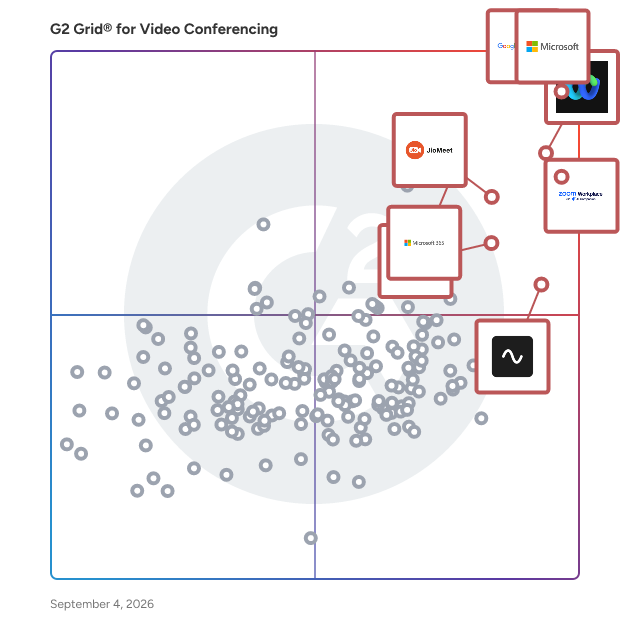
G2 Grid® for Video Conferencing Software

G2 Grid® for Video Conferencing Software plotting products by satisfaction and market presence

Highlighted products: Google Workspace, Microsoft Teams, Webex Suite, Zoom Workplace, JioMeet, Microsoft 365, Riverside, and GoTo Meeting.

Underlying data: [Grid® JSON](https://www.g2.com/categories/video-conferencing/grids.json?focus%5B%5D=google-workspace&focus%5B%5D=microsoft-teams&focus%5B%5D=cisco-webex-suite&focus%5B%5D=zoom-workplace&focus%5B%5D=jiomeet&focus%5B%5D=microsoft365&focus%5B%5D=riverside&focus%5B%5D=goto-meeting)

MemoriaCall

Unlike legacy products like Zoom, MemoriaCall's in-app Meeting Intelligences features revolutionizes the way users interact with their meetings at a fraction of the cost. With MemoriaCall, simply ask any question about your meeting, and within seconds, you'll receive an accurate answer. No more manual note-taking or missed details in office or on the move. MemoriaCall automatically audio transcribes users meetings, provides AI-powered summarizations, and even acts as their intelligent meeting assistant. With in-app file-share, archives and advanced search capabilities, all users meeting information is at their fingertips. Experience seamless integration and boost your organization's profitability by adding 1000’s of productivity hours per year to your bottom line.

Average Rating: 4.5/5.0

Total Reviews: 39

How Do G2 Users Rate MemoriaCall?

  • Has the product been a good partner in doing business?: 9.2/10 (Category avg: 8.9/10)
  • Presentations: 8.8/10 (Category avg: 8.9/10)
  • Participant Permissions: 8.8/10 (Category avg: 8.8/10)
  • Whiteboarding: 10.0/10 (Category avg: 8.6/10)

Who Is the Company Behind MemoriaCall?

  • Seller: Memoria
  • Year Founded: 2018
  • HQ Location: Miami , FL
  • LinkedIn® Page: www.linkedin.com
    7 employees on LinkedIn®

Who Uses This Product?

  • Top Industries: Computer Software
  • Company Size: 48% Small, 26% Medium

What Do G2 Reviewers Say About MemoriaCall?

AI-generated summary from verified user reviews

Pros
  • Users appreciate the ease of use with MemoriaCall, allowing quick setup and seamless integration for smooth workflows.
  • Users love the easy setup of MemoriaCall, enjoying a quick, user-friendly, and streamlined experience.
  • Users love the superior audio quality of MemoriaCall, enhancing communication clarity during calls and meetings.
  • Users praise MemoriaCall for its reliability in capturing important conversations effortlessly, enhancing their communication experience.
  • Users appreciate the easy communication of MemoriaCall, enabling seamless video/audio conferencing without hassle or complications.
Cons
  • Users experience performance delays with MemoriaCall, leading to frustration and a desire for faster processing and syncing.
  • Users find the search functionality inadequate, making it challenging to locate specific past meetings or conversations quickly.
  • Users face editing limitations with transcripts, requiring manual cleanup for clearer understanding of discussions.
  • Users find the learning curve steep with MemoriaCall, citing difficulties with setup and a need for better guidance.
  • Users feel that there is limited customization, which hinders personalization for varied call types and needs.

What Are Recent G2 Reviews of MemoriaCall?

What Are G2 Users Discussing About MemoriaCall?

idiligo business

Idiligo Business is a comprehensive online meeting platform designed to enhance the efficiency and effectiveness of virtual sales and advisory sessions. By integrating predefined scripts and structured content, it guides users through step-by-step, results-oriented meetings, ensuring consistency and professionalism. This approach not only streamlines the meeting process but also empowers junior staff to perform at a senior level, reducing the learning curve and improving overall performance. Key Features and Functionality: - Predefined Meeting Scripts: Create and utilize structured scripts tailored to specific business cases, ensuring a consistent and effective meeting flow. - Content Sharing: Present documents, videos, and photos seamlessly during meetings to enhance engagement and understanding. - Screen Sharing: Share your screen with participants to provide real-time demonstrations or walkthroughs. - Online Document Signing: Facilitate the signing of documents digitally within the meeting environment, expediting agreement processes. - Form Completion: Fill in forms collaboratively during meetings, ensuring accuracy and completeness. - Automated Document Generation: Generate documents automatically based on meeting inputs, saving time and reducing manual errors. - File Upload and Download: Allow participants to upload and download documents as needed during the session. - Automated Email Generation and Sending: Create and send emails automatically, streamlining follow-up communications. - Decision-Making Support: Incorporate decision-making steps within the meeting to guide participants towards desired outcomes. - Reporting: Generate reports based on meeting activities and outcomes for analysis and record-keeping. - Customization: Apply your own branding, including logos and CSS styles, to maintain brand consistency. - Integrations: Connect with APIs and platforms like Zapier and Make for enhanced workflow automation. Primary Value and Solutions Provided: Idiligo Business addresses the challenges of conducting effective and consistent online meetings by providing a structured framework that ensures all critical points are covered. This structure leads to predictable outcomes, saves valuable time, and allows less experienced staff to perform at higher levels. By standardizing the meeting process, organizations can maintain control over sales and advisory procedures, ensuring that all representatives adhere to best practices. Additionally, the platform's ability to integrate with existing systems and customize content makes it adaptable to various business needs, enhancing overall productivity and client satisfaction.

Average Rating: 4.3/5.0

Total Reviews: 32

How Do G2 Users Rate idiligo business?

  • Has the product been a good partner in doing business?: 8.8/10 (Category avg: 8.9/10)
  • Presentations: 9.4/10 (Category avg: 8.9/10)
  • Participant Permissions: 9.3/10 (Category avg: 8.8/10)
  • Whiteboarding: 8.3/10 (Category avg: 8.6/10)

Who Is the Company Behind idiligo business?

  • Seller: idiligo
  • Year Founded: 2011
  • HQ Location: Amsterdam
  • Twitter: @idiligo
    1,083 Twitter followers
  • LinkedIn® Page: www.linkedin.com
    8 employees on LinkedIn®

Who Uses This Product?

  • Company Size: 61% Small, 25% Medium

What Do G2 Reviewers Say About idiligo business?

AI-generated summary from verified user reviews

Pros
  • Users praise the ease of use of Idiligo Business, highlighting its intuitive setup and streamlined communication processes.
  • Users commend the easy setup of Idiligo Business, finding it intuitive and quick to get started with.
  • Users find Idiligo Business to be intuitive and user-friendly, making communication and meetings more structured and efficient.
  • Users praise the simplicity of Idiligo Business, enhancing organization and efficiency in customer communication and meetings.
  • Users enjoy the easy communication of Idiligo Business, facilitating organized interactions and timely responses with clients.
Cons
  • Users feel limited customization hampers their ability to personalize Idiligo for specific client needs and workflows.
  • Users are disappointed with idiligo Business's missing integration features and limited functionality, leading to time-consuming manual tasks.
  • Users find idiligo has limited collaboration capabilities, restricting flexibility in discussions and idea generation.
  • Users find the limited integrations with QuickBooks and Xero burdensome, leading to manual data entry and wasted time.
  • Users notice slow loading times during busy periods, impacting their overall experience with idiligo business.

What Are Recent G2 Reviews of idiligo business?

What Are G2 Users Discussing About idiligo business?

Proton Workspace

Proton Workspace is a business productivity and collaboration software suite that helps organizations manage communication, scheduling, files, documents, access, and internal collaboration, all with privacy-focused security controls. It is designed for businesses, distributed teams, startups, nonprofits, and regulated organizations seeking a single workspace for email, calendar, cloud storage, document collaboration, video meetings, password management, VPN access, and administrative controls. Proton positions it as an integrated business suite within the broader collaboration and secure workplace software category. Proton Workspace supports everyday business workflows, including company email and calendar management, secure file storage and sharing, document and spreadsheet collaboration, team meetings, credential management, and remote access protection. It can also support IT and operations teams that need centralized user administration, storage allocation, and policy enforcement across multiple workplace tools. According to Proton’s business materials, the suite brings together Proton Mail, Calendar, Drive, Docs, Sheets, Meet, Pass, VPN, and a private AI assistant in one subscription for business users. - Unified workspace for business operations: Combines encrypted email, calendar, cloud storage, document editing, spreadsheets, meetings, password management, and VPN services in one environment. - Privacy-focused architecture: Built around end-to-end encryption and zero-access encryption for core data types, which is relevant for teams handling sensitive communications, files, or credentials. - Team collaboration tools: Supports file sharing, permission controls, password-protected links, real-time document collaboration, spreadsheets, and video meetings for internal and external work. - Business administration features: Includes user management, storage allocation, support for custom email domains, and security settings for organizational deployment. - Use cases across secure work environments: Suitable for companies that need an alternative to standard office suites, especially where data protection, remote work security, and centralized tool management are priorities.

Average Rating: 4.6/5.0

Total Reviews: 32

How Do G2 Users Rate Proton Workspace?

  • Has the product been a good partner in doing business?: 10.0/10 (Category avg: 8.9/10)

Who Is the Company Behind Proton Workspace?

  • Seller: Proton AG
  • Company Website:
  • Year Founded: 2014
  • HQ Location: Plan-les-Ouates, Geneva, Switzerland
  • Twitter: @ProtonPrivacy
    363,085 Twitter followers
  • LinkedIn® Page: www.linkedin.com
    973 employees on LinkedIn®

Who Uses This Product?

  • Top Industries: Information Technology and Services
  • Company Size: 21% Small, 9% Medium

What Are Recent G2 Reviews of Proton Workspace?

Teemyco

Teemyco is an online platform that provides you with your own office, virtually. Work efficiently and build culture - all while integrating with your existing office setup. Invite external guests to visit you, see who is available and what they are up to in the office. Hop into a room and start ad-hoc conversations seamlessly, just like you would in a physical office. Humanize your digital work and collaborate more efficiently than ever. Feel as if you are together even when you are apart with happiness features like office pets and kudos appreciation hats to support your team's culture. Personalize your office layout with branded rugs, brand colours and your own customizeable room names. Built for organisations of all sizes, Teemyco is helping hundreds of modern companies around the world improve their online work experience, growing business efficiency and productivity. Grow as a team, and do the best work of your career.  Learn more at www.teemyco.com Security: As a European based company we adhere to GDPR principles and requirements. The video engine we use is SOC II, HIPAA and ISO 27001 compliant.

Average Rating: 4.8/5.0

Total Reviews: 89

How Do G2 Users Rate Teemyco?

  • Has the product been a good partner in doing business?: 10.0/10 (Category avg: 8.9/10)
  • Presentations: 10.0/10 (Category avg: 8.9/10)
  • Participant Permissions: 10.0/10 (Category avg: 8.8/10)
  • Whiteboarding: 5.0/10 (Category avg: 8.6/10)

Who Is the Company Behind Teemyco?

  • Seller: Teemyco
  • Year Founded: 2019
  • HQ Location: Stockholm, Stockholm County
  • Twitter: @teemyco
    127 Twitter followers
  • LinkedIn® Page: www.linkedin.com
    4 employees on LinkedIn®

Who Uses This Product?

  • Who Uses This: CEO
  • Top Industries: Staffing and Recruiting, Computer Software
  • Company Size: 86% Small, 8% Medium

What Do G2 Reviewers Say About Teemyco?

AI-generated summary from verified user reviews

Pros
  • Users value the effective communication features in Teemyco, enhancing teamwork and collaboration effortlessly.
  • Users love Teemyco's intuitive interface, making collaboration effortless and communication seamless among team members.
  • Users value the easy communication Teemyco fosters, enhancing collaboration and connection among team members effortlessly.
  • Users value the easy accessibility of Teemyco, facilitating effortless collaboration and communication within the office.
  • Users value the easy collaboration Teemyco offers, facilitating quick communication and feedback among colleagues and clients.

What Are Recent G2 Reviews of Teemyco?

What Are G2 Users Discussing About Teemyco?

Kaltura

Kaltura helps organizations turn content, knowledge, and audience signals into personalized, AI-powered experiences that move people forward. Our platform brings together content, video, data, intelligence, and agentic AI to help businesses engage customers, enable employees, and guide every user with the right content, interaction, or next step in the moment. Kaltura’s solutions are built around two critical business challenges: accelerating revenue across the customer journey and helping people learn, perform, and succeed at scale. **Agentic Revenue Engagement** Kaltura Agentic Revenue Engagement helps organizations create connected, personalized experiences across the buyer and customer journey. Instead of leaving people to navigate static websites, disconnected content, forms, webinars, and follow-up on their own, Kaltura turns these touchpoints into interactive experiences that understand intent and actively guide each user forward. Organizations can create digital destinations, events, webinars, content experiences, and AI-powered conversational interactions that adapt to each buyer or customer. Agentic experiences can answer questions, recommend relevant content, help users explore solutions, capture intent, identify meaningful engagement signals, and connect people with sales or customer teams when human involvement adds value. For marketing and revenue teams, this creates a more continuous journey from first engagement through purchase, onboarding, adoption, and expansion, while providing richer insight into what each account and individual actually cares about. Teams can use Kaltura to: • Create personalized digital experiences for buyers and customers • Run webinars, virtual events, and always-on content destinations • Turn video and other content into interactive, discoverable experiences • Deploy AI-powered agents that answer questions and guide users in real time • Recommend content and next steps based on user needs and behavior • Capture and activate engagement and intent signals • Support customer onboarding, education, activation, and ongoing engagement • Connect digital interactions with revenue workflows and business outcomes The goal is simple: reduce friction across the journey and help every interaction create momentum toward the next meaningful action. **Agentic Learning & Enablement** Kaltura Agentic Learning & Enablement helps organizations turn institutional knowledge into personalized learning, practice, and on-demand guidance that improves performance. Traditional learning often depends on static courses, fragmented knowledge, and one-size-fits-all training. Kaltura creates a more continuous model of enablement, where employees, sales teams, customers, and partners can access the knowledge, practice, and guidance they need at the moment they need it. Organizations can create and manage learning content at scale, transform existing knowledge and video into new learning experiences, personalize learning based on individual needs, and give users AI-powered guides that help them find answers and apply knowledge in their day-to-day work. Kaltura also supports interactive practice and simulation, allowing people to rehearse important conversations and scenarios and receive immediate feedback. This can include sales conversations, customer interactions, leadership scenarios, onboarding, certification, and other high-stakes situations where practice directly affects performance. Teams can use Kaltura to: • Create and manage video, learning, and enablement content at scale • Generate and repurpose content using AI-powered creation tools • Deliver personalized onboarding, upskilling, and continuous learning • Give employees on-demand access to company knowledge and guidance • Provide sales teams with training, coaching, and in-the-moment enablement • Run realistic roleplay and simulation experiences with AI-powered feedback and assessment • Educate and enable customers and partners • Support structured learning paths, certifications, and skills development • Understand engagement, readiness, and learning effectiveness • Connect learning and enablement programs more closely to business performance Rather than treating learning as an occasional activity, Kaltura helps make knowledge and guidance available continuously, embedded into the way people work and perform. **One platform for intelligent digital experiences** Both solutions are powered by the same Kaltura foundation. Kaltura has spent years helping global organizations create, manage, distribute, and understand video and digital content at enterprise scale. Today, those capabilities are combined with AI, audience intelligence, content generation, conversational agents, analytics, and experience orchestration. This means organizations do not have to treat content, engagement, learning, and AI as separate layers. Kaltura can help teams turn existing content and organizational knowledge into active, reusable intelligence; understand what each user needs based on context and behavior; and deliver a personalized experience that responds in real time. The result is a new type of digital experience: one that does more than present information. It understands, interacts, guides, and helps each person take the next step. Whether that next step is booking a meeting, exploring a solution, completing onboarding, learning a new skill, practicing an important conversation, adopting a product, or finding the right answer, Kaltura helps organizations make every interaction more relevant, useful, and measurable. Kaltura is used by organizations around the world to power digital experiences across marketing, sales, customer engagement, learning, employee enablement, education, media, and communications.

Average Rating: 4.3/5.0

Total Reviews: 117

How Do G2 Users Rate Kaltura?

  • Has the product been a good partner in doing business?: 8.7/10 (Category avg: 8.9/10)
  • Presentations: 8.5/10 (Category avg: 8.9/10)
  • Participant Permissions: 9.3/10 (Category avg: 8.8/10)
  • Whiteboarding: 9.4/10 (Category avg: 8.6/10)

Who Is the Company Behind Kaltura?

  • Seller: Kaltura
  • Company Website:
  • Year Founded: 2006
  • HQ Location: New York, NY
  • Twitter: @Kaltura
    8,954 Twitter followers
  • LinkedIn® Page: www.linkedin.com
    734 employees on LinkedIn®

Who Uses This Product?

  • Top Industries: Higher Education, Education Management
  • Company Size: 42% Medium, 33% Large

What Do G2 Reviewers Say About Kaltura?

AI-generated summary from verified user reviews

Pros
  • Users find the ease of use of Kaltura Video Cloud makes creating and managing business videos seamless and efficient.
  • Users appreciate Kaltura's robust features for video creation, including seamless integration, analytics, and superb customer support.
  • Users value the seamless integrations of Kaltura, enhancing video solutions for diverse business applications effortlessly.
  • Users praise Kaltura for its excellent features, allowing seamless video creation for various business purposes and needs.
  • Users highlight the reliability of Kaltura, with smooth performance and consistent functionality boosting their experience.
Cons
  • Users find the reporting system lacking customization, making it difficult to access detailed insights efficiently.
  • Users find the difficult setup process cumbersome, requiring internal readiness before implementing Kaltura's platform.
  • Users experience integration issues with Kaltura’s PATH tool, though support helps resolve some problems quickly.
  • Users report technical issues with Kaltura involving slow uploads, high bandwidth needs, and integration challenges.
  • Users find Kaltura's setup process complex and requiring developer assistance, making updates challenging and unintuitive.

What Are Recent G2 Reviews of Kaltura?

What Are G2 Users Discussing About Kaltura?
OnePgr

OnePgr is a complete meeting and collaboration platform, delivered as a single application, fundamentally changing the way sales, customer support, and other teams communicate. From conversations ranging from exchanging emails, scheduling meetings, meeting online, sharing documents, sending video messages, to analyzing recordings, OnePgr helps teams more effectively organize information and communication as well as gain behavioral insights to help improve sales cycle time, ticket & incident resolution time, project efficiency, among other performance metrics. More information at: https://onepgr.com

Average Rating: 4.4/5.0

Total Reviews: 10

How Do G2 Users Rate OnePgr?

  • Has the product been a good partner in doing business?: 8.3/10 (Category avg: 8.9/10)
  • Presentations: 9.4/10 (Category avg: 8.9/10)
  • Participant Permissions: 8.1/10 (Category avg: 8.8/10)
  • Whiteboarding: 8.9/10 (Category avg: 8.6/10)

Who Is the Company Behind OnePgr?

  • Seller: OnePgr
  • HQ Location: San Francisco, Bay Area
  • LinkedIn® Page: www.linkedin.com
    13 employees on LinkedIn®

Who Uses This Product?

  • Company Size: 50% Medium, 50% Small

What Do G2 Reviewers Say About OnePgr?

AI-generated summary from verified user reviews

Pros
  • Users love the real-time collaboration features of OnePgr, enhancing communication for sales and business initiatives.
  • Users love the efficient communication features of OnePgr, making meetings and collaborations seamless and easy.
  • Users find OnePgr incredibly helpful for seamless communication and efficient real-time collaboration during meetings and webinars.
  • Users praise the seamless video conferencing features of OnePgr, enhancing client communication and collaboration effortlessly.
  • Users value the efficient virtual meetings capabilities of OnePgr, enhancing client communication and collaboration seamlessly.
Cons
  • Users report connection issues, including poor video and audio quality, affecting their conferencing experience.
  • Users experience connectivity issues with poor video and audio quality affecting their conferencing experience.
  • Users frequently face video issues with poor connection and stability, affecting the overall conferencing experience.
  • Users report poor audio quality during video conferences, leading to frustrating communication difficulties.
  • Users experience call issues with OnePgr, citing poor connection and audio quality during video conferences.

What Are Recent G2 Reviews of OnePgr?

What Are G2 Users Discussing About OnePgr?

Flow

Flow is a 100% web-based, HTML/WebRTC webinar platform with virtual webinar rooms, event management, and video chat capabilities (3 in 1). Unlike most other video conferencing or meeting platforms, Flow is purely engineered as a webinar platform that helps webinar and event managers choreograph the entire event with easy steps. Flow is created with user-friendliness in mind. With patent-pending Storyboard and AutoFlow recording technologies, it enables pre-recording and automation capabilities. Whether it is a webinar room, a live event, an interactive engagement replay, or an evergreen automated event with zero touch, Flow is capable of delivering solutions to match all these scenarios.

Average Rating: 4.5/5.0

Total Reviews: 12

How Do G2 Users Rate Flow?

  • Has the product been a good partner in doing business?: 6.7/10 (Category avg: 8.9/10)
  • Presentations: 9.0/10 (Category avg: 8.9/10)
  • Participant Permissions: 8.7/10 (Category avg: 8.8/10)
  • Whiteboarding: 9.0/10 (Category avg: 8.6/10)

Who Is the Company Behind Flow?

Who Uses This Product?

  • Top Industries: Information Technology and Services
  • Company Size: 42% Small, 38% Medium

What Do G2 Reviewers Say About Flow?

AI-generated summary from verified user reviews

Pros
  • Users find Flow to be easy to use, making teamwork organized and efficient with helpful automation features.
  • Users enjoy the impressive file sharing capabilities of Flow, enhancing collaboration and streamlining their workflow.
  • Users appreciate the accessibility of Flow, allowing attendees to join webinars easily from their mobile devices.
  • Users value the easy attendee management with automation in Flow, simplifying their event coordination significantly.
  • Users value the effective communication capabilities of Flow, enhancing collaboration and driving business growth through digital platforms.
Cons
  • Users experience application instability with Flow, facing lag, buffering, and disconnection issues during webinars.
  • Users often experience connection issues with Flow, including lag and disconnections during webinars, impacting their experience.
  • Users find the subscription charges high and believe they do not justify the value received.
  • Users find the initial learning curve steep, making it challenging to set up complex workflows effectively.
  • Users find limited customization options in Flow, which can restrict tailoring the experience to specific needs.

What Are Recent G2 Reviews of Flow?

Daakia

Daakia is an AI-powered multilingual video conferencing platform designed for organizations operating in diverse linguistic environments. Unlike traditional meeting tools, Daakia combines real-time translation in 15+ languages, AI meeting summaries, secure communication, and enterprise-grade collaboration in a single platform— helping enterprises, government organizations, healthcare institutions, and educators connect seamlessly across diverse languages.

Average Rating: 5.0/5.0

Total Reviews: 5

How Do G2 Users Rate Daakia?

  • Has the product been a good partner in doing business?: 10.0/10 (Category avg: 8.9/10)
  • Presentations: 10.0/10 (Category avg: 8.9/10)
  • Participant Permissions: 10.0/10 (Category avg: 8.8/10)
  • Whiteboarding: 10.0/10 (Category avg: 8.6/10)

Who Is the Company Behind Daakia?

  • Seller: Daakia
  • Year Founded: 2020
  • HQ Location: Kolkata, IN
  • LinkedIn® Page: www.linkedin.com
    14 employees on LinkedIn®

Who Uses This Product?

  • Company Size: 50% Medium, 50% Small

What Are Recent G2 Reviews of Daakia?

Spot

Remote work doesn’t have to feel remote Built by the technical co-founders of outreach.io, Spot is a virtual workspace that lets your team feel like a team again by recreating your office online. Combining all the tools you already use for remote work with all the things you miss about being in the office, Spot is an all-in-one culture, productivity, accountability, and collaboration tool built for this new way of working. -Create a customizable office online: customize and recreate your office, controlling everything from the floorplan down to the interior design -Let your team customize their avatars: build virtual avatars that let your team feel more than a collection of green dots and profile pictures -Be more productive: need to catch up? Just walk over to their desk and start chatting, just like it used to be. (Plus lots more tools designed to get your team firing on all cylinders.) -Collaborate again: some of our best ideas used to come from hallway chats or whiteboard sessions, so we’ve built Spot to foster collaboration through impromptu chats, interactive whiteboards and more… -Have fun as a team again: bring out the cake for a birthday, kick back with a game on your break, watch cat videos together, share your 🔥 playlist… Spot is designed to recreate those in-person vibes, online. -Hold better meetings: Let multiple people share their screens simultaneously, work together on the whiteboard, put live stats on the walls… meet a better way to meet. -Keep everything secure: Need to talk about something privately? Holding HR meetings or performance reviews? Lock the room to keep everything private. (Plus enterprise-level roles and permissions and SAML.) -All the features you’ve come to expect: we’re not just a virtual workspace, we have all the chat, video call and screen features your team have come to depend upon. (Plus, we’ve upgraded them a bit too.) To find out more and see how Spot can make your team feel like a team again, visit spotvirtual.com.

Average Rating: 4.9/5.0

Total Reviews: 38

How Do G2 Users Rate Spot?

  • Has the product been a good partner in doing business?: 9.4/10 (Category avg: 8.9/10)
  • Presentations: 9.7/10 (Category avg: 8.9/10)
  • Participant Permissions: 9.2/10 (Category avg: 8.8/10)
  • Whiteboarding: 8.3/10 (Category avg: 8.6/10)

Who Is the Company Behind Spot?

  • Seller: Spot.xyz
  • HQ Location: Seattle, US
  • Twitter: @SpotVirtualHQ
    103 Twitter followers
  • LinkedIn® Page: www.linkedin.com
    18 employees on LinkedIn®

Who Uses This Product?

  • Top Industries: Computer Software
  • Company Size: 74% Small, 13% Medium

What Are Recent G2 Reviews of Spot?

ScreenConnect

ScreenConnect delivers fast, flexible, and secure remote desktop and mobile support solutions for every industry and need. With ScreenConnect, IT teams can raise the bar for remote support and reduce customer downtime through on-demand access to desktops, mobile devices, and more. No matter where you work, how you work, and who you work for, ScreenConnect helps you serve customers securely, silently, and seamlessly.

Average Rating: 4.7/5.0

Total Reviews: 489

How Do G2 Users Rate ScreenConnect?

  • Has the product been a good partner in doing business?: 9.1/10 (Category avg: 8.9/10)
  • Presentations: 8.3/10 (Category avg: 8.9/10)
  • Participant Permissions: 8.3/10 (Category avg: 8.8/10)
  • Whiteboarding: 8.3/10 (Category avg: 8.6/10)

Who Is the Company Behind ScreenConnect?

  • Seller: ConnectWise
  • Company Website:
  • Year Founded: 1982
  • HQ Location: Tampa, FL
  • Twitter: @ConnectWise
    14,926 Twitter followers
  • LinkedIn® Page: www.linkedin.com
    3,401 employees on LinkedIn®

Who Uses This Product?

  • Who Uses This: Owner, IT Manager
  • Top Industries: Information Technology and Services, Computer & Network Security
  • Company Size: 67% Small, 31% Medium

What Do G2 Reviewers Say About ScreenConnect?

AI-generated summary from verified user reviews

Pros
  • Users find ScreenConnect to be highly reliable, with stable connections that facilitate seamless remote access and support.
  • Users appreciate the reliable remote access of ScreenConnect, providing seamless support and efficient management of client systems.
  • Users value the blazing-fast connection speed of ScreenConnect, ensuring smooth and responsive remote access experiences.
  • Users find ScreenConnect extremely easy to use, facilitating quick and efficient support for end users remotely.
  • Users enjoy the easy communication features of ScreenConnect, enabling quick and reliable remote support interactions.
Cons
  • Users find the cost prohibitive for small teams, potentially limiting access and creating concerns about future price increases.
  • Users experience remote access issues due to added security steps and occasional difficulties with support and antivirus software.
  • Users face internet dependency with ScreenConnect, which can be problematic in locations with limited connectivity.
  • Users express concerns over security features in ScreenConnect, particularly following a security incident that compromised their server.
  • Users express concerns over security issues in ScreenConnect, highlighting incidents that undermine confidence in the system.

What Are Recent G2 Reviews of ScreenConnect?

What Are G2 Users Discussing About ScreenConnect?

Voximplant

Voximplant is a communications platform as a service, it allows developers to add real-time communications features (voice, video and messaging) in their applications without a need to build any backend infrastructure. Voximplant architecture is designed for serverless: developers upload their JavaScript code into our cloud and uploaded code is being executed automatically when a call arrives at the platform or when an HTTP API command is executed. A call can arrive at the platform from a phone network, from a SIP device or application, and from Voximplant Web or Mobile SDK.

Average Rating: 4.8/5.0

Total Reviews: 32

How Do G2 Users Rate Voximplant?

  • Has the product been a good partner in doing business?: 9.5/10 (Category avg: 8.9/10)
  • Presentations: 9.2/10 (Category avg: 8.9/10)
  • Participant Permissions: 8.3/10 (Category avg: 8.8/10)
  • Whiteboarding: 9.2/10 (Category avg: 8.6/10)

Who Is the Company Behind Voximplant?

  • Seller: VoxImplant
  • Year Founded: 2013
  • HQ Location: Palo Alto, California
  • Twitter: @voximplant
    977 Twitter followers
  • LinkedIn® Page: www.linkedin.com
    208 employees on LinkedIn®

Who Uses This Product?

  • Top Industries: Computer Software, Information Technology and Services
  • Company Size: 54% Medium, 31% Small

What Do G2 Reviewers Say About Voximplant?

AI-generated summary from verified user reviews

Pros
  • Users appreciate the ease of use of Voximplant, making customer calls straightforward and efficient.
  • Users value the easy communication Voximplant offers, streamlining customer calls with numerous helpful features.
  • Users appreciate how Voximplant makes customer calling easy with its multitude of features for enhanced communication.
Cons
  • Users experience connectivity issues that hinder the performance of Voximplant, needing a strong internet connection to function properly.
  • Users note that a strong internet connection is essential for Voximplant to function properly.
  • Users note the necessity of a strong internet connection for Voximplant to function properly and avoid issues.

What Are Recent G2 Reviews of Voximplant?

What Are G2 Users Discussing About Voximplant?

inMeet

inMeet is an enterprise-grade video conferencing solution built to meet the communication needs of modern organizations across industries, including businesses, healthcare providers, and government bodies. The platform is designed to support secure, high-quality virtual interactions at scale while offering flexible deployment and branding options. Key capabilities of inMeet include: White-Label Configuration: Enables organizations to customize the interface and user experience with their own branding, ensuring consistency across communication touchpoints. Concurrent Licensing Model: Allows multiple users to share a limited number of licenses, helping reduce recurring software costs without limiting access. HD Video & Audio Quality: Supports high-definition video conferencing for webinars, consultations, and internal meetings with minimal latency. Enterprise-Grade Security: Features robust security protocols, including end-to-end encryption and role-based access, suitable for regulated industries. Cloud-Based Control Dashboard: Provides centralized meeting management, user controls, and analytics to improve efficiency and oversight. Scalability: Built to support a range of use cases—from small team meetings to large-scale, organization-wide virtual events. inMeet is suitable for organizations looking to implement secure, cost-efficient, and customizable virtual meeting infrastructure.

Average Rating: 4.5/5.0

Total Reviews: 2

How Do G2 Users Rate inMeet?

  • Has the product been a good partner in doing business?: 10.0/10 (Category avg: 8.9/10)
  • Presentations: 10.0/10 (Category avg: 8.9/10)
  • Participant Permissions: 10.0/10 (Category avg: 8.8/10)
  • Whiteboarding: 10.0/10 (Category avg: 8.6/10)

Who Is the Company Behind inMeet?

  • Seller: InstaVC
  • Year Founded: 2007
  • HQ Location: Palo Alto, US
  • LinkedIn® Page: www.linkedin.com
    101 employees on LinkedIn®

Who Uses This Product?

  • Company Size: 80% Small, 20% Medium

What Do G2 Reviewers Say About inMeet?

AI-generated summary from verified user reviews

Pros
  • Users love the ease of use of inMeet, making it their preferred choice for video conferencing.
  • Users find the easy setup of inMeet exceptional, making it their preferred choice for video conferencing.
  • Users find inMeet very easy to use, making it their go-to choice for seamless video conferencing on Mac.

What Are Recent G2 Reviews of inMeet?

Muvi Live

Muvi Live is a B2B live streaming platform that allows businesses and individuals to stream professional live videos and audio in a completely DIY setup and deliver ultra-low latency live videos across a range of platforms, screens, and devices.

Average Rating: 4.6/5.0

Total Reviews: 8

How Do G2 Users Rate Muvi Live?

  • Has the product been a good partner in doing business?: 10.0/10 (Category avg: 8.9/10)
  • Presentations: 10.0/10 (Category avg: 8.9/10)
  • Participant Permissions: 6.7/10 (Category avg: 8.8/10)
  • Whiteboarding: 10.0/10 (Category avg: 8.6/10)

Who Is the Company Behind Muvi Live?

  • Seller: Muvi
  • Year Founded: 2013
  • HQ Location: Ashburn, Virginia
  • LinkedIn® Page: www.linkedin.com
    195 employees on LinkedIn®

Who Uses This Product?

  • Company Size: 53% Small, 29% Medium

What Do G2 Reviewers Say About Muvi Live?

AI-generated summary from verified user reviews

Pros
  • Users find Muvi Live to be extremely easy to use, allowing for efficient online HR meetings and seamless setup.
  • Users praise the high-quality audio of Muvi Live, enhancing their online meeting experiences significantly.
  • Users appreciate the customization options of Muvi Live, which perfectly support their employer branding needs.
  • Users value the customization options of Muvi Live, enhancing their online HR meeting experiences effectively.
  • Users praise the seamless setup process of Muvi Live, enhancing the overall experience for online HR meetings.
Cons
  • Users feel the need for frequent updates to enhance features and improve the overall functionality of Muvi Live.
  • Users feel the lack of guidance in the initial setup makes it challenging for new enterprise administrators.
  • Users feel Muvi Live lacks updated features and suggest the integration of AI tools for improvement.
  • Users feel that Muvi Live requires updating outdated technology to enhance its features and integrate AI tools effectively.
  • Users find the documentation lacking, particularly for new administrators needing guidance during initial setup.

What Are Recent G2 Reviews of Muvi Live?

What Are G2 Users Discussing About Muvi Live?

Talkroute

Talkroute is a cloud based business phone system designed to help small and midsize businesses sound professional, stay connected, and manage calls from anywhere. Built for modern, distributed teams, Talkroute replaces traditional phone systems with a flexible virtual phone solution that works seamlessly across desktop, mobile, and web without requiring specialized hardware. With Talkroute, businesses can create a polished phone presence using features like local, toll free, and vanity phone numbers, multi level auto attendants, call routing, call forwarding, voicemail, call recording, and business SMS. Calls can be answered on smartphones, computers, or existing desk phones, allowing teams to work remotely or on the go while delivering a consistent and professional customer experience. Talkroute is especially well suited for service based businesses, startups, agencies, healthcare practices, legal firms, and growing companies that need a reliable VoIP phone system without enterprise level complexity or cost. Setup is fast, configuration is intuitive, and updates can be made instantly through an easy to use web dashboard with no IT team required. Unlike many UCaaS platforms that bundle unnecessary features or lock customers into rigid plans, Talkroute focuses on simplicity, transparency, and value. Pricing is straightforward, with no long term contracts, no per user confusion, and no surprise fees, making it an ideal choice for small businesses that want predictable costs as they grow. Talkroute also integrates smoothly into existing workflows. Teams can manage calls alongside email, CRM tools, and other business software, while features like call routing rules and business hours help ensure customers always reach the right person at the right time. Call analytics and reporting provide insight into call volume, performance, and customer behavior. Backed by responsive, US based customer support, Talkroute is known for hands on onboarding and real human assistance when it is needed. Whether a business is upgrading from a personal phone number or replacing a legacy PBX system, Talkroute delivers a modern virtual phone system that is dependable, easy to use, and built specifically for small business needs.

Average Rating: 4.6/5.0

Total Reviews: 44

How Do G2 Users Rate Talkroute?

  • Has the product been a good partner in doing business?: 8.8/10 (Category avg: 8.9/10)

Who Is the Company Behind Talkroute?

  • Seller: Talkroute
  • Year Founded: 2013
  • HQ Location: Chicago, IL
  • Twitter: @Talkroute
    376 Twitter followers
  • LinkedIn® Page: www.linkedin.com
    11 employees on LinkedIn®

Who Uses This Product?

  • Top Industries: Information Technology and Services, Real Estate
  • Company Size: 100% Small, 7% Medium

What Do G2 Reviewers Say About Talkroute?

AI-generated summary from verified user reviews

Pros
  • Users appreciate the ease of use of Talkroute, finding it streamlined and just right for their needs.
  • Users value the easy setup of Talkroute, enabling quick configuration and seamless operation for remote staff.
  • Users love the quick setup of Talkroute, making call management seamless and efficient from anywhere.
  • Users praise the responsive and knowledgeable customer support of Talkroute, ensuring quick and helpful assistance whenever needed.
  • Users value the streamlined essential features of Talkroute, providing only what they need without unnecessary extras.
Cons
  • Users find the limited customization options frustrating, particularly for call flows, reporting, and hold music.
  • Users often face performance issues with Talkroute, including slow loading times and lagging notifications.
  • Users find the reporting insufficient and desire more detailed options for call tracking and analysis.
  • Users note the inadequate reporting in Talkroute, feeling it lacks detail but is manageable overall.
  • Users desire more integration options with CRMs and other tools to enhance the functionality of Talkroute.

What Are Recent G2 Reviews of Talkroute?

What Are G2 Users Discussing About Talkroute?

TrueConf Room

TrueConf Room is a software-based video conferencing solution that transforms any meeting room into a powerful collaboration space. Designed for simplicity and flexibility, it runs on Windows or Linux PCs and turns them into fully functional conference systems without the need for dedicated hardware or complex setup. The platform is ideal for organizations seeking a cost-effective, secure, and high-quality video communication experience. TrueConf Room enables 4K Ultra HD video conferencing, screen sharing, and wireless presentation capabilities, providing a seamless and productive meeting experience. It supports SIP and H.323 standards for integration with existing AV equipment and third-party conferencing endpoints, ensuring interoperability within hybrid infrastructures. The solution can be deployed in local networks or operated offline, guaranteeing full control over meeting data and privacy. With an intuitive interface optimized for touch control and remote management, TrueConf Room offers easy conference creation, participant moderation, and layout customization. Administrators can manage devices, configure presets, and monitor system performance directly through the web interface, simplifying room management at scale. The platform also supports BYOD scenarios, allowing participants to join and share screens wirelessly from their laptops or smartphones via browser links or QR codes. Integrated collaboration tools — including chat, slideshow mode, and meeting recording — enhance engagement and make every session more interactive and productive.

Average Rating: 5.0/5.0

Total Reviews: 1

How Do G2 Users Rate TrueConf Room?

  • Presentations: 10.0/10 (Category avg: 8.9/10)
  • Participant Permissions: 10.0/10 (Category avg: 8.8/10)

Who Is the Company Behind TrueConf Room?

  • Seller: TrueConf
  • Year Founded: 2003
  • HQ Location: Vilnius, LT
  • Twitter: @trueconf
    474 Twitter followers
  • LinkedIn® Page: www.linkedin.com
    104 employees on LinkedIn®

Who Uses This Product?

  • Company Size: 100% Medium

What Are TrueConf Room's Pros and Cons?

Pros
  • Reliability (1 reviews)

What Are Recent G2 Reviews of TrueConf Room?

Neeraja Prakash
NP
Researched and written by Neeraja Prakash
Updated April 9, 2026