Best Version Control Clients

How Many Version Control Clients Products Does G2 Track?

Total Products under this Category: 20

Category Stats (Sep 2026)

  • Average Rating: 4.34/5 The average rating of products in this category, based on all submitted ratings

Last updated: September 26, 2026

How Does G2 Rank Version Control Clients Products?

Why You Can Trust G2's Software Rankings:

  • 30 Analysts and Data Experts
  • 1,400+ Authentic Reviews
  • 20+ Products
  • Unbiased Rankings

G2's software rankings are built on verified user reviews, rigorous moderation, and a consistent research methodology maintained by a team of analysts and data experts. Each product is measured using the same transparent criteria, with no paid placement or vendor influence. While reviews reflect real user experiences, which can be subjective, they offer valuable insight into how software performs in the hands of professionals. Together, these inputs power the G2 Score, a standardized way to compare tools within every category.

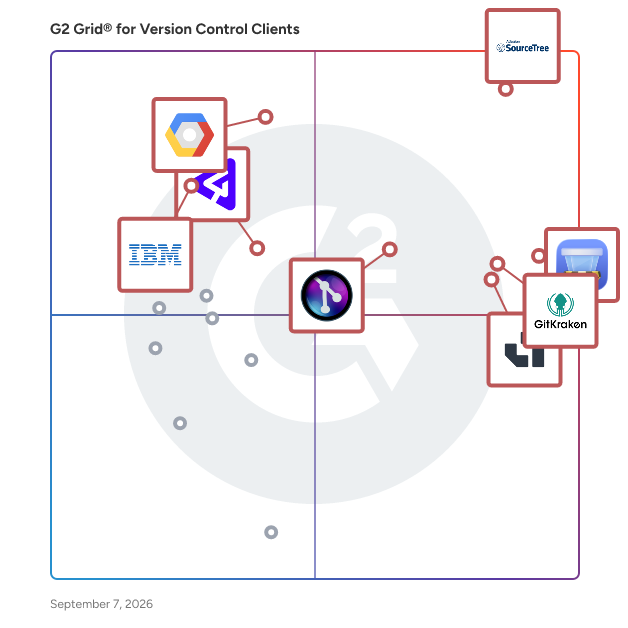
G2 Grid® for Version Control Clients

G2 Grid® for Version Control Clients plotting products by satisfaction and market presence

Highlighted products: SourceTree, Git Tower, GitKraken Desktop, Assembla, Google Cloud Source Repositories, GitLens, P4, and IBM Engineering Workflow Management.

Underlying data: [Grid® JSON](https://www.g2.com/categories/version-control-clients/grids.json?focus%5B%5D=sourcetree&focus%5B%5D=git-tower&focus%5B%5D=axosoft-gitkraken-desktop&focus%5B%5D=assembla&focus%5B%5D=google-cloud-source-repositories&focus%5B%5D=gitlens&focus%5B%5D=p4&focus%5B%5D=ibm-engineering-workflow-management)

SourceTree

SourceTree simplifies how you interact with your Git and Mercurial repositories so you can focus on coding. Visualize and manage your repositories through SourceTree's simple interface.

Average Rating: 4.3/5.0

Total Reviews: 372

How Do G2 Users Rate SourceTree?

  • Ease of Admin: 8.7/10 (Category avg: 8.4/10)
  • Ease of Use: 8.8/10 (Category avg: 8.5/10)
  • Quality of Support: 8.1/10 (Category avg: 8.5/10)
  • Has the product been a good partner in doing business?: 9.0/10 (Category avg: 8.7/10)

Who Is the Company Behind SourceTree?

  • Seller: Atlassian
  • Year Founded: 2002
  • HQ Location: Sydney and San Francisco
  • Twitter: @Atlassian
    106,496 Twitter followers
  • LinkedIn® Page: www.linkedin.com
    16,946 employees on LinkedIn®
  • Ownership: NASDAQ:TEAM

Who Uses This Product?

  • Who Uses This: Software Engineer, Senior Software Engineer
  • Top Industries: Computer Software, Information Technology and Services
  • Company Size: 37% Small, 35% Medium

What Are Recent G2 Reviews of SourceTree?

What Are G2 Users Discussing About SourceTree?

Git Tower

Tower is a beautiful, native Git client designed to make Git easy (and actually enjoyable!) to use. With its best-in-class features and seamless integration with popular code hosting platforms such as GitHub or GitLab, Tower grants you all the power of Git in an intuitive interface. Available for Mac and Windows.

Average Rating: 4.7/5.0

Total Reviews: 190

How Do G2 Users Rate Git Tower?

  • Ease of Admin: 9.2/10 (Category avg: 8.4/10)
  • Ease of Use: 9.3/10 (Category avg: 8.5/10)
  • Quality of Support: 9.2/10 (Category avg: 8.5/10)
  • Has the product been a good partner in doing business?: 9.0/10 (Category avg: 8.7/10)

Who Is the Company Behind Git Tower?

  • Seller: Tower
  • Year Founded: 2010
  • HQ Location: Stuttgart
  • Twitter: @gittower
    11,300 Twitter followers
  • LinkedIn® Page: www.linkedin.com
    13 employees on LinkedIn®

Who Uses This Product?

  • Who Uses This: Software Engineer, Web Developer
  • Top Industries: Computer Software, Information Technology and Services
  • Company Size: 57% Small, 19% Large

What Are Recent G2 Reviews of Git Tower?

What Are G2 Users Discussing About Git Tower?

GitKraken Desktop

Millions of developers and teams around the world choose GitKraken Desktop to make Git work for them. It makes Git more visual and accessible with an intuitive UI, the flexibility to switch between a GUI or a terminal, and a seamless experience across operating systems. Integrations with GitHub, GitLab, Bitbucket, and Azure DevOps make it swift and simple to clone, fork, and add remotes. You can even create, view and manage pull requests. Download it today for free at https://gitkraken.com/git-client

Average Rating: 4.5/5.0

Total Reviews: 198

How Do G2 Users Rate GitKraken Desktop?

  • Ease of Admin: 8.5/10 (Category avg: 8.4/10)
  • Ease of Use: 9.0/10 (Category avg: 8.5/10)
  • Quality of Support: 8.2/10 (Category avg: 8.5/10)
  • Has the product been a good partner in doing business?: 9.3/10 (Category avg: 8.7/10)

Who Is the Company Behind GitKraken Desktop?

  • Seller: Axosoft
  • Year Founded: 2002
  • HQ Location: Scottsdale, AR
  • Twitter: @axosoft
    4,445 Twitter followers
  • LinkedIn® Page: www.linkedin.com
    1 employees on LinkedIn®

Who Uses This Product?

  • Who Uses This: Software Engineer, Senior Software Engineer
  • Top Industries: Computer Software, Information Technology and Services
  • Company Size: 55% Small, 32% Medium

What Are Recent G2 Reviews of GitKraken Desktop?

What Are G2 Users Discussing About GitKraken Desktop?

Assembla

Assembla is the only managed cloud hosting provider for Perforce (Helix Core) and SVN, with project management built in. We provision, manage, and support your entire version control infrastructure so your team never has to touch a server. Teams running Perforce or SVN in the cloud come to Assembla because we are the only provider that handles everything: dedicated instances, automated backups, failovers, SOC 2 and GDPR compliance, and 24/5 DevOps support. No self-managed infrastructure. No custom integrations. No DevOps overhead. Perforce Cloud delivers managed Helix Core hosting on a shared, high-performance cloud environment with monthly licensing and the Perforce license included. Perforce Enterprise Cloud gives larger teams a dedicated single-tenant instance with custom architecture and unlimited users and storage. SVN Cloud Hosting brings the same managed approach to Subversion, with modern collaboration features like merge requests, locking, and code search that most SVN providers do not offer. More than 5,500 development teams worldwide trust Assembla to keep their most critical code available, secure, and compliant.

Average Rating: 4.2/5.0

Total Reviews: 146

How Do G2 Users Rate Assembla?

  • Ease of Admin: 8.5/10 (Category avg: 8.4/10)
  • Ease of Use: 8.5/10 (Category avg: 8.5/10)
  • Quality of Support: 8.4/10 (Category avg: 8.5/10)
  • Has the product been a good partner in doing business?: 8.3/10 (Category avg: 8.7/10)

Who Is the Company Behind Assembla?

  • Seller: Assembla
  • Year Founded: 2005
  • HQ Location: San Antonio, TX
  • Twitter: @assembla
    3,818 Twitter followers
  • LinkedIn® Page: www.linkedin.com
    20 employees on LinkedIn®

Who Uses This Product?

  • Who Uses This: Software Engineer, Product Manager
  • Top Industries: Computer Software, Information Technology and Services
  • Company Size: 51% Small, 40% Medium

What Are Recent G2 Reviews of Assembla?

What Are G2 Users Discussing About Assembla?

Google Cloud Source Repositories

Multiple private Git repositories hosted on Google Cloud Platform

Average Rating: 4.3/5.0

Total Reviews: 64

How Do G2 Users Rate Google Cloud Source Repositories?

  • Ease of Admin: 8.5/10 (Category avg: 8.4/10)
  • Ease of Use: 7.9/10 (Category avg: 8.5/10)
  • Quality of Support: 8.4/10 (Category avg: 8.5/10)
  • Has the product been a good partner in doing business?: 8.5/10 (Category avg: 8.7/10)

Who Is the Company Behind Google Cloud Source Repositories?

  • Seller: Google
  • Year Founded: 1998
  • HQ Location: Mountain View, CA
  • Twitter: @google
    31,899,995 Twitter followers
  • LinkedIn® Page: www.linkedin.com
    301,144 employees on LinkedIn®
  • Ownership: NASDAQ:GOOG

Who Uses This Product?

  • Top Industries: Computer Software, Information Technology and Services
  • Company Size: 53% Small, 31% Medium

What Are Recent G2 Reviews of Google Cloud Source Repositories?

What Are G2 Users Discussing About Google Cloud Source Repositories?

GitLens

GitLens is the most popular Git extension for Visual Studio Code. It supercharges the Git capabilities built into your IDE. GitLens unlocks the untapped knowledge within each repository to help visualize code authorship by leveraging CodeLens and Git blame to expose your Git history at every line of code. Seamlessly navigate and explore Git repositories, gain valuable insights via powerful comparison commands, and unleash the full power of Git without breaking your development flow. While GitLens is powerful and feature-rich, it is also highly customizable to meet your specific needs. Find code lens intrusive or the current line blame annotation distracting? No problem, it is quick and easy to turn them off or change how they behave.

Average Rating: 4.7/5.0

Total Reviews: 28

How Do G2 Users Rate GitLens?

  • Ease of Admin: 9.2/10 (Category avg: 8.4/10)
  • Ease of Use: 9.3/10 (Category avg: 8.5/10)
  • Quality of Support: 9.2/10 (Category avg: 8.5/10)
  • Has the product been a good partner in doing business?: 10.0/10 (Category avg: 8.7/10)

Who Is the Company Behind GitLens?

  • Seller: GitKraken
  • HQ Location: Scottsdale, US
  • Twitter: @gitkraken
    17,056 Twitter followers
  • LinkedIn® Page: www.linkedin.com
    91 employees on LinkedIn®

Who Uses This Product?

  • Top Industries: Computer Software, Information Technology and Services
  • Company Size: 46% Medium, 36% Small

What Are Recent G2 Reviews of GitLens?

What Are G2 Users Discussing About GitLens?

IBM Engineering Workflow Management

IBM Rational Team Concert lets you use one tool to collaborate across teams, manage code, run meetings, plan sprints and track work - cloud or on-premise. Work smarter and faster Work on the right things with work tasks that link plans with development and execution. Bring teams together Linked work enables teams to find, fix and test things faster than using isolated, disjointed tools with fragile integration. Project reporting made easy Stay on top of activities and overall progress with simple, automated cross-project reporting with a single view of the truth Reliable and repeatable work Learn, adapt and change your process to meet your needs. Make every team high-performing by sharing best practices. Accelerate time to value Use the cloud to get up and running faster leaving you to focus on innovation.

Average Rating: 4.0/5.0

Total Reviews: 42

How Do G2 Users Rate IBM Engineering Workflow Management?

  • Ease of Admin: 7.1/10 (Category avg: 8.4/10)
  • Ease of Use: 6.9/10 (Category avg: 8.5/10)
  • Quality of Support: 7.4/10 (Category avg: 8.5/10)
  • Has the product been a good partner in doing business?: 7.6/10 (Category avg: 8.7/10)

Who Is the Company Behind IBM Engineering Workflow Management?

  • Seller: IBM
  • Year Founded: 1911
  • HQ Location: Armonk, New York, United States
  • Twitter: @IBMSecurity
    74,660 Twitter followers
  • LinkedIn® Page: www.linkedin.com
    344,328 employees on LinkedIn®
  • Ownership: SWX:IBM

Who Uses This Product?

  • Top Industries: Defense & Space, Information Technology and Services
  • Company Size: 78% Large, 16% Medium

What Do G2 Reviewers Say About IBM Engineering Workflow Management?

AI-generated summary from verified user reviews

Pros
  • Users value the extensive options and integrations of IBM Engineering Workflow Management, enhancing productivity and tracking efficiency.
  • Users value the seamless integrations of IBM Engineering Workflow Management with various software, enhancing their productivity.
  • Users value the seamless tool integration with various software, enhancing their workflow and task management efficiency.
Cons
  • Users face difficult learning challenges, struggling to master the complex features of IBM Engineering Workflow Management.
  • Users find the expertise requirement high for IBM Engineering Workflow Management, making it challenging to master its features.
  • Users find the user interface very challenging, requiring extensive learning to navigate and utilize all features effectively.

What Are Recent G2 Reviews of IBM Engineering Workflow Management?

What Are G2 Users Discussing About IBM Engineering Workflow Management?

P4

Perforce P4 is an industry-standard version control platform built for teams working with large, complex codebases and digital assets. Designed to handle scale where other tools hit limits, P4 helps teams accelerate production, eliminate file sharing chaos, and keep every version tracked and recoverable. Whether your team is distributed or moving fast toward release, P4 makes it easy to collaborate efficiently and stay in control—no matter the size or complexity of your projects. P4 is trusted by the world’s most innovative brands, including Pixar, NVIDIA, Scania, EA, Ubisoft, and VMware.

Average Rating: 4.2/5.0

Total Reviews: 93

How Do G2 Users Rate P4?

  • Ease of Admin: 7.7/10 (Category avg: 8.4/10)
  • Ease of Use: 7.7/10 (Category avg: 8.5/10)
  • Quality of Support: 8.8/10 (Category avg: 8.5/10)
  • Has the product been a good partner in doing business?: 8.6/10 (Category avg: 8.7/10)

Who Is the Company Behind P4?

  • Seller: Perforce
  • Year Founded: 1995
  • HQ Location: Minneapolis, MN
  • Twitter: @perforce
    5,090 Twitter followers
  • LinkedIn® Page: www.linkedin.com
    2,009 employees on LinkedIn®

Who Uses This Product?

  • Who Uses This: Principal Software Engineer
  • Top Industries: Computer Games, Computer Software
  • Company Size: 39% Large, 36% Medium

What Are Recent G2 Reviews of P4?

What Are G2 Users Discussing About P4?

Code Compare

Devart Code Compare is a smart and flexible tool that provides you with the easiest possible way of comparing and merging source code, files, and folders. Now you can install and integrate it with Visual Studio 2022 and experience all of its capabilities right there! Key features of Code Compare 1. File comparison. First and foremost, you can use Code Compare to find differences between any blocks of text. The comparison window is divided into two panes—source and target—and the differences are shown with convenient highlighting. 2. Source code comparison. As for your source code, it can be compared just as effectively. In this respect, Code Compare supports lexical comparison of code in major programming languages, including C#, C++, Visual Basic, JavaScript, Java, and XML. You get syntax highlighting, matching of similar lines, and code outlining for collapsing and expanding regions of code. 3. Folder comparison. Besides blocks of text/code and files, Code Compare allows comparing and merging entire folders. Here, you get color coding for added, deleted, and modified files, filtering options for excluding or including certain file types, quick opening of individual files, and batch copying of files to another pane or to a selected folder. 4. Version control integration We’ve saved the best for last. Code Compare helps you merge files and resolve conflicts in a variety of version control systems that support external comparison tools, including Git, Mercurial, Perforce, TFS, and a few others. It has also never been easier to quickly resolve conflicts using tools like Sourcetree.

Average Rating: 4.3/5.0

Total Reviews: 54

How Do G2 Users Rate Code Compare?

  • Ease of Admin: 8.8/10 (Category avg: 8.4/10)
  • Ease of Use: 9.2/10 (Category avg: 8.5/10)
  • Quality of Support: 8.4/10 (Category avg: 8.5/10)
  • Has the product been a good partner in doing business?: 8.3/10 (Category avg: 8.7/10)

Who Is the Company Behind Code Compare?

  • Seller: Devart
  • Year Founded: 1997
  • HQ Location: Wilmington, Delaware, USA
  • Twitter: @DevartSoftware
    1,736 Twitter followers
  • LinkedIn® Page: www.linkedin.com
    251 employees on LinkedIn®

Who Uses This Product?

  • Who Uses This: Software Engineer
  • Top Industries: Computer Software, Information Technology and Services
  • Company Size: 43% Large, 32% Medium

What Are Recent G2 Reviews of Code Compare?

What Are G2 Users Discussing About Code Compare?

Digital.ai TeamForge

An award-winning open platform for collaborative software development, TeamForge helps leading companies and government agencies accelerate software delivery while maintaining the highest standards of governance, compliance, and IP security. Boost development productivity with Agile, Continuous Integration (CI), Continuous Delivery (CD), and DevOps. Equip cross-functional teams with best-of-breed tools, while maintaining governance, compliance, and code security standards. Create high-quality applications at speed with this open, extensible, and flexible platform. Build an integrated application delivery pipeline from best-of-breed commercial and open source tools like Artifactory®, Chef®, Git®, Gerrit®, HP® ALM, JIRA® Software, Jenkins®, Nexus®, Subversion®, TeamCity®, and TestLink®. Leverage the development methodologies—Agile, Waterfall, or hybrid—and version control systems—Git or Subversion—as appropriate for your IT and business needs. Connect cross-functional and distributed teams, helping them effectively collaborate and share expertise, best practices, and code. Drive development efficiency by enabling the reuse of existing assets, resources, and processes in new projects. CollabNet’s leadership in Agile training and consulting builds an introduction to Agile development practices in a way and at a pace that best fit your organization—from empowering Agile teams to facilitating global enterprise wide Agile transformations. Adopt the Agile methods of your choice—Scrum, Kanban, or others—and implement Agile throughout your entire application lifecycle, from planning (upstream) to deployment (downstream).

Average Rating: 4.2/5.0

Total Reviews: 20

How Do G2 Users Rate Digital.ai TeamForge?

  • Ease of Admin: 7.2/10 (Category avg: 8.4/10)
  • Ease of Use: 8.0/10 (Category avg: 8.5/10)
  • Quality of Support: 7.9/10 (Category avg: 8.5/10)
  • Has the product been a good partner in doing business?: 7.1/10 (Category avg: 8.7/10)

Who Is the Company Behind Digital.ai TeamForge?

  • Seller: Digital.ai
  • HQ Location: Raleigh, NC
  • Twitter: @digitaldotai
    819 Twitter followers
  • LinkedIn® Page: www.linkedin.com
    945 employees on LinkedIn®

Who Uses This Product?

  • Top Industries: Computer Software
  • Company Size: 43% Medium, 33% Small

What Are Recent G2 Reviews of Digital.ai TeamForge?

TortoiseHg

TortoiseHg is a Windows shell extension and a series of applications for the Mercurial distributed revision control system that includes a Gnome/Nautilus extension and a CLI wrapper application to be able to used on non-Windows platforms.

Average Rating: 3.9/5.0

Total Reviews: 42

How Do G2 Users Rate TortoiseHg?

  • Ease of Admin: 8.7/10 (Category avg: 8.4/10)
  • Ease of Use: 7.9/10 (Category avg: 8.5/10)
  • Quality of Support: 8.6/10 (Category avg: 8.5/10)
  • Has the product been a good partner in doing business?: 9.2/10 (Category avg: 8.7/10)

Who Is the Company Behind TortoiseHg?

  • Seller: Bitsy
  • HQ Location: Cottonwood Heights, UT
  • Twitter: @Bitbucket
    46,582 Twitter followers
  • LinkedIn® Page: www.linkedin.com
    1 employees on LinkedIn®

Who Uses This Product?

  • Top Industries: Computer Software, Information Technology and Services
  • Company Size: 43% Large, 33% Small

What Are Recent G2 Reviews of TortoiseHg?

What Are G2 Users Discussing About TortoiseHg?

Git Integration for Jira

Git Integration for Jira simplifies connectivity between applications, boosting productivity for Jira users—like project managers—seeking to view Git commits, branches, tags and pull requests inside of Jira without context switching. All Git integrations are supported, including serving customers with self-hosted or cloud-based Git servers. Git Integration for Jira is also enhanced with features to meet the unique needs of those requiring strict source code control with Webhook Indexing. Even non-technical users will understand what’s happening in your Git repository when it’s presented alongside your Jira issues and projects, leading to better cross-department collaboration and organization-wide transparency.

Average Rating: 4.5/5.0

Total Reviews: 15

How Do G2 Users Rate Git Integration for Jira?

  • Ease of Use: 9.2/10 (Category avg: 8.5/10)
  • Quality of Support: 8.5/10 (Category avg: 8.5/10)

Who Is the Company Behind Git Integration for Jira?

  • Seller: GitKraken
  • HQ Location: Scottsdale, US
  • Twitter: @gitkraken
    17,056 Twitter followers
  • LinkedIn® Page: www.linkedin.com
    91 employees on LinkedIn®

Who Uses This Product?

  • Top Industries: Computer Software
  • Company Size: 47% Medium, 33% Large

What Are Recent G2 Reviews of Git Integration for Jira?

What Are G2 Users Discussing About Git Integration for Jira?

Perforce TeamHub

Helix TeamHub can host your source code repository, whether it’s Mercurial, Git, or SVN. You can add multiple repositories in one project — or create a separate project for each repository.

Average Rating: 4.3/5.0

Total Reviews: 13

How Do G2 Users Rate Perforce TeamHub?

  • Ease of Admin: 8.3/10 (Category avg: 8.4/10)
  • Ease of Use: 7.2/10 (Category avg: 8.5/10)
  • Quality of Support: 9.3/10 (Category avg: 8.5/10)
  • Has the product been a good partner in doing business?: 8.3/10 (Category avg: 8.7/10)

Who Is the Company Behind Perforce TeamHub?

  • Seller: Perforce
  • Year Founded: 1995
  • HQ Location: Minneapolis, MN
  • Twitter: @perforce
    5,090 Twitter followers
  • LinkedIn® Page: www.linkedin.com
    2,009 employees on LinkedIn®

Who Uses This Product?

  • Company Size: 54% Large, 31% Medium

What Are Recent G2 Reviews of Perforce TeamHub?

What Are G2 Users Discussing About Perforce TeamHub?

GitAtomic

GitAtomic is the only truly integrated GUI/CLI Git client for Windows. Its use of native technology gives you the fastest, lightest, most powerful Windows Git client available. Perfect for power users - access every command from the fully integrated terminal. Ideal for beginners – intuitive GUI means no knowledge of Git commands needed to get started. Powerful, yet easy to use. GitAtomic offers you superior features and performance at a fraction of the cost of the most popular alternative Git clients.

Average Rating: 3.7/5.0

Total Reviews: 19

How Do G2 Users Rate GitAtomic?

  • Ease of Use: 7.9/10 (Category avg: 8.5/10)
  • Quality of Support: 6.9/10 (Category avg: 8.5/10)

Who Is the Company Behind GitAtomic?

Who Uses This Product?

  • Top Industries: Computer Software
  • Company Size: 50% Small, 35% Large

What Are Recent G2 Reviews of GitAtomic?

What Are G2 Users Discussing About GitAtomic?

BitKeeper

BitKeeper is a source code management software with simple-to-use command line interface and auto-merging capability for projects of any size.

Average Rating: 4.0/5.0

Total Reviews: 15

How Do G2 Users Rate BitKeeper?

  • Ease of Admin: 8.3/10 (Category avg: 8.4/10)
  • Ease of Use: 8.3/10 (Category avg: 8.5/10)
  • Quality of Support: 8.0/10 (Category avg: 8.5/10)
  • Has the product been a good partner in doing business?: 8.3/10 (Category avg: 8.7/10)

Who Is the Company Behind BitKeeper?

Who Uses This Product?

  • Top Industries: Computer Software, Information Technology and Services
  • Company Size: 47% Small, 33% Large

What Are Recent G2 Reviews of BitKeeper?

What Are G2 Users Discussing About BitKeeper?

Adam Crivello
AC
Researched and written by Adam Crivello
Updated October 3, 2024

Learn More About Version Control Clients

What are Version Control Clients?

Version control clients allow developers to interact with version control systems more intuitively and with greater control. Version control systems are vital to the development process; they grant developers the ability to collaborate on isolated branches of code without compromising the master code repository, then merge any finalized branches with the master repository. Upon an attempted merge, version control systems alert developers to merge conflicts if code changes are at odds with each other. Merge to merge, a version history is maintained so developers can revert back to a previous version if severe problems appear throughout the process. Developers can make changes to code and add new code to projects while protecting pre-existing code with this software.

Version control clients utilize many of the core features of a version control system and interact with that system to provide developers a more intuitive graphical user interface (GUI). This tool gives developers access to multiple code repositories and allows them to push and pull code from a hosted repository. Essentially, version control clients sit atop version control systems and help developers get the most out of their version control systems. The ease of use introduced by version control clients empowers developers to be more productive and grants them complete visibility into their version control systems. Without version control clients, developers would spend unnecessary time and energy managing version control systems on the command line. Version control clients provide a more intuitive GUI, and enhance features of version control systems that ultimately benefit development workflows.

Key Benefits of Version Control Clients

  • Enhance version control system functionality
  • Grant developers better control over version control systems
  • Make version control system functionality more intuitive via GUI

Why Use Version Control Clients?

Version control clients go hand in hand with version control systems. Version control systems are vital for the successful collaboration and version maintenance of software development projects. Version control clients enhance the functionality of version control systems and provide a GUI to streamline collaborative coding and make changes while protecting existing code.

Intuitive, powerful interface — Version control clients help developers interact with their version control systems via intuitive GUI. This visually intuitive functionality frees development teams from the monotony of operating within the command line. Version control clients’ interfaces also grant developers better control of their version control systems by embedding clear, readily available interactivity. Thanks to version control clients’ GUI overlay, development teams become more efficient by reducing consumption of resources and improving workflows.

Enhanced functionality — Version control clients enhance the existing functionality of version control systems by allowing easy management of multiple code repositories. With version control clients, developers can have all their code repositories under one umbrella—reducing the stress of working with multiple version control systems.

Who Uses Version Control Clients?

Version control clients present clear benefits for development teams of all sizes thanks to its intuitive and collaborative functionality. However, even solo developers find themselves relying on software to enhance the functionality of version control systems to make development more foolproof.

Software development teams — Software development teams use version control clients to overlay with their version control systems to achieve organized collaboration and parallel development via branching. With version control clients, team members can work on separate tasks simultaneously while keeping the master repository intact. Version control clients’ GUIs make version history and merges visible to the entire team, helping keep everyone on the same page.

Solo developers — The benefits of version control clients extend beyond team collaboration. Solo developers rely on version control clients’ enhanced version control system functionality to safely make changes to their projects, without breaking their builds. If a branch merge ruins a project, solo developers can easily revert to a prior version to preserve their overall progress.

Version Control Clients Software Features

The great thing about version control clients is that they retain and enhance the features of version control systems. These features include committing code, merging code, viewing a history of changes, branching, and pushing code to an online repository. Because version control clients allow developers to visually engage with these features and functions through a GUI, these tools improve overall productivity and efficiency. The benefits are comprehensive, but there are a couple features granted by version control clients’ visual, intuitive tools that stand out.

Branch visualization — With version control clients, team members can access an overall view of any completed, in-progress, or planned code branches across the development team. This intuitive visual insight keeps developers on track and on the same page as they progress through projects.

Visual repository management — Version control clients make repository management easier through user-friendly GUIs. Rather than meticulously managing separate repositories from the command line, developers can access all their repositories in the same place.