Best Unified Workspaces Software - Page 30

Last updated: October 3, 2024

How Many Unified Workspaces Software Products Does G2 Track?

Total Products under this Category: 449

Category Stats (Nov 2026)

  • Average Rating: 4.6/5 (↑0.03 vs Oct 2026) The average rating of products in this category, based on all submitted ratings
  • Top Trending Product: Collabase (+12.5%) - Among all products in this category, Collabase recorded the largest rating increase compared to last month

Last updated: November 21, 2026

How Does G2 Rank Unified Workspaces Software Products?

Why You Can Trust G2's Software Rankings:

  • 30 Analysts and Data Experts
  • 208,800+ Authentic Reviews
  • 449+ Products
  • Unbiased Rankings

G2's software rankings are built on verified user reviews, rigorous moderation, and a consistent research methodology maintained by a team of analysts and data experts. Each product is measured using the same transparent criteria, with no paid placement or vendor influence. While reviews reflect real user experiences, which can be subjective, they offer valuable insight into how software performs in the hands of professionals. Together, these inputs power the G2 Score, a standardized way to compare tools within every category.

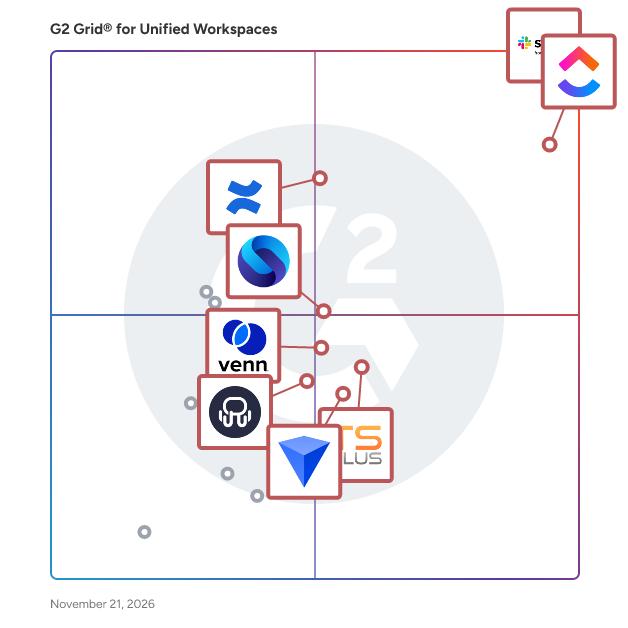
G2 Grid® for Unified Workspaces Software

G2 Grid® for Unified Workspaces Software plotting products by satisfaction and market presence

Highlighted products: Slack, ClickUp, Confluence, Shift, TSplus, Venn, Workona, and Rambox.

Underlying data: [Grid® JSON](https://www.g2.com/categories/unified-workspaces/grids.json?focus%5B%5D=slack&focus%5B%5D=clickup&focus%5B%5D=confluence&focus%5B%5D=redbrick-shift&focus%5B%5D=tsplus&focus%5B%5D=venn&focus%5B%5D=workona&focus%5B%5D=rambox)

Zenkit

Zenkit is a collaborative SaaS platform for project management, database building and more. Follow your data through its entire lifecycle, from fluid brainstorming and research through to a structured system for collaborative use. Zenkit is the flexible workspace you can use to organize anything. Zenkit lets you view and manipulate your data in multiple intuitive ways to gain deeper insight into your projects. Start with a simple list or Kanban board to plan your process, or switch to a table to input additional data and view analytics. Use it to build your own CRM, automated reporting system, or financial planner, or simply save your recipes and plan your holidays. Share your workspaces and assign tasks to your friends and colleagues, and view as much or as little data as you need at any moment. Zenkit helps you to intuitively focus on what’s important. Hyper-flexible and customizable, Zenkit is a relational database that anyone can use and understand. It is the home for your data, your projects and your business, no matter how big or small, simple or complex. Use Zenkit to cultivate your data and help your projects flourish.

Average Rating: 4.7/5.0

Total Reviews: 88

How Do G2 Users Rate Zenkit?

  • Ease of Use: 8.8/10 (Category avg: 9.0/10)

Who Is the Company Behind Zenkit?

Who Uses This Product?

  • Top Industries: Information Technology and Services, Marketing and Advertising
  • Company Size: 74% Small, 19% Medium

What Are Recent G2 Reviews of Zenkit?

ZeroDesk

Who Is the Company Behind ZeroDesk?

Zest

Zest helps teams and individual professionals find information from any cloud service (Google Drive, Dropbox, Slack, GitHub, Zendesk...) in an instant, without having to switch apps or tabs. It is achieved with Zest's Information Finder Sidebar (Chrome Extension) and unified search that securely indexes all of your internal knowledge bases and cloud services. With Zest, teams can also manage work-critical information with the use of Collections. Each Collection has links to information around a specific purpose (i.e. Marketing Strategy Q4 2020). In order to keep the information up to date and valuable, Collection items can be verified or flagged by teammates so that the collection owner could update accordingly. Additionally, Zest uses an Artificial Intelligence component that securely analyzes the context of your messages on supported integrations (Gmail, Zendesk...) to proactively recommend information links that could help answer your questions. It helps teams eliminate shoulder tapping by surfacing required information before questions are even asked. Zest is a product for professionals that need to juggle a lot of information that's scattered all over the cloud fast, and we are constantly looking for innovative ways to make that even faster.

Who Is the Company Behind Zest?

  • Seller: Zest.is
  • Year Founded: 2018
  • HQ Location: Tel Aviv, IL
  • LinkedIn® Page: www.linkedin.com
    3 employees on LinkedIn®

AI can help you find the answers. G2 helps you trust them.

Connect G2 to Claude or ChatGPT for answers grounded in G2's trusted reviews, comparisons, and pricing from real user insights.

How it works

ZIWO

With ZIWO, simply talk to your clients! ZIWO is a cloud contact center software (CCaaS) solution in the GCC that enables businesses to manage customer communication through voice calls and WhatsApp messaging in a single, unified platform. Designed for customer service, sales, and support teams, ZIWO simplifies multichannel communication and enhances team productivity. It is widely adopted across the Middle East and North Africa region (MENA), and supports both remote and in-office operations. This customer service platform is ideal for industries such as e-commerce, logistics, finance, real estate, healthcare, and much more - especially for companies operating in multiple markets that require local phone numbers, multilingual support, and seamless CRM integration. Common use cases include inbound customer support, outbound sales, and WhatsApp-based service desks. The key ZIWO features include: - Multichannel Communication: Consolidate voice calls and WhatsApp conversations in one platform, with full support for English, Arabic, and French to serve diverse audiences. - High-Quality Voice Services: Calls are routed via licensed local telecom providers and trusted international carriers to ensure clear, uninterrupted communication. - CRM Integrations: Instantly connect to over 15 major CRM platforms to streamline workflows, increase agent productivity, and improve customer relationship management. - Extensive API Library: Access 500+ APIs for advanced customization and integration into your existing business systems and infrastructure. ZIWO empowers companies to deliver consistent, high-quality customer experiences by streamlining communication and simplifying technical complexity - all through a scalable cloud-based contact center solution. It enables teams to operate more efficiently, respond faster to customer needs, and maintain full visibility across all interactions in real time.

Average Rating: 4.9/5.0

Total Reviews: 74

How Do G2 Users Rate ZIWO?

  • Ease of Use: 9.9/10 (Category avg: 9.0/10)

Who Is the Company Behind ZIWO?

  • Seller: Ziwo
  • Year Founded: 2010
  • HQ Location: Dubai (UAE)
  • LinkedIn® Page: www.linkedin.com
    115 employees on LinkedIn®

Who Uses This Product?

  • Who Uses This: Operations team lead.
  • Top Industries: Financial Services, Consumer Services
  • Company Size: 51% Large, 38% Medium

What Do G2 Reviewers Say About ZIWO?

AI-generated summary from verified user reviews

Pros
  • Users commend ZIWO for its user-friendly interface that simplifies both implementation and daily operations.
  • Users highlight the easy implementation of ZIWO, making setup straightforward and hassle-free.
  • Users highlight the excellent customer support of ZIWO, enhancing their experience and easing problem resolutions.
  • Users appreciate the clear call quality of ZIWO, enhancing their communication experience with ease of use.
  • Users value the easy integrations offered by ZIWO, enhancing their operational efficiency and user experience.
Cons
  • Users report experiencing technical issues with ZIWO, including lagging that disrupts their workflow.
  • Users experience unreliability with ZIWO, facing unexpected outages that disrupt urgent communication needs.
  • Users criticize the forced online status of ZIWO, which complicates their experience by receiving unwanted calls.
  • Users report frequent internet connection failures with ZIWO, disrupting their communication and performance.
  • Users experience frequent dialer issues, with calls dropping several times a week causing frustration and interruptions.

What Are Recent G2 Reviews of ZIWO?

What Are G2 Users Discussing About ZIWO?

Zoho Assist

Zoho Assist is a cloud-based remote support and unattended access solution designed to help businesses deliver seamless IT support and manage remote devices effortlessly. Whether you're assisting customers in real time or managing unattended endpoints, Zoho Assist offers a fast, secure, and reliable platform that works across devices and operating systems. With zero setup required on the technician's end and a lightweight client for end users, Zoho Assist makes remote troubleshooting simple and efficient, no complicated configurations, no hassle.

Average Rating: 4.7/5.0

Total Reviews: 745

How Do G2 Users Rate Zoho Assist?

  • Ease of Use: 9.3/10 (Category avg: 9.0/10)

Who Is the Company Behind Zoho Assist?

  • Seller: Zoho
  • Year Founded: 1996
  • HQ Location: Austin, TX
  • LinkedIn® Page: www.linkedin.com
    30,913 employees on LinkedIn®
  • Phone: +1 (888) 900-9646

Who Uses This Product?

  • Who Uses This: Owner, IT Manager
  • Top Industries: Information Technology and Services, Computer & Network Security
  • Company Size: 70% Small, 23% Medium

What Do G2 Reviewers Say About Zoho Assist?

AI-generated summary from verified user reviews

Pros
  • Users commend the ease of use of Zoho Assist, appreciating its simple setup and seamless remote support integration.
  • Users highly value the ease of remote access with Zoho Assist, facilitating quick and efficient customer support.
  • Users appreciate the ease of remote support with Zoho Assist, streamlining customer assistance effectively and efficiently.
  • Users appreciate the easy setup of Zoho Assist, making remote connections quick and efficient for customer support.
  • Users appreciate the reliable performance of Zoho Assist, noting its stability and effective remote support capabilities.
Cons
  • Users experience remote access issues with quality resolution, leading to slight difficulties in viewing systems clearly.
  • Users note feature limitations in Zoho Assist, particularly in advanced options and control for iOS devices.
  • Users report connection issues like lag and occasional session drops, affecting their remote session experience.
  • Users find the interface not user-friendly, often struggling to understand features and settings without extensive guidance.
  • Users find Zoho Assist expensive due to high costs for additional technicians and premium features behind a paywall.

What Are Recent G2 Reviews of Zoho Assist?

What Are G2 Users Discussing About Zoho Assist?

Zoho CRM

Zoho CRM is a cloud-based 360° customer relationship management tool that caters to business needs of mid-scale businesses to large-scale enterprises. Key features include contact management, sales funnels, pipeline management, workflow automation, AI-powered conversational assistant, task management, managing marketing campaigns, sales forecasting, customer support & service, inventory management, reporting & analytics, and seamlessly integrating with 500+ popular business apps in a single business system.

Average Rating: 4.1/5.0

Total Reviews: 2,858

G2 Deal: Get 50% off and save up to $100

Zoho CRM is a cloud-based, 360° business management platform that streamlines business processes to deliver better customer experiences. Close deals faster with better visibility at every stage of your sales pipeline, omnichannel connectivity and AI-powered tools.

Price: ~~$14/user/month~~ → $7/user/month

View this exclusive G2 deal

How Do G2 Users Rate Zoho CRM?

  • Ease of Use: 8.3/10 (Category avg: 9.0/10)

Who Is the Company Behind Zoho CRM?

  • Seller: Zoho
  • Year Founded: 1996
  • HQ Location: Austin, TX
  • LinkedIn® Page: www.linkedin.com
    30,913 employees on LinkedIn®
  • Phone: +1 (888) 900-9646

Who Uses This Product?

  • Who Uses This: Owner, CEO
  • Top Industries: Information Technology and Services, Computer Software
  • Company Size: 62% Small, 33% Medium

What Do G2 Reviewers Say About Zoho CRM?

AI-generated summary from verified user reviews

Pros
  • Users like the intuitive, user-friendly interface, which makes everyday navigation and common CRM tasks easy to learn.
  • Users value its broad, seamless integrations with Zoho apps and other business tools, helping connect workflows and save time.
  • Users value the extensive customization of fields, layouts, and workflows, which lets them tailor the CRM to their business needs.
  • Users value the broad, useful feature set, which brings together capabilities for managing CRM and wider business needs.
  • Users value the workflow automation for reducing manual work and handling repetitive tasks like follow-ups and lead assignments.
Cons
  • Users say the platform takes time to learn, especially for beginners and when exploring advanced features.
  • Users report slow loading and occasional lag, especially when working with large datasets or complex workflows.
  • Users report slow, inconsistent support responses and difficulty getting effective help with complex issues.
  • Users find the interface cluttered and overwhelming, with too many options and elements on screen.
  • Users find integrations difficult to configure and need extra setup or manual troubleshooting to get them working reliably.

What Are Recent G2 Reviews of Zoho CRM?

What Are G2 Users Discussing About Zoho CRM?

Zoho Meeting

One stop solution to manage your online meetings, video conferencing, meeting rooms, business phones, and webinars for your organization. The best solution for your remote collaboration for the hybrid work. Communication and collaboration that cuts through EX to CX across all departments of an organization. Online meeting or web conferencing is a rapidly growing segment of the Internet as more businesses opt to connect with customers and partners remotely. Zoho Meeting is the easiest and most affordable online web conferencing tool to enhance the business collaboration with screen/application sharing, whiteboard sharing, remote control, audio, and video conferencing. It provides single users as well as small and large size organizations, a quick and easy way to host and conduct secure and cost-effective online meetings. Host product launches, feature demonstrations, sales presentations, lead-nurturing webinars, user education webinars, and online meetings, right from your browser. Zoho Meeting is typically used in the following scenarios. You can host secure, robust web meetings and share your screen online with your remote audience using any browser or computer operating system. Your remote audience can be from any part of the world and they can be in different locations. Zoho Meeting saves time, travel and money by providing real-time virtual meetings - While face-to-face meetings are still a necessity and irreplaceable in many circumstances; the power of a Zoho Meeting provides the next best thing. Online meeting is also tightly integrated with Zoho CRM, Zoho Projects, Microsoft Teams, Slack, Gmail, and more. Now you can schedule, invite, host meetings and view reports and recording from your Zoho CRM account. You can organize cost-effective sales and marketing meetings with a few simple clicks of your mouse. Demonstrate your products and services to potential clients, connect with your colleagues for discussions and periodic meetings, engage larger audiences and even perform after-sales support. Simplify your sales process with online presentations, conduct web meetings for business strategy and marketing; communicate efficiently and quickly with your customers anywhere, anytime. You can target new prospects or announce new product launches to your existing customer base using Zoho Meeting. Host large virtual events and live stream them on social platform. Webinars and media launches can effectively be managed to save you a bundle in time and money.

Average Rating: 4.5/5.0

Total Reviews: 1,161

How Do G2 Users Rate Zoho Meeting?

  • Ease of Use: 9.1/10 (Category avg: 9.0/10)

Who Is the Company Behind Zoho Meeting?

  • Seller: Zoho
  • Year Founded: 1996
  • HQ Location: Austin, TX
  • LinkedIn® Page: www.linkedin.com
    30,913 employees on LinkedIn®
  • Phone: +1 (888) 900-9646

Who Uses This Product?

  • Who Uses This: CEO, Founder
  • Top Industries: Information Technology and Services, Education Management
  • Company Size: 80% Small, 15% Medium

What Do G2 Reviewers Say About Zoho Meeting?

AI-generated summary from verified user reviews

Pros
  • Users appreciate the ease of use of Zoho Meeting, enjoying its simple interface and smooth webinar experience.
  • Users value the easy setup of Zoho Meeting, enabling quick, hassle-free meetings without app downloads.
  • Users appreciate the essential conferencing features of Zoho Meeting, praising its user-friendly interface and competitive pricing.
  • Users value the affordable pricing of Zoho Meeting, finding it budget-friendly for small and medium teams.
  • Users value the user-friendly interface of Zoho Meeting, enabling quick and effortless meeting setups for everyone.
Cons
  • Users report poor video quality in Zoho Meeting, including delays, freezes, and occasional lag during calls.
  • Users experience frequent audio issues with Zoho Meeting, affecting clarity and interaction during calls.
  • Users find missing features in Zoho Meeting, such as limited functionality and outdated UI compared to competitors.
  • Users face missing functionality in Zoho Meeting, particularly with timezone management and mobile app requirements.
  • Users are disappointed by the poor quality of Zoho Meeting, citing video instability and audio clarity issues.

What Are Recent G2 Reviews of Zoho Meeting?

What Are G2 Users Discussing About Zoho Meeting?

Zoho Projects

Zoho Projects is a cloud based project management software with over 200,000 customers worldwide. It helps you plan your projects, and execute them with perfection. With Projects, you can assign tasks easily, communicate effectively with both your team and clients, be informed on all project updates, get detailed reports on work progress and deliver projects on time, everytime. With a ton of customization capabilities and features such as Gantt Charts, Blueprints and Time sheets, Zoho Projects is a full-fledged project management tool which caters to the business needs of companies of all sizes and industries. With a wide range of in-house and third-party integrations, Projects is one of the most integrated project management tools available and can be a perfect fit for your work ecosystem.

Average Rating: 4.4/5.0

Total Reviews: 540

How Do G2 Users Rate Zoho Projects?

  • Ease of Use: 8.5/10 (Category avg: 9.0/10)

Who Is the Company Behind Zoho Projects?

  • Seller: Zoho
  • Year Founded: 1996
  • HQ Location: Austin, TX
  • LinkedIn® Page: www.linkedin.com
    30,913 employees on LinkedIn®
  • Phone: +1 (888) 900-9646

Who Uses This Product?

  • Who Uses This: Project Manager, CEO
  • Top Industries: Information Technology and Services, Computer Software
  • Company Size: 60% Small, 31% Medium

What Do G2 Reviewers Say About Zoho Projects?

AI-generated summary from verified user reviews

Pros
  • Users find Zoho Projects to be very user-friendly, with intuitive navigation and helpful drag-and-drop features.
  • Users value the integrated tools in Zoho Projects for effective project management and seamless experiences.
  • Users value the effective task management in Zoho Projects, enhancing organization and productivity across teams.
  • Users appreciate the effective project tracking in Zoho Projects, allowing seamless management of tasks and deadlines.
  • Users value the straightforward time tracking in Zoho Projects, enhancing productivity and reducing stress in task management.
Cons
  • Users are frustrated by the limited features of Zoho Projects, finding the interface complex and lacking essential functionalities.
  • Users find the missing features in Zoho Projects hinder usability and limit project management capabilities.
  • Users find the learning curve steep with Zoho Projects, especially when adjusting to its complex interface and features.
  • Users find the interface not intuitive, as excessive features and options complicate the user experience significantly.
  • Users often experience slow performance, especially with large projects, leading to frustrating delays during reviews.

What Are Recent G2 Reviews of Zoho Projects?

What Are G2 Users Discussing About Zoho Projects?

Zoho Tables

Zoho Tables is a simple yet powerful work management software that strikes the perfect balance between overly complicated tools and those lacking essential features. It offers the simplicity of a spreadsheet combined with the robust capabilities of a database, making it easy for users of any skill level to get started without the need for extensive training or a steep learning curve. Zoho Tables provides five different views—Grid, Gallery, Kanban, Calendar, and Form—allowing you to choose how you want to visualize your data. Beyond data consolidation, it facilitates smart relationships and seamless collaboration among team members while automating routine tasks to boost efficiency. Highly flexible and suitable for any function or industry, Zoho Tables enables you to create personalized solutions tailored to your specific needs, all without requiring any coding. The mobile app ensures you can stay on top of your tasks and projects, no matter where you are.

Average Rating: 4.6/5.0

Total Reviews: 8

How Do G2 Users Rate Zoho Tables?

  • Ease of Use: 9.0/10 (Category avg: 9.0/10)

Who Is the Company Behind Zoho Tables?

  • Seller: Zoho
  • Year Founded: 1996
  • HQ Location: Austin, TX
  • LinkedIn® Page: www.linkedin.com
    30,913 employees on LinkedIn®
  • Phone: +1 (888) 900-9646

Who Uses This Product?

  • Company Size: 75% Small, 25% Medium

What Do G2 Reviewers Say About Zoho Tables?

AI-generated summary from verified user reviews

Pros
  • Users find the ease of use in Zoho Tables remarkable, significantly improving efficiency and saving time.
  • Users value the powerful automation of Zoho Tables, enhancing data management and collaboration seamlessly.
  • Users rave about the streamlined communication in Zoho Tables, enhancing their workflow and client management significantly.
  • Users find the ease of implementation in Zoho Tables helpful for saving time and enhancing business efficiency.
  • Users value the ease of integration with Zoho Tables, streamlining processes and saving valuable time.
Cons
  • Users note a steep learning curve with Zoho Tables, though the interface helps ease the process.
  • Users find Zoho Tables has a steep learning curve, making it less intuitive for some, despite its advantages.

What Are Recent G2 Reviews of Zoho Tables?

Zoho WorkDrive

Zoho Docs is now Zoho WorkDrive! Launched in 2019 as the successor to Zoho Docs, Zoho WorkDrive is a robust content management platform trusted by over 1 million businesses worldwide. Built for modern teams, small businesses, and enterprises, it provides secure file storage, seamless collaboration, and powerful automation features. With detailed access stats, mobile apps for Android and iOS, and a desktop sync application, WorkDrive empowers teams to work efficiently from anywhere, anytime.

Average Rating: 4.4/5.0

Total Reviews: 701

How Do G2 Users Rate Zoho WorkDrive?

  • Ease of Use: 9.1/10 (Category avg: 9.0/10)

Who Is the Company Behind Zoho WorkDrive?

  • Seller: Zoho
  • Year Founded: 1996
  • HQ Location: Austin, TX
  • LinkedIn® Page: www.linkedin.com
    30,913 employees on LinkedIn®
  • Phone: +1 (888) 900-9646

Who Uses This Product?

  • Who Uses This: Software Engineer, Owner
  • Top Industries: Information Technology and Services, Computer Software
  • Company Size: 51% Small, 35% Medium

What Do G2 Reviewers Say About Zoho WorkDrive?

AI-generated summary from verified user reviews

Pros
  • Users appreciate the ease of use of Zoho WorkDrive, which simplifies organization and enhances team collaboration effortlessly.
  • Users value the easy team collaboration in Zoho WorkDrive, streamlining file sharing and keeping everyone organized.
  • Users value the easy collaboration features of Zoho WorkDrive, enhancing teamwork and keeping projects organized and efficient.
  • Users value the real-time collaboration features of Zoho WorkDrive, making teamwork efficient and organized.
  • Users appreciate the seamless integration of Zoho WorkDrive, enhancing collaboration and file management across their business apps.
Cons
  • Users experience slow loading and syncing issues, especially with larger files, impacting productivity and user satisfaction.
  • Users experience slow performance with Zoho WorkDrive, particularly when handling large files and navigating the interface.
  • Users often face syncing issues with Zoho WorkDrive, particularly concerning slow performance and limited offline access.
  • Users note the lack of essential features in Zoho WorkDrive, which limits functionality and user experience.
  • Users frequently experience performance issues with file syncing and app responsiveness, making the process frustrating at times.

What Are Recent G2 Reviews of Zoho WorkDrive?

What Are G2 Users Discussing About Zoho WorkDrive?

Zoiper

Zoiper's Whitelabel Softphone is a customizable VoIP solution designed for businesses seeking to offer a branded communication experience to their users. This platform enables companies to tailor the softphone's interface, features, and functionalities to align with their brand identity and meet specific operational requirements. Key Features and Functionality: - Brand Customization: Incorporate your company's logo, color scheme, fonts, and icons to create a cohesive brand experience. - User Interface Personalization: Develop a custom interface that enhances user experience and reflects your brand's aesthetics. - Smart Provisioning: Configure different features and licenses for various user groups, such as novice or business users, ensuring tailored functionality. - Custom Feature Sets: Add or remove features according to the specific needs of different user segments. - Flexible Licensing Models: Choose from per-user to unlimited user installations to suit your business model. - Advanced Communication Support: Ensure compatibility with IMS/RCS, VoLTE, and secure communication protocols for enhanced connectivity and security. Primary Value and User Solutions: Zoiper's Whitelabel Softphone empowers businesses to deliver a seamless and branded communication experience to their users. By offering extensive customization options, companies can align the softphone with their brand identity, enhancing user engagement and satisfaction. The platform's flexibility in provisioning and feature configuration allows businesses to cater to diverse user needs, improving operational efficiency. Additionally, support for advanced communication standards and secure protocols ensures reliable and secure communication, addressing the critical needs of modern enterprises.

Average Rating: 4.4/5.0

Total Reviews: 52

How Do G2 Users Rate Zoiper?

  • Ease of Use: 9.2/10 (Category avg: 9.0/10)

Who Is the Company Behind Zoiper?

Who Uses This Product?

  • Top Industries: Information Technology and Services
  • Company Size: 53% Small, 45% Medium

What Do G2 Reviewers Say About Zoiper?

AI-generated summary from verified user reviews

Pros
  • Users find Zoiper to be an affordable solution, particularly beneficial for businesses with various locations and remote employees.
  • Users love the ease of use of Zoiper, allowing for quick and effortless call-making.
  • Users love the easy integrations of Zoiper, praising its straightforward setup and feature accessibility.
  • Users love the easy setup of Zoiper, appreciating how straightforward it is to integrate and start using.
  • Users praise the easy setup and integration features of Zoiper, enhancing their overall experience significantly.
Cons
  • Users find the interface accessibility lacking, wishing for a more user-friendly experience while using Zoiper.
  • Users express privacy concerns regarding Zoiper, highlighting potential vulnerabilities and risks of data breaches.
  • Users highlight security concerns with Zoiper, noting potential vulnerabilities and risks with sensitive data handling.
  • Users report frequent crashes with Zoiper, requiring a safe mode restart to regain functionality.

What Are Recent G2 Reviews of Zoiper?

What Are G2 Users Discussing About Zoiper?

Zulip

Zulip is an organized team chat application for distributed teams. Zulip’s 100% open-source software is available as a cloud service or a self-hosted solution. With conversations organized by topic, Zulip is ideal for both live and asynchronous communication Zulip serves startups, and small and mid-sized businesses, as well as communities with up to tens of thousands of members. It’s used by thousands of organizations around the world. Developed as an open-source project since 2015, Zulip is stewarded and financially supported by a values-driven company designed for long-term sustainable development.

Average Rating: 4.6/5.0

Total Reviews: 115

How Do G2 Users Rate Zulip?

  • Ease of Use: 8.5/10 (Category avg: 9.0/10)

Who Is the Company Behind Zulip?

Who Uses This Product?

  • Who Uses This: Professor, Associate Professor
  • Top Industries: Research, Computer Software
  • Company Size: 74% Small, 22% Medium

What Do G2 Reviewers Say About Zulip?

AI-generated summary from verified user reviews

Pros
  • Users enjoy the intuitive interface of Zulip, facilitating effortless navigation and simplifying team communications effectively.
  • Users appreciate the intuitive user interface of Zulip, enabling seamless communication and efficient organization of topics.
  • Users appreciate the topic-based messaging system of Zulip, enabling organized and focused discussions without distraction.
  • Users appreciate the intuitive communication tools in Zulip, enhancing collaboration and keeping discussions organized and focused.
  • Users admire Zulip's intuitive user interface, enhancing navigation and communication for effective and organized teamwork.
Cons
  • Users find the learning curve steep due to unfamiliar topic structures and a confusing interface that hinders adoption.
  • Users face significant integration issues with Zulip, leading to confusion and inefficiencies in communication.
  • Users find Zulip's interface not intuitive, especially for non-technical teams, complicating the onboarding process.
  • Users note several missing features in Zulip, including a lack of visibility and functionality across different platforms.
  • Users report connectivity issues with Zulip, experiencing lag and unreliable performance on the mobile app.

What Are Recent G2 Reviews of Zulip?

What Are G2 Users Discussing About Zulip?

Neeraja Prakash
NP
Researched and written by Neeraja Prakash