# Best Transcription Software - Page 9

*By [Neeraja Prakash](https://research.g2.com/insights/author/neeraja-prakash)*


Transcription software automatically converts audio from interviews, conversations, dictations, and video footage into text using natural language processing and machine learning, providing a standalone platform for speech-to-text transcription, with some tools employing a human-in-the-loop (HITL) model to ensure transcription quality.

### Core Capabilities of Transcription Software

To qualify for inclusion in the Transcription category, a product must:

- Provide a platform to transcribe audio using automated means
- Upload audio to the platform to be transcribed
- Leverage [machine learning](https://www.g2.com/categories/machine-learning) or [NLP](https://www.g2.com/categories/natural-language-processing-nlp) technology to transcribe text
- Facilitate the editing of transcriptions via a text editor

### Common Use Cases for Transcription Software

Journalists, researchers, legal professionals, and business teams use transcription software to convert spoken content into searchable, editable text efficiently. Common use cases include:

- Transcribing interviews, focus groups, and meeting recordings for documentation and analysis
- Converting video footage into text for captioning, search indexing, or content repurposing
- Supporting legal and medical dictation workflows that require accurate, editable transcriptions

### How Transcription Software Differs from Other Tools

Transcription software provides an easy-to-use standalone platform for speech-to-text conversion, distinguishing it from [voice recognition software](https://www.g2.com/categories/voice-recognition), which typically provides APIs or web services for integration into applications or web pages. While voice recognition is designed for embedding speech capabilities into other software, transcription tools are purpose-built for users who need a complete, self-contained platform to upload, transcribe, and edit audio content.

### Insights from G2 on Transcription Software

Based on category trends on G2, transcription accuracy and collaborative editing features stand out as standout capabilities. Significant time savings compared to manual transcription and improved searchability of recorded content stand out as primary benefits of adoption.


## Top Transcription Software at a Glance
| # | Product | Rating | Best For | What Users Say |
|---|---------|--------|----------|----------------|
| 1 | [Fathom](https://www.g2.com/products/fathom-video/reviews) | 5.0/5.0 (6,929 reviews) | Meeting transcripts with AI-generated action items | "[Effortless, Proactive Meeting Notes That Let Me Focus on the Conversation](https://www.g2.com/survey_responses/fathom-review-13110538)" |
| 2 | [Rev](https://www.g2.com/products/rev/reviews) | 4.7/5.0 (616 reviews) | Interview transcription with AI-assisted quote extraction | "[Quick Transcripts, Seamless Workflow](https://www.g2.com/survey_responses/rev-review-13116732)" |
| 3 | [Riverside](https://www.g2.com/products/riverside/reviews) | 4.8/5.0 (1,733 reviews) | Podcast transcript editing with AI-generated clips | "[Studio-quality remote recording that keeps our crew connected across the US](https://www.g2.com/survey_responses/riverside-review-13100500)" |
| 4 | [Google Cloud Speech-to-Text](https://www.g2.com/products/google-cloud-speech-to-text/reviews) | 4.6/5.0 (234 reviews) | Multilingual audio transcription with Google Cloud integration | "[Makes Multilingual Client Meetings Effortless with Accurate Transcription](https://www.g2.com/survey_responses/google-cloud-speech-to-text-review-12894708)" |
| 5 | [Otter.ai](https://www.g2.com/products/otter-ai/reviews) | 4.4/5.0 (497 reviews) | Real-time meeting transcription with automated summaries | "[Otter.ai Boosts Productivity with Real-Time Transcription and Automatic Summaries](https://www.g2.com/survey_responses/otter-ai-review-13091867)" |
| 6 | [Fireflies.ai](https://www.g2.com/products/fireflies-ai/reviews) | 4.7/5.0 (748 reviews) | Meeting transcription with AI-powered action items | "[Great Automated Summaries, Seamless Slack/CRM Sync, and a Lifesaving Global Search](https://www.g2.com/survey_responses/fireflies-ai-review-12754153)" |
| 7 | [Noota](https://www.g2.com/products/noota/reviews) | 4.7/5.0 (314 reviews) | Meeting transcription with AI-powered multilingual summaries | "[It&#39;s difficult, if not impossible, to do without Noota today.](https://www.g2.com/survey_responses/noota-review-11904576)" |
| 8 | [Speechmatics](https://www.g2.com/products/speechmatics/reviews) | 4.7/5.0 (66 reviews) | — | "[Making Transcription and Content Creation Much More Manageable](https://www.g2.com/survey_responses/speechmatics-review-12927046)" |
| 9 | [Descript](https://www.g2.com/products/descript/reviews) | 4.6/5.0 (898 reviews) | Text-based audio and video editing | "[Makes Video Editing Much Easier for Teaching and Content Creation](https://www.g2.com/survey_responses/descript-review-12694941)" |
| 10 | [HeyGen](https://www.g2.com/products/heygen/reviews) | 4.8/5.0 (1,891 reviews) | — | "[Effortless Video Creation, Impressive Avatars](https://www.g2.com/survey_responses/heygen-review-10847284)" |

---
## What Are the Most Common Questions About Transcription Software?
*AI-generated · Last updated: May 26, 2026*
### Which transcription service offers the most accurate speech-to-text conversion?
Based on G2 reviews, [Fathom](https://www.g2.com/products/fathom-video/reviews) stands out for speech-to-text accuracy in meeting transcription. According to verified users, it delivers detailed transcripts, strong speaker capture, and reliable summaries that reduce the need for manual note-taking. G2 reviewers mention that it performs especially well in live meetings, supports review of past conversations, and helps teams stay present instead of typing notes. Some users note occasional issues with specific words, accents, or meeting joins, but recent reviews most consistently describe Fathom as accurate, easy to use, and dependable for capturing discussions, action items, and follow-up details across recurring calls and internal or client meetings.


### Which solution supports secure transcription for confidential documents?
Based on G2 reviews, several transcription products are used for sensitive or high-accountability workflows, but reviewer language around confidentiality is strongest for Rev. According to verified users, Rev is trusted for handling interviews, reports, and professional documentation, and reviewers specifically mention confidence in its security and encryption while working with transcripts. G2 reviewers also mention workflows involving legal, research, and business reporting use cases where accurate records matter. Other products in this category are praised for meeting capture and note-taking, but the clearest recent reviewer grounding for confidential document handling comes from Rev, especially where users value secure transcript access, editing, and reliable conversion of recorded material into written records.


### What is the best platform for real-time meeting transcription?
Based on G2 reviews, [Fathom](https://www.g2.com/products/fathom-video/reviews) is frequently described as a strong choice for real-time meeting transcription because users highlight how quickly it joins meetings, captures conversations, and delivers transcripts and summaries soon after calls end. According to verified users, it helps them stay focused during meetings instead of multitasking with notes, while still preserving action items, decisions, and searchable records. G2 reviewers mention reliable integrations with Zoom, Teams, and Google Meet, plus helpful summaries and follow-up support. Some reviewers mention minor UI or join-timing issues, but the dominant recent feedback centers on fast meeting capture, accurate notes, and easy post-meeting review for both client and internal conversations.

**Here are some of the top-rated products on G2:**

- [Fathom](https://www.g2.com/products/fathom-video/reviews) – frequently used for Zoom, Teams, and Google Meet transcription with summaries and action items
- [Otter.ai](https://www.g2.com/products/otter-ai/reviews) – used for real-time meeting notes, searchable transcripts, and post-meeting summaries
- [Fireflies.ai](https://www.g2.com/products/fireflies-ai/reviews) – popular for automated meeting recording, transcription, and follow-up insights across calls


### What platform provides searchable transcripts for audio and video files?
Based on G2 reviews, buyers looking for searchable transcripts across audio and video files often mention tools that make it easy to revisit conversations without replaying everything manually. According to verified users, Fathom, Rev, Riverside, and Otter.ai all support workflows where transcripts can be searched to find quotes, moments, decisions, or follow-up details. G2 reviewers mention using these tools to review interviews, podcasts, meetings, webinars, and customer calls, often highlighting searchable archives, timestamps, and fast retrieval of specific sections. The strongest pattern in recent reviews is that searchable transcripts are most valuable when paired with summaries, clips, or recordings, helping teams move faster on reporting, content reuse, follow-up communication, and internal documentation.


### What is the most affordable transcription service for SMBs?
Based on G2 reviews, affordable options for SMBs tend to be the products reviewers describe as offering strong value, usable free tiers, or lower-cost alternatives to manual transcription. According to verified users, Fathom is often praised for a robust free version and time-saving meeting notes, while Rev is described as cost-effective and reasonable for transcription work. G2 reviewers also mention Riverside as a good value for teams that want recording, editing, and transcript workflows in one place. For small businesses, affordability in reviews usually means balancing ease of use, transcript quality, and time saved rather than looking only at subscription cost. Products with straightforward setup and broad usefulness appear to create the strongest value for lean teams.

**Here are some of the top-rated products on G2:**

- [Fathom](https://www.g2.com/products/fathom-video/reviews) – praised for a strong free version, meeting transcription, and easy sharing for smaller teams
- [Rev](https://www.g2.com/products/rev/reviews) – often described as a cost-effective option for interviews, captions, and meeting transcription
- [Riverside](https://www.g2.com/products/riverside/reviews) – valued by SMB reviewers for combining recording, transcripts, clips, and publishing workflows


### Which tool supports timestamped transcription for media production?
Based on G2 reviews, timestamped transcription is commonly highlighted in products used for podcasts, interviews, video editing, and media repurposing. According to verified users, Riverside is frequently used for recording and editing media content with transcripts, clips, and subtitles, while Rev reviewers mention synced transcripts and quick access to quotes or sections in audio and video. G2 reviewers also mention Fathom for timestamped meeting summaries and searchable playback, especially when they need to revisit exact moments later. For media production teams, the strongest recent signals point to tools that combine timestamps with editing, clipping, or transcript navigation so creators can move quickly from raw recording to polished deliverables without manually scanning long files.


### Which vendor provides multi-language transcription capabilities?
Based on G2 reviews, multi-language transcription capabilities appear across several products, especially those used in global teams and multilingual content workflows. According to verified users, Speechmatics is praised for high-accuracy transcription across multiple languages and dialects, including real-time use cases. G2 reviewers also mention Google Cloud Speech-to-Text for multilingual support, Rev for varied language and caption workflows, and tools like Fireflies.ai or Fathom where reviewers reference handling different languages or accents in meetings. The most grounded takeaway from recent reviews is that vendors differ by use case: some are used for live captioning and APIs, while others focus on meetings or content creation. Buyers should match language support to whether they need meetings, media, or large-scale transcription workflows.


### What is the top-rated transcription service for enterprises?
Based on G2 reviews, enterprise buyers often favor tools that combine transcript quality, workflow automation, integrations, and scalability across teams. According to verified users, Fathom is frequently praised for broad organizational use around meetings, summaries, and action tracking, while Speechmatics appears in enterprise-style use cases involving live captioning, APIs, and multilingual transcription at scale. G2 reviewers also mention Fireflies.ai for searchable meeting archives and workflow integrations, and Rev for dependable transcription across content, meetings, and documentation. Recent reviews suggest that the strongest enterprise transcription services are the ones that reduce manual work while fitting into broader systems for collaboration, reporting, or customer operations rather than functioning as standalone transcript utilities alone.

**Here are some of the top-rated products on G2:**

- [Fathom](https://www.g2.com/products/fathom-video/reviews) – widely used for organization-wide meeting transcription, summaries, and action tracking
- [Fireflies.ai](https://www.g2.com/products/fireflies-ai/reviews) – supports enterprise teams with searchable meeting archives and workflow integrations
- [Rev](https://www.g2.com/products/rev/reviews) – used across teams for transcription, captions, summaries, and content documentation


### What platform integrates transcription with video conferencing tools?
Based on G2 reviews, several transcription platforms are repeatedly praised for integrating directly with major video conferencing tools. According to verified users, Fathom integrates with Zoom, Teams, and Google Meet and is often described as easy to add to meetings and simple to review afterward. G2 reviewers also mention Otter.ai for Zoom and Teams support, Fireflies.ai for automatic call capture and meeting recaps, and Riverside for recording and transcription tied to remote sessions. Across recent reviews, the clearest buyer pattern is that good conferencing integration means more than just joining the call: users value fast setup, automatic capture, searchable transcripts, and summaries that support follow-ups without requiring separate manual note-taking workflows after the meeting ends.


### Which vendor offers AI-powered transcription editing tools?
Based on G2 reviews, Descript is one of the clearest examples of a vendor offering AI-powered transcription editing tools. According to verified users, Descript lets them edit audio and video by editing the transcript itself, making changes feel more like working in a document than on a traditional timeline. G2 reviewers mention filler-word removal, transcript-based editing, audio cleanup, captions, and support for repurposing recordings into shorter content. Reviews also note that performance can slow on larger projects and some transcript corrections are still needed, but the overall buyer signal is strong: users consistently value how Descript combines transcription with direct editing, especially for podcasts, training recordings, walkthroughs, webinars, and video content that needs quick revision.


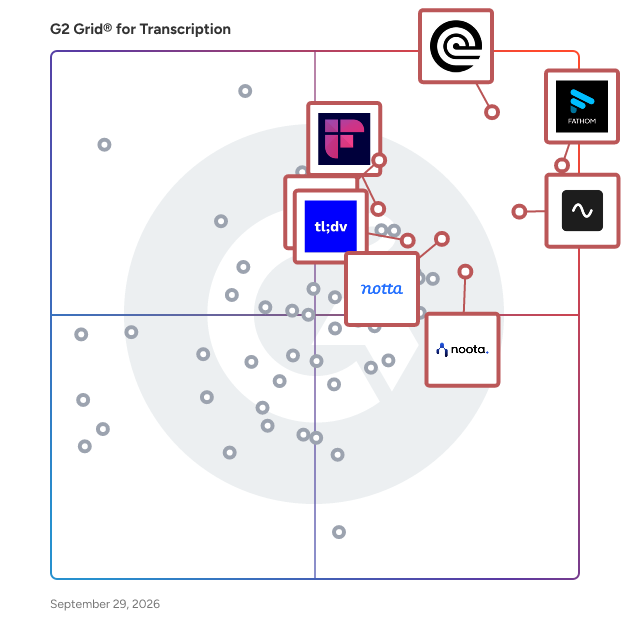
## G2 Grid® for Transcription Software
![G2 Grid® for Transcription Software plotting products by satisfaction and market presence](https://www.g2.com/categories/transcription/grids.png?focus%5B%5D=156120&focus%5B%5D=22198&focus%5B%5D=136204&focus%5B%5D=21471&focus%5B%5D=109345&focus%5B%5D=41250&focus%5B%5D=1195853&focus%5B%5D=84794)
Highlighted products: Fathom, Rev, Riverside, Google Cloud Speech-to-Text, Otter.ai, Fireflies.ai, Noota, and Speechmatics.
Underlying data: [Grid® JSON](https://www.g2.com/categories/transcription/grids.json?focus%5B%5D=fathom-video&amp;focus%5B%5D=rev&amp;focus%5B%5D=riverside&amp;focus%5B%5D=google-cloud-speech-to-text&amp;focus%5B%5D=otter-ai&amp;focus%5B%5D=fireflies-ai&amp;focus%5B%5D=noota&amp;focus%5B%5D=speechmatics)


## How Many Transcription Software Products Does G2 Track?
**Total Products under this Category:** 244

### Category Stats (Jul 2026)
- **Average Rating**: 4.59/5 The average rating of products in this category, based on all submitted ratings
- **Top Trending Product**: Video To Text AI (+0.94%) - Among all products in this category, Video To Text AI recorded the largest rating increase compared to last month
*Last updated: July 17, 2026*


## How Does G2 Rank Transcription Software Products?

**Why You Can Trust G2's Software Rankings:**

- 30 Analysts and Data Experts
- 38,600+ Authentic Reviews
- 244+ Products
- Unbiased Rankings

G2's software rankings are built on verified user reviews, rigorous moderation, and a consistent research methodology maintained by a team of analysts and data experts. Each product is measured using the same transparent criteria, with no paid placement or vendor influence. While reviews reflect real user experiences, which can be subjective, they offer valuable insight into how software performs in the hands of professionals. Together, these inputs power the G2 Score, a standardized way to compare tools within every category.


## Which Transcription Software Is Best for Your Use Case?

- **Leader:** [Fathom](https://www.g2.com/products/fathom-video/reviews)
- **Highest Performer:** [HeyMarvin](https://www.g2.com/products/heymarvin/reviews)
- **Easiest to Use:** [Riverside](https://www.g2.com/products/riverside/reviews)
- **Top Trending:** [tl;dv](https://www.g2.com/products/tl-dv/reviews)
- **Best Free Software:** [Fathom](https://www.g2.com/products/fathom-video/reviews)


---

**Sponsored**

### Fathom

Fathom is the #1-rated AI meeting partner that captures what matters and turns every conversation into clear, actionable outcomes. It surfaces decisions, makes every meeting searchable, and syncs insights directly into CRM and productivity tools – eliminating manual work. Named to G2’s 2026 Best Software Awards Top 100, and recognized by HubSpot as its 2025 Most Used App of the Year, Fathom is trusted by hundreds of thousands of companies worldwide to help individuals stay focused, teams stay aligned, and organizations move faster.


[Visit website](https://www.g2.com/external_clickthroughs/record?secure%5Bad_program%5D=paid_promo&amp;secure%5Bad_slot%5D=category_product_list&amp;secure%5Bcategory_id%5D=2358&amp;secure%5Bchosen_at%5D=2026-07-18T09%3A14%3A49Z&amp;secure%5Bmedium%5D=sponsored&amp;secure%5Bprioritized%5D=false&amp;secure%5Bproduct_id%5D=156120&amp;secure%5Bresource_id%5D=2358&amp;secure%5Bresource_type%5D=Category&amp;secure%5Bsource_type%5D=category_page&amp;secure%5Bsource_url%5D=https%3A%2F%2Fwww.g2.com%2Fcategories%2Ftranscription%3Fpage%3D3&amp;secure%5Btoken%5D=a60bcf5b52e9f4ad0435549d6090f24c93f3edddcaaf6e40cb14452eab636d7d&amp;secure%5Burl%5D=https%3A%2F%2Ffathom.video%2Fpricing&amp;secure%5Burl_type%5D=paid_promos)

---

## What Are the Top-Rated Transcription Software Products in 2026?
### 1. [SmartCaptions](https://www.g2.com/products/smartcaptions/reviews)
SmartCaptions is a powerful Adobe Premiere Pro extension that turns your audio into accurate, time-coded transcripts. Edit faster, create better content, and save time with our AI-powered transcription.


**Who Is the Company Behind SmartCaptions?**

- **Seller:** [SmartCaptions](https://www.g2.com/sellers/smartcaptions)
- **HQ Location:** N/A
- **LinkedIn® Page:** https://www.linkedin.com/company/No-Linkedin-Presence-Added-Intentionally-By-DataOps (1 employees on LinkedIn®)


### 2. [Snackable AI](https://www.g2.com/products/snackable-ai/reviews)
Snackable AI is a cloud-based platform that finds the most powerful moments in your video (like webinars) and audio (like podcasts) FOR you, so you can share those insights faster than ever before. \* navigate long video easily with AI-generated chapters and transcripts \* let AI highlight key moments (snacks) for you automatically \* share them as engaging short clips (audiograms) seamlessly \* organize everything in one media library


**Who Is the Company Behind Snackable AI?**

- **Seller:** [Snackable AI](https://www.g2.com/sellers/snackable-ai)
- **HQ Location:** N/A
- **LinkedIn® Page:** https://www.linkedin.com/company/No-Linkedin-Presence-Added-Intentionally-By-DataOps (1 employees on LinkedIn®)


### 3. [Sound Transcription](https://www.g2.com/products/sound-transcription/reviews)
Transcription software for automated audio and video transcription, delivered to your inbox in minutes.


**Who Is the Company Behind Sound Transcription?**

- **Seller:** [Sound Transcription](https://www.g2.com/sellers/sound-transcription)
- **HQ Location:** N/A
- **LinkedIn® Page:** https://www.linkedin.com/company/No-Linkedin-Presence-Added-Intentionally-By-DataOps (1 employees on LinkedIn®)


### 4. [SpeechFlow](https://www.g2.com/products/speechflow/reviews)
&quot;SpeechFlow is a cutting-edge speech-to-text tool that empowers businesses and individuals with unparalleled accuracy and efficiency. Our advanced AI technology ensures precise transcription of audio and video content into written text, supporting up to 14 languages, beyond just English. Main Features: Multilingual Transcriptions: Overcome language barriers with support for 14 languages. Get accurate and reliable transcriptions in diverse linguistic contexts. All-in-One Transcription Solution: API &amp; Online Platform：For enterprises and individuals, SpeechFlow offers a speech recognition API interface and online transcription features, which are simple and easy to use. Accurate Transcriptions: Benefit from industry-leading accuracy, understanding industry-specific terminology, and context for comprehensive and reliable transcriptions. Industry-Specific Models: Tailored to meet the unique needs of various sectors, our well-trained speech recognition models enhance operational efficiency in healthcare, finance, legal, customer service, and education. Lightning-Fast Processing: Experience rapid transcriptions, with 1 hour of audio transcribed in under 3 minutes, saving you valuable time. Free extended trial every month：5 hours of free speech-to-text transcription per user per month Cost-Effective Pricing: Prices as low as $0.0002 per second,pay only for what you use with our flexible pay-as-you-go pricing Main Applicability: Contact Centers: Extract valuable insights from customer conversations, improve agent productivity, and reduce costs. Video Captioning: Enhance accessibility and reach a broader audience with accurate video transcriptions. Virtual Meetings: Easily transcribe meetings and get insights from every discussion, regardless of background noise. Media Monitoring: Build a safer platform by detecting sensitive content like hate speech and profanity with high accuracy. Content Creators: Effortlessly transcribe interviews and lectures for focused analysis. Translators and Interpreters: Enhance workflow and deliver precise translations. Requirements for Use: SpeechFlow top-notch accuracy, fast processing, multilingual support, and cost-effective pricing make SpeechFlow the ultimate choice for all your speech-to-text needs. Click now to streamline your transcription process and take your business to the next level with SpeechFlow!&quot;


**Average Rating:** 4.4/5.0
**Total Reviews:** 6

**Who Is the Company Behind SpeechFlow?**

- **Seller:** [SpeechFlow](https://www.g2.com/sellers/speechflow)
- **HQ Location:** HONGKONG, HK
- **LinkedIn® Page:** https://www.linkedin.com/company/speechflow/ (1 employees on LinkedIn®)

**Who Uses This Product?**
- **Company Size:** 83% Small-Business, 17% Enterprise


#### What Are SpeechFlow's Pros and Cons?

**Pros:**

- Ease of Use (1 reviews)
- Real-time Transcription (1 reviews)
- Speed (1 reviews)


### What Do G2 Reviewers Say About SpeechFlow?
*AI-generated summary from verified user reviews*

**Pros:**

- Users value the **ease of use** in SpeechFlow, appreciating its clear organization and accessible tools.
- Users value the **real-time transcription** of SpeechFlow, enabling precise and efficient content marketing strategies.
- Users value the **speed** of SpeechFlow, enabling quick and precise transcriptions for effective content marketing.


#### What Are Recent G2 Reviews of SpeechFlow?

**"[User friendly and helpful to usè](https://www.g2.com/survey_responses/speechflow-review-10250458)"**

**Rating:** 4.5/5.0 stars
*— Sana F.*

[Read full review](https://www.g2.com/survey_responses/speechflow-review-10250458)

---

**"[Most effective speech-to-text API service!](https://www.g2.com/survey_responses/speechflow-review-8727308)"**

**Rating:** 4.0/5.0 stars
*— ANUROOP F.*

[Read full review](https://www.g2.com/survey_responses/speechflow-review-8727308)

---


### 5. [Speech to Text](https://www.g2.com/products/innefu-labs-speech-to-text/reviews)
Speech to Text is an advanced AI -powered audio transcription solution that automatically converts recorded calls, radio transmissions, and satellite communications into accurate, readable text. With support for over 50 languages, background noise reduction, and audio enhancement, it ensures critical information is never missed. Designed for defense, emergency, and intelligence use cases, it simplifies documentation and accelerates response times.


**Who Is the Company Behind Speech to Text?**

- **Seller:** [Innefu Labs](https://www.g2.com/sellers/innefu-labs-88b9b2a4-270b-486c-93c0-0b2dc0d2f2ba)
- **Year Founded:** 2010
- **HQ Location:** New Delhi, IN
- **LinkedIn® Page:** https://www.linkedin.com/company/innefulabs/ (326 employees on LinkedIn®)


### 6. [Spext](https://www.g2.com/products/spext/reviews)
Spext Editor Studio is an AI-powered platform designed to simplify the editing and sharing of audio and video recordings. By transforming media files into editable text documents, Spext enables users to edit recordings as easily as editing a text document. This innovative approach streamlines the content creation process, making it accessible and efficient for professionals across various industries. Key Features and Functionality: - Text-Based Editing: Edit audio and video recordings by modifying the transcribed text, allowing for intuitive and precise adjustments. - Autopilot Editing: Automatically removes filler words like &quot;umms&quot; and &quot;uhhs,&quot; eliminates background noise, and adjusts speaker volumes to enhance audio quality. - Brand Integration: Set up a brand kit once, and Spext will automatically apply logos, intros, and other branding elements to all recordings. - Content Repurposing: Convert recordings into various formats such as podcasts, audiograms, and AI voice narrations, facilitating diverse content creation. - Collaborative Workflows: Enable teams to collaborate effectively by providing tools to clip user research interviews, edit screen recordings, and share webinar highlights. - Searchable Archives: Create searchable links for recordings, allowing audiences to easily find and highlight key parts, enhancing engagement and feedback. Primary Value and User Solutions: Spext Editor Studio addresses the challenges of traditional media editing by offering a user-friendly, text-based interface that simplifies the editing process. By automating tedious tasks such as filler word removal and noise reduction, it saves users significant time and effort. The platform&#39;s ability to repurpose content into multiple formats maximizes the value of each recording, catering to various content distribution needs. Additionally, its collaborative features and searchable archives enhance team productivity and audience engagement, making it an invaluable tool for content creators, marketers, and educators.


**Who Is the Company Behind Spext?**

- **Seller:** [Spext](https://www.g2.com/sellers/spext)
- **HQ Location:** N/A
- **LinkedIn® Page:** https://www.linkedin.com/company/No-Linkedin-Presence-Added-Intentionally-By-DataOps (1 employees on LinkedIn®)


### 7. [Subanana](https://www.g2.com/products/subanana/reviews)
What is Subanana? Subanana is an AI-powered speech-to-text platform built for content creators, businesses, and teams who need fast, accurate subtitles, transcriptions, and live captions across 80+ languages. Trusted by over 100,000 users and teams — and the most widely adopted AI subtitle and transcription tool in Hong Kong — Subanana turns spoken content into polished, actionable text in minutes. Subtitling Made Simple Subanana generates precise AI subtitles from YouTube links, uploaded video/audio files, or in-app recordings. Its built-in subtitle editor lets users review and adjust text and timecodes directly in the browser, then export in multiple formats including SRT, DOCX, CSV, and TXT. Users can also download videos with subtitles already embedded — no post-production software required. Meeting &amp; Interview Transcription For professionals and remote teams, Subanana transcribes meetings and interviews with automatic speaker identification. Users can upload recordings, paste a YouTube link, record directly, or connect their Google Calendar to schedule a recording bot for Google Meet and Microsoft Teams calls. Beyond verbatim transcripts, Subanana&#39;s AI generates meeting summaries, action items, and chapter highlights — giving teams a complete, searchable record of every conversation. Users can also chat with the AI to instantly locate key details within their meetings. Live Transcription &amp; Translation Subanana enables real-time speech-to-text captioning for conferences, multilingual events, and cross-border collaboration. Audio is transcribed and translated live, with bilingual content displayed side by side on Subanana&#39;s web and mobile interface. Attendees can join via QR code to follow along on their own devices. Transcription and translation results are saved for later review, while audio is never stored — keeping sensitive conversations private. Why Teams Choose Subanana Subanana delivers up to 99% accuracy as reported by users, with the team continuously benchmarking the latest AI models on a weekly basis. The platform supports free and paid plans — free users can process the first 15 minutes of any file, while subscribers unlock files up to 15 GB, watermark-free exports, and up to 4K video output. Paid plans start at $9/month with no commitment — cancel anytime. Whether you&#39;re a YouTuber adding multilingual subtitles, a team documenting every meeting, or an event organizer captioning a live conference, Subanana is the all-in-one AI platform that turns speech into content.


**Who Is the Company Behind Subanana?**

- **Seller:** [Datax Limited](https://www.g2.com/sellers/datax-limited)
- **HQ Location:** N/A
- **LinkedIn® Page:** https://www.linkedin.com/company/No-Linkedin-Presence-Added-Intentionally-By-DataOps (1 employees on LinkedIn®)


### 8. [Subtitling.net AI Subtitle Generator](https://www.g2.com/products/subtitling-net-ai-subtitle-generator/reviews)
Subtitling.net creates professional subtitles, not just captions. Built on more than 40 years of subtitling expertise, the AI subtitle generator produces subtitles that are easy to read, easy to follow, and comfortable to watch. While many subtitle tools focus on converting speech into text, Subtitling.net focuses on how that text appears on screen. The result is subtitles that feel more natural, look more professional, and typically require far less editing before publication. Subtitling.net combines AI subtitle generation with professional subtitling practices developed through decades of work for television, corporate, educational, and online video content. Instead of treating subtitles as a transcript displayed on screen, the platform is designed around the viewing experience, helping audiences follow both the video and the subtitles at the same time. From a single video upload, users receive both a downloadable SRT subtitle file and a video with subtitles burned in. Subtitles can be generated in the original language or translated across more than 50 languages, then reviewed and adjusted in the built-in subtitle editor before export. Key features include: • AI subtitle generation from video files • Downloadable SRT subtitle files • Burned-in subtitle video exports up to 4K • Built-in subtitle editor • Subtitle translation in 50+ languages • Free preview before purchase • Pay-as-you-go pricing with no subscription required Subtitling.net is used by content creators, businesses, educators, agencies, and professional subtitlers who want professional-quality subtitles without complex workflows.


**Who Is the Company Behind Subtitling.net AI Subtitle Generator?**

- **Seller:** [Subtitling.net](https://www.g2.com/sellers/subtitling-net)
- **HQ Location:** N/A
- **LinkedIn® Page:** https://www.linkedin.com/company/No-Linkedin-Presence-Added-Intentionally-By-DataOps (1 employees on LinkedIn®)


### 9. [TalkLog](https://www.g2.com/products/talklog/reviews)
Upload any coaching or therapy session recording. Get a speaker-labeled transcript with timestamps, AI-generated summary of goals, themes, breakthroughs, and next steps - in under 5 minutes. 10 sessions transcriptions for free


**Who Is the Company Behind TalkLog?**

- **Seller:** [TalkLog](https://www.g2.com/sellers/talklog)
- **HQ Location:** N/A
- **LinkedIn® Page:** https://www.linkedin.com/company/No-Linkedin-Presence-Added-Intentionally-By-DataOps (1 employees on LinkedIn®)


### 10. [TalkMark](https://www.g2.com/products/talkmark/reviews)
TalkMark is a Dutch-first AI transcription application that converts speech to text with 95%+ accuracy in Dutch, English, German, and French. Built specifically for the Dutch and Belgian market, TalkMark uses a fine-tuned version of OpenAI Whisper Large-V3, trained on thousands of hours of Dutch audio—including regional dialects such as Flemish, Frisian, Limburgish, and Brabant accents. TalkMark automatically detects languages and seamlessly handles code-switching within a single recording—making it ideal for bilingual Dutch-English business meetings. The platform can recognize and label up to 10 speakers per recording. Key Features Real-time and batch transcription with 95%+ accuracy for Dutch AI-generated meeting summaries with clear action items Automatic speaker recognition (up to 10 speakers) Code-switching detection between Dutch, English, German, and French Export options: PDF, Word (.docx), TXT, CSV, SRT, and VTT Advanced search across all transcriptions Tags and categorization for easy organization Team workspaces for collaboration (Business tier) API access and webhook integrations (Business tier) Who It&#39;s For TalkMark is designed for professionals who rely on accurate transcription: Lawyers documenting client conversations Journalists transcribing interviews Students processing lecture recordings Teams automating meeting notes Unlike generic transcription tools, TalkMark understands Dutch compound words, place names, and technical terminology—areas where international tools often fall short. Privacy &amp; Compliance Privacy and compliance are at the core of TalkMark’s architecture: All data is stored exclusively within the EU (Frankfurt, Germany) Fully GDPR-compliant End-to-end encryption No audio data is sold or used for AI training This makes TalkMark suitable for regulated industries such as legal, healthcare, and government. Pricing Free Trial: 7 days, including 120 minutes Basic: €9.99/month – 400 minutes Pro: €19.99/month – 1,000 minutes + real-time transcription &amp; speaker recognition Business: €49.99/month – 2,500 minutes + team features, API access, and SLA guarantees Annual billing offers approximately 17% savings. Additional minutes can be purchased separately. Availability TalkMark is available on: iOS Android Web browser Supported payment methods include iDEAL, credit card, and Wero—tailored for European users.


**Who Is the Company Behind TalkMark?**

- **Seller:** [Securyflex](https://www.g2.com/sellers/securyflex)
- **Year Founded:** 2025
- **HQ Location:** Woerdense Verlaat, NL
- **LinkedIn® Page:** https://www.linkedin.com/company/talkmark/ (1 employees on LinkedIn®)


### 11. [Transcribe by Wreally](https://www.g2.com/products/transcribe-by-wreally/reviews)
Transcribe saves thousands of hours every month in transcription time for journalists, lawyers, podcasters, students and professional transcriptionists all over the world.


**Who Is the Company Behind Transcribe by Wreally?**

- **Seller:** [Wreally](https://www.g2.com/sellers/wreally)
- **Year Founded:** 2010
- **HQ Location:** N/A
- **LinkedIn® Page:** http://www.linkedin.com/company/wreally (2 employees on LinkedIn®)


### 12. [TranscribeLegal](https://www.g2.com/products/transcribelegal/reviews)
AI legal transcription starting at $0.25/minute. Upload depositions, hearings, or recorded statements and get court-ready transcripts with speaker identification — delivered same day, HIPAA compliant.


**Who Is the Company Behind TranscribeLegal?**

- **Seller:** [TranscribeLegal](https://www.g2.com/sellers/transcribelegal)
- **Year Founded:** 2024
- **HQ Location:** N/A
- **LinkedIn® Page:** https://www.linkedin.com/company/transcribelegal/ (1 employees on LinkedIn®)


### 13. [TranscribeNext](https://www.g2.com/products/transcribenext/reviews)
Description of Product для G2: TranscribeNext is an AI-powered transcription platform that converts audio and video into accurate, editable text in over 100 languages. Businesses, teams, researchers, educators, and content creators use it to turn meetings, interviews, lectures, podcasts, and videos into searchable documents — at up to 99.5% accuracy and in a fraction of the time manual transcription takes. Users can upload audio or video files, paste a YouTube link, or record meetings directly from Zoom, Google Meet, and Microsoft Teams. Every transcript includes automatic speaker detection and timestamps, while built-in AI summaries and action items surface the key takeaways from long recordings. A distraction-free editor makes it easy to review and refine transcripts before exporting to TXT, DOCX, PDF, SRT, VTT, or JSON, or copying directly into Google Docs and Microsoft Word. With support for 100+ languages, automatic language detection, secure cloud storage, and flexible subscription plans — including a free tier with no credit card required — TranscribeNext replaces hours of tedious manual work with fast, reliable, and scalable transcription for individuals and growing teams alike.


**Who Is the Company Behind TranscribeNext?**

- **Seller:** [Weapps](https://www.g2.com/sellers/weapps)
- **HQ Location:** N/A
- **LinkedIn® Page:** https://www.linkedin.com/company/No-Linkedin-Presence-Added-Intentionally-By-DataOps (1 employees on LinkedIn®)


### 14. [Transcribethis.io](https://www.g2.com/products/transcribethis-io/reviews)
Transcribethis.io is a highly accurate audio-to-text transcription solution, perfect for converting spoken words into written text.


**Who Is the Company Behind Transcribethis.io?**

- **Seller:** [Mighty Media](https://www.g2.com/sellers/mighty-media)
- **HQ Location:** N/A
- **LinkedIn® Page:** https://www.linkedin.com/company/No-Linkedin-Presence-Added-Intentionally-By-DataOps (1 employees on LinkedIn®)


### 15. [TranscribeToText.AI](https://www.g2.com/products/transcribetotext-ai/reviews)
TranscribeToText.ai, powered by Whisper AI, offers fast and accurate transcription of audio, video, and music files. With seamless subtitle generation and easy export options, it&#39;s the perfect tool for content creators, educators, and business professionals. Simple, reliable, and efficient.


**Who Is the Company Behind TranscribeToText.AI?**

- **Seller:** [Mithrilmobile OU](https://www.g2.com/sellers/mithrilmobile-ou)
- **HQ Location:** N/A
- **LinkedIn® Page:** https://www.linkedin.com/company/No-Linkedin-Presence-Added-Intentionally-By-DataOps (1 employees on LinkedIn®)


### 16. [Transcribe Video to Text](https://www.g2.com/products/transcribe-video-to-text/reviews)
Transcribe video to text instantly with our free AI video transcript generator. 99% accuracy, 100+ languages, speaker labels, timestamps, and TXT, PDF, DOCX, SRT/VTT export. No signup required.


**Who Is the Company Behind Transcribe Video to Text?**

- **Seller:** [Transcribe Video to Text](https://www.g2.com/sellers/transcribe-video-to-text)
- **HQ Location:** N/A
- **LinkedIn® Page:** https://www.linkedin.com/company/No-Linkedin-Presence-Added-Intentionally-By-DataOps (1 employees on LinkedIn®)


### 17. [Transcribr](https://www.g2.com/products/transcribr/reviews)
Bulk extract YouTube transcripts instantly from YouTube channels and playlists. AI-powered chat analysis &amp; summaries with YouTube channels, playlists, and videos.


**Who Is the Company Behind Transcribr?**

- **Seller:** [transcribr.io](https://www.g2.com/sellers/transcribr-io)
- **HQ Location:** N/A
- **LinkedIn® Page:** https://www.linkedin.com/company/No-Linkedin-Presence-Added-Intentionally-By-DataOps (1 employees on LinkedIn®)


### 18. [Transcripción+](https://www.g2.com/products/transcripcion/reviews)
Transcripciones de audio a texto en Chile. Garantizamos un servicio confidencial, de excelencia y en el tiempo adecuado. Podemos emitir factura y boleta de servicios.


**Who Is the Company Behind Transcripción+?**

- **Seller:** [Transcripcion+](https://www.g2.com/sellers/transcripcion)
- **Year Founded:** 2018
- **HQ Location:** Santiago, CL
- **LinkedIn® Page:** https://www.linkedin.com/company/transcripcion-plus (13 employees on LinkedIn®)


### 19. [Transcriptingly](https://www.g2.com/products/transcriptingly/reviews)
Transcriptingly makes it easy to convert YouTube video content into clean text transcripts. Simply provide a video link or upload video, and generate readable transcripts you can use for blogs, captions, notes, or documentation. It’s ideal for creators, marketers, and educators who want to repurpose video content quickly and efficiently.


**Who Is the Company Behind Transcriptingly?**

- **Seller:** [Transcriptingly](https://www.g2.com/sellers/transcriptingly)
- **HQ Location:** N/A
- **LinkedIn® Page:** https://www.linkedin.com/company/transcriptingly/ (1 employees on LinkedIn®)


### 20. [Transcripto](https://www.g2.com/products/transcripto/reviews)
Transcripto is an AI transcription tool that converts video, audio, YouTube, TikTok, and Instagram links into clean, timestamped text. It supports speaker detection, 100+ languages, translation, and exports such as TXT, SRT, VTT, and DOCX. Users can start with free daily credits and no credit card required.


**Who Is the Company Behind Transcripto?**

- **Seller:** [Transcripto](https://www.g2.com/sellers/transcripto)
- **HQ Location:** N/A
- **LinkedIn® Page:** https://www.linkedin.com/company/No-Linkedin-Presence-Added-Intentionally-By-DataOps (1 employees on LinkedIn®)


### 21. [Transcriptum](https://www.g2.com/products/transcriptum/reviews)
Transcriptum is an AI-powered platform for transcribing and analyzing audio, video, and YouTube content. Upload via drag-and-drop or share cloud links (Google Drive, Dropbox, OneDrive, iCloud, WeTransfer). Transcripts include word-level timestamps, speaker labels (diarization), and click-to-seek navigation in a clean editor. An integrated AI assistant generates summaries, highlights, action items, and answers questions about your recordings. Translate and localize content with DeepL, then export to DOCX/PDF, SRT/VTT/ASS, CSV/JSON. Designed for desktop and mobile, with EU-based hosting, HTTPS encryption, fine-grained access controls, and GDPR-aligned data practices.


**Who Is the Company Behind Transcriptum?**

- **Seller:** [Daniel Joachim Miksch](https://www.g2.com/sellers/daniel-joachim-miksch)
- **HQ Location:** N/A
- **LinkedIn® Page:** https://www.linkedin.com/company/No-Linkedin-Presence-Added-Intentionally-By-DataOps (1 employees on LinkedIn®)


### 22. [Transkribieren](https://www.g2.com/products/transkribieren/reviews)
Transkribieren is a fast and accurate audio-to-text transcription assistant, making transcribing a breeze.


**Who Is the Company Behind Transkribieren?**

- **Seller:** [Transkribieren.xyz](https://www.g2.com/sellers/transkribieren-xyz)
- **HQ Location:** N/A
- **LinkedIn® Page:** https://www.linkedin.com/company/No-Linkedin-Presence-Added-Intentionally-By-DataOps (1 employees on LinkedIn®)


### 23. [TransPocket](https://www.g2.com/products/transpocket/reviews)
Transpocket is a cloud-based, AI-powered speech-to-text platform that turns audio or video into accurate, searchable transcripts, captions, and translations in 100+ languages. Users can record, upload, or import links and receive transcripts, summaries, and subtitles within minutes. Built-in dashboards, secure storage, and team collaboration features streamline content creation, localization, and knowledge sharing.


**Who Is the Company Behind TransPocket?**

- **Seller:** [Transpocket](https://www.g2.com/sellers/transpocket)
- **HQ Location:** N/A
- **LinkedIn® Page:** https://www.linkedin.com/company/No-Linkedin-Presence-Added-Intentionally-By-DataOps (1 employees on LinkedIn®)


### 24. [Tucan.ai](https://www.g2.com/products/tucan-ai/reviews)
Manual writing and typing consumes an awful lot of resources, often leading to miscommunication and loss of information. Our AI-powered, NLP-based software helps professionals extract and share meaning in one click by transcribing, encoding and summarising your interviews, calls and meetings. Tucan.ai generates and archives smart summaries including discussed topics, open questions, decisions and follow-up actions. Our customisable solution can be upgraded with additional features such as specific file formats and export systems, individual integrations and targeted algorithm trainings.


**Who Is the Company Behind Tucan.ai?**

- **Seller:** [Tucan.ai](https://www.g2.com/sellers/tucan-ai)
- **Year Founded:** 2019
- **HQ Location:** Berlin, DE
- **LinkedIn® Page:** https://www.linkedin.com/company/tucan-ai (8 employees on LinkedIn®)


### 25. [Txtro](https://www.g2.com/products/txtro/reviews)
Txtro is an AI-powered platform that transforms long-form media into ready-to-publish written content in seconds. Users can upload YouTube videos, audio recordings, screen captures, or voice notes, and Txtro will transcribe and enhance them into polished text for blog posts, summaries, social media content, scripts, and more. With support for 120+ languages, real-time editing, custom AI prompts, and export options (PDF, Word, TXT), Txtro is built for creators, marketers, educators, and business teams who want to save hours on content production and repurpose media at scale.


**Who Is the Company Behind Txtro?**

- **Seller:** [Txtro](https://www.g2.com/sellers/txtro)
- **HQ Location:** N/A
- **LinkedIn® Page:** https://www.linkedin.com/company/No-Linkedin-Presence-Added-Intentionally-By-DataOps (1 employees on LinkedIn®)


## What Is Transcription Software?

[Collaboration &amp; Productivity Software](https://www.g2.com/categories/collaboration-productivity)

## What Software Categories Are Similar to Transcription Software?

- [Meeting Management Software](https://www.g2.com/categories/meeting-management)
- [Conversation Intelligence Software](https://www.g2.com/categories/conversation-intelligence)
- [AI Meeting Assistants Software](https://www.g2.com/categories/ai-meeting-assistants)


