Best Task Management Software - Page 16

How Many Task Management Software Products Does G2 Track?

Total Products under this Category: 563

Category Stats (Sep 2026)

  • Average Rating: 4.46/5 (↑0.01 vs Aug 2026) The average rating of products in this category, based on all submitted ratings
  • Top Trending Product: Chaser (+1.82%) - Among all products in this category, Chaser recorded the largest rating increase compared to last month

Last updated: September 01, 2026

How Does G2 Rank Task Management Software Products?

Why You Can Trust G2's Software Rankings:

  • 30 Analysts and Data Experts
  • 118,800+ Authentic Reviews
  • 563+ Products
  • Unbiased Rankings

G2's software rankings are built on verified user reviews, rigorous moderation, and a consistent research methodology maintained by a team of analysts and data experts. Each product is measured using the same transparent criteria, with no paid placement or vendor influence. While reviews reflect real user experiences, which can be subjective, they offer valuable insight into how software performs in the hands of professionals. Together, these inputs power the G2 Score, a standardized way to compare tools within every category.

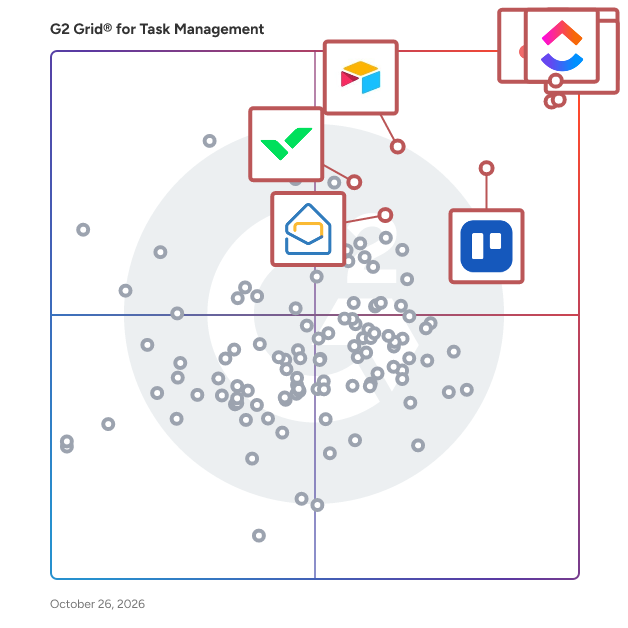
G2 Grid® for Task Management Software

G2 Grid® for Task Management Software plotting products by satisfaction and market presence

Highlighted products: Asana, ClickUp, monday AI Work Platform, Smartsheet, Trello, Airtable, Wrike, and Microsoft Planner.

Underlying data: [Grid® JSON](https://www.g2.com/categories/task-management-software/grids.json?focus%5B%5D=asana&focus%5B%5D=clickup&focus%5B%5D=monday-com&focus%5B%5D=smartsheet&focus%5B%5D=trello&focus%5B%5D=airtable&focus%5B%5D=wrike&focus%5B%5D=microsoft-planner)

Ikkendo

Ikkendo is an execution-first workspace built for solo professionals and small teams who are tired of switching between separate tools just to get one thing done. Instead of managing notes in one app, tasks in another, and asking AI questions in a browser tab, Ikkendo connects notes, task management, goal tracking, habit building, and AI-assisted research into a single, coherent daily loop. The core idea is simple: work shouldn't lose context every time it moves from one stage to the next. In Ikkendo, notes convert directly into tasks with one click. Tasks can be linked to broader goals, so daily work stays connected to what actually matters. A dedicated "Questions" module handles decisions that need real thinking, not just a checkbox to tick off, keeping reasoning and context alongside the eventual answer. For teams, Ikkendo supports shared workspaces with owner, admin, and member roles, so tasks can be assigned to specific teammates and progress tracked without a separate project management tool. A feature called Company Brain lets teams upload their own documents, which are indexed so AI-assisted research can pull from the team's actual knowledge when needed, rather than relying on generic web answers alone. Views include list, kanban board, and calendar layouts, with AI-assisted daily prioritization and AI-generated subtasks to help break larger work into manageable steps. Habits are tracked directly alongside tasks and goals, with streak tracking and AI-generated insights into patterns over time. Ikkendo is available as a web application and an installable Progressive Web App, working across desktop and mobile without a separate native app. Core functionality (notes, tasks, goals, habits) works offline after login, with a short grace period before reconnection is required; AI features require an active connection. The platform uses first-party analytics rather than third-party ad trackers, and offers optional local encryption for notes. Ikkendo was built solo by a founder who also runs a martial arts club, driven by a personal need for one connected system rather than three disconnected subscriptions. A free plan is available, with paid plans starting at $8.99/month for individuals and team pricing from $14/seat or $114/month flat for up to 10 members.

Average Rating: 5.0/5.0

Total Reviews: 1

Who Is the Company Behind Ikkendo?

  • Seller: Ikkendo
  • Year Founded: 2026
  • HQ Location: Belgrade, Serbia
  • Twitter: @ikkendoapp
  • LinkedIn® Page: www.linkedin.com
    1 employees on LinkedIn®

Who Uses This Product?

  • Company Size: 100% Small

What Are Recent G2 Reviews of Ikkendo?

Integrate

Integrate is the first real-time, cross-boundary project management platform built for complex and classified programs in government and defense technology. Ultra-secure and AI-native by design, Integrate connects teams, organizations, classification levels, and networks through one continuously synchronized schedule with precision access, spanning organizational and security boundaries including NIPRNet, SIPRNet, and JWICS. Users, teams, and partners operate from the same reality instead of conflicting, out-of-date snapshots. Backed by world-class investors including FPV Ventures, Integrate already works with dozens of customers and partners, including the U.S. Space Force.

Average Rating: 3.8/5.0

Total Reviews: 2

Who Is the Company Behind Integrate?

  • Seller: Integrate.co
  • Year Founded: 2022
  • HQ Location: Seattle, US
  • Twitter: @integrate_co
    176 Twitter followers
  • LinkedIn® Page: www.linkedin.com
    17 employees on LinkedIn®

Who Uses This Product?

  • Company Size: 67% Small, 33% Medium

What Do G2 Reviewers Say About Integrate?

AI-generated summary from verified user reviews

Pros
  • Users appreciate the ease of use of Integrate, enjoying its clean interface and intuitive scheduling features.
  • Users love the easy integration of Integrate, enabling quick adjustments and reducing scheduling conflicts effortlessly.
  • Users appreciate the easy integrations of Integrate, simplifying scheduling and reducing conflicts effortlessly.
  • Users love the easy setup of Integrate, finding it simple and stress-free for scheduling tasks effectively.
  • Users love the intuitive interface of Integrate, which simplifies scheduling and reduces conflicts effectively.
Cons
  • Users find the complexity of Integrate frustrating due to the absence of bulk editing and recurring shift templates.
  • Users note the limited features of Integrate, particularly missing bulk editing and recurring shift templates.
  • Users are frustrated by the missing features like bulk editing and recurring shift templates in Integrate.
  • Users find the lack of intuitive bulk editing and recurring shift templates challenging and frustrating in Integrate.
  • Users are frustrated by the lack of bulk editing and recurring shift templates, which limits their efficiency in managing tasks.

What Are Recent G2 Reviews of Integrate?

Kerika

Kerika is a task management tool with a very user-friendly design and seamless integration with Google Workspace, Microsoft Office 365, and Box. If you use Google Apps, sign up with your Google ID and your Kerika files will be stored in your own Google Drive, where they will remain under your ownership and control. Your IT folks will be thrilled to know that their document management policies are being automatically enforced! You can even create new Google Docs, Slides, Sheets, and Forms from inside Kerika and have them shared automatically with your board's team: Team Members get read+write access and Visitors get read-only access. If you prefer Microsoft, sign up with your Microsoft ID and your Kerika files will be stored in your own OneDrive and, yes, you can even create new Office documents from inside Kerika and have them shared automatically with your board's team! If you use Box, sign up with your Box ID and your Kerika files will be stored in your own Box account. You create new Box Notes from inside Kerika and have them shared automatically with your board's team. Add someone to a board's team and Kerika makes sure all the relevant files in your are shared with the new team member. Change someone's role on a board and Kerika will instantly update that person's access rights to your project files. All of this is done on a board-by-board basis, to give you maximum flexibility and privacy. Within an account you can have as many boards as you like, and each board can be as big as you need it to be. Kerika is the only task management tool that supports both Task Boards that can be used for Kanban-style or Scrum work, and Whiteboards that can be used for creativity. Kerika's Whiteboards are patented and contain other Whiteboards as well as files and Web content, live! Start your new board from scratch or use one of our templates to get started faster. Every board can be completely customized, with the workflow, tags, teams, tasks, and content that you need to get the job done. Each board can also be kept as private as you like, or shared with others in your account team. Everything in Kerika’s clean design, from adjusting automatically to different time zones and highlighting “while you were away” changes supports the needs of distributed and remote teams. Even if your board has thousands of tasks, a unique Highlights feature helps you quickly focus on what matters most to you, like what's assigned to you, or what needs attention. The Dashboard makes sure you stay on top of things when you have dozens of projects to watch over: it summarizes key information across all the boards you care about so you never feel lost or overwhelmed. Kerika is available in 38 languages! After a 30-day free trial (with no strings attached), you can buy a paid plan in 135 currencies. Purchasing annual subscriptions comes with a 30-day Money Back Guarantee.

Average Rating: 4.8/5.0

Total Reviews: 11

How Do G2 Users Rate Kerika?

  • Has the product been a good partner in doing business?: 10.0/10 (Category avg: 9.0/10)

Who Is the Company Behind Kerika?

  • Seller: Kerika
  • Year Founded: 2002
  • HQ Location: Issaquah, WA
  • Twitter: @kerika
    134 Twitter followers
  • LinkedIn® Page: www.linkedin.com
    5 employees on LinkedIn®

Who Uses This Product?

  • Company Size: 83% Small, 17% Medium

What Do G2 Reviewers Say About Kerika?

AI-generated summary from verified user reviews

Pros
  • Users appreciate the user-friendly interface of Kerika, making project management simple and efficient even with large boards.
  • Users value Kerika's powerful collaboration features, enhancing teamwork through real-time updates and intuitive task management.
  • Users commend the clean and intuitive UI of Kerika, making project management a breeze compared to other tools.
  • Users value the seamless app integration of Kerika with Google Drive, enhancing collaboration and file management efficiency.
  • Users appreciate the user-friendly interface of Kerika, enjoying its intuitive drag-and-drop functionality for task organization.
Cons
  • Users find the initial complexity of Kerika overwhelming and desire a mobile version for easier access.
  • Users note a need for improved third-party integration support to enhance their Kerika experience further.
  • Users note the lack of advanced features in Kerika, particularly for complex project customization needs.
  • Users find the limited customization options restrict their ability to effectively manage complex projects in Kerika.
  • Users note the missing advanced features and suggest better customization options for complex projects in Kerika.

What Are Recent G2 Reviews of Kerika?

What Are G2 Users Discussing About Kerika?

Lyearn

Lyearn is an AI-native workforce intelligence platform that turns learning, performance, and engagement into measurable business outcomes. Instead of guessing where skill gaps are or who's ready for what's next, Lyearn gives HR and business leaders real-time visibility into how work actually happens. At the core is a comprehensive AI-powered Learning Management System (LMS) paired with OKR-based performance management, so companies can train employees, set and track objectives, close skill gaps, and measure real impact, all from one platform. ✅ AI-powered LMS – Deliver structured, engaging, interactive learning experiences ✅ OKRs – Align teams to business goals and track performance in real time ✅ Performance Management – Continuous feedback, 1:1s, and data-backed reviews ✅ Employee Engagement & Recognition – Surveys, social recognition, real-time feedback ✅ Custom Branding & Integrations – Works with tools like Zoom, matches your brand Trusted by leading enterprises to scale learning, performance, and workforce intelligence in one place.

Average Rating: 4.3/5.0

Total Reviews: 3

How Do G2 Users Rate Lyearn?

  • Has the product been a good partner in doing business?: 9.2/10 (Category avg: 9.0/10)
  • Task Prioritization: 10.0/10 (Category avg: 8.8/10)
  • To-Do Lists: 10.0/10 (Category avg: 8.9/10)

Who Is the Company Behind Lyearn?

  • Seller: Lyearn
  • Year Founded: 2017
  • HQ Location: Gurugram, IN
  • LinkedIn® Page: www.linkedin.com
    25 employees on LinkedIn®

Who Uses This Product?

  • Company Size: 100% Small

What Are Recent G2 Reviews of Lyearn?

Matilda Workspace

The All-New All-In-One Workspace for Modern Teams Embracing the concept of a unified workspace, Matilda brings a powerful suite of best-in-class apps together in one place, allowing teams across the globe to connect, create, coordinate, and delight their customers effortlessly. With its mission to simplify technology, Matilda empowers organisations to do more with less, making it an essential tool for startups to Fortune 500 companies alike. Key Features: -Powerful Apps Included: Matilda comes packed with a suite of powerful applications including Docs, Projects, Tables, Chat, Customers, and Copilot, ensuring that teams have all the tools they need to succeed. - Create with Ease: With Docs, teams can co-edit in real time, making document creation and coordination seamless. This feature aims to replace Google Docs, Notion, and Coda, by providing a more integrated and efficient experience. - Streamlined Project Management: Matilda's Projects feature allows for effortless management and tracking of every aspect of your projects. With capabilities like auto-scheduling, it's designed to replace tools like Jira, Trello, and Asana. - Advanced Data Management: Although Tables are coming soon, they promise to redefine data handling by syncing data from hundreds of sources or creating new collections, aiming to replace tools like Airtable, Notion, and Segment. - Seamless Communication: Chat brings all team communication into one place, integrated across projects, tasks, and docs, providing an alternative to Slack and MS Teams. - Customer Relationship Management: The soon-to-be-released Customers feature will allow teams to effortlessly track leads and manage customer interactions in one streamlined interface, aiming to replace Salesforce and Hubspot. - AI-Powered Assistance: Copilot offers custom AI assistants to help automate and streamline workflows, aiming to replace AI tools like ChatGPT and Google Bard. Conclusion: Matilda Workspace stands out as an all-encompassing solution that not only promises to streamline and simplify the way teams work but also embraces the future with its AI-powered capabilities and commitment to sustainability. Whether you’re managing projects, coordinating with your team, handling customer relationships, or leveraging AI for automation, Matilda Workspace provides an intuitive, powerful, and adaptable platform for every kind of team to thrive. Try Matilda today and experience the future of work, designed to help you deliver projects on time, every time.

Average Rating: 4.7/5.0

Total Reviews: 14

How Do G2 Users Rate Matilda Workspace?

  • Has the product been a good partner in doing business?: 9.7/10 (Category avg: 9.0/10)

Who Is the Company Behind Matilda Workspace?

  • Seller: Matilda Workspace
  • Year Founded: 2024
  • HQ Location: San Francisco, California
  • Twitter: @matildaworkspce
    127 Twitter followers
  • LinkedIn® Page: www.linkedin.com
    2 employees on LinkedIn®

Who Uses This Product?

  • Company Size: 80% Small, 20% Medium

What Do G2 Reviewers Say About Matilda Workspace?

AI-generated summary from verified user reviews

Pros
  • Users love the seamless team collaboration within Matilda Workspace, simplifying communication and enhancing project management efficiency.
  • Users appreciate the rich functionalities of Matilda Workspace, streamlining project management and enhancing communication effortlessly.
  • Users find Matilda Workspace's ease of use exceptional, seamlessly integrating various tools for streamlined collaboration and task management.
  • Users appreciate the all-in-one functionality of Matilda Workspace, enhancing collaboration and simplifying project management.
  • Users appreciate the AI-powered Copilot in Matilda Workspace, enhancing efficiency and simplifying project management tasks.
Cons
  • Users notice missing features in Matilda Workspace, acknowledging potential improvements as it develops further in future updates.
  • Users note the lack of features in Matilda Workspace, highlighting the potential for future improvements and updates.
  • Users often face tiny bugs in Matilda Workspace, but the team is responsive and eager to improve the app.
  • Users find the learning curve challenging for some team members, though onboarding helps ease the transition.
  • Users feel that limited customization may restrict their experience with Matilda Workspace despite its other strong features.

What Are Recent G2 Reviews of Matilda Workspace?

MetaTask

Metatask is a business workflow and process organization solution ideal for teams conducting recurring internal processes such as approvals, on-boarding, and reviews. With features including workflow templates, internal process sharing, control process management, task management, custom forms, chat functionality, and zapier integration, Metatask provides the tools to help businesses create and organize their internal processes, for consistency across the brand. In order to help businesses and teams perform the same tasks consistently, Metatask provides the tools to create and define templates for business processes which can be assigned to specific teams and shared across the entire company. Users can start processes for common tasks such as onboarding, vacation requests, and more, and can see the progress of all ongoing or completed processes being carried out by other team members. Overdue tasks or processes can be identified by color-coded progress bars and red alerts outlining imminent or past due dates. Tasks can be delegated to the relevant team members when a process is created, and due dates can be set automatically based on pre-set parameters and trigger rules. Users can comment on tasks using the chat tool so that all conversations, files, and updates are attached to that particular chat. With the form functionality, users can extract important data from chat comments, emails, and attachments, and control who, when, and how users provide process information.

Average Rating: 5.0/5.0

Total Reviews: 1

How Do G2 Users Rate MetaTask?

  • Task Prioritization: 10.0/10 (Category avg: 8.8/10)
  • Creation & Assignment: 10.0/10 (Category avg: 9.0/10)
  • To-Do Lists: 10.0/10 (Category avg: 8.9/10)

Who Is the Company Behind MetaTask?

Who Uses This Product?

  • Company Size: 100% Small

What Are Recent G2 Reviews of MetaTask?

MinuteShark

More than just a timer: MinuteShark gives you a dashboard with your timer, widgets & productivity features — plus MinuteShark AI to log time, start timers, manage work, and pull reports in plain English. Everything you need to support you through the day - all in a beautiful time tracker you and your team will actually want to use. Built with multitaskers in mind. Keep tabs on your clients, projects, and tasks with no-nonsense, no-clutter project management. Access your account from your browser, phone or tablet with seamless cross-device cloud syncing. Intuitive, modern design your team will love using MinuteShark AI: say what you need, confirm the proposal, and get it done Switch tasks like a pro with features like Starred Tasks, Recent Tasks, To-Do Task Lists, and a power search bar to find anything - fast. Pomodoro Timer Beautiful Reports Generate invoices with the simple and intuitive Billable Rates feature. Daily Productivity Hub: Manage personal notes, see your daily progress at a glance, and view assigned tasks all from one screen to maintain focus and team productivity. Simple project management: keep notes on your clients, projects, and tasks. Rich text descriptions, links and attachments - simple and unbloated. Invite team members Different roles: Admin, Team Leader, Regular User, and Custom Roles Clients, Projects, Tasks, and Subtasks Track project cost, revenue, and time estimates Filter reports by user, team, project, task and dates Cloud sync Stop guessing where your time (and money) goes. MinuteShark turns raw data into powerful, beautiful reports that unlock hidden project insights — and MinuteShark AI helps you capture that data in the moment.

Average Rating: 4.5/5.0

Total Reviews: 1

Who Is the Company Behind MinuteShark?

Who Uses This Product?

  • Company Size: 100% Small

What Do G2 Reviewers Say About MinuteShark?

AI-generated summary from verified user reviews

Pros
  • Users find MinuteShark to be very easy to use, enabling quick setup and efficient time tracking without assistance.
  • Users praise the easy setup of MinuteShark, allowing quick onboarding and seamless time tracking with colleagues.
  • Users love the easy-to-use time tracking feature of MinuteShark, allowing quick setup and smooth collaboration.
  • Users find the user-friendly interface of MinuteShark easy to navigate, enabling quick time tracking without assistance.

What Are Recent G2 Reviews of MinuteShark?

moo.do

Moo.do is the task manager for everything. Email is now a todo list. Get it together

Average Rating: 4.5/5.0

Total Reviews: 1

Who Is the Company Behind moo.do?

  • Seller: moo.do
  • HQ Location: N/A
  • Twitter: @MooDoApp
    540 Twitter followers
  • LinkedIn® Page: www.linkedin.com
    1 employees on LinkedIn®

Who Uses This Product?

  • Company Size: 100% Medium

What Are Recent G2 Reviews of moo.do?

What Are G2 Users Discussing About moo.do?

Nova

Nova is an all-in-one productivity tool. With Nova you can freely choose which components to add to your projects and which you need for productivity, without any pre-set template.

Average Rating: 3.0/5.0

Total Reviews: 1

How Do G2 Users Rate Nova?

  • Task Prioritization: 8.3/10 (Category avg: 8.8/10)
  • Creation & Assignment: 8.3/10 (Category avg: 9.0/10)
  • To-Do Lists: 8.3/10 (Category avg: 8.9/10)

Who Is the Company Behind Nova?

Who Uses This Product?

  • Company Size: 100% Medium

Nurture CRM

Nurture allows you to engage all your prospects and collect payments on-time. Manage all your enquiries, students, payments & batches of your Institute with one super app. Nurture them effectively to scale your growth! Nurture App is a technology company that believes in delivering helpful, easy, and result-focused solutions. Together with our payment gateway partners, we offer better payment solutions and services by addressing the fundamental issues in the industry between what’s good for institutes and what’s suitable for students. We want to profit with our members, not from them. That’s why Nurture App doesn’t rely on onboarding fee, migration fee, or customer requirements. It Feels like progress.

Average Rating: 3.5/5.0

Total Reviews: 1

How Do G2 Users Rate Nurture CRM?

  • Has the product been a good partner in doing business?: 10.0/10 (Category avg: 9.0/10)
  • Task Prioritization: 6.7/10 (Category avg: 8.8/10)
  • Creation & Assignment: 8.3/10 (Category avg: 9.0/10)
  • To-Do Lists: 6.7/10 (Category avg: 8.9/10)

Who Is the Company Behind Nurture CRM?

Who Uses This Product?

  • Company Size: 100% Small

What Do G2 Reviewers Say About Nurture CRM?

AI-generated summary from verified user reviews

Pros
  • Users value the efficiency of automation in Nurture CRM for managing fee collection tasks seamlessly.
  • Users appreciate the exceptional customer support from Nurture CRM, which enhances their experience with timely assistance.
  • Users find Nurture CRM very easy to use, enjoying efficient fee automation and excellent support during implementation.
  • Users value the efficiency of Nurture CRM, enhancing fee collection management through seamless automation and user-friendly implementation.
  • Users find the implementation ease of Nurture CRM exceptional, enhancing efficiency with excellent support and automation.
Cons
  • Users face integration issues with Nurture CRM, particularly in setting up reminders and payment gateways for international fees.
  • Users find the learning curve challenging, particularly when adjusting reminder settings and payment integration options.

One24

A complete software program created to enhance and streamline different IT organizational operations

Average Rating: 5.0/5.0

Total Reviews: 1

How Do G2 Users Rate One24?

  • Has the product been a good partner in doing business?: 10.0/10 (Category avg: 9.0/10)

Who Is the Company Behind One24?

Who Uses This Product?

  • Company Size: 100% Medium

What Do G2 Reviewers Say About One24?

AI-generated summary from verified user reviews

Cons
  • Users experience integration issues with One24, as it lacks compatibility with other platforms, hindering usability.

What Are Recent G2 Reviews of One24?

PeerBie

Peerbie is an all-in-one team collaboration platform designed to boost productivity within teams. It centralizes tasks, projects, messages, and events in one integrated platform, making it easier for teams to collaborate, communicate, and manage their work effectively. Peerbie offers a range of tools to help manage distributed teams by measuring productivity and enhancing engagement through structured communication and custom workflows. It also features a suite of analytical tools to provide insights that help leaders measure and improve the performance of projects and teams. Whether for small to midsize businesses or larger enterprises, Peerbie is engineered to streamline workflows, reduce tool fatigue, and support a seamless planning and execution process.

Average Rating: 4.5/5.0

Total Reviews: 2

How Do G2 Users Rate PeerBie?

  • Has the product been a good partner in doing business?: 8.3/10 (Category avg: 9.0/10)

Who Is the Company Behind PeerBie?

  • Seller: PeerBie
  • Year Founded: 2018
  • HQ Location: San Francisco, US
  • LinkedIn® Page: www.linkedin.com
    12 employees on LinkedIn®

Who Uses This Product?

  • Company Size: 50% Medium, 50% Small

What Do G2 Reviewers Say About PeerBie?

AI-generated summary from verified user reviews

Pros
  • Users value the easy communication in PeerBie, streamlining teamwork without the need for multiple tools.
  • Users praise the cooperative support team of PeerBie, enhancing productivity with great product features.
  • Users appreciate the ease of use of PeerBie, simplifying planning, communication, and collaboration in one platform.
  • Users highlight the efficiency of PeerBie, noting its simple UI/UX and effective features that boost productivity.
  • Users value the intuitive design of PeerBie, praising its simplicity and efficiency for enhancing productivity.
Cons
  • Users find the learning curve steep, making it challenging to convince teams to effectively use PeerBie.
  • Users desire greater integration support with PeerBie, as current options feel limited and restrictive.
  • Users find PeerBie’s interface not intuitive, making it challenging to get teams on board effectively.

What Are Recent G2 Reviews of PeerBie?

pinnery

An online taskboard solution to organize tasks, collaborate with team members, track progress, record time, track budget, and more.

Average Rating: 5.0/5.0

Total Reviews: 1

Who Is the Company Behind pinnery?

  • Seller: Rowisoft
  • Year Founded: 2000
  • HQ Location: Hahnbach, DE
  • LinkedIn® Page: www.linkedin.com
    2 employees on LinkedIn®

Who Uses This Product?

  • Company Size: 100% Medium

What Are Recent G2 Reviews of pinnery?

What Are G2 Users Discussing About pinnery?

Plaky

Plaky is a project and work management platform that helps teams plan projects, organize tasks, and manage workflows in a collaborative and structured workspace. Plaky is used by teams that need a clear and flexible way to structure their work and keep projects moving forward efficiently. It supports use cases such as task management, project planning, workflow tracking, and cross-team collaboration. Users can create project boards, break work into tasks and subtasks, assign responsible persons, set deadlines, and monitor progress in real time. This helps teams maintain visibility into priorities, ownership, and timelines across multiple projects simultaneously. One of Plaky’s key strengths is its flexibility, allowing teams to adapt the platform to their own workflows instead of adjusting their princesses to a rigid system. Users can customize fields, statuses, and views to match their way of working, whether they are managing simple task lists or more complex multi-stage projects. This adaptability allows teams across marketing, product, operations, HR and other departments to use Plaky in a way that fits their needs without forcing rigid structures. Plaky also improves collaboration by allowing users to comment directly on tasks, share files, and keep all relevant information in one place. This reduces the need for multiple tools and helps teams maintain a single source of truth for their work. As a result, communication becomes more contextual and easier to follow. The platform is web-based and accessible from anywhere, making it suitable for both in-office and remote teams. It supports real-time updates so team members always have up-to-date view of project status. Additionally, integrations with communication and time tracking tools help teams connect planning with execution and reporting within a broader productivity ecosystem. Plaky helps teams stay organized, improve visibility into work, and manage projects more efficiently from start to finish. Organizes projects with boards, tasks, and structured workflows. Provides real-time visibility into progress and responsibilities. Supports customization to fit different team processes. Enables collaboration through comments and file sharing. Connects with other tools to support complete workflows.

Average Rating: 3.5/5.0

Total Reviews: 1

How Do G2 Users Rate Plaky?

  • Task Prioritization: 10.0/10 (Category avg: 8.8/10)
  • Creation & Assignment: 10.0/10 (Category avg: 9.0/10)
  • To-Do Lists: 10.0/10 (Category avg: 8.9/10)

Who Is the Company Behind Plaky?

  • Seller: CAKE.com
  • Year Founded: 2017
  • HQ Location: Palo Alto, California
  • Twitter: @cake_dot_com
    837 Twitter followers
  • LinkedIn® Page: www.linkedin.com
    430 employees on LinkedIn®

Who Uses This Product?

  • Company Size: 100% Small

PrioBox

PrioBox is an AI-powered task prioritization app using the Eisenhower Matrix. It automatically ranks tasks by urgency and importance, includes built-in focus timers, and tracks consistency streaks to help individuals and teams focus on high-impact work.

Average Rating: 5.0/5.0

Total Reviews: 1

How Do G2 Users Rate PrioBox?

  • Has the product been a good partner in doing business?: 10.0/10 (Category avg: 9.0/10)
  • Task Prioritization: 10.0/10 (Category avg: 8.8/10)
  • Creation & Assignment: 10.0/10 (Category avg: 9.0/10)
  • To-Do Lists: 10.0/10 (Category avg: 8.9/10)

Who Is the Company Behind PrioBox?

Who Uses This Product?

  • Company Size: 100% Small

What Do G2 Reviewers Say About PrioBox?

AI-generated summary from verified user reviews

Pros
  • Users value the ease of use of PrioBox, finding it simplifies task management and boosts productivity.
  • Users appreciate the 'tell me what's next' feature for minimizing analysis paralysis and enhancing task focus.
  • Users value the time-saving features of PrioBox, enhancing focus on meaningful tasks and reducing analysis paralysis.
Cons
  • Users express frustration with the lack of integration with essential apps, limiting PrioBox's overall functionality.

What Are Recent G2 Reviews of PrioBox?

Subhransu Sahu
SS
Researched and written by Subhransu Sahu
Updated April 10, 2026