# Best Screen Sharing Software - Page 4

## How Many Screen Sharing Software Products Does G2 Track?

**Total Products under this Category:** 71

### Category Stats (Aug 2026)

- **Average Rating:** 4.42/5 The average rating of products in this category, based on all submitted ratings
- **Top Trending Product:** Zoho Assist (+0.04%) - Among all products in this category, Zoho Assist recorded the largest rating increase compared to last month

_Last updated: August 06, 2026_

## How Does G2 Rank Screen Sharing Software Products?

**Why You Can Trust G2's Software Rankings:**

- 30 Analysts and Data Experts
- 156,800+ Authentic Reviews
- 71+ Products
- Unbiased Rankings

G2's software rankings are built on verified user reviews, rigorous moderation, and a consistent research methodology maintained by a team of analysts and data experts. Each product is measured using the same transparent criteria, with no paid placement or vendor influence. While reviews reflect real user experiences, which can be subjective, they offer valuable insight into how software performs in the hands of professionals. Together, these inputs power the G2 Score, a standardized way to compare tools within every category.

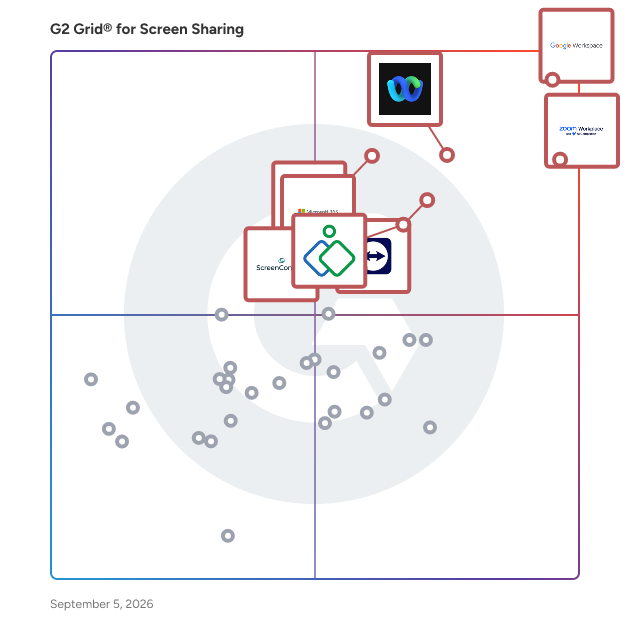
## G2 Grid® for Screen Sharing Software
 ![G2 Grid® for Screen Sharing Software plotting products by satisfaction and market presence](https://www.g2.com/categories/screen-sharing/grids.png?focus%5B%5D=1434&focus%5B%5D=7372&focus%5B%5D=18255&focus%5B%5D=2397&focus%5B%5D=663&focus%5B%5D=15890&focus%5B%5D=306&focus%5B%5D=15025)

Highlighted products: Google Workspace, Zoom Workplace, Webex Suite, TeamViewer, Microsoft 365, Zoho Assist, GoTo Meeting, and ScreenConnect.

Underlying data: [Grid® JSON](https://www.g2.com/categories/screen-sharing/grids.json?focus%5B%5D=google-workspace&focus%5B%5D=zoom-workplace&focus%5B%5D=cisco-webex-suite&focus%5B%5D=teamviewer&focus%5B%5D=microsoft365&focus%5B%5D=zoho-assist&focus%5B%5D=goto-meeting&focus%5B%5D=screenconnect)

**Sponsored**

### CrankWheel

Share your screen without any friction. Screen share in seconds during a voice call. You send a link via text or email and your viewer opens the session in any browser on any device. No download or registration is required for your viewer(s), even on their mobile phone. Add visuals to voice calls. No need to book a follow-up meeting, instead go seamlessly from phone call to full visual presentation. Establish trust faster and close the deal in the first cold call with CrankWheel. In addition to screen sharing, you can also run full web conferences with CrankWheel, with all participants optionally sharing their webcam and using their computer audio to speak to each other. The product can thus replace any other sales meeting tool you may be using. Remote Control and built-in custom e-signature solutions allow clients to sign legally binding agreements, audited by CrankWheel, during your meetings. The product also includes a full video sales platform, replacing Vidyard, BoomBoom or Loom, that lets you record webcam intros, screencasts, or your meetings, then share them as trackable links with optional animated previews that you can paste into your emails. You can even do "video mail merge" to track video interactions down to individual viewers in an audience of dozens or hundreds. Features: Easy screen share Stream HQ videos with sound within a screen share Electronic Signature on forms Record your screen and webcam and embed the video in emails, with Grant your viewer remote control A preview window shows you what the viewer sees and if he is engaged Customizable post-session redirect URL Traditional web conferencing (web-based audio, all participants can share webcam)

[Visit website](https://www.g2.com/external_clickthroughs/record?secure%5Bad_program%5D=ppc&secure%5Bad_slot%5D=category_product_list_llm&secure%5Bcategory_id%5D=1854&secure%5Bchosen_at%5D=2026-08-15T06%3A27%3A20Z&secure%5Bdisplayable_resource_id%5D=1854&secure%5Bdisplayable_resource_type%5D=Category&secure%5Bmedium%5D=sponsored&secure%5Bplacement_reason%5D=page_category&secure%5Bplacement_resource_ids%5D%5B%5D=1854&secure%5Bprioritized%5D=false&secure%5Bproduct_id%5D=22451&secure%5Bresource_id%5D=1854&secure%5Bresource_type%5D=Category&secure%5Bsource_type%5D=category_page&secure%5Bsource_url%5D=https%3A%2F%2Fwww.g2.com%2Fcategories%2Fscreen-sharing%3Fpage%3D4&secure%5Btoken%5D=65651a138ab830a670adc1f2c27debd51247536830a2bb984895d0504b2f2141&secure%5Burl%5D=https%3A%2F%2Fwww.crankwheel.com%2F%3Futm_campaign%3Dg2ppc%26utm_medium%3Dppc%26utm_source%3Dg2&secure%5Burl_type%5D=free_trial)

### [Mingle View](https://www.g2.com/products/mingle-view/reviews)

First ever free desktop sharing application with unlimited participants.

**Average Rating:** 4.1/5.0

**Total Reviews:** 4

#### How Do G2 Users Rate Mingle View?

- **Video Conferencing:** 7.8/10 (Category avg: 8.8/10)
- **Live Preview:** 8.3/10 (Category avg: 8.9/10)
- **Audio Conferencing:** 8.9/10 (Category avg: 8.9/10)

#### Who Is the Company Behind Mingle View?

- **Seller:** [Crowsoft Ltd.](https://www.g2.com/sellers/crowsoft-ltd)
- **HQ Location:** N/A
- **Twitter:** @CROWSOFT
- **LinkedIn® Page:** [www.linkedin.com](https://www.g2.com/external_clickthroughs/record?secure%5Bsource_type%5D=product_profile&secure%5Btoken%5D=7886df2ed926834e5eb248c77dcfa8e5c815d3ab1f0fe3132ced0dba45868834&secure%5Burl%5D=https%3A%2F%2Fwww.linkedin.com%2Fcompany%2FNo-Linkedin-Presence-Added-Intentionally-By-DataOps&secure%5Burl_type%5D=linkedin_company_website)  
1 employees on LinkedIn®

#### Who Uses This Product?

- **Company Size:** 75% Small, 25% Medium

#### What Do G2 Reviewers Say About Mingle View?

_AI-generated summary from verified user reviews_

##### Pros

- Users enjoy the **good audio quality** of Mingle View, enhancing their meeting experience significantly.
- Users find Mingle View to be a **free and user-friendly tool** ideal for daily project discussions with excellent performance.
- Users commend the **ease of use** of Mingle View, enabling seamless meetings without the need for personal information.
- Users appreciate the **easy implementation** of Mingle View, enabling smooth and efficient meetings without disruptions.
- Users love the **easy setup** of Mingle View, enabling smooth meetings without the need for personal information.

##### Cons

- Users report **browser compatibility issues** with Mingle View, limiting usage primarily to Windows without MacOS support.
- Users express frustration over **frequent updates** being lacking, impacting performance and overall satisfaction with Mingle View.
- Users face **integration issues** with Mingle View, limiting functionality and creating challenges in connecting with other applications.
- Users express frustration with the **limited features** of Mingle View, restricting functionality and integration with other applications.
- Users experience **performance issues** with Mingle View, particularly with lagging and screen sharing problems during meetings.

#### What Are Recent G2 Reviews of Mingle View?

**["MingleView is very use full for my Desktop sharing works without any lagging."](https://www.g2.com/survey_responses/mingle-view-review-10197617)**

**Rating:** 5.0/5.0 stars

_— Wasim K._

[Read full review](https://www.g2.com/survey_responses/mingle-view-review-10197617)

**["Very good"](https://www.g2.com/survey_responses/mingle-view-review-8758991)**

**Rating:** 5.0/5.0 stars

_— Nneka H._

[Read full review](https://www.g2.com/survey_responses/mingle-view-review-8758991)

### [Reactiv SUITE](https://www.g2.com/products/reactiv-suite/reviews)

Remote meetings suck! They are exhausting and none of us remembers anything. For hybrid\remote meetings to be effective they have to have an impact, allow the presenter and the content to stand out and be memorable. This tool allows remote meeting presenters to pin their camera, control their image, present any type of content and file format, ink, highlight and draw attention. This allows the participants to focus and pay more attention, which results in greater engagement.

**Average Rating:** 4.6/5.0

**Total Reviews:** 5

#### How Do G2 Users Rate Reactiv SUITE?

- **Video Conferencing:** 6.7/10 (Category avg: 8.8/10)
- **Live Preview:** 6.7/10 (Category avg: 8.9/10)
- **Audio Conferencing:** 6.7/10 (Category avg: 8.9/10)

#### Who Is the Company Behind Reactiv SUITE?

- **Seller:** [Vizetto](https://www.g2.com/sellers/vizetto)
- **HQ Location:** Mississauga, CA
- **LinkedIn® Page:** [ca.linkedin.com](https://www.g2.com/external_clickthroughs/record?secure%5Bsource_type%5D=product_profile&secure%5Btoken%5D=47b55fe82ade5730f841039ce8e89ee729b14733ac3ee0162f010b960e725887&secure%5Burl%5D=https%3A%2F%2Fca.linkedin.com%2Fcompany%2Fvizetto&secure%5Burl_type%5D=linkedin_company_website)  
12 employees on LinkedIn®

#### Who Uses This Product?

- **Company Size:** 80% Large, 20% Small

#### What Are Recent G2 Reviews of Reactiv SUITE?

**["It really Helped me in get to know about winner circle points"](https://www.g2.com/survey_responses/reactiv-suite-review-7059519)**

**Rating:** 5.0/5.0 stars

_— Verified User in Logistics and Supply Chain_

[Read full review](https://www.g2.com/survey_responses/reactiv-suite-review-7059519)

**["Perfect platform for remote meetings"](https://www.g2.com/survey_responses/reactiv-suite-review-7060481)**

**Rating:** 5.0/5.0 stars

_— Shivani R._

[Read full review](https://www.g2.com/survey_responses/reactiv-suite-review-7060481)

### [Tamashare](https://www.g2.com/products/tamashare/reviews)

Tamashare offers collaborative office solutions such as documents sharing, whiteboard, screen-sharing, annotations etc.

**Average Rating:** 4.7/5.0

**Total Reviews:** 5

#### How Do G2 Users Rate Tamashare?

- **Video Conferencing:** 8.8/10 (Category avg: 8.8/10)
- **Live Preview:** 10.0/10 (Category avg: 8.9/10)
- **Audio Conferencing:** 10.0/10 (Category avg: 8.9/10)

#### Who Is the Company Behind Tamashare?

- **Seller:** [Tamaplace](https://www.g2.com/sellers/tamaplace)
- **Year Founded:** 2012
- **HQ Location:** Latresne, FR
- **Twitter:** @Tamaplace33  
297 Twitter followers
- **LinkedIn® Page:** [www.linkedin.com](https://www.g2.com/external_clickthroughs/record?secure%5Bsource_type%5D=product_profile&secure%5Btoken%5D=24e5d6ce1cc3b22845194de6d8b54ccfb0d0e5ebc9174a77f595e7be235b09f6&secure%5Burl%5D=https%3A%2F%2Fwww.linkedin.com%2Fcompany%2F5105835&secure%5Burl_type%5D=linkedin_company_website)  
2 employees on LinkedIn®

#### Who Uses This Product?

- **Top Industries:** Marketing and Advertising
- **Company Size:** 80% Small, 40% Medium

#### What Are Recent G2 Reviews of Tamashare?

**["Excellent tool to increase collaboration in the work team."](https://www.g2.com/survey_responses/tamashare-review-3368205)**

**Rating:** 4.5/5.0 stars

_— Henry M._

[Read full review](https://www.g2.com/survey_responses/tamashare-review-3368205)

**["Excellent collaboration software."](https://www.g2.com/survey_responses/tamashare-review-3665968)**

**Rating:** 5.0/5.0 stars

_— Edward H._

[Read full review](https://www.g2.com/survey_responses/tamashare-review-3665968)

### [CoScreen](https://www.g2.com/products/coscreen/reviews)

CoScreen enables multiple team members to share their application windows with each other simultaneously and to interact with them as if they were their own.

**Average Rating:** 3.8/5.0

**Total Reviews:** 3

#### Who Is the Company Behind CoScreen?

- **Seller:** [CoScreen](https://www.g2.com/sellers/coscreen)
- **HQ Location:** Menlo Park, US
- **LinkedIn® Page:** [www.linkedin.com](https://www.g2.com/external_clickthroughs/record?secure%5Bsource_type%5D=product_profile&secure%5Btoken%5D=5f332c47adc600f8f6db54ffefb087acc0ae6b96b7cb5e83e089a74a75d8525a&secure%5Burl%5D=http%3A%2F%2Fwww.linkedin.com%2Fcompany%2Fcoscreen&secure%5Burl_type%5D=linkedin_company_website)  
6 employees on LinkedIn®

#### Who Uses This Product?

- **Company Size:** 67% Small, 33% Medium

#### What Are Recent G2 Reviews of CoScreen?

**["Meet your team seamlessly"](https://www.g2.com/survey_responses/coscreen-review-7507151)**

**Rating:** 4.5/5.0 stars

_— Hitesh T._

[Read full review](https://www.g2.com/survey_responses/coscreen-review-7507151)

**["Remote work is as simple as never"](https://www.g2.com/survey_responses/coscreen-review-7427703)**

**Rating:** 4.5/5.0 stars

_— Ani S._

[Read full review](https://www.g2.com/survey_responses/coscreen-review-7427703)

### [Dead Simple Screen Sharing](https://www.g2.com/products/dead-simple-screen-sharing/reviews)

Dead Simple Screen Sharing is a free screen sharing and online meetings solution.

**Average Rating:** 4.8/5.0

**Total Reviews:** 3

#### How Do G2 Users Rate Dead Simple Screen Sharing?

- **Video Conferencing:** 10.0/10 (Category avg: 8.8/10)
- **Live Preview:** 10.0/10 (Category avg: 8.9/10)
- **Audio Conferencing:** 10.0/10 (Category avg: 8.9/10)

#### Who Is the Company Behind Dead Simple Screen Sharing?

- **Seller:** [Dead Simple Screen Sharing](https://www.g2.com/sellers/dead-simple-screen-sharing)
- **HQ Location:** nagpur, IN
- **LinkedIn® Page:** [www.linkedin.com](https://www.g2.com/external_clickthroughs/record?secure%5Bsource_type%5D=product_profile&secure%5Btoken%5D=0b99552ffd417e74bff027811c681f2f2d1f5477100db161b3def0b1ac7ffeaa&secure%5Burl%5D=https%3A%2F%2Fwww.linkedin.com%2Fcompany%2F13369191&secure%5Burl_type%5D=linkedin_company_website)  
2 employees on LinkedIn®

#### Who Uses This Product?

- **Company Size:** 100% Small

#### What Are Recent G2 Reviews of Dead Simple Screen Sharing?

**["One of the best Screen sharing and conferencing software"](https://www.g2.com/survey_responses/dead-simple-screen-sharing-review-7911774)**

**Rating:** 5.0/5.0 stars

_— Sachin K._

[Read full review](https://www.g2.com/survey_responses/dead-simple-screen-sharing-review-7911774)

**["Best video conferencing solution"](https://www.g2.com/survey_responses/dead-simple-screen-sharing-review-7430507)**

**Rating:** 5.0/5.0 stars

_— Karan P._

[Read full review](https://www.g2.com/survey_responses/dead-simple-screen-sharing-review-7430507)

### [Vidsell](https://www.g2.com/products/vidsell/reviews)

Vidsell is an AI-powered tool for creating personalized videos, designed specifically for sales and marketing teams that want to boost their pipeline, create connections, and drive revenue. We make it easy to create a single video, add forms, surveys, and buttons, and share a dynamic GIF with unlimited contacts in less than 5 minutes. You can also measure video performance with our advanced analytics.

**Average Rating:** 4.8/5.0

**Total Reviews:** 4

#### How Do G2 Users Rate Vidsell?

- **Has the product been a good partner in doing business?:** 10.0/10 (Category avg: 9.1/10)

#### Who Is the Company Behind Vidsell?

- **Seller:** [Vidsell](https://www.g2.com/sellers/vidsell)
- **Year Founded:** 2024
- **HQ Location:** Amsterdam, NL
- **Twitter:** @vidsell\_ai  
26 Twitter followers
- **LinkedIn® Page:** [www.linkedin.com](https://www.g2.com/external_clickthroughs/record?secure%5Bsource_type%5D=product_profile&secure%5Btoken%5D=46cabc8701ff090414b954a50718a1fda53a1b12af49250bf246325b966f7dd6&secure%5Burl%5D=https%3A%2F%2Fwww.linkedin.com%2Fcompany%2Fvidsell%2F&secure%5Burl_type%5D=linkedin_company_website)  
2 employees on LinkedIn®
- **Ownership:** Vidsell

#### Who Uses This Product?

- **Company Size:** 75% Small, 25% Medium

#### What Do G2 Reviewers Say About Vidsell?

_AI-generated summary from verified user reviews_

##### Pros

- Users appreciate the **quick and seamless onboarding** process of Vidsell, making video creation easy and efficient.
- Users love the **ease of creation** with Vidsell, finding onboarding quick and video recording simple.
- Users appreciate the **easy integrations** of Vidsell, enabling quick and seamless onboarding for effective video outreach.
- Users love the **easy recording** feature of Vidsell, making video creation quick and efficient for outreach efforts.
- Users value the **quick and seamless onboarding** process of Vidsell, making video creation easy and efficient.

#### What Are Recent G2 Reviews of Vidsell?

**["Game-changer for our Lead Generation efforts! The most user-friendly interactive video platform 🚀"](https://www.g2.com/survey_responses/vidsell-review-9715867)**

**Rating:** 5.0/5.0 stars

_— Verified User in Hospital & Health Care_

[Read full review](https://www.g2.com/survey_responses/vidsell-review-9715867)

**["Personal videos at scale"](https://www.g2.com/survey_responses/vidsell-review-10872673)**

**Rating:** 5.0/5.0 stars

_— Kevin T._

[Read full review](https://www.g2.com/survey_responses/vidsell-review-10872673)

### [VoxMeet](https://www.g2.com/products/voxmeet/reviews)

VoxMeet is a Made-in-India, simple, secure and seamless video conferencing platform based on the latest WebRTC technologies. Designed for multi-device access and browsers, it supports Android, IOS as well as Windows. VoxMeet features such as high definition audio, video, live streaming and smart productivity add-on provide the best video conferencing experience, so explore new opportunities, collaborate with clients and enhance your digital journey with VoxMeet.

**Average Rating:** 4.3/5.0

**Total Reviews:** 12

#### How Do G2 Users Rate VoxMeet?

- **Has the product been a good partner in doing business?:** 6.7/10 (Category avg: 9.1/10)
- **Video Conferencing:** 8.9/10 (Category avg: 8.8/10)
- **Live Preview:** 7.8/10 (Category avg: 8.9/10)
- **Audio Conferencing:** 8.9/10 (Category avg: 8.9/10)

#### Who Is the Company Behind VoxMeet?

- **Seller:** [Voxomos Systems](https://www.g2.com/sellers/voxomos-systems)
- **Year Founded:** 2014
- **HQ Location:** Noida, Uttar Pradesh
- **LinkedIn® Page:** [www.linkedin.com](https://www.g2.com/external_clickthroughs/record?secure%5Bsource_type%5D=product_profile&secure%5Btoken%5D=0f92f1a11246865d4c90d7be55cf66d80d319dc3495f6a2c343ff15bef06aff7&secure%5Burl%5D=https%3A%2F%2Fwww.linkedin.com%2Fcompany%2Fvoxomos-pvt.-ltd%2F&secure%5Burl_type%5D=linkedin_company_website)  
15 employees on LinkedIn®

#### Who Uses This Product?

- **Top Industries:** Information Technology and Services
- **Company Size:** 50% Small, 42% Medium

#### What Are Recent G2 Reviews of VoxMeet?

**["Voxmeet Video confrencing review"](https://www.g2.com/survey_responses/voxmeet-review-8591775)**

**Rating:** 5.0/5.0 stars

_— Kartik S._

[Read full review](https://www.g2.com/survey_responses/voxmeet-review-8591775)

**["Online Video meeting"](https://www.g2.com/survey_responses/voxmeet-review-8648355)**

**Rating:** 4.5/5.0 stars

_— Neeraj K._

[Read full review](https://www.g2.com/survey_responses/voxmeet-review-8648355)

### [Zoapi](https://www.g2.com/products/zoapi/reviews)

Zoapi Hub is a wireless presentation and collaboration solution for enterprise companies, coworking spaces and education centres. With Zoapi connected to your meeting room projector/TV, you can seamlessly share your screens from any device running Windows, Mac, Linux, Chrome OS, Android or iOS, host video conferences using Zoom, Skype, MS Teams, WebEx or any application of your choice, view your meeting room calendar on the go and manage your meetings. With wireless collaboration, hassle-free video conferencing, Annotation & Whiteboarding, multiple application support and an admin control panel, Zoapi leaves no room for unproductivity.

**Average Rating:** 4.8/5.0

**Total Reviews:** 3

#### How Do G2 Users Rate Zoapi?

- **Has the product been a good partner in doing business?:** 10.0/10 (Category avg: 9.1/10)
- **Live Preview:** 10.0/10 (Category avg: 8.9/10)

#### Who Is the Company Behind Zoapi?

- **Seller:** [Zoapi Innovation](https://www.g2.com/sellers/zoapi-innovation)
- **HQ Location:** N/A
- **LinkedIn® Page:** [www.linkedin.com](https://www.g2.com/external_clickthroughs/record?secure%5Bsource_type%5D=product_profile&secure%5Btoken%5D=9487f2a83bf64391601bde07128b8bf8808cdda98cd2bbdcf889302278c69cf1&secure%5Burl%5D=https%3A%2F%2Fwww.linkedin.com%2Fcompany%2Fzoapiinnovations&secure%5Burl_type%5D=linkedin_company_website)  
1 employees on LinkedIn®

#### Who Uses This Product?

- **Company Size:** 67% Medium, 33% Small

#### What Do G2 Reviewers Say About Zoapi?

_AI-generated summary from verified user reviews_

##### Pros

- Users commend the **good support team** of Zoapi, enhancing their overall experience and satisfaction with the product.
- Users appreciate the **ease of use** of Zoapi, finding it simple to set up and navigate without training.
- Users value the **easy integrations** with Zoom and Teams, enhancing their seamless collaboration experience without hassle.
- Users find the **easy setup** of Zoapi intuitive, requiring no extensive training for seamless navigation.
- Users appreciate the **seamless integrations** with Zoom and Teams, enhancing their collaborative experience effortlessly.

##### Cons

- Users are frustrated by the **booking limitations** that restrict scheduling meetings beyond 24 hours in advance.
- Users frequently experience **connectivity issues** with Zoapi, impacting their ability to use the product effectively.
- Users find the pricing **too high for small businesses** , limiting accessibility and usage of Zoapi.
- Users note the **full reliance on internet connectivity** as a limitation that can disrupt their experience with Zoapi.
- Users face **meeting booking limitations** with Zoapi, restricting future meetings to less than 24 hours ahead.

#### What Are Recent G2 Reviews of Zoapi?

**["Meeting room scheduler and conferencing solutions with Third-party Integration"](https://www.g2.com/survey_responses/zoapi-review-9792804)**

**Rating:** 4.5/5.0 stars

_— Surajit B._

[Read full review](https://www.g2.com/survey_responses/zoapi-review-9792804)

**["Zoapi: Effortless Screen Casting with Minor Delays"](https://www.g2.com/survey_responses/zoapi-review-12640494)**

**Rating:** 5.0/5.0 stars

_— Prajwal E._

[Read full review](https://www.g2.com/survey_responses/zoapi-review-12640494)

### [Aericast](https://www.g2.com/products/aericast/reviews)

Wireless presentations from your laptop. Turn screens to digital signage when room not in use. Just download AeriCast Receiver app and turn any device into a receiver for Wireless Presentations.

**Average Rating:** 4.5/5.0

**Total Reviews:** 1

#### How Do G2 Users Rate Aericast?

- **Video Conferencing:** 10.0/10 (Category avg: 8.8/10)
- **Live Preview:** 8.3/10 (Category avg: 8.9/10)
- **Audio Conferencing:** 10.0/10 (Category avg: 8.9/10)

#### Who Is the Company Behind Aericast?

- **Seller:** [Aericast](https://www.g2.com/sellers/aericast)
- **HQ Location:** Houston, US
- **LinkedIn® Page:** [www.linkedin.com](https://www.g2.com/external_clickthroughs/record?secure%5Bsource_type%5D=product_profile&secure%5Btoken%5D=14006b6ec316158a0d9fbb60df52c451a7be318cdb96e598b2897f792c996032&secure%5Burl%5D=http%3A%2F%2Fwww.linkedin.com%2Fcompany%2Faericast&secure%5Burl_type%5D=linkedin_company_website)  
2 employees on LinkedIn®

#### Who Uses This Product?

- **Company Size:** 100% Small

#### What Are Recent G2 Reviews of Aericast?

**["Step up in conferencing with Aericast. The future of wireless peripheral connection."](https://www.g2.com/survey_responses/aericast-review-9344068)**

**Rating:** 4.5/5.0 stars

_— Alwanga J._

[Read full review](https://www.g2.com/survey_responses/aericast-review-9344068)

### [Coview](https://www.g2.com/products/coview/reviews)

Coview is an innovative customer support platform designed to enhance user experience by providing real-time, visual communication tools. It enables support teams to connect directly with customers' browsers, facilitating efficient issue resolution without the need for downloads or installations. By allowing customers to share screenshots, record their screens, and engage in live co-browsing sessions, Coview streamlines the support process, reduces frustration, and improves overall satisfaction. Additionally, it offers automatic browser health checks and code-level data logging, empowering support and development teams to diagnose and resolve technical issues swiftly. Key Features and Functionality: - Screenshots and Annotations: Customers can capture their entire browser page, highlight specific areas, add notes, and conceal sensitive information before sharing. - Screen Recording: Users can record their interactions to demonstrate issues, capturing every action and transition without requiring software installations. - Co-Browsing: Support agents can initiate live, one-click screen-sharing sessions to guide customers directly on their own screens, enhancing onboarding and troubleshooting experiences. - Automatic Browser Health Checks: Coview performs real-time assessments of browser compatibility, cache status, and site loading performance to identify potential issues proactively. - Error Reporting and Debugging: The platform logs code-level data and network activity, allowing developers to replay customer sessions, inspect code, and resolve bugs without reproducing errors. - Integration with External Tools: Seamless integration with platforms like Intercom, Jira, and Asana enables efficient ticket creation and management directly from customer interactions. Primary Value and Problem Solved: Coview addresses the common challenges in customer support by eliminating the need for customers to articulate complex issues verbally. By providing visual tools such as screenshots, screen recordings, and live co-browsing, it allows customers to demonstrate problems directly, leading to faster and more accurate resolutions. This approach not only enhances customer satisfaction but also boosts support team productivity by reducing the time spent diagnosing issues. Furthermore, Coview's automatic health checks and detailed error reporting equip development teams with the necessary insights to address technical problems efficiently, ultimately improving the overall quality and reliability of web applications.

**Average Rating:** 4.8/5.0

**Total Reviews:** 2

#### How Do G2 Users Rate Coview?

- **Video Conferencing:** 10.0/10 (Category avg: 8.8/10)
- **Live Preview:** 10.0/10 (Category avg: 8.9/10)
- **Audio Conferencing:** 8.3/10 (Category avg: 8.9/10)

#### Who Is the Company Behind Coview?

- **Seller:** [Coview](https://www.g2.com/sellers/coview)
- **Year Founded:** 2018
- **HQ Location:** Freiburg im Breisgau, DE
- **LinkedIn® Page:** [www.linkedin.com](https://www.g2.com/external_clickthroughs/record?secure%5Bsource_type%5D=product_profile&secure%5Btoken%5D=bc513c613a87001f3f44dd2f87c098d63ac16131ad9d21a1b7bd9cdbc3a175c5&secure%5Burl%5D=https%3A%2F%2Fwww.linkedin.com%2Fcompany%2Fcoviewhq%2F&secure%5Burl_type%5D=linkedin_company_website)  
6 employees on LinkedIn®

#### Who Uses This Product?

- **Company Size:** 50% Small

#### What Do G2 Reviewers Say About Coview?

_AI-generated summary from verified user reviews_

##### Pros

- Users appreciate the **easy setup and usability** of Coview, making it ideal for busy schedules and efficient assessments.
- Users love the **ease of setup and use** of Coview, making it perfect for busy schedules and efficient assessments.
- Users appreciate the **easy access** of Coview, enabling efficient student testing and seamless switching between assessments.
- Users value the **easy collaboration** features of Coview, facilitating efficient testing and accessibility for staff.
- Users enjoy the **easy setup** of Coview, fitting seamlessly into their busy schedules for efficient assessments.

#### What Are Recent G2 Reviews of Coview?

**["Coview - Great screen-sharing and collaboration tool!"](https://www.g2.com/survey_responses/coview-review-4994630)**

**Rating:** 4.5/5.0 stars

_— Verified User in Human Resources_

[Read full review](https://www.g2.com/survey_responses/coview-review-4994630)

**["Efficient, User-Friendly Tool for Student Assessments"](https://www.g2.com/survey_responses/coview-review-11821013)**

**Rating:** 5.0/5.0 stars

_— Joanne F._

[Read full review](https://www.g2.com/survey_responses/coview-review-11821013)

#### What Are G2 Users Discussing About Coview?

- [What is Coview used for?](https://www.g2.com/discussions/what-is-coview-used-for)

### [Multicast](https://www.g2.com/products/multicast/reviews)

Multicast is the 100% free web app for sharing presentations, YouTube videos, a virtual whiteboard, your camera and more over Zoom, Webex or ANY other online meeting app. It also can be used at in-person events to cast content onto projectors and TV's. Unlike virtual webcam apps like ManyCam, Multicast doesn't replace your webcam, but works by sharing your screen. It is easier to set up and looks better when using it. It also allows you to choose up to 16 different display layouts. This is a great resource for teachers, corporations, and anyone else looking to share multiple types of content at once. Instead of constantly switching between your camera, a presentation, and videos you are sharing, you can now show them all at once or switch between them instantly. Visit www.multicastapp.com to try it out or learn more!

**Average Rating:** 2.5/5.0

**Total Reviews:** 1

#### Who Is the Company Behind Multicast?

- **Seller:** [multicastapp](https://www.g2.com/sellers/multicastapp)
- **HQ Location:** N/A
- **LinkedIn® Page:** [www.linkedin.com](https://www.g2.com/external_clickthroughs/record?secure%5Bsource_type%5D=product_profile&secure%5Btoken%5D=7886df2ed926834e5eb248c77dcfa8e5c815d3ab1f0fe3132ced0dba45868834&secure%5Burl%5D=https%3A%2F%2Fwww.linkedin.com%2Fcompany%2FNo-Linkedin-Presence-Added-Intentionally-By-DataOps&secure%5Burl_type%5D=linkedin_company_website)  
1 employees on LinkedIn®

#### Who Uses This Product?

- **Company Size:** 100% Large

### [MultiShare](https://www.g2.com/products/multishare/reviews)

MultiShare offers a unique feature for Microsoft Teams users, allowing multiple users to share multiple screens at once for efficient collaboration. This feature allows users to seamlessly switch between available screen shares without interrupting someone else's screen share and quickly bring their intended screen to the front. With MultiShare, users gain a total flexible environment for a streamlined decision-making process. Total flexibility -Up to 15 users can share screens at once, and each user can choose which screen to view. Streamline decision making -Easily troubleshoot or present multiple scenarios with colleagues and make decisions together in real time.

**Average Rating:** 4.0/5.0

**Total Reviews:** 1

#### Who Is the Company Behind MultiShare?

- **Seller:** [Frameable](https://www.g2.com/sellers/frameable)
- **Year Founded:** 2021
- **HQ Location:** New York
- **Twitter:** @FrameableInc  
1,110 Twitter followers
- **LinkedIn® Page:** [www.linkedin.com](https://www.g2.com/external_clickthroughs/record?secure%5Bsource_type%5D=product_profile&secure%5Btoken%5D=44e398944656ad27438d309a4c7a095773deba7b888c4fd872f298b518cfff79&secure%5Burl%5D=https%3A%2F%2Fwww.linkedin.com%2Fcompany%2Fframeableinc%2Fabout%2F&secure%5Burl_type%5D=linkedin_company_website)  
9 employees on LinkedIn®

#### Who Uses This Product?

- **Company Size:** 100% Small

#### What Are Recent G2 Reviews of MultiShare?

**["Ease of Use and Share"](https://www.g2.com/survey_responses/multishare-review-9154381)**

**Rating:** 4.0/5.0 stars

_— Haider K._

[Read full review](https://www.g2.com/survey_responses/multishare-review-9154381)

### [Scoot](https://www.g2.com/products/scoot/reviews)

Scoot is an experiential meeting and webinar platform that provides new ways for people to interact in a virtual setting. Patented Social Presence® technology promotes connections because meeting attendees can move and mingle, just like they do in real life. Scoot is ideal for meetings and webinars that have more than 25 attendees. When attendees want to engage with each other, company representatives, and subject matter experts, an interactive experience on Scoot provides more value than a broadcast-style meeting or webinar. There are two experience modes in Scoot. Mingle mode enables attendees to move within a customized, branded virtual space. Presentation mode provides presenters to share content and videos. Screen sharing is enabled at three levels: group discussion, entire room, and entire Scootaverse. Smart Badges are populated with attendee data and are searchable. Attendees can enter their Smart Badge data during registration or upon entry. Data can also be loaded in advance or imported from external systems. Smart Badge data can be configured as conditionally viewable. Scoot supports all major browsers and mobile devices. Our client list includes multiple Fortune 500 brands as well as many small and medium-sized organizations.

**Average Rating:** 4.7/5.0

**Total Reviews:** 41

#### How Do G2 Users Rate Scoot?

- **Has the product been a good partner in doing business?:** 9.2/10 (Category avg: 9.1/10)

#### Who Is the Company Behind Scoot?

- **Seller:** [Scoot](https://www.g2.com/sellers/scoot)
- **Year Founded:** 2017
- **HQ Location:** Dallas, Texas
- **LinkedIn® Page:** [www.linkedin.com](https://www.g2.com/external_clickthroughs/record?secure%5Bsource_type%5D=product_profile&secure%5Btoken%5D=014ae92cfe6ba6bfdd13f5b3efb54277f35f8ffd3dba65377911578cefa45a1c&secure%5Burl%5D=https%3A%2F%2Fwww.linkedin.com%2Fcompany%2Fscootmeeting&secure%5Burl_type%5D=linkedin_company_website)  
23 employees on LinkedIn®

#### Who Uses This Product?

- **Top Industries:** Information Technology and Services
- **Company Size:** 67% Small, 29% Medium

#### What Do G2 Reviewers Say About Scoot?

_AI-generated summary from verified user reviews_

##### Pros

- Users appreciate the **flexibility** of Scoot, utilizing it for both meetings and engaging team-building activities.
- Users value the **flexibility** of Scoot for team-building and social events, enhancing global collaboration efforts.
- Users appreciate the **flexibility** of Scoot, utilizing it for both video conferences and engaging team-building activities.

#### What Are Recent G2 Reviews of Scoot?

**["Large platform for virtual meetings."](https://www.g2.com/survey_responses/scoot-review-7484528)**

**Rating:** 5.0/5.0 stars

_— Gustavo O._

[Read full review](https://www.g2.com/survey_responses/scoot-review-7484528)

**["Preciate--facilitating a thank-you culture in these remote times"](https://www.g2.com/survey_responses/scoot-review-5363038)**

**Rating:** 5.0/5.0 stars

_— Stefanie G._

[Read full review](https://www.g2.com/survey_responses/scoot-review-5363038)

#### What Are G2 Users Discussing About Scoot?

- [What is Preciate used for?](https://www.g2.com/discussions/what-is-preciate-used-for)

### [StarzMirror](https://www.g2.com/products/starzmirror/reviews)

The best phone mirror tool for both iOS and Android devices. You can use it to mirror and record anything you want, and even mirror multiple devices at the same time.

**Average Rating:** 4.5/5.0

**Total Reviews:** 1

#### Who Is the Company Behind StarzMirror?

- **Seller:** [StarzSoft](https://www.g2.com/sellers/starzsoft)
- **HQ Location:** N/A
- **LinkedIn® Page:** [www.linkedin.com](https://www.g2.com/external_clickthroughs/record?secure%5Bsource_type%5D=product_profile&secure%5Btoken%5D=7886df2ed926834e5eb248c77dcfa8e5c815d3ab1f0fe3132ced0dba45868834&secure%5Burl%5D=https%3A%2F%2Fwww.linkedin.com%2Fcompany%2FNo-Linkedin-Presence-Added-Intentionally-By-DataOps&secure%5Burl_type%5D=linkedin_company_website)  
1 employees on LinkedIn®

#### Who Uses This Product?

- **Company Size:** 100% Small

#### What Are Recent G2 Reviews of StarzMirror?

**["Streamlined Tool: Screen Mirroring and Testing for Android/iOS"](https://www.g2.com/survey_responses/starzmirror-review-9397758)**

**Rating:** 4.5/5.0 stars

_— Preeti S._

[Read full review](https://www.g2.com/survey_responses/starzmirror-review-9397758)

### [AnyRec Phone Mirror](https://www.g2.com/products/anyrec-phone-mirror/reviews)

AnyRec Phone Mirror has many features that other similar software does not have. Users can cast multiple mobile phone screen video and audio to a PC via Wi-Fi, USB connection, or QR code smoothly and stably. Moreover, the program provides a built-in screen recorder for all users. Key Features: 1. Mirror Mobile Games You can mirror your mobile games to the computer, so you will no longer be annoyed by the small screen. And there is no lag or delay when you play the game on your computer screen. And you can also use the microphone when you play the game, which is also could be recorded when you play the game. 2. Live Stream AnyRec Phone Mirror is suitable for game streaming and other entertainment. By casting your phone screen video and audio to a PC. Teachers and students can share phone screens with the computer for better interaction. Just draw lines and type critical points on your phone. If you are on a business trip or work from home, you can start remotely meeting with colleagues. 3. Record the Screen You can get an excellent phone screen recorder, a larger display screen, and more. You will find that using AnyRec Phone Mirror to record your phone screen will have a smoother effect. The recorder will not make your phone heat and run slower. Moreover, there is a larger space to store your HD screen videos. So, you can record a long video about the games, courses, meetings, and so on.

#### Who Is the Company Behind AnyRec Phone Mirror?

- **Seller:** [AnyRec Studio](https://www.g2.com/sellers/anyrec-studio)
- **HQ Location:** N/A
- **LinkedIn® Page:** [www.linkedin.com](https://www.g2.com/external_clickthroughs/record?secure%5Bsource_type%5D=product_profile&secure%5Btoken%5D=118b3d8c2e34fd7a2d2e3678f6641f045d79825538fb740c93bae5190ee6e445&secure%5Burl%5D=https%3A%2F%2Fwww.linkedin.com%2Fcompany%2Fanyrec%2Fabout%2F&secure%5Burl_type%5D=linkedin_company_website)

- [&lsaquo; Prev ‹ Prev](/categories/screen-sharing?ampDeviceId=475756ff-74e4-4923-819a-429e4ae427a5&ampSessionId=undefined&categories=security-privacy&filter-countries=&filter-industries=Education+-+K-12&keywords=%3Ffrom%3D1&onlycontent=1&optimizely_user_id=a916f6f81cd61f75eb1d87620d9ab0df&order=g2_score&page=3#product-list)
- [1](/categories/screen-sharing?ampDeviceId=475756ff-74e4-4923-819a-429e4ae427a5&ampSessionId=undefined&categories=security-privacy&filter-countries=&filter-industries=Education+-+K-12&keywords=%3Ffrom%3D1&onlycontent=1&optimizely_user_id=a916f6f81cd61f75eb1d87620d9ab0df&order=g2_score#product-list)
- [2](/categories/screen-sharing?ampDeviceId=475756ff-74e4-4923-819a-429e4ae427a5&ampSessionId=undefined&categories=security-privacy&filter-countries=&filter-industries=Education+-+K-12&keywords=%3Ffrom%3D1&onlycontent=1&optimizely_user_id=a916f6f81cd61f75eb1d87620d9ab0df&order=g2_score&page=2#product-list)
- [3](/categories/screen-sharing?ampDeviceId=475756ff-74e4-4923-819a-429e4ae427a5&ampSessionId=undefined&categories=security-privacy&filter-countries=&filter-industries=Education+-+K-12&keywords=%3Ffrom%3D1&onlycontent=1&optimizely_user_id=a916f6f81cd61f75eb1d87620d9ab0df&order=g2_score&page=3#product-list)
- 4
- [5](/categories/screen-sharing?ampDeviceId=475756ff-74e4-4923-819a-429e4ae427a5&ampSessionId=undefined&categories=security-privacy&filter-countries=&filter-industries=Education+-+K-12&keywords=%3Ffrom%3D1&onlycontent=1&optimizely_user_id=a916f6f81cd61f75eb1d87620d9ab0df&order=g2_score&page=5#product-list)
- [Next &rsaquo; Next ›](/categories/screen-sharing?ampDeviceId=475756ff-74e4-4923-819a-429e4ae427a5&ampSessionId=undefined&categories=security-privacy&filter-countries=&filter-industries=Education+-+K-12&keywords=%3Ffrom%3D1&onlycontent=1&optimizely_user_id=a916f6f81cd61f75eb1d87620d9ab0df&order=g2_score&page=5#product-list)

Spotlight Categories

[Survey Software](https://www.g2.com/categories/survey)

[Product Analytics Software](https://www.g2.com/categories/product-analytics)

[ERP Systems](https://www.g2.com/categories/erp-systems)

[Compensation Management Software](https://www.g2.com/categories/compensation-management)

[Sales Performance Management Software](https://www.g2.com/categories/sales-performance-management)

Similar Categories

- [Collaborative Whiteboard](/categories/collaborative-whiteboard)
- [Employee Intranet](/categories/employee-intranet)

- [Virtual Workspaces](/categories/virtual-workspaces)
- [Visual Collaboration Platforms](/categories/visual-collaboration-platforms)

[Browse Screen Sharing Themes](/categories/screen-sharing/themes)

 ![Neeraja Prakash](/assets/transparent-ad5be28fbcd25b7b08d2cebe1d957125437fb5407d75ee717965ad22c8808791.gif "Neeraja Prakash")
NP

Researched and written by [Neeraja Prakash](https://research.g2.com/insights/author/neeraja-prakash)

Updated October 3, 2024

Screen sharing tools allow users to share the screen of their devices in real time, enabling outside viewers to watch their movements. Screen sharing tools facilitate collaboration between teams and between demonstrators and their audience by turning a user’s device screen into a point of discussion, a collaborative space, or a demonstration. Screen sharing tools are a must in an organization's collaboration software stack and are often built into other software products.

Screen sharing solutions can be useful regardless of industry. Generally, they’re used internally when teams are brainstorming or ideating. Sales and marketing teams often use screen sharing tools during calls with clients or stakeholders to provide demos or extra collateral. Many screen sharing tools are built into other software solutions such as [video conferencing software](https://www.g2crowd.com/categories/video-conferencing) and [webinar software](https://www.g2crowd.com/categories/webinar). Some screen sharing tools are dedicated solutions that provide screen sharing as a main feature and video conferencing as a secondary solution.

To qualify for inclusion in the Screen Sharing category, a product must:

- Allow users to share the screen of their digital device in real time
- Provide collaborative tools like audio and video conferencing or live chat
- Allow multiple users to share their screen at once

Show More