Best Resource Management Software - Page 2

How Many Resource Management Software Products Does G2 Track?

Total Products under this Category: 215

Category Stats (Nov 2026)

  • Average Rating: 4.32/5 The average rating of products in this category, based on all submitted ratings
  • Top Trending Product: PSOHUB. (+0.32%) - Among all products in this category, PSOHUB. recorded the largest rating increase compared to last month

Last updated: November 01, 2026

How Does G2 Rank Resource Management Software Products?

Why You Can Trust G2's Software Rankings:

  • 30 Analysts and Data Experts
  • 77,300+ Authentic Reviews
  • 215+ Products
  • Unbiased Rankings

G2's software rankings are built on verified user reviews, rigorous moderation, and a consistent research methodology maintained by a team of analysts and data experts. Each product is measured using the same transparent criteria, with no paid placement or vendor influence. While reviews reflect real user experiences, which can be subjective, they offer valuable insight into how software performs in the hands of professionals. Together, these inputs power the G2 Score, a standardized way to compare tools within every category.

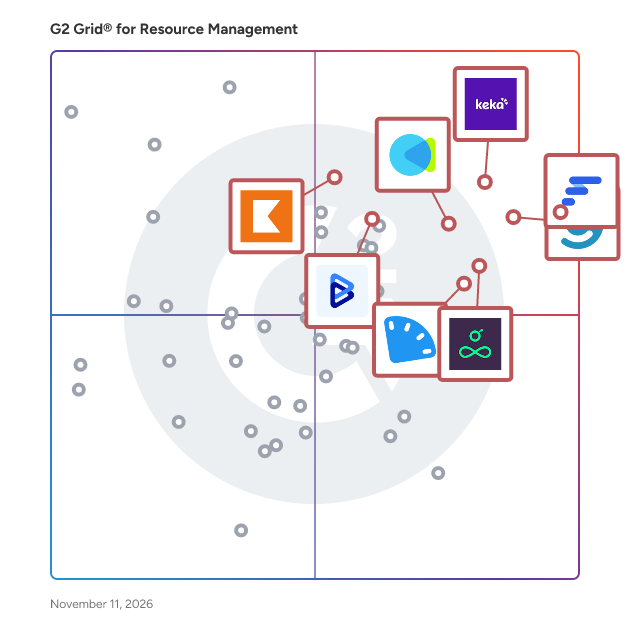
G2 Grid® for Resource Management Software

G2 Grid® for Resource Management Software plotting products by satisfaction and market presence

Highlighted products: Float.com, Keka, Celoxis, CMap, Resource Guru, ClickTime, Kantata Professional Services Automation (formerly Mavenlink+ Kimble), and BigTime.

Underlying data: [Grid® JSON](https://www.g2.com/categories/resource-management/grids.json?focus%5B%5D=float-com&focus%5B%5D=keka&focus%5B%5D=celoxis&focus%5B%5D=cmap&focus%5B%5D=resource-guru&focus%5B%5D=clicktime&focus%5B%5D=kantata-professional-services-automation-formerly-mavenlink-kimble&focus%5B%5D=bigtime)

Octave Sequence Enterprise

Octave Sequence Enterprise (formerly EcoSys) is an enterprise project performance solution designed to bring clarity, control, and predictability to complex project environments. It connects project portfolio management, project controls, and project management into a unified platform that helps organizations manage the full lifecycle of their capital programs. Built for complex engineering, construction, and infrastructure projects, Sequence Enterprise provides the structure needed to align strategy with execution. Organizations gain a consistent view of cost, schedule, risk, and performance, allowing teams to act earlier, manage change more effectively, and deliver better outcomes. The platform is highly configurable and easy to use, enabling organizations to adapt workflows, dashboards, and reporting to their delivery models without heavy customization. Sequence Enterprise also integrates with key enterprise systems, including ERP, scheduling, and other critical project data sources, creating a connected ecosystem that replaces fragmented tools and eliminates data silos. With trusted data and enterprise-wide visibility, leaders can better understand performance, allocate resources more effectively, and forecast outcomes with greater confidence. Ultimately, Sequence Enterprise helps organizations move from fragmented project oversight to coordinated performance, empowering teams to deliver projects on time, on budget, and aligned with strategic goals.

Average Rating: 4.1/5.0

Total Reviews: 61

How Do G2 Users Rate Octave Sequence Enterprise?

  • Ease of Use: 8.1/10 (Category avg: 8.6/10)
  • Resource Definiton: 9.0/10 (Category avg: 8.6/10)
  • Capacity: 9.0/10 (Category avg: 8.8/10)
  • Forecasting: 9.3/10 (Category avg: 8.5/10)

Who Is the Company Behind Octave Sequence Enterprise?

  • Seller: Octave
  • Company Website:
  • HQ Location: Madison, US
  • LinkedIn® Page: www.linkedin.com
    3,835 employees on LinkedIn®

Who Uses This Product?

  • Top Industries: Construction, Computer Software
  • Company Size: 41% Medium, 38% Small

What Do G2 Reviewers Say About Octave Sequence Enterprise?

AI-generated summary from verified user reviews

Pros
  • Users value the ease of use of Octave Sequence Enterprise, facilitating efficient project management through a centralized platform.
  • Users appreciate the integrated project management capabilities of EcoSys, enhancing efficiency and streamlining data access.
  • Users value EcoSys for its seamless integration of complex project data, enhancing efficiency and project management effectiveness.
  • Users appreciate the easy integration of EcoSys, simplifying data flows with no code connectors for enhanced efficiency.
  • Users value the real-time project tracking of Octave Sequence Enterprise, simplifying decision-making and enhancing budget visibility.
Cons
  • Users find EcoSys complex for new users, requiring significant time and training to become productive.
  • Users find the steep learning curve challenging, requiring significant time and training to become proficient with EcoSys.
  • Users find the difficult onboarding process of Octave Sequence Enterprise challenging due to its complex interface and configuration.
  • Users find Octave Sequence Enterprise complex for new users, requiring significant time investment and dedicated training to navigate.
  • Users find the difficult learning curve of Octave Sequence Enterprise requires significant time and dedicated training for productivity.

What Are Recent G2 Reviews of Octave Sequence Enterprise?

What Are G2 Users Discussing About Octave Sequence Enterprise?

Beebole

Beebole is a cloud-based time tracking and project management tool for teams that need to track hours, manage resources, and monitor project costs and profitability. It has been used by companies worldwide of all sizes across multiple industries since 2008. Core capabilities: •Time tracking: Log hours against unlimited clients, projects, subprojects, and tasks. Track billable and non-billable time separately. Set flexible logging modes — daily, weekly, or monthly — and configure automated reminders for timesheet submission. •Resource planning: Plan and allocate work across the team using Gantt or Kanban views. Compare planned hours to actuals in real time, monitor capacity, and turn planned tasks into timesheet entries directly. •Time off and attendance: Create custom time off types (vacation, sick leave, accrued time, etc.), assign annual allowances, and manage requests and approvals in the same place as timesheets. •Costs, billing, and budgets: Define billing rates and costs at the person, client, project, subproject, or task level. Track labor and project expenses against budgets in real time. Beebole supports multiple currencies and multiple billing rates. •Approvals and permissions: Multi-level timesheet approval workflows allow managers to review, approve, reject, and lock entries individually or in bulk. Role-based permissions control what each user can see and do. •Reporting and dashboards: Build custom reports on time, costs, profitability, overtime, billable ratios, budget status, and more. Save views to a KPI dashboard or export as CSV, PDF, or directly to Excel and Google Sheets via native add-ons. •Integrations: Connects natively with Microsoft 365, Google Workspace, BambooHR, Slack, Jira, Asana, and others. Also available via Zapier, Pipedream, and an open API. •Security and compliance: GDPR and DCAA compliant. Data protected with 256-bit encryption, SSL/TLS connections, multi-layer server security, and daily backups. Beebole is available on web, iOS, and Android, and it's supported in 10 languages with live multilingual customer support. Plans start with a free tier (project tracking, resource planning, basic time off, custom reports) for up to 5 users. Paid plans — Essential ($9/user/mo) and Advanced ($18/user/mo) — add billing rates, approvals, integrations, cost tracking, expense tracking, project budgets, and advanced configuration options.

Average Rating: 4.5/5.0

Total Reviews: 80

How Do G2 Users Rate Beebole?

  • Ease of Use: 8.9/10 (Category avg: 8.6/10)

Who Is the Company Behind Beebole?

  • Seller: Beebole
  • Company Website:
  • Year Founded: 2008
  • HQ Location: Brussels, Belgium
  • LinkedIn® Page: www.linkedin.com
    7 employees on LinkedIn®

Who Uses This Product?

  • Top Industries: Information Technology and Services, Computer Software
  • Company Size: 64% Small, 30% Medium

What Do G2 Reviewers Say About Beebole?

AI-generated summary from verified user reviews

Pros
  • Users find Beebole's ease of use invaluable for efficient time tracking and team management.
  • Users appreciate the ease of time tracking with Beebole, simplifying entry, management, and detailed analysis of team hours.
  • Users value the time-saving features of Beebole, enhancing workflow efficiency through streamlined timesheet management and reporting.
  • Users commend Beebole's exceptional customer support, highlighting the team's responsiveness and helpfulness in improving user experience.
  • Users value the customization options in Beebole, enhancing workflows and personalizing time-tracking experiences.
Cons
  • Users desire missing features like improved forecasting, flexible permissions, and more user-friendly reporting options in Beebole.
  • Users find the interface not intuitive, with a complex correction process and outdated visuals affecting usability.
  • Users find the data inaccuracy challenging, as incomplete timesheets aren't clearly displayed, complicating report generation.
  • Users find Beebole lacks advanced features like forecasting and flexible permissions, limiting functionality for better planning.
  • Users find the poor interface design of Beebole to be outdated and not intuitive, affecting overall usability.

What Are Recent G2 Reviews of Beebole?

What Are G2 Users Discussing About Beebole?

ProjectManager

ProjectManager is project and portfolio management software with world-class project scheduling, native ERP integrations and AI integration with ChatGPT. Project managers, PMOs and operations leaders use it to plan, schedule, staff and track projects in one cloud platform. Project scheduling ProjectManager offers scheduling depth on par with desktop tools like Microsoft Project, with the real-time collaboration of the cloud. Teams build plans with interactive Gantt charts, task dependencies, lag, critical path and baselines, then track actual progress against the plan. Kanban boards, task lists, sheets and calendars give every team member a view that fits their work. ERP project management Native, bi-directional integrations with Acumatica and MYOB Acumatica sync projects, tasks, resources and hours between ProjectManager and the ERP, so project and financial data stay consistent. A QuickBooks Online integration connects project data to accounting, and an open API supports custom integrations with other business systems. AI integration with ChatGPT Users can work in ProjectManager from ChatGPT in plain language: check project status, find tasks, see who is assigned, create projects and tasks, set dates and costs, and update progress. Each user signs in with their own account, so the assistant only sees what that user can access. Managers control access by role, and the assistant asks for approval before changing data. Resource and cost management Workload charts show who is over- or under-allocated, and managers can reassign work to balance the team. Team availability, PTO, labor rates and timesheets are built in, so labor costs are tracked against budget automatically. Portfolio visibility Live dashboards, portfolio roadmaps and reports give PMOs and executives a real-time view of progress, cost, workload and risk across every project. Why teams choose ProjectManager - Advanced scheduling without desktop software - Native, bi-directional ERP integration with Acumatica and MYOB Acumatica - QuickBooks Online integration and an open API - Secure, permission-based ChatGPT integration - Resource, time and cost tracking in the same platform as the schedule Trusted by thousands of teams worldwide. Available in English, Spanish, French, German and Portuguese.

Average Rating: 4.4/5.0

Total Reviews: 95

How Do G2 Users Rate ProjectManager?

  • Ease of Use: 8.7/10 (Category avg: 8.6/10)
  • Resource Definiton: 8.8/10 (Category avg: 8.6/10)
  • Capacity: 8.4/10 (Category avg: 8.8/10)
  • Forecasting: 8.8/10 (Category avg: 8.5/10)

Who Is the Company Behind ProjectManager?

Who Uses This Product?

  • Who Uses This: Project Manager
  • Top Industries: Information Technology and Services, Construction
  • Company Size: 50% Small, 32% Medium

What Do G2 Reviewers Say About ProjectManager?

AI-generated summary from verified user reviews

Pros
  • Users appreciate the ease of use of ProjectManager, enabling smooth project planning and effortless execution.
  • Users find ProjectManager to be a user-friendly and helpful tool that effectively aids project management tasks.
  • Users value ProjectManager for its effortless planning and execution, greatly enhancing project management efficiency and collaboration.
  • Users appreciate the centralization of ProjectManager, which simplifies project management and enhances collaboration effortlessly.
  • Users value the effective communication features of ProjectManager, enhancing collaboration and project execution seamlessly.
Cons
  • Users report the need for frequent refreshing due to slow updates, impacting their overall efficiency with ProjectManager.
  • Users often face app crashes, requiring a browser refresh that disrupts workflow and productivity.
  • Users dislike the poor integration with other programs, which complicates their workflow and user experience.
  • Users often experience website errors that require refreshing the browser, disrupting their workflow with ProjectManager.

What Are Recent G2 Reviews of ProjectManager?

What Are G2 Users Discussing About ProjectManager?

AI can help you find the answers. G2 helps you trust them.

Connect G2 to Claude or ChatGPT for answers grounded in G2's trusted reviews, comparisons, and pricing from real user insights.

How it works

Ruddr Professional Services Automation

Ruddr is an AI-native Professional Services Automation (PSA) platform that helps professional services organizations manage project delivery, resource planning, financial operations, and business performance in a single system. The platform is designed for consulting firms, agencies, IT services companies, and other project-based organizations with 20 to 2,000 billable employees. Our software supports the full professional services lifecycle, including client management, project management, budgeting, task management, resource allocation, time and expense tracking, invoicing, revenue recognition, forecasting, utilization tracking, gross margin analysis, and KPI reporting. The platform also supports more than 150 global currencies, making it suitable for firms operating across multiple regions, subsidiaries, and distributed teams. Ruddr Intelligence, the platform’s embedded AI functionality, enables users to analyze operational data, generate reports and visualizations, answer business questions, and identify trends using natural language prompts. Teams can use AI-powered workflows to reduce manual reporting, improve visibility into project and financial performance, and support faster operational decision-making. Users can also create downloadable custom reports and generate data visualizations for executive reporting and planning. Ruddr is designed to provide enterprise-level functionality with an intuitive user experience and flexible deployment options for growing and established services organizations that need operational visibility, financial oversight, and scalable project management capabilities. Key capabilities include: - Project management, budgeting, forecasting, and resource management - Time tracking, expense management, invoicing, and revenue recognition - AI-powered reporting, analytics, and operational insights through Ruddr Intelligence - Support for multi-currency operations and global professional services teams - Flexible subscription options with monthly or annual billing and free licenses for non-billable users

Average Rating: 4.6/5.0

Total Reviews: 371

How Do G2 Users Rate Ruddr Professional Services Automation?

  • Ease of Use: 9.3/10 (Category avg: 8.6/10)
  • Resource Definiton: 9.3/10 (Category avg: 8.6/10)
  • Capacity: 9.2/10 (Category avg: 8.8/10)
  • Forecasting: 9.1/10 (Category avg: 8.5/10)

Who Is the Company Behind Ruddr Professional Services Automation?

  • Seller: Ruddr
  • Company Website:
  • Year Founded: 2018
  • HQ Location: Atlanta, Georgia, United States
  • LinkedIn® Page: www.linkedin.com
    22 employees on LinkedIn®

Who Uses This Product?

  • Who Uses This: Software Engineer, Account Coordinator
  • Top Industries: Information Technology and Services, Marketing and Advertising
  • Company Size: 51% Small, 45% Medium

What Do G2 Reviewers Say About Ruddr Professional Services Automation?

AI-generated summary from verified user reviews

Pros
  • Users value the ease of use of Ruddr Professional Services Automation, appreciating its intuitive interface and efficient workflow.
  • Users love the easy-to-use time tracking features of Ruddr, making timesheet submission seamless and efficient.
  • Users enjoy the intuitive UI of Ruddr, making it easy for quick adoption and efficient time management.
  • Users value the robust features of Ruddr Professional Services Automation, enhancing profitability insights and operational efficiency.
  • Users appreciate the beautiful and intuitive UI of Ruddr, enabling quick adoption and efficient project management.
Cons
  • Users find the report customization limited, desiring more flexibility in creating tailored reports for their needs.
  • Users find some missing features in Ruddr, such as budget management and bulk task deletion, hindering productivity.
  • Users note limited features like lacking custom report options and missing QuickBooks integration, which affects usability.
  • Users find the learning curve challenging for beginners, requiring prior training for effective initial setup.
  • Users desire more customization options for invoices, reports, and dashboards to better meet their specific needs.

What Are Recent G2 Reviews of Ruddr Professional Services Automation?

What Are G2 Users Discussing About Ruddr Professional Services Automation?

Klient PSA

Klient PSA is a Professional Services Automation (PSA) platform built 100% natively on Salesforce. It is designed for professional services organizations of roughly 50 to 1,000 people — consulting firms, SaaS services teams, systems integrators, and agencies — that already run on Salesforce and want delivery, finance, and customer data in one system instead of in a PSA bolted on beside the CRM. Because Klient PSA runs inside your existing Salesforce org, projects, resources, timesheets, and invoices share the same records, permissions, and reports as your pipeline. Klient PSA is sold as a Salesforce-native application and includes the Salesforce platform license required to run it, so buyers do not need to purchase a separate Salesforce subscription to get started. Klient Insights, included in Klient PSA from release 51.13, is a dashboard workspace inside Salesforce. It answers four recurring delivery questions on one live screen: where margin is being lost, who is free in the next 12 weeks, what time is unbilled, and which clients need attention this week. Templates cover Profitability, Capacity and Demand, Revenue and Billing, and an Account and Project Scorecard. Any number opens the records behind it, and Play mode runs the review meeting from the dashboard. What Klient PSA does Project management: templates, Kanban boards, Gantt charts, and task grids to plan and deliver projects on time and on budget. Resource management: assign people by skill, availability, and priority, and forecast billable utilization and capacity. Time and expense tracking: log time and expenses in seconds, with approval workflows that feed billing and forecasting. Billing and financials: pre-invoicing, invoice generation, revenue recognition, and accounting connectors for QuickBooks, Xero, Sage Intacct, and Accounting Seed. Customer collaboration: a customer portal for real-time status, shared documents, and approvals. Estimates and forecasting: quote work from the Salesforce opportunity and carry the estimate through to delivery and invoicing. AI agents inside your PSA Klient PSA includes a catalog of nine Agentforce AI agents that act on live PSA data inside Salesforce: SCOPEY1 for business analysis, PLANNY1 for project management, TIMEY1 for timesheets, STAFFY1 for resource management, CASEY1 for customer support, GUIDY1 for customer onboarding, TOUCHY1 for project touchpoints, DEVY1 for software development, and KNOWWY1 for knowledge. Klient PSA also ships MCP1, a Model Context Protocol server, so external AI assistants can read and update PSA data under existing Salesforce permissions. Implementation and support Klient PSA installs as a managed AppExchange package. Implementation is delivered by Klient's services team or a certified implementation partner, and covers configuration workshops, data migration, and administrator training. Ongoing support is provided by Klient's own team. Editions Three editions are sold annually — Professional, Enterprise, and Ultimate — with current per-user pricing shown in the Pricing section of this profile. The Ultimate edition includes every AI agent; agents can also be added individually to the other editions. Built by consultants for consultants, Klient PSA covers the full project lifecycle — estimation, planning, delivery, time tracking, billing, and reporting — on one Salesforce-native platform. Klient PSA was previously listed as Krow PSA. Older reviews and discussions on this profile that mention Krow refer to the same product.

Average Rating: 4.5/5.0

Total Reviews: 94

How Do G2 Users Rate Klient PSA?

  • Ease of Use: 8.5/10 (Category avg: 8.6/10)
  • Resource Definiton: 7.9/10 (Category avg: 8.6/10)
  • Capacity: 9.0/10 (Category avg: 8.8/10)
  • Forecasting: 8.6/10 (Category avg: 8.5/10)

Who Is the Company Behind Klient PSA?

  • Seller: Klient Software
  • Company Website:
  • Year Founded: 2014
  • HQ Location: Laval, Québec, Canada
  • LinkedIn® Page: www.linkedin.com
    36 employees on LinkedIn®

Who Uses This Product?

  • Who Uses This: CEO
  • Top Industries: Information Technology and Services, Computer Software
  • Company Size: 56% Small, 41% Medium

What Do G2 Reviewers Say About Klient PSA?

AI-generated summary from verified user reviews

Pros
  • Users appreciate the ease of use of Klient PSA, finding it intuitive, efficient, and well-organized for daily tasks.
  • Users value the flexibility and clarity of Klient PSA, enhancing project management with integrated financial insights.
  • Users appreciate the comprehensive features of Klient PSA, noting its usability, flexibility, and continuous improvements.
  • Users appreciate the flexibility of Klient PSA, allowing easy adaptation to diverse consulting workflows and needs.
  • Users value the flexible yet structured resource management in Klient PSA, enhancing visibility and decision-making capabilities.
Cons
  • Users experience a steep learning curve during initial setup, but appreciate smooth operation once configured correctly.
  • Users note the missing features in Klient PSA, such as revenue recognition and customizable PDF generation, impacting their experience.
  • Users face a steep learning curve in configuring Klient PSA to match their workflows effectively.
  • Users find that time consumption in mastering Klient PSA's features impacts efficiency and adds complexity to their workflow.
  • Users note the unnecessary customization required for Klient PSA to align with their specific processes and needs.

What Are Recent G2 Reviews of Klient PSA?

What Are G2 Users Discussing About Klient PSA?

Epicflow

Epicflow is a predictive project portfolio management platform for complex, resource-constrained organisations. It gives PMO, portfolio and finance leaders a shared decision layer that shows what the portfolio can realistically deliver and how resource constraints, priorities and schedule changes affect business and financial outcomes. By connecting finite specialist capacity and feasible delivery dates with approved budgets, actual costs, contractual bonuses and penalties, revenue and profit, Epicflow helps leaders detect bottlenecks, trace the affected commitments, quantify the exposure, compare alternative interventions and act before delivery risk becomes financial loss. Epicflow complements existing planning, execution, ERP and accounting systems rather than replacing them. It adds predictive portfolio intelligence above those systems, while financial and execution platforms remain systems of record.

Average Rating: 4.4/5.0

Total Reviews: 14

How Do G2 Users Rate Epicflow?

  • Ease of Use: 8.5/10 (Category avg: 8.6/10)
  • Resource Definiton: 10.0/10 (Category avg: 8.6/10)
  • Capacity: 10.0/10 (Category avg: 8.8/10)
  • Forecasting: 10.0/10 (Category avg: 8.5/10)

Who Is the Company Behind Epicflow?

  • Seller: Epicflow
  • Year Founded: 2007
  • HQ Location: Amsterdam, Netherlands
  • LinkedIn® Page: www.linkedin.com
    26 employees on LinkedIn®

Who Uses This Product?

  • Company Size: 60% Medium, 40% Small

What Do G2 Reviewers Say About Epicflow?

AI-generated summary from verified user reviews

Pros
  • Users value the insightful dashboard features of Epicflow, enabling proactive management of resources and project states.
  • Users value the automatic report generation feature of Epicflow, significantly saving time and enhancing efficiency.
  • Users value the automation features of Epicflow, especially the time-saving automatic report generation that streamlines project management.
  • Users find Epicflow's ease of understanding invaluable, streamlining project management tasks effortlessly and enhancing productivity.
  • Users value the efficiency and comprehensive features of Epicflow for streamlining project management and resource allocation.
Cons
  • Users find the complex UI challenging initially, but training helps in overcoming these hurdles effectively.

What Are Recent G2 Reviews of Epicflow?

What Are G2 Users Discussing About Epicflow?

Meisterplan

Meisterplan is a lean and visual project portfolio management software focused on planning resources beyond the short-term. It enables you to reliably deliver on your commitments by guaranteeing optimal resource utilization in line with your priorities. With Meisterplan, you can • Raise your perspective to the portfolio level to get an overview of all projects, bringing in relevant data from any tool your teams are already using. • Add future resource needs with just minimal detail, giving you the right amount of information for confident decisions without unnecessary effort. • Use the most intuitive what-if scenario planning, where you can explore plan alternatives and find the best way forward based on actual resource availability.

Average Rating: 4.7/5.0

Total Reviews: 26

How Do G2 Users Rate Meisterplan?

  • Ease of Use: 9.6/10 (Category avg: 8.6/10)
  • Resource Definiton: 7.5/10 (Category avg: 8.6/10)
  • Capacity: 9.4/10 (Category avg: 8.8/10)
  • Forecasting: 9.0/10 (Category avg: 8.5/10)

Who Is the Company Behind Meisterplan?

Who Uses This Product?

  • Company Size: 44% Medium, 37% Small

What Do G2 Reviewers Say About Meisterplan?

AI-generated summary from verified user reviews

Pros
  • Users find Meisterplan's ease of use remarkable, streamlining resource allocation and planning across multiple methodologies.
  • Users value the ease of scenario planning in Meisterplan, enhancing decision-making and resource management efficiency.
  • Users appreciate the responsive customer support from Meisterplan, which enhances their tool usage and overall experience.
  • Users value the customizable fields in Meisterplan, making it easy to tailor the tool to their business needs.
  • Users value the dashboard features for easy resource visibility and efficient project management, streamlining team collaboration.
Cons
  • Users face challenges with data import limitations, impacting financial forecasting and project management efficiency in Meisterplan.
  • Users are frustrated by the inability to export a change log, limiting project tracking and analytics capabilities.
  • Users face export limitations in Meisterplan, hindering their ability to access and analyze crucial project data efficiently.
  • Users experience a steep learning curve with Meisterplan, which can be time-consuming but eventually leads to efficient usage.
  • Users face project management issues with Meisterplan due to sync challenges, clutter, and lack of key analytics.

What Are Recent G2 Reviews of Meisterplan?

Kytes

Kytes is an AI-enabled Professional Services Automation (PSA) and Project & Portfolio Management (PPM) platform that digitises the entire project lifecycle on a single data foundation - from opportunity to cash, and from idea to launch. Rather than a point tool for timesheets or task boards, Kytes unifies project management, resource management, project financials, estimation and proposals, timesheets and leave, workflow automation and analytics in one system. Enterprises run it as their system of record for delivery, utilisation and margin. Purpose-built for verticals: Kytes ships with domain templates and best-practice workflows for IT and engineering services, pharmaceuticals and life sciences, EPC, and Global Capability Centres (GCCs), so teams configure rather than build from scratch. One platform covers three project journeys. Customer Projects runs the full Opportunity-to-Cash process, including estimation, proposals, revenue recognition, billing and project P&L. New Product Development covers stage-gate NPD and NPI, dossier management, portfolio prioritisation and launch readiness. Internal Initiatives brings governance and visibility to transformation programmes. AI sits at the core. Conversational intelligence lets teams query project data and generate reports in plain language. Predictive intelligence forecasts delays, flags resource conflicts before they bite, and auto-generates charters, WBS, minutes and executive decks. Knowledge intelligence searches by meaning and extracts skills from resumes. Customers report 14% higher resource utilisation, 21% faster delivery cycles, a 12% increase in billable hours and 9% margin uplift through predictive forecasting. Enterprise-ready by design: multi-currency and multi-entity financials with intra-company transactions, pre-built integrations to SAP, Oracle, Workday, Darwinbox, Power BI and Tableau, and a mobile app. Kytes has served project-driven enterprises since 2006, including Volkswagen Group Digital Solutions India, Mitsubishi Electric India, Quest Global, Alkem Laboratories, Mega Lifesciences, TVS and Egnyte.

Average Rating: 4.3/5.0

Total Reviews: 103

How Do G2 Users Rate Kytes?

  • Ease of Use: 8.6/10 (Category avg: 8.6/10)
  • Resource Definiton: 8.9/10 (Category avg: 8.6/10)
  • Capacity: 8.3/10 (Category avg: 8.8/10)
  • Forecasting: 8.3/10 (Category avg: 8.5/10)

Who Is the Company Behind Kytes?

  • Seller: Kytes
  • Company Website:
  • Year Founded: 2006
  • HQ Location: Pune, IN
  • LinkedIn® Page: in.linkedin.com
    170 employees on LinkedIn®

Who Uses This Product?

  • Who Uses This: Project Manager
  • Top Industries: Information Technology and Services, Computer Software
  • Company Size: 69% Medium, 19% Large

What Do G2 Reviewers Say About Kytes?

AI-generated summary from verified user reviews

Pros
  • Users value the ease of use of Kytes, benefiting from its user-friendly system and organized interface.
  • Users value the centralized resource and task management in Kytes, making project delivery more efficient and streamlined.
  • Users value the robust project tracking features in Kytes, facilitating efficient activity management and support.
  • Users appreciate the effective resource management in Kytes, enabling streamlined project deliveries and team coordination across locations.
  • Users value the effective team collaboration facilitated by Kytes, enhancing organization and operational efficiency.
Cons
  • Users experience slow loading times for reports and uploads, leading to frustration and occasional crashes.
  • Users report slow performance with Kytes, particularly during file uploads and when generating volume-based reports.
  • Users experience a learning curve with Kytes due to confusing menu layouts and understanding the software flows.
  • Users express concerns about limited reporting and the need for more dashboard features and integration options.
  • Users find missing features in Kytes, like limited reporting and lack of AI/ML integrations, disappointing.

What Are Recent G2 Reviews of Kytes?

What Are G2 Users Discussing About Kytes?

Resource Management by Smartsheet

Resource Management by Smartsheet high-level project and resource management software helps modern teams make confident decisions about project planning, team capacity, budget forecasting, team utilization, and hiring needs in real time. SIMPLE, POWERFUL RESOURCE PLANNING Our resource planning tool gives you visibility to schedule and manage your team effectively, update on the fly, and immediately see the impact on the project’s budget. FLEXIBLE, BIG-PICTURE PROJECT MANAGEMENT Look across projects and track multiple teams at once, see the impact of changes to the plan on the overall business, and learn from past projects to make more accurate forecasts. EMPLOYEE TIME TRACKING SOFTWARE YOUR TEAM WILL ACTUALLY USE No more chasing down timesheets. Resource Management by Smartsheet is a simple software makes time tracking painless, so your team members can focus on work priorities. Outcome-focused time tracking options will keep your team happy and projects moving forward. A ROBUST SUITE OF REPORTING TOOLS TO HELP YOUR BUSINESS GROW Get the big picture of your company performance with data you can trust. With highly visual analytics and powerful reporting tools, you can make confident decisions to support your business growth. . . . . . . . . . . . . . . . ABOUT Resource Management by Smartsheet We're on a mission to surface the right information at the right time so everyone across the organization can make more confident decisions. Over 1,000 of the most innovative companies in the world rely on Resource Management by Smartsheet — from growing 10-person software shops, to 100-person teams within global brands, to 1,000+ person professional services firms. Get started with a free trial to see how it works for your team — no credit card required. Our Seattle-based team is here to help.

Average Rating: 4.0/5.0

Total Reviews: 139

How Do G2 Users Rate Resource Management by Smartsheet?

  • Ease of Use: 8.0/10 (Category avg: 8.6/10)
  • Resource Definiton: 7.4/10 (Category avg: 8.6/10)
  • Capacity: 7.4/10 (Category avg: 8.8/10)
  • Forecasting: 6.7/10 (Category avg: 8.5/10)

Who Is the Company Behind Resource Management by Smartsheet?

  • Seller: Smartsheet
  • Year Founded: 2005
  • HQ Location: Bellevue, WA
  • LinkedIn® Page: www.linkedin.com
    4,034 employees on LinkedIn®
  • Ownership: NYSE: SMAR
  • Phone: +1 425.283.1870

Who Uses This Product?

  • Who Uses This: Project Manager
  • Top Industries: Design, Marketing and Advertising
  • Company Size: 51% Small, 40% Medium

What Do G2 Reviewers Say About Resource Management by Smartsheet?

AI-generated summary from verified user reviews

Pros
  • Users praise the ease of use of Resource Management by Smartsheet, highlighting its intuitive features and seamless integration.
  • Users value the project tracking capabilities of Resource Management, enabling seamless oversight of resources and timelines.
  • Users appreciate the integrated time tracking feature, streamlining project management with direct logging against assignments.
  • Users value the seamless integration with Smartsheet, enhancing project visibility and resource management efficiency.
  • Users value the comprehensive project overview offered by Resource Management, enhancing team collaboration and efficiency.
Cons
  • Users face access limitations in Resource Management, impacting functionality and workflow efficiency with tedious manual adjustments.
  • Users face limitations in detailed task-level resourcing, impacting complexity and advanced reporting needs in Smartsheet.
  • Users report frequent billing issues and complications with manual updates, impacting project management efficiency.
  • Users experience inaccurate data from time tracking and scheduling issues, impacting overall project management effectiveness.
  • Users find inadequate reporting capabilities require workarounds, limiting effective utilization and capacity tracking in Smartsheet.

What Are Recent G2 Reviews of Resource Management by Smartsheet?

What Are G2 Users Discussing About Resource Management by Smartsheet?

Dayshape

Dayshape delivers leading resource management software designed to help organizations achieve extraordinary results. Trusted by Big Four and many other top professional services firms globally, Dayshape is the only solution that combines advanced AI, real-time project financials, and firm-wide insights enabling customers to elevate resource management into a strategic function. With far-reaching connectivity, Dayshape fits into existing ecosystems and stands out as the only resource management vendor with a Workday packaged solution—built to handle complexity and grow with your firm. By driving profitable growth, powering confident decisions, and ensuring satisfied clients and teams—we're helping our customers build strong organizations and careers for the long term.

Average Rating: 4.6/5.0

Total Reviews: 13

How Do G2 Users Rate Dayshape?

  • Ease of Use: 9.5/10 (Category avg: 8.6/10)
  • Resource Definiton: 9.3/10 (Category avg: 8.6/10)
  • Capacity: 9.4/10 (Category avg: 8.8/10)
  • Forecasting: 9.0/10 (Category avg: 8.5/10)

Who Is the Company Behind Dayshape?

  • Seller: Dayshape
  • Company Website:
  • Year Founded: 2013
  • HQ Location: Edinburgh, Scotland
  • LinkedIn® Page: www.linkedin.com
    174 employees on LinkedIn®

Who Uses This Product?

  • Top Industries: Accounting
  • Company Size: 54% Large, 38% Medium

What Do G2 Reviewers Say About Dayshape?

AI-generated summary from verified user reviews

Pros
  • Users appreciate the intuitive design and ease of use of Dayshape, facilitating effortless scheduling and assignment management.
  • Users value the overview and filtering capabilities of Dayshape for managing tasks and resources efficiently.
  • Users value Dayshape's responsive and helpful customer support, greatly enhancing their overall experience with the platform.
  • Users appreciate the overview and filtering features of Dayshape, enhancing resource management and task visibility.
  • Users appreciate the ease of understanding in Dayshape, highlighting its intuitive design and seamless scheduling features.
Cons
  • Users face dashboard issues with Dayshape, particularly in navigating reports and managing multiple smaller projects efficiently.
  • Users experience integration issues with Dayshape, particularly with Outlook and mail notifications lacking useful links.
  • Users face lack of clarity when navigating granular projects and managing complex reporting in Dayshape.
  • Users find collaboration limitations in Dayshape, noting inadequate Outlook integration and the need for enhanced mail notifications.
  • Users find navigation difficult in Dayshape, especially when managing numerous small projects and complex reporting.

What Are Recent G2 Reviews of Dayshape?

Cinode

Cinode is the AI-powered operating platform for consulting firms — the single system that connects skills, sales, and resource planning to supercharge growth. Founded in 2010, Cinode was built specifically for the consulting industry to solve its most fundamental questions: Who knows what? Who’s available? What can we sell? and How do we win more business — faster and smarter? From first client contact to staffing, delivery, and long-term growth, Cinode gives consultancy leaders real-time insights that drive better decisions and measurable results. With intuitive skills management, instant CV creation, advanced utilization planning, and AI-driven matching — all in one platform — teams work with clarity, speed, and confidence. A Platform Built for the Future of Consulting Cinode brings together the core building blocks of a modern consultancy: • Skills & Competence Management – Map every skill, identify gaps, and unlock the full value of your collective expertise. • Professional CV & Profiles – Create tailored, high-quality consultant profiles in seconds to win more deals. • Resource Planning & Matching – Maximize utilization with intelligent planning and precision matching. • Sales & Delivery Integration – Connect pipeline and delivery to shorten sales cycles and reduce friction. • Partners & Subcontractors – Scale delivery through collaboration with external consultants and partners. • AI-Driven Automation – Automate intake, matching, insights, and actions with AI, including MCP Server and AI chat directly on your Cinode data. A Growing Global Network Cinode is not just a platform — it’s an ecosystem. Today, Cinode connects a network of over 10,000 consulting firms, enabling collaboration, partner sourcing, and access to a broader pool of skills when demand peaks. Why Cinode Consulting firms use Cinode to: • respond to client requests in minutes instead of days, • improve utilization and profitability, • engage consultants with better matching and transparency, and • scale their business with data-driven confidence. Headquartered in Stockholm, Cinode is trusted by consulting firms across Europe and beyond — helping tens of thousands of consultants match the right skills to the right assignments, every day.

Average Rating: 4.6/5.0

Total Reviews: 163

How Do G2 Users Rate Cinode?

  • Ease of Use: 8.4/10 (Category avg: 8.6/10)
  • Resource Definiton: 7.8/10 (Category avg: 8.6/10)
  • Capacity: 8.3/10 (Category avg: 8.8/10)
  • Forecasting: 7.7/10 (Category avg: 8.5/10)

Who Is the Company Behind Cinode?

  • Seller: Cinode
  • Company Website:
  • Year Founded: 2010
  • HQ Location: Stockholm, Sweden
  • LinkedIn® Page: www.linkedin.com
    22 employees on LinkedIn®

Who Uses This Product?

  • Who Uses This: CEO
  • Top Industries: Consulting, Information Technology and Services
  • Company Size: 44% Small, 42% Medium

What Do G2 Reviewers Say About Cinode?

AI-generated summary from verified user reviews

Pros
  • Users find Cinode's ease of use exceptional, simplifying complex tasks and saving valuable time and effort.
  • Users appreciate Cinode's comprehensive features, enhancing efficiency in consultant management and assignment matching.
  • Users appreciate the easy creation of tailored CVs and portfolios, enhancing efficiency and clarity in project management.
  • Users love the AI support of Cinode for making profile updates easy and efficient, saving time and effort.
  • Users value the skill management features of Cinode for efficient consultant selection and seamless project allocation.
Cons
  • Users find that there can be a learning difficulty in adapting to all features and maintaining consistent data entry.
  • Users find the learning curve steep, requiring time to master features and data entry for effective use.
  • Users find Cinode to be time-consuming for skill management, requiring significant effort for data entry and organization.
  • Users find navigation difficult, particularly with the interface and search functionality, impacting overall usability.
  • Users find Cinode to be not intuitive, requiring significant time to learn and adapt to its features.

What Are Recent G2 Reviews of Cinode?

What Are G2 Users Discussing About Cinode?

Moovila

Moovila Perfect Project is an AI-powered project management and automation platform developed by Moovila to help organizations plan, predict, and deliver projects with precision. Built for Managed Service Providers (MSPs), IT service firms, and other project-driven organizations, Moovila enables teams to manage complex, resource-dependent workflows while eliminating uncertainty in project timelines. Unlike traditional project management tools, the platform uses artificial intelligence to dynamically create and maintain optimized project schedules, ensuring that teams can adapt in real time while staying on track for on-time delivery. Moovila is designed for organizations that manage a high volume of concurrent projects, particularly MSPs, consulting firms, and professional services teams that rely on structured workflows and accurate resource planning. Its ideal users are teams working within PSA environments such as ConnectWise PSA, Autotask PSA, and HaloPSA, where alignment between sales, operations, and project delivery is critical. These organizations often face challenges such as missed deadlines, limited visibility into project health, and inefficient resource allocation, all of which Moovila is built to solve through automation and intelligent forecasting. What differentiates Moovila Perfect Project from other platforms is its focus on predictability and real-time intelligence rather than manual tracking. At the core of the platform is its AI-driven Critical Path Engine, which automatically maps task dependencies and continuously recalculates the most efficient path to project completion as conditions evolve. This is paired with real-time risk detection, which monitors projects for potential delays or bottlenecks and proactively alerts teams with recommended actions to mitigate those risks before they impact delivery timelines. Another key advantage of Moovila is its native bi-directional integration with major PSA systems, including ConnectWise PSA, Autotask PSA, and HaloPSA, allowing for seamless, real-time synchronization of project data without the need for middleware or manual data entry. This integration ensures that all teams are working from the same source of truth. In addition, Moovila has read-only integrations with Box, Dropbox, Google Drive, Microsoft OneDrive, Microsoft SharePoint, Google Calendar, Microsoft Outlook, Microsoft Teams, Cisco Webex, Salesforce, HubSpot, QuickBooks Online, Jira, Microsoft Excel, Microsoft 365, Microsoft Exchange Online, Visual Studio Team Services (Azure DevOps). The platform also features Smart Scheduling, which automatically generates and adjusts timelines based on real-time inputs, ensuring that project plans remain accurate without constant manual updates. Moovila supports structured, dependency-driven workflows through a waterfall methodology, with optional Gantt chart visualization for teams that require a visual representation of project timelines. Its Project Hub further enhances efficiency by providing a library of pre-built templates, enabling teams to quickly launch standardized, well-structured projects with confidence and consistency. Moovila Perfect Project is used across a variety of use cases, including client project delivery such as onboarding, migrations, and implementations, as well as internal operations management and cross-functional coordination. It is equally effective for both short-term initiatives and long-term strategic projects, making it a flexible solution for organizations that require both structure and adaptability. By automating scheduling, monitoring risks, and optimizing resources, Moovila helps teams stay aligned, accountable, and in control of even the most complex project environments. By combining automation, real-time intelligence, and seamless integration, Moovila Perfect Project enables organizations to move from simply managing projects to delivering them with consistency and precision.

Average Rating: 4.8/5.0

Total Reviews: 55

How Do G2 Users Rate Moovila?

  • Ease of Use: 8.9/10 (Category avg: 8.6/10)
  • Resource Definiton: 8.9/10 (Category avg: 8.6/10)
  • Capacity: 9.2/10 (Category avg: 8.8/10)
  • Forecasting: 8.5/10 (Category avg: 8.5/10)

Who Is the Company Behind Moovila?

  • Seller: Moovila
  • Company Website:
  • HQ Location: Mount Pleasant, South Carolina
  • LinkedIn® Page: www.linkedin.com
    26 employees on LinkedIn®

Who Uses This Product?

  • Who Uses This: Project Manager
  • Top Industries: Information Technology and Services, Computer & Network Security
  • Company Size: 54% Small, 41% Medium

What Do G2 Reviewers Say About Moovila?

AI-generated summary from verified user reviews

Pros
  • Users find Moovila's project management capabilities enhance efficiency and clarity, significantly improving project execution and support.
  • Users find Moovila's ease of use enhances project management efficiency and supports smooth implementation and onboarding.
  • Users commend the automation capabilities of Moovila, enhancing efficiency and reducing human error in project management.
  • Users value the insightful project tracking Moovila offers, enhancing visibility and understanding of project statuses and bottlenecks.
  • Users commend the excellent customer support of Moovila, noting their responsiveness and commitment to user success.
Cons
  • Users find limited customization options in Moovila, feeling the interface lacks intuitiveness and flexibility for their needs.
  • Users face integration issues with Moovila, particularly with pulling data from their PSA systems efficiently.
  • Users find the learning curve to be steep, which can hinder effective use and project management integration.
  • Users express concerns over Moovila's limited features, particularly in customization and detailed reporting capabilities.
  • Users find Moovila's interface not intuitive, citing a steep learning curve and clunky navigation as major issues.

What Are Recent G2 Reviews of Moovila?

What Are G2 Users Discussing About Moovila?

Synergist

Synergist is an all-in-one agency and project management software, designed for agencies that want to improve performance and profitability. From CRM, job costing, project management, resource scheduling and capacity planning to timesheets, expenses, billing and reporting, Synergist gives you everything you need to manage your agency’s projects, people, clients, and financials. Synergist comes with hundreds of features and gives you more advanced functionality as you grow. But we get that every agency is unique, so your system setup should be too. Synergist’s flexible nature means it can be configured to work as your agency does and give you the exact data intelligence you need. https://www.synergist.co.uk/

Average Rating: 4.6/5.0

Total Reviews: 32

How Do G2 Users Rate Synergist?

  • Ease of Use: 7.8/10 (Category avg: 8.6/10)
  • Resource Definiton: 8.1/10 (Category avg: 8.6/10)
  • Capacity: 8.4/10 (Category avg: 8.8/10)
  • Forecasting: 8.3/10 (Category avg: 8.5/10)

Who Is the Company Behind Synergist?

  • Seller: Synergist
  • Company Website:
  • Year Founded: 2003
  • HQ Location: Bollington, England, United Kingdom
  • LinkedIn® Page: www.linkedin.com
    40 employees on LinkedIn®
  • Ownership: Private

Who Uses This Product?

  • Top Industries: Marketing and Advertising
  • Company Size: 64% Small, 33% Medium

What Do G2 Reviewers Say About Synergist?

AI-generated summary from verified user reviews

Pros
  • Users find Synergist intuitive and easy to use, enhancing workflow and decision-making across projects and resources.
  • Users appreciate the end-to-end visibility and intuitive reporting tools of Synergist for effective project management.
  • Users appreciate the end-to-end visibility of Synergist for enhanced workflow and capacity management across projects.
  • Users find Synergist's ease of learning impressive, with intuitive navigation and excellent onboarding support enhancing their experience.
  • Users value the end-to-end visibility of Synergist, enhancing project management and decision-making across agency operations.
Cons
  • Users find the learning curve steep, requiring dedicated training to effectively utilize Synergist's features and benefits.
  • Users find the complexity of Synergist overwhelming, requiring dedicated training for effective utilization and streamlined processes.
  • Users find the steep learning curve challenging initially, requiring dedicated training to navigate Synergist effectively.
  • Users find difficult navigation in Synergist challenging initially, but ongoing support helps ease the learning curve.
  • Users often find the difficult onboarding process overwhelming, requiring dedicated training to maximize the system's potential.

What Are Recent G2 Reviews of Synergist?

What Are G2 Users Discussing About Synergist?

Operating

Operating is an AI-enabled professional services automation (PSA) platform for running the business behind complex consulting work. It puts time, people, projects, and money in one place and sits in between the CRM and accounting platform. It's the one hub for running the professional services delivery. Operating is built by former IT services professionals. Operating does the following: - Skills-based project staffing & resource planning with timeline views - Project planning with rate cards, labor costs, and margin & profit forecasting - Time tracking - Project health monitoring: margin, profits, project progress, budget burndown - Revenue recognition: ASC-06 compliant revenue recognition specific to professional services - Invoice generation and integrations to accounting platforms (QuickBooks & Xero) to close the month. On top of the the already mentioned features, Operating is design to work with an MCP-first approach: anything you do in the UI, you can do with AI assistants. We also provide a robust REST API to connect Operating with your tooling of choice. Operating doesn't replace your issue tracking or task management system, so you can continue using your project management tool of choice for collaborating with your team within projects.

Average Rating: 4.7/5.0

Total Reviews: 20

How Do G2 Users Rate Operating?

  • Ease of Use: 9.3/10 (Category avg: 8.6/10)
  • Resource Definiton: 9.0/10 (Category avg: 8.6/10)
  • Capacity: 8.9/10 (Category avg: 8.8/10)
  • Forecasting: 8.5/10 (Category avg: 8.5/10)

Who Is the Company Behind Operating?

Who Uses This Product?

  • Top Industries: Consulting
  • Company Size: 65% Medium, 35% Small

What Do G2 Reviewers Say About Operating?

AI-generated summary from verified user reviews

Pros
  • Users praise the exceptional customer support of Operating, highlighting quick responses and helpful assistance from the team.
  • Users appreciate the intuitive user experience of Operating, facilitating seamless team collaboration and efficient project management.
  • Users appreciate the intuitive user experience of Operating, making project management and resource tracking effortless.
  • Users love the exceptional project management capabilities of Operating, enhancing resource tracking and team collaboration effortlessly.
  • Users appreciate the effective time tracking capabilities of Operating, enhancing their resource planning and project management.
Cons
  • Users find the lack of customization frustrating, especially regarding reporting features that need more flexibility.
  • Users find the report customization challenging, requiring extra steps for a more intuitive experience and faster insights.
  • Users feel that the time tracking features lack intuitiveness, making it harder to access and customize reports efficiently.
  • Users find update issues frustrating as some features are still in development and reporting needs improvement.

What Are Recent G2 Reviews of Operating?

Parallax

Parallax delivers business insights that empower digital services companies to forecast with confidence for improved profitability and employee engagement. Built by leaders in digital services, Parallax is the only professional service automation platform designed to support the unique needs of agencies and software firms - combining real-time data with operational best practices to optimize resource planning and ROI. Backed by an intuitive user interface that easily integrates with existing business tools, Parallax helps companies better understand the health of their business to minimize workload inefficiencies and employee burnout while maximizing team utilization, revenue, and growth.

Average Rating: 4.7/5.0

Total Reviews: 26

How Do G2 Users Rate Parallax?

  • Ease of Use: 7.9/10 (Category avg: 8.6/10)
  • Resource Definiton: 8.8/10 (Category avg: 8.6/10)
  • Capacity: 9.5/10 (Category avg: 8.8/10)
  • Forecasting: 9.5/10 (Category avg: 8.5/10)

Who Is the Company Behind Parallax?

  • Seller: Parallax
  • Year Founded: 2019
  • HQ Location: Edina, Minnesota
  • LinkedIn® Page: www.linkedin.com
    21 employees on LinkedIn®

Who Uses This Product?

  • Top Industries: Marketing and Advertising
  • Company Size: 69% Small, 27% Medium

What Do G2 Reviewers Say About Parallax?

AI-generated summary from verified user reviews

Pros
  • Users love the seamless team collaboration enabled by Parallax, fostering efficient planning and real-time visibility across teams.
  • Users commend the responsive customer support from the Parallax team, providing essential assistance during onboarding and beyond.
  • Users highly value the seamless integrations with Hubspot and Harvest, streamlining their workflows effectively.
  • Users praise the ease of use of Parallax, which enhances workflow efficiency and seamless integrations with existing tools.
  • Users find the seamless resource management capabilities of Parallax crucial for accurate planning and financial projections.
Cons
  • Users find a significant learning curve with Parallax, requiring extensive onboarding to utilize its full potential effectively.
  • Users experience slow performance with Parallax, particularly when handling large data requests, affecting overall efficiency.
  • Users face software bugs and data inconsistencies that can hinder trust and complicate the adoption process.
  • Users struggle with a steep learning curve, needing extensive onboarding and training to effectively use Parallax.
  • Users find the interface clunky, needing too many clicks for basic functionality, which hampers usability.

What Are Recent G2 Reviews of Parallax?

Subhransu Sahu
SS
Researched and written by Subhransu Sahu
Updated November 6, 2024