Best Remote Monitoring & Management (RMM) Software for Medium-Sized Businesses

How Many Remote Monitoring & Management (RMM) Software Products Does G2 Track?

Total Products under this Category: 76

Category Stats (Sep 2026)

  • Average Rating: 4.55/5 The average rating of products in this category, based on all submitted ratings
  • Top Trending Product: MSP360 RMM (+0.65%) - Among all products in this category, MSP360 RMM recorded the largest rating increase compared to last month

Last updated: September 26, 2026

How Does G2 Rank Remote Monitoring & Management (RMM) Software Products?

Why You Can Trust G2's Software Rankings:

  • 30 Analysts and Data Experts
  • 18,400+ Authentic Reviews
  • 76+ Products
  • Unbiased Rankings

G2's software rankings are built on verified user reviews, rigorous moderation, and a consistent research methodology maintained by a team of analysts and data experts. Each product is measured using the same transparent criteria, with no paid placement or vendor influence. While reviews reflect real user experiences, which can be subjective, they offer valuable insight into how software performs in the hands of professionals. Together, these inputs power the G2 Score, a standardized way to compare tools within every category.

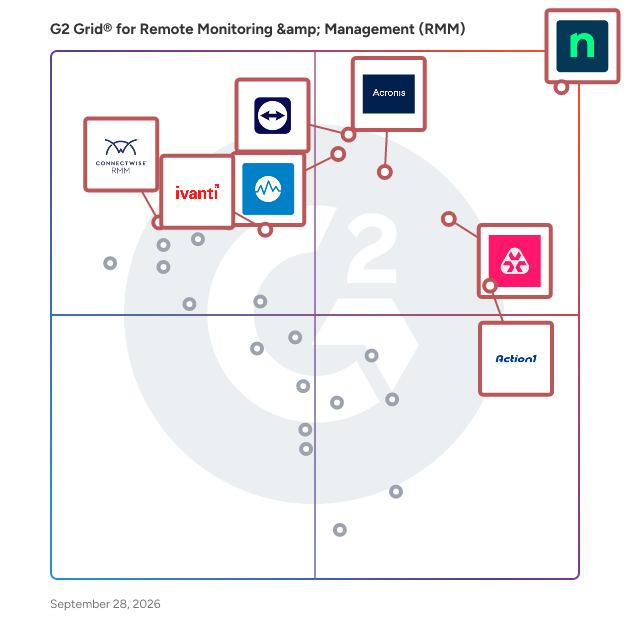
G2 Grid® for Remote Monitoring & Management (RMM) Software

G2 Grid® for Remote Monitoring & Management (RMM) Software plotting products by satisfaction and market presence

Highlighted products: NinjaOne, Action1, Acronis Cyber Protect Cloud, Datto RMM, TeamViewer, Ivanti Autonomous Endpoint Management, Remote Monitoring and Management, and ConnectWise RMM.

Underlying data: [Grid® JSON](https://www.g2.com/categories/remote-monitoring-management-rmm/grids.json?focus%5B%5D=ninjaone&focus%5B%5D=action1&focus%5B%5D=acronis-cyber-protect-cloud&focus%5B%5D=datto-rmm&focus%5B%5D=teamviewer&focus%5B%5D=ivanti-autonomous-endpoint-management&focus%5B%5D=remote-monitoring-and-management&focus%5B%5D=connectwise-rmm&segment=mid-market)

NinjaOne

NinjaOne is the unified IT operations platform that helps IT teams and managed service providers manage, secure, and support every endpoint from a single cloud-native console. Nearly 40,000 customers across 140+ countries use NinjaOne to replace fragmented point tools with one platform built to scale. The platform brings together the core work of modern IT operations: endpoint management, autonomous patch management, vulnerability management, endpoint and SaaS backup, remote access, and IT service desk. Teams monitor and control Windows, macOS, Linux, mobile, and virtual devices in one place, automate routine work with policy-based automation and human-centered AI, and cut the cost and risk that come from running many disconnected tools. NinjaOne serves internal IT teams and MSPs alike, from lean IT departments to mid-market and large enterprise organizations managing distributed, multi-site environments. Common uses include consolidating IT tooling, automating patching for security and compliance, managing distributed and hybrid workforces, improving endpoint visibility, and strengthening backup and ransomware readiness. NinjaOne has maintained a 98 percent customer satisfaction score for more than five years, backed by free unlimited onboarding and 24/7 support in seven languages. Organizations that move to NinjaOne report replacing four or more separate tools with the single platform. NinjaOne is FedRAMP Moderate Authorized and SOC 2 Type II and Type III compliant, and supports audit-ready compliance evidence across frameworks including CMMC, ISO 27001, and HIPAA. The mission behind the platform is simple: unify IT to simplify work, giving IT teams better tools and employees a great technology experience at work.

Average Rating: 4.7/5.0

Total Reviews: 4,990

How Do G2 Users Rate NinjaOne?

  • Ease of Admin: 9.1/10 (Category avg: 8.9/10)
  • Device Management: 9.4/10 (Category avg: 9.3/10)
  • Service Management: 8.6/10 (Category avg: 8.5/10)
  • Remote Monitoring: 9.5/10 (Category avg: 9.3/10)

Who Is the Company Behind NinjaOne?

  • Seller: NinjaOne
  • Company Website:
  • Year Founded: 2013
  • HQ Location: Austin, Texas
  • Twitter: @NinjaOne
    3,607 Twitter followers
  • LinkedIn® Page: www.linkedin.com
    2,376 employees on LinkedIn®

Who Uses This Product?

  • Who Uses This: IT Manager, Owner
  • Top Industries: Information Technology and Services, Computer & Network Security
  • Company Size: 47% Medium, 45% Small

What Do G2 Reviewers Say About NinjaOne?

AI-generated summary from verified user reviews

Pros
  • Users value the ease of use of NinjaOne, highlighting its seamless implementation and effective support for MSPs.
  • Users appreciate the ongoing feature enhancements of NinjaOne, ensuring the platform continuously evolves to meet our needs.
  • Users praise NinjaOne for its easy-to-navigate remote access and full visibility, enhancing IT support efficiency.
  • Users praise the powerful automation features of NinjaOne, enhancing efficiency and simplifying management tasks.
  • Users appreciate the exceptional customer support of NinjaOne, which simplifies learning and enhances overall usability.
Cons
  • Users notice the missing features in NinjaOne, specifically regarding client and customer portal capabilities.
  • Users find the limited features of NinjaOne frustrating, especially regarding user management and third-party software automation.
  • Users find the search function lacking and struggle with visibility and usability issues in NinjaOne.
  • Users feel the search function needs improvement and find the visibility of the NinjaOne icon inconsistent.
  • Users express concerns about feature issues, including confusion over roles, auto-installations, and OS compatibility challenges.

What Are Recent G2 Reviews of NinjaOne?

What Are G2 Users Discussing About NinjaOne?

Action1

Action1 is an autonomous endpoint management platform trusted by many Fortune 500 companies. Cloud-native, infinitely scalable, highly secure, and configurable in 5 minutes—it just works and is always free for the first 200 endpoints, with no functional limits. By pioneering autonomous OS and third-party patching with peer-to-peer patch distribution and real-time vulnerability assessment without needing a VPN, it eliminates routine labor, preempts ransomware and security risks, and protects the digital employee experience. In 2025, Action1 was recognized by Inc. 5000 as the fastest-growing private software company in America. The company is founder-led by Alex Vovk and Mike Walters, American entrepreneurs who previously founded Netwrix, a multi-billion-dollar cybersecurity company.

Average Rating: 4.9/5.0

Total Reviews: 1,201

How Do G2 Users Rate Action1?

  • Ease of Admin: 9.5/10 (Category avg: 8.9/10)
  • Device Management: 9.1/10 (Category avg: 9.3/10)
  • Service Management: 8.0/10 (Category avg: 8.5/10)
  • Remote Monitoring: 8.9/10 (Category avg: 9.3/10)

Who Is the Company Behind Action1?

  • Seller: Action1
  • Company Website:
  • Year Founded: 2018
  • HQ Location: Houston, Texas
  • Twitter: @Action1corp
    609 Twitter followers
  • LinkedIn® Page: www.linkedin.com
    137 employees on LinkedIn®

Who Uses This Product?

  • Who Uses This: IT Manager, System Administrator
  • Top Industries: Information Technology and Services, Computer & Network Security
  • Company Size: 56% Medium, 37% Small

What Do G2 Reviewers Say About Action1?

AI-generated summary from verified user reviews

Pros
  • Users find Action1's ease of use exceptional, enabling quick setup and efficient remote management of devices.
  • Users value Action1 for its effective and reliable patch management, streamlining their endpoint management with remarkable ease.
  • Users find Action1's easy setup and configuration a significant advantage, simplifying device management and monitoring.
  • Users value the automated update capabilities of Action1, significantly reducing time spent on server maintenance and management.
  • Users benefit from automated server updates in Action1, significantly reducing time and effort previously needed for manual updates.
Cons
  • Users note the missing Linux agent, which limits functionality for server and client systems in Action1.
  • Users find the remote access issues needing improvement, citing speed and usability concerns with the connection.
  • Users note certain feature limitations in Action1, especially regarding customizations and missing support for Linux clients.
  • Users find the report generation and logging readability lacking, making the experience less user-friendly.
  • Users feel that Action1 requires improvement in report creation and readability to enhance overall user experience.

What Are Recent G2 Reviews of Action1?

What Are G2 Users Discussing About Action1?

Acronis Cyber Protect Cloud

Acronis delivers the world’s most complete cyber resilience platform, combining backup, disaster recovery, cybersecurity, RMM, and business operations tools into a single, natively integrated solution. Built specifically for Managed Service Providers (MSPs) and IT teams, Acronis simplifies operations with one agent, one console, and one license model. Automation, AI-driven insights, and multi-tenant management ensure that fewer technicians can manage more clients at lower cost. With predictable pricing and transparent billing, Acronis enables partners and IT teams to scale efficiently, comply with regulations, and deliver unmatched resilience. No other vendor delivers this level of integration, efficiency, and MSP alignment. Acronis Cyber Protect Cloud unites backup and next-generation, AI-based anti-malware, antivirus, and endpoint protection management in one solution. Integration and automation provide unmatched ease for service providers — reducing complexity while increasing productivity and decreasing operating costs. Acronis Cyber Protect Cloud is the single service provider solution that combines backup, anti-malware (including anti-virus, anti-ransomware, and anti-cryptojacking) and security and management capabilities such as vulnerability assessments, patch management, URL filtering and more. Now, service providers can eliminate complexity and make security a centerpiece of their offerings while increasing SLAs, decreasing churn, and generating more recurring revenue. Get upgraded security with integrated AI-based defenses that protect clients from modern threats, make smarter use of resources so your team can focus on clients, and earn new recurring revenue and higher margins that strengthen your business. Enriched with next-gen, full-stack anti-malware protection and comprehensive yet simple management tools, built on top of our industry-leading backup and data recovery solution, Acronis Cyber Protect Cloud simplifies onboarding, daily operations, and reporting, and combats advanced attacks with new use cases enabled by integration. Acronis Cyber Protect Cloud makes it easy to deliver the modern cyber protection your clients seek. Acronis is majority-owned by EQT.

Average Rating: 4.7/5.0

Total Reviews: 1,389

How Do G2 Users Rate Acronis Cyber Protect Cloud?

  • Ease of Admin: 9.1/10 (Category avg: 8.9/10)
  • Device Management: 9.6/10 (Category avg: 9.3/10)
  • Remote Monitoring: 9.9/10 (Category avg: 9.3/10)

Who Is the Company Behind Acronis Cyber Protect Cloud?

  • Seller: Acronis
  • Company Website:
  • Year Founded: 2003
  • HQ Location: Schaffhausen
  • Twitter: @acronis
    94,498 Twitter followers
  • LinkedIn® Page: www.linkedin.com
    1,923 employees on LinkedIn®

Who Uses This Product?

  • Who Uses This: Director, CEO
  • Top Industries: Information Technology and Services, Computer & Network Security
  • Company Size: 68% Small, 28% Medium

What Do G2 Reviewers Say About Acronis Cyber Protect Cloud?

AI-generated summary from verified user reviews

Pros
  • Users appreciate the ease of use of Acronis Cyber Protect Cloud, making management and customization straightforward and efficient.
  • Users value the effective backup solutions of Acronis Cyber Protect Cloud for their simplicity and integration.
  • Users value the robust security features of Acronis Cyber Protect Cloud, ensuring safe data management and ransomware protection.
  • Users value the ease of backup management with Acronis Cyber Protect Cloud's all-in-one platform, simplifying their operations.
  • Users value the all-in-one platform of Acronis Cyber Protect Cloud, integrating backup, cybersecurity, and management seamlessly.
Cons
  • Users often experience slow performance with Acronis Cyber Protect Cloud, affecting the efficiency of backups and restores.
  • Users find Acronis Cyber Protect Cloud expensive compared to competitors, complicating their decision-making due to unclear pricing.
  • Users are frustrated with the poor customer support, especially due to unavailability on weekends during critical backup tests.
  • Users find the complexity of the interface and pricing confusing, which complicates their overall experience with Acronis Cyber Protect Cloud.
  • Users report backup issues with Acronis Cyber Protect Cloud, particularly concerning multiple export files and limited weekend support.

What Are Recent G2 Reviews of Acronis Cyber Protect Cloud?

What Are G2 Users Discussing About Acronis Cyber Protect Cloud?

TeamViewer

TeamViewer is a leading provider of remote connectivity software for individuals and businesses of all sizes. Our remote software enables companies across various industries to enhance their efficiency and achieve their business goals by digitally transforming their processes. We offer a selection of bespoke solutions: TeamViewer Tensor, our enterprise remote connectivity solution, enables businesses to connect, manage, and protect computers, mobile devices, and embedded platforms – on site and around the globe. TeamViewer Remote, our remote access and support solution, enables secure access to devices for remote support in small and medium-sized businesses. A free version of TeamViewer Remote is available for personal use. TeamViewer is actively working to shape the digital revolution by innovating in the fields of augmented reality (AR) and the Internet of Things (IoT). Our AR platform, Frontline, brings digital technology onto the shop floor with industrial AR solutions designed to optimize manual processes. Strategic partnerships and software integrations with other industry leaders such as SAP, Google, and Microsoft let us provide our customers with a seamless experience, regardless of their device or operating system. Since TeamViewer was founded in Göppingen, Germany, in 2005, our solutions have been installed on more than 2.5 billion devices worldwide. For more information, visit www.teamviewer.com.

Average Rating: 4.5/5.0

Total Reviews: 4,094

How Do G2 Users Rate TeamViewer?

  • Ease of Admin: 8.9/10 (Category avg: 8.9/10)
  • Device Management: 9.4/10 (Category avg: 9.3/10)
  • Service Management: 9.4/10 (Category avg: 8.5/10)
  • Remote Monitoring: 9.3/10 (Category avg: 9.3/10)

Who Is the Company Behind TeamViewer?

  • Seller: TeamViewer
  • Company Website:
  • Year Founded: 2005
  • HQ Location: Goppingen
  • Twitter: @TeamViewer
    48,070 Twitter followers
  • LinkedIn® Page: www.linkedin.com
    2,818 employees on LinkedIn®

Who Uses This Product?

  • Who Uses This: Software Engineer, IT Manager
  • Top Industries: Information Technology and Services, Computer Software
  • Company Size: 41% Small, 34% Medium

What Do G2 Reviewers Say About TeamViewer?

AI-generated summary from verified user reviews

Pros
  • Users appreciate the ease of use of TeamViewer, enjoying a smooth experience for remote access and support.
  • Users appreciate the easy remote access provided by TeamViewer, simplifying connections and enhancing productivity.
  • Users value the easy remote access with TeamViewer, simplifying connections and control over devices effortlessly.
  • Users love the Easy Access feature of TeamViewer, making remote connections seamless and efficient.
  • Users appreciate the seamless remote access of TeamViewer, enhancing productivity through easy connections and cross-platform compatibility.
Cons
  • Users face significant connection issues with TeamViewer, impacting performance during slow or unstable internet conditions.
  • Users experience connectivity issues with TeamViewer, leading to poor performance during slow or bad connections.
  • Users find TeamViewer expensive in South Africa due to high subscription fees and limited performance on slow connections.
  • Users experience slow performance with TeamViewer, particularly during weak internet connections and after network disruptions.
  • Users often face remote access issues with TeamViewer, including connection failures and confusing control panel interfaces.

What Are Recent G2 Reviews of TeamViewer?

What Are G2 Users Discussing About TeamViewer?

Datto RMM

Datto RMM is a secure, cloud-based platform for IT Managed Service Providers (MSPs) to remotely monitor, manage and support endpoints across their customer base. It provides a multi-tenant view, automated monitoring, alerts, patch management, endpoint remote control, and insightful reporting. Built with a security-first design, Datto RMM enables robust endpoint & data security via features such as native ransomware detection, mandatory 2FA, agent encryption, and more. With 24x7 support and 99.99% uptime, MSPs can rely on Datto RMM to deliver the best experience to their customers.

Average Rating: 4.5/5.0

Total Reviews: 796

How Do G2 Users Rate Datto RMM?

  • Ease of Admin: 8.9/10 (Category avg: 8.9/10)
  • Device Management: 9.2/10 (Category avg: 9.3/10)
  • Service Management: 8.7/10 (Category avg: 8.5/10)
  • Remote Monitoring: 9.2/10 (Category avg: 9.3/10)

Who Is the Company Behind Datto RMM?

  • Seller: Kaseya
  • Company Website:
  • Year Founded: 2000
  • HQ Location: Miami, FL
  • Twitter: @KaseyaCorp
    17,411 Twitter followers
  • LinkedIn® Page: www.linkedin.com
    5,483 employees on LinkedIn®

Who Uses This Product?

  • Who Uses This: Owner, Director
  • Top Industries: Information Technology and Services, Computer & Network Security
  • Company Size: 64% Small, 32% Medium

What Do G2 Reviewers Say About Datto RMM?

AI-generated summary from verified user reviews

Pros
  • Users appreciate the ease of use of Datto RMM, facilitating seamless management and troubleshooting for MSPs.
  • Users value the automation features of Datto RMM, enhancing efficiency and simplifying app deployment.
  • Users value the extensive information and integrated tools offered by Datto RMM for efficient customer support.
  • Users value the easy remote access capabilities of Datto RMM, enhancing support and issue resolution efficiency.
  • Users appreciate the s seamless integrations of Datto RMM, enhancing efficiency and streamlining daily management tasks.
Cons
  • Users struggle with remote access issues, experiencing frequent connection timeouts and complex cloud backup recovery processes.
  • Users often experience slow performance with Datto RMM, particularly when controlling endpoints and accessing support.
  • Users find the missing features in Datto RMM challenging, particularly with stability and agent dependency issues.
  • Users feel Datto RMM needs improvement in modernizing Webremote and enhancing usability for better team adoption.
  • Users find feature issues arise with custom monitors and installation hurdles due to admin rights and customer setups.

What Are Recent G2 Reviews of Datto RMM?

What Are G2 Users Discussing About Datto RMM?

ConnectWise RMM

ConnectWise RMM is a cloud-native remote monitoring and management (RMM) solution designed for IT professionals who need to monitor, manage, and support diverse IT environments. It provides centralized visibility, intelligent alerting, and advanced automation to help teams proactively address IT challenges and prevent downtime. Comprehensive Monitoring and Visibility ConnectWise RMM delivers 24/7 monitoring across endpoints, networks, backups, cloud health and availability, and security posture. Unified dashboards bring this information together in one place, making it easier to identify issues and act before issues affect end users. With more than 1,200 expert-maintained alerts, the system can reduce typical RMM alerting noise by up to 90% without sacrificing visibility, helping technicians focus on meaningful issues instead of spending time reviewing false positives. Automated Patch Management The solution includes automated OS and third-party patch management for over 7,000 applications. Uniquely, Windows OS security updates are reviewed and approved by ConnectWise NOC experts before each release. This helps teams' patch faster and with more confidence to reduce vulnerabilities, streamline compliance, and keep systems optimized. Advanced Automation and Scripting ConnectWise RMM provides automation capabilities such as built-in automation to select intelligent alerts, AI-assisted script generation, and multi-solution workflow orchestration. These tools simplify routine maintenance tasks, enforce consistent standards, and enable faster response to common IT events. Teams can complete work up to 75% faster, reducing repetitive manual effort and creating more time for strategic projects. Scalability and Endpoint Management ConnectWise RMM is built to support a wide range of businesses, including large and complex environments, with the ability to manage more than 100,000 devices in a single tenant. By unifying monitoring, patching, automation, and scripting into one solution, IT professionals can deliver reliable service, reduce ticket volume, and improve overall IT performance. Multi-site visibility, flexible add-ons, and seamless integration with security, backup, and business management tools make it easy to adapt as environments grow without adding unnecessary complexity.

Average Rating: 4.1/5.0

Total Reviews: 77

How Do G2 Users Rate ConnectWise RMM?

  • Ease of Admin: 7.9/10 (Category avg: 8.9/10)
  • Device Management: 8.3/10 (Category avg: 9.3/10)
  • Service Management: 8.1/10 (Category avg: 8.5/10)
  • Remote Monitoring: 8.5/10 (Category avg: 9.3/10)

Who Is the Company Behind ConnectWise RMM?

  • Seller: ConnectWise
  • Company Website:
  • Year Founded: 1982
  • HQ Location: Tampa, FL
  • Twitter: @ConnectWise
    14,926 Twitter followers
  • LinkedIn® Page: www.linkedin.com
    3,401 employees on LinkedIn®

Who Uses This Product?

  • Top Industries: Information Technology and Services, Computer & Network Security
  • Company Size: 66% Small, 29% Medium

What Do G2 Reviewers Say About ConnectWise RMM?

AI-generated summary from verified user reviews

Pros
  • Users find ConnectWise RMM very easy to use, appreciating its accessibility and helpful customer support.
  • Users value the ease of remote access with ConnectWise RMM, enabling seamless support from any location.
  • Users value automation in ConnectWise RMM, finding it convenient for managing assets and enhancing accessibility.
  • Users value the all-in-one solution of ConnectWise RMM, enhancing productivity and simplifying management tasks effectively.
  • Users value the user-friendly interface of ConnectWise RMM, enhancing visibility and ease of management in organizations.
Cons
  • Users are frustrated by missing features in ConnectWise RMM, hindering usability and lacking essential functionality.
  • Users often face poor customer support, with slow response times and communication issues impacting their experience.
  • Users report feature issues with ConnectWise RMM, citing complexity, poor documentation, and a cumbersome user interface.
  • Users face integration issues, with limited connectivity, reporting, and automation affecting overall functionality with ConnectWise RMM.
  • Users find ConnectWise RMM to be expensive, preferring more affordable cloud backup options that integrate seamlessly.

What Are Recent G2 Reviews of ConnectWise RMM?

What Are G2 Users Discussing About ConnectWise RMM?

Remote Monitoring and Management

Atera is defining the category of Autonomous IT, where AI agents resolve technical incidents end to end, without a technician in the loop. Atera's AI-native IT management platform consolidates RMM, helpdesk, ticketing, advanced reporting, and automation, empowering IT teams and MSPs to manage and protect infrastructure, automate tasks, and boost service quality by reducing downtime and improving SLAs. Atera’s autonomous AI agent, Robin, detects, diagnoses, remediates, and verifies incidents by taking action directly on devices, servers, networks, and mainframes, resolving Tier-1 and complex Tier-2 incidents in full. 1) Resolution without the wait. Robin doesn't just suggest or assist, it acts and resolves, on its own, instantly. 2) Always-on coverage, day and night. Robin extends your team's reach around the clock, resolving issues at 2am just as reliably as at 2pm, so your team isn't the only line of defense when it comes to fighting downtime. 3) A personal IT tech for every employee. An intelligent, context-aware AI agent that understands your environment, adapts to each user, and responds instantly. Built on a patented architecture, Robin operates as a system of action within your existing enterprise environment, adhering to the highest enterprise-grade security and compliance standards. It's governed by configurable guardrails, a complete audit trail, and approval workflows, so autonomy never comes at the cost of control. More than 13,000 organizations across 120+ countries rely on Atera to keep their people working, uninterrupted. Discover how Atera can help you achieve unparalleled organizational efficiency at www.atera.com.

Average Rating: 4.6/5.0

Total Reviews: 1,254

How Do G2 Users Rate Remote Monitoring and Management?

  • Ease of Admin: 9.0/10 (Category avg: 8.9/10)
  • Device Management: 9.0/10 (Category avg: 9.3/10)
  • Service Management: 8.7/10 (Category avg: 8.5/10)
  • Remote Monitoring: 9.2/10 (Category avg: 9.3/10)

Who Is the Company Behind Remote Monitoring and Management?

  • Seller: Atera
  • Company Website:
  • Year Founded: 2011
  • HQ Location: New York
  • Twitter: @ateracloud
    1,675 Twitter followers
  • LinkedIn® Page: www.linkedin.com
    416 employees on LinkedIn®

Who Uses This Product?

  • Who Uses This: Owner, IT Manager
  • Top Industries: Information Technology and Services, Computer & Network Security
  • Company Size: 55% Small, 30% Medium

What Do G2 Reviewers Say About Remote Monitoring and Management?

AI-generated summary from verified user reviews

Pros
  • Users find Atera's ease of use exceptional, streamlining management and enhancing efficiency across various tasks.
  • Users appreciate the powerful automation tools of Atera, enabling efficient management and consistent setup for new employees.
  • Users appreciate the all-in-one dashboard of Atera, enhancing efficiency with seamless access to various tools and features.
  • Users praise Atera for its efficiency, streamlining processes and enhancing remote management of devices.
  • Users value the proactive monitoring and all-in-one platform of Atera, significantly enhancing productivity and efficiency.
Cons
  • Users find missing features in Atera, such as insufficient alert context and lack of essential ticketing tools.
  • Users find the limited features of Atera, especially in the mobile app, restrict overall functionality for freelancers.
  • Users find improvement needed in Atera's interface changes and agent installation process, along with remote access reliability.
  • Users note that report loading times and limited customization can hinder efficiency, revealing areas for improvement.
  • Users express concerns about feature issues in Atera, citing limitations and disruptions affecting their workflow.

What Are Recent G2 Reviews of Remote Monitoring and Management?

What Are G2 Users Discussing About Remote Monitoring and Management?

Ivanti Autonomous Endpoint Management

Ivanti Autonomous Endpoint Management is a software designed to automate and simplify the management of devices throughout their lifecycle. The software provides capabilities for endpoint discovery, configuration, security, monitoring, and remediation across various platforms, including Windows, macOS, Linux, and mobile devices. It enables organizations to reduce manual IT workloads by leveraging automation for patch management, software distribution, compliance enforcement, and device provisioning. The software also offers insights into device health and usage, helping businesses address vulnerabilities, ensure policy adherence, and maintain endpoint performance while supporting remote and hybrid work environments. Ivanti Autonomous Endpoint Management aims to improve operational efficiency by centralizing endpoint administration and minimizing risks associated with unmanaged or unpatched devices.

Average Rating: 4.3/5.0

Total Reviews: 387

How Do G2 Users Rate Ivanti Autonomous Endpoint Management?

  • Ease of Admin: 8.1/10 (Category avg: 8.9/10)
  • Device Management: 8.9/10 (Category avg: 9.3/10)
  • Service Management: 8.5/10 (Category avg: 8.5/10)
  • Remote Monitoring: 8.6/10 (Category avg: 9.3/10)

Who Is the Company Behind Ivanti Autonomous Endpoint Management?

  • Seller: Ivanti
  • Company Website:
  • Year Founded: 1985
  • HQ Location: South Jordan, UT
  • Twitter: @GoIvanti
    6,761 Twitter followers
  • LinkedIn® Page: www.linkedin.com
    3,026 employees on LinkedIn®

Who Uses This Product?

  • Who Uses This: Software Engineer
  • Top Industries: Information Technology and Services, Computer & Network Security
  • Company Size: 47% Large, 34% Medium

What Do G2 Reviewers Say About Ivanti Autonomous Endpoint Management?

AI-generated summary from verified user reviews

Pros
  • Users appreciate the strong automation features of Ivanti Neurons, making endpoint management seamless and efficient.
  • Users value the robust automation and AI-driven features of Ivanti Neurons, enhancing IT efficiency and productivity.
  • Users value the strong automation and self-healing features of Ivanti Neurons, enhancing device management and visibility.
  • Users value the access ease of Ivanti Neurons UEM, praising its effortless integration across various operating systems.
  • Users value the effective Apple Device Management of Ivanti Neurons, simplifying device locking and enhancing functionality.
Cons
  • Users experience communication delays in support responsiveness, impacting critical troubleshooting during high-priority incidents.
  • Users report feature issues such as a cluttered UI and sluggish performance with large device counts.
  • Users find the UI cluttered and unintuitive, making navigation and accessing essential tools more difficult.
  • Users experience slow performance when managing large device counts, impacting efficiency during critical operations.
  • Users find the complexity of setup and customization challenging, leading to a steep learning curve.

What Are Recent G2 Reviews of Ivanti Autonomous Endpoint Management?

What Are G2 Users Discussing About Ivanti Autonomous Endpoint Management?

N-able N-central

Join the thousands of MSPs and IT professionals who use N-able™ N-central® to remotely monitor and manage devices and complex networks. Built with security in mind, N-central provides the visibility and efficiency you need to monitor more, provide great customer service, and scale your business. Key features include: • Monitor almost any device, including support for Windows, Linux, and macOS • Gain complete insight across your network and cloud services without the need for extra network monitoring software • Create automated patch management policies to ensure devices are up to date • Streamline your workflow with drag-and-drop scripting in automation manager—no need to write a line of code • Provide remote support across devices and platforms with the integrated Take Control feature • Integrate your existing PSA software or use N-able MSP Manager to manage tickets and billing • Manage security with integrated backup, EDR, AV, and disk encryption • Available as an on-premises or hosted cloud solution to fit your business N-central is designed to help you run your managed services business or internal IT department more efficiently, so you can focus on scaling operations.

Average Rating: 4.4/5.0

Total Reviews: 543

How Do G2 Users Rate N-able N-central?

  • Ease of Admin: 7.9/10 (Category avg: 8.9/10)
  • Device Management: 8.8/10 (Category avg: 9.3/10)
  • Service Management: 8.1/10 (Category avg: 8.5/10)
  • Remote Monitoring: 9.1/10 (Category avg: 9.3/10)

Who Is the Company Behind N-able N-central?

  • Seller: N-able
  • Company Website:
  • HQ Location: Morrisville, North Carolina
  • Twitter: @Nable
    15,859 Twitter followers
  • LinkedIn® Page: www.linkedin.com
    2,307 employees on LinkedIn®
  • Ownership: NYSE: NABL

Who Uses This Product?

  • Who Uses This: Director, Operations Manager
  • Top Industries: Information Technology and Services, Computer & Network Security
  • Company Size: 59% Small, 33% Medium

What Do G2 Reviewers Say About N-able N-central?

AI-generated summary from verified user reviews

Pros
  • Users appreciate the ease of use of N-able N-central, finding it intuitive for managing systems seamlessly.
  • Users value the customizable automation features of N-able N-central, enhancing control and efficiency in IT management.
  • Users value the customizable scripting options in N-able N-central, enhancing control and flexibility for IT management.
  • Users appreciate the solid remote access features of N-able N-central, enhancing system monitoring and management efficiency.
  • Users value the proactive monitoring capabilities of N-able N-central, enhancing efficiency without disrupting clients.
Cons
  • Users find the missing features, like chat and credential management, hinder efficiency and user experience.
  • Users often face feature issues that hinder efficiency, including bugs, connection problems, and inconsistent filtering.
  • Users express frustration over filter editing limitations and the cumbersome patching process in N-able N-central.
  • Users find the steep learning curve due to scattered documentation and lack of comprehensive guides challenging.
  • Users find the interface confusing, struggling with a steep learning curve and unwieldy settings management.

What Are Recent G2 Reviews of N-able N-central?

What Are G2 Users Discussing About N-able N-central?

Hexnode UEM

Hexnode is a comprehensive unified endpoint management tool used by IT professionals to deploy and secure corporate devices. It enables businesses to handle mobility concerns by providing a simple, effective way to view and control devices from a single administrative platform. Hexnode ensures a total separation of corporate and personal data on devices, ensuring the security of the data and the privacy of employees. Supported Operating Systems - Android, Fire OS, iOS, macOS, Linux, ChromeOS, visionOS, tvOS, Windows. Integrations: -Android Enterprise -Apple Business Manager (ABM) -Apple School Manager (ASM) -Azure AD Integration -G Suite (now Google Workspace) -Freshservice -LG, Kyocera and Samsun Knox Enterprise Solution -Microsoft AD -Okta -SCCM -Zendesk Here're the best features of Hexnode UEM: -Android Enterprise program. -Apple Business Manager and Apple School Manager Integrations. -Automated device management. -Web Content Filtering. -BYOD Deployment. -WPCO - Enrollment for Android -Bypass Activation Lock on Apple devices. -Co-managing Windows devices. -Enrollment Profiles for Android, iOS and Windows -Compliance management across the entire device fleet. -Custom Roles for technicians. -Digital Signage -Custom Reports -Different Device Encryption and Security Strategies. -Over-the-air deployment of endpoints using Samsung's Knox Mobile -Enrollment and Google's Zero Touch Enrollment. -Enable Account and Network Configuration. -Enroll using Apple Configurator and other quick enrollment options. -Enterprise application installation using IPA, APK, XAPK, MSI, DMG or PKG files for different platforms. -AI based Scripting with the help of Hexnode Genie. -Automate routine device management tasks with Deployments -Hexnode browser to enable multi-tabbed browsing on mobile devices. -Kiosk mode with a wide range of functionalities. -Unattended Remote Access -Account driven enrollment for Apple devices -Patch management. -Manage any number of devices within a single centralized console. -Monitor and track everything from an intuitive dashboard. -Out-of-the-box devices management. -Out-of-bound product management with REST-based API. -Precisely document security and compliance through a wide array of reports. -Provision, deploy and manage mobile applications. -Remotely set up device configurations on the user devices. -Remote view and control help admins troubleshoot the devices remotely. -ROM Enrollment for Android. -Seamless User Provision. -Selectively restrict device functionalities. -Incidents tab -Compliance policy -LAPS for Windows Security -Self Service device management for macOS and Windows -ChromeOS Managed Guest Sessions -Okta Device Trust -Conditional Access using Entra ID -Android SCEP Solutions we offer: -Unified Endpoint Management -Application Management -Bring Your Own Device -Cross-Platform Support -Enterprise Mobility Management -Identity and Access Management -IoT Device Management -Mobile Device Management -Mobile Application Management -Mobile Content Management -Mobile Expense Management -Mobile Security Management -Mobile Threat Defense -Kiosk Software -Remote Monitoring and Management -Rugged Device Management -Patch Management Trusted by SMBs to Fortune 100 Companies around the world. Check out these case studies: AudiçãoActiva - https://www.hexnode.com/mobile-device-management/mdm-case-study-audicaoactiva/ Andalusia Hospitals - https://www.hexnode.com/mobile-device-management/mdm-case-study-andalusia-hospitals/ Choyce - https://www.hexnode.com/mobile-device-management/mdm-case-study-choyce/ Condé Nast - https://www.hexnode.com/mobile-device-management/mdm-case-study-conde-nast/ DigitalMint - https://www.hexnode.com/mobile-device-management/mdm-case-study-digitalmint/ DKT Philippines - https://www.hexnode.com/mobile-device-management/mdm-case-study-dkt-international/ Hartley ISD - https://www.hexnode.com/mobile-device-management/mdm-case-study-hartley-isd/ Ur & Penn - https://www.hexnode.com/mobile-device-management/mdm-case-study-ur-penn/ Western Airways - https://www.hexnode.com/mobile-device-management/mdm-case-study-western-airways/

Average Rating: 4.6/5.0

Total Reviews: 274

How Do G2 Users Rate Hexnode UEM?

  • Ease of Admin: 9.0/10 (Category avg: 8.9/10)
  • Device Management: 9.3/10 (Category avg: 9.3/10)
  • Service Management: 8.6/10 (Category avg: 8.5/10)
  • Remote Monitoring: 9.3/10 (Category avg: 9.3/10)

Who Is the Company Behind Hexnode UEM?

  • Seller: Mitsogo Inc.
  • Company Website:
  • Year Founded: 2013
  • HQ Location: San Francisco, CA
  • Twitter: @thehexnode
    17,615 Twitter followers
  • LinkedIn® Page: www.linkedin.com
    532 employees on LinkedIn®

Who Uses This Product?

  • Who Uses This: Business Analyst, IT Manager
  • Top Industries: Information Technology and Services, Computer Software
  • Company Size: 54% Medium, 36% Small

What Do G2 Reviewers Say About Hexnode UEM?

AI-generated summary from verified user reviews

Pros
  • Users find Hexnode UEM's ease of use exceptional, especially praising the helpful support for resolving issues.
  • Users value the user-friendly interface and smooth navigation of Hexnode UEM, enhancing configuration and management tasks.
  • Users appreciate the ability to manage devices across different OS, making setup and profile management seamless.
  • Users appreciate the stellar customer support from Hexnode UEM, making issue resolution easy and effective.
  • Users find the intuitive user interface of Hexnode UEM makes it easy to manage and deploy devices effectively.
Cons
  • Users experience missing features, such as end-user management and app switching in Kiosk mode, hindering usability.
  • Users express frustration with the inefficient MFA process that slows down bulk device removal and clutters inboxes.
  • Users find Hexnode UEM lacking features in reporting and management, particularly for Windows environments and advanced automation.
  • Users find the limited features of Hexnode UEM restrictive, particularly in user management and Windows environments.
  • Users find the pricing to be quite expensive, particularly impacting smaller teams looking for flexible plans.

What Are Recent G2 Reviews of Hexnode UEM?

What Are G2 Users Discussing About Hexnode UEM?

Milvus TI

O Milvus é uma plataforma completa de gestão de atendimento, relacionamento com clientes e ativos de TI, desenvolvida para empresas que buscam centralizar processos, aumentar a eficiência operacional e melhorar a experiência do cliente. A solução reúne em um único ambiente recursos de Help Desk, gestão de tickets, inventário de TI, atendimento multicanal (e-mail, chat, WhatsApp e outros) e automação de processos, permitindo maior controle, visibilidade e padronização das operações de suporte e atendimento. Com foco em simplicidade, escalabilidade e integração, o Milvus se conecta facilmente a ferramentas de CRM, marketing e vendas, ajudando equipes a tomar decisões baseadas em dados e a acompanhar indicadores em tempo real. É ideal para empresas de diferentes portes que desejam profissionalizar o suporte, organizar ativos tecnológicos e fortalecer o relacionamento com seus clientes.

Average Rating: 4.8/5.0

Total Reviews: 132

How Do G2 Users Rate Milvus TI?

  • Ease of Admin: 9.3/10 (Category avg: 8.9/10)
  • Device Management: 9.8/10 (Category avg: 9.3/10)
  • Remote Monitoring: 9.4/10 (Category avg: 9.3/10)

Who Is the Company Behind Milvus TI?

  • Seller: Milvus
  • HQ Location: São Caetano do Sul, BR
  • LinkedIn® Page: www.linkedin.com
    71 employees on LinkedIn®

Who Uses This Product?

  • Who Uses This: Analista de Suporte, Analista de TI
  • Top Industries: Information Technology and Services, Computer Networking
  • Company Size: 45% Small, 42% Medium

What Do G2 Reviewers Say About Milvus TI?

AI-generated summary from verified user reviews

Pros
  • Users appreciate the efficient automation and integration of Milvus TI, streamlining operations and enhancing productivity.
  • Users value the automation features of Milvus TI, significantly reducing manual tasks and improving operational efficiency.
  • Users commend the efficiency of Milvus TI, highlighting its automation and streamlined operations for daily tasks.
  • Users value the management efficiency of Milvus TI, particularly for automating tasks and organizing operations seamlessly.
  • Users benefit from the WhatsApp integration that automates ticketing, streamlining operations and reducing manual tasks.
Cons
  • Users often face connection issues with Milvus TI, especially on older hardware, leading to sluggish performance.
  • Users find the performance issues of the remote access agent can lead to sluggish connections on older hardware.
  • Users find Milvus TI initially complex, especially if they lack familiarity with using filters.
  • Users experience latency issues on older hardware, leading to a sluggish connection that affects performance significantly.
  • Users find the learning curve challenging at first, but it's a powerful tool once mastered.

What Are Recent G2 Reviews of Milvus TI?

LogMeIn Central

LogMeIn Central is a remote monitoring and management (RMM) platform for IT teams and managed service providers. It enables remote access, endpoint monitoring, patch management, task automation, and reporting from a centralized dashboard. The platform supports Windows and Mac environments and includes antivirus management powered by Bitdefender.

Average Rating: 4.2/5.0

Total Reviews: 203

How Do G2 Users Rate LogMeIn Central?

  • Ease of Admin: 9.1/10 (Category avg: 8.9/10)
  • Device Management: 8.7/10 (Category avg: 9.3/10)
  • Service Management: 8.1/10 (Category avg: 8.5/10)
  • Remote Monitoring: 9.1/10 (Category avg: 9.3/10)

Who Is the Company Behind LogMeIn Central?

  • Seller: GoTo
  • Year Founded: 2003
  • HQ Location: Boston, MA
  • Twitter: @goto
    41,211 Twitter followers
  • LinkedIn® Page: www.linkedin.com
    993 employees on LinkedIn®

Who Uses This Product?

  • Who Uses This: IT Manager, Network Administrator
  • Top Industries: Information Technology and Services, Computer Software
  • Company Size: 51% Small, 38% Medium

What Are Recent G2 Reviews of LogMeIn Central?

LogMeIn Resolve

LogMeIn Resolve is a unified endpoint management (UEM) platform that helps IT teams and managed service providers (MSPs) centrally manage, secure, and support every device across their organization — from a single intelligent console, without the complexity of disconnected tools. Designed for IT professionals facing growing device diversity, escalating security demands, and relentless pressure to do more with less, Resolve combines proactive endpoint management with AI-driven automation to shift IT from constant firefighting to predictive, outcome-driven support. Whether managing a lean SMB environment or a multi-tenant MSP operation, Resolve scales to fit your team and your workflows. Built on a zero-trust security architecture, Resolve verifies every identity, device, and action before access is granted — making enterprise-grade security a built-in default, not an afterthought. Key capabilities include: -Remote Monitoring & Management (RMM): Automated patch management, IT alerting, and scheduled background maintenance keep endpoints healthy and compliant without technician intervention or end-user disruption -Mobile Device Management (MDM): Enforce security policies, application controls, and remote lock/wipe capabilities across iOS, Android, and BYOD environments to minimize data exposure -AI-driven automation & reporting: Codeless automation, AI-generated scripts, on-demand fleet reporting, and an AI Virtual Technician handle repeatable tasks so technicians can focus on higher-impact work -Integrated helpdesk & knowledge management: AI-powered ticket classification, automated knowledge base article creation, and session summaries capture institutional knowledge and accelerate time-to-resolution -Asset management: Real-time software discovery, license tracking, lifecycle monitoring, and asset-to-ticket correlation give IT full visibility across their environment -Cross-platform remote support: Seamless access and control across Windows, macOS, iOS, Android, and Chrome OS from a single console Resolve integrates with the tools IT teams already rely on — including Microsoft Teams, Microsoft Intune, ServiceNow, Acronis, SentinelOne, Jira Service Desk, ConnectWise PSA, HaloPSA, Logitech, and more — reducing stack complexity and streamlining workflows end-to-end.

Average Rating: 4.3/5.0

Total Reviews: 467

How Do G2 Users Rate LogMeIn Resolve?

  • Ease of Admin: 8.9/10 (Category avg: 8.9/10)
  • Device Management: 9.3/10 (Category avg: 9.3/10)
  • Service Management: 9.2/10 (Category avg: 8.5/10)
  • Remote Monitoring: 9.4/10 (Category avg: 9.3/10)

Who Is the Company Behind LogMeIn Resolve?

  • Seller: GoTo
  • Company Website:
  • Year Founded: 2003
  • HQ Location: Boston, MA
  • Twitter: @goto
    41,211 Twitter followers
  • LinkedIn® Page: www.linkedin.com
    993 employees on LinkedIn®

Who Uses This Product?

  • Who Uses This: IT Manager, IT Director
  • Top Industries: Information Technology and Services, Computer Software
  • Company Size: 43% Medium, 36% Small

What Do G2 Reviewers Say About LogMeIn Resolve?

AI-generated summary from verified user reviews

Pros
  • Users find LogMeIn Resolve to be very easy to use, facilitating seamless connections with clients across multiple platforms.
  • Users love the easy remote control of LogMeIn Resolve, allowing seamless access for effective tech support anytime, anywhere.
  • Users love the ease of remote access with LogMeIn Resolve, facilitating efficient technical support across various platforms.
  • Users value the convenience and effectiveness of LogMeIn Resolve for efficient remote support and seamless HelpDesk workflows.
  • Users praise the active and authentic customer support of LogMeIn Resolve, enhancing remote assistance experiences.
Cons
  • Users face remote access issues with connection drops and limitations on features like printing documents remotely.
  • Users find LogMeIn Resolve to be expensive compared to alternatives, especially with limited features in the free version.
  • Users experience slow performance during heavy usage, leading to lag in video calls and file transfers.
  • Users experience technical issues on Mac, making it challenging, especially under high load conditions.
  • Users experience connection issues with LogMeIn Resolve, causing occasional lags and affecting performance during use.

What Are Recent G2 Reviews of LogMeIn Resolve?

What Are G2 Users Discussing About LogMeIn Resolve?

Domotz

Domotz is a network monitoring and management software platform used by MSPs and IT teams to gain visibility and operational control across distributed network environments. It enables organizations to monitor, manage, and troubleshoot network infrastructure across multiple sites or customer environments from a centralized interface. Founded in 2015 and headquartered in Draper, Utah, Domotz supports organizations worldwide that are responsible for maintaining reliable and secure network operations. The platform is used in a wide range of environments, including small and mid sized businesses, enterprise locations, and managed service provider deployments. Domotz provides automated device discovery and asset inventory, allowing teams to identify all devices connected to the network and maintain accurate records over time. It supports SNMP monitoring, alerting, and performance tracking to help teams detect availability issues, degradation, or misconfigurations before they impact users. Network topology visualization helps teams understand how devices are connected and identify potential points of failure. Additional capabilities include configuration backup and change tracking for supported devices, secure remote access without requiring VPNs, and tools for troubleshooting network issues remotely. Domotz can be used to monitor and manage routers, switches, firewalls, access points, servers, cameras, printers, and other IP enabled devices across heterogeneous vendor environments. Domotz is designed for operational use by technical teams. It can be deployed quickly, provides access to real network data, and supports ongoing monitoring and troubleshooting as networks evolve. The platform integrates with common MSP and IT tools to support workflows related to documentation, alerting, and service delivery. Pricing is based on a per device monthly model, currently priced at $1.50 per device per month. This pricing structure allows organizations to scale monitoring based on the number of devices managed while maintaining predictable costs. Users can start with Free Discovery to evaluate their environment using real network data before committing.

Average Rating: 4.8/5.0

Total Reviews: 101

How Do G2 Users Rate Domotz?

  • Ease of Admin: 9.1/10 (Category avg: 8.9/10)
  • Device Management: 8.9/10 (Category avg: 9.3/10)
  • Service Management: 9.1/10 (Category avg: 8.5/10)
  • Remote Monitoring: 9.3/10 (Category avg: 9.3/10)

Who Is the Company Behind Domotz?

  • Seller: Domotz
  • Company Website:
  • Year Founded: 2015
  • HQ Location: Draper, Utah
  • Twitter: @domotz
    2,420 Twitter followers
  • LinkedIn® Page: www.linkedin.com
    70 employees on LinkedIn®

Who Uses This Product?

  • Who Uses This: Owner
  • Top Industries: Information Technology and Services, Computer & Network Security
  • Company Size: 71% Small, 23% Medium

What Do G2 Reviewers Say About Domotz?

AI-generated summary from verified user reviews

Pros
  • Users value the ease of use of Domotz, enhancing their ability to monitor and manage networks effortlessly.
  • Users value the customizable alerts and seamless monitoring of network devices offered by Domotz for efficient troubleshooting.
  • Users value the customizable alert notifications from Domotz, enabling quick responses to network device issues.
  • Users appreciate the customizable alerts from Domotz, enabling quick responses to device issues and enhancing network management.
  • Users highlight the excellent customer support of Domotz, emphasizing quick responses and helpful assistance.
Cons
  • Users find the network diagram feature lacking and experience lag with the desktop app when managing multiple devices.
  • Users face challenges with alert issues, including false positives and overwhelming notifications during network outages.
  • Users find the costs prohibitive for SMEs and individuals, with frequent price increases adding to their concerns.
  • Users note the missing features in Domotz, particularly for beginners and flat networks, limiting functionality and flexibility.
  • Users face integration issues due to lack of API support, making setup and notifications challenging initially.

What Are Recent G2 Reviews of Domotz?

What Are G2 Users Discussing About Domotz?

Pulseway

Pulseway is RMM software, built to help MSPs and IT teams reduce downtime, take control and become more efficient. Pulseway provides all-in-one IT monitoring and management software, filled with features and modules to boost your productivity straight out of the box and never miss critical alerts. - Pulseway’s comprehensive remote monitoring and management (RMM) software provides a complete view across your network. View operational data for workstations, servers, VMs, network devices and more, while resolving issues straight from the same interface. - Be instantly alerted to issues, resolve them before they become a problem and minimize downtime – across the network. - Let you and your team be fully productive from anywhere to deliver first-class customer service wherever you are. - Automate repetitive IT tasks and automatically fix issues before they become a problem. - Pulseway built-in Mobile Remote Control enables simple, reliable, and fluid remote access to any monitored systems. Access files, applications and control remote systems as if you were sitting right in front of them. Try Pulseway RMM today with a free 14-day no-commitment trial to see for yourself.

Average Rating: 4.5/5.0

Total Reviews: 122

How Do G2 Users Rate Pulseway?

  • Ease of Admin: 9.2/10 (Category avg: 8.9/10)
  • Device Management: 9.3/10 (Category avg: 9.3/10)
  • Service Management: 8.8/10 (Category avg: 8.5/10)
  • Remote Monitoring: 9.4/10 (Category avg: 9.3/10)

Who Is the Company Behind Pulseway?

  • Seller: MMSoft Design
  • Year Founded: 2011
  • HQ Location: Dublin, Ireland
  • Twitter: @pulsewayapp
    6,073 Twitter followers
  • LinkedIn® Page: www.linkedin.com
    47 employees on LinkedIn®

Who Uses This Product?

  • Who Uses This: IT Manager, Owner
  • Top Industries: Information Technology and Services, Computer & Network Security
  • Company Size: 52% Small, 42% Medium

What Do G2 Reviewers Say About Pulseway?

AI-generated summary from verified user reviews

Pros
  • Users praise the intuitive interface of Pulseway, making it easy to implement and enhancing business operations seamlessly.
  • Users commend the easy setup of Pulseway, enabling seamless integration and management for their computer repair services.
  • Users appreciate the implementation ease of Pulseway, enjoying its quick setup and seamless integrations with existing tools.
  • Users appreciate the easy integrations of Pulseway, enhancing efficiency in monitoring and managing infrastructure seamlessly.
  • Users value the s seamless integrations of Pulseway with other software, enhancing efficiency and support capabilities.
Cons
  • Users note the limited features of Pulseway, particularly in network monitoring and mobile app updates.
  • Users find limited compatibility with Pulseway, particularly regarding Microsoft Office and Linux integration issues.
  • Users find the slow performance of Pulseway frustrating, particularly during peak hours, affecting overall usability.
  • Users find the pricing very high compared to other comparable remote monitoring management solutions.
  • Users are frustrated with constant upselling and unfinished features, alongside issues with logging out and reporting quality.

What Are Recent G2 Reviews of Pulseway?

What Are G2 Users Discussing About Pulseway?

Tian Lin
TL
Researched and written by Tian Lin
Updated