Best Project Management Tools Software - Page 20

How Many Project Management Tools Software Products Does G2 Track?

Total Products under this Category: 336

Category Stats (Sep 2026)

  • Average Rating: 4.35/5 (↑0.01 vs Aug 2026) The average rating of products in this category, based on all submitted ratings
  • Top Trending Product: Klient PSA (+0.49%) - Among all products in this category, Klient PSA recorded the largest rating increase compared to last month

Last updated: September 01, 2026

How Does G2 Rank Project Management Tools Software Products?

Why You Can Trust G2's Software Rankings:

  • 30 Analysts and Data Experts
  • 2,900+ Authentic Reviews
  • 336+ Products
  • Unbiased Rankings

G2's software rankings are built on verified user reviews, rigorous moderation, and a consistent research methodology maintained by a team of analysts and data experts. Each product is measured using the same transparent criteria, with no paid placement or vendor influence. While reviews reflect real user experiences, which can be subjective, they offer valuable insight into how software performs in the hands of professionals. Together, these inputs power the G2 Score, a standardized way to compare tools within every category.

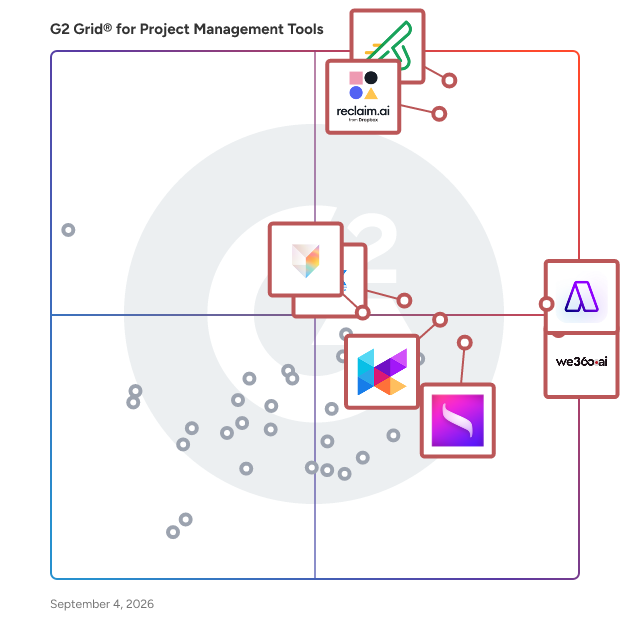
G2 Grid® for Project Management Tools Software

G2 Grid® for Project Management Tools Software plotting products by satisfaction and market presence

Highlighted products: Zoho Sprints, Reclaim.ai, Akiflow, We360.ai, Klient PSA, Saturation, DHTMLX UI, and Tana.

Underlying data: [Grid® JSON](https://www.g2.com/categories/project-management-tools/grids.json?focus%5B%5D=zoho-sprints&focus%5B%5D=reclaim-ai&focus%5B%5D=akiflow&focus%5B%5D=we360-ai&focus%5B%5D=klient-psa&focus%5B%5D=saturation&focus%5B%5D=dhtmlx-ui&focus%5B%5D=tana-2025-09-29)

Quantivia

In a world where finding fault in others is unprecedented, Quantivia is the dedicated solution that examines every aspect of your project to deliver transparent real-time reports.

Who Is the Company Behind Quantivia?

  • Seller: PROCON8
  • Year Founded: 2017
  • HQ Location: Riyadh, SA
  • LinkedIn® Page: www.linkedin.com
    2 employees on LinkedIn®

Redmine Outlook Classic Add-In

The integration plugin that allows to convert emails into Redmine activities inside Outlook Desktop version. Enforces Outlook with Redmine projects and tasks tree. Create new Redmine activities, assign assignees, log work hours, change activities statuses directly from Outlook.

Who Is the Company Behind Redmine Outlook Classic Add-In?

Release Gadgets: Calendar, Roadmaps, Status Report & Burnups

Your Jira Dashboard knows a lot about your releases. Release Gadgets makes it actually show that information. A Jira-native gadget pack that turns any Jira Dashboard into a live release visibility hub for Release, Delivery, and Program Managers. Drop in a Release Calendar to show stakeholders what's shipping this month, a Roadmap to display multi-team timelines, Progress Bars to track delivery in real time, or a Scope Change report to explain why the deadline moved - all without leaving Jira, all without exporting to a spreadsheet. Standard includes Calendar, Roadmap, Countdown, Progress Bars, Status Report, Burnup, Trends, and Scope Change gadgets. Advanced adds Roadmap and Calendar views for Epics and Sprints, plus Release Frequency reporting for teams tracking delivery cadence over time. Works natively with Jira Cloud, Data Center, and Server. Learn more at releasemanagement.app

Who Is the Company Behind Release Gadgets: Calendar, Roadmaps, Status Report & Burnups?

Releasion

The right app for the right process

Who Is the Company Behind Releasion?

  • Seller: Lienion
  • Year Founded: 2016
  • HQ Location: Tremelo, BE
  • LinkedIn® Page: www.linkedin.com
    3 employees on LinkedIn®

Resonate

Resonate is an AI-powered, voice-driven project reporting tool that utilises AI to generate professional, polished reports. It enables project managers and teams to effortlessly capture, update, and share project progress using voice calls. Designed to improve reporting accuracy and save time, Resonate allows users to generate structured updates and progress reports through simple, natural voice interactions. Key Features: - Voice-Driven Capture: Schedule and conduct voice calls with individual team members or entire teams to gather project updates using guided questions. - AI-Generated Reports: Automatically generates project progress reports based on voice responses, tailored for each team member and sent directly to the project manager. - Customisable Question Packs: Choose from a library of curated question sets or create your own to match your reporting needs. - Scheduled Reporting: Supports weekly, fortnightly, or monthly update cadences to fit different team rhythms. - Target Audience: Resonate is built for project managers, delivery leads, and teams working on complex programmes who want to reduce the time spent gathering updates and improve reporting accuracy. Limitations and Requirements: - Resonate requires an active Resonate account to use. Users must sign up via https://resonate.firewoodtools.com/signup. - The AI-generated reporting features are available only for English language input at this time. Languages Supported: - English (additional languages will be supported in future updates) If you come across any objectionable AI-generated content please reach out to us as info@firewoodtools.com. For help or to get started, please visit our support page: https://resonate.firewoodtools.com/about

Who Is the Company Behind Resonate?

Resource Manager by VirtoSoftware

Resource Manager by Virto is designed for effective resource management in Office 365 and SharePoint. This tool allows users to display data from SharePoint lists as a table with task stripes oriented along the time axis. Manage your SharePoint project tasks, check your employees’ workload, and use material resources in a chart view. Key features of Resource Manager: 1) Monitor the workload of your team and utilization of resources. 2) Create and edit SharePoint tasks directly in the chart view. 3) Combine data from multiple SharePoint data sources in a single chart. 4) Adjust the data sources and display workloads as you wish. Manage resources effectively with Virto Resource Manager—get your 30-day FREE trial today.

Who Is the Company Behind Resource Manager by VirtoSoftware?

  • Seller: VirtoSoftware
  • Year Founded: 2009
  • HQ Location: Los Angeles, US
  • Twitter: @VirtoSoftware
    896 Twitter followers
  • LinkedIn® Page: www.linkedin.com
    15 employees on LinkedIn®

Review by Easy Agile

Review by Easy Agile is a free Jira app for retrospectives, reviews, and project debriefs. From reflection to results Our free retrospective tool works in Jira to support your next project debrief or sprint retrospective, helping remote teams and co-located teams turn conversation into progress. Free retrospective templates Built-in retrospective templates and reactions invite engagement and guide discussion for your next sprint review or campaign debrief. Run easy retrospectives that are smooth, collaborative, and always worth the time. Never lose an action item Keep team feedback one click from your Jira board and avoid action items getting lost in spreadsheets or separate tools. Track planned and incomplete action items, so ownership is clear and next steps are visible and implemented. Anonymous retrospectives Anonymous posting, mood surveys, and reactions create psychological safety and a safe place for all voices to be heard. Every team member can raise real issues and help shape improvement, leading to better team decisions. Adopt with confidence and trust Review by Easy Agile is a free retro app from a SOC II Certified, Platinum Marketplace Partner. Secure, trusted, and supported, so you can install with the confidence of enterprise-grade security.

Who Is the Company Behind Review by Easy Agile?

  • Seller: Easy Agile
  • Year Founded: 2015
  • HQ Location: Wollongong, New South Wales
  • Twitter: @easyagile
    622 Twitter followers
  • LinkedIn® Page: www.linkedin.com
    21 employees on LinkedIn®

RiskRegister

Risk Register automates best practice risk management techniques.

Who Is the Company Behind RiskRegister?

RTC Tracking

RTC offers companies real-time access to what their consultants are working on. Offering enhanced communication, remote monitoring & management, better consultant protection, improved transparency and project management. RTC Tracking is an easy to learn and easy to use software that will streamline your work with consultants. In our every changing world with remote work skyrocketing, RTC Tracking will help you keep everyone on track, and offer seamless communication.

Who Is the Company Behind RTC Tracking?

ScatterSpoke

ScatterSpoke is an agile retrospective tool where anyone can quickly launch and share a retro with team members. Everyone can post feedback in real-time, vote on issues, create groups, and tag action items for follow-up.  Retro data is rolled up to provide metrics on common patterns and themes across teams. It's time to have a smarter retrospective.

Who Is the Company Behind ScatterSpoke?

Schedule Tracker

Web based app for schedule analysis, comparison, and project tracking for Primavera P6. Track schedule updates, changes, delays, costs and negative trends over the entire project timeline. Generate easy to export reports and charts.

Who Is the Company Behind Schedule Tracker?

Scrumpy Planning Poker for Jira

Scrumpy Planning Poker for Jira is online planning poker for distributed teams.

Who Is the Company Behind Scrumpy Planning Poker for Jira?

  • Seller: AELBOX
  • HQ Location: N/A
  • Twitter: @scrumpypoker
    5 Twitter followers
  • LinkedIn® Page: www.linkedin.com
    1 employees on LinkedIn®

Sense

Sense is an Artificial Memory for your work. Connect your apps once and enjoy all your work being automatically organised in one place!

Who Is the Company Behind Sense?

ShowMyProgress

With ShowMyProgress, clients will never miss important updates on collaborative tasks and milestones.Everyone can easily track progress to ensure everyone is on the same page every step of the way.

Who Is the Company Behind ShowMyProgress?

Smart LAP App

Accelerate Performance by integrating Business Functions and Stakeholders (Customers, Employees & Management) on the same platform. Work Performance measures how well work is done (Quality) while Productivity measures how much work is done (Speed). AI has made work much faster, however the quality of work may not be as good leading to improved Productivity but reduced Performance. Smart LAP focusses on improving Quality & Speed by integrating different business functions & stakeholders on the same platform. Each feature has WhatsApp actions, so that users can complete their work within WhatsApp with a single click (without the need to login). Projects: - You can use Reusable Templates to Plan Projects with Deliverables & Tasks with specific timelines and assigned to users. - Task Quality is measured by using Form checklists & Attachments to ensure that work is correctly done before closure. - You can build Approval workflows where the manager can view the previous task and Approve or Send it back. All tasks can also be given Ratings. Requests: - Requests are an email like interface to allocate work for all stakeholders with context aware & configurable Workflows for Routing, Escalation & Approval. - WhatsApp alerts with actions are sent to Employees on assignment and Managers on completion or escalation. - Managers can assign work to their team and specify escalation timelines for each request - Customers can raise tickets for their Projects which can be auto routed to Project Managers - Employees can raise Service requests routed to specific people within the respective departments Forms: - Forms can be used to collect information from Prospects, Customers, Employees & Projects. - They can be viewed via a Link, QR code or embedded in your website. - Forms can be periodic (Monthly, Quarterly etc) with reminders sent to people and tracking of responses. Attendance: - Our Mobile App installed in employees’ phones is used to record In/Out times without the need for biometric machines - Users take a selfie and the app uses Face Recognition to check if the person is correct - Geo Location can be optionally used Leave: - The company can setup their Leave Types, Accrual policies and leave day policies - Employees can apply for leave which can be approved by their managers in WhatsApp itself Timesheet: - Employees can enter the time taken daily for each open Project Task or Request - This can be sent to managers as daily WhatsApp alerts and also added to their respective histories Workspaces: - Office seating (cabins, workstations etc) can be setup and office employees can be allocated seats that can be viewed on the floor plan - Employees can book meeting rooms as per timeslots and can also book seats on the floor plan Mobile eCards: - Digital Visiting cards can be designed with photos, text and employee information

Who Is the Company Behind Smart LAP App?

Subhransu Sahu
SS
Researched and written by Subhransu Sahu
Updated October 3, 2024