  # Best Print Management Solutions - Page 6

  *By [Neeraja Prakash](https://research.g2.com/insights/author/neeraja-prakash)*

   Print management solutions coordinate all processes that take place between printer hardware and the devices requiring print jobs. These solutions are ideal for enterprise businesses, as they can be used to manage various printing tasks for large networks of printers. For businesses, print management tools ensure that employees’ computers are properly connected to an organization’s printers. These solutions are typically deployed on one device, such as a printer, that can manage the entire network from a single location. A member of the organization’s IT department typically acts as the administrator of this software.

Print management solutions enable users to print and ensure the process is as user-friendly as possible. These platforms can calibrate print jobs by color, size, and layout. They can also assist organizations with the logistical side of printing, such as revealing the cost of print jobs and administering updates to the printing systems. Print management software should integrate with [document creation software](https://www.g2.com/categories/document-creation) to print text-based documents.

To qualify for inclusion in the Print Management category, a product must:

- Handle user management by role or department
- Manage a network of printers
- Organize print jobs by color, size, layout, and more
- Monitor print queues
- Administer updates to printers
- Maintain print history and audit logs
- Track ink and paper use


## How Many Print Management Solutions Products Does G2 Track?
**Total Products under this Category:** 91

### Category Stats (May 2026)
- **Average Rating**: 4.18/5
- **New Reviews This Quarter**: 23
- **Buyer Segments**: Mid-Market 48% │ Small-Business 45% │ Enterprise 7%
- **Top Trending Product**: Xerox FreeFlow Print Server (+0.065)
*Last updated: May 19, 2026*

  
## How Does G2 Rank Print Management Solutions Products?

**Why You Can Trust G2's Software Rankings:**

- 30 Analysts and Data Experts
- 1,500+ Authentic Reviews
- 91+ Products
- Unbiased Rankings

G2's software rankings are built on verified user reviews, rigorous moderation, and a consistent research methodology maintained by a team of analysts and data experts. Each product is measured using the same transparent criteria, with no paid placement or vendor influence. While reviews reflect real user experiences, which can be subjective, they offer valuable insight into how software performs in the hands of professionals. Together, these inputs power the G2 Score, a standardized way to compare tools within every category.

  
## Which Print Management Solutions Is Best for Your Use Case?

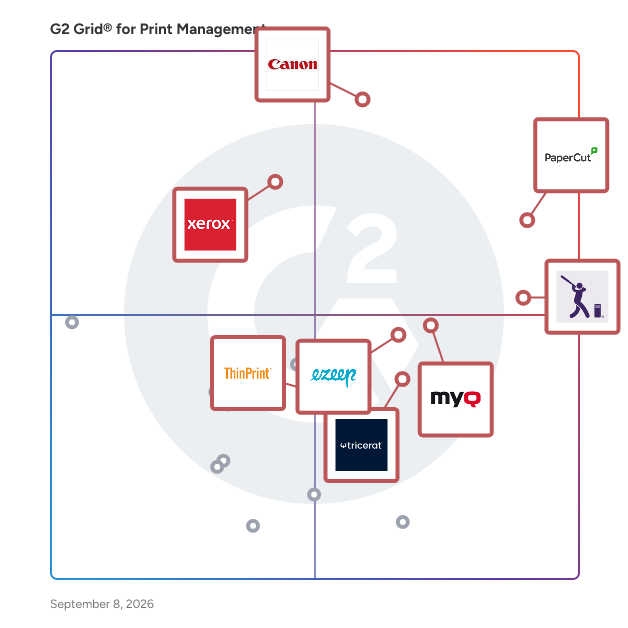
- **Leader:** [PaperCut](https://www.g2.com/products/papercut-mf/reviews)
- **Highest Performer:** [MyQ](https://www.g2.com/products/myq/reviews)
- **Easiest to Use:** [Vasion Print (formerly PrinterLogic)](https://www.g2.com/products/vasion-print-formerly-printerlogic/reviews)
- **Top Trending:** [Vasion Print (formerly PrinterLogic)](https://www.g2.com/products/vasion-print-formerly-printerlogic/reviews)
- **Best Free Software:** [PaperCut](https://www.g2.com/products/papercut-mf/reviews)

  
---

**Sponsored**

### PaperCut

PaperCut is a print management software solution designed to help users optimize their printing processes while minimizing waste and costs. With a history spanning over two decades, PaperCut addresses the prevalent issue of excessive paper waste in various printing environments. Serving a diverse user base of over 200 million individuals across 195 countries and more than 100,000 organizations, PaperCut has established itself as a leader in advocating for sustainable printing practices. The primary target audience for PaperCut encompasses businesses, educational institutions, healthcare facilities, and organizations of all sizes that aim to enhance their printing efficiency and reduce their environmental footprint. This software is particularly advantageous for organizations with high print volumes that are looking to implement cost-saving measures. By providing detailed insights into printing habits, PaperCut empowers users to make informed decisions regarding their printing practices, ultimately fostering more sustainable behaviors. Key features of PaperCut include robust tracking and reporting capabilities, enabling administrators to monitor print jobs, identify patterns of high usage, and set quotas or restrictions based on user roles. This level of visibility allows organizations to manage their printing resources effectively, leading to reduced unnecessary expenses and promoting responsible usage. Furthermore, PaperCut supports a wide array of printers and operating systems, ensuring compatibility across diverse environments. The software&#39;s user-friendly interface simplifies installation and operation, making it accessible for both technical and non-technical users alike. One of the notable benefits of PaperCut is its significant contribution to environmental sustainability. To date, the PaperCut community has collectively saved over 750 million sheets of paper, which is equivalent to preserving approximately 80,000 trees. This achievement underscores the software&#39;s effectiveness in reducing waste and resonates with organizations that are committed to enhancing their sustainability initiatives. By integrating PaperCut into their operations, users can actively contribute to a greener future while simultaneously realizing cost savings. Overall, PaperCut provides a comprehensive solution for organizations seeking to streamline their printing processes, enhance visibility, and promote sustainable practices. Its combination of powerful features, ease of use, and dedication to environmental responsibility positions it as a valuable tool for any organization aiming to improve its print management strategies.


[Visit website](https://www.g2.com/external_clickthroughs/record?secure%5Bad_program%5D=ppc&amp;secure%5Bad_slot%5D=category_product_list&amp;secure%5Bcategory_id%5D=1546&amp;secure%5Bdisplayable_resource_id%5D=1546&amp;secure%5Bdisplayable_resource_type%5D=Category&amp;secure%5Bmedium%5D=sponsored&amp;secure%5Bplacement_reason%5D=page_category&amp;secure%5Bplacement_resource_ids%5D%5B%5D=1546&amp;secure%5Bprioritized%5D=false&amp;secure%5Bproduct_id%5D=71205&amp;secure%5Bresource_id%5D=1546&amp;secure%5Bresource_type%5D=Category&amp;secure%5Bsource_type%5D=category_page&amp;secure%5Bsource_url%5D=https%3A%2F%2Fwww.g2.com%2Fcategories%2Fprint-management%3Fpage%3D4&amp;secure%5Btoken%5D=8c185f92f68a8e238883ba83f3db19a2ed50a4ded31fcbf2fa3837b828ea5dec&amp;secure%5Burl%5D=https%3A%2F%2Fwww.papercut.com%2Fbook-a-demo%2F&amp;secure%5Burl_type%5D=book_demo)

---

  
    ## What Is Print Management Solutions?
  [Office Management Software](https://www.g2.com/categories/office-management-software)


