Top Free Online Backup Software

How Many Online Backup Software Products Does G2 Track?

Total Products under this Category: 182

Category Stats (Nov 2026)

  • Average Rating: 4.37/5 The average rating of products in this category, based on all submitted ratings
  • Top Trending Product: Datto Endpoint Backup (+0.38%) - Among all products in this category, Datto Endpoint Backup recorded the largest rating increase compared to last month

Last updated: November 01, 2026

How Does G2 Rank Online Backup Software Products?

Why You Can Trust G2's Software Rankings:

  • 30 Analysts and Data Experts
  • 17,900+ Authentic Reviews
  • 182+ Products
  • Unbiased Rankings

G2's software rankings are built on verified user reviews, rigorous moderation, and a consistent research methodology maintained by a team of analysts and data experts. Each product is measured using the same transparent criteria, with no paid placement or vendor influence. While reviews reflect real user experiences, which can be subjective, they offer valuable insight into how software performs in the hands of professionals. Together, these inputs power the G2 Score, a standardized way to compare tools within every category.

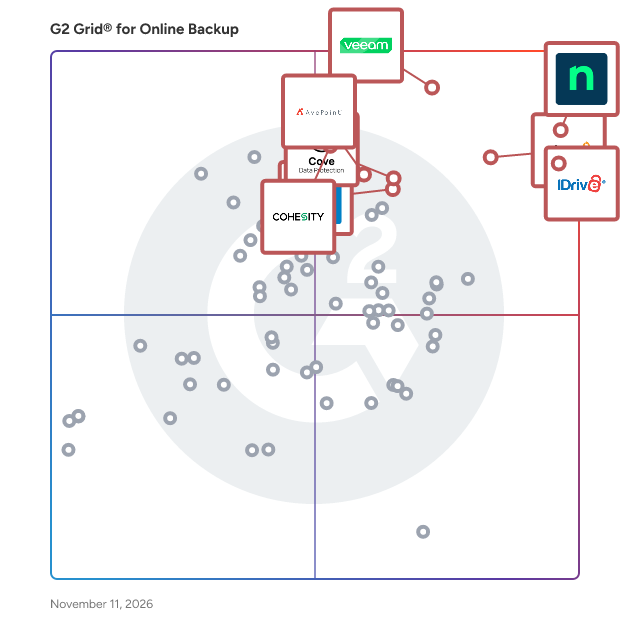
G2 Grid® for Online Backup Software

G2 Grid® for Online Backup Software plotting products by satisfaction and market presence

Highlighted products: NinjaOne, IDrive Online and SaaS Backup, Object Storage e2, Veeam Data Platform, Druva Data Security Cloud, Cove Data Protection, Datto SIRIS, Cohesity, and AvePoint Confidence Platform.

Underlying data: [Grid® JSON](https://www.g2.com/categories/online-backup/grids.json?focus%5B%5D=ninjaone&focus%5B%5D=idrive-online-and-saas-backup-object-storage-e2&focus%5B%5D=veeam-data-platform&focus%5B%5D=druva-data-security-cloud&focus%5B%5D=cove-data-protection&focus%5B%5D=kaseya-datto-siris&focus%5B%5D=cohesity&focus%5B%5D=avepoint-confidence-platform)

NinjaOne

NinjaOne unifies IT to simplify work for 40,000 customers in 140+ countries. The NinjaOne Unified IT Operations Platform delivers endpoint management, autonomous patching, backup, and remote access in a single console to improve efficiency, increase resilience, and reduce spend. By automating IT and managing all endpoints, organizations give employees a great technology experience at work. The platform brings together the core work of modern IT operations: endpoint management, autonomous patch management, vulnerability management, endpoint and SaaS backup, remote access, and IT service desk. Teams monitor and control Windows, macOS, Linux, mobile, and virtual devices in one place, automate routine work with policy-based automation and human-centered AI, and cut the cost and risk that come from running many disconnected tools. NinjaOne has maintained a 98 percent customer satisfaction score for more than five years, backed by free unlimited onboarding and 24/7 support in seven languages. Organizations that move to NinjaOne report replacing four or more separate tools with the single platform. NinjaOne is FedRAMP Moderate Authorized and SOC 2 Type II and Type III compliant, and supports audit-ready compliance evidence across frameworks including CMMC, ISO 27001, and HIPAA. The mission behind the platform is simple: unify IT to simplify work, giving IT teams better tools and employees a great technology experience at work.

Average Rating: 4.7/5.0

Total Reviews: 5,810

How Do G2 Users Rate NinjaOne?

  • Disk Backup: 8.8/10 (Category avg: 8.5/10)
  • Has the product been a good partner in doing business?: 9.4/10 (Category avg: 8.8/10)
  • Remote Backup: 9.2/10 (Category avg: 8.9/10)
  • Encrypted Storage: 8.8/10 (Category avg: 8.9/10)

Who Is the Company Behind NinjaOne?

  • Seller: NinjaOne
  • Company Website:
  • Year Founded: 2013
  • HQ Location: Austin, Texas
  • LinkedIn® Page: www.linkedin.com
    2,555 employees on LinkedIn®

Who Uses This Product?

  • Who Uses This: IT Manager, Owner
  • Top Industries: Information Technology and Services, Computer & Network Security
  • Company Size: 46% Small, 46% Medium

What Do G2 Reviewers Say About NinjaOne?

AI-generated summary from verified user reviews

Pros
  • Users find the interface intuitive and easy to navigate, making daily tasks straightforward.
  • Users value responsive, helpful support that quickly answers questions and helps resolve problems.
  • Users value fast, reliable remote access that makes it easy to connect to devices and resolve issues without being onsite.
  • Users appreciate the easy deployment and setup, which gets the platform running across devices with little effort.
  • Users value its broad, robust feature set and deep capabilities across RMM and IT management needs.
Cons
  • Users find navigation confusing and the interface dated, with settings and features sometimes difficult to locate.
  • Users find reporting limited in detail, available report types, and analytical depth.
  • Users find reporting inflexible and difficult to customize, configure, and tailor to complex needs.
  • Users find pricing steep for smaller teams and as endpoint counts grow, while add-ons and extra fees increase overall costs.
  • Users find integrations limited, less robust than desired, and sometimes difficult to configure or use with other systems.

What Are Recent G2 Reviews of NinjaOne?

What Are G2 Users Discussing About NinjaOne?

IDrive Online and SaaS Backup, Object Storage e2

IDrive protects all your PCs, Macs, mobile devices, Servers, your Cloud Applications Data (SAAS) including Office 365, Google Workspace and more, and provides the best in class S3 compatible Object Storage service with IDrive e2. IDrive offers many different plans for cloud backup for your devices: -IDrive Personal -IDrive Team -IDrive Small Business -IDrive Enterprise - IDrive360 EndPoint IDrive provides Cloud Applications data (SAAS) Backup: - Microsoft Office 365 Backup - Google Workspace Backup - Dropbox and Box Backup - Salesforce Backup The company's services help over 4 million customers back up over 1 Exabyte of data

Average Rating: 4.4/5.0

Total Reviews: 2,074

How Do G2 Users Rate IDrive Online and SaaS Backup, Object Storage e2?

  • Disk Backup: 8.9/10 (Category avg: 8.5/10)
  • Has the product been a good partner in doing business?: 9.0/10 (Category avg: 8.8/10)
  • Remote Backup: 9.0/10 (Category avg: 8.9/10)
  • Encrypted Storage: 9.1/10 (Category avg: 8.9/10)

Who Is the Company Behind IDrive Online and SaaS Backup, Object Storage e2?

  • Seller: IDrive
  • Year Founded: 2007
  • HQ Location: Calabasas, CA
  • LinkedIn® Page: www.linkedin.com
    135 employees on LinkedIn®

Who Uses This Product?

  • Who Uses This: Owner, President
  • Top Industries: Photography, Information Technology and Services
  • Company Size: 89% Small, 4% Medium

What Do G2 Reviewers Say About IDrive Online and SaaS Backup, Object Storage e2?

AI-generated summary from verified user reviews

Pros
  • Users value the ease of use of IDrive Online and SaaS Backup, enjoying seamless access and customization options.
  • Users value the affordable pricing of IDrive Online and SaaS Backup, providing excellent service and flexibility.
  • Users appreciate the flexible storage capacity of IDrive Online, allowing seamless backups and easy file access across devices.
  • Users find the setup process very easy, enhancing their overall experience with IDrive Online and SaaS Backup.
  • Users value the flexible backup frequency options of IDrive, making data management efficient and stress-free.
Cons
  • Users often face backup issues with IDrive, including slow speeds and challenges with syncing and uploading files.
  • Users feel that the poor interface design of IDrive Online hinders usability and complicates file management.
  • Users express frustration over backup failures, particularly with syncing deletions and scheduled backups not functioning properly.
  • Users report storage issues with iDrive, including sync failures and manual upload requirements that complicate the process.
  • Users experience slow backup speeds, especially with initial backups and large restores, affecting overall performance.

What Are Recent G2 Reviews of IDrive Online and SaaS Backup, Object Storage e2?

What Are G2 Users Discussing About IDrive Online and SaaS Backup, Object Storage e2?

Veeam Data Platform

Veeam’s premier product, Veeam Data Platform, is a unified solution that goes deeper on security, gets you back faster when it matters most, and expands workload protection across hypervisors and applications. Going beyond backup with best-in-class security, Veeam Data Platform is engineered to tackle the realities of today’s threat landscape. Deep threat detection backed by AI and a broad threat detection surface give your teams the business-critical tools they need to defend against evolving cyberattacks. With unmatched multicloud portability and expansive workload support, you gain the flexibility to move across hybrid and multicloud environments without disruption or lock-in. It’s protection for where you are, not where you were. For organizations looking to simplify deployment, Veeam Software Appliance gives you a pre-built, hardened, and highly available option that expands the strength of your team without adding headcount. These capabilities (and more) are what makes Veeam the #1 leader in data resilience, trusted by over 550,000 customers worldwide, including 82% of the Fortune 500.

Average Rating: 4.6/5.0

Total Reviews: 710

How Do G2 Users Rate Veeam Data Platform?

  • Disk Backup: 9.2/10 (Category avg: 8.5/10)
  • Has the product been a good partner in doing business?: 9.0/10 (Category avg: 8.8/10)
  • Remote Backup: 9.0/10 (Category avg: 8.9/10)
  • Encrypted Storage: 9.1/10 (Category avg: 8.9/10)

Who Is the Company Behind Veeam Data Platform?

  • Seller: Veeam
  • Company Website:
  • Year Founded: 2006
  • HQ Location: Kirkland, WA
  • LinkedIn® Page: www.linkedin.com
    7,515 employees on LinkedIn®

Who Uses This Product?

  • Who Uses This: IT Manager, System Administrator
  • Top Industries: Information Technology and Services, Computer & Network Security
  • Company Size: 59% Medium, 23% Small

What Do G2 Reviewers Say About Veeam Data Platform?

AI-generated summary from verified user reviews

Pros
  • Users commend the ease of use of Veeam Data Platform, enhancing reliability and ensuring seamless operations.
  • Users value the reliability and comprehensiveness of Veeam Data Platform for efficient backup and recovery solutions.
  • Users value the reliability of Veeam Data Platform, ensuring consistent data protection and swift recovery in all environments.
  • Users value the frequent backup capabilities of Veeam Data Platform, allowing for quick recovery and data integrity.
  • Users praise the easy setup of Veeam Data Platform, facilitating quick onboarding and effective backups right from the start.
Cons
  • Users experience backup issues, particularly with Linux databases and advanced features, impacting overall reliability and efficiency.
  • Users find the pricing high for smaller teams, making it less accessible despite its capabilities.
  • Users find the licensing issues complex and opaque, complicating setups and potentially leading to unexpected costs.
  • Users find the complex setup of Veeam Data Platform challenging, often needing extensive research to navigate its features.
  • Users report backup problems with Veeam Data Platform, particularly with Linux databases and cloud management inconsistencies.

What Are Recent G2 Reviews of Veeam Data Platform?

What Are G2 Users Discussing About Veeam Data Platform?

AI can help you find the answers. G2 helps you trust them.

Connect G2 to Claude or ChatGPT for answers grounded in G2's trusted reviews, comparisons, and pricing from real user insights.

How it works

Druva Data Security Cloud

Over the past decade, data risks have diversified, shifting data protection’s role from a passive last line of defense to an active data partner in responding to and recovering from diverse data risks. Traditionally, backup solutions aimed to secure against system risks such as hardware and application failures. However, with cloud making infrastructure redundant and applications becoming more resilient, risks have shifted from infrastructure to the data layer. While security tools play a critical role in creating defensive layers to secure the enterprise perimeter, some threats inevitably breach these defenses. Legacy backup approaches typically resorted to brute force recovery, but modern incident response demands a thorough analysis of the breach's scope, impact, and remediation strategies before recovery can occur. Data security is essential in this process, providing deep data insights that, when combined with perimeter security data, drive comprehensive and effective data-powered incident response. Druva bolsters enterprise data defense with the Data Security Cloud, a 100% SaaS, fully-managed platform that enhances protection, monitoring, and recovery. Druva ensures secure and clean recovery through air-gapped immutable backups, and advanced anomaly detection facilitates early threat identification. The platform's integrated response capabilities allow organizations to assess and address threats promptly, and bounce back to clean data without loss. By combining these features, Druva complements existing perimeter defenses, providing a seamless, comprehensive solution that simplifies the response and recovery process and ensures robust protection against modern threats. About Druva Druva is the leading provider of data security solutions, empowering customers to secure and recover their data from all threats. The Druva Data Security Cloud is a fully managed SaaS solution offering air-gapped and immutable data protection across cloud, on-premises, and edge environments. By centralizing data protection, Druva enhances traditional security measures and enables faster incident response, effective cyber remediation, and robust data governance. Trusted by over 7,500 customers, including 65 of the Fortune 500, Druva safeguards business data in an increasingly interconnected world.

Average Rating: 4.7/5.0

Total Reviews: 735

How Do G2 Users Rate Druva Data Security Cloud?

  • Disk Backup: 9.2/10 (Category avg: 8.5/10)
  • Has the product been a good partner in doing business?: 9.4/10 (Category avg: 8.8/10)
  • Remote Backup: 9.5/10 (Category avg: 8.9/10)
  • Encrypted Storage: 9.5/10 (Category avg: 8.9/10)

Who Is the Company Behind Druva Data Security Cloud?

  • Seller: Druva
  • Company Website:
  • Year Founded: 2008
  • HQ Location: Sunnyvale, CA
  • LinkedIn® Page: www.linkedin.com
    1,372 employees on LinkedIn®

Who Uses This Product?

  • Who Uses This: IT Manager, System Administrator
  • Top Industries: Information Technology and Services, Computer Software
  • Company Size: 59% Medium, 34% Large

What Do G2 Reviewers Say About Druva Data Security Cloud?

AI-generated summary from verified user reviews

Pros
  • Users appreciate the ease of use of Druva Data Security Cloud, highlighting its simplicity and effective management.
  • Users appreciate the ease of use in Druva Data Security Cloud, valuing its simplicity and user-friendly interface.
  • Users appreciate the easy file-level restores with Druva, saving time and simplifying backup management significantly.
  • Users appreciate the professional and proactive support from Druva, enhancing their overall experience and system reliability.
  • Users value the consistent backup frequency of Druva Data Security Cloud, ensuring reliable data protection across systems.
Cons
  • Users experience occasional backup proxy failures initially, but overall stability improves after troubleshooting and support.
  • Users are frustrated by the storage limitations imposed on Druva Data Security Cloud compared to the initial unlimited storage offer.
  • Users find the costs of Druva Data Security Cloud can escalate rapidly due to its pricing model based on data volume.
  • Users often face slow performance during initial backups and restores, especially with large datasets, impacting efficiency.
  • Users are frustrated by the lack of backup options for Hyper-V, limiting functionality and integration with other platforms.

What Are Recent G2 Reviews of Druva Data Security Cloud?

What Are G2 Users Discussing About Druva Data Security Cloud?

Cove Data Protection

Cove Data Protection, from N-able, is a cloud-first backup and disaster recovery service for servers, workstations, and Microsoft 365™, all managed from a multitenant web-based dashboard. Cove was created and optimized for the cloud, so incremental backups are up to 60 times smaller than with traditional image backup products. This allows you to back up more often, and the SaaS delivery format reduces administrative time, lowering your cost of service delivery. Storage in our private cloud is included, with data centers worldwide.

Average Rating: 4.5/5.0

Total Reviews: 438

How Do G2 Users Rate Cove Data Protection?

  • Disk Backup: 8.8/10 (Category avg: 8.5/10)
  • Has the product been a good partner in doing business?: 8.9/10 (Category avg: 8.8/10)
  • Remote Backup: 8.9/10 (Category avg: 8.9/10)
  • Encrypted Storage: 8.8/10 (Category avg: 8.9/10)

Who Is the Company Behind Cove Data Protection?

  • Seller: N-able
  • Company Website:
  • HQ Location: Morrisville, North Carolina
  • LinkedIn® Page: www.linkedin.com
    2,307 employees on LinkedIn®
  • Ownership: NYSE: NABL

Who Uses This Product?

  • Who Uses This: Owner, President
  • Top Industries: Information Technology and Services, Computer & Network Security
  • Company Size: 72% Small, 21% Medium

What Do G2 Reviewers Say About Cove Data Protection?

AI-generated summary from verified user reviews

Pros
  • Users find Cove Data Protection highly user-friendly, appreciating its intuitive dashboard and seamless backup management.
  • Users praise Cove Data Protection for its simple and reliable backup solutions, enhancing management with strong support.
  • Users appreciate the reliable performance of Cove Data Protection, ensuring smooth backups and effective data management.
  • Users value the automatic backup frequency of Cove Data Protection, ensuring seamless data management and peace of mind.
  • Users commend the easy setup of Cove Data Protection, enhanced by responsive support and seamless integration with existing tools.
Cons
  • Users experience backup issues during outages, with vague error messages and failed folder backups complicating recovery efforts.
  • Users experience backup failures during outages, vague error messages, and issues with restoring data effectively.
  • Users face challenges with restore issues during outages, leading to incomplete backups and vague error messages.
  • Users experience backup failures during internet outages, making data restoration difficult and creating vague error messages.
  • Users face restoration issues with Cove Data Protection, including slow recovery and unclear error messages during outages.

What Are Recent G2 Reviews of Cove Data Protection?

What Are G2 Users Discussing About Cove Data Protection?

Datto SIRIS

Datto SIRIS is an all-in-one BCDR solution built for MSPs to efficiently prevent data loss and minimize downtime. Utilizing a cloud-first approach, MSPs can offer their clients local backup and recovery with a secure, cloud-based repository and full disaster recovery in the cloud. All of this administered from a multi-tenant cloud portal that allows MSPs to view, manage and recover client data from a single interface. Simplicity is a guiding design principle for SIRIS. From deployment flexibility that spans a software-only implementation to hardened backup appliances, MSPs can implement the solution that fits their client’s requirements. SIRIS cross-platform support enables MSPs to protect their client’s data anywhere it lives, from physical servers to virtual machines running Windows Server or Linux. Innovative features include: • Inverse Chain Technology™ for reliable backup • Patented ransomware scanning • Patented Screenshot Verification for recovery assurance • Intuitive Recovery Launchpad for failproof recovery • Patented Fast Failback™ to primary system after a disaster • Instant virtualization recovery, local or in the cloud SIRIS Explainer: https://www.youtube.com/watch?v=C5We4VpRqOA

Average Rating: 4.5/5.0

Total Reviews: 286

How Do G2 Users Rate Datto SIRIS?

  • Disk Backup: 9.5/10 (Category avg: 8.5/10)
  • Has the product been a good partner in doing business?: 9.0/10 (Category avg: 8.8/10)
  • Remote Backup: 9.6/10 (Category avg: 8.9/10)
  • Encrypted Storage: 9.5/10 (Category avg: 8.9/10)

Who Is the Company Behind Datto SIRIS?

  • Seller: Kaseya
  • Company Website:
  • Year Founded: 2000
  • HQ Location: Miami, FL
  • LinkedIn® Page: www.linkedin.com
    5,483 employees on LinkedIn®

Who Uses This Product?

  • Who Uses This: Owner, President
  • Top Industries: Information Technology and Services, Computer & Network Security
  • Company Size: 66% Small, 28% Medium

What Do G2 Reviewers Say About Datto SIRIS?

AI-generated summary from verified user reviews

Pros
  • Users appreciate the ease of use of Datto SIRIS, enjoying quick support and seamless disaster recovery processes.
  • Users appreciate the reliability of Datto SIRIS, benefiting from improved support and minimized verification errors.
  • Users highlight the easy recovery process with Datto SIRIS, appreciating its performance and user-friendly interface.
  • Users appreciate the reliable instant virtualization of Datto SIRIS, allowing for quick recovery and minimal downtime.
  • Users appreciate the responsive customer support of Datto SIRIS, enhancing their overall experience with the product.
Cons
  • Users often mention the high cost of Datto SIRIS, which can be prohibitive for smaller environments.
  • Users find poor customer support challenging, especially with response times and escalations during busy periods.
  • Users feel that Datto SIRIS has high pricing issues that may be a barrier for smaller environments needing storage.
  • Users often face restore issues with Datto SIRIS, particularly regarding speed and backup size complications.
  • Users often face storage issues with Datto SIRIS, citing slow backup speeds for large data amounts as problematic.

What Are Recent G2 Reviews of Datto SIRIS?

What Are G2 Users Discussing About Datto SIRIS?

AvePoint Confidence Platform

AvePoint is the unifying Trust Layer for AI. AvePoint enables more than 28,000 organizations and 6,000 channel partners to protect, secure, and govern their entire AI estate across data, infrastructure, AI and agents for Microsoft, Google, Salesforce, and other leading cloud environments — so that enterprises can deploy AI with confidence and scale innovation without scaling risk. To learn more, visit www.avepoint.com.

Average Rating: 4.5/5.0

Total Reviews: 123

How Do G2 Users Rate AvePoint Confidence Platform?

  • Has the product been a good partner in doing business?: 9.1/10 (Category avg: 8.8/10)
  • Remote Backup: 9.4/10 (Category avg: 8.9/10)
  • Encrypted Storage: 9.2/10 (Category avg: 8.9/10)

Who Is the Company Behind AvePoint Confidence Platform?

  • Seller: AvePoint
  • Company Website:
  • Year Founded: 2001
  • HQ Location: Jersey City, NJ
  • LinkedIn® Page: www.linkedin.com
    2,850 employees on LinkedIn®
  • Ownership: NASDAQ: AVPT

Who Uses This Product?

  • Top Industries: Information Technology and Services, Computer Software
  • Company Size: 40% Medium, 27% Large

What Do G2 Reviewers Say About AvePoint Confidence Platform?

AI-generated summary from verified user reviews

Pros
  • Users appreciate the ease of use of the AvePoint Confidence Platform for seamless implementation and administration.
  • Users value the simplified cloud data protection of AvePoint Confidence Platform, enabling automated backups with ease.
  • Users value the automated backup frequency of AvePoint Confidence Platform, simplifying data protection for cloud environments.
  • Users value the comprehensive security features of AvePoint Confidence Platform, providing effortless data protection and compliance management.
  • Users appreciate the easy setup of AvePoint Confidence Platform, facilitating smooth implementation and ongoing management.
Cons
  • Users find the high cost of AvePoint Confidence Platform challenging, especially compared to similar applications.
  • Users experience backup issues with incomplete completions and limited frequency, leading to frustration in dependability.
  • Users find poor customer support frustrating, lacking proactivity in communication and timely issue notifications.
  • Users struggle with the slow performance of AvePoint Confidence Platform, facing long wait times and frequent timeouts.
  • Users experience technical issues with bugs, delayed enhancements, backup notifications, and frequent timeouts requiring re-logins.

What Are Recent G2 Reviews of AvePoint Confidence Platform?

What Are G2 Users Discussing About AvePoint Confidence Platform?

Backblaze B2 Cloud Storage

Backblaze B2 is S3 compatible cloud object storage built purposefully to unlock budgets, unburden administrators, and unleash innovators. Delivering performance at 1/5 the cost including free egress up to 3x monthly storage, it’s the easy choice for more than 85,000 organizations including Patagonia, UCLA, Fortune, and Streamlabs for backup, active archive, and application storage needs. Together with technology partners, Backblaze B2 helps customers break free from restrictive, overpriced legacy providers that hold them back, and blaze forward with the full power of the open cloud in their hands.

Average Rating: 4.6/5.0

Total Reviews: 117

How Do G2 Users Rate Backblaze B2 Cloud Storage?

  • Disk Backup: 8.9/10 (Category avg: 8.5/10)
  • Has the product been a good partner in doing business?: 8.9/10 (Category avg: 8.8/10)
  • Remote Backup: 9.2/10 (Category avg: 8.9/10)
  • Encrypted Storage: 9.5/10 (Category avg: 8.9/10)

Who Is the Company Behind Backblaze B2 Cloud Storage?

  • Seller: Backblaze
  • Company Website:
  • Year Founded: 2007
  • HQ Location: San Mateo, California
  • LinkedIn® Page: www.linkedin.com
    377 employees on LinkedIn®
  • Ownership: NASDAQ: BLZE

Who Uses This Product?

  • Who Uses This: Owner, Director
  • Top Industries: Information Technology and Services, Computer Software
  • Company Size: 71% Small, 19% Medium

What Do G2 Reviewers Say About Backblaze B2 Cloud Storage?

AI-generated summary from verified user reviews

Pros
  • Users find Backblaze B2 Cloud Storage's affordable storage options ideal for seamless NAS backups without complexity.
  • Users value the reliability of Backblaze B2 Cloud Storage, enjoying its seamless integration and effortless management for secure storage.
  • Users find the ease of use of Backblaze B2 Cloud Storage ideal for smooth setup and management.
  • Users value the easy setup of Backblaze B2 Cloud Storage, which integrates smoothly with their existing systems.
  • Users value the generous storage capacity of Backblaze B2 Cloud Storage, enabling efficient data management and backups.
Cons
  • Users find the poor interface design challenging, especially lacking guidance for new users unfamiliar with cloud storage.
  • Users find navigation cumbersome, as browsing data is slow and advanced features may overwhelm first-time users.
  • Users face storage issues as deleting buckets is complex, making it challenging to switch providers or retrieve files.
  • Users find storage limitations challenging, particularly for heavy processing or compatibility with large datasets.
  • Users find backup retrieval and bucket deletion challenging, complicating their experience and making it difficult to leave the service.

What Are Recent G2 Reviews of Backblaze B2 Cloud Storage?

What Are G2 Users Discussing About Backblaze B2 Cloud Storage?

Backblaze Computer Backup

Backblaze Computer Backup for Business is a cloud-based endpoint backup software that automatically backs up and restores data from Mac and Windows computers across an organization. IT directors, system administrators, and managed service providers use it to protect employee laptops and desktops at small and mid-sized businesses, typically 5 to 1,000 devices. Common users include creative agencies, distributed and remote teams, K-12 and higher education IT departments, and organizations moving off legacy tools like CrashPlan or Code42. The software runs in the background on each device, uploading files to Backblaze's cloud storage so IT teams can restore data after a hardware failure, ransomware attack, accidental deletion, or employee offboarding. Main features: -Backs up all user-generated data by default, with no file type or size limits, and no storage overages. Backup runs on an hourly incremental schedule, so protection stays current without manual scheduling. -Deploys through Jamf, Kandji, Addigy, and other MDM and RMM platforms, with command-line support for silent, unattended installs across a fleet and no user prompts required. -Gives administrators a web-based console that shows backup status for every device and controls who can restore data, to which device, and under what conditions, which matters most during employee offboarding. -Offers several restore options depending on the situation: individual file and folder recovery from any point within the version history, restore-in-place for a quick recovery to the same machine, and a physical hard drive shipped with the backup data loaded for large-scale recovery, with the cost refunded if the drive is returned within 30 days. -Keeps one year of version history and deleted-file retention, plus Legal Hold to preserve a departed employee's data for legal or HR review independent of what happens to the device. -Includes encryption in transit and at rest, two-factor authentication, single sign-on through Okta or Azure AD, and optional private encryption keys for organizations that want to hold their own keys. Backblaze Computer Backup uses native Mac and Windows clients rather than a cross-platform framework. This includes support for Mac-specific data like Photos libraries and Mail, Contacts, and Calendar files stored in the user library, along with Mac file-naming conventions that some cross-platform clients handle poorly. The native client also runs with a lighter resource footprint than Java-based alternatives, and it throttles automatically so backup doesn't compete with active work on the device. It's priced per device with no overage charges, so IT teams don't have to decide what to exclude from backup based on storage cost. That's a different model from vendors that charge by the gigabyte, where the largest and often most important files tend to get excluded to control spend.

Average Rating: 4.4/5.0

Total Reviews: 56

How Do G2 Users Rate Backblaze Computer Backup?

  • Disk Backup: 8.2/10 (Category avg: 8.5/10)
  • Has the product been a good partner in doing business?: 9.3/10 (Category avg: 8.8/10)
  • Remote Backup: 8.3/10 (Category avg: 8.9/10)
  • Encrypted Storage: 8.0/10 (Category avg: 8.9/10)

Who Is the Company Behind Backblaze Computer Backup?

  • Seller: Backblaze
  • Company Website:
  • Year Founded: 2007
  • HQ Location: San Mateo, California
  • LinkedIn® Page: www.linkedin.com
    377 employees on LinkedIn®
  • Ownership: NASDAQ: BLZE

Who Uses This Product?

  • Top Industries: Computer Software, Information Technology and Services
  • Company Size: 86% Small, 14% Medium

What Do G2 Reviewers Say About Backblaze Computer Backup?

AI-generated summary from verified user reviews

Pros
  • Users love the effortless backup experience of Backblaze, enjoying reliable, automatic protection for their files.
  • Users praise Backblaze for its superb customer support, enhancing their overall experience and satisfaction with the service.
  • Users love the ease of use of Backblaze, enabling effortless backups with a reliable set-it-and-forget-it approach.
  • Users appreciate the simplicity and reliability of Backblaze, enjoying effortless backups and peace of mind.
  • Users value the peace of mind Backblaze offers, ensuring files are reliably backed up without constant attention.
Cons
  • Users often face backup issues with Backblaze, leading to frustration and complications in accessing their data.
  • Users report poor customer support with Backblaze, facing difficulties in reaching help and managing subscriptions.
  • Users face significant billing issues, struggling with auto-renewal and poor customer service when seeking help.
  • Users find the ongoing subscription cost of Backblaze unnecessary when alternatives like Time Machine exist for free.
  • Users are frustrated by missing backup features and lack of support, complicating their overall experience.

What Are Recent G2 Reviews of Backblaze Computer Backup?

CrashPlan Platform

CrashPlan delivers enterprise-grade backup, recovery, and archiving to protect the data organizations cannot afford to lose. Our cloud-native platform helps businesses secure Microsoft 365, Google Workspace, endpoint, and server data with scalable protection that reduces risk, supports compliance, and controls storage costs. Built for modern IT environments, CrashPlan enables fast, reliable recovery while supporting long-term retention, legal hold, and broader data governance needs. We help enterprises strengthen resilience and maintain continuity without added complexity.

Average Rating: 4.9/5.0

Total Reviews: 264

How Do G2 Users Rate CrashPlan Platform?

  • Disk Backup: 10.0/10 (Category avg: 8.5/10)
  • Has the product been a good partner in doing business?: 9.9/10 (Category avg: 8.8/10)
  • Remote Backup: 10.0/10 (Category avg: 8.9/10)
  • Encrypted Storage: 9.9/10 (Category avg: 8.9/10)

Who Is the Company Behind CrashPlan Platform?

  • Seller: CrashPlan
  • Company Website:
  • Year Founded: 2001
  • HQ Location: Minneapolis, MN
  • LinkedIn® Page: www.linkedin.com
    164 employees on LinkedIn®

Who Uses This Product?

  • Who Uses This: Administrator
  • Top Industries: Real Estate, Information Technology and Services
  • Company Size: 63% Medium, 36% Large

What Do G2 Reviewers Say About CrashPlan Platform?

AI-generated summary from verified user reviews

Pros
  • Users appreciate the lightning-speed backup frequency of CrashPlan Platform, which ensures minimal downtime during restores.
  • Users value the ease of use of CrashPlan, making backup management simple and efficient for admins.
  • Users highlight the excellent security features of CrashPlan Platform, ensuring protection against ransomware and compliance with regulations.
  • Users appreciate the quality customer support provided by CrashPlan Platform, enhancing their overall experience and satisfaction.
  • Users value the keen and clear reporting support of CrashPlan, enhancing admin efficiency in managing backups.
Cons
  • Users note that the UI could be more engaging and suggest simplifying log fetching for easier troubleshooting.
  • Users find the reporting inadequate, with unclear data and issues like mismatched reports and slow restore progress.
  • Users experience restoration issues with CrashPlan Platform, facing slow processes and mismatched report data during recovery.
  • Users experience slow performance with loading times, which can be frustrating despite excellent support from the team.
  • Users report backup issues that can be resource-intensive, especially on older hardware, affecting overall performance.

What Are Recent G2 Reviews of CrashPlan Platform?

What Are G2 Users Discussing About CrashPlan Platform?

Axcient x360Cloud

Axcient x360Cloud protects and secures Microsoft 365 and Google Workspace data by providing complete backup and restore for Exchange Online, OneDrive, SharePoint, and Teams, plus Google Drive, including Google Docs, Files, and Folders. x360Cloud supports cloud-to-cloud backup directly from Microsoft 365 or Google Workspace to the Axcient Cloud. Given the critical nature of business data, x360Cloud gives MSPs the secure second cloud option they need to avoid the risks of being 100% dependent on Microsoft or Google for business continuity.

Average Rating: 4.4/5.0

Total Reviews: 87

How Do G2 Users Rate Axcient x360Cloud?

  • Disk Backup: 8.0/10 (Category avg: 8.5/10)
  • Has the product been a good partner in doing business?: 9.0/10 (Category avg: 8.8/10)
  • Remote Backup: 9.4/10 (Category avg: 8.9/10)
  • Encrypted Storage: 9.3/10 (Category avg: 8.9/10)

Who Is the Company Behind Axcient x360Cloud?

  • Seller: ConnectWise
  • Year Founded: 1982
  • HQ Location: Tampa, FL
  • LinkedIn® Page: www.linkedin.com
    3,401 employees on LinkedIn®
  • Phone: 800-671-6898

Who Uses This Product?

  • Who Uses This: Owner
  • Top Industries: Information Technology and Services, Computer & Network Security
  • Company Size: 81% Small, 16% Medium

What Do G2 Reviewers Say About Axcient x360Cloud?

AI-generated summary from verified user reviews

Pros
  • Users praise the ease of use of Axcient x360Cloud, enabling effortless management and recovery of backups.
  • Users value the easy setup of Axcient x360Cloud, enabling quick backups and seamless integration into their routine.
  • Users appreciate the attentive and knowledgeable customer support of Axcient x360Cloud, ensuring smooth and reliable service.
  • Users appreciate the simple navigation of Axcient x360Cloud, which enables easy backup and recovery for everyone.
  • Users appreciate the restore functionality of Axcient x360Cloud, which effectively handles various data loss scenarios with ease.
Cons
  • Users express concerns about the lack of backup efficiency, complicating restoration processes and increasing management difficulties.
  • Users find the poor interface design of Axcient x360Cloud confusing and in need of modernization for better usability.
  • Users experience backup issues with unclear remediation, extended recovery times, and a puzzling recovery rate.
  • Users experience occasional delay issues with backups and recovery searches, impacting overall user satisfaction.
  • Users find difficult navigation in Axcient x360Cloud, making file recovery and backup access confusing and time-consuming.

What Are Recent G2 Reviews of Axcient x360Cloud?

What Are G2 Users Discussing About Axcient x360Cloud?

C2 Backup

C2 Backup is Synology’s cloud-based backup service, designed to keep every piece of your personal data safe and offer you an easy-to-handle backup solution. ‧ All-in-one backup solution for both Mac and Windows devices Back up your Windows PCs, MAC devices, and Microsoft OneDrive data to the cloud and never lose a file again. ‧ Manage backups with ease and flexibility C2 Backup keeps all your data safe by protecting your device entirely, from software to tools you use every day, files, folders, and even external drives when you plug them into your PC. Users are also able to configure backup schedule and retention policies based on individual requirements and restore preferences. ‧ Multiple recovery methods available C2 Backup offers flexible recovery options when restoring your main PC or new devices. You can restore exactly what you need, from entire bare-metal recovery to individual files and folders. ‧ Your data is protected with our military-grade data protection C2 Backup can securely and efficiently back up Windows devices and Microsoft 365 data from a signle console. The solution is equipped with private key protection, client-side AES 256-bit encryption, and high data resiliency (servers with 99.999999999% data durability) to keep your data fully protected.

Average Rating: 4.6/5.0

Total Reviews: 29

How Do G2 Users Rate C2 Backup?

  • Disk Backup: 9.7/10 (Category avg: 8.5/10)
  • Has the product been a good partner in doing business?: 9.4/10 (Category avg: 8.8/10)
  • Remote Backup: 9.5/10 (Category avg: 8.9/10)
  • Encrypted Storage: 9.8/10 (Category avg: 8.9/10)

Who Is the Company Behind C2 Backup?

  • Seller: Synology C2
  • Year Founded: 2000
  • HQ Location: New Taipei City , TW
  • LinkedIn® Page: www.linkedin.com
    993 employees on LinkedIn®

Who Uses This Product?

  • Company Size: 66% Small, 17% Medium

What Are Recent G2 Reviews of C2 Backup?

What Are G2 Users Discussing About C2 Backup?

Sync.com

Since 2011, Sync.com has been on a mission to provide a safe space for the world to collaborate. Today, over one million businesses of all sizes use Sync’s award-winning cloud apps and ground-breaking privacy protection features to share big ideas, store important information and collaborate on game-changing projects.

Average Rating: 4.3/5.0

Total Reviews: 54

How Do G2 Users Rate Sync.com?

  • Disk Backup: 7.9/10 (Category avg: 8.5/10)
  • Has the product been a good partner in doing business?: 8.8/10 (Category avg: 8.8/10)
  • Remote Backup: 7.4/10 (Category avg: 8.9/10)
  • Encrypted Storage: 8.9/10 (Category avg: 8.9/10)

Who Is the Company Behind Sync.com?

  • Seller: Sync.com
  • Year Founded: 2011
  • HQ Location: Ontario, Canada
  • LinkedIn® Page: www.linkedin.com
    45 employees on LinkedIn®

Who Uses This Product?

  • Top Industries: Information Technology and Services
  • Company Size: 77% Small, 14% Large

What Do G2 Reviewers Say About Sync.com?

AI-generated summary from verified user reviews

Pros
  • Users love the seamless integration of Sync.com, quickly adapting from Sharefile to a smooth experience.
  • Users value the secure storage provided by Sync.com, ensuring their files remain private and accessible only to them.
  • Users value the zero-knowledge encryption of Sync.com, ensuring their files remain private and secure from unauthorized access.
  • Users value the zero-knowledge encryption of Sync.com for its unparalleled privacy and security of personal files.
Cons
  • Users are disappointed with the poor customer support, facing challenges with refunds and slow response times.
  • Users express frustration with billing issues, facing unclear charges and a lack of refund support after trials.
  • Users note that Sync.com can be expensive for storage beyond 5GB compared to other cloud services.
  • Users are frustrated by limited integrations with Sync.com and challenges during the trial and billing process.
  • Users are disappointed by Sync.com's limited functionality due to insufficient integrations and unsatisfactory customer service experiences.

What Are Recent G2 Reviews of Sync.com?

What Are G2 Users Discussing About Sync.com?

NAKIVO Backup & Replication

NAKIVO Backup & Replication provides an all-in-one data protection solution for backup, replication, recovery, ransomware resilience, and disaster recovery (DR). The feature set includes application-aware backups, instant recovery capabilities, Site Recovery for DR orchestration, encryption, federated repositories, immutability, and other security features. IT Monitoring for VMware vSphere is also available as a separately licensed capability. Supported Platforms: VMware vSphere, Microsoft Hyper-V, Nutanix AHV, Proxmox VE, Amazon EC2, Windows and Linux physical machines, Microsoft 365, NAS and file shares, and Oracle Database via RMAN.

Average Rating: 4.7/5.0

Total Reviews: 355

How Do G2 Users Rate NAKIVO Backup & Replication?

  • Disk Backup: 9.3/10 (Category avg: 8.5/10)
  • Has the product been a good partner in doing business?: 9.4/10 (Category avg: 8.8/10)
  • Remote Backup: 9.2/10 (Category avg: 8.9/10)
  • Encrypted Storage: 8.9/10 (Category avg: 8.9/10)

Who Is the Company Behind NAKIVO Backup & Replication?

Who Uses This Product?

  • Who Uses This: IT Manager, Owner
  • Top Industries: Information Technology and Services, Computer & Network Security
  • Company Size: 59% Small, 35% Medium

What Do G2 Reviewers Say About NAKIVO Backup & Replication?

AI-generated summary from verified user reviews

Pros
  • Users value the ease of use of NAKIVO Backup & Replication, appreciating its straightforward interface and automation features.
  • Users value the seamless on-premises and cloud backup solutions of NAKIVO, ensuring data protection with minimal effort.
  • Users commend the exceptional customer support of NAKIVO, providing informative assistance that enhances the overall experience.
  • Users value the fast and automated backups of NAKIVO Backup & Replication, ensuring effortless data protection and recovery.
  • Users find NAKIVO Backup & Replication's easy setup enhances their experience, making backup management intuitive and efficient.
Cons
  • Users often face backup issues due to integration gaps and limitations with SQL Server log backups and unnecessary file backups.
  • Users face backup problems due to integration gaps with ITSM platforms and missing features compared to competitors.
  • Users face storage limitations in NAKIVO Backup & Replication, complicating backup processes with multiple repositories required.
  • Users are frustrated by the lack of backup options, missing critical features and integration with ITSM platforms.
  • Users note the limited features of NAKIVO Backup & Replication, particularly missing support for certain applications and platforms.

What Are Recent G2 Reviews of NAKIVO Backup & Replication?

What Are G2 Users Discussing About NAKIVO Backup & Replication?

MSP360 Backup

MSP360 Managed Backup is a centralized backup platform for managed service providers and IT teams. It covers multiple clients, platforms, and workloads from a single web console - no on-premises infrastructure needed. Deploy agents remotely, configure backup plans, track job status in real time, and handle issues without site visits. The platform supports the full range of environments MSPs work with: - File-level and image-based backup for Windows, macOS, and Linux desktops and servers - Virtual machine backup for VMware (vSphere 6.0+), Hyper-V, and Proxmox - SQL Server backup and application-aware (VSS-based) backup - Local, cloud, and hybrid destinations, including NAS and network shares MSP360 Managed Backup works on a bring-your-own-storage model - connect your preferred provider and keep full control over costs and data residency. Supported storage includes Amazon S3, Microsoft Azure, Wasabi, Backblaze B2, Google Cloud, and IDrive e2. No proprietary storage required. Security and compliance are covered at every level: - AES 256-bit encryption in transit and at rest - Object Lock (immutability) to protect backups from ransomware and deletion - Two-factor authentication and role-based access control - GFS retention policies and versioning - Audit logging and scheduled reporting Group endpoints by company, apply policies in bulk, and configure alerts and reports per client. White-labeling lets MSPs deliver the platform under their own brand. Native integration with MSP360 RMM gives teams a unified view of endpoint health and backup status in one console. PSA integrations include ConnectWise PSA and Autotask for billing automation and ticketing, and HaloPSA for asset sync and remote access. Recovery options include bare-metal restore, granular file and folder recovery, and restore to dissimilar hardware or virtual machines.

Average Rating: 4.5/5.0

Total Reviews: 566

How Do G2 Users Rate MSP360 Backup?

  • Disk Backup: 9.4/10 (Category avg: 8.5/10)
  • Has the product been a good partner in doing business?: 8.9/10 (Category avg: 8.8/10)
  • Remote Backup: 9.4/10 (Category avg: 8.9/10)
  • Encrypted Storage: 9.2/10 (Category avg: 8.9/10)

Who Is the Company Behind MSP360 Backup?

  • Seller: MSP360
  • Company Website:
  • Year Founded: 2011
  • HQ Location: Pittsburgh, PA
  • LinkedIn® Page: www.linkedin.com
    120 employees on LinkedIn®

Who Uses This Product?

  • Who Uses This: Owner, President
  • Top Industries: Information Technology and Services, Computer & Network Security
  • Company Size: 81% Small, 14% Medium

What Do G2 Reviewers Say About MSP360 Backup?

AI-generated summary from verified user reviews

Pros
  • Users praise the ease of use of MSP360 Backup, highlighting its intuitive setup and seamless management of backups.
  • Users value the reliable and versatile backup solution of MSP360 Backup, enhanced by excellent support and ease of use.
  • Users appreciate the excellent customer support, noting knowledgeable reps and quick responses to their inquiries.
  • Users praise the versatile and feature-rich capabilities of MSP360 Backup, appreciating its seamless integration and automation.
  • Users enjoy the easy setup of MSP360 Backup, finding the installation and configuration process intuitive and straightforward.
Cons
  • Users find the interface design confusing, with a steep learning curve that complicates setup and navigation.
  • Users face significant backup issues with MSP360, struggling with limitations on full system image backups and media management.
  • Users are frustrated by the lack of backup options, particularly for full system images and easy restoration processes.
  • Users express frustration with poor customer support, noting slow issue resolution and frequent complications after updates.
  • Users mention a noticeable learning difficulty with MSP360 Backup, suggesting a need for familiarization with its options.

What Are Recent G2 Reviews of MSP360 Backup?

What Are G2 Users Discussing About MSP360 Backup?

Tian Lin
TL
Researched and written by Tian Lin
Updated April 9, 2026