Best Learning Management Systems

How Many Learning Management Systems Products Does G2 Track?

Total Products under this Category: 295

Category Stats (Aug 2026)

  • Average Rating: 4.44/5 The average rating of products in this category, based on all submitted ratings
  • Top Trending Product: iSpring LMS (+0.31%) - Among all products in this category, iSpring LMS recorded the largest rating increase compared to last month

Last updated: August 04, 2026

How Does G2 Rank Learning Management Systems Products?

Why You Can Trust G2's Software Rankings:

  • 30 Analysts and Data Experts
  • 12,800+ Authentic Reviews
  • 295+ Products
  • Unbiased Rankings

G2's software rankings are built on verified user reviews, rigorous moderation, and a consistent research methodology maintained by a team of analysts and data experts. Each product is measured using the same transparent criteria, with no paid placement or vendor influence. While reviews reflect real user experiences, which can be subjective, they offer valuable insight into how software performs in the hands of professionals. Together, these inputs power the G2 Score, a standardized way to compare tools within every category.

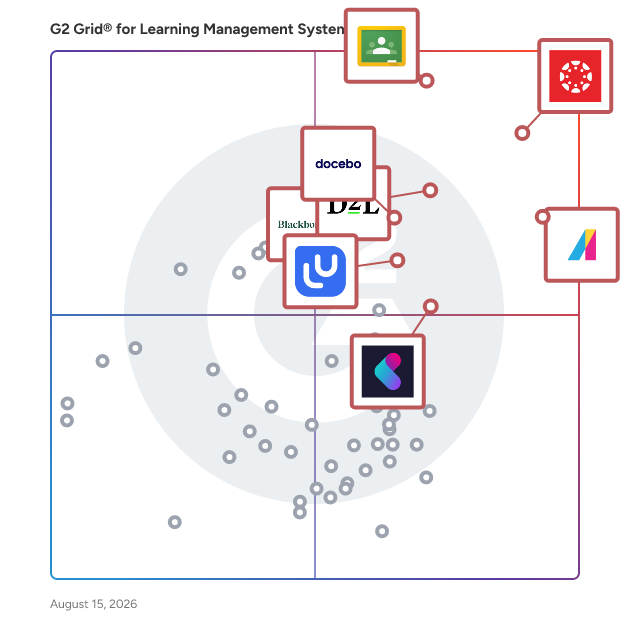
G2 Grid® for Learning Management Systems

G2 Grid® for Learning Management Systems plotting products by satisfaction and market presence

Highlighted products: Canvas LMS, Google Classroom, Absorb LMS, D2L Brightspace, Blackboard, Docebo, LearnUpon, and Kallidus Learn.

Underlying data: [Grid® JSON](https://www.g2.com/categories/learning-management-system-lms/grids.json?focus%5B%5D=canvas-lms&focus%5B%5D=google-classroom&focus%5B%5D=absorb-software-absorb-lms&focus%5B%5D=d2l-brightspace&focus%5B%5D=blackboard&focus%5B%5D=docebo&focus%5B%5D=learnupon&focus%5B%5D=kallidus-learn)

Sponsored

Unanet AE ERP

Unanet is a leading provider of project-based ERP and CRM solutions purpose-built for Government Contractors, AEC, and Professional Services. More than 4,000 project-driven organizations depend on Unanet to turn their information into actionable insights, drive better decision- making, and accelerate business growth. All backed by a people-centered team invested in the success of your projects, people, and financials. Unanet AE ERP is purpose-built ERP for architecture and engineering firms and offers a powerful combination of Project Management, Business Intelligence, Time and Expense Tracking, Financials, and Integration tools in one single source to run your business more effectively. Powerful and customizable analytic dashboards dashboards allow organizations to gain greater visibility and control, analyze data and trends in real time, interact dynamically with their data, and drive their business forward. Unanet Connect is the industry’s first and only open integration marketplace and platform that goes beyond APIs to seamlessly integrate hundreds of prebuilt connectors with customers’ ERP.

Visit website

Canvas LMS

Canvas by Instructure is a versatile, cloud-based learning management system (LMS) designed to transform online learning across every stage of education. Since its launch in 2011, Canvas has become the foundational hub for digital classrooms, empowering institutions to deliver high-quality instruction from K-12 to Corporate Training. Trusted by millions worldwide, Canvas remains the #1 educational software and the core of the Instructure ecosystem. Comprehensive Instructor Tools for Every Environment Canvas is built with flexibility at its core, allowing organizations to tailor the platform to their unique goals. Whether you are managing complex curricula in Higher Education or streamlining Primary/Secondary Education (K-12), our robust instructor tools ensure that every learning experience is impactful and learner-centered. From educational initiatives to professional development, Canvas adapts to your mission by providing a seamless interface to: -Create and manage online courses and high-quality learning materials. -Deliver assignments, quizzes, and assessments that meet diverse learning standards. -Enable collaboration through integrated discussions and messaging to boost student engagement. -Track student progress and learning outcomes through real-time data. -Integrate with third-party education tools, with over 900+ partners to choose from. Empowering Success Through Virtual Learning The platform provides a scalable, secure environment for virtual learning that goes beyond the traditional classroom. By combining course management with advanced assessments and grading features, Canvas reduces administrative friction and allows educators to focus on what matters most: student success. Key Features & Benefits Intuitive Design: An easy-to-use interface reduces overhead and ensures learners stay focused on their goals. Mobile Accessibility: The top-rated Canvas mobile app keeps learners connected, even offline. Advanced Analytics: Gain actionable insights to monitor student engagement and improve institutional outcomes. Scalable Ecosystem: With 500+ third-party integrations, Canvas connects with your existing tech stack to build a truly dynamic learning environment. Industries We Serve Canvas by Instructure is the trusted partner for organizations aiming to unlock the full potential of their learners across: -Higher Education -Primary/Secondary Education (K-12) -Corporate Training

Average Rating: 4.5/5.0

Total Reviews: 1,732

How Do G2 Users Rate Canvas LMS?

  • Ease of Use: 8.5/10 (Category avg: 8.7/10)
  • Has the product been a good partner in doing business?: 8.6/10 (Category avg: 9.1/10)
  • Quality of Support: 8.5/10 (Category avg: 8.8/10)
  • Ease of Admin: 8.3/10 (Category avg: 8.7/10)

Who Is the Company Behind Canvas LMS?

  • Seller: Instructure
  • Company Website:
  • Year Founded: 2008
  • HQ Location: Salt Lake City, Utah
  • Twitter: @Instructure
    12,576 Twitter followers
  • LinkedIn® Page: www.linkedin.com
    2,229 employees on LinkedIn®

Who Uses This Product?

  • Who Uses This: Teacher, Student
  • Top Industries: Higher Education, Education Management
  • Company Size: 45% Medium, 42% Large

What Do G2 Reviewers Say About Canvas LMS?

AI-generated summary from verified user reviews

Pros
  • Users value the ease of use of Canvas LMS, finding it intuitive and helpful for content integration.
  • Users appreciate the user-friendly interface of Canvas LMS, making it accessible for all tech skill levels.
  • Users enjoy the intuitive interface of Canvas LMS, enhancing workflows and reducing confusion for all demographics.
  • Users value the feature diversity of Canvas LMS, enabling creativity and effective engagement in digital education.
  • Users love the intuitive interface of Canvas LMS, making learning accessible for everyone from students to faculty.
Cons
  • Users express a desire for more built-in features in Canvas LMS, finding the reliance on add-ons frustrating.
  • Users find the lack of intuitiveness in Canvas LMS frustrating, complicating basic tasks and navigation.
  • Users report experiencing poor support with Canvas LMS, causing frustration and hindering effective use of the platform.
  • Users express frustration with limited customization in Canvas LMS, needing more native tools and features for effective course design.
  • Users often face navigation issues on Canvas LMS due to disorganization and unintuitive controls, hindering their overall experience.

What Are Recent G2 Reviews of Canvas LMS?

What Are G2 Users Discussing About Canvas LMS?

Google Classroom

Google Classroom is a free, web-based platform developed by Google to streamline educational processes and enhance communication between teachers and students. Launched in 2014, it integrates seamlessly with other Google tools like Drive, Docs, and Calendar, making it a popular choice for schools and educators worldwide. Designed to simplify assignment management, foster collaboration, and improve classroom efficiency, Google Classroom is accessible on any device with an internet connection, offering flexibility for both in-person and remote learning environments. Key Features and Functionality: - Assignment Management: Teachers can create, distribute, and collect assignments paperlessly, utilizing Google Docs, Drive, and Gmail. They can quickly see who has or hasn't completed the work and provide direct, real-time feedback to individual students. - Class Communication: Educators can make announcements, ask questions, and engage in real-time discussions with students, enhancing communication inside and outside the classroom. - Organization: Classroom automatically creates Drive folders for each assignment and for each student, helping both teachers and students stay organized. Students can easily see what’s due on their Assignments page. - Integration with Google Workspace: The platform works seamlessly with familiar apps like Docs and Slides, and integrates with YouTube, allowing educators to enrich their teaching materials. - Video Conferencing: Google Meet is accessible directly through Classroom, enabling face-to-face connections with individuals or the entire class from anywhere. - Third-Party App Integration: Classroom add-ons allow integration with popular EdTech tools like Kahoot!, Nearpod, and BookWidgets, enhancing the learning experience. Primary Value and Solutions Provided: Google Classroom addresses the need for a centralized, efficient, and user-friendly platform for managing educational workflows. It reduces the reliance on paper, saving time and resources, and facilitates a more organized approach to teaching and learning. By integrating with various Google tools and third-party applications, it offers a comprehensive solution that supports diverse teaching methods and learning styles. The platform's accessibility across devices ensures that education can continue seamlessly, whether in traditional classroom settings or remote learning environments. Overall, Google Classroom empowers educators to focus more on teaching while providing students with a structured and interactive learning experience.

Average Rating: 4.5/5.0

Total Reviews: 1,473

How Do G2 Users Rate Google Classroom?

  • Ease of Use: 9.0/10 (Category avg: 8.7/10)
  • Has the product been a good partner in doing business?: 8.9/10 (Category avg: 9.1/10)
  • Quality of Support: 8.7/10 (Category avg: 8.8/10)
  • Ease of Admin: 8.9/10 (Category avg: 8.7/10)

Who Is the Company Behind Google Classroom?

  • Seller: Google
  • Year Founded: 1998
  • HQ Location: Mountain View, CA
  • Twitter: @google
    31,899,995 Twitter followers
  • LinkedIn® Page: www.linkedin.com
    341,888 employees on LinkedIn®
  • Ownership: NASDAQ:GOOG

Who Uses This Product?

  • Who Uses This: Teacher, Student
  • Top Industries: Education Management, Primary/Secondary Education
  • Company Size: 49% Medium, 30% Small

What Do G2 Reviewers Say About Google Classroom?

AI-generated summary from verified user reviews

Pros
  • Users appreciate the efficient assignment management of Google Classroom, streamlining organization and enhancing the learning experience.
  • Users commend Google Classroom for its user-friendly interface, making class management and communication effortless and organized.
  • Users appreciate the ease of use of Google Classroom, enjoying its user-friendly interface and efficient organization.
  • Users find the easy setup of Google Classroom convenient, allowing quick access through college email logins.
  • Users value the accessibility and remote access of Google Classroom, enabling effective learning anytime, anywhere.
Cons
  • Users report integration issues with Google Classroom, noting difficulties connecting to other platforms and limited customization options.
  • Users note the limited customization options in Google Classroom hinder organization and flexibility for a better experience.
  • Users face integration issues with Google Classroom, struggling with compatibility and dependency on Google's system.
  • Users frequently struggle with notification issues, leading to missed updates among the many classes in Google Classroom.
  • Users feel that Google Classroom's limited features hinder advanced analytics and customization, reducing effectiveness in tracking student progress.

What Are Recent G2 Reviews of Google Classroom?

What Are G2 Users Discussing About Google Classroom?

Absorb LMS

Absorb is an agentic AI-powered learning platform designed to deliver results for all learners — employees, partners, and customers alike. With AI agents that handle the heavy lifting across administration, content creation, and learner guidance, Absorb goes beyond traditional LMS capabilities to actively drive learning outcomes at scale. Seamless integrations across your tech stack, native content authoring, and advanced reporting and analytics simplify learning management while AI handles the routine. Personalized learning paths, automated workflows, and white-labeled experiences let your team focus on high-impact learning initiatives rather than managing the system. Absorb helps organizations improve time-to-productivity, ensure compliance, and scale training programs efficiently — whether you’re onboarding employees, training partners, or educating customers.

Average Rating: 4.6/5.0

Total Reviews: 946

How Do G2 Users Rate Absorb LMS?

  • Ease of Use: 8.8/10 (Category avg: 8.7/10)
  • Has the product been a good partner in doing business?: 9.4/10 (Category avg: 9.1/10)
  • Quality of Support: 9.6/10 (Category avg: 8.8/10)
  • Ease of Admin: 8.6/10 (Category avg: 8.7/10)

Who Is the Company Behind Absorb LMS?

  • Seller: Absorb Software
  • Company Website:
  • Year Founded: 2003
  • HQ Location: Calgary
  • Twitter: @AbsorbLMS
    1,463 Twitter followers
  • LinkedIn® Page: www.linkedin.com
    675 employees on LinkedIn®

Who Uses This Product?

  • Who Uses This: Instructional Designer, Training Manager
  • Top Industries: Hospital & Health Care, Non-Profit Organization Management
  • Company Size: 44% Medium, 37% Large

What Do G2 Reviewers Say About Absorb LMS?

AI-generated summary from verified user reviews

Pros
  • Users find the ease of use of Absorb LMS invaluable for creating effective training materials effortlessly.
  • Users praise the exceptional customer support of Absorb LMS, highlighting its attentiveness and helpfulness in addressing needs.
  • Users praise the outstanding support from knowledgeable staff, enhancing the Absorb LMS experience significantly.
  • Users find Absorb LMS to be incredibly user-friendly, allowing seamless navigation and efficient reporting for daily tasks.
  • Users praise the excellent support from Marcia, appreciating her patience, guidance, and friendly partnership throughout their learning journey.
Cons
  • Users find limited features difficult to discover, which complicates usability and often leads to frustration.
  • Users find the limited customization options of Absorb LMS restrictive, impacting their overall experience and creativity.
  • Users point out the missing features in Absorb LMS, such as audience mapping and tracking learner interactions.
  • Users find the learning curve steep, requiring significant time and practice to navigate Absorb LMS effectively.
  • Users find the reporting features confusing and limited, impacting their experience and flexibility with the LMS.

What Are Recent G2 Reviews of Absorb LMS?

What Are G2 Users Discussing About Absorb LMS?

D2L Brightspace

Learning That Transforms Lives D2L Brightspace is a powerful, flexible learning platform designed to put learners first. Whether you’re supporting students, employees, or members, Brightspace helps you create personalized, engaging, and measurable learning experiences that drive success. Built for Your World Brightspace adapts to the needs of every learning environment: K–12: Empower teachers and inspire every learner Higher Education: Deliver personalized learning at scale Corporate: Drive business results through smarter learning Associations: Turn training into a competitive advantage Training Providers: Deliver scalable, high-impact learning programs Modernize with Confidence Easily digitize your courses and adopt intuitive tools designed to enhance engagement, accessibility, and outcomes—no technical background required. Scale Personalized Learning Automate routine tasks, unlock actionable insights, and build learning paths that adapt to each learner’s needs. Brightspace helps you save time while improving outcomes. Support Advanced Learning Models From mastery-based progressions to competency-based learning, Brightspace has the power and flexibility to support even the most advanced online and blended strategies. A True Partner in Your Success More than a platform, Brightspace comes with a team dedicated to helping you succeed. From onboarding to optimization, we align our support and services to your goals—every step of the way.

Average Rating: 4.4/5.0

Total Reviews: 668

How Do G2 Users Rate D2L Brightspace?

  • Ease of Use: 8.4/10 (Category avg: 8.7/10)
  • Has the product been a good partner in doing business?: 8.9/10 (Category avg: 9.1/10)
  • Quality of Support: 8.5/10 (Category avg: 8.8/10)
  • Ease of Admin: 8.2/10 (Category avg: 8.7/10)

Who Is the Company Behind D2L Brightspace?

  • Seller: Desire2Learn
  • Company Website:
  • Year Founded: 1999
  • HQ Location: Kitchener, ON
  • Twitter: @D2L
    23,447 Twitter followers
  • LinkedIn® Page: www.linkedin.com
    1,272 employees on LinkedIn®

Who Uses This Product?

  • Who Uses This: Instructional Designer, Teacher
  • Top Industries: Higher Education, Education Management
  • Company Size: 45% Medium, 40% Large

What Do G2 Reviewers Say About D2L Brightspace?

AI-generated summary from verified user reviews

Pros
  • Users appreciate the user-friendly interface of D2L Brightspace, making navigation and setup effortless for both teachers and students.
  • Users appreciate the supportive customer service from D2L Brightspace, ensuring a smooth and effective administrative experience.
  • Users appreciate the excellent customer support from D2L Brightspace, which significantly enhances their overall experience.
  • Users value the responsive customer support of D2L Brightspace, ensuring prompt assistance and effective solutions.
  • Users appreciate the customizability of D2L Brightspace, enjoying diverse templates and widgets for tailored learning experiences.
Cons
  • Users desire more customization options in D2L Brightspace, feeling limited by the current tools and features available.
  • Users experience navigation issues due to complex structures and excessive clicks needed to access discussions efficiently.
  • Users express frustration over feature inconsistencies in D2L Brightspace, hindering seamless integration and usability across tools.
  • Users report integration issues with D2L Brightspace, complicating access to certain external content and requiring multiple logins.
  • Users experience limited functionality with outdated forums and few collaborative options, impacting engagement and learning quality.

What Are Recent G2 Reviews of D2L Brightspace?

What Are G2 Users Discussing About D2L Brightspace?

Blackboard

Every day, millions of students around the world learn, collaborate, and grow with Blackboard. More than an LMS, Blackboard is where learning comes to life—where students build skills, gain confidence, and prepare for what’s next. It supports modern teaching and learning by helping institutions deliver engaging instruction, improve accessibility, and better understand learner progress. Used by learners, instructors, and administrators across more than 70 countries, Blackboard is designed in close partnership with educators, helping ensure innovation is grounded in proven teaching practices and aligned with what institutions need most. Blackboard supports the full teaching lifecycle, from course and content creation to assessment, grading, and ongoing engagement—across online, in-person, and hybrid learning models. A key priority for Blackboard is reducing the administrative burden on instructors so they can spend more time on teaching and student support. With native AI capabilities, Blackboard helps streamline practical course-building and assessment tasks by offering a strong starting point that instructors can tailor to their own teaching style. Blackboard also includes accessibility support that helps instructors create more inclusive learning experiences, while giving institutions a clearer path toward measurable progress at scale. Blackboard is evolving quickly. It has delivered the fastest rate of innovation in the LMS market for four years in a row, releasing frequent updates informed directly by the global learning community. Combined with deep integrations across the broader education ecosystem, mobile-first access, and actionable insights, Blackboard helps institutions continuously improve teaching and learning. Visit www.anthology.com/why-choose-blackboard to see what sets Blackboard apart.

Average Rating: 4.0/5.0

Total Reviews: 1,016

How Do G2 Users Rate Blackboard?

  • Ease of Use: 7.8/10 (Category avg: 8.7/10)
  • Has the product been a good partner in doing business?: 7.9/10 (Category avg: 9.1/10)
  • Quality of Support: 7.5/10 (Category avg: 8.8/10)
  • Ease of Admin: 7.4/10 (Category avg: 8.7/10)

Who Is the Company Behind Blackboard?

  • Seller: Blackboard
  • Year Founded: 1997
  • HQ Location: Washington, DC
  • Twitter: @Blackboard
    38,486 Twitter followers
  • LinkedIn® Page: www.linkedin.com
    2,752 employees on LinkedIn®
  • Phone: 800.483.9106

Who Uses This Product?

  • Who Uses This: Student, Teacher
  • Top Industries: Higher Education, Education Management
  • Company Size: 46% Large, 38% Medium

What Do G2 Reviewers Say About Blackboard?

AI-generated summary from verified user reviews

Pros
  • Users appreciate the ease of use in Blackboard, enabling effortless content addition and student navigation.
  • Users find navigation easy in Blackboard, enhancing the overall student experience and making learning more accessible.
  • Users highlight the user-friendly nature of Blackboard, praising its ease of navigation and efficiency.
  • Users appreciate the feature diversity of Blackboard, benefiting from constant updates and innovative integrations for education.
  • Users appreciate the robust set of tools in Blackboard, enhancing course management and integration with educational technologies.
Cons
  • Users find the limited features of Blackboard cumbersome, complicating grading and communication processes unnecessarily.
  • Users find it frustrating that Blackboard lacks essential modern features and struggles to keep up with competitors like Canvas.
  • Users find the limited customization in Blackboard restrictive, hindering flexibility for diverse academic needs and learning styles.
  • Users find Blackboard's interface to lack intuitiveness, leading to frustration and a steep learning curve for newcomers.
  • Users find Blackboard's interface not intuitive, especially for new users struggling with its complexity and learning curve.

What Are Recent G2 Reviews of Blackboard?

What Are G2 Users Discussing About Blackboard?

Docebo

Docebo is an AI-powered learning platform designed to support continuous learning across employees, partners, and customers. More than 3,900 organizations use Docebo to deliver onboarding, enablement, compliance, and customer education from a single platform. Learning experiences are personalized at scale, with AI improving content discovery, recommendations, and automation to reduce manual administration. With skills-based insights, flexible delivery, and built-in analytics, Docebo helps organizations keep learning aligned to evolving roles and business goals, so people never stop learning as work changes.

Average Rating: 4.3/5.0

Total Reviews: 731

How Do G2 Users Rate Docebo?

  • Ease of Use: 8.4/10 (Category avg: 8.7/10)
  • Has the product been a good partner in doing business?: 8.7/10 (Category avg: 9.1/10)
  • Quality of Support: 8.6/10 (Category avg: 8.8/10)
  • Ease of Admin: 8.0/10 (Category avg: 8.7/10)

Who Is the Company Behind Docebo?

  • Seller: Docebo Inc.
  • Company Website:
  • Year Founded: 2005
  • HQ Location: Toronto
  • Twitter: @docebo
    6,629 Twitter followers
  • LinkedIn® Page: www.linkedin.com
    1,009 employees on LinkedIn®

Who Uses This Product?

  • Who Uses This: Instructional Designer, Training Manager
  • Top Industries: Information Technology and Services, Computer Software
  • Company Size: 45% Large, 44% Medium

What Do G2 Reviewers Say About Docebo?

AI-generated summary from verified user reviews

Pros
  • Users love the intuitive user experience of Docebo, allowing easy adaptation for new hires and streamlined training management.
  • Users appreciate the powerful course management features in Docebo, enhancing efficiency and customization in training operations.
  • Users benefit from the efficient course management capabilities of Docebo, enhancing training operations and speeding up delivery.
  • Users value the highly customizable platform of Docebo, enhancing the learning experience to suit their unique needs.
  • Users love Docebo for its intuitive navigation, making platform usage easy and efficient for all employees.
Cons
  • Users often face a steep learning curve with Docebo due to its many features and configuration demands.
  • Users find the limited customization options in Docebo challenging, especially for content and reporting features.
  • Users highlight the limited features of Docebo, particularly in batch actions and content authoring tools.
  • Users find the complexity of configurations daunting, leading to a steep learning curve for newcomers to Docebo.
  • Users find the missing features in Docebo, such as insufficient batch actions and weak content authoring tools, limiting.

What Are Recent G2 Reviews of Docebo?

What Are G2 Users Discussing About Docebo?

LearnUpon

LearnUpon’s Agentic Learning Platform is the LMS of the future, built to elevate human capability in the AI era. By pairing human ingenuity with specialized AI agents, our platform automates heavy administrative workflows to deliver hyper-personalized learning experiences, empowering learning leaders to recapture energy and elevate strategic impact.

Average Rating: 4.5/5.0

Total Reviews: 247

How Do G2 Users Rate LearnUpon?

  • Ease of Use: 9.1/10 (Category avg: 8.7/10)
  • Has the product been a good partner in doing business?: 9.6/10 (Category avg: 9.1/10)
  • Quality of Support: 9.4/10 (Category avg: 8.8/10)
  • Ease of Admin: 9.1/10 (Category avg: 8.7/10)

Who Is the Company Behind LearnUpon?

  • Seller: LearnUpon
  • Company Website:
  • Year Founded: 2012
  • HQ Location: Dublin , Ireland
  • Twitter: @learnupon
    2,432 Twitter followers
  • LinkedIn® Page: www.linkedin.com
    325 employees on LinkedIn®

Who Uses This Product?

  • Top Industries: Computer Software, E-Learning
  • Company Size: 44% Medium, 26% Large

What Do G2 Reviewers Say About LearnUpon?

AI-generated summary from verified user reviews

Pros
  • Users appreciate the ease of use in LearnUpon, finding course creation intuitive and session setup quick.
  • Users appreciate the responsive customer support of LearnUpon, ensuring quick resolutions and thorough assistance for inquiries.
  • Users love the intuitive design of LearnUpon, facilitating seamless onboarding and enhancing engagement in online learning.
  • Users appreciate the user-friendly design of LearnUpon, which enhances their overall learning experience and engagement.
  • Users find the course creation process straightforward, appreciating the flexibility and ease of use with LearnUpon.
Cons
  • Users find the limited forum features of LearnUpon outdated and lacking in intuitiveness for modern learners.
  • Users find limited customization options frustrating, particularly for forums, email, and user report functionalities.
  • Users face navigation difficulties due to limited Forum options and confusing mobile app requirements, hindering their experience.
  • Users find the course management challenging, especially with enrollment difficulties and limitations in course offerings.
  • Users note the need for improved reporting flexibility and bulk management tools in LearnUpon for a better experience.

What Are Recent G2 Reviews of LearnUpon?

What Are G2 Users Discussing About LearnUpon?

Kallidus Learn

At Kallidus, we believe learning should be measured by what changes in the organisation - not what was delivered, but what improved. Trusted by over 1,000 organisations worldwide, we help organisations escape The Activity Trap: measuring learning by completion rather than real performance change. Because when learning mitigates risk, key people stay, teams become more productive, and business metrics begin to move. Our award-winning LMS and eLearning content have an intentional AI data layer to make learning, skills, and performance data valuable for the whole business. This helps link L&D initiatives to the goals and objectives of your organisation and your team. Backed by dedicated, in-house support and implementation specialists, we're with you every step, from simplifying mandatory compliance to building the future-ready workforce your business needs to grow and deliver impact.

Average Rating: 4.4/5.0

Total Reviews: 254

How Do G2 Users Rate Kallidus Learn?

  • Ease of Use: 8.9/10 (Category avg: 8.7/10)
  • Has the product been a good partner in doing business?: 8.9/10 (Category avg: 9.1/10)
  • Quality of Support: 9.1/10 (Category avg: 8.8/10)
  • Ease of Admin: 8.1/10 (Category avg: 8.7/10)

Who Is the Company Behind Kallidus Learn?

  • Seller: Kallidus Ltd
  • Company Website:
  • Year Founded: 2000
  • HQ Location: Bristol, GB
  • Twitter: @Kallidus
    3,110 Twitter followers
  • LinkedIn® Page: www.linkedin.com
    215 employees on LinkedIn®

Who Uses This Product?

  • Who Uses This: Learning and Development Manager, Head of HR
  • Top Industries: Hospital & Health Care, Financial Services
  • Company Size: 59% Medium, 28% Large

What Do G2 Reviewers Say About Kallidus Learn?

AI-generated summary from verified user reviews

Pros
  • Users appreciate the ease of use of Kallidus Learn, which supports efficient navigation and quick team adoption.
  • Users appreciate the user-friendly interface of Kallidus Learn, valuing its flexibility and ease of navigation.
  • Users appreciate the responsive customer support of Kallidus Learn, enhancing their overall experience and satisfaction.
  • Users value the helpful support network of Kallidus Learn, making integration and training straightforward and effective.
  • Users appreciate the intuitive design of Kallidus Learn, making navigation and management effortless for all.
Cons
  • Users find Kallidus Learn has limited features, making event bookings and role assignments unnecessarily complicated.
  • Users face feature issues such as limitations on eTests, group rules, and integration challenges with proctoring services.
  • Users experience reporting issues with Kallidus Learn, including delays and cumbersome sharing processes for reports.
  • Users find the inadequate reporting options challenging, complicating access and usability for effective data sharing.
  • Users find the reporting capabilities inadequate, noting difficulties with mixed data sets and access for managers.

What Are Recent G2 Reviews of Kallidus Learn?

What Are G2 Users Discussing About Kallidus Learn?

LearnWorlds

LearnWorlds helps training businesses deliver professional learning programs from one flexible setup, whether they’re launching a new academy, scaling client training, or connecting learning into an existing tech stack. Most LMS platforms are built for one use case. LearnWorlds is built for training businesses that have several. A single platform for branded academies, B2B client programs, corporate education, and paid learning — with user groups, roles, ecommerce, reporting, and automation tools that let you configure each program differently without starting from scratch. AI content creation, integrations, and scheduled reporting mean less time on the work that doesn't need a human, and more time on the work that does. When you outgrow a basic course platform or standard LMS, the problem is rarely just course creation. Every new client brings new learner groups, access rules, seats, reports, certificates, stakeholder visibility, and rollout work. LearnWorlds gives training businesses the delivery, reporting, commerce, and operational control to run programs across multiple client organizations without rebuilding from scratch or adding more manual work. One core offer, adapted for every client. With branded academies, user roles, access rules, certificates, ecommerce, analytics, and scheduled reports, teams can configure repeatable training experiences that serve different clients, cohorts, partners, customers, employees, members, and paid learners. Most training teams already have the content — it just lives across documents, slide decks, notes, and existing materials. LearnWorlds AI helps turn that knowledge into course-ready material, including outlines, activities, assessments, pages, emails, and visuals, while allowing teams to refine specific sections and keep content consistent across the academy. LearnWorlds helps commercial training businesses launch new clients faster, prove impact clearly, support more complex delivery models, and scale operations without scaling headcount.

Average Rating: 4.7/5.0

Total Reviews: 377

How Do G2 Users Rate LearnWorlds?

  • Ease of Use: 8.8/10 (Category avg: 8.7/10)
  • Has the product been a good partner in doing business?: 9.3/10 (Category avg: 9.1/10)
  • Quality of Support: 9.6/10 (Category avg: 8.8/10)
  • Ease of Admin: 8.7/10 (Category avg: 8.7/10)

Who Is the Company Behind LearnWorlds?

  • Seller: LearnWorlds
  • Company Website:
  • Year Founded: 2014
  • HQ Location: Limassol, Greece
  • Twitter: @LearnWorlds
    2,948 Twitter followers
  • LinkedIn® Page: www.linkedin.com
    195 employees on LinkedIn®

Who Uses This Product?

  • Who Uses This: CEO, Owner
  • Top Industries: E-Learning, Professional Training & Coaching
  • Company Size: 87% Small, 11% Medium

What Do G2 Reviewers Say About LearnWorlds?

AI-generated summary from verified user reviews

Pros
  • Users rave about the fast and personal customer support from LearnWorlds, consistently exceeding expectations with prompt assistance.
  • Users value the ease of use of LearnWorlds, appreciating its intuitive design and quick setup for online courses.
  • Users love the diverse features of LearnWorlds, which enhance functionality and customization for online education.
  • Users commend the excellent support from LearnWorlds, highlighting personalized assistance and rapid response times.
  • Users highlight the outstanding customer support of LearnWorlds, appreciating the personalized and timely assistance provided.
Cons
  • Users feel that LearnWorlds has limited features, lacking essential tools that enhance usability and functionality.
  • Users find limited customization options frustrating, particularly for multilingual setups and mobile responsiveness.
  • Users note the absence of key integrations and bulk editing features, which limits functionality and affects usability.
  • Users find the platform not intuitive, facing confusion initially, especially with mobile navigation and multilingual setup.
  • Users report that LearnWorlds is not user-friendly, with frustrating editing tools and poor mobile navigation experiences.

What Are Recent G2 Reviews of LearnWorlds?

What Are G2 Users Discussing About LearnWorlds?

CYPHER Learning

CYPHER Learning is the AI-native platform built to power modern training operations. Organizations use CYPHER to rapidly create, manage, and scale commercial-grade training across employees, partners, customers, agents, franchises, and members. By combining AI-powered content creation, orchestration, and personalization in one integrated platform, CYPHER helps organizations move faster and achieve stronger business outcomes.

Average Rating: 4.4/5.0

Total Reviews: 288

How Do G2 Users Rate CYPHER Learning?

  • Ease of Use: 8.8/10 (Category avg: 8.7/10)
  • Has the product been a good partner in doing business?: 8.9/10 (Category avg: 9.1/10)
  • Quality of Support: 9.1/10 (Category avg: 8.8/10)
  • Ease of Admin: 8.7/10 (Category avg: 8.7/10)

Who Is the Company Behind CYPHER Learning?

  • Seller: CYPHER Learning
  • Year Founded: 2009
  • HQ Location: Plano, TX
  • Twitter: @CypherLearning
    10,539 Twitter followers
  • LinkedIn® Page: www.linkedin.com
    103 employees on LinkedIn®

Who Uses This Product?

  • Who Uses This: Teacher, Docente
  • Top Industries: Education Management, Higher Education
  • Company Size: 56% Medium, 28% Small

What Do G2 Reviewers Say About CYPHER Learning?

AI-generated summary from verified user reviews

Pros
  • Users find CYPHER Learning's NEO platform to be incredibly easy to use, enhancing teaching and learning experiences effortlessly.
  • Users commend the reliable and helpful customer support of CYPHER Learning, enhancing their confidence in using the platform.
  • Users appreciate the intuitive design and reliable support of CYPHER Learning, enhancing lesson planning and student engagement.
  • Users value the user-friendly design of CYPHER Learning, enhancing teaching efficiency and student engagement.
  • Users value the intuitive design of CYPHER Learning, enhancing ease of use for both educators and students.
Cons
  • Users find the limited features of CYPHER Learning reduce its usability and can hinder user experience.
  • Users express frustration over the lack of a subtotal column for attendance, making grade tracking difficult.
  • Users desire better communication transparency from CYPHER Learning to enhance their overall experience with the product.
  • Users find the difficult learning curve of CYPHER Learning challenging, requiring consistent use to master its features.
  • Users find CYPHER Learning difficult to use, requiring constant interaction to become familiar with its features.

What Are Recent G2 Reviews of CYPHER Learning?

What Are G2 Users Discussing About CYPHER Learning?

iSpring LMS

iSpring LMS is a feature-rich platform that helps companies accelerate their business momentum through ROI-efficient training. The LMS enables the entire training cycle with clarity and consistency, from structured onboarding to continuous employee development. It helps reduce employee turnover, improve performance, and ensure that teams stay aligned, skilled, and ready to support the company’s long-term growth. iSpring LMS gives managers and trainers a simple way to organize training, guide employees through skill-building, and see exactly how their learners are progressing. Employees get a clear path to follow, and leaders get the visibility they need to support growth, maintain standards, and keep performance on track. Here are the core capabilities that make this possible: - The mirrored organizational structure reflects how your company works, so training stays aligned with roles and teams. - Specified learning tracks guide learners step by step through required courses and programs. - Detailed reporting highlights progress, deadlines, and knowledge gaps with actionable insights. - The Supervisor Dashboard gives managers instant visibility into team performance without extra admin work. - Automated workflows handle enrollments, reminders, and assignments, saving time and reducing manual tasks. - The corporate portal and newsfeed centralize updates and announcements to keep everyone aligned. - 360-Degree Reviews gather well-rounded performance feedback from peers and supervisors. - On-The-Job Training validates real-world skills with structured checklists. - Knowledge Base gives employees quick access to SOPs, product info, and internal documentation. - Development Plans build personalized growth paths that connect training to long-term skill development.

Average Rating: 4.6/5.0

Total Reviews: 162

How Do G2 Users Rate iSpring LMS?

  • Ease of Use: 9.1/10 (Category avg: 8.7/10)
  • Has the product been a good partner in doing business?: 9.3/10 (Category avg: 9.1/10)
  • Quality of Support: 9.4/10 (Category avg: 8.8/10)
  • Ease of Admin: 9.0/10 (Category avg: 8.7/10)

Who Is the Company Behind iSpring LMS?

  • Seller: iSpring
  • Company Website:
  • Year Founded: 2001
  • HQ Location: Alexandria, VA
  • Twitter: @iSpringPro
    6,522 Twitter followers
  • LinkedIn® Page: www.linkedin.com
    268 employees on LinkedIn®

Who Uses This Product?

  • Top Industries: E-Learning, Information Technology and Services
  • Company Size: 53% Medium, 38% Small

What Do G2 Reviewers Say About iSpring LMS?

AI-generated summary from verified user reviews

Pros
  • Users appreciate the ease of use of iSpring LMS, enabling quick course creation and management without extensive training.
  • Users praise the intuitive course creation experience of iSpring LMS, enabling quick and efficient content development without hassle.
  • Users praise the quick and effective customer support of iSpring LMS, enhancing their overall experience and satisfaction.
  • Users appreciate the user-friendly interface of iSpring LMS, allowing quick setup and intuitive management of courses.
  • Users value the intuitive layout of iSpring LMS, making it accessible for admins at any experience level.
Cons
  • Users find the limited features of iSpring LMS restrict their ability to gather comprehensive learner feedback and advanced integrations.
  • Users find limited customization in iSpring LMS, particularly lacking advanced integrations and flexible development options.
  • Users find the lack of learner feedback options and feature limitations make the iSpring LMS less effective for training.
  • Users report integration issues with HR systems and virtual trainings that complicate the user experience significantly.
  • Users face limitations with reporting capabilities, hindering effective tracking and making it difficult to consolidate data.

What Are Recent G2 Reviews of iSpring LMS?

Learn:Up

Learn:Up by Confirm (formerly Learning Pool) Learn:Up (formerly WorkRamp), is an AI-powered learning platform that brings employee onboarding, revenue enablement, and customer education together. Growing businesses have more people to onboard, more knowledge to share, and more customers to support. Keeping all of that learning consistent can quickly become a challenge. Learn:Up gives teams one place to build, deliver, and measure learning for employees, customers, and partners. Key capabilities include: - Create faster: Use AI-assisted authoring to turn ideas and source material into learning content quickly. - Practice in the real world: Give sales teams AI conversation simulations to rehearse pitches, handle objections, and build confidence. - Build learning that fits: Create branded academies for employees, customers, and channel partners, with tailored access and content. - Make learning part of work: Connect with Salesforce, Slack, Microsoft Teams, Zoom, and other everyday tools. - Build and prove capability: Use assessments, certifications, video assignments, and instructor-led learning to build and test skills. - See the difference: Track completion, assessment results, ramp time, and other outcomes to understand whether learning is moving the needle. Learn:Up helps growing organizations connect internal and external learning without adding another collection of disconnected systems. Find out more at https://www.confirm.com/scale-up/products/learn-up

Average Rating: 4.4/5.0

Total Reviews: 617

How Do G2 Users Rate Learn:Up?

  • Ease of Use: 8.8/10 (Category avg: 8.7/10)
  • Has the product been a good partner in doing business?: 9.4/10 (Category avg: 9.1/10)
  • Quality of Support: 9.3/10 (Category avg: 8.8/10)
  • Ease of Admin: 8.7/10 (Category avg: 8.7/10)

Who Is the Company Behind Learn:Up?

  • Seller: Confirm
  • Company Website:
  • Year Founded: 2006
  • HQ Location: Derry, Northern Ireland
  • LinkedIn® Page: www.linkedin.com
    445 employees on LinkedIn®
  • Phone: +44 207 101 9383

Who Uses This Product?

  • Who Uses This: Customer Success Manager, Account Executive
  • Top Industries: Computer Software, Information Technology and Services
  • Company Size: 72% Medium, 16% Large

What Do G2 Reviewers Say About Learn:Up?

AI-generated summary from verified user reviews

Pros
  • Users find WorkRamp to be easy to navigate, facilitating quick onboarding and efficient content creation.
  • Users appreciate the ease of use in course creation, benefiting from a user-friendly system and responsive support.
  • Users value the responsive customer support of WorkRamp, enhancing the implementation process and ongoing assistance.
  • Users appreciate the intuitive interface of WorkRamp, making navigation and content creation seamless and enjoyable.
  • Users value the superb customer support from WorkRamp, which is quick to assist with any inquiries or issues.
Cons
  • Users find the missing features frustrating, such as lacking copy-paste for images and course linking options.
  • Users note limited features in WorkRamp, especially for automation and reporting, impacting overall usability compared to competitors.
  • Users desire more customization options for branding and communications in WorkRamp's features and aesthetics.
  • Users find the inadequate reporting in WorkRamp limits efficiency and hampers data accessibility for course responses.
  • Users face feature issues with WorkRamp, including poor analytics and a lack of interactive elements.

What Are Recent G2 Reviews of Learn:Up?

What Are G2 Users Discussing About Learn:Up?

Moodle

Moodle is an open source, feature-rich, secure and scalable learning management system that integrates seamlessly with other platforms and can be customised for any teaching or training method you choose. With fresh and intuitive interfaces, Moodle has solutions suitable for K-12, higher education, vocational training, corporates, and all types of enterprise learning. From improving your teaching and student outcomes to streamlining training, onboarding, and compliance management, you'll build more active and engaging online learning spaces with Moodle. When you choose Moodle, you benefit from Moodle's 20+ years of expertise in educational technology and you become part of a global community of people who love our online learning platform and our values. You can get support from our active community forums, access Moodle's certified integrations, and explore over 2000 open source plugins. Or, for expert advice, end-to-end support, and services, including site setup and hosting, customisations, and training, unlock unparalleled expertise and dedicated 24/7 support through our global network of Moodle Certified Partners and Service Providers.

Average Rating: 4.1/5.0

Total Reviews: 431

How Do G2 Users Rate Moodle?

  • Ease of Use: 7.7/10 (Category avg: 8.7/10)
  • Has the product been a good partner in doing business?: 8.6/10 (Category avg: 9.1/10)
  • Quality of Support: 7.6/10 (Category avg: 8.8/10)
  • Ease of Admin: 7.8/10 (Category avg: 8.7/10)

Who Is the Company Behind Moodle?

  • Seller: Moodle
  • Company Website:
  • Year Founded: 2001
  • HQ Location: West Perth, Western Australia
  • Twitter: @moodle
    35,811 Twitter followers
  • LinkedIn® Page: www.linkedin.com
    477 employees on LinkedIn®

Who Uses This Product?

  • Who Uses This: Teacher, Assistant Professor
  • Top Industries: Higher Education, Education Management
  • Company Size: 48% Medium, 28% Small

What Do G2 Reviewers Say About Moodle?

AI-generated summary from verified user reviews

Pros
  • Users value the ease of use of Moodle, enabling seamless course creation and training delivery after initial setup.
  • Users appreciate Moodle's user-friendly design and extensive features that enhance collaborative and supportive learning experiences.
  • Users love the ease of course creation in Moodle, allowing seamless integration and efficient management of training programs.
  • Users value Moodle's feature diversity, which supports various teaching styles and enhances collaborative learning opportunities.
  • Users appreciate the flexibility and customization of Moodle, enhancing control over course design and learning experiences.
Cons
  • Users find Moodle's interface not user-friendly, often overwhelmed by complex settings and a steep learning curve.
  • Users find Moodle has a lack of intuitiveness, making it difficult for beginners to navigate and utilize effectively.
  • Users find Moodle's limited features challenging, with complex setups and accessibility issues affecting overall usability.
  • Users find the complexity of Moodle's administration challenging, particularly for newcomers, requiring considerable technical expertise.
  • Users find Moodle's interface slow and cluttered, often describing it as outdated and lacking intuitiveness compared to competitors.

What Are Recent G2 Reviews of Moodle?

What Are G2 Users Discussing About Moodle?

ProProfs Training Maker

ProProfs Training Maker is a LMS that is specially designed for businesses, corporate trainers and educational institutions. The sole objective of this unique software is to help users create engaging courses for learners and provide them with a holistic learning solution. A powerful tool comprising cutting-edge features, ProProfs Training Maker enables educators to manage thousands of learners effortlessly. It supports 70+ languages that help in creating multi-lingual courses for learners spread across the globe. Backed by powerful technology, the software assists in launching surveys to get feedback for performance improvement and at the same time embed quizzes to gauge the progress of learners. Besides this, it also empowers users to make announcements and send notifications or reminders to keep learners informed of any important changes. With a record of having over 4 million learners and 1,00,000+ courses and tests created, ProProfs Training Maker has proved to be a compelling learning management solution. Product Offerings - ----------------------------- OSHA Safety Compliance Training Software eLearning authoring tool Online Employee Training Software Cloud-based LMS Online Customer Service Training Software Online Harassment Training Software for the Workplace Online HR Training & Course Software Important Features - --------------------------------- Create online courses Develop online Assessments/Surveys/Polls/Flashcards Create online training certification No HTML skills required Custom branding / White label Easy to add documents, articles, videos, PPTs, PDFs, wikis & blogs Automated grading A cost-effective and flexible pricing model No software to download or learn Supports all browsers- Chrome, Firefox, Internet Ex Supports all Operating Systems - Windows or Mac or Linux Fully hosted and managed service Compatible with different mobile devices - iPhone, iPad, Android

Average Rating: 4.6/5.0

Total Reviews: 35

How Do G2 Users Rate ProProfs Training Maker?

  • Ease of Use: 9.5/10 (Category avg: 8.7/10)
  • Has the product been a good partner in doing business?: 8.5/10 (Category avg: 9.1/10)
  • Quality of Support: 9.4/10 (Category avg: 8.8/10)
  • Ease of Admin: 8.3/10 (Category avg: 8.7/10)

Who Is the Company Behind ProProfs Training Maker?

  • Seller: ProProfs
  • Year Founded: 2009
  • HQ Location: Los Angeles, CA
  • Twitter: @ProProfs
    4,731 Twitter followers
  • LinkedIn® Page: www.linkedin.com
    215 employees on LinkedIn®

Who Uses This Product?

  • Top Industries: Information Technology and Services, Marketing and Advertising
  • Company Size: 55% Small, 50% Medium

What Do G2 Reviewers Say About ProProfs Training Maker?

AI-generated summary from verified user reviews

Pros
  • Users value the simplicity of ProProfs Training Maker, enabling easy management of training sessions for diverse skill levels.
  • Users value the high customization options of ProProfs Training Maker, enabling tailored courses for effective learning outcomes.
  • Users value the impactful learning outcomes from ProProfs, noting improvements in knowledge retention and job performance.
  • Users appreciate the assignment management feature of ProProfs Training Maker for its organization and tracking capabilities.
  • Users love the course creation flexibility of ProProfs Training Maker, enabling quick and scalable training solutions.
Cons
  • Users face a steep learning curve with ProProfs Training Maker, requiring significant time to become proficient initially.
  • Users experience a steep learning curve initially with ProProfs Training Maker, requiring significant time to master the platform.
  • Users find that complexity issues in structuring modules hinder their ability to manage intricate courses effectively.
  • Users find the difficult setup of ProProfs Training Maker frustrating, requiring significant time to learn the platform effectively.
  • Users face a challenging initial learning curve with ProProfs Training Maker, requiring significant time investment for mastery.

What Are Recent G2 Reviews of ProProfs Training Maker?

What Are G2 Users Discussing About ProProfs Training Maker?

CustomGuide

CustomGuide helps associations, governments, nonprofits, and public libraries train their staff and communities. CustomGuide is an all-in-one online learning platform that makes staff training easy to create, deliver, and track. It combines interactive eLearning courses, skill assessments, and AI-powered course creation tools to help organizations build effective training programs. Choose from over 300 LMS-ready courses on Microsoft, Google, and business skills, or create your own in minutes using the AI Course Builder. Measure progress, award certificates, and reinforce learning with branded cheat sheets. Recognized by G2 as a Top 50 Education Software product and trusted by more than 3,000 organizations worldwide, CustomGuide provides simple, flexible, and measurable online training solutions for every team and community.

Average Rating: 4.9/5.0

Total Reviews: 69

How Do G2 Users Rate CustomGuide?

  • Ease of Use: 9.9/10 (Category avg: 8.7/10)
  • Has the product been a good partner in doing business?: 9.8/10 (Category avg: 9.1/10)
  • Quality of Support: 9.9/10 (Category avg: 8.8/10)
  • Ease of Admin: 9.8/10 (Category avg: 8.7/10)

Who Is the Company Behind CustomGuide?

  • Seller: CustomGuide, Inc.
  • Company Website:
  • Year Founded: 1999
  • HQ Location: Plymouth, US
  • Twitter: @CustomGuide
    259 Twitter followers
  • LinkedIn® Page: www.linkedin.com
    29 employees on LinkedIn®

Who Uses This Product?

  • Top Industries: Accounting, Computer Software
  • Company Size: 61% Small, 23% Medium

What Do G2 Reviewers Say About CustomGuide?

AI-generated summary from verified user reviews

Pros
  • Users appreciate the ease of use of CustomGuide, finding the materials clear, engaging, and supportive of different learning styles.
  • Users love progress tracking, which motivates them and provides clear indicators of their learning journey.
  • Users appreciate the wide variety of courses offered by CustomGuide, enhancing their learning experience significantly.
  • Users value the interactive courses of CustomGuide, enabling quick skill improvement and aligning with personal growth goals.
  • Users value the self-pacing aspect of CustomGuide, allowing them to learn and master skills at their own speed.
Cons
  • Users feel that CustomGuide has limited course offerings and would benefit from more advanced IT topics.
  • Users report inaccuracies in answer quality, leading to confusion and frustration with incorrect assessments during courses.
  • Users wish for multilingual subtitles or captions to enhance understanding for non-native speakers.
  • Users report video playback issues that disrupt the learning experience and hinder effective training with CustomGuide.

What Are Recent G2 Reviews of CustomGuide?

What Are G2 Users Discussing About CustomGuide?

Emma Stein
ES
Researched and written by Emma Stein
Updated October 3, 2024

Learn More About Learning Management Systems

What is a Learning Management System (LMS)?

A learning management system (LMS) helps instructors deliver and manage online learning by creating a streamlined communication channel between instructors and students. These software applications manage all types of content, including video, courses, and documents, and allow students to access all course content from any device. Instructors can use an LMS to manage rubrics, student discussion boards, and course syllabi, and they provide key features for reporting, progress tracking, and assignments and assessments.

LMS is the software backbone for many educational institutions, particularly for those that primarily offer online courses. These solutions are designed for academic use and give schools a valuable tool that allows students to access course material from anywhere. As eLearning has grown in prominence at all levels of education, an LMS has become an even more central part of an institution’s digital instruction efforts. Instructors rely on these tools for content management, diversifying their learning activities, and giving students more control over the learning process.

What Types of Learning Management System (LMS) Exist?

Proprietary LMS

A proprietary LMS is a closed-source platform sold and maintained by a vendor. These LMS products are often more expensive than closed source due to the licensing fee that must be paid per user, in addition to annual and ongoing fees related to the subscription. Proprietary LMS is hosted by vendors on their own server, and they are responsible for managing and maintaining the platform. They also offer the benefit of strong external support in terms of tech support if anything goes wrong with the product, though this comes at an additional cost. The downside to a proprietary LMS is the limited integrations and customization, and that security and stability rests in the vendor’s hands.

Open-source LMS

An open-source LMS is freely distributed, does not require a licensing fee, and can be maintained and customized by the user. Compared to proprietary products, these open-source solutions allow for a greater level of accessibility and control. Users can personalize the platform to suits their specific needs, with plugins and new functionalities able to be added immediately and for free. The caveat is that organizations must have the infrastructure in place to run and support their open-source solution, as well as an IT team that is familiar with the platform. Managed service providers do exist for open-source LMS, though. While there are no hard costs with an open-source LMS, organizations may still find themselves spending just as much, if not more, as a proprietary LMS to implement and manage an open-source platform.

What are the Common Features of Learning Management System (LMS)?

Course creation and management: Instructors can create and manage structured learning content and set user permissions to control how students access content. With an LMS, instructors can add a variety of media to enhance their syllabus, including text, images, videos, links, interactive tests, slideshows, and more. Teachers can upload entire courses and modules, enroll students or enable self-enrollment, and see individual reports on each student. These learning materials can be uploaded all at once, allowing students to follow along with content for the course's length synchronously or asynchronously.

Course calendars: Instructors can set all upcoming course activities on a calendar for student access. This allows students to stay on top of all assignments and upcoming tests, and to see real-time updates when due dates change.

Online assessment: Instructors can create and customize tests for students to access and submit online. Most platforms will support a variety of question types, such as multiple choice, drag and drop, essay, true or false, and agreement scale. From there, instructors can grade assignments and post scores online for students to access. Additionally, in-person assessments can also be uploaded and graded on the LMS. 

Attendance management: Some LMS products allow instructors to track student attendance for classes and events, whether the student was late or absent. These attendance reports can then be viewed online by students to see where they stand in the class.

Discussion boards: Instructors and students can create discussion topics for the purpose of completing specific assignments, continuing in-class discussions, or soliciting end-of-semester feedback. Students can respond to individual threads and edit their comments. Instructors can also set time limits on discussion access, which motivates students to respond within the given timeframe. Typically, all discussions will also be timestamped. Discussion boards give teachers one more tool to assess overall student competency in a particular subject.

Gamification: Certain LMSs contain gaming elements, which may include badges and leaderboards. The gamified environment is designed to create a more engaging learning experience for students and promote social learning. In addition to tracking their grades, students are encouraged to work toward acquiring various pieces of digital approval directly in the system.

Teacher communications: Instructors can send messages to students directly within the LMS or via email, which usually integrates with the LMS. This allows teachers and students to have 1:1 discussions related to student performance or further discussion of class topics. Teachers can also set reminders and notifications to alert students of upcoming deadlines whenever they access the LMS.

Dashboards: Dashboards allow instructors to organize all relevant information and keep it clean for viewing and tracking specific data. These interfaces can be customized to suit user needs and could include data such as average class grade, student attendance, assignment submission statistics, and student access time.

Reporting: All LMS products contain some type of reporting feature. These reports are either prebuilt (in which case the user has only a limited number of offerings that are already in existence) or customizable. These may include reports on participation, learner progress, access time, quizzes, course activity, and more.

Student profiles: Students can create and manage their own user profile within the LMS, which helps build social relationships with classmates during discussions and helps instructors to recognize their students more easily. These profiles can also contain contact information if teachers or classmates need to reach out to them.

Other Features of Learning Management Systems: Cloud, Higher education, On-premises,

What are the Benefits of Learning Management System (LMS)?

An LMS provides a centralized repository for digital content, allowing students and instructors to access and manage all required course materials in one place, from any device. These tools allow for automation of the assessment process and tracking of student progress while facilitating collaboration and communication among students, teachers, and parents.

Consolidate digital content: The primary reason to use an LMS is that it is a living repository for all digital learning content that the organization offers. It enables teachers to upload documents, create presentations, and share all course material directly through the application.

Assess student progress: Instructors can track student progress by uploading grades and assignment scores. The LMS gives them a single place where they may create, distribute, and grade assessments and assignments for their courses. Most platforms include automatic grading functions that allow instructors to mark student work and input the scores directly into a gradebook.

Distribute content: Instructors can create new content or upload existing content as needed within the application. This lets students immediately see exactly what they need to study, without having to wait until the next class session.

Facilitate communication: Typically, LMS platforms come with standard communication features that allow instructors to send messages to students or parents and vice versa. Instructors communicate information about upcoming assignments to an entire class, or they message an individual student about their progress or any concerns. Mass notification features allow instructors to get in touch with many members of the school community with one click.

Encourage collaboration: An LMS helps create a digital community that fosters meaningful collaboration among peers, both for teachers and students. Instructors use an LMS to share lesson plans and materials, tell colleagues about an instructional strategy they are trying out, or ask a question to the community. Students use discussion forums built into LMS platforms to participate in online discussions, work together on group projects, or seek help with an assignment. Learning is a social process, so encouraging collaboration can lead to a richer learning experience for students and improve retention rates.

Who Uses Learning Management System (LMS)?

Teachers: Teachers use LMS software to upload and house digital course content. Those who teach online courses often use only an LMS for all of their teaching-related needs. In an LMS, teachers can upload and collect assignments and assessments, update student grades, track student progress, and more.

Students: Students use LMS tools to access course material, take online assessments, submit assignments, and track their progress throughout the duration of a course. The LMS, particularly for an online student, acts as the hub for all school-related activities.

Administrators: School administrators use the data gathered by LMS software to track student progress and report on key metrics. Often, administrators may integrate existing student information systems (SIS) with the LMS to facilitate a seamless transition of data from one system to another. In this way, they use an LMS to maintain a holistic view of student performance throughout their tenure at the educational institution.

What are the Alternatives to Learning Management System (LMS)?

Online learning platform: Online learning platforms provide an architecture to create online courses and other educational products, and are often sold as an integration within LMS products. These products allow instructors to create customizable study materials and streamline tasks, freeing up educators to focus on providing engaging, high-quality lessons. For smaller institutions, an online learning platform might be a cheaper option to provide engaging online learning experiences for students.

Software Related to Learning Management System (LMS)

Student information systems (SIS): SIS stores and tracks all student information, including grades, attendance records, and more. The software functions as a digital dropbox for school-related information. An LMS offers some of the same features as SIS, but while SIS is focused on tracking and storing information, an LMS is entirely focused on the creation and consumption of online content. Most LMS products allow for SIS data migration.

Virtual classroom: Virtual classroom software is used by educational institutions to host classes remotely while maintaining the functionality available in a traditional classroom environment. Through the virtual classroom environment, teachers can interact with students, and students can engage with lesson materials, view presentations and videos, and take tests, all in real time. Virtual classrooms may come as an integrated part of an LMS or integrate with one.

Online proctoring: Online proctoring software allows instructors to monitor test takers remotely during online exams. Many proctoring products integrate with LMSs to streamline the delivery of exams to test takers.

Challenges with Learning Management System (LMS)

Compared to an open-source LMS, a proprietary LMS comes with several challenges:

Integrations: LMS products often have integrations with a variety of other education software, which allow for improved communication and sharing of data. Particularly when using a proprietary LMS, users may find a frustrating lack of supported integrations with their other tools. Taking stock of all products in the existing tech stack prior to purchase can help identify LMS products that would allow for integration with all other tools. Vendors may also charge for additional integrations.

Data migration: It is significantly harder to move from a proprietary LMS to another LMS product, due to the exclusivity of the vendor’s hosted platform. Users may face difficulty in migrating their data successfully to and from a proprietary LMS.

Security and stability: Proprietary LMS vendors take full ownership of the security and stable hosting of their product. Users are therefore at the mercy of vendors to keep the servers operational, and to ensure data breaches do not occur. If a proprietary LMS platform suddenly shutters, users would have little recourse to retrieve all their data safely and efficiently. 

Scalability: Proprietary LMS products charge per user, and having to add users as time goes on will incur additional registration and maintenance fees. Open-source LMS products, on the other hand, are often free and allow for smooth scaling up to tens of thousands of users. 

Which Companies Should Buy Learning Management System (LMS)?

Any educational institution that needs to manage coursework content online and improve online learning delivery should consider using an LMS. These platforms automate the administrative tasks that can detract educators from focusing more time on improving their syllabi and class engagement. 

Corporate organizations seeking a similar platform to manage their training content can find relevant products in the Corporate Learning Management Systems category. As opposed to an academic LMS, corporate LMS products are designed to support a business's onboarding, employee training, and compliance training programs. 

How to Buy Learning Management System (LMS)

Requirements Gathering (RFI/RFP) for Learning Management System (LMS)

Open-source LMS products are developed through developer collaboration and the source code is made publicly available for download. If schools are seeking an open-source LMS, they can either download and host the platform on their own on-premise servers or have a third-party vendor manage that process for them. That process will look different than a traditional buying process for proprietary LMS products, which is detailed below.

Since an LMS is often the most expensive software in a school’s tech ecosystem, the buying process can feel stressful and complicated. Schools in the process of purchasing a new proprietary LMS should consider factors such as hard costs and recurring costs, required versus nice-to-have features, and ease of use. Interoperability is also an important consideration; will the school’s existing tools and course content be able to integrate and transfer over to the new LMS? Furthermore, the platform should support an institution’s model for tracking and assessing student performance.

An intuitive platform is also critical, as both teachers and students must be able to navigate the platform with relatively minimal training, or else LMS adoption is likely to fail. Some LMS products are more optimized to suit the needs of smaller schools or vice versa. It’s important for teachers to be included in the conversation about what features an LMS should have to be useful for them, as their user experience will be the deciding factor of success or failure.

Schools should also consider both current and future goals with using an LMS. If a school is looking to massively grow its student base over a given span of time, certain LMS products may only be useful to them in the interim. A school may also desire to grow its virtual classroom capabilities and shift more substantially towards fully-online course models, in which case it would be even more important to have a platform that supports online collaboration and communication.

Once a school has considered these factors and developed their list of requirements, the next step is to develop long lists and short lists for potential vendors.

Compare Learning Management System (LMS) Products

Create a long list

Long lists are created by eliminating the options that do not provide critical functionality. For example, a K-12 school looking for an LMS shouldn’t bother with platforms intended for higher education, as they likely will offer far more features than needed and come with higher costs. They may need an LMS with built-in course authoring tools, which is not a present feature in every LMS. A typical long list should not include more than 10 products unless there are many options that are very similar. In this case, additional details like the geographical presence of the company or its reputation can be used to eliminate vendors.

What to ask vendors of learning management system (LMS)?

When narrowing down the list of vendors, buyers should consider questions such as:

  • How does the pricing model for this product work? Are there capital and recurring costs? What are the annual licensing and maintenance costs? Can the vendor offer a SaaS model?
  • How well known is the vendor? Do they have a sizable amount of clientele in the given education market?
  • If the LMS is open source, is there a reliable community of active developers that still maintain it and can respond to questions? How active is the user community for this LMS?
  • Is the LMS customizable? How much do additional modules or plug-ins cost? Can certain features be turned off or modified?
  • Can specific user restrictions be assigned depending on user type (student, teacher, administrator)?
  • What type of eLearning content does the LMS support? What languages does it support for content? Are there course templates available?
  • How well does the LMS work on mobile devices?
  • How easily can the LMS be grown to support a larger number of users and content?
  • How does the LMS handle assessment?
  • Is the LMS compliant with the school's and nation's security and privacy protocols around eLearning courses, such as SCORM, AICC, and xAPI? Is there a disaster recovery plan? Where are the servers hosted?

Create a short list

Short lists are created by reviewing the RFI information received from vendors. It is possible that some vendors decline to participate and don’t respond to RFIs. These vendors are usually eliminated from the selection process. From there, this short list steers the buying decision closer to completion, leaving only a couple of vendors to choose between based on small, key factors that fulfill all the requirements and considerations a school has for implementing an LMS.

Conduct demos

Demos are a great opportunity for buyers to see how the LMS works. Only the shortlisted vendors are invited to demonstrate their solutions. Demos should be performed live, using the system, and not through slide decks and screenshots. All vendors should follow a predetermined scenario that simulates the business processes of the buyer. For schools, they should specifically request a walkthrough of a student versus teacher experience of using the platform.

Selection of Learning Management System (LMS)

Choose a selection team

To choose a selection team, decision makers need to involve subject matter experts from all teams that will use the system. This will likely involve the principal or dean, as well as a select number of teachers who represent the larger faculty's needs. The IT department may also be present, especially if going with an open-source LMS.

Negotiation

Negotiation happens between the buyer and the short list of vendors. In some cases, there are only two vendors that make it to this stage, which means that they offer similar products. At this point, the dealbreaker is the price of the product, which can vary based on the discounts offered by each vendor. Buyers should consider upfront costs, price per user costs, and any associated content hosting costs with the LMS.

The final decision should be based on all the information gathered previously.