Top Free Invoice Management Software - Page 2

How Many Invoice Management Software Products Does G2 Track?

Total Products under this Category: 796

Category Stats (Oct 2026)

  • Average Rating: 4.47/5 The average rating of products in this category, based on all submitted ratings
  • Top Trending Product: Esker (+4.9%) - Among all products in this category, Esker recorded the largest rating increase compared to last month

Last updated: October 01, 2026

How Does G2 Rank Invoice Management Software Products?

Why You Can Trust G2's Software Rankings:

  • 30 Analysts and Data Experts
  • 38,300+ Authentic Reviews
  • 796+ Products
  • Unbiased Rankings

G2's software rankings are built on verified user reviews, rigorous moderation, and a consistent research methodology maintained by a team of analysts and data experts. Each product is measured using the same transparent criteria, with no paid placement or vendor influence. While reviews reflect real user experiences, which can be subjective, they offer valuable insight into how software performs in the hands of professionals. Together, these inputs power the G2 Score, a standardized way to compare tools within every category.

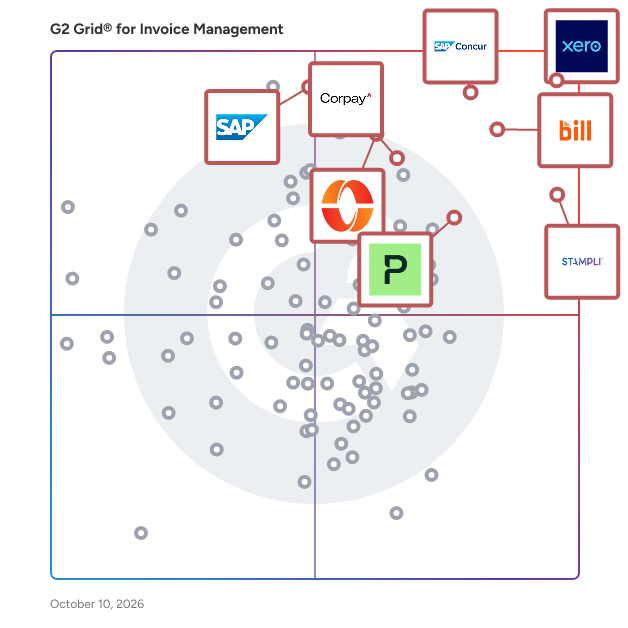
G2 Grid® for Invoice Management Software

G2 Grid® for Invoice Management Software plotting products by satisfaction and market presence

Highlighted products: Xero, SAP Concur, Stampli, BILL AP/AR, Paylocity, Corpay Cross-Border, Payhawk, and SAP Cloud ERP (SAP S/4HANA Cloud).

Underlying data: [Grid® JSON](https://www.g2.com/categories/invoice-management/grids.json?focus%5B%5D=xero&focus%5B%5D=sap-concur&focus%5B%5D=stampli&focus%5B%5D=bill-ap-ar&focus%5B%5D=paylocity&focus%5B%5D=corpay-cross-border&focus%5B%5D=payhawk&focus%5B%5D=sap-cloud-erp-sap-s-4hana-cloud)

BlueSnap Accounts Receivable Automation

The Armatic platform enhances the power of your existing accounting/ ERP software and your existing CRM system with workflow automation, powerful business intelligence and fully integrated cross-department communications functionality to automate tasks in finance, sales, support, HR and operations. 1. Finance & Billing Automation (AR, AP, Invoices, Subscriptions, Payments): Fully automated AR Collections drastically reduces time to payment (DSO). Our advanced rules engine delivers the right message at the right time automatically, ensuring the highest likelihood of payment, while enabling prompt, efficient customer communication. Never have another vendor payment not accounted for, assign vendor bills for review and approvals. Leverage our workflow automation and approval engine to route all your bills for optimized payments. Enable subscription/recurring billing, progress billing, invoice creation, automatic payments, payment plans, late fees, coupons, online billing and interactive customer portals, all integrated and synced with your current accounting and CRM systems. Payment tokenization and automated failed payment recovery ensures no payment is missed and all data is secure. 2. Sales & Success Automation (QTC, CPQ, NPS, eSign): Automate quotes for prospects, control your pricing and close deals faster with our QTC and CPQ features. Everything from creating a quote to collecting cash from customers. Empower your sales and success team to handle the QTC process and remove departmental bottlenecks. No more second-guessing, let your sales team handle all aspects of new contract creation within a clearly defined framework - from quote to eSignature and payment. Share all historical communication data, files, documents, invoices and contracts across your whole team from the customer manager. Use Armatic's build in contact center to communicate with your customers. Leverage the Armatic Net Promoter Score engine to join companies that have grown 2x faster vs the competition. Empower your teams to make better decisions backed by customer feedback. 3. Human Capital Automation (eNPS, Employee Advocacy, Contracts, eRecords): Measure and improve your employee satisfaction with the Armatic employee NPS. Create communication feedback loops with your employees to drive loyalty and employee engagement. Amplify your companies social reach with Employee Advocacy. Leverage the social networks of your employees, by providing them an easy way to share approved company information. Your companies social posts reach a magnitude of prospects and potential new hires. Provide your HR team and managers across your organization a solution to eSign, store and manage securely all employee contracts. Share all historical communication data, files, documents, employee contracts and NDAs across your whole team. The Armatic employee contact manager provides your team instant and easy access to all employee relevant information, including communication data, contracts, and HR related notes.

Average Rating: 4.6/5.0

Total Reviews: 37

How Do G2 Users Rate BlueSnap Accounts Receivable Automation?

  • Has the product been a good partner in doing business?: 9.6/10 (Category avg: 8.9/10)
  • Accounting: 9.3/10 (Category avg: 8.8/10)
  • Cashflow: 8.7/10 (Category avg: 8.4/10)
  • Payments: 9.0/10 (Category avg: 8.8/10)

Who Is the Company Behind BlueSnap Accounts Receivable Automation?

  • Seller: Payroc
  • Year Founded: 2003
  • HQ Location: Tinley Park, US
  • Twitter: @Payscape
    1,003 Twitter followers
  • LinkedIn® Page: www.linkedin.com
    1,132 employees on LinkedIn®

Who Uses This Product?

  • Company Size: 59% Small, 19% Medium

What Do G2 Reviewers Say About BlueSnap Accounts Receivable Automation?

AI-generated summary from verified user reviews

Pros
  • Users value the automation features of BlueSnap Accounts Receivable Automation, streamlining invoicing and enhancing payment speed effortlessly.
  • Users appreciate the efficiency of BlueSnap Accounts Receivable Automation, minimizing manual work and streamlining invoicing processes.
  • Users value the seamless payment processing of BlueSnap, enhancing efficiency and reducing manual follow-ups on invoices.
  • Users love the time-saving automation of BlueSnap Accounts Receivable, streamlining invoicing and payments effortlessly.
  • Users love the ease of use of BlueSnap Accounts Receivable Automation, streamlining invoicing and payment processes effortlessly.
Cons
  • Users often find the complexity of BlueSnap's setup and reporting features impacts their efficiency and experience negatively.
  • Users feel that reporting is complicated, requiring extra effort to interpret data, especially under pressure.
  • Users express frustration with limited customization, making it difficult to adapt workflows for unique billing scenarios.
  • Users find the reporting features unclear, requiring extra effort to see progress and affecting overall efficiency.
  • Users find the complex features of BlueSnap Accounts Receivable Automation challenging, particularly during setup and reporting.

What Are Recent G2 Reviews of BlueSnap Accounts Receivable Automation?

vcita

vcita: All-in-one business management solution designed to help busy business owners stay organized and deliver exceptional client experiences. vcita is a comprehensive business management software designed to empower small and medium-sized businesses with digital tools to automate administrative tasks and deliver exceptional client experiences. With vcita, business owners can streamline operations, save time, and drive growth through smart automation and seamless integration. Key Features of vcita’s All-in-One Solution: • CRM & Client Management: Easily manage client information, communication history, and track interactions with customizable client cards and workflows. • Payment Collection & Invoicing: Automate billing, estimates, invoicing, and payment collection to ensure getting paid on time 3x faster. • Online Scheduling & Calendar Management: Let clients schedule appointments 24/7,keeping your and your staff’s calendar full with automated reminders and meeting confirmations. • SMS & Email Marketing: Run targeted campaigns and automated follow-ups via SMS and email campaigns to nurture relationships and retain clients. • Lead Capture: Securely capture new leads directly from your website, ensuring seamless integration into your CRM and business flow.. • Client Portal: Let your clients book, pay, send messages and share documents through a secure and branded client portal - any time, from any device. • Documents & Files Management: Store, share, and manage documents securely in one place for easy access. • Automated Reminders: Set reminders for clients and staff to ensure no appointment or payment is missed. • Marketing Automation: Engage clients with automated SMS and email campaigns, saving you time and effort on routine communications. Latest Updates: • BizAI -AI assistant: A fully integrated AI-powered business advisor that offers personalized insights and automates tasks like scheduling, client communication. It learns from user feedback and business data to provide tailored recommendations, allowing business owners to stay in control. • Facebook Messenger Integration: Capture leads directly from Facebook Messenger and integrate them into your CRM, making communication with prospects more seamless. • Multi-Service Scheduling: Schedule multiple services within a single client appointment, allowing for easier management of complex client needs. • Calls & Texting App: New integration allows businesses to manage both calls and text messages from a single business phone number, streamlining communication and offering features like call recording, missed call logs, and custom greetings. • Payment Workflows: New streamlined payment workflows allow businesses to charge clients directly from the service catalog, providing a POS-like experience for quicker payments. Why Choose vcita? Join over 100,000 businesses globally using vcita to automate tasks, improve client relationships, and grow their business. Whether you’re looking to streamline billing, enhance marketing efforts, or offer a better client experience, vcita delivers a powerful, easy-to-use solution that covers it all.

Average Rating: 4.5/5.0

Total Reviews: 80

How Do G2 Users Rate vcita?

  • Has the product been a good partner in doing business?: 9.1/10 (Category avg: 8.9/10)
  • Accounting: 8.3/10 (Category avg: 8.8/10)
  • Payments: 9.8/10 (Category avg: 8.8/10)

Who Is the Company Behind vcita?

  • Seller: vcita
  • Year Founded: 2010
  • HQ Location: St. Petersburg Florida
  • Twitter: @vCita
    1,739 Twitter followers
  • LinkedIn® Page: www.linkedin.com
    139 employees on LinkedIn®

Who Uses This Product?

  • Top Industries: Alternative Medicine, Marketing and Advertising
  • Company Size: 88% Small, 12% Medium

What Do G2 Reviewers Say About vcita?

AI-generated summary from verified user reviews

Pros
  • Users find vcita's ease of use exceptional, benefiting from seamless integrations and automated features that enhance productivity.
  • Users love the automated reminders and bookings, making client management seamless and efficient for their businesses.
  • Users commend the exceptional customer support from vcita, providing quick assistance and helpful solutions for their needs.
  • Users appreciate the seamless integration capabilities of vcita, enhancing client interaction and streamlining business management.
  • Users value the seamless integration options of vcita, enhancing client interaction and streamlining business operations.
Cons
  • Users face integration issues with vcita, particularly with Google Calendar syncing and availability inaccuracies.
  • Users express frustration over missing features like partial refunds, limited uploads, and costly adjustments to templates.
  • Users find vcita expensive, facing additional costs for basic adjustments and limitations on document uploads.
  • Users find the lack of integration with other services frustrating, leading to disjointed workflows and inefficiencies.
  • Users report linking issues with vcita, resulting in syncing problems and miscommunication with other platforms.

What Are Recent G2 Reviews of vcita?

What Are G2 Users Discussing About vcita?

WorkflowMAX

WorkflowMAX is a job and profitability management software solution specifically designed to assist service firms in optimizing their operations. This platform provides users with comprehensive control over essential aspects such as time management, team collaboration, and profit tracking, all consolidated into a single interface. By streamlining processes like project management, timesheet tracking, invoicing, and purchase order issuance, WorkflowMAX enhances clarity at every stage of a firm's workflow. Targeted primarily at growing service-oriented businesses, WorkflowMAX empowers users to scale their operations effectively. With the ability to monitor where time is allocated and profits are generated, firms can make informed decisions, delegate tasks with accuracy, and expand their services without uncertainty. This adaptability ensures that the software aligns with the unique workflows of each firm, rather than imposing a rigid structure that may not fit their needs. Key features of WorkflowMAX include its robust project management tools, which allow users to create, assign, and track projects in real time. The timesheet functionality simplifies the process of logging hours worked, ensuring that all team members can accurately report their time. Additionally, the invoicing and purchase order capabilities facilitate seamless financial transactions, making it easier for firms to manage their cash flow. The software also integrates deeply with popular accounting platforms like Xero and QuickBooks, enabling users to synchronize financial data effortlessly. The benefits of using WorkflowMAX extend beyond its core functionalities. The software is designed to provide users with insights into their operations, helping them identify areas for improvement and opportunities for growth. The dedicated support team is another significant advantage, as they are genuinely invested in the success of their clients, offering assistance and guidance as needed. This commitment to customer support, combined with the software's comprehensive features, positions WorkflowMAX as a valuable asset for service firms looking to enhance their operational efficiency and profitability.

Average Rating: 4.1/5.0

Total Reviews: 63

How Do G2 Users Rate WorkflowMAX?

  • Has the product been a good partner in doing business?: 8.3/10 (Category avg: 8.9/10)

Who Is the Company Behind WorkflowMAX?

  • Seller: WorkflowMAX
  • Company Website:
  • Year Founded: 2023
  • HQ Location: Melbourne
  • LinkedIn® Page: www.linkedin.com
    27 employees on LinkedIn®

Who Uses This Product?

  • Who Uses This: Director
  • Top Industries: Marketing and Advertising, Accounting
  • Company Size: 76% Small, 14% Medium

What Do G2 Reviewers Say About WorkflowMAX?

AI-generated summary from verified user reviews

Pros
  • Users find WorkflowMax to be easy to use and customize, enhancing their experience with minimal onboarding required.
  • Users appreciate the time tracking simplicity of WorkflowMAX, enhancing productivity and streamlining project management.
  • Users value the easy integration of WorkflowMAX with Xero, enhancing their streamlined invoicing process without double handling.
  • Users appreciate the seamless integration with Xero, enhancing workflow efficiency and minimizing invoice handling.
  • Users love the ease of use of WorkflowMax for managing projects seamlessly and efficiently from start to finish.
Cons
  • Users find the missing features of WorkflowMAX, like multi-currency billing, hinder effective task management.
  • Users find the limited functionality of WorkflowMAX frustrating, noting inefficiencies and outdated processes affecting usability.
  • Users face billing issues, including multi-currency needs and invoice discrepancies that hinder smooth transaction management.
  • Users find that time consumption is an issue with WorkflowMAX due to slow entry processes and multiple clicks.
  • Users express frustration over invoicing problems like discrepancies in quoted and invoice values and missing multi-currency billing.

What Are Recent G2 Reviews of WorkflowMAX?

What Are G2 Users Discussing About WorkflowMAX?

AI can help you find the answers. G2 helps you trust them.

Connect G2 to Claude or ChatGPT for answers grounded in G2's trusted reviews, comparisons, and pricing from real user insights.

How it works

Method CRM

Method CRM is the #1-rated CRM for businesses using QuickBooks — a customizable CRM that adapts to your business, not the other way around. Instead of forcing teams to change their processes to fit the software, Method lets them build the workflows, screens, and automations their business actually uses, without developer resources or enterprise pricing. Method fills the gap between QuickBooks and rigid, one-size-fits-all CRMs. With real-time, two-way sync, teams manage leads, customers, estimates, invoices, and payments in one place while accounting data stays current in both systems. Customers can approve estimates, sign proposals, and pay invoices online through a branded 24/7 portal, streamlining every step from lead to payment. Automating this busywork — fewer steps, less retyping, fewer errors — saves teams hours every week. Nearly 4,000 businesses across construction, field services, manufacturing, warehousing, and professional services trust Method to support the workflows their industries rely on daily. Every account is backed by fast access to real subject-matter experts who treat you like a partner, not a ticket — including a free hour of customization to tailor Method to your business.

Average Rating: 4.4/5.0

Total Reviews: 342

How Do G2 Users Rate Method CRM?

  • Has the product been a good partner in doing business?: 8.9/10 (Category avg: 8.9/10)
  • Accounting: 8.3/10 (Category avg: 8.8/10)
  • Cashflow: 8.3/10 (Category avg: 8.4/10)
  • Payments: 7.8/10 (Category avg: 8.8/10)

Who Is the Company Behind Method CRM?

  • Seller: Method Integration Inc.
  • Company Website:
  • Year Founded: 2010
  • HQ Location: Toronto
  • Twitter: @MethodCRM
    2,075 Twitter followers
  • LinkedIn® Page: www.linkedin.com
    112 employees on LinkedIn®

Who Uses This Product?

  • Who Uses This: Owner, Office Manager
  • Top Industries: Construction, Wholesale
  • Company Size: 88% Small, 10% Medium

What Do G2 Reviewers Say About Method CRM?

AI-generated summary from verified user reviews

Pros
  • Users find Method CRM to be easy to use, enhancing organization and data management for efficient workflow.
  • Users enjoy the outstanding customization options of Method CRM, tailoring workflows to enhance their operational efficiency.
  • Users value the seamless integration with QuickBooks, enhancing their CRM and accounting functionality for improved efficiency.
  • Users value the responsive customer support of Method CRM, ensuring quick assistance and effective solutions whenever needed.
  • Users highlight the extensive customization options of Method CRM, enabling tailored workflows that enhance operational efficiency.
Cons
  • Users find the learning curve for Method CRM steep, complicating initial setup and familiarity with its features.
  • Users experience limited customization, as changes often require costly developer support and can complicate the system.
  • Users experience several glitches and performance issues, particularly with the mobile app and integration syncing.
  • Users find customization costs for Method CRM to be a significant financial burden, impacting overall affordability.
  • Users note the missing features in Method CRM, wishing for improved reporting and comprehensive all-in-one capabilities.

What Are Recent G2 Reviews of Method CRM?

What Are G2 Users Discussing About Method CRM?

MakersHub

MakersHub automates and simplifies accounts payable (AP) for businesses with complex operations and high payment volumes. Our solution streamlines bill capture, coding, approval routing, and payment processing, giving finance teams real-time visibility into project costs and cash flow. By eliminating manual inefficiencies and enabling smarter workflows, MakersHub helps you process bills faster, improve financial accuracy, and scale with ease. We ingest, structure, and centralize bill data using advanced computer vision and task-specific language models. We can then link line-item details to their appropriate accounting codes, customer and project names, and approval hierarchies. This gives businesses the confidence and oversight they need before making payments. Our deep integration to the accounting system, configurable approval workflows, and automated vendor communications set us apart from generic, one-size-fits-all solutions. Every business operates differently, and MakersHub was built with that in mind, because we’ve lived these challenges ourselves! Our platform meets you where you are today—whether you're an established business with sophisticated financial workflows or a growing company looking to scale—providing flexibility, control, and efficiency at every stage of the AP process.

Average Rating: 4.9/5.0

Total Reviews: 34

How Do G2 Users Rate MakersHub?

  • Has the product been a good partner in doing business?: 10.0/10 (Category avg: 8.9/10)
  • Accounting: 9.5/10 (Category avg: 8.8/10)
  • Payments: 9.4/10 (Category avg: 8.8/10)

Who Is the Company Behind MakersHub?

  • Seller: MakersHub
  • Company Website:
  • Year Founded: 2021
  • HQ Location: Austin, US
  • LinkedIn® Page: www.linkedin.com
    17 employees on LinkedIn®

Who Uses This Product?

  • Who Uses This: CFO
  • Top Industries: Construction, Accounting
  • Company Size: 79% Small, 15% Medium

What Do G2 Reviewers Say About MakersHub?

AI-generated summary from verified user reviews

Pros
  • Users rave about the world-class customer support from MakersHub, enhancing efficiency and addressing challenges effectively.
  • Users appreciate the ease of use in MakersHub, enhancing efficiency and streamlining Accounts Payable processes effectively.
  • Users admire the efficiency of MakersHub, greatly improving productivity and simplifying the accounts payable process.
  • Users appreciate the time-saving features of MakersHub, significantly boosting productivity and simplifying financial processes.
  • Users commend the efficient approval process in MakersHub, significantly enhancing productivity and accuracy in invoice management.
Cons
  • Users face challenges with client approval processes being tedious and manual, impacting their experience with MakersHub.
  • Users experience integration difficulties with MakersHub, as it often fails to pick up mapping correctly.
  • Users often face integration issues with MakersHub, as it doesn't consistently recognize mapping accurately.
  • Users desire more control over visibility, noting a lack of flexibility in tracking payments and user interface options.
  • Users find the learning curve steep as the interface requires time to master and adapt to effectively.

What Are Recent G2 Reviews of MakersHub?

Trail Agent Builder

Nanonets agents run complex, document-heavy processes from start to finish. They read incoming documents, apply your business rules, make the call, and post clean data into SAP, Salesforce, NetSuite, and beyond. Teams use them for accounts payable, invoice processing, order management, reconciliation, and supplier onboarding, cutting processing time by 95%. Context Graph is what makes that work in production. It holds thousands of your business rules and applies the right one in the right situation, which is where generic agents fail, because real processes carry rules that change by vendor, region, and value. Add a rule and Context Graph tracks which rule drove which decision. Every decision is traceable. You can see what the agent read, which rule fired, and why it made the call, instead of accepting a black box that guesses and invents field values. When an agent is uncertain, it routes the exception to a named owner rather than silently getting it wrong. When someone corrects it, every agent sharing that rule learns. Nanonets ranks #1 for accuracy on complex documents, and global enterprises including Volkswagen, Schneider Electric, Mondelez, and Roche run it where accuracy is non-negotiable. It is not just an agent. It is the only automation layer you can actually audit, control, and trust.

Average Rating: 4.7/5.0

Total Reviews: 100

How Do G2 Users Rate Trail Agent Builder?

  • Has the product been a good partner in doing business?: 9.4/10 (Category avg: 8.9/10)
  • Accounting: 9.2/10 (Category avg: 8.8/10)
  • Cashflow: 8.3/10 (Category avg: 8.4/10)

Who Is the Company Behind Trail Agent Builder?

  • Seller: Trail
  • Year Founded: 2017
  • HQ Location: San Francisco, CA
  • Twitter: @nanonets
    1,531 Twitter followers
  • LinkedIn® Page: www.linkedin.com
    331 employees on LinkedIn®

Who Uses This Product?

  • Top Industries: Accounting, Information Technology and Services
  • Company Size: 42% Small, 39% Medium

What Do G2 Reviewers Say About Trail Agent Builder?

AI-generated summary from verified user reviews

Pros
  • Users praise the exceptional customer support from Nanonets, highlighting their quick responses and willingness to assist.
  • Users praise Nanonets for its ease of use, making implementation and navigation straightforward and efficient.
  • Users value the time-saving automation of Nanonets, significantly enhancing workflow efficiency and reducing manual tasks.
  • Users commend Nanonets for its exceptional accuracy in data extraction, making invoicing efficient and reliable.
  • Users value the highly customizable workflows of Nanonets, enhancing efficiency and tailoring the system to their needs.
Cons
  • Users face data management issues with file control and customization, complicating model access and workflow efficiency.
  • Users face a steep learning curve when using Nanonets due to complex setup and configuration requirements.
  • Users find Nanonets to be expensive, with high pricing that can complicate budgeting for small to medium businesses.
  • Users report occasional OCR mapping inaccuracies that may require manual correction, though improvements have been noted over time.
  • Users find that learning difficulties arise from complex setups and the need for significant training for advanced features.

What Are Recent G2 Reviews of Trail Agent Builder?

What Are G2 Users Discussing About Trail Agent Builder?

OneSuite

OneSuite is an all-in-one client work management platform built for agencies, professional service teams, consultants, and independent professionals. It brings CRM, projects, clients, teams, time tracking, documents, invoicing, communication, and client collaboration into one connected workspace. Instead of managing client work across disconnected tools, OneSuite helps businesses manage the complete client journey, from the first opportunity and proposal to project delivery, tracked time, invoicing, and ongoing client relationships. Manage Leads and Clients With a Connected CRM OneSuite’s built-in CRM helps service businesses organize leads, manage opportunities, and move potential clients through customizable pipelines. Keep client details, conversations, projects, documents, invoices, and related activity connected, giving your team a clearer picture of every relationship. Plan and Deliver Client Projects Manage projects using flexible boards and lists, create and assign tasks, set priorities and deadlines, organize project files, and keep work moving from start to finish. Because projects are connected with clients, teams can easily understand what they’re working on, who it’s for, and what needs attention next. Track Time and Understand Team Capacity Built-in time tracking connects working hours directly with projects, tasks, and team members. Track billable and non-billable time, review timesheets, and understand where your team’s time is going. Team View brings important workforce information together so you can see assignments, capacity, utilization, permissions, rates, and contributions in one place. This helps agencies make better decisions about workloads, resources, and profitability without relying on separate tools. Create Proposals, Contracts, and Documents Create and manage proposals, contracts, agreements, and other client documents directly in OneSuite. Reusable templates and built-in e-signatures make it easier to standardize your sales and onboarding process while reducing paperwork and tool switching. Invoice Clients and Manage Recurring Billing Turn client work into revenue with one-time and recurring invoices. Manage retainers and ongoing services, keep track of invoice activity, and give clients convenient ways to pay online through supported payment providers. Because clients, projects, tracked time, documents, and billing live in the same system, teams get a more connected view of their work and finances. Give Clients a Branded Portal OneSuite includes a white-label client portal that creates a professional, branded experience for your clients. Customize the portal with your business branding and domain while giving clients a central place to access their projects, documents, invoices, and other shared information. This keeps clients informed without forcing your team to manage endless email threads or send information across multiple platforms. Keep Client Communication Connected Manage client communication closer to the work with OneSuite’s built-in email capabilities. Teams can connect email, keep conversations organized, and reduce the need to constantly switch between their inbox and client management tools. Custom SMTP support also gives businesses greater flexibility over how emails are sent from their workspace. Connect Your Accounting Workflow OneSuite integrates with QuickBooks and Xero, helping businesses connect their client management and invoicing workflows with the accounting tools they already use. Instead of manually moving information between disconnected systems, teams can build a more connected workflow from client work to financial management. Run Client Work From One Place OneSuite is designed to reduce the growing software stack that service businesses often need to manage their operations. CRM, client management, projects, tasks, team management, time tracking, timesheets, documents, e-signatures, invoicing, recurring billing, email, files, client portals, payment options, and integrations work together in one platform. For agencies and service professionals, that means less time switching between tools, better visibility across client work, and a more consistent experience for both teams and clients. With OneSuite, you can manage the client journey from lead to payment—and the work in between—from one connected platform.

Average Rating: 4.8/5.0

Total Reviews: 17

How Do G2 Users Rate OneSuite?

  • Has the product been a good partner in doing business?: 9.3/10 (Category avg: 8.9/10)
  • Accounting: 6.7/10 (Category avg: 8.8/10)
  • Cashflow: 7.2/10 (Category avg: 8.4/10)
  • Payments: 7.8/10 (Category avg: 8.8/10)

Who Is the Company Behind OneSuite?

  • Seller: OneSuite
  • Year Founded: 2024
  • HQ Location: Wilmington, Delaware, United States
  • Twitter: @getOneSuite
    25 Twitter followers
  • LinkedIn® Page: www.linkedin.com
    7 employees on LinkedIn®

Who Uses This Product?

  • Company Size: 94% Small, 6% Medium

What Do G2 Reviewers Say About OneSuite?

AI-generated summary from verified user reviews

Pros
  • Users love the Task Management features of OneSuite, allowing them to effectively keep track of multiple projects seamlessly.
  • Users find the intuitive interface of OneSuite enhances project tracking and task management, making it easy to use.
  • Users love the Calendar and Dashboard features of OneSuite, simplifying project management and enhancing productivity.
  • Users value the automation features of OneSuite, streamlining workflows and simplifying tasks for enhanced efficiency.
  • Users find the easy setup of OneSuite simplifies onboarding and enhances workflow efficiency across projects.
Cons
  • Users wish for improved missing features like time tracking, as manual entry feels outdated and inconvenient.
  • Users find the time management cumbersome due to manual entry and lack of essential tracking features.
  • Users express frustration over the missing time tracking functionality, as it needs to be entered manually.
  • Users suggest that cost issues could be improved for a better overall value with OneSuite.
  • Users feel that while there is nothing to dislike, the product is expensive and suggest reducing costs.

What Are Recent G2 Reviews of OneSuite?

Corpay One

Corpay One is a credit card and spend management solution for businesses. Build custom bookkeeping and approval workflows that streamline work for your team, send fast virtual cards for vendor payments, control employee spending with custom card control tools and earn rebates on all business expenses with the Smart Business Mastercard® or Universal Fuel Mastercard®. Our complete solution is designed to help you spend smarter, earn faster, and save more while reducing your tech stack and other card programs. Get started today! Corpay One helps you with: - Automated ACH, Check and Virtual Card payments - Company cards and fuel cards - Spend control - Easy-to-use bill pay interface - Hands-free bill and receipt scanning - Infinitely customizable workflows - Guided onboarding - Live, online support - Dedicated team of payments experts

Average Rating: 4.2/5.0

Total Reviews: 178

How Do G2 Users Rate Corpay One?

  • Has the product been a good partner in doing business?: 8.7/10 (Category avg: 8.9/10)
  • Accounting: 7.9/10 (Category avg: 8.8/10)
  • Cashflow: 6.8/10 (Category avg: 8.4/10)
  • Payments: 8.0/10 (Category avg: 8.8/10)

Who Is the Company Behind Corpay One?

  • Seller: Corpay
  • Year Founded: 2000
  • HQ Location: Atlanta, US
  • Twitter: @GetCorpay
    3,102 Twitter followers
  • LinkedIn® Page: www.linkedin.com
    7,238 employees on LinkedIn®

Who Uses This Product?

  • Who Uses This: Owner
  • Top Industries: Accounting, Non-Profit Organization Management
  • Company Size: 77% Small, 20% Medium

What Do G2 Reviewers Say About Corpay One?

AI-generated summary from verified user reviews

Pros
  • Users appreciate the user-friendly nature of Corpay One, simplifying daily operations and enhancing overall efficiency.
  • Users value the automation features of Corpay One, streamlining expense reporting and enhancing efficiency for all parties.
  • Users value the user-friendly portal of Corpay One, simplifying payments and enhancing visibility on spending details.
  • Users find the easy implementation of Corpay One a significant advantage, enhancing their accounts payable process effortlessly.
  • Users highlight the easy setup of Corpay One, facilitating a seamless transition and user-friendly experience.
Cons
  • Users experience approval issues with unclear card declines and lengthy setup processes, leading to frustration.
  • Users find the setup process too complex, leading to time consumption and decreased productivity overall.
  • Users are frustrated by the inflexibility in customization options for expense categories, affecting usability and experience.
  • Users experience a lack of flexibility in rule-setting and card options, complicating navigation and functionality.
  • Users express frustration with the limited customization options in Corpay One, impacting usability and efficiency.

What Are Recent G2 Reviews of Corpay One?

What Are G2 Users Discussing About Corpay One?

Flowlu

Flowlu is a cloud-based business management platform designed to help teams plan, track, and optimize their work in a single, centralized workspace. It provides a suite of tools for project management, CRM, task tracking, financial management, team collaboration, and knowledge sharing. Flowlu is built to streamline operations, improve productivity, and ensure seamless communication across teams, making it an ideal solution for businesses of all sizes, from startups to large enterprises. Flowlu supports organizations across various industries by offering tools to: Manage projects efficiently with task assignments, deadlines, progress tracking, and automated workflows. Streamline sales processes with an integrated CRM, pipeline management, and automated follow-ups. Optimize financial operations through invoicing, expense tracking, budgeting, and revenue forecasting. Enhance team collaboration with real-time communication, shared workspaces, and internal chat. Store and distribute knowledge with an internal and external knowledge base for easy access to critical information. Key Features & Benefits Project Management: Utilize Kanban boards, Gantt charts, and task dependencies for structured planning and execution. CRM & Sales Automation: Track leads, manage opportunities, and set up automated workflows for follow-ups and deal tracking. Financial Management: Create invoices, process payments, monitor expenses, and gain real-time insights into business profitability. Customization: Personalize workflows, dashboards, reports, and fields to fit specific business needs. Time Tracking & Workload Management: Monitor time spent on tasks and balance workloads to enhance team efficiency. Client Portal: Securely share project updates, invoices, and documents with clients for smooth communication. Who Can Benefit from Flowlu? Flowlu is designed for small to mid-sized businesses, agencies, freelancers, and enterprises that need an all-in-one platform to manage their projects, finances, and client relationships. It is particularly valuable for service-based businesses, consulting firms, IT companies, creative agencies, and product development teams looking to improve efficiency and organization. By centralizing essential business operations, Flowlu eliminates the need for multiple disconnected tools, enabling teams to stay organized, productive, and focused on achieving their goals.

Average Rating: 4.7/5.0

Total Reviews: 196

How Do G2 Users Rate Flowlu?

  • Has the product been a good partner in doing business?: 9.5/10 (Category avg: 8.9/10)
  • Accounting: 10.0/10 (Category avg: 8.8/10)
  • Cashflow: 10.0/10 (Category avg: 8.4/10)
  • Payments: 10.0/10 (Category avg: 8.8/10)

Who Is the Company Behind Flowlu?

  • Seller: Cloud22
  • Year Founded: 2016
  • HQ Location: Dubai
  • Twitter: @Flowlusoft
    194 Twitter followers
  • LinkedIn® Page: www.linkedin.com
    9 employees on LinkedIn®

Who Uses This Product?

  • Who Uses This: CEO, Owner
  • Top Industries: Marketing and Advertising, Information Technology and Services
  • Company Size: 89% Small, 9% Medium

What Do G2 Reviewers Say About Flowlu?

AI-generated summary from verified user reviews

Pros
  • Users value Flowlu's efficiency, benefiting from its all-in-one design that centralizes project management seamlessly.
  • Users love the intuitive interface of Flowlu, which simplifies project management and enhances team productivity.
  • Users praise Flowlu for its affordable pricing combined with excellent features, enhancing productivity and efficiency significantly.
  • Users love the harmonious functionality of Flowlu, appreciating its universal appeal and constant updates.
  • Users appreciate the automation capabilities of Flowlu, benefiting from its harmonious integration of multiple functions within one system.

What Are Recent G2 Reviews of Flowlu?

What Are G2 Users Discussing About Flowlu?

ProcureDesk

ProcureDesk is a procurement and accounts payable automation platform built for mid-market finance teams — Controllers, Accounting Managers, and VPs of Finance at companies with roughly 100 to 1,000 employees. It gives finance control over spending before money moves, so committed spend is visible in real time and the books match reality every day. Most spend tools optimize the buyer's experience and leave finance to reconcile after the fact. ProcureDesk works the other way around: it captures every purchase at the point of request — before a vendor is contacted, before a PO is issued, before an invoice arrives. Approvals, GL coding, 3-way matching, and multi-entity allocation are built into the workflow, so the audit trail is created in real time instead of assembled retrospectively at month-end. That design produces three outcomes finance teams feel daily: • No surprise invoices — spend is approved before it happens, so nothing hits AP without a PO and an approver. • Faster close — customers reduce month-end close from about 10 days to 4, with 90% fewer invoices arriving without a PO. • Audit-readiness — every approval, PO, receipt, match, and GL entry is captured as it happens, turning audit prep into audit retrieval. Key capabilities: • Purchase requests with multi-level approval routing • GL coding at the point of request • Automated 3-way matching (PO + receipt + invoice) • Real-time budget and committed-spend visibility • Multi-entity, multi-location allocation • 200+ punchout supplier catalogs (Amazon Business, Grainger, Thermo Fisher, VWR, Staples, McMaster-Carr, and more) • Native, bidirectional sync with QuickBooks (Online, Desktop, and Enterprise), Sage Intacct, NetSuite, and Microsoft Business Central Implementation is done for you in 2–4 weeks, with no IT project required. ProcureDesk is used by finance teams across biotech, logistics, manufacturing, and multi-entity organizations that need procurement structure without a months-long enterprise implementation. Best for: mid-market finance teams that need spend control before the invoice, not after.

Average Rating: 4.4/5.0

Total Reviews: 49

How Do G2 Users Rate ProcureDesk?

  • Has the product been a good partner in doing business?: 8.7/10 (Category avg: 8.9/10)
  • Accounting: 8.0/10 (Category avg: 8.8/10)
  • Cashflow: 6.7/10 (Category avg: 8.4/10)
  • Payments: 8.3/10 (Category avg: 8.8/10)

Who Is the Company Behind ProcureDesk?

  • Seller: ProcureDesk
  • Company Website:
  • HQ Location: Cincinnati
  • Twitter: @ProcureDesk
    222 Twitter followers
  • LinkedIn® Page: www.linkedin.com
    41 employees on LinkedIn®

Who Uses This Product?

  • Top Industries: Biotechnology, Accounting
  • Company Size: 47% Medium, 45% Small

What Do G2 Reviewers Say About ProcureDesk?

AI-generated summary from verified user reviews

Pros
  • Users find ProcureDesk to be user-friendly, appreciating its simplicity and ease of navigation on a single page.
  • Users commend ProcureDesk for its responsive and knowledgeable customer support, enhancing usability and assistance.
  • Users find ProcureDesk intuitive, appreciating its user-friendly interface and quick, knowledgeable support for seamless use.
  • Users value the efficient approval process in ProcureDesk, enhancing accuracy and ease in invoice management.
  • Users love the seamless integration with accounting software, enhancing efficiency and overall operational smoothness.
Cons
  • Users report vendor management issues with incorrect field transfers and integration failures that hinder efficiency.
  • Users struggle with the learning curve, especially if they don't use ProcureDesk regularly, complicating their experience.
  • Users experience some update issues with bugs, but appreciate ProcureDesk's quick response to feedback and improvements.
  • Users experience delays with fixes and processing, leading to lost time and inefficient workflow management.
  • Users experience insufficient details in ProcureDesk, hindering effective use of features and project management.

What Are Recent G2 Reviews of ProcureDesk?

What Are G2 Users Discussing About ProcureDesk?

Pluto

Pluto is the most comprehensive & powerful corporate card and spend management platform built for MENA businesses. From small businesses to the largest multi-national group holdings, businesses such as Property Finder, Knight Frank and Swissport have trusted Pluto with all of their non-payroll spending. Pluto combines the power of getting access to instant issuance unlimited corporate cards, full end-to-end reimbursements, petty cash & account payables management all within one platform. No more chasing for receipts, manually approving invoices on long e-mail threads or sharing one corporate card with several people. Pluto's enterprise platform brings control back to complex finance and accounting business processes and creates a streamlined approach to controlling your company's spending.

Average Rating: 4.6/5.0

Total Reviews: 506

How Do G2 Users Rate Pluto?

  • Has the product been a good partner in doing business?: 9.1/10 (Category avg: 8.9/10)
  • Accounting: 8.7/10 (Category avg: 8.8/10)
  • Cashflow: 8.6/10 (Category avg: 8.4/10)
  • Payments: 8.9/10 (Category avg: 8.8/10)

Who Is the Company Behind Pluto?

  • Seller: Pluto Card
  • Year Founded: 2021
  • HQ Location: Dubai, AE
  • Twitter: @getplutocom
    259 Twitter followers
  • LinkedIn® Page: www.linkedin.com
    57 employees on LinkedIn®

Who Uses This Product?

  • Who Uses This: Accountant, Finance Manager
  • Top Industries: Real Estate, Financial Services
  • Company Size: 54% Medium, 39% Small

What Do G2 Reviewers Say About Pluto?

AI-generated summary from verified user reviews

Pros
  • Users find Pluto’s interface very easy to use, enjoying seamless integration and automated expense management features.
  • Users appreciate the time-saving features of Pluto, making expense management effortless and efficient for their teams.
  • Users highlight the ease of handling expense management with Pluto, appreciating its accessibility and transparency for teams.
  • Users commend Pluto's exceptional customer support, making onboarding and usage seamless despite varying user backgrounds.
  • Users value the real-time visibility and control of Pluto, streamlining expense management and enhancing team efficiency.
Cons
  • Users find the card issues with Pluto limit its usability, especially concerning payment methods while traveling.
  • Users experience payment issues with Pluto, including transaction rejections and delays in receipt uploads.
  • Users face approval issues with Pluto, leading to declined transactions and delays during purchasing situations.
  • Users experience occasional delays in card transaction syncing, which can lead to minor inconveniences in their overall experience.
  • Users find the limited customization options frustrating, affecting their ability to tailor the product to specific needs.

What Are Recent G2 Reviews of Pluto?

MaestroPayment

Maestro Payment is a smart, super-intuitive contractor invoicing and payment platform that streamlines your end-to-end payment processes, automates global and local payments, and reduces costs. With Maestro, you’ll benefit from customizable approval workflows, invoice generation, contractor time-off tracking, and pre-built reports to help monitor your activity and ensure accurate and secure payments on time – every time. AI-powered, Maestro automatically detects and flags anomalies, so you can identify and fix issues early. Plus, it integrates seamlessly with leading biz management tools, including QuickBooks, Oracle NetSuite, Sage Intacct, and Xero. This means you’ll always have clear, unified visibility into critical data, making your contractor payment management easier, smarter, and more efficient. With fast and easy setup and onboarding, localized legal contract generation, and multi-currency payment support across the US and around the globe, Maestro Payment gives you all the tools you need for comprehensive, fully-transparent control of all your contractor payments.

Average Rating: 4.9/5.0

Total Reviews: 152

How Do G2 Users Rate MaestroPayment?

  • Has the product been a good partner in doing business?: 10.0/10 (Category avg: 8.9/10)
  • Accounting: 9.8/10 (Category avg: 8.8/10)
  • Cashflow: 9.2/10 (Category avg: 8.4/10)
  • Payments: 9.8/10 (Category avg: 8.8/10)

Who Is the Company Behind MaestroPayment?

Who Uses This Product?

  • Top Industries: Computer & Network Security, Computer Software
  • Company Size: 80% Medium, 20% Small

What Do G2 Reviewers Say About MaestroPayment?

AI-generated summary from verified user reviews

Pros
  • Users find MaestroPayment to be extremely easy to use, simplifying contractor management and automating crucial processes.
  • Users highlight the time-saving automation of MaestroPayment, streamlining payment management for numerous contractors efficiently.
  • Users highlight the easy integrations of MaestroPayment, making setup and onboarding remarkably fast and efficient.
  • Users value the easy setup of MaestroPayment, enjoying automated processes and smooth management of contractors.
  • Users value the management ease of MaestroPayment, greatly simplifying contractor payment and contract processes.
Cons
  • Users note a limited range of features in MaestroPayment, lacking flexibility for diverse payment options.
  • Users express a desire for an app availability as they currently find using MaestroPayment on mobile lacking.
  • Users note the learning curve with MaestroPayment as it requires more time to understand and navigate.
  • Users express concerns about the poor benefits of MaestroPayment, highlighting limited support and payment options.
  • Users often face poor customer support, making it difficult to resolve urgent payment issues effectively.

What Are Recent G2 Reviews of MaestroPayment?

Bloom

Bloom is a business workspace for independent business owners, freelancers, and service professionals. It connects all client touch-points in a professional experience, including digital forms, quotes, contracts, invoices, digital payments, communication, scheduling, and even the client portal.

Average Rating: 4.5/5.0

Total Reviews: 82

G2 Deal: G2 Users Get 50% Off + Access to All Templates

Start your free trial of Bloom using the G2 link and promo code to automatically claim 50% OFF + access to all templates when you upgrade.

Price: ~~$34 per month~~ → $17 per month

View this exclusive G2 deal

How Do G2 Users Rate Bloom?

  • Has the product been a good partner in doing business?: 8.5/10 (Category avg: 8.9/10)
  • Accounting: 8.3/10 (Category avg: 8.8/10)
  • Cashflow: 8.7/10 (Category avg: 8.4/10)
  • Payments: 9.0/10 (Category avg: 8.8/10)

Who Is the Company Behind Bloom?

  • Seller: Bloom.io
  • Year Founded: 2015
  • HQ Location: Vancouver, WA
  • Twitter: @bloomcrm
    9,470 Twitter followers
  • LinkedIn® Page: www.linkedin.com
    10 employees on LinkedIn®

Who Uses This Product?

  • Top Industries: Photography, Marketing and Advertising
  • Company Size: 100% Small

What Do G2 Reviewers Say About Bloom?

AI-generated summary from verified user reviews

Pros
  • Users love the stunning UI of Bloom, perfectly catering to solopreneurs and small creative teams.
  • Users love Bloom's intuitive interface, making it easy for solopreneurs and small teams to streamline client communications.
  • Users praise the intuitive interface of Bloom, ideal for solopreneurs and small creative teams' client communication needs.
  • Users value the user-friendly interface of Bloom, ideal for solopreneurs and small creative teams seeking streamlined communication.
  • Users love Bloom's stunning user-friendly interface that effectively centralizes client communications for solopreneurs and small teams.
Cons
  • Users find the limited features of Bloom restrict its functionality, leaning towards project tracking rather than effective management.
  • Users find Bloom lacking in task management features, limiting its effectiveness for comprehensive project management.

What Are Recent G2 Reviews of Bloom?

Allfred

Allfred is a workflow management tool tailor-made for Ad or PR agencies that enables all team members to work seamlessly together from the client's first brief to invoicing, streamlining the process and minimizing mistakes. Allfred was designed with "creatives in mind" to shift agencies' focus to do more creative work and less on paperwork and numerous Spreadsheets. We understand that for CFOs and managing directors, every decision must be rooted in financial data. That's why our platform offers real-time integrated financial and project data, allowing for better business decisions and increased profitability. Starting with automated Proposals and Budgeting, through interactive Resource Planning up to integrated Project Management and one-click Time Tracking, Allfred gives agency teams the right tools to make the process simple and efficient to deliver agencies more profit. *Time management* To-do-list and one-click time tracking reduces friction in communication within creative departments. *Resource planning* Interactive resource planning with drag&drop options increases agency team capacity and helps reduce overwork. *Project management* Time-saving automation and process assistance reduce dull work and frequent budgeting and project management mistakes. *Financial analysis* The Finance dashboard provides a comprehensive overview of your financial data and KPIs in one place. It helps you understand and analyze the sources of your revenue and identify opportunities for growth and allows you to track and optimize profitability and performance. With a step-by-step approach to onboarding into agency processes, we reduce the management effort and shorten the implementation time. We believe that better work for everyone means better profit for the agency.

Average Rating: 4.7/5.0

Total Reviews: 52

How Do G2 Users Rate Allfred?

  • Has the product been a good partner in doing business?: 9.6/10 (Category avg: 8.9/10)
  • Accounting: 7.9/10 (Category avg: 8.8/10)
  • Cashflow: 9.7/10 (Category avg: 8.4/10)
  • Payments: 8.0/10 (Category avg: 8.8/10)

Who Is the Company Behind Allfred?

  • Seller: Allfred
  • Year Founded: 2020
  • HQ Location: Bratislava, Slovakia
  • LinkedIn® Page: www.linkedin.com
    8 employees on LinkedIn®

Who Uses This Product?

  • Who Uses This: Account Manager
  • Top Industries: Marketing and Advertising
  • Company Size: 83% Small, 17% Medium

What Do G2 Reviewers Say About Allfred?

AI-generated summary from verified user reviews

Pros
  • Users highlight the ease of use of Allfred, appreciating its intuitive interface and seamless integration capabilities.
  • Users love the simple and organized task management of Allfred, finding it essential and efficient for daily use.
  • Users appreciate the comprehensive project management capabilities of Allfred, streamlining processes and enhancing team collaboration.
  • Users value the robust and customizable features of Allfred for effective resource management and streamlined project organization.
  • Users love the user-friendly interface of Allfred, appreciating its seamless integration and productivity-boosting capabilities.
Cons
  • Users experience slow loading times occasionally, especially with large sheets, which can hinder efficiency.
  • Users occasionally experience slow performance when handling large data sheets, impacting their overall efficiency.
  • Users often experience slow update issues, leading to confusion and delays in project and task management.
  • Users report encountering bug issues with Allfred, which can occasionally disrupt their workflow and experience.
  • Users encounter occasional glitches in Allfred, which can disrupt workflow but are generally minor and manageable.

What Are Recent G2 Reviews of Allfred?

OpenEnvoy

OpenEnvoy is an AI-native invoice verification platform, designed to help organizations prevent erroneous payments and fraud before any financial transactions occur. OpenEnvoy's agents verify every line item on invoices in real time, matching against contracts, purchase orders, bills of materials, rate cards, and live commodity and tariff data. By operating within your own cloud infrastructure, OpenEnvoy ensures that your invoice and supplier data remain secure and within your environment. For accounting, finance and treasury teams of any size, OpenEnvoy is particularly beneficial for complex accounts payable (AP) and accounts receivable (AR) transactions. The platform is purpose-built for agentic finance operations, meaning it enhances the capabilities of finance teams by automating critical verification processes. This automation helps mitigate risks associated with payment errors and fraudulent activities, allowing finance professionals to focus on strategic decision-making rather than manual invoice checks. Smaller finance teams start on the Essentials plan the same day they sign up: a workspace opens with 800 free tokens, QuickBooks Online connects in one-click, and the first invoice is captured, matched and routed for approval within minutes. Scale and Enterprise plans add multilingual capture, SSO, Verified Payments and specialized matching, with the same token pool spending across every product and unused tokens rolling over. OpenEnvoy's Ask OE conversational AI works seamlessly alongside your team. Ask OE's Matching Agent meticulously verifies each line item against the appropriate contract, purchase order, bill of materials, and index pricing sources before any payment is made. Ask OE's Document Agent captures invoices in various formats without requiring any configuration from suppliers, streamlining the invoice submission process. Lastly, Ask OE's Analytics Agent transforms AP, AR, and payment data into real-time insights, providing visibility for finance, treasury, and CIOs, which is crucial for informed decision-making. With a proven track record in enterprise environments, OpenEnvoy boasts an impressive 99.7% capture accuracy and has processed $25B+ billion in payables. The platform has successfully identified $3.2 billion in duplicate invoices and over-billings for its customers, with less than 0.04% of transactions necessitating manual work Furthermore, OpenEnvoy has achieved 100% customer retention since its launch, underscoring its reliability and effectiveness in the field. Designed to integrate effortlessly with existing systems, OpenEnvoy comes with pre-built integrations for all wide range of major ERP platforms, including NetSuite, Sage Intacct, QuickBooks Online, and more. This eliminates the need for supplier portals, OCR templates, or manual configurations, enabling most companies to go live in under 60 days. The platform not only promises a same-year payback but also offers an 8X ROI in the first year, making it a compelling choice for organizations looking to enhance their financial operations.

Average Rating: 4.6/5.0

Total Reviews: 19

How Do G2 Users Rate OpenEnvoy?

  • Has the product been a good partner in doing business?: 9.8/10 (Category avg: 8.9/10)
  • Accounting: 8.8/10 (Category avg: 8.8/10)
  • Cashflow: 8.6/10 (Category avg: 8.4/10)
  • Payments: 9.2/10 (Category avg: 8.8/10)

Who Is the Company Behind OpenEnvoy?

  • Seller: OpenEnvoy
  • Company Website:
  • Year Founded: 2020
  • HQ Location: San Mateo, US
  • Twitter: @openenvoy
    230 Twitter followers
  • LinkedIn® Page: www.linkedin.com
    55 employees on LinkedIn®

Who Uses This Product?

  • Company Size: 58% Medium, 21% Large

What Are Recent G2 Reviews of OpenEnvoy?

What Are G2 Users Discussing About OpenEnvoy?

Nathan Calabrese
NC
Researched and written by Nathan Calabrese
Updated April 9, 2026