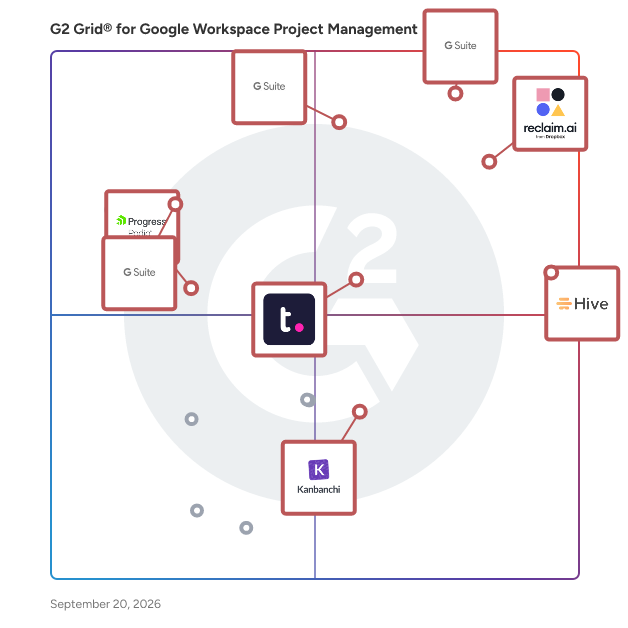
  # Best Google Workspace Project Management Software for Medium-Sized Businesses

  *By [Neeraja Prakash](https://research.g2.com/insights/author/neeraja-prakash)*

   Products classified in the overall Google Workspace Project Management category are similar in many regards and help companies of all sizes solve their business problems. However, medium-sized business features, pricing, setup, and installation differ from businesses of other sizes, which is why we match buyers to the right Medium-Sized Business Google Workspace Project Management to fit their needs. Compare product ratings based on reviews from enterprise users or connect with one of G2&#39;s buying advisors to find the right solutions within the Medium-Sized Business Google Workspace Project Management category.

In addition to qualifying for inclusion in the Google Workspace Project Management Software category, to qualify for inclusion in the Medium-Sized Business Google Workspace Project Management Software category, a product must have at least 10 reviews left by a reviewer from a medium-sized business.


## How Many Google Workspace Project Management Software Products Does G2 Track?
**Total Products under this Category:** 54

### Category Stats (May 2026)
- **Average Rating**: 4.19/5
- **New Reviews This Quarter**: 2
- **Buyer Segments**: Small-Business 57% │ Mid-Market 43%
- **Top Trending Product**: Reclaim.ai (+0.003)
*Last updated: May 29, 2026*

  
## How Does G2 Rank Google Workspace Project Management Software Products?

**Why You Can Trust G2's Software Rankings:**

- 30 Analysts and Data Experts
- 3,000+ Authentic Reviews
- 54+ Products
- Unbiased Rankings

G2's software rankings are built on verified user reviews, rigorous moderation, and a consistent research methodology maintained by a team of analysts and data experts. Each product is measured using the same transparent criteria, with no paid placement or vendor influence. While reviews reflect real user experiences, which can be subjective, they offer valuable insight into how software performs in the hands of professionals. Together, these inputs power the G2 Score, a standardized way to compare tools within every category.


---

**Sponsored**

### Smartsheet

Smartsheet is an Intelligent Work Management Platform that revolutionizes how you manage projects, portfolios, and processes. The Smartsheet AI-powered platform delivers adaptability, sophisticated experiences, and enterprise-grade rigor to support work across industries — from service delivery to construction, clinical trials, and marketing campaigns. Designed to meet demanding requirements, it helps organizations drive efficiency, accelerate innovation, and stay competitive. Over 85% of Fortune 500 companies trust Smartsheet to align their resources to improve efficiency, agility, and collaboration in today’s ever-changing world of work.


[Visit website](https://www.g2.com/external_clickthroughs/record?secure%5Bad_program%5D=ppc&amp;secure%5Bad_slot%5D=category_product_list&amp;secure%5Bcategory_id%5D=1172&amp;secure%5Bdisplayable_resource_id%5D=14&amp;secure%5Bdisplayable_resource_type%5D=Category&amp;secure%5Bmedium%5D=sponsored&amp;secure%5Bplacement_reason%5D=neighbor_category&amp;secure%5Bplacement_resource_ids%5D%5B%5D=14&amp;secure%5Bprioritized%5D=false&amp;secure%5Bproduct_id%5D=530&amp;secure%5Bresource_id%5D=1172&amp;secure%5Bresource_type%5D=Category&amp;secure%5Bsource_type%5D=category_page&amp;secure%5Bsource_url%5D=https%3A%2F%2Fwww.g2.com%2Fcategories%2Fgoogle-workspace-project-management%3Fpage%3D2&amp;secure%5Btoken%5D=b211f9a0bbba3e56c6eac1e861bfd5546ccece456536b0aff9d1e27004772c82&amp;secure%5Burl%5D=https%3A%2F%2Fwww.smartsheet.com%2Fs%2Fproject-management%3Futm_source%3DG2%26utm_medium%3Daffiliate%26utm_campaign%3Daff-pm-us-ca-g2&amp;secure%5Burl_type%5D=custom_url)

---

  ## What Are the Top-Rated Google Workspace Project Management Software Products in 2026?
### 1. [Asana for Gmail for G Suite](https://www.g2.com/products/asana-for-gmail-for-g-suite/reviews)
  Asana for Gmail is designed to help users turn emails into tasks with assigned responsibilities and due dates, right from within their inbox.


  **Average Rating:** 4.4/5.0
  **Total Reviews:** 51
**How Do G2 Users Rate Asana for Gmail for G Suite?**

- **Has the product been a good partner in doing business?:** 9.3/10 (Category avg: 8.7/10)
- **Ease of Use:** 8.7/10 (Category avg: 8.7/10)
- **Quality of Support:** 8.3/10 (Category avg: 8.4/10)

**Who Is the Company Behind Asana for Gmail for G Suite?**

- **Seller:** [Asana](https://www.g2.com/sellers/asana)
- **Year Founded:** 2008
- **HQ Location:** San Francisco, CA
- **Twitter:** @Asana (120,003 Twitter followers)
- **LinkedIn® Page:** https://www.linkedin.com/company/807257/ (4,246 employees on LinkedIn®)
- **Ownership:** NYSE: ASAN

**Who Uses This Product?**
  - **Top Industries:** Information Technology and Services, Marketing and Advertising
  - **Company Size:** 58% Small-Business, 34% Mid-Market


#### What Are Asana for Gmail for G Suite's Pros and Cons?

**Pros:**

- Email Integration (2 reviews)
- App Integration (1 reviews)
- Ease of Use (1 reviews)
- Organization (1 reviews)
- Task Management (1 reviews)

**Cons:**

- Email Integration (1 reviews)
- Expensive (1 reviews)
- Update Issues (1 reviews)

### 2. [Hive](https://www.g2.com/products/hive-hive-hive/reviews)
  Hive is a type of project management software solution designed to help teams streamline their workflows and enhance collaboration. This platform provides a comprehensive suite of tools that cater to various project management needs, enabling users to manage tasks, track progress, and communicate effectively within their teams. Hive&#39;s flexibility allows organizations to tailor their project management experience to fit their unique requirements, ensuring that teams can work in a way that suits them best. Targeted at businesses of all sizes, Hive is particularly beneficial for teams that require a high level of customization in their project management processes. Whether it&#39;s a marketing team coordinating campaigns, a product development team managing timelines, or a remote team collaborating on deliverables, Hive offers the versatility needed to adapt to different workflows. The platform is designed to accommodate diverse use cases, making it a valuable asset for organizations looking to improve efficiency and productivity. One of the key features of Hive is its flexible project views, which allow users to visualize their work in a manner that aligns with their preferences. Users can choose from various layouts, such as Kanban boards, Gantt charts, or list views, providing multiple ways to manage tasks and deadlines. This adaptability ensures that teams can find the most effective way to organize their projects, leading to increased clarity and focus. Additionally, Hive offers extensive customization options, enabling users to create workflows that reflect their specific processes. This includes the ability to set custom fields, automate repetitive tasks, and integrate with other tools that teams may already be using. Such features not only save time but also enhance the overall project management experience by allowing teams to work more efficiently and effectively. Another standout aspect of Hive is its commitment to user success. The platform is designed with the understanding that every team has unique needs, and Hive is willing to build additional tools or features to meet those needs. This level of support ensures that organizations can fully leverage the capabilities of the software, ultimately leading to improved project outcomes and faster execution of tasks. By adopting Hive, teams can expect to enhance their project management processes and foster a more collaborative work environment.


  **Average Rating:** 4.6/5.0
  **Total Reviews:** 650
**How Do G2 Users Rate Hive?**

- **Has the product been a good partner in doing business?:** 9.4/10 (Category avg: 8.7/10)
- **Ease of Use:** 9.1/10 (Category avg: 8.7/10)
- **Quality of Support:** 9.3/10 (Category avg: 8.4/10)

**Who Is the Company Behind Hive?**

- **Seller:** [Hive](https://www.g2.com/sellers/hive-a8fc1992-3c13-4b7c-bff1-ccef60fc94b6)
- **Company Website:** https://hive.com/
- **Year Founded:** 2016
- **HQ Location:** New York, New York
- **Twitter:** @hive (3,360 Twitter followers)
- **LinkedIn® Page:** https://www.linkedin.com/company/6473048/ (64 employees on LinkedIn®)

**Who Uses This Product?**
  - **Who Uses This:** Project Manager, Graphic Designer
  - **Top Industries:** Marketing and Advertising, Information Technology and Services
  - **Company Size:** 63% Small-Business, 29% Mid-Market


#### What Are Hive's Pros and Cons?

**Pros:**

- Project Management (167 reviews)
- Ease of Use (159 reviews)
- Team Collaboration (145 reviews)
- Features (126 reviews)
- Organization (108 reviews)

**Cons:**

- Missing Features (77 reviews)
- Learning Curve (49 reviews)
- Limited Features (48 reviews)
- Not Intuitive (38 reviews)
- Complexity (34 reviews)

### 3. [Teamwork.com](https://www.g2.com/products/teamwork-com/reviews)
  Combining powerful project management and easily streamlined operations - we’re the only platform built for managing client projects, profitably. Deliver work on time and on budget, eliminate client chaos, and understand profitability, all in one platform. Headquartered in Cork, Ireland and founded by a team who have run an agency before, Teamwork.com has more than 20,000 customers around the world with a global team of over 350 employees. Learn more at teamwork.com.


  **Average Rating:** 4.4/5.0
  **Total Reviews:** 1,176
**How Do G2 Users Rate Teamwork.com?**

- **Has the product been a good partner in doing business?:** 9.0/10 (Category avg: 8.7/10)
- **Ease of Use:** 8.6/10 (Category avg: 8.7/10)
- **Quality of Support:** 8.8/10 (Category avg: 8.4/10)

**Who Is the Company Behind Teamwork.com?**

- **Seller:** [Teamwork](https://www.g2.com/sellers/teamwork)
- **Company Website:** https://www.teamwork.com
- **Year Founded:** 2007
- **HQ Location:** Cork
- **Twitter:** @teamwork (1 Twitter followers)
- **LinkedIn® Page:** https://www.linkedin.com/company/1042291/ (547 employees on LinkedIn®)

**Who Uses This Product?**
  - **Who Uses This:** Project Manager, Owner
  - **Top Industries:** Marketing and Advertising, Information Technology and Services
  - **Company Size:** 57% Small-Business, 31% Mid-Market


#### What Are Teamwork.com's Pros and Cons?

**Pros:**

- Project Management (44 reviews)
- Task Management (44 reviews)
- Team Collaboration (38 reviews)
- Task Tracking (36 reviews)
- Ease of Use (33 reviews)

**Cons:**

- Learning Curve (17 reviews)
- Limited Features (14 reviews)
- Complexity (13 reviews)
- Missing Features (13 reviews)
- Not Intuitive (12 reviews)

### 4. [Asana for G Suite](https://www.g2.com/products/asana-for-g-suite/reviews)
  Asana is designed to be an easy way for teams to track their work and get results.


  **Average Rating:** 3.9/5.0
  **Total Reviews:** 57
**How Do G2 Users Rate Asana for G Suite?**

- **Has the product been a good partner in doing business?:** 9.4/10 (Category avg: 8.7/10)
- **Ease of Use:** 8.4/10 (Category avg: 8.7/10)
- **Quality of Support:** 8.4/10 (Category avg: 8.4/10)

**Who Is the Company Behind Asana for G Suite?**

- **Seller:** [Asana](https://www.g2.com/sellers/asana)
- **Year Founded:** 2008
- **HQ Location:** San Francisco, CA
- **Twitter:** @Asana (120,003 Twitter followers)
- **LinkedIn® Page:** https://www.linkedin.com/company/807257/ (4,246 employees on LinkedIn®)
- **Ownership:** NYSE: ASAN

**Who Uses This Product?**
  - **Top Industries:** Marketing and Advertising
  - **Company Size:** 69% Small-Business, 31% Mid-Market


#### What Are Asana for G Suite's Pros and Cons?

**Pros:**

- Collaboration (1 reviews)
- Communication (1 reviews)
- Ease of Use (1 reviews)
- Efficiency (1 reviews)
- Email Integration (1 reviews)

**Cons:**

- Complexity (3 reviews)
- Difficult Setup (1 reviews)
- Missing Features (1 reviews)
- Task Management (1 reviews)
- User Interface (1 reviews)

### 5. [Reclaim.ai](https://www.g2.com/products/reclaim-ai/reviews)
  Reclaim is an AI calendar app that helps individuals and teams automatically plan their time and protect more space to get stuff done. The AI scheduling assistant optimizes meeting times across your workweek, flexibly defends focus time, prevents interruptions, and promotes work-life balance so your productivity thrives—without the burnout. Simply connect your Google Calendar or Outlook Calendar, set up a few AI-powered goals, and automatically start reclaiming your time every week. Reclaim’s AI continuously adapts your schedule as priorities shift — rescheduling tasks, protecting deep work time, and keeping your calendar optimized without the manual effort. On average, Reclaim saves busy people 7.6 hours/week through smarter AI scheduling – even across the most chaotic work environments. Get back up to 40% of the workweek with adaptive, real-time scheduling, while keeping your calendar flexible with predictive intelligence to dynamically defend priorities as your week fills up – so you always have time for focused work, while staying open to collaborate with your team. You get to tell Reclaim exactly how you want your priorities scheduled, just like you would a great assistant. And when plans change, it automatically realigns your schedule in seconds. Over 65,000 companies rely on Reclaim to get more out of their workweeks. Sign up and get started for free so you and your team can spend time where it matters most, every week. Want to learn more? Check out just some of Reclaim’s features below and visit our homepage at Reclaim.ai to get started today: • Focus Time: proactively defend a weekly focus time goal • Tasks: auto-schedule your to-dos in your calendar • Habits: block flexible time for recurring routines • Smart Meetings: find the best time for one-on-one meetings • Scheduling Links: book smarter with flexible meeting links • Calendar Sync: block your availability across calendars including Google Calendar &amp; Microsoft Outlook Calendar • Buffer Time: auto-schedule breaks &amp; travel time • Color Coding: automatically color-code your events by category • No-Meeting Days: prevent meetings &amp; auto-schedule heads-down work • Team Analytics: track your team&#39;s time across meetings, tasks, wellness metrics, &amp; more • Task Integrations: sync tasks from Asana, Todoist, Jira, ClickUp, Linear &amp; Google Tasks to your calendar • Slack Integration: customize &amp; sync your Slack status to your calendar in real time


  **Average Rating:** 4.8/5.0
  **Total Reviews:** 139
**How Do G2 Users Rate Reclaim.ai?**

- **Has the product been a good partner in doing business?:** 9.6/10 (Category avg: 8.7/10)
- **Ease of Use:** 8.9/10 (Category avg: 8.7/10)
- **Quality of Support:** 9.7/10 (Category avg: 8.4/10)

**Who Is the Company Behind Reclaim.ai?**

- **Seller:** [Dropbox](https://www.g2.com/sellers/dropbox)
- **Year Founded:** 2007
- **HQ Location:** San Francisco, California
- **Twitter:** @Dropbox (3,286,648 Twitter followers)
- **LinkedIn® Page:** https://www.linkedin.com/company/167251/ (4,030 employees on LinkedIn®)
- **Ownership:** NASDAQ: DBX

**Who Uses This Product?**
  - **Top Industries:** Computer Software, Information Technology and Services
  - **Company Size:** 74% Small-Business, 16% Mid-Market


#### What Are Reclaim.ai's Pros and Cons?

**Pros:**

- Scheduling (28 reviews)
- Time-saving (26 reviews)
- Scheduling Flexibility (21 reviews)
- Scheduling Ease (20 reviews)
- Ease of Use (19 reviews)

**Cons:**

- Missing Features (15 reviews)
- Task Management (15 reviews)
- Scheduling Issues (11 reviews)
- Limited Features (9 reviews)
- Calendar Integration (8 reviews)

### 6. [Progress Podio](https://www.g2.com/products/progress-podio/reviews)
  Progress Podio is a flexible, custom collaboration database that enables you to accelerate and simplify your work. An all-in-one solution to accelerate productivity, digitize essential processes, streamline data collection, and automate document workflows in one secure tool. Progress Podio can automate, operationalize, and secure important business and document processes that reduces manual work and increases efficiency. Transform how work is done with versatile forms, powerful data collection, and automated client and document workflows— customized all by you with a few simple clicks. From key industries such as, creative agencies, legal services, accounting firms, real-estate, construction / manufacturing, to key departmental areas—sales, HR, marketing, legal, finance. Podio’s ability to connect diverse teams and disparate processes helps thousands of companies optimize their entire operations in one place. With Progress Podio, give your team a single tool to automate timely processes that unify in one tool. From simplifying client data collection to automating client interactions and agreements, Progress Podio simplifies your business’s most core activities.


  **Average Rating:** 4.2/5.0
  **Total Reviews:** 507
**How Do G2 Users Rate Progress Podio?**

- **Has the product been a good partner in doing business?:** 8.4/10 (Category avg: 8.7/10)
- **Ease of Use:** 8.3/10 (Category avg: 8.7/10)
- **Quality of Support:** 8.1/10 (Category avg: 8.4/10)

**Who Is the Company Behind Progress Podio?**

- **Seller:** [Progress Software](https://www.g2.com/sellers/progress-software)
- **Company Website:** https://www.progress.com/
- **Year Founded:** 1981
- **HQ Location:** Burlington, MA.
- **Twitter:** @ProgressSW (48,825 Twitter followers)
- **LinkedIn® Page:** https://www.linkedin.com/company/progress-software/ (4,207 employees on LinkedIn®)

**Who Uses This Product?**
  - **Who Uses This:** Owner, Project Manager
  - **Top Industries:** Real Estate, Information Technology and Services
  - **Company Size:** 61% Small-Business, 28% Mid-Market


#### What Are Progress Podio's Pros and Cons?

**Pros:**

- Ease of Use (4 reviews)
- Automation (2 reviews)
- Features (2 reviews)
- Integrations (2 reviews)
- Task Tracking (2 reviews)

**Cons:**

- Billing Issues (2 reviews)
- Learning Curve (2 reviews)
- Poor Customer Support (2 reviews)
- Beginner Difficulty (1 reviews)
- Column Management (1 reviews)

### 7. [Collavate](https://www.g2.com/products/collavate/reviews)
  Collavate is an easy to use document collaboration tool that helps make idea creation a reality. With security options, all the necessary document tools and features, Collavate meets your needs for simplified workflow automation and team member sharing. Easy to set up Google Docs and Drive Add-on makes document archiving applications easier than ever before in a safe environment perfect for any situation. It provides a secure, centralized place to manage documents and compliance workflow for Google Workspace. With industry experts working behind the scenes to bring you the most relevant features, you can trust Collavate to bring you the features you need without cramming in features you don’t. Plus, compliances such as ISO 9001 , GDPR, HIPAA, ISO 13485 are easy to achieve. We support the entire process of planning, brainstorming, drafting, reviewing, correcting and publishing documents. Group messaging lets you chat in an organized way with other team members while you’re working. You can share screenshots, links, videos, and more using the messenger feature. We have a wide range of collaboration capabilities for corporate documentation, including automated workflows, ledger, reminder/due-date for approval, audit trail, version control and document template options. Automate workflows and establish communication with Collavate with a variety of tasks that require document control, editing, and document collaboration. Issues or Questions: support@collavate.com


  **Average Rating:** 4.8/5.0
  **Total Reviews:** 58
**How Do G2 Users Rate Collavate?**

- **Has the product been a good partner in doing business?:** 8.6/10 (Category avg: 8.7/10)
- **Ease of Use:** 9.3/10 (Category avg: 8.7/10)
- **Quality of Support:** 9.4/10 (Category avg: 8.4/10)

**Who Is the Company Behind Collavate?**

- **Seller:** [Netkiller](https://www.g2.com/sellers/netkiller)
- **Year Founded:** 2005
- **HQ Location:** Palo Alto, California
- **Twitter:** @netkiller_cloud (54 Twitter followers)
- **LinkedIn® Page:** https://www.linkedin.com/company/1644003 (29 employees on LinkedIn®)

**Who Uses This Product?**
  - **Top Industries:** Automotive, Financial Services
  - **Company Size:** 42% Mid-Market, 39% Enterprise


### 8. [Kanbanchi for Google Workspace](https://www.g2.com/products/kanbanchi-for-google-workspace/reviews)
  Kanbanchi for Google Workspace is an online project management / task management / collaboration software with Kanban Board, Gantt Chart and Time Tracker. Project boards with lists and cards visualise a workflow of all your tasks and activities. Collaborate with your team in real time and manage your projects visually! Kanbanchi is the only app of its kind built specifically for Google Workspace – you sign up with Google account, manipulate your project boards as files in Google Drive, give flexible access permissions, push dates to Google Calendar, etc. Intuitive, simple familiar interface and no learning curve can get people engaged easily – just deploy Kanbanchi to all users of your organisation from Google Workspace Admin Console. Core functionality: – Create unlimited number of boards and cards – Share with an unlimited number of collaborators – Get email and in-app notifications about board updates – Push start/due dates to Google Calendar – Attach files from Google Drive – Leave comments for your colleagues – Organize cards with text tags and colour tags – Sort and filter cards as needed – Manipulate boards as files in Google Drive (Shared Drives for Enterprise users) – Import Your Trello Boards Advanced functionality helps you and your team rock your projects even more: — Gantt Chart Convert your Kanbanchi board to a Gantt Chart in one click. See how all your cards relate in time and visually plan project schedules with your team. — Time Tracker Track your time right in Kanbanchi — choose a card, start the timer, and stop it when you’re done. Monitor your team’s progress with the card in Timing tab, where time data for all users is recorded. — Company&#39;s logo Customize Kanbanchi’s look and feel by adding your company’s logo. — Export to Google Sheets Swiftly export to Google Spreadsheets all your board data: people assigned, dates, checklists, comments and more. — Card from email Create new cards by sending an email to a unique email address of your board. — Sorting cards by priority Simplify your working process - sort cards by priority automatically. — Backups For those who want to be on the safe side — back up your most important Kanbanchi boards for easy recovery. — List View See all your cards in a scrollable list, quickly look through them from top to bottom and filter the ones you need. — Subcards Organise tasks that have multiple steps or have to be divided up among multiple people – break cards into a number of smaller subcards that can be assigned and tracked separately. — Boards Templates Speed up your work process with the default and custom templates. — Shared Drives Integration Google Shared Drives have become an indispensable shared space where teams store information. With Shared Drive integration you can attach files from Shared Drives to cards in Kanbanchi and create boards in there for your team.


  **Average Rating:** 4.7/5.0
  **Total Reviews:** 93
**How Do G2 Users Rate Kanbanchi for Google Workspace?**

- **Has the product been a good partner in doing business?:** 9.3/10 (Category avg: 8.7/10)
- **Ease of Use:** 9.4/10 (Category avg: 8.7/10)
- **Quality of Support:** 9.4/10 (Category avg: 8.4/10)

**Who Is the Company Behind Kanbanchi for Google Workspace?**

- **Seller:** [Kanbanchi](https://www.g2.com/sellers/kanbanchi)
- **Year Founded:** 2013
- **HQ Location:** Dartford, United Kingdom
- **Twitter:** @Kanbanchi (513 Twitter followers)
- **LinkedIn® Page:** https://www.linkedin.com/company/kanbanchi/ (10 employees on LinkedIn®)

**Who Uses This Product?**
  - **Top Industries:** Information Technology and Services, Marketing and Advertising
  - **Company Size:** 59% Small-Business, 23% Mid-Market


    ## What Is Google Workspace Project Management Software?
  [Marketplace Apps](https://www.g2.com/categories/marketplace-apps)
  ## What Software Categories Are Similar to Google Workspace Project Management Software?
    - [Project Management Software](https://www.g2.com/categories/project-management)
    - [Task Management Software](https://www.g2.com/categories/task-management-software)


