Best Google Workspace Office Tools - Page 8

Last updated: June 16, 2025

How Many Google Workspace Office Tools Products Does G2 Track?

Total Products under this Category: 117

Category Stats (Nov 2026)

  • Average Rating: 4.34/5 The average rating of products in this category, based on all submitted ratings
  • Top Trending Product: Docusign (+0.02%) - Among all products in this category, Docusign recorded the largest rating increase compared to last month

Last updated: November 20, 2026

How Does G2 Rank Google Workspace Office Tools Products?

Why You Can Trust G2's Software Rankings:

  • 30 Analysts and Data Experts
  • 6,100+ Authentic Reviews
  • 117+ Products
  • Unbiased Rankings

G2's software rankings are built on verified user reviews, rigorous moderation, and a consistent research methodology maintained by a team of analysts and data experts. Each product is measured using the same transparent criteria, with no paid placement or vendor influence. While reviews reflect real user experiences, which can be subjective, they offer valuable insight into how software performs in the hands of professionals. Together, these inputs power the G2 Score, a standardized way to compare tools within every category.

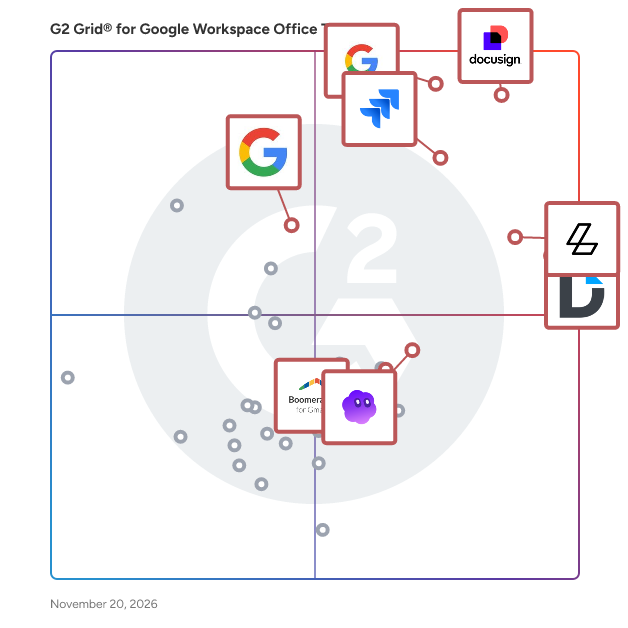
G2 Grid® for Google Workspace Office Tools

G2 Grid® for Google Workspace Office Tools  plotting products by satisfaction and market presence

Highlighted products: Docusign, Google Enterprise Search, DocHub, Jira Cloud for Sheets, Lumin, Google Apps Tips for G Suite, GPT Workspace, and Boomerang for Gmail.

Underlying data: [Grid® JSON](https://www.g2.com/categories/google-workspace-office-tools/grids.json?focus%5B%5D=docusign&focus%5B%5D=google-google-enterprise-search&focus%5B%5D=dochub&focus%5B%5D=jira-cloud-for-sheets&focus%5B%5D=lumin-pdf-lumin&focus%5B%5D=google-apps-tips-for-g-suite&focus%5B%5D=qualtir-gpt-workspace&focus%5B%5D=boomerang-for-gmail)

Projects for G Suite

Projects for G Suite is a project management software designed for Google Works.It is focused on budget approval and organizing your documents.

Who Is the Company Behind Projects for G Suite?

Rollstack

Rollstack helps data, finance, customer success, and revenue operations teams automate recurring PowerPoint presentations and Word documents by connecting directly to business intelligence tools like Tableau, Power BI, Looker, Metabase, and Google Sheets. If you’re tired of copying charts, pasting screenshots, or triple-checking KPIs across decks, Rollstack eliminates that manual, error-prone work. You can sync up-to-date data into branded templates, update them with one click, and export presentation-ready files in seconds. It’s built for teams responsible for client reporting, executive dashboards, business reviews, and sales enablement materials. Rollstack integrates directly with your existing BI stack, so there’s no need to rebuild dashboards or redesign visuals. Just connect your source, map the data to your slides or docs, and update them on your schedule — daily, weekly, or whenever you need them. Used by companies like Zillow, SoFi, Whirlpool, TripAdvisor, and CarGurus, Rollstack helps teams save 10+ hours per week, avoid mistakes, and focus on the story the data tells — not the tedious mechanics of building decks. For data analysts, program managers, sales ops, finance, and client success teams — Rollstack is how modern enterprises deliver consistent, trusted reports at scale. Whether you’re building a QBR for a $10M account or a weekly EBR, Rollstack makes its creation automatic and accurate. Book a demo today to learn how to automate your most important business reports.

Average Rating: 4.6/5.0

Total Reviews: 78

How Do G2 Users Rate Rollstack?

  • Ease of Admin: 9.0/10 (Category avg: 8.6/10)
  • Has the product been a good partner in doing business?: 9.6/10 (Category avg: 8.6/10)
  • Ease of Use: 8.6/10 (Category avg: 8.9/10)
  • Quality of Support: 9.7/10 (Category avg: 8.5/10)

Who Is the Company Behind Rollstack?

  • Seller: Rollstack
  • Year Founded: 2022
  • HQ Location: New York, USA
  • LinkedIn® Page: www.linkedin.com
    33 employees on LinkedIn®

Who Uses This Product?

  • Top Industries: Marketing and Advertising, Computer Software
  • Company Size: 46% Medium, 41% Large

What Do G2 Reviewers Say About Rollstack?

AI-generated summary from verified user reviews

Pros
  • Users appreciate the time-saving automation of Rollstack, freeing them from tedious manual data entry.
  • Users appreciate the responsive customer support of Rollstack, enhancing their experience with prompt assistance and guidance.
  • Users appreciate the ease of use of Rollstack, enjoying its intuitive setup and streamlined automation processes.
  • Users value the ease of automation with Rollstack, streamlining reporting and presentation tasks efficiently.
  • Users value the easy integration of Rollstack, enhancing efficiency in automating reports and presentations seamlessly.
Cons
  • Users experience slow loading times and occasional glitches, which disrupt their overall experience with Rollstack.
  • Users experience slow performance with Rollstack, as updates and data loading can take significant time.
  • Users face limitations in storage with Rollstack, requiring manual intervention to manage slide uploads effectively.
  • Users find the complex setup process time-consuming and confusing, but it simplifies future tasks once completed.
  • Users find limited customization options for capture areas and formatting, impacting their experience with Rollstack.

What Are Recent G2 Reviews of Rollstack?

ServBasic for G Suite

ServBasic Service Industry Software allows you to manage customers, schedules, billing, payments, google calendar, and more in minutes.

Who Is the Company Behind ServBasic for G Suite?

AI can help you find the answers. G2 helps you trust them.

Connect G2 to Claude or ChatGPT for answers grounded in G2's trusted reviews, comparisons, and pricing from real user insights.

How it works

SEWPOINT

The AI editor for the Google Slides you already have — not another deck generator, think of it as the cursor for slide deck. Type one instruction in plain language, e.g. refresh every chart with new numbers, translate the whole deck to Japanese, rebuild it on your brand template. Every change lands as native, editable objects in your live file. No export, no add-on, no cleanup. This product is the first time the architecture has been pointed at a traditional presentation tool, and it was built so it would not be the last. The engine sits deliberately apart from Google Slides itself: most of the hard part — figuring out what you actually meant, planning the edit, writing it back as real native objects — is the same problem in PowerPoint or Keynote.

Who Is the Company Behind SEWPOINT?

  • Seller: SEWPOINT
  • Year Founded: 2026
  • HQ Location: Sheridan, US
  • LinkedIn® Page: www.linkedin.com
    1 employees on LinkedIn®

SheetDog

SheetDog is the fastest way to build and maintain financial models in Google Sheets. AI-powered editing, formula tracing, Excel-style shortcuts, and format cycles, all working together so you can model faster and present cleaner.

Who Is the Company Behind SheetDog?

ShortieCuts

ShortieCuts brings Microsoft Office's ALT-key shortcuts to Google Workspace. Open a Google Sheet, Slides deck or Doc, press Alt (Option on Mac), and Office-style key-tips appear on screen. Type the same letters you would in Excel, PowerPoint or Word. - Excel to Google Sheets: 233 shortcuts, e.g. Alt H O I (autofit column), Alt H V V (paste values), Alt W F F (freeze panes) - PowerPoint to Google Slides: 148 shortcuts (new) - Word to Google Docs: 149 shortcuts (new) - Trace Precedents (Ctrl + [) and Trace Dependents (Ctrl + ]) across tabs, with an F5 list to jump back - Goal Seek in Google Sheets (Alt A W G) Built for analysts, investment bankers, consultants, accountants and students who learned on Microsoft Office and now work in Google Workspace. Rated 5.0 on the Chrome Web Store. Pricing: 14-day free trial, no credit card needed. Then $7.99/month or $69.99/year. Teams of 5 or more get volume discounts automatically: www.shortiecuts.com/teams Privacy: ShortieCuts never reads or stores the content of your sheets, slides or docs. It keeps only your account email (for the subscription) and counts of which ShortieCuts shortcuts are used. Full shortcut lists: www.shortiecuts.com/shortcuts. Not affiliated with Microsoft or Google.

Who Is the Company Behind ShortieCuts?

Sorc'd for Docs 1.3 for G Suite

SORC'D provides an easy way to organize, recall and discover snippets of relevant content.

Who Is the Company Behind Sorc'd for Docs 1.3 for G Suite?

  • Seller: SORC'D
  • Year Founded: 2014
  • HQ Location: Chicago, IL
  • LinkedIn® Page: www.linkedin.com
    1 employees on LinkedIn®

Sutra Tools For Google Sheets

Our product is designed to help Google Sheet users save time and effort by simplifying repetitive and manual tasks. With just one click, you can perform multiple tasks and gain access to features that Google Sheet™ lacks

Who Is the Company Behind Sutra Tools For Google Sheets?

teamgeist.io for G Suite

teamgeist is the app for the work environment of the 21st century.teamgeist.io takes care of absence planning and reclaims your time for what's important to you.

Who Is the Company Behind teamgeist.io for G Suite?

Tenwrite

Tenwrite is a Google Docs add-on that lets you publish your Google Docs to popular blogging platforms like WordPress & Blogger in a few clicks. Say goodbye to manual copy and paste. Instantly export your Google Docs content to WordPress and Blogger with perfect formatting.

Who Is the Company Behind Tenwrite?

Typsystem for G Suite

Typsystem for G Suite help for assigning types to cells and checking the correctness of formulas.

Who Is the Company Behind Typsystem for G Suite?

Unsafe Content Detection for G Suite

Unsafe Content Detection for G Suite component is an integration of this service into Google Doc that allows to scan big documents in one click in order to detect content that should be reviewed by an user to be sure it should not be removed.

Who Is the Company Behind Unsafe Content Detection for G Suite?

Neeraja Prakash
NP
Researched and written by Neeraja Prakash