# Best Flipbook Software

  *By [Gauri Pawsey](https://research.g2.com/insights/author/gauri-pawsey)*

   Flipbook software creates embeddable flipbooks for websites by converting files (such as PDFs) into HTML5. Users can upload preselected images through a PDF or presentation file and convert it into an automatic or interactable image scroll for a website. Some flipbook software is capable of creating full digital publications that simulate physical books with page turn animations. Flipbooks are a visually appealing addition to any website that can showcase a business’ products, goals, and achievements.

Flipbooks are often made by creative teams or web designers, but most offerings are intuitive enough for newcomers to pick up with little explanation. Some [desktop publishing software](https://www.g2.com/categories/desktop-publishing) will offer flipbook creation as an additional feature within their offering, but many flipbook products are offered standalone.

To qualify for inclusion in the Flipbook category, a product must:

- Convert files into HTML5 or Flash digital publications
- Create embeddable digital publications
- Provide content templates and editing tools for digital publications


## Category Overview

**Total Products under this Category:** 55


## Trust & Credibility Stats

**Why You Can Trust G2's Software Rankings:**

- 30 Analysts and Data Experts
- 2,600+ Authentic Reviews
- 55+ Products
- Unbiased Rankings

G2's software rankings are built on verified user reviews, rigorous moderation, and a consistent research methodology maintained by a team of analysts and data experts. Each product is measured using the same transparent criteria, with no paid placement or vendor influence. While reviews reflect real user experiences, which can be subjective, they offer valuable insight into how software performs in the hands of professionals. Together, these inputs power the G2 Score, a standardized way to compare tools within every category.


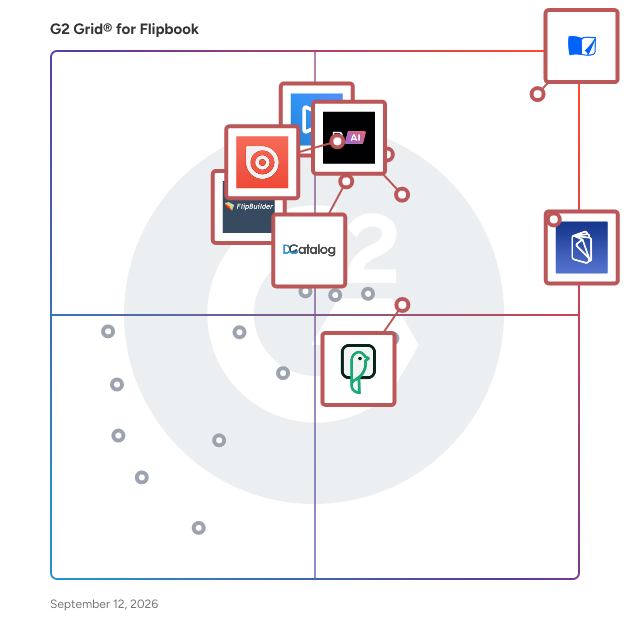
## Best Flipbook Software At A Glance

- **Leader:** [Flipsnack](https://www.g2.com/products/flipsnack/reviews)
- **Highest Performer:** [Flip HTML5](https://www.g2.com/products/flip-html5/reviews)
- **Easiest to Use:** [Flipsnack](https://www.g2.com/products/flipsnack/reviews)
- **Top Trending:** [Heyzine](https://www.g2.com/products/heyzine/reviews)
- **Best Free Software:** [Publuu](https://www.g2.com/products/publuu/reviews)


---

**Sponsored**

### Publuu

Publuu is an online tool that lets you turn a regular PDF into a flipbook you can open and read in a browser. It’s used by businesses, marketers, educators, and creators to share catalogs, brochures, magazines, or reports in a way that feels closer to a real publication and is easier to view online. Once a PDF is uploaded, it can be turned into a flipbook that feels similar to browsing a printed document, with pages that flip as you go. It’s also possible to add things like videos, links, photo galleries, audio, or clickable hotspots directly into the pages. The look of the publication can be adjusted as well – for example by adding a logo, choosing colors, or using a custom link so everything stays consistent with your brand. People use Publuu to put together different types of materials, from product catalogs and digital magazines to presentations, educational content, and sales documents. Since everything runs in the browser, the publications can be opened on phones, tablets, and desktops without downloading anything. Key features and capabilities include: – Conversion of PDF files into interactive flipbooks with realistic page-turn effects. – Support for multimedia elements such as videos, links, audio, and photo galleries. – Custom branding options, including logos, colors, and white-label sharing. – Multiple sharing methods, including direct links, website embedding, and social media distribution. – Analytics and tracking tools that provide insights into reader behavior, including views, time spent, and interactions. Beyond creating and sharing publications, Publuu also makes it easier to keep them organized. Users can arrange their content on virtual bookshelves and connect their publications with analytics tools. There are also built-in security settings, such as password protection and access restrictions, which help control who can view the content. Instead of sharing static files, users can publish documents in a more interactive form that’s easier to distribute and track. This makes Publuu a practical option for teams that want a clearer way to present content and see how it’s being used.


[Visit website](https://www.g2.com/external_clickthroughs/record?secure%5Bad_program%5D=ppc&amp;secure%5Bad_slot%5D=category_product_list&amp;secure%5Bcategory_id%5D=1692&amp;secure%5Bdisplayable_resource_id%5D=1692&amp;secure%5Bdisplayable_resource_type%5D=Category&amp;secure%5Bmedium%5D=sponsored&amp;secure%5Bplacement_reason%5D=page_category&amp;secure%5Bplacement_resource_ids%5D%5B%5D=1692&amp;secure%5Bprioritized%5D=false&amp;secure%5Bproduct_id%5D=150165&amp;secure%5Bresource_id%5D=1692&amp;secure%5Bresource_type%5D=Category&amp;secure%5Bsource_type%5D=category_page&amp;secure%5Bsource_url%5D=https%3A%2F%2Fwww.g2.com%2Fcategories%2Fflipbook&amp;secure%5Btoken%5D=76d5a1fae3a38476f8978ead11456f4625b2806ea1e602405e606770fea048e5&amp;secure%5Burl%5D=https%3A%2F%2Fpubluu.com%2Fflipbook-maker%2F&amp;secure%5Burl_type%5D=product_website)

---

## Top-Rated Products (Ranked by G2 Score)
  ### 1. [Flipsnack](https://www.g2.com/products/flipsnack/reviews)
  Flipsnack is the fastest PDF to flipbook converter on the market. Bring your PDFs to life, transforming them into life-like publications with a 3D flip-page effect. Alternatively, you can use our Design Studio to easily create engaging flipbooks from scratch. Bring your printed catalogs to digital customers while embracing a more sustainable and cost-effective path for your business. Powerful features like shopping buttons, videos, GIFs, enticing photo slideshows, customizable lead forms, embeds, and many more, will help you stand out amongst competitors. Advanced statistics and branding options are also available to help you offer your readers a memorable experience. Create workspaces, manage different projects, invite teammates, and assign different roles. Ensure brand consistency and collaborate with your team to create stunning publications. All in Flipsnack.


  **Average Rating:** 4.7/5.0
  **Total Reviews:** 382

**User Satisfaction Scores:**

- **Ease of Admin:** 9.5/10 (Category avg: 9.2/10)
- **Has the product been a good partner in doing business?:** 9.6/10 (Category avg: 9.1/10)
- **Ease of Use:** 9.4/10 (Category avg: 9.0/10)
- **Slideshow Converter:** 8.9/10 (Category avg: 8.9/10)


**Seller Details:**

- **Seller:** [Flipsnack](https://www.g2.com/sellers/flipsnack)
- **Company Website:** https://www.flipsnack.com
- **Year Founded:** 2011
- **HQ Location:** San Francisco, US
- **Twitter:** @flipsnack (2,198 Twitter followers)
- **LinkedIn® Page:** https://www.linkedin.com/company/6413929/ (90 employees on LinkedIn®)

**Reviewer Demographics:**
  - **Who Uses This:** Owner, Graphic Designer
  - **Top Industries:** Marketing and Advertising, Non-Profit Organization Management
  - **Company Size:** 68% Small-Business, 25% Mid-Market


#### Pros & Cons

**Pros:**

- Ease of Use (84 reviews)
- Customer Support (57 reviews)
- Features (35 reviews)
- User Experience (31 reviews)
- User Interface (28 reviews)

**Cons:**

- Expensive (18 reviews)
- Limited Features (16 reviews)
- Missing Features (7 reviews)
- Limited Editing Capabilities (6 reviews)
- Limited Editability (5 reviews)

  ### 2. [Publuu](https://www.g2.com/products/publuu/reviews)
  Publuu is an online tool that lets you turn a regular PDF into a flipbook you can open and read in a browser. It’s used by businesses, marketers, educators, and creators to share catalogs, brochures, magazines, or reports in a way that feels closer to a real publication and is easier to view online. Once a PDF is uploaded, it can be turned into a flipbook that feels similar to browsing a printed document, with pages that flip as you go. It’s also possible to add things like videos, links, photo galleries, audio, or clickable hotspots directly into the pages. The look of the publication can be adjusted as well – for example by adding a logo, choosing colors, or using a custom link so everything stays consistent with your brand. People use Publuu to put together different types of materials, from product catalogs and digital magazines to presentations, educational content, and sales documents. Since everything runs in the browser, the publications can be opened on phones, tablets, and desktops without downloading anything. Key features and capabilities include: – Conversion of PDF files into interactive flipbooks with realistic page-turn effects. – Support for multimedia elements such as videos, links, audio, and photo galleries. – Custom branding options, including logos, colors, and white-label sharing. – Multiple sharing methods, including direct links, website embedding, and social media distribution. – Analytics and tracking tools that provide insights into reader behavior, including views, time spent, and interactions. Beyond creating and sharing publications, Publuu also makes it easier to keep them organized. Users can arrange their content on virtual bookshelves and connect their publications with analytics tools. There are also built-in security settings, such as password protection and access restrictions, which help control who can view the content. Instead of sharing static files, users can publish documents in a more interactive form that’s easier to distribute and track. This makes Publuu a practical option for teams that want a clearer way to present content and see how it’s being used.


  **Average Rating:** 4.8/5.0
  **Total Reviews:** 540

**User Satisfaction Scores:**

- **Ease of Admin:** 9.4/10 (Category avg: 9.2/10)
- **Has the product been a good partner in doing business?:** 9.1/10 (Category avg: 9.1/10)
- **Ease of Use:** 9.5/10 (Category avg: 9.0/10)
- **Slideshow Converter:** 9.0/10 (Category avg: 8.9/10)


**Seller Details:**

- **Seller:** [Publuu](https://www.g2.com/sellers/publuu)
- **Year Founded:** 2014
- **HQ Location:** Opole, PL
- **LinkedIn® Page:** https://www.linkedin.com/company/publuu (9 employees on LinkedIn®)

**Reviewer Demographics:**
  - **Who Uses This:** Owner, Marketing Manager
  - **Top Industries:** Marketing and Advertising, Higher Education
  - **Company Size:** 84% Small-Business, 13% Mid-Market


#### Pros & Cons

**Pros:**

- Ease of Use (66 reviews)
- Flipbook Creation (47 reviews)
- Simple (32 reviews)
- Interactive (26 reviews)
- PDF Conversion (18 reviews)

**Cons:**

- Expensive (32 reviews)
- Limited Features (15 reviews)
- Limited Customization (9 reviews)
- Page Limitations (5 reviews)
- Limited Access (4 reviews)

  ### 3. [FlippingBook](https://www.g2.com/products/flippingbook/reviews)
  FlippingBook is an online tool and desktop software for creating professional digital flipbooks. It makes your PDF ebooks, e-catalogs, digital brochures, annual reports, presentations, magazines, and sales collateral interactive. More than 50,000 companies across 179 countries use FlippingBook to create easy-to-use online documents, deliver content across the web, and improve their communication processes. The service works on desktops and mobile devices and can be integrated with third-party systems such as Zapier, Google Analytics, and WordPress. FlippingBook helps small businesses and large renowned brands, such as Unilever, Marriott, Intel, Cartier, FOX, Nestle.


  **Average Rating:** 4.7/5.0
  **Total Reviews:** 291

**User Satisfaction Scores:**

- **Ease of Admin:** 9.5/10 (Category avg: 9.2/10)
- **Has the product been a good partner in doing business?:** 9.4/10 (Category avg: 9.1/10)
- **Ease of Use:** 9.4/10 (Category avg: 9.0/10)
- **Slideshow Converter:** 9.1/10 (Category avg: 8.9/10)


**Seller Details:**

- **Seller:** [FlippingBook](https://www.g2.com/sellers/flippingbook)
- **Year Founded:** 2004
- **HQ Location:** Cospicua, Malta
- **Twitter:** @flippingbook (1,122 Twitter followers)
- **LinkedIn® Page:** https://www.linkedin.com/company/2495509/ (44 employees on LinkedIn®)

**Reviewer Demographics:**
  - **Who Uses This:** Marketing Manager, Marketing Coordinator
  - **Top Industries:** Marketing and Advertising, Real Estate
  - **Company Size:** 58% Small-Business, 31% Mid-Market


#### Pros & Cons

**Pros:**

- Ease of Use (57 reviews)
- Intuitive (33 reviews)
- Quality (32 reviews)
- Features (25 reviews)
- Simple (23 reviews)

**Cons:**

- Missing Features (11 reviews)
- Limited Features (10 reviews)
- Expensive (8 reviews)
- Feature Limitations (8 reviews)
- Lacking Features (7 reviews)

  ### 4. [Issuu](https://www.g2.com/products/issuu/reviews)
  Issuu connects content with people, making it easy for 1M+ users worldwide to transform and publish digital content that resonates with their audience. With 60M+ publications, Issuu is the world’s largest digital publishing and content marketing platform that empowers people to convert, host, and share meaningful content in a variety of dynamic formats across all digital distribution channels. The Issuu platform turns a single document into a uniquely immersive reading experience by converting it into a range of marketing assets – including flipbooks to embed in websites, mobile-optimized articles, eye-catching posts for social media, and GIFs for email. Each day, more than 300,000 pages of content are uploaded to Issuu, allowing readers worldwide access to discover and engage with more of what they love, from brochures and eBooks to portfolios and catalogs. Enterprise marketers and individual creators alike choose Issuu for its user-friendly platform that puts their message front and center – without requiring a single line of code. Issuu is headquartered in Palo Alto, CA, with global offices in Copenhagen, Berlin, and Braga. Learn more at issuu.com.


  **Average Rating:** 4.7/5.0
  **Total Reviews:** 106

**User Satisfaction Scores:**

- **Ease of Admin:** 9.0/10 (Category avg: 9.2/10)
- **Has the product been a good partner in doing business?:** 9.1/10 (Category avg: 9.1/10)
- **Ease of Use:** 9.0/10 (Category avg: 9.0/10)
- **Slideshow Converter:** 8.7/10 (Category avg: 8.9/10)


**Seller Details:**

- **Seller:** [Issuu](https://www.g2.com/sellers/issuu)
- **Year Founded:** 2006
- **HQ Location:** Palo Alto, California
- **Twitter:** @issuu (78,748 Twitter followers)
- **LinkedIn® Page:** https://www.linkedin.com/company/issuu/ (62 employees on LinkedIn®)

**Reviewer Demographics:**
  - **Top Industries:** Marketing and Advertising, Non-Profit Organization Management
  - **Company Size:** 69% Small-Business, 23% Mid-Market


#### Pros & Cons

**Pros:**

- Affordable Pricing (1 reviews)
- Content Quality (1 reviews)
- Creative Design (1 reviews)
- Ease of Creation (1 reviews)
- Ease of Use (1 reviews)


  ### 5. [RELAYTO AI](https://www.g2.com/products/relayto-ai/reviews)
  How do you 100× your content’s impact? RELAYTO is the AI-powered interactive content experience platform that turns every static PDF, PowerPoint, MP4, or image into a choose-your-own-path experience. Check out our own RELAYTO-powered buying journey that started as a conventional presentation here: https://rla.to/pitch In minutes, no code required, you can drag and drop files into our intuitive builder, layer in video, audio, forms, and CTAs, and publish a responsive microsite that feels more like Netflix than a flipbook. The result is an interactive sales-collateral hub, digital sales room, or secure proposal microsite that buyers binge on any device while they self-educate at their own pace. Behind the scenes, RELAYTO’s AI-driven content-engagement analytics capture 360° digital body language—page-level heatmaps, scroll depth, dwell time, replays, document heat-map insights, and intent scoring—delivering the PDF analytics legacy sales-enablement suites can’t. Real-time alerts surface high-intent viewers so revenue teams, account-based marketers, and customer-success managers can prioritize follow-up, shorten deal cycles, and prove content ROI with data-backed confidence. Security and scale come standard: create unlimited public or private interactive experiences, lock them down with granular permissions, SSO, watermarking, and compliance controls, or open them up with SEO-friendly embedding links across email, LinkedIn, HubSpot, Salesforce, your CMS, and anywhere a single link can travel. From AI-powered flipbook e-books and white papers to interactive pitch decks, proposal microsites, demo portals, and digital sales rooms, RELAYTO is the simplest way to transform boring documents into captivating, measurable experiences that boost engagement, conversion, and revenue. https://relayto.com/showcase


  **Average Rating:** 4.7/5.0
  **Total Reviews:** 449

**User Satisfaction Scores:**

- **Ease of Admin:** 9.1/10 (Category avg: 9.2/10)
- **Has the product been a good partner in doing business?:** 9.4/10 (Category avg: 9.1/10)
- **Ease of Use:** 9.4/10 (Category avg: 9.0/10)
- **Slideshow Converter:** 9.7/10 (Category avg: 8.9/10)


**Seller Details:**

- **Seller:** [Relayto](https://www.g2.com/sellers/relayto)
- **Year Founded:** 2023
- **HQ Location:** San Francisco , California
- **Twitter:** @relayter (2,215 Twitter followers)
- **LinkedIn® Page:** https://www.linkedin.com/company/relayto/ (48 employees on LinkedIn®)

**Reviewer Demographics:**
  - **Who Uses This:** Student, Executive Assistant
  - **Top Industries:** Marketing and Advertising, Information Technology and Services
  - **Company Size:** 61% Small-Business, 24% Mid-Market


#### Pros & Cons

**Pros:**

- Ease of Use (118 reviews)
- Features (71 reviews)
- User Interface (64 reviews)
- Quality (63 reviews)
- Easy Creation (62 reviews)

**Cons:**

- Learning Curve (58 reviews)
- Learning Difficulty (50 reviews)
- Steep Learning Curve (42 reviews)
- Initial Difficulty (34 reviews)
- Initial Usage Difficulty (18 reviews)

  ### 6. [Heyzine](https://www.g2.com/products/heyzine/reviews)
  Service to convert a PDF to an online flipping book or slideshow with different page flip effects. It&#39;s highly customizable with branding, backgrounds, navigation, control styles, and more. It supports PDFs with any page size, even non-standard ones, and the resulting flip book is supported on all mobile and desktop devices, it automatically generates share links with thumbnails, gifs, and QR codes. After uploading your files, you will have a dashboard to manage, publish and edit your flipbooks. The service is free with no ads and you can share your flipbooks, fast and easily.


  **Average Rating:** 4.8/5.0
  **Total Reviews:** 20

**User Satisfaction Scores:**

- **Ease of Admin:** 10.0/10 (Category avg: 9.2/10)
- **Has the product been a good partner in doing business?:** 10.0/10 (Category avg: 9.1/10)
- **Ease of Use:** 9.5/10 (Category avg: 9.0/10)
- **Slideshow Converter:** 10.0/10 (Category avg: 8.9/10)


**Seller Details:**

- **Seller:** [Heyzine](https://www.g2.com/sellers/heyzine)
- **Year Founded:** 2017
- **HQ Location:** Barcelona
- **Twitter:** @heyzinehq (204 Twitter followers)
- **LinkedIn® Page:** https://www.linkedin.com/company/heyzine/about/ (1 employees on LinkedIn®)

**Reviewer Demographics:**
  - **Company Size:** 76% Small-Business, 14% Mid-Market


#### Pros & Cons

**Pros:**

- Ease of Use (2 reviews)
- Simple (2 reviews)
- Affordable (1 reviews)
- Customer Support (1 reviews)
- Embedding Features (1 reviews)

**Cons:**

- Upload Limitations (1 reviews)

  ### 7. [Flipbuilder](https://www.g2.com/products/flipbuilder/reviews)
  Interactive Digital Publishing FlipBuilder is an innovative digital publishing platform that transforms standard PDF documents and Images into highly engaging, realistic page-flipping books (flipbooks). The software specializes in enriching static content with interactive elements. Premium users can utilize the Multimedia Editor to embed videos, links, images, and animations directly onto the pages, maximizing reader engagement. Flipbooks created with FlipBuilder are fully optimized for all modern devices (desktop and mobile), providing a professional and dynamic way to present content online. Core Value Proposition FlipBuilder offers exceptional control and security through its licensing model: It provides a Lifetime License on the software (non-subscription model). Users benefit from offline access for flipbook creation and secure local export for complete data control.


  **Average Rating:** 4.3/5.0
  **Total Reviews:** 30

**User Satisfaction Scores:**

- **Ease of Admin:** 8.9/10 (Category avg: 9.2/10)
- **Has the product been a good partner in doing business?:** 8.9/10 (Category avg: 9.1/10)
- **Ease of Use:** 8.8/10 (Category avg: 9.0/10)
- **Slideshow Converter:** 7.6/10 (Category avg: 8.9/10)


**Seller Details:**

- **Seller:** [FlipBuilder](https://www.g2.com/sellers/flipbuilder)
- **HQ Location:** N/A
- **Twitter:** @FlipBuilder (347 Twitter followers)
- **LinkedIn® Page:** https://www.linkedin.com/company/No-Linkedin-Presence-Added-Intentionally-By-DataOps (1 employees on LinkedIn®)

**Reviewer Demographics:**
  - **Top Industries:** Higher Education
  - **Company Size:** 68% Small-Business, 19% Mid-Market


#### Pros & Cons

**Pros:**

- Customer Support (6 reviews)
- Flipbook Creation (5 reviews)
- Ease of Use (4 reviews)
- Creative Design (3 reviews)
- Features (3 reviews)

**Cons:**

- Difficult Learning Curve (1 reviews)
- Learning Curve (1 reviews)
- Limited Customization (1 reviews)
- Limited Features (1 reviews)
- Poor Interface Design (1 reviews)

  ### 8. [Anyflip](https://www.g2.com/products/anyflip/reviews)
  AnyFlip is a digital publishing platform that can be used by everyone to quickly create and publish flipbooks. No download required, users just need to upload a PDF online, then AnyFlip automatically converts it into a flipbook. No design skills required, users are allowed to use the templates, themes, and dynamic scenes provided by AnyFlip. AnyFlip also comes with an online editor that allows users to enrich their flipbooks using some customization options, including links, images, videos, audio, text, sliders, hot spots, and so on. Also, users can save and preview their flipbooks. AnyFlip supports social media sharing, enabling users to share their flipbooks on Facebook, Twitter, G+, and so on. For those who don’t want to share their flipbooks on social media, they are allowed to share their flipbooks via QR codes or book links.


  **Average Rating:** 4.4/5.0
  **Total Reviews:** 15

**User Satisfaction Scores:**

- **Ease of Admin:** 9.7/10 (Category avg: 9.2/10)
- **Has the product been a good partner in doing business?:** 9.4/10 (Category avg: 9.1/10)
- **Ease of Use:** 8.2/10 (Category avg: 9.0/10)
- **Slideshow Converter:** 8.8/10 (Category avg: 8.9/10)


**Seller Details:**

- **Seller:** [Anyflip](https://www.g2.com/sellers/anyflip)
- **HQ Location:** San Jose
- **Twitter:** @any_flip (210 Twitter followers)
- **LinkedIn® Page:** https://www.linkedin.com/company/anyflip/about/ (1 employees on LinkedIn®)

**Reviewer Demographics:**
  - **Company Size:** 67% Small-Business, 27% Mid-Market


#### Pros & Cons

**Pros:**

- Customer Support (2 reviews)
- Ease of Use (2 reviews)
- Easy Creation (2 reviews)
- Professional Appearance (1 reviews)
- Sharing (1 reviews)

**Cons:**

- Link Issues (1 reviews)

  ### 9. [Ceros](https://www.g2.com/products/ceros/reviews)
  Ceros is a flexible, no-code platform for designing and publishing premium interactive content, empowering marketers and designers to turn passive viewers into active buyers. We exist to solve the industry&#39;s biggest creative bottleneck: the reliance on engineering to bring bold ideas to life. While modern audiences are tired of static PDFs and generic landing pages, building the immersive web experiences they crave usually requires expensive development and long lead times. Ceros eliminates this barrier, giving teams the power to create custom digital experiences—from reports and eBooks to product demos—without writing a single line of code. The platform is built around a design canvas that works like the tools you already love. You can import directly from Photoshop, Illustrator, Figma, or Sketch, start from a blank slate, or use a customizable template to transform static assets into scroll-stopping HTML5 experiences in hours, not weeks. Your content is designed to move, utilizing rich animations, scroll-based triggers, and responsive layouts to keep audiences engaged and exploring. Why high-performing teams choose Ceros: - Liberate Your Creative Workflow: End the &quot;developer handoff.&quot; Use live previews to collaborate in real-time, then publish instantly or embed into any CMS. - Total Brand Control: Ensure pixel-perfect consistency across every touchpoint, from ABM campaigns to investor presentations. - Prove the Value of Creative: Unlike a PDF, Ceros experiences come with deep analytics. See exactly where users click, hover, and drop off, so you can tie creative execution directly to ROI. - Enterprise-Grade Performance: Build with confidence on a secure, scalable cloud architecture that ensures instant load times, full SEO &amp; AEO crawlability, and compliance. Whether you need to revitalize your lead gen content or create a flagship year-in-review, Ceros empowers you to turn passive viewers into active participants.


  **Average Rating:** 4.0/5.0
  **Total Reviews:** 78

**User Satisfaction Scores:**

- **Ease of Admin:** 8.6/10 (Category avg: 9.2/10)
- **Has the product been a good partner in doing business?:** 9.0/10 (Category avg: 9.1/10)
- **Ease of Use:** 8.1/10 (Category avg: 9.0/10)


**Seller Details:**

- **Seller:** [Ceros](https://www.g2.com/sellers/ceros)
- **Year Founded:** 2012
- **HQ Location:** New York, NY
- **LinkedIn® Page:** https://www.linkedin.com/company/213398/ (266 employees on LinkedIn®)

**Reviewer Demographics:**
  - **Who Uses This:** Graphic Designer
  - **Top Industries:** Internet, Marketing and Advertising
  - **Company Size:** 41% Mid-Market, 27% Small-Business


#### Pros & Cons

**Pros:**

- Ease of Use (16 reviews)
- Interactive (11 reviews)
- Ease of Creation (9 reviews)
- Simple (9 reviews)
- Creative Design (8 reviews)

**Cons:**

- Limited Features (10 reviews)
- Slow Loading (6 reviews)
- Layout Issues (5 reviews)
- Learning Curve (5 reviews)
- Technical Issues (5 reviews)

  ### 10. [Joomag](https://www.g2.com/products/joomag/reviews)
  Joomag is a leading Content Experience Platform for creating and distributing high-design, personalized content at scale. Leveraging AI and Content Automation, Joomag enables non-creatives to effortlessly produce and deliver exceptional content experiences across all devices and mediums. It boosts ROI by providing actionable insights, uncovering reader interests, and re-engaging audiences through targeted campaigns and tailored recommendations. Trusted by over 5,000 customers globally, Joomag offers a comprehensive solution for optimizing content strategies and driving meaningful engagement.


  **Average Rating:** 4.5/5.0
  **Total Reviews:** 84

**User Satisfaction Scores:**

- **Ease of Admin:** 9.1/10 (Category avg: 9.2/10)
- **Has the product been a good partner in doing business?:** 9.1/10 (Category avg: 9.1/10)
- **Ease of Use:** 9.3/10 (Category avg: 9.0/10)
- **Slideshow Converter:** 9.0/10 (Category avg: 8.9/10)


**Seller Details:**

- **Seller:** [Joomag](https://www.g2.com/sellers/joomag)
- **Year Founded:** 2009
- **HQ Location:** San Jose, CA
- **Twitter:** @Joomag (3,431 Twitter followers)
- **LinkedIn® Page:** https://www.linkedin.com/company/533005/ (39 employees on LinkedIn®)

**Reviewer Demographics:**
  - **Top Industries:** Publishing, Marketing and Advertising
  - **Company Size:** 61% Small-Business, 28% Mid-Market


#### Pros & Cons

**Pros:**

- Ease of Use (4 reviews)
- Customer Support (3 reviews)
- Useful (3 reviews)
- Features (2 reviews)
- Intuitive (2 reviews)

**Cons:**

- Expensive (3 reviews)
- Cost Issues (2 reviews)
- Payment Required (1 reviews)
- Poor Customer Support (1 reviews)
- Poor Support Services (1 reviews)

  ### 11. [Flip HTML5](https://www.g2.com/products/flip-html5/reviews)
  FlipHTML5 is a leading online publishing platform that empowers users to craft and share a variety of digital content, including magazines, brochures, catalogs, photo albums, annual reports, and newspapers. The platform boasts an intuitive interface, simplifying the process of converting documents (such as PDF, DOC, PPT, JPG, and PNG) into engaging online publications. These publications can be enriched with interactive elements like links, text, videos, audio, sliders, and hot spots, enhancing reader engagement. Moreover, FlipHTML5 publications can be seamlessly embedded into websites, disseminated across social media platforms, and monetized through online sales. At the core of FlipHTML5&#39;s innovation is the integration of AI technology, which streamlines the content creation-to-publication workflow. ● Build for beginners, user-friendly user interface ● Convert PDFs to gorgeous flipbooks in a split second ● Super easy to edit, add text, videos, audio, and images ● One click to export as PDF, ZIP, EXE, and Mac App ● Perfectly mobile responsive ● Easy to share via QR codes, links and social media ● Support iframe embed and download ● Wide selection of templates, themes, and dynamic scenes ● Leading edge cloud and CDN and load fast ● Directly monetizing content without extra fee


  **Average Rating:** 4.7/5.0
  **Total Reviews:** 92

**User Satisfaction Scores:**

- **Ease of Admin:** 9.5/10 (Category avg: 9.2/10)
- **Has the product been a good partner in doing business?:** 9.5/10 (Category avg: 9.1/10)
- **Ease of Use:** 9.7/10 (Category avg: 9.0/10)
- **Slideshow Converter:** 9.3/10 (Category avg: 8.9/10)


**Seller Details:**

- **Seller:** [Wonder Idea Techonology Limited](https://www.g2.com/sellers/wonder-idea-techonology-limited)
- **HQ Location:** N/A
- **LinkedIn® Page:** https://www.linkedin.com/company/No-Linkedin-Presence-Added-Intentionally-By-DataOps (1 employees on LinkedIn®)

**Reviewer Demographics:**
  - **Top Industries:** Non-Profit Organization Management, Education Management
  - **Company Size:** 75% Small-Business, 18% Mid-Market


#### Pros & Cons

**Pros:**

- Ease of Use (5 reviews)
- Flipbook Creation (5 reviews)
- Customer Support (3 reviews)
- Affordable (2 reviews)
- Easy Integrations (2 reviews)

**Cons:**

- Limited Features (1 reviews)

  ### 12. [DCatalog](https://www.g2.com/products/dcatalog/reviews)
  DCatalog is the ultimate platform for intelligent, automated catalog creation. Since 2008, we&#39;ve helped marketers, retailers, and B2B teams transform their data into polished, branded PDF catalogs and interactive online experiences with no coding required. ✓ Automate the entire workflow: Connect your product feeds, map fields to your custom or pre-designed templates, and generate catalogs at scale with a single click. ✓ Choose the perfect layout: From visual grid views and multi-variant family charts to information-rich list templates, seamlessly control how your product data is presented. ✓ Stay up-to-date: Easily sync and refresh content any time your inventory, specs, or prices change, you can regenerate both PDF and HTML5 catalogs instantly. ✓ Preserve brand consistency: Use dynamic templates to ensure cohesive branding across every page and version. ✓ Blend automation with customization: Inject manually designed intro pages, TOCs, or chapter layouts alongside automated content for a polished final product. ✓ Optimize your output: Built-in error reduction, rapid turnaround, and support for tailored sales sheets, price lists, or order forms help you cut costs and improve operational efficiency. The entire catalog can also be published as an interactive flipbook, viewable on any device to boost engagement and conversions.


  **Average Rating:** 4.3/5.0
  **Total Reviews:** 13

**User Satisfaction Scores:**

- **Ease of Admin:** 9.0/10 (Category avg: 9.2/10)
- **Has the product been a good partner in doing business?:** 10.0/10 (Category avg: 9.1/10)
- **Ease of Use:** 8.8/10 (Category avg: 9.0/10)


**Seller Details:**

- **Seller:** [DCatalog](https://www.g2.com/sellers/dcatalog)
- **Year Founded:** 2008
- **HQ Location:** San Diego, US
- **Twitter:** @DCatalog_Inc (2,495 Twitter followers)
- **LinkedIn® Page:** https://www.linkedin.com/company/10679694/ (24 employees on LinkedIn®)

**Reviewer Demographics:**
  - **Company Size:** 46% Small-Business, 31% Mid-Market


  ### 13. [iPaper](https://www.g2.com/products/ipaper/reviews)
  iPaper is a digital catalog platform that lets you convert your printed leaflets and catalogs into fully interactive digital shopping experiences. Capture shopper’s attention with product images and videos. Drive traffic and sales with in-catalog shopping over email, WhatsApp or directly integrated with your ecommerce webshop. The iPaper platform is built to fit your business and we offer advanced features to fully automate your setup.


  **Average Rating:** 4.8/5.0
  **Total Reviews:** 30

**User Satisfaction Scores:**

- **Ease of Admin:** 9.3/10 (Category avg: 9.2/10)
- **Has the product been a good partner in doing business?:** 9.7/10 (Category avg: 9.1/10)
- **Ease of Use:** 9.3/10 (Category avg: 9.0/10)
- **Slideshow Converter:** 8.3/10 (Category avg: 8.9/10)


**Seller Details:**

- **Seller:** [Ipaper](https://www.g2.com/sellers/ipaper)
- **Year Founded:** 2006
- **HQ Location:** Aarhus C, Middle Jutland
- **Twitter:** @iPaper_Insights (217 Twitter followers)
- **LinkedIn® Page:** https://www.linkedin.com/company/1432154 (55 employees on LinkedIn®)

**Reviewer Demographics:**
  - **Top Industries:** Retail
  - **Company Size:** 37% Enterprise, 37% Mid-Market


#### Pros & Cons

**Pros:**

- Customer Support (1 reviews)
- Quality (1 reviews)
- User Interface (1 reviews)


  ### 14. [FlowPaper](https://www.g2.com/products/flowpaper/reviews)
  Transform Your PDFs with FlowPaper: Interactive Flipbooks, Brochures, and Magazines Made Easy Unlock the full potential of your PDF documents with FlowPaper, the leading solution for converting static PDFs into dynamic, interactive online experiences. Whether you&#39;re looking to create engaging flipbooks, eye-catching brochures, or responsive magazines, FlowPaper offers seamless conversion with superior quality and speed. Elevate your content presentation and captivate your audience effortlessly. Discover the power of FlowPaper today and turn your PDFs into stunning interactive publications!


  **Average Rating:** 4.5/5.0
  **Total Reviews:** 27

**User Satisfaction Scores:**

- **Ease of Admin:** 9.0/10 (Category avg: 9.2/10)
- **Has the product been a good partner in doing business?:** 8.9/10 (Category avg: 9.1/10)
- **Ease of Use:** 9.2/10 (Category avg: 9.0/10)
- **Slideshow Converter:** 9.7/10 (Category avg: 8.9/10)


**Seller Details:**

- **Seller:** [FlowPaper](https://www.g2.com/sellers/flowpaper)
- **Year Founded:** 2010
- **HQ Location:** Auckland, NZ
- **Twitter:** @getflowpaper (8,285 Twitter followers)
- **LinkedIn® Page:** https://www.linkedin.com/company/flowpaper/ (1 employees on LinkedIn®)

**Reviewer Demographics:**
  - **Top Industries:** Education Management
  - **Company Size:** 67% Small-Business, 26% Mid-Market


#### Pros & Cons

**Pros:**

- Ease of Use (5 reviews)
- Cost-Effective (3 reviews)
- Affordable (2 reviews)
- Options (2 reviews)
- Simple (2 reviews)

**Cons:**

- Difficult Learning Curve (2 reviews)
- Difficult Navigation (1 reviews)
- Difficult Onboarding (1 reviews)
- Limited Options (1 reviews)
- Login Issues (1 reviews)

  ### 15. [3D Issue FlipBook](https://www.g2.com/products/3d-issue-flipbook/reviews)
  3D Issue Flipbooks is a digital publishing software for Windows, Mac &amp; Web that lets you convert all of your PDFs into flipbooks or stunning digital publications. Reach as many readers as possible on a wide array of devices.


  **Average Rating:** 4.2/5.0
  **Total Reviews:** 21

**User Satisfaction Scores:**

- **Ease of Admin:** 9.7/10 (Category avg: 9.2/10)
- **Has the product been a good partner in doing business?:** 8.9/10 (Category avg: 9.1/10)
- **Ease of Use:** 9.7/10 (Category avg: 9.0/10)
- **Slideshow Converter:** 8.3/10 (Category avg: 8.9/10)


**Seller Details:**

- **Seller:** [3D Issue](https://www.g2.com/sellers/3d-issue)
- **Year Founded:** 2006
- **HQ Location:** Letterkenny, Donegal
- **Twitter:** @3Dissue (1,503 Twitter followers)
- **LinkedIn® Page:** https://www.linkedin.com/company/1073144/ (20 employees on LinkedIn®)

**Reviewer Demographics:**
  - **Top Industries:** Marketing and Advertising
  - **Company Size:** 71% Small-Business, 29% Mid-Market


#### Pros & Cons

**Pros:**

- Flipbook Creation (1 reviews)
- Professional Appearance (1 reviews)
- Upload Efficiency (1 reviews)

**Cons:**

- Expensive (1 reviews)

  ### 16. [Marq](https://www.g2.com/products/charles-thayne-capital-marq/reviews)
  Marq (formerly Lucidpress) helps anyone within an organization to meet the ever-growing demand for content. Propel your organization forward, and seamlessly align your creative team&#39;s vision with your sales and marketing teams&#39; hustle. With Marq, you can create brochures, flyers, social media, posters, business cards, and more. Because of its drag-and-drop templates and collaborative features, it has become a go-to tool for today&#39;s busy marketers. Marq allows you to lock-down branding, automate content, and export through many social/digital and print channels.


  **Average Rating:** 4.5/5.0
  **Total Reviews:** 208

**User Satisfaction Scores:**

- **Ease of Admin:** 8.9/10 (Category avg: 9.2/10)
- **Has the product been a good partner in doing business?:** 8.8/10 (Category avg: 9.1/10)
- **Ease of Use:** 8.9/10 (Category avg: 9.0/10)
- **Slideshow Converter:** 9.5/10 (Category avg: 8.9/10)


**Seller Details:**

- **Seller:** [Marq](https://www.g2.com/sellers/marq)
- **Year Founded:** 2012
- **HQ Location:** Draper, Utah
- **LinkedIn® Page:** https://www.linkedin.com/company/marqhq (87 employees on LinkedIn®)

**Reviewer Demographics:**
  - **Who Uses This:** Marketing Manager, Marketing Coordinator
  - **Top Industries:** Real Estate, Education Management
  - **Company Size:** 58% Small-Business, 30% Mid-Market


#### Pros & Cons

**Pros:**

- Customizability (2 reviews)
- Customization (2 reviews)
- Customization Options (2 reviews)
- Template Availability (2 reviews)
- Templates (2 reviews)

**Cons:**

- Technical Issues (2 reviews)
- Interface Issues (1 reviews)
- Poor Usability (1 reviews)
- Scrolling Issues (1 reviews)
- Software Bugs (1 reviews)

  ### 17. [Paperturn](https://www.g2.com/products/paperturn/reviews)
  Stop sending static PDFs. Start delivering experiences. Paperturn transforms your PDFs into stunning, interactive digital publications in seconds. No coding, no complexity - just upload and publish. Built for businesses of all sizes, Paperturn combines an effortlessly simple editor with powerful analytics so you always know how your content is performing. Track views, clicks, and reader behavior across every publication, and use built-in lead capture, shopping carts, and interactive features to turn readers into customers. Enterprise-ready with GDPR compliance, password protection, multi-user collaboration, and seamless embedding across web and mobile - Paperturn gives your content the reach and impact it deserves.


  **Average Rating:** 4.6/5.0
  **Total Reviews:** 37

**User Satisfaction Scores:**

- **Ease of Admin:** 9.5/10 (Category avg: 9.2/10)
- **Has the product been a good partner in doing business?:** 9.6/10 (Category avg: 9.1/10)
- **Ease of Use:** 9.3/10 (Category avg: 9.0/10)
- **Slideshow Converter:** 9.2/10 (Category avg: 8.9/10)


**Seller Details:**

- **Seller:** [Paperturn](https://www.g2.com/sellers/paperturn)
- **Year Founded:** 2013
- **HQ Location:** Odense, South Denmark
- **LinkedIn® Page:** https://www.linkedin.com/company/paperturn-com (14 employees on LinkedIn®)

**Reviewer Demographics:**
  - **Company Size:** 68% Small-Business, 24% Mid-Market


  ### 18. [Simplebooklet PDF Flipbook](https://www.g2.com/products/simplebooklet-pdf-flipbook/reviews)
  Simplebooklet is for marketing and communication professionals who need to unlock the value in existing print collateral to generate measureable customer engagement across digital channels that can’t be done with PDFs. Automatically Make Interactive Digital Content From Your Marketing Collateral, Brochures, Flyers, Lookbooks, Product Sheets and more. So you can influence and engage your audience across the digital channels where they hang out. The #1 way to share your marketing and communications collateral in email, on websites, and across social networks. PDFs are a terrible way to treat your customers. No one wants to open an attachment in an email, save a file on their device (only to forget to also save it on the other 5 devices they also use), or scroll through an uninspiring vertical presentation of your marketing message. Don&#39;t believe me? Try viewing the PDF file of your own marketing collateral. If you&#39;re trying to influence your customers, you need to start sharing your print collateral online the way it was meant to be experienced. All you have to do is take the PDF version of your marketing collateral that you currently send to your printer and upload it to the Simplebooklet platform. Choose from one of our professional presentations and add your logo. Put in contact information so your customer can connect with your organization. Simplebooklet automates everything else. Search discovery is optimized with meta and structured data. Links get activated. Customers can keyword search your brochure. And deep-dive analytics, including realtime Google Analytics reporting, give you the insight to act on customer engagement. best of all, you can one click share it practically anywhere online. No attachments, no virus warnings, just a simple branded link anyone can open. You&#39;ll be emailing, posting, sharing, embedding, and installing your marketing collateral everywhere, with a simple tap. Your customers will be so impressed you aren&#39;t wasting their time with another painful PDF.


  **Average Rating:** 4.5/5.0
  **Total Reviews:** 13

**User Satisfaction Scores:**

- **Ease of Admin:** 8.3/10 (Category avg: 9.2/10)
- **Has the product been a good partner in doing business?:** 8.8/10 (Category avg: 9.1/10)
- **Ease of Use:** 9.4/10 (Category avg: 9.0/10)
- **Slideshow Converter:** 9.4/10 (Category avg: 8.9/10)


**Seller Details:**

- **Seller:** [Simplebooklet](https://www.g2.com/sellers/simplebooklet)
- **Year Founded:** 2017
- **HQ Location:** Vancouver, CA
- **Twitter:** @simplebooklet (425 Twitter followers)
- **LinkedIn® Page:** https://www.linkedin.com/company/simplebooklet/ (6 employees on LinkedIn®)

**Reviewer Demographics:**
  - **Company Size:** 62% Small-Business, 23% Enterprise


  ### 19. [Yumpu](https://www.g2.com/products/yumpu/reviews)
  Yumpu is a digital publishing platform that enables users to transform static PDF documents into interactive, page-turning publications accessible online. Designed for both individuals and businesses, Yumpu simplifies the process of creating and distributing digital magazines, brochures, catalogs, and presentations. By converting PDFs into HTML5 flipbooks, Yumpu enhances content visibility, interactivity, and accessibility across various devices, including desktops, tablets, and smartphones. Key Features and Functionality: - Easy PDF Conversion: Upload your PDF files, and Yumpu swiftly converts them into interactive flipbooks with a realistic page-turning effect. - Multimedia Integration: Enhance your publications by embedding videos, audio files, image galleries, and hyperlinks, creating a rich and engaging reader experience. - Responsive Design: Publications are optimized for seamless viewing on all devices, ensuring a consistent and user-friendly experience across desktops, tablets, and smartphones. - Search Engine Optimization (SEO): Yumpu&#39;s HTML5 conversion makes your content more discoverable by search engines, increasing online visibility and attracting a broader audience. - Customization and Branding: Tailor your publications to reflect your brand identity by customizing logos, colors, and backgrounds, and by removing Yumpu branding on premium plans. - Analytics and Performance Tracking: Monitor reader engagement and publication performance through integration with Google Analytics, allowing for data-driven decisions to optimize content. - Content Protection: Control access to your publications with visibility settings, including password protection and private sharing options, ensuring content security. - Ad-Free Experience: Premium plans offer an ad-free environment, allowing readers to focus solely on your content without distractions. Primary Value and User Solutions: Yumpu addresses the challenges of traditional publishing by offering a cost-effective, efficient, and environmentally friendly solution for digital content distribution. Users can: - Expand Reach: By converting PDFs into SEO-friendly flipbooks, Yumpu helps users reach a global audience, increasing readership and engagement. - Enhance Engagement: Interactive elements like videos and links make publications more engaging, keeping readers interested and encouraging longer interaction times. - Simplify Distribution: Easily share publications via social media, email, or embed them directly into websites and blogs, streamlining the distribution process. - Reduce Costs: Eliminate printing and distribution expenses by transitioning to digital publications, offering a sustainable and budget-friendly alternative. - Maintain Brand Consistency: Customize publications to align with brand aesthetics, ensuring a professional and cohesive presentation across all digital materials. In summary, Yumpu empowers users to create dynamic, interactive digital publications that are easily accessible, shareable, and optimized for search engines, thereby enhancing audience engagement and expanding content reach.


  **Average Rating:** 3.5/5.0
  **Total Reviews:** 14

**User Satisfaction Scores:**

- **Ease of Admin:** 7.8/10 (Category avg: 9.2/10)
- **Has the product been a good partner in doing business?:** 7.5/10 (Category avg: 9.1/10)
- **Ease of Use:** 7.5/10 (Category avg: 9.0/10)
- **Slideshow Converter:** 7.5/10 (Category avg: 8.9/10)


**Seller Details:**

- **Seller:** [yumpu.com](https://www.g2.com/sellers/yumpu-com)
- **Year Founded:** 2007
- **HQ Location:** Diepoldsau, Sankt Gallen
- **Twitter:** @yumpu_com (9,047 Twitter followers)
- **LinkedIn® Page:** https://www.linkedin.com/company/yumpu/ (5 employees on LinkedIn®)

**Reviewer Demographics:**
  - **Company Size:** 53% Small-Business, 20% Mid-Market


#### Pros & Cons

**Pros:**

- Ease of Use (1 reviews)
- Easy Access (1 reviews)
- Embedding Features (1 reviews)
- Flipbook Creation (1 reviews)

**Cons:**

- Expensive (1 reviews)

  ### 20. [PUB HTML5](https://www.g2.com/products/pub-html5/reviews)
  PubHTML5 provides professional HTML5 publishing solutions for global users to create online magazines, catalogs, brochures, lookbooks, newspapers, textbooks, newsletters, and more. Designed to make publishing easy for everyone, PubHTML5 comes with a super easy-to-operate user interface. All you need to do is upload your PDF file and PubHTML5 will auto-convert it into a stunning flipbook and host it online. ● Online Convert Dull PDF to Interactive Flipbook ● Add Video, Images, URLs, Hotspots &amp; More to Level Up Flipbooks ● Sensational Page-turning Sound and Effect for Premium Reading ● Customized Logo &amp; Domain for Each Publication/Bookcase ● Offline Export as PDF, ZIP, EXE, and Mac App ● Distribute and Share Anywhere Easily with One Link ● Copy-Paste to Embed in Emails, Webpages, E-commerce Sites ● Accessible on Mobile, Tablets, Desktops ● Perfect Mobile, Social Media &amp; SEO Friendly


  **Average Rating:** 3.8/5.0
  **Total Reviews:** 12

**User Satisfaction Scores:**

- **Ease of Admin:** 10.0/10 (Category avg: 9.2/10)
- **Has the product been a good partner in doing business?:** 10.0/10 (Category avg: 9.1/10)
- **Ease of Use:** 8.1/10 (Category avg: 9.0/10)
- **Slideshow Converter:** 8.8/10 (Category avg: 8.9/10)


**Seller Details:**

- **Seller:** [pub html5](https://www.g2.com/sellers/pub-html5)
- **HQ Location:** N/A
- **LinkedIn® Page:** https://www.linkedin.com/company/No-Linkedin-Presence-Added-Intentionally-By-DataOps (1 employees on LinkedIn®)

**Reviewer Demographics:**
  - **Company Size:** 92% Small-Business, 8% Mid-Market


  ### 21. [Designrr](https://www.g2.com/products/designrr/reviews)
  Create eBooks, Reports, Whitepapers &amp; Leadmagnets to Reach More People, grow your audience and revenue. With Designrr, you can transform your content including blog posts, word, Google docs, Podcasts, Audio files, Videos and PDFs into eBooks and Flipbooks. Best For Users who want to repurpose content into ebooks, reports and whitepapers.


  **Average Rating:** 4.1/5.0
  **Total Reviews:** 24

**User Satisfaction Scores:**

- **Ease of Admin:** 8.3/10 (Category avg: 9.2/10)
- **Ease of Use:** 7.1/10 (Category avg: 9.0/10)
- **Slideshow Converter:** 9.6/10 (Category avg: 8.9/10)


**Seller Details:**

- **Seller:** [designrr.io](https://www.g2.com/sellers/designrr-io)
- **Year Founded:** 2016
- **HQ Location:** London, GB
- **LinkedIn® Page:** https://www.linkedin.com/company/pageonetraffic/ (9 employees on LinkedIn®)

**Reviewer Demographics:**
  - **Company Size:** 96% Small-Business, 4% Mid-Market


#### Pros & Cons

**Pros:**

- Easy Creation (2 reviews)
- AI Features (1 reviews)
- Ease of Learning (1 reviews)
- Ease of Use (1 reviews)
- Easy Editing (1 reviews)

**Cons:**

- Difficult Navigation (1 reviews)
- Difficulty (1 reviews)
- Expensive (1 reviews)
- File Management (1 reviews)
- Intuitiveness Issue (1 reviews)

  ### 22. [3D PageFlip Professional](https://www.g2.com/products/3d-pageflip-professional/reviews)
  3D PageFlip Professional adds features that allow you to convert Adobe Acrobat PDFs, OpenOffice, Microsoft Office to page flipping book with realistic 3D Flash effects and stunning page turns! Also, this flip book PDF tool offers comprehensive design options for users. Anyone can easily create multimedia contents in pages like slideshows, 3D Image Sphere gallery, 3D Product Present, 3D Video, etc


  **Average Rating:** 4.0/5.0
  **Total Reviews:** 13

**User Satisfaction Scores:**

- **Ease of Admin:** 8.3/10 (Category avg: 9.2/10)
- **Has the product been a good partner in doing business?:** 8.3/10 (Category avg: 9.1/10)
- **Ease of Use:** 8.8/10 (Category avg: 9.0/10)
- **Slideshow Converter:** 9.0/10 (Category avg: 8.9/10)


**Seller Details:**

- **Seller:** [3DPageFlip Software Co., Ltd.](https://www.g2.com/sellers/3dpageflip-software-co-ltd)
- **HQ Location:** N/A
- **Twitter:** @3DPageFlip (47 Twitter followers)
- **LinkedIn® Page:** https://www.linkedin.com/company/No-Linkedin-Presence-Added-Intentionally-By-DataOps (1 employees on LinkedIn®)

**Reviewer Demographics:**
  - **Company Size:** 54% Small-Business, 23% Mid-Market


#### Pros & Cons

**Pros:**

- Interactive (2 reviews)
- User Experience (2 reviews)
- Creative Design (1 reviews)
- Customization (1 reviews)
- Ease of Use (1 reviews)

**Cons:**

- Slow Performance (2 reviews)
- Difficult Learning Curve (1 reviews)
- Expensive (1 reviews)
- Limited Features (1 reviews)
- Limited Options (1 reviews)

  ### 23. [FlipbookPDF.net](https://www.g2.com/products/flipbookpdf-net/reviews)
  Free online PDF to Flipbook Converter to create mobile friendly (HTML5) Flipbook PDF. You can turn your PDF into online FlipBook in just one click, without registration and without any request for advance payment. It is very simple to use: click on Browse to select the PDF and start the conversion. After conversion you will get the link of your Flipbook to share quickly with all your audience or to publish on your preferred social networks. You can also download the flipbook in HTML format on your PC to upload it manually on your website or to use it for other purposes. In addition to the flipbook link, you will have access to an ADMIN area where you can customize the flipbook by adding a title, description, inserting your logo or changing the background, resolution, add hyperlinks, and so on.


  **Average Rating:** 4.4/5.0
  **Total Reviews:** 46

**User Satisfaction Scores:**

- **Ease of Admin:** 10.0/10 (Category avg: 9.2/10)
- **Has the product been a good partner in doing business?:** 10.0/10 (Category avg: 9.1/10)
- **Ease of Use:** 9.5/10 (Category avg: 9.0/10)
- **Slideshow Converter:** 8.8/10 (Category avg: 8.9/10)


**Seller Details:**

- **Seller:** [Globosoft SRL](https://www.g2.com/sellers/globosoft-srl)
- **Year Founded:** 2012
- **HQ Location:** Roma, Italy
- **Twitter:** @Globosoft_srl (292 Twitter followers)
- **LinkedIn® Page:** https://www.linkedin.com/company/2799521 (3 employees on LinkedIn®)

**Reviewer Demographics:**
  - **Top Industries:** Information Technology and Services, Marketing and Advertising
  - **Company Size:** 57% Small-Business, 39% Mid-Market


#### Pros & Cons


**Cons:**

- Limited Editing Capabilities (1 reviews)
- Limited Features (1 reviews)
- Upload Limitations (1 reviews)

  ### 24. [FlipBook Creator](https://www.g2.com/products/flipbook-creator/reviews)
  Quickly and easily create unlimited publications with 3D realistic page-flipping effect. Output flipbooks (HTML5) for portable devices like iPhone, iPad or Android devices. Distribute your flipbook online, offline ( email, FTP, CD/DVD, and USB devices.


  **Average Rating:** 4.3/5.0
  **Total Reviews:** 6

**User Satisfaction Scores:**

- **Ease of Admin:** 8.3/10 (Category avg: 9.2/10)
- **Has the product been a good partner in doing business?:** 8.3/10 (Category avg: 9.1/10)
- **Ease of Use:** 9.2/10 (Category avg: 9.0/10)
- **Slideshow Converter:** 8.3/10 (Category avg: 8.9/10)


**Seller Details:**

- **Seller:** [flippagemaker](https://www.g2.com/sellers/flippagemaker)
- **HQ Location:** N/A
- **LinkedIn® Page:** https://www.linkedin.com/company/No-Linkedin-Presence-Added-Intentionally-By-DataOps (1 employees on LinkedIn®)

**Reviewer Demographics:**
  - **Company Size:** 83% Small-Business, 17% Mid-Market


  ### 25. [PageTurnPro](https://www.g2.com/products/pageturnpro/reviews)
  PageTurnPro is an online, automated digital publishing platform that transforms static PDF files into dynamic and user-friendly presentations that engage your readers. Unlike traditional printed publications and other collateral marketing materials, you can create a PageTurnPro digital publication online in just a few minutes and add deeper, more meaningful dimensions to them. The process is simple, upload your PDF, configure what features you want your digital publication to have and then convert! Anything you use to communicate to your audience can be converted with PageTurnPro like newsletters, catalogs, magazines, advertising flyers, brochures and annual reports, just to name a few. Your digital publications are hosted solutions which means there is nothing you need to do to your existing Web site to integrate a PageTurnPro digital publication. There is no software to buy and install. All you do is simply paste a link on your Web site, e-mail or newsletter campaigns and you&#39;re ready to go. And best of all, you don&#39;t have to worry about your readers needing to download any third-party software or plug-ins for them to view your digital publications. A PageTurnPro digital publication is much lighter and more flexible than downloading a heavy, clunky, static PDF file. This serves to make your publication materials and your brand more interesting to use and to read.


  **Average Rating:** 4.5/5.0
  **Total Reviews:** 6

**User Satisfaction Scores:**

- **Ease of Use:** 10.0/10 (Category avg: 9.0/10)


**Seller Details:**

- **Seller:** [PageTurnPro](https://www.g2.com/sellers/pageturnpro)
- **Year Founded:** 2006
- **HQ Location:** New Canaan, US
- **Twitter:** @Page_Turn_Pro (1,395 Twitter followers)
- **LinkedIn® Page:** https://www.linkedin.com/company/3597499 (3 employees on LinkedIn®)

**Reviewer Demographics:**
  - **Company Size:** 67% Mid-Market, 33% Small-Business


#### Pros & Cons

**Pros:**

- Customer Support (1 reviews)
- Ease of Use (1 reviews)
- Features (1 reviews)
- Useful (1 reviews)

**Cons:**

- Learning Curve (1 reviews)
- Steep Learning Curve (1 reviews)


## Parent Category

[Graphic Design Software](https://www.g2.com/categories/graphic-design)


## Related Categories

- [Desktop Publishing Software](https://www.g2.com/categories/desktop-publishing)
- [Content Creation Software](https://www.g2.com/categories/content-creation)


---

## Buyer Guide

### What You Should Know About Flipbook Software

### What is Flipbook Software?

Flipbook software gives the illusion of flipping the pages of a book. By taking a PDF and converting it into Flash or HTML5, users can create a dynamic website experience that is interactive for viewers. For many businesses, turning content into interactive flippable books is a way to keep viewers engaged. Content such as magazines, catalogs, brochures, e-books, and reports can all be turned into captivating flipbooks. Overall, the goal of flipbook software is to make your content stand out against normal PDF files. For businesses that are worried about low engagement due to PDF length, which can potentially intimidate viewers, converting the PDF into a flipbook is the ideal route to take.

Key Benefits of Flipbook Software

- Converts PDF files to Flash or HTML5 files
- Breaks up long PDFs into engaging, flippable pages
- Helps create dynamic and interactive content

### Why Use Flipbook Software?

There are a variety of reasons why someone would want to create a digital flipbook. One major reason is to create more engaging content for viewers. Flipbooks are more than just realistic page flips—they are a means of presenting content in an interactive way. By mimicking the physical activity of turning pages, users have more engagement with content and are more likely to click links, since they are already clicking on the page anyway. When viewers are more engaged in this regard, users may see higher click-through rates on links included in the flipbooks, which is a useful marketing opportunity. In addition to engagement, flipbooks also make a large presentation of information easier to absorb. By gating information using flippable pages, users are less likely to be overwhelmed by a wall of text that is sometimes inevitable with in-depth reports and other types of text-heavy content.

### Who Uses Flipbook Software?

Industries that publish all types of content can benefit from flipbook software:

**Magazine publishers —** Publishers often will distribute magazines online using flipbook software so it mimics flipping through a physical magazine. Since the magazine industry is heavily focused on digital sales, flipbook software is an ideal tool to use in order to digitally publish a magazine that mimics the page-turning characteristics of a physical magazine.

**Educators —** Educators can make courses more dynamic using flipbook software. This tool can make courses more engaging for students, as it’s more interactive and enjoyable to look through content.

**Researchers —** Research teams, or any department that creates reports, can opt to use flipbook software to present reports for a more interactive approach.

**Content teams —** Any department that publishes particularly lengthy content, whether blog posts, newsletters, or product catalogs, benefits from flipbook software. Lengthy pieces of content are more dynamic and interactive when presented as a flipbook. For example, an e-commerce business with a large product catalog may choose to showcase the products within a flipbook, which would allow customers to see and interact with the offerings.

### Flipbook Software Features

Flipbook tools have many features that help users create and edit their flipbooks:

**Editor tool —** The editing function of flipbook software is the main feature of the tool. Photos and fonts within the flipbook can be adjusted using a variety of photo and text editing functions, such as shadow effects. Users can also add interactive elements to flipbooks beyond the typical turning of pages, including animated GIFs, videos, and hyperlinks.

**Templates —** With predesigned templates, users can create flipbooks from scratch more quickly and efficiently.

**File converter —** Quickly and easily convert PDF files into HTML5 or Flash, the formats used for flipbooks.

**Mobile support —** Many flipbook tools can be formatted for multi-device viewing. This ensures that all created flipbooks are responsive on browsers, mobile devices, and tablets.

**Table of contents —** Viewers can begin their flipbook engagement with a table of contents, which allows them to easily flip to a specific page.

**Analytics —** Flipbook creators can track the amount of views, see viewer data, and even integrate with other [digital analytics software](https://www.g2.com/categories/digital-analytics) for a deeper understanding of viewer engagement.

### Trends Related to Flipbook Software

**E-book publishing —** While authors already use flipbook software to share their books as a flipbook, many authors are using flipbooks as a permanent means of book publication. Since flipbooks can be easily created and shared on social media, as well as embedded within websites, they are the optimal route for authors looking to share their work quickly and independently.

### Potential Issues with Flipbook Software

**Slow page turning —** In some cases, content made using a flipbook tool may have pages that flip too slowly. Users can adjust the speed at which the pages turn, but depending on the size of the flipbook, the pages may still load slowly due to the size of the project. A potential fix is to lower the file size of the flipbook. Sacrificing size and quality can make files run more smoothly.

### Software and Services Related to Flipbook Software

There are several other tools that are similar to or work well alongside flipbook tools:

[**File converter software**](https://www.g2.com/categories/file-converter) **—** For users that want to convert PDFs into Flash or HTML5 but don’t want to create flipbooks, a file converter tool can do that quickly and efficiently.

[**Document creation software**](https://www.g2.com/categories/document-creation) **—** Document creation software is a useful tool for users that are looking for a simple way to create a new text-based document from scratch. Within document creation software, users can edit and share created documents, which can then be transferred to flipbook software to create a flipbook.


