Best Enterprise Search Software for Small Business - Page 2

How Many Enterprise Search Software Products Does G2 Track?

Total Products under this Category: 342

Category Stats (Nov 2026)

  • Average Rating: 4.44/5 The average rating of products in this category, based on all submitted ratings
  • Top Trending Product: Read AI (+0.57%) - Among all products in this category, Read AI recorded the largest rating increase compared to last month

Last updated: November 01, 2026

How Does G2 Rank Enterprise Search Software Products?

Why You Can Trust G2's Software Rankings:

  • 30 Analysts and Data Experts
  • 87,000+ Authentic Reviews
  • 342+ Products
  • Unbiased Rankings

G2's software rankings are built on verified user reviews, rigorous moderation, and a consistent research methodology maintained by a team of analysts and data experts. Each product is measured using the same transparent criteria, with no paid placement or vendor influence. While reviews reflect real user experiences, which can be subjective, they offer valuable insight into how software performs in the hands of professionals. Together, these inputs power the G2 Score, a standardized way to compare tools within every category.

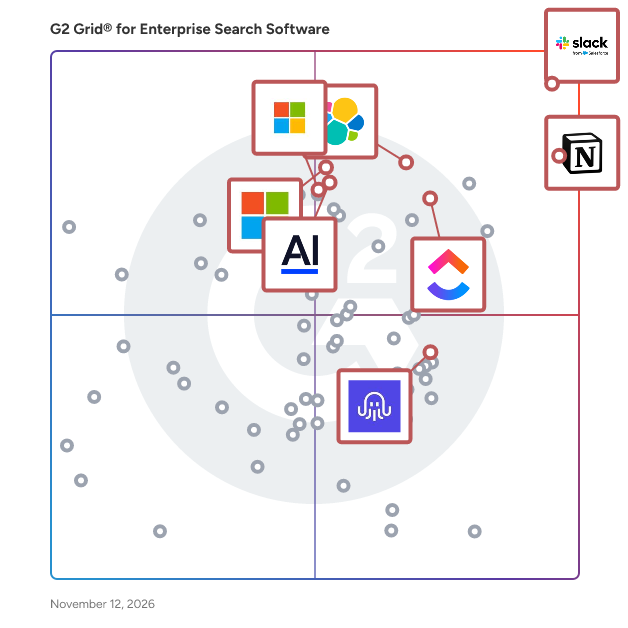
G2 Grid® for Enterprise Search Software

G2 Grid® for Enterprise Search Software plotting products by satisfaction and market presence

Highlighted products: Notion, Slack, ClickUp, Elasticsearch, Microsoft Bing Web Search API, AlphaSense, SearchApi, and Azure AI Search.

Underlying data: [Grid® JSON](https://www.g2.com/categories/enterprise-search-software/grids.json?focus%5B%5D=notion&focus%5B%5D=slack&focus%5B%5D=clickup&focus%5B%5D=elastic-elasticsearch&focus%5B%5D=microsoft-bing-web-search-api&focus%5B%5D=alphasense&focus%5B%5D=searchapi&focus%5B%5D=azure-ai-search&segment=small-business)

Glean

Glean is an enterprise AI platform that brings together AI assistants, AI agents, and enterprise search to help employees find answers, create content, and automate work. Grounded in your company’s knowledge, Glean Assistant answers questions, summarizes information, and drafts content, while Glean Agents enables teams to build and deploy AI agents that execute multi-step workflows across business applications. With 275+ out-of-the-box connectors, Glean connects information across workplace tools and delivers personalized AI that respects existing access permissions. Enterprise-grade security and governance help organizations scale AI across teams—turning company knowledge into answers, content, and action.

Average Rating: 4.7/5.0

Total Reviews: 333

How Do G2 Users Rate Glean?

  • Highlighting: 8.7/10 (Category avg: 8.4/10)
  • Quality of Support: 9.1/10 (Category avg: 8.9/10)
  • Natural Language: 8.9/10 (Category avg: 8.7/10)
  • File Types: 9.0/10 (Category avg: 8.5/10)

Who Is the Company Behind Glean?

Who Uses This Product?

  • Who Uses This: Software Engineer, Account Executive
  • Top Industries: Computer Software, Information Technology and Services
  • Company Size: 52% Large, 40% Medium

What Do G2 Reviewers Say About Glean?

AI-generated summary from verified user reviews

Pros
  • Users find the interface intuitive and easy to use, helping them handle everyday tasks.
  • Users value its broad, straightforward integrations, which connect workplace tools and company data sources in one place.
  • Users appreciate quickly finding information and getting answers across workplace tools, saving time searching separate sources.
  • Users say it improves team productivity and streamlines daily work, helping them complete tasks faster and manage knowledge more efficiently.
  • Users value its company context, which helps AI deliver relevant, specific responses without needing context supplied upfront.
Cons
  • Users say AI answers can be inaccurate or hallucinated, overly wordy, and citations may not open directly to sources.
  • Users say searches, answers, and other operations can be slow or time out.
  • Users find the pricing high, making it harder for smaller teams and large companies to justify the cost.
  • Users find search results can be broad, inconsistent, or fail to surface the information they need.
  • Users miss broader integration coverage, including support for needed apps and data sources.

What Are Recent G2 Reviews of Glean?

Guru

Guru is the AI Source of Truth for your company—an AI knowledge platform that connects everything your teams know, makes it accessible everywhere you work, and keeps it accurate automatically. Guru unifies your company’s apps, chats, and docs into one governed knowledge layer, delivering cited, permission-aware answers, chat, and research across Slack, Teams, your browser, or even other AIs like ChatGPT and Claude. Every answer is grounded in verified knowledge, with built-in verification and lineage to ensure trust, compliance, and confidence at scale. Connect your knowledge. Access it everywhere. Build trust—automatically.

Average Rating: 4.7/5.0

Total Reviews: 2,281

How Do G2 Users Rate Guru?

  • Highlighting: 9.4/10 (Category avg: 8.4/10)
  • Quality of Support: 9.4/10 (Category avg: 8.9/10)
  • Natural Language: 9.2/10 (Category avg: 8.7/10)
  • File Types: 9.2/10 (Category avg: 8.5/10)

Who Is the Company Behind Guru?

  • Seller: Guru
  • Company Website:
  • Year Founded: 2013
  • HQ Location: Philadelphia, PA
  • LinkedIn® Page: www.linkedin.com
    2,705 employees on LinkedIn®

Who Uses This Product?

  • Who Uses This: Customer Service Representative, Customer Success Manager
  • Top Industries: Computer Software, Information Technology and Services
  • Company Size: 59% Medium, 29% Large

What Do G2 Reviewers Say About Guru?

AI-generated summary from verified user reviews

Pros
  • Users appreciate the ease of use of Guru, finding it intuitive and efficient for organizing and accessing information.
  • Users love the organizational capabilities of Guru, praising its ease of use and effective knowledge management features.
  • Users value the comprehensive information offered by Guru, which is organized and frequently updated for easy access.
  • Users appreciate the easy access to verified information, enhancing knowledge sharing and team collaboration effortlessly.
  • Users appreciate the information accuracy of Guru, ensuring reliable and structured knowledge sharing for effective teamwork.
Cons
  • Users find the search functionality lacking, making it difficult to locate essential information efficiently.
  • Users face inefficient search challenges, struggling to locate information quickly due to outdated cards and limited options.
  • Users often experience search functionality issues, making it difficult to find specific information efficiently.
  • Users face inefficient searching as it sometimes yields outdated or irrelevant results, complicating the knowledge retrieval process.
  • Users find organizational challenges with Guru, citing difficulty in locating information due to cluttered display.

What Are Recent G2 Reviews of Guru?

What Are G2 Users Discussing About Guru?

iManage Work

iManage Work is the industry’s leading document and email management application, empowering professionals to manage information more productively, securely, and seamlessly. We built iManage Work with a comprehensive focus on the user experience, bringing you and your knowledge workers agility, efficiency, and access across devices. Key Benefits - Work productively: Manage documents and emails more efficiently and intuitively - Work from anywhere: Mobile-first design lets users work remotely on any device - Work securely: Industry-leading security and governance ensures that iManage Work is the safest place to store information - Work seamlessly: Integrations with Office 365 enable users to do more from inside the familiar Office and Outlook interfaces - Find anything: Smart search cuts through clutter to deliver personalized results For professionals and organizations who need security, agility, and ease-of-use, iManage Work 10 provides a single-source-of-truth for documents and emails to simplify and streamline work. Used globally by leading corporations, law firms, and professional services firms — over 1 million professionals worldwide rely on iManage Work every day.

Average Rating: 4.4/5.0

Total Reviews: 355

How Do G2 Users Rate iManage Work?

  • Highlighting: 8.5/10 (Category avg: 8.4/10)
  • Quality of Support: 8.4/10 (Category avg: 8.9/10)
  • Natural Language: 8.4/10 (Category avg: 8.7/10)
  • File Types: 8.9/10 (Category avg: 8.5/10)

Who Is the Company Behind iManage Work?

  • Seller: iManage
  • Company Website:
  • Year Founded: 2015
  • HQ Location: Chicago, Illinois
  • LinkedIn® Page: www.linkedin.com
    1,310 employees on LinkedIn®

Who Uses This Product?

  • Who Uses This: Associate, IT Director
  • Top Industries: Legal Services, Law Practice
  • Company Size: 50% Medium, 32% Large

What Do G2 Reviewers Say About iManage Work?

AI-generated summary from verified user reviews

Pros
  • Users appreciate the ease of use of iManage Work, benefiting from its intuitive interface and seamless integration.
  • Users appreciate the easy-to-use interface and seamless integration of iManage Work, enhancing their document management experience.
  • Users value the advanced search functionality of iManage Work, enhancing their efficiency and document management capabilities.
  • Users value the easy access to documents and emails in iManage Work, enhancing their organization and productivity.
  • Users appreciate the seamless integration of iManage Work with Microsoft tools, enhancing collaboration and efficiency in document management.
Cons
  • Users find that iManage Work has inconsistent responsiveness issues and requires manual adjustments, impacting user experience.
  • Users note performance lag during large matters and suggest improvements for integrations and UI to enhance usability.
  • Users face inconsistent responsiveness and maintenance downtime with iManage Work, impacting document access and functionality.
  • Users note that iManage Work has inconsistent responsiveness and issues with downtime and integration complexity, affecting usability.
  • Users experience performance issues with iManage Work, including slow file synchronization and inconsistent responsiveness after updates.

What Are Recent G2 Reviews of iManage Work?

What Are G2 Users Discussing About iManage Work?

AI can help you find the answers. G2 helps you trust them.

Connect G2 to Claude or ChatGPT for answers grounded in G2's trusted reviews, comparisons, and pricing from real user insights.

How it works

Hebbia AI

Hebbia is an advanced AI platform purpose-built for financial institutions to transform how analysts, bankers, and investors handle document-intensive workflows. Its flagship product, Matrix, serves as a co-pilot for finance, automating processes that rely on parsing and analyzing vast sets of PDFs, spreadsheets, and data rooms. How Matrix Works Matrix leverages large language models (LLMs) such as OpenAI and Anthropic, but extends them with agentic execution that decomposes financial queries into multi-step actions. The system presents results in a transparent data grid with citations, so teams can audit, verify, and collaborate in real time. Key Features Financial Data Analysis at Scale: Extracts and structures information from CIMs, loan agreements, credit models, and filings with unmatched speed and accuracy. Multi-Modal Processing: Handles PDFs, spreadsheets, redlines, emails, and nested tables seamlessly. Agentic Execution: Breaks down valuation, comps, and diligence queries into actionable steps for precise outcomes. Transparent AI Grid: Shows every reasoning step, making workflows auditable and collaborative. Enterprise-Grade Security: End-to-end encryption trusted by top investment banks and funds. The Value Matrix makes financial workflows up to ten times faster and more accurate. By automating the extraction, structuring, and analysis of millions of documents, Hebbia helps finance professionals overcome information overload and move from raw data to investment decisions in record time. Unlike generic LLM solutions, Hebbia integrates seamlessly with existing financial data sources and requires no custom model training—delivering immediate business value that compounds over time.

Average Rating: 4.4/5.0

Total Reviews: 76

How Do G2 Users Rate Hebbia AI?

  • Highlighting: 8.7/10 (Category avg: 8.4/10)
  • Quality of Support: 9.0/10 (Category avg: 8.9/10)
  • Natural Language: 8.7/10 (Category avg: 8.7/10)
  • File Types: 8.1/10 (Category avg: 8.5/10)

Who Is the Company Behind Hebbia AI?

  • Seller: Hebbia
  • Year Founded: 2020
  • HQ Location: New York, NY
  • LinkedIn® Page: www.linkedin.com
    192 employees on LinkedIn®
  • Phone: 212-655-5043

Who Uses This Product?

  • Who Uses This: Student
  • Top Industries: Computer Software, Financial Services
  • Company Size: 59% Small, 35% Medium

What Do G2 Reviewers Say About Hebbia AI?

AI-generated summary from verified user reviews

Pros
  • Users value the user-friendly interface of Hebbia AI, which enhances efficiency and ease of document analysis.
  • Users value the seamless document extraction capabilities of Hebbia AI, enhancing efficiency in due diligence processes.
  • Users find Hebbia AI's efficient document analysis invaluable for streamlining information extraction and decision-making.
  • Users appreciate the user-friendly platform of Hebbia AI, simplifying their daily tasks and enhancing productivity.
  • Users find the matrix feature of Hebbia AI extremely helpful for efficient information extraction from documents.
Cons
  • Users find the file management cumbersome, struggling with organization and lacking customizable options within Hebbia AI.
  • Users find usage limitations in Hebbia AI, struggling with customization, chat history, and export options.
  • Users find the poor usability of Hebbia AI frustrating, particularly with file management and insufficient user functions.
  • Users find the upload issues in Hebbia AI challenging, especially with large volumes of files and folder management.
  • Users point out limited context understanding, often receiving answers that misalign with their specific questions and needs.

What Are Recent G2 Reviews of Hebbia AI?

Perplexity

Perplexity is an AI-powered search engine designed to transform how users discover and interact with information. By processing user queries through advanced language models, it delivers concise, conversational answers backed by verifiable sources. Each response includes citations and links to original content, enabling users to verify information and delve deeper into topics. This approach streamlines the search experience, moving beyond traditional search engines that present numerous links for users to sift through. Key Features and Functionality: - Conversational Search Interface: Users can ask questions in natural language and receive direct, concise answers. - Real-Time Web Integration: The platform searches the web in real-time to provide up-to-date information. - Source Citations: Each response includes citations and links to original sources, ensuring transparency and credibility. - Multiple AI Model Integration: Perplexity integrates cutting-edge AI models, including OpenAI's GPT models and Anthropic's Claude, allowing users to choose the model that best fits their specific needs. - Freemium Model: Offers a free version with access to a proprietary large language model, while the paid Perplexity Pro subscription provides access to advanced models like GPT-4, Claude 3, Mistral Large, Llama 3, and an experimental Perplexity model. Primary Value and User Solutions: Perplexity addresses the inefficiencies of traditional search engines by providing direct, concise answers to user queries, eliminating the need to sift through numerous links. Its integration of multiple AI models and real-time web search capabilities ensures that users receive accurate and current information. The inclusion of source citations enhances transparency and trustworthiness, making it a valuable tool for researchers, professionals, and the general public seeking reliable information efficiently.

Average Rating: 4.4/5.0

Total Reviews: 371

How Do G2 Users Rate Perplexity?

  • Quality of Support: 8.3/10 (Category avg: 8.9/10)
  • Natural Language: 10.0/10 (Category avg: 8.7/10)
  • File Types: 8.9/10 (Category avg: 8.5/10)

Who Is the Company Behind Perplexity?

Who Uses This Product?

  • Who Uses This: Founder, CEO
  • Top Industries: Information Technology and Services, Computer Software
  • Company Size: 55% Small, 17% Medium

What Do G2 Reviewers Say About Perplexity?

AI-generated summary from verified user reviews

Pros
  • Users value deep research across sources and support for complex, varied tasks.
  • Users value clear, linked citations that let them verify answers and trace claims back to their original sources.
  • Users find setup quick and easy, with little configuration needed to get started.
  • Users value its accurate, reliable answers, which build confidence and reduce time spent double-checking information.
  • Users find it intuitive for everyday questions, with little learning required, and appreciate its flexibility across tasks.
Cons
  • Users encounter factual errors and unsupported claims, so answers often require checking against other sources.
  • Users find the paid plans expensive and feel their features or credits don’t always justify the price.
  • Users find external tool integrations limited, wanting deeper, more native connections to their existing workflows.
  • Users find usage limits low and restrictive, with searches, messages, and credits often running out quickly or triggering rate limits.
  • Users find answers too brief, often needing follow-up questions to get enough detail on complex topics.

What Are Recent G2 Reviews of Perplexity?

Customer Experience Agent Studio

Lifelike conversational AI with state-of-the-art virtual agents. Available in two editions: Dialogflow CX (advanced), Dialogflow ES (standard).

Average Rating: 4.4/5.0

Total Reviews: 145

How Do G2 Users Rate Customer Experience Agent Studio?

  • Highlighting: 9.0/10 (Category avg: 8.4/10)
  • Quality of Support: 8.3/10 (Category avg: 8.9/10)
  • Natural Language: 9.3/10 (Category avg: 8.7/10)
  • File Types: 8.9/10 (Category avg: 8.5/10)

Who Is the Company Behind Customer Experience Agent Studio?

  • Seller: Google
  • Year Founded: 1998
  • HQ Location: Mountain View, CA
  • LinkedIn® Page: www.linkedin.com
    301,144 employees on LinkedIn®
  • Ownership: NASDAQ:GOOG
  • Phone: +1 (650) 253-0000

Who Uses This Product?

  • Who Uses This: Software Engineer
  • Top Industries: Information Technology and Services, Computer Software
  • Company Size: 43% Small, 34% Large

What Do G2 Reviewers Say About Customer Experience Agent Studio?

AI-generated summary from verified user reviews

Pros
  • Users love the intuitive interface of Google Cloud Dialogflow, making chatbot development simple and efficient for all skill levels.
  • Users value the seamless integrations with leading platforms, enhancing ease of use and deployment capabilities.
  • Users value the intuitive drag-and-drop interface of Google Cloud Dialogflow, making it easy for beginners to create chatbots.
  • Users value the easy setup of Google Cloud Dialogflow, facilitating quick deployment even for non-developers.
  • Users appreciate the user-friendly interface and powerful natural language understanding of Google Cloud Dialogflow for chatbot development.
Cons
  • Users find the cost to be unbearable initially, escalating quickly with high-traffic bots and advanced features.
  • Users find the cost of Google Cloud Dialogflow excessive, especially for high-traffic bots and advanced features.
  • Users find feature complexity in Dialogflow frustrating, especially when scaling projects or managing advanced functionalities.
  • Users find the learning curve steep for Dialogflow, especially when transitioning between ES and CX versions.
  • Users find the learning difficulty of Dialogflow challenging, especially due to its technical initial setup and complexity.

What Are Recent G2 Reviews of Customer Experience Agent Studio?

What Are G2 Users Discussing About Customer Experience Agent Studio?

Dropbox Dash

Dropbox Dash is an AI-powered search and knowledge management platform that brings your company's content into one secure, central workspace. Dash connects to the apps your team already uses, making it easier to find, organize, and put your team’s knowledge to work—no matter where it lives. Search across your apps ​​Quickly find what you’re looking for—files, images, videos, and more—across all your connected apps, not just Dropbox. Dash understands your work, so you get more relevant, contextual results without toggling between tabs, digging through folders, or guessing file names. Get answers from your work Ask questions about your files (“Which version is approved?”) and get clear answers—not just links. Dash can generate drafts, summarize documents, surface insights, and organize content to help move projects forward. Smarter, faster sharing Pull files, folders, and conversations from across your tools into Stacks. Share with teams, clients, or partners—permissions already set. Dash is built on the security and reliability Dropbox brings to 700 million users and 575,000 teams worldwide. With integrations for Google Workspace, Microsoft 365, Zoom, Miro, Canva, Notion, Asana, Slack, and more—all respecting existing permissions, so your work stays secure.

Average Rating: 4.2/5.0

Total Reviews: 86

How Do G2 Users Rate Dropbox Dash?

  • Highlighting: 7.0/10 (Category avg: 8.4/10)
  • Quality of Support: 8.9/10 (Category avg: 8.9/10)
  • Natural Language: 8.8/10 (Category avg: 8.7/10)
  • File Types: 8.6/10 (Category avg: 8.5/10)

Who Is the Company Behind Dropbox Dash?

  • Seller: Dropbox
  • Year Founded: 2007
  • HQ Location: San Francisco, California
  • LinkedIn® Page: www.linkedin.com
    4,183 employees on LinkedIn®
  • Ownership: NASDAQ: DBX
  • Phone: 855-237-6726

Who Uses This Product?

  • Top Industries: Information Technology and Services
  • Company Size: 52% Small, 8% Medium

What Do G2 Reviewers Say About Dropbox Dash?

AI-generated summary from verified user reviews

Pros
  • Users appreciate the ease of use of Dropbox Dash, finding it effortlessly simplifies file searching and integration.
  • Users admire the efficient search functionality of Dropbox Dash, making file retrieval effortless and time-effective.
  • Users love the easy setup of Dropbox Dash, making integration into their workflow seamless and stress-free.
  • Users value the seamless integrations of Dropbox Dash, enhancing its utility within their digital workflows.
  • Users appreciate the simple setup of Dropbox Dash, making integration into their workflow effortless and stress-free.
Cons
  • Users often face integration issues with Dropbox Dash, making workflows less efficient and complicating teamwork.
  • Users find Dropbox Dash too expensive, particularly students who struggle with the current pricing model.
  • Users find that Dropbox Dash's complexity can be overwhelming, preferring a simpler, more integrated file management approach.
  • Users find limited account connectivity with Dropbox Dash hampers its usefulness compared to other productivity tools.
  • Users frequently experience issues with the search functionality, making it unreliable for locating files effectively.

What Are Recent G2 Reviews of Dropbox Dash?

Curiosity Studio

AI grounded in industrial context. Curiosity is the context graph for industrial AI. It connects records that live in separate systems, such as tickets, part and BOM data, maintenance logs, supplier notices, field reports, email, SharePoint, Jira and Confluence, into one permission-aware knowledge graph that teams can search, explore and build on. With Curiosity Studio, you build enterprise AI by describing it. Write a sentence and Studio builds a working app, dashboard or agent on your connected data. Every answer traces back to the records behind it. Permissions are inherited from the source systems, so no one sees more than they already could. Tools go from prompt to production with an audit trail, and everything runs on your own infrastructure with the model you choose, on premises or in a private cloud. In production with 20,000+ active users, 30TB+ of connected data and 70+ integrations. Built in Munich. GDPR compliant, with EU data residency.

Average Rating: 4.6/5.0

Total Reviews: 17

How Do G2 Users Rate Curiosity Studio?

  • Highlighting: 9.2/10 (Category avg: 8.4/10)
  • Quality of Support: 8.8/10 (Category avg: 8.9/10)
  • Natural Language: 8.6/10 (Category avg: 8.7/10)
  • File Types: 9.4/10 (Category avg: 8.5/10)

Who Is the Company Behind Curiosity Studio?

Who Uses This Product?

  • Company Size: 94% Small, 6% Medium

What Do G2 Reviewers Say About Curiosity Studio?

AI-generated summary from verified user reviews

Pros
  • Users highlight the ease of use of Curiosity, appreciating its time-saving search capabilities across multiple applications.
  • Users love the seamless integrations of Curiosity, enhancing productivity and simplifying access to diverse tools.
  • Users love the quick and accurate results from Curiosity.ai, enhancing productivity and simplifying data exploration.
  • Users appreciate the speed of Curiosity, enabling quick document searches across various applications and saving valuable time.
  • Users appreciate the intuitive design of Curiosity, making information retrieval effortless and efficient for daily tasks.
Cons
  • Users find the search functionality distracting due to inconsistent result bands and missed emails during searches.
  • Users find the slow indexing process takes a few days, impacting initial setup efficiency.
  • Users note that the slow loading during startup can be frustrating despite the overall amazing experience.
  • Users feel that the pricing is too high for the business tier, despite good functionality in the personal tier.
  • Users note the slow performance of Curiosity, especially on systems with limited RAM and CPU capabilities.

What Are Recent G2 Reviews of Curiosity Studio?

AddSearch

AddSearch is the unified AI Search and Conversational Content Discovery platform for content-rich websites. One implementation gives you three layers of depth: fast keyword search, AI-generated answers grounded entirely in your own content, and multi-turn AI conversations — deployed together or individually. What customers get on day one (typical go-live: under one week; simple sites in a day): • Site search with autocomplete, typo tolerance, AutoSynonyms in 33 languages, and Progressive Ranking that auto-promotes the most relevant content. • AI Answers with full source transparency, no hallucinations, and a Privacy-First architecture — your data never trains external models. • AI Conversations that remember context, support follow-up questions, and reduce helpdesk volume by answering directly on your site. • Built-in analytics that surface zero-result searches and content gaps. • Total Control: pin results, run promotional banners, and override ranking when you need to. Trusted by 1,800+ organizations in higher education, government, finance, healthcare, manufacturing & telecom, associations, and insurance. SOC 2 Type II, GDPR compliant, 99.9% uptime SLA, with up to 99.999% available on Enterprise.

Average Rating: 4.6/5.0

Total Reviews: 98

How Do G2 Users Rate AddSearch?

  • Highlighting: 9.1/10 (Category avg: 8.4/10)
  • Quality of Support: 9.3/10 (Category avg: 8.9/10)
  • Natural Language: 9.0/10 (Category avg: 8.7/10)
  • File Types: 8.7/10 (Category avg: 8.5/10)

Who Is the Company Behind AddSearch?

  • Seller: AddSearch
  • Company Website:
  • Year Founded: 2013
  • HQ Location: Helsinki, Southern Finland
  • LinkedIn® Page: www.linkedin.com
    19 employees on LinkedIn®

Who Uses This Product?

  • Who Uses This: Marketing Manager, President
  • Top Industries: Computer Software, Marketing and Advertising
  • Company Size: 49% Small, 42% Medium

What Do G2 Reviewers Say About AddSearch?

AI-generated summary from verified user reviews

Pros
  • Users commend AddSearch for its responsive customer support, ensuring timely assistance and smooth problem resolution.
  • Users find AddSearch highly easy to use, with quick setup and fast, accurate search results enhancing their experience.
  • Users love the fast and accurate search results from AddSearch, enhancing their website's search experience effortlessly.
  • Users appreciate the fast and accurate search results of AddSearch, enhancing the overall user experience significantly.
  • Users commend the helpful customer support of AddSearch, enhancing their overall experience and satisfaction.
Cons
  • Users find AddSearch expensive for smaller sites, as advanced features are often locked behind higher-tier plans.
  • Users experience search functionality issues with AddSearch, especially regarding result relevance on larger websites.
  • Users experience inconsistent search results when using AddSearch, particularly on larger websites, affecting effectiveness.
  • Users find the feature deficiencies in AddSearch, like limited integration and advanced options behind higher-tier plans, frustrating.
  • Users find that customization options are limited, making it challenging for non-technical users to fully utilize AddSearch.

What Are Recent G2 Reviews of AddSearch?

What Are G2 Users Discussing About AddSearch?

GoLinks

Companies today use upwards of 137 apps. The average employee wastes 19% of the workweek searching for information. Despite efforts to organize resources, nothing has solved the challenge of finding and sharing information fast - Until now! GoLinks revolutionizes how employees find and share knowledge by transforming any URL into short, memorable, and searchable go links (i.e., go/g2-reviews). You now have instant access to information with AI answers for every question, with conversational search powered by generative AI built into our platform. You can now surface company information with AI, just type any question in our dashboard or Slack and instantly get recommended resources and AI answers. GoLinks connects teams more intuitively to the apps and information they access daily. Retire long URLs and share knowledge with memorable keywords in browsers, apps, visually, and in conversation. Context switching has become a thing of the past with human-readable go links that redirect to any web application.

Average Rating: 4.7/5.0

Total Reviews: 852

How Do G2 Users Rate GoLinks?

  • Highlighting: 8.4/10 (Category avg: 8.4/10)
  • Quality of Support: 9.3/10 (Category avg: 8.9/10)
  • Natural Language: 8.4/10 (Category avg: 8.7/10)
  • File Types: 8.2/10 (Category avg: 8.5/10)

Who Is the Company Behind GoLinks?

  • Seller: GoLinks
  • Year Founded: 2017
  • HQ Location: San Jose, California
  • LinkedIn® Page: www.linkedin.com
    1 employees on LinkedIn®

Who Uses This Product?

  • Who Uses This: Software Engineer, Product Manager
  • Top Industries: Computer Software, Information Technology and Services
  • Company Size: 54% Medium, 34% Large

What Do G2 Reviewers Say About GoLinks?

AI-generated summary from verified user reviews

Pros
  • Users appreciate the ease of use of GoLinks, enjoying quick access and efficiency in their workflow.
  • Users appreciate the efficiency of link management with GoLinks, simplifying access to important URLs for their teams.
  • Users enjoy the easy access to documents and tools, streamlining navigation and saving time daily.
  • Users love the quick access provided by GoLinks, making it easy to share and find important resources.
  • Users appreciate the quick access feature of GoLinks, streamlining their workflow and enhancing team collaboration.
Cons
  • Users note the need for better link management due to issues like duplication and organization challenges.
  • Users feel that GoLinks' organization could be improved, making it challenging to manage numerous links effectively.
  • Users face access issues, including unclear login requirements and difficulties with URL navigation and integration.
  • Users find the learning difficulty significant at first due to the abundance of links and potential overlap.
  • Users experience naming issues with duplicate or overlapping links, leading to occasional confusion about the official link.

What Are Recent G2 Reviews of GoLinks?

What Are G2 Users Discussing About GoLinks?

X1 Search

Stop Searching and Start Finding — with X1 Search. X1 Search empowers you to instantly find the exact information you need across your data sources — including emails, files, chats, documents, and more — from Microsoft 365 (Mail, Teams, SharePoint, OneDrive, Exchange), Google Workspace, Slack, local files, and cloud storage. All in a single, lightning-fast search using one powerful solution. Powered by X1’s fast-as-you-type technology, this intuitive desktop application delivers real-time results across your content — helping you work smarter and save hours every day. With the X1 Search MCP Connector for Claude, you can also search across your indexed sources using natural language through your own Claude account. X1 finds the relevant information first, before it reaches the AI, and passes targeted results and snippets to Claude. This gives Claude the context it needs while reducing unnecessary data transfer, token usage, and associated AI costs. Designed for both business and personal use, X1 Search streamlines your workflow by consolidating years of content into a single, unified interface and providing: • Unified search across email, files, chats, and cloud sources • Natural-language search through the optional MCP Connector for Claude • Full-fidelity previews • Built-in hit highlighting • Blazing-fast performance • Advanced review and tagging tools for efficient data organization • More accurate results than OS or legacy desktop search tools With X1 Search, you no longer need to switch between apps or struggle with fragmented systems. Your indexed content is searchable and accessible from one place — with the flexibility to search as you type or ask in your own words. Experience unmatched speed, precision, and simplicity — all in one solution built to handle the demands of modern information workflows. X1 Search is currently supported on Windows-based operating systems and is available for immediate purchase on our website. Simply buy online and download to get started within minutes. The optional MCP Connector requires your own Claude account.

Average Rating: 4.6/5.0

Total Reviews: 66

How Do G2 Users Rate X1 Search?

  • Highlighting: 9.4/10 (Category avg: 8.4/10)
  • Quality of Support: 9.7/10 (Category avg: 8.9/10)
  • Natural Language: 9.2/10 (Category avg: 8.7/10)
  • File Types: 9.4/10 (Category avg: 8.5/10)

Who Is the Company Behind X1 Search?

  • Seller: X1
  • Year Founded: 2003
  • HQ Location: Pasadena, CA
  • LinkedIn® Page: www.linkedin.com
    148 employees on LinkedIn®

Who Uses This Product?

  • Top Industries: Information Technology and Services, Higher Education
  • Company Size: 61% Small, 19% Medium

What Do G2 Reviewers Say About X1 Search?

AI-generated summary from verified user reviews

Pros
  • Users love the instant and thorough search functionality of X1 Search, enhancing their productivity with unmatched speed.
  • Users commend X1 Search for its excellent customer support, consistently receiving prompt and effective assistance from the support team.
  • Users find X1 Search extremely easy to use, enhancing their productivity with fast and efficient file searching capabilities.
  • Users value the efficiency of X1 Search, which rapidly locates files and enhances overall productivity significantly.
  • Users appreciate the fast search capability of X1 Search, effortlessly retrieving old emails without limitations.
Cons
  • Users find the lack of wildcard search functionality in X1 Search limits their ability to find products easily.

What Are Recent G2 Reviews of X1 Search?

What Are G2 Users Discussing About X1 Search?

Workvivo

Workvivo HQ gives Comms, HR, and IT teams an AI-powered employee experience no traditional intranet can match. With HQ Agent helping every employee find trusted answers and take action in seconds, and Seer turning employee feedback and sentiment into actionable intelligence, Workvivo is the missing link in your AI transformation strategy, driving adoption by making AI useful, accessible, and engaging for every employee. HQ Agent brings conversational and agentic AI into the daily flow of work. Employees can ask questions in natural language, receive concise answers grounded in trusted company sources, search across connected workplace content, and complete everyday tasks without navigating multiple systems. AI-powered summaries, enterprise search, federated knowledge, third-party data connections, and governance controls help organizations make workplace AI useful, secure, and accessible to every employee. AI is also embedded across internal communications and employee engagement. AI Compose helps teams create, personalize, translate, and optimize content, while Catch Me Up gives employees fast, relevant summaries of important updates. AI Podcasts and automated Employee Journeys help organizations deliver more engaging communications and guide employees through key moments such as onboarding, role changes, and promotions. Seer uses AI to transform employee listening into action. It brings together surveys, sentiment analysis, AI-powered comment analysis, engagement data, benchmarking, and workforce insights so leaders can understand what employees need, identify emerging issues, and respond faster. This connects employee voice directly to better communication, engagement, and business decisions. Built for frontline, hybrid, remote, and desk-based workforces, Workvivo acts as the AI-powered digital front door to work. Employees can access company news, conversations, recognition, documents, knowledge, workplace services, and essential tools through one intuitive experience across mobile, desktop, and digital signage—helping organizations drive AI adoption across the entire workforce, not just desk-based teams. Workvivo integrates with the technology organizations already use, including Microsoft 365, Google Workspace, Zoom, Workday, ServiceNow, Salesforce, SAP, Slack, Jira, Okta, and leading HRIS platforms. Trusted by global organizations including Amazon, Ryanair, Bupa, White Castle, and Motherson, Workvivo by Zoom is recognized by customers and industry analysts as a leader in employee engagement, intranet, and internal communications.

Average Rating: 4.8/5.0

Total Reviews: 2,651

How Do G2 Users Rate Workvivo?

  • Quality of Support: 9.5/10 (Category avg: 8.9/10)

Who Is the Company Behind Workvivo?

  • Seller: Zoom
  • Company Website:
  • Year Founded: 2011
  • HQ Location: San Jose, CA
  • LinkedIn® Page: www.linkedin.com
    14,013 employees on LinkedIn®

Who Uses This Product?

  • Who Uses This: SPS Associate, Software Engineer
  • Top Industries: Consumer Services, Information Technology and Services
  • Company Size: 57% Large, 29% Medium

What Do G2 Reviewers Say About Workvivo?

AI-generated summary from verified user reviews

Pros
  • Users praise Workvivo for its user-friendly interface, making navigation and communication effortless and efficient.
  • Users appreciate the engaging communication features of Workvivo, fostering a strong sense of community and connection.
  • Users appreciate the enhanced employee engagement through Workvivo's user-friendly design and features that foster collaboration.
  • Users appreciate the engaging communication features of Workvivo, enhancing connectivity and community within the workplace.
  • Users value the enhanced peer recognition features in Workvivo, fostering connection and engagement within the workplace.
Cons
  • Users note the slow loading of Workvivo, finding it less responsive than other applications and frustrating to navigate.
  • Users express concern over the lack of notifications, finding it difficult to manage and customize information effectively.
  • Users find notification issues frustrating, as frequent alerts can overwhelm and complicate the user experience.
  • Users find the interface not user-friendly, with confusing menus and an overwhelming amount of notifications.
  • Users find excessive notifications overwhelming, especially with frequent updates from various groups and comments on posts.

What Are Recent G2 Reviews of Workvivo?

What Are G2 Users Discussing About Workvivo?

Zendesk for Employee Service

Zendesk for Employee Service is an easy to use, AI-powered solution designed to streamline internal service delivery across IT Service Management (ITSM), Human Resources Service Management (HRSM), and other internal support. Built on the Zendesk Resolution Platform and powered by AI trained on 18+ billion service interactions, Zendesk empowers teams to provide fast, accurate resolutions, increasing employee satisfaction and productivity. Easy to implement, scale, and adapt across departments, Zendesk is designed to accommodate the evolving needs of growing organizations without costly developer resources. The platform offers pre-built integrations with popular IT and HR systems, along with robust data analytics to drive informed decisions. Whether you're looking to build a top-tier service desk, improve incident management, automate workflows, or boost self-service capabilities, Zendesk for Employee Service provides the ease of use, flexibility and scalability required for today's dynamic workplace.

Average Rating: 4.5/5.0

Total Reviews: 111

How Do G2 Users Rate Zendesk for Employee Service?

  • Highlighting: 9.6/10 (Category avg: 8.4/10)
  • Quality of Support: 8.9/10 (Category avg: 8.9/10)
  • Natural Language: 9.7/10 (Category avg: 8.7/10)
  • File Types: 9.5/10 (Category avg: 8.5/10)

Who Is the Company Behind Zendesk for Employee Service?

  • Seller: Zendesk
  • Company Website:
  • Year Founded: 2007
  • HQ Location: San Francisco, CA
  • LinkedIn® Page: www.linkedin.com
    7,537 employees on LinkedIn®
  • Ownership: NYSE: ZEN

Who Uses This Product?

  • Top Industries: Information Technology and Services, Computer Software
  • Company Size: 52% Medium, 26% Small

What Do G2 Reviewers Say About Zendesk for Employee Service?

AI-generated summary from verified user reviews

Pros
  • Users appreciate the quick access to answers with Zendesk for Employee Service, enhancing team synchronization and efficiency.
  • Users value the time-saving capabilities of Unleash, enabling quick answers and efficient workflows across teams.
  • Users value the AI-powered search capabilities of Zendesk for Employee Service, significantly enhancing support efficiency and collaboration.
  • Users appreciate the easy integrations of Zendesk for Employee Service, quickly getting up and running with excellent support.
  • Users appreciate the smooth integration process of Zendesk for Employee Service, enabling quick deployment and enhanced productivity.
Cons
  • Users find AI limitations in Zendesk for Employee Service, feeling it falls short of expectations and transparency.
  • Users find Zendesk for Employee Service offers limited features, lacking advanced options for complex workflows and reporting.
  • Users find Zendesk for Employee Service has limited options, lacking advanced features for complex reporting and ticket management.
  • Users note the lack of advanced features in Zendesk for Employee Service, limiting its functionality for complex needs.
  • Users experience slow loading times and often have to refresh for updated tickets, impacting efficiency.

What Are Recent G2 Reviews of Zendesk for Employee Service?

What Are G2 Users Discussing About Zendesk for Employee Service?

AI Data Platform for Manufacturing

CADDi is a global manufacturing technology company driven by the vision to accelerate physical innovation tenfold. Headquartered in Chicago and Tokyo, the company was founded in 2017 by industry veterans Yushiro Kato and Aki Kobashi, formerly of McKinsey and Apple. CADDi currently serves manufacturing businesses in more than 20 countries, including many of the largest publicly traded companies in Japan and the United States. CADDi’s manufacturing AI data platform  analyzes, structures, contextualizes and connects data that has historically been fragmented across the manufacturing value chain. With a proprietary AI model, CADDi offers domain-specific products supporting every phase of the manufacturing value chain, enhancing decision-making and execution to drive business-critical impact. To learn more, visit caddi.com.

Average Rating: 4.6/5.0

Total Reviews: 48

How Do G2 Users Rate AI Data Platform for Manufacturing?

  • Quality of Support: 9.5/10 (Category avg: 8.9/10)
  • Natural Language: 10.0/10 (Category avg: 8.7/10)
  • File Types: 8.3/10 (Category avg: 8.5/10)

Who Is the Company Behind AI Data Platform for Manufacturing?

  • Seller: CADDi
  • Year Founded: 2017
  • HQ Location: Chicago, Illinois
  • LinkedIn® Page: www.linkedin.com
    583 employees on LinkedIn®
  • Ownership: CADDi, Co., Ltd.
  • Phone: 872-257-3965

Who Uses This Product?

  • Top Industries: Manufacturing, Automotive
  • Company Size: 50% Medium, 34% Small

What Do G2 Reviewers Say About AI Data Platform for Manufacturing?

AI-generated summary from verified user reviews

Pros
  • Users love the easy search functionality of CADDi Drawer, enhancing productivity and saving significant time in locating materials.
  • Users find CADDi Drawer to be extremely user-friendly, facilitating quick searches and enhancing overall productivity.
  • Users benefit from easy data accessibility with CADDi Drawer, improving workflows and boosting efficiency across teams.
  • Users value the excellent customer support from CADDi Drawer, enhancing the overall experience and satisfaction.
  • Users appreciate the enhanced productivity from CADDi Drawer, celebrating its efficiency in managing and accessing drawings seamlessly.
Cons
  • Users find the complex usability of CADDi Drawer requires significant effort for setup and effective utilization.
  • Users find the difficult learning curve challenging at first, requiring effort to maximize CadDi Drawer’s features.
  • Users find the CADDi Drawer somewhat expensive for file storage, suggesting not all data needs uploading.

What Are Recent G2 Reviews of AI Data Platform for Manufacturing?

Yext

Yext — Enterprise Agentic Marketing Platform Yext is the enterprise agentic marketing platform for multi-location brands that need to win across both AI and traditional search. AI is reshaping how customers discover brands. They're not just searching Google. They're asking ChatGPT, Gemini, Perplexity, and Grok — and the brands that show up in those responses are the ones with verified, structured data distributed to the right places. Yext is built to make that happen at enterprise scale. What Yext does Yext delivers three core capabilities from one platform. Scout, Yext's visibility intelligence engine, analyzes 10 billion signals across four AI models and more than 12 million business locations. Every scan surfaces 150 visibility metrics across 20 competitors, down to the location level, so marketing leaders know exactly where they're losing and why — across both AI and traditional search. The Yext Knowledge Graph is the verified source of truth for every location in a brand's portfolio. Data agents maintain it automatically, connecting data across sources, verifying it at scale, and resolving inconsistencies before they reach a customer. When AI models generate responses about your brand, they pull from this verified record. Content generation agents create on-brand content across every channel from verified brand data: local pages, social posts and replies, review campaigns and responses, and email and SMS campaigns. Distribution agents syndicate that content and data in real time to LLMs, voice assistants, listings, maps, social and review platforms, and email — with no aggregator in between. What Yext pushes is what AI and search engines actually see and trust. Who it's for Yext is built for CMOs, SVPs, and VPs of marketing at multi-location enterprise brands in financial services, healthcare, retail, hospitality, and food. If your brand competes at the local level and needs to show up accurately and consistently across AI and traditional search, Yext is built for you. Why Yext Most platforms deliver insight or distribution, not both. Yext closes the loop — from competitive intelligence to verified data to agentic content creation and real-time distribution — in one system with no disconnected tools and no aggregator delays. Thousands of brands trust Yext, including top US banks, leading hospital systems, and the world's largest restaurant and retail chains.

Average Rating: 4.4/5.0

Total Reviews: 1,101

How Do G2 Users Rate Yext?

  • Highlighting: 7.4/10 (Category avg: 8.4/10)
  • Quality of Support: 8.5/10 (Category avg: 8.9/10)
  • Natural Language: 8.4/10 (Category avg: 8.7/10)
  • File Types: 8.0/10 (Category avg: 8.5/10)

Who Is the Company Behind Yext?

  • Seller: Yext
  • Company Website:
  • Year Founded: 2006
  • HQ Location: New York
  • LinkedIn® Page: www.linkedin.com
    2,427 employees on LinkedIn®
  • Ownership: NYSE: YEXT

Who Uses This Product?

  • Who Uses This: Marketing Manager, Digital Marketing Manager
  • Top Industries: Financial Services, Hospital & Health Care
  • Company Size: 37% Large, 30% Medium

What Do G2 Reviewers Say About Yext?

AI-generated summary from verified user reviews

Pros
  • Users appreciate the ease of use of Yext, benefiting from streamlined management and excellent support services.
  • Users find Yext to be easy to use with excellent support, streamlining their listing management tasks effectively.
  • Users value the centralized management of Yext, enabling efficient updates and consistent information across multiple locations.
  • Users appreciate the great support team of Yext, which allows them to prioritize other tasks efficiently.
  • Users value Yext's centralized management of listings and reviews, enhancing efficiency and consistency across multiple locations.
Cons
  • Users find the complex usability of Yext frustrating, particularly when managing and duplicating posts across locations.
  • Users note a challenging learning curve when adapting to Yext's features, despite helpful support and documentation.
  • Users find the difficult learning process in Yext challenging, suggesting improvements in onboarding and training resources.
  • Users find the difficult navigation of Yext's website interface leads to confusion and slows down updates.
  • Users note the limited features of Yext, such as no LinkedIn page management and the inability to duplicate posts easily.

What Are Recent G2 Reviews of Yext?

What Are G2 Users Discussing About Yext?

Bijou Barry
BB
Researched and written by Bijou Barry
Updated
Reviews & FAQs

Reviews Summary: The Best Enterprise Search Software Software for Small-Business Businesses

Thanks to 78448 Enterprise Search Software software reviews and associated data from users working for small-sized companies, at G2 we have some of the most definitive data on the best Enterprise Search Software software for the smaller space. We have identified 32 individual Enterprise Search Software products offering the features, pricing and support that Small-Business companies look for when comparing Enterprise Search Software software and solutions. These reviews are generated using the qualitative and quantitative feedback from G2 members working in small-sized companies and who have used these Enterprise Search Software software products.

When G2 reviewers submit their Enterprise Search Software software reviews, they often provide information on the type of company they work for and what market segment they belong to. We break these different market segments into three distinct groups:

  • Small Business Enterprise Search Software Software Reviews (< 50 employees)
  • smaller Enterprise Search Software Software Reviews (51-1,000 employees)
  • Enterprise Enterprise Search Software Software Reviews (1,001+ employees)

smaller businesses have their own unique requirements when it comes to Enterprise Search Software software compared to small or enterprise companies. That is why these individual small-sized company Enterprise Search Software software reviews are especially helpful when comparing product set up, ease of use and overall cost.

Below you will find FAQs and review snippets for Enterprise Search Software software products that work well in smaller environments. These reviews are written by real G2 users working for these Small-Business companies who have real-world experience with these Enterprise Search Software software products.

FAQs About Enterprise Search Software Software for Small-Business Businesses

Q. What are the best Enterprise Search Software software products for small-sized businesses, according to G2 reviewers?
  • Notion - 4.6-stars, 983 reviews (54% from smaller reviewers)
  • Slack - 4.6-stars, 98 reviews (24% from smaller reviewers)
  • ClickUp - 4.6-stars, 226 reviews (77% from smaller reviewers)
  • Elasticsearch - 4.5-stars, 83 reviews (30% from smaller reviewers)
  • Microsoft Bing Web Search API - 4.2-stars, 151 reviews (50% from smaller reviewers)
Q. What are the least-liked Enterprise Search Software software products for professionals at small-sized companies, based on the overall G2 rating?
  • Lookeen - 3.4-stars, 12 reviews (71% from smaller reviewers)
  • Albus - 4.6-stars, 11 reviews (52% from smaller reviewers)
  • Arango - 4.7-stars, 18 reviews (58% from smaller reviewers)
  • Omnity - 4.3-stars, 14 reviews (48% from smaller reviewers)
  • Yext - 4.1-stars, 30 reviews (24% from smaller reviewers)
Q. What are the highest-rated Enterprise Search Software software tool features according to employees at Small-Business companies?
  • Full Text Search - 4.7-stars
  • Natural Language - 4.2-stars
  • Integrations - 4.2-stars
Q. What are the features that are rated lowest by employees at Small-Business companies?
  • Proactive Assistance - 3.7-stars
  • Relevance Tuning - 3.7-stars
  • Adaptive Learning - 3.7-stars
Q. How many Enterprise Search Software software reviews are from users working in smaller companies?

2279 out of all Enterprise Search Software software reviews on G2 are from users working in Small-Business companies (3%).

Here's What Reviewers Working at smaller Businesses Have to Say About Enterprise Search Software Software

What Small-Business Professionals Liked What Small-Business Professionals Disliked

Elasticsearch: “Great engine. Fast performance and everytime does great work”

Read Review

Perplexity: “Its ludicrously unreliable. And whilst it started off its now idiotically expensive burning through $1,500 in two days whilst achieving next to nothing. Support are chocolate tea pots these days when they were responsive at first. The guardrails are non existent despite how many times you reiterate it. Has led to numerous GDPR disasters. Avoid like the plague”

Read Review

ClickUp: “Seriously the ClickUp platform is like a wonderland where everyday I discover a new feature, quirk or clever way of working. There's always some new sweet thing to find - despite using ClickUp for over 7 years now :) Also, I love how accessible it is for newbies & small business owners - the free forever plan is legit the most generous software freebie option I've ever seen. Cheers legends!”

Read Review

Notion: “It is as shown on the previous page. At first glance, it seems good, but the database keeps getting messier, making it difficult to search and use.”

Read Review

ClickUp: “Helps organise all the tasks and connect with mails”

Read Review

Microsoft Bing Web Search API: “Bing's feature sets are often less comprehensive or user-friendly than search engines, such as Google. Also, it is sometimes cluttered with too many ads, which is distracting.”

Read Review

Recommendations To Others Problems Solved & Benefits

Slack: “not needed”

Read Review

Hebbia AI: “It helps me find and organise information faster reducing the time that I spend on research”

Read Review

AlphaSense: “Access to experts is commoditising but Stream by Alphasense differentiate through strong customer service and competitive pricing.”

Read Review

Slack: “Slack solves the problem of fragmented communication and scattered files by replacing messy email threads with organized channels. It benefits me by streamlining daily collaboration, making project updates easily searchable, and bringing file sharing and real-time huddles into one place to save time”

Read Review

AddSearch: “The trial is easy to set up and evaluate. You'll know whether it meets your needs quickly.”

Read Review

ClickUp: “ClickUp has addressed one of our biggest challenges: keeping projects organized while ensuring everyone has clear visibility into tasks, responsibilities, and deadlines. Before we started using it, tracking work across different teams and managing complex projects was far more difficult, which often created communication gaps and led to duplicated effort. With ClickUp, we can break projects down into tasks and subtasks, assign work to multiple contributors, and monitor progress in real time. This has strengthened collaboration, improved accountability, and made it much easier to spot bottlenecks early—before they affect delivery. The integrations with email and other business applications have also helped reduce context switching by keeping related information connected in one place. On top of that, ClickUp AI helps us quickly generate well-structured task breakdowns, speeding up project planning and helping ensure nothing important gets missed. Overall, our team is more organized, communication is more transparent, and we deliver work more efficiently, with better visibility across all ongoing projects.”

Read Review