Best Other Analytics Software

How Many Other Analytics Software Products Does G2 Track?

Total Products under this Category: 727

Category Stats (Sep 2026)

  • Average Rating: 4.4/5 The average rating of products in this category, based on all submitted ratings
  • Top Trending Product: Commutifi (+22.62%) - Among all products in this category, Commutifi recorded the largest rating increase compared to last month

Last updated: September 01, 2026

How Does G2 Rank Other Analytics Software Products?

Why You Can Trust G2's Software Rankings:

  • 30 Analysts and Data Experts
  • 3,300+ Authentic Reviews
  • 727+ Products
  • Unbiased Rankings

G2's software rankings are built on verified user reviews, rigorous moderation, and a consistent research methodology maintained by a team of analysts and data experts. Each product is measured using the same transparent criteria, with no paid placement or vendor influence. While reviews reflect real user experiences, which can be subjective, they offer valuable insight into how software performs in the hands of professionals. Together, these inputs power the G2 Score, a standardized way to compare tools within every category.

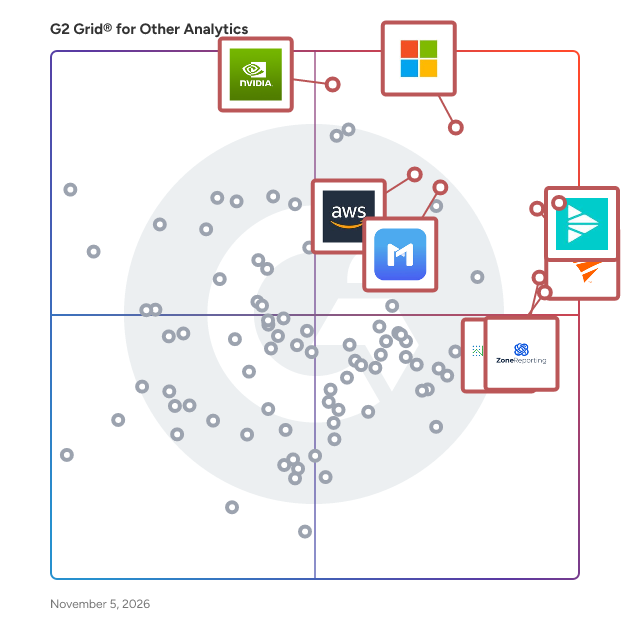
G2 Grid® for Other Analytics Software

G2 Grid® for Other Analytics Software plotting products by satisfaction and market presence

Highlighted products: Azure Analysis Services, Mimicpc, SolarWinds Database Observability, NVIDIA cuOpt, ZoneReporting, Angles Enterprise For SAP, Fusion ERP Analytics, and Google Cloud Scheduler.

Underlying data: [Grid® JSON](https://www.g2.com/categories/other-analytics/grids.json?focus%5B%5D=azure-analysis-services&focus%5B%5D=mimicpc&focus%5B%5D=database-observability&focus%5B%5D=nvidia-cuopt&focus%5B%5D=zonereporting&focus%5B%5D=angles-enterprise-for-sap&focus%5B%5D=fusion-erp-analytics&focus%5B%5D=google-cloud-scheduler)

Azure Analysis Services

Azure Analysis Services integrates with many Azure services enabling you to build sophisticated analytics solutions.Its integration with Azure Active Directory provides secure, role-based access to your critical data.

Average Rating: 4.4/5.0

Total Reviews: 152

How Do G2 Users Rate Azure Analysis Services?

  • Has the product been a good partner in doing business?: 8.5/10 (Category avg: 8.8/10)
  • Ease of Use: 8.2/10 (Category avg: 8.8/10)
  • Ease of Admin: 8.3/10 (Category avg: 8.7/10)
  • Quality of Support: 8.7/10 (Category avg: 8.6/10)

Who Is the Company Behind Azure Analysis Services?

  • Seller: Microsoft
  • Year Founded: 1975
  • HQ Location: Redmond, Washington
  • Twitter: @microsoft
    13,091,739 Twitter followers
  • LinkedIn® Page: www.linkedin.com
    232,750 employees on LinkedIn®
  • Ownership: MSFT

Who Uses This Product?

  • Who Uses This: Software Engineer, Senior Software Engineer
  • Top Industries: Information Technology and Services, Computer Software
  • Company Size: 39% Small, 37% Medium

What Are Recent G2 Reviews of Azure Analysis Services?

What Are G2 Users Discussing About Azure Analysis Services?

SolarWinds Database Observability

SolarWinds Database Observability brings together SolarWinds database monitoring and performance management capabilities for organizations running mixed database estates across on-premises and cloud environments. The portfolio includes self-hosted and SaaS offerings and supports relational, open-source, and NoSQL databases, including SQL Server, Oracle, MySQL, PostgreSQL, MongoDB, Redis, Amazon Aurora, Amazon RDS, Azure SQL, and Google Cloud SQL. Designed for database administrators, platform teams, and IT operations teams, SolarWinds Database Observability helps users monitor database health, analyze query performance, troubleshoot waits, blocking, and deadlocks, and investigate performance problems with greater speed and confidence. Across the portfolio, teams can use capabilities such as query analysis, workload profiling, execution plan analysis, historical performance analysis, anomaly detection, alerting, and reporting to identify issues before they become larger operational problems. It also helps teams connect database performance to the wider IT environment by correlating database activity with CPU, memory, disk I/O, and surrounding infrastructure context. Integrations with tools and services such as SolarWinds Service Desk, PagerDuty, ServiceNow, Microsoft Teams, OpsGenie, and webhooks support faster notification, escalation, and response workflows. This broader context is especially useful for organizations trying to reduce troubleshooting silos and improve collaboration between database and infrastructure teams. The primary value of SolarWinds Database Observability is that it gives teams deeper visibility into database behavior across diverse environments while helping them diagnose slowdowns, tune performance, and resolve issues more efficiently. Rather than positioning database monitoring as a secondary add-on, it delivers database-focused depth alongside broader IT context, making it well suited to organizations that need strong database performance management without unnecessary complexity.

Average Rating: 4.5/5.0

Total Reviews: 224

How Do G2 Users Rate SolarWinds Database Observability?

  • Has the product been a good partner in doing business?: 8.9/10 (Category avg: 8.8/10)
  • Ease of Use: 8.7/10 (Category avg: 8.8/10)
  • Ease of Admin: 8.8/10 (Category avg: 8.7/10)
  • Quality of Support: 8.7/10 (Category avg: 8.6/10)

Who Is the Company Behind SolarWinds Database Observability?

  • Seller: SolarWinds Worldwide LLC
  • Company Website:
  • Year Founded: 1999
  • HQ Location: Austin, TX
  • Twitter: @solarwinds
    19,570 Twitter followers
  • LinkedIn® Page: www.linkedin.com
    2,864 employees on LinkedIn®

Who Uses This Product?

  • Top Industries: Information Technology and Services, Computer Software
  • Company Size: 42% Medium, 38% Large

What Do G2 Reviewers Say About SolarWinds Database Observability?

AI-generated summary from verified user reviews

Pros
  • Users value the real-time monitoring of Database Observability, significantly improving resource allocation and performance management.
  • Users value the excellent monitoring capabilities of SolarWinds Database Observability, enabling efficient SQL query analysis and visibility.
  • Users appreciate the stellar visibility into database performance, enabling quick identification of issues and proactive management.
  • Users appreciate the ease of use of SolarWinds Database Observability, enabling quick setup and intuitive monitoring for efficient management.
  • Users appreciate the real-time insights provided by SolarWinds Database Observability, enhancing efficient and proactive database management.
Cons
  • Users find the learning curve steep for new teams, making initial setup and understanding metrics challenging.
  • Users find the steep learning curve challenging, particularly for new teams adapting to extensive metrics and configurations.
  • Users encounter a difficult setup with SolarWinds Database Observability, requiring significant time and effort to configure properly.
  • Users find the cost prohibitive for smaller teams, making it less accessible for those with limited budgets.
  • Users find the initial setup and learning curve complex, particularly challenging for teams new to database monitoring tools.

What Are Recent G2 Reviews of SolarWinds Database Observability?

What Are G2 Users Discussing About SolarWinds Database Observability?

Mimicpc

MimicPC is a cloud-based platform that revolutionizes the way users interact with AI applications, particularly in the realm of AI-driven art creation. By offering a browser-based interface, MimicPC eliminates the need for downloads or installations, allowing users to run powerful AI tools like ComfyUI directly from the cloud. This platform is designed for artists, developers, and AI enthusiasts who want to create complex Stable Diffusion workflows without needing to write any code. MimicPC’s standout feature is its ability to provide high-speed GPU access, enabling users to experiment with and deploy AI workflows seamlessly. ComfyUI, one of the key tools on the platform, offers a visual node/graph interface that simplifies the creation of intricate AI art processes. Users can drag and drop elements, share, and discover workflows within the community, making the platform highly interactive and user-friendly. Additionally, MimicPC offers fully managed cloud workspaces, where users can customize their environment with various open-source AI tools like Automatic1111 and Kohya. With fast setup times, flexible machine instances, and persistent storage options, MimicPC streamlines the AI creation process, making it accessible and efficient for both beginners and advanced users.

Average Rating: 4.8/5.0

Total Reviews: 31

How Do G2 Users Rate Mimicpc?

  • Has the product been a good partner in doing business?: 9.2/10 (Category avg: 8.8/10)
  • Ease of Use: 8.9/10 (Category avg: 8.8/10)
  • Ease of Admin: 9.2/10 (Category avg: 8.7/10)
  • Quality of Support: 9.4/10 (Category avg: 8.6/10)

Who Is the Company Behind Mimicpc?

Who Uses This Product?

  • Company Size: 94% Small, 3% Large

What Do G2 Reviewers Say About Mimicpc?

AI-generated summary from verified user reviews

Pros
  • Users value the ease of use of MimicPC, enjoying a seamless cloud experience without local installations.
  • Users value the ease of use and extensive features of MimicPC, enhancing their learning experience effectively.
  • Users love the seamless cloud-based setup of MimicPC, enabling effortless access to powerful AI tools anywhere, anytime.
  • Users value the responsive customer support of MimicPC, enhancing their overall experience and problem resolution.
  • Users appreciate the flexible and accessible learning environment provided by MimicPC, enhancing their overall experience.
Cons
  • Users find the price to be high, especially for heavy use and storage requirements compared to alternatives.
  • Users desire a wider range of tools and express concerns about limited storage and capacity on Mimicpc.
  • Users note limited features in MimicPC, hoping for more tools and improvements in future updates.
  • Users report slow performance when organizing files, leading to a frustrating and clunky experience with Mimicpc.
  • Users experience technical issues like lag and integration problems, making the setup and workflows frustrating and unreliable.

What Are Recent G2 Reviews of Mimicpc?

NVIDIA cuOpt

NVIDIA cuOpt is an open-source, GPU-accelerated engine designed for decision optimization, enabling organizations to solve complex routing and logistics challenges with unprecedented speed and efficiency. By leveraging the parallel processing capabilities of GPUs, cuOpt addresses large-scale problems involving millions of variables and constraints, facilitating real-time, data-driven decision-making across various industries. Key Features and Functionality: - Advanced Optimization Algorithms: Utilizes mixed-integer linear programming (MILP) and linear programming (LP) solvers to tackle complex optimization problems such as vehicle routing, resource allocation, and job scheduling. - Real-Time Route Optimization: Delivers dynamic route planning capabilities, enabling rapid adjustments to changing conditions, thereby reducing travel time, fuel consumption, and operational costs. - Scalability and Performance: Achieves significant speedups over traditional CPU-based methods, solving large-scale problems in seconds and setting multiple world records in routing benchmarks. - Versatile Use Cases: Applicable across various domains, including supply chain management, fleet management, last-mile delivery, field dispatch, job scheduling optimization, and portfolio optimization. Primary Value and User Solutions: NVIDIA cuOpt empowers businesses to enhance operational efficiency by optimizing complex logistics and decision-making processes. It enables real-time adaptation to dynamic environments, leading to cost reductions, improved resource utilization, and increased customer satisfaction. By integrating cuOpt, organizations can achieve faster delivery times, minimize carbon emissions, and gain a competitive edge through superior optimization capabilities.

Average Rating: 4.0/5.0

Total Reviews: 18

How Do G2 Users Rate NVIDIA cuOpt?

  • Has the product been a good partner in doing business?: 8.3/10 (Category avg: 8.8/10)
  • Ease of Use: 7.6/10 (Category avg: 8.8/10)
  • Ease of Admin: 8.3/10 (Category avg: 8.7/10)
  • Quality of Support: 7.9/10 (Category avg: 8.6/10)

Who Is the Company Behind NVIDIA cuOpt?

  • Seller: NVIDIA
  • Year Founded: 1993
  • HQ Location: Santa Clara, CA
  • Twitter: @nvidia
    2,582,827 Twitter followers
  • LinkedIn® Page: www.linkedin.com
    51,762 employees on LinkedIn®
  • Ownership: NVDA

Who Uses This Product?

  • Company Size: 45% Small, 30% Medium

What Do G2 Reviewers Say About NVIDIA cuOpt?

AI-generated summary from verified user reviews

Pros
  • Users commend NVIDIA cuOpt for its effective AI-driven optimization, greatly benefiting logistics and transportation industries.
  • Users praise the performance optimization of NVIDIA cuOpt for efficiently solving complex, large-scale problems.
  • Users appreciate the ease of use of NVIDIA cuOpt, finding it interactive and helpful for on-the-go tasks.
  • Users commend NVIDIA cuOpt for its large-scale data handling, which enhances efficiency in complex routing and logistics tasks.
  • Users admire the high accuracy of NVIDIA cuOpt, noting its impressive optimization performance rivaling human expertise.
Cons
  • Users find NVIDIA cuOpt too expensive for smaller businesses, limiting its accessibility and practicality for broader applications.
  • Users find the high complexity of NVIDIA cuOpt challenging, particularly those unfamiliar with CUDA or GPU programming.
  • Users find the steep learning curve of NVIDIA cuOpt challenging, especially without prior CUDA or GPU programming experience.
  • Users find the setup complexity of NVIDIA cuOpt challenging, requiring significant investment in GPU infrastructure.

What Are Recent G2 Reviews of NVIDIA cuOpt?

ZoneReporting

ZoneReporting is the Only Pre-Built Power BI Reporting Solution for NetSuite. Implementation in weeks with daily or hourly automated refreshes. In addition to unlimited joins, you can integrate all your data sources, financial and operational reporting functionality, and the creation of a NetSuite data backup. All your NetSuite data goes through our enterprise-grade ETL processes to replicate a reconciled version of NetSuite inside of Power BI. with implementation in weeks.

Average Rating: 4.4/5.0

Total Reviews: 44

How Do G2 Users Rate ZoneReporting?

  • Has the product been a good partner in doing business?: 7.9/10 (Category avg: 8.8/10)
  • Ease of Use: 9.2/10 (Category avg: 8.8/10)
  • Ease of Admin: 7.6/10 (Category avg: 8.7/10)
  • Quality of Support: 8.7/10 (Category avg: 8.6/10)

Who Is the Company Behind ZoneReporting?

  • Seller: Zone & Co
  • Year Founded: 2013
  • HQ Location: Boston, MA
  • Twitter: @ZoneandCo
    84 Twitter followers
  • LinkedIn® Page: in.linkedin.com
    298 employees on LinkedIn®

Who Uses This Product?

  • Top Industries: Computer Software, Accounting
  • Company Size: 73% Medium, 18% Large

What Do G2 Reviewers Say About ZoneReporting?

AI-generated summary from verified user reviews

Pros
  • Users appreciate the reporting efficiency of ZoneReporting, enabling clear insights and smoother workflows with reliable results.
  • Users find ZoneReporting to be a time-saving solution, streamlining analysis and reporting across various systems effortlessly.
  • Users find ZoneReporting to be easy to use, featuring a simple interface and seamless access across platforms.
  • Users benefit from easy integrations in ZoneReporting, streamlining issue tracking and enhancing collaboration for quicker resolutions.
  • Users appreciate the ease of reporting and insightful data analysis provided by ZoneReporting, enhancing operational efficiency.
Cons
  • Users find that expertise is required to effectively create reports in ZoneReporting, limiting accessibility for some businesses.
  • Users find ZoneReporting to be quite expensive, especially for small scale startups considering its outdated features.
  • Users find the limited flexibility in reporting and customization options to be a significant drawback of ZoneReporting.
  • Users find the reporting options limited, affecting their ability to create detailed visualizations and manage large data sets.
  • Users find the steep learning curve of ZoneReporting challenging, especially when handling large data sets.

What Are Recent G2 Reviews of ZoneReporting?

Angles Enterprise For SAP

Your SAP enterprise resource planning (ERP) software has a wealth of data. But its complex nature makes it difficult for your teams to access, understand, and use the data efficiently and productively. Without data insights, you lack a clear understanding of your organization’s operations. And ad hoc or custom report requests to the IT team only slow down your employees and the reporting process. Transform the critical data in your SAP ERP tools into actionable insights with Angles Enterprise for SAP from insightsoftware. Give the power of operational analytics and business intelligence (BI) to the people who need it most—your business users. Angles for SAP works ‘’plug-and-play” on any SAP ERP, including both ECC and S/4HANA, to collect and prepare data so it is suitable to analyze. It understands context, connections, and integrations, and it simplifies data for business users. It then creates insights into what is happening at an operational level right now and in the foreseeable future by enriching the data with pre-built supply chain and finance calculations, on a transaction level (execution status, order bottlenecks) and in the form of operational KPIs (delivery reliability, stock level). These insights create answers to business questions. Insights can then be published directly or distributed by being pushed to or pulled by third-party BI tools. Regardless of SAP experience or role, users can: • Quickly find information with a simple search. • Identify pain points and bottlenecks early and act on them before they impact the bottom line. • Create detailed action lists that highlight operational issues, exceptions, and bottlenecks. • Easily export enhanced data to third-party BI tools. • Understand the root cause of issues. • Enrich views with information from other process areas. Increase your confidence in your SAP ERP and its data quality to create trustworthy reports and reduce time spent on reconciling results.

Average Rating: 4.4/5.0

Total Reviews: 20

How Do G2 Users Rate Angles Enterprise For SAP?

  • Has the product been a good partner in doing business?: 9.2/10 (Category avg: 8.8/10)
  • Ease of Use: 8.6/10 (Category avg: 8.8/10)
  • Ease of Admin: 8.3/10 (Category avg: 8.7/10)
  • Quality of Support: 8.6/10 (Category avg: 8.6/10)

Who Is the Company Behind Angles Enterprise For SAP?

  • Seller: insightsoftware
  • Year Founded: 2018
  • HQ Location: Raleigh, North Carolina
  • Twitter: @insightsoftware
    801 Twitter followers
  • LinkedIn® Page: www.linkedin.com
    2,273 employees on LinkedIn®

Who Uses This Product?

  • Company Size: 50% Small, 20% Large

What Do G2 Reviewers Say About Angles Enterprise For SAP?

AI-generated summary from verified user reviews

Pros
  • Users appreciate the accuracy of Angles Enterprise for SAP, which enhances decision-making with reliable data and insights.
  • Users appreciate the intuitive dashboard design of Angles Enterprise for SAP, enhancing data analysis and decision-making efficiency.
  • Users appreciate the intuitive dashboards and robust analytics of Angles Enterprise for SAP, enhancing reporting efficiency and decision-making.
  • Users value the real-time insights provided by Angles Enterprise for SAP, enhancing decision-making and operational control.
  • Users appreciate the ease of use of Angles Enterprise for SAP, enabling straightforward data analysis and decision-making.
Cons
  • Users find a steep learning curve with Angles Enterprise For SAP, requiring time and effort to master its features.
  • Users find the complexity of the system daunting, requiring significant time and effort to fully master its features.
  • Users find the poor documentation makes onboarding complicated, especially for those new to SAP environments.
  • Users find the setup difficulty challenging, particularly for those lacking a technical background, making initial configuration tedious.

What Are Recent G2 Reviews of Angles Enterprise For SAP?

Fusion ERP Analytics

Oracle Fusion ERP Analytics is a prebuilt, cloud-native analytics solution designed for Oracle Fusion Cloud ERP users. It empowers finance, procurement, and project professionals to uncover the underlying drivers of profitability, optimize working capital, and control business expenditures. By providing comprehensive insights into financial performance, this solution enables organizations to make informed decisions and enhance operational efficiency. Key Features and Functionality: - General Ledger Insights: Gain a comprehensive view of financial performance by analyzing profitability, costs, and revenue through historical trend and variance analyses using prebuilt metrics. - Receivables Management: Improve collections and cash flow by performing in-depth revenue analysis, identifying inefficiencies in the collections process, and analyzing aging receivables using prebuilt performance indicators. - Payables Management: Enhance payment performance by tracking on-time and overdue vendor payments, understanding invoice holds, and reviewing accounts payable aging trends with comprehensive dashboards. - Spend Analysis: Achieve full visibility into company spend across various categories, develop strategies to consolidate suppliers, and minimize non-compliant spend using detailed insights into purchasing patterns. - Expense Monitoring: Identify fraud and noncompliance by utilizing prebuilt data visualizations to detect expense anomalies, ensuring adherence to policy and timely reimbursements. - Procurement Performance: Uncover cost-saving opportunities, enhance procure-to-pay efficiency, and minimize supplier risk by analyzing supplier performance against contractual benchmarks using multiple prebuilt metrics. Primary Value and Solutions Provided: Oracle Fusion ERP Analytics delivers actionable insights that help organizations optimize financial processes, improve operational efficiency, and make data-driven decisions. By offering prebuilt analytics and data visualizations, it reduces the need for complex data integration and IT intervention, enabling users to quickly identify trends, anomalies, and opportunities for cost savings. This solution addresses common challenges such as managing cash flow, controlling expenditures, ensuring compliance, and enhancing supplier relationships, ultimately contributing to improved business performance and profitability.

Average Rating: 4.3/5.0

Total Reviews: 20

How Do G2 Users Rate Fusion ERP Analytics?

  • Has the product been a good partner in doing business?: 8.1/10 (Category avg: 8.8/10)
  • Ease of Use: 8.2/10 (Category avg: 8.8/10)
  • Ease of Admin: 8.0/10 (Category avg: 8.7/10)
  • Quality of Support: 8.0/10 (Category avg: 8.6/10)

Who Is the Company Behind Fusion ERP Analytics?

  • Seller: Oracle
  • Year Founded: 1977
  • HQ Location: Austin, TX
  • Twitter: @Oracle
    827,997 Twitter followers
  • LinkedIn® Page: www.linkedin.com
    207,576 employees on LinkedIn®
  • Ownership: NYSE:ORCL

Who Uses This Product?

  • Top Industries: Information Technology and Services
  • Company Size: 45% Medium, 30% Large

What Are Recent G2 Reviews of Fusion ERP Analytics?

Google Cloud Scheduler

Cloud Scheduler Fully managed cron job service.

Average Rating: 4.4/5.0

Total Reviews: 28

How Do G2 Users Rate Google Cloud Scheduler?

  • Has the product been a good partner in doing business?: 8.9/10 (Category avg: 8.8/10)
  • Ease of Use: 8.6/10 (Category avg: 8.8/10)
  • Ease of Admin: 8.9/10 (Category avg: 8.7/10)
  • Quality of Support: 8.5/10 (Category avg: 8.6/10)

Who Is the Company Behind Google Cloud Scheduler?

  • Seller: Google
  • Year Founded: 1998
  • HQ Location: Mountain View, CA
  • Twitter: @google
    31,899,995 Twitter followers
  • LinkedIn® Page: www.linkedin.com
    301,144 employees on LinkedIn®
  • Ownership: NASDAQ:GOOG

Who Uses This Product?

  • Company Size: 46% Small, 39% Medium

What Do G2 Reviewers Say About Google Cloud Scheduler?

AI-generated summary from verified user reviews

Pros
  • Users appreciate the ease of use of Google Cloud Scheduler for client bookings and scheduling tasks seamlessly.
Cons
  • Users experience usability issues with overlap in schedules, wishing for a more user-friendly design.

What Are Recent G2 Reviews of Google Cloud Scheduler?

AWS Trusted Advisor

AWS Trusted Advisor is an online resource to help you reduce cost, increase performance, and improve security by optimizing your AWS environment, and it provides real time guidance to help you provision your resources following AWS best practices.

Average Rating: 4.4/5.0

Total Reviews: 23

How Do G2 Users Rate AWS Trusted Advisor?

  • Has the product been a good partner in doing business?: 8.5/10 (Category avg: 8.8/10)
  • Ease of Use: 9.2/10 (Category avg: 8.8/10)
  • Ease of Admin: 9.1/10 (Category avg: 8.7/10)
  • Quality of Support: 9.2/10 (Category avg: 8.6/10)

Who Is the Company Behind AWS Trusted Advisor?

  • Seller: Amazon Web Services (AWS)
  • Year Founded: 2006
  • HQ Location: Seattle, WA
  • Twitter: @awscloud
    2,232,483 Twitter followers
  • LinkedIn® Page: www.linkedin.com
    147,094 employees on LinkedIn®
  • Ownership: NASDAQ: AMZN

Who Uses This Product?

  • Top Industries: Information Technology and Services
  • Company Size: 42% Large, 33% Medium

What Are Recent G2 Reviews of AWS Trusted Advisor?

What Are G2 Users Discussing About AWS Trusted Advisor?

PowerBI Tiles Pro

PowerBI Tiles Pro is a Microsoft Office add-in designed to help professionals bring Power BI and Fabric data into the documents, presentations, and emails they use every day. It allows users to embed Power BI reports directly into PowerPoint, Word, and Outlook, replacing static screenshots with a faster, more efficient way to communicate data-driven insights. Built for teams that regularly analyze, present, and share business data, PowerBI Tiles Pro helps streamline reporting workflows and improve the way insights are delivered across the organization. Instead of manually exporting visuals and updating slides or documents one by one, users can add Power BI content in seconds and refresh it whenever needed while keeping formatting, styles, and themes unchanged. PowerBI Tiles Pro includes both Desktop and Online capabilities. The Desktop experience allows users to embed high-quality Power BI visuals into PowerPoint presentations, Word documents, and Outlook messages, making it easier to create polished business materials. The Online experience allows users to embed live Power BI visualizations into PowerPoint, enabling always-refreshed data and interactive reporting directly inside presentations. By connecting Microsoft Power BI with the Office tools professionals already rely on, PowerBI Tiles Pro helps organizations save time, reduce manual work, improve reporting accuracy, and tell more impactful stories with data.

Average Rating: 4.5/5.0

Total Reviews: 28

How Do G2 Users Rate PowerBI Tiles Pro?

  • Has the product been a good partner in doing business?: 8.3/10 (Category avg: 8.8/10)
  • Ease of Use: 8.6/10 (Category avg: 8.8/10)
  • Ease of Admin: 8.8/10 (Category avg: 8.7/10)
  • Quality of Support: 8.4/10 (Category avg: 8.6/10)

Who Is the Company Behind PowerBI Tiles Pro?

Who Uses This Product?

  • Top Industries: Information Technology and Services, Consulting
  • Company Size: 52% Large, 24% Small

What Do G2 Reviewers Say About PowerBI Tiles Pro?

AI-generated summary from verified user reviews

Pros
  • Users appreciate the ease of use of Power BI Tiles Pro, benefiting from its user-friendly interface and clear navigation.
  • Users value the versatile tile creation options and automation features of Power BI Tiles Pro for enhanced functionality.
  • Users love the presentation enhancement capabilities of Power BI Tiles Pro, making it easy to integrate and showcase data.
  • Users value the easy integrations of PowerBI Tiles Pro, seamlessly embedding dashboards in various Microsoft applications.
  • Users value the enhanced data visualization in PowerBI Tiles Pro, enabling easy and frequent insights for dashboards.
Cons
  • Users find the complexity of PowerBI Tiles Pro challenging, especially for beginners in data visualization and modeling.
  • Users experience connection issues that slow data refresh and require constant sign-ins, complicating the user experience.
  • Users find the limited customization of PowerBI Tiles Pro can be frustrating and time-consuming for different project needs.
  • Users note the limited features of PowerBI Tiles Pro, specifically the inability to interact with filters on dashboards.
  • Users note the limited visualization capabilities in PowerBI Tiles Pro, impacting interactivity and performance with complex datasets.

What Are Recent G2 Reviews of PowerBI Tiles Pro?

Azure Monitor

Azure Monitor is a comprehensive monitoring solution designed to maximize the availability and performance of applications and services across cloud and on-premises environments. It collects, analyzes, and acts on telemetry data, providing deep insights into system behavior and facilitating proactive issue resolution. By offering end-to-end observability, Azure Monitor enables organizations to maintain optimal operational health and enhance user experiences. Key Features and Functionality: - Unified Monitoring: Azure Monitor provides a centralized platform to monitor applications, infrastructure, and networks, offering a holistic view of system performance. - Data Collection and Analysis: It collects diverse telemetry data, including metrics, logs, and traces, and utilizes powerful analytics tools to identify trends and anomalies. - Visualization Tools: The service offers customizable dashboards and workbooks, enabling users to visualize data effectively and gain actionable insights. - Alerting and Automation: Azure Monitor supports near-real-time alerts and automated responses, allowing for prompt issue detection and resolution. - Integration Capabilities: It seamlessly integrates with Azure services, third-party tools, and on-premises systems, ensuring flexibility and extensibility. Primary Value and Problem Solving: Azure Monitor addresses the critical need for comprehensive observability in complex IT environments. By providing real-time insights and proactive monitoring, it helps organizations: - Enhance Performance: Identify and resolve performance bottlenecks swiftly, ensuring optimal application and service delivery. - Ensure Availability: Detect and mitigate issues before they impact users, maintaining high availability and reliability. - Optimize Resources: Analyze usage patterns to make informed decisions about resource allocation and cost management. - Support Compliance: Maintain security and compliance standards through continuous monitoring and auditing capabilities. By leveraging Azure Monitor, organizations can achieve operational excellence, improve user satisfaction, and drive business success through informed, data-driven decisions.

Average Rating: 4.3/5.0

Total Reviews: 90

How Do G2 Users Rate Azure Monitor?

  • Has the product been a good partner in doing business?: 8.9/10 (Category avg: 8.8/10)
  • Ease of Use: 8.5/10 (Category avg: 8.8/10)
  • Ease of Admin: 8.9/10 (Category avg: 8.7/10)
  • Quality of Support: 8.5/10 (Category avg: 8.6/10)

Who Is the Company Behind Azure Monitor?

  • Seller: Microsoft
  • Year Founded: 1975
  • HQ Location: Redmond, Washington
  • Twitter: @microsoft
    13,091,739 Twitter followers
  • LinkedIn® Page: www.linkedin.com
    232,750 employees on LinkedIn®
  • Ownership: MSFT

Who Uses This Product?

  • Top Industries: Computer Software, Information Technology and Services
  • Company Size: 38% Large, 31% Medium

What Do G2 Reviewers Say About Azure Monitor?

AI-generated summary from verified user reviews

Pros
  • Users value the AI-driven alerting system in Azure Monitor, enhancing proactive optimization and clarity in monitoring.
  • Users appreciate the unified full-stack visibility of Azure Monitor, which enhances clarity and optimizes monitoring.
  • Users value the unified full-stack visibility of Azure Monitor, enabling efficient monitoring and proactive insights across systems.
  • Users value the unified full-stack visibility of Azure Monitor, effectively transforming chaos into clarity for monitoring.
  • Users value the unified full-stack visibility of Azure Monitor, transforming chaos into clarity across apps and infrastructure.
Cons
  • Users find complex debugging due to overwhelming options and difficult alert setups in Azure Monitor.
  • Users find the complexity of metric structure and alert setups in Azure Monitor to be quite confusing.
  • Users find the alerting noise and complex setups to be a frustrating aspect of Azure Monitor.
  • Users find the complex interface overwhelming, with too many options making usability challenging.
  • Users find the complex setup of Azure Monitor challenging, leading to alerting noise and difficulty in management.

What Are Recent G2 Reviews of Azure Monitor?

What Are G2 Users Discussing About Azure Monitor?

Google Cloud Telecom Subscriber Insights

Google Cloud's Telecom Subscriber Insights is an AI-powered solution designed to help Communication Service Providers enhance subscriber acquisition, engagement, and retention. By ingesting data from various sources, it creates predictive models and uses artificial intelligence to recommend personalized offers, which are then presented directly to subscribers' devices for activation. This approach enables CSPs to deliver contextual and relevant services, thereby improving customer satisfaction and driving revenue growth. Key Features and Functionality: - Simplified Data Ingestion and Normalization: Utilizes pre-built data adapters and tools to efficiently ingest and normalize data from multiple sources, ensuring a comprehensive view of subscriber information. - Predictive Intelligence: Employs AI-driven predictive models to refine recommendations and identify subscribers at high risk of churn, enabling proactive retention strategies. - Subscriber Acquisition Modeling: Facilitates targeted reach and activation through simplified onboarding processes and provides SDKs for in-application experiences, enhancing subscriber acquisition efforts. - Multi-Channel Activation: Supports engagement with subscribers across various channels, including SMS and in-app notifications, ensuring seamless delivery of personalized offers. Primary Value and Solutions Provided: Telecom Subscriber Insights addresses several critical challenges faced by CSPs: - Increased Subscriber Engagement: By creating a holistic view of subscribers, CSPs can improve their Net Promoter Score and foster stronger customer relationships. - Enhanced Revenue through Upsell and Cross-Sell: The solution identifies subscriber segments most receptive to specific offerings, enabling CSPs to effectively implement upsell and cross-sell strategies, thereby increasing Average Revenue Per User . - Improved Subscriber Retention: By predicting and identifying subscribers with a high likelihood of churn, CSPs can proactively offer personalized incentives, such as transitioning prepaid users to postpaid plans or promoting device upgrades, to retain their customer base. In summary, Google Cloud's Telecom Subscriber Insights empowers CSPs to leverage their existing data through AI-driven analytics, enabling personalized subscriber interactions that drive growth, enhance customer satisfaction, and reduce churn.

Average Rating: 4.7/5.0

Total Reviews: 13

How Do G2 Users Rate Google Cloud Telecom Subscriber Insights?

  • Has the product been a good partner in doing business?: 10.0/10 (Category avg: 8.8/10)
  • Ease of Use: 9.5/10 (Category avg: 8.8/10)
  • Ease of Admin: 9.4/10 (Category avg: 8.7/10)
  • Quality of Support: 9.2/10 (Category avg: 8.6/10)

Who Is the Company Behind Google Cloud Telecom Subscriber Insights?

  • Seller: Google
  • Year Founded: 1998
  • HQ Location: Mountain View, CA
  • Twitter: @google
    31,899,995 Twitter followers
  • LinkedIn® Page: www.linkedin.com
    301,144 employees on LinkedIn®
  • Ownership: NASDAQ:GOOG

Who Uses This Product?

  • Company Size: 38% Medium, 38% Small

What Do G2 Reviewers Say About Google Cloud Telecom Subscriber Insights?

AI-generated summary from verified user reviews

Pros
  • Users value the advanced AI capabilities of Google Cloud Telecom Subscriber Insights for actionable subscriber data analysis.
  • Users value the actionable insights provided by Google Cloud Telecom Subscriber Insights for driving significant business growth.
  • Users find the data analytics capabilities invaluable for deriving actionable insights to enhance customer experience and drive growth.
  • Users value the actionable insights derived from subscriber data, enhancing customer experience and optimizing network performance.
  • Users value the performance optimization offered by Google Cloud Telecom Subscriber Insights, enhancing experience and driving growth.

What Are Recent G2 Reviews of Google Cloud Telecom Subscriber Insights?

SimpleX

Cloud-based universal text mining console that helps businesses analyze text data via natural language processing (NLP) and artificial intelligence (AI). SimpleX is powered by state-of-the-art NLP capabilities delivered through a great UI for optimal Human-Machine interface. This productivity tool slashes by 10 the time spent analyzing text data. It includes standard features (keyword extraction, sentiment analysis...) plus many proprietary features (originality, autoclustering...)

Average Rating: 4.7/5.0

Total Reviews: 22

How Do G2 Users Rate SimpleX?

  • Has the product been a good partner in doing business?: 8.7/10 (Category avg: 8.8/10)
  • Ease of Use: 9.1/10 (Category avg: 8.8/10)
  • Ease of Admin: 7.8/10 (Category avg: 8.7/10)
  • Quality of Support: 8.9/10 (Category avg: 8.6/10)

Who Is the Company Behind SimpleX?

Who Uses This Product?

  • Top Industries: Information Technology and Services
  • Company Size: 57% Medium, 30% Small

What Do G2 Reviewers Say About SimpleX?

AI-generated summary from verified user reviews

Pros
  • Users appreciate the user-friendly interface of SimpleX, making it easy to use and efficient for data handling.
  • Users appreciate the AI feature of SimpleX for making data handling accurate and hassle-free.
  • Users value the affordability and simplicity of SimpleX, enhancing their messaging experience with high efficiency.
  • Users commend SimpleX for its high accuracy in data handling and seamless integration, enhancing their crypto experience.
  • Users value the affordability of SimpleX, praising its cost-effective solutions and user-friendly design.
Cons
  • Users express concerns about the lack of rich features in SimpleX, limiting its overall functionality and appeal.
  • Users note limited features and compatibility issues, impacting the overall effectiveness and adoption of SimpleX.
  • Users find the complexity of setup to be a major hurdle, impacting performance and overall user experience.
  • Users express frustration with the limited customization options in SimpleX, which hinder personal preferences and performance.
  • Users report performance issues with SimpleX, impacting the overall user experience and limiting its effectiveness.

What Are Recent G2 Reviews of SimpleX?

GeoGebra

GeoGebra is dynamic mathematics software for all levels of education that brings together geometry, algebra, spreadsheets, graphing, statistics and calculus in one easy-to-use package. GeoGebra is a rapidly expanding community of millions of users located in just about every country. GeoGebra has become the leading provider of dynamic mathematics software, supporting science, technology, engineering and mathematics (STEM) education and innovations in teaching and learning worldwide.

Average Rating: 4.5/5.0

Total Reviews: 30

How Do G2 Users Rate GeoGebra?

  • Has the product been a good partner in doing business?: 7.8/10 (Category avg: 8.8/10)
  • Ease of Use: 8.2/10 (Category avg: 8.8/10)
  • Ease of Admin: 9.2/10 (Category avg: 8.7/10)
  • Quality of Support: 8.7/10 (Category avg: 8.6/10)

Who Is the Company Behind GeoGebra?

  • Seller: GeoGebra
  • HQ Location: Linz
  • Twitter: @geogebra
    60,571 Twitter followers
  • LinkedIn® Page: www.linkedin.com
    50 employees on LinkedIn®

Who Uses This Product?

  • Who Uses This: Mathematics Teacher
  • Top Industries: Primary/Secondary Education, Higher Education
  • Company Size: 60% Small, 33% Medium

What Are Recent G2 Reviews of GeoGebra?

Needl

Needl Analytics is a comprehensive data visualization and business intelligence platform designed to help organizations unlock the full potential of their data. Led by Chief Data Visualization Strategist Michael Morgan, Needl Analytics offers cutting-edge visualization tools and insights that empower businesses to make informed, strategic decisions. Key Features and Functionality: - Custom Data Visualization Consulting: Tailored consulting services to develop and implement bespoke visualization strategies aligned with unique business objectives. - Data Visualization Workshops and Training: Interactive sessions designed to equip teams with the skills to interpret and visualize data effectively, covering tools like Power BI, Tableau, and D3.js. - Business Intelligence Solutions Development: Comprehensive development of BI solutions, including dashboard creation, data integration, and analytics reporting, focusing on intuitive and impactful visualizations. Primary Value and Solutions Provided: Needl Analytics addresses the challenge of interpreting complex data by providing clear, insightful visualizations that illuminate trends and highlight opportunities. By transforming raw data into actionable insights, the platform enables businesses to enhance decision-making processes, improve strategic planning, and maintain a competitive edge in their industry.

Average Rating: 4.3/5.0

Total Reviews: 17

How Do G2 Users Rate Needl?

  • Has the product been a good partner in doing business?: 10.0/10 (Category avg: 8.8/10)
  • Ease of Use: 8.7/10 (Category avg: 8.8/10)
  • Ease of Admin: 9.2/10 (Category avg: 8.7/10)
  • Quality of Support: 8.8/10 (Category avg: 8.6/10)

Who Is the Company Behind Needl?

Who Uses This Product?

  • Company Size: 56% Small, 28% Medium

What Do G2 Reviewers Say About Needl?

AI-generated summary from verified user reviews

Pros
  • Users appreciate the ease of use of Needl, finding it intuitive and perfect for efficient data search.
  • Users find Needl to be affordable, making it accessible for startups while effectively meeting diverse business needs.
  • Users appreciate the quick and effective customer support that enhances their experience with Needl.
  • Users love the customizable filters, enhancing data search efficiency and streamlining their workflow seamlessly.
  • Users love the unified search functionality of Needl, simplifying access to their entire digital life effortlessly.
Cons
  • Users experience integration issues with Needl, as support for various tools is often limited and inconsistent.
  • Users find the limited features of Needl unsatisfactory, wishing for a more polished interface and enhanced reporting tools.
  • Users face poor customer support with long wait times for responses, impacting their overall experience with Needl.
  • Users experience slow performance with Needl, especially when dealing with large data sources and extensive histories.
  • Users find the UX improvement necessary as the interface can be challenging and feels somewhat clunky.

What Are Recent G2 Reviews of Needl?

Bijou Barry
BB
Researched and written by Bijou Barry
Updated June 16, 2025