Sponsored
altaFlow
altaFlow generates custom docs with a click, integrates eSignatures, creates webforms, and more without coding. It’s the ultimate tool to simplify, automate, and elevate your workflows.
Total Products under this Category: 431
Last updated: August 04, 2026
Why You Can Trust G2's Software Rankings:
G2's software rankings are built on verified user reviews, rigorous moderation, and a consistent research methodology maintained by a team of analysts and data experts. Each product is measured using the same transparent criteria, with no paid placement or vendor influence. While reviews reflect real user experiences, which can be subjective, they offer valuable insight into how software performs in the hands of professionals. Together, these inputs power the G2 Score, a standardized way to compare tools within every category.
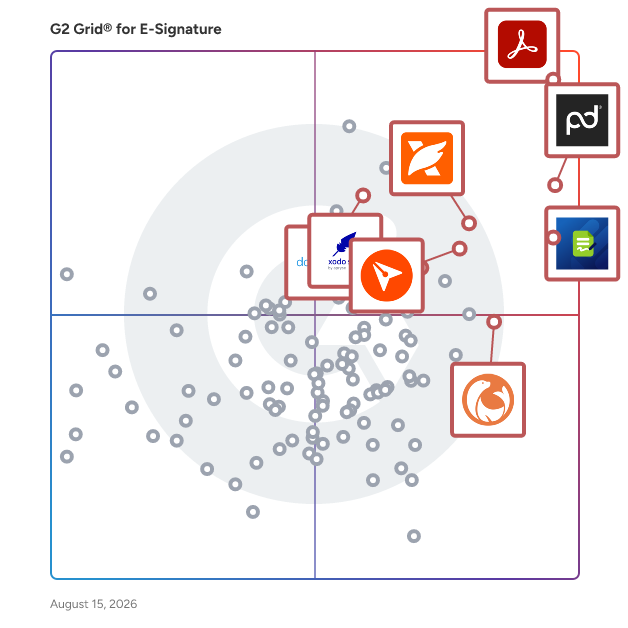
Highlighted products: Adobe Acrobat, PandaDoc, Jotform Sign, BoldSign, Foxit PDF Editor, DocuSeal, Xodo Sign, and dotloop.
Underlying data: [Grid® JSON](https://www.g2.com/categories/e-signature/grids.json?focus%5B%5D=adobe-acrobat&focus%5B%5D=pandadoc&focus%5B%5D=jotform-sign&focus%5B%5D=boldsign&focus%5B%5D=foxit-pdf-editor&focus%5B%5D=docuseal&focus%5B%5D=xodo-sign&focus%5B%5D=dotloop&segment=small-business)
Sponsored
altaFlow generates custom docs with a click, integrates eSignatures, creates webforms, and more without coding. It’s the ultimate tool to simplify, automate, and elevate your workflows.
signNow is an electronic signature that enables business to be conducted anywhere, anytime and on any device. signNow offers the best ROI for SBM and mid-market thanks to its intuitive UI, transparent pricing, flexible configuration and the ease of API integrations. All paid plans of airSlate SignNow include unlimited number of users.
Average Rating: 4.6/5.0
Total Reviews: 1,731
AI-generated summary from verified user reviews
"Precision and Speed, Scaling Our Legal Workflows with SignNow Advanced Document Automation"
Rating: 4.5/5.0 stars
— Verified User in Information Technology and Services
"Saves time, which makes it invaluable!"
Rating: 5.0/5.0 stars
— Julia R.
DocHub offers a comprehensive online solution to streamline and enhance your document workflows. With DocHub, you can effortlessly edit, sign, fill out, and share documents or forms from anywhere, making it perfect for work, school, or everyday tasks. With seamless Google integrations, you can manage your documents directly from your favorite apps—no hassle, no downloads, just productivity.
Average Rating: 4.6/5.0
Total Reviews: 272
AI-generated summary from verified user reviews
"A Fast, Affordable E-Signature Solution That Just Works"
Rating: 5.0/5.0 stars
— Darrell W.
"Clean, Browser-Based PDF Edits and E-Signatures Made Simple"
Rating: 5.0/5.0 stars
— Muzammil M.
GetAccept est la salle de vente numérique AI numéro 1, conçue pour aider les équipes de revenus à gérer chaque affaire comme leur meilleur représentant commercial. Elle remplace les e-mails dispersés et les pièces jointes statiques par un espace de travail natif AI, réunissant contenu, propositions, signatures électroniques et communication avec les acheteurs afin que les vendeurs, les acheteurs et chaque partie prenante restent alignés sur les derniers documents, calendriers et prochaines étapes tout au long du cycle de vente. L'IA de GetAccept analyse vos réunions, appels, e-mails, données CRM, contenu interne et données disponibles publiquement, et est formée pour agir, en construisant et mettant à jour des salles de vente numériques personnalisées en quelques minutes et en gardant chaque représentant sur la bonne voie avec votre processus et méthodologie de vente. Le suivi en temps réel montre exactement comment les acheteurs interagissent avec chaque affaire, et les intégrations CRM natives gardent tout synchronisé dans les outils que les représentants utilisent déjà. GetAccept résout le problème des affaires qui stagnent entre les réunions dans des fils d'e-mails dispersés, des pièces jointes statiques et une administration manuelle. En offrant aux vendeurs et aux acheteurs un espace unique et traçable pour collaborer du premier contact à la signature, il aide les équipes de revenus de toutes tailles à travailler plus intelligemment, à conclure plus rapidement et à gagner davantage. Pourquoi les équipes de revenus choisissent GetAccept ↳ Activation alimentée par l'IA : générer automatiquement et faire apparaître le bon contenu pour chaque affaire, étape et partie prenante, basé sur vos réunions, CRM et connaissances internes. ↳ Salles de vente construites par l'IA : créer une salle de vente numérique personnalisée et interactive en quelques minutes qui garde les conversations, les matériaux et les actions alignés. ↳ Intelligence des affaires : transformer les signaux d'engagement des acheteurs en visibilité claire et en prochaines étapes guidées par l'IA. ↳ Propositions et signatures électroniques intégrées : créer, envoyer, suivre et conclure des documents sans quitter la salle. ↳ Connecté à votre pile : intégrations natives classées numéro 1 avec Salesforce, HubSpot et Slack, plus 100+ autres, gardent l'activité synchronisée partout automatiquement. Fiable par plus de 5 000 équipes de revenus, y compris Dealfront, ScaleWise, Samsung et Chargebee. "C'est un moyen pour vous de contrôler le récit, de vous assurer que vos représentants respectent le processus et aident vos clients à vivre une expérience de valeur au lieu de simplement présenter le produit." Remi Aaagaard Mørken, SVP des ventes, SalesScreen (augmentation de 100 % du taux de réussite) "Depuis que j'ai commencé à utiliser GetAccept, mon processus de vente et ma communication avec mes prospects sont beaucoup plus orientés projet et solution. Ils savent où trouver le contenu dont ils ont besoin, et je peux me concentrer sur la fourniture de solutions." Carolina Bräuninger, Senior Strategic Account Executive, Dealfront (réduction de 67 % du temps de cycle de vente) "Si vous n'avez pas quelque chose comme GetAccept d'un point de vue des contrats, mais également d'un point de vue de la salle de négociation, alors vous êtes en retard." Gavin Summer, co-fondateur, ScaleWise (augmentation de 51 % du taux de proposition à clôture)
Average Rating: 4.6/5.0
Total Reviews: 1,252
AI-generated summary from verified user reviews
"GetAccept : un accélérateur de productivité au quotidien"
Rating: 5.0/5.0 stars
— Christelle A.
"GetAccept : Un changeur de jeu pour centraliser les opérations de vente avec HubSpot"
Rating: 5.0/5.0 stars
— Franck T.
Docusign aide les organisations à se connecter et à automatiser la façon dont elles préparent, signent, agissent et gèrent les accords. Dans le cadre de la gestion intelligente des accords (IAM) de Docusign, Docusign propose eSignature, la méthode numéro un au monde pour signer électroniquement sur pratiquement n'importe quel appareil, de presque n'importe où, à tout moment. Aujourd'hui, plus d'un million de clients et plus d'un milliard d'utilisateurs dans plus de 180 pays utilisent la gestion intelligente des accords (IAM) de Docusign pour accélérer le processus de faire des affaires et simplifier la vie des gens. Pourquoi les entreprises du monde entier choisissent Docusign : * Approuvé par plus d'un million de clients et plus d'un milliard d'utilisateurs * 80 % des accords complétés en 24 heures (44 % en moins de 15 minutes) * Économise en moyenne 36 $ par document par rapport aux processus papier traditionnels * Support client 24/7 * Plus de 350 intégrations et API * Docusign eSignature a le plus d'avis 5 étoiles de tous les produits de signature électronique sur Apple App Store, Google Play Store et Salesforce AppExchange * Les eSignatures de Docusign sont sécurisées, légales et admissibles en justice
Average Rating: 4.5/5.0
Total Reviews: 2,523
AI-generated summary from verified user reviews
"Signature à distance rapide et sécurisée avec DocuSign—Accords conclus en quelques minutes"
Rating: 5.0/5.0 stars
— Claire D.
"DocuSign a rationalisé notre flux de travail documentaire et nous a fait gagner du temps"
Rating: 5.0/5.0 stars
— Quennette A.
Signaturely is a free electronic signature software to get documents signed online. Work smarter & faster by moving into the digital age with esignatures. Signing documents by hand, scanning them, and emailing them is a headache, wouldn’t you agree? Signaturely eliminates the headache and moves you into the digital age.
Average Rating: 4.8/5.0
Total Reviews: 566
AI-generated summary from verified user reviews
"Seamless and Reliable: Signaturely Simplifies Document Signing"
Rating: 5.0/5.0 stars
— Phil G.
"Facilitate Document Signing with Efficiency and Savings"
Rating: 4.5/5.0 stars
— Nathalia R.
Signeasy is an eSignature and Intelligent Contract Management platform for every team that works with contracts. Finance, HR, Sales, Operations, IT, Legal Ops, and Supply Chain teams across 48,000+ businesses in 100+ countries use Signeasy to manage contracts from the first request to renewal. Signeasy has everything your team needs to manage contracts end to end: - eSignatures - Secure contract repository - Approval workflows - AI-powered contract insights and summary - Key term extraction - Renewal reminders - Downloadable reports - Team workspaces with Role-based access control - Search that lets you go deep into your contracts - AI answer engine that helps you get information from your contracts Signeasy is built for every team that touches contracts. Its AI tells you what's inside every contract, team workspaces show what's pending, and renewal tracking surfaces insights you can act on — all inside one platform. Signeasy easily integrates with the tools your team already uses: Google Workspace, Microsoft 365, HubSpot, SharePoint, Salesforce, and more. With over 100 million contracts processed, every feature is built to ensure your contracts are secure and compliant with SOC 2, GDPR, HIPAA, 21 CFR Part 11 and eIDAS — with audit trails, 2FA, SSO, and tamper-proof trust seals built in. Signeasy focuses on user experience and is a Google recommended App and is designed for a mobile workforce in the SMB and mid-market segment. Signeasy is reputed for its high-touch human support team. Customers report saving dozens of hours a month, eliminating manual follow-ups, and processing contracts significantly faster on Signeasy. Hear it directly from our customers: https://signeasy.com/case-study
Average Rating: 4.7/5.0
Total Reviews: 743
AI-generated summary from verified user reviews
"Less manual follow-up for contracts, change orders, and approval documents"
Rating: 5.0/5.0 stars
— Samantha V.
"Easy to Use, Fast, and Helpful Outlook Integration"
Rating: 5.0/5.0 stars
— Nick M.
DottedSign is a trusted, seamless, and flexible eSignature solution designed to enhance operational effectiveness for organizations. Offering accessible SaaS, API, and self-hosted deployment , DottedSign enables secure online signing, ensuring regulatory compliance. Try out DottedSign Business Plan FREE for 14-days: https://www.dottedsign.com/ Review DottedSign to get US$20 now: https://reurl.cc/1bnD0G KEY FEATURES GET SIGNATURE FROM MULTIPLE SIGNERS ● Invite signers by adding them straight from your contact list or entering their emails (Google Contact supported) ● Remote signing - Assign signature, initial, date and text fields to signers in a designated order. Advanced field settings are available including checkbox, radio button, image and hyperlink fields. ● Bulk send - Send a single document to multiple groups of signers ● Public form - Create an on-demand, self-service document signing link on your website ● Front desk signing - For face-to-face signing scenarios ● Color-coded fields to navigate your signers where to fill in ● Save tasks as reusable templates, or create standardized document templates ● Modify documents - Merge, replace, add, or remove documents in tasks or templates ● Field conditional rule - Dynamic field filling setup for signers' smooth signing completion ● Assign editors to handle the signing process, simplifying it for the sender ● Set document viewing permissions for each recipient SIGN DOCUMENTS YOURSELF & PERSONALIZE YOUR SIGNATURES ● Add your eSignature by hand, by the mobile panel, or by typing ● Click signature - Add your last-used signature by clicking the field, and it will apply automatically ● Make stamps by using your camera or photos ● Pre-fill your personal information and drag and drop it to the document ● Add signatures, initials, texts, and dates to documents ● Adjust the font size and text alignment to your liking ● Remove backgrounds for signature stamps MANAGE SIGNATURE TASKS ● Visual progress bar - Monitor signature tasks by intuitively checking all signers’ status ● Timeline of Personal Activities - Display and record activities of all your personal tasks ● Void signature requests - Cancel signature tasks with one tap ● Search - Find your documents easily by searching with signer names, documents, or field search key ● Custom message - Leave messages to all recipients before and after completion ● Auto reminder & expiry date setting - Automatically send reminders to notify anyone who has not signed documents yet ● Change signer – Replace a recipient of a sent document with another one; recipient can send change requests to the sender ● Decline to sign or edit recipient permissions– Sender can manage the recipient’s permission to decline the request in case the document requires further amendment EXPAND YOUR TEAM CAPACITY WITH ADVANCED SECURITY AND CONTROLS ● Create your Admin Console and invite team members ● Template sharing across the team ● Team management reporting - Show insights based on the team performance ● Set up your logo, profile and name when sending the signature request email ● Member permission control across files and relevant data access under the Admin Console IMPORT, EXPORT AND SHARE DOCUMENTS WITH EASE ● Get documents from camera, photos, the iOS file app, email attachments and the web ● Import documents from cloud services, including Google Drive, OneDrive, Dropbox and KDAN Cloud ● Export completed documents to cloud services, including Google Drive and OneDrive ● Share the document via a file link to open the file directly on the web browser SECURITY AND LEGALITY ● Digital audit trails - Record every change made to the document for evidence ● Protected signing process - Ensure confidentiality of paperless signing, encrypted by TLS/SSL, AES-256 and RSA-2048 ● Email & SMS secure password to identify signer identity before accessing the task OR before completing the task ● Digital certificates issued by Adobe Approved Trust List (AATL) certified CA INTEGRATIONS ● Top-tier integrations - Google Drive, Gmail, Salesforce, Microsoft Teams, Zapier, and more ● DottedSign API - Automate the signing flow in your system ● Embedded signing - Quickly integrate eSignature into your web applications
Average Rating: 4.7/5.0
Total Reviews: 235
AI-generated summary from verified user reviews
"Smooth & Secure Signing Experience!"
Rating: 4.5/5.0 stars
— Jalissa P.
"Clean, Simple E-Signing That Saves Time"
Rating: 4.5/5.0 stars
— Muzammil M.
From lead to cash, Ignition transforms your sales, billing and payments process with seamless automation. Over 8,500 service-based businesses, including accounting, agencies, consulting and financial services, trust Ignition to sell, bill and get paid. ✓ Capture leads and manage your sales pipeline ✓ Fast track revenue with branded online proposals ✓ Get paid on time with automated invoicing and payments ✓ Reduce business risk with templated contracts ✓ Automate data collection with online forms ✓ Centralize and manage client billing in one place ✓ Keep track of projected revenue and cash flow ✓ Seamlessly increase pricing and renew proposals in bulk ✓ Connect apps to automate workflows
Average Rating: 4.7/5.0
Total Reviews: 122
AI-generated summary from verified user reviews
"Streamlined Proposals & Invoicing with Ease"
Rating: 4.5/5.0 stars
— Kevin L.
"All-in-One System That Simplifies Proposals, Engagement Letters, and Invoicing"
Rating: 4.5/5.0 stars
— Angela K.
Dropbox DocSend helps business professionals like you to securely share and control the content that drives your business forward. Dropbox DocSend's powerful link-based system makes it easy to set security preferences for each stakeholder, receive notifications each time someone views your file, analyze content performance on a page-by-page basis, and create modern virtual deal rooms. With DocSend, business can offload administrative burdens and securely share the most impactful proprietary information faster. DocSend’s Virtual Data Rooms manage sensitive documents securely and gets team real-time deal insights, simplying the entire deal process from initial pitch to final signature. Join over 34,000 companies that rely on Dropbox DocSend to share and manage sensitive information.
Average Rating: 4.6/5.0
Total Reviews: 561
AI-generated summary from verified user reviews
"Docsend Makes Secure Document Sharing Simple with Helpful Viewing Insights"
Rating: 5.0/5.0 stars
— Muzammil M.
"I didn't expect document analytics to be this useful"
Rating: 5.0/5.0 stars
— Yaroslav B.
We are a tech company disrupting the e-signing market with competitive pricing, biometric verification and a user-friendly product. Many businesses are making the switch to Yoti, saving them money and making the process of sending, signing and managing documents so much easier. Thanks to the advanced encryption used, it is the safest way to get any contract or agreement signed from anywhere in the world and on any device. Our team has analysed the market and products available and developed an e-signing platform that is seamless for users. Features like templates, check boxes, editable text fields and signing order allow you to adjust documents to your needs. Embedded in the platform, biometric verification is the powerful option to carry out client onboarding, KYC or authenticate a signee. Our e-signing platform is a tool for both small and large businesses that are looking to speed up their sales processes and improve customer service. We have onboarded a significant number of customers across many sectors such as tech, property, legal, financial and recruitment. Our clients have reviewed us with an average score of 9.6/10, with a particular emphasis towards the customer service and integration support the team are offering.
Average Rating: 4.9/5.0
Total Reviews: 24
Rating: 5.0/5.0 stars
— Simon A.
"Fantastic eSigning tool and team at Yoti Sign"
Rating: 5.0/5.0 stars
— Paul J.
eZsign is a secure, legally binding e-signature platform for businesses of any size, anywhere — with data hosted exclusively in Canada. That gives every customer strong privacy protection, and gives organizations subject to Canadian or Quebec privacy laws (PIPEDA, Law 25) built-in compliance with no configuration. Fully bilingual in English and French, eZsign delivers SOC 2 Type II certified security, Level 4 assurance, Long-Term Validation (LTV), and Time Stamping Authority (TSA) timestamps. Every signed document includes a court-admissible audit trail. Pricing is simple: one flat monthly rate in CAD covers teams of 2 to 10 users, with unlimited documents, unlimited signatures, and no envelope limits or overage fees. Onboarding training and live human support are included on all business plans — you reach a real person, not a chatbot. Used across HR, sales, legal, real estate, accounting, procurement, and government. A strong alternative to DocuSign, Adobe Acrobat Sign, and PandaDoc for teams that want predictable pricing, fast human support and training for their team. Try it free for 30 days — no credit card required.
Average Rating: 4.7/5.0
Total Reviews: 99
Rating: 4.5/5.0 stars
— Benoît L.
"Intuitive with Responsive Support and Great Value"
Rating: 4.5/5.0 stars
— Laura R.
Evrotrust is an electronic identity and trust service provider with a mission to help businesses transform their services and develop sustainable digital channels. Established with a vision to redefine how identity is verified online, we strive to provide secure, efficient, and user-friendly solutions for digital authentication, e-signatures, and identity proofing. For the past 7 years, hundreds of enterprises from 11 countries have made Evrotrust the foundation of their digital services. 15 major EU banks prefer our regulated remote customer identification and e-signing to solve the security and compliance dilemma in the long term. Through the Evrotrust mobile application, we provide free, reusable electronic identity to more than 1.3 million users from 57 nationalities. Evrotrust offers robust legal and security protection for organizations during digital interactions with their clients while providing the end user with an easy-to-use agile tool that makes their experience as seamless as possible. Our expertise and the quality of our services are recognized internationally at the highest level. Evrotrust is also a qualified trust service provider, featured in the EU’s QTSPs list, and our solution has been elected as a notified eID scheme under the eIDAS. For more information, please visit: www.evrotrust.com
Average Rating: 4.9/5.0
Total Reviews: 30
"Zero-friction EU-valid E-Signatures that our team adopted instantly"
Rating: 5.0/5.0 stars
— Lubomila J.
"Effortless Signature Automation, Highly Reliable"
Rating: 5.0/5.0 stars
— Philip B.
OneSpan Sign is a modern, secure, and enterprise-grade eSignature solution designed to help organizations streamline document signing workflows and enhance customer experiences. This innovative platform addresses the growing need for efficient and reliable electronic signature processes, particularly in industries where compliance and security are paramount. By leveraging advanced technology, OneSpan Sign empowers businesses to manage their document signing needs effectively while reducing turnaround times and improving overall operational efficiency. Targeted primarily at enterprises and organizations that require robust eSignature capabilities, OneSpan Sign caters to a wide range of industries, including finance, insurance, government, public sector, healthcare, technology, and business services. These sectors often face stringent regulatory requirements and high stakes when it comes to document security and integrity. OneSpan Sign provides a comprehensive solution that not only meets these demands but also offers a user-friendly interface that simplifies the signing process for both senders and signers. This ease of use is crucial in fostering positive customer interactions and ensuring that agreements are completed swiftly. One of the key features of OneSpan Sign is its high level of customization, which allows organizations to fully tailor the signing experience to align with their brand identity. This includes the ability to incorporate logos, colors, and personalized messaging, ensuring that the eSignature process feels cohesive and familiar to users. Unlike other eSignature solutions that prioritize their own branding, OneSpan Sign’s white-labeling capabilities keep your brand front and center, leading to higher adoption and a seamless user experience. Security is a cornerstone of OneSpan Sign, which offers advanced identity proofing, authentication methods, and encryption protocols to protect sensitive information. This focus on security not only helps organizations safeguard their data but also builds trust with customers who are increasingly concerned about privacy and fraud. Furthermore, OneSpan Sign is recognized for its exceptional customer support, ranked #1 in customer satisfaction according to G2 Quality of Support. This commitment to responsive and expert assistance ensures seamless implementation and ongoing success for users. Another significant advantage of OneSpan Sign is its cost-effectiveness compared to traditional eSignature solutions. Many organizations struggle with the high costs associated with scaling eSignature capabilities, but OneSpan Sign offers one of the most flexible and competitive pricing models on the market. This makes it an attractive option for businesses looking to enhance their document signing processes without incurring prohibitive expenses, ultimately leading to improved operational efficiency and customer satisfaction.
Average Rating: 4.7/5.0
Total Reviews: 735
AI-generated summary from verified user reviews
"Fast, Secure, and Easy to Use"
Rating: 5.0/5.0 stars
— Monica S.
"Efficient, Secure, and Easy to Use"
Rating: 4.5/5.0 stars
— Alex S.
Create remarkable client experiences. CRM, portal, payments, tasks, contracts & more — with an AI Assistant that works for you. Assembly is the AI-powered platform for professional service firms. It replaces a patchwork of point tools with one place to run client work — so clients get a clean, branded portal for tasks, payments, messages, files, contracts, and forms, and your team runs on a simple CRM with an AI Assistant that knows full client context. The result: faster onboarding, improved retention, and happier clients. Assembly also fits the stack you already use. Embed Calendly, Airtable, and 1,000s of other products, connect Zapier/Make and webhooks, or build Custom Apps with our API so your workflow drives the software, not the other way around. Trusted by 1,000+ businesses serving 1M+ clients. SOC 2 Type II and HIPAA. Start a 14-day trial at assembly.com.
Average Rating: 4.7/5.0
Total Reviews: 324
AI-generated summary from verified user reviews
"Quick, Seamless Onboarding with Time-Saving Rules, Billing, and Client Communication"
Rating: 5.0/5.0 stars
— Aminder M.
"All-in-One, Minimalist Dashboard with the Features You Actually Need"
Rating: 5.0/5.0 stars
— Greg F.
Make your competitors’ proposals look primitive with Qwilr. Send proposals, generate quotes, collect sign-off, and get paid – all in one place. Trusted by 5,000+ organizations including OpenTable, Thomson Reuters, Drata, Yale University and more, Qwilr helps sales teams close deals faster by turning static proposals and quotes into interactive, trackable web pages. With Qwilr, you can… Create impressive, interactive proposals: Engage buyers with dynamic proposals featuring videos, interactive pricing, calendar links and more Get deals closed faster: Get deals signed with legally-compliant e-signatures and collect payments instantly with our integrated payments solution, QwilrPay Track buyer engagement: See what your buyers view and click on, and use this to tailor your follow-ups. Get real-time alerts via Slack or email when buyers take action Keep every page consistently branded: Standardize your proposals, automatically applying your fonts and colors to every page Scale your process with automation: Connect Qwilr to Salesforce, HubSpot, Pipedrive or Zoho and automate proposal creation. Improve team efficiency: Create reusable templates and content blocks, so that reps never start from scratch Thousands of sales teams use Qwilr to modernize their proposal process, impress buyers, and close deals faster. Try Qwilr free for 14 days: https://qwilr.com/
Average Rating: 4.6/5.0
Total Reviews: 900
AI-generated summary from verified user reviews
"User-Friendly, Time-Saving Quotes with Live Updates in Qwilr"
Rating: 5.0/5.0 stars
— Julie B.
"Versatile, Polished Quotes That Boost Client Confidence"
Rating: 5.0/5.0 stars
— Jacob J.