Best Design Systems Software for Small Business

How Many Design Systems Software Products Does G2 Track?

Total Products under this Category: 44

Category Stats (Sep 2026)

  • Average Rating: 4.5/5 (↓0.01 vs Aug 2026) The average rating of products in this category, based on all submitted ratings
  • Top Trending Product: Desygner (+0.22%) - Among all products in this category, Desygner recorded the largest rating increase compared to last month

Last updated: September 15, 2026

How Does G2 Rank Design Systems Software Products?

Why You Can Trust G2's Software Rankings:

  • 30 Analysts and Data Experts
  • 9,800+ Authentic Reviews
  • 44+ Products
  • Unbiased Rankings

G2's software rankings are built on verified user reviews, rigorous moderation, and a consistent research methodology maintained by a team of analysts and data experts. Each product is measured using the same transparent criteria, with no paid placement or vendor influence. While reviews reflect real user experiences, which can be subjective, they offer valuable insight into how software performs in the hands of professionals. Together, these inputs power the G2 Score, a standardized way to compare tools within every category.

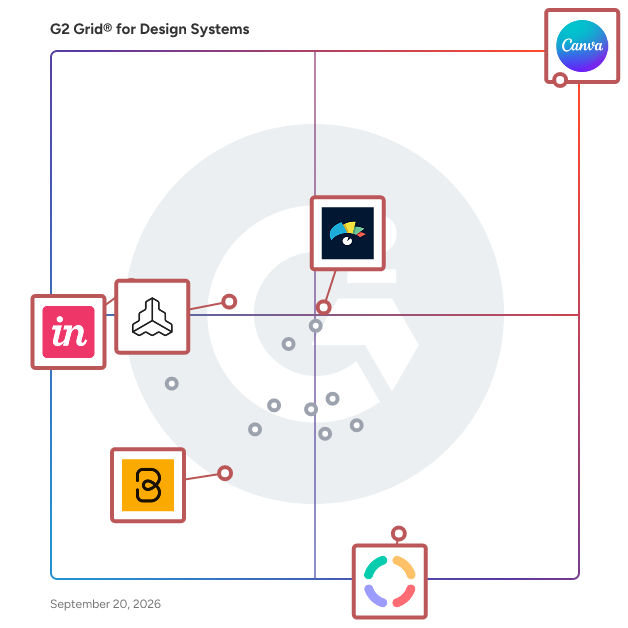
G2 Grid® for Design Systems Software

G2 Grid® for Design Systems Software plotting products by satisfaction and market presence

Highlighted products: Canva, Visme, InVision, Frontify, Design Huddle, and Baseline.

Underlying data: [Grid® JSON](https://www.g2.com/categories/design-systems/grids.json?focus%5B%5D=canva&focus%5B%5D=visme&focus%5B%5D=invision&focus%5B%5D=frontify&focus%5B%5D=design-huddle&focus%5B%5D=baseline-baseline&segment=small-business)

Canva

Canva is a visual communication platform that gives everyone a creative voice, no matter your design experience, team size, or budget. Whether you're a student making your first presentation, a marketer producing social graphics in minutes, or a global team creating on-brand content without touching a designer's inbox, Canva is where ideas become something you can actually show. Start with one of over a million professionally designed templates, or build from scratch with an AI-powered drag-and-drop editor. A library of stock images, videos, soundtracks, and fonts means you are easily equipped to create visual content at scale. Looking to work in Canva across your team? Real-time collaboration lets multiple people design simultaneously. Brand kits keep assets, colors, and fonts consistent across a one-person business or a Fortune 500 company. Canva AI helps you generate, resize, write, and edit visuals in a fraction of the time. Canva is used by more than 265 million people across 190 countries and trusted by 95% of Fortune 500 companies. Canva is available on the web, iOS and Android.

Average Rating: 4.7/5.0

Total Reviews: 6,500

How Do G2 Users Rate Canva?

  • Has the product been a good partner in doing business?: 9.4/10 (Category avg: 8.9/10)
  • Template Usage: 9.2/10 (Category avg: 8.4/10)
  • Educational Resources: 8.9/10 (Category avg: 8.3/10)
  • Design Templates: 9.4/10 (Category avg: 9.0/10)

Who Is the Company Behind Canva?

  • Seller: Canva
  • Company Website:
  • Year Founded: 2012
  • HQ Location: Sydney
  • Twitter: @canva
    339,250 Twitter followers
  • LinkedIn® Page: www.linkedin.com
    19,250 employees on LinkedIn®

Who Uses This Product?

  • Who Uses This: Owner, Marketing Manager
  • Top Industries: Marketing and Advertising, Information Technology and Services
  • Company Size: 66% Small, 23% Medium

What Do G2 Reviewers Say About Canva?

AI-generated summary from verified user reviews

Pros
  • Users appreciate the ease of use in Canva, enabling quick, intuitive designs on any device with minimal effort.
  • Users love the extensive templates in Canva, enabling quick and polished designs that suit varied needs effortlessly.
  • Users love Canva for its extensive design options, intuitive interface, and time-saving templates across devices.
  • Users love how Canva offers easy creation with intuitive templates and features, streamlining their design workflow effortlessly.
  • Users appreciate the wide variety of ready-made templates in Canva, enabling quick and easy design customization.
Cons
  • Users find Canva's limited features frustrating, especially with vector editing and costly premium options for essential tools.
  • Users find the limited options in Canva frustrating, especially for vector editing and bulk page creation.
  • Users express frustration over the missing features in Canva, impacting design capabilities and overall usability.
  • Users feel that the premium plan is expensive, especially for beginners who need essential features.
  • Users find the limited customization options in Canva restricts their creativity and flexibility in design projects.

What Are Recent G2 Reviews of Canva?

What Are G2 Users Discussing About Canva?

Visme

Visme is the operating system for business content, the platform teams use to create, manage, and scale everything their business communicates with, from presentations and reports to infographics, documents, and social graphics. Where most AI creates from a blank prompt, Visme works from what your business already knows. Connect your Drive, OneDrive, SharePoint, and existing decks, and Visme reads them, structures them, and learns your brand, voice, and key facts. Every new piece is held to that brand standard automatically, with the right fonts, colors, logos, and tone applied without anyone enforcing them manually. Visme's AI is grounded in your brand, your content, and your data rather than a generic prompt, so what it produces reads like your company instead of off-the-shelf output. From that foundation, Visme can build on-brand Sales Decks, QBRs, and Proposals from your own content, pull live data from Salesforce, Google Sheets, and Excel, and update a fact once so it carries across every piece built from it. Visme is built for the teams that produce recurring customer-facing content: sales, customer success, marketing, and revenue operations. Real-time collaboration keeps distributed teams working in one place, and Smart Link sharing shows how content performs after it is sent. The outcome is one system the whole company creates from, consistent, current, and built on what your team already has, so the people accountable for the brand can hold the standard without reviewing every piece.

Average Rating: 4.5/5.0

Total Reviews: 498

How Do G2 Users Rate Visme?

  • Has the product been a good partner in doing business?: 9.2/10 (Category avg: 8.9/10)
  • Template Usage: 9.0/10 (Category avg: 8.4/10)
  • Educational Resources: 8.9/10 (Category avg: 8.3/10)
  • Design Templates: 9.3/10 (Category avg: 9.0/10)

Who Is the Company Behind Visme?

  • Seller: Visme
  • Company Website:
  • Year Founded: 2014
  • HQ Location: Rockville, Maryland
  • Twitter: @VismeApp
    63,790 Twitter followers
  • LinkedIn® Page: www.linkedin.com
    91 employees on LinkedIn®

Who Uses This Product?

  • Who Uses This: CEO, Founder
  • Top Industries: Marketing and Advertising, Education Management
  • Company Size: 69% Small, 24% Medium

What Do G2 Reviewers Say About Visme?

AI-generated summary from verified user reviews

Pros
  • Users praise Visme for its ease of use, enabling non-designers to create stunning presentations effortlessly.
  • Users love the variety of templates in Visme, enabling easy creation of beautiful presentations for everyone.
  • Users value the intuitive user interface and extensive features of Visme, enhancing the design experience for all.
  • Users appreciate the intuitive and easy-to-use interface of Visme, enhancing their creative workflow effectively.
  • Users find the intuitive interface of Visme perfect for creating impressive presentations, even without design skills.
Cons
  • Users express frustration over limited features in Visme, including collaboration restrictions and formatting issues.
  • Users express frustration over missing features like collaboration limitations and insufficient editing tools in Visme.
  • Users face limited editing capabilities in Visme, hindering collaboration and complicating project management across different formats.
  • Users find the pricing of Visme to be expensive, especially for freelancers needing budget-friendly options.
  • Users express concern over limited options in Visme, including basic shapes and audio tracks in videos.

What Are Recent G2 Reviews of Visme?

What Are G2 Users Discussing About Visme?

InVision

InVision is the visual collaboration platform powering the world’s smartest companies. We exist to make every kind of work more collaborative, inclusive and impactful. Between our platform, our practices, and our community, we enable tens of thousands of organizations to improve their processes and workflows so they can get the most out of their most valuable asset: their people. Sign up for a free trial at invisionapp.com and begin streamlining your digital product workflow.

Average Rating: 4.4/5.0

Total Reviews: 680

How Do G2 Users Rate InVision?

  • Has the product been a good partner in doing business?: 8.8/10 (Category avg: 8.9/10)
  • Template Usage: 8.3/10 (Category avg: 8.4/10)
  • Educational Resources: 6.7/10 (Category avg: 8.3/10)
  • Design Templates: 8.3/10 (Category avg: 9.0/10)

Who Is the Company Behind InVision?

  • Seller: InVision
  • Year Founded: 2011
  • HQ Location: N/A
  • Twitter: @freehandapp
    50 Twitter followers
  • LinkedIn® Page: www.linkedin.com
    1 employees on LinkedIn®

Who Uses This Product?

  • Who Uses This: UX Designer, Designer
  • Top Industries: Design, Marketing and Advertising
  • Company Size: 50% Small, 33% Medium

What Do G2 Reviewers Say About InVision?

AI-generated summary from verified user reviews

Pros
  • Users love the intuitive animation tools in InVision, enhancing creativity and collaboration in their design process.
  • Users love the effortless navigation of InVision's Auto Layout, enhancing collaboration and design efficiency significantly.
  • Users value the collaboration features of InVision, enhancing teamwork with real-time comments and easy access to designs.
  • Users love the creativity tools in InVision, enhancing collaboration and making design processes more dynamic and engaging.
  • Users find InVision's ease of use invaluable for navigating mockups and collaborating seamlessly on projects.
Cons
  • Users find comment management inadequate, making it difficult to follow conversations and context effectively.
  • Users face challenges with commenting difficulty as scattered threads make it hard to track conversations and context.
  • Users find comment management challenging as scattered threads make it hard to track conversations and context.
  • Users struggle with poor organization in InVision, causing difficulties in managing comments and following conversation threads.

What Are Recent G2 Reviews of InVision?

What Are G2 Users Discussing About InVision?

Frontify

Frontify is a brand-building platform where a user-friendly DAM meets customized portals. With Frontify, you can: - Give context to your assets, enabling everyone to use them correctly. - Simplify how you organize and share your assets, allowing anyone to discover and contribute. - Launch on-brand campaigns at scale across global and local teams, leveraging existing assets and proving ROI. - Connect, modify and customize for a truly personalized end to end experience. Book a demo to see why Frontify has been listed on both G2's Best Software Awards and The Forrester Wave™.

Average Rating: 4.5/5.0

Total Reviews: 212

How Do G2 Users Rate Frontify?

  • Has the product been a good partner in doing business?: 9.3/10 (Category avg: 8.9/10)
  • Template Usage: 7.6/10 (Category avg: 8.4/10)
  • Educational Resources: 8.0/10 (Category avg: 8.3/10)
  • Design Templates: 7.8/10 (Category avg: 9.0/10)

Who Is the Company Behind Frontify?

  • Seller: Frontify AG
  • Company Website:
  • Year Founded: 2013
  • HQ Location: St.Gallen, Switzerland
  • Twitter: @Frontify
    2,750 Twitter followers
  • LinkedIn® Page: www.linkedin.com
    355 employees on LinkedIn®

Who Uses This Product?

  • Top Industries: Marketing and Advertising, Information Technology and Services
  • Company Size: 42% Large, 38% Medium

What Do G2 Reviewers Say About Frontify?

AI-generated summary from verified user reviews

Pros
  • Users find Frontify's intuitive platform essential for centralizing brand management and enhancing collaboration across teams.
  • Users highlight the fast and effective customer support of Frontify, enhancing their overall experience and satisfaction.
  • Users value the all-in-one asset organization of Frontify, praising its ease of use and time-saving features.
  • Users find Frontify easy to use, facilitating seamless asset management and collaboration within their teams.
Cons
  • Users express disappointment with Frontify's poor usability, citing a clunky interface and cumbersome editing processes.
  • Users experience a steep learning curve with Frontify, making initial setup challenging despite easier maintenance later on.

What Are Recent G2 Reviews of Frontify?

What Are G2 Users Discussing About Frontify?

Design Huddle

Design Huddle is a white label design and video creation platform, offering complete branding control and powerful APIs for custom integrations. It empowers businesses to streamline the creation of digital, print, video, and slide content through template-based editing and automation. Who it’s for: - Web-to-print businesses that want to simplify the design experience and increase customer loyalty with easy-to-personalize standard and large format media, packaging, signage, stickers, apparel, and any other unique product. - SaaS and technology platforms looking to expand their product offerings through a custom media creation experience, featuring programmatic automation for personalized content and a user-friendly UI for seamless editing. - Brands and agencies seeking to fast-track the design-to-approval process by giving teams and clients the autonomy to edit designs and videos within brand-approved guardrails. - Franchises aiming to scale marketing to a diverse network of business owners while maintaining brand consistency and enabling franchisees to effortlessly localize content. Product Description: Design Huddle’s API-first embeddable media creation platform makes it easy to import existing designs, convert them into editable, lockable templates, and personalize media through an intuitive interface or programmatically. The platform offers a comprehensive feature set, including media asset management, smooth design and motion graphics imports, granular template locking, and creative automation for programmatic content population. Design Huddle also provides user-friendly editing workflows, a robust API library and JavaScript SDK for custom integrations and UI experiences, a drag-and-drop editor for both static and motion graphics, royalty-free stock media libraries, social media integrations, user roles and permissions, and dedicated admin and user portals. The benefits of Design Huddle include: - One tool for every media type - Create editable templates for digital, print, video, and slides–everything in one place. - Built for everyone, not just designers - An intuitive UI and consistent, template-based editing workflows empower any user to customize designs and eliminate guesswork. - Personalized content at scale - Creative automation streamlines repetitive production tasks on existing designs and videos, boosting efficiency, speeding up production, and saving businesses and creative teams time. - Your creative process, uninterrupted - Design Huddle’s seamless design and motion graphics imports let you design in your favorite apps, then quickly import pixel-perfect media and convert it into editable templates. - Design autonomy, brand aligned - Template locking defines which elements and properties can be edited, guaranteeing that designs remain consistent while giving users the creative independence and simple workflows to produce designs quickly. - Custom development with turnkey speed - Design Huddle’s API and JavaScript SDK make it easy to use our ready-made editor as a base for customizations, speeding up time-to-launch and reducing development costs.

Average Rating: 4.8/5.0

Total Reviews: 35

How Do G2 Users Rate Design Huddle?

  • Has the product been a good partner in doing business?: 9.7/10 (Category avg: 8.9/10)
  • Template Usage: 10.0/10 (Category avg: 8.4/10)
  • Educational Resources: 10.0/10 (Category avg: 8.3/10)
  • Design Templates: 10.0/10 (Category avg: 9.0/10)

Who Is the Company Behind Design Huddle?

Who Uses This Product?

  • Top Industries: Marketing and Advertising, Computer Software
  • Company Size: 70% Small, 24% Medium

What Do G2 Reviewers Say About Design Huddle?

AI-generated summary from verified user reviews

Pros
  • Users value the seamless branding management in Design Huddle, enhancing consistency and collaboration across projects.
  • Users value the versatility of Design Huddle, enabling easy customization and consistent branding across all materials.
  • Users appreciate the user-friendly and collaborative branding tools of Design Huddle, enhancing design resource accessibility.
  • Users love the seamless branding customization of Design Huddle, ensuring consistent application of brand standards across materials.
  • Users love the customization capabilities of Design Huddle, enhancing customer satisfaction and streamlining the production process.
Cons
  • Users note feature limitations, yet appreciate the team's responsiveness and adaptability in addressing their needs.
  • Users note some limitations in user account setup, though many have found effective workarounds.
  • Users find it difficult from the admin side to keep everything organized effectively.
  • Users find it difficult to keep everything organized from the admin side, impacting their overall experience with Design Huddle.
  • Users find editing difficult, making organization challenging from the admin perspective in Design Huddle.

What Are Recent G2 Reviews of Design Huddle?

What Are G2 Users Discussing About Design Huddle?

Baseline

Baseline is a modern digital asset management (DAM) platform built for creative teams, agencies, and brand organizations that need more than file storage. Baseline combines centralized asset management with direct publishing — so teams can store, organize, and share brand assets, then publish them as live brand guides, client portals, and portfolio sites from the same workspace. Unlike traditional DAM systems that stop at storage, Baseline eliminates the gap between asset libraries and presentation. Update a logo, color palette, or approved asset once, and it automatically refreshes everywhere it's published. That means fewer version mix-ups, less duplicated work, and brand guidelines that stay current without manual rebuilds. Baseline is designed for teams that move fast without sacrificing consistency. AI-powered tagging and visual search help teams find assets in seconds instead of digging through folders. Flexible organization — gallery, Kanban, and table views — supports real approval workflows. Client-specific workspaces, board-level guest access, and secure share links make it a strong fit for agencies managing multiple brands, as well as in-house teams coordinating across departments. Plans start at $59/month with transparent pricing, so growing teams can adopt professional DAM capabilities without enterprise sales cycles. From solo creatives and small studios to agencies and larger organizations, Baseline helps teams spend less time searching for files and more time creating, approving, and publishing work that stays on brand.

Average Rating: 4.7/5.0

Total Reviews: 30

How Do G2 Users Rate Baseline?

  • Has the product been a good partner in doing business?: 9.6/10 (Category avg: 8.9/10)
  • Template Usage: 9.4/10 (Category avg: 8.4/10)
  • Educational Resources: 9.4/10 (Category avg: 8.3/10)
  • Design Templates: 9.3/10 (Category avg: 9.0/10)

Who Is the Company Behind Baseline?

  • Seller: Baseline
  • Year Founded: 2020
  • HQ Location: Reykjavik, IS
  • Twitter: @baselineis
    342 Twitter followers
  • LinkedIn® Page: www.linkedin.com
    3 employees on LinkedIn®

Who Uses This Product?

  • Top Industries: Design, Marketing and Advertising
  • Company Size: 93% Small, 17% Medium

What Do G2 Reviewers Say About Baseline?

AI-generated summary from verified user reviews

Pros
  • Users love the intuitive interface and advanced features of Baseline for easy logo creation and team collaboration.
  • Users love the inbuilt templates of Baseline for saving time and enabling creative designs effortlessly.
  • Users appreciate the customization options in Baseline, enabling a tailored and consistent brand identity effortlessly.
  • Users love the extensive template library of Baseline, enabling quick and creative design for various purposes.
  • Users love how Baseline provides time-saving capabilities, allowing quick setup and streamlined design processes for multiple brands.
Cons
  • Users find Baseline to be expensive compared to other design tools, limiting access to its extra features.
  • Users find the clumsy user interface of Baseline outdated, complicating navigation and overall user experience.
  • Users experience slow loading times with Baseline, particularly when accessing templates and the mobile application.
  • Users express frustration over the limited options available in Baseline's library, affecting their overall satisfaction.
  • Users find the expensive pro version a barrier, limiting access for small businesses and individuals.

What Are Recent G2 Reviews of Baseline?

Neeraja Prakash
NP
Researched and written by Neeraja Prakash
Updated