# Best Accounting Software for Small Business - Page 3

*By [Nathan Calabrese](https://research.g2.com/insights/author/nathan-calabrese)*


Products classified in the overall Accounting category are similar in many regards and help companies of all sizes solve their business problems. However, small business features, pricing, setup, and installation differ from businesses of other sizes, which is why we match buyers to the right Small Business Accounting to fit their needs. Compare product ratings based on reviews from enterprise users or connect with one of G2&#39;s buying advisors to find the right solutions within the Small Business Accounting category.

In addition to qualifying for inclusion in the Accounting Software category, to qualify for inclusion in the Small Business Accounting Software category, a product must have at least 10 reviews left by a reviewer from a small business.


## Top Accounting Software at a Glance
| # | Product | Rating | Best For | What Users Say |
|---|---------|--------|----------|----------------|
| 1 | [QuickBooks Online](https://www.g2.com/products/quickbooks-online/reviews) | 4.0/5.0 (3,755 reviews) | Browser-based small business accounting | "[QB Online Lets Me Work Anywhere, Anytime](https://www.g2.com/survey_responses/quickbooks-online-review-12994640)" |
| 2 | [Sage Intacct](https://www.g2.com/products/sage-intacct/reviews) | 4.3/5.0 (3,973 reviews) | Advanced financial reporting | "[Powerful Reporting and Integrations That Keep Work Moving](https://www.g2.com/survey_responses/sage-intacct-review-13139484)" |
| 3 | [NetSuite](https://www.g2.com/products/oracle-netsuite/reviews) | 4.1/5.0 (4,721 reviews) | ERP-connected accounting operations | "[Real-Time Visibility Across Finance, Inventory, Purchasing, and Sales](https://www.g2.com/survey_responses/netsuite-review-12905951)" |
| 4 | [Xero](https://www.g2.com/products/xero/reviews) | 4.4/5.0 (1,676 reviews) | Cloud accounting with cash flow visibility | "[Beginner-Friendly Accounting with Fast Support, Helpful AI, and Smooth Hubdoc Uploads](https://www.g2.com/survey_responses/xero-review-13094370)" |
| 5 | [Acumatica](https://www.g2.com/products/acumatica/reviews) | 4.4/5.0 (1,917 reviews) | Business management accounting workflows | "[Flexible ERP That Empowers Customization and Scales with Your Business](https://www.g2.com/survey_responses/acumatica-review-13074356)" |
| 6 | [QuickBooks Online Advanced](https://www.g2.com/products/quickbooks-online-advanced/reviews) | 4.4/5.0 (553 reviews) | Advanced cloud accounting controls | "[Affordable Software with Seamless Integrations and Helpful AI Support](https://www.g2.com/survey_responses/quickbooks-online-advanced-review-12966653)" |
| 7 | [Intuit QuickBooks](https://www.g2.com/products/intuit-quickbooks/reviews) | 4.4/5.0 (396 reviews) | Small business financial management | "[Intuitive, Dependable Accounting That Streamlines Bookkeeping](https://www.g2.com/survey_responses/intuit-quickbooks-review-13054420)" |
| 8 | [QuickBooks Desktop Enterprise](https://www.g2.com/products/quickbooks-desktop-enterprise/reviews) | 4.3/5.0 (1,033 reviews) | Large-file desktop accounting | "[Reliable Accounting with Room for Mobile Improvement](https://www.g2.com/survey_responses/quickbooks-desktop-enterprise-review-7811217)" |
| 9 | [Microsoft Dynamics 365 Business Central](https://www.g2.com/products/microsoft-microsoft-dynamics-365-business-central/reviews) | 4.0/5.0 (856 reviews) | Microsoft-connected financial management | "[A Complete All-in-One Solution for Managing Business Operations](https://www.g2.com/survey_responses/microsoft-dynamics-365-business-central-review-12910861)" |
| 10 | [FreshBooks](https://www.g2.com/products/freshbooks/reviews) | 4.5/5.0 (959 reviews) | Simple invoicing and billing | "[Straightforward Invoicing and Tracking with a Clean, Easy-to-Navigate Interface](https://www.g2.com/survey_responses/freshbooks-review-12668419)" |


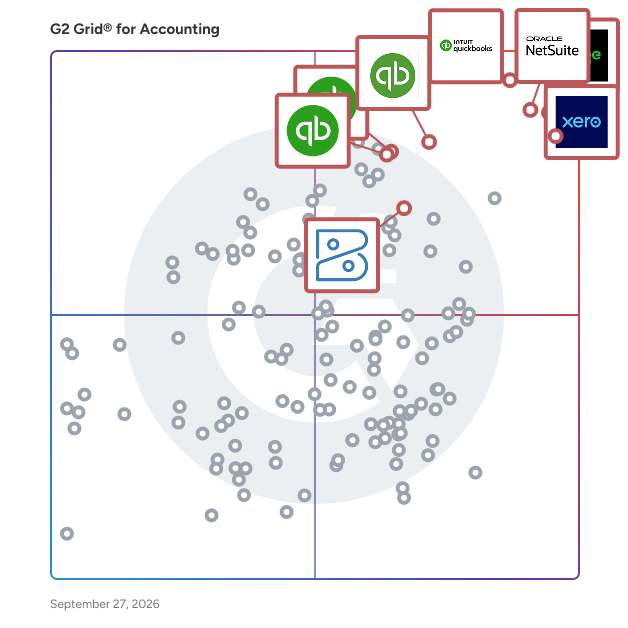
## G2 Grid® for Accounting Software
![G2 Grid® for Accounting Software plotting products by satisfaction and market presence](https://www.g2.com/categories/accounting/grids.png?focus%5B%5D=394&focus%5B%5D=1142&focus%5B%5D=390&focus%5B%5D=122647&focus%5B%5D=148997&focus%5B%5D=446&focus%5B%5D=4111&focus%5B%5D=14468)
Highlighted products: QuickBooks Online, Xero, Sage Intacct, QuickBooks Online Advanced, Intuit QuickBooks, NetSuite, QuickBooks Desktop Enterprise, and Zoho Books.
Underlying data: [Grid® JSON](https://www.g2.com/categories/accounting/grids.json?focus%5B%5D=quickbooks-online&amp;focus%5B%5D=xero&amp;focus%5B%5D=sage-intacct&amp;focus%5B%5D=quickbooks-online-advanced&amp;focus%5B%5D=intuit-quickbooks&amp;focus%5B%5D=oracle-netsuite&amp;focus%5B%5D=quickbooks-desktop-enterprise&amp;focus%5B%5D=zoho-books&amp;segment=small-business)


## How Many Accounting Software Products Does G2 Track?
**Total Products under this Category:** 613

### Category Stats (Jul 2026)
- **Average Rating**: 4.26/5 (↑0.01 vs Jun 2026) The average rating of products in this category, based on all submitted ratings
- **Top Trending Product**: Bullet (+12.5%) - Among all products in this category, Bullet recorded the largest rating increase compared to last month
*Last updated: July 21, 2026*


## How Does G2 Rank Accounting Software Products?

**Why You Can Trust G2's Software Rankings:**

- 30 Analysts and Data Experts
- 38,000+ Authentic Reviews
- 613+ Products
- Unbiased Rankings

G2's software rankings are built on verified user reviews, rigorous moderation, and a consistent research methodology maintained by a team of analysts and data experts. Each product is measured using the same transparent criteria, with no paid placement or vendor influence. While reviews reflect real user experiences, which can be subjective, they offer valuable insight into how software performs in the hands of professionals. Together, these inputs power the G2 Score, a standardized way to compare tools within every category.


---

**Sponsored**

### NetSuite

As the world&#39;s #1 AI Cloud ERP solution for more than 25 years, NetSuite has helped businesses gain the visibility, control, and agility to build and grow a successful business. First focused on financials and ERP, we now provide an AI-powered integrated system that also includes inventory management, HR, professional services automation, and commerce, and is used by more than 43,000 customers in 220 countries.


[Visit website](https://www.g2.com/external_clickthroughs/record?secure%5Bad_program%5D=paid_promo&amp;secure%5Bad_slot%5D=category_product_list&amp;secure%5Bcategory_id%5D=65&amp;secure%5Bchosen_at%5D=2026-07-22T23%3A08%3A58Z&amp;secure%5Bmedium%5D=sponsored&amp;secure%5Bprioritized%5D=false&amp;secure%5Bproduct_id%5D=446&amp;secure%5Bresource_id%5D=65&amp;secure%5Bresource_type%5D=Category&amp;secure%5Bsource_type%5D=llm_category_page&amp;secure%5Bsource_url%5D=https%3A%2F%2Fwww.g2.com%2Fcategories%2Faccounting%2Fsmall-business%3Fpage%3D4&amp;secure%5Btoken%5D=24fd5b87d9eaafba9da68c19b92cd65194499b11824c18cfecd5a1b4ad7eb433&amp;secure%5Burl%5D=https%3A%2F%2Fwww.netsuite.com%2Fportal%2Fproducts%2Ferp.shtml&amp;secure%5Burl_type%5D=paid_promos)

---


## Accounting Software Features & Capabilities

### What are the Best Accounting Software with Check/W-2 Printing?
Allows administrators to print valid paychecks and W-2 forms.

**Top-rated Accounting Software for Check/W-2 Printing:**
- [QuickBooks Online](https://www.g2.com/products/quickbooks-online/reviews)
- [NetSuite](https://www.g2.com/products/oracle-netsuite/reviews)
- [Xero](https://www.g2.com/products/xero/reviews)
[Explore Accounting Software with Check/W-2 Printing](https://www.g2.com/categories/accounting/f/check-w-2-printing)

### What are the Best Accounting Software with Workflow Capability?
Automates a process that requires a series of steps that typically require intervention by several different users. Administrators can write rules to determine who and when a user needs to complete a step. Also includes notification of users when they need to take action.

**Top-rated Accounting Software for Workflow Capability:**
- [QuickBooks Online](https://www.g2.com/products/quickbooks-online/reviews)
- [Sage Intacct](https://www.g2.com/products/sage-intacct/reviews)
- [NetSuite](https://www.g2.com/products/oracle-netsuite/reviews)
[Explore Accounting Software with Workflow Capability](https://www.g2.com/categories/accounting/f/workflow-capability)

### What are the Best Accounting Software with Internationalization?
Enables users to view and transact business with the same content in multiple languages and currencies.

**Top-rated Accounting Software for Internationalization:**
- [QuickBooks Online](https://www.g2.com/products/quickbooks-online/reviews)
- [Sage Intacct](https://www.g2.com/products/sage-intacct/reviews)
- [NetSuite](https://www.g2.com/products/oracle-netsuite/reviews)
[Explore Accounting Software with Internationalization](https://www.g2.com/categories/accounting/f/internationalization)

### What are the Best Accounting Software with Inventory Tracking / Ordering?
Real time inventory tracking. Maintains accurate &quot;On Hand&quot; infomation by matching reserved inventory requested on purchase and sales orders.

**Top-rated Accounting Software for Inventory Tracking / Ordering:**
- [QuickBooks Online](https://www.g2.com/products/quickbooks-online/reviews)
- [Sage Intacct](https://www.g2.com/products/sage-intacct/reviews)
- [NetSuite](https://www.g2.com/products/oracle-netsuite/reviews)
[Explore Accounting Software with Inventory Tracking / Ordering](https://www.g2.com/categories/accounting/f/inventory-tracking-ordering)

### What are the Best Accounting Software with Reporting and Dashboards?
Access pre-built and custom reports and dashboards to track payroll costs and for compliance purposes.

**Top-rated Accounting Software for Reporting and Dashboards:**
- [QuickBooks Online](https://www.g2.com/products/quickbooks-online/reviews)
- [Sage Intacct](https://www.g2.com/products/sage-intacct/reviews)
- [NetSuite](https://www.g2.com/products/oracle-netsuite/reviews)
[Explore Accounting Software with Reporting and Dashboards](https://www.g2.com/categories/accounting/f/reporting-and-dashboards)


## What Are the Top-Rated Accounting Software Products in 2026?
### 1. [Certinia Financial Management Cloud](https://www.g2.com/products/certinia-financial-management-cloud/reviews)
Certinia FM Cloud: The Engine for Financial Certainty Streamline, simplify, and automate your financial management on the Salesforce platform. Our services-centric FM Cloud software provides a unified information infrastructure, automated billing processes, and connected financial intelligence to move your organization from reactive accounting to a predictive financial engine. Accounting &amp; Finance Automate your financial operations and tackle routine tasks in a few clicks. Generate real-time financial analysis and impeccable compliance reports. Subscription &amp; Usage Billing Whether you deal in time and materials, subscription-based contracts, or fixed-fee services, any billing model can be accommodated. Centralize and manage limitless revenue models tailored to your customers’ needs, not system constraints, while reducing Time-to-Revenue. Revenue Management Automate revenue and cost schedules for a faster period-end close. Eliminate error-prone spreadsheets with automated workflows that ensure compliance with ASC 606 and IFRS 15. Simplify complex recognition processes, streamline audits, and increase operational efficiency. Financial Planning &amp; Analysis Accelerate planning cycles with core financials and analytics on a single platform. Build dynamic, accurate plans and stress-test scenarios to better anticipate spend and generate budgets with audit trails of all the changes being made. Perform FP&amp;A to inform agile, strategic decision-making. Procurement Manage and analyze the procurement of goods and services across your organization. Enforce spend policies, source suppliers, and identify savings while controlling maverick spend through automated workflows and 2- or 3-way invoice matching. Order &amp; Inventory Management Simplify the fulfillment of goods and services with a true opportunity-to-cash solution. Get flexible pricing, views into upsell opportunities, and margin at a line level, ensuring your financial truth is defined by your project outcomes. FM Cloud Analytics &amp; Reporting Increase revenue with business insights generated by data-centric architecture. Find intelligence on project profitability to increase margins and improve overall business predictability through automated, service-centric analytics. FM Cloud Communities Reduce DSO and streamline customer service. Connect customers and partners with experts, information, and each other. Collaborate, share data, e-invoice, and enable instant digital payments.


**Average Rating:** 4.0/5.0
**Total Reviews:** 418
**How Do G2 Users Rate Certinia Financial Management Cloud?**

- **Has the product been a good partner in doing business?:** 8.0/10 (Category avg: 8.5/10)
- **Output Document Generation:** 7.5/10 (Category avg: 8.3/10)
- **Workflow Capability:** 7.9/10 (Category avg: 8.1/10)
- **Performance and Reliability:** 7.9/10 (Category avg: 8.4/10)

**Who Is the Company Behind Certinia Financial Management Cloud?**

- **Seller:** [Certinia](https://www.g2.com/sellers/certinia)
- **Company Website:** https://certinia.com/
- **Year Founded:** 2009
- **HQ Location:** Austin, TX
- **Twitter:** @CertiniaInc (12,206 Twitter followers)
- **LinkedIn® Page:** https://www.linkedin.com/company/certinia/ (981 employees on LinkedIn®)

**Who Uses This Product?**
- **Who Uses This:** Accountant, Controller
- **Top Industries:** Information Technology and Services, Computer Software
- **Company Size:** 65% Mid-Market, 23% Small-Business


#### What Are Certinia Financial Management Cloud's Pros and Cons?

**Pros:**

- Integrations (3 reviews)
- Accounting Management (2 reviews)
- Cloud-Based (2 reviews)
- Customer Service (2 reviews)
- Customer Support (2 reviews)

**Cons:**

- Learning Curve (4 reviews)
- Complexity (2 reviews)
- Learning Difficulty (2 reviews)
- Access Restrictions (1 reviews)
- Account Setup Difficulty (1 reviews)


### What Do G2 Reviewers Say About Certinia Financial Management Cloud?
*AI-generated summary from verified user reviews*

**Pros:**

- Users value the **seamless integration** with Salesforce, enhancing financial data management and operational efficiency.
- Users value the **centralized accounting and financial reporting** capabilities of Certinia Financial Management Cloud for efficiency.
- Users value the **cloud-based integration** of Certinia Financial Management Cloud for streamlined financial operations and analytics.
- Users appreciate the **excellent customer support** of Certinia Financial Management Cloud, enhancing their overall positive experience.
- Users commend the **excellent customer support** of Certinia Financial Management Cloud, enhancing their overall experience with the product.

**Cons:**

- Users find the **steep learning curve** of Certinia Financial Management Cloud challenging, particularly during setup and navigation.
- Users find the **complexity of setup and navigation** challenging, particularly for those unfamiliar with Salesforce.
- Users find the **learning difficulty** of Certinia Financial Management Cloud to be challenging, especially for newcomers.
- Users express concerns about the **dependency on the Salesforce ecosystem** , which may limit flexibility and accessibility.
- Users find the **account setup difficult** , leading to a complex experience that hinders efficiency for new users.

#### What Are Recent G2 Reviews of Certinia Financial Management Cloud?

**"[Seamless Sales to Billing Integration](https://www.g2.com/survey_responses/certinia-financial-management-cloud-review-12701761)"**

**Rating:** 4.5/5.0 stars
*— Alex C.*

[Read full review](https://www.g2.com/survey_responses/certinia-financial-management-cloud-review-12701761)

---

**"[Easy to Use, Unifies Finance, Billing, and Customer Data in One Place](https://www.g2.com/survey_responses/certinia-financial-management-cloud-review-12536451)"**

**Rating:** 5.0/5.0 stars
*— Jessica M.*

[Read full review](https://www.g2.com/survey_responses/certinia-financial-management-cloud-review-12536451)

---


#### What Are G2 Users Discussing About Certinia Financial Management Cloud?

- [What is FinancialForce Financial Management ERP used for?](https://www.g2.com/discussions/what-is-financialforce-financial-management-erp-used-for) - 1 comment
- [How much does financial force cost?](https://www.g2.com/discussions/how-much-does-financial-force-cost)
- [What is financial accounting software?](https://www.g2.com/discussions/what-is-financial-accounting-software) - 1 comment
- [What is enterprise financial management?](https://www.g2.com/discussions/what-is-enterprise-financial-management) - 1 comment
- [What is the financial management system?](https://www.g2.com/discussions/what-is-the-financial-management-system) - 1 comment

### 2. [ZarMoney](https://www.g2.com/products/zarmoney-zarmoney/reviews)
ZarMoney is a complete cloud-based accounting software that offers invoicing, billing, income and expense tracking, financial reporting, inventory management and much more. For entrepreneurs, startups, or for established businesses on the move, ZarMoney helps build solid relationships through real-time collaboration and offers the flexibility to do all the financial tasks needed to successfully run a business. An easy to use software with advanced features and customization capabilities, ZarMoney transforms the way business is done, for any industry.


**Average Rating:** 4.6/5.0
**Total Reviews:** 28
**How Do G2 Users Rate ZarMoney?**

- **Has the product been a good partner in doing business?:** 9.8/10 (Category avg: 8.5/10)
- **Output Document Generation:** 8.5/10 (Category avg: 8.3/10)
- **Workflow Capability:** 9.0/10 (Category avg: 8.1/10)
- **Performance and Reliability:** 9.2/10 (Category avg: 8.4/10)

**Who Is the Company Behind ZarMoney?**

- **Seller:** [ZarMoney](https://www.g2.com/sellers/zarmoney)
- **HQ Location:** Los Angeles, CA
- **Twitter:** @ZarMoneyUS (2,695 Twitter followers)
- **LinkedIn® Page:** https://www.linkedin.com/company/4849504/ (5 employees on LinkedIn®)

**Who Uses This Product?**
- **Who Uses This:** Owner
- **Top Industries:** Packaging and Containers
- **Company Size:** 80% Small-Business, 10% Mid-Market


#### What Are ZarMoney's Pros and Cons?

**Pros:**

- Easy Setup (3 reviews)
- Ease of Use (2 reviews)
- Financial Management (2 reviews)
- Tax Management (2 reviews)
- Automation Efficiency (1 reviews)

**Cons:**

- Limited Customization (2 reviews)
- Export Issues (1 reviews)
- Field Issues (1 reviews)
- Inadequate Reporting (1 reviews)
- Insufficient Information (1 reviews)


### What Do G2 Reviewers Say About ZarMoney?
*AI-generated summary from verified user reviews*

**Pros:**

- Users praise the **easy setup** of ZarMoney, allowing quick and hassle-free management of business finances.
- Users find ZarMoney to be **easy to use** , providing a smooth interface and stress-free financial management.
- Users appreciate ZarMoney for its **user-friendly financial management** , simplifying accounting and ensuring organized, stress-free finances.
- Users value ZarMoney for its **automated US multi-state sales tax compliance** , simplifying tax management and reducing risks.
- Users value the **automation efficiency** of ZarMoney, transforming complex tax compliance into a seamless, hassle-free process.

**Cons:**

- Users find **limited customization** options restrict their ability to tailor reports and dashboards according to specific business needs.
- Users face **export issues** with ZarMoney, limited by fixed templates and lack of advanced reporting options.
- Users find the **lack of custom dashboards and ad-hoc reporting** restricts their ability to analyze crucial business metrics.
- Users find the **inadequate reporting** capabilities of ZarMoney limiting for custom dashboards and detailed metrics tracking.
- Users express concerns about **insufficient information** regarding document attachment governance, impacting audit trails and tax compliance.

#### What Are Recent G2 Reviews of ZarMoney?

**"[Streamlined Financial Management with Room for Customization](https://www.g2.com/survey_responses/zarmoney-review-12929922)"**

**Rating:** 5.0/5.0 stars
*— Verified User in Airlines/Aviation*

[Read full review](https://www.g2.com/survey_responses/zarmoney-review-12929922)

---

**"[Streamlined and Cost-Effective Accounting Solution](https://www.g2.com/survey_responses/zarmoney-review-12481212)"**

**Rating:** 4.0/5.0 stars
*— Debnar K.*

[Read full review](https://www.g2.com/survey_responses/zarmoney-review-12481212)

---


#### What Are G2 Users Discussing About ZarMoney?

- [How do you use Zarmoney?](https://www.g2.com/discussions/how-do-you-use-zarmoney)
- [What is the use of Zarmoney?](https://www.g2.com/discussions/what-is-the-use-of-zarmoney)
- [What does ZarMoney do?](https://www.g2.com/discussions/what-does-zarmoney-do)
- [How much does ZarMoney cost?](https://www.g2.com/discussions/how-much-does-zarmoney-cost)

### 3. [CustomBooks™](https://www.g2.com/products/custombooks/reviews)
CustomBooks™ is a powerful, all-in-one business application for accounting, cloud banking, order management, inventory management, project and time tracking into one cloud-driven platform. Our mission is to provide easy-to-use, no-nonsense, scalable business software for startups, entrepreneurs, and growing companies to manage their finances and day-to-day operations. Our vision for CustomBooks™ is to give you, your employees and business partners easy, secure access to company information from anywhere on the planet —empowering everyone at your company with the information that often makes the difference between gaining new customers and losing them to the competition.


**Average Rating:** 4.4/5.0
**Total Reviews:** 72
**How Do G2 Users Rate CustomBooks™?**

- **Has the product been a good partner in doing business?:** 9.5/10 (Category avg: 8.5/10)
- **Output Document Generation:** 8.9/10 (Category avg: 8.3/10)
- **Workflow Capability:** 9.0/10 (Category avg: 8.1/10)
- **Performance and Reliability:** 9.2/10 (Category avg: 8.4/10)

**Who Is the Company Behind CustomBooks™?**

- **Seller:** [CustomBooks™](https://www.g2.com/sellers/custombooks)
- **Year Founded:** 2012
- **HQ Location:** San Francisco, CA
- **Twitter:** @custombookserp (1,457 Twitter followers)
- **LinkedIn® Page:** https://www.linkedin.com/company/2882399 (19 employees on LinkedIn®)

**Who Uses This Product?**
- **Who Uses This:** Accountant
- **Top Industries:** Accounting, Banking
- **Company Size:** 59% Small-Business, 40% Mid-Market


#### What Are CustomBooks™'s Pros and Cons?

**Pros:**

- Accuracy (3 reviews)
- Accurate Data (3 reviews)
- Accounting Management (2 reviews)
- Ease of Use (2 reviews)
- Easy Setup (2 reviews)

**Cons:**

- Limited Customization (2 reviews)
- Missing Features (2 reviews)
- Syncing Issues (2 reviews)
- Difficult Learning (1 reviews)
- Lack of Mobile Support (1 reviews)


### What Do G2 Reviewers Say About CustomBooks™?
*AI-generated summary from verified user reviews*

**Pros:**

- Users praise the **accuracy** of CustomBooks™, enabling reliable financial tracking and insightful reporting with ease.
- Users value the **accurate data** provided by CustomBooks™, enhancing financial clarity and improving decision-making efficiency.
- Users appreciate the **reliability and organization** of CustomBooks™, facilitating clear financial oversight and efficient workflows.
- Users find CustomBooks™ **easy to use** , with smooth navigation and quick setup enhancing their overall efficiency.
- Users praise the **easy setup** of CustomBooks™, enabling quick configuration and efficient use from the start.

**Cons:**

- Users find the **limited customization** in CustomBooks™ restricts their ability to tailor workflows to their needs.
- Users find the **missing features** in CustomBooks™ limit flexibility and hinder workflow customization and usability.
- Users experience **syncing issues** , particularly with delays and the need for real-time updates across devices.
- Users find the **difficult learning** curve challenging due to fixed features that limit workflow customization and adaptability.
- Users find the **lack of mobile support** limiting, wishing for better functionality and access on the go.

#### What Are Recent G2 Reviews of CustomBooks™?

**"[Reliable All-in-One Platform](https://www.g2.com/survey_responses/custombooks-review-12831451)"**

**Rating:** 4.0/5.0 stars
*— Shri .*

[Read full review](https://www.g2.com/survey_responses/custombooks-review-12831451)

---

**"[Reliable Record Keeper with Room for Customization](https://www.g2.com/survey_responses/custombooks-review-12305282)"**

**Rating:** 4.0/5.0 stars
*— Bhavesh I.*

[Read full review](https://www.g2.com/survey_responses/custombooks-review-12305282)

---


#### What Are G2 Users Discussing About CustomBooks™?

- [What is AccountingSuite™ used for?](https://www.g2.com/discussions/what-is-accountingsuite-used-for)

### 4. [Kinetic](https://www.g2.com/products/epicor-kinetic/reviews)
Epicor Kinetic is a cloud-first enterprise resource planning (ERP) system specifically designed for manufacturing organizations. This comprehensive solution integrates essential business functions such as finance, supply chain management, production planning, quality control, service, and analytics into a unified platform. By consolidating these core operations, Kinetic enables teams to effectively manage data and processes across various departments, enhancing overall operational efficiency. Targeted primarily at discrete, make-to-order, engineer-to-order, and mixed-mode manufacturers, Kinetic addresses the unique challenges faced by these industries. It is particularly beneficial for organizations that require seamless coordination of operations from the initial stages of estimating and purchasing through to production, shipment, and financial reporting. The platform is equipped with manufacturing and planning tools that facilitate production management, scheduling, materials requirements, and shop floor coordination, ensuring that all aspects of the manufacturing process are streamlined and transparent. Kinetic’s capabilities extend to supply chain, inventory, and warehouse management, which support purchasing, supplier collaboration, and order fulfillment. Additionally, the financial management and analytics features allow users to track costs, margins, and operational performance in a single environment, providing valuable insights into business results. The inclusion of workflow automation, embedded AI capabilities, and extensibility tools further enhances the user experience by reducing manual tasks and supporting role-based processes, making it easier for teams to focus on strategic initiatives. The Kinetic platform is designed for a diverse range of users, including operations leaders, plant managers, supply chain teams, production planners, finance teams, IT stakeholders, and other business users who require shared visibility into manufacturing and commercial processes. Common use cases encompass production scheduling, inventory and materials management, quality tracking, product configuration, project-based manufacturing, and multi-site coordination. Organizations looking for an ERP solution that supports global operations or offers browser-based access often consider Kinetic as a viable option. Epicor Kinetic is utilized across various sectors, including industrial machinery, fabricated metals, electronics and high-tech, automotive, aerospace and defense, medical devices, and plastics. With its AI-driven capabilities, Kinetic not only supports day-to-day ERP activities but also assists in decision-making and workflow management, positioning manufacturers for future-ready business and digital transformation. This singular ERP solution is designed to adapt to the evolving needs of manufacturers, ensuring they remain competitive in a rapidly changing landscape.


**Average Rating:** 3.9/5.0
**Total Reviews:** 722
**How Do G2 Users Rate Kinetic?**

- **Has the product been a good partner in doing business?:** 7.2/10 (Category avg: 8.5/10)
- **Output Document Generation:** 7.1/10 (Category avg: 8.3/10)
- **Workflow Capability:** 7.1/10 (Category avg: 8.1/10)
- **Performance and Reliability:** 7.1/10 (Category avg: 8.4/10)

**Who Is the Company Behind Kinetic?**

- **Seller:** [Epicor](https://www.g2.com/sellers/epicor)
- **Company Website:** https://www.epicor.com
- **Year Founded:** 1972
- **HQ Location:** Austin, TX
- **Twitter:** @Epicor (9,286 Twitter followers)
- **LinkedIn® Page:** https://www.linkedin.com/company/4617/ (6,179 employees on LinkedIn®)

**Who Uses This Product?**
- **Who Uses This:** Controller, IT Manager
- **Top Industries:** Manufacturing, Machinery
- **Company Size:** 79% Mid-Market, 15% Small-Business


#### What Are Kinetic's Pros and Cons?

**Pros:**

- Ease of Use (47 reviews)
- Customization (28 reviews)
- Customizability (27 reviews)
- Customization Flexibility (27 reviews)
- Features (27 reviews)

**Cons:**

- Learning Curve (26 reviews)
- Not User-Friendly (22 reviews)
- Learning Difficulty (19 reviews)
- Missing Features (19 reviews)
- Navigation Difficulty (19 reviews)


### What Do G2 Reviewers Say About Kinetic?
*AI-generated summary from verified user reviews*

**Pros:**

- Users value the **ease of use** of Kinetic, appreciating its intuitive interface and convenient access to necessary information.
- Users value the **customization and flexibility** of Kinetic, enabling tailored solutions that align with unique business processes.
- Users value Kinetic&#39;s **customizability and flexibility** , allowing tailored solutions to meet specific business needs easily.
- Users value the **customization flexibility** of Kinetic, enabling tailored solutions that align with their business processes.
- Users value the **versatile features** of Kinetic, appreciating easy access and modern technology tailored to their needs.

**Cons:**

- Users find the **learning curve steep** due to lack of effective reporting tools and inadequate support resources.
- Users find the Kinetic interface **not user-friendly** , citing issues with navigation, layout, and dashboard customization.
- Users find the **learning difficulty** of Kinetic challenging due to complex reporting tools and limited out-of-box options.
- Users find **missing features** in Kinetic, particularly for compliance with specific country requirements like Mexico&#39;s SAT.
- Users find the **navigation difficult** due to clunky interfaces and inefficient dashboard layouts, hindering user experience.

#### What Are Recent G2 Reviews of Kinetic?

**"[Epicor Kinetic in the cloud](https://www.g2.com/survey_responses/kinetic-review-5072455)"**

**Rating:** 4.0/5.0 stars
*— Jason B.*

[Read full review](https://www.g2.com/survey_responses/kinetic-review-5072455)

---

**"[Kinetic: the change we needed - the future we expected!](https://www.g2.com/survey_responses/kinetic-review-12839892)"**

**Rating:** 4.5/5.0 stars
*— Connie C.*

[Read full review](https://www.g2.com/survey_responses/kinetic-review-12839892)

---


#### What Are G2 Users Discussing About Kinetic?

- [How much does Epicor ERP cost?](https://www.g2.com/discussions/how-much-does-epicor-erp-cost)
- [What are the main features of ERP?](https://www.g2.com/discussions/kinetic-what-are-the-main-features-of-erp)
- [What is Epicor software used for?](https://www.g2.com/discussions/what-is-epicor-software-used-for)
- [What is Epicor ERP system?](https://www.g2.com/discussions/what-is-epicor-erp-system)

### 5. [Accounting Seed](https://www.g2.com/products/accounting-seed/reviews)
Accounting Seed is a cloud-based accounting software built 100% natively on the Salesforce platform that helps businesses manage financial operations without the integration challenges of standalone systems. Operating entirely within Salesforce&#39;s force.com environment, Accounting Seed connects the entire lead-to-ledger process—from initial opportunity and quote management through invoicing, payment collection, project accounting, and financial statement generation—all within a single platform that eliminates the need for third-party connectors or overnight data syncs. Accounting Seed serves small to mid-sized and growing companies on the Salesforce platform across industries including IT services, financial services, manufacturing, retail, and nonprofit organizations. The solution is designed for businesses outgrowing entry-level accounting systems like QuickBooks or replacing disconnected legacy systems. Organizations gain unified visibility across sales, operations, and finance without switching between applications or reconciling data across multiple systems. Core capabilities include general ledger management, accounts payable and receivable with automation workflows, cash management, bank reconciliation, project accounting with cost tracking, multi-entity consolidation, and customizable financial reporting. The platform supports multi-currency transactions, revenue recognition compliance, audit trails, and configurable approval workflows. Users can create custom financial statements, interactive dashboards, and reports that combine CRM data with accounting metrics, enabling profitability analysis by customer, product line, or project. Accounting Seed&#39;s native Salesforce architecture provides operational advantages for growing businesses. Finance teams work within the same platform as sales and operations, eliminating data entry duplication between systems. The solution inherits Salesforce&#39;s security model and infrastructure scalability. With over 60,000 active users globally and a 4.7 out of 5 star rating based on 386 reviews on the Salesforce AppExchange, Accounting Seed has been recognized as an Inc. 5000 fastest-growing company for six consecutive years (2020-2025). Accounting Seed also has embedded AI productivity that’s included in our Salesforce accounting package—no costly integrations or complex data matching required. Our built-in agents enable seamless data flows from opportunity to billing to cash, making all your data AI-ready today.


**Average Rating:** 4.2/5.0
**Total Reviews:** 153
**How Do G2 Users Rate Accounting Seed?**

- **Has the product been a good partner in doing business?:** 8.4/10 (Category avg: 8.5/10)
- **Output Document Generation:** 7.8/10 (Category avg: 8.3/10)
- **Workflow Capability:** 8.3/10 (Category avg: 8.1/10)
- **Performance and Reliability:** 8.5/10 (Category avg: 8.4/10)

**Who Is the Company Behind Accounting Seed?**

- **Seller:** [Accounting Seed](https://www.g2.com/sellers/accounting-seed)
- **Company Website:** https://www.accountingseed.com
- **Year Founded:** 2008
- **HQ Location:** Columbia, MD
- **Twitter:** @AccountingSeed (3,114 Twitter followers)
- **LinkedIn® Page:** https://www.linkedin.com/company/accounting-seed (119 employees on LinkedIn®)

**Who Uses This Product?**
- **Who Uses This:** CFO
- **Top Industries:** Information Technology and Services, Accounting
- **Company Size:** 57% Small-Business, 44% Mid-Market


#### What Are Accounting Seed's Pros and Cons?

**Pros:**

- Integrations (14 reviews)
- Features (13 reviews)
- Automation (10 reviews)
- Customizability (10 reviews)
- Ease of Use (10 reviews)

**Cons:**

- Learning Curve (6 reviews)
- Complicated Reporting (4 reviews)
- Learning Difficulty (4 reviews)
- Accounting Limitations (3 reviews)
- Limited Customization (3 reviews)


### What Do G2 Reviewers Say About Accounting Seed?
*AI-generated summary from verified user reviews*

**Pros:**

- Users value the **seamless integrations** of Accounting Seed with Salesforce, enhancing efficiency in finance operations and reporting.
- Users appreciate the **seamless integration with Salesforce** , enhancing workflow efficiency and providing a user-friendly experience.
- Users appreciate the **high level of automation** in Accounting Seed, significantly reducing tedious manual accounting tasks.
- Users value the **extensive customizability** of Accounting Seed, enabling tailored solutions that fit diverse business workflows.
- Users value the **ease of use** in Accounting Seed, which simplifies finance operations and enhances user experience.

**Cons:**

- Users find the **learning curve complex** , requiring significant time and effort to master Accounting Seed&#39;s functionalities.
- Users find **reporting complicated** , leading to inefficiencies and requiring more time and specialized knowledge for setup.
- Users find the **learning difficulty** of Accounting Seed increases setup time and demands technical expertise.
- Users find the **billing adjustments and reporting limitations** of Accounting Seed hinder effective management and efficiency.
- Users find that **limited customization** options require additional coding, complicating setup and reducing ease of use.

#### What Are Recent G2 Reviews of Accounting Seed?

**"[Accounting inside Salesforce, no more double entry](https://www.g2.com/survey_responses/accounting-seed-review-13070674)"**

**Rating:** 4.0/5.0 stars
*— Priyanshu J.*

[Read full review](https://www.g2.com/survey_responses/accounting-seed-review-13070674)

---

**"[Powerful Customizations with Some Initial Setup Hurdles](https://www.g2.com/survey_responses/accounting-seed-review-12892983)"**

**Rating:** 4.5/5.0 stars
*— Julian R.*

[Read full review](https://www.g2.com/survey_responses/accounting-seed-review-12892983)

---


#### What Are G2 Users Discussing About Accounting Seed?

- [What is Accounting Seed used for?](https://www.g2.com/discussions/what-is-accounting-seed-used-for) - 1 upvote
- [What does Accounting Seed do?](https://www.g2.com/discussions/what-does-accounting-seed-do)
- [Does salesforce do accounting?](https://www.g2.com/discussions/does-salesforce-do-accounting)
- [What is accounting management software?](https://www.g2.com/discussions/what-is-accounting-management-software)
- [What are the features of accounting software?](https://www.g2.com/discussions/accounting-seed-what-are-the-features-of-accounting-software)

### 6. [Cryptoworth](https://www.g2.com/products/cryptoworth/reviews)
A comprehensive Crypto Accounting tool and API designed to help businesses of all sizes automate their back-office crypto accounting tasks. - By syncing with over 230 blockchains and 1,000 additional sources, Cryptoworth ensures reliable financial control of digital assets. This web3 accounting solution optimizes crypto asset management effortlessly, making it one of the Top Crypto Accounting Software options for 2024. In addition to Accounting Software for Digital Assets, Cryptoworth provides a suite of specialized solutions, including Digital Assets Treasury Management, DeFi, NFT, Staking, AR/AP, Audit-readiness, crypto data reconciliation, and API Solutions. Whether you&#39;re wondering how to do crypto bookkeeping or searching for the best crypto bookkeeping software for businesses


**Average Rating:** 4.8/5.0
**Total Reviews:** 48
**How Do G2 Users Rate Cryptoworth?**

- **Has the product been a good partner in doing business?:** 9.6/10 (Category avg: 8.5/10)
- **Output Document Generation:** 8.2/10 (Category avg: 8.3/10)
- **Workflow Capability:** 8.7/10 (Category avg: 8.1/10)
- **Performance and Reliability:** 8.6/10 (Category avg: 8.4/10)

**Who Is the Company Behind Cryptoworth?**

- **Seller:** [Cryptoworth Corporation](https://www.g2.com/sellers/cryptoworth-corporation)
- **Year Founded:** 2017
- **HQ Location:** Toronto, Ontario
- **Twitter:** @CryptoworthApp (562 Twitter followers)
- **LinkedIn® Page:** https://www.linkedin.com/company/cryptoworth/ (25 employees on LinkedIn®)

**Who Uses This Product?**
- **Top Industries:** Accounting, Information Technology and Services
- **Company Size:** 79% Small-Business, 19% Mid-Market


#### What Are Cryptoworth's Pros and Cons?

**Pros:**

- Customer Support (7 reviews)
- Ease of Use (6 reviews)
- Intuitive (3 reviews)
- Accurate Data (2 reviews)
- Automation Efficiency (2 reviews)

**Cons:**

- Slow Performance (3 reviews)
- Limited Customization (1 reviews)
- Missing Features (1 reviews)
- Poor Customer Support (1 reviews)
- Refresh (1 reviews)


### What Do G2 Reviewers Say About Cryptoworth?
*AI-generated summary from verified user reviews*

**Pros:**

- Users praise the **responsive and helpful customer support** of Cryptoworth, enhancing their overall experience.
- Users find Cryptoworth to be **incredibly easy to use** , streamlining navigation and enhancing efficiency for all users.
- Users highlight the **intuitive interface** of Cryptoworth, making it simple to navigate and manage crypto tasks effectively.
- Users value the **accurate data** provided by Cryptoworth, ensuring effortless financial reporting and management for clients.
- Users appreciate the **automation efficiency** of Cryptoworth, significantly reducing manual efforts in accounting and reporting tasks.

**Cons:**

- Users experience **slow performance** during wallet syncs and bulk data imports, affecting efficiency during critical periods.
- Users note the need for more **customization options** in reports to better meet specific client needs.
- Users find **missing features** like improved tax treatment assignment and syncing transactions limits their overall experience.
- Users have experienced **poor customer support** for resolving minor issues, affecting the overall experience with Cryptoworth.
- Users experience occasional **lag and manual refresh requirements** when accessing large historical data, hindering tax reporting efficiency.

#### What Are Recent G2 Reviews of Cryptoworth?

**"[CEO](https://www.g2.com/survey_responses/cryptoworth-review-12576714)"**

**Rating:** 5.0/5.0 stars
*— Verified User in Consulting*

[Read full review](https://www.g2.com/survey_responses/cryptoworth-review-12576714)

---

**"[Best Crypto-Supporting Accounting Platform for Professionals and Handling Complex Financials](https://www.g2.com/survey_responses/cryptoworth-review-12584375)"**

**Rating:** 5.0/5.0 stars
*— Mark E.*

[Read full review](https://www.g2.com/survey_responses/cryptoworth-review-12584375)

---


### 7. [SAP Business ByDesign](https://www.g2.com/products/sap-business-bydesign/reviews)
SAP Business ByDesign (ByD) is a comprehensive cloud enterprise resource planning software (Cloud ERP) that is sold and operated as software as a service (SaaS) by SAP SE. It is designed for small to medium-sized enterprises as well as subsidiary businesses. The software is designed to provide business processes across application areas from financials to human resources with embedded business analytics, mobility, e-learning, and support. SAP Business ByDesign is built on the principles of a service-oriented architecture (SOA). The underlying technology is leveraging SAP&#39;s in-memory HANA database. A comprehensive set of prepackaged integrations as well as SOAP and oData webservices ensure easy integrations to other SAP or non-SAP applications. The main application areas: Financial Management (FIN) Customer Relationship Management (CRM) Project Management (PRO) and Professional Service Automation (PSA) Supplier Relationship Management (SRM) and Procurement Supply Chain Management (SCM) and Production Human Resource Management (HCM) Fund and Grant Management Integrated Business Analytics Executive support and compliance management. ByDesign is deployed in 144 countries and supports 12 languages. SAP Business ByDesign is available for a monthly software-as-a-service (SaaS) subscription, based on a base package, user types, and number of users. The price includes hosting, unlimited storage, access to all application areas (see above), support etc. Updates are delivered automatically four times a year with no IT staff required.


**Average Rating:** 4.0/5.0
**Total Reviews:** 124
**How Do G2 Users Rate SAP Business ByDesign?**

- **Has the product been a good partner in doing business?:** 8.6/10 (Category avg: 8.5/10)
- **Output Document Generation:** 7.9/10 (Category avg: 8.3/10)
- **Workflow Capability:** 7.8/10 (Category avg: 8.1/10)
- **Performance and Reliability:** 8.2/10 (Category avg: 8.4/10)

**Who Is the Company Behind SAP Business ByDesign?**

- **Seller:** [SAP](https://www.g2.com/sellers/sap)
- **Year Founded:** 1972
- **HQ Location:** Walldorf
- **Twitter:** @SAP (297,052 Twitter followers)
- **LinkedIn® Page:** https://www.linkedin.com/company/sap/ (141,955 employees on LinkedIn®)
- **Ownership:** NYSE:SAP

**Who Uses This Product?**
- **Who Uses This:** Consultant, Senior Consultant
- **Top Industries:** Information Technology and Services, Computer Software
- **Company Size:** 47% Mid-Market, 38% Small-Business


#### What Are SAP Business ByDesign's Pros and Cons?

**Pros:**

- Accurate Data (2 reviews)
- Business Growth (2 reviews)
- Cloud-Based (2 reviews)
- Data Management (2 reviews)
- ERP Solutions (2 reviews)

**Cons:**

- Business Size Limitations (1 reviews)
- Difficult Customization (1 reviews)
- Expensive (1 reviews)
- Expensive Setup (1 reviews)
- Inadequate Reporting (1 reviews)


### What Do G2 Reviewers Say About SAP Business ByDesign?
*AI-generated summary from verified user reviews*

**Pros:**

- Users value the **accurate and consistent data** provided by SAP Business ByDesign, enhancing productivity across all functions.
- Users appreciate the **business growth capabilities** of SAP Business ByDesign, benefiting from consistent, real-time data across departments.
- Users appreciate the **cloud-based integration** of SAP Business ByDesign, streamlining operations and enhancing efficiency across departments.
- Users value the **integrated data management** of SAP Business ByDesign, enhancing efficiency across all departments.
- Users value the **integrated, end-to-end ERP solution** of SAP Business ByDesign, enhancing efficiency and collaboration across departments.

**Cons:**

- Users note the **business size limitations** of SAP Business ByDesign, finding it expensive for small businesses with tight budgets.
- Users experience **difficult customization** challenges with slow system performance and limited report configuration options.
- Users find SAP Business ByDesign **very expensive** , citing high license, implementation, and maintenance costs for small businesses.
- Users find the SAP Business ByDesign to be **too expensive** for small businesses due to high costs associated.
- Users experience **inadequate reporting** , with slow system performance and challenges in report configuration hindering productivity.

#### What Are Recent G2 Reviews of SAP Business ByDesign?

**"[Architecturally Cohesive ERP With Strong Governance and Identity Alignment](https://www.g2.com/survey_responses/sap-business-bydesign-review-12784924)"**

**Rating:** 5.0/5.0 stars
*— Akansha C.*

[Read full review](https://www.g2.com/survey_responses/sap-business-bydesign-review-12784924)

---

**"[Truly Integrated End-to-End ERP That Eliminates Data Silos](https://www.g2.com/survey_responses/sap-business-bydesign-review-11410109)"**

**Rating:** 4.0/5.0 stars
*— Mohammed S.*

[Read full review](https://www.g2.com/survey_responses/sap-business-bydesign-review-11410109)

---


#### What Are G2 Users Discussing About SAP Business ByDesign?

- [What is SAP Business ByDesign used for?](https://www.g2.com/discussions/what-is-sap-business-bydesign-used-for)
- [What is the difference between SAP Business One and SAP Business ByDesign?](https://www.g2.com/discussions/what-is-the-difference-between-sap-business-one-and-sap-business-bydesign)
- [How much does SAP Business ByDesign cost?](https://www.g2.com/discussions/how-much-does-sap-business-bydesign-cost)
- [What is SAP ByDesign solution?](https://www.g2.com/discussions/what-is-sap-bydesign-solution)
- [What is SAP Business ByDesign ERP?](https://www.g2.com/discussions/what-is-sap-business-bydesign-erp) - 1 comment

### 8. [QuickFile](https://www.g2.com/products/quickfile/reviews)
QuickFile is a cloud-based accounting software tailored for small to medium-sized businesses, freelancers, and sole traders. It offers a comprehensive suite of tools designed to simplify financial management, including invoicing, expense tracking, bank reconciliation, and VAT compliance. With its user-friendly interface and customizable features, QuickFile enables users to efficiently manage their finances without requiring extensive accounting knowledge. Key Features and Functionality: - Professional Invoicing: Create and customize invoices with ease, utilizing templates that reflect your brand identity. - Expense Tracking: Record and categorize expenses to monitor business costs effectively. - Bank Reconciliation: Integrate with over 50 UK banking institutions to automatically import transactions, streamlining the reconciliation process. - VAT Management: Track and file VAT returns directly to HMRC, supporting both Standard and Flat Rate VAT methods on cash or accrual bases. - Multi-Currency Support: Handle transactions and invoicing in multiple currencies, facilitating international business operations. - Financial Reporting: Generate detailed reports, including profit and loss statements and balance sheets, to gain insights into business performance. - Client Management: Maintain a centralized database of clients and suppliers, track communications, and manage contacts efficiently. - Integrations: Connect with various third-party applications and services such as PayPal, Stripe, GoCardless, and more to enhance functionality. Primary Value and Solutions Provided: QuickFile addresses the common challenges faced by small businesses in managing their finances by offering an intuitive and cost-effective solution. Its automation of routine accounting tasks reduces manual effort, minimizes errors, and saves time. The software&#39;s compliance with UK tax regulations, including Making Tax Digital (MTD), ensures that businesses meet their legal obligations seamlessly. By providing real-time financial insights and facilitating efficient client interactions through a branded client portal, QuickFile empowers businesses to maintain accurate records, improve cash flow management, and make informed financial decisions.


**Average Rating:** 4.3/5.0
**Total Reviews:** 20
**How Do G2 Users Rate QuickFile?**

- **Has the product been a good partner in doing business?:** 8.3/10 (Category avg: 8.5/10)
- **Output Document Generation:** 9.3/10 (Category avg: 8.3/10)
- **Workflow Capability:** 9.0/10 (Category avg: 8.1/10)
- **Performance and Reliability:** 8.5/10 (Category avg: 8.4/10)

**Who Is the Company Behind QuickFile?**

- **Seller:** [QuickFile Ltd](https://www.g2.com/sellers/quickfile-ltd)
- **Year Founded:** 2010
- **HQ Location:** London, GB
- **Twitter:** @QuickFile (989 Twitter followers)
- **LinkedIn® Page:** https://www.linkedin.com/company/1640818/ (3 employees on LinkedIn®)

**Who Uses This Product?**
- **Top Industries:** Accounting
- **Company Size:** 59% Small-Business, 23% Mid-Market


#### What Are QuickFile's Pros and Cons?

**Pros:**

- Ease of Use (2 reviews)
- Accounting Management (1 reviews)
- Accurate Data (1 reviews)
- Automation Efficiency (1 reviews)
- Business Suitability (1 reviews)

**Cons:**

- Error Handling (1 reviews)
- Learning Curve (1 reviews)
- Limited Automation (1 reviews)
- Missing Features (1 reviews)


### What Do G2 Reviewers Say About QuickFile?
*AI-generated summary from verified user reviews*

**Pros:**

- Users find QuickFile&#39;s **ease of use** beneficial for managing invoices, expenses, and financial oversight effortlessly.
- Users value the **cost-effective accounting management** of QuickFile, appreciating its user-friendly design and automation features.
- Users value the **accurate data** provided by QuickFile, enhancing their financial management and reporting capabilities.
- Users value the **automation efficiency** of QuickFile, significantly enhancing their financial management processes.
- Users value the **affordable pricing and ease of use** for their firms and clients with QuickFile.

**Cons:**

- Users experience a **frustrating error handling** process, leading to confusion and occasional inaccuracies in their work.
- Users face a potential **learning curve** with QuickFile, particularly non-accountants struggling to navigate the system.
- Users find QuickFile **not as well automated** as Xero, impacting their efficiency in completing tasks.
- Users face a **lack of essential features** such as credit note handling, complicating their QuickFile experience.

#### What Are Recent G2 Reviews of QuickFile?

**"[User-Friendly and Comprehensive for Small Businesses](https://www.g2.com/survey_responses/quickfile-review-12150619)"**

**Rating:** 4.0/5.0 stars
*— indrani b.*

[Read full review](https://www.g2.com/survey_responses/quickfile-review-12150619)

---

**"[Easy-to-Use Accounting Tool That Saves Hours of work](https://www.g2.com/survey_responses/quickfile-review-12701751)"**

**Rating:** 4.0/5.0 stars
*— Candace D.*

[Read full review](https://www.g2.com/survey_responses/quickfile-review-12701751)

---


#### What Are G2 Users Discussing About QuickFile?

- [Is QuickFile secure?](https://www.g2.com/discussions/is-quickfile-secure)
- [Is QuickFile MTD compliant?](https://www.g2.com/discussions/is-quickfile-mtd-compliant)
- [How does QuickFile work?](https://www.g2.com/discussions/how-does-quickfile-work)
- [Does QuickFile have an app?](https://www.g2.com/discussions/does-quickfile-have-an-app)

### 9. [Sage 300](https://www.g2.com/products/sage-300/reviews)
Sage 300 is a comprehensive business management solution designed to keep your total cost of ownership low by supporting multiple technologies, databases, and operating systems. Available in multiple editions, Sage 300 gives you the opportunity to add users and adopt greater functionality as your business grows and offers built-in support for multiple languages and multicurrency transactions, so your business can comfortably reach around the globe. Sage 300 contains the power and tools to help you see your business in a new way so you can improve productivity, envision success, and accelerate growth. It’s time to turn your business dreams into reality with the real-time visibility, collaboration, and innovation you need to succeed.


**Average Rating:** 3.8/5.0
**Total Reviews:** 87
**How Do G2 Users Rate Sage 300?**

- **Has the product been a good partner in doing business?:** 7.6/10 (Category avg: 8.5/10)
- **Output Document Generation:** 6.9/10 (Category avg: 8.3/10)
- **Workflow Capability:** 7.2/10 (Category avg: 8.1/10)
- **Performance and Reliability:** 7.4/10 (Category avg: 8.4/10)

**Who Is the Company Behind Sage 300?**

- **Seller:** [Sage Software](https://www.g2.com/sellers/sage-software-d61a780c-4fb3-4781-9519-baa772f5ea91)
- **Year Founded:** 1981
- **HQ Location:** Newcastle
- **LinkedIn® Page:** https://www.linkedin.com/company/2802/ (15,579 employees on LinkedIn®)
- **Ownership:** SGE.L
- **Phone:** +1 (866) 996-7243

**Who Uses This Product?**
- **Who Uses This:** Controller
- **Top Industries:** Construction, Financial Services
- **Company Size:** 48% Mid-Market, 46% Small-Business


#### What Are Sage 300's Pros and Cons?

**Pros:**

- Ease of Use (2 reviews)
- Meets Needs (2 reviews)
- Accessibility (1 reviews)
- Accounting Management (1 reviews)
- Beginner-Friendly (1 reviews)

**Cons:**

- Invoice Issues (1 reviews)
- Invoicing Issues (1 reviews)
- Learning Curve (1 reviews)
- Limited Automation (1 reviews)
- Non-intuitive (1 reviews)


### What Do G2 Reviewers Say About Sage 300?
*AI-generated summary from verified user reviews*

**Pros:**

- Users appreciate the **ease of use** of Sage 300, enjoying efficient organization and adaptability for diverse accounting needs.
- Users appreciate how Sage 300 **meets diverse organizational needs** , consolidating finances, stock, and orders for streamlined management.
- Users appreciate the **adaptability and user-friendliness** of Sage 300, making it ideal for diverse business needs.
- Users value the **adaptability and user-friendly design** of Sage 300 for diverse accounting needs across industries.
- Users find Sage 300 to be highly **beginner-friendly** , making it easy to navigate for job cost accounting tasks.

**Cons:**

- Users encounter **invoice issues** with Sage 300, including non-editable dates and limited character length for references.
- Users are frustrated by **invoicing issues** , including restrictions on invoice dates and limited character count for payment references.
- Users find the **learning curve steep** , with slow processes and a complicated setup hindering initial use of Sage 300.
- Users find the **limited automation** of Sage 300 frustrating, as processes can be slow and not very intuitive.
- Users find the **non-intuitive interface** of Sage 300cloud challenging, particularly for new users during setup and report customization.

#### What Are Recent G2 Reviews of Sage 300?

**"[Customizable Yet Manual Payroll Solution](https://www.g2.com/survey_responses/sage-300-review-12701291)"**

**Rating:** 4.0/5.0 stars
*— Alex W.*

[Read full review](https://www.g2.com/survey_responses/sage-300-review-12701291)

---

**"[Sage’s Robust Functionality Keeps It Ahead of the Market](https://www.g2.com/survey_responses/sage-300-review-12722156)"**

**Rating:** 4.0/5.0 stars
*— Verified User in Construction*

[Read full review](https://www.g2.com/survey_responses/sage-300-review-12722156)

---


#### What Are G2 Users Discussing About Sage 300?

- [How has Sage 300cloud supported your financial management, and what do you recommend for those considering it?](https://www.g2.com/discussions/how-has-sage-300cloud-supported-your-financial-management-and-what-do-you-recommend-for-those-considering-it)
- [What is Sage 300cloud used for?](https://www.g2.com/discussions/what-is-sage-300cloud-used-for)
- [What is Sage Evolution software?](https://www.g2.com/discussions/sage-300cloud-what-is-sage-evolution-software)
- [Is Sage 300 cloud based?](https://www.g2.com/discussions/is-sage-300-cloud-based) - 1 comment
- [How much does Sage 300 cost?](https://www.g2.com/discussions/how-much-does-sage-300-cost)

### 10. [Oracle PeopleSoft](https://www.g2.com/products/oracle-peoplesoft/reviews)
Oracle PeopleSoft is a comprehensive suite of enterprise resource planning (ERP) applications designed to meet the complex business requirements of organizations across various industries. Originally developed to support human resources and financial operations, PeopleSoft has evolved to offer a wide range of industry-specific solutions, including those for healthcare, education, communications, and manufacturing. Acquired by Oracle Corporation in 2005, PeopleSoft now provides an integrated platform that helps organizations manage human capital, finance, supply chain, customer relationships, and business analytics from a centralized system. Key Features and Functionality: - Human Capital Management (HCM): Streamlines HR processes, including talent acquisition, payroll, benefits administration, and workforce analytics. - Financial Management Solutions (FMS): Offers tools for managing financial operations, such as general ledger, accounts payable and receivable, and asset management. - Supply Chain Management (SCM): Enhances supply chain efficiency through inventory management, procurement, and supplier collaboration. - Customer Relationship Management (CRM): Provides capabilities for sales automation, customer service, and marketing campaigns. - Enterprise Performance Management (EPM): Delivers analytics and reporting tools to monitor and improve business performance. - PeopleTools Technology: A robust development toolset that supports the customization and extension of PeopleSoft applications, facilitating integration with other systems and adherence to service-oriented architecture (SOA) principles. Primary Value and Solutions Provided: PeopleSoft&#39;s primary value lies in its ability to integrate various business functions into a unified system, thereby enhancing operational efficiency and decision-making. By offering a modular and scalable architecture, it allows organizations to tailor the software to their specific needs, ensuring flexibility and adaptability in a dynamic business environment. The platform&#39;s intuitive user interface and powerful analytics empower users to access critical information and insights, facilitating informed decision-making and strategic planning. Additionally, PeopleSoft&#39;s continuous delivery model ensures that organizations can adopt new features and updates seamlessly, reducing the total cost of ownership and improving the overall user experience.


**Average Rating:** 3.8/5.0
**Total Reviews:** 664
**How Do G2 Users Rate Oracle PeopleSoft?**

- **Has the product been a good partner in doing business?:** 8.0/10 (Category avg: 8.5/10)
- **Output Document Generation:** 7.8/10 (Category avg: 8.3/10)
- **Workflow Capability:** 7.9/10 (Category avg: 8.1/10)
- **Performance and Reliability:** 8.0/10 (Category avg: 8.4/10)

**Who Is the Company Behind Oracle PeopleSoft?**

- **Seller:** [Oracle](https://www.g2.com/sellers/oracle)
- **Year Founded:** 1977
- **HQ Location:** Austin, TX
- **Twitter:** @Oracle (827,997 Twitter followers)
- **LinkedIn® Page:** https://www.linkedin.com/company/1028/ (208,078 employees on LinkedIn®)
- **Ownership:** NYSE:ORCL

**Who Uses This Product?**
- **Top Industries:** Hospital &amp; Health Care, Higher Education
- **Company Size:** 70% Enterprise, 23% Mid-Market


#### What Are Oracle PeopleSoft's Pros and Cons?

**Pros:**

- Ease of Use (8 reviews)
- Efficiency (5 reviews)
- Reporting (5 reviews)
- Simple (5 reviews)
- Helpful (4 reviews)

**Cons:**

- Slow Performance (8 reviews)
- Not User-Friendly (6 reviews)
- Slow Loading (6 reviews)
- Steep Learning Curve (5 reviews)
- Delays (4 reviews)


### What Do G2 Reviewers Say About Oracle PeopleSoft?
*AI-generated summary from verified user reviews*

**Pros:**

- Users appreciate the **ease of use** in Oracle PeopleSoft, finding it user-friendly and easy to navigate.
- Users value the **efficiency** of Oracle PeopleSoft, streamlining management of payroll, benefits, and employee records effectively.
- Users appreciate the **robust reporting features** of Oracle PeopleSoft, enhancing visibility into financial and operational data.
- Users love the **user-friendly interface** of Oracle PeopleSoft, making navigation and management of information easy and efficient.
- Users value the **helpfulness** of Oracle PeopleSoft, praising its ease of use and effective reporting functionalities.

**Cons:**

- Users experience **slow performance** with Oracle PeopleSoft, finding it clunky and time-consuming for processing tasks.
- Users find Oracle PeopleSoft to have a **not user-friendly interface** , making it challenging for new users and inefficient overall.
- Users find that the **slow loading** times hinder efficiency and make the experience frustrating, especially during busy periods.
- Users find the **steep learning curve** of Oracle PeopleSoft challenging due to its complexity and outdated interface.
- Users experience **delays** in processing and system glitches, making Oracle PeopleSoft feel cumbersome and slow over time.

#### What Are Recent G2 Reviews of Oracle PeopleSoft?

**"[Reliable and Stable for Daily Accounting Tasks](https://www.g2.com/survey_responses/oracle-peoplesoft-review-12381142)"**

**Rating:** 4.5/5.0 stars
*— William L.*

[Read full review](https://www.g2.com/survey_responses/oracle-peoplesoft-review-12381142)

---

**"[People soft All the Basics Covered: Tax Structure, Salary Slips, and KRA](https://www.g2.com/survey_responses/oracle-peoplesoft-review-12701452)"**

**Rating:** 5.0/5.0 stars
*— Savitha N.*

[Read full review](https://www.g2.com/survey_responses/oracle-peoplesoft-review-12701452)

---


#### What Are G2 Users Discussing About Oracle PeopleSoft?

- [What is Oracle PeopleSoft used for?](https://www.g2.com/discussions/oracle-peoplesoft-what-is-oracle-peoplesoft-used-for) - 1 comment
- [Is PeopleSoft an accounting software?](https://www.g2.com/discussions/is-peoplesoft-an-accounting-software) - 1 comment
- [Is Oracle and PeopleSoft the same?](https://www.g2.com/discussions/is-oracle-and-peoplesoft-the-same) - 1 comment
- [Who uses PeopleSoft software?](https://www.g2.com/discussions/who-uses-peoplesoft-software) - 1 comment
- [What is Oracle PeopleSoft used for?](https://www.g2.com/discussions/what-is-oracle-peoplesoft-used-for) - 1 comment

### 11. [Microsoft Dynamics 365 Supply Chain Management](https://www.g2.com/products/microsoft-dynamics-365-supply-chain-management/reviews)
Microsoft Dynamics AX is the complete ERP solution for enterprises that provides a purpose-built foundation across five industries (manufacturing, distribution, retail, services, and public sector), along with comprehensive, core ERP functionality for financial, human resources and operations management. It empowers your people to anticipate and embrace change so your business can thrive. All of this is packaged in a single global solution giving you rapid time to value.


**Average Rating:** 3.7/5.0
**Total Reviews:** 98
**How Do G2 Users Rate Microsoft Dynamics 365 Supply Chain Management?**

- **Has the product been a good partner in doing business?:** 7.4/10 (Category avg: 8.5/10)
- **Output Document Generation:** 7.5/10 (Category avg: 8.3/10)
- **Workflow Capability:** 7.3/10 (Category avg: 8.1/10)
- **Performance and Reliability:** 7.6/10 (Category avg: 8.4/10)

**Who Is the Company Behind Microsoft Dynamics 365 Supply Chain Management?**

- **Seller:** [Microsoft](https://www.g2.com/sellers/microsoft)
- **Year Founded:** 1975
- **HQ Location:** Redmond, Washington
- **Twitter:** @microsoft (13,091,739 Twitter followers)
- **LinkedIn® Page:** https://www.linkedin.com/company/microsoft/ (231,632 employees on LinkedIn®)
- **Ownership:** MSFT

**Who Uses This Product?**
- **Top Industries:** Information Technology and Services, Computer Software
- **Company Size:** 47% Mid-Market, 33% Enterprise


#### What Are Microsoft Dynamics 365 Supply Chain Management's Pros and Cons?

**Pros:**

- Accurate Data (1 reviews)
- Customizability (1 reviews)
- Data Management (1 reviews)
- Features (1 reviews)
- Functionality (1 reviews)

**Cons:**

- Expensive (1 reviews)
- Lacking Features (1 reviews)
- Lack of Features (1 reviews)
- Missing Features (1 reviews)
- Small Businesses (1 reviews)


### What Do G2 Reviewers Say About Microsoft Dynamics 365 Supply Chain Management?
*AI-generated summary from verified user reviews*

**Pros:**

- Users value the **accurate data** provided by Dynamics 365, enhancing visibility and driving informed decision-making across the supply chain.
- Users value the **customizability** of Microsoft Dynamics 365 Supply Chain Management for tailored insights and enhanced decision-making.
- Users benefit from **live insights** throughout the supply chain, facilitating faster, data-driven decisions and enhanced visibility.
- Users value the **real-time insights** provided by Dynamics 365, enhancing data-driven decision-making across the supply chain.
- Users value the **live insights across the supply chain** , enhancing data-driven decision-making and reducing product unavailability.

**Cons:**

- Users find the **cost of specialized support** to be prohibitive, especially for smaller or rapidly growing businesses.
- Users find that **lacking features** in Microsoft Dynamics 365 Supply Chain Management limits functionality for smaller businesses.
- Users find the **lack of features** in Microsoft Dynamics 365 Supply Chain Management limits scalability for smaller businesses.
- Users find the **missing features** in Dynamics 365 Supply Chain Management costly and limiting for small businesses.
- Users find **specialized support costly** for smaller businesses, limiting features due to budget constraints during growth.

#### What Are Recent G2 Reviews of Microsoft Dynamics 365 Supply Chain Management?

**"[D365 SCM is a very viable solution for any manufacturer or distributor.](https://www.g2.com/survey_responses/microsoft-dynamics-365-supply-chain-management-review-9104119)"**

**Rating:** 5.0/5.0 stars
*— Verified User in Logistics and Supply Chain*

[Read full review](https://www.g2.com/survey_responses/microsoft-dynamics-365-supply-chain-management-review-9104119)

---

**"[Microsoft 365 supply chain an amazing product](https://www.g2.com/survey_responses/microsoft-dynamics-365-supply-chain-management-review-8830755)"**

**Rating:** 5.0/5.0 stars
*— Tejal p.*

[Read full review](https://www.g2.com/survey_responses/microsoft-dynamics-365-supply-chain-management-review-8830755)

---


#### What Are G2 Users Discussing About Microsoft Dynamics 365 Supply Chain Management?

- [What advice do you have for others considering Microsoft Dynamics 365 Supply Chain Management for logistics operations?](https://www.g2.com/discussions/what-advice-do-you-have-for-others-considering-microsoft-dynamics-365-supply-chain-management-for-logistics-operations)
- [What is Microsoft Dynamics 365 Supply Chain Management used for?](https://www.g2.com/discussions/what-is-microsoft-dynamics-365-supply-chain-management-used-for)

### 12. [TrulySmall Accounting](https://www.g2.com/products/trulysmall-accounting/reviews)
While many platforms are built for accountants and enterprise-level firms, TrulySmall Accounting was designed specifically for the sole proprietor and freelancer. It focuses on accounting automation, meaning it categorizes transactions and balances books with minimal manual entry. As a bonus, the learning curve is very minimal, making it an excellent choice even for individuals with no prior accounting knowledge. The platform is built around the following core pillars: Focused on Automation: The &quot;Auto Post&quot; feature automatically imports and categorizes your bank transactions. Zero Learning Curve: The dashboard is intuitive and requires no CPA to understand, offering a setup time of less than ten minutes. Streamlined Invoicing: You can create and send professional invoices directly from the platform, supporting online payments and recurring billing to speed up cash flow. Scan Your Receipts: An integrated receipt scanner automatically converts uploaded photos into expenses ready for review. Our platform is the ideal fit for: Sole Proprietors: Designers, Consultants, Writers, Online Coaches, Bookkeepers, Digital Marketers, Drop Shippers Service-Based Businesses: Construction and Skilled Trades, Landlords, Landscapers, Cleaners and Movers, Repair Shops The “Automation” Seekers: People who are seeking an automated accounting solution so they can focus on growing their business.


**Average Rating:** 4.5/5.0
**Total Reviews:** 65
**How Do G2 Users Rate TrulySmall Accounting?**

- **Has the product been a good partner in doing business?:** 9.6/10 (Category avg: 8.5/10)
- **Output Document Generation:** 8.1/10 (Category avg: 8.3/10)
- **Workflow Capability:** 6.7/10 (Category avg: 8.1/10)
- **Performance and Reliability:** 8.9/10 (Category avg: 8.4/10)

**Who Is the Company Behind TrulySmall Accounting?**

- **Seller:** [Kashoo](https://www.g2.com/sellers/kashoo)
- **Year Founded:** 2009
- **HQ Location:** Vancouver, BC
- **Twitter:** @KashooOnline (2,170 Twitter followers)
- **LinkedIn® Page:** https://www.linkedin.com/company/827645/ (10 employees on LinkedIn®)

**Who Uses This Product?**
- **Top Industries:** Marketing and Advertising, Accounting
- **Company Size:** 95% Small-Business, 3% Enterprise


#### What Are TrulySmall Accounting's Pros and Cons?

**Pros:**

- Accounting Management (1 reviews)
- Ease of Understanding (1 reviews)
- Ease of Use (1 reviews)
- Intuitive (1 reviews)

**Cons:**

- Slow Performance (1 reviews)


### What Do G2 Reviewers Say About TrulySmall Accounting?
*AI-generated summary from verified user reviews*

**Pros:**

- Users appreciate the **user-friendly interface** of TrulySmall Accounting, making accounting stress-free and accessible.
- Users appreciate the **ease of understanding** in TrulySmall Accounting, finding it simple and friendly for stress-free accounting.
- Users appreciate the **ease of use** of TrulySmall Accounting, finding it simple and friendly for stress-free accounting.
- Users find TrulySmall Accounting **intuitive** , making accounting less stressful with its simple and friendly interface.

**Cons:**

- Users notice that the **slow performance** can hinder quick tasks, yet value the overall helpful service.

#### What Are Recent G2 Reviews of TrulySmall Accounting?

**"[Simple and Stress-Free Accounting Support](https://www.g2.com/survey_responses/trulysmall-accounting-review-12275819)"**

**Rating:** 4.5/5.0 stars
*— Ranjit K.*

[Read full review](https://www.g2.com/survey_responses/trulysmall-accounting-review-12275819)

---

**"[It’s been easy, straight forward and very helpful](https://www.g2.com/survey_responses/trulysmall-accounting-review-9037687)"**

**Rating:** 5.0/5.0 stars
*— Egbevurie J.*

[Read full review](https://www.g2.com/survey_responses/trulysmall-accounting-review-9037687)

---


#### What Are G2 Users Discussing About TrulySmall Accounting?

- [What is the number 1 accounting software?](https://www.g2.com/discussions/what-is-the-number-1-accounting-software)
- [What are the features of accounting software?](https://www.g2.com/discussions/trulysmall-accounting-what-are-the-features-of-accounting-software)
- [What is accounting software Main features of advanced accounting software?](https://www.g2.com/discussions/trulysmall-accounting-what-is-accounting-software-main-features-of-advanced-accounting-software)
- [What is the most common accounting software?](https://www.g2.com/discussions/what-is-the-most-common-accounting-software)

### 13. [Vyapar](https://www.g2.com/products/vyapar/reviews)
Vyapar is the only Business Accounting, Invoicing &amp; Inventory management software made for small Business, that lets you manage, invoices/receipts, estimates, payments, inventory, online store and clients. An ideal solution fulfilling all your Business Accounting needs. Using Vyapar you can: 1.GST compliant Invoicing; 2. Apply TCS in transactions 3.Online Payment gateway Integration 3. All GSTR reports ( GSTR-1, GSTR-2, GSTR-3B, GSTR4); 4. Stock/Inventory management; &amp;nbsp; &amp;nbsp; &amp;nbsp; &amp;nbsp; &amp;nbsp; &amp;nbsp; &amp;nbsp; &amp;nbsp; &amp;nbsp; &amp;nbsp; &amp;nbsp; &amp;nbsp; &amp;nbsp; &amp;nbsp; &amp;nbsp; &amp;nbsp; &amp;nbsp; &amp;nbsp; &amp;nbsp; 5. Invoice customization; &amp;nbsp; &amp;nbsp; &amp;nbsp; &amp;nbsp; &amp;nbsp; &amp;nbsp; &amp;nbsp; &amp;nbsp; &amp;nbsp; &amp;nbsp; &amp;nbsp; &amp;nbsp; &amp;nbsp; &amp;nbsp; &amp;nbsp; &amp;nbsp; &amp;nbsp; &amp;nbsp; &amp;nbsp; &amp;nbsp; 6. Invoice print support for a regular printer and thermal printer; 7. Expense management with GST; 8. Bank management; 9. Receivable and payable maintenance; 10. Bar-code Generation &amp; billing support; 11. Bill wise payment; 12. Stock tracking based on the serial number, exp. date, mfg date, batch number, etc.; 13. Order and estimate management; 14. Business overview with multiple reports; 15. Balance sheet; 16. Loan account; 17. My Online Store; 18. E-way bill generation; 19. Multiple Device Synchronization in real time; 20. Sale, purchase, cash flow, day-book, custom reports; &amp;nbsp; &amp;nbsp; 21. Profit and loss, item wise profit and loss, Bill wise and Party wise Profit &amp; Loss; 22. Bank statement; 23. Stock related reports: stock summary, stock detail, item wise sale purchase, etc. 24. Party to Party Transfer 25. Many More...


**Average Rating:** 4.4/5.0
**Total Reviews:** 60
**How Do G2 Users Rate Vyapar?**

- **Has the product been a good partner in doing business?:** 8.5/10 (Category avg: 8.5/10)
- **Output Document Generation:** 8.3/10 (Category avg: 8.3/10)
- **Workflow Capability:** 8.6/10 (Category avg: 8.1/10)
- **Performance and Reliability:** 8.1/10 (Category avg: 8.4/10)

**Who Is the Company Behind Vyapar?**

- **Seller:** [Vyapar](https://www.g2.com/sellers/vyapar-c1224904-3c56-4eae-bbb0-95ed28356c76)
- **Year Founded:** 2017
- **HQ Location:** Bangalore, Karnataka
- **LinkedIn® Page:** https://www.linkedin.com/company/vyaparapp/ (1,501 employees on LinkedIn®)

**Who Uses This Product?**
- **Top Industries:** Accounting
- **Company Size:** 47% Small-Business, 17% Mid-Market


#### What Are Vyapar's Pros and Cons?

**Pros:**

- Easy Setup (22 reviews)
- Ease of Use (19 reviews)
- Billing Management (13 reviews)
- Inventory Management (11 reviews)
- Customer Support (8 reviews)

**Cons:**

- Missing Features (6 reviews)
- Limited Customization (4 reviews)
- Field Issues (3 reviews)
- Integration Issues (3 reviews)
- Inadequate Reporting (2 reviews)


### What Do G2 Reviewers Say About Vyapar?
*AI-generated summary from verified user reviews*

**Pros:**

- Users find the **easy setup** of Vyapar smooth, enabling hassle-free management without needing technical expertise.
- Users find the **ease of use** of Vyapar remarkable, enabling effortless billing and inventory management without technical knowledge.
- Users appreciate the **easy-to-use billing management** in Vyapar, streamlining invoicing and customer history tracking effortlessly.
- Users value the **easy-to-use inventory management** in Vyapar, appreciating its seamless integration and helpful support.
- Users praise Vyapar for its **responsive customer support** , enhancing their overall experience and satisfaction with the software.

**Cons:**

- Users note the **missing features** in Vyapar, such as online ordering and customization options, limiting its usability.
- Users wish for more **customization options** in Vyapar to better suit their specific business needs.
- Users find the **limited item field options** inadequate for their needs, hindering invoice customization and product variety.
- Users find Vyapar&#39;s **integration capabilities lacking** , limiting functionality and potential for enhanced operational efficiency.
- Users find the **inadequate reporting** of Vyapar limiting, especially for larger businesses needing detailed analytics.

#### What Are Recent G2 Reviews of Vyapar?

**"[Vyapar with automatic GST and easy invoicing](https://www.g2.com/survey_responses/vyapar-review-12587292)"**

**Rating:** 4.0/5.0 stars
*— pankaj p.*

[Read full review](https://www.g2.com/survey_responses/vyapar-review-12587292)

---

**"[Affordable and Intuitive, But Needs Better German Integration](https://www.g2.com/survey_responses/vyapar-review-13062059)"**

**Rating:** 4.5/5.0 stars
*— Irby C.*

[Read full review](https://www.g2.com/survey_responses/vyapar-review-13062059)

---


#### What Are G2 Users Discussing About Vyapar?

- [Is Vyapaar App good?](https://www.g2.com/discussions/vyapar-is-vyapaar-app-good) - 3 upvotes
- [Is Vyapaar App good?](https://www.g2.com/discussions/is-vyapaar-app-good) - 2 comments, 2 upvotes
- [How does Vyapar app work?](https://www.g2.com/discussions/vyapar-how-does-vyapar-app-work) - 1 comment, 1 upvote
- [How does Vyapar app work?](https://www.g2.com/discussions/how-does-vyapar-app-work)
- [Is Vyapar app free for lifetime?](https://www.g2.com/discussions/vyapar-is-vyapar-app-free-for-lifetime) - 2 comments

### 14. [BQE CORE](https://www.g2.com/products/core-bqe-software-inc/reviews)
Designed for and built by Architects , Engineers, Consulting Firms, and Professional Service Practices, BQE CORE is an all-in-one professional services work management platform that enables firms to control every aspect of their operations - project management, project accounting, time &amp; expense, time tracking, billing &amp; invoicing, project-based ERP, professional services automation, and so much more. BQE CORE makes it easier and more profitable to run professional services firms. It organizes information, automates repetitive tasks, and allows your firm to spend more time providing service to your clients instead of managing internal processes. It is built by Architects, Engineers, and CPA&#39;s to meet the specific needs of professional services firms. It helps firms bolster their cash flow by expediting their billing process while improving their project management and their ability to analyze performance. BQE CORE utilizes state-of-the-art technologies delivering actionable business intelligence and award winning artificial intelligence including natural language processing and speech recognition. BQE CORE supports a wide range of industries, including architect firms, engineering, legal services and many more. You can access BQE CORE from any browser or mobile device and experience full functionality. The native mobile app includes iPhone and Android devices. CORE also has over 200 report and invoice templates. Invoices for every contract type conceivable.


**Average Rating:** 4.3/5.0
**Total Reviews:** 437
**How Do G2 Users Rate BQE CORE?**

- **Has the product been a good partner in doing business?:** 8.4/10 (Category avg: 8.5/10)
- **Output Document Generation:** 8.6/10 (Category avg: 8.3/10)
- **Workflow Capability:** 8.3/10 (Category avg: 8.1/10)
- **Performance and Reliability:** 8.0/10 (Category avg: 8.4/10)

**Who Is the Company Behind BQE CORE?**

- **Seller:** [BQE Software, Inc.](https://www.g2.com/sellers/bqe-software-inc)
- **Company Website:** https://www.bqe.com
- **Year Founded:** 1995
- **HQ Location:** Torrance, CA
- **Twitter:** @bqesoftware (3,923 Twitter followers)
- **LinkedIn® Page:** https://www.linkedin.com/company/151644/ (410 employees on LinkedIn®)

**Who Uses This Product?**
- **Who Uses This:** Office Manager, Architect
- **Top Industries:** Architecture &amp; Planning, Civil Engineering
- **Company Size:** 79% Small-Business, 19% Mid-Market


#### What Are BQE CORE's Pros and Cons?

**Pros:**

- Ease of Use (9 reviews)
- User Interface (5 reviews)
- Invoice Management (4 reviews)
- Invoicing (4 reviews)
- Time Tracking (4 reviews)

**Cons:**

- Slow Loading (4 reviews)
- Slow Performance (4 reviews)
- Learning Difficulty (3 reviews)
- Complex Usability (2 reviews)
- Learning Curve (2 reviews)


### What Do G2 Reviewers Say About BQE CORE?
*AI-generated summary from verified user reviews*

**Pros:**

- Users find **BQE CORE&#39;s ease of use** to be exceptional, facilitating various business functions seamlessly.
- Users appreciate the **intuitive user interface** of BQE CORE, enhancing project management and time tracking efficiency.
- Users praise BQE CORE&#39;s **efficient invoice management** , enjoying its simplicity and responsive customer support for seamless transactions.
- Users praise the **easy invoicing process** in BQE CORE, highlighting its efficiency and helpful customer support.
- Users find **time tracking effortless** with BQE CORE, enhancing project management and invoicing capabilities significantly.

**Cons:**

- Users note that the **slow loading** of BQE CORE can hinder the overall experience, despite its reliability.
- Users experience **slow performance** with BQE CORE, noting lag and refresh needs, despite its reliability.
- Users find the **learning difficulty** frustrating due to complicated navigation and cumbersome record management.
- Users find the **navigation complex** and scheduling training challenging, impacting their overall experience with BQE CORE.
- Users find the **learning curve steep** , making initial navigation and training a challenge for new users.

#### What Are Recent G2 Reviews of BQE CORE?

**"[BQE has all of the pieces we were missing!](https://www.g2.com/survey_responses/bqe-core-review-7306061)"**

**Rating:** 4.0/5.0 stars
*— Verified User in Civil Engineering*

[Read full review](https://www.g2.com/survey_responses/bqe-core-review-7306061)

---

**"[Good Software](https://www.g2.com/survey_responses/bqe-core-review-11659639)"**

**Rating:** 5.0/5.0 stars
*— Camilo R.*

[Read full review](https://www.g2.com/survey_responses/bqe-core-review-11659639)

---


#### What Are G2 Users Discussing About BQE CORE?

- [What are the components in a core ERP system?](https://www.g2.com/discussions/what-are-the-components-in-a-core-erp-system)
- [What are the 3 most common core ERP components?](https://www.g2.com/discussions/what-are-the-3-most-common-core-erp-components)
- [What are two features of a ERP?](https://www.g2.com/discussions/what-are-two-features-of-a-erp)
- [What are the main features of ERP?](https://www.g2.com/discussions/bqe-core-what-are-the-main-features-of-erp)

### 15. [Gravity Software](https://www.g2.com/products/gravity-software/reviews)
Gravity Software: The Ultimate Multi-Entity Accounting Software for Mid-Market Businesses Gravity Software is an advanced cloud accounting solution designed specifically for mid-market businesses managing multiple entities. This powerful platform streamlines multi-entity accounting processes, allowing CFOs and finance directors to efficiently handle intercompany transactions without the hassle of logging into multiple databases. By centralizing all financial data in one place, Gravity Software simplifies month-end reporting, increases transparency, and improves cross-department collaboration. Tailored for organizations with complex financial structures, including family offices, healthcare organizations, hospitality groups, and other multi-entity operations, Gravity Software addresses the unique challenges these businesses face. It excels in managing multi-currency accounting, automating currency conversions, and accurately calculating foreign currency gains and losses — making it easier for companies operating in multiple regions to stay compliant and manage their finances effectively. As a Microsoft Power Platform-built solution, Gravity Software seamlessly integrates with the tools businesses already use, including Microsoft 365, Teams, Excel, Power BI, Power Automate, and more. This integration ensures that users can manage their multi-company accounting needs directly within their existing Microsoft environment, streamlining workflows and reducing manual data entry. Automated Workflows and Enterprise-Level Security Gravity Software goes beyond basic accounting with powerful features like automated workflows, AI-powered AP automation, and invoice processing, saving accounting teams significant time each week. With artificial intelligence driving the AP automation, invoices are processed faster and more accurately, reducing errors and increasing efficiency across the board. Built-in business intelligence empowers teams to make informed decisions faster. Plus, Gravity offers enterprise-level security without the cost of a large ERP system. Payment Processing Gravity’s payment processing capabilities are available for businesses in the US and Canada, allowing them to accept ACH payments quickly, aggregate transactions from multiple global financial institutions, and pay vendors internationally using preferred payment methods. The platform also enables secure invoicing and payment collection within these regions, streamlining the process for domestic transactions. Improved Reporting and Efficiency Gravity Software’s easy-to-use interface allows finance professionals to generate consolidated reports quickly, enhancing reporting timelines and enabling businesses to gain insights without navigating multiple systems. As noted by Shila Singh, Head of Finance at the British Institute of Innkeeping, the ability to seamlessly select entities and continue working without interruptions has revolutionized their financial reporting processes. Experience the power of multi-entity accounting in one unified platform with Gravity Software — the ideal solution for mid-market businesses operating across multiple entities and markets.


**Average Rating:** 4.5/5.0
**Total Reviews:** 36
**How Do G2 Users Rate Gravity Software?**

- **Has the product been a good partner in doing business?:** 8.8/10 (Category avg: 8.5/10)
- **Output Document Generation:** 8.6/10 (Category avg: 8.3/10)
- **Workflow Capability:** 8.8/10 (Category avg: 8.1/10)
- **Performance and Reliability:** 8.7/10 (Category avg: 8.4/10)

**Who Is the Company Behind Gravity Software?**

- **Seller:** [Gravity Software](https://www.g2.com/sellers/gravity-software)
- **Company Website:** https://www.gogravity.com
- **Year Founded:** 2013
- **HQ Location:** Detroit, Michigan
- **Twitter:** @GravityCloudERP (170 Twitter followers)
- **LinkedIn® Page:** https://www.linkedin.com/company/9323790/ (11 employees on LinkedIn®)

**Who Uses This Product?**
- **Top Industries:** Accounting, Hospital &amp; Health Care
- **Company Size:** 63% Small-Business, 35% Mid-Market


#### What Are Gravity Software's Pros and Cons?

**Pros:**

- Customer Satisfaction (3 reviews)
- Ease of Use (3 reviews)
- Automation (2 reviews)
- Customer Support (2 reviews)
- Customizability (2 reviews)

**Cons:**

- Inadequate Reporting (2 reviews)
- Poor Reporting (2 reviews)
- Card Issues (1 reviews)
- Complicated Reporting (1 reviews)
- Dashboard Issues (1 reviews)


### What Do G2 Reviewers Say About Gravity Software?
*AI-generated summary from verified user reviews*

**Pros:**

- Users appreciate the **excellent customer service** of Gravity Software, enhancing their overall user experience and satisfaction.
- Users appreciate the **user-friendly interface** of Gravity Software, enhancing navigation and efficient task management across multiple entities.
- Users value the **automation capabilities** of Gravity Software, enhancing efficiency and reducing the need for additional staff.
- Users commend the **responsive customer support** of Gravity Software, noting quick resolutions and effective communication.
- Users value the **customizability** of Gravity Software, allowing personalized screens and seamless data management across companies.

**Cons:**

- Users find the **inadequate reporting** features cumbersome, often leading to timeouts and display inaccuracies in Gravity Software.
- Users find the **poor reporting** process cumbersome and prone to errors, affecting efficiency and accuracy in data display.
- Users experience issues with **card acceptance** , as not all credit cards are supported by Gravity Software.
- Users face **complicated reporting** issues, like timeouts and incorrect dashboard displays, though support resolves them quickly.
- Users experience **dashboard issues** with timeouts and incorrect displays, though support usually resolves them quickly.

#### What Are Recent G2 Reviews of Gravity Software?

**"[Exceptionally User-Friendly with Outstanding Support](https://www.g2.com/survey_responses/gravity-software-review-11990822)"**

**Rating:** 5.0/5.0 stars
*— JUSTIN W.*

[Read full review](https://www.g2.com/survey_responses/gravity-software-review-11990822)

---

**"[User-Friendly Platform with Seamless Module Integration](https://www.g2.com/survey_responses/gravity-software-review-12047315)"**

**Rating:** 4.5/5.0 stars
*— Daniel H.*

[Read full review](https://www.g2.com/survey_responses/gravity-software-review-12047315)

---


#### What Are G2 Users Discussing About Gravity Software?

- [What is Gravity Software used for?](https://www.g2.com/discussions/what-is-gravity-software-used-for) - 1 comment

### 16. [TopNotepad](https://www.g2.com/products/topnotepad/reviews)
TopNotepad is a super simple cloud invoicing, accounting and CRM software for freelancers and small businesses. A feature rich affordable, all-in-one software.


**Average Rating:** 4.6/5.0
**Total Reviews:** 34
**How Do G2 Users Rate TopNotepad?**

- **Has the product been a good partner in doing business?:** 9.4/10 (Category avg: 8.5/10)
- **Output Document Generation:** 8.3/10 (Category avg: 8.3/10)
- **Workflow Capability:** 8.9/10 (Category avg: 8.1/10)
- **Performance and Reliability:** 8.9/10 (Category avg: 8.4/10)

**Who Is the Company Behind TopNotepad?**

- **Seller:** [TopNotepad](https://www.g2.com/sellers/topnotepad)
- **Year Founded:** 2017
- **HQ Location:** Newark, DE
- **Twitter:** @TopNotepad (503 Twitter followers)
- **LinkedIn® Page:** https://www.linkedin.com/company/10126468/ (3 employees on LinkedIn®)

**Who Uses This Product?**
- **Company Size:** 68% Small-Business, 26% Mid-Market


#### What Are TopNotepad's Pros and Cons?

**Pros:**

- Ease of Use (2 reviews)
- Accounting Management (1 reviews)
- Easy Setup (1 reviews)
- Time Saving (1 reviews)
- User Interface (1 reviews)

**Cons:**

- Data Management (1 reviews)
- Inefficiency (1 reviews)
- Missing Features (1 reviews)


### What Do G2 Reviewers Say About TopNotepad?
*AI-generated summary from verified user reviews*

**Pros:**

- Users value the **ease of use** of TopNotepad, appreciating its simple setup and intuitive interface.
- Users value the **ease of use** of TopNotepad, appreciating its simplicity for effective accounting management.
- Users love the **easy setup** of TopNotepad, simplifying installation without the need for complex configurations.
- Users value the **time-saving tabbed editing** feature of TopNotepad, reducing the hassle of managing multiple windows.
- Users appreciate the **simple and reliable user interface** of TopNotepad, making it advantageous for their accounting needs.

**Cons:**

- Users find the **lack of bulk file actions** frustrating, hindering efficient tab management and file organization.
- Users express concern over **inefficiencies in file management** , highlighting difficulties in bulk actions like saving or renaming files.
- Users find a lack of **essential features** in TopNotepad, suggesting improvements for a more comprehensive experience.

#### What Are Recent G2 Reviews of TopNotepad?

**"[Streamlined Bookkeeping with Room for Localization](https://www.g2.com/survey_responses/topnotepad-review-13058737)"**

**Rating:** 4.5/5.0 stars
*— Steven D.*

[Read full review](https://www.g2.com/survey_responses/topnotepad-review-13058737)

---

**"[Centralizes Financial Tracking with Robust Audit Trails](https://www.g2.com/survey_responses/topnotepad-review-13088740)"**

**Rating:** 4.5/5.0 stars
*— Thamyres A.*

[Read full review](https://www.g2.com/survey_responses/topnotepad-review-13088740)

---


### 17. [BizAutomation Cloud ERP](https://www.g2.com/products/bizautomation-cloud-erp/reviews)
Streamline your ENTIRE organization and Supply-Chain on ONE platform. Our single version offering avoids hidden add-ons and leveraged upselling. Compare us to advanced versions of NetSuite, Acumatica, SAP, and Sage, but easier to use, faster to implement, and half the price. From a privately owned software company that doesn&#39;t treat its customers like a number. Implementation success rate is near 100% which might explain why our ratings are so high. - No pricing gimmicks - No low-ball entry level pricing that goes away after you commit.


**Average Rating:** 4.7/5.0
**Total Reviews:** 25
**How Do G2 Users Rate BizAutomation Cloud ERP?**

- **Has the product been a good partner in doing business?:** 9.8/10 (Category avg: 8.5/10)
- **Output Document Generation:** 6.4/10 (Category avg: 8.3/10)
- **Workflow Capability:** 8.3/10 (Category avg: 8.1/10)
- **Performance and Reliability:** 8.6/10 (Category avg: 8.4/10)

**Who Is the Company Behind BizAutomation Cloud ERP?**

- **Seller:** [BizAutomation Cloud ERP](https://www.g2.com/sellers/bizautomation-cloud-erp)
- **Year Founded:** 2003
- **HQ Location:** Santa Ana, CA
- **Twitter:** @bizautomation (256 Twitter followers)
- **LinkedIn® Page:** https://www.linkedin.com/company/3137136/ (5 employees on LinkedIn®)

**Who Uses This Product?**
- **Company Size:** 96% Small-Business


#### What Are BizAutomation Cloud ERP's Pros and Cons?

**Pros:**

- Customer Service (3 reviews)
- Good Performance (3 reviews)
- Customer Support (2 reviews)
- Implementation Ease (2 reviews)
- Accounting Efficiency (1 reviews)

**Cons:**

- Banking Issues (1 reviews)
- Complex Features (1 reviews)
- Complexity (1 reviews)
- Feature Overload (1 reviews)
- Limited Functionality (1 reviews)


### What Do G2 Reviewers Say About BizAutomation Cloud ERP?
*AI-generated summary from verified user reviews*

**Pros:**

- Users commend the **exceptional customer service** of BizAutomation, noting its responsiveness and direct support for businesses.
- Users praise BizAutomation Cloud ERP for its **good performance** and exceptional customer support tailored to business needs.
- Users value the **excellent customer support** of BizAutomation Cloud ERP, appreciating the rapid response and assistance provided.
- Users value the **implementation ease** of BizAutomation Cloud ERP, benefiting from seamless integration and dedicated support.
- Users value the **accounting efficiency** of BizAutomation Cloud ERP, streamlining their financial processes effectively.

**Cons:**

- Users find the **banking issues** in BizAutomation Cloud ERP can complicate financial management for smaller companies.
- Users feel the **complex features** may overwhelm smaller companies, making it challenging to utilize effectively.
- Users find the **complexity of options** in BizAutomation Cloud ERP overwhelming for smaller companies.
- Users find the **feature overload** in BizAutomation Cloud ERP overwhelming, especially for smaller companies needing simplicity.
- Users find that BizAutomation Cloud ERP offers **limited functionality** , making it complex for smaller businesses to navigate effectively.

#### What Are Recent G2 Reviews of BizAutomation Cloud ERP?

**"[Bizautomation is the Netsuite Killer](https://www.g2.com/survey_responses/bizautomation-cloud-erp-review-10794857)"**

**Rating:** 5.0/5.0 stars
*— Chary C.*

[Read full review](https://www.g2.com/survey_responses/bizautomation-cloud-erp-review-10794857)

---

**"[JUST WHAT EXPECTED](https://www.g2.com/survey_responses/bizautomation-cloud-erp-review-11394372)"**

**Rating:** 5.0/5.0 stars
*— Omayda N.*

[Read full review](https://www.g2.com/survey_responses/bizautomation-cloud-erp-review-11394372)

---


#### What Are G2 Users Discussing About BizAutomation Cloud ERP?

- [What is BizAutomation Cloud ERP used for?](https://www.g2.com/discussions/what-is-bizautomation-cloud-erp-used-for) - 1 comment, 1 upvote

### 18. [Deskera ERP](https://www.g2.com/products/deskera-erp/reviews)
Manage all aspects of your business with Deskera ERP. Automate and centralize business processes, from financial management to inventory control and manufacturing operations. Gain real-time insights and increase business control. Increase data accuracy, reduce costs, fulfill orders faster, and improve customer service with Deskera ERP&#39;s custom built tools.


**Average Rating:** 4.4/5.0
**Total Reviews:** 30
**How Do G2 Users Rate Deskera ERP?**

- **Has the product been a good partner in doing business?:** 8.3/10 (Category avg: 8.5/10)
- **Output Document Generation:** 9.2/10 (Category avg: 8.3/10)
- **Workflow Capability:** 10.0/10 (Category avg: 8.1/10)
- **Performance and Reliability:** 9.0/10 (Category avg: 8.4/10)

**Who Is the Company Behind Deskera ERP?**

- **Seller:** [Deskera](https://www.g2.com/sellers/deskera)
- **Year Founded:** 2008
- **HQ Location:** Minneapolis, Minnesota
- **Twitter:** @deskera (5,787 Twitter followers)
- **LinkedIn® Page:** https://www.linkedin.com/company/deskera/ (109 employees on LinkedIn®)

**Who Uses This Product?**
- **Who Uses This:** Founder
- **Company Size:** 85% Small-Business, 12% Mid-Market


#### What Are Recent G2 Reviews of Deskera ERP?

**"[There is good support received from the coordinator Ms Bhavani and back team but need improvement](https://www.g2.com/survey_responses/deskera-erp-review-9078735)"**

**Rating:** 4.0/5.0 stars
*— Verified User in Medical Devices*

[Read full review](https://www.g2.com/survey_responses/deskera-erp-review-9078735)

---

**"[All in One Platform where you get Accounting CRM and Payroll](https://www.g2.com/survey_responses/deskera-erp-review-9088401)"**

**Rating:** 4.5/5.0 stars
*— Verified User in Mining &amp; Metals*

[Read full review](https://www.g2.com/survey_responses/deskera-erp-review-9088401)

---


#### What Are G2 Users Discussing About Deskera ERP?

- [Who uses deskera?](https://www.g2.com/discussions/who-uses-deskera) - 2 comments
- [Is Deskera free?](https://www.g2.com/discussions/is-deskera-free)
- [Is deskera an ERP?](https://www.g2.com/discussions/is-deskera-an-erp)
- [Is Deskera good?](https://www.g2.com/discussions/is-deskera-good)

### 19. [FreeAgent](https://www.g2.com/products/freeagent/reviews)
FreeAgent is a multi-award winning online accounting software designed specifically to meet the needs of small businesses, freelancers and their accountants. FreeAgent helps businesses take care of their day-to-day admin, from managing expenses and running fully RTI-compliant payroll to creating and sending professional-looking estimates and invoices. It also allows businesses to keep track of their cash flow and profitability, showing who owes them money - and how much!. FreeAgent also has a personalised ‘Tax Timeline’ of upcoming deadlines and amounts due, as well as the functionality to easily file VAT, RTI payroll and - for sole traders and limited company directors - Self Assessment tax returns directly to HMRC. Around 100,000 customers currently use FreeAgent to manage their business accounts simply, with no confusing accounting jargon and with a team of friendly support accountants on hand to help them stay on track.


**Average Rating:** 4.3/5.0
**Total Reviews:** 44
**How Do G2 Users Rate FreeAgent?**

- **Has the product been a good partner in doing business?:** 8.9/10 (Category avg: 8.5/10)
- **Output Document Generation:** 7.6/10 (Category avg: 8.3/10)
- **Workflow Capability:** 7.3/10 (Category avg: 8.1/10)
- **Performance and Reliability:** 8.8/10 (Category avg: 8.4/10)

**Who Is the Company Behind FreeAgent?**

- **Seller:** [Freeagent](https://www.g2.com/sellers/freeagent)
- **Year Founded:** 2007
- **HQ Location:** Edinburgh, Midlothian
- **LinkedIn® Page:** https://www.linkedin.com/company/167335/ (406 employees on LinkedIn®)

**Who Uses This Product?**
- **Top Industries:** Management Consulting, Accounting
- **Company Size:** 82% Small-Business, 18% Mid-Market


#### What Are FreeAgent's Pros and Cons?

**Pros:**

- Automation Efficiency (1 reviews)
- Business Suitability (1 reviews)
- Ease of Use (1 reviews)
- Flexibility (1 reviews)
- Flexibility Benefits (1 reviews)

**Cons:**

- Inefficiency (1 reviews)
- Missing Features (1 reviews)


### What Do G2 Reviewers Say About FreeAgent?
*AI-generated summary from verified user reviews*

**Pros:**

- Users value the **automation efficiency** of FreeAgent, enhancing expense tracking and overall project management.
- Users find FreeAgent to be **highly suitable for small businesses and freelancers** , enhancing their operational efficiency.
- Users commend the **ease of use** for both clients and accountants, simplifying financial management tasks efficiently.
- Users value the **flexibility** of FreeAgent, appreciating its adaptability for small businesses and freelance needs.
- Users value the **flexible interface** of FreeAgent, which supports tax forecasting and enhances project management.

**Cons:**

- Users find FreeAgent&#39;s **inefficiency** frustrating due to its lack of advanced features for complex financial analysis.
- Users find FreeAgent&#39;s **missing advanced features** limits their ability for complex financial analysis compared to other apps.

#### What Are Recent G2 Reviews of FreeAgent?

**"[Streamlines UK VAT for Cross-Border Clients, Needs German Integration](https://www.g2.com/survey_responses/freeagent-review-13083944)"**

**Rating:** 4.5/5.0 stars
*— Landrum L.*

[Read full review](https://www.g2.com/survey_responses/freeagent-review-13083944)

---

**"[Fast, Easy Invoicing with seamless HMRC integrations](https://www.g2.com/survey_responses/freeagent-review-12708563)"**

**Rating:** 5.0/5.0 stars
*— Michal S.*

[Read full review](https://www.g2.com/survey_responses/freeagent-review-12708563)

---


#### What Are G2 Users Discussing About FreeAgent?

- [Is FreeAgent free for accountants?](https://www.g2.com/discussions/is-freeagent-free-for-accountants) - 1 comment
- [Is FreeAgent easy to use?](https://www.g2.com/discussions/is-freeagent-easy-to-use)
- [Is FreeAgent better than Xero?](https://www.g2.com/discussions/is-freeagent-better-than-xero)
- [How does FreeAgent work?](https://www.g2.com/discussions/how-does-freeagent-work)

### 20. [Sylogist](https://www.g2.com/products/sylogist-sylogist/reviews)
SylogistMission ERP is a purpose-built Enterprise Resource Planning solution tailored for nonprofits, NGOs, dioceses, and faith-based organizations. Headquartered in Canada, Sylogist has a long history of empowering mission-driven organizations with advanced technology solutions. Built on Microsoft Dynamics 365 Business Central, SylogistMission ERP supports multi-country and multi-currency financial management, enabling organizations to track grants and funds, maintain compliance with international accounting standards, and access consolidated financial reporting. Esteemed customers such as Mercy Corp, Boys &amp; Girls Clubs of America, and Catholic Charities USA trust SylogistMission ERP to streamline their operations and amplify their impact. SylogistMission ERP offers a comprehensive suite of features designed to enhance financial management and operational efficiency. The platform includes fund accounting and financial management tools, grant management, budget and expense tracking, and multi-entity consolidation. It also provides advanced analytics and reporting, deposits and loans management, and robust automation capabilities. Additionally, SylogistMission ERP supports payroll and talent management with solutions for accurate payroll processing, HR functions, and time tracking. The platform&#39;s project management, fixed assets, inventory management, and payment processing tools further optimize operational workflows, ensuring efficient stewardship of resources. The primary value of SylogistMission ERP lies in its ability to solve critical challenges faced by mission-driven organizations. By centralizing financial data and automating routine tasks, the platform enhances transparency, compliance, and decision-making. Users benefit from real-time access to financial data and donor information, enabling accurate tracking and reporting of transactions and funds. SylogistMission ERP&#39;s modular design offers flexibility, allowing organizations to adapt and scale as needed. Built on Microsoft technology, the platform ensures top-tier security, data protection, and continuity during emergencies. Ultimately, SylogistMission ERP reduces administrative burdens, allowing organizations to focus on their mission and drive greater impact​.


**Average Rating:** 4.5/5.0
**Total Reviews:** 42
**How Do G2 Users Rate Sylogist?**

- **Has the product been a good partner in doing business?:** 10.0/10 (Category avg: 8.5/10)
- **Output Document Generation:** 9.6/10 (Category avg: 8.3/10)
- **Workflow Capability:** 9.6/10 (Category avg: 8.1/10)
- **Performance and Reliability:** 9.6/10 (Category avg: 8.4/10)

**Who Is the Company Behind Sylogist?**

- **Seller:** [Sylogist](https://www.g2.com/sellers/sylogist)
- **Year Founded:** 1993
- **HQ Location:** Calgary, Alberta
- **Twitter:** @SylogistLtd (134 Twitter followers)
- **LinkedIn® Page:** https://www.linkedin.com/company/sylogist-ltd/ (176 employees on LinkedIn®)
- **Ownership:** TSXV: SYZ

**Who Uses This Product?**
- **Top Industries:** Computer Software, Hospital &amp; Health Care
- **Company Size:** 48% Mid-Market, 48% Enterprise


#### What Are Recent G2 Reviews of Sylogist?

**"[My All Time Grant &amp; Donations Manager (SN)](https://www.g2.com/survey_responses/sylogist-review-8234713)"**

**Rating:** 4.5/5.0 stars
*— Erin K.*

[Read full review](https://www.g2.com/survey_responses/sylogist-review-8234713)

---

**"[One of the most trusted accounting and financial management solution](https://www.g2.com/survey_responses/sylogist-review-7553252)"**

**Rating:** 4.5/5.0 stars
*— Vishal M.*

[Read full review](https://www.g2.com/survey_responses/sylogist-review-7553252)

---


#### What Are G2 Users Discussing About Sylogist?

- [What is Serenic Navigator used for?](https://www.g2.com/discussions/what-is-serenic-navigator-used-for)

### 21. [Versa Cloud ERP](https://www.g2.com/products/versa-cloud-erp/reviews)
Versa Cloud ERP is the modern ERP made for inventory-centric businesses. Unlike traditional systems that are overly complex or built for a broad audience, Versa is purpose-built for growing companies that make, sell, or ship products. It offers powerful inventory and operations capabilities that help your business run smoothly — without sacrificing usability or breaking your budget. Versa Cloud ERP delivers the features operations teams are always asking for: real-time inventory tracking, streamlined order management, integrated financials, and robust reporting — all in one intuitive platform. Whether you&#39;re scaling a warehouse operation, managing multi-channel sales, or expanding your supply chain, Versa gives you the visibility and control you need to grow with confidence. Trusted everywhere inventory matters, Versa Cloud ERP combines simplicity, flexibility, and responsive support to help you move faster, work smarter, and stay ready for what’s next. Learn more at versaclouderp.com


**Average Rating:** 4.4/5.0
**Total Reviews:** 13
**How Do G2 Users Rate Versa Cloud ERP?**

- **Has the product been a good partner in doing business?:** 9.4/10 (Category avg: 8.5/10)
- **Output Document Generation:** 5.0/10 (Category avg: 8.3/10)
- **Workflow Capability:** 5.0/10 (Category avg: 8.1/10)
- **Performance and Reliability:** 9.2/10 (Category avg: 8.4/10)

**Who Is the Company Behind Versa Cloud ERP?**

- **Seller:** [Versa Cloud ERP](https://www.g2.com/sellers/versa-cloud-erp)
- **Year Founded:** 2008
- **HQ Location:** Portland, US
- **Twitter:** @versaclouderp (111 Twitter followers)
- **LinkedIn® Page:** https://www.linkedin.com/company/versaclouderp (26 employees on LinkedIn®)

**Who Uses This Product?**
- **Company Size:** 100% Small-Business


#### What Are Recent G2 Reviews of Versa Cloud ERP?

**"[VERSA COUNT ERP: An All-in-One System for buying and selling imported designed products smoothly.](https://www.g2.com/survey_responses/versa-cloud-erp-review-12735232)"**

**Rating:** 4.5/5.0 stars
*— Anki S.*

[Read full review](https://www.g2.com/survey_responses/versa-cloud-erp-review-12735232)

---

**"[Efficient System with Stellar Support but Pricey](https://www.g2.com/survey_responses/versa-cloud-erp-review-12968091)"**

**Rating:** 4.0/5.0 stars
*— Kelly L.*

[Read full review](https://www.g2.com/survey_responses/versa-cloud-erp-review-12968091)

---


#### What Are G2 Users Discussing About Versa Cloud ERP?

- [What is Versa Cloud ERP used for?](https://www.g2.com/discussions/what-is-versa-cloud-erp-used-for)

### 22. [Akaunting](https://www.g2.com/products/akaunting/reviews)
Akaunting is a free, open source and online accounting software for small businesses and freelancers. From invoicing to expense tracking to accounting, Akaunting has all the tools you need to manage your money online, for free. Thanks to its modular structure, Akaunting provides an awesome App Store for users and developers. FEATURES - Customer Management - Vendor Management - Inventory Management - Easy Invoicing - Billable Expenses - Inventory Management - Bank Accounts - Multi-Currency - Multi-Company - Powerful Reporting - Client Portal - Unlimited Attachments - Transaction Categories - Tax Rates - App Store - Multilingual Panel - Fine-Grained Permissions


**Average Rating:** 1.8/5.0
**Total Reviews:** 12
**How Do G2 Users Rate Akaunting?**

- **Has the product been a good partner in doing business?:** 2.3/10 (Category avg: 8.5/10)
- **Output Document Generation:** 2.9/10 (Category avg: 8.3/10)
- **Workflow Capability:** 2.9/10 (Category avg: 8.1/10)
- **Performance and Reliability:** 3.8/10 (Category avg: 8.4/10)

**Who Is the Company Behind Akaunting?**

- **Seller:** [Akaunting](https://www.g2.com/sellers/akaunting)
- **Year Founded:** 2017
- **HQ Location:** Istanbul, Istanbul
- **Twitter:** @akaunting (982 Twitter followers)
- **LinkedIn® Page:** https://www.linkedin.com/company/18187678/ (10 employees on LinkedIn®)

**Who Uses This Product?**
- **Top Industries:** Accounting
- **Company Size:** 100% Small-Business


#### What Are Akaunting's Pros and Cons?

**Pros:**

- Business Suitability (1 reviews)
- Cloud-Based (1 reviews)
- Data Storage (1 reviews)
- Ease of Use (1 reviews)
- Easy Access (1 reviews)

**Cons:**

- Integration Issues (1 reviews)
- Lack of Features (1 reviews)
- Limited Reporting (1 reviews)
- Missing Features (1 reviews)


### What Do G2 Reviewers Say About Akaunting?
*AI-generated summary from verified user reviews*

**Pros:**

- Users value the **simplicity and intuitiveness** of Akaunting, making it ideal for small business owners.
- Users value the **cloud-based accessibility** of Akaunting, allowing easy access and a user-friendly experience for small business owners.
- Users value the **easy access and intuitive interface** of Akaunting, making accounting simple and efficient for small businesses.
- Users appreciate the **simplicity and intuitiveness** of Akaunting, making accounting accessible for small business owners.
- Users appreciate the **easy access** of Akaunting, enjoying its intuitive design for seamless cloud-based accounting.

**Cons:**

- Users find **integration issues** with third-party tools, limiting Akaunting&#39;s effectiveness for more complex financial needs.
- Users feel a **lack of features** in Akaunting, particularly in advanced reporting and third-party integrations.
- Users find Akaunting&#39;s **limited reporting** capabilities a drawback, wishing for more customization and integration options.
- Users feel that Akaunting lacks **advanced reporting customization** and a wider array of third-party integrations.

#### What Are Recent G2 Reviews of Akaunting?

**"[Experimenting the open source version of Akaunting](https://www.g2.com/survey_responses/akaunting-review-6649880)"**

**Rating:** 5.0/5.0 stars
*— Deividson D.*

[Read full review](https://www.g2.com/survey_responses/akaunting-review-6649880)

---

**"[User-friendly accounting platform for small businesses](https://www.g2.com/survey_responses/akaunting-review-11756622)"**

**Rating:** 5.0/5.0 stars
*— Cristian C.*

[Read full review](https://www.g2.com/survey_responses/akaunting-review-11756622)

---


#### What Are G2 Users Discussing About Akaunting?

- [What does bookkeeping software do?](https://www.g2.com/discussions/what-does-bookkeeping-software-do)
- [What are the features of accounting?](https://www.g2.com/discussions/akaunting-what-are-the-features-of-accounting)
- [What are the features of electronic accounting?](https://www.g2.com/discussions/what-are-the-features-of-electronic-accounting) - 1 comment

### 23. [Multiview ERP](https://www.g2.com/products/multiview-erp/reviews)
Discover Multiview ERP. For over 30 years, we&#39;ve been redefining ERP solutions for organizations from startups to Fortune 500 companies across 40+ industries. A Cloud ERP platform is built by accountants, for accountants. Our enterprise resource planning software provides a single point of truth within your organization, enabling visibility across divisional, regional, or product line silos. Our goal? To transform your financial processes with unparalleled ease and efficiency.


**Average Rating:** 4.2/5.0
**Total Reviews:** 222
**How Do G2 Users Rate Multiview ERP?**

- **Has the product been a good partner in doing business?:** 8.6/10 (Category avg: 8.5/10)
- **Output Document Generation:** 7.5/10 (Category avg: 8.3/10)
- **Workflow Capability:** 8.1/10 (Category avg: 8.1/10)
- **Performance and Reliability:** 8.0/10 (Category avg: 8.4/10)

**Who Is the Company Behind Multiview ERP?**

- **Seller:** [Multiview Financial](https://www.g2.com/sellers/multiview-financial)
- **Year Founded:** 1990
- **HQ Location:** Ottawa, ON
- **Twitter:** @multiviewcorp (147 Twitter followers)
- **LinkedIn® Page:** https://www.linkedin.com/company/8752179/ (129 employees on LinkedIn®)

**Who Uses This Product?**
- **Who Uses This:** Controller, CFO
- **Top Industries:** Hospital &amp; Health Care, Accounting
- **Company Size:** 79% Mid-Market, 16% Small-Business


#### What Are Multiview ERP's Pros and Cons?

**Pros:**

- User-Friendly (6 reviews)
- Detailed Information (5 reviews)
- Reporting (5 reviews)
- Customization (4 reviews)
- Efficiency (4 reviews)

**Cons:**

- Slow Loading (5 reviews)
- Time-Consuming (4 reviews)
- Error Handling (3 reviews)
- Upload Issues (3 reviews)
- Complex Reporting (2 reviews)


### What Do G2 Reviewers Say About Multiview ERP?
*AI-generated summary from verified user reviews*

**Pros:**

- Users find Multiview **very user-friendly** , appreciating its ease of use and functionality, especially with multiple screens open.
- Users find that Multiview provides **efficiency and user-friendliness** , streamlining financial processes and data management.
- Users value the **customizable reporting features** of Multiview ERP, enhancing flexibility and user experience.
- Users value the **extreme flexibility and customization** of Multiview ERP, enhancing their user experience and reporting capabilities.
- Users value the **efficiency** of Multiview ERP, enabling smooth workflows and streamlined processes for daily tasks.

**Cons:**

- Users experience **slow loading** times with Multiview ERP, causing delays in logging in and data retrieval.
- Users find the **time-consuming setup** process frustrating, affecting their overall efficiency and experience with Multiview ERP.
- Users often face **error handling issues** with Multiview ERP, making it frustrating to resolve problems efficiently.
- Users often face **upload issues** and experience slow logins, leading to a frustrating overall experience.
- Users face challenges with **complex reporting** , finding the process cumbersome and the interface confusing at times.

#### What Are Recent G2 Reviews of Multiview ERP?

**"[Recently started using Multiview in our facility. Some things are user friendly, but after upgrade.](https://www.g2.com/survey_responses/multiview-erp-review-11720124)"**

**Rating:** 4.0/5.0 stars
*— Emily B.*

[Read full review](https://www.g2.com/survey_responses/multiview-erp-review-11720124)

---

**"[Finance Director Review](https://www.g2.com/survey_responses/multiview-erp-review-10614221)"**

**Rating:** 5.0/5.0 stars
*— Korlynn A.*

[Read full review](https://www.g2.com/survey_responses/multiview-erp-review-10614221)

---


#### What Are G2 Users Discussing About Multiview ERP?

- [What is Multiview ERP used for?](https://www.g2.com/discussions/what-is-multiview-erp-used-for)
- [What does Multiview Financials do?](https://www.g2.com/discussions/what-does-multiview-financials-do)
- [How much is Multiview?](https://www.g2.com/discussions/how-much-is-multiview)
- [What is a multiview system?](https://www.g2.com/discussions/what-is-a-multiview-system)

### 24. [Banana Accounting](https://www.g2.com/products/banana-accounting/reviews)
Banana Accounting is a and user-friendly accounting software designed to meet the needs of small businesses, non-profit organizations, and individuals. Its intuitive, spreadsheet-like interface simplifies financial management, making it accessible even to those with limited accounting experience. The software offers a comprehensive suite of features, including double-entry bookkeeping, multi-currency support, budgeting, VAT/GST management, invoicing, and financial reporting. Available across multiple platforms—Windows, Mac, Linux, and mobile devices—Banana Accounting provides flexibility and convenience for users. Key Features and Functionality: - Double-Entry Accounting: Ensures accurate financial records by recording each transaction in two accounts, maintaining balance and integrity. - Multi-Currency Support: Facilitates international transactions by allowing users to manage multiple currencies with real-time exchange rate tracking. - Budget Management: Enables users to create, monitor, and adjust budgets, aiding in effective financial planning and control. - VAT/GST Management: Simplifies tax calculations and reporting, ensuring compliance with local tax regulations. - Invoicing: Allows for the creation and customization of invoices, including the addition of QR codes, to streamline billing processes. - Financial Reporting: Generates detailed reports such as balance sheets, profit and loss statements, and cash flow statements, providing valuable insights into financial health. - Inventory Management: Offers tools to track and manage inventory levels, ensuring efficient stock control. - Fixed Assets Management: Assists in recording and depreciating fixed assets, maintaining accurate asset records. - Project Accounting: Supports tracking of financials for specific projects, aiding in project-based financial management. - Time Tracking: Includes features for recording and managing time spent on various tasks or projects. Primary Value and User Solutions: Banana Accounting addresses the common challenges faced by small businesses and individuals in managing their finances by offering an affordable, easy-to-use solution that doesn&#39;t compromise on functionality. Its familiar interface reduces the learning curve, allowing users to quickly adapt and efficiently handle their accounting tasks. The software&#39;s comprehensive features ensure that users can maintain accurate financial records, comply with tax regulations, and gain insightful financial reports, all of which are crucial for informed decision-making and business success. By providing a cost-effective alternative to more complex accounting systems, Banana Accounting empowers users to take control of their financial management with confidence.


**Average Rating:** 3.9/5.0
**Total Reviews:** 16
**How Do G2 Users Rate Banana Accounting?**

- **Has the product been a good partner in doing business?:** 10.0/10 (Category avg: 8.5/10)
- **Output Document Generation:** 7.4/10 (Category avg: 8.3/10)
- **Workflow Capability:** 7.4/10 (Category avg: 8.1/10)
- **Performance and Reliability:** 7.4/10 (Category avg: 8.4/10)

**Who Is the Company Behind Banana Accounting?**

- **Seller:** [Banana Accounting](https://www.g2.com/sellers/banana-accounting)
- **Year Founded:** 1990
- **HQ Location:** Viganello, Switzerland
- **Twitter:** @BananaSoftware (222 Twitter followers)
- **LinkedIn® Page:** https://www.linkedin.com/company/367512/ (20 employees on LinkedIn®)

**Who Uses This Product?**
- **Top Industries:** Accounting
- **Company Size:** 75% Small-Business, 31% Mid-Market


#### What Are Recent G2 Reviews of Banana Accounting?

**"[Complete Accounting Solution](https://www.g2.com/survey_responses/banana-accounting-review-8954521)"**

**Rating:** 4.5/5.0 stars
*— Aditi G.*

[Read full review](https://www.g2.com/survey_responses/banana-accounting-review-8954521)

---

**"[Simplify financial tasks](https://www.g2.com/survey_responses/banana-accounting-review-8820520)"**

**Rating:** 5.0/5.0 stars
*— mahmoud a.*

[Read full review](https://www.g2.com/survey_responses/banana-accounting-review-8820520)

---


#### What Are G2 Users Discussing About Banana Accounting?

- [What is Banana software?](https://www.g2.com/discussions/what-is-banana-software)
- [What is Banana accounting?](https://www.g2.com/discussions/what-is-banana-accounting)
- [What are the features of accounting software?](https://www.g2.com/discussions/banana-accounting-what-are-the-features-of-accounting-software)

### 25. [Botkeeper](https://www.g2.com/products/botkeeper/reviews)
Botkeeper is a leading automated bookkeeping solution that provides automated bookkeeping to accounting firms and their clients, by using a powerful combination of skilled accountants, machine learning, and artificial intelligence. The various packages provide full-suite bookkeeping &amp; pre-accounting solutions, a consolidated platform consisting of tools to optimize firm processes, and the highest quality support, all designed to meet our clients&#39; unique needs at any stage of growth. Accounting firms running on Botkeeper are able to grow their book of business, diversify their service offering, increase capacity, and reduce stress during tax time—all while improving their overhead costs. The powerful and easy-to-use solution has helped firms across the United States to maximize their potential, better serve their clients, and do more of what they love.


**Average Rating:** 4.4/5.0
**Total Reviews:** 31
**How Do G2 Users Rate Botkeeper?**

- **Has the product been a good partner in doing business?:** 9.2/10 (Category avg: 8.5/10)
- **Output Document Generation:** 9.4/10 (Category avg: 8.3/10)
- **Workflow Capability:** 9.5/10 (Category avg: 8.1/10)
- **Performance and Reliability:** 9.4/10 (Category avg: 8.4/10)

**Who Is the Company Behind Botkeeper?**

- **Seller:** [Botkeeper](https://www.g2.com/sellers/botkeeper)
- **Year Founded:** 2015
- **HQ Location:** Boston, MA
- **Twitter:** @b0tkeeper (1,422 Twitter followers)
- **LinkedIn® Page:** https://www.linkedin.com/company/botkeeper/ (197 employees on LinkedIn®)

**Who Uses This Product?**
- **Top Industries:** Accounting
- **Company Size:** 64% Small-Business, 33% Mid-Market


#### What Are Botkeeper's Pros and Cons?

**Pros:**

- Automation Efficiency (2 reviews)
- Easy Tracking (1 reviews)
- Efficiency Focus (1 reviews)
- Integration Features (1 reviews)
- Scalability (1 reviews)

**Cons:**

- Missing Features (1 reviews)
- Setup Difficulties (1 reviews)


### What Do G2 Reviewers Say About Botkeeper?
*AI-generated summary from verified user reviews*

**Pros:**

- Users appreciate the **automation efficiency** of Botkeeper, significantly reducing time spent on bookkeeping tasks.
- Users appreciate the **easy tracking** features of Botkeeper, significantly reducing time spent on bookkeeping tasks.
- Users value the **efficiency in automating tasks** , allowing them to concentrate on more important accounting responsibilities.
- Users value the **automated reconciliation and coding** features of Botkeeper, significantly reducing bookkeeping time and enhancing efficiency.
- Users value the **scalability** of Botkeeper, which streamlines tasks and supports growth without overwhelming workload.

**Cons:**

- Users struggle with **missing transaction deletion features** , needing to delete entire batches to correct bank statement errors.
- Users face **setup difficulties** with Botkeeper, finding the process more labor-intensive than expected.

#### What Are Recent G2 Reviews of Botkeeper?

**"[AI-Powered Bookkeeping That&#39;s Canada-Ready](https://www.g2.com/survey_responses/botkeeper-review-12883003)"**

**Rating:** 4.5/5.0 stars
*— Camposano S.*

[Read full review](https://www.g2.com/survey_responses/botkeeper-review-12883003)

---

**"[Useful Tool for Bookkeeping](https://www.g2.com/survey_responses/botkeeper-review-11155651)"**

**Rating:** 4.5/5.0 stars
*— Ajay B.*

[Read full review](https://www.g2.com/survey_responses/botkeeper-review-11155651)

---


#### What Are G2 Users Discussing About Botkeeper?

- [Can you automate bookkeeping?](https://www.g2.com/discussions/can-you-automate-bookkeeping)
- [How much does Botkeeper cost?](https://www.g2.com/discussions/how-much-does-botkeeper-cost)
- [Is Botkeeper any good?](https://www.g2.com/discussions/is-botkeeper-any-good) - 1 upvote
- [What does Botkeeper do?](https://www.g2.com/discussions/what-does-botkeeper-do)


## What Is Accounting Software?

[Accounting &amp; Finance Software](https://www.g2.com/categories/accounting-finance)

## What Software Categories Are Similar to Accounting Software?

- [Billing Software](https://www.g2.com/categories/billing)
- [Expense Management Software](https://www.g2.com/categories/expense-management)
- [ERP Systems](https://www.g2.com/categories/erp-systems)
- [Invoice Management Software](https://www.g2.com/categories/invoice-management)
- [Discrete ERP Software](https://www.g2.com/categories/discrete-erp)
- [Distribution ERP Software](https://www.g2.com/categories/distribution-erp)
- [Mixed Mode ERP Software](https://www.g2.com/categories/mixed-mode-erp)


---

## How Do You Choose the Right Accounting Software?

### What You Should Know About Accounting Software

### Accounting Software software buying insights at a glance

[Accounting software](https://www.g2.com/categories/accounting) helps organizations record financial transactions, manage general ledgers, reconcile accounts, and generate accurate financial reports. These systems allow finance teams to automate recurring accounting processes, track invoices and expenses, and maintain financial records across finance and operational systems. As businesses manage increasing transaction volumes and demand clearer financial visibility, accounting software is becoming essential infrastructure for organizations that want to run finance operations efficiently. For many buyers, the best accounting software now ranks among the top systems for financial decision-making across the business.

Organizations adopt accounting software products to simplify financial management, reduce manual work, and gain clearer insight into performance. Across user reviews, buyers often highlight benefits such as streamlined reconciliations, automated invoicing, improved reporting, and centralized transaction tracking. The top accounting software platforms stand out when they balance usability with financial depth, acting as an operational hub that connects accounting [workflows](https://www.g2.com/categories/workflow-management) with [payroll](https://www.g2.com/categories/payroll), [ERP](https://www.g2.com/categories/erp-systems), [tax](https://www.g2.com/categories/corporate-tax), and [reporting systems](https://www.g2.com/software/financial-reporting).

Pricing varies based on company size, transaction complexity, and available modules. Many accounting software tools offer subscription pricing, while some top accounting systems use quote-based pricing for more complex deployments. Organizations evaluating the best accounting software also consider implementation effort, integrations, and reporting capabilities when estimating the total cost of ownership.

**Top 5 FAQs from software buyers:**

- What features should I look for in the best accounting software for a growing finance team?
- How do accounting software platforms help automate bookkeeping and financial workflows?
- What makes accounting software easy to implement and learn for finance teams?
- How scalable are accounting software platforms as a business grows??
- How do modern accounting systems support real-time financial visibility and reporting?

G2’s top-rated accounting software, based on verified reviews, include [Sage Intacct](https://www.g2.com/products/sage-intacct/reviews) **,&amp;nbsp;** [NetSuite](https://www.g2.com/products/netsuite/reviews) **,** [Xero](https://www.g2.com/products/xero/reviews) **,** and [QuickBooks Online](https://www.g2.com/products/quickbooks-online/reviews).

### What are the top-reviewed Accounting Software on G2?

[Sage Intacct](https://www.g2.com/products/sage-intacct/reviews)

- Number of Reviews: 3,350
- Satisfaction: 98
- Market Score: 93
- G2 Score: 95

[NetSuite](https://www.g2.com/products/netsuite/reviews)

- Number of Reviews: 3,125
- Satisfaction: 95
- Market Score: 95
- G2 Score: 95

[Xero](https://www.g2.com/products/xero/reviews)

- Number of Reviews: 1,231
- Satisfaction: 99
- Market Score: 88
- G2 Score: 93

[QuickBooks Online](https://www.g2.com/products/quickbooks-online/reviews)

- Number of Reviews: 3,375
- Satisfaction: 84
- Market Score: 99
- G2 Score: 91

[Microsoft Dynamics 365 Business Central](https://www.g2.com/products/microsoft-microsoft-dynamics-365-business-central/reviews)

- Number of Reviews: 566
- Satisfaction: 73
- Market Score: 94
- G2 Score: 83

Satisfaction reflects user-reported ratings across various factors, including ease of use, feature fit, and quality of support. ([Source 2](https://www.g2.com/reports))

Market Presence scores are calculated based on review volume, third-party signals, and overall market visibility. ([Source 2](https://www.g2.com/reports))

G2 Score is a weighted composite of Satisfaction and Market Presence. ([Source 2](https://www.g2.com/reports))

Learn how G2 scores products. ([Source 1](https://documentation.g2.com/docs/research-scoring-methodologies?_gl=1*5vlk6s*_gcl_au*MTAwMzU5MzUxLjE3NjM0MTg0NzYuNjY0NTIxMTY0LjE3NjQ2MTc0NzcuMTc2NDYxNzQ3Nw..*_ga*NzY1MDU0NjE3LjE3NjM0NzQ3ODM.*_ga_MFZ5NDXZ5F*czE3NjYwODk1MTMkbzY3JGcxJHQxNzY2MDkyMjQyJGo1NyRsMCRoMA..))

### What I Often See in Accounting Software

#### Feedback Pros: What Users Consistently Appreciate

- **Managing multiple entities and bulk financial uploads is significantly easier**
- “_Being able to keep multiple tabs open for different entities within the same login is a game changer. I also really appreciate how quickly I can move between modules. The custom reports are extremely helpful once you know how to use them. The CSV uploads for checking accounts, 1099 transaction updates, adding bills, adding invoices, adding GLs, adding vendors, and adding customers are amazing and make those updates much easier to manage.”_ - [Levi S.](https://www.g2.com/products/sage-intacct/reviews/sage-intacct-review-12465224), Sage Intacct review

- **Finance operations become centralized with automation and real-time reporting**
- “_NetSuite is powerful because it brings accounting, billing, purchasing, and financial reporting into one unified system, creating a single source of truth for the business. For finance teams, it helps automate key processes such as invoicing, revenue recognition, and approvals, which reduces manual work and helps cut down on errors. The platform is also highly scalable, allowing companies to grow from startup to enterprise without needing to switch ERPs along the way. NetSuite offers strong real-time reporting and dashboards as well, giving leadership clear visibility into overall financial performance. On top of that, its ability to integrate with tools like Salesforce and other operational systems makes it a solid backbone for a modern SaaS tech stack.”_ - [Grant H.](https://www.g2.com/products/netsuite/reviews/netsuite-review-12461333), NetSuite review

- **Deep integrations reduce duplicate entry across finance workflows**
- “_It has a good easy to use interface and all the functions are easy to find. It has a good help system to get you through using those features that are not so obvious. The import bills functions by email is really useful for me and saves a lot of time over manually entering data.”_ - [Andrew A.](https://www.g2.com/products/xero/reviews/xero-review-11695593), Xero review

#### Cons: Where Many Platforms Fall Short

- **Reporting accuracy concerns and complex usability**
- “_I feel like the reporting dashboards are never 100% accurate or fully trustworthy. The way the information is laid out, along with the recent updates, felt unnecessary and made things harder to follow. Overall, it isn’t very user-friendly unless you’ve had training or have been using it for a long time. Customer support is lacking.”_ - [Danielle P.](https://www.g2.com/products/quickbooks-online/reviews/quickbooks-online-review-12472098), QuickBooks Online review

- **Interface feels dense for new users and lacks in-app guidance**
- “_The interface can feel dense at first, especially for new users who aren&#39;t familiar with ERP-style screens. Some actions take a few extra clicks, and onboarding would be smoother with more in app guidance for non technical users.”_ - [Avyan S.](https://www.g2.com/products/acumatica/reviews/acumatica-review-12287585), Acumatica review

- **Some workflows require multiple steps and have a learning curve**
- “_One thing I dislike about Sage Intacct is that some processes are not as intuitive as they could be, especially for new users. Certain tasks require several steps or navigating through multiple menus, which can take time to learn. Customizing reports and configurations can also require a deeper understanding of the system, so there can be a learning curve for teams that are new to the platform.”_ - [Marcus G.](https://www.g2.com/products/sage-intacct/reviews/sage-intacct-review-12442716), Sage Intacct review

### My Expert Takeaway on Accounting Software

Accounting software delivers the most value when organizations treat it as a financial workflow system rather than just a tool for recording transactions. The strongest platforms combine accounting functionality with reconciliations, reporting, invoicing, and integrations across finance systems, allowing teams to manage financial processes with less manual work.

Review sentiment reflects strong adoption across the category. In this dataset, accounting software holds a 4.39 average star rating, with strong usability signals including 6.32 Ease of Use, 6.13 Ease of Setup, and 6.17 Quality of Support. Likelihood to recommend is also high at 8.78 out of 10, suggesting that many buyers see operational improvements after implementation.

Friction typically appears as reporting complexity increases or integrations expand. Teams that struggle often underestimate the effort required to configure reporting, reconciliations, and connections with other finance systems.

The best accounting software vendors succeed when they balance automation with financial control. As organizations scale financial operations and transaction volumes, accounting software is becoming essential infrastructure for modern finance teams.

### Accounting Software FAQs

#### **How to choose the right accounting software for your business?**

Choosing the right accounting software starts with evaluating workflow complexity, including invoicing, reconciliation, reporting, approvals, inventory, and entity structure. Buyers should compare ease of use, implementation effort, support quality, and integration capabilities to ensure the platform can scale with financial operations.

#### **What is accounting software?**

Accounting software helps businesses record financial transactions, manage financial records, generate reports, reconcile accounts, and monitor cash flow. These platforms streamline processes such as invoicing, ledger management, and financial reporting while improving visibility into business performance.

#### **Which accounting automation software is best?**

There is no single solution that fits every organization. Highly rated and widely reviewed accounting software options include [Sage Intacct](https://www.g2.com/products/sage-intacct/reviews) **,** [NetSuite](https://www.g2.com/products/netsuite/reviews) **,** [Xero](https://www.g2.com/products/xero/reviews) **,** [QuickBooks Online](https://www.g2.com/products/quickbooks-online/reviews), and [Acumatica](https://www.g2.com/products/acumatica/reviews). The best choice typically depends on transaction volume, reporting complexity, operational needs, and finance team maturity.

#### **Which accounting software is the easiest to use?**

Ease of use varies depending on company size and financial process complexity. However, several accounting software products are frequently highlighted for their intuitive interfaces and streamlined workflows, including [FloQast](https://www.g2.com/products/floqast/reviews), [Xero](https://www.g2.com/products/xero/reviews) **,** [DualEntry](https://www.g2.com/products/dualentry/reviews) **,** [finally](https://www.g2.com/products/finally-finally/reviews) and [FreshBooks](https://www.g2.com/products/freshbooks/reviews) **.** Platforms that consistently score well typically offer simple navigation, reliable bank feeds, straightforward invoicing, and accessible reporting features that help finance teams complete routine tasks efficiently.

#### **What&#39;s the best accounting solution for a growing business?**

The best accounting solution for a growing business is one that supports current financial processes while scaling with increasing operational complexity. Platforms such as [Sage Intacct](https://www.g2.com/products/sage-intacct/reviews) **,** [NetSuite](https://www.g2.com/products/netsuite/reviews) **,** and [Acumatica](https://www.g2.com/products/acumatica/reviews) are commonly considered strong options for growing businesses because they provide advanced reporting, integrations, approval workflows, and multi-entity capabilities that support expansion without requiring a full system replacement.

#### **What are the top accounting softwares with cloud storage for enterprises?**

Top accounting software with cloud storage for enterprises includes [NetSuite](https://www.g2.com/products/netsuite/reviews) **,** [Sage Intacct](https://www.g2.com/products/sage-intacct/reviews) **, and** [SAP Cloud ERP (formerly SAP S/4HANA Cloud)](https://www.g2.com/products/sap-cloud-erp-formerly-sap-s-4hana-cloud/reviews). These platforms provide cloud-based deployments, centralized financial data storage, advanced reporting, and integrations with other enterprise systems, helping large organizations manage complex financial operations while maintaining scalability and accessibility.

### Sources

1. [G2 Scoring Methodologies](https://documentation.g2.com/docs/research-scoring-methodologies?_gl=1*5ky9es*_gcl_au*MTY2NDg2MDY3Ny4xNzU1MDQxMDU4*_ga*MTMwMTMzNzE1MS4xNzQ5MjMyMzg1*_ga_MFZ5NDXZ5F*czE3NTUwOTkzMjgkbzQkZzEkdDE3NTUwOTk3NzYkajU3JGwwJGgw)
2. [G2 Winter 2026 Reports](https://company.g2.com/news/g2-winter-2026-reports)

Researched By: [Nathan Calabrese](https://research.g2.com/insights/author/nathan-calabrese)

Last updated on March 17, 2026


---
## What Are the Most Common Questions About Accounting Software?
*AI-generated · Last updated: June  3, 2026*
### Best accounting software for small businesses
Based on G2 reviews, these accounting products are frequently mentioned for small business bookkeeping, invoicing, reporting, and day-to-day cash visibility.

- [QuickBooks Online](https://www.g2.com/products/quickbooks-online) — bank feeds, invoicing, simple bookkeeping.
- [Xero](https://www.g2.com/products/xero) — recurring invoices and bank reconciliation.
- [Intuit QuickBooks](https://www.g2.com/products/intuit-quickbooks) — expense tracking and cash flow visibility.
- [Sage Intacct](https://www.g2.com/products/sage-intacct) — reporting and multi-entity financial management.


### What&#39;s the best accounting software for startups
Based on G2 reviews, these products are commonly used when teams need accounting software that is easy to adopt, organized, and scalable for growing operations.

- [QuickBooks Online](https://www.g2.com/products/quickbooks-online) — easy setup and accountant collaboration.
- [Xero](https://www.g2.com/products/xero) — clean interface and automated invoicing.
- [NetSuite](https://www.g2.com/products/netsuite) — unified financials and reporting visibility.
- [Sage Intacct](https://www.g2.com/products/sage-intacct) — strong reporting for growing teams.


### Recommendations for the best accounting service provider
According to verified users, the most discussed buying factors in this category are ease of use, reporting, bank reconciliation, invoicing, and collaboration with accountants. Recent reviews highlight a range of options depending on business complexity. Some users prefer tools that simplify daily bookkeeping and recurring invoices, while others value stronger multi-entity controls, deeper reporting, or inventory and operational visibility. For many buyers, the best fit comes down to whether they need straightforward accounting for a small team or broader financial management across multiple workflows. In G2 reviews, recurring themes include automation, centralized records, and quicker access to financial data.


### What features define modern accounting software
According to verified users, modern accounting software is defined by automation and centralized financial workflows. Across recent reviews, buyers repeatedly mention invoicing, expense tracking, bank feeds, reconciliation, reporting, and cloud access as core expectations. Users also point to customizable reports, recurring invoices, receipt capture, accountant collaboration, and integrations with banking, payroll, ecommerce, or payment tools as important differentiators. Many reviews describe value in having accounts payable, accounts receivable, and financial visibility in one place rather than across spreadsheets or separate systems. Common pain points still include slow performance on large datasets, limited customization in some reports, and occasional transaction categorization errors that require manual review.


### How does accounting integrate with bank accounts
According to verified users, accounting software often integrates with bank accounts through bank feeds, transaction syncing, and reconciliation workflows. Recent reviews frequently describe connected bank accounts as a major time-saver because transactions can flow into the system automatically instead of being entered manually. Users mention matching expenses or income, categorizing transactions, reviewing cash position, and accelerating month-end reconciliation as key benefits. Many also note that these integrations improve visibility into outstanding balances and support faster reporting. At the same time, some reviews call out occasional sync delays, transaction mislabeling, or bank-feed reliability issues, so buyers still need to review and validate imported activity rather than rely on full automation.


