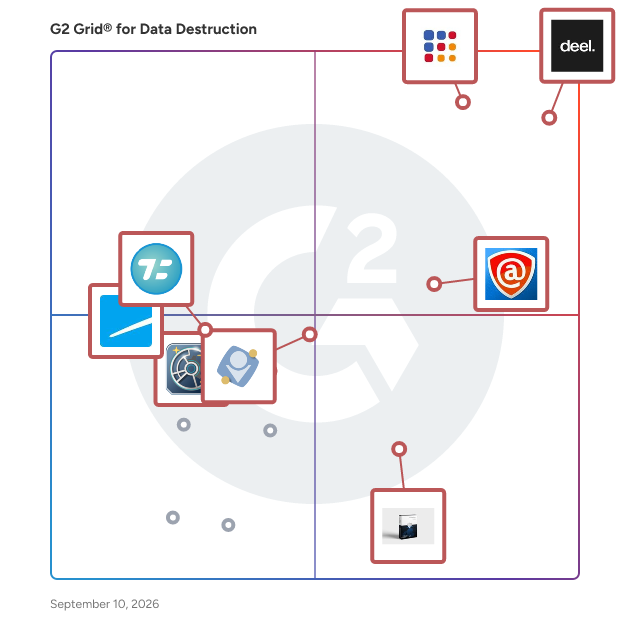
G2 takes pride in showing unbiased reviews on user satisfaction in our ratings and reports. We do not allow paid placements in any of our ratings, rankings, or reports. Learn about our scoring methodologies.
Blancco is a provider of certified data erasure and mobile lifecycle solutions, offering secure, compliant, and automated methods to permanently erase sensitive data from various IT assets. Their solu
Blancco is a software that focuses on data security, providing comprehensive data erasure capabilities and compliance with various data protection regulations. Reviewers like the software's thorough data erasure capabilities, its compliance with data protection regulations, and its role in reducing the environmental impact of electronic waste. Users mentioned that the software's aesthetic and design is outdated, it is not NIST certified, and it has some compatibility issues with older Lenovo machines and Mac computers.
Deel IT is a global IT management platform that helps organizations provision, secure, support, and recover employee devices and software across distributed teams. It enables IT teams to manage the fu
Deel IT is a platform designed to manage global teams and their equipment, handle payments, and streamline the IT lifecycle for distributed teams. Users like the user-friendly interface, the ability to manage global employees and their equipment efficiently, and the convenience of having multiple withdrawal methods and financial aid options. Users experienced issues with the lack of advanced automation options, the need for manual intervention in certain processes, occasional crashes in data or workflows, and high fees for certain services.
Active@ KillDisk is a fast, reliable solution for permanently erasing data from HDDs, SSDs, USB drives, and memory cards. It supports 20+ international data destruction standards, including DoD 5220.2
At WIPERAPP, our goal is to offer a secure and environmentally friendly data erasure solutions that meet the highest industry standards. Through our data erasure technology, we aim to assist both busi
DeleteOnClick is a straightforward utility designed to securely and permanently delete files from your computer, ensuring they cannot be recovered by any means. By integrating directly into the Window
Parted Magic is a comprehensive, Linux-based bootable solution designed for efficient hard disk management and data recovery tasks. Operating directly from a CD, USB drive, or network via PXE, it elim
Ashampoo WinOptimizer is a comprehensive system optimization suite designed to enhance the performance, security, and privacy of Windows PCs. It offers a user-friendly interface that simplifies the pr
CopyWipe is a robust utility designed for securely copying and erasing hard drives. It enables users to duplicate the contents of one drive to another, ensuring data integrity during the transfer proc
Wipe out all content and settings on (locked) iPhone iPad iPod permanently. Protect your personal privacy safely.
File Shredder is a free desktop application designed to permanently delete unwanted files from your hard drive, ensuring they cannot be recovered. Unlike the standard Windows "delete" command, which o
Redkey is the certified secure, easy-to-use data wipe tool you've been searching for! This portable USB stick grants access to our proprietary software, designed for unlimited usage and including life
PC Shredder is a free, user-friendly software designed to permanently delete files and folders, ensuring they are irrecoverable. By overwriting data multiple times using advanced algorithms, it preven
WipeOS is an enterprise-grade platform unifying diagnostics, imaging, and certified data sanitization in a single workflow.
Jungle Inc. is incorporated in USA and parent company is Jungle KK. Company designs, develops, publishes and distributes a wide range of software applications for Microsoft Windows and Mac operating s
Data Wiping with BCWipe BCWipe by Jetico is a powerful and trusted data wiping utility, engineered for a wide range of users: from experts at large organizations handling national security to peopl
Data destruction software completely deletes all data on hard drives to ensure that sensitive data will not be recovered by unauthorized personnel. When users delete data stored on retired hard drives, the hard drive can still be retrieved by hackers. Since most operating systems such as Microsoft Windows, Linux, and Apple macOS do not securely erase data, hackers can recover the storage devices and access financial information, client details, and other sensitive materials for blackmail or corporate espionage purposes. This exposes businesses to serious financial losses and legal troubles. This is why many businesses are required by regulations to have a data sanitization process to properly destroy their data.
For hard drives that contain extremely sensitive information, companies use physical data destruction methods such as melting and shredding on-site. Physical data erasure can shred flash drives, solid-state drives (SSD), USB drives, and other hard disks from desktops, laptops, or servers. This is a secure data erasure method to prevent personal data from being accessible by destroying the entire drive. However, the company will need to buy hard drive destruction equipment such as a hard drive shredder. This will render the device unusable. For most companies, physical data destruction is costly and unnecessary. Instead, they can use data destruction software, which can be used in multiple locations and is affordable. This is also sometimes referred to as data eraser software or data erasure software. This type of software can erase, wipe, and shred files and systems. It can also be used for separate partitioned drives instead of the whole drive. Once the drive erasure is complete, others can’t use data recovery methods to regain access to the file system since the drive will be filled with random data or return the hard drive into a bootable drive.
Since data destruction or data wiping falls under the last step of the data lifecycle management (DLM) process, data destruction should be planned ahead of time as part of the whole process. And without a good DLM, data can be leaked in earlier steps before they are erased. Companies should evaluate their DLM process and data protection process before they buy data destruction software. For example, there is some freeware to wipe data but they might not fit the overall process or the industry standards.
The following are some core features within data destruction software that can help users delete their data completely and comply with data regulations:
Data wiping: The software can destroy the data by overwriting (replace data with random 1s and 0s), block erase (wipe the whole logical block), or cryptographic erase (destroy built-in data encryption). Since there are many different types of SSD and hard disk drive (HDD), the software also needs to have different data destruction technology depending on the hard drive type. Regardless of the wiping method and technology, the old data should not be recoverable after the wipe.
Certified compliance: Each industry and region have different laws and standards for erasing the data. The software should have different data wiping configurations for different laws, thus making each wipe certified for compliance.
Reports for auditing: Electronic reports should be automatically generated for different regulations based on the compliance criteria (device types, wiping methods, validation, and others). Manual documentation is prone to human error, hard to scale, and difficult to customize. The online report provides proof and validations that the wipe process fits the regulation standards and is available for auditing in the future.
Integration: Many data destruction software is a part of or integrate with data governance software or IT asset management software. Data governance software manages all the DLM processes which include data destruction. It is a one-stop solution for companies that need to automate all of the data management processes. IT asset management tracks IT hardware inventory. Once the hard drive is wiped, data destruction software can automatically update the IT hardware inventory, which saves time from manual input.
Information security: Sensitive data, file, and file structures on any operating system won’t fall into the wrong hands when it is completely destroyed. The data is beyond recovery even with advanced recovery software.
Cost saving: Data destruction software only costs a fraction of physical destruction tools and services. The software can be remotely managed without the limit of distance. It can also operate hundreds of devices at the same time.
Environmentally friendly: Physically destroyed software cannot be used again, which contributes to electronic waste. Data destruction software supports zero-landfill movement because the wiped drive is reusable and recyclable.
Data security team: The data security team first needs to determine what data should be perishable from the team that stores the data. Once the usable data is moved into a new drive, the data team should conduct the wipe using the software.
Compliance team: Compliance team consists of data privacy and legal personnel, who should ensure that the data destruction process and software are set up properly to fit the industry standards.
Software solutions can come with their own set of challenges.
Low priority: Most businesses that aren’t directly affected by privacy and data security standards will not place data management as a priority, much less data destruction. It might be hard to get buy-in for data destruction software unless the company suffered the consequences of stolen hard drives.
Improper disposal of hard drive and data: Data destruction involves using software destruction and physical destruction depending on the industry. Since data management is still a new practice for most companies, they sometimes don’t properly implement sound data destruction plans. Once a data breach happens because of that, these companies receive large amounts of fines, broken trusts, and bad reputations. The compliance team and data team should emphasize the importance of adhering to privacy and data security regulations and the negative consequences of data breaches. This will incentivize companies to implement proper data management practices.
Since data destruction is a part of the DLM process, it is important to plan out a DLM process first if the company doesn’t have one. Many companies that don’t have the talents for data destruction, data privacy management, and compliance management should consider hiring outside talents to properly implement the DLM process. The DLM process needs to comply with the industry standards. Once the DLM planning is done, the compliance team needs to identify how to destruct the data according to their company budget, data management process, industry, and feature requirements. For example, some industry regulations require on-site hardware destruction whereas others have no such requirements.
Prioritizing the desired feature set can help narrow down the potential pool of data destruction solutions, allowing teams to then apply further considerations for budget, ease of integration with other systems, security requirements, and more. This holistic approach empowers buyers to move forward with a focused checklist, which can be used in conjunction with G2 scoring to select the best product for the business.
Create a long list
Buyers should start with a large pool of data destruction software vendors. Keeping the desired must-have features in mind, it is important that buyers perform consistent inquiries during demos by which they can effectively compare the pros and cons of each software solution.
Create a short list
It helps to cross-reference the results of initial vendor evaluations with G2 reviews from other buyers, the combination of which will help to narrow in on a short three to five product list. From there, buyers can compare pricing and features to determine the best fit.
Conduct demos
As a rule of thumb, companies should make sure to demo all of the products that end up on their short list. During demos, buyers should ask specific questions related to the functionalities they care most about; for example, one might ask to be walked through a typical data wiping process from planning to recycling the hard drive within the data destruction tool.
Choose a selection team
Regardless of a company’s size, it’s important to involve the most relevant personas when beginning the data destruction software selection process. Larger companies may include individual team members to fill roles such as compliance manager, data lifecycle manager, lawyers, system owner, and IT professionals who will be working with the software most closely. Smaller companies with fewer employees might overlap roles.
Negotiation
Many companies offer DLM platforms that go beyond data destruction to include data discovery, data quality, and more. While some companies will not budge on the configurations of their packages, buyers looking to trim costs should try to negotiate down to the specific functions that matter to them in order to get the best price. For example, a vendor’s pricing page where data destruction functionality is only included with a robust all-in-one DLM package, whereas a sales conversation may prove otherwise.
Final decision
After this stage, it is important to perform a trial run if possible with the selection team. This will help to ensure that the data destruction software of choice integrates well with the system setup and day-to-day work. If the data destruction tool is easy to use and fits the compliance standards, the buyer can take that as a sign that their selection is the right one. If not, reevaluation of the options may be necessary.