


Designcenter Solid Edge Reviews & Product Details

Pricing

Pricing provided by Designcenter Solid Edge.

Solid Edge Design and Drafting XaaS

Starting at $90.47
Per Month

Designcenter Solid Edge Media

Designcenter Solid Edge Demo - Large Assembly
Faster performance and memory load time when developing large assemblies. New support for embedded components inside the assembly with no file reference, for simplified supplier data workflow.
Designcenter Solid Edge Demo - Next-generation Cloud-Based Collaboration
Synchronize files with cloud storage, while you work; view, measure and markup any computer-aided design (CAD) on any device; securely share projects with anyone; and, review designs in augmented reality (AR) on phones and tablets.
Designcenter Solid Edge Demo - CAM & Machining
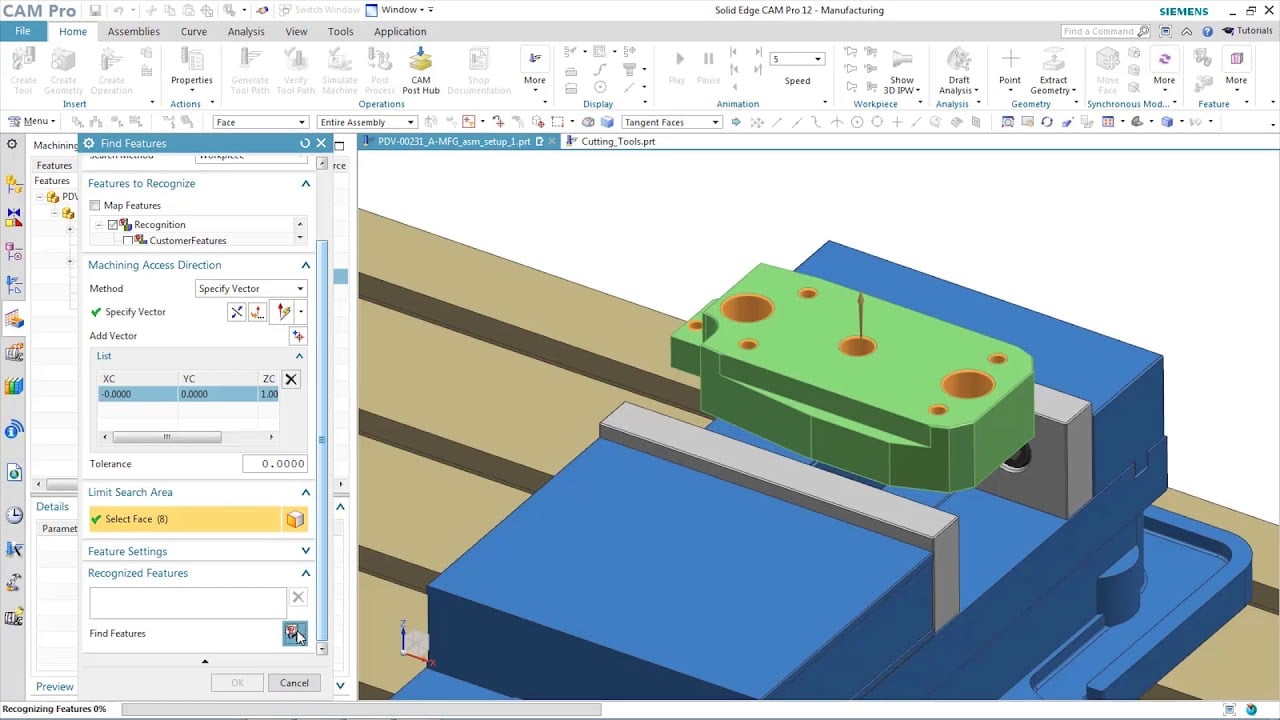
Solid Edge manufacturing solutions provide fast and easy feature-based machining, allowing you to automatically determine the machining process for a wide range of features.
Designcenter Solid Edge Demo - Faster reverse engineering
Reduce time spent on reverse engineering with lightning-fast performance enhancements including deviation analysis.
Designcenter Solid Edge Demo - Technical Publications
Open, save and revise data from Teamcenter, Siemens’ powerful PLM solution, with tight integration to ensure your working with the right data, every time. Go from engineering to documentation quickly and seamlessly working directly with Solid Edge 3D models; leveraging the digital twin ensures al...
Designcenter Solid Edge Demo - FLOEFD
Better integration between flow simulation and structural simulation help create a more accurate digital twin. Add fluid pressure and temperatures results from Simcenter FLOEFD for Solid Edge for analysis in Solid Edge Simulation. Digitally validating and optimizing parts, assemblies and complete...
Play Designcenter Solid Edge Video
Product Avatar Image

Have you used Designcenter Solid Edge before?

Answer a few questions to help the Designcenter Solid Edge community

Designcenter Solid Edge Reviews (579)

View 1 Video Reviews
Reviews

Designcenter Solid Edge Reviews (579)

View 1 Video Reviews
4.3
579 reviews

Review Summary

Generated using AI from real user reviews
Users consistently praise the intuitive interface and synchronous technology of Designcenter Solid Edge, which streamline the design process and facilitate quick modifications. Many appreciate its ability to handle complex assemblies efficiently, making it a reliable choice for mechanical design. However, some users note that performance can lag with larger projects, and the learning curve may be steep for beginners.

Pros & Cons

Generated from real user reviews
View All Pros and Cons
Search reviews
Filter Reviews
Clear Results
G2 reviews are authentic and verified.
David  R.
DR
Maintenance Engineer
Small-Business (50 or fewer emp.)
"Fast and Tool-Rich for Part Design"
What do you like best about Designcenter Solid Edge?

I like using Designcenter Solid Edge to design some individual parts. I find it faster than doing small tasks myself. I enjoy the tools, specifically Sheet Metal and Part Modeling, which are really beneficial. Review collected by and hosted on G2.com.

What do you dislike about Designcenter Solid Edge?

I think the sheet metal flange trimming could be improved to be smarter. I'd like to see a reduction in the number of clicks required to use it. Review collected by and hosted on G2.com.

Verified User in Design
UD
Small-Business (50 or fewer emp.)
"Familiar and Reliable—Does the Job"
What do you like best about Designcenter Solid Edge?

To be honest it is what I have used and I am just used to it nothing I like more or less compared to other programs. I like the fact that is easier to use when you have a large assembly but not much more on that. Review collected by and hosted on G2.com.

What do you dislike about Designcenter Solid Edge?

It was a hell of a ride to learn how to use it and didn’t have many tutorials (my bad), interface is a bit old I believe but not much more than that! I don’t really mind it as it is Review collected by and hosted on G2.com.

Dassan R.
DR
Electrical Engineer
"Fast 3D Modeling with AI and Automation"
What do you like best about Designcenter Solid Edge?

I like using Designcenter Solid Edge for 3D modeling because it provides a fast edit tool. The AI and automation features are great as they automatically create 80% of my 2D drawings with a quick pattern. I find the workflow to be good and it's quite easy to learn and use. Review collected by and hosted on G2.com.

What do you dislike about Designcenter Solid Edge?

For me the tool has good workflow but in future I want to see we get the editing features when using visual reality gear with Solid Edge. Review collected by and hosted on G2.com.

kareem w.
KW
Mechatronics Engineer
Enterprise (> 1000 emp.)
"Solid Edge – Intuitive Workflow & Seamless Integration"
What do you like best about Designcenter Solid Edge?

What I like best about Solid Edge is how intuitive it feels from day one The ease of use is clear thanks to its clean interface and organized ribbon tabs making navigation quick even for new users The ease of implementation allowed me to start real projects almost immediately without a steep learning curve Its ease of integration with CAM and simulation tools means I can handle design machining preparation and testing in one connected workflow I also appreciate the number of features it offers from detailed 3D modeling to built in analysis without feeling cluttered Given my workflow the frequency of use is high and the more I use it the faster and more confident I become in delivering projects While I havent needed to contact customer support yet knowing its available and backed by Siemens adds extra confidence in relying on the software for critical work Review collected by and hosted on G2.com.

What do you dislike about Designcenter Solid Edge?

The only small drawback for me is the default mouse scroll zoom direction, which feels opposite compared to some other CAD tools I’ve used. It’s a quick setting to adapt to, but it takes a short adjustment period. Also, some icons are placed slightly differently than in other platforms, so you might spend a moment looking for them in the beginning but once familiar, the workflow is smooth. Review collected by and hosted on G2.com.

Luther S.
LS
Junior App Dev
Information Technology and Services
Small-Business (50 or fewer emp.)
"It was easy to master and has a lot of prototyping posibilities"
What do you like best about Designcenter Solid Edge?

The fact that for students we got a free version to use that had all the functions was a huge plus. You can also link it with already designed prototypes of various siemens machines and electronics. Esay to intergrate with siemens logosoft. Review collected by and hosted on G2.com.

What do you dislike about Designcenter Solid Edge?

Some users dislike Solid Edge because it can feel less intuitive than competitors like SolidWorks, has a smaller user community hence has fewer tutorials/resources since it it used mostly by big companies, and sometimes faces compatibility or stability issues with very large or complex assemblies Review collected by and hosted on G2.com.

Gugulethu D.
GD
Telesales Specialist
"Powerful, Accurate, But Steep Learning Curve"
What do you like best about Designcenter Solid Edge?

I like that Designcenter Solid Edge allows me to work confidently, make changes quickly, and deliver designs that are accurate. I also really feel like it handles imported files from other CAD systems well. Being able to edit and reuse external models without rebuilding them from scratch saves a lot of time and effort. Review collected by and hosted on G2.com.

What do you dislike about Designcenter Solid Edge?

I find the learning curve steep for new users. A step-by-step onboarding inside the software would assist. Review collected by and hosted on G2.com.

Abdallah S.
AS
R&D Hardware Engineer
Enterprise (> 1000 emp.)
"Effortless 3D Modeling with Solid Edge's Synchronous Technology"
What do you like best about Designcenter Solid Edge?

What I like best about Solid Edge is how powerful and flexible it is for 3D design. The synchronous technology makes editing parts really easy I can change dimensions or features without worrying about breaking the model. It also handles large assemblies smoothly and has great built-in simulation tools, so I can test my designs before production. Overall, it saves a lot of time and makes the design process much more efficient. Review collected by and hosted on G2.com.

What do you dislike about Designcenter Solid Edge?

What I dislike about Solid Edge is that it can feel a bit heavy when working on large or complex projects. Sometimes it takes longer to load big assemblies or detailed models. The learning curve is also a little steep at first, so new users might need some time to get comfortable with all the tools and features. Other than that, it’s a great program once you get used to it. Review collected by and hosted on G2.com.

DA
Mechanical design engineer
Small-Business (50 or fewer emp.)
"Streamlining 3D Design with Solid Edge; A Powerful Tool for Fast and Flexible Engineering ."
What do you like best about Designcenter Solid Edge?

its Synchronous Technology which combines the speed of direct modeling with the control of parametric design making design changes fast, flexible, and intuitive coupled with it's simulation tools . Review collected by and hosted on G2.com.

What do you dislike about Designcenter Solid Edge?

1. Learning Curve– Synchronous Technology can be confusing at first for users used to traditional parametric modeling.

2. Add-on Integration– Certain third-party plugins or tools aren’t as widely supported compared to other major CAD platforms.

4. Resource Demand – Large assemblies can be demanding on system hardware.

5. Limited Community Support – Smaller user base than SolidWorks or Autodesk, so finding tutorials or forums may take more effort. Review collected by and hosted on G2.com.

Jesus L.
JL
Engineer Trainee
Mid-Market (51-1000 emp.)
"Intuitive Launchpad for Civil 3D Design"
What do you like best about Designcenter Solid Edge?

As a beginner in civil engineering design, I find Solid Edge’s synchronous technology incredibly empowering. It lets me drag and reshape parametric models in real time without breaking relationships, so I can explore ideas freely and learn by doing. The user interface balances simplicity and depth: core commands are easy to find, and contextual ribbons surface advanced tools when I need them. Integrated drafting and analytical modules help me transition seamlessly from 3D concepts to construction-ready drawings, boosting my confidence as I tackle infrastructure projects. Review collected by and hosted on G2.com.

What do you dislike about Designcenter Solid Edge?

Despite its strengths, Solid Edge can feel overwhelming when diving into simulation or detailed finite element analysis—menus multiply, and it’s easy to get lost. Handling large assemblies of beams, columns, or rebar sometimes causes lag, slowing my workflow and testing my patience. The modular licensing model also bites: unlocking specialized civil tools or simulation packs can strain a beginner’s or small firm’s budget. Finally, native support for some civil-specific file formats is limited, so I often need extra export steps, adding friction to collaboration with other CAD platforms. Review collected by and hosted on G2.com.

DS
Engineer
Mid-Market (51-1000 emp.)
"Intuitive and Flexible 3D Design Companion"
What do you like best about Designcenter Solid Edge?

Solid Edge’s streamlined interface combined with its synchronous modeling engine makes practicing simple 3D designs a breeze. I love how quickly I can sketch parametric profiles and then directly manipulate geometry without juggling feature trees. The integrated tools for patterning, filleting, and mirroring feel responsive, letting me iterate on ideas rapidly. Even as a beginner, I found the learning path logical, and the automatic dimensioning and constraint suggestions help reinforce good modeling habits every time I practice. Review collected by and hosted on G2.com.

What do you dislike about Designcenter Solid Edge?

While Solid Edge excels at simple part modeling, I’ve noticed that performance can dip when working on more complex assemblies or high-detail meshes, even on a mid-range workstation. The installation and licensing process also felt cumbersome compared to some competitors, requiring extra steps to activate and update. Finally, although the core tools are intuitive, finding in-depth tutorials for advanced synchronous features or specialized workflows can be challenging, which sometimes slows down my progress when I want to explore beyond the basics. Review collected by and hosted on G2.com.

Pricing Options

Pricing provided by Designcenter Solid Edge.

Solid Edge Design and Drafting XaaS

Starting at $90.47
Per Month

Solid Edge X Standard

Starting at $261.00
Per Month

Solid Edge X Advanced

Starting at $312.00
Per Month

Solid Edge X Premium

Starting at $413.00
Per Month

G2 Deals

Exclusive savings on Designcenter Solid Edge through G2 Deals

Get 25% off any monthly or annual subscription of Solid Edge and accelerate your product development process using best-in-class 3D design tools.

How to claim this offer

Claim the offer via G2 and use code G2START25 during checkout.

Designcenter Solid Edge Comparisons
Product Avatar Image
SOLIDWORKS
Compare Now
Product Avatar Image
Inventor
Compare Now
Product Avatar Image
Designcenter NX
Compare Now
Designcenter Solid Edge Features
CAD-CAM Import
Drawing
Modeling
Visualize
File Import
Push/Pull
Views
Annotate
Documentation
Data Extract
Product Avatar Image
Designcenter Solid Edge