


Designcenter Solid Edge Reviews & Product Details

Pricing

Pricing provided by Designcenter Solid Edge.

Solid Edge Design and Drafting XaaS

Starting at $90.47
Per Month

Designcenter Solid Edge Media

Designcenter Solid Edge Demo - Large Assembly
Faster performance and memory load time when developing large assemblies. New support for embedded components inside the assembly with no file reference, for simplified supplier data workflow.
Designcenter Solid Edge Demo - Next-generation Cloud-Based Collaboration
Synchronize files with cloud storage, while you work; view, measure and markup any computer-aided design (CAD) on any device; securely share projects with anyone; and, review designs in augmented reality (AR) on phones and tablets.
Designcenter Solid Edge Demo - CAM & Machining
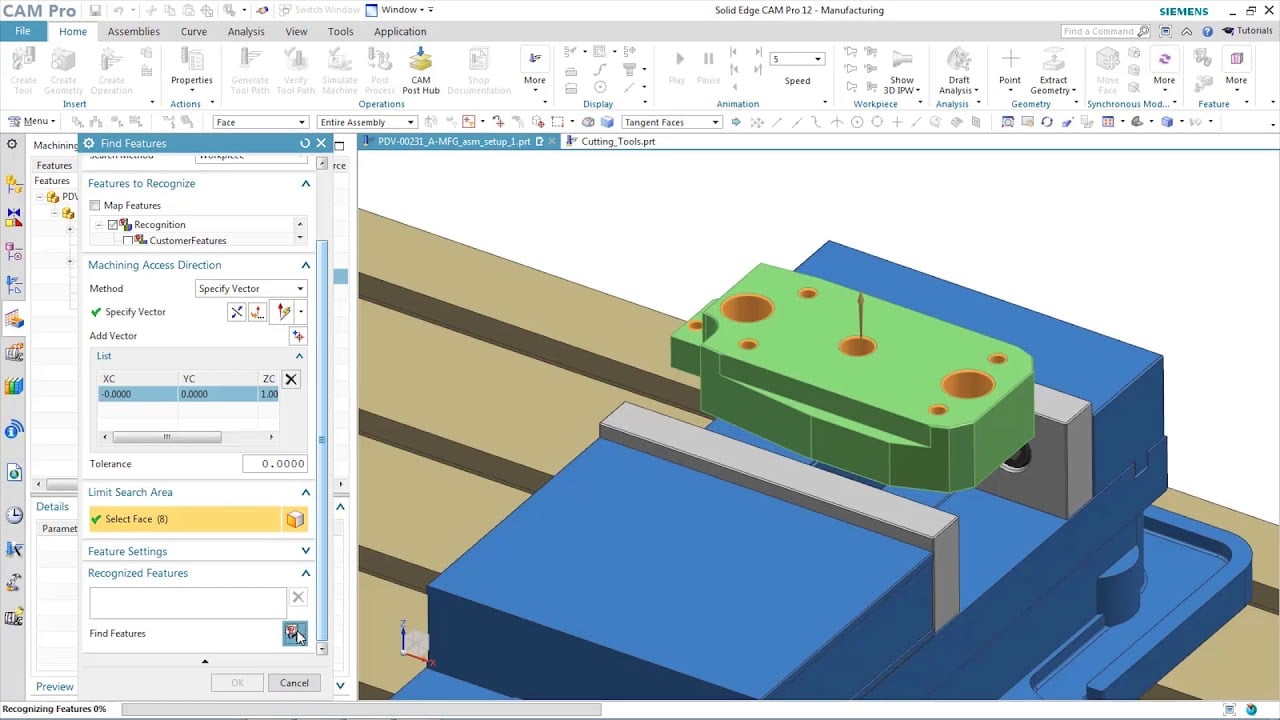
Solid Edge manufacturing solutions provide fast and easy feature-based machining, allowing you to automatically determine the machining process for a wide range of features.
Designcenter Solid Edge Demo - Faster reverse engineering
Reduce time spent on reverse engineering with lightning-fast performance enhancements including deviation analysis.
Designcenter Solid Edge Demo - Technical Publications
Open, save and revise data from Teamcenter, Siemens’ powerful PLM solution, with tight integration to ensure your working with the right data, every time. Go from engineering to documentation quickly and seamlessly working directly with Solid Edge 3D models; leveraging the digital twin ensures al...
Designcenter Solid Edge Demo - FLOEFD
Better integration between flow simulation and structural simulation help create a more accurate digital twin. Add fluid pressure and temperatures results from Simcenter FLOEFD for Solid Edge for analysis in Solid Edge Simulation. Digitally validating and optimizing parts, assemblies and complete...
Play Designcenter Solid Edge Video
Product Avatar Image

Have you used Designcenter Solid Edge before?

Answer a few questions to help the Designcenter Solid Edge community

Designcenter Solid Edge Reviews (579)

View 1 Video Reviews
Reviews

Designcenter Solid Edge Reviews (579)

View 1 Video Reviews
4.3
579 reviews

Review Summary

Generated using AI from real user reviews
Users consistently praise the intuitive interface and synchronous technology of Designcenter Solid Edge, which streamline the design process and facilitate quick modifications. Many appreciate its ability to handle complex assemblies efficiently, making it a reliable choice for mechanical design. However, some users note that performance can lag with larger projects, and the learning curve may be steep for beginners.

Pros & Cons

Generated from real user reviews
View All Pros and Cons
Search reviews
Filter Reviews
Clear Results
G2 reviews are authentic and verified.
Wisdom James M.
WM
Process Engineer
Small-Business (50 or fewer emp.)
"QUICK, USER FRIENDLY AND EFFICIENT CAD SOFTWARE (SOLIDE EDGE)"
What do you like best about Designcenter Solid Edge?

Solid Edge interface is quite user friendly with less clutter of icons and modelling tools conviently placed on straightforward positions which can enable learning it within a few days. Solid Edge Synchronous Technology has made my 3D modelling tasks less strenuous and more efficient with less cycle time per each model as compared to the previous CAD software I have been using. Solid Edge has been a game changer in my design work. Review collected by and hosted on G2.com.

What do you dislike about Designcenter Solid Edge?

Solid Edge has actually made my design work a lot easier and efficient.I haven't experienced any observable shortcomings. Adding Built in Computational Fluid Dynamics options in the Academic and Community Editions for stress simulation will make it even more convinient for design work to the common student and/or early career reasearchers. Review collected by and hosted on G2.com.

Muhammet A.
MA
Mechanical Design Engineer
Mid-Market (51-1000 emp.)
"strogn cad software, but it has learning curve"
What do you like best about Designcenter Solid Edge?

What I appreciate most about Solid Edge is its robust 3D modeling capabilities. The parametric design tools are highly advanced, allowing me to create complex parts efficiently. The assembly module is particularly impressive - managing large assemblies is seamless and intuitive. The dedicated sheet metal design tools are extremely useful for manufacturing workflows. Additionally, the Siemens integration provides excellent compatibility with PLM systems, making it ideal for enterprise environments. Review collected by and hosted on G2.com.

What do you dislike about Designcenter Solid Edge?

The software has a steep learning curve, especially for users transitioning from AutoCAD or other platforms. The interface can feel overwhelming at times, and accessing certain functions isn't always intuitive. The rendering quality lags behind competitors like SolidWorks in terms of photorealistic output. License costs are quite high for smaller companies or individual users. Performance can be sluggish when working with large files, and occasional crashes during complex operations can be frustrating. Review collected by and hosted on G2.com.

Vinod R.
VR
Robotics Engineer
Aviation & Aerospace
Small-Business (50 or fewer emp.)
"Perfect CAD Starter: Intuitive, Beginner-Friendly, and Easy to Master"
What do you like best about Designcenter Solid Edge?

Extremely easy for a beginner to pick up and start working. Easy to learn with lots of ground to master. Serves as an excellent tool for those who want to begin CAD. UI is straightforward with appropriate symbols that more or less depict functions well when comapred to a handful of tools I have used so far. Review collected by and hosted on G2.com.

What do you dislike about Designcenter Solid Edge?

It is hard to immediately define what I dislike. This served as a gateway to a lot of other CAD softwares that I do not particularly see it employed in companies. I wish there was more outreach for SolidEdge, which is not a fault but a compliment from my side. Review collected by and hosted on G2.com.

Elshad S.
ES
Mechanical Engineer
Mid-Market (51-1000 emp.)
"Effortless Parts Reuse, But Needs Faster Library Access"
What do you like best about Designcenter Solid Edge?

I enjoy how it's easy to reuse existing components with Designcenter Solid Edge. The ability to drag and drop parts or assemblies directly into a new design is particularly helpful. Review collected by and hosted on G2.com.

What do you dislike about Designcenter Solid Edge?

I think I had an issue with the library. When I search through very large folders or assemblies, it was sometimes very slow or less responsive. Also, the UI design or integration with modern collaboration tools could be improved. Review collected by and hosted on G2.com.

Verified User in Automotive
CA
Enterprise (> 1000 emp.)
"Solid Edge Designcenter: Steep Learning Curve, But Promising"
What do you like best about Designcenter Solid Edge?

What i dislike about Designcenter Solid Edge is the slightly softer learning curve, coming from Catia many things were able to be "ported", it is more user-friendly and we were able to integrate it on our workflow. It is also cheaper. Review collected by and hosted on G2.com.

What do you dislike about Designcenter Solid Edge?

What i disliked about Designcenter Solid Edge is that it can slow down with extremely large components. Another thing I disliked is that the interface feels a bit cluttered, making it harder to quickly find certain tools. However, this went away with practice and as i got used to the program. Review collected by and hosted on G2.com.

SD
Application Engineer
Mechanical or Industrial Engineering
Mid-Market (51-1000 emp.)
"User-Friendly, Cost-Effective, and Lightning Fast Editing"
What do you like best about Designcenter Solid Edge?

good user friendly interface, cost effective software, very fast software also flexible for editing, very good for manufacturing oriented design as well as electrical design Review collected by and hosted on G2.com.

What do you dislike about Designcenter Solid Edge?

less customization of UI, wile opening large files face issue like software slow down a bit, sometimes creating files size are large, suppose if in need of extensive simulation then we can not do it in software Review collected by and hosted on G2.com.

Monish K.
MK
Manufacturing Engineer
Mid-Market (51-1000 emp.)
"Powerful CAD Features and Easy Adaptation for Designers"
What do you like best about Designcenter Solid Edge?

It has good feautures for design makes it one of the good CAD software …. If you master the solid edge then you can work any CAD software thats the best thing … also there is slight thing i worry about is its expensive if you use it for business purpose which is also one thing to look at …. Autocad gives the same feature but bit cheap compare to solid edge …. But both are very good competitors that i can say Review collected by and hosted on G2.com.

What do you dislike about Designcenter Solid Edge?

When it comes to cost, I don't really prefer Solid Edge. However, aside from the price, it's actually a great option for both beginners and advanced designers. In terms of simulation, Solid Edge performs well, though I wouldn't say it's the very best. Review collected by and hosted on G2.com.

Gareth E.
GE
Graduate mechanical design engineer
Mid-Market (51-1000 emp.)
"The whole 9 yards"
What do you like best about Designcenter Solid Edge?

Solid Edge is an extremely comprehensive software allowing the user to access all the required stages of design in one single place. The overall interface is very easy to use and the parametric elements within the design software allows for rapid modelling of parts. Moving from these the FEA section allows these parts to be simulated in a rough manner to ensure suitability of the design prior to moving forward. The CAM tooling section also allows for the design to be made quicker with manufacture in mind. Seeing the design on a virtual machining bed with the tooling path can show you areas which need changing in the design before its too late. Overall a very comprehensive and sophisticated CAD program. Review collected by and hosted on G2.com.

What do you dislike about Designcenter Solid Edge?

The main dislike I have with the system is the large learning curve. Due to there being so much in the package it takes a long time to get to grips with it all. Additionally while the FEA integration is fantastic, it is not suitable for larger simulations meaning another product is required. As a user the cost of the product does not affect me personally however it is an expensive system to run and the variations in file type mean at times it fails to integrate with external parts from other programs. Review collected by and hosted on G2.com.

Mohammed T.
MT
Electrical Maintenance Engineer
Small-Business (50 or fewer emp.)
"Boosts Design Efficiency with Intuitive Reusability Features"
What do you like best about Designcenter Solid Edge?

What I like best about DesignCenter in Solid Edge is how it improves design efficiency and reusability. It allows me to easily access and reuse existing parts, assemblies, and features from other projects, which saves a lot of time during design. The interface is intuitive — I can drag and drop components directly into my working assembly without needing to search manually through folders. Review collected by and hosted on G2.com.

What do you dislike about Designcenter Solid Edge?

I think DesignCenter is useful overall, but I’d like to see improvements in search speed, preview loading, and better organization tools for large libraries. Enhancing these areas would make it much smoother to use. Review collected by and hosted on G2.com.

Muhammad T.
MT
Electronics Engineering Specialist
Enterprise (> 1000 emp.)
"Flexible, Fast Design with Powerful Tools—But Steep Learning Curve and Performance Lags"
What do you like best about Designcenter Solid Edge?

What I like best is the flexibility and speed of iteration. The mix of direct & parametric modeling (“Synchronous Technology”) lets me make design changes fast without being locked into a rigid history tree workflow. Also, its strong assembly, sheet metal and collaboration support means I can move from part to manufacturing prep more smoothly. Review collected by and hosted on G2.com.

What do you dislike about Designcenter Solid Edge?

Performance can lag when working with very large assemblies or highly detailed models. Also The learning curve is steeper for new users, especially when transitioning from simpler CAD workflows. Review collected by and hosted on G2.com.

Pricing Options

Pricing provided by Designcenter Solid Edge.

Solid Edge Design and Drafting XaaS

Starting at $90.47
Per Month

Solid Edge X Standard

Starting at $261.00
Per Month

Solid Edge X Advanced

Starting at $312.00
Per Month

Solid Edge X Premium

Starting at $413.00
Per Month

G2 Deals

Exclusive savings on Designcenter Solid Edge through G2 Deals

Get 25% off any monthly or annual subscription of Solid Edge and accelerate your product development process using best-in-class 3D design tools.

How to claim this offer

Claim the offer via G2 and use code G2START25 during checkout.

Designcenter Solid Edge Comparisons
Product Avatar Image
SOLIDWORKS
Compare Now
Product Avatar Image
Inventor
Compare Now
Product Avatar Image
Designcenter NX
Compare Now
Designcenter Solid Edge Features
CAD-CAM Import
Drawing
Modeling
Visualize
File Import
Push/Pull
Views
Annotate
Documentation
Data Extract
Product Avatar Image
Designcenter Solid Edge