Best Room Systems

How Many Room Systems Products Does G2 Track?

Total Products under this Category: 16

Category Stats (Oct 2026)

  • Average Rating: 4.44/5 (↑0.02 vs Sep 2026) The average rating of products in this category, based on all submitted ratings
  • Top Trending Product: ClickShare (+5.88%) - Among all products in this category, ClickShare recorded the largest rating increase compared to last month

Last updated: October 01, 2026

How Does G2 Rank Room Systems Products?

Why You Can Trust G2's Software Rankings:

  • 30 Analysts and Data Experts
  • 2,000+ Authentic Reviews
  • 16+ Products
  • Unbiased Rankings

G2's software rankings are built on verified user reviews, rigorous moderation, and a consistent research methodology maintained by a team of analysts and data experts. Each product is measured using the same transparent criteria, with no paid placement or vendor influence. While reviews reflect real user experiences, which can be subjective, they offer valuable insight into how software performs in the hands of professionals. Together, these inputs power the G2 Score, a standardized way to compare tools within every category.

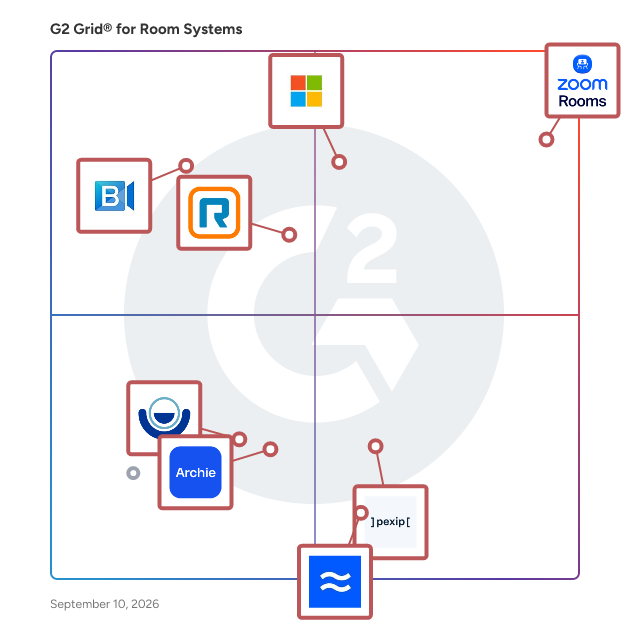
G2 Grid® for Room Systems

G2 Grid® for Room Systems  plotting products by satisfaction and market presence

Highlighted products: Zoom Rooms, Microsoft Teams Room, RingCentral Video, BlueJeans Rooms, Pexip, AIRTAME, Archie, and Lifesize.

Underlying data: [Grid® JSON](https://www.g2.com/categories/room-systems/grids.json?focus%5B%5D=zoom-rooms&focus%5B%5D=microsoft-teams-room&focus%5B%5D=ringcentral-video&focus%5B%5D=bluejeans-rooms&focus%5B%5D=pexip&focus%5B%5D=airtame&focus%5B%5D=archie-archie&focus%5B%5D=lifesize)

Zoom Rooms

Bring best-in-class Zoom Meetings into any space Simple and high quality: Start a meeting with one touch HD video collaboration with built-in productivity tools Wireless sharing from laptop or mobile devices Leverage ecosystem of leading hardware partners Built for flexible work: Easily transfer meetings from mobile or laptop to the Zoom Room Pair Zoom Rooms for Touch device to use as Companion Zoom Room for added functionality Digital signage included to keep employees informed Leverage AI and modern innovation: Intelligent director and smart gallery determine the best angle of individuals to display Smart name tags applies name tags to participants to know who is in the room and who is speaking during a meeting Frictionless interoperability with leading platforms

Average Rating: 4.5/5.0

Total Reviews: 425

How Do G2 Users Rate Zoom Rooms?

  • Quality of Support: 8.6/10 (Category avg: 9.0/10)
  • Collaborative Whiteboards: 8.7/10 (Category avg: 8.5/10)
  • Screen Sharing: 9.5/10 (Category avg: 9.2/10)
  • Calendar Integration: 9.2/10 (Category avg: 8.9/10)

Who Is the Company Behind Zoom Rooms?

  • Seller: Zoom
  • Year Founded: 2011
  • HQ Location: San Jose, CA
  • Twitter: @zoom
    1,042,714 Twitter followers
  • LinkedIn® Page: www.linkedin.com
    14,013 employees on LinkedIn®

Who Uses This Product?

  • Who Uses This: Software Engineer
  • Top Industries: Information Technology and Services, Computer Software
  • Company Size: 40% Medium, 30% Small

What Do G2 Reviewers Say About Zoom Rooms?

AI-generated summary from verified user reviews

Pros
  • Users appreciate the ease of use of Zoom Rooms, facilitating seamless hybrid meetings and simple participant management.
  • Users appreciate the high-quality video resolution in Zoom Rooms, enhancing their meeting experience significantly.
  • Users love the easy setup of Zoom Rooms, requiring just a QR scan for quick pairing and efficiency.
  • Users value the seamless device connectivity and intuitive interface for effortless hybrid meeting experiences.
  • Users enjoy the easy communication in Zoom Rooms, enhancing collaboration and connectivity during meetings and discussions.
Cons
  • Users find the initial investment and subscription costs for Zoom Rooms to be prohibitively expensive for smaller organizations.
  • Users often face connection issues that hinder performance, particularly with weak internet bandwidth affecting audio and video quality.
  • Users find the complexity of initial setup and advanced settings challenging, especially without IT support.
  • Users face Zoom issues with complex setup, frequent software updates, and login struggles affecting meeting efficiency.
  • Users report high initial hardware costs and occasional connectivity issues that can disrupt their Zoom Rooms experience.

What Are Recent G2 Reviews of Zoom Rooms?

What Are G2 Users Discussing About Zoom Rooms?

Microsoft Teams Room

Microsoft Teams Rooms is a comprehensive solution designed to transform meeting spaces into inclusive, collaborative environments that bridge the gap between in-person and remote participants. By integrating Microsoft Teams software with certified hardware devices, Teams Rooms enables seamless communication and collaboration across various room sizes and configurations. Key Features and Functionality: - One-Touch Join: Quickly start meetings with a single touch, streamlining the meeting initiation process. - Wireless Content Sharing: Easily share content from personal devices without the need for cables, enhancing flexibility and convenience. - AI-Powered Audio and Video: Utilize intelligent audio and video capabilities to ensure clear communication and an immersive meeting experience. - Inclusive Video Layouts: Support various video layouts, including Front Row and large galleries, to accommodate different meeting scenarios and preferences. - Scalability: Adapt to different room sizes, from small huddle spaces to large conference rooms, ensuring consistent performance across all environments. - Remote Management: Manage and monitor devices remotely through a centralized portal, simplifying administration and maintenance tasks. Primary Value and User Solutions: Microsoft Teams Rooms addresses the challenges of hybrid work environments by creating meeting spaces that are both functional and inclusive. It ensures that all participants, regardless of their location, can engage fully in meetings. The solution simplifies the meeting experience with intuitive controls and seamless integration with Microsoft Teams, reducing setup time and technical difficulties. Additionally, its scalability and remote management capabilities make it a cost-effective and efficient choice for organizations aiming to enhance collaboration and productivity in a hybrid work setting.

Average Rating: 4.6/5.0

Total Reviews: 97

How Do G2 Users Rate Microsoft Teams Room?

  • Quality of Support: 9.1/10 (Category avg: 9.0/10)
  • Collaborative Whiteboards: 9.0/10 (Category avg: 8.5/10)
  • Screen Sharing: 9.4/10 (Category avg: 9.2/10)
  • Calendar Integration: 9.3/10 (Category avg: 8.9/10)

Who Is the Company Behind Microsoft Teams Room?

  • Seller: Microsoft
  • Year Founded: 1975
  • HQ Location: Redmond, Washington
  • Twitter: @microsoft
    13,091,739 Twitter followers
  • LinkedIn® Page: www.linkedin.com
    232,750 employees on LinkedIn®
  • Ownership: MSFT

Who Uses This Product?

  • Top Industries: Computer Software, Information Technology and Services
  • Company Size: 40% Large, 35% Medium

What Are Recent G2 Reviews of Microsoft Teams Room?

What Are G2 Users Discussing About Microsoft Teams Room?

RingCentral Video

Glip is a conversation platform for teams to plan, share & organize work tasks. Text and video chat features facilitate communication between team members whilst file sharing and collaborative task management encourage efficiency and productivity. Glip helps teams to connect in real-time, unifying chat, tasks, video calling, file sharing, and event scheduling. Glip simplifies teamwork with secure instant messaging designed for teams to communicate and get work done at the same time. With Glip, work can be organized around conversations because the two are aligned. Users will always know what their team is doing and what needs to be done next. Glip enables the free flow of communication in teams. With text and and video chat at Glip's core, conversation barriers between team members are removed, enabling productivity and a smoother workflow. Ideas can be debated and problems solved through swift communication with Glip, which can be used like a Knowledge Base. Email and third party integrations mean that Glip - which requires no technical knowledge - can be implemented by teams already using different applications.

Average Rating: 4.2/5.0

Total Reviews: 496

How Do G2 Users Rate RingCentral Video?

  • Quality of Support: 8.3/10 (Category avg: 9.0/10)
  • Collaborative Whiteboards: 7.5/10 (Category avg: 8.5/10)
  • Screen Sharing: 9.2/10 (Category avg: 9.2/10)
  • Calendar Integration: 7.8/10 (Category avg: 8.9/10)

Who Is the Company Behind RingCentral Video?

  • Seller: RingCentral
  • Year Founded: 1999
  • HQ Location: Belmont, CA
  • Twitter: @RingCentral
    61,963 Twitter followers
  • LinkedIn® Page: www.linkedin.com
    6,675 employees on LinkedIn®
  • Ownership: NYSE:RNG

Who Uses This Product?

  • Who Uses This: Owner
  • Top Industries: Information Technology and Services, Computer Software
  • Company Size: 48% Medium, 42% Small

What Do G2 Reviewers Say About RingCentral Video?

AI-generated summary from verified user reviews

Pros
  • Users appreciate the ease of use of RingCentral Video, making connections and setups straightforward and efficient.
  • Users enjoy the great video quality of RingCentral Video, enhancing their conferencing experience significantly.
  • Users appreciate the easy screen sharing feature of RingCentral Video, enabling seamless collaboration and connectivity.
  • Users praise the accessible connectivity of RingCentral Video, making it easy for everyone to join meetings effortlessly.
  • Users find RingCentral Video to be highly reliable, ensuring stable connections and clear communication for meetings.
Cons
  • Users experience connectivity issues with RingCentral Video, including delays and audio sync problems during meetings.
  • Users report slow loading times, particularly when joining large meetings, negatively impacting their overall experience.
  • Users find the learning curve to be challenging, requiring extra time to adjust to RingCentral Video's interface.
  • Users find missing features in RingCentral Video, particularly for interactivity and engaging tools during meetings.
  • Users experience occasional performance issues with RingCentral Video, such as lags and app freezes during use.

What Are Recent G2 Reviews of RingCentral Video?

What Are G2 Users Discussing About RingCentral Video?

AI can help you find the answers. G2 helps you trust them.

Connect G2 to Claude or ChatGPT for answers grounded in G2's trusted reviews, comparisons, and pricing from real user insights.

How it works

BlueJeans Rooms

Turbocharge your conference rooms and huddle spaces with the power of BlueJeans. BlueJeans is on a mission to modernize traditional meeting rooms and convert them into digital workplaces. Whether outfitting new rooms with the latest hardware or using your existing room systems investments, BlueJeans has the right solution for you. BlueJeans also supports Microsoft Teams in standards-based (H.323/SIP) rooms with BlueJeans Gateway, a Microsoft Certified Cloud Video Interop (CVI) solution.

Average Rating: 4.0/5.0

Total Reviews: 29

How Do G2 Users Rate BlueJeans Rooms?

  • Quality of Support: 7.7/10 (Category avg: 9.0/10)
  • Collaborative Whiteboards: 8.8/10 (Category avg: 8.5/10)
  • Screen Sharing: 8.7/10 (Category avg: 9.2/10)
  • Calendar Integration: 8.8/10 (Category avg: 8.9/10)

Who Is the Company Behind BlueJeans Rooms?

  • Seller: Verizon
  • Year Founded: 1983
  • HQ Location: Basking RIdge, NJ
  • Twitter: @Verizon
    1,486,564 Twitter followers
  • LinkedIn® Page: www.linkedin.com
    101,991 employees on LinkedIn®
  • Ownership: NYSE:VZ

Who Uses This Product?

  • Company Size: 48% Medium, 31% Large

What Are Recent G2 Reviews of BlueJeans Rooms?

What Are G2 Users Discussing About BlueJeans Rooms?

Pexip

Pexip enables any room to join any meeting through universal interoperability. We work with top providers and device manufacturers, like Microsoft, Google, Zoom, and Poly, to deliver a seamless and secure collaboration experience built on trusted, certified technology. Popular interoperability use cases that Pexip solves: - Google Meet Hardware to Teams Meetings - Zoom Rooms To Teams Meetings - Teams Rooms to Zoom and Webex meetings - Cisco and Poly SIP Devices to Teams, Zoom, Webex, and Google Meet What sets Pexip apart? Pexip's video conferencing solutions are designed to address some of the most complex communication challenges by prioritizing security, interoperability, and scalability. Pexip Secure Meetings ensures that sensitive video conversations and data are protected, offering advanced access control and compliance with relevant regulations. Pexip Connect breaks down platform barriers, enabling users to collaborate efficiently across different solutions and systems.

Average Rating: 4.4/5.0

Total Reviews: 98

How Do G2 Users Rate Pexip?

  • Quality of Support: 8.9/10 (Category avg: 9.0/10)
  • Collaborative Whiteboards: 10.0/10 (Category avg: 8.5/10)
  • Screen Sharing: 9.4/10 (Category avg: 9.2/10)
  • Calendar Integration: 10.0/10 (Category avg: 8.9/10)

Who Is the Company Behind Pexip?

  • Seller: Pexip
  • Company Website:
  • Year Founded: 2012
  • HQ Location: Oslo, Norway
  • Twitter: @pexip
    4,124 Twitter followers
  • LinkedIn® Page: www.linkedin.com
    327 employees on LinkedIn®

Who Uses This Product?

  • Top Industries: Information Technology and Services, Computer Software
  • Company Size: 43% Medium, 35% Small

What Do G2 Reviewers Say About Pexip?

AI-generated summary from verified user reviews

Pros
  • Users commend Pexip for its reliability, ensuring consistent performance and high-quality video conferencing across various platforms.
  • Users commend Pexip for its ease of use, enabling seamless meeting participation across multiple platforms and devices.
  • Users value Pexip's strong security and reliability, ensuring high-quality video meetings across multiple platforms with ease.
  • Users commend Pexip for its easy setup, facilitating a smooth and straightforward initial experience for all users.
  • Users appreciate the smoother cross-platform integration of Pexip, enabling efficient collaborations across various video systems.
Cons
  • Users find Pexip's user interface complex, especially for newcomers, impacting ease of use and configuration.
  • Users find the learning curve steep with Pexip, especially for non-technical administrators, complicating setup and use.
  • Users find Pexip's limited customization options restrictive, particularly regarding branding and meeting layouts.
  • Users find that customer support responsiveness needs improvement, particularly during peak times affecting ticket resolution speed.
  • Users face editing limitations in Pexip, particularly with customization options and configuration complexity affecting usability.

What Are Recent G2 Reviews of Pexip?

What Are G2 Users Discussing About Pexip?

AIRTAME

Airtame is a leading all-in-one solution for shared screens in business and education, challenging the norms in the AV industry with a hardware-enabled SaaS platform. With a focus on empowering people to collaborate in new ways, Airtame makes meeting rooms more inclusive and classrooms and common spaces more dynamic through intuitive hybrid conferencing, screen sharing, and digital signage. Airtame is known for being easy to install, easy to use, and easy to manage. Airtame solutions are used by more than 10,000 organizations worldwide to make over 110,000 rooms and spaces more engaging, and is trusted by people to facilitate over 1.5 million meetings and classes each month. The Airtame Hub and Airtame Room delivers a reliable and innovative hybrid conferencing solution - this solution allows you to: - Join Microsoft Teams or Zoom calls from the same set-up - Rely on a wired ethernet connection for quality calls - Know your peripherals will always be ready to go - Stop worrying about a separate tablet controller - Screen share without even joining the call The Airtame 2 allows for screen sharing and digital signage in a single solution. Presenters can share their screen wirelessly, from a computer or mobile device to a TV, projector or monitor. Our SaaS⁠ solution, Airtame Cloud, provides centralized remote management where you can: - Manage devices from anywhere. View, update, and manage devices and content across thousands of screens. - Run your signage remotely. Control digital signage content remotely and show important and relevant messages to engage the audience. - Save on power. Schedule your screens to turn on and off automatically, according to the office or school hours. Using Airtame for Digital Signage allows to inform, educate, and engage. Turn your displays into info screens. Display relevant content that you control. Founded in 2013, Airtame has grown to a company of over 80 people with offices in New York, Copenhagen, and Budapest. We have an international mindset, fostered by inclusion and collaboration.

Average Rating: 4.6/5.0

Total Reviews: 36

How Do G2 Users Rate AIRTAME?

  • Quality of Support: 9.7/10 (Category avg: 9.0/10)
  • Collaborative Whiteboards: 8.8/10 (Category avg: 8.5/10)
  • Screen Sharing: 10.0/10 (Category avg: 9.2/10)
  • Calendar Integration: 9.6/10 (Category avg: 8.9/10)

Who Is the Company Behind AIRTAME?

  • Seller: AIRTAME
  • Year Founded: 2013
  • HQ Location: Copenhagen, DK
  • Twitter: @airtame
    2,560 Twitter followers
  • LinkedIn® Page: www.linkedin.com
    59 employees on LinkedIn®

Who Uses This Product?

  • Top Industries: Financial Services, Primary/Secondary Education
  • Company Size: 54% Medium, 27% Large

What Do G2 Reviewers Say About AIRTAME?

AI-generated summary from verified user reviews

Pros
  • Users admire the simplicity and ease of use of AIRTAME's devices and online interface.
  • Users find the easy setup of AIRTAME incredibly convenient, enhancing overall usability in various environments.
  • Users appreciate the dependability of AIRTAME, ensuring reliable performance for both wired and wireless integrations.
  • Users find AIRTAME very convenient to set up and manage, especially with Airtame Cloud integration.
  • Users celebrate the cross-platform compatibility of Airtame, making it easy for everyone to integrate and use.
Cons
  • Users wish for improved app functionality, such as interactive support and Bluetooth connectivity for easier device integration.
  • Users desire improved hardware reliability with features like Bluetooth support for better connectivity in Airtame.
  • Users express a desire for improved integration issues with Epson projectors and Bluetooth support for easier connectivity.

What Are Recent G2 Reviews of AIRTAME?

What Are G2 Users Discussing About AIRTAME?

Archie

Archie powers thousands of modern offices and shared workspaces worldwide, offering an integrated solution that includes meeting room and desk booking, visitor management, workspace analytics, and coworking software. A modern UI, powerful admin features, and an unparalleled user experience set Archie apart from other solutions. Both SMBs and enterprises love Archie’s extensive features, which include visual floor plans, visitor logs, check-in and check-out tracking, meeting room scheduling, seat assignment, multi-location management, smart automations, real-time notifications, a white label mobile app, SSO and SCIM, an open API, and much, much more. Archie also natively integrates with productivity tools (Slack, Teams, Google Calendar, and more), physical access systems (Kisi, Brivo, Salto, and more), payment providers, accounting software (QuickBooks and Xero), WiFi networks (Cisco, Ubiquiti, Aruba, and more), and many other solutions. Whether you’re looking for room and desk booking to power your hybrid office, visitor management for efficiency and compliance, or the right software to grow your coworking business, Archie is the solution for you.

Average Rating: 4.9/5.0

Total Reviews: 244

How Do G2 Users Rate Archie?

  • Quality of Support: 9.5/10 (Category avg: 9.0/10)
  • Collaborative Whiteboards: 9.0/10 (Category avg: 8.5/10)
  • Screen Sharing: 9.3/10 (Category avg: 9.2/10)
  • Calendar Integration: 10.0/10 (Category avg: 8.9/10)

Who Is the Company Behind Archie?

  • Seller: Archie
  • Company Website:
  • Year Founded: 2016
  • HQ Location: Montreal, Canada
  • LinkedIn® Page: www.linkedin.com
    28 employees on LinkedIn®

Who Uses This Product?

  • Who Uses This: Graphic Designer
  • Top Industries: Real Estate, Marketing and Advertising
  • Company Size: 42% Medium, 36% Small

What Do G2 Reviewers Say About Archie?

AI-generated summary from verified user reviews

Pros
  • Users appreciate the easy booking process of Archie, enhancing efficiency and organization for meetings and workspace reservations.
  • Users appreciate the ease of use of Archie, making office management and collaboration simple and intuitive.
  • Users appreciate the visibility into office status, enabling better planning and coordination with team schedules.
  • Users love the reservation ease of Archie, finding it intuitive for managing bookings and payments effortlessly.
  • Users love the intuitive desk management of Archie, streamlining hybrid work and enhancing collaboration effortlessly.
Cons
  • Users find the missing features of Archie limiting, wishing for more customization and direct integration with tools like Slack.
  • Users desire more customization options for Archie, especially for dashboard features and shortcuts for convenience.
  • Users feel the limited features of Archie hinder schedule coordination and essential functionalities, impacting their experience.
  • Users experience booking issues due to tight check-in windows and delayed mobile app syncing, adding unnecessary stress.
  • Users find the check-in process stressful due to tight windows and lack of automatic location-based check-ins.

What Are Recent G2 Reviews of Archie?

Lifesize

For more than a decade, Lifesize has been at the forefront of video conferencing delivering high-quality technology designed to bring people together. Our cloud conferencing solutions deliver unparalleled ease-to-use and superior quality for every audio, web and video conferencing use case. We combine an integrated, best-in-class cloud-based conferencing experience, with award-winning, cloud-ready meeting room systems so that you can connect to anyone, anywhere and from any device. It’s a meeting experience like no other.

Average Rating: 4.6/5.0

Total Reviews: 467

How Do G2 Users Rate Lifesize?

  • Quality of Support: 9.1/10 (Category avg: 9.0/10)
  • Collaborative Whiteboards: 9.1/10 (Category avg: 8.5/10)
  • Screen Sharing: 9.4/10 (Category avg: 9.2/10)
  • Calendar Integration: 9.2/10 (Category avg: 8.9/10)

Who Is the Company Behind Lifesize?

  • Seller: Enghouse Systems
  • Year Founded: 1984
  • HQ Location: Markham
  • Twitter: @EnghouseInterac
    2,418 Twitter followers
  • LinkedIn® Page: www.linkedin.com
    1,284 employees on LinkedIn®
  • Ownership: ENGH (TSE)

Who Uses This Product?

  • Who Uses This: Software Engineer, IT Manager
  • Top Industries: Information Technology and Services, Marketing and Advertising
  • Company Size: 52% Medium, 24% Large

What Do G2 Reviewers Say About Lifesize?

AI-generated summary from verified user reviews

Pros
  • Users love Lifesize for its easy setup, simplifying the process of starting meetings and enhancing user experience.
  • Users find Lifesize to be very easy to use, with intuitive features that simplify joining and hosting meetings.
  • Users praise Lifesize for its crystal clear video and audio quality, enhancing the naturalness of professional meetings.
  • Users praise Lifesize for its crystal clear audio quality, making meetings feel natural and enhancing professional communication.
  • Users appreciate the high-quality video and audio of Lifesize, enhancing clarity and engagement in meetings and lectures.
Cons
  • Users face significant connectivity issues with Lifesize, resulting in dropped calls and frustrating video quality problems.
  • Users report significant integration issues, particularly with calendar functionality and compatibility across different devices.
  • Users express dissatisfaction with Lifesize due to a lack of essential features that limits its usability and effectiveness.
  • Users experience significant glitches with Lifesize, including sync issues and bugs that hinder usability and functionality.
  • Users often face audio/video sync issues and bugs that disrupt their overall experience with Lifesize.

What Are Recent G2 Reviews of Lifesize?

What Are G2 Users Discussing About Lifesize?

GoTo Room

GoTo Room is an all-new hardware and software bundle that enables organizations to go from unboxing to meeting in a matter of minutes. Part of GoTo, the most comprehensive suite of collaboration products in the industry, GoTo Room is the simplest and most affordable way for businesses to transform conference rooms into collaborative meeting spaces.

Average Rating: 4.3/5.0

Total Reviews: 25

How Do G2 Users Rate GoTo Room?

  • Quality of Support: 8.6/10 (Category avg: 9.0/10)
  • Collaborative Whiteboards: 8.1/10 (Category avg: 8.5/10)
  • Screen Sharing: 8.6/10 (Category avg: 9.2/10)
  • Calendar Integration: 8.7/10 (Category avg: 8.9/10)

Who Is the Company Behind GoTo Room?

  • Seller: GoTo
  • Year Founded: 2003
  • HQ Location: Boston, MA
  • Twitter: @goto
    41,211 Twitter followers
  • LinkedIn® Page: www.linkedin.com
    993 employees on LinkedIn®

Who Uses This Product?

  • Top Industries: Human Resources
  • Company Size: 38% Large, 31% Small

What Are Recent G2 Reviews of GoTo Room?

What Are G2 Users Discussing About GoTo Room?

ClickShare

What is ClickShare Conference? ClickShare Conference, working with the users preferred UC platform, brings instant wireless connections to meeting room peripherals. Start a meeting from your laptop using your preferred unified conferencing tool and you are automatically connected wirelessly to the room cameras, speakerphones, displays and soundbars for a more immersive meeting. In less than 7 seconds all connections are made effortlessly at the click of a button. ClickShare Conference. Great things happen when people click! Who uses ClickShare Conference? ClickShare eliminates tech-related stress for users who are combining live & remote presentations and those who are responsible for implementing/supporting the technology for those users.

Average Rating: 4.5/5.0

Total Reviews: 1

How Do G2 Users Rate ClickShare?

  • Collaborative Whiteboards: 6.7/10 (Category avg: 8.5/10)
  • Screen Sharing: 8.3/10 (Category avg: 9.2/10)
  • Calendar Integration: 6.7/10 (Category avg: 8.9/10)

Who Is the Company Behind ClickShare?

  • Seller: Barco
  • Year Founded: 1934
  • HQ Location: Kortrijk, Belgium
  • Twitter: @Barco
    16,787 Twitter followers
  • LinkedIn® Page: www.linkedin.com
    4,679 employees on LinkedIn®
  • Ownership: EBR: BAR

Who Uses This Product?

  • Company Size: 300% Medium

What Are Recent G2 Reviews of ClickShare?

inFusion

inFusion is an all-in-one meeting room solution with one-tap join, wireless sharing, and smart scheduling for any platform.

Who Is the Company Behind inFusion?

  • Seller: InstaVC
  • Year Founded: 2007
  • HQ Location: Palo Alto, US
  • LinkedIn® Page: www.linkedin.com
    101 employees on LinkedIn®

Mersive Essentials

Mersive Essentials is the compact wireless collaboration device in the Mersive Collaboration Suite, built for organizations that want a modern, secure, and effortless meeting room experience. Mersive Essentials enables truly client-less content sharing. Laptop and desktop users connect and share without installing drivers or software, making it seamless for both internal teams and visiting guests. Security is built into the hardware from day one, with an NXP SE050 Secure Element providing FIPS 140-3 certified, hardware-rooted device identity, secure boot, and encrypted storage. Cloud-managed through the portal with over-the-air firmware updates, Mersive Essentials keeps devices current automatically, no manual intervention required. Digital signage is built in, and the device works with any video conferencing platform. No lock-in, no compromise.

Who Is the Company Behind Mersive Essentials?

  • Seller: Mersive Technologies
  • Year Founded: 2006
  • HQ Location: Denver, CO
  • Twitter: @Mersive
    3,516 Twitter followers
  • LinkedIn® Page: www.linkedin.com
    56 employees on LinkedIn®
  • Phone: 30329113775

Mersive Pro

Mersive Pro is the most advanced tier of the Mersive Collaboration Suite, built for organizations ready to unlock the full potential of their meeting spaces. Mersive Pro includes an on-device AI processor (NPU+VPU) that lays the foundation for transcription, occupancy sensing, and meeting analytics, all without cloud dependency. Like every product in the Mersive Collaboration Suite, Mersive Pro’s cloud-managed through the portal with over-the-air updates, hardware-rooted security via the NXP SE050 Secure Element, and a conferencing-agnostic design that works with Microsoft Teams, Zoom, and any browser-based platform. For IT teams building the meeting room of tomorrow, Mersive Pro is the platform to build on.

Who Is the Company Behind Mersive Pro?

  • Seller: Mersive Technologies
  • Year Founded: 2006
  • HQ Location: Denver, CO
  • Twitter: @Mersive
    3,516 Twitter followers
  • LinkedIn® Page: www.linkedin.com
    56 employees on LinkedIn®
  • Phone: 30329113775

Nearity 360 Alien

Nearity 360 Alien is a true 4K 360-degree conference camera and speakerphone built for hybrid meeting rooms. It replaces multi-camera PTZ installations with a single wireless device that sets up in under 4 seconds—no cabling, no IT support, and zero cloud dependencies. AI auto-framing dynamically tracks active speakers across the entire room, while optional expansion microphones scale audio coverage up to 16m/52ft for medium-to-large spaces. UVC/UAC compliant; works natively with Zoom, Microsoft Teams, Google Meet, and Webex.

Who Is the Company Behind Nearity 360 Alien?

Neeraja Prakash
NP
Researched and written by Neeraja Prakash
Updated October 3, 2024