Best HVAC Software

How Many HVAC Software Products Does G2 Track?

Total Products under this Category: 121

Category Stats (Oct 2026)

  • Average Rating: 4.25/5 The average rating of products in this category, based on all submitted ratings
  • Top Trending Product: Housecall Pro (+0.25%) - Among all products in this category, Housecall Pro recorded the largest rating increase compared to last month

Last updated: October 26, 2026

How Does G2 Rank HVAC Software Products?

Why You Can Trust G2's Software Rankings:

  • 30 Analysts and Data Experts
  • 2,600+ Authentic Reviews
  • 121+ Products
  • Unbiased Rankings

G2's software rankings are built on verified user reviews, rigorous moderation, and a consistent research methodology maintained by a team of analysts and data experts. Each product is measured using the same transparent criteria, with no paid placement or vendor influence. While reviews reflect real user experiences, which can be subjective, they offer valuable insight into how software performs in the hands of professionals. Together, these inputs power the G2 Score, a standardized way to compare tools within every category.

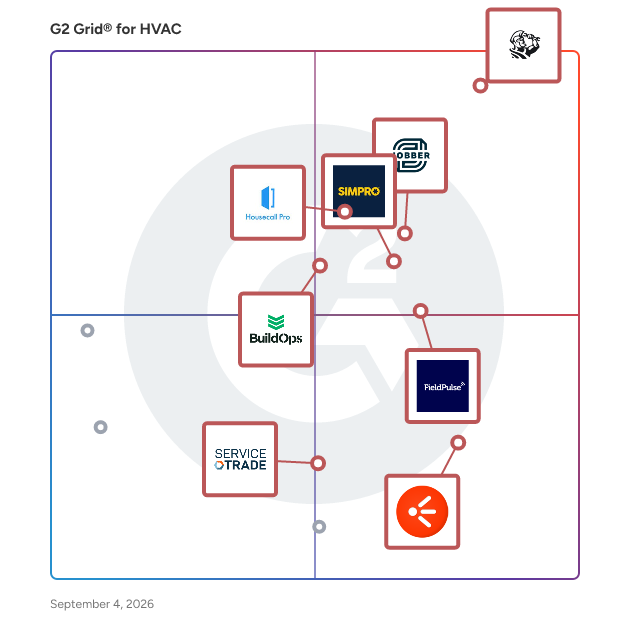
G2 Grid® for HVAC Software

G2 Grid® for HVAC Software plotting products by satisfaction and market presence

Highlighted products: ServiceTitan, Jobber, Simpro, Housecall Pro, FieldPulse, BuildOps, HVAKR, and ServiceTrade.

Underlying data: [Grid® JSON](https://www.g2.com/categories/hvac/grids.json?focus%5B%5D=servicetitan&focus%5B%5D=jobber&focus%5B%5D=simpro&focus%5B%5D=housecall-pro&focus%5B%5D=fieldpulse-fieldpulse&focus%5B%5D=buildops&focus%5B%5D=hvakr&focus%5B%5D=servicetrade)

ServiceTitan

Ready to grow your service business? Meet ServiceTitan. ServiceTitan is AI for the trades - a purpose-built agentic operating system automating every workflow that runs a contracting business, from enterprise commercial construction to residential field service, exteriors and beyond. ServiceTitan is powerful yet easy to use, combining scheduling, dispatch, invoicing, sales, marketing, reporting, and more in a mobile, cloud-based platform. Say hello to effortless job booking, seamless communication with your techs, advanced reporting, call recording and tracking, paperless invoicing, incredible visual sales tools, the ability to process credit cards in the field, and much more. ServiceTitan has helped a growing number of extraordinary service companies—like George Brazil, Hunter Heat & Air, Gold Medal Service, and Goettl—achieve incredible business results.

Average Rating: 4.4/5.0

Total Reviews: 374

How Do G2 Users Rate ServiceTitan?

  • Has the product been a good partner in doing business?: 8.7/10 (Category avg: 8.4/10)
  • Ease of Use: 8.3/10 (Category avg: 8.6/10)
  • Ease of Admin: 8.0/10 (Category avg: 7.9/10)
  • Quality of Support: 7.7/10 (Category avg: 8.8/10)

Who Is the Company Behind ServiceTitan?

  • Seller: ServiceTitan
  • Company Website:
  • Year Founded: 2012
  • HQ Location: Glendale, CA
  • Twitter: @ServiceTitan
    4,766 Twitter followers
  • LinkedIn® Page: www.linkedin.com
    3,381 employees on LinkedIn®

Who Uses This Product?

  • Who Uses This: Office Manager, Owner
  • Top Industries: Construction, Consumer Services
  • Company Size: 65% Small, 32% Medium

What Do G2 Reviewers Say About ServiceTitan?

AI-generated summary from verified user reviews

Pros
  • Users value the ease of use of ServiceTitan, enjoying its accessibility and intuitive navigation for business efficiency.
  • Users commend the exceptional customer support at ServiceTitan, highlighting the team's responsiveness and helpfulness throughout the onboarding process.
  • Users appreciate the comprehensive features of ServiceTitan, significantly enhancing tracking, reporting, and overall workflow efficiency.
  • Users appreciate the robust tracking capabilities of ServiceTitan, enhancing efficiency in managing materials and labor.
  • Users value the efficiency of ServiceTitan in organizing operations and enhancing communication, leading to business growth.
Cons
  • Users face a steep learning curve and often struggle with setup, requiring additional training to utilize ServiceTitan effectively.
  • Users note the improvement needed in ServiceTitan due to bugs and issues affecting certain features and usability.
  • Users report poor customer support from ServiceTitan, citing misinformation and difficulty in obtaining satisfactory answers.
  • Users experience poor support with ServiceTitan, struggling to find adequate answers and facing communication issues.
  • Users find the limited functionality of ServiceTitan frustrating, often requiring workarounds for essential features.

What Are Recent G2 Reviews of ServiceTitan?

What Are G2 Users Discussing About ServiceTitan?

Simpro

Simpro is field service management software that helps trade and service contractors manage the complete job lifecycle in one connected platform. Designed as business management software for trades, it brings office and field teams together across customer management, estimating, scheduling, job and project delivery, asset maintenance, invoicing, payments, inventory, and reporting. Whether a business is comparing job management software, trade contractor software, HVAC software, plumbing software, electrical contractor software, or security contractor software, Simpro supports residential and commercial workflows including service calls, preventive maintenance, installations, and projects. • Win and plan work: Customer management, estimating and quoting, quote-view triggers, and smart scheduling and dispatch software help teams move from inquiry to an assigned job with clearer information and less manual coordination. • Complete work in the field: Mobile workflows, work orders, digital forms, job notes, asset records, and maintenance planning connect technicians with the information they need while keeping office records current. This makes Simpro useful as service software and asset maintenance software, not just a calendar or dispatch board. • Protect cash flow and contractor profitability: Job costing, inventory visibility, invoicing, payment options, dashboards, and business intelligence give managers a more connected view from quote to cash, helping them identify issues and make informed operational decisions. • Add AI field service management to everyday operations: Simpro Lightning is an embedded intelligence layer, not a separate replacement system. It brings AI for field service into the workflows businesses already use. Its AI digital workers are role-based agents: FieldReady supports workflow training, JobReady prepares pre-dispatch context, JobScribe structures field documentation, and JobBrief creates customer summaries for technician review. JustAsk provides conversational access to business data. By combining field service automation with practical operational controls, Simpro helps growing contractors replace disconnected tools with a consistent workflow across the office, field, and finance teams. The result is a platform built to simplify complexity, strengthen visibility, and support more predictable service delivery.

Average Rating: 4.1/5.0

Total Reviews: 474

How Do G2 Users Rate Simpro?

  • Has the product been a good partner in doing business?: 8.0/10 (Category avg: 8.4/10)
  • Ease of Use: 7.8/10 (Category avg: 8.6/10)
  • Ease of Admin: 7.6/10 (Category avg: 7.9/10)
  • Quality of Support: 7.8/10 (Category avg: 8.8/10)

Who Is the Company Behind Simpro?

  • Seller: Simpro
  • Company Website:
  • Year Founded: 2002
  • HQ Location: Miami, FL
  • Twitter: @simprosoftware
    2,426 Twitter followers
  • LinkedIn® Page: www.linkedin.com
    719 employees on LinkedIn®

Who Uses This Product?

  • Who Uses This: Director, Office Manager
  • Top Industries: Construction, Electrical/Electronic Manufacturing
  • Company Size: 77% Small, 23% Medium

What Do G2 Reviewers Say About Simpro?

AI-generated summary from verified user reviews

Pros
  • Users appreciate the ease of use of Simpro, facilitating a seamless workflow from quoting to invoicing.
  • Users value the comprehensive data management of Simpro, streamlining asset maintenance and enhancing workflow efficiency.
  • Users appreciate the streamlined data processes in Simpro, enabling a unified system for management and efficiency.
  • Users value the efficiency of Simpro's comprehensive asset maintenance and streamlined workflow processes in one package.
  • Users value the centralization of Simpro, benefiting from a unified system that streamlines all asset management processes.
Cons
  • Users find simPRO's complexity daunting, requiring extensive setup and training to fully utilize its features.
  • Users find the setup process complex and challenging, requiring significant effort to fully utilize Simpro's features.
  • Users find simPRO's setup to be difficult to learn, resulting in challenges during onboarding and workflow application.
  • Users find the learning curve steep, as the complexity and feature set can overwhelm new users initially.
  • Users face setup difficulties with Simpro, finding the onboarding process and data migration quite challenging.

What Are Recent G2 Reviews of Simpro?

What Are G2 Users Discussing About Simpro?

Jobber

Start Your Free Trial of Jobber - No Credit Card Required Run a more efficient, predictable service business with one system built for growing, multi-crew teams. Keep Work Moving as You Get Busier Jobber connects quoting, scheduling, invoicing, and payments in one place so work moves forward without constant follow-ups or manual coordination. Build efficient days without spending hours managing the calendar, and adjust quickly when plans change. Plus, connect with tools like QuickBooks Online to keep your operations running smoothly. Keep Your Team Aligned in the Field and Office Give your crews clear schedules, job details, and updates they can access anywhere. While they stay focused on the work, your office has real-time visibility into every job without chasing calls, texts, or status updates. Drive Predictable, Profitable Performance Track jobs, revenue, and payments in one place so you always know how your business is performing. Automations keep quotes, invoices, and follow-ups moving, helping you maintain steady cash flow without adding more admin work. Client Testimonial “I spend maybe an hour per week on invoicing and paperwork now. Online payments and invoicing make me look professional.” - Stacey Flanagan, SEF The Lawn Surgeon Discover the Jobber Difference Join 200,000+ service professionals across 50+ industries including landscaping, HVAC, and residential cleaning who run their business with Jobber.

Average Rating: 4.6/5.0

Total Reviews: 521

How Do G2 Users Rate Jobber?

  • Has the product been a good partner in doing business?: 9.3/10 (Category avg: 8.4/10)
  • Ease of Use: 9.0/10 (Category avg: 8.6/10)
  • Ease of Admin: 9.1/10 (Category avg: 7.9/10)
  • Quality of Support: 9.1/10 (Category avg: 8.8/10)

Who Is the Company Behind Jobber?

  • Seller: Jobber
  • Company Website:
  • Year Founded: 2011
  • HQ Location: Edmonton, Canada
  • Twitter: @GetJobber
    7,288 Twitter followers
  • LinkedIn® Page: www.linkedin.com
    1,462 employees on LinkedIn®

Who Uses This Product?

  • Who Uses This: Owner, Office Manager
  • Top Industries: Construction, Consumer Services
  • Company Size: 85% Small, 6% Medium

What Do G2 Reviewers Say About Jobber?

AI-generated summary from verified user reviews

Pros
  • Users find Jobber's ease of use invaluable, enhancing workflow both in-office and on-field, simplifying invoicing and scheduling.
  • Users value the easy-to-use scheduling features of Jobber, enhancing efficiency and customer management in their businesses.
  • Users love the easy-to-use invoicing system in Jobber, streamlining billing and ensuring a professional appearance.
  • Users value the flexibility and comprehensive features of Jobber, enhancing efficiency across all departments.
  • Users love the convenient scheduling management that keeps everything organized in one accessible location.
Cons
  • Users believe that improvements are needed in maintenance agreements and invoicing processes for better workflow management.
  • Users find Jobber's limited functionality frustrating, particularly lacking marketing features and options for larger operations.
  • Users find Jobber's limited features frustrating, particularly for time tracking and usability with larger operations.
  • Users experience feature limitations in Jobber, particularly with clock-in/out and lack of user-friendly cost analysis.
  • Users express frustration over poor job management features in Jobber, affecting tracking and reporting efficiency.

What Are Recent G2 Reviews of Jobber?

What Are G2 Users Discussing About Jobber?

AI can help you find the answers. G2 helps you trust them.

Connect G2 to Claude or ChatGPT for answers grounded in G2's trusted reviews, comparisons, and pricing from real user insights.

How it works

Housecall Pro

Housecall Pro is a comprehensive business solution designed specifically for home service professionals, providing a suite of innovative tools and features within an easy-to-use platform. Trusted by over 200k+ Pros, Housecall Pro aims to streamline operations for professionals in various home service industries, including plumbing, electrical work, landscaping, and cleaning services. This platform is accessible via both web and mobile applications, allowing users to manage their businesses efficiently from anywhere. The target audience for Housecall Pro includes small to medium-sized businesses in the home services sector that are looking to enhance their operational efficiency and increase revenue. The platform caters to a variety of use cases, such as automating marketing efforts to attract new customers, facilitating online booking, and managing job schedules. By integrating these functionalities, Housecall Pro empowers service professionals to focus more on their core work while effectively managing the business side of operations. Key features of Housecall Pro include automated marketing campaigns that help users reach potential clients, visually appealing proposal creation, and consumer financing options that enable businesses to secure larger jobs. The platform also supports online payment processing, allowing customers to pay via multiple methods, including credit cards, bank transfers, and mobile wallets. This flexibility not only enhances customer satisfaction but also accelerates cash flow for service providers. In addition to revenue growth and payment solutions, Housecall Pro offers robust job management capabilities. Users can automate routine tasks such as scheduling, dispatching, and invoicing, while also tracking leads and job progress through a comprehensive workflow management board. Real-time alerts enhance communication among team members and clients, ensuring everyone stays informed throughout the service process. Furthermore, the platform integrates seamlessly with third-party tools like QuickBooks, enabling users to sync data effortlessly and manage payroll and employee benefits. Housecall Pro also provides valuable insights through detailed analytics and reporting on key business metrics, allowing professionals to make informed decisions and scale their operations effectively. On average, users report a more than 35% increase in monthly revenue after their first year with Housecall Pro. Subscribers gain access to an online community where they can connect with other home service professionals, sharing insights and best practices. This collaborative environment fosters growth and learning, making Housecall Pro not just a tool, but a partner in business success.

Average Rating: 4.3/5.0

Total Reviews: 203

How Do G2 Users Rate Housecall Pro?

  • Has the product been a good partner in doing business?: 8.8/10 (Category avg: 8.4/10)
  • Ease of Use: 8.9/10 (Category avg: 8.6/10)
  • Ease of Admin: 9.0/10 (Category avg: 7.9/10)
  • Quality of Support: 8.7/10 (Category avg: 8.8/10)

Who Is the Company Behind Housecall Pro?

  • Seller: Housecall Pro
  • Company Website:
  • Year Founded: 2013
  • HQ Location: San Diego, CA
  • LinkedIn® Page: www.linkedin.com
    1,550 employees on LinkedIn®

Who Uses This Product?

  • Who Uses This: Owner, owner
  • Top Industries: Construction, Consumer Services
  • Company Size: 91% Small, 4% Medium

What Do G2 Reviewers Say About Housecall Pro?

AI-generated summary from verified user reviews

Pros
  • Users appreciate the ease of use of Housecall Pro, highlighting its simple setup and user-friendly features.
  • Users appreciate the easy setup of Housecall Pro, highlighting its user-friendly nature and seamless integration.
  • Users find Housecall Pro to be highly user-friendly, simplifying business operations and enhancing customer interactions.
  • Users appreciate the user-friendly interface of Housecall Pro, finding it easy to set up and learn.
  • Users value the responsive customer support of Housecall Pro, enhancing their overall experience and business efficiency.
Cons
  • Users find missing features in Housecall Pro, such as insufficient customization and lack of specialized tools for industries.
  • Users find Housecall Pro to be a little expensive, especially when adding more contractors increases overall costs significantly.
  • Users express the need for improvement in functionality, reporting consistency, and less aggressive upselling of services.
  • Users express frustration over limited features in Housecall Pro, desiring better customization and specialized tools for scheduling.
  • Users feel that feature limitations hinder Housecall Pro's effectiveness, lacking customization and specialized options for diverse needs.

What Are Recent G2 Reviews of Housecall Pro?

What Are G2 Users Discussing About Housecall Pro?

FieldPulse

FieldPulse is an all-in-one business management solution specifically designed for field service teams. This software provides a comprehensive platform that assists users in managing various aspects of their operations, from scheduling and dispatching to customer relationship management (CRM) and financial documentation. By integrating essential functionalities into a single solution, FieldPulse aims to streamline workflows and enhance productivity for business owners, administrators, and technicians alike. The target audience for FieldPulse includes a diverse range of field service businesses, such as plumbing, electrical, HVAC, septic, glass repair, and garage door companies. These organizations often face challenges related to administrative tasks, team communication, and customer service. FieldPulse addresses these pain points by offering tools that simplify scheduling, manage estimates and invoices, and facilitate effective communication with customers. The software is particularly beneficial for companies seeking to improve their operational efficiency and enhance the overall customer experience. FieldPulse stands out in the market with its robust feature set, which includes not only standard field service management (FSM) capabilities but also advanced tools that cater to the needs of growing businesses. Key features such as a flat-rate pricebook, lead management, and inventory management empower users to make informed decisions and optimize their resources. Additionally, advanced reporting functionalities provide insights into business performance, enabling users to track key metrics and identify areas for improvement. The software's user-friendly interface ensures that even those with limited technical expertise can navigate the system with ease. However, its advanced features make it suitable for companies of any size that are looking to scale their operations. FieldPulse also offers customer management tools, timesheet tracking, booking portals, and franchise management capabilities, making it a versatile solution for various business models. By consolidating these functionalities into one platform, FieldPulse helps businesses reduce administrative burdens, enhance team collaboration, and ultimately drive growth.

Average Rating: 4.7/5.0

Total Reviews: 381

How Do G2 Users Rate FieldPulse?

  • Has the product been a good partner in doing business?: 9.2/10 (Category avg: 8.4/10)
  • Ease of Use: 8.8/10 (Category avg: 8.6/10)
  • Ease of Admin: 8.8/10 (Category avg: 7.9/10)
  • Quality of Support: 9.5/10 (Category avg: 8.8/10)

Who Is the Company Behind FieldPulse?

  • Seller: FieldPulse
  • Company Website:
  • Year Founded: 2015
  • HQ Location: Dallas, Texas
  • Twitter: @FieldPulseApp
    1,076 Twitter followers
  • LinkedIn® Page: www.linkedin.com
    208 employees on LinkedIn®

Who Uses This Product?

  • Who Uses This: Owner, Office Manager
  • Top Industries: Construction, Consumer Services
  • Company Size: 94% Small, 4% Medium

What Do G2 Reviewers Say About FieldPulse?

AI-generated summary from verified user reviews

Pros
  • Users commend the responsive customer support of FieldPulse, appreciating quick answers and hands-on assistance.
  • Users value the ease of use of FieldPulse, finding it simple to navigate and implement in their business.
  • Users appreciate the ease of use and detailed project tracking in FieldPulse, enhancing workflow management effectively.
  • Users love the intuitive scheduling feature of FieldPulse, which simplifies job assignments and enhances technician tracking.
  • Users appreciate the excellent customer service from FieldPulse, receiving quick responses and effective support for all inquiries.
Cons
  • Users find the need for improvement in FieldPulse, citing issues with CRM functionality and system integration.
  • Users find the limited customization options in FieldPulse challenging, impacting their workflows and overall experience.
  • Users find the limited features of FieldPulse hinder their workflow and integration capabilities significantly.
  • Users note a steep learning curve with FieldPulse, requiring significant time and effort to fully harness its capabilities.
  • Users express frustration with update issues, particularly regarding missed features and ineffective support responses.

What Are Recent G2 Reviews of FieldPulse?

What Are G2 Users Discussing About FieldPulse?

BuildOps

BuildOps is an all-in-one operations platform for commercial MEP contractors—HVAC, mechanical, refrigeration, electrical, and plumbing—bringing dispatch, estimating, invoicing, service, projects, and reporting into one system. A single source of truth unifies office and field data, metrics, and work history. Projects flow seamlessly into service: as-built equipment becomes asset records that power service agreements, scheduling, dispatch, billing, and documentation. Smarter scheduling comes from a live planning board with technician skills, certifications, location, and availability—plus intelligent recommendations and drag-and-drop dispatch to handle emergencies, multi-day work, and long-term planning. Field teams stay audit-ready with photos, videos, and PDFs attached directly to quotes, invoices, and assets, while automated workflows keep work orders, customer data, and billing in sync across project and service. The result: predictable maintenance, stronger recurring revenue, protected margins, and a end-to-end support from the building phase to ongoing service.

Average Rating: 4.1/5.0

Total Reviews: 73

How Do G2 Users Rate BuildOps?

  • Has the product been a good partner in doing business?: 8.3/10 (Category avg: 8.4/10)
  • Ease of Use: 7.8/10 (Category avg: 8.6/10)
  • Ease of Admin: 7.7/10 (Category avg: 7.9/10)
  • Quality of Support: 8.1/10 (Category avg: 8.8/10)

Who Is the Company Behind BuildOps?

  • Seller: BuildOps
  • Company Website:
  • Year Founded: 2018
  • HQ Location: Santa Monica, CA 90404, US
  • Twitter: @GoBuildOps
    502 Twitter followers
  • LinkedIn® Page: www.linkedin.com
    616 employees on LinkedIn®

Who Uses This Product?

  • Top Industries: Construction, Facilities Services
  • Company Size: 49% Small, 45% Medium

What Do G2 Reviewers Say About BuildOps?

AI-generated summary from verified user reviews

Pros
  • Users find BuildOps to be incredibly easy to use, significantly enhancing operational efficiency and dispatching capabilities.
  • Users value the extensive features of BuildOps, enhancing workflow and overall efficiency in their daily tasks.
  • Users praise the exceptional customer support of BuildOps, highlighting responsiveness and helpfulness in enhancing their experience.
  • Users value the centralization of BuildOps, enabling seamless collaboration and easy access for both office and field teams.
  • Users value the user-friendly interface of BuildOps, which simplifies workflows and enhances team collaboration.
Cons
  • Users feel that improvement is needed in the PO module and audit/version control features for better functionality.
  • Users report frequent update issues causing delays, unclear changes, and limitations in data input and system integration.
  • Users struggle with the learning curve of BuildOps, finding the platform unintuitive and challenging for techs to adapt.
  • Users find the limited features of BuildOps particularly frustrating, affecting overall usability and integration with their needs.
  • Users express concerns about limited customization in BuildOps, affecting usability and integration with existing systems.

What Are Recent G2 Reviews of BuildOps?

What Are G2 Users Discussing About BuildOps?

HVAKR

HVAKR is a cloud-based HVAC design platform that streamlines mechanical system design by integrating key workflows—load calculations, equipment sizing, duct layouts, and reporting—into a single, collaborative environment. - Visual Workflow: Overlay floorplans, define zones, and perform calculations directly within the platform. - Real-Time Updates: Adjust design parameters (e.g., window specs, insulation) and instantly see updated loads, CFMs, and duct sizes. - Integrated Tools: Includes area takeoffs, pressure loss calculations, and report generation without the need for external tools. - Collaboration: Multiple users can work simultaneously on the same project, enhancing team efficiency. - Web-Based Access: Accessible from any device with a browser, eliminating the need for local installations.

Average Rating: 4.7/5.0

Total Reviews: 27

How Do G2 Users Rate HVAKR?

  • Has the product been a good partner in doing business?: 10.0/10 (Category avg: 8.4/10)
  • Ease of Use: 9.2/10 (Category avg: 8.6/10)
  • Ease of Admin: 10.0/10 (Category avg: 7.9/10)
  • Quality of Support: 9.7/10 (Category avg: 8.8/10)

Who Is the Company Behind HVAKR?

  • Seller: HVAKR
  • Year Founded: 2019
  • HQ Location: San Diego, US
  • Twitter: @hvakr_official
    21 Twitter followers
  • LinkedIn® Page: www.linkedin.com
    4 employees on LinkedIn®

Who Uses This Product?

  • Who Uses This: Student, Mechanical Designer
  • Top Industries: Mechanical or Industrial Engineering
  • Company Size: 81% Small, 11% Medium

What Do G2 Reviewers Say About HVAKR?

AI-generated summary from verified user reviews

Pros
  • Users highlight the intuitive interface of HVAKR, making it easy and accessible even for beginners.
  • Users praise the exceptional customer support of HVAKR, highlighting quick assistance and thorough training for success.
  • Users find HVAKR's ease of learning exceptional, thanks to its intuitive design and straightforward interface.
  • Users appreciate the intuitive design and extensive features of HVAKR, enabling efficient project completion with ease.
  • Users appreciate the simplicity and intuitive design of HVAKR, making it easy to learn and use effectively.
Cons
  • Users find the learning curve steep due to overwhelming features and unclear assumptions for new users.
  • Users express a need for limited customization options, desiring more flexibility and intermediate tiers in HVAKR.
  • Users find the limited options for subscription tiers of HVAKR restrictive for their diverse needs in HVAC design.
  • Users report poor execution in auto-population features and exporting formats that hinder usability and learning.
  • Users highlight the expensive price of HVAKR, causing management to consider cheaper alternatives despite its value.

What Are Recent G2 Reviews of HVAKR?

ServiceTrade

ServiceTrade is the software platform that helps commercial HVAC, mechanical, and fire contractors grow their profits. During a persistent skilled labor shortage, contractors use ServiceTrade to control the costly chaos of on-demand work and effectively deliver contract commitments. ServiceTrade streamlines service and project operations to reduce administrative costs, optimizes field performance to increase revenue per technician, and boosts sales and client retention to grow margins. Over 1,300 commercial contractors trust ServiceTrade’s 11+ years of experience to help them manage over 13 million assets and invoice over $7.5 billion in revenue annually.

Average Rating: 4.5/5.0

Total Reviews: 59

How Do G2 Users Rate ServiceTrade?

  • Has the product been a good partner in doing business?: 9.4/10 (Category avg: 8.4/10)
  • Ease of Use: 8.9/10 (Category avg: 8.6/10)
  • Ease of Admin: 9.1/10 (Category avg: 7.9/10)
  • Quality of Support: 9.2/10 (Category avg: 8.8/10)

Who Is the Company Behind ServiceTrade?

  • Seller: ServiceTrade
  • Year Founded: 2012
  • HQ Location: Durham, NC
  • Twitter: @ServiceTrade
    630 Twitter followers
  • LinkedIn® Page: www.linkedin.com
    238 employees on LinkedIn®

Who Uses This Product?

  • Top Industries: Construction, Facilities Services
  • Company Size: 44% Small, 41% Medium

What Are Recent G2 Reviews of ServiceTrade?

What Are G2 Users Discussing About ServiceTrade?

Jonas Enterprise Service & Construction Software

Jonas Construction Software is an all-in-one ERP built for mechanical, electrical, plumbing, HVAC and specialty contractors who run both construction projects and service work. Instead of juggling separate tools for accounting, job costing, payroll, service dispatch and project management, and re-entering the same hours and invoices in each, everything runs on one connected system. Project managers see real-time job costs against budget, so overruns show up while there is still time to act. Service teams dispatch, track and invoice work orders from the field on mobile. Meanwhile, accounting handles AP, AR, union and multi-rate payroll, and WIP reporting without spreadsheet workarounds. Contractors across Canada and the US use Jonas to protect margins, bill faster and make decisions based on current numbers instead of last month's. Whether you are outgrowing QuickBooks or replacing a patchwork of disconnected apps, Jonas gives your office and field teams one place to work.

Average Rating: 3.4/5.0

Total Reviews: 26

How Do G2 Users Rate Jonas Enterprise Service & Construction Software?

  • Has the product been a good partner in doing business?: 6.3/10 (Category avg: 8.4/10)
  • Ease of Use: 6.7/10 (Category avg: 8.6/10)
  • Ease of Admin: 6.0/10 (Category avg: 7.9/10)
  • Quality of Support: 6.7/10 (Category avg: 8.8/10)

Who Is the Company Behind Jonas Enterprise Service & Construction Software?

Who Uses This Product?

  • Top Industries: Construction
  • Company Size: 58% Medium, 38% Small

What Do G2 Reviewers Say About Jonas Enterprise Service & Construction Software?

AI-generated summary from verified user reviews

Pros
  • Users find the software easy and straightforward to use, enhancing their convenience across all projects.
  • Users praise the easy access for financial reporting, making project analysis straightforward and convenient.
  • Users find the easy accessibility of financial reports invaluable for detailed analysis and efficient information retrieval.
  • Users find the accessibility of Jonas software easy and straightforward, enhancing their experience with financial reporting.
  • Users appreciate the easy access to financial reporting, finding analyses well summarized and straightforward to navigate.
Cons
  • Users experience limited integration options with other software, hindering the overall effectiveness of the system.
  • Users experience limited integration options with other software, hindering overall usability and workflow efficiency.
  • Users find the software not user-friendly, especially when troubleshooting various issues that arise during use.
  • Users find the poor integration with other software to be a significant limitation of Jonas Enterprise Service & Construction Software.

What Are Recent G2 Reviews of Jonas Enterprise Service & Construction Software?

Sera

Sera Systems, located in Grapevine, TX,  is a full-suite Field Service Management software solution built to ensure each job is profitable. Sera was created with the basic principle of helping small to mid-size HVAC, Plumbing, and other Home Service residential contractors reduce the chaos of running a Home Service business while: • Identifying financial gaps • Learn their business at a deeper level • Streamline processes • Reduce burden and employee stress levels Sera's powerful, yet simple-to-use platform consists of three core components, an automated Admin Portal, industry-first Customer Hub, and an intuitive Tech App. The core components work together in real-time so contractors always have current data around KPIs, job time efficiency, and memberships. Our satisfaction comes from your success, which is why Sera's clients average a net profit increase of 52% in their first six months of launching Sera, as well as a 90% increase in their tech efficiency rate. 

Average Rating: 4.3/5.0

Total Reviews: 59

How Do G2 Users Rate Sera?

  • Has the product been a good partner in doing business?: 8.8/10 (Category avg: 8.4/10)
  • Ease of Use: 9.1/10 (Category avg: 8.6/10)
  • Ease of Admin: 8.6/10 (Category avg: 7.9/10)
  • Quality of Support: 9.4/10 (Category avg: 8.8/10)

Who Is the Company Behind Sera?

  • Seller: Sera Systems
  • Year Founded: 2018
  • HQ Location: Grapevine, Texas
  • Twitter: @SystemsSera
    9 Twitter followers
  • LinkedIn® Page: www.linkedin.com
    27 employees on LinkedIn®

Who Uses This Product?

  • Top Industries: Construction, Consumer Services
  • Company Size: 78% Small, 20% Medium

What Do G2 Reviewers Say About Sera?

AI-generated summary from verified user reviews

Pros
  • Users value the ease of use in Sera, enhancing efficiency for management and technicians alike.
  • Users appreciate the user-friendly interface of Sera, enjoying its lightweight design and easy navigation for all tasks.
  • Users praise the amazing customer support of Sera, emphasizing their honesty and commitment to client needs.
  • Users appreciate the smart scheduling features of Sera, enabling efficient planning and real-time tracking for their teams.
  • Users appreciate the convenience of Sera, enjoying its lightweight design and effortless navigation.
Cons
  • Users express frustration with the complex setup of Sera, citing slow performance and unresponsive support during onboarding.
  • Users frequently experience connectivity issues with Sera, causing frustration and hindering overall performance.
  • Users express frustration with Sera's mobile app crashes and performance issues, impacting overall usability and experience.
  • Users report poor customer support, often feeling ignored and frustrated when seeking assistance with Sera.
  • Users express frustration with poor integration in Sera, citing slow tech, crashes, and unresponsive support.

What Are Recent G2 Reviews of Sera?

ECI Davisware

Davisware by ECI Software Solutions is an all-in-one platform tailored for commercial service companies across industries like Food Equipment, commercial HVAC/R, Petroleum Equipment, Overhead Garage Doors, and Air Compressors. It streamlines operations and improves efficiency with tools designed to meet the unique needs of service-oriented businesses. Key features include robust scheduling and dispatching, enabling efficient resource allocation and service management. Its reporting tools deliver real-time insights that support informed decision-making, while the CRM functionality enhances customer satisfaction through stronger communication and service delivery. By integrating various service management aspects, we helps businesses reduce administrative overhead and minimize errors. This approach improves cash flow management, simplifies operations, and provides industry-specific tools to address sector-specific challenges. Our solutions, Vision and GlobalEdge, enable users to gain valuable insights, optimize workflows, and unlock financial performance. We empower commercial service providers to excel in their markets, delivering exceptional service through a unified, industry-focused platform. We are leading our field, so you can lead yours.

Average Rating: 4.0/5.0

Total Reviews: 38

How Do G2 Users Rate ECI Davisware?

  • Has the product been a good partner in doing business?: 8.5/10 (Category avg: 8.4/10)
  • Ease of Use: 7.6/10 (Category avg: 8.6/10)
  • Ease of Admin: 7.1/10 (Category avg: 7.9/10)
  • Quality of Support: 7.3/10 (Category avg: 8.8/10)

Who Is the Company Behind ECI Davisware?

Who Uses This Product?

  • Top Industries: Construction, Facilities Services
  • Company Size: 60% Medium, 35% Small

What Do G2 Reviewers Say About ECI Davisware?

AI-generated summary from verified user reviews

Pros
  • Users laud the amazing customer support from ECI Davisware, praising their responsiveness and dedication to client needs.
  • Users appreciate the ease of use in ECI Davisware, finding it simple and efficient for managing tasks.
  • Users value the robust reporting features of ECI Davisware, enhancing their efficiency and ease of use.
Cons
  • Users face a steep learning curve with ECI Davisware due to insufficient guidance and complex features, hindering effective use.
  • Users experience system unreliability with ECI Davisware, facing glitches and lengthy workarounds for basic functionality.
  • Users face customization difficulties with ECI Davisware, hampered by glitches and lack of proper guidance for effective usage.

What Are Recent G2 Reviews of ECI Davisware?

What Are G2 Users Discussing About ECI Davisware?

Service Fusion

Service Fusion provides field service software built for trade contractors to manage service fleets, optimize scheduling, and speed up invoicing without per-user fees. Built for service companies that have outgrown spreadsheets, paper forms, and disconnected tools, Service Fusion brings scheduling, dispatching, estimates, invoices, payments, technician management, job costing, and QuickBooks integration into one easy-to-use system. Office teams get clearer visibility and control, while technicians get a mobile app that keeps job details, updates, and payment collection moving in the field. Unlike entry-level tools that can hold teams back or enterprise platforms that feel too complex, Service Fusion is built for growing businesses that need practical software their whole team can actually use. Add office staff, dispatchers, and technicians without increasing your monthly software cost. Why service businesses choose Service Fusion: No per-user fees Easy for office teams and technicians to use Scheduling, dispatching, invoicing, payments, and QuickBooks in one system Mobile app + offline mode for technicians in the field Live visibility into jobs, costs, and technician performance Built for growing service businesses ready to scale

Average Rating: 4.1/5.0

Total Reviews: 123

How Do G2 Users Rate Service Fusion?

  • Has the product been a good partner in doing business?: 8.5/10 (Category avg: 8.4/10)
  • Ease of Use: 8.6/10 (Category avg: 8.6/10)
  • Ease of Admin: 8.2/10 (Category avg: 7.9/10)
  • Quality of Support: 8.4/10 (Category avg: 8.8/10)

Who Is the Company Behind Service Fusion?

  • Seller: EverCommerce
  • Company Website:
  • Year Founded: 2016
  • HQ Location: Denver, US
  • LinkedIn® Page: www.linkedin.com
    1,613 employees on LinkedIn®
  • Ownership: NASDAQ: EVCM

Who Uses This Product?

  • Who Uses This: Office Manager, Owner
  • Top Industries: Construction, Consumer Services
  • Company Size: 81% Small, 14% Medium

What Do G2 Reviewers Say About Service Fusion?

AI-generated summary from verified user reviews

Pros
  • Users appreciate the ease of use in Service Fusion, simplifying management with an integrated dashboard and support.
  • Users praise the responsive customer support of Service Fusion for quick and effective assistance whenever needed.
  • Users love the comprehensive integration of features in Service Fusion that streamline business operations and enhance efficiency.
  • Users appreciate the ease of invoicing with Service Fusion, which simplifies business operations and integrates seamlessly.
  • Users value the efficiency and seamless integration of Service Fusion, enhancing organization and reducing errors in operations.
Cons
  • Users often face data management issues with Service Fusion, experiencing lag, upload limits, and poor inventory tracking.
  • Users find Service Fusion to be expensive compared to competitors, raising concerns about its overall cost-effectiveness.
  • Users report that improvement needed in Service Fusion includes reliability, customer service, and inventory management issues.
  • Users face integration issues with Service Fusion, struggling with manual processes and limited communication, affecting efficiency.
  • Users face invoicing issues, including difficulties with updating invoices and managing expenses efficiently.

What Are Recent G2 Reviews of Service Fusion?

What Are G2 Users Discussing About Service Fusion?

Operix

Operix is a field operations platform built to accelerate the businesses of specialty contractors - empowering contractors to quickly and easily complete their projects - at scale. With Operix, contractors can combine field operations with accounting systems and automate the information back to the office. From local shops to multi-state organizations, Operix allows you to manage your resources, jobs and customer experience from a single location.

Average Rating: 4.8/5.0

Total Reviews: 29

How Do G2 Users Rate Operix?

  • Has the product been a good partner in doing business?: 9.7/10 (Category avg: 8.4/10)
  • Ease of Use: 9.3/10 (Category avg: 8.6/10)
  • Ease of Admin: 9.0/10 (Category avg: 7.9/10)
  • Quality of Support: 9.9/10 (Category avg: 8.8/10)

Who Is the Company Behind Operix?

  • Seller: Operix
  • Year Founded: 2007
  • HQ Location: Boston, Massachusetts
  • Twitter: @IFSCore
    75 Twitter followers
  • LinkedIn® Page: www.linkedin.com
    63 employees on LinkedIn®

Who Uses This Product?

  • Top Industries: Construction
  • Company Size: 55% Medium, 45% Small

What Are Recent G2 Reviews of Operix?

ServiceBox

ServiceBox is the leader in Field Service Management. No matter what industry you work in, ServiceBox’s software and app can help you run a more efficient business and increase your bottom line. ServiceBox was originally designed for the Plumbing and Heating (HVAC) industry, but over the years we've grown to become a full feature software for service companies of all industries. This includes electrical contractors, HVAC contractors, plumbing contractors, duct cleaning companies, security companies, water treatment companies, industrial maintenance companies, heavy-duty mechanics, pest control companies, roofing contractors, handyman services, and carpenters. ServiceBox allows these companies to manage their business workflow of Quoting, Work Orders, Scheduling, Maintenance, Invoicing, Payments, Timesheets, and Accounting Integration. WOW YOUR CUSTOMERS Our Customer Information Management Software allows you to create a great customer experience that will increase your repeat business. STREAMLINE YOUR WORKFLOW MANAGEMENT ServiceBox is a powerful cloud-based job management software system designed to streamline and track all processes from the initial quote, through to final invoicing. TIME TRACK WITH EASE Record labour on the go, your field team can simply track their time on the job from their phone or device, and the data flows through to their timesheet. GET PAID FASTER Create quotes and invoices quickly and send them to your customers instantly. You can even sync with your account software QuickBooks, QuickBooks Online, and Sage 50. MAXIMIZE EFFICIENCY Say goodbye to paper-shuffling between teams, wasted admin hours, and time-consuming paper schedules. With ServiceBox you’ll be able to maximize your billable hours, minimize risks such as missed invoices and enhance customer service opportunities.

Average Rating: 4.9/5.0

Total Reviews: 14

How Do G2 Users Rate ServiceBox?

  • Has the product been a good partner in doing business?: 9.5/10 (Category avg: 8.4/10)
  • Ease of Use: 9.3/10 (Category avg: 8.6/10)
  • Ease of Admin: 9.3/10 (Category avg: 7.9/10)
  • Quality of Support: 9.7/10 (Category avg: 8.8/10)

Who Is the Company Behind ServiceBox?

  • Seller: Jobbox Software
  • Year Founded: 2012
  • HQ Location: Regina, SK
  • Twitter: @getservicebox
    77 Twitter followers
  • LinkedIn® Page: www.linkedin.com
    20 employees on LinkedIn®

Who Uses This Product?

  • Top Industries: Construction
  • Company Size: 100% Small

What Are Recent G2 Reviews of ServiceBox?

What Are G2 Users Discussing About ServiceBox?

ServiceDeck

ServiceDeck is a powerful field service management (FSM) software designed to revolutionize your field service operations. Ideal for service providers like plumbers, electricians, cleaners, landscapers, and many others, ServiceDeck streamlines operations, automates processes, and enhances customer connections with its cutting-edge dispatching software and field worker management tools. Explore the incredible features ServiceDeck provides: 🔗 Connect - Marketplace: An AI-Powered marketplace tailored to your business, offering instant access to new markets, clients, and projects. Benefit from a data-driven Business Directory with public reviews and ratings, and a database of Service Providers for efficient outsourcing. - Customer Portal: Offer customers a personalized portal to view and manage their requests, quotes, invoices, and job statuses. - Mobile App: Empower your team with a mobile app for live location tracking, work history access, project status updates, and time-off requests. 🎛️ Manage - Smart Scheduling: Leverage our advanced scheduling software to visualize your company's daily workload and assign jobs based on team availability. - Document Management: Maintain organization with all job-specific documents in one place, enabling your team to attach project images on-the-go. - Integrated Invoicing: Effortlessly convert jobs into customizable invoices with a single click, providing customers the convenience of online payments through various methods. 🤖 Automate - Custom Integrations: Optimize your operations by integrating ServiceDeck with existing platforms like Stripe, QuickBooks, and WordPress. - Automated Proposals: Deliver a personalized and automated proposal process by integrating your public website with ServiceDeck for seamless quotation requests. - Detailed Reporting: Monitor your team's workload and efficiency with in-app time logs, and track your revenue and expenses to make informed business decisions. 🌟 Top Features: - Worker Availability: Schedule intelligently based on employee availability, time off, and daily breaks. - GPS Tracking: Keep track of your team's location with in-app live tracking and interactive maps. - Document Management: Easily attach project images on-the-go and store all job-specific documents in one place. - Scheduling and Dispatching: Streamline job assignments and resource allocation with efficient scheduling and dispatching tools in our field service management software. Transform your service business with ServiceDeck and focus on delivering outstanding services to your customers. Experience the difference ServiceDeck can make for your business. Don't wait – try ServiceDeck now and elevate your field service operations to new heights with our comprehensive FSM software!

Average Rating: 4.5/5.0

Total Reviews: 33

How Do G2 Users Rate ServiceDeck?

  • Has the product been a good partner in doing business?: 7.3/10 (Category avg: 8.4/10)
  • Ease of Use: 8.9/10 (Category avg: 8.6/10)
  • Ease of Admin: 7.0/10 (Category avg: 7.9/10)
  • Quality of Support: 8.9/10 (Category avg: 8.8/10)

Who Is the Company Behind ServiceDeck?

  • Seller: ServiceDeck
  • Year Founded: 2022
  • HQ Location: Mississauga , CA
  • Twitter: @Servicedeck_io
    42 Twitter followers
  • LinkedIn® Page: www.linkedin.com
    6 employees on LinkedIn®

Who Uses This Product?

  • Company Size: 57% Small, 26% Medium

What Do G2 Reviewers Say About ServiceDeck?

AI-generated summary from verified user reviews

Pros
  • Users value the intuitive interface and comprehensive features of ServiceDeck, ensuring efficient task management and streamlined operations.
  • Users commend the responsive customer support of ServiceDeck, appreciating their prompt and helpful assistance during onboarding.
  • Users love the ease of use of ServiceDeck, finding it intuitive and simple for all technical levels.
  • Users appreciate the responsive customer support of ServiceDeck, ensuring prompt issue resolution and a smooth experience.
  • Users appreciate the simplicity and cross-platform functionality of ServiceDeck, enhancing their business operations efficiently.
Cons
  • Users note that improvement is needed in loading times and feature integrations, affecting overall efficiency.
  • Users experience slow performance at times, with longer loading for certain features causing frustration during urgent tasks.
  • Users often face bug issues in ServiceDeck, which can disrupt workflows and affect overall functionality.
  • Users find the complex setup for ServiceDeck time-consuming, especially for larger teams with intricate requirements.
  • Users note that data importing issues stem from limited integrations, highlighting a need for improvement.

What Are Recent G2 Reviews of ServiceDeck?

Neya Kumaresan
NK
Researched and written by Neya Kumaresan
Updated October 3, 2024