  # Best Enterprise Monitoring Software

  *By [Tian Lin](https://research.g2.com/insights/author/tian-lin)*

   Enterprise monitoring tools provide a single-pane-of-glass approach to overseeing a broad spectrum of IT systems, enabling businesses to monitor servers, applications, networks, databases, and more through a unified dashboard, generating real-time analytics and alerts to support proactive infrastructure management.

### Core Capabilities of Enterprise Monitoring Software

To qualify for inclusion in the Enterprise Monitoring category, a product must:

- Monitor activity and performance for several IT systems such as servers, databases, and networks
- Generate real-time analytics regarding monitored system activity
- Create and distribute detailed alerts via email, phone, and messaging for potential and active failures and errors
- Offer pre-built and custom reporting and dashboards for quick insights into system states

### Common Use Cases for Enterprise Monitoring Software

Server admins, network admins, and IT engineers use enterprise monitoring tools to maintain visibility and control across complex IT environments. Common use cases include:

- Monitoring multi-system environments including servers, databases, and network infrastructure from a single dashboard
- Setting up real-time alerts for performance degradation, outages, and anomalous activity
- Leveraging observability features, including event metrics, traces, logging, and metadata, to understand system state beyond basic monitoring

### How Enterprise Monitoring Software Differs from Other Tools

Enterprise monitoring solutions sometimes incorporate [machine learning](https://www.g2.com/categories/machine-learning) or [AIOps platform](https://www.g2.com/categories/aiops-platforms) capabilities to enhance standard monitoring with intelligent anomaly detection and predictive insights. Some tools are also extending into observability, going beyond reactive monitoring to provide deeper insight into system behavior through correlated metrics, traces, and logs, a capability more fully realized in dedicated observability platforms.

### Insights from G2 on Enterprise Monitoring Software

Based on category trends on G2, unified multi-system dashboards and customizable alerting stand out as the most valued capabilities. Improved incident detection speed and reduced mean time to awareness (MTTA) stand out as primary benefits of adoption.


  ## How Many Enterprise Monitoring Software Products Does G2 Track?
**Total Products under this Category:** 71

  
## How Does G2 Rank Enterprise Monitoring Software Products?

**Why You Can Trust G2's Software Rankings:**

- 30 Analysts and Data Experts
- 8,500+ Authentic Reviews
- 71+ Products
- Unbiased Rankings

G2's software rankings are built on verified user reviews, rigorous moderation, and a consistent research methodology maintained by a team of analysts and data experts. Each product is measured using the same transparent criteria, with no paid placement or vendor influence. While reviews reflect real user experiences, which can be subjective, they offer valuable insight into how software performs in the hands of professionals. Together, these inputs power the G2 Score, a standardized way to compare tools within every category.

  
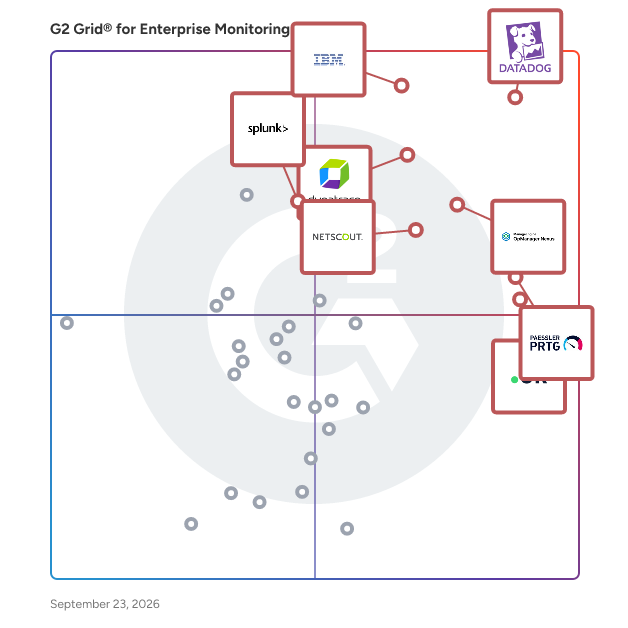
## Which Enterprise Monitoring Software Is Best for Your Use Case?

- **Leader:** [Datadog](https://www.g2.com/products/datadog/reviews)
- **Highest Performer:** [Checkmk](https://www.g2.com/products/checkmk/reviews)
- **Easiest to Use:** [Paessler PRTG](https://www.g2.com/products/paessler-prtg/reviews)
- **Top Trending:** [IBM SevOne](https://www.g2.com/products/ibm-sevone/reviews)
- **Best Free Software:** [Dynatrace](https://www.g2.com/products/dynatrace/reviews)

  
---

**Sponsored**

### ManageEngine OpManager

ManageEngine OpManager offers unified network performance monitoring and fault management for your entire IT infrastructure. It provides real-time insights into the health and availability of all devices, servers, and applications, enabling quick troubleshooting and ensuring continuous network uptime.


[Visit website](https://www.g2.com/external_clickthroughs/record?secure%5Bad_program%5D=ppc&amp;secure%5Bad_slot%5D=category_product_list&amp;secure%5Bcategory_id%5D=2126&amp;secure%5Bdisplayable_resource_id%5D=2126&amp;secure%5Bdisplayable_resource_type%5D=Category&amp;secure%5Bmedium%5D=sponsored&amp;secure%5Bplacement_reason%5D=page_category&amp;secure%5Bplacement_resource_ids%5D%5B%5D=2126&amp;secure%5Bprioritized%5D=false&amp;secure%5Bproduct_id%5D=17351&amp;secure%5Bresource_id%5D=2126&amp;secure%5Bresource_type%5D=Category&amp;secure%5Bsource_type%5D=category_page&amp;secure%5Bsource_url%5D=https%3A%2F%2Fwww.g2.com%2Fcategories%2Fenterprise-monitoring&amp;secure%5Btoken%5D=a23cd38867045ac75f2250b86b412195cd2bffc64a2085f55a8baff9053ed600&amp;secure%5Burl%5D=https%3A%2F%2Fwww.manageengine.com%2Fnetwork-monitoring%2Fenterprise-network-monitoring.html%3Futm_source%3Dg2%26utm_medium%3Dcpc&amp;secure%5Burl_type%5D=custom_url)

---

  ## What Are the Top-Rated Enterprise Monitoring Software Products in 2026?
### 1. [Datadog](https://www.g2.com/products/datadog/reviews)
  Datadog is the monitoring, security and analytics platform for developers, IT operations teams, security engineers and business users in the cloud age. The SaaS platform integrates and automates infrastructure monitoring, application performance monitoring and log management to provide unified, real-time observability of our customers&#39; entire technology stack. Datadog is used by organizations of all sizes and across a wide range of industries to enable digital transformation and cloud migration, drive collaboration among development, operations, security and business teams, accelerate time to market for applications, reduce time to problem resolution, secure applications and infrastructure, understand user behavior and track key business metrics.


  **Average Rating:** 4.4/5.0
  **Total Reviews:** 689
**How Do G2 Users Rate Datadog?**

- **Has the product been a good partner in doing business?:** 8.5/10 (Category avg: 8.8/10)
- **Dashboards and Visualization:** 8.6/10 (Category avg: 8.8/10)
- **Observability:** 9.1/10 (Category avg: 9.0/10)
- **Single Pane of Glass:** 8.7/10 (Category avg: 8.7/10)

**Who Is the Company Behind Datadog?**

- **Seller:** [Datadog](https://www.g2.com/sellers/datadog)
- **Company Website:** https://www.datadoghq.com/
- **Year Founded:** 2010
- **HQ Location:** New York
- **Twitter:** @datadoghq (51,018 Twitter followers)
- **LinkedIn® Page:** https://www.linkedin.com/company/1066442/ (10,076 employees on LinkedIn®)

**Who Uses This Product?**
  - **Who Uses This:** Software Engineer, DevOps Engineer
  - **Top Industries:** Information Technology and Services, Computer Software
  - **Company Size:** 47% Mid-Market, 34% Enterprise


#### What Are Datadog's Pros and Cons?

**Pros:**

- Ease of Use (145 reviews)
- Monitoring (144 reviews)
- Real-time Monitoring (122 reviews)
- Features (93 reviews)
- Analytics (88 reviews)

**Cons:**

- Expensive (92 reviews)
- Learning Curve (73 reviews)
- Pricing Issues (71 reviews)
- Cost (65 reviews)
- Learning Difficulty (56 reviews)

### 2. [IBM Instana](https://www.g2.com/products/ibm-instana/reviews)
  IBM Instana, now part of the Concert platform, discovers and maps all services, infrastructure, and their inter-dependencies automatically. Instana ingests all observability metrics, traces each request, profiles every process, and updates application dependency maps in real-time to deliver the context and actionable feedback needed by DevOps to optimize application performance, enable innovation and mitigate risk to help them add value and efficiency to the pipeline. IBM Instana is available on AWS Marketplace.


  **Average Rating:** 4.4/5.0
  **Total Reviews:** 465
**How Do G2 Users Rate IBM Instana?**

- **Has the product been a good partner in doing business?:** 8.5/10 (Category avg: 8.8/10)
- **Dashboards and Visualization:** 10.0/10 (Category avg: 8.8/10)
- **Observability:** 10.0/10 (Category avg: 9.0/10)
- **Single Pane of Glass:** 10.0/10 (Category avg: 8.7/10)

**Who Is the Company Behind IBM Instana?**

- **Seller:** [IBM](https://www.g2.com/sellers/ibm)
- **Company Website:** https://www.ibm.com/us-en
- **Year Founded:** 1911
- **HQ Location:** Armonk, NY
- **Twitter:** @IBM (709,298 Twitter followers)
- **LinkedIn® Page:** https://www.linkedin.com/company/1009/ (324,553 employees on LinkedIn®)

**Who Uses This Product?**
  - **Who Uses This:** Software Engineer, System Engineer
  - **Top Industries:** Information Technology and Services, Computer Software
  - **Company Size:** 41% Mid-Market, 36% Enterprise


#### What Are IBM Instana's Pros and Cons?

**Pros:**

- Ease of Use (132 reviews)
- Monitoring (116 reviews)
- Real-time Monitoring (107 reviews)
- Monitoring Capabilities (99 reviews)
- Easy Setup (69 reviews)

**Cons:**

- Expensive (48 reviews)
- Learning Curve (40 reviews)
- User Interface Issues (40 reviews)
- Pricing Issues (39 reviews)
- Difficult Learning (36 reviews)

### 3. [Paessler PRTG](https://www.g2.com/products/paessler-prtg/reviews)
  Paessler PRTG is a real-time unified infrastructure monitoring solution that enables IT Pros to locate problems throughout their entire network and resolve them before they escalate and become business critical. PRTG monitors all systems, devices, traffic and applications of your IT infrastructure using these technologies: SNMP: ready to use and custom options WMI and Windows Performance Counters SSH: for Linux/Unix and MacOS systems Flows and Packet Sniffing HTTP requests REST APIs returning XML or JSON Ping, SQL and many more Over 500,000 sysadmins from SMB&#39;s to large enterprises use Paessler PRTG to make their networks faster, more responsive, and more reliable.


  **Average Rating:** 4.7/5.0
  **Total Reviews:** 203
**How Do G2 Users Rate Paessler PRTG?**

- **Has the product been a good partner in doing business?:** 8.9/10 (Category avg: 8.8/10)
- **Dashboards and Visualization:** 9.2/10 (Category avg: 8.8/10)
- **Observability:** 8.9/10 (Category avg: 9.0/10)
- **Single Pane of Glass:** 9.1/10 (Category avg: 8.7/10)

**Who Is the Company Behind Paessler PRTG?**

- **Seller:** [Paessler GmbH](https://www.g2.com/sellers/paessler-gmbh)
- **Company Website:** https://www.paessler.com/
- **Year Founded:** 1997
- **HQ Location:** Nuremberg, Germany
- **LinkedIn® Page:** https://www.linkedin.com/company/409588/ (390 employees on LinkedIn®)

**Who Uses This Product?**
  - **Who Uses This:** Software Engineer, Network Administrator
  - **Top Industries:** Information Technology and Services, Telecommunications
  - **Company Size:** 52% Mid-Market, 36% Enterprise


#### What Are Paessler PRTG's Pros and Cons?

**Pros:**

- Ease of Use (78 reviews)
- Monitoring (64 reviews)
- Monitoring Capabilities (57 reviews)
- Alerting Systems (53 reviews)
- Easy Setup (51 reviews)

**Cons:**

- Expensive (30 reviews)
- Slow Performance (29 reviews)
- User Interface Issues (28 reviews)
- Learning Curve (23 reviews)
- Licensing Issues (23 reviews)

### 4. [Dynatrace](https://www.g2.com/products/dynatrace/reviews)
  Dynatrace is advancing observability for today’s digital businesses, helping to transform the complexity of modern digital ecosystems into powerful business assets. By leveraging AI-powered insights, Dynatrace enables organizations to analyze, automate, and innovate faster to drive their business forward. Learn more at www.dynatrace.com.


  **Average Rating:** 4.5/5.0
  **Total Reviews:** 1,231
**How Do G2 Users Rate Dynatrace?**

- **Has the product been a good partner in doing business?:** 8.7/10 (Category avg: 8.8/10)
- **Dashboards and Visualization:** 8.4/10 (Category avg: 8.8/10)
- **Observability:** 9.1/10 (Category avg: 9.0/10)
- **Single Pane of Glass:** 8.3/10 (Category avg: 8.7/10)

**Who Is the Company Behind Dynatrace?**

- **Seller:** [Dynatrace](https://www.g2.com/sellers/dynatrace)
- **Year Founded:** 2005
- **HQ Location:** Boston, MA
- **Twitter:** @Dynatrace (18,662 Twitter followers)
- **LinkedIn® Page:** https://www.linkedin.com/company/125999/ (5,950 employees on LinkedIn®)
- **Ownership:** NYSE: DT

**Who Uses This Product?**
  - **Who Uses This:** Software Engineer, Senior Software Engineer
  - **Top Industries:** Information Technology and Services, Financial Services
  - **Company Size:** 69% Enterprise, 23% Mid-Market


#### What Are Dynatrace's Pros and Cons?

**Pros:**

- Ease of Use (84 reviews)
- Debugging (53 reviews)
- Insights (47 reviews)
- Features (44 reviews)
- Monitoring (44 reviews)

**Cons:**

- Learning Curve (43 reviews)
- Missing Features (39 reviews)
- Complexity (29 reviews)
- UX Improvement (26 reviews)
- Learning Difficulty (25 reviews)

### 5. [UptimeRobot](https://www.g2.com/products/uptimerobot/reviews)
  The free online uptime monitoring service with an App available for iOS and Android (https://uptimerobot.com). With the Free Plan, you can monitor up to 50 URLs, check for the content of a website (using the keyword monitor), ping your server or monitor your ports in 5-minute intervals. You can create a status page to showcase your uptime. SMS or Call alerts can be bought anytime. Receive notifications via email, phone call, SMS, or integrations like Microsoft Teams, Telegram, Slack, Twitter, Zapier, Pagerduty, Splunk On-Call, Pushbullet, Webhooks, Google Chat, or Pushover. Upgrade to Pro to get more monitors, 1-minute intervals, unlimited status pages that you can customize, share announcements on your status page to which your customers can subscribe and receive them via email. With the Pro Plan, you can monitor SSL certificates or use the Heartbeat monitor to keep an eye on your cron jobs. Adjust and manage your monitoring with maintenance windows or advanced notifications, to avoid getting alerts during maintenance, or to receive notifications after a certain time of downtime.


  **Average Rating:** 4.7/5.0
  **Total Reviews:** 283
**How Do G2 Users Rate UptimeRobot?**

- **Has the product been a good partner in doing business?:** 9.5/10 (Category avg: 8.8/10)

**Who Is the Company Behind UptimeRobot?**

- **Seller:** [Uptime Robot](https://www.g2.com/sellers/uptime-robot)
- **Year Founded:** 2010
- **HQ Location:** Sliema, Malta
- **Twitter:** @uptimerobot (17,456 Twitter followers)
- **LinkedIn® Page:** https://www.linkedin.com/company/9396064/ (15 employees on LinkedIn®)

**Who Uses This Product?**
  - **Who Uses This:** CEO, Founder
  - **Top Industries:** Information Technology and Services, Computer Software
  - **Company Size:** 70% Small-Business, 19% Mid-Market


#### What Are UptimeRobot's Pros and Cons?

**Pros:**

- Notifications (71 reviews)
- Easy Setup (68 reviews)
- Monitoring (61 reviews)
- Ease of Use (53 reviews)
- Reliability (51 reviews)

**Cons:**

- Inadequate Notifications (20 reviews)
- Plan Limitations (13 reviews)
- Expensive (9 reviews)
- Poor UI (9 reviews)
- Limited Monitoring (8 reviews)

### 6. [ManageEngine OpManager](https://www.g2.com/products/manageengine-opmanager/reviews)
  ManageEngine OpManager offers unified network performance monitoring and fault management for your entire IT infrastructure. It provides real-time insights into the health and availability of all devices, servers, and applications, enabling quick troubleshooting and ensuring continuous network uptime.


  **Average Rating:** 4.5/5.0
  **Total Reviews:** 182
**How Do G2 Users Rate ManageEngine OpManager?**

- **Has the product been a good partner in doing business?:** 9.0/10 (Category avg: 8.8/10)
- **Dashboards and Visualization:** 9.2/10 (Category avg: 8.8/10)
- **Observability:** 8.9/10 (Category avg: 9.0/10)
- **Single Pane of Glass:** 8.9/10 (Category avg: 8.7/10)

**Who Is the Company Behind ManageEngine OpManager?**

- **Seller:** [Zoho](https://www.g2.com/sellers/zoho-b00ca9d5-bca8-41b5-a8ad-275480841704)
- **Company Website:** https://www.zoho.com
- **Year Founded:** 1996
- **HQ Location:** Austin, TX
- **Twitter:** @Zoho (137,412 Twitter followers)
- **LinkedIn® Page:** https://www.linkedin.com/company/38373/ (30,531 employees on LinkedIn®)

**Who Uses This Product?**
  - **Who Uses This:** IT Manager, Network Administrator
  - **Top Industries:** Information Technology and Services, Financial Services
  - **Company Size:** 57% Mid-Market, 31% Enterprise


#### What Are ManageEngine OpManager's Pros and Cons?

**Pros:**

- Monitoring (44 reviews)
- Real-time Monitoring (34 reviews)
- Ease of Use (33 reviews)
- User Interface (27 reviews)
- Comprehensive Monitoring (25 reviews)

**Cons:**

- Complexity (14 reviews)
- Complex Configuration (13 reviews)
- Complex Setup (11 reviews)
- Missing Features (11 reviews)
- Difficult Configuration (9 reviews)

### 7. [Splunk Enterprise](https://www.g2.com/products/splunk-enterprise/reviews)
  Find out what is happening in your business and take meaningful action quickly with Splunk Enterprise. Automate the collection, indexing and alerting of machine data that&#39;s critical to your operations. Uncover the actionable insights from all your data — no matter the source or format. Leverage artificial intelligence and machine learning for predictive and proactive business decisions.


  **Average Rating:** 4.3/5.0
  **Total Reviews:** 412
**How Do G2 Users Rate Splunk Enterprise?**

- **Has the product been a good partner in doing business?:** 8.7/10 (Category avg: 8.8/10)
- **Dashboards and Visualization:** 9.0/10 (Category avg: 8.8/10)
- **Observability:** 9.1/10 (Category avg: 9.0/10)
- **Single Pane of Glass:** 8.4/10 (Category avg: 8.7/10)

**Who Is the Company Behind Splunk Enterprise?**

- **Seller:** [Cisco](https://www.g2.com/sellers/cisco)
- **Year Founded:** 1984
- **HQ Location:** San Jose, CA
- **Twitter:** @Cisco (721,419 Twitter followers)
- **LinkedIn® Page:** https://www.linkedin.com/company/cisco/ (95,742 employees on LinkedIn®)
- **Ownership:** NASDAQ:CSCO

**Who Uses This Product?**
  - **Who Uses This:** Software Engineer, Senior Software Engineer
  - **Top Industries:** Information Technology and Services, Computer Software
  - **Company Size:** 64% Enterprise, 27% Mid-Market


#### What Are Splunk Enterprise's Pros and Cons?

**Pros:**

- Ease of Use (10 reviews)
- Log Management (8 reviews)
- Dashboards (6 reviews)
- Data Analysis (6 reviews)
- User Interface (5 reviews)

**Cons:**

- Expensive (8 reviews)
- Learning Curve (8 reviews)
- High Resource Consumption (4 reviews)
- Licensing Issues (4 reviews)
- Pricing Issues (4 reviews)

### 8. [LogicMonitor](https://www.g2.com/products/logicmonitor/reviews)
  LogicMonitor® offers hybrid observability powered by AI. The company’s SaaS-based platform, LM Envision, enables observability across on-prem and multi-cloud environments. We provide IT and business teams operational visibility and predictability across their technologies and applications to focus less on troubleshooting and more on delivering extraordinary employee and customer experiences. For more information, visit  www.logicmonitor.com and our blog, or follow us on LinkedIn, X, Facebook, and YouTube.


  **Average Rating:** 4.5/5.0
  **Total Reviews:** 578
**How Do G2 Users Rate LogicMonitor?**

- **Has the product been a good partner in doing business?:** 9.0/10 (Category avg: 8.8/10)
- **Dashboards and Visualization:** 8.5/10 (Category avg: 8.8/10)
- **Observability:** 8.7/10 (Category avg: 9.0/10)
- **Single Pane of Glass:** 8.5/10 (Category avg: 8.7/10)

**Who Is the Company Behind LogicMonitor?**

- **Seller:** [LogicMonitor](https://www.g2.com/sellers/logicmonitor)
- **Company Website:** https://www.logicmonitor.com/
- **Year Founded:** 2007
- **HQ Location:** Santa Barbara, CA
- **Twitter:** @logicmonitor (12,464 Twitter followers)
- **LinkedIn® Page:** https://www.linkedin.com/company/1165219/ (1,249 employees on LinkedIn®)

**Who Uses This Product?**
  - **Who Uses This:** Infrastructure Manager, IT Manager
  - **Top Industries:** Information Technology and Services, Computer Software
  - **Company Size:** 51% Mid-Market, 30% Enterprise


#### What Are LogicMonitor's Pros and Cons?

**Pros:**

- Ease of Use (21 reviews)
- Monitoring (18 reviews)
- Implementation Ease (17 reviews)
- Comprehensive Monitoring (16 reviews)
- Customer Support (16 reviews)

**Cons:**

- Limited Features (10 reviews)
- Learning Curve (9 reviews)
- Expensive (8 reviews)
- Feature Deficiency (8 reviews)
- Inadequate Monitoring (8 reviews)

### 9. [NETSCOUT Network &amp; Application Observability](https://www.g2.com/products/netscout-network-application-observability/reviews)
  NETSCOUT’s Network &amp; Application Observability solution is engineered for IT practitioners who need deep, real-time visibility into complex hybrid environments. Whether you&#39;re managing a sprawling data center, a multi-cloud deployment, 5G deployment, or a remote workforce, this solution delivers the actionable intelligence required to maintain performance, availability, and user experience across every layer of your infrastructure. At its core, NETSCOUT leverages Deep Packet Inspection (DPI) to convert raw network traffic into smart data. This allows IT teams to monitor application behavior, network performance, and service dependencies with precision, even in containerized environments. The result is a unified, end-to-end view that helps you quickly isolate root causes, reduce mean time to knowledge (MTTK), and proactively resolve issues before they impact users or business operations. What sets NETSCOUT apart is its ability to scale observability across both legacy and modern architectures without requiring intrusive agents or instrumentation. It integrates seamlessly with existing workflows and tools, providing consistent visibility whether you&#39;re troubleshooting a VoIP degradation, tracking down a cloud latency spike, or validating the performance of a new application rollout. For IT professionals tasked with ensuring uptime and optimizing digital experiences, NETSCOUT’s observability platform is not just a monitoring tool—it’s a strategic asset that transforms packet-level data into operational intelligence. Products included in this solution: - nGeniusONE - InfiniStreamNG - vSTREAM - Packet Flow Switches (PFS) and TAPs


  **Average Rating:** 4.5/5.0
  **Total Reviews:** 63
**How Do G2 Users Rate NETSCOUT Network &amp; Application Observability?**

- **Has the product been a good partner in doing business?:** 7.0/10 (Category avg: 8.8/10)
- **Dashboards and Visualization:** 7.4/10 (Category avg: 8.8/10)
- **Observability:** 8.5/10 (Category avg: 9.0/10)
- **Single Pane of Glass:** 7.8/10 (Category avg: 8.7/10)

**Who Is the Company Behind NETSCOUT Network &amp; Application Observability?**

- **Seller:** [NETSCOUT](https://www.g2.com/sellers/netscout)
- **Company Website:** https://www.netscout.com
- **Year Founded:** 1984
- **HQ Location:** Westford, Mass.
- **Twitter:** @NETSCOUT (13,789 Twitter followers)
- **LinkedIn® Page:** https://www.linkedin.com/company/netscout/ (2,691 employees on LinkedIn®)

**Who Uses This Product?**
  - **Top Industries:** Telecommunications, Financial Services
  - **Company Size:** 42% Enterprise, 31% Mid-Market


#### What Are NETSCOUT Network &amp; Application Observability's Pros and Cons?

**Pros:**

- Monitoring (23 reviews)
- Issue Detection (21 reviews)
- Performance (21 reviews)
- Reliability (20 reviews)
- Ease of Use (18 reviews)

**Cons:**

- Learning Curve (15 reviews)
- Complexity (14 reviews)
- Difficult Learning (14 reviews)
- Complex Setup (12 reviews)
- Complex Configuration (11 reviews)

### 10. [IBM SevOne](https://www.g2.com/products/ibm-sevone/reviews)
  IBM® SevOne, now part of the Concert platform, gives NetOps teams deep, real-time visibility into hybrid cloud and SD-WAN performance —&amp;nbsp;combining network-layer intelligence and app-aware insights to speed up resolution, reduce complexity, and ensure seamless digital experiences. In a world of hybrid clouds and ever-rising user expectations, downtime is not an option. IBM SevOne 8.0 equips NetOps teams with real-time, unified visibility across complex networks—from SD-WAN and multi-cloud (AWS, GCP, Azure) to Kubernetes. Built for speed and scale, it reduces time-to-value with native widget deployment, enhances diagnostics with advanced Flow Filters, and integrates seamlessly with vendors like Cisco, Aruba, and Palo Alto. The result? A cloud-smart, app-aware network that proactively detects issues before they impact users. With SevOne, you don’t just monitor. You take control of the future of network observability—today.


  **Average Rating:** 4.3/5.0
  **Total Reviews:** 70
**How Do G2 Users Rate IBM SevOne?**

- **Has the product been a good partner in doing business?:** 9.0/10 (Category avg: 8.8/10)
- **Dashboards and Visualization:** 8.9/10 (Category avg: 8.8/10)
- **Observability:** 9.4/10 (Category avg: 9.0/10)
- **Single Pane of Glass:** 9.4/10 (Category avg: 8.7/10)

**Who Is the Company Behind IBM SevOne?**

- **Seller:** [IBM](https://www.g2.com/sellers/ibm)
- **Year Founded:** 1911
- **HQ Location:** Armonk, NY
- **Twitter:** @IBM (709,298 Twitter followers)
- **LinkedIn® Page:** https://www.linkedin.com/company/1009/ (324,553 employees on LinkedIn®)
- **Ownership:** SWX:IBM

**Who Uses This Product?**
  - **Top Industries:** Computer Software, Information Technology and Services
  - **Company Size:** 38% Mid-Market, 32% Enterprise


#### What Are IBM SevOne's Pros and Cons?

**Pros:**

- Monitoring (36 reviews)
- Reliability (32 reviews)
- Real-time Monitoring (26 reviews)
- Dashboard Customization (22 reviews)
- Dashboard Features (22 reviews)

**Cons:**

- Learning Curve (26 reviews)
- Difficult Learning (24 reviews)
- Complex Setup (22 reviews)
- Complexity (21 reviews)
- Complex Configuration (19 reviews)

### 11. [ManageEngine Applications Manager](https://www.g2.com/products/manageengine-applications-manager/reviews)
  ManageEngine Applications Manager is an application performance &amp; IT infrastructure monitoring solution that is designed to combat modern infrastructure problems and ensure that your business and end users are unaffected by substandard performance and downtime. By leveraging deep application performance monitoring with byte-code instrumentation, infrastructure monitoring, hybrid cloud monitoring, and digital experience monitoring from a single console, IT and DevOps teams will be able to gain code-level insights, automate their processes, pinpoint &amp; resolve performance issues, and deliver better business outcomes. Overall, our product will help businesses optimize application usage &amp; revenue, reduce MTTR, improve DevOps processes, migrate to the cloud with confidence, respond to incidents faster, and ensure seamless user experiences.


  **Average Rating:** 4.7/5.0
  **Total Reviews:** 103
**How Do G2 Users Rate ManageEngine Applications Manager?**

- **Has the product been a good partner in doing business?:** 9.3/10 (Category avg: 8.8/10)
- **Dashboards and Visualization:** 8.5/10 (Category avg: 8.8/10)
- **Observability:** 8.5/10 (Category avg: 9.0/10)
- **Single Pane of Glass:** 7.5/10 (Category avg: 8.7/10)

**Who Is the Company Behind ManageEngine Applications Manager?**

- **Seller:** [Zoho](https://www.g2.com/sellers/zoho-b00ca9d5-bca8-41b5-a8ad-275480841704)
- **Year Founded:** 1996
- **HQ Location:** Austin, TX
- **Twitter:** @Zoho (137,412 Twitter followers)
- **LinkedIn® Page:** https://www.linkedin.com/company/38373/ (30,531 employees on LinkedIn®)
- **Phone:** +1 (888) 900-9646 

**Who Uses This Product?**
  - **Top Industries:** Information Technology and Services, Computer Software
  - **Company Size:** 48% Mid-Market, 41% Enterprise


#### What Are ManageEngine Applications Manager's Pros and Cons?

**Pros:**

- Monitoring (21 reviews)
- Monitoring Capabilities (18 reviews)
- Monitoring Features (14 reviews)
- Real-time Monitoring (14 reviews)
- Ease of Use (12 reviews)

**Cons:**

- Limited Features (9 reviews)
- Feature Limitations (6 reviews)
- Integration Issues (6 reviews)
- Learning Curve (6 reviews)
- Limited Customization (6 reviews)

### 12. [Checkmk](https://www.g2.com/products/checkmk/reviews)
  Checkmk is a full-stack monitoring and observability platform designed to provide unified visibility into hybrid IT infrastructures. With more than 2,000 built-in integrations, it offers broad coverage across networks, servers, cloud workloads, Kubernetes and applications. The platform is highly automated, featuring auto-discovery of hosts and services and rule-based configuration to reduce manual setup. It is highly scalable, capable of efficiently monitoring thousands of hosts and millions of services. A central web-based interface allows users to manage configuration, visualize data with customizable dashboards, and track system performance over time. Checkmk is available as packages for all common Linux distributions, as a virtual or physical appliance, through AWS and Azure Marketplace images, or as SaaS. Checkmk is available in four editions: Checkmk Community offers free and open source monitoring for small infrastructures. Checkmk Pro allows for monitoring at speed and scale for data center infrastructures. Checkmk Ultimate offers full-stack observability for hybrid and cloud-native infrastructures which is also available with multi-tenancy and data segregation to support security and compliance. And Checkmk Cloud for full-stack observability for hybrid and cloud-native infrastructures in a SaaS platform. Available extensions include synthetic monitoring and OpenTelemetry for application monitoring. The Checkmk Relay enables secure data collection for segmented networks using outbound-only communication, supporting fully air-gapped and zero-inbound monitoring deployments. Checkmk supports integration with ITSM tools and third-party platforms, enabling automatic ticket creation and consistent alerting. Features such as forecasting, capacity planning, and asset inventory as well as lifecycle management and auto-registration help teams manage dynamic IT environments. Monitoring capabilities: - Monitoring of hybrid infrastructures: cloud, on-premises, virtual, and container environments. - 2000+ built-in integrations networks, servers, cloud workloads, Kubernetes and applications out-of-the-box dashboards provide key metrics for AWS and Azure environments, Linux and Windows servers, and Kubernetes clusters. - Automated discovery and configuration. - Alerting with native ITSM integrations. Operational benefits: - Provides insights into system health, capacity trends, and future resource needs through built-in assessments and forecasting tools. - Reduces manual effort with auto-discovery, rule-based configuration, and centralized agent management as well as auto-registration and host lifecycle management. - Accelerates incident response time by using custom self-healing workflows via the ‘Alert Handler’. - Allows creation of tailored dashboards and views to focus on the most relevant metrics for each team. - Maintains an up-to-date inventory of hardware and software assets, enriched with live monitoring data. - Supports distributed monitoring and can handle massive amounts of data. Why choose Checkmk? - Cost Efficiency: Transparent pricing model with a strong price-performance ratio - Security: Meets stringent security requirements, including fully air-gapped deployments and zero-inbound monitoring. - Visibility: Delivers broad and deep visibility with flexible deployment options. - Scalability: Scales efficiently to support large, distributed environments with high host and service counts. - Extensibility: Supports custom plug-ins, integrations, synthetic monitoring to monitor you applications from the user’s perspective and OpenTelemetry for application monitoring. Customers include: Adobe, Cloudera, Fujitsu, Siemens, Orange, VW, HP, Zalando, Fitbit, NEC, Continental, NHL, Capgemini, Sixt, Intesa SanPaolo


  **Average Rating:** 4.7/5.0
  **Total Reviews:** 283
**How Do G2 Users Rate Checkmk?**

- **Has the product been a good partner in doing business?:** 9.0/10 (Category avg: 8.8/10)
- **Dashboards and Visualization:** 7.7/10 (Category avg: 8.8/10)
- **Observability:** 8.3/10 (Category avg: 9.0/10)
- **Single Pane of Glass:** 7.4/10 (Category avg: 8.7/10)

**Who Is the Company Behind Checkmk?**

- **Seller:** [Checkmk](https://www.g2.com/sellers/checkmk)
- **Company Website:** https://checkmk.com/
- **Year Founded:** 2007
- **HQ Location:** Munich, DE
- **Twitter:** @checkmk (1,756 Twitter followers)
- **LinkedIn® Page:** https://www.linkedin.com/company/11824415/ (223 employees on LinkedIn®)

**Who Uses This Product?**
  - **Who Uses This:** IT Engineer, Systemadministrator
  - **Top Industries:** Information Technology and Services, Computer &amp; Network Security
  - **Company Size:** 42% Mid-Market, 41% Enterprise


#### What Are Checkmk's Pros and Cons?

**Pros:**

- Ease of Use (27 reviews)
- Monitoring (24 reviews)
- Monitoring Services (23 reviews)
- Flexibility (21 reviews)
- Real-time Monitoring (19 reviews)

**Cons:**

- Learning Curve (18 reviews)
- Difficult Learning (15 reviews)
- Learning Difficulty (12 reviews)
- Complex Configuration (11 reviews)
- Complex Setup (10 reviews)

### 13. [Rakuten SixthSense Observability](https://www.g2.com/products/rakuten-sixthsense-observability/reviews)
  In today&#39;s digital landscape, businesses need a powerful and comprehensive Application Performance Monitoring (APM) solution to stay ahead of the curve. Introducing Rakuten SixthSense Observability - a next-generation APM tool that transforms the way you monitor, analyze, and optimize your applications and infrastructure. With its robust suite of features and advanced analytics, Rakuten SixthSense Observability empowers you to proactively identify and resolve issues, streamline operations, and enhance customer experiences. Key Capabilities: • Comprehensive Monitoring and Alerting: Rakuten SixthSense Observability offers end-to-end monitoring of your applications, infrastructure, and network performance. With real-time alerting and customizable dashboards, you can quickly detect issues and gain actionable insights into the health and performance of your systems. • Distributed Tracing and Correlation: Gain full visibility into your application&#39;s performance with distributed tracing, which tracks transactions and requests across multiple services and components. This feature helps you identify bottlenecks, latency issues, and errors, making it easier to optimize your application and enhance customer experiences. • Anomaly Detection and Machine Learning: Leverage Rakuten SixthSense&#39;s advanced machine learning capabilities to automatically identify unusual patterns and deviations in application performance and resource utilization. This proactive approach enables you to detect and resolve issues before they impact your business and customers. • Advanced Analytics and Visualization: Rakuten SixthSense&#39;s rich data visualization and analytics tools allow you to dive deep into your application performance data. Generate custom reports, analyze trends, and uncover hidden patterns that can drive continuous improvement and optimization. • Log Management and Integration: Effortlessly collect, analyze, and store logs from various sources with Rakuten SixthSense&#39;s integrated log management feature. This seamless integration enables you to correlate log data with performance metrics and traces, providing a comprehensive understanding of your application&#39;s behaviour. • Scalability and Flexibility: Rakuten SixthSense Observability is built to scale with your growing business needs, supporting a wide range of applications, services, and infrastructure. Its flexible architecture allows you to customize the tool to your specific requirements and integrate it with other monitoring and observability solutions. Current Feature set: • Application Performance Monitoring: Full stack visibility across Java, PHP, Node.js, Python, Go and a lot more! Key Features include, Distributed Tracing, Profiling, Database Monitoring • Infrastructure Monitoring: Get a birds-eye view of your infrastructure health and gain granular insights with easy deployment Key Features include Kubernetes, VMs, Web Servers, Cloud Integrations • Digital Experience Monitoring: Improve the end-user experience of your applications mapped with contextual information of application performance metrics • Browser Monitoring: Metrics to optimize end users’ experience and help in improving application performance. • Mobile Monitoring: Monitor crashes, performance &amp; usage metrics for your mobile applications • Synthetic Monitoring: Stimulate end-user transactions using low code, no code test scripts • VM Monitoring: VM monitoring capability lets you view your infrastructure performance and health of servers, virtual machines, containers, databases etc. at a glance. • SixthSense Cognitive Engine: Modern observability and the proactive approach using artificial intelligence. The application uses different AI/ML algorithms that can predict performance metrics with an accuracy of up to 98% and a confidence level of 90%.


  **Average Rating:** 4.6/5.0
  **Total Reviews:** 52
**How Do G2 Users Rate Rakuten SixthSense Observability?**

- **Has the product been a good partner in doing business?:** 9.2/10 (Category avg: 8.8/10)
- **Dashboards and Visualization:** 10.0/10 (Category avg: 8.8/10)
- **Observability:** 10.0/10 (Category avg: 9.0/10)
- **Single Pane of Glass:** 10.0/10 (Category avg: 8.7/10)

**Who Is the Company Behind Rakuten SixthSense Observability?**

- **Seller:** [Rakuten SixthSense](https://www.g2.com/sellers/rakuten-sixthsense-f1af4c23-8be7-4bf4-a775-a4d50eebce5d)
- **Year Founded:** 2016
- **HQ Location:** Bengaluru, IN
- **LinkedIn® Page:** https://www.linkedin.com/company/rakuten-sixthsense/ (12 employees on LinkedIn®)
- **Ownership:** TYO: 4755

**Who Uses This Product?**
  - **Who Uses This:** Senior Software Engineer
  - **Top Industries:** Information Technology and Services, Computer Games
  - **Company Size:** 47% Enterprise, 38% Mid-Market


#### What Are Rakuten SixthSense Observability's Pros and Cons?

**Pros:**

- Monitoring (11 reviews)
- Alerting System (9 reviews)
- Customer Support (9 reviews)
- Ease of Use (9 reviews)
- Implementation Ease (9 reviews)

**Cons:**

- Complex Setup (3 reviews)
- Poor Documentation (3 reviews)
- Alert Issues (2 reviews)
- Inefficient Alert System (2 reviews)
- Insufficient Information (2 reviews)

### 14. [Pandora FMS](https://www.g2.com/products/pandora-fms/reviews)
  Pandora FMS is a unified monitoring and observability platform designed to consolidate visibility, alerting, reporting, and automation across heterogeneous IT environments. Instead of combining multiple point tools for networks, servers, applications, and cloud services, Pandora FMS centralizes data collection and operational workflows in a single console, reducing integration effort and operational complexity in on-premise, hybrid, and multi-cloud architectures. The platform collects telemetry using multiple methods, including agents, remote checks, standard protocols (e.g., SNMP/WMI), APIs, and log/event ingestion. This enables teams to monitor infrastructure and services end-to-end, correlate signals, and maintain consistent alerting policies and dashboards across distributed estates. Pandora FMS also supports capacity and trend analysis to anticipate resource constraints and identify recurring patterns, and includes AI-assisted capabilities for anomaly detection and automated thresholds to surface hard-to-spot operational signals. Pandora FMS is extensible through a large plugin ecosystem (500+ plugins and integrations), covering a wide range of enterprise and infrastructure technologies such as SAP, Oracle, Citrix, JBoss, VMware, AWS, SQL Server, Red Hat, and WebSphere. This extensibility helps organizations standardize monitoring across legacy and modern stacks without redesigning their monitoring approach per technology. Core capabilities: -Unified monitoring for networks, servers, applications, cloud services, endpoints, and logs -Centralized alerting, event correlation, dashboards, and scheduled reporting -Flexible data collection via agents, remote checks, APIs, and plugins -Scalability for distributed environments and large numbers of monitored elements -Analytics for trend/capacity planning plus AI-assisted anomaly detection and dynamic thresholds -A key differentiator is direct vendor support, which simplifies escalation and ensures continuity of expertise for deployment, tuning, and ongoing operations.


  **Average Rating:** 4.6/5.0
  **Total Reviews:** 212
**How Do G2 Users Rate Pandora FMS?**

- **Has the product been a good partner in doing business?:** 9.0/10 (Category avg: 8.8/10)
- **Dashboards and Visualization:** 8.9/10 (Category avg: 8.8/10)
- **Observability:** 9.2/10 (Category avg: 9.0/10)
- **Single Pane of Glass:** 9.0/10 (Category avg: 8.7/10)

**Who Is the Company Behind Pandora FMS?**

- **Seller:** [Pandora FMS](https://www.g2.com/sellers/pandora-fms)
- **Company Website:** https://pandorafms.com/
- **Year Founded:** 2004
- **HQ Location:** Madrid, Spain
- **Twitter:** @pandorafms (5,466 Twitter followers)
- **LinkedIn® Page:** https://www.linkedin.com/company/pandora-pfms/ (57 employees on LinkedIn®)

**Who Uses This Product?**
  - **Who Uses This:** Data Analyst
  - **Top Industries:** Information Technology and Services, Telecommunications
  - **Company Size:** 50% Mid-Market, 37% Small-Business


#### What Are Pandora FMS's Pros and Cons?

**Pros:**

- Monitoring (138 reviews)
- Ease of Use (113 reviews)
- Real-time Monitoring (95 reviews)
- Flexibility (64 reviews)
- Network Monitoring (60 reviews)

**Cons:**

- Learning Curve (44 reviews)
- Complex Setup (31 reviews)
- Learning Difficulty (30 reviews)
- Difficult Learning (28 reviews)
- Complex Configuration (27 reviews)

### 15. [IBM Turbonomic](https://www.g2.com/products/ibm-turbonomic/reviews)
  IBM Turbonomic, now part of the Concert platform, is a real-time application resource management platform designed to help users optimize and manage resources across hybrid and multi-cloud environments. This innovative solution continuously analyzes application performance and resource utilization, automating critical resourcing decisions to ensure optimal application performance while minimizing costs associated with cloud and infrastructure resources. IBM Turbonomic addresses the challenges of managing complex, dynamic environments. As organizations increasingly adopt hybrid and multi-cloud strategies, the need for effective resource management becomes paramount. Turbonomic provides a comprehensive approach to performance management by analyzing the entire technology stack, identifying inefficiencies, and uncovering dependencies that can impact application performance. This proactive management capability allows organizations to maintain high service levels while controlling costs. One of the key features of IBM Turbonomic is its ability to continuously adjust application resources in real time. By monitoring resource utilization and application performance, Turbonomic prevents performance degradation and overprovisioning. This dynamic adjustment ensures that applications receive the necessary resources when needed, which is crucial for maintaining optimal performance levels. Additionally, the platform automates resource decisions such as scaling and placement, allowing organizations to focus on strategic initiatives rather than manual resource management tasks. Turbonomic customers report an average 33% reduction in cloud and infrastructure waste without impacting application performance, and return-on-investment of 471% over three years. IBM Turbonomic is also available on AWS Marketplace. By leveraging Turbonomic, businesses can ensure that their applications run smoothly, resources are utilized effectively, and costs are kept in check, all while maintaining a focus on innovation and growth. For further information, please visit www.ibm.com/products/turbonomic


  **Average Rating:** 4.4/5.0
  **Total Reviews:** 287
**How Do G2 Users Rate IBM Turbonomic?**

- **Has the product been a good partner in doing business?:** 8.9/10 (Category avg: 8.8/10)
- **Dashboards and Visualization:** 8.7/10 (Category avg: 8.8/10)
- **Observability:** 8.1/10 (Category avg: 9.0/10)
- **Single Pane of Glass:** 8.3/10 (Category avg: 8.7/10)

**Who Is the Company Behind IBM Turbonomic?**

- **Seller:** [IBM](https://www.g2.com/sellers/ibm)
- **Company Website:** https://www.ibm.com/us-en
- **Year Founded:** 1911
- **HQ Location:** Armonk, NY
- **Twitter:** @IBM (709,298 Twitter followers)
- **LinkedIn® Page:** https://www.linkedin.com/company/1009/ (324,553 employees on LinkedIn®)

**Who Uses This Product?**
  - **Who Uses This:** Software Engineer, System Engineer
  - **Top Industries:** Information Technology and Services, Computer Software
  - **Company Size:** 42% Enterprise, 32% Mid-Market


#### What Are IBM Turbonomic's Pros and Cons?

**Pros:**

- Cost Optimization (41 reviews)
- Ease of Use (39 reviews)
- Automation (38 reviews)
- Performance (31 reviews)
- Real-time Monitoring (29 reviews)

**Cons:**

- Complexity (32 reviews)
- Learning Curve (30 reviews)
- Complex Configuration (26 reviews)
- Difficult Learning (25 reviews)
- Difficult Setup (25 reviews)

### 16. [Entuity](https://www.g2.com/products/entuity/reviews)
  Imagine never having to worry about your IT infrastructure again. Entuity Software offers a comprehensive platform that provides real-time visibility and actionable insights into every aspect of your on-prem, cloud and hybrid infrastructures in real-time. With its intuitive interface and advanced analytics capabilities, Entuity enables organizations to proactively monitor and optimize network performance, enhance security measures, and maximize resource efficiency. Ideal for enterprises seeking to streamline operations and ensure seamless connectivity, Entuity Software stands out for its ability to deliver comprehensive network visibility and management solutions that empower IT teams to drive business success.


  **Average Rating:** 4.7/5.0
  **Total Reviews:** 97
**How Do G2 Users Rate Entuity?**

- **Has the product been a good partner in doing business?:** 9.5/10 (Category avg: 8.8/10)
- **Dashboards and Visualization:** 8.7/10 (Category avg: 8.8/10)
- **Observability:** 9.0/10 (Category avg: 9.0/10)
- **Single Pane of Glass:** 8.5/10 (Category avg: 8.7/10)

**Who Is the Company Behind Entuity?**

- **Seller:** [Park Place Technologies](https://www.g2.com/sellers/park-place-technologies)
- **Company Website:** https://www.parkplacetechnologies.com/
- **Year Founded:** 1991
- **HQ Location:** Mayfield Heights, OH
- **Twitter:** @parkplacetech (1,005 Twitter followers)
- **LinkedIn® Page:** https://www.linkedin.com/company/825290/ (2,357 employees on LinkedIn®)

**Who Uses This Product?**
  - **Top Industries:** Information Technology and Services, Banking
  - **Company Size:** 48% Mid-Market, 46% Enterprise


#### What Are Entuity's Pros and Cons?

**Pros:**

- Ease of Use (11 reviews)
- User Interface (8 reviews)
- Features (5 reviews)
- Customer Support (4 reviews)
- Monitoring Performance (4 reviews)

**Cons:**

- Integration Issues (4 reviews)
- Complexity (3 reviews)
- Configuration Difficulty (3 reviews)
- Inadequate Monitoring (3 reviews)
- Complex Configuration (2 reviews)

### 17. [Coralogix](https://www.g2.com/products/coralogix/reviews)
  Coralogix is a modern, full-stack observability platform transforming how businesses process and understand their data. Our unique architecture powers in-stream analytics without reliance on indexing or hot storage. We specialize in comprehensive monitoring of logs, metrics, trace and security events, enhancing operational efficiency and reducing total cost of ownership by up to 70%. Coralogix stands out for its simple pricing model, based solely on data volume ingested and retained, and offers free, fast customer support with less than 30 second response time and 1 hour resolution time. Our platform covers the entire range of observability with features such as APM, RUM, SIEM, Kubernetes monitoring and more, all streamlined for quick integration and immediate value. Components within the stream store the system state to provide stateful insights and real-time alerting without ever needing to index the data — so there are never any trade-offs to achieve observability. Once ingested, parsed, and enriched, data is written remotely to an archive bucket controlled by the client. The archive can be queried directly at any time, from the platform UI or via CLI, giving users infinite retention with full control over, and access to, their data. View and query your data from any dashboard using any syntax. Coralogix has successfully completed relevant security and privacy compliances by BDO including GDPR, SOC 2, PCI, HIPAA, and ISO 27001/27701.


  **Average Rating:** 4.6/5.0
  **Total Reviews:** 339
**How Do G2 Users Rate Coralogix?**

- **Has the product been a good partner in doing business?:** 9.4/10 (Category avg: 8.8/10)
- **Dashboards and Visualization:** 8.5/10 (Category avg: 8.8/10)
- **Observability:** 9.0/10 (Category avg: 9.0/10)
- **Single Pane of Glass:** 7.7/10 (Category avg: 8.7/10)

**Who Is the Company Behind Coralogix?**

- **Seller:** [Coralogix](https://www.g2.com/sellers/coralogix)
- **Company Website:** https://www.coralogix.com
- **Year Founded:** 2014
- **HQ Location:** San Francisco, CA
- **Twitter:** @Coralogix (4,087 Twitter followers)
- **LinkedIn® Page:** https://www.linkedin.com/company/3763125/ (592 employees on LinkedIn®)

**Who Uses This Product?**
  - **Who Uses This:** Software Engineer, DevOps Engineer
  - **Top Industries:** Computer Software, Information Technology and Services
  - **Company Size:** 53% Mid-Market, 34% Enterprise


#### What Are Coralogix's Pros and Cons?

**Pros:**

- Ease of Use (82 reviews)
- Log Management (70 reviews)
- Customer Support (65 reviews)
- Real-time Monitoring (57 reviews)
- User Interface (57 reviews)

**Cons:**

- Learning Curve (25 reviews)
- Missing Features (25 reviews)
- Difficult Learning (24 reviews)
- Slow Performance (24 reviews)
- Learning Difficulty (22 reviews)

### 18. [SolarWinds Observability](https://www.g2.com/products/solarwinds-worldwide-llc-solarwinds-observability/reviews)
  SolarWinds® Observability is a comprehensive full-stack observability solution designed to meet the diverse needs of modern organizations, regardless of their size. This solution provides deep visibility into hybrid ecosystems, enabling users to monitor and manage both on-premises and cloud environments effectively. By optimizing performance and ensuring availability across distributed hybrid IT infrastructures, SolarWinds Observability supports organizations in navigating the complexities of their IT environments. Targeted at IT professionals and organizations that require robust monitoring capabilities, SolarWinds Observability caters to a wide range of use cases. It is particularly beneficial for businesses operating in hybrid environments, where the integration of on-premises and cloud resources is essential. The solution allows users to gain a holistic view of their networks, applications, databases, and user experiences, thereby facilitating better decision-making and operational efficiency. This is especially crucial in today’s fast-paced digital landscape, where downtime can significantly impact service reliability and customer satisfaction. One of the standout features of SolarWinds Observability is its built-in intelligence powered by AIOps capabilities. This functionality accelerates issue remediation by enabling users to detect, troubleshoot, and resolve problems more efficiently. The advanced predictive analysis and anomaly-based alerts help organizations proactively address potential issues before they escalate, ultimately reducing downtime and enhancing service reliability. Additionally, the solution&#39;s log pattern analysis further streamlines the troubleshooting process, allowing IT teams to focus on strategic initiatives rather than being bogged down by operational challenges. SolarWinds Observability offers flexibility in deployment, providing users with the option to choose between self-hosted and SaaS models. The self-hosted option integrates seamlessly with other SolarWinds services, such as security and storage monitoring, while the SaaS option is tailored for deeper monitoring of custom and cloud-based applications. This adaptability ensures that organizations can select the deployment method that best aligns with their operational needs and infrastructure. Moreover, SolarWinds Observability stands out by consolidating multiple monitoring tools into a single, integrated solution. This not only simplifies the monitoring process but also helps organizations reduce costs associated with managing disparate systems. By offering comprehensive visibility across hybrid IT environments, SolarWinds Observability empowers organizations to optimize their operations and enhance overall performance.


  **Average Rating:** 4.3/5.0
  **Total Reviews:** 793
**How Do G2 Users Rate SolarWinds Observability?**

- **Has the product been a good partner in doing business?:** 8.3/10 (Category avg: 8.8/10)
- **Dashboards and Visualization:** 8.6/10 (Category avg: 8.8/10)
- **Observability:** 7.5/10 (Category avg: 9.0/10)
- **Single Pane of Glass:** 8.3/10 (Category avg: 8.7/10)

**Who Is the Company Behind SolarWinds Observability?**

- **Seller:** [SolarWinds Worldwide LLC](https://www.g2.com/sellers/solarwinds-worldwide-llc)
- **Company Website:** https://www.solarwinds.com
- **Year Founded:** 1999
- **HQ Location:** Austin, TX
- **Twitter:** @solarwinds (19,604 Twitter followers)
- **LinkedIn® Page:** https://www.linkedin.com/company/166039/ (2,818 employees on LinkedIn®)

**Who Uses This Product?**
  - **Who Uses This:** Network Engineer, Network Administrator
  - **Top Industries:** Information Technology and Services, Hospital &amp; Health Care
  - **Company Size:** 45% Enterprise, 36% Mid-Market


#### What Are SolarWinds Observability's Pros and Cons?

**Pros:**

- Ease of Use (64 reviews)
- Monitoring (63 reviews)
- Monitoring Performance (55 reviews)
- Monitoring Capabilities (51 reviews)
- User Interface (41 reviews)

**Cons:**

- Expensive (35 reviews)
- Learning Curve (21 reviews)
- Integration Issues (20 reviews)
- Complex Setup (19 reviews)
- Configuration Difficulty (18 reviews)

### 19. [Checkly](https://www.g2.com/products/checkly/reviews)
  Checkly allows engineers to write their E2E monitors as they write their cloud-native application, as code. Powered by the Checkly CLI, engineers code, test, and deploy API and Playwright-based checks from their code repository. Checkly&#39;s programmable Monitoring as Code (MaC) workflow seamlessly integrates with modern development practices, tools, and frameworks, at a fraction of the cost of legacy testing and monitoring solutions. The end result? Detecting issues faster, reducing response times, and shipping code faster with more confidence, resulting in increased efficiency and cost reduction of up to 80% compared to legacy solutions. Founded in 2018, Checkly is a remote-first company, with strong roots in Berlin.


  **Average Rating:** 4.6/5.0
  **Total Reviews:** 34
**How Do G2 Users Rate Checkly?**

- **Has the product been a good partner in doing business?:** 9.4/10 (Category avg: 8.8/10)
- **Dashboards and Visualization:** 8.3/10 (Category avg: 8.8/10)
- **Observability:** 8.9/10 (Category avg: 9.0/10)
- **Single Pane of Glass:** 8.3/10 (Category avg: 8.7/10)

**Who Is the Company Behind Checkly?**

- **Seller:** [Checkly](https://www.g2.com/sellers/checkly)
- **Year Founded:** 2018
- **HQ Location:** Berlin
- **Twitter:** @checklyHQ (2,497 Twitter followers)
- **LinkedIn® Page:** https://www.linkedin.com/company/checkly (59 employees on LinkedIn®)

**Who Uses This Product?**
  - **Top Industries:** Computer Software, Information Technology and Services
  - **Company Size:** 65% Small-Business, 24% Mid-Market


#### What Are Checkly's Pros and Cons?

**Pros:**

- Monitoring (6 reviews)
- Monitoring Services (6 reviews)
- Alerting System (5 reviews)
- Easy Integrations (5 reviews)
- Integrations (5 reviews)

**Cons:**

- Expensive (3 reviews)
- Pricing Issues (3 reviews)
- Customization Difficulty (2 reviews)
- Data Limitations (2 reviews)
- Downtime Issues (2 reviews)

### 20. [Splunk AppDynamics](https://www.g2.com/products/splunk-appdynamics/reviews)
  Powered by Cisco, AppDynamics is on a mission to help companies see their technology through the lens of the business so they can work as one to prioritize what matters most. We’re reinventing the observability space and simplifying the challenge of digital transformation for the world’s largest enterprises. In this era of unprecedented digital growth, the AppDynamics Business Observability Platform transforms organizations faster by providing business context deep into the technology stack, aligning teams around shared priorities, and enabling technologists to act with confidence and control. AppDynamics has been recognized by Gartner as a leader in the APM market for more than eight years and was positioned highest in ‘ability to execute’ in Gartner’s 2021 Magic Quadrant Report for APM.


  **Average Rating:** 4.3/5.0
  **Total Reviews:** 335
**How Do G2 Users Rate Splunk AppDynamics?**

- **Has the product been a good partner in doing business?:** 8.5/10 (Category avg: 8.8/10)
- **Dashboards and Visualization:** 8.6/10 (Category avg: 8.8/10)
- **Observability:** 8.9/10 (Category avg: 9.0/10)
- **Single Pane of Glass:** 8.5/10 (Category avg: 8.7/10)

**Who Is the Company Behind Splunk AppDynamics?**

- **Seller:** [Cisco](https://www.g2.com/sellers/cisco)
- **Year Founded:** 1984
- **HQ Location:** San Jose, CA
- **Twitter:** @Cisco (721,419 Twitter followers)
- **LinkedIn® Page:** https://www.linkedin.com/company/cisco/ (95,742 employees on LinkedIn®)
- **Ownership:** NASDAQ:CSCO

**Who Uses This Product?**
  - **Who Uses This:** Senior Software Engineer, Software Engineer
  - **Top Industries:** Information Technology and Services, Computer Software
  - **Company Size:** 58% Enterprise, 35% Mid-Market


#### What Are Splunk AppDynamics's Pros and Cons?

**Pros:**

- Automation (1 reviews)
- Cloud Services (1 reviews)
- Ease of Use (1 reviews)
- Easy Integrations (1 reviews)
- Integrations (1 reviews)

**Cons:**

- Billing Issues (1 reviews)
- Expensive (1 reviews)
- Inefficient Alert System (1 reviews)
- Poor Customer Support (1 reviews)
- Pricing Issues (1 reviews)

### 21. [Netdata](https://www.g2.com/products/netdata/reviews)
  Netdata is an AI-driven real-time observability platform that monitors systems, containers, applications, and infrastructure across servers, cloud environments, Kubernetes clusters, and IoT devices. With zero-configuration deployment, Netdata installs instantly, automatically discovers metrics, builds dashboards, and begins monitoring without setup. Netdata AI serves as an intelligent on-call assistant, automatically investigating alerts, correlating anomalies across thousands of metrics, identifying root causes, and explaining incidents with clear, actionable recommendations. By transforming raw telemetry into AI-guided insights, Netdata helps engineering teams move from alert to resolution in minutes instead of hours. The platform collects per-second metrics through 800+ integrations across operating systems, containers, databases, applications, OpenMetrics exporters, StatsD, and logs. Its distributed architecture processes data at the edge, enabling high-resolution monitoring and visibility into short-lived performance issues that traditional monitoring tools often miss. Netdata is available as a scalable SaaS platform with Netdata Cloud or as a private deployment within your own infrastructure, supporting on-prem, private cloud, and air-gapped environments while delivering automated dashboards, ML-based anomaly detection, and real-time troubleshooting.


  **Average Rating:** 4.6/5.0
  **Total Reviews:** 51
**How Do G2 Users Rate Netdata?**

- **Has the product been a good partner in doing business?:** 9.4/10 (Category avg: 8.8/10)
- **Dashboards and Visualization:** 10.0/10 (Category avg: 8.8/10)
- **Observability:** 10.0/10 (Category avg: 9.0/10)
- **Single Pane of Glass:** 10.0/10 (Category avg: 8.7/10)

**Who Is the Company Behind Netdata?**

- **Seller:** [Netdata](https://www.g2.com/sellers/netdata)
- **Year Founded:** 2018
- **HQ Location:** San Francisco, US
- **Twitter:** @netdatahq (4,045 Twitter followers)
- **LinkedIn® Page:** https://www.linkedin.com/company/netdata-cloud/ (78 employees on LinkedIn®)

**Who Uses This Product?**
  - **Top Industries:** Information Technology and Services, Computer Software
  - **Company Size:** 44% Small-Business, 43% Mid-Market


#### What Are Netdata's Pros and Cons?

**Pros:**

- Ease of Use (24 reviews)
- Easy Setup (22 reviews)
- Monitoring (16 reviews)
- Real-time Monitoring (15 reviews)
- User Interface (14 reviews)

**Cons:**

- Missing Features (9 reviews)
- Insufficient Information (7 reviews)
- Limited Compatibility (6 reviews)
- Limited Functionality (6 reviews)
- Resource Limitations (6 reviews)

### 22. [Splunk Infrastructure Monitoring](https://www.g2.com/products/splunk-infrastructure-monitoring/reviews)
  SignalFx is the only real-time cloud monitoring platform for infrastructure, microservices, and applications. The platform discovers and collects metrics across every component in your cloud environment, replacing traditional point tools and providing real-time predictive analytics. The massively scalable SignalFx architecture is optimized for cloud infrastructure and microservices-based applications, It provides powerful visualization, proactive alerting, and collaborative triage capabilities for organizations of all sizes. SignalFx is used by leading enterprises across high tech, financial services, consumer products, retail, communications, media, entertainment, and web-scale players like Yelp, HubSpot, Acquia, and Kayak. SignalFx is venture-funded by Andreessen Horowitz, Charles River Ventures, and General Catalyst


  **Average Rating:** 4.3/5.0
  **Total Reviews:** 48
**How Do G2 Users Rate Splunk Infrastructure Monitoring?**

- **Has the product been a good partner in doing business?:** 9.2/10 (Category avg: 8.8/10)
- **Dashboards and Visualization:** 9.3/10 (Category avg: 8.8/10)
- **Observability:** 9.0/10 (Category avg: 9.0/10)
- **Single Pane of Glass:** 9.2/10 (Category avg: 8.7/10)

**Who Is the Company Behind Splunk Infrastructure Monitoring?**

- **Seller:** [Cisco](https://www.g2.com/sellers/cisco)
- **Year Founded:** 1984
- **HQ Location:** San Jose, CA
- **Twitter:** @Cisco (721,419 Twitter followers)
- **LinkedIn® Page:** https://www.linkedin.com/company/cisco/ (95,742 employees on LinkedIn®)
- **Ownership:** NASDAQ:CSCO

**Who Uses This Product?**
  - **Who Uses This:** Software Engineer
  - **Top Industries:** Information Technology and Services, Computer Software
  - **Company Size:** 46% Enterprise, 35% Mid-Market


#### What Are Splunk Infrastructure Monitoring's Pros and Cons?

**Pros:**

- Dashboards (2 reviews)
- Ease of Use (2 reviews)
- Log Management (2 reviews)
- Data Analysis (1 reviews)
- Monitoring (1 reviews)

**Cons:**

- Learning Curve (2 reviews)
- Expensive (1 reviews)
- Outdated Interface (1 reviews)
- Poor UI (1 reviews)

### 23. [Nagios XI](https://www.g2.com/products/nagios-xi/reviews)
  Nagios XI is an enterprise-grade IT infrastructure monitoring and alerting solution designed to provide comprehensive oversight of servers, networks, applications, and services. Built upon the robust Nagios Core monitoring engine, Nagios XI offers a user-friendly web interface, advanced visualization tools, and customizable dashboards, enabling IT teams to proactively identify and resolve issues before they impact business operations. Its scalable architecture supports monitoring from small environments to large-scale infrastructures with thousands of devices. Key Features and Functionality: - Comprehensive Monitoring: Nagios XI delivers full-stack monitoring capabilities, covering networks, servers, databases, and applications. It supports native cloud and virtualization platforms, including AWS, Azure, VMware, and Hyper-V. - Advanced Alerting and Reporting: The platform provides event-driven automation with multi-channel alerting options such as email, SMS, Slack, and Microsoft Teams. It includes customizable dashboards with performance graphs and capacity planning tools to aid in proactive infrastructure management. - User Management and Security: Nagios XI features role-based access control with multi-tenant capabilities, ensuring secure and efficient user management across the organization. - Flexible Deployment and Licensing: Offering hybrid deployment options, Nagios XI supports both on-premises and cloud environments. Its perpetual licensing model eliminates subscription fees, providing cost-effective monitoring solutions. Primary Value and Problem Solving: Nagios XI addresses the critical need for real-time visibility into IT infrastructures, enabling organizations to detect and resolve issues promptly, thereby minimizing downtime and maintaining optimal performance. By consolidating monitoring tools into a single platform, it reduces complexity and operational costs. The solution&#39;s proactive alerting and reporting capabilities empower IT teams to anticipate potential problems and implement corrective measures before they escalate, ensuring business continuity and enhancing overall efficiency.


  **Average Rating:** 4.5/5.0
  **Total Reviews:** 51
**How Do G2 Users Rate Nagios XI?**

- **Has the product been a good partner in doing business?:** 8.2/10 (Category avg: 8.8/10)
- **Dashboards and Visualization:** 8.9/10 (Category avg: 8.8/10)
- **Observability:** 9.2/10 (Category avg: 9.0/10)
- **Single Pane of Glass:** 9.4/10 (Category avg: 8.7/10)

**Who Is the Company Behind Nagios XI?**

- **Seller:** [Nagios](https://www.g2.com/sellers/nagios)
- **Year Founded:** 2007
- **HQ Location:** Saint Paul, MN
- **Twitter:** @nagiosinc (5,505 Twitter followers)
- **LinkedIn® Page:** https://www.linkedin.com/company/808129 (81 employees on LinkedIn®)

**Who Uses This Product?**
  - **Who Uses This:** Network Engineer
  - **Top Industries:** Information Technology and Services, Internet
  - **Company Size:** 66% Mid-Market, 24% Enterprise


#### What Are Nagios XI's Pros and Cons?

**Pros:**

- Comprehensive Monitoring (2 reviews)
- All-in-One Solution (1 reviews)
- Compatibility (1 reviews)
- Customer Support (1 reviews)
- Dashboard Features (1 reviews)

**Cons:**

- Complex Configuration (1 reviews)
- Complex Setup (1 reviews)
- Configuration Difficulties (1 reviews)
- Expertise Required (1 reviews)
- Inadequate Monitoring (1 reviews)

### 24. [Zabbix](https://www.g2.com/products/zabbix/reviews)
  Zabbix is an all-in-one, open source monitoring and observability solution that makes any hardware, software, service, or web application more efficient and reliable. Available on-premise and in the cloud, Zabbix can deploy anywhere and monitor any device, system, or app in any environment – while providing comprehensive data protection, easy integration, and limitless data visualization options. Zabbix uses a wide range of data collection methods to collect metrics, defining smart problem thresholds and harnessing the power of machine learning to suppress unwanted alert storms and notify users regarding the root cause of issues. Metrics are displayed on intuitive, easy-to-understand dashboards that allow users to access issues, reports, and maps with a single click. Users can monitor anything from physical and virtual servers or containers to network infrastructure and applications. Zabbix allows users to: • Control their infrastructure by collecting any metric from any source • Detect problems instantly • Get alerted on critical issues • Gain additional insights and extend observability via powerful data visualization • Leverage a single pane of glass for an entire infrastructure • Keep track of KPI&#39;s with business service monitoring • Seamlessly deploy Zabbix within any infrastructure • Deploy with just a few clicks, either on-premise or in the cloud • Scale quickly and without limits • Do business with the peace of mind that enterprise-grade security provides Zabbix also offers a full range of professional services, including: • Technical support subscriptions • Zabbix professional training • Migration • Upgrades • Template building • Development • Integration • Consulting • Turnkey solution


  **Average Rating:** 4.4/5.0
  **Total Reviews:** 204
**How Do G2 Users Rate Zabbix?**

- **Has the product been a good partner in doing business?:** 8.1/10 (Category avg: 8.8/10)
- **Dashboards and Visualization:** 8.8/10 (Category avg: 8.8/10)
- **Observability:** 8.6/10 (Category avg: 9.0/10)
- **Single Pane of Glass:** 9.1/10 (Category avg: 8.7/10)

**Who Is the Company Behind Zabbix?**

- **Seller:** [Zabbix](https://www.g2.com/sellers/zabbix)
- **Company Website:** https://www.zabbix.com
- **Year Founded:** 2005
- **HQ Location:** Riga, Latvia
- **Twitter:** @zabbix (9,931 Twitter followers)
- **LinkedIn® Page:** https://www.linkedin.com/company/2476879/ (164 employees on LinkedIn®)

**Who Uses This Product?**
  - **Who Uses This:** System Administrator
  - **Top Industries:** Information Technology and Services, Telecommunications
  - **Company Size:** 61% Mid-Market, 27% Enterprise


#### What Are Zabbix's Pros and Cons?

**Pros:**

- Monitoring (11 reviews)
- Ease of Use (9 reviews)
- Monitoring Capabilities (8 reviews)
- Monitoring Ease (6 reviews)
- Real-time Monitoring (6 reviews)

**Cons:**

- Learning Curve (4 reviews)
- Dashboard Issues (3 reviews)
- Data Limitations (3 reviews)
- Difficult Configuration (3 reviews)
- Difficult Learning (3 reviews)

### 25. [Centreon Infra Monitoring](https://www.g2.com/products/centreon-infra-monitoring/reviews)
  Centreon is a comprehensive IT monitoring solution designed to help organizations gain full visibility and control over their IT operations. By providing real-time insights into system performance, network health, and application availability, Centreon enables businesses to proactively manage their IT environments, ensuring uninterrupted operations and optimal resource utilization. Targeted primarily at IT departments and operations teams, Centreon serves a diverse range of industries, from small businesses to large enterprises. Its user-friendly interface and customizable dashboards make it accessible for both technical and non-technical users. This versatility allows organizations to tailor the monitoring experience to their specific needs, making it an invaluable tool for maintaining operational efficiency and enhancing service delivery. One of the key use cases for Centreon is its ability to prevent downtime through proactive issue detection. By continuously monitoring critical systems and applications, Centreon alerts IT teams to potential problems before they escalate into significant outages. This proactive approach minimizes disruptions and helps organizations maintain a reliable IT infrastructure, which is essential for meeting business demands and ensuring customer satisfaction. Centreon also emphasizes resource optimization, allowing businesses to maximize efficiency and reduce IT costs. By providing detailed insights into resource utilization, organizations can identify underperforming assets and make informed decisions about capacity planning and resource allocation. This capability enables businesses to streamline their IT operations, ultimately leading to cost savings and improved performance. In addition, Centreon enhances the user experience by delivering consistent, high-quality IT services. With its comprehensive monitoring capabilities, IT teams can ensure that applications and services are running smoothly, providing end-users with the reliable performance they expect. This focus on user experience fosters customer loyalty and supports overall business success by aligning IT services with organizational goals. Centreon distinguishes itself in the IT monitoring category by combining powerful monitoring features with a user-centric approach. Its ability to deliver actionable insights, prevent downtime, optimize resources, and enhance user experience makes it a vital tool for organizations looking to improve their IT operations and achieve business success.


  **Average Rating:** 4.6/5.0
  **Total Reviews:** 89
**How Do G2 Users Rate Centreon Infra Monitoring?**

- **Has the product been a good partner in doing business?:** 8.1/10 (Category avg: 8.8/10)
- **Dashboards and Visualization:** 7.5/10 (Category avg: 8.8/10)
- **Observability:** 7.7/10 (Category avg: 9.0/10)
- **Single Pane of Glass:** 7.7/10 (Category avg: 8.7/10)

**Who Is the Company Behind Centreon Infra Monitoring?**

- **Seller:** [Centreon](https://www.g2.com/sellers/centreon)
- **Company Website:** https://www.centreon.com/
- **Year Founded:** 2005
- **HQ Location:** Paris, France
- **Twitter:** @Centreon (697 Twitter followers)
- **LinkedIn® Page:** https://www.linkedin.com/company/830051/ (156 employees on LinkedIn®)

**Who Uses This Product?**
  - **Who Uses This:** Network Engineer
  - **Top Industries:** Information Technology and Services, Internet
  - **Company Size:** 63% Mid-Market, 25% Enterprise


#### What Are Centreon Infra Monitoring's Pros and Cons?

**Pros:**

- Ease of Use (9 reviews)
- Monitoring (8 reviews)
- Monitoring Capabilities (7 reviews)
- Real-time Monitoring (7 reviews)
- Integrations (6 reviews)

**Cons:**

- Complex Configuration (5 reviews)
- Not User-Friendly (5 reviews)
- Complex Setup (4 reviews)
- Difficult Learning (4 reviews)
- Learning Curve (4 reviews)


    ## What Is Enterprise Monitoring Software?
  [Monitoring Software](https://www.g2.com/categories/monitoring)
  ## What Software Categories Are Similar to Enterprise Monitoring Software?
    - [Application Performance Monitoring (APM) Tools](https://www.g2.com/categories/application-performance-monitoring-apm)
    - [Cloud Infrastructure Monitoring  Software](https://www.g2.com/categories/cloud-infrastructure-monitoring)
    - [Observability Software](https://www.g2.com/categories/observability-software)


