Best Workflow Management Software - Page 6

How Many Workflow Management Software Products Does G2 Track?

Total Products under this Category: 389

Category Stats (Aug 2026)

  • Average Rating: 4.54/5 The average rating of products in this category, based on all submitted ratings
  • Top Trending Product: R2 Docuo (+0.84%) - Among all products in this category, R2 Docuo recorded the largest rating increase compared to last month

Last updated: August 04, 2026

How Does G2 Rank Workflow Management Software Products?

Why You Can Trust G2's Software Rankings:

  • 30 Analysts and Data Experts
  • 145,000+ Authentic Reviews
  • 389+ Products
  • Unbiased Rankings

G2's software rankings are built on verified user reviews, rigorous moderation, and a consistent research methodology maintained by a team of analysts and data experts. Each product is measured using the same transparent criteria, with no paid placement or vendor influence. While reviews reflect real user experiences, which can be subjective, they offer valuable insight into how software performs in the hands of professionals. Together, these inputs power the G2 Score, a standardized way to compare tools within every category.

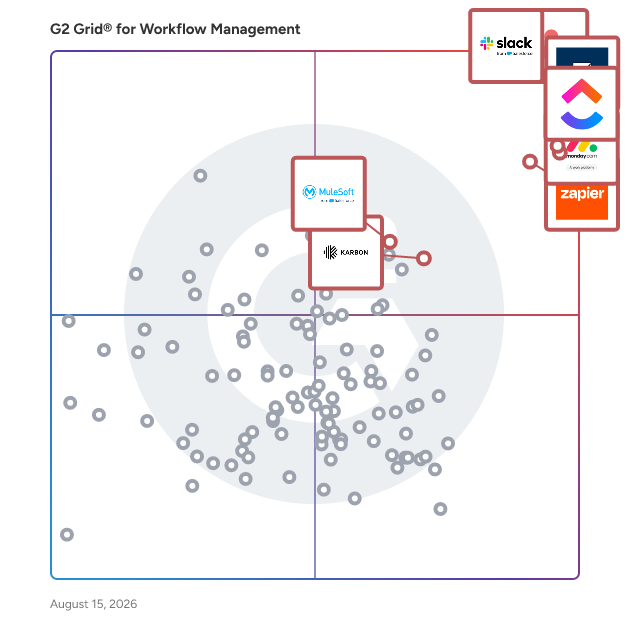
G2 Grid® for Workflow Management Software

G2 Grid® for Workflow Management Software plotting products by satisfaction and market presence

Highlighted products: Slack, Asana, Smartsheet, ClickUp, monday AI Work Platform, Zapier, Karbon, and MuleSoft Automation.

Underlying data: [Grid® JSON](https://www.g2.com/categories/workflow-management/grids.json?focus%5B%5D=slack&focus%5B%5D=asana&focus%5B%5D=smartsheet&focus%5B%5D=clickup&focus%5B%5D=monday-com&focus%5B%5D=zapier&focus%5B%5D=karbon-2025-03-03&focus%5B%5D=mulesoft-automation)

Sponsored

Hive

Hive is an all-in-one project management software platform that helps teams plan, collaborate, automate workflows, and deliver projects faster. Designed for organizations of every size, Hive combines powerful project planning, task management, team collaboration, and workflow automation tools in one customizable workspace. Whether you're managing marketing campaigns, product launches, creative projects, client work, or cross-functional initiatives, Hive adapts to your team's unique processes. Unlike rigid project management tools, Hive offers flexible workflows, customizable dashboards, and multiple project views so every team can work the way they work best. Hive empowers marketing, operations, product, IT, creative, and remote teams with the tools they need to stay organized and aligned. With customizable workflows and powerful collaboration features, teams can centralize work, reduce manual tasks, and improve visibility across every project. Key capabilities include: - Multiple project views, including Kanban boards, Gantt charts, calendars, tables, and lists - Task management with custom fields, dependencies, milestones, and priorities - Workflow automation to eliminate repetitive work - Real-time team collaboration with messaging, comments, and file sharing - Time tracking, reporting, and analytics - Integrations with hundreds of popular business applications Every organization works differently, which is why Hive is built to be one of the most customizable project management platforms available. Teams can create workflows tailored to their business processes using custom fields, project templates, automations, approvals, and integrations. Instead of forcing teams to change how they work, Hive adapts to existing workflows — helping organizations improve efficiency without disrupting productivity. Hive gives teams the flexibility to manage projects from the perspective that works best for them. Switch seamlessly between: - Kanban boards for agile workflows - Gantt charts for timeline planning - Calendar views for scheduling - Table and List views for detailed task management These flexible project views help teams track deadlines, manage resources, identify bottlenecks, and keep projects moving forward. Hive brings projects, communication, and documentation together in one centralized workspace. Team members can collaborate in real time, assign tasks, share files, provide feedback, and monitor project progress without switching between multiple tools. By combining project planning, collaboration, automation, and reporting in a single platform, Hive helps teams reduce busywork and focus on delivering results. Hive is more than just task management software—it's a scalable work management platform built to evolve alongside your business. As your needs change, Hive continues to expand through new features, integrations, and customer-driven enhancements. With flexible customization, powerful automation, and dedicated customer support, Hive enables organizations to streamline workflows, improve cross-functional collaboration, and execute projects with greater speed and confidence.

Visit website

Content Snare

Content Snare helps accounting firms, mortgage brokers, law firms, and professional services teams collect documents and information from clients without endless email back-and-forth. Customers report a 71% reduction in time spent gathering information, a 67% reduction in stalled projects, and a 23.9× return on investment. Send clients a secure, branded portal with a checklist of exactly what you need. Auto-saving progress means clients can complete the request over multiple sessions; automatic reminders handle the follow-up; in-context approvals and rejections replace the email back-and-forth when something needs correcting. Used by 1,900+ companies across 103 countries to collect tax documents, onboarding information, workpapers, KYC, and ongoing client requests. ISO 27001 certified. Integrates with Xero, Zapier, Make, Google Drive, Dropbox, OneDrive, and SharePoint.

Average Rating: 4.7/5.0

Total Reviews: 53

How Do G2 Users Rate Content Snare?

  • Has the product been a good partner in doing business?: 9.8/10 (Category avg: 9.1/10)

Who Is the Company Behind Content Snare?

  • Seller: Content Snare
  • Year Founded: 2016
  • HQ Location: Brisbane, Queensland
  • Twitter: @contentsnare
    901 Twitter followers
  • LinkedIn® Page: www.linkedin.com
    7 employees on LinkedIn®

Who Uses This Product?

  • Top Industries: Accounting, Marketing and Advertising
  • Company Size: 89% Small, 11% Medium

What Do G2 Reviewers Say About Content Snare?

AI-generated summary from verified user reviews

Pros
  • Users love the ease of use of Content Snare, simplifying client interactions and streamlining their processes effectively.
  • Users praise Content Snare's client management for streamlining document collection and enhancing overall workflow and professionalism.
  • Users praise the responsive customer support of Content Snare, ensuring seamless operation and user satisfaction.
  • Users highlight the efficiency of Content Snare, streamlining client communication and drastically reducing workload.
  • Users value the automation features of Content Snare, significantly streamlining client communication and information collection.
Cons
  • Users note that excessive email notifications can overwhelm clients, suggesting a daily summary might improve the experience.
  • Users find Content Snare to be expensive, especially when technical issues lead to significant unforeseen costs.
  • Users report experiencing significant bugs in Content Snare, leading to costly issues and unsatisfactory customer support responses.
  • Users experience data saving issues as clients lack access to links for their completed requests.
  • Users find the email integration overwhelming, wishing for a way to consolidate messages into daily summaries.

What Are Recent G2 Reviews of Content Snare?

What Are G2 Users Discussing About Content Snare?

Uku

Uku is a powerful, beautiful, and easy-to-use accounting practice management platform for ambitious firms. Every accountant runs their whole day from one list. Tasks, deadlines, and recurring workflows for every client are sorted the moment they log in, so month-end close never sneaks up and nothing slips. Recurring work generates itself, and one click tracks time straight to billing. When someone is out, the firm keeps running. Add a vacation and Uku reassigns the work automatically, so no deadline falls through and no one scrambles to cover. Billing that used to take days now takes minutes. Uku turns tracked time and your price lists into accurate invoices and e-invoices in a click, chases the unpaid ones, and lets clients pay by card inside the portal. Firms tell us this is where they stop leaving money on the table. The client portal chases missing documents for you. Uku knows what is missing and asks the client before the task even starts, then keeps every file, task, and message in one shared timeline instead of scattered inboxes. Reports show which clients are actually profitable, so you price fairly and fix what drains the firm. Connects to QuickBooks, Xero, e-conomic, and Microsoft 365. In interviews with firms of 15 to 56 people, Uku lifted profit per firm by 28% and saved 12+ hours per person every week. Over 1,000 firms trust Uku, and most are up and running in 1 to 3 weeks with free migration help. SOC 2 Type I certified, EU-hosted, available in 12 languages.

Average Rating: 4.7/5.0

Total Reviews: 109

How Do G2 Users Rate Uku?

  • Has the product been a good partner in doing business?: 9.3/10 (Category avg: 9.1/10)
  • Activities: 8.9/10 (Category avg: 8.9/10)
  • Flows: 8.6/10 (Category avg: 8.9/10)
  • Integration: 8.3/10 (Category avg: 8.4/10)

Who Is the Company Behind Uku?

  • Seller: Getuku
  • Year Founded: 2017
  • HQ Location: Tallinn, EE
  • Twitter: @accountinguku
    48 Twitter followers
  • LinkedIn® Page: www.linkedin.com
    9 employees on LinkedIn®

Who Uses This Product?

  • Who Uses This: Accountant
  • Top Industries: Accounting, Financial Services
  • Company Size: 72% Small, 27% Medium

What Do G2 Reviewers Say About Uku?

AI-generated summary from verified user reviews

Pros
  • Users find Uku's ease of use impressive, noting its intuitive design and straightforward setup process.
  • Users value Uku's time tracking capabilities, enabling improved efficiency and accountability for teams and projects.
  • Users appreciate the easy-to-use and attractive user interface, enhancing their daily experience and company adaptation.
  • Users value the effective task management in Uku, as it helps streamline planning and enhances workflow organization.
  • Users love the efficient organization features of Uku, making time tracking and task management seamless for teams.
Cons
  • Users find the learning curve for recurring tasks steep, leading to confusion and duplicate entries in Uku.
  • Users find it challenging to locate completed tasks in Uku's calendar without exact dates, impacting ease of use.
  • Users find the difficult learning curve of Uku frustrating, making task management complex and confusing.
  • Users find date issues frustrating, as tasks may disappear or appear duplicated, complicating task management and planning.
  • Users experience integration issues with Uku, facing complications in tasks management and inefficient manual processes.

What Are Recent G2 Reviews of Uku?

WorkflowMAX

WorkflowMAX is a job and profitability management software solution specifically designed to assist service firms in optimizing their operations. This platform provides users with comprehensive control over essential aspects such as time management, team collaboration, and profit tracking, all consolidated into a single interface. By streamlining processes like project management, timesheet tracking, invoicing, and purchase order issuance, WorkflowMAX enhances clarity at every stage of a firm's workflow. Targeted primarily at growing service-oriented businesses, WorkflowMAX empowers users to scale their operations effectively. With the ability to monitor where time is allocated and profits are generated, firms can make informed decisions, delegate tasks with accuracy, and expand their services without uncertainty. This adaptability ensures that the software aligns with the unique workflows of each firm, rather than imposing a rigid structure that may not fit their needs. Key features of WorkflowMAX include its robust project management tools, which allow users to create, assign, and track projects in real time. The timesheet functionality simplifies the process of logging hours worked, ensuring that all team members can accurately report their time. Additionally, the invoicing and purchase order capabilities facilitate seamless financial transactions, making it easier for firms to manage their cash flow. The software also integrates deeply with popular accounting platforms like Xero and QuickBooks, enabling users to synchronize financial data effortlessly. The benefits of using WorkflowMAX extend beyond its core functionalities. The software is designed to provide users with insights into their operations, helping them identify areas for improvement and opportunities for growth. The dedicated support team is another significant advantage, as they are genuinely invested in the success of their clients, offering assistance and guidance as needed. This commitment to customer support, combined with the software's comprehensive features, positions WorkflowMAX as a valuable asset for service firms looking to enhance their operational efficiency and profitability.

Average Rating: 4.1/5.0

Total Reviews: 63

How Do G2 Users Rate WorkflowMAX?

  • Has the product been a good partner in doing business?: 8.3/10 (Category avg: 9.1/10)
  • Activities: 7.5/10 (Category avg: 8.9/10)
  • Flows: 7.5/10 (Category avg: 8.9/10)
  • Integration: 8.8/10 (Category avg: 8.4/10)

Who Is the Company Behind WorkflowMAX?

  • Seller: WorkflowMAX
  • Company Website:
  • Year Founded: 2023
  • HQ Location: Melbourne
  • LinkedIn® Page: www.linkedin.com
    26 employees on LinkedIn®

Who Uses This Product?

  • Who Uses This: Director
  • Top Industries: Marketing and Advertising, Accounting
  • Company Size: 76% Small, 14% Medium

What Do G2 Reviewers Say About WorkflowMAX?

AI-generated summary from verified user reviews

Pros
  • Users appreciate the ease of use of WorkflowMax, finding it intuitive and customizable for seamless integration.
  • Users appreciate the central time tracking functionality of WorkflowMax, enabling effective project management and accountability.
  • Users appreciate the easy integration with Xero, streamlining workflows and enhancing project cost management.
  • Users value the seamless integration with Xero, simplifying invoicing and enhancing workflow efficiency in WorkflowMax.
  • Users appreciate the seamless integration and comprehensive features of WorkflowMax for effective project management and cost tracking.
Cons
  • Users find missing features like Dext integration and multi-currency billing hinder WorkflowMAX's effectiveness and usability.
  • Users find WorkflowMAX has limited functionality, with slow processes and many bugs hindering their experience.
  • Users express frustration over billing issues, including inconsistencies in quotes and complexities in invoicing ongoing jobs.
  • Users find the time consumption tedious, struggling with excessive clicks and slow page refreshes while logging entries.
  • Users face invoicing problems such as discrepancies and lack of options for multi-currency billing and tax deductions.

What Are Recent G2 Reviews of WorkflowMAX?

What Are G2 Users Discussing About WorkflowMAX?

Dubsado

Business Management Solution

Average Rating: 4.3/5.0

Total Reviews: 72

How Do G2 Users Rate Dubsado?

  • Has the product been a good partner in doing business?: 8.8/10 (Category avg: 9.1/10)
  • Activities: 10.0/10 (Category avg: 8.9/10)
  • Flows: 9.2/10 (Category avg: 8.9/10)
  • Integration: 8.3/10 (Category avg: 8.4/10)

Who Is the Company Behind Dubsado?

  • Seller: Dubsado
  • Year Founded: 2015
  • HQ Location: Burbank , CA
  • Twitter: @mydubsado
    3,355 Twitter followers
  • LinkedIn® Page: www.linkedin.com
    26 employees on LinkedIn®

Who Uses This Product?

  • Who Uses This: CEO, Owner
  • Top Industries: Marketing and Advertising, Management Consulting
  • Company Size: 95% Small, 1% Medium

What Do G2 Reviewers Say About Dubsado?

AI-generated summary from verified user reviews

Pros
  • Users appreciate the seamless automation of Dubsado, enabling effortless management as their businesses grow.
  • Users praise Dubsado's exceptional customer support for enhancing their experience and ensuring seamless operations.
  • Users value Dubsado's time-saving automations, enabling seamless management and efficiency as businesses scale.
Cons
  • Users find the complexity of Dubsado can be frustrating, often feeling outdated and convoluted for simple tasks.
  • Users find the learning curve steep, often feeling confused and needing extra time to navigate Dubsado effectively.
  • Users find Dubsado not intuitive, experiencing confusion and complexity when trying to accomplish tasks effectively.

What Are Recent G2 Reviews of Dubsado?

What Are G2 Users Discussing About Dubsado?

APPSeCONNECT

APPSeCONNECT is an Integration Platform as a Service (iPaaS) solution designed to facilitate seamless and instantaneous integration of various business applications, including eCommerce platforms, Customer Relationship Management (CRM) systems, and Enterprise Resource Planning (ERP) systems. This platform ensures smooth communication between disparate software systems, enabling users to automate workflows, synchronize data across platforms, and streamline operational procedures for organizations of all sizes. Targeted at businesses across various sectors such as retail, manufacturing, distribution, and customer service, APPSeCONNECT is particularly beneficial for companies with complex software ecosystems that require reliable connectivity solutions to support growth. The platform provides a robust integration framework that enhances operational efficiency and responsiveness to market demands, allowing organizations to adapt quickly to changing business environments. APPSeCONNECT showcases its versatility through a range of specific use cases. For example, e-commerce businesses can automate the integration of orders, inventory, and customer information across platforms like Shopify, Magento, and SAP. Companies can also link ERP systems such as Microsoft Dynamics and SAP Business One to other business applications for real-time data synchronization. Furthermore, integrating CRMs like Salesforce, Zoho CRM, and HubSpot ensures a consistent flow of information between marketing, sales, and service teams. The platform also supports data consolidation from various sources, providing a unified view of business operations for effective reporting and analytics, while automating workflows to reduce manual intervention and enhance productivity. Key features of APPSeCONNECT include over 200 pre-built connectors for popular applications, allowing for quick and straightforward integration. Its low-code/no-code interface, featuring a drag-and-drop ProcessFlow designer, empowers users to create and manage integrations without extensive technical expertise. Real-time data synchronization ensures that all integrated systems maintain the most current information, which is crucial for informed decision-making. The platform is both scalable and flexible, adapting to the evolving needs of businesses as they grow, and it allows for customization of integration flows to meet specific requirements. Furthermore, APPSeCONNECT prioritizes security and compliance, adhering to industry-standard protocols such as GDPR, ISO 27001, and SOC 2 Type II, ensuring safe data handling. By facilitating smooth software integration, APPSeCONNECT serves as a powerful tool that enables companies to optimize their digital ecosystems, enhance operational effectiveness, and drive growth. Its comprehensive features and adaptability make it a valuable asset for organizations looking to improve their integration capabilities and streamline their business processes.

Average Rating: 4.5/5.0

Total Reviews: 150

How Do G2 Users Rate APPSeCONNECT?

  • Has the product been a good partner in doing business?: 8.9/10 (Category avg: 9.1/10)
  • Activities: 8.5/10 (Category avg: 8.9/10)
  • Flows: 8.2/10 (Category avg: 8.9/10)
  • Integration: 8.6/10 (Category avg: 8.4/10)

Who Is the Company Behind APPSeCONNECT?

  • Seller: APPSeCONNECT Corp
  • Company Website:
  • Year Founded: 2022
  • HQ Location: Frisco, Texas
  • Twitter: @appseconnect
    1,782 Twitter followers
  • LinkedIn® Page: www.linkedin.com
    95 employees on LinkedIn®

Who Uses This Product?

  • Who Uses This: IT Manager
  • Top Industries: Retail, Wholesale
  • Company Size: 63% Small, 36% Medium

What Do G2 Reviewers Say About APPSeCONNECT?

AI-generated summary from verified user reviews

Pros
  • Users commend the exceptional customer support at APPSeCONNECT for its quick response and friendly collaboration.
  • Users value the seamless integrations of APPSeCONNECT, enabling efficient automation and accurate data synchronization across platforms.
  • Users commend APPSeCONNECT for its robust integration capabilities, seamlessly connecting various ERP solutions and eCommerce platforms.
  • Users appreciate the easy integration of APPSeCONNECT with various platforms, enhancing automation and streamlining processes.
  • Users commend the ease of implementation with APPSeCONNECT, appreciating its smooth onboarding and exceptional support throughout the process.
Cons
  • Users find the learning curve steep, making initial use and error troubleshooting somewhat challenging and overwhelming.
  • Users find the complexity of the interface overwhelming, requiring extensive technical knowledge for effective use.
  • Users often face integration issues with APPSeCONNECT, including error inaccuracies and a cumbersome setup process.
  • Users experience slow performance with APPSeCONNECT, facing delays and difficulties during the initial setup and troubleshooting process.
  • Users face challenges with error handling, particularly regarding accuracy in reporting and difficulty in troubleshooting issues.

What Are Recent G2 Reviews of APPSeCONNECT?

What Are G2 Users Discussing About APPSeCONNECT?

Troop Messenger

The Unified Sovereign Workspace | Troop Messenger: The Secure, AI-Enabled Collaboration Powerhouse for Modern Enterprises. Troop Messenger is a high-performance, enterprise-grade communication and collaboration platform designed for organisations that refuse to compromise between user experience and data sovereignty. While traditional tools lock you into their clouds, Troop Messenger gives you the keys by providing a unified "Command Center" that fits your unique security architecture. The Troop Messenger Difference: - Total Deployment Flexibility: Unlike "SaaS-only" competitors, we offer On-Premise, Private Cloud, and Self-Hosted delivery. Maintain 100% ownership of your organizational intelligence. - AI-Enhanced Productivity: Move beyond simple chat. Use AI-Powered File Summaries to digest long briefings instantly and Smart Suggestions to accelerate team responses. - Unified Enterprise Tools: Consolidate your stack. Seamlessly switch between 1:1 & Group messaging, high-definition video conferencing, screen sharing, all within a single, encrypted interface. - Built for High-Stakes Environments: Engineered for industries requiring strict regulatory compliance (BFSI, Healthcare, Legal, and Tech), ensuring your corporate communication meets the highest global standards without sacrificing speed. Primary Solutions Provided: - Eliminate Tool Fragmentation & Silos: Consolidate chat, video, and task management into one cohesive ecosystem. Leverage robust REST APIs and webhooks to build custom workflows and ensure Troop Messenger integrates seamlessly with your existing enterprise application landscape. - Security at the Forefront: Enable global collaboration with end-to-end encryption, multi-factor authentication, SSO, SAML, user authorisations, and advanced role-based administrative controls (RBAC). - Scalable Efficiency: From agile startups to massive enterprises, Troop Messenger scales with your headcount while keeping your overhead low. Experience why forward-thinking enterprises are migrating to a more secure way to work.

Average Rating: 4.7/5.0

Total Reviews: 101

How Do G2 Users Rate Troop Messenger?

  • Has the product been a good partner in doing business?: 9.5/10 (Category avg: 9.1/10)

Who Is the Company Behind Troop Messenger?

Who Uses This Product?

  • Top Industries: Information Technology and Services, Computer Software
  • Company Size: 49% Medium, 43% Small

What Do G2 Reviewers Say About Troop Messenger?

AI-generated summary from verified user reviews

Pros
  • Users appreciate the ease of use of Troop Messenger, enjoying seamless communication and effortless onboarding.
  • Users appreciate the strong security of Troop Messenger, ensuring safe file sharing and protected internal discussions.
  • Users appreciate the simple and secure communication offered by Troop Messenger for efficient team collaboration.
  • Users value the organized file sharing in Troop Messenger, facilitating easy access and secure communication across teams.
  • Users appreciate the organized team communication of Troop Messenger, enhancing productivity and simplifying collaboration effortlessly.
Cons
  • Users feel there is a lack of features in Troop Messenger, impacting usability and integration options.
  • Users feel the user interface needs improvement with suggestions for a more modern design and better integrations.
  • Users notice missing features in Troop Messenger, including inconsistencies and a cluttered interface affecting overall usability.
  • Users feel that integration issues hinder workflow and seek smoother connections with third-party applications.
  • Users find the limited participant options for audio and video calls frustrating for larger teams.

What Are Recent G2 Reviews of Troop Messenger?

What Are G2 Users Discussing About Troop Messenger?

PF 360 Capture

PF 360 Capture is a highly scalable cloud-based document workflow platform that intelligently captures, classifies and transmits critical data from documents and faxes to the right process workflows. Our purpose is to help organizations eliminate costly, time-consuming manual processes and traditional document workflows so users can focus on tasks that require their attention. Our mission is to create and integrate the best cloud technologies to simplify digital transformation experiences for our customers. PF 360 Capture is ISO 27001 and SOC 2 Type II certified and HIPAA compliant. Organizations have the flexibility to decide the best deployment scenario for their environment with enterprise-grade SLAs and 24/7 support.

Average Rating: 4.4/5.0

Total Reviews: 15

How Do G2 Users Rate PF 360 Capture?

  • Has the product been a good partner in doing business?: 8.3/10 (Category avg: 9.1/10)
  • Activities: 8.3/10 (Category avg: 8.9/10)
  • Flows: 6.7/10 (Category avg: 8.9/10)
  • Integration: 7.3/10 (Category avg: 8.4/10)

Who Is the Company Behind PF 360 Capture?

Who Uses This Product?

  • Company Size: 87% Medium, 7% Large

What Do G2 Reviewers Say About PF 360 Capture?

AI-generated summary from verified user reviews

Pros
  • Users find PF 360 Capture to be very easy to use, streamlining their workflow and enhancing team collaboration.
  • Users appreciate the efficiency of PF 360 Capture, highlighting its smooth implementation and adaptability to business needs.
  • Users value the seamless hybrid office solution of PF 360 Capture, enhancing collaboration and simplifying document workflows.
  • Users value the automation adaptability of PF 360 Capture, seamlessly integrating with business processes and ERP systems.
  • Users appreciate the automation ease of PF 360 Capture, seamlessly integrating with their business processes and ERP software.
Cons
  • Users experience occasional communication issues, but find it easy to rectify these disruptions quickly.
  • Users often experience connection issues with PF 360 Capture that lead to frustration and hinder functionality.
  • Users often face connectivity issues with PF 360 Capture, leading to frustration during usage.
  • Users find that obtaining support and development can be difficult and time-consuming, impacting their overall experience.
  • Users feel the limited customization of PF 360 Capture may hinder meeting specific needs effectively.

What Are Recent G2 Reviews of PF 360 Capture?

Emailgistics

Emailgistics is an advanced email management solution designed to enhance Microsoft Outlook 365 shared mailboxes. This software focuses on automation, intelligent routing, and performance tracking, providing a structured, data-driven approach to managing emails. By streamlining shared inbox management, Emailgistics aims to boost team efficiency, accountability, and collaboration, fundamentally transforming how organizations handle their email communications. This solution is particularly beneficial for organizations that deal with high volumes of incoming messages and require a systematic approach to ensure timely responses. Emailgistics addresses common challenges associated with email management, such as the risk of missed messages and delayed replies. By automating the assignment of emails to the appropriate team members, Emailgistics significantly reduces the time spent on manual triage, allowing teams to concentrate on delivering prompt and accurate replies to customers. Key features of Emailgistics include automated message assignment, customizable workflow rules, and one-click availability controls. These functionalities enable teams to manage email interactions efficiently without becoming overwhelmed by administrative tasks. The automation aspect ensures that messages are routed to the right individual, which not only speeds up response times but also enhances accountability among team members. This structured approach promotes a collaborative and efficient work environment, where team members can focus on their core responsibilities rather than getting bogged down by email overload. Additionally, Emailgistics provides performance tracking tools, such as real-time dashboards and detailed reports on response times and productivity metrics. These data-driven insights empower managers to make informed decisions, refine team performance, and continuously improve email management processes. By analyzing performance metrics, organizations can identify areas for improvement and implement strategies to enhance overall efficiency, ensuring that every team member is contributing effectively to email communications. Seamlessly integrated with Outlook 365, Emailgistics enhances existing workflows without disrupting established practices. This integration allows teams to optimize their email management processes, leading to faster, more reliable responses and improved collaboration. By adopting Emailgistics, organizations can transform their email handling capabilities, ensuring that they meet customer expectations while maintaining a high level of operational efficiency.

Average Rating: 4.7/5.0

Total Reviews: 52

How Do G2 Users Rate Emailgistics?

  • Has the product been a good partner in doing business?: 9.4/10 (Category avg: 9.1/10)

Who Is the Company Behind Emailgistics?

  • Seller: Emailgistics
  • Company Website:
  • Year Founded: 2018
  • HQ Location: Oakville, CA
  • LinkedIn® Page: www.linkedin.com
    17 employees on LinkedIn®

Who Uses This Product?

  • Top Industries: Manufacturing
  • Company Size: 44% Medium, 42% Small

What Do G2 Reviewers Say About Emailgistics?

AI-generated summary from verified user reviews

Pros
  • Users commend the exceptional customer support of Emailgistics, enhancing implementation and ongoing assistance for better management.
  • Users praise the ease of use in Emailgistics, appreciating the quick setup and intuitive dashboard navigation.
  • Users love the time-saving benefits of Emailgistics, enhancing productivity and streamlining email management effectively.
  • Users appreciate the efficient email management in Emailgistics, enhancing workflows and improving customer service effectiveness.
  • Users value the enhanced team collaboration with Emailgistics, improving workflows and personalizing email management effectively.
Cons
  • Users face archiving issues that complicate email management and require significant training to overcome.
  • Users find the difficult setup process time-consuming and challenging, especially with numerous accounts and rules to manage.
  • Users experience slow loading times when searching folders and using the Outlook add-on, impacting their efficiency.
  • Users desire better folder management options, including sharing rules and the ability to fully close folders.
  • Users face challenges due to a lack of training, struggling to adapt to the new email management approach.

What Are Recent G2 Reviews of Emailgistics?

Box Relay

Box Relay, co-developed with IBM, is a workflow tool that automates and standardizes structured document workflows.

Average Rating: 4.0/5.0

Total Reviews: 11

How Do G2 Users Rate Box Relay?

  • Has the product been a good partner in doing business?: 7.5/10 (Category avg: 9.1/10)

Who Is the Company Behind Box Relay?

  • Seller: Box
  • Year Founded: 1998
  • HQ Location: Redwood City, CA
  • Twitter: @Box
    78,537 Twitter followers
  • LinkedIn® Page: www.linkedin.com
    4,311 employees on LinkedIn®
  • Ownership: NYSE:BOX

Who Uses This Product?

  • Company Size: 45% Large, 45% Small

What Are Recent G2 Reviews of Box Relay?

Nutrient Workflow

Nutrient Workflow (formerly Integrify) process automation software is built with powerful, intuitive tools for ease of use and rapid deployment. Nutrient Workflow is the choice for organizations or departments looking to automate and streamline their daily workflow processes for high efficiency and to ensure consistent standards are followed. Our Fortune 500 customers have automated a wide variety of workflows in operations, finance, HR, IT, marketing, and customer service.

Average Rating: 4.5/5.0

Total Reviews: 36

How Do G2 Users Rate Nutrient Workflow?

  • Has the product been a good partner in doing business?: 9.3/10 (Category avg: 9.1/10)
  • Activities: 8.7/10 (Category avg: 8.9/10)
  • Flows: 9.2/10 (Category avg: 8.9/10)
  • Integration: 8.3/10 (Category avg: 8.4/10)

Who Is the Company Behind Nutrient Workflow?

  • Seller: Nutrient
  • Year Founded: 2011
  • HQ Location: Raleigh, North Carolina USA
  • Twitter: @nutrientdocs
    4,183 Twitter followers
  • LinkedIn® Page: www.linkedin.com
    141 employees on LinkedIn®
  • Phone: +1 888 356 4219

Who Uses This Product?

  • Company Size: 53% Medium, 33% Large

What Do G2 Reviewers Say About Nutrient Workflow?

AI-generated summary from verified user reviews

Pros
  • Users value the ease of use of Nutrient Workflow, making customization and workflow building seamless and intuitive.
  • Users praise the exceptional customer support from Nutrient Workflow, highlighting responsiveness and valuable assistance throughout their experience.
  • Users value the customizability of Nutrient Workflow, allowing them to tailor workflows to their specific processes and goals.
  • Users value the customizability of Nutrient Workflow, allowing workflows to perfectly align with their unique processes and goals.
  • Users value the ease of learning with Integrify, finding its intuitive functionality accessible for all experience levels.
Cons
  • Users find the coding difficulty in Nutrient Workflow frustrating, with cumbersome JavaScript and SQL integration processes.
  • Users find that while Integrify offers an intuitive interface, building complex features can be cumbersome and challenging.
  • Users find the complexity of JavaScript and SQL integration in Nutrient Workflow to be frustrating and tedious.
  • Users find debugging issues in Nutrient Workflow tedious and frustrating, complicating coding and integration processes.
  • Users find the integration issues with JavaScript and SQL in Nutrient Workflow frustrating and tedious, complicating their development process.

What Are Recent G2 Reviews of Nutrient Workflow?

Moxo

Moxo is the AI orchestration platform built for business operations teams. From manual coordination to intelligent orchestration, Moxo transforms the way organizations run complex processes. The old way relies on scattered emails and manual follow-ups; the Moxo way keeps every step clear, connected, and accountable. We put human actions and decisions at the center of workflows, while AI and automation clear the manual work behind the scenes. By connecting people, systems, and AI, Moxo drives the right actions, from the right people, at the right time —whether it’s client onboarding, multi-party approvals, or ongoing account management. Business teams can eliminate bottlenecks, reduce drop-offs, and keep critical milestones moving forward. Trusted by leading global enterprises across financial services, consulting, legal, and healthcare, Moxo is the smarter way to orchestrate mission-critical workflows with confidence.

Average Rating: 4.5/5.0

Total Reviews: 192

How Do G2 Users Rate Moxo?

  • Has the product been a good partner in doing business?: 9.5/10 (Category avg: 9.1/10)
  • Activities: 8.8/10 (Category avg: 8.9/10)
  • Flows: 8.3/10 (Category avg: 8.9/10)
  • Integration: 7.8/10 (Category avg: 8.4/10)

Who Is the Company Behind Moxo?

  • Seller: Moxo
  • Company Website:
  • Year Founded: 2012
  • HQ Location: Cupertino, CA
  • Twitter: @PoweredByMoxo
    10,432 Twitter followers
  • LinkedIn® Page: www.linkedin.com
    218 employees on LinkedIn®

Who Uses This Product?

  • Who Uses This: CEO, Director
  • Top Industries: Financial Services, Marketing and Advertising
  • Company Size: 80% Small, 18% Medium

What Do G2 Reviewers Say About Moxo?

AI-generated summary from verified user reviews

Pros
  • Users praise the ease of use of Moxo, appreciating its user-friendly interface and seamless integration with other systems.
  • Users commend Moxo's exceptional customer support, highlighting their willingness to assist and enhance the user experience.
  • Users appreciate the effective team collaboration in Moxo, seamlessly coordinating tasks and enhancing communication.
  • Users commend Moxo for its responsive support, ensuring a seamless experience and valuable assistance when needed.
  • Users find Moxo's communication features invaluable for streamlining client interactions and enhancing collaboration.
Cons
  • Users find that missing features like client portal simulation and enhanced notification controls limit Moxo's functionality.
  • Users feel Moxo lacks key features, like client portal simulation and better notification control, impacting usability.
  • Users find Moxo lacking essential features like client portal simulation and advanced calendar integrations, affecting usability.
  • Users find limited customization in Moxo, lacking features like client portal simulation and advanced notification controls.
  • Users find integration issues with Moxo, particularly in calendar syncing and automation, affecting overall usability.

What Are Recent G2 Reviews of Moxo?

What Are G2 Users Discussing About Moxo?

Shapes

Shapes is the people platform for the AI era. Every HR process lives in one place, from your people directory and time off to performance cycles and analytics, with no spreadsheets or scattered systems in sight. AI agents handle the admin load end-to-end: answering employee questions instantly, running onboarding seamlessly, and flagging patterns or issues that need your attention. Using Vibe Views, any people leader can build the dashboard or tool they've always needed, just by describing it. No engineer required. Connect your people data wherever AI works, through MCP, enabling deep analysis, workflow triggers and custom tooling without ever exporting sensitive data. One clear price. Quick to implement. Built for HR leaders ready to turn off the noise and turn up the strategy.

Average Rating: 4.6/5.0

Total Reviews: 35

How Do G2 Users Rate Shapes?

  • Has the product been a good partner in doing business?: 9.6/10 (Category avg: 9.1/10)
  • Activities: 8.1/10 (Category avg: 8.9/10)
  • Flows: 6.1/10 (Category avg: 8.9/10)
  • Integration: 6.7/10 (Category avg: 8.4/10)

Who Is the Company Behind Shapes?

  • Seller: Shapes
  • Year Founded: 2022
  • HQ Location: Tel Aviv, Israel
  • LinkedIn® Page: www.linkedin.com
    79 employees on LinkedIn®

Who Uses This Product?

  • Top Industries: Computer Software
  • Company Size: 66% Small, 34% Medium

What Do G2 Reviewers Say About Shapes?

AI-generated summary from verified user reviews

Pros
  • Users highlight the user-friendly interface of Shapes, making interactions and processes seamless and efficient.
  • Users highlight the exceptional customer support of Shapes, noting responsiveness and commitment to resolving issues promptly.
  • Users highlight the user-friendly interface of Shapes, enhancing team collaboration and streamlining project management.
  • Users find the intuitive interface of Shapes makes managing HR processes seamless and user-friendly.
  • Users value the comprehensive features of Shapes, enhancing project management and team collaboration effortlessly.
Cons
  • Users note significant missing features, requiring improvements like currency support and integration with other tools.
  • Users desire more integration options in Shapes, as some essential features are currently lacking in the system.
  • Users express the need for a mobile app, as currently only the web version is available.
  • Users want a mobile app for Shapes, as they currently have to rely solely on the web version.
  • Users are disappointed that Shapes has a lack of mobile app, limiting accessibility and convenience for on-the-go use.

What Are Recent G2 Reviews of Shapes?

Ninety.io

Run EOS® with one platform built for execution. Ninety is business operating system software designed for leadership teams running EOS® (the Entrepreneurial Operating System®). Instead of managing your operating system across spreadsheets, documents, email, and disconnected project management tools, Ninety brings your team's Vision, Accountability Chart®, Scorecards, Rocks, Issues, To-Dos, meetings, and planning into one connected platform. Today, more than 44,428 companies use Ninety to improve alignment, accountability, and execution. Whether you're implementing EOS for the first time or looking for a better way to run it, Ninety helps leadership teams spend less time managing the process and more time solving issues, making decisions, and achieving their goals. Teams can document their Vision/Traction Organizer® (V/TO®), assign accountability, track weekly measurable data, run Level 10 Meetings™, manage Rocks, To-Dos, and Issues, conduct Quarterly and Annual Planning, and strengthen leaders with People Analyzer™ and structured 1-on-1s. Ninety also includes Ask Maz, an AI-powered assistant that helps teams quickly find information, surface trends, answer questions about company data, and uncover insights across their operating system. By connecting strategy, people, meetings, and execution in one place, Ninety helps leadership teams stay focused on what matters most and build healthier, more aligned, and more effective organizations. What teams use Ninety for - Running EOS® from one connected platform - Building and sharing the Vision/Traction Organizer® (V/TO®) - Maintaining an Accountability Chart™ - Tracking weekly Scorecards and KPIs - Running Level 10 Meetings™, Quarterly Planning, and Annual Planning - Managing Rocks, To-Dos, and Issues - Using People Analyzer™ and 1-on-1s to strengthen accountability - Asking Maz AI to find information and surface insights across company data

Average Rating: 4.7/5.0

Total Reviews: 100

How Do G2 Users Rate Ninety.io?

  • Has the product been a good partner in doing business?: 9.7/10 (Category avg: 9.1/10)
  • Activities: 8.4/10 (Category avg: 8.9/10)
  • Flows: 8.0/10 (Category avg: 8.9/10)
  • Integration: 7.1/10 (Category avg: 8.4/10)

Who Is the Company Behind Ninety.io?

  • Seller: Ninety.io
  • Year Founded: 2016
  • HQ Location: Park City, US
  • Twitter: @NinetyApp
    334 Twitter followers
  • LinkedIn® Page: www.linkedin.com
    173 employees on LinkedIn®

Who Uses This Product?

  • Who Uses This: EOS Implementer, Certified EOS Implementer
  • Top Industries: Consulting, Professional Training & Coaching
  • Company Size: 80% Small, 12% Medium

What Do G2 Reviewers Say About Ninety.io?

AI-generated summary from verified user reviews

Pros
  • Users appreciate the ease of use of Ninety.io, benefiting from its intuitive interface and seamless workflow automation.
  • Users value the easy setup of Ninety.io, making for a smooth and efficient transition to the platform.
  • Users praise the intuitive design of Ninety.io, which simplifies workflow and enhances productivity through a seamless experience.
  • Users value the high efficiency of Ninety.io, enhancing productivity through streamlined meetings and automated workflows.
  • Users value the collaborative features of Ninety.io, enhancing teamwork and efficiency in resolving issues.
Cons
  • Users note missing features such as improved automations and better reminders, impacting usability and efficiency.
  • Users desire greater customization options in Ninety.io, finding current features too rigid for their needs.
  • Users desire more customization options in Ninety.io, finding certain features too rigid for their needs.
  • Users find the robotic feel of meetings to be a drawback, lacking a human touch and flexibility.
  • Users find the notifications lacking, leading to confusion when sending issues to different departments.

What Are Recent G2 Reviews of Ninety.io?

What Are G2 Users Discussing About Ninety.io?

Magical

Magical is a productivity app that speeds up repetitive tasks as you work - no APIs or integrations required. Just an browser extension. With a simple keystroke, Magical automates mundane tasks like messaging, data entry, sourcing, and prospecting workflows. Unlike existing automation solutions that are expensive, clunky, and require a technical team to set up, Magical is designed for non-technical users, offering no-build task automations that works across any app. Use Magical to quickly personalize and expand messages as you type, move data from app to app to keep data bases up to date or move data into spreadsheets instantly. You can even use AI to write new messages for your using quick replies or custom prompts - where ever you work. Invite your entire team onto Magical and make everyone more productive by sharing your best message templates or productivity hacks. Magical is free to use!

Average Rating: 4.7/5.0

Total Reviews: 73

How Do G2 Users Rate Magical?

  • Has the product been a good partner in doing business?: 10.0/10 (Category avg: 9.1/10)
  • Activities: 9.4/10 (Category avg: 8.9/10)
  • Flows: 9.0/10 (Category avg: 8.9/10)
  • Integration: 8.9/10 (Category avg: 8.4/10)

Who Is the Company Behind Magical?

  • Seller: Magical
  • Year Founded: 2020
  • HQ Location: San Francisco, CA
  • Twitter: @get_magical
    1,674 Twitter followers
  • LinkedIn® Page: www.linkedin.com
    112 employees on LinkedIn®

Who Uses This Product?

  • Top Industries: Consumer Services, Hospital & Health Care
  • Company Size: 46% Medium, 36% Small

What Do G2 Reviewers Say About Magical?

AI-generated summary from verified user reviews

Pros
  • Users value the time-saving automation of Magical, enhancing productivity and managing workloads effectively.
  • Users love the time-saving automation of Magical, making workload management more efficient and less stressful.
  • Users value the time-saving automation of Magical, which helps them manage their workload efficiently.
  • Users appreciate the ease of use of Magical, enhancing productivity and efficiency with convenient shortcuts and automation.
  • Users love the efficiency of Magical, as it automates tasks and significantly saves time on workflows.
Cons
  • Users face technical issues with Magical, including glitches, inconsistent web pages, and difficulty in debugging errors.
  • Users find the complexity of the programme overwhelming, with complicated manuals and multiple steps hindering usability.
  • Users find the difficult settings of Magical can be clunky and less intuitive during initial setup.
  • Users find the learning curve challenging, wishing for a more user-friendly experience to ease usability.
  • Users find Magical not intuitive, especially when in a rush, as it requires time to learn effectively.

What Are Recent G2 Reviews of Magical?

VobeSoft

VobeSoft is the modular platform for your work. Configure databases, automations, and views to streamline and optimize your operations—all within one flexible system. Every software system has databases. These databases are often static, giving organizations that work with these standard solutions functionalities that they are not using and functions they can't change to their unique needs. Usually, with a lot of hassle, workarounds are applied to reach the end goal. But in the end, this hassle with workarounds only leads to frustration and not optimally using the advantages a software system should give you and your organization. The only static of today is that organizations are constantly changing. And this change isn't bad. It represents an improvement of the organization. To accommodate for this change, a system that changes and adapts to the way an organization works is necessary to ensure growth. This is VobeSoft: a software system with a dynamic database that is configurable to fit seamlessly into any organization. You, and not the software determines how work will be done, what data matters and how it should be stored. The context of the custom is leading in the way the system is set up and used.

Average Rating: 4.6/5.0

Total Reviews: 42

How Do G2 Users Rate VobeSoft?

  • Has the product been a good partner in doing business?: 9.8/10 (Category avg: 9.1/10)
  • Activities: 10.0/10 (Category avg: 8.9/10)
  • Flows: 10.0/10 (Category avg: 8.9/10)
  • Integration: 10.0/10 (Category avg: 8.4/10)

Who Is the Company Behind VobeSoft?

  • Seller: VobeSoft
  • Year Founded: 2011
  • HQ Location: s-Hertogenbosch, North Brabant
  • LinkedIn® Page: www.linkedin.com
    14 employees on LinkedIn®

Who Uses This Product?

  • Top Industries: Insurance, Financial Services
  • Company Size: 60% Small, 37% Medium

What Do G2 Reviewers Say About VobeSoft?

AI-generated summary from verified user reviews

Pros
  • Users commend the ease of use of VobeSoft, highlighting its flexibility and straightforward setup for custom needs.
  • Users value the easy customization of VobeSoft, appreciating its flexibility and adaptability to their unique needs.
  • Users highlight the flexibility and customization of VobeSoft, making it ideal for diverse organizational needs.
  • Users value the flexible customizability of VobeSoft, which adapts effortlessly to their unique business needs.
  • Users appreciate the flexibility and customization of VobeSoft, allowing for easy adaptation to specific business needs.
Cons
  • Users note the steep learning curve with VobeSoft, requiring time to master data modeling and application usage.

What Are Recent G2 Reviews of VobeSoft?

What Are G2 Users Discussing About VobeSoft?

Bijou Barry
BB
Researched and written by Bijou Barry
Updated April 9, 2026