# Best Video Hosting Platforms for Small Business

*By [Neeraja Prakash](https://research.g2.com/insights/author/neeraja-prakash)*


Products classified in the overall Video Hosting category are similar in many regards and help companies of all sizes solve their business problems. However, small business features, pricing, setup, and installation differ from businesses of other sizes, which is why we match buyers to the right Small Business Video Hosting to fit their needs. Compare product ratings based on reviews from enterprise users or connect with one of G2&#39;s buying advisors to find the right solutions within the Small Business Video Hosting category.

In addition to qualifying for inclusion in the Video Hosting Platforms category, to qualify for inclusion in the Small Business Video Hosting Platforms category, a product must have at least 10 reviews left by a reviewer from a small business.


## Top Video Hosting Platforms at a Glance
| # | Product | Rating | Best For | What Users Say |
|---|---------|--------|----------|----------------|
| 1 | [Wistia](https://www.g2.com/products/wistia/reviews) | 4.6/5.0 (1,132 reviews) | Marketing video hosting with lead capture analytics | "[Seamless Video Hosting with User-Friendly Interface](https://www.g2.com/survey_responses/wistia-review-4364873)" |
| 2 | [YouTube Advertising](https://www.g2.com/products/google-youtube-advertising/reviews) | 4.6/5.0 (283 reviews) | Video ad campaigns with Google-powered audience targeting | "[Informative Ads That Help Us Discover New Things](https://www.g2.com/survey_responses/youtube-advertising-review-12917925)" |
| 3 | [Loom](https://www.g2.com/products/atlassian-loom/reviews) | 4.7/5.0 (2,397 reviews) | Async screen recordings with instant shareable links | "[Quick Screen Recording Makes Explaining Work and Sharing Updates Effortless](https://www.g2.com/survey_responses/loom-review-12917192)" |
| 4 | [Consensus](https://www.g2.com/products/consensus/reviews) | 4.7/5.0 (1,787 reviews) | Pre-sales demo automation with buyer engagement tracking | "[Consensus Makes Customer Education Easy and Scales GTM Technical Evaluations.](https://www.g2.com/survey_responses/consensus-review-13057498)" |
| 5 | [Vimeo](https://www.g2.com/products/vimeo/reviews) | 4.3/5.0 (700 reviews) | Ad-free video hosting with brand customization | "[Vimeo stocks](https://www.g2.com/survey_responses/vimeo-review-9098885)" |
| 6 | [Adobe Media Encoder](https://www.g2.com/products/adobe-media-encoder/reviews) | 4.5/5.0 (193 reviews) | Batch video encoding from Adobe editing workflows | "[Powerful, Super-Fast Encoding That Complements Premiere and After Effects](https://www.g2.com/survey_responses/adobe-media-encoder-review-12710177)" |
| 7 | [VdoCipher](https://www.g2.com/products/vdocipher/reviews) | 4.9/5.0 (71 reviews) | DRM-protected video hosting against piracy | "[Full control of video delivery](https://www.g2.com/survey_responses/vdocipher-review-11464212)" |
| 8 | [Gumlet](https://www.g2.com/products/gumlet/reviews) | 4.7/5.0 (352 reviews) | DRM-protected course video hosting with adaptive streaming | "[Gumlet’s Human, Responsive Customer Support Stands Out](https://www.g2.com/survey_responses/gumlet-review-12996267)" |
| 9 | [Vidcast](https://www.g2.com/products/vidcast/reviews) | 4.7/5.0 (128 reviews) | Async video updates inside Webex workflows | "[Essential Tool for Effortless Team Collaboration](https://www.g2.com/survey_responses/vidcast-review-12196203)" |
| 10 | [Ignite Video Cloud](https://www.g2.com/products/ignite-video-cloud/reviews) | 4.9/5.0 (17 reviews) | GDPR-compliant video embedding without consent banners | "[An enrichment for us - handling and the team behind it fully convince](https://www.g2.com/survey_responses/ignite-video-cloud-review-12976734)" |

---
## What Are the Most Common Questions About Video Hosting Platforms?
*AI-generated · Last updated: May 26, 2026*
### Which video hosting platform offers the fastest streaming speeds?
Based on G2 reviews, Wistia stands out most often for fast, reliable video delivery in this category. According to verified users, uploads are quick, embeds work smoothly, and playback is dependable across websites and client-facing pages. G2 reviewers mention fast uploads, strong uptime, reliable web platform integrations, and consistent playback without distracting ads. Some reviewers also call out how easy it is to replace videos while keeping the same links live, which helps teams maintain performance without disrupting published content. While other products mention speed in narrower use cases, Wistia shows the broadest recent evidence around fast streaming, stable delivery, and smooth viewing experiences for business video hosting workflows.


### What platform provides secure enterprise video hosting?
Based on G2 reviews, secure video hosting needs vary, but several products are repeatedly praised for access control and content protection. According to verified users, Vimeo is valued for privacy and sharing controls, password-protected pages, and secure external collaboration. Gumlet reviewers mention DRM, dynamic watermarking, domain restrictions, and member-only access for protecting paid or private content. VdoCipher users most often emphasize strong DRM, watermarking, geo restrictions, device controls, and secure playback for premium training or course content. G2 reviewers mention these tools when discussing enterprise-style requirements such as secure distribution, controlled access, and reducing unauthorized sharing across internal, client, or educational video environments.


### What platform integrates video hosting with marketing automation tools?
Based on G2 reviews, Wistia is the product most consistently associated with video hosting tied to marketing workflows. According to verified users, it connects video engagement with CRM and marketing tools like HubSpot, supports lead capture inside videos, and helps teams track registrants, attendees, form submissions, and watch behavior. G2 reviewers mention using Wistia to trigger email automations, connect webinars to CRM records, and turn video into a measurable part of pipeline growth. Reviews also highlight customizable CTAs, lead capture forms, and analytics that support follow-up strategies. For teams prioritizing video hosting plus marketing automation, recent reviews most clearly point to Wistia as a strong fit.


### Which vendor offers real-time video analytics and viewer insights?
Based on G2 reviews, Wistia is frequently highlighted for detailed viewer insight and easy-to-read analytics. According to verified users, the platform helps teams understand views, watch time, drop-offs, completions, heatmaps, and overall engagement trends. G2 reviewers mention using these insights to optimize content, report back to marketing teams, identify what viewers cared about, and improve follow-up conversations. Several reviews also point to visibility into who watched and how long they watched, making video performance more actionable for sales, onboarding, and customer engagement. While other products mention analytics in specific contexts, Wistia appears most consistently in recent reviews for strong viewer tracking and practical engagement reporting.


### What is the best video hosting solution for monetizing content?
Based on G2 reviews, monetization-related needs show up most clearly in products built for shoppable or revenue-focused video experiences. According to verified users, Bambuser helps brands turn video into commerce with shoppable video, product highlights, live shopping, and direct checkout from content. EX.CO reviewers mention video monetization, SSP integration, and unlocking incremental revenue without adding operational complexity. G2 reviewers also note that these products support engagement and conversion goals by making content easier to shop or monetize directly. For buyers focused specifically on monetizing content rather than general hosting alone, recent reviews point most strongly to Bambuser and EX.CO for commerce and monetization-oriented use cases.

**Here are some of the top-rated products on G2:**

- [Bambuser](https://www.g2.com/products/bambuser/reviews) – used for live shopping, shoppable video, and product-focused video commerce experiences
- [EX.CO](https://www.g2.com/products/ex-co/reviews) – used to scale video monetization with player customization and incremental video revenue
- [Show](https://www.g2.com/products/show/reviews) – used to host videos with embedded forms and lead capture tied to marketing workflows


### Which vendor provides advanced privacy and access control features?
Based on G2 reviews, advanced privacy and access control are most often associated with Gumlet, VdoCipher, Vimeo, and Ignite Video Cloud. According to verified users, Gumlet offers DRM, signed links, dynamic watermarking, domain limits, and member-only access. VdoCipher reviewers repeatedly mention device limits, OTP access, geo blocking, DRM, and user-specific watermarking for premium content. Vimeo is praised for privacy controls, secure sharing, and password protection, while Ignite Video Cloud is noted for privacy-friendly hosting and strong data protection. G2 reviewers mention these capabilities when they need tighter control over who can view content, how it is shared, and how unauthorized distribution can be reduced.


### Which solution supports adaptive bitrate streaming for all devices?
Based on G2 reviews, adaptive delivery across devices is most explicitly described in reviews for Gumlet and VdoCipher. According to verified users, Gumlet supports adaptive streaming, per-title encoding, fast global delivery, and reliable playback for audiences in different regions. VdoCipher reviewers mention adaptive bitrate streaming, smooth playback on low bandwidth, mobile and desktop compatibility, and secure delivery across devices. G2 reviewers mention these strengths in contexts such as online courses, mobile apps, client-facing content, and global training use cases where playback needs to adjust smoothly to different screens and connection quality. These products appear most directly tied to adaptive streaming capabilities in the recent review set.


### What is the top-rated video hosting platform for large organizations?
Based on G2 reviews, Wistia is the product with the strongest recent review volume and broad evidence across business use cases, making it the clearest top-rated choice here. According to verified users, Wistia helps teams centralize video libraries, manage webinars, customize players, track engagement, capture leads, and embed content reliably across websites and campaigns. G2 reviewers mention strong ease of use, dependable hosting, branding flexibility, integrations with tools like HubSpot, and support for customer-facing videos, onboarding resources, and webinar programs. Reviews also highlight that teams use it across marketing, training, support, and client communication workflows, suggesting a platform that scales well across larger organizational needs.


### What is the most affordable video hosting platform for SMBs?
Based on G2 reviews, affordability for SMBs tends to come up most often with Gumlet, Loom, and Vimeo, though needs vary by use case. According to verified users, Gumlet is described as cheaper than competitors while still offering fast streaming, customization, and strong security features. Loom reviewers frequently point to easy recording and sharing, though some mention free-plan limits and pricing changes. Vimeo reviews are more mixed, with some users calling pricing decent or competitive and others noting higher-tier costs. G2 reviewers mention that smaller teams often prioritize simple setup, reliable playback, and manageable costs, which makes Gumlet especially notable in recent reviews for value-focused SMB video hosting.

**Here are some of the top-rated products on G2:**

- [Gumlet](https://www.g2.com/products/gumlet/reviews) – used by small teams for cost-effective hosting, branding, fast delivery, and video protection
- [Loom](https://www.g2.com/products/atlassian-loom/reviews) – suited for SMBs that need simple recording, sharing, and async communication workflows
- [Vimeo](https://www.g2.com/products/vimeo/reviews) – used for professional ad-free hosting, embeds, and client sharing with mixed pricing feedback


### Which tool supports multi-language subtitles and closed captions?
Based on G2 reviews, Wistia is the clearest fit for teams that need subtitle and caption support across languages. According to verified users, Wistia creates subtitles in different languages, supports automated captions, makes transcripts easy to generate and reuse, and helps teams translate captions for multilingual content. G2 reviewers mention using these features for training videos, webinars, accessibility, AI readability, and content repurposing. Some reviews also note subtitle and translation workflows could improve or become costly in advanced cases, but the repeated mention of transcripts, captions, and multilingual subtitle support makes Wistia the most directly supported answer in the recent review set.


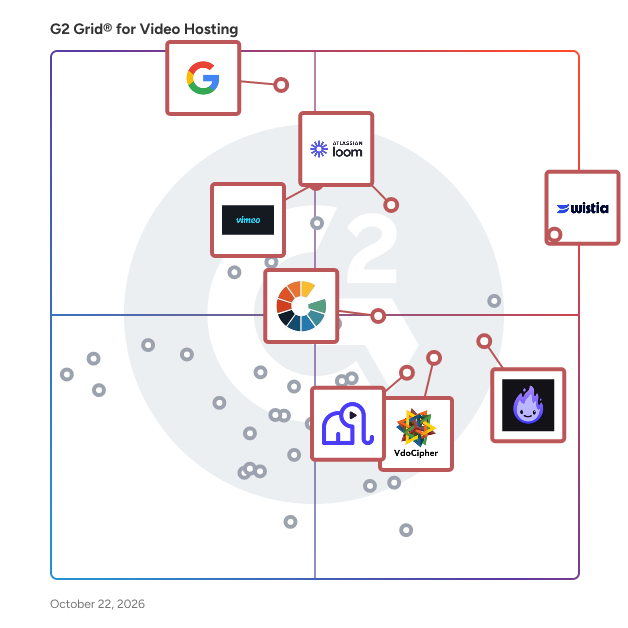
## G2 Grid® for Video Hosting Platforms
![G2 Grid® for Video Hosting Platforms plotting products by satisfaction and market presence](https://www.g2.com/categories/video-hosting-platforms/grids.png?focus%5B%5D=1831&focus%5B%5D=52980&focus%5B%5D=17247&focus%5B%5D=1387&focus%5B%5D=95903&focus%5B%5D=58154&focus%5B%5D=52007&focus%5B%5D=1402692)
Highlighted products: Wistia, Loom, YouTube Advertising, Vimeo, Gumlet, VdoCipher, Adobe Media Encoder, and Ignite Video Cloud.
Underlying data: [Grid® JSON](https://www.g2.com/categories/video-hosting-platforms/grids.json?focus%5B%5D=wistia&amp;focus%5B%5D=atlassian-loom&amp;focus%5B%5D=google-youtube-advertising&amp;focus%5B%5D=vimeo&amp;focus%5B%5D=gumlet&amp;focus%5B%5D=vdocipher&amp;focus%5B%5D=adobe-media-encoder&amp;focus%5B%5D=ignite-video-cloud&amp;segment=small-business)


## How Many Video Hosting Platforms Products Does G2 Track?
**Total Products under this Category:** 143

### Category Stats (Jul 2026)
- **Average Rating**: 4.54/5 The average rating of products in this category, based on all submitted ratings
- **Top Trending Product**: Livid (+2.78%) - Among all products in this category, Livid recorded the largest rating increase compared to last month
*Last updated: July 12, 2026*


## How Does G2 Rank Video Hosting Platforms Products?

**Why You Can Trust G2's Software Rankings:**

- 30 Analysts and Data Experts
- 14,800+ Authentic Reviews
- 143+ Products
- Unbiased Rankings

G2's software rankings are built on verified user reviews, rigorous moderation, and a consistent research methodology maintained by a team of analysts and data experts. Each product is measured using the same transparent criteria, with no paid placement or vendor influence. While reviews reflect real user experiences, which can be subjective, they offer valuable insight into how software performs in the hands of professionals. Together, these inputs power the G2 Score, a standardized way to compare tools within every category.


---

**Sponsored**

### Vyond

Vyond is an all-in-one AI video platform designed to empower organizations in creating secure, compliant, and engaging business content at scale. With a history spanning over 15 years, Vyond has established itself as a trusted solution for more than 20,000 companies, including 65% of the Fortune 500. Vyond is particularly suited for enterprises looking to enhance their internal communications, training programs, sales enablement, and marketing efforts through high-quality video content. Vyond serves a diverse range of use cases. It is particularly beneficial for companies aiming to streamline onboarding processes, improve training completion rates, and enhance compliance training. By integrating seamlessly with existing tools such as Slack, Learning Management Systems (LMS), and Customer Relationship Management (CRM) systems, Vyond allows employees to create brand-safe content without the need to switch between multiple applications. This integration not only fosters a more efficient workflow but also ensures that video content aligns with organizational branding and compliance standards. Key features of Vyond include AI avatars, AI-assisted scripting, instant translation, and text-to-speech capabilities, which collectively enhance the video creation process. Users can develop custom characters and utilize various animation styles, including animated, photorealistic, mixed-media, and live-action formats, all within a single platform. This versatility allows organizations to cater to different audience preferences and learning styles, making their content more engaging and effective. Additionally, Vyond’s SCORM-compliant LMS integration ensures that training materials can be easily tracked and measured, providing valuable insights into employee engagement and learning outcomes. Vyond stands out in the market by simplifying the technology stack for enterprises while expanding their creative capabilities. The platform’s focus on measurable outcomes—such as faster onboarding, higher training completion, and improved sales enablement—enables organizations to track return on investment (ROI) within their existing systems of record. This emphasis on data-driven results allows businesses to make informed decisions about their video content strategies and optimize their communication efforts. With a commitment to ongoing innovation and customer trust, Vyond is dedicated to evolving its platform to meet the needs of modern enterprises. By bringing next-generation AI capabilities into a compliant and governed environment, Vyond enables organizations to create content more efficiently, communicate more effectively, and reduce their reliance on fragmented solutions. This positions Vyond as a comprehensive tool for any organization looking to leverage video as a key component of their business strategy.


[Visit website](https://www.g2.com/external_clickthroughs/record?secure%5Bad_program%5D=ppc&amp;secure%5Bad_slot%5D=category_product_list&amp;secure%5Bcategory_id%5D=583&amp;secure%5Bchosen_at%5D=2026-07-12T19%3A03%3A25Z&amp;secure%5Bdisplayable_resource_id%5D=1002912&amp;secure%5Bdisplayable_resource_type%5D=Category&amp;secure%5Bmedium%5D=sponsored&amp;secure%5Bplacement_reason%5D=neighbor_category&amp;secure%5Bplacement_resource_ids%5D%5B%5D=1002912&amp;secure%5Bprioritized%5D=false&amp;secure%5Bproduct_id%5D=7533&amp;secure%5Bresource_id%5D=583&amp;secure%5Bresource_type%5D=Category&amp;secure%5Bsource_type%5D=category_page&amp;secure%5Bsource_url%5D=https%3A%2F%2Fwww.g2.com%2Fcategories%2Fvideo-hosting-platforms%2Fsmall-business&amp;secure%5Btoken%5D=49b6ec07fe84252c48a334deb3b635f5d77a0751209efef697e6390dc9bf92b0&amp;secure%5Burl%5D=https%3A%2F%2Fthink.vyond.com%2Fsignup%3Futm_source%3Dg2%26utm_medium%3Dppc%26utm_campaign%3Dfree_trial&amp;secure%5Burl_type%5D=free_trial)

---

## What Are the Top-Rated Video Hosting Platforms Products in 2026?
### 1. [Wistia](https://www.g2.com/products/wistia/reviews)
Wistia is a complete video marketing platform that helps teams create, host, market, and measure their videos and webinars—all in one place. With Wistia, you can easily create professional videos, host webinars, collect and send leads to your marketing automation platform, and more. As you level up your video marketing strategy, Wistia has your back with educational resources and world-class support.


**Average Rating:** 4.6/5.0
**Total Reviews:** 1,132
**How Do G2 Users Rate Wistia?**

- **Has the product been a good partner in doing business?:** 9.2/10 (Category avg: 9.2/10)
- **Distribution:** 9.4/10 (Category avg: 9.0/10)
- **Video management:** 9.3/10 (Category avg: 9.2/10)
- **Video player:** 9.4/10 (Category avg: 9.1/10)

**Who Is the Company Behind Wistia?**

- **Seller:** [Wistia](https://www.g2.com/sellers/wistia)
- **Company Website:** https://www.wistia.com
- **Year Founded:** 2006
- **HQ Location:** Cambridge, MA
- **Twitter:** @wistia (28,640 Twitter followers)
- **LinkedIn® Page:** https://www.linkedin.com/company/1316084/ (208 employees on LinkedIn®)

**Who Uses This Product?**
- **Who Uses This:** Marketing Manager, Digital Marketing Manager
- **Top Industries:** Computer Software, Marketing and Advertising
- **Company Size:** 48% Mid-Market, 35% Small-Business


#### What Are Wistia's Pros and Cons?

**Pros:**

- Ease of Use (302 reviews)
- Features (189 reviews)
- Video Quality (125 reviews)
- Video Management (115 reviews)
- Integrations (100 reviews)

**Cons:**

- Limited Customization (67 reviews)
- Expensive (57 reviews)
- Missing Features (56 reviews)
- Expensive Cost (50 reviews)
- Feature Limitations (48 reviews)


### What Do G2 Reviewers Say About Wistia?
*AI-generated summary from verified user reviews*

**Pros:**

- Users find Wistia&#39;s platform **easy to use** , appreciating its seamless video uploads and strong customization options.
- Users love the **powerful video editing features** of Wistia, enhancing brand customization and integration with their workflow.
- Users love the **high-quality video** from Wistia, enhancing their branding and seamless integration into campaigns.
- Users love Wistia&#39;s **centralized video management** , simplifying sharing, editing, and tracking analytics effortlessly across platforms.
- Users appreciate the **seamless integrations** of Wistia, enhancing productivity and allowing easy sharing across platforms.

**Cons:**

- Users desire more **customization options** in Wistia, particularly for the live webinar experience and detailed analytics.
- Users find Wistia to be **expensive** , creating barriers to entry and leading to the removal of archived videos.
- Users often face **missing features** like easy playlist creation and limited customization options for videos in Wistia.
- Users find Wistia&#39;s pricing structure to be a **high barrier to entry** , especially for those with large video collections.
- Users express concerns regarding **feature limitations** in Wistia, particularly in landing page creation and event setup.

#### What Are Recent G2 Reviews of Wistia?

**"[Wistia Makes Video Management Simple, Customizable, and Efficient](https://www.g2.com/survey_responses/wistia-review-12960803)"**

**Rating:** 5.0/5.0 stars
*— Mikalla C.*

[Read full review](https://www.g2.com/survey_responses/wistia-review-12960803)

---

**"[Seamless Video Hosting with User-Friendly Interface](https://www.g2.com/survey_responses/wistia-review-4364873)"**

**Rating:** 5.0/5.0 stars
*— Josh W.*

[Read full review](https://www.g2.com/survey_responses/wistia-review-4364873)

---


#### What Are G2 Users Discussing About Wistia?

- [What is Wistia used for?](https://www.g2.com/discussions/wistia-what-is-wistia-used-for)
- [How do I download wistia?](https://www.g2.com/discussions/how-do-i-download-wistia) - 1 comment
- [How much does wistia cost?](https://www.g2.com/discussions/how-much-does-wistia-cost)
- [What is wistia?](https://www.g2.com/discussions/what-is-wistia)
- [What is wistia used for?](https://www.g2.com/discussions/what-is-wistia-used-for) - 1 comment

### 2. [YouTube Advertising](https://www.g2.com/products/google-youtube-advertising/reviews)
YouTube Advertising is a dynamic platform that enables businesses to reach a vast audience through targeted video content. With over two billion monthly active users, YouTube offers unparalleled opportunities for brands to engage with potential customers across various devices, including computers, mobile phones, TVs, and game consoles. By leveraging YouTube&#39;s diverse ad formats and advanced targeting options, advertisers can effectively promote their products or services to a global audience. Key Features and Functionality: - Diverse Ad Formats: YouTube provides several ad formats to suit different marketing objectives: - Skippable In-Stream Ads: These ads play before, during, or after other videos and can be skipped after five seconds, allowing advertisers to pay only when viewers watch at least 30 seconds or interact with the ad. - Non-Skippable In-Stream Ads: Short ads of up to 15 seconds that viewers must watch before accessing their chosen content, ideal for delivering concise messages. - Bumper Ads: Non-skippable ads lasting up to six seconds, designed for broad reach and brand awareness. - In-Feed Video Ads: Appear alongside YouTube content, such as in search results or the homepage, encouraging viewers to click and watch. - Overlay Ads: Semi-transparent ads that appear on the lower portion of a video, available only on desktop devices. - Advanced Targeting Options: Advertisers can tailor their campaigns using various targeting methods, including demographic information, interests, purchase intent, location, language, keywords, device type, and remarketing strategies. - Cost-Effective Bidding Strategies: YouTube offers flexible bidding options, such as cost-per-view (CPV) and cost-per-thousand impressions (CPM), allowing businesses of all sizes to manage budgets effectively. Primary Value and Solutions for Users: YouTube Advertising empowers businesses to connect with a massive and engaged audience, enhancing brand visibility and driving conversions. The platform&#39;s diverse ad formats and precise targeting capabilities enable advertisers to deliver relevant messages to specific demographics, maximizing the impact of their marketing efforts. Additionally, the cost-effective nature of YouTube ads ensures that companies can achieve significant reach without substantial investment, making it an accessible and powerful tool for businesses aiming to expand their online presence and customer base.


**Average Rating:** 4.6/5.0
**Total Reviews:** 283
**How Do G2 Users Rate YouTube Advertising?**

- **Has the product been a good partner in doing business?:** 8.5/10 (Category avg: 9.2/10)
- **Distribution:** 9.0/10 (Category avg: 9.0/10)
- **Video management:** 9.2/10 (Category avg: 9.2/10)
- **Video player:** 9.1/10 (Category avg: 9.1/10)

**Who Is the Company Behind YouTube Advertising?**

- **Seller:** [Google](https://www.g2.com/sellers/google)
- **Year Founded:** 1998
- **HQ Location:** Mountain View, CA
- **Twitter:** @google (31,899,995 Twitter followers)
- **LinkedIn® Page:** https://www.linkedin.com/company/1441/ (341,888 employees on LinkedIn®)
- **Ownership:** NASDAQ:GOOG

**Who Uses This Product?**
- **Who Uses This:** System Engineer, Digital Marketing Manager
- **Top Industries:** Marketing and Advertising, Computer Software
- **Company Size:** 59% Small-Business, 27% Mid-Market


#### What Are YouTube Advertising's Pros and Cons?

**Pros:**

- Lead Generation (2 reviews)
- Training Efficiency (1 reviews)

**Cons:**

- Ineffective Advertising (2 reviews)
- Inadequate Editing Tools (1 reviews)
- Usability Issues (1 reviews)


### What Do G2 Reviewers Say About YouTube Advertising?
*AI-generated summary from verified user reviews*

**Pros:**

- Users appreciate the **ability to reach a large targeted audience** through effective location- and language-based ad placements.
- Users benefit from the **training efficiency** of YouTube Advertising, allowing effective ad management and audience reach.

**Cons:**

- Users find YouTube Advertising **ineffective** , citing high costs and intrusive ads that disrupt their viewing experience.
- Users find YouTube Advertising&#39;s **inadequate editing tools** hinder effective ad placement compared to competitors like Meta.
- Users experience **confusion in audience targeting** due to the complexity of keyword and demographic options.

#### What Are Recent G2 Reviews of YouTube Advertising?

**"[Location &amp; Language-Based Ad Placement That Really Delivers](https://www.g2.com/survey_responses/youtube-advertising-review-12269836)"**

**Rating:** 4.5/5.0 stars
*— Majid M.*

[Read full review](https://www.g2.com/survey_responses/youtube-advertising-review-12269836)

---

**"[Informative Ads That Help Us Discover New Things](https://www.g2.com/survey_responses/youtube-advertising-review-12917925)"**

**Rating:** 4.0/5.0 stars
*— Vipin  P.*

[Read full review](https://www.g2.com/survey_responses/youtube-advertising-review-12917925)

---


#### What Are G2 Users Discussing About YouTube Advertising?

- [What is other YouTube features in Youtube studio?](https://www.g2.com/discussions/what-is-other-youtube-features-in-youtube-studio)
- [What is YouTube&#39;s purpose?](https://www.g2.com/discussions/what-is-youtube-s-purpose) - 1 comment
- [How do I get to YouTube features?](https://www.g2.com/discussions/how-do-i-get-to-youtube-features)
- [What is YouTube and its features?](https://www.g2.com/discussions/what-is-youtube-and-its-features) - 1 comment

### 3. [Loom](https://www.g2.com/products/atlassian-loom/reviews)
Loom is video communication that moves work forward. Think of Loom as a tool that transforms how you share and understand ideas. Record your screen and camera bubble, then share your video instantly with a link. Sending a Loom saves time and enhances clarity compared to scheduling live meetings or crafting lengthy emails. You get more focus time (fewer meetings), with the clarity and nuance that comes with live conversation. And when you do need to meet live, Loom AI for meetings automatically records, organizes, and delivers AI-powered recaps, creating a searchable library of knowledge and insights. Key Features: ✔ Free screenshots: capture, edit, &amp; share high-quality screenshots with a link ✔ AI-powered transcriptions and closed captions: available in 50+ distinct languages ✔ Video-to-text: automate documentation, messages, bug reports and more with a single click ✔ Loom AI for meetings- meeting notes, action items, and recap emails ✔ Instant screen and camera recording ✔ Easy editing: trim and stitch, edit like a word doc, annotate, and add overlays to your videos ✔ Viewer insights &amp; engagement tracking ✔ Secure sharing with password protection &amp; domain management Loom is for all kinds of teams, helping everyone from remote collaborators to educators communicate effectively. Whether your team is five or 50,000 strong, millions across 400,000 companies choose Loom to stay connected and share information effortlessly.


**Average Rating:** 4.7/5.0
**Total Reviews:** 2,397
**How Do G2 Users Rate Loom?**

- **Has the product been a good partner in doing business?:** 9.3/10 (Category avg: 9.2/10)
- **Distribution:** 9.2/10 (Category avg: 9.0/10)
- **Video management:** 9.1/10 (Category avg: 9.2/10)
- **Video player:** 9.3/10 (Category avg: 9.1/10)

**Who Is the Company Behind Loom?**

- **Seller:** [Atlassian](https://www.g2.com/sellers/atlassian)
- **Company Website:** https://www.atlassian.com/
- **Year Founded:** 2002
- **HQ Location:** Sydney and San Francisco
- **Twitter:** @Atlassian (106,496 Twitter followers)
- **LinkedIn® Page:** https://www.linkedin.com/company/atlassian (21,081 employees on LinkedIn®)

**Who Uses This Product?**
- **Who Uses This:** Customer Success Manager, Owner
- **Top Industries:** Computer Software, Marketing and Advertising
- **Company Size:** 61% Small-Business, 31% Mid-Market


#### What Are Loom's Pros and Cons?

**Pros:**

- Ease of Use (330 reviews)
- Easy Recording (260 reviews)
- Screen Recording (207 reviews)
- Easy Sharing (192 reviews)
- Video Recording (170 reviews)

**Cons:**

- Recording Issues (147 reviews)
- Limited Features (82 reviews)
- Slow Loading (64 reviews)
- Limited Free Version (61 reviews)
- Slow Performance (56 reviews)


### What Do G2 Reviewers Say About Loom?
*AI-generated summary from verified user reviews*

**Pros:**

- Users find Loom&#39;s **ease of use** transformative, simplifying communication and significantly reducing meetings and email exchanges.
- Users love Loom for its **easy recording** , allowing quick explanations and reducing confusion in team communication.
- Users appreciate the **user-friendly screen recording** of Loom, enhancing communication and boosting productivity for remote teams.
- Users love the **easy sharing** feature of Loom, simplifying communication and speeding up collaboration across teams.
- Users love Loom for its **quick and easy video recording** , streamlining communication and reducing misunderstandings in their work.

**Cons:**

- Users often face **recording issues** with Loom, mistakenly capturing the wrong screen and struggling with take consistency.
- Users find Loom&#39;s **limited features** restrictive, particularly regarding video downloads and creative branding options.
- Users often face **slow loading** issues, especially when internet connectivity is unstable, impacting video recording and conferencing quality.
- Users find the **limited free version** restricts video length and editing capabilities, hindering more polished content creation.
- Users experience **slow performance** during video uploads and internet interruptions, affecting overall video quality and workflow.

#### What Are Recent G2 Reviews of Loom?

**"[Seamless Video Sharing with Loom](https://www.g2.com/survey_responses/loom-review-12844537)"**

**Rating:** 4.0/5.0 stars
*— Nitin V.*

[Read full review](https://www.g2.com/survey_responses/loom-review-12844537)

---

**"[Quick Screen Recording Makes Explaining Work and Sharing Updates Effortless](https://www.g2.com/survey_responses/loom-review-12917192)"**

**Rating:** 4.0/5.0 stars
*— Abhishan M.*

[Read full review](https://www.g2.com/survey_responses/loom-review-12917192)

---


#### What Are G2 Users Discussing About Loom?

- [How can I best use Loom&#39;s video recording features to create engaging content for team communication?](https://www.g2.com/discussions/how-can-i-best-use-loom-s-video-recording-features-to-create-engaging-content-for-team-communication) - 2 comments
- [Is Valant ONC certified?](https://www.g2.com/discussions/loom-is-valant-onc-certified)
- [What is Behavioral Health EHR?](https://www.g2.com/discussions/loom-what-is-behavioral-health-ehr)
- [What is Loom software used for?](https://www.g2.com/discussions/what-is-loom-software-used-for) - 4 comments, 1 upvote
- [What are the features of loom?](https://www.g2.com/discussions/what-are-the-features-of-loom)

### 4. [Vimeo](https://www.g2.com/products/vimeo/reviews)
Vimeo is the world&#39;s most innovative video experience platform. We enable anyone to create high-quality video experiences to better connect and bring ideas to life. We proudly serve our community of millions of users – from creative storytellers to globally distributed teams at the world&#39;s largest companies – whose videos receive billions of views each month.


**Average Rating:** 4.3/5.0
**Total Reviews:** 700
**How Do G2 Users Rate Vimeo?**

- **Has the product been a good partner in doing business?:** 8.5/10 (Category avg: 9.2/10)
- **Distribution:** 8.8/10 (Category avg: 9.0/10)
- **Video management:** 9.0/10 (Category avg: 9.2/10)
- **Video player:** 9.1/10 (Category avg: 9.1/10)

**Who Is the Company Behind Vimeo?**

- **Seller:** [Vimeo](https://www.g2.com/sellers/vimeo)
- **Company Website:** https://vimeo.com
- **Year Founded:** 2004
- **HQ Location:** New York
- **Twitter:** @Vimeo (205,088 Twitter followers)
- **LinkedIn® Page:** https://www.linkedin.com/company/167813/ (898 employees on LinkedIn®)

**Who Uses This Product?**
- **Who Uses This:** Owner, Marketing Manager
- **Top Industries:** Marketing and Advertising, Computer Software
- **Company Size:** 64% Small-Business, 27% Mid-Market


#### What Are Vimeo's Pros and Cons?

**Pros:**

- Ease of Use (106 reviews)
- Video Quality (63 reviews)
- Features (58 reviews)
- Video Management (57 reviews)
- Quality (54 reviews)

**Cons:**

- Expensive (43 reviews)
- Limited Features (28 reviews)
- Subscription Cost (26 reviews)
- Limited Free Version (18 reviews)
- Limited Customization (17 reviews)


### What Do G2 Reviewers Say About Vimeo?
*AI-generated summary from verified user reviews*

**Pros:**

- Users appreciate the **ease of use** of Vimeo, benefiting from its intuitive interface and effective embedding options.
- Users admire the **high video quality** of Vimeo, enhancing their presentations and film projects effectively.
- Users value Vimeo for its **robust collaboration tools and privacy options** , enhancing project sharing and teamwork efficiency.
- Users value the **video management features** of Vimeo, enhancing their projects and presentations with ease and precision.
- Users appreciate the **high-quality playback** of Vimeo, enjoying seamless integration and a distraction-free viewing experience.

**Cons:**

- Users express concern over Vimeo&#39;s **high pricing** , feeling restricted by subscription plans and limited advanced features.
- Users find the **limited features** of Vimeo&#39;s UI and editing tools complex and lacking compared to competitors.
- Users express concern over Vimeo&#39;s **expensive subscription cost** and feel plans lack value beyond the free tier.
- Users find the **limited free version** restrictive, with too few features and high costs for premium plans.
- Users find **limited customization** options on Vimeo, particularly for the showcase page header and email notifications.

#### What Are Recent G2 Reviews of Vimeo?

**"[Reliable Video Hosting and Website Embedding with Vimeo](https://www.g2.com/survey_responses/vimeo-review-5026186)"**

**Rating:** 5.0/5.0 stars
*— Tom P.*

[Read full review](https://www.g2.com/survey_responses/vimeo-review-5026186)

---

**"[Vimeo stocks](https://www.g2.com/survey_responses/vimeo-review-9098885)"**

**Rating:** 5.0/5.0 stars
*— SAIKRISHNA M.*

[Read full review](https://www.g2.com/survey_responses/vimeo-review-9098885)

---


#### What Are G2 Users Discussing About Vimeo?

- [What is Vimeo used for?](https://www.g2.com/discussions/vimeo-what-is-vimeo-used-for) - 1 comment
- [What is Vimeo Livestream used for?](https://www.g2.com/discussions/what-is-vimeo-livestream-used-for) - 1 comment
- [What is Vimeo Record used for?](https://www.g2.com/discussions/what-is-vimeo-record-used-for) - 2 comments
- [Can you live stream from Vimeo?](https://www.g2.com/discussions/can-you-live-stream-from-vimeo) - 1 comment
- [Is Livestream Studio free?](https://www.g2.com/discussions/is-livestream-studio-free)

### 5. [Gumlet](https://www.g2.com/products/gumlet/reviews)
Host and deliver buffer-free videos and stunning images across websites and apps, at any scale. Gumlet is an end-to-end platform to host, secure, and stream videos, and to automatically optimize and deliver images. Trusted by 10,000+ businesses and creators globally. Gumlet Video: Record, protect, and stream videos in minutes. - Record inside Gumlet: Capture your screen, camera, and audio directly from the dashboard. No external tools — record, edit, and share without breaking your flow. - Multi-DRM Protection (Add-on): Secure videos with Widevine and FairPlay DRM, available as an add-on on any plan — try it free on up to 5 videos. Layer on dynamic watermarking, signed URLs, geo-blocking, domain restrictions, and password protection to stop piracy and screen recording. - Lead Capture &amp; Engagement: Turn viewers into leads with native email capture forms and CTAs inside the player. Boost engagement with AI-generated chapters and descriptions, auto subtitles in 29 languages (translatable to 98+), and custom thumbnails. - Built-in Video Editing: Trim and crop videos, and add text overlays, image overlays, and logo watermarks during processing - no separate editor needed. - Cinematic Streaming: AI-powered per-title encoding and adaptive streaming up to 4K HDR10 on every device, with multi-audio language tracks for global audiences. Analytics &amp; APIs: In-depth per-view analytics, plus APIs, SDKs, and webhooks to run your video infrastructure on autopilot. Gumlet Image: Publish optimized images automatically. - Auto Resize, Compression &amp; Format Conversion: Serve the smallest, sharpest image in the latest format to every device - cutting bandwidth and CDN costs while boosting web vitals and SEO. - Effortless Integration: Low-code/no-code setup puts your entire image pipeline on autopilot, with powerful transformation tools for full control. Start for free, or contact our sales team for custom pricing tailored to your needs.


**Average Rating:** 4.7/5.0
**Total Reviews:** 352
**How Do G2 Users Rate Gumlet?**

- **Has the product been a good partner in doing business?:** 9.5/10 (Category avg: 9.2/10)
- **Distribution:** 9.5/10 (Category avg: 9.0/10)
- **Video management:** 9.5/10 (Category avg: 9.2/10)
- **Video player:** 9.7/10 (Category avg: 9.1/10)

**Who Is the Company Behind Gumlet?**

- **Seller:** [Gumlet](https://www.g2.com/sellers/gumlet)
- **Year Founded:** 2020
- **HQ Location:** Singapore, SG
- **Twitter:** @gumlethq (531 Twitter followers)
- **LinkedIn® Page:** https://www.linkedin.com/company/gumlet/ (37 employees on LinkedIn®)

**Who Uses This Product?**
- **Who Uses This:** Founder, Owner
- **Top Industries:** Marketing and Advertising, E-Learning
- **Company Size:** 93% Small-Business, 3% Mid-Market


#### What Are Gumlet's Pros and Cons?

**Pros:**

- Features (58 reviews)
- Ease of Use (50 reviews)
- Video Quality (48 reviews)
- User Interface (34 reviews)
- Security (27 reviews)

**Cons:**

- Learning Curve (21 reviews)
- Limited Customization (15 reviews)
- Feature Limitations (11 reviews)
- Pricing Issues (11 reviews)
- Expensive (10 reviews)


### What Do G2 Reviewers Say About Gumlet?
*AI-generated summary from verified user reviews*

**Pros:**

- Users highlight the **ease of use and robust features** of Gumlet, making it a top choice for video hosting.
- Users love the **ease of use** of Gumlet, praising its intuitive interface and quick setup process.
- Users rave about the **fantastic video quality** of Gumlet, noting fast loading times and smooth playback experience.
- Users rave about Gumlet&#39;s **intuitive user interface** , which enhances navigation and overall experience while managing videos.
- Users value the **robust security features** of Gumlet, enhancing privacy and content protection while hosting videos.

**Cons:**

- Users find the **steep learning curve** of Gumlet challenging, especially those without technical backgrounds.
- Users feel the **limited customization** options restrict their ability to tailor the platform to their specific needs.
- Users are disappointed by the **absence of monetization features** and essential integrations, limiting Gumlet&#39;s functionality.
- Users express concerns about **pricing issues** , wishing for better value and more flexible subscription options with Gumlet.
- Users find Gumlet **expensive** , especially for essential features like DRM protection that require higher-tier subscriptions.

#### What Are Recent G2 Reviews of Gumlet?

**"[Gumlet’s Human, Responsive Customer Support Stands Out](https://www.g2.com/survey_responses/gumlet-review-12996267)"**

**Rating:** 5.0/5.0 stars
*— Agnieszka K.*

[Read full review](https://www.g2.com/survey_responses/gumlet-review-12996267)

---

**"[Switched from a premium host to Gumlet and it fits our small team better](https://www.g2.com/survey_responses/gumlet-review-12106935)"**

**Rating:** 4.0/5.0 stars
*— Jackie C.*

[Read full review](https://www.g2.com/survey_responses/gumlet-review-12106935)

---


#### What Are G2 Users Discussing About Gumlet?

- [What is Gumlet used for?](https://www.g2.com/discussions/what-is-gumlet-used-for)

### 6. [VdoCipher](https://www.g2.com/products/vdocipher/reviews)
VdoCipher enables businesses to stream videos on their websites and apps with unmatched security and seamless performance. Designed to protect premium content, VdoCipher shields against piracy through enterprise-grade DRM encryption, piracy blockers with hacker identification, dynamic watermarking, and screen capture protection. Even in low-bandwidth environments, videos play smoothly thanks to optimized encoding that delivers the best quality at smaller sizes—ensuring viewers in tier 2 and 3 cities enjoy the same flawless experience as those on faster connections. Beyond security, VdoCipher offers a complete streaming solution: multi-CDN delivery, transcoding, API and plugin integrations, a customizable HTML5 player, per-video analytics, and secure offline app playback. With VdoCipher, creators and businesses not only protect their revenue streams but also provide audiences with a streaming experience that is secure, reliable, and effortlessly engaging. VdoCipher Live empowers course creators, event organisers and broadcasters with expert live video streaming, ensuring smooth playback globally. Integrate with your website or app within 5 mins, with authenticated and anonymous chat options. Scalable to 100,000 viewers in single session. AWS &amp; GCP Backed Infrastructure, Full HD Playback along with Polls &amp; Quizzes. VdoCipher is the proud winner of best company in video security (DRM ) category by prestigious Streaming Media Global, Europe. Free 30 day trial is available at vdocipher.com&quot;


**Average Rating:** 4.9/5.0
**Total Reviews:** 71
**How Do G2 Users Rate VdoCipher?**

- **Has the product been a good partner in doing business?:** 9.6/10 (Category avg: 9.2/10)
- **Distribution:** 9.6/10 (Category avg: 9.0/10)
- **Video management:** 9.7/10 (Category avg: 9.2/10)
- **Video player:** 9.7/10 (Category avg: 9.1/10)

**Who Is the Company Behind VdoCipher?**

- **Seller:** [VdoCipher Media Solutions Pvt Ltd](https://www.g2.com/sellers/vdocipher-media-solutions-pvt-ltd)
- **Year Founded:** 2015
- **HQ Location:** Gurgaon, Haryana
- **Twitter:** @vdocipher (210 Twitter followers)
- **LinkedIn® Page:** https://www.linkedin.com/company/3649921/ (38 employees on LinkedIn®)

**Who Uses This Product?**
- **Who Uses This:** Founder
- **Top Industries:** Marketing and Advertising, E-Learning
- **Company Size:** 77% Small-Business, 18% Mid-Market


#### What Are VdoCipher's Pros and Cons?

**Pros:**

- Data Security (20 reviews)
- Ease of Use (20 reviews)
- Video Quality (20 reviews)
- Security (19 reviews)
- Features (15 reviews)

**Cons:**

- Learning Curve (10 reviews)
- Expensive (7 reviews)
- Poor Documentation (6 reviews)
- Usability Issues (6 reviews)
- Complex Setup (4 reviews)


### What Do G2 Reviewers Say About VdoCipher?
*AI-generated summary from verified user reviews*

**Pros:**

- Users value the **robust data security** features of VdoCipher, ensuring peace of mind with advanced protection measures.
- Users love the **ease of use** of VdoCipher, allowing even non-tech staff to upload securely and efficiently.
- Users highlight the **excellent video quality** of VdoCipher, ensuring smooth playback and enhanced security features.
- Users value the **robust security features** of VdoCipher, ensuring videos are well-protected from piracy and unauthorized access.
- Users appreciate the **advanced video protection features** of VdoCipher, ensuring personalized and secure video access with ease.

**Cons:**

- Users note a **slight learning curve** for VdoCipher, requiring some technical understanding for initial setup.
- Users find VdoCipher’s pricing to be **expensive** , particularly challenging for solopreneurs and small business owners.
- Users find the **poor documentation** frustrating, especially for advanced integrations and specific SDK issues.
- Users find the **usability issues** of VdoCipher challenging, especially regarding dashboard complexity and unclear documentation.
- Users find the **complex setup** of VdoCipher time-consuming and requiring technical knowledge for effective integration.

#### What Are Recent G2 Reviews of VdoCipher?

**"[Full control of video delivery](https://www.g2.com/survey_responses/vdocipher-review-11464212)"**

**Rating:** 5.0/5.0 stars
*— Chakshoo C.*

[Read full review](https://www.g2.com/survey_responses/vdocipher-review-11464212)

---

**"[Streamlined frontend iIntegration with Web Player &amp; JavaScript API](https://www.g2.com/survey_responses/vdocipher-review-11465683)"**

**Rating:** 5.0/5.0 stars
*— Saurabh T.*

[Read full review](https://www.g2.com/survey_responses/vdocipher-review-11465683)

---


#### What Are G2 Users Discussing About VdoCipher?

- [What is VdoCipher used for?](https://www.g2.com/discussions/what-is-vdocipher-used-for)

### 7. [Adobe Media Encoder](https://www.g2.com/products/adobe-media-encoder/reviews)
Adobe Media Encoder is a robust media processing application designed to ingest, transcode, create proxies, and output video files in a wide array of formats. It seamlessly integrates with Adobe Premiere Pro, After Effects, and other Adobe applications, facilitating a streamlined workflow for video professionals. Key Features and Functionality: - Broad Format Support: Encode and export audio and video files to virtually any format, ensuring compatibility across different platforms and devices. - Automated Workflows: Utilize presets, Watch Folders, and Destination Publishing to automate encoding tasks, enhancing efficiency and consistency. - Time Tuner: Adjust the duration of videos without noticeable quality loss, making it easier to meet specific time constraints. - LUTs and Loudness Correction: Apply Look-Up Tables (LUTs) and perform loudness corrections directly within the application, eliminating the need to reopen projects for these adjustments. - Hardware Acceleration: Leverage GPU acceleration for faster encoding and decoding, improving performance and reducing processing times. Primary Value and User Solutions: Adobe Media Encoder addresses the need for efficient and reliable media processing by offering a comprehensive suite of tools that automate and streamline the encoding process. Its tight integration with other Adobe Creative Cloud applications ensures a cohesive workflow, allowing users to focus on creative aspects while the technical encoding tasks are handled seamlessly. This results in significant time savings and ensures high-quality output tailored to various platforms and devices.


**Average Rating:** 4.5/5.0
**Total Reviews:** 193
**How Do G2 Users Rate Adobe Media Encoder?**

- **Has the product been a good partner in doing business?:** 8.6/10 (Category avg: 9.2/10)
- **Distribution:** 7.8/10 (Category avg: 9.0/10)
- **Video management:** 8.9/10 (Category avg: 9.2/10)
- **Video player:** 7.1/10 (Category avg: 9.1/10)

**Who Is the Company Behind Adobe Media Encoder?**

- **Seller:** [Adobe](https://www.g2.com/sellers/adobe)
- **Year Founded:** 1982
- **HQ Location:** San Jose, CA
- **Twitter:** @Adobe (956,842 Twitter followers)
- **LinkedIn® Page:** https://www.linkedin.com/company/1480/ (42,087 employees on LinkedIn®)
- **Ownership:** NASDAQ:ADBE

**Who Uses This Product?**
- **Who Uses This:** Video Editor, Assistant Editor
- **Top Industries:** Media Production, Marketing and Advertising
- **Company Size:** 60% Small-Business, 27% Mid-Market


#### What Are Adobe Media Encoder's Pros and Cons?

**Pros:**

- Ease of Use (1 reviews)
- Integrations (1 reviews)
- Time-saving (1 reviews)
- Video Quality (1 reviews)


### What Do G2 Reviewers Say About Adobe Media Encoder?
*AI-generated summary from verified user reviews*

**Pros:**

- Users appreciate the **ease of use** of Adobe Media Encoder, allowing efficient background processing of multiple files.
- Users appreciate the **seamless integration** with Adobe After Effects, making video processing straightforward and efficient.
- Users value the **time-saving capabilities** of Adobe Media Encoder, allowing them to multitask effectively during exports.
- Users appreciate the **high video quality** produced by Adobe Media Encoder, enhancing their content delivery and viewer experience.


#### What Are Recent G2 Reviews of Adobe Media Encoder?

**"[Powerful, Super-Fast Encoding That Complements Premiere and After Effects](https://www.g2.com/survey_responses/adobe-media-encoder-review-12710177)"**

**Rating:** 5.0/5.0 stars
*— Daniel C.*

[Read full review](https://www.g2.com/survey_responses/adobe-media-encoder-review-12710177)

---

**"[Quick, Easy Conversion for Large Video Files](https://www.g2.com/survey_responses/adobe-media-encoder-review-12700874)"**

**Rating:** 5.0/5.0 stars
*— Matthew D.*

[Read full review](https://www.g2.com/survey_responses/adobe-media-encoder-review-12700874)

---


#### What Are G2 Users Discussing About Adobe Media Encoder?

- [Can Adobe Media Encoder convert files?](https://www.g2.com/discussions/can-adobe-media-encoder-convert-files) - 1 comment
- [What formats does adobe media encoder?](https://www.g2.com/discussions/what-formats-does-adobe-media-encoder)
- [What are two useful features offered by Adobe Encoder?](https://www.g2.com/discussions/what-are-two-useful-features-offered-by-adobe-encoder) - 1 comment
- [What can Adobe Media Encoder do?](https://www.g2.com/discussions/what-can-adobe-media-encoder-do)

### 8. [Ignite Video Cloud](https://www.g2.com/products/ignite-video-cloud/reviews)
Ignite is video hosting and live streaming for businesses that want video to stay part of their brand. Your player runs in your design and on your domain, with no foreign logo and no ads. Video plays cookie- and consent-free, so every visitor sees it, not just the ones who accept the banner. Everything is hosted and processed in Europe and delivered worldwide, GDPR-compliant by design, with analytics but without viewer tracking. Hosting, management, collaboration and analytics come in one tool. Embed with copy and paste or connect via API to your CMS, DAM or intranet. Switching from another provider is fast, from €9/month, self-service, cancel anytime. Made in Europe. ------------------ Why Ignite is your video hosting solution Privacy-first and legally compliant Data protection as a UX boost? Unusual, but a true and real effect. Because: Reach every visitor While others videos stop at cookie banners, Ignite delivers videos seamlessly, with no pop-ups and no overlays, so your whole audience can watch. Quality and performance Adaptive encoding for every device, on scaling European infrastructure. Easy integration Add Ignite with a few lines of code, or connect via API to your CMS. Switch in minutes Moving from other providers is fast and comfortable; migration is possible. Transparent pricing Starting at €9/month, cancel anytime. Plus video management, single sign-on, first-party domain, and enterprise accounts with dedicated infrastructure. And what really matters: a better video experience for your visitors.


**Average Rating:** 4.9/5.0
**Total Reviews:** 17
**How Do G2 Users Rate Ignite Video Cloud?**

- **Has the product been a good partner in doing business?:** 10.0/10 (Category avg: 9.2/10)
- **Distribution:** 9.7/10 (Category avg: 9.0/10)
- **Video management:** 10.0/10 (Category avg: 9.2/10)
- **Video player:** 9.6/10 (Category avg: 9.1/10)

**Who Is the Company Behind Ignite Video Cloud?**

- **Seller:** [Ignite Video](https://www.g2.com/sellers/ignite-video)
- **Year Founded:** 2024
- **HQ Location:** N/A
- **LinkedIn® Page:** https://www.linkedin.com/company/ignite-video-cloud/ (4 employees on LinkedIn®)

**Who Uses This Product?**
- **Company Size:** 59% Small-Business, 35% Mid-Market


#### What Are Ignite Video Cloud's Pros and Cons?

**Pros:**

- Customer Support (2 reviews)
- Video Quality (2 reviews)
- Analytics (1 reviews)
- Ease of Use (1 reviews)
- Hosting Services (1 reviews)


### What Do G2 Reviewers Say About Ignite Video Cloud?
*AI-generated summary from verified user reviews*

**Pros:**

- Users praise the **responsive customer support** of Ignite Video Cloud, highlighting quick assistance and personal engagement.
- Users value the **excellent video quality** of Ignite Video Cloud, enhancing their educational content delivery effectively.
- Users value the **detailed statistics** from Ignite Video Cloud, enhancing their ability to measure content success effectively.
- Users find Ignite Video Cloud&#39;s interface **straightforward and user-friendly** , enhancing their overall experience with seamless video integration.
- Users value the **strong European data protection standard** of Ignite Video Cloud, ensuring compliance and security for their content.


#### What Are Recent G2 Reviews of Ignite Video Cloud?

**"[An enrichment for us - handling and the team behind it fully convince](https://www.g2.com/survey_responses/ignite-video-cloud-review-12976734)"**

**Rating:** 5.0/5.0 stars
*— Michael A.*

[Read full review](https://www.g2.com/survey_responses/ignite-video-cloud-review-12976734)

---

**"[Ignite Makes GDPR-Compliant Livestreaming Simple and Stress-Free](https://www.g2.com/survey_responses/ignite-video-cloud-review-12553091)"**

**Rating:** 5.0/5.0 stars
*— Peter R.*

[Read full review](https://www.g2.com/survey_responses/ignite-video-cloud-review-12553091)

---


### 9. [Dubb: Sales Video System + CRM](https://www.g2.com/products/dubb-sales-video-system-crm/reviews)
Founded in 2018, Dubb is the video sales system that offers business users a platform to send personalized, trackable videos. Based in Los Angeles, the company was founded by deep technologists with specialties in marketing automation, artificial intelligence, and machine learning. The Dubb platform features a mobile app, Outlook Add-In, website, Slack app, and Chrome Extension (with integrations to LinkedIn, Gmail, and more). The company was built on the premise that everyone should have the ability to share intelligent, visually engaging content with others without the need for special tools or technical skills. The mission of the company is simple: to change the way people communicate in business using video. The story continues on dubb.com.


**Average Rating:** 4.6/5.0
**Total Reviews:** 569
**How Do G2 Users Rate Dubb: Sales Video System + CRM?**

- **Has the product been a good partner in doing business?:** 9.2/10 (Category avg: 9.2/10)
- **Distribution:** 9.2/10 (Category avg: 9.0/10)
- **Video management:** 9.1/10 (Category avg: 9.2/10)
- **Video player:** 9.1/10 (Category avg: 9.1/10)

**Who Is the Company Behind Dubb: Sales Video System + CRM?**

- **Seller:** [Dubb](https://www.g2.com/sellers/dubb)
- **Year Founded:** 2017
- **HQ Location:** Los Angeles, California
- **Twitter:** @dubbapp (879 Twitter followers)
- **LinkedIn® Page:** https://www.linkedin.com/company/6591765/ (38 employees on LinkedIn®)

**Who Uses This Product?**
- **Who Uses This:** Owner, Founder
- **Top Industries:** Marketing and Advertising, Real Estate
- **Company Size:** 86% Small-Business, 9% Mid-Market


#### What Are Dubb: Sales Video System + CRM's Pros and Cons?

**Pros:**

- Ease of Use (33 reviews)
- Video Content (20 reviews)
- Personalization (16 reviews)
- Customer Support (13 reviews)
- Integrations (13 reviews)

**Cons:**

- Learning Curve (6 reviews)
- Steep Learning Curve (5 reviews)
- Delays (4 reviews)
- Poor Customer Support (3 reviews)
- Video Playback Issues (3 reviews)


### What Do G2 Reviewers Say About Dubb: Sales Video System + CRM?
*AI-generated summary from verified user reviews*

**Pros:**

- Users praise the **ease of use** of Dubb, appreciating its intuitive interface and seamless video creation process.
- Users love the **versatile video content capabilities** of Dubb, enhancing engagement and driving sales effectively.
- Users value the **personalization** in Dubb, feeling understood and supported by the team’s authentic approach.
- Users value the **responsive and helpful customer support** of Dubb, enhancing their overall experience with the product.
- Users appreciate the **seamless integrations** of Dubb with tools like GMAIL and FollowUpBoss, enhancing their productivity.

**Cons:**

- Users face a **steep learning curve** with Dubb, but appreciate the ample support for overcoming challenges.
- Users note a **steep learning curve** with Dubb, but appreciate the support that aids in navigating it.
- Users experience frustrating **delays** due to choppy video quality and performance issues from excessive cookies and trackers.
- Users express frustration with **poor customer support** , experiencing slow responses and a lack of timely assistance.
- Users experience **video playback issues** including choppy quality and lack of default 1080p resolution, affecting usability.

#### What Are Recent G2 Reviews of Dubb: Sales Video System + CRM?

**"[Fabulous Video System with Easy Setup and Use](https://www.g2.com/survey_responses/dubb-sales-video-system-crm-review-12633460)"**

**Rating:** 5.0/5.0 stars
*— Fernando C.*

[Read full review](https://www.g2.com/survey_responses/dubb-sales-video-system-crm-review-12633460)

---

**"[DUBB - Outstanding Video Platform](https://www.g2.com/survey_responses/dubb-sales-video-system-crm-review-6870340)"**

**Rating:** 5.0/5.0 stars
*— Valerie K M.*

[Read full review](https://www.g2.com/survey_responses/dubb-sales-video-system-crm-review-6870340)

---


### 10. [Consensus](https://www.g2.com/products/consensus/reviews)
More than half of the world’s top 30 software companies leverage Consensus to close deals 30% faster, double their win rates, and increase deal sizes by 1.5X. Consensus is a Product Experience Platform that transforms complex buyer’s journeys into easy, interactive product experiences. We help companies satisfy the modern buyer’s craving to watch, try, and explore products throughout the entire buyer’s journey, making it easier for them to evaluate products and build buying consensus with their peers. Our patented demo automation technology combines video demos, product tours, and simulated environments to give each stakeholder a personalized experience with your product, while simultaneously giving revenue teams access to unique buyer intent data that empowers them to multiply their impact across the entire funnel. Best of all, you create these experiences in minutes rather than months. G2 rates us #1 in demo automation, the only enterprise-hardened solution, and one of the top 15 sales software solutions for 2025.


**Average Rating:** 4.7/5.0
**Total Reviews:** 1,787
**How Do G2 Users Rate Consensus?**

- **Has the product been a good partner in doing business?:** 9.5/10 (Category avg: 9.2/10)
- **Distribution:** 9.3/10 (Category avg: 9.0/10)
- **Video management:** 8.7/10 (Category avg: 9.2/10)
- **Video player:** 9.1/10 (Category avg: 9.1/10)

**Who Is the Company Behind Consensus?**

- **Seller:** [Consensus](https://www.g2.com/sellers/consensus)
- **Company Website:** https://www.goconsensus.com
- **Year Founded:** 2013
- **HQ Location:** Orem, UT
- **Twitter:** @goconsensus (2,990 Twitter followers)
- **LinkedIn® Page:** https://www.linkedin.com/company/3540957/ (299 employees on LinkedIn®)

**Who Uses This Product?**
- **Who Uses This:** Account Executive, Account Manager
- **Top Industries:** Computer Software, Information Technology and Services
- **Company Size:** 49% Enterprise, 33% Mid-Market


#### What Are Consensus's Pros and Cons?

**Pros:**

- Ease of Use (510 reviews)
- Demos (433 reviews)
- Time-saving (340 reviews)
- Easy Sharing (250 reviews)
- Features (233 reviews)

**Cons:**

- Demos Management (155 reviews)
- Demo Issues (151 reviews)
- Usability Issues (108 reviews)
- Demo Management (106 reviews)
- Time-Consumption (89 reviews)


### What Do G2 Reviewers Say About Consensus?
*AI-generated summary from verified user reviews*

**Pros:**

- Users find Consensus&#39;s **ease of use** essential for engaging prospects and streamlining conversations effectively.
- Users value the **easy integration with Outlook** for sending tailored demo content efficiently without leaving their email.
- Users appreciate the **time-saving benefits** of Consensus, enhancing efficiency in sales and customer interaction processes.
- Users value the **easy sharing** capabilities of Consensus, enhancing communication with customers and increasing efficiency in demos.
- Users appreciate the **video indexing and tracking features** of Consensus, enhancing customer engagement and sales efficiency.

**Cons:**

- Users find the **demos management process too cumbersome** , citing excessive clicks and inefficient steps during creation.
- Users face **demo issues** with organizing content and managing repetitive steps, leading to inefficiencies in the workflow.
- Users find **usability issues** with Consensus, citing inefficiencies and poor search functionality as major concerns.
- Users find the **demo management process cumbersome** , needing more intuitive features and fewer clicks for efficiency.
- Users find the **time-consuming nature** of simulations and demo creation processes frustrating and inefficient.

#### What Are Recent G2 Reviews of Consensus?

**"[Consensus Makes Customer Education Easy and Scales GTM Technical Evaluations.](https://www.g2.com/survey_responses/consensus-review-13057498)"**

**Rating:** 5.0/5.0 stars
*— Michael P.*

[Read full review](https://www.g2.com/survey_responses/consensus-review-13057498)

---

**"[Great Insights and Statistics That Help Tailor My Live Demos](https://www.g2.com/survey_responses/consensus-review-13079569)"**

**Rating:** 5.0/5.0 stars
*— Rohan D.*

[Read full review](https://www.g2.com/survey_responses/consensus-review-13079569)

---


#### What Are G2 Users Discussing About Consensus?

- [What is Consensus used for?](https://www.g2.com/discussions/what-is-consensus-used-for) - 1 comment

### 11. [Sendspark](https://www.g2.com/products/sendspark/reviews)
Email is one of the best ways to reach customers—for you and every other business. With some customers receiving more than 100 emails a day, you’ve got to find a way to cut through the noise. Stand out in the inbox with a personalized video email solution that helps you build genuine connections with your audience. Introducing Sendspark, video messaging for external communication. -- Sendspark helps you stand out in the inbox with video emails for smarter outreach and clearer communication. With the Sendspark Chrome extension, new videos are just one click away with the ability to record right from the browser. Create quick videos of any kind on the fly for customers: introduce yourself, follow up on a conversation, answer questions, showcase your product, or create instant tutorials. You’ll be able to record yourself, your screen, or your face as a floating bubble over your screen to make personalized videos at scale. After you record your personal video message in Chrome, you can add personalization and branding to make the experience more attention-grabbing. You can also share the video in a regular email or message to add a personalized touch that gets you noticed in your customers’ inboxes. Create customized video landing pages to make the experience more personal and attention-grabbing. You can use these personalized videos for account-based marketing, sales, and onboarding to book more calls and retain more customers. Personalize video thumbnails with the recipient’s name and logo to capture their attention! If you’re working for a marketing agency that uses Sendspark to help clients grow its business, you can even manage videos on behalf of your clients. Sendspark lets you enjoy collaborative workspaces with your team or clients to create awesome videos for prospective customers. Getting video content from others—especially if they aren’t tech-savvy—can often feel impossible. Sendspark makes it easy to request videos from customers that they can record and upload without installing anything. You’ll also be able to collect videos from team members for emails, getting the whole company involved with outreach and engagement. Let’s make real human connections with your audience. Learn more: https://www.sendspark.com/


**Average Rating:** 4.7/5.0
**Total Reviews:** 369
**How Do G2 Users Rate Sendspark?**

- **Has the product been a good partner in doing business?:** 9.6/10 (Category avg: 9.2/10)
- **Distribution:** 9.6/10 (Category avg: 9.0/10)
- **Video management:** 9.2/10 (Category avg: 9.2/10)
- **Video player:** 9.7/10 (Category avg: 9.1/10)

**Who Is the Company Behind Sendspark?**

- **Seller:** [Sendspark](https://www.g2.com/sellers/sendspark)
- **Year Founded:** 2019
- **HQ Location:** San Antonio, Texas
- **Twitter:** @sendspark (548 Twitter followers)
- **LinkedIn® Page:** https://www.linkedin.com/company/sendspark/ (24 employees on LinkedIn®)

**Who Uses This Product?**
- **Who Uses This:** CEO, Owner
- **Top Industries:** Marketing and Advertising, Computer Software
- **Company Size:** 88% Small-Business, 5% Mid-Market


#### What Are Sendspark's Pros and Cons?

**Pros:**

- Features (2 reviews)
- Personalization (2 reviews)
- Affordable (1 reviews)
- AI Integration (1 reviews)
- Cost-Effective (1 reviews)

**Cons:**

- Difficult Setup (2 reviews)
- Account Issues (1 reviews)
- AI Limitations (1 reviews)
- Background Issues (1 reviews)
- Complex Setup (1 reviews)


### What Do G2 Reviewers Say About Sendspark?
*AI-generated summary from verified user reviews*

**Pros:**

- Users commend Sendspark for its **powerful video capabilities and stellar customer support** , enhancing their automated recruiting workflows.
- Users value the **exceptional personalization** features of Sendspark, enhancing their automated outreach and client interactions.
- Users appreciate the **accessible pricing** of Sendspark, making it an easy choice for integration with their tech stack.
- Users value the **AI video prospecting** capabilities of Sendspark, enhancing personalized outreach for their teams.
- Users value Sendspark for its **accessible pricing** , making it a budget-friendly choice among similar tools.

**Cons:**

- Users find the **difficult setup** of Sendspark challenging, highlighting the need for improved self-service options.
- Users find **account issues** frustrating due to limited support and difficulties in making necessary changes independently.
- Users note that **AI voice cloning is sensitive to audio quality** , which can impact output, despite the team&#39;s support.
- Users find **limited customer support** availability frustrating, complicating necessary changes and impacting overall satisfaction with Sendspark.
- Users find the **complex setup** of Sendspark to be challenging initially, but it becomes worthwhile afterward.

#### What Are Recent G2 Reviews of Sendspark?

**"[Move deals fast with custom video](https://www.g2.com/survey_responses/sendspark-review-11673486)"**

**Rating:** 5.0/5.0 stars
*— Amber S.*

[Read full review](https://www.g2.com/survey_responses/sendspark-review-11673486)

---

**"[Outstanding Support &amp; Critical Tool for Automated Recruiting Pipelines](https://www.g2.com/survey_responses/sendspark-review-11675528)"**

**Rating:** 4.5/5.0 stars
*— Manuel P.*

[Read full review](https://www.g2.com/survey_responses/sendspark-review-11675528)

---


#### What Are G2 Users Discussing About Sendspark?

- [What is Sendspark used for?](https://www.g2.com/discussions/what-is-sendspark-used-for) - 1 comment

### 12. [Dadan](https://www.g2.com/products/dadan/reviews)
Dadan is an AI-powered online video creation platform that enables users to record, edit, share, and analyze high-quality videos with ease. Whether capturing a screen, webcam, audio, or a combination of all three, Dadan simplifies the process of creating professional and interactive content for education, training, internal communication, sales, and more. Built for modern teams, educators, and creators, Dadan brings together recording, editing, engagement, analytics, and sharing in one streamlined platform, eliminating the need to switch between multiple tools. Key Features Screen, Webcam, and Audio Recording Record your screen, webcam, audio, or any combination in high quality. Capture product demos, training videos, presentations, tutorials, sales pitches, podcasts, and internal communications with ease. Advanced Video Editor Create polished videos directly in your browser with a professional timeline-based editor. Trim clips, add captions, resize videos, crop content, blur sensitive information, zoom into important sections, add animations, and combine multiple media assets. Access stock videos, images, music, and sound effects without leaving the editor. AI-Powered Video Assist Automatically generate transcripts, captions, chapters, summaries, meeting notes, and highlights. Support for 30+ languages helps teams create accessible content for global audiences. Interactive Video Engagement Turn passive viewers into active participants with built-in polls, quizzes, forms, feedback fields, and customizable call-to-action buttons. Add Calendly booking links, lead generation forms, and destination URLs directly inside videos. Advanced Video Analytics Track video performance with detailed insights into impressions, views, watch duration, engagement rates, interaction clicks, and CTA performance. Analyze individual videos, team workspaces, or overall account performance to optimize content effectiveness. Smart Video Management Organize recordings, meeting recordings, and archives in dedicated workspaces. Search instantly across video titles, transcripts, and tags to find content faster. Custom Branding Maintain brand consistency by storing logos, colors, images, videos, and creative assets in a centralized brand library for quick access during editing. Video Hosting and Collaboration Host videos securely, share through custom links, collect timestamped feedback, and collaborate with teammates and stakeholders from anywhere. Integrations Connect with YouTube, LinkedIn, Slack, Dropbox, Google Classroom, Mailchimp, GoHighLevel, ActiveCampaign, and other tools to streamline video distribution, automate workflows, and integrate with custom webhooks. Cross-Platform Support Available on Windows, macOS, Chrome, and Edge, with dedicated desktop applications for long-form recordings and enhanced recording performance. Key Benefits Create, Edit, and Share from One Platform Manage the entire video workflow from recording and editing to hosting, engagement, and analytics without relying on multiple tools. Increase Viewer Engagement Drive informed action with interactive elements, lead generation forms, customizable CTAs, and real-time engagement tracking. Improve Team Communication Replace unnecessary meetings with clear video updates, tutorials, walkthroughs, and asynchronous communication. Make Better Content with Data Use advanced analytics and viewer behavior insights to understand what works and continuously improve video performance. Scale Knowledge Sharing Enable employees, customers, students, and stakeholders to access information through engaging video experiences that are easy to create and distribute. Whether you&#39;re creating product demos, onboarding materials, training content, sales videos, educational lessons, meeting recordings, or customer communications, Dadan helps you create videos that do more than generate views. It helps drive engagement, action, and measurable results.


**Average Rating:** 4.8/5.0
**Total Reviews:** 62
**How Do G2 Users Rate Dadan?**

- **Has the product been a good partner in doing business?:** 9.3/10 (Category avg: 9.2/10)
- **Distribution:** 9.7/10 (Category avg: 9.0/10)
- **Video management:** 10.0/10 (Category avg: 9.2/10)
- **Video player:** 9.5/10 (Category avg: 9.1/10)

**Who Is the Company Behind Dadan?**

- **Seller:** [dadan](https://www.g2.com/sellers/dadan)
- **HQ Location:** N/A
- **LinkedIn® Page:** https://www.linkedin.com/company/dadan/ (17 employees on LinkedIn®)

**Who Uses This Product?**
- **Who Uses This:** Founder
- **Top Industries:** Marketing and Advertising, Information Technology and Services
- **Company Size:** 73% Small-Business, 11% Mid-Market


#### What Are Dadan's Pros and Cons?

**Pros:**

- Ease of Use (11 reviews)
- Easy Recording (10 reviews)
- Features (10 reviews)
- Screen Recording (10 reviews)
- Easy Editing (9 reviews)

**Cons:**

- Bug Issues (5 reviews)
- Software Bugs (3 reviews)
- AI Limitations (2 reviews)
- Limitations (2 reviews)
- Limited Editing Options (2 reviews)


### What Do G2 Reviewers Say About Dadan?
*AI-generated summary from verified user reviews*

**Pros:**

- Users praise Dadan for its **ease of use** , enabling quick recordings and effortless video sharing.
- Users love the **easy recording** features of Dadan, enabling quick and seamless video creation without complications.
- Users love Dadan for its **powerful video transcription and user-friendly interface** , making video creation and editing effortless.
- Users love the **ease of use and powerful editing features** of Dadan for seamless screen recording and video production.
- Users find Dadan&#39;s **easy editing** capabilities invaluable for creating instructional videos quickly and efficiently.

**Cons:**

- Users report persistent **bug issues** with Dadan&#39;s desktop app, hindering functionality and causing frustration during use.
- Users report **software bugs** that affect functionality, especially with video uploads and shared playlists needing improvement.
- Users find the **AI interactive capabilities** of Dadan lacking, seeking more human-like responses and improvements.
- Users are frustrated by Dadan&#39;s **lack of effective product management** , leading to unresolved issues and slow progress.
- Users desire **more advanced editing options** in Dadan to enhance their workflow and functionality for detailed recordings.

#### What Are Recent G2 Reviews of Dadan?

**"[Must have tool to teach, customer support and providing feedback](https://www.g2.com/survey_responses/dadan-review-12725341)"**

**Rating:** 5.0/5.0 stars
*— Mariela Q.*

[Read full review](https://www.g2.com/survey_responses/dadan-review-12725341)

---

**"[A great solution for capturing and requesting video, and much much more!](https://www.g2.com/survey_responses/dadan-review-12997882)"**

**Rating:** 5.0/5.0 stars
*— Sean K.*

[Read full review](https://www.g2.com/survey_responses/dadan-review-12997882)

---


### 13. [ScreenPal](https://www.g2.com/products/screenpal/reviews)
ScreenPal is an all-in-one platform for screen recording, video creation, secure video hosting, and AI-powered workflows. Our cloud-based tools and native apps help organizations communicate, collaborate, and share knowledge through video. Teams can create, edit, manage, and share video content with intuitive online, desktop, and mobile tools. ScreenPal&#39;s secure video hosting platform includes analytics, interactive engagement features, and accessibility tools that support content delivery in more than 150 languages. Built-in AI features help accelerate video creation with tools for captions, transcription, translation, and content generation. Organizations can also benefit from SSO, user and license management, and strong privacy and security controls. Trusted by Fortune 100 companies and 98 of the top 100 universities in the United States, ScreenPal helps organizations scale video communication with ease.


**Average Rating:** 4.5/5.0
**Total Reviews:** 137
**How Do G2 Users Rate ScreenPal?**

- **Has the product been a good partner in doing business?:** 9.1/10 (Category avg: 9.2/10)
- **Distribution:** 9.6/10 (Category avg: 9.0/10)
- **Video management:** 9.1/10 (Category avg: 9.2/10)
- **Video player:** 9.3/10 (Category avg: 9.1/10)

**Who Is the Company Behind ScreenPal?**

- **Seller:** [ScreenPal](https://www.g2.com/sellers/screenpal)
- **Year Founded:** 2006
- **HQ Location:** Seattle, WA
- **Twitter:** @screenpalapp (8,061 Twitter followers)
- **LinkedIn® Page:** https://www.linkedin.com/company/10538027/ (17 employees on LinkedIn®)

**Who Uses This Product?**
- **Top Industries:** Higher Education, Marketing and Advertising
- **Company Size:** 61% Small-Business, 28% Mid-Market


#### What Are ScreenPal's Pros and Cons?

**Pros:**

- Ease of Use (29 reviews)
- Screen Recording (20 reviews)
- Easy Creation (15 reviews)
- Easy Sharing (14 reviews)
- Intuitive (14 reviews)

**Cons:**

- Recording Issues (8 reviews)
- Learning Curve (5 reviews)
- Limited Features (5 reviews)
- Limited Options (5 reviews)
- Editing Limitations (4 reviews)


### What Do G2 Reviewers Say About ScreenPal?
*AI-generated summary from verified user reviews*

**Pros:**

- Users highlight the **ease of use** of ScreenPal, making video creation simple and efficient for educators.
- Users appreciate the **ease of use** of ScreenPal, finding it simple and effective for screen recording needs.
- Users value the **easy creation** process in ScreenPal, allowing for intuitive video tutorials and effective communication.
- Users love the **easy sharing** feature of ScreenPal, simplifying communication and enhancing collaboration in various contexts.
- Users appreciate the **intuitive usability** of ScreenPal, finding it straightforward and user-friendly for video creation.

**Cons:**

- Users report **recording issues** , including jitters, monitor limitations, and potential crashes with longer videos.
- Users experience a **slight learning curve** with ScreenPal, requiring some exploration to fully utilize its features.
- Users note **limited features** in ScreenPal, with advanced options locked behind higher plans and insufficient training resources.
- Users find the **limited editing and customization options** hinder the creation of polished instructional content in ScreenPal.
- Users find the **editing limitations** restrictive, hindering their ability to create polished instructional content effectively.

#### What Are Recent G2 Reviews of ScreenPal?

**"[ScreenPal: Low-Friction, End-to-End Platform for Professional Technical Instruction](https://www.g2.com/survey_responses/screenpal-review-12508342)"**

**Rating:** 5.0/5.0 stars
*— Verified User in Education Management*

[Read full review](https://www.g2.com/survey_responses/screenpal-review-12508342)

---

**"[Effortless Video Management, Exceptional Support](https://www.g2.com/survey_responses/screenpal-review-12443503)"**

**Rating:** 5.0/5.0 stars
*— Kelly G.*

[Read full review](https://www.g2.com/survey_responses/screenpal-review-12443503)

---


#### What Are G2 Users Discussing About ScreenPal?

- [What is Screencast-O-Matic used for?](https://www.g2.com/discussions/screenpal-what-is-screencast-o-matic-used-for) - 1 comment
- [Can screencast O Matic record games?](https://www.g2.com/discussions/can-screencast-o-matic-record-games)
- [How do you screen cast O Matic?](https://www.g2.com/discussions/how-do-you-screen-cast-o-matic) - 1 comment, 1 upvote
- [Is screencast O Matic free?](https://www.g2.com/discussions/is-screencast-o-matic-free) - 1 comment
- [What is screencast O Matic used for?](https://www.g2.com/discussions/what-is-screencast-o-matic-used-for)

### 14. [Quickpage](https://www.g2.com/products/quickpage/reviews)
Welcome to Quickpage, where everyone from individual sales reps aiming to elevate their sales game to enterprises intending to transform their customer engagements finds value. We are a powerful hub for dynamic video sales, video email, video follow up, and video outreach, designed by seasoned sales pros committed to supercharging your sales success. Discover the Quickpage difference! Propel your sales journey with our quick, engaging, and personalized video messages delivered through email and SMS. Dazzle your customers with a unique experience they never saw coming. What&#39;s more? We&#39;re excited to introduce new enticing features – embeddable video chat bubbles, the ability to add media to Quickpage message bodies, and a seamless integration with Canva. Forge trust with your leads without the usual hassle, using Quickpage. Say goodbye to mundane emails and engage your leads with high-resolution personalized videos that truly stand out in their inboxes. But it doesn&#39;t stop at videos. With Quickpage, diversify your reach by sending images, documents, testimonials, and more. Boost your click-through rates and replies with our personalized animated GIFs, captivating your audience and making them feel truly special. And for those strategic communications, our &#39;share later&#39; feature lets you schedule pages to be sent at any time in the future. Engage in real-time conversations with our built-in live chat, facilitating faster sales closure. Stay in the loop with our live notifications for viewer engagement and utilize our analytics dashboard to understand who&#39;s genuinely interested in your offer. For Gmail users, we offer a Quickpage Chrome extension that lets you record, upload, and send high-resolution video emails directly from your Chrome browser or Gmail account. We also integrate seamlessly with tools like Calendly, Zapier, Vinsolutions, and Homenet for dealership inventory. Are your messages not catching enough attention? Let our AI writer step in. Trained to craft compelling sales messages, it eliminates guesswork and ensures your responses stand out. Say goodbye to mundane prospect emails and embrace Quickpage - the unique personalized solution transforming your lead engagement and sales closure process. Welcome to the future of sales enablement, tailored by salespeople for salespeople!


**Average Rating:** 4.8/5.0
**Total Reviews:** 539
**How Do G2 Users Rate Quickpage?**

- **Has the product been a good partner in doing business?:** 9.8/10 (Category avg: 9.2/10)
- **Distribution:** 9.5/10 (Category avg: 9.0/10)
- **Video management:** 9.7/10 (Category avg: 9.2/10)
- **Video player:** 9.5/10 (Category avg: 9.1/10)

**Who Is the Company Behind Quickpage?**

- **Seller:** [Quickpage](https://www.g2.com/sellers/quickpage)
- **Year Founded:** 2016
- **HQ Location:** Seattle
- **LinkedIn® Page:** https://www.linkedin.com/company/15176979/ (17 employees on LinkedIn®)

**Who Uses This Product?**
- **Who Uses This:** Owner, Founder
- **Top Industries:** Automotive, Marketing and Advertising
- **Company Size:** 83% Small-Business, 15% Mid-Market


#### What Are Quickpage's Pros and Cons?

**Pros:**

- Communication (1 reviews)
- Customization (1 reviews)
- Ease of Use (1 reviews)
- Features (1 reviews)
- Personalization (1 reviews)

**Cons:**

- Recording Issues (1 reviews)


### What Do G2 Reviewers Say About Quickpage?
*AI-generated summary from verified user reviews*

**Pros:**

- Users appreciate the **simplicity of communication** with Quickpage, making email and text messaging easy and effective.
- Users appreciate the **customization options** in Quickpage, enhancing communication with user-friendly templates for their teams.
- Users enjoy the **ease of use** of Quickpage, finding it simple to communicate with emails and texts.
- Users appreciate the **simplicity of sending emails and texts** with Quickpage, thanks to its convenient template feature.
- Users appreciate the **personalized templates** of Quickpage, making communication simple and user-friendly for their teams.

**Cons:**

- Users find the **reporting tricky** , though support indicates that improvements are being actively worked on.

#### What Are Recent G2 Reviews of Quickpage?

**"[Amazing support, great tech to drive business growth &amp; trust.](https://www.g2.com/survey_responses/quickpage-review-11778235)"**

**Rating:** 5.0/5.0 stars
*— Anna A.*

[Read full review](https://www.g2.com/survey_responses/quickpage-review-11778235)

---

**"[This is not just a quick video tool, it is a complete marketing and sales tool.](https://www.g2.com/survey_responses/quickpage-review-11301113)"**

**Rating:** 5.0/5.0 stars
*— Carlos M.*

[Read full review](https://www.g2.com/survey_responses/quickpage-review-11301113)

---


#### What Are G2 Users Discussing About Quickpage?

- [What is Quickpage used for?](https://www.g2.com/discussions/what-is-quickpage-used-for)

### 15. [Wave.video](https://www.g2.com/products/wave-video/reviews)
Wave.video is an all-in-one video platform that combines five must-have products for successful video marketing: live streaming studio, video recording app, video editor, thumbnail maker, and video hosting. On top of it, you get access to over 200M of stock videos, photos, and audio tracks and over 1000 customizable video templates. The most affordable solution allows every marketer and business to create professional live streams, promo videos, GIFs, and images with no design skills. Live streaming killer features: • Fully customizable layouts with no coding required • Planning live streams with scenes • Multistreaming for different channels and easy scheduling • Broadcasting from two cameras simultaneously • Different roles for guests, co-hosts, and producers • Adjustable chatbox to easily manage live comments • Screensahring and opportunity to stream videos from computer • Recording streams in advance • Integration with a video editor to make thumbnails, overlays, intros, promo videos, and many more! Video editor killer features • Auto-captions with customizable styles • AI-powered text-to-video feature • Access to over 200M stock video clips, images, and audio tracks • Uploading your own footages • Auto-resizing for 30+ video formats • All editing tools you need: trim, transitions, color control, stickers &amp; GIFs, background removal • In-place text editor with animation effects • Over 50 customizable video layouts • Download in MP4, JPG, PNG, and GIF formats • Animated logo and CTA for lead generation • Inbuilt voice-over tool • Saving your branded style to ensure consistency • Over 1000 ready-to-use templates for any occasion • Inspirational calendar to never run out of content ideas • Folders to organize your work Video hosting killer features • Ad-free with no outbound links • Responsive to any video format and size • Customizable player with full control over viewer’s experience • Autoplay and looping video functions • Automatically generated video landing page that you can integrate into the email campaign • Security of your video


**Average Rating:** 4.6/5.0
**Total Reviews:** 79
**How Do G2 Users Rate Wave.video?**

- **Has the product been a good partner in doing business?:** 9.7/10 (Category avg: 9.2/10)
- **Distribution:** 9.2/10 (Category avg: 9.0/10)
- **Video management:** 9.6/10 (Category avg: 9.2/10)
- **Video player:** 9.4/10 (Category avg: 9.1/10)

**Who Is the Company Behind Wave.video?**

- **Seller:** [Animatron](https://www.g2.com/sellers/animatron)
- **Year Founded:** 2011
- **HQ Location:** Boston, MA
- **Twitter:** @Animatron (18,682 Twitter followers)
- **LinkedIn® Page:** https://www.linkedin.com/company/3045957/ (20 employees on LinkedIn®)

**Who Uses This Product?**
- **Top Industries:** Marketing and Advertising, E-Learning
- **Company Size:** 89% Small-Business, 7% Mid-Market


#### What Are Wave.video's Pros and Cons?

**Pros:**

- Features (3 reviews)
- Video Editing (3 reviews)
- Ease of Creation (2 reviews)
- Ease of Use (2 reviews)
- Live Streaming (2 reviews)

**Cons:**

- Feature Deficiency (1 reviews)
- Feature Limitations (1 reviews)
- Limited Features (1 reviews)
- Poor Customer Support (1 reviews)
- Poor Support (1 reviews)


### What Do G2 Reviewers Say About Wave.video?
*AI-generated summary from verified user reviews*

**Pros:**

- Users appreciate the **user-friendly features** of Wave.video, making video creation quick and accessible for everyone.
- Users admire the **user-friendly video editing features** of Wave.video, making professional video creation accessible to all.
- Users appreciate the **ease of creation** with Wave.video, enabling quick production of professional-looking videos without prior experience.
- Users appreciate the **ease of use** of Wave.video, enabling quick video creation without prior editing experience.
- Users praise the **accessibility and ease of live streaming** on Wave.video, simplifying video creation for everyone.

**Cons:**

- Users feel that the **video editing features are lacking** and need significant improvement and additional options.
- Users note the **video editing features&#39; limitations** , seeking improvements and additional functionalities for better creativity.
- Users feel that Wave.video lacks **video editing features** and would like to see improvements and additions.
- Users have experienced **poor customer support** , often facing delays and unsatisfactory resolutions to their issues.
- Users experience **poor support** response times, making issue resolution feel frustratingly slow and inefficient.

#### What Are Recent G2 Reviews of Wave.video?

**"[Wave video is one of the best all-in-one video platforms that I use](https://www.g2.com/survey_responses/wave-video-review-11707006)"**

**Rating:** 4.5/5.0 stars
*— Diego C.*

[Read full review](https://www.g2.com/survey_responses/wave-video-review-11707006)

---

**"[An intuittive video suite of multimedia tools](https://www.g2.com/survey_responses/wave-video-review-6797303)"**

**Rating:** 5.0/5.0 stars
*— SRV P.*

[Read full review](https://www.g2.com/survey_responses/wave-video-review-6797303)

---


#### What Are G2 Users Discussing About Wave.video?

- [What is Wave.video used for?](https://www.g2.com/discussions/what-is-wave-video-used-for)
- [How do I make a 30 second video for free?](https://www.g2.com/discussions/how-do-i-make-a-30-second-video-for-free)
- [Does wave video have a watermark?](https://www.g2.com/discussions/does-wave-video-have-a-watermark) - 2 comments
- [How do you use Wave video?](https://www.g2.com/discussions/how-do-you-use-wave-video) - 1 comment
- [What is Wave video?](https://www.g2.com/discussions/what-is-wave-video) - 1 comment

### 16. [Castr](https://www.g2.com/products/castr/reviews)
Castr is a professional live video streaming platform for small to enterprise businesses. You can use Castr to stream, host, schedule and monetize your live videos in high-quality 4k resolution using Akamai CDN. Our 24/7 dedicated tech support makes sure your live event goes smoothly on its way in and out. With Castr you can stream buffer-free and lag-free not only to 30+ social platforms but also to your own website or app simultaneously.


**Average Rating:** 4.8/5.0
**Total Reviews:** 240
**How Do G2 Users Rate Castr?**

- **Has the product been a good partner in doing business?:** 9.6/10 (Category avg: 9.2/10)
- **Distribution:** 9.8/10 (Category avg: 9.0/10)
- **Video management:** 9.8/10 (Category avg: 9.2/10)
- **Video player:** 9.8/10 (Category avg: 9.1/10)

**Who Is the Company Behind Castr?**

- **Seller:** [Castr](https://www.g2.com/sellers/castr)
- **Company Website:** https://castr.com/
- **Year Founded:** 2018
- **HQ Location:** Vancouver, CA
- **Twitter:** @CastrHQ (14,863 Twitter followers)
- **LinkedIn® Page:** https://www.linkedin.com/company/18874342/ (28 employees on LinkedIn®)

**Who Uses This Product?**
- **Who Uses This:** Pastor, CEO
- **Top Industries:** Religious Institutions, Broadcast Media
- **Company Size:** 90% Small-Business, 7% Mid-Market


#### What Are Castr's Pros and Cons?

**Pros:**

- Ease of Use (26 reviews)
- Live Streaming (24 reviews)
- Customer Support (19 reviews)
- Streaming Capabilities (15 reviews)
- Reliability (12 reviews)

**Cons:**

- Expensive (3 reviews)
- Poor Documentation (3 reviews)
- Access Limitations (2 reviews)
- Feature Deficiency (2 reviews)
- Limited Features (2 reviews)


### What Do G2 Reviewers Say About Castr?
*AI-generated summary from verified user reviews*

**Pros:**

- Users value the **ease of use** of Castr, enabling seamless streaming across platforms with minimal technical know-how.
- Users love the **intuitive and reliable live streaming** features of Castr, making multi-platform broadcasting effortless and efficient.
- Users value the **responsive customer support** from Castr, noting timely assistance that enhances the live streaming experience.
- Users love the **robust streaming capabilities** of Castr, allowing efficient multi-streaming and seamless integration for effortless video content delivery.
- Users praise Castr for its **reliability** , experiencing no lag and consistent performance even during challenging internet conditions.

**Cons:**

- Users feel that the **high cost** of premium features like higher bitrate streaming limits accessibility for some organizations.
- Users often struggle with **poor documentation** , finding it difficult to locate necessary information when troubleshooting issues.
- Users experience **access limitations** with the starter plan, particularly with content availability and feature restrictions.
- Users find **feature deficiencies** in Castr, lacking essential functionalities for managing streams and user sign-ups effectively.
- Users find **limited features** in Castr restrict functionality, particularly regarding Livestream saving and user management.

#### What Are Recent G2 Reviews of Castr?

**"[Effortless Broadcasting with Stellar Support](https://www.g2.com/survey_responses/castr-review-12360651)"**

**Rating:** 5.0/5.0 stars
*— Lewis W.*

[Read full review](https://www.g2.com/survey_responses/castr-review-12360651)

---

**"[Easy Dual Streaming to Facebook and YouTube for Our Church Volunteers](https://www.g2.com/survey_responses/castr-review-12755606)"**

**Rating:** 4.0/5.0 stars
*— Jason Y.*

[Read full review](https://www.g2.com/survey_responses/castr-review-12755606)

---


#### What Are G2 Users Discussing About Castr?

- [What does Castr Live Streaming do?](https://www.g2.com/discussions/what-does-castr-live-streaming-do) - 5 comments
- [What platforms can Castr stream to?](https://www.g2.com/discussions/what-platforms-can-castr-stream-to) - 4 comments
- [What are features of streaming?](https://www.g2.com/discussions/castr-live-streaming-what-are-features-of-streaming) - 1 comment

### 17. [SproutVideo](https://www.g2.com/products/sproutvideo/reviews)
SproutVideo is the best video hosting platform for business. We make it easy to customize, publish, and track your videos online. Host your videos with all the security, marketing, and analytical tools you need, whether your business is big or small. We offer video marketing features like lead capture, post play screens, video SEO tools, video landing pages and websites, and premium integrations. You&#39;ll have advanced video privacy options, including password protection, viewer logins, single-sign-on, IP address restriction, geo restriction, and more. Easily track and monitor your viewers using our real-time video engagement metrics, and see how your videos are performing with meaningful analytics. We offer video website templates with built-in SEO to share your content and beautiful, mobile-friendly themes to choose from. Sign up for a 30-day free trial of our platform and see how our features can help your business!


**Average Rating:** 4.6/5.0
**Total Reviews:** 186
**How Do G2 Users Rate SproutVideo?**

- **Has the product been a good partner in doing business?:** 9.5/10 (Category avg: 9.2/10)
- **Distribution:** 9.4/10 (Category avg: 9.0/10)
- **Video management:** 9.2/10 (Category avg: 9.2/10)
- **Video player:** 9.3/10 (Category avg: 9.1/10)

**Who Is the Company Behind SproutVideo?**

- **Seller:** [SproutVideo](https://www.g2.com/sellers/sproutvideo)
- **Year Founded:** 2010
- **HQ Location:** United States
- **Twitter:** @sproutvideo (2,062 Twitter followers)
- **LinkedIn® Page:** https://www.linkedin.com/company/2507556/ (7 employees on LinkedIn®)

**Who Uses This Product?**
- **Who Uses This:** Owner, Founder
- **Top Industries:** Computer Software, E-Learning
- **Company Size:** 73% Small-Business, 21% Mid-Market


#### What Are Recent G2 Reviews of SproutVideo?

**"[Great application for sharing your video as you would like !!!](https://www.g2.com/survey_responses/sproutvideo-review-7306136)"**

**Rating:** 5.0/5.0 stars
*— David S.*

[Read full review](https://www.g2.com/survey_responses/sproutvideo-review-7306136)

---

**"[It is the perfect solution; we changed from Vimeo.](https://www.g2.com/survey_responses/sproutvideo-review-8522538)"**

**Rating:** 5.0/5.0 stars
*— Ferenc B.*

[Read full review](https://www.g2.com/survey_responses/sproutvideo-review-8522538)

---


#### What Are G2 Users Discussing About SproutVideo?

- [What is SproutVideo used for?](https://www.g2.com/discussions/what-is-sproutvideo-used-for)

### 18. [Vadoo](https://www.g2.com/products/vadoo/reviews)
Vadoo is a comprehensive platform offering two primary services: 1. Vadoo AI: An all-in-one artificial intelligence video platform that simplifies the creation and editing of short-form videos. It allows users to transform text prompts into engaging videos within minutes, offering features such as customizable themes, voiceovers, subtitles, and advanced editing tools. The platform supports multi-language captioning in over 50 languages, making it suitable for a global audience. Additionally, Vadoo AI provides seamless integration with social media platforms like YouTube, Instagram, and TikTok, allowing users to export and share their content effortlessly. 2. Vadoo.tv: A professional video hosting solution that offers a sophisticated suite of video marketing tools to help businesses grow with video. It provides features like video hosting, customizable video players, landing pages, and marketing integrations, enabling users to manage and share video content effectively. Together, these services empower users to create, edit, host, and share high-quality video content seamlessly.


**Average Rating:** 4.6/5.0
**Total Reviews:** 469
**How Do G2 Users Rate Vadoo?**

- **Has the product been a good partner in doing business?:** 9.4/10 (Category avg: 9.2/10)
- **Distribution:** 9.4/10 (Category avg: 9.0/10)
- **Video management:** 9.2/10 (Category avg: 9.2/10)
- **Video player:** 9.4/10 (Category avg: 9.1/10)

**Who Is the Company Behind Vadoo?**

- **Seller:** [Vadoo](https://www.g2.com/sellers/vadoo)
- **HQ Location:** Bangalore
- **Twitter:** @vadoo (4 Twitter followers)
- **LinkedIn® Page:** https://www.linkedin.com/company/31560805/ (14 employees on LinkedIn®)

**Who Uses This Product?**
- **Who Uses This:** Owner, CEO
- **Top Industries:** Marketing and Advertising, E-Learning
- **Company Size:** 96% Small-Business, 1% Mid-Market


#### What Are Vadoo's Pros and Cons?

**Pros:**

- Accuracy (1 reviews)
- AI Excellence (1 reviews)
- Captioning Features (1 reviews)
- Content Creation (1 reviews)
- Customization (1 reviews)

**Cons:**

- AI Limitations (1 reviews)
- Cost Issue (1 reviews)
- Feature Deficiency (1 reviews)
- Hidden Costs (1 reviews)
- Limited Features (1 reviews)


### What Do G2 Reviewers Say About Vadoo?
*AI-generated summary from verified user reviews*

**Pros:**

- Users praise the **accuracy** of Vadoo, achieving optimal results for faceless video creation effortlessly.
- Users love the **AI-driven versatility** of Vadoo, allowing easy creation of engaging multimedia from one dashboard.
- Users love the **versatile captioning features** of Vadoo, enabling easy content creation for diverse media formats.
- Users love the **ease of content creation** with Vadoo, enabling diverse media and customized outputs effortlessly.
- Users enjoy the **extensive customization options** of Vadoo, enhancing their project experience and collaboration capabilities.

**Cons:**

- Users experience **delays and queue issues** with AI features, disrupting their creative process occasionally.
- Users find Vadoo&#39;s pricing to be a **cost issue** , with credits wasted on untested features and poor support.
- Users feel that the **feature deficiencies** and lack of support make Vadoo not worth the investment.
- Users feel there are **hidden costs** with Vadoo, risking credits without adequate support or satisfactory results from new features.
- Users feel Vadoo offers **limited features** , leaving them dissatisfied and frustrated with unresponsive support and untested updates.

#### What Are Recent G2 Reviews of Vadoo?

**"[Value of VadooTv For Video](https://www.g2.com/survey_responses/vadoo-review-4739573)"**

**Rating:** 5.0/5.0 stars
*— Robert R.*

[Read full review](https://www.g2.com/survey_responses/vadoo-review-4739573)

---

**"[The Swiss Army Knife of Multimedia Content Creation](https://www.g2.com/survey_responses/vadoo-review-11446886)"**

**Rating:** 5.0/5.0 stars
*— Mark D.*

[Read full review](https://www.g2.com/survey_responses/vadoo-review-11446886)

---


#### What Are G2 Users Discussing About Vadoo?

- [What is Vadoo used for?](https://www.g2.com/discussions/what-is-vadoo-used-for)

### 19. [Vidyard](https://www.g2.com/products/vidyard/reviews)
Vidyard is an AI-powered video platform built for modern revenue teams to personalize buyer engagement at scale. It helps sales, marketing, and customer success teams create, automate, and deliver personalized video messages across the entire customer journey without adding manual work or headcount. In a world of crowded inboxes and declining response rates, Vidyard turns key revenue moments into meaningful, human interactions. From prospecting and meeting follow-ups to onboarding and renewals, teams use Vidyard to engage buyers more effectively, build trust faster, and keep deals moving forward. Unlike traditional video tools, Vidyard goes beyond recording. With automation, CRM-native workflows, and AI-generated video, teams can trigger personalized videos based on real buyer actions such as booking a meeting, downloading content, or reaching a deal stage. This ensures every touchpoint feels timely, relevant, and personal. Vidyard also makes it easy to get started with AI-powered video by creating your own AI Avatar for free. With a single recording, users can generate personalized, on-brand videos without needing to record every message manually. AI Avatars help revenue teams save time, stay consistent, and scale personalized video across prospecting, follow-ups, onboarding, and customer communications, while still delivering a human, face-to-face experience. Key capabilities include: • Video messaging and hosting: Record, host, and share personal video messages across email, LinkedIn, and the web, with secure playback and branded viewing experiences. • AI Avatars and personalized video: Create realistic, on-brand videos using your own AI Avatar, allowing you to record once and reuse personalized messages at scale. • Video Agent (AI automation): Automatically generate and send personalized videos in response to buyer actions across your CRM, sales engagement, or marketing automation tools. • Campaigns and bulk personalization: Launch proven video plays for prospecting, nurturing, onboarding, and renewals using dynamic variables. • Video analytics and buyer intent signals: Track views, engagement, and drop-off, with activity logged directly into your CRM to prioritize follow-up. • Native integrations: Connect seamlessly with HubSpot, Salesforce, Salesloft, Marketo, Zapier, and more. With Vidyard, revenue teams can: • Break through crowded inboxes with personalized video outreach that drives higher reply rates and more meetings booked • Prioritize high-intent buyers using real engagement data • Reduce no-shows and stalled deals with timely, automated follow-ups • Build trust and relationships with multiple stakeholders even without live meetings • Scale best-performing behavior across the entire team Vidyard is trusted by thousands of B2B revenue teams to turn video into a repeatable, measurable growth lever that helps sellers engage more buyers, close deals faster, and drive revenue more efficiently.


**Average Rating:** 4.5/5.0
**Total Reviews:** 791
**How Do G2 Users Rate Vidyard?**

- **Has the product been a good partner in doing business?:** 9.3/10 (Category avg: 9.2/10)
- **Distribution:** 8.9/10 (Category avg: 9.0/10)
- **Video management:** 8.6/10 (Category avg: 9.2/10)
- **Video player:** 9.1/10 (Category avg: 9.1/10)

**Who Is the Company Behind Vidyard?**

- **Seller:** [Vidyard](https://www.g2.com/sellers/vidyard)
- **Company Website:** https://www.vidyard.com
- **Year Founded:** 2011
- **HQ Location:** Kitchener, Ontario
- **Twitter:** @vidyard (11,784 Twitter followers)
- **LinkedIn® Page:** https://www.linkedin.com/company/2086508/ (157 employees on LinkedIn®)

**Who Uses This Product?**
- **Who Uses This:** Account Executive, Customer Success Manager
- **Top Industries:** Computer Software, Marketing and Advertising
- **Company Size:** 44% Mid-Market, 35% Small-Business


#### What Are Vidyard's Pros and Cons?

**Pros:**

- Ease of Use (59 reviews)
- Easy Sharing (38 reviews)
- Features (29 reviews)
- Personalization (29 reviews)
- Communication (27 reviews)

**Cons:**

- Limited Features (19 reviews)
- Limited Editing (16 reviews)
- Limited Options (15 reviews)
- Video Issues (14 reviews)
- Difficult Editing (12 reviews)


### What Do G2 Reviewers Say About Vidyard?
*AI-generated summary from verified user reviews*

**Pros:**

- Users find Vidyard to be **incredibly easy to use** , streamlining video recording and sharing for increased engagement.
- Users appreciate the **easy sharing** capabilities of Vidyard, enhancing collaboration and video engagement effortlessly.
- Users value Vidyard&#39;s **easy video recording and sharing** , enhancing engagement and simplifying client communication effectively.
- Users appreciate the **personalization options** in Vidyard, enhancing brand identity and engagement through customized videos.
- Users value the **effortless and personal communication** enabled by Vidyard, enhancing connections with prospects and teammates.

**Cons:**

- Users feel that Vidyard&#39;s **limited features** hinder their ability to create professional-quality videos effectively.
- Users find the **limited editing options** restrictive, making it difficult to produce polished and professional videos.
- Users find the free version **limited in features** , wishing for more templates and flexibility in the mobile app.
- Users face **video limitations** with Vidyard, struggling with tracking views and coordinating multiple monitors during filming.
- Users find **difficult editing** in Vidyard frustrating, wishing for improved control and enhanced video creation options.

#### What Are Recent G2 Reviews of Vidyard?

**"[Powerful, User-Friendly Platform for Personalized Avatar Videos](https://www.g2.com/survey_responses/vidyard-review-12587699)"**

**Rating:** 4.5/5.0 stars
*— Konjengbam  M.*

[Read full review](https://www.g2.com/survey_responses/vidyard-review-12587699)

---

**"[Vidyard: Effortless Screen Recording, Smooth Sharing, and Powerful Engagement Insights](https://www.g2.com/survey_responses/vidyard-review-13047233)"**

**Rating:** 5.0/5.0 stars
*— Muzammil M.*

[Read full review](https://www.g2.com/survey_responses/vidyard-review-13047233)

---


#### What Are G2 Users Discussing About Vidyard?

- [What is Vidyard used for?](https://www.g2.com/discussions/what-is-vidyard-used-for)
- [How long can Vidyard videos be?](https://www.g2.com/discussions/how-long-can-vidyard-videos-be) - 2 comments
- [Who owns Vidyard?](https://www.g2.com/discussions/who-owns-vidyard)
- [How do you use Vidyard?](https://www.g2.com/discussions/how-do-you-use-vidyard)
- [What is Vidyard com?](https://www.g2.com/discussions/what-is-vidyard-com) - 1 comment

### 20. [Cincopa](https://www.g2.com/products/cincopa/reviews)
Turn video and documents into structured, searchable knowledge. Launch structured video knowledge for customers, employees, partners, and public audiences, so people can browse, search, and ask with AI where they already work. Teams use Cincopa to organize videos and documents into structured knowledge environments for training, product education, support, and internal operations. Instead of browsing content, users can ask questions, get answers, and jump to the exact moment that shows the solution. Unlike traditional video platforms or generic AI tools, Cincopa combines structured video libraries with AI-powered retrieval, so users can read the answer and see the fix. By turning video into a searchable, interactive, and continuously improving knowledge system, Cincopa helps organizations reduce repetitive support questions, scale training, and make operational knowledge easier to access and use.


**Average Rating:** 4.7/5.0
**Total Reviews:** 112
**How Do G2 Users Rate Cincopa?**

- **Has the product been a good partner in doing business?:** 9.0/10 (Category avg: 9.2/10)
- **Distribution:** 9.5/10 (Category avg: 9.0/10)
- **Video management:** 9.4/10 (Category avg: 9.2/10)
- **Video player:** 9.3/10 (Category avg: 9.1/10)

**Who Is the Company Behind Cincopa?**

- **Seller:** [Cincopa](https://www.g2.com/sellers/cincopa)
- **Year Founded:** 2009
- **HQ Location:** Tel-Aviv, IL
- **Twitter:** @cincopa (4,161 Twitter followers)
- **LinkedIn® Page:** https://www.linkedin.com/company/950564/ (20 employees on LinkedIn®)

**Who Uses This Product?**
- **Who Uses This:** Owner
- **Top Industries:** Design, Marketing and Advertising
- **Company Size:** 82% Small-Business, 11% Mid-Market


#### What Are Cincopa's Pros and Cons?

**Pros:**

- Ease of Use (6 reviews)
- Quality (6 reviews)
- Features (5 reviews)
- Communication (4 reviews)
- Easy Creation (4 reviews)

**Cons:**

- Usability Issues (2 reviews)
- Bug Issues (1 reviews)
- Costly Subscriptions (1 reviews)
- Difficult Navigation (1 reviews)
- Difficult Setup (1 reviews)


### What Do G2 Reviewers Say About Cincopa?
*AI-generated summary from verified user reviews*

**Pros:**

- Users appreciate the **ease of use** of Cincopa, enhancing their experience with responsive support and organized media management.
- Users commend Cincopa for its **high-quality content management** , streamlining multimedia sharing and enhancing user experience across projects.
- Users appreciate the **unified platform** of Cincopa, making it easy to share diverse media for educational projects.
- Users value Cincopa&#39;s **effective communication** features, enhancing collaboration and organization across educational projects and media management.
- Users value the **easy creation** process of Cincopa, enhancing productivity with its simple and efficient platform setup.

**Cons:**

- Users identify **usability issues** such as tricky navigation and minor improvements needed for a smoother experience.
- Users often face **bugs and glitches** with Cincopa, although the support team provides excellent assistance.
- Users wish for a **one-time purchase option** instead of the costly subscriptions that Cincopa offers.
- Users find **difficult navigation** in large galleries, wishing for improvements like bulk tagging and yearly archives.
- Users find the **difficult setup** of Cincopa to be a hurdle that can complicate initial use.

#### What Are Recent G2 Reviews of Cincopa?

**"[Unified Hybrid Educational Streaming Platform with Strong Support and Time-Saving AI Features](https://www.g2.com/survey_responses/cincopa-review-12292486)"**

**Rating:** 5.0/5.0 stars
*— Magdalena .*

[Read full review](https://www.g2.com/survey_responses/cincopa-review-12292486)

---

**"[Great for large organizations! Effortless School Photo &amp; Video Management](https://www.g2.com/survey_responses/cincopa-review-12295692)"**

**Rating:** 5.0/5.0 stars
*— Stephanie S.*

[Read full review](https://www.g2.com/survey_responses/cincopa-review-12295692)

---


#### What Are G2 Users Discussing About Cincopa?

- [What are the benefits and drawbacks of using Cincopa for media hosting and management?](https://www.g2.com/discussions/what-are-the-benefits-and-drawbacks-of-using-cincopa-for-media-hosting-and-management)
- [What is Cincopa used for?](https://www.g2.com/discussions/what-is-cincopa-used-for)

### 21. [Cloudinary](https://www.g2.com/products/cloudinary/reviews)
Cloudinary is the image and video platform that enables the world’s most engaging brands to deliver transformative visual experiences at global scale. More than three million users and 11,000 customers, including Adidas, Bleacher Report, Etsy, Fiverr, Grubhub, Minted, Paul Smith and Rivian, rely on Cloudinary to bring their campaigns, apps and sites to life. Backed by an ecosystem of more than 300 partners, integrations and plug-ins, Cloudinary’s AI-powered image and video solutions offer a single source of truth for brands to manage, transform, optimize, and deliver engaging visual content to anyone, anywhere. As a result, brands across all industries are seeing up to a 203% ROI with benefits including faster time to market, higher user satisfaction and increased engagement and conversions. For more information, visit www.cloudinary.com. Brands use Cloudinary to -Boost ecommerce conversion with optimized images, videos, 3D. -Improve operational efficiency by automating management and transformation of visual assets at scale. -Unlock innovative visual experiences with powerful APIs and workflow automation tools.


**Average Rating:** 4.4/5.0
**Total Reviews:** 216
**How Do G2 Users Rate Cloudinary?**

- **Has the product been a good partner in doing business?:** 8.7/10 (Category avg: 9.2/10)
- **Distribution:** 8.6/10 (Category avg: 9.0/10)
- **Video management:** 8.1/10 (Category avg: 9.2/10)
- **Video player:** 7.8/10 (Category avg: 9.1/10)

**Who Is the Company Behind Cloudinary?**

- **Seller:** [Cloudinary](https://www.g2.com/sellers/cloudinary)
- **Company Website:** https://cloudinary.com/
- **Year Founded:** 2011
- **HQ Location:** San Jose, CA
- **Twitter:** @cloudinary (25,232 Twitter followers)
- **LinkedIn® Page:** https://www.linkedin.com/company/2725088/ (451 employees on LinkedIn®)

**Who Uses This Product?**
- **Who Uses This:** Software Engineer
- **Top Industries:** Retail, Leisure, Travel &amp; Tourism
- **Company Size:** 36% Small-Business, 31% Mid-Market


#### What Are Cloudinary's Pros and Cons?

**Pros:**

- Ease of Use (71 reviews)
- Image Management (43 reviews)
- Features (41 reviews)
- Efficiency (33 reviews)
- Quality (29 reviews)

**Cons:**

- Poor Navigation (22 reviews)
- Expensive (21 reviews)
- Usability Issues (17 reviews)
- Complex UI (14 reviews)
- Poor Usability (12 reviews)


### What Do G2 Reviewers Say About Cloudinary?
*AI-generated summary from verified user reviews*

**Pros:**

- Users love the **ease of use** of Cloudinary, enjoying quick setup and seamless integrations with various frameworks.
- Users praise the **easy file storage and API integration** features of Cloudinary, enhancing their image management experience.
- Users rave about Cloudinary’s **exceptional customer service** and robust features, enhancing media management and seamless integration.
- Users value the **efficiency** of Cloudinary, streamlining operations and optimizing image management for enhanced productivity.
- Users value the **user-friendly interface** of Cloudinary, enhancing efficiency in managing digital assets effortlessly.

**Cons:**

- Users struggle with **poor navigation** in Cloudinary, finding the interface clunky and difficult to locate controls.
- Users face **high costs** with Cloudinary, as expenses rise with increased content and traffic, lacking clear management options.
- Users experience **usability issues** with Cloudinary, finding the UI clunky and the photo editor unintuitive.
- Users find the **UI confusing** , especially with many folders, affecting their overall experience negatively.
- Users find **poor usability** in Cloudinary, struggling with cumbersome processes and a clunky interface that disrupts workflow.

#### What Are Recent G2 Reviews of Cloudinary?

**"[Massive Time-Saver for On-the-Fly Image Optimization and Resizing](https://www.g2.com/survey_responses/cloudinary-review-13076126)"**

**Rating:** 4.5/5.0 stars
*— Vincenzo A.*

[Read full review](https://www.g2.com/survey_responses/cloudinary-review-13076126)

---

**"[Robust Image &amp; Video Optimization with Seamless Team Collaboration](https://www.g2.com/survey_responses/cloudinary-review-13088297)"**

**Rating:** 4.5/5.0 stars
*— Konjengbam  M.*

[Read full review](https://www.g2.com/survey_responses/cloudinary-review-13088297)

---


#### What Are G2 Users Discussing About Cloudinary?

- [Is Cloudinary free to use?](https://www.g2.com/discussions/is-cloudinary-free-to-use) - 1 comment
- [What is RES Cloudinary?](https://www.g2.com/discussions/what-is-res-cloudinary) - 1 comment
- [Is Cloudinary a database?](https://www.g2.com/discussions/is-cloudinary-a-database) - 1 comment
- [What is Cloudinary used for?](https://www.g2.com/discussions/what-is-cloudinary-used-for) - 1 comment

### 22. [Microsoft Stream](https://www.g2.com/products/microsoft-stream/reviews)
Microsoft Stream is an enterprise video management service that enables organizations to securely create, store, share, and view videos. Integrated within the Microsoft 365 ecosystem, it allows seamless incorporation of videos into applications like Teams, SharePoint, and OneDrive. Users can record and watch Teams meetings with automatically generated transcripts, create screen and webcam recordings, and share videos for purposes such as leadership communications, training, and compliance. Stream also offers features like video search, transcript reading, commenting, and embedding videos into SharePoint portals and pages. By leveraging Stream, organizations can enhance collaboration, improve information dissemination, and foster a more connected workplace through the power of video.


**Average Rating:** 4.3/5.0
**Total Reviews:** 54
**How Do G2 Users Rate Microsoft Stream?**

- **Has the product been a good partner in doing business?:** 8.8/10 (Category avg: 9.2/10)
- **Distribution:** 8.4/10 (Category avg: 9.0/10)
- **Video management:** 8.5/10 (Category avg: 9.2/10)
- **Video player:** 9.3/10 (Category avg: 9.1/10)

**Who Is the Company Behind Microsoft Stream?**

- **Seller:** [Microsoft](https://www.g2.com/sellers/microsoft)
- **Year Founded:** 1975
- **HQ Location:** Redmond, Washington
- **Twitter:** @microsoft (13,091,739 Twitter followers)
- **LinkedIn® Page:** https://www.linkedin.com/company/microsoft/ (231,632 employees on LinkedIn®)
- **Ownership:** MSFT

**Who Uses This Product?**
- **Top Industries:** Information Technology and Services, Computer Software
- **Company Size:** 39% Enterprise, 30% Mid-Market


#### What Are Microsoft Stream's Pros and Cons?

**Pros:**

- Easy Recording (2 reviews)
- Screen Recording (2 reviews)
- Demos (1 reviews)
- Ease of Use (1 reviews)
- Hosting Services (1 reviews)

**Cons:**

- Difficult Navigation (1 reviews)
- Organizational Issues (1 reviews)
- Poor Customer Support (1 reviews)
- Recording Issues (1 reviews)


### What Do G2 Reviewers Say About Microsoft Stream?
*AI-generated summary from verified user reviews*

**Pros:**

- Users love the **easy recording** feature of Microsoft Stream, making video capture simple and accessible for all staff.
- Users find Microsoft Stream&#39;s **easy navigation and seamless integration** beneficial for recording trainings and team meetings.
- Users find Microsoft Stream&#39;s **ease of navigation** invaluable for creating and sharing training videos effortlessly.
- Users find Microsoft Stream **easy to navigate and use** , making video sharing accessible for all staff members.
- Users praise the **seamless integration with Microsoft Teams** for recording meetings and capturing screens effectively.

**Cons:**

- Users find **difficult navigation** in Microsoft Stream frustrating, as it complicates tracking and managing video content.
- Users struggle with **organizational issues** in Microsoft Stream, particularly in video navigation and support availability.
- Users are frustrated by the **poor customer support** provided by Microsoft Stream, impacting their overall experience.
- Users frequently desire **default settings for recordings** , finding the manual checks tedious and time-consuming.

#### What Are Recent G2 Reviews of Microsoft Stream?

**"[Easy to use recording platform](https://www.g2.com/survey_responses/microsoft-stream-review-11688302)"**

**Rating:** 5.0/5.0 stars
*— Leslie P.*

[Read full review](https://www.g2.com/survey_responses/microsoft-stream-review-11688302)

---

**"[Easy to use internally](https://www.g2.com/survey_responses/microsoft-stream-review-10378597)"**

**Rating:** 4.0/5.0 stars
*— Alaide P.*

[Read full review](https://www.g2.com/survey_responses/microsoft-stream-review-10378597)

---


#### What Are G2 Users Discussing About Microsoft Stream?

- [What is Stream used for?](https://www.g2.com/discussions/what-is-stream-used-for)
- [What is the difference between Microsoft video and Stream?](https://www.g2.com/discussions/what-is-the-difference-between-microsoft-video-and-stream)
- [What is replacing Microsoft Stream?](https://www.g2.com/discussions/what-is-replacing-microsoft-stream)
- [What are the features of Microsoft Stream?](https://www.g2.com/discussions/what-are-the-features-of-microsoft-stream)

### 23. [muse.ai](https://www.g2.com/products/muse-ai/reviews)
muse.ai is a video search platform that enables anyone to quickly find particular moments in large amounts videos. It is also a complete video storage and streaming platform that allows users to embed the most advanced video search in any website.


**Average Rating:** 4.9/5.0
**Total Reviews:** 15
**How Do G2 Users Rate muse.ai?**

- **Has the product been a good partner in doing business?:** 10.0/10 (Category avg: 9.2/10)
- **Distribution:** 10.0/10 (Category avg: 9.0/10)
- **Video management:** 10.0/10 (Category avg: 9.2/10)
- **Video player:** 10.0/10 (Category avg: 9.1/10)

**Who Is the Company Behind muse.ai?**

- **Seller:** [muse.ai](https://www.g2.com/sellers/muse-ai)
- **HQ Location:** San Ramon, US
- **Twitter:** @video_ai (1,030 Twitter followers)
- **LinkedIn® Page:** https://www.linkedin.com/company/33434227/ (2 employees on LinkedIn®)

**Who Uses This Product?**
- **Company Size:** 87% Small-Business


#### What Are Recent G2 Reviews of muse.ai?

**"[I love Muse.ai!!](https://www.g2.com/survey_responses/muse-ai-review-7730771)"**

**Rating:** 5.0/5.0 stars
*— Susan T.*

[Read full review](https://www.g2.com/survey_responses/muse-ai-review-7730771)

---

**"[Customer service is excellent and their product is hands down the best video platform I have used!](https://www.g2.com/survey_responses/muse-ai-review-7458131)"**

**Rating:** 5.0/5.0 stars
*— David F.*

[Read full review](https://www.g2.com/survey_responses/muse-ai-review-7458131)

---


#### What Are G2 Users Discussing About muse.ai?

- [What is muse.ai used for?](https://www.g2.com/discussions/what-is-muse-ai-used-for)

### 24. [Hippo Video](https://www.g2.com/products/hippo-video-hippo-video/reviews)
Hippo Video: Effortless video creation and distribution with AI Hippo Video empowers businesses to create impactful videos at scale, eliminating the need for lengthy recording sessions or complex editing. Our AI-powered platform streamlines the process, allowing you to: Craft professional videos in minutes: Hippo Video offers Text-to-Video, Interactive Human Avatars, and Screen and Webcam recording options to create polished videos quickly. Reach a wider audience: Personalize video experiences with custom backgrounds, CTAs, and multilingual capabilities. Engage viewers globally and cater to diverse preferences. Boost engagement effectiveness: Go beyond static content. Our interactive videos allow viewers to take action with CTAs, forms, polls, and surveys, keeping them captivated throughout. Increase efficiency: Automate video production, repurpose existing content (blogs, documents, presentations) into engaging formats, and free up your team&#39;s valuable time. Empower your Teams Across Departments: Boost GTM impact: Create impactful video emails, explainers, and demos to elevate your sales &amp; marketing strategy. Enhance L&amp;D: Develop engaging and interactive training videos for a more effective learning experience. Improve customer service: Build a comprehensive video library with FAQs, KB articles, and product demos, reducing the support workload. Personalize outreach at scale: Craft personalized videos for a wider audience using AI-powered templates, fostering deeper connections. Empower developers: Integrate video capabilities into your existing platform with the Hippo Video SDK. Ready to transform your video communication strategy? Sign up for a free trial today to experience Hippo Video firsthand: https://bit.ly/44ykshg


**Average Rating:** 4.5/5.0
**Total Reviews:** 734
**How Do G2 Users Rate Hippo Video?**

- **Has the product been a good partner in doing business?:** 9.1/10 (Category avg: 9.2/10)
- **Distribution:** 9.2/10 (Category avg: 9.0/10)
- **Video management:** 8.6/10 (Category avg: 9.2/10)
- **Video player:** 9.2/10 (Category avg: 9.1/10)

**Who Is the Company Behind Hippo Video?**

- **Seller:** [Hippo Video](https://www.g2.com/sellers/hippo-video)
- **Year Founded:** 2016
- **HQ Location:** Newark, Delaware
- **Twitter:** @thehippovideo (454 Twitter followers)
- **LinkedIn® Page:** https://www.linkedin.com/company/lyceumhippo/ (68 employees on LinkedIn®)

**Who Uses This Product?**
- **Who Uses This:** Owner, CEO
- **Top Industries:** Marketing and Advertising, Computer Software
- **Company Size:** 77% Small-Business, 17% Mid-Market


#### What Are Hippo Video's Pros and Cons?

**Pros:**

- Ease of Use (2 reviews)
- Access Ease (1 reviews)
- Affordable (1 reviews)
- Connectivity (1 reviews)
- Cost-Effective (1 reviews)

**Cons:**

- Poor Interface Design (1 reviews)
- Slow Loading (1 reviews)
- Slow Performance (1 reviews)
- UI Design Issues (1 reviews)
- Usability Issues (1 reviews)


### What Do G2 Reviewers Say About Hippo Video?
*AI-generated summary from verified user reviews*

**Pros:**

- Users find Hippo Video&#39;s **ease of use** impressive, especially with effective personalization tools and seamless Salesforce integration.
- Users appreciate the **easy integration** of Hippo Video with Salesforce, making it both user-friendly and affordable.
- Users find Hippo Video to be **affordable** , offering great value while ensuring effective video personalization.
- Users appreciate the **seamless integration** of Hippo Video with Salesforce, enhancing their overall user experience.
- Users appreciate the **affordability** of Hippo Video, finding it cost-effective and easy to integrate with Salesforce.

**Cons:**

- Users find the **interface clunky and slow** , which impacts their overall experience with Hippo Video.
- Users find the **slow loading** of Hippo Video frustrating, affecting their overall user experience.
- Users find the **slow performance** of Hippo Video frustrating, impacting their overall experience with the platform.
- Users find the **UI clunky and slow** , which can detract from their overall experience with Hippo Video.
- Users find **usability issues** with Hippo Video due to its clunky UI and occasional slow performance.

#### What Are Recent G2 Reviews of Hippo Video?

**"[Simple All-in-One Video Creation with a Fantastic Teleprompter](https://www.g2.com/survey_responses/hippo-video-review-12716450)"**

**Rating:** 5.0/5.0 stars
*— Kaprice D.*

[Read full review](https://www.g2.com/survey_responses/hippo-video-review-12716450)

---

**"[Amazing Software](https://www.g2.com/survey_responses/hippo-video-review-5398868)"**

**Rating:** 4.0/5.0 stars
*— Stecy D.*

[Read full review](https://www.g2.com/survey_responses/hippo-video-review-5398868)

---


#### What Are G2 Users Discussing About Hippo Video?

- [How do I make a video recording?](https://www.g2.com/discussions/how-do-i-make-a-video-recording) - 1 comment
- [How do I download a hippo video?](https://www.g2.com/discussions/how-do-i-download-a-hippo-video) - 1 comment
- [How do you use Hippo video?](https://www.g2.com/discussions/how-do-you-use-hippo-video) - 2 comments
- [How much does hippo video cost?](https://www.g2.com/discussions/how-much-does-hippo-video-cost) - 1 comment

### 25. [Muvi One](https://www.g2.com/products/muvi-one/reviews)
Built on top of AWS, Muvi One is a revolutionary all-in-one streaming platform that empowers businesses to launch their own Multi-Screen Streaming Service effortlessly. Packaged with the best of IT Infrastructure as well as power-packed features that allow businesses to configure and launch their own custom video service to meet their vision, from Netflix to Udemy, anything can be achieved in a matter of few clicks. Muvi One includes; Powerful Video CMS Supports Multiple Monetization Formats Subscriber Management Analytics and Reports


**Average Rating:** 4.5/5.0
**Total Reviews:** 69
**How Do G2 Users Rate Muvi One?**

- **Has the product been a good partner in doing business?:** 8.3/10 (Category avg: 9.2/10)
- **Distribution:** 9.4/10 (Category avg: 9.0/10)
- **Video management:** 9.2/10 (Category avg: 9.2/10)
- **Video player:** 9.5/10 (Category avg: 9.1/10)

**Who Is the Company Behind Muvi One?**

- **Seller:** [Muvi](https://www.g2.com/sellers/muvi-3d02c940-269c-4418-bca1-88682586cb16)
- **Year Founded:** 2013
- **HQ Location:** Ashburn, Virginia
- **LinkedIn® Page:** https://www.linkedin.com/company/muvi-com/ (201 employees on LinkedIn®)

**Who Uses This Product?**
- **Top Industries:** Entertainment, Motion Pictures and Film
- **Company Size:** 74% Small-Business, 16% Mid-Market


#### What Are Muvi One's Pros and Cons?

**Pros:**

- Customer Support (13 reviews)
- Ease of Use (7 reviews)
- Customization (6 reviews)
- Features (6 reviews)
- Customer Satisfaction (5 reviews)

**Cons:**

- Bugs (1 reviews)
- Complex Interface (1 reviews)
- Complex Setup (1 reviews)
- Difficult Setup (1 reviews)
- Difficult Usability (1 reviews)


### What Do G2 Reviewers Say About Muvi One?
*AI-generated summary from verified user reviews*

**Pros:**

- Users praise the **excellent customer support** of Muvi One for its quick responses and effective issue resolution.
- Users find Muvi One incredibly **easy to use** , making video management simple and approachable for everyone.
- Users value the **customization options** of Muvi One, enabling tailored solutions for their diverse OTT needs.
- Users appreciate the **feature-rich and user-friendly** nature of Muvi One, enhancing their video management experience effectively.
- Users value the **outstanding customer support** of Muvi One, enhancing their OTT experience across various platforms.

**Cons:**

- Users note occasional **bugs** but appreciate the efforts to resolve them effectively over time.
- Users find the **complex interface** of Muvi One challenging, though support helps in overcoming these learning curves.
- Users find the **complex setup** of Muvi One challenging and time-consuming, particularly for non-technical individuals.
- Users find the **difficult setup** of Muvi One frustrating, with slow loading times and a lengthy implementation process.
- Users report **difficult usability** with Muvi One, citing slow loading times and challenges for non-technical users.

#### What Are Recent G2 Reviews of Muvi One?

**"[Streamlined Video Management with Seamless Automation](https://www.g2.com/survey_responses/muvi-one-review-12718691)"**

**Rating:** 4.5/5.0 stars
*— Antony W.*

[Read full review](https://www.g2.com/survey_responses/muvi-one-review-12718691)

---

**"[Muvi’s Attentive Team Made Our Streaming Platform Work](https://www.g2.com/survey_responses/muvi-one-review-12581909)"**

**Rating:** 4.0/5.0 stars
*— Ann A.*

[Read full review](https://www.g2.com/survey_responses/muvi-one-review-12581909)

---


#### What Are G2 Users Discussing About Muvi One?

- [What is Muvizu used for?](https://www.g2.com/discussions/muvizu-what-is-muvizu-used-for)
- [What is Muvizu used for?](https://www.g2.com/discussions/what-is-muvizu-used-for)
- [Where can I watch OTT content for free?](https://www.g2.com/discussions/where-can-i-watch-ott-content-for-free)
- [What is on OTT platform?](https://www.g2.com/discussions/what-is-on-ott-platform) - 1 comment, 1 upvote
- [Is Muvi free?](https://www.g2.com/discussions/is-muvi-free)


## What Is Video Hosting Platforms?

[Video Software](https://www.g2.com/categories/video)

## What Software Categories Are Similar to Video Hosting Platforms?

- [Video CMS Software](https://www.g2.com/categories/video-cms)
- [Live Stream Software](https://www.g2.com/categories/live-stream-software)
- [Video Communications Software](https://www.g2.com/categories/video-communications)


---

## How Do You Choose the Right Video Hosting Platforms?

### What You Should Know About Video Hosting Platforms

### What are Video Hosting Platforms?

Short-form video content is the new normal for how we consume content. This goes for our news and entertainment and also customer support and business training. We send personalized videos to our clients and our team, and the frequency is constantly increasing thanks to smartphones and tablets. Even users with little or no technology experience can record, edit, and share clips with one of the many easy video apps on the market. It is not surprising that social media has evolved from statuses and photos to a barrage of GIFs and videos based on this newfound ease of filming.

Whether you do marketing for your business, are involved with employee and customer support, or are simply part of a tech-forward team, sharing videos will likely become a routine task if it isn’t already. The tools in this category provide an easy, secure platform for uploading and viewing the video content you create. These web platforms allow for convenient video streaming by your customers, business partners, or whoever else your intended audience may be. They also help with content management thanks to features such as tagging and search engines. Rather than tossing your countless demo videos and similar content into a traditional [file storage and sharing software](https://www.g2.com/categories/file-storage-and-sharing), these tools enable users to upload, share, and interact with these files in one centralized, online location. A number of these platforms offer additional features to help manage and optimize your growing library of content. As video content further cements itself as legitimate business media, online video hosting will become requisite technology for millions of businesses. The diverse products in this category already help millions of businesses.

Key Benefits of Video Hosting Platforms

- Upload and store videos from desktops and, in some cases, mobile devices
- Conveniently organize videos for your intended audience with tagging and search filters
- Allow public or private users to stream or download content
- Monetize public-facing content with advertisements and embedded sales communications

### Why Use Video Hosting Platforms?

Before the rise of this software space, viewing video content required each individual to download files to their hard drives and run them on media players installed on their computers. Video sharing was a complicated and stressful process due to the oversized files, which would often not fit on emails or flash drives. Video hosting providers eliminate this problem with easy, interactive platforms that can be accessed by multiple visitors at once. Depending on a platform’s bandwidth, hundreds or even thousands of viewers can stream or download these files at a given moment. Additionally, visitors can pause or jump around to different times within a video as needed, without interrupting the playback of others. It is no longer necessary to install media players or wait for large downloads and slow down your computer’s bandwidth to watch digital videos.

Whether you create this content with expensive camera equipment or a popular mobile app, modern video platforms are an ideal service for organizing and distributing your finished content. Web hosting not only eliminates the stress of oversized downloads—along with the potential problems this can entail—but helps users reach more viewers than ever before. This can mean sharing company-related video content across an enterprise organization or engaging with customers around the world in the blink of an eye. The unprecedented capabilities of these tools goes hand in hand with how easy it has become to create high-resolution, movie-quality content using the Android or iOS device already in your pocket.

Your target viewers, whether on your staff or scattered around the globe, are already on the internet for hours a day. The solutions in this category make it simple to store and organize video content online, where viewers can access it with an HTML link or by accessing a website. It is not only easier to access this content online, but the average employee or customer may be more open to viewing it when they do not have to download large files. The ease of these sharing platforms also increases the potential for resharing of your content and generating new followers or sales opportunities that were previously not possible. And when it comes to internal content, such as webinars or marketing collateral, these solutions can rapidly improve engagement and learning by making fun, informative content readily available for any and all employees.

For these reasons and more, video hosting tools are a worthwhile addition to your company’s software stack. If you already have a significant investment in video content or are likely to produce or gather valuable content in the future, these tools can provide a solid foundation for sorting, streaming, and interacting with your company’s videos for years to come.

### Who Uses Video Hosting Platforms?

As mentioned above, web videos are a universal medium, showing no signs of changing. The widespread availability of streaming on hosted platforms is a central part of the equation. Collectively, these tools have millions of users once you factor in everyone who has watched a clip with help from this technology, not to mention the artists and video bloggers adding their personal bodies of work on a daily basis.

With that being said, there are particular groups of professionals more likely to leverage these solutions on the back end—that is, uploading and sharing videos in this way. This is particularly true when it comes to more business-focused applications. It is impossible to summarize the types of users creating videos, but the following groups are most likely to create business content and use this technology for the purposes of sharing, whether with a few colleagues or thousands of customers.

**Marketers —** Viral marketing is a common aspiration for the modern marketer. This can mean anything from mysterious commercials on television to giant displays in the middle of a busy city. For many successful campaigns, it includes a buzzworthy video campaign on the internet. If you publish the right video and it catches fire through word of mouth, it can mean big business for your brand. When used to maximum effect, short promotional clips published on these channels can be more valuable than just about any form of advertising. This is especially true when viral videos are reshared and discussed on [social networks software](https://www.g2.com/categories/social-networks). Public URLs of content that is published on video hosting sites can be conveniently shared on a viewer’s feed. Some hosting sites even include features for direct sharing right from the video’s webpage.

Outside of attempted viral marketing, marketers can keep a repository of branded content on a video hosting platform to be used within the company. These videos can be used to help promote culture and educate the staff about certain promotions or messaging. Together with product teams, brand marketers can supplement new product or service rollouts with informative content and welcome others in the company to comment on videos directly on the hosting site. This branded content can also be used by salespeople as marketing collateral. For these purposes, sales teams can use this software alongside or in place of [sales enablement software](https://www.g2.com/categories/sales-enablement). Email marketing or marketing automation campaigns can even link to timely videos or specific content related to a topic. At the very least, marketing teams can organize video content within these platforms so they are easily searchable across the organization and, if so desired, by customers or followers.

**Support teams —** For software developers and consumer product vendors, there is a constant demand for customer support and education. Text-based resources, such as product manuals and knowledge bases, are still a reliable way to communicate information such as setup, troubleshooting, and frequently asked questions (FAQs). Professional videos, though, have changed the way product and support departments engage with a brand’s audience. Video content such as step-by-step walkthroughs of features and issue resolution can be more engaging than lengthy written content. A collection of such content on an easily navigable platform is an ideal use of this technology.

Over time, product support teams can build a comprehensive collection of helpful content and grant access to customers as needed, making it a privileged membership site. These videos can also be an excellent resource for others within the company as they attempt to master the brand’s product or run into issues. With tagging and search features built into some hosting tools, these video collections can become a unique help directory, where visitors type in keywords or click on certain topics and are directed to the most relevant videos. Support teams might use [screen and video capture software](https://www.g2.com/categories/screen-and-video-capture) in the process of creating help content. These products allow users to record themselves resolving an issue or performing a task on their computer screen and repurpose this footage into shareable content. Support staff might collaborate with the content or design department to plan and design the most helpful, high-quality content possible.

**Trainers —** Video hosting platforms have changed the way that companies do onboarding and training, whether you work in the retail industry or a technology development firm. From introductory lessons to advanced webinars, your internal training staff can take advantage of video technology to curate a variety of educational materials. Migrating certain aspects of your employee training onto this effective medium can not only improve learning speed and retention, but it can free up those staffers who would normally be tasked with on-hands training. Traditional training would entail repeating certain information over and over with every new hire. Thanks to these hosting tools, managers, trainers, and human resources can structure a complete training plan through these videos. This can include continuing education in addition to day-one information.

A collection of training videos can be used in conjunction with [corporate LMS software](https://www.g2.com/categories/corporate-lms) to provide employees with all the materials they could possibly need to get acclimated with a new position. Long after the initial training is over, employees can go back and access content as needed for specific subject areas or job scenarios. Managers and executive assistants may choose to upload lectures, important meetings, or other informative content on these platforms. The more informative, engaging content made available to a growing staff, the better. And because these sites are often accessible from anywhere, with the right login credentials, employees are empowered to watch helpful content at home to strengthen their skills whenever the time calls for it. In many cases, these videos are accessible from mobile devices as well, so employees can continue their training on the go.

### Video Hosting Platforms Features

As with any software category, there is a great deal of product diversity in the video hosting space. No two offerings are exactly the same. Certain features, though, have come to define these solutions beyond uploading and storing your videos. When researching the different solutions in this category, you may encounter some of the following features as core capabilities of a given product.

**Tagging —** When you transfer a video file onto a hosting application, you may be given options for naming the video and placing it into a certain folder. In many platforms, you can also add a description. This will ensure the viewer knows some context for a clip before they watch it. The more details you assign to a given video, the easier it will be for visitors to find what they are looking for in a search and get a sense of the content before investing time in the stream.

To build upon this, a number of video hosting solutions provide the ability to tag individual videos with one or more relevant keywords. For example, if your video is about updating a software to a newer version, you could tag it with the terms “update&quot; and “version.&quot; By doing this, your software will automatically arrange the video into a folder with similar content. Users then have the ability to search through all videos based on these keywords. If they click or search the tag “update,&quot; the platform will direct them to a list of all videos that are tagged with this term. This can help them quickly find any and all content that may interest them on the topic without having to weed through unrelated content on a search query.

**Search —** After tagging and describing videos, users can find the content they are looking for with embedded search features in many video hosting platforms. With these features, visitors can type in a phrase, topic, name, or other descriptor in a search bar, and the most relevant results will appear in list form. From there they can open the desired content. Search tools are often bolstered by filtering options, which can further optimize a page of search results based on the needs of a given visitor. Examples of filtering might include sorting videos by their upload date (e.g., newest to oldest) or popularity (e.g., most views to least views). An application with open-source elements may allow the administrator to change, remove, or add new filters to help streamline these searches.

**Social sharing —** Social media is largely to thank for the current ubiquity of video content. Each day, millions of videos are streamed directly from posts and news feeds on the world’s largest social networks. These include everything from short, funny clips to major promotional videos. Posting videos to one’s social feed may entail copying and pasting a link, uploading a video file directly, or a direct share from a third-party hosting site.

Social sharing tools included on some video hosting platforms enable viewers to instantly reshare content they find important, entertaining, or fitting for a certain occasion. Sharing a video can often be a statement in its own right, in lieu of a personally crafted status. With that said, some sharing features allow users to add a personal description to a video for their followers or tag others who are most likely to benefit from the content. In cases where social sharing features exist, it often takes the form of a small icon or button at the bottom of a hosted video stream. Clicking the button will provide viewers with a shareable link or, in some cases, allow them to share directly to their preferred social profile without having to leave the site or open a new window.

**Live streaming —** Live streaming is another phenomenon of the social age. Filming and editing videos allows for a wide variety of visual content, from commercials to full-length movies. But with live streaming, individuals and brands can create in-the-moment video feeds of newsworthy moments or commentary without the need to edit and delay viewership.

In recent years, some of the largest social sites in the world have implemented live streams, making us more connected and informed than ever. Examples of such streams are live shots of company events or announcements, news conferences, sporting events, and concerts. It can also include live commentary on notable stories, as well as interviews and roundtables. Live video streaming is an included feature in some products in this category, or in some cases, a sole feature of other products or plugins. Video hosting solutions may integrate with third-party products to enable live streaming.

**Commenting —** A signature component of modern video content is the ability for viewers to interact with the creator and other viewers through embedded comment boards. Video comments can be a mix of positive feedback and criticism, and in some cases, they demand a degree of moderation to keep the conversation civil and on topic. When handled professionally, video commenting allows viewers to feel more engaged with their content and gives businesses a steady flow of valuable feedback. For internal-focused video content, commenting promotes interaction among employees and can effectively be a form of collaboration, with both the company itself and other colleagues who are commenting. Some platforms also include other engagement capabilities such as liking and disliking of videos.

**Analytics —** Measuring a video’s performance—from number of views to the average time watched—is crucial to a content team’s process. Reporting and analytics features allow video creators and administrators to accurately gauge a video’s response and effectiveness and use this knowledge moving forward in their production and curation. Analytics can also include information such as viewer demographics, the most popular channels for resharing, and which points in a video causes viewers to bounce. These features can also help users understand the viewing patterns of different visitors, such as which videos are commonly watched in succession. These analytics and insights can assist a business not just with its videos but with its operations as a whole, as they gain a deeper understanding of their customers and their unique relationships with a brand.

### Potential Issues with Video Hosting Platforms

**Inappropriate content —** There is a rash of vulgar video content on the web, which has been an unfortunate side effect of the medium’s popularity. Even if your company does not personally host any of these videos, your users may stumble upon them when navigating one of these sites. And if your employees are given access to the administrative options of your video hosting platform, it can require additional moderation to make sure they do not upload anything inappropriate. Some hosting tools will offer content filters to reduce the chances of people uploading or viewing these materials, but it is still important to be vigilant when exploring these websites and granting access to the features within your company.

**Broken content —** Video files require a significant amount of bandwidth to produce, host, and stream. Because of this, issues can arise where playback is interrupted with lags or glitches. In some rare cases, files may be corrupted or lost completely at some point due to software updates, data migrations, or a simple crash within the software. You may receive a notification if any of these issues arise, but to minimize the risk, you should consider occasional checks of your content to ensure the videos are intact and running smoothly. If any employees have trouble with playback, it might be related to their hardware or internet speed, so be sure to consider that first.

### Software and Services Related to Video Hosting Platforms

With each passing year, multimedia becomes more indispensable to the strategy of the average business. To effectively create and distribute this content, businesses need to invest in the right solutions along the way. Video hosting platforms are part of a larger stack that might include a number of technology tools and professional services, depending on the individual needs and goals of a company. Finding the right integrations and complementary solutions is an essential consideration for any business seeking to make videos part of its repertoire. The following are some solutions you might consider alongside a video hosting platform.

**Video editing software —** Creating an expert video begins, first and foremost, with the right hardware. That can mean anything from your smartphone to professional camera equipment. Once you capture raw footage with your chosen hardware, the next logical step is to piece together the footage so it flows well. This is where [video editing software](https://www.g2.com/categories/video-editing) comes into play.

Video editing products offer helpful tools for compiling disparate footage or refining a single piece of footage into something worth sharing. This usually entails functions such as cropping, transitions, and quality adjustments. It is not uncommon for some content producers to share unedited videos from a single take. Taking the time to edit, though, can be an important step for creating content that is effective, entertaining, and taken seriously by a mass audience.

**Video effects software —** For many out there, basic editing goes hand in hand with adding stylish effects that elevate the content to its true potential. [Video effects software](https://www.g2.com/categories/video-effects) provides users with enhancements that can transform a standard video in a number of ways. These might include subtle effects like spot color or screen filters to computer-generated objects or character alterations. Depending on the purpose of your video or the intended audience, a handful of effects can be the crux of a video project, turning simple footage into a work of art. Additionally, these tools often provide features such as object removal that can be a lifesaver when otherwise perfect footage is marred by minor gaffes.

Video effects software may offer features of or integration with other modern solutions such as [animation software](https://www.g2.com/categories/animation), [3D modeling software, and](https://www.g2.com/categories/3d-modeling)[audio editing software](https://www.g2.com/categories/audio-editing). Professional filmmakers and artists may use any combination of these technologies to craft fully realized videos such as short films, commercials, and feature-length movies. These tools each allow users to add artistic touches to their projects and take full advantage of the medium. Videos can then be uploaded to video hosting platforms at various stages in their progress and use these channels as a foundation for reaching the largest possible number of viewers across an organization or around the world.

**Video production companies —** Not every company has the means or the in-house talent to self-produce quality videos. This is where [video production companies](https://www.g2.com/categories/video-production-companies) might come in handy. In our listings alone, there are hundreds of creative agencies that are capable of tackling a brand’s video ideas and helping to get them seen by the target market. Video production agencies are equipped with quality hardware and software and staffed by talented filmmakers and editing teams that contribute both the technical skills and artistic eye necessary for a range of filmed content.

If your company is considering delving into video, whether for a commercial, an in-depth tutorial, or anything in between, you can reach out to one of these providers for a consultation about your project. If there is a good fit, you can outsource one or all components of the video production lifecycle. This may include brainstorming ideas for a video all the way to hosting and sharing the video once it is complete.

**Digital asset management software —** [Digital asset management software](https://www.g2.com/categories/digital-asset-management) provides a secure repository for branded media files, from company logos to promotional videos. Though they may not offer the embedded streaming and sharing features of video hosting platforms, these tools offer a simple storage solution for media files that are likely to be useful for various departments and initiatives. These tools are especially useful for brand-centric materials that will be used and reused in marketing, sales, and other promotional efforts. Photos, audio clips, and video files stored on these solutions can be accessed across an organization based on permissions established by the administrator. Videos that are eventually bound for hosting and sharing will often begin their journey on digital asset management (DAM) software or similar solutions.la