Top Free Video Hosting Platforms

Sponsored content: This content is sponsored.

Cloudinary

Cloudinary is the image and video platform that enables the world’s most engaging brands to deliver transformative visual experiences at global scale. More than four million users and 13,000 customers, including Adidas, Etsy, Grubhub, Mattel, Minted, Paul Smith, and Zalando, rely on Cloudinary to bring their campaigns, apps, and sites to life. Backed by an ecosystem of more than 300 partners, integrations and plug-ins, Cloudinary’s AI-powered image and video solutions offer a single source of truth for brands to manage, transform, optimize, and deliver engaging visual content to anyone, anywhere. As a result, brands across all industries are seeing up to a 203% ROI with benefits including faster time to market, higher user satisfaction and increased engagement and conversions. Cloudinary is also recognized as a Visionary in the Gartner® Magic Quadrant™ for DAM platforms and a Leader in the IDC MarketScape for Worldwide Intelligent DAM. Teams use Cloudinary to: - Deliver fast, responsive images and video, optimized automatically for every device and network. - Create media once and adapt everywhere, with real-time transformations for web, mobile, social, and more. - Drive conversions with rich product images, video, and immersive 3D. - Automate tagging, moderation, approvals, and workflows at scale. - Organize, search, and control all media with AI-generated metadata and enterprise-grade governance. - Generate, transform, and edit media with AI and agents. For more information, visit www.cloudinary.com.

Average Rating: 4.4/5.0

Total Reviews: 218

How Do G2 Users Rate Cloudinary?

  • Has the product been a good partner in doing business?: 8.7/10 (Category avg: 9.2/10)
  • Distribution: 8.5/10 (Category avg: 9.0/10)
  • Video management: 8.0/10 (Category avg: 9.2/10)
  • Video player: 7.8/10 (Category avg: 9.1/10)

Who Is the Company Behind Cloudinary?

  • Seller: Cloudinary
  • Company Website:
  • Year Founded: 2011
  • HQ Location: San Jose, CA
  • Twitter: @cloudinary
    25,232 Twitter followers
  • LinkedIn® Page: www.linkedin.com
    450 employees on LinkedIn®

Who Uses This Product?

  • Who Uses This: Software Engineer
  • Top Industries: Retail, Leisure, Travel & Tourism
  • Company Size: 38% Small, 31% Medium

What Do G2 Reviewers Say About Cloudinary?

AI-generated summary from verified user reviews

Pros
  • Users find Cloudinary's ease of use remarkable, enabling quick setup and efficient media management for various needs.
  • Users love the ease of use and intuitive platform of Cloudinary, streamlining media management effortlessly.
  • Users value Cloudinary's user-friendly features, allowing easy transformations and scaling for high-quality images and videos.
  • Users value the efficiency of Cloudinary, benefiting from convenient image management and seamless transformations.
  • Users appreciate the exceptional quality of Cloudinary, enjoying sharp images and seamless cloud storage and transformations.
Cons
  • Users struggle with poor navigation on Cloudinary, finding it complicated and cumbersome to locate essential controls.
  • Users find that the expensive pricing model escalates costs, complicating potential returns on investment.
  • Users find the UI complicated and clunky, wishing for a more modern, responsive, and user-friendly design.
  • Users find the UI of Cloudinary complicated, struggling with navigation due to frequent changes and a lack of user-friendliness.
  • Users find the poor usability of Cloudinary's UI complicates their experience, desiring a more modern and responsive design.

What Are Recent G2 Reviews of Cloudinary?

What Are G2 Users Discussing About Cloudinary?

Updated August 2026.

How Many Video Hosting Platforms Products Does G2 Track?

Total Products under this Category: 171

Category Stats (Oct 2026)

  • Average Rating: 4.57/5 (↑0.01 vs Sep 2026) The average rating of products in this category, based on all submitted ratings
  • Top Trending Product: RecRam (+0.54%) - Among all products in this category, RecRam recorded the largest rating increase compared to last month

Last updated: October 26, 2026

How Does G2 Rank Video Hosting Platforms Products?

Why You Can Trust G2's Software Rankings:

  • 30 Analysts and Data Experts
  • 15,500+ Authentic Reviews
  • 171+ Products
  • Unbiased Rankings

G2's software rankings are built on verified user reviews, rigorous moderation, and a consistent research methodology maintained by a team of analysts and data experts. Each product is measured using the same transparent criteria, with no paid placement or vendor influence. While reviews reflect real user experiences, which can be subjective, they offer valuable insight into how software performs in the hands of professionals. Together, these inputs power the G2 Score, a standardized way to compare tools within every category.

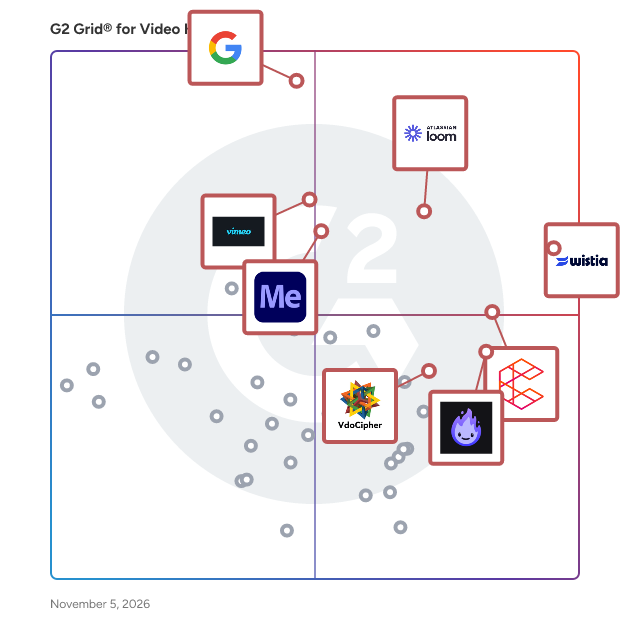
G2 Grid® for Video Hosting Platforms

G2 Grid® for Video Hosting Platforms plotting products by satisfaction and market presence

Highlighted products: Wistia, YouTube Advertising, Loom, Consensus, Livid, Vimeo, Adobe Media Encoder, and VdoCipher.

Underlying data: [Grid® JSON](https://www.g2.com/categories/video-hosting-platforms/grids.json?focus%5B%5D=wistia&focus%5B%5D=google-youtube-advertising&focus%5B%5D=atlassian-loom&focus%5B%5D=consensus&focus%5B%5D=livid&focus%5B%5D=vimeo&focus%5B%5D=adobe-media-encoder&focus%5B%5D=vdocipher)

Wistia

Wistia is a complete video marketing platform that helps teams create, host, market, and measure their videos and webinars—all in one place. With Wistia, you can easily create professional videos, host webinars, collect and send leads to your marketing automation platform, and more. As you level up your video marketing strategy, Wistia has your back with educational resources and world-class support.

Average Rating: 4.6/5.0

Total Reviews: 1,187

How Do G2 Users Rate Wistia?

  • Has the product been a good partner in doing business?: 9.3/10 (Category avg: 9.2/10)
  • Distribution: 9.4/10 (Category avg: 9.0/10)
  • Video management: 9.3/10 (Category avg: 9.2/10)
  • Video player: 9.4/10 (Category avg: 9.1/10)

Who Is the Company Behind Wistia?

  • Seller: Wistia
  • Company Website:
  • Year Founded: 2006
  • HQ Location: Cambridge, MA
  • Twitter: @wistia
    28,640 Twitter followers
  • LinkedIn® Page: www.linkedin.com
    201 employees on LinkedIn®

Who Uses This Product?

  • Who Uses This: Marketing Manager, Digital Marketing Manager
  • Top Industries: Computer Software, Information Technology and Services
  • Company Size: 48% Medium, 35% Small

What Do G2 Reviewers Say About Wistia?

AI-generated summary from verified user reviews

Pros
  • Users find Wistia extremely easy to use, simplifying video uploads and edits while providing excellent customization options.
  • Users value the customization and video editing features of Wistia, enhancing brand presentation and integration capabilities.
  • Users love Wistia's high-quality video capabilities, making it easy to enhance branding and share content effectively.
  • Users value Wistia's centralized video management, enhancing ease of sharing, editing, and analytics across multiple platforms.
  • Users value the seamless integrations of Wistia, enhancing their workflow and improving overall media usability.
Cons
  • Users find limited customization in Wistia's features, wishing for more flexibility in webinars and analytics tools.
  • Users find the missing playlist feature frustrating, making video organization and sharing unnecessarily complicated.
  • Users find Wistia's pricing to be expensive, making it challenging to maintain archived video collections.
  • Users find Wistia's pricing to be a high barrier for entry, especially with increasing costs for video hosting.
  • Users express concerns about feature limitations in Wistia, especially regarding landing page creation and recurring events.

What Are Recent G2 Reviews of Wistia?

What Are G2 Users Discussing About Wistia?

Loom

Loom is video communication that moves work forward. Think of Loom as a tool that transforms how you share and understand ideas. Record your screen and camera bubble, then share your video instantly with a link. Sending a Loom saves time and enhances clarity compared to scheduling live meetings or crafting lengthy emails. You get more focus time (fewer meetings), with the clarity and nuance that comes with live conversation. And when you do need to meet live, Loom AI for meetings automatically records, organizes, and delivers AI-powered recaps, creating a searchable library of knowledge and insights. Key Features: ✔ Free screenshots: capture, edit, & share high-quality screenshots with a link ✔ AI-powered transcriptions and closed captions: available in 50+ distinct languages ✔ Video-to-text: automate documentation, messages, bug reports and more with a single click ✔ Loom AI for meetings- meeting notes, action items, and recap emails ✔ Instant screen and camera recording ✔ Easy editing: trim and stitch, edit like a word doc, annotate, and add overlays to your videos ✔ Viewer insights & engagement tracking ✔ Secure sharing with password protection & domain management Loom is for all kinds of teams, helping everyone from remote collaborators to educators communicate effectively. Whether your team is five or 50,000 strong, millions across 400,000 companies choose Loom to stay connected and share information effortlessly.

Average Rating: 4.7/5.0

Total Reviews: 2,438

How Do G2 Users Rate Loom?

  • Has the product been a good partner in doing business?: 9.3/10 (Category avg: 9.2/10)
  • Distribution: 9.2/10 (Category avg: 9.0/10)
  • Video management: 9.1/10 (Category avg: 9.2/10)
  • Video player: 9.3/10 (Category avg: 9.1/10)

Who Is the Company Behind Loom?

  • Seller: Atlassian
  • Company Website:
  • Year Founded: 2002
  • HQ Location: Sydney and San Francisco
  • Twitter: @Atlassian
    106,496 Twitter followers
  • LinkedIn® Page: www.linkedin.com
    16,946 employees on LinkedIn®

Who Uses This Product?

  • Who Uses This: Customer Success Manager, Owner
  • Top Industries: Computer Software, Marketing and Advertising
  • Company Size: 61% Small, 31% Medium

What Do G2 Reviewers Say About Loom?

AI-generated summary from verified user reviews

Pros
  • Users praise Loom for its ease of use, facilitating clear communication and saving time on meetings and emails.
  • Users love the easy recording feature of Loom, enhancing team communication and simplifying explanations through video.
  • Users value Loom's speedy screen recording for efficient communication, streamlining collaboration and reducing unnecessary meetings.
  • Users love the easy sharing with Loom, making collaboration seamless and efficient across global teams.
  • Users love Loom's quick and seamless video recording capabilities, enhancing communication while saving time and reducing confusion.
Cons
  • Users often face recording issues, mistakenly capturing the wrong screen, which can lead to frustrating experiences.
  • Users feel that Loom's limited features, such as the download option being restricted to paid plans, hinder its usability.
  • Users experience slow loading issues with Loom, especially during internet drops, leading to frustrating delays and re-recordings.
  • Users find the limited free version restrictive, lacking advanced editing tools and having shorter video durations.
  • Users experience slow performance with Loom, especially during internet drops, causing lags and video quality issues.

What Are Recent G2 Reviews of Loom?

What Are G2 Users Discussing About Loom?

Livid

Livid is a Vimeo alternative for video hosting, built by the founders of StreamYard after Bending Spoons acquired Vimeo and raised prices. Livid offers ad-free video hosting for individuals and small businesses. Every plan includes embedding, sharing, analytics, versioning, and timestamped comments. Pro ($10/month) adds 2TB of storage, password and unlisted sharing, full player customization, watermark removal, custom logos, and viewer downloads. Need more storage or bandwidth? Custom plans are available. Migrating from Vimeo takes minutes with LOVE, the free Livid One-click Video Exporter. LOVE transfers your entire Vimeo library to Livid with folder structure, descriptions, and privacy settings preserved. It can also download videos locally or export to Google Drive. Nothing is altered or deleted on Vimeo. Switching mid-contract? Livid credits the remaining months of your Vimeo annual plan, so you never pay for hosting twice. Livid is independently funded with $10M from StreamYard's founders and has been covered by The New York Times. No ads. No acquisition. No forced upgrades.

Average Rating: 4.8/5.0

Total Reviews: 119

How Do G2 Users Rate Livid?

  • Has the product been a good partner in doing business?: 9.6/10 (Category avg: 9.2/10)
  • Distribution: 9.9/10 (Category avg: 9.0/10)
  • Video management: 10.0/10 (Category avg: 9.2/10)
  • Video player: 9.9/10 (Category avg: 9.1/10)

Who Is the Company Behind Livid?

  • Seller: Livid
  • Year Founded: 2026
  • HQ Location: Delaware
  • Twitter: @lividvideo
    39 Twitter followers
  • LinkedIn® Page: www.linkedin.com
    5 employees on LinkedIn®

Who Uses This Product?

  • Who Uses This: Owner, CEO
  • Top Industries: Marketing and Advertising, Professional Training & Coaching
  • Company Size: 96% Small, 3% Medium

What Are Recent G2 Reviews of Livid?

AI can help you find the answers. G2 helps you trust them.

Connect G2 to Claude or ChatGPT for answers grounded in G2's trusted reviews, comparisons, and pricing from real user insights.

How it works

Vimeo

Vimeo is the world's most innovative video experience platform. We enable anyone to create high-quality video experiences to better connect and bring ideas to life. We proudly serve our community of millions of users – from creative storytellers to globally distributed teams at the world's largest companies – whose videos receive billions of views each month.

Average Rating: 4.3/5.0

Total Reviews: 701

How Do G2 Users Rate Vimeo?

  • Has the product been a good partner in doing business?: 8.5/10 (Category avg: 9.2/10)
  • Distribution: 8.8/10 (Category avg: 9.0/10)
  • Video management: 8.9/10 (Category avg: 9.2/10)
  • Video player: 9.1/10 (Category avg: 9.1/10)

Who Is the Company Behind Vimeo?

  • Seller: Vimeo
  • Year Founded: 2004
  • HQ Location: New York
  • Twitter: @Vimeo
    205,088 Twitter followers
  • LinkedIn® Page: www.linkedin.com
    883 employees on LinkedIn®
  • Ownership: NASDAQ: VMEO

Who Uses This Product?

  • Who Uses This: Owner, Marketing Manager
  • Top Industries: Marketing and Advertising, Computer Software
  • Company Size: 64% Small, 27% Medium

What Do G2 Reviewers Say About Vimeo?

AI-generated summary from verified user reviews

Pros
  • Users appreciate the ease of use with Vimeo, finding it intuitive and straightforward for video management.
  • Users enjoy the high-quality playback of Vimeo, enhancing their viewing experience significantly.
  • Users value Vimeo's robust features, including privacy options and analytics, enhancing video sharing and engagement tracking.
  • Users value the advanced video management tools of Vimeo, enhancing privacy, analytics, and content presentation effortlessly.
  • Users praise Vimeo for its high-quality playback and robust tools, enhancing the professional video experience significantly.
Cons
  • Users find Vimeo to be expensive and express dissatisfaction with the high costs for limited features and support.
  • Users find Vimeo's limited features frustrating, as key functionalities feel hidden and less accessible.
  • Users find the subscription cost high, making it unaffordable for many and limiting for serious video uploads.
  • Users find the limited free version restrictive, with minimal storage that quickly depletes for serious video uploaders.
  • Users find the limited customization options in Vimeo's email notifications and content selection frustrating for their needs.

What Are Recent G2 Reviews of Vimeo?

What Are G2 Users Discussing About Vimeo?

VdoCipher

VdoCipher enables businesses to stream videos on their websites and apps with unmatched security and seamless performance. Designed to protect premium content, VdoCipher shields against piracy through enterprise-grade DRM encryption, piracy blockers with hacker identification, dynamic watermarking, and screen capture protection. Even in low-bandwidth environments, videos play smoothly thanks to optimized encoding that delivers the best quality at smaller sizes—ensuring viewers in tier 2 and 3 cities enjoy the same flawless experience as those on faster connections. Beyond security, VdoCipher offers a complete streaming solution: multi-CDN delivery, transcoding, API and plugin integrations, a customizable HTML5 player, per-video analytics, and secure offline app playback. With VdoCipher, creators and businesses not only protect their revenue streams but also provide audiences with a streaming experience that is secure, reliable, and effortlessly engaging. VdoCipher Live empowers course creators, event organisers and broadcasters with expert live video streaming, ensuring smooth playback globally. Integrate with your website or app within 5 mins, with authenticated and anonymous chat options. Scalable to 100,000 viewers in single session. AWS & GCP Backed Infrastructure, Full HD Playback along with Polls & Quizzes. VdoCipher is the proud winner of best company in video security (DRM ) category by prestigious Streaming Media Global, Europe. Free 30 day trial is available at vdocipher.com"

Average Rating: 4.9/5.0

Total Reviews: 71

How Do G2 Users Rate VdoCipher?

  • Has the product been a good partner in doing business?: 9.6/10 (Category avg: 9.2/10)
  • Distribution: 9.6/10 (Category avg: 9.0/10)
  • Video management: 9.7/10 (Category avg: 9.2/10)
  • Video player: 9.7/10 (Category avg: 9.1/10)

Who Is the Company Behind VdoCipher?

Who Uses This Product?

  • Who Uses This: Founder
  • Top Industries: Marketing and Advertising, E-Learning
  • Company Size: 77% Small, 18% Medium

What Do G2 Reviewers Say About VdoCipher?

AI-generated summary from verified user reviews

Pros
  • Users value the robust data security features of VdoCipher, providing peace of mind for sensitive content.
  • Users find VdoCipher's ease of use impressive, enabling even non-tech staff to manage videos effortlessly.
  • Users praise VdoCipher for its exceptional video quality, ensuring clear playback and a secure viewing experience.
  • Users praise the robust security features of VdoCipher, ensuring videos are protected against piracy and unauthorized access.
  • Users value the smart token based access and seamless integrations of VdoCipher for efficient video protection and delivery.
Cons
  • Users note a slight learning curve for new users, requiring some technical knowledge and time to integrate effectively.
  • Users find VdoCipher's pricing to be expensive for solopreneurs, with limited customization options on lower tiers.
  • Users find the documentation lacking, often requiring support for advanced integrations and specific issues.
  • Users find the usability issues frustrating, with documentation and error handling needing significant improvements for better experience.
  • Users find the complex setup requires significant time and technical knowledge for proper integration and configuration.

What Are Recent G2 Reviews of VdoCipher?

What Are G2 Users Discussing About VdoCipher?

Dadan

Dadan is an AI-powered online video creation platform that enables users to record, edit, share, and analyze high-quality videos with ease. Whether capturing a screen, webcam, audio, or a combination of all three, Dadan simplifies the process of creating professional and interactive content for education, training, internal communication, sales, and more. Built for modern teams, educators, and creators, Dadan brings together recording, editing, engagement, analytics, and sharing in one streamlined platform, eliminating the need to switch between multiple tools. Key Features Screen, Webcam, and Audio Recording Record your screen, webcam, audio, or any combination in high quality. Capture product demos, training videos, presentations, tutorials, sales pitches, podcasts, and internal communications with ease. Advanced Video Editor Create polished videos directly in your browser with a professional timeline-based editor. Trim clips, add captions, resize videos, crop content, blur sensitive information, zoom into important sections, add animations, and combine multiple media assets. Access stock videos, images, music, and sound effects without leaving the editor. AI-Powered Video Assist Automatically generate transcripts, captions, chapters, summaries, meeting notes, and highlights. Support for 30+ languages helps teams create accessible content for global audiences. Interactive Video Engagement Turn passive viewers into active participants with built-in polls, quizzes, forms, feedback fields, and customizable call-to-action buttons. Add Calendly booking links, lead generation forms, and destination URLs directly inside videos. Guides Turn any workflow into a clear, step-by-step guide, just by clicking through it. Perfect for SOPs, how-to documentation, product walkthroughs, and training materials. With Guides, you can: - Automatically turn clicks into steps with screenshots - Edit, reorder, merge, delete, or add steps - Annotate screenshots and add tips or warnings - Jump from any step to the exact moment in your recording - Translate Guides into multiple languages - Publish, share, or download your Guide as a PDF Advanced Video Analytics Track video performance with detailed insights into impressions, views, watch duration, engagement rates, interaction clicks, and CTA performance. Analyze individual videos, team workspaces, or overall account performance to optimize content effectiveness. Smart Video Management Organize recordings, meeting recordings, and archives in dedicated workspaces. Search instantly across video titles, transcripts, and tags to find content faster. Dadan MCP Connect dadan to ChatGPT, Claude, Cursor, VS Code, and other MCP-compatible AI assistants to search transcripts, summarize meetings, edit videos, analyze engagement, and manage your video library using natural language. Custom Branding Maintain brand consistency by storing logos, colors, images, videos, and creative assets in a centralized brand library for quick access during editing. Video Hosting and Collaboration Host videos securely, share through custom links, collect timestamped feedback, and collaborate with teammates and stakeholders from anywhere. Integrations Connect with YouTube, LinkedIn, Slack, Dropbox, Google Classroom, Mailchimp, GoHighLevel, ActiveCampaign, and other tools to streamline video distribution, automate workflows, and integrate with custom webhooks. Cross-Platform Support Available on Windows, macOS, Chrome, and Edge, with dedicated desktop applications for long-form recordings and enhanced recording performance. Key Benefits Create, Edit, and Share from One Platform Manage the entire video workflow from recording and editing to hosting, engagement, and analytics without relying on multiple tools. Increase Viewer Engagement Drive informed action with interactive elements, lead generation forms, customizable CTAs, and real-time engagement tracking. Improve Team Communication Replace unnecessary meetings with clear video updates, tutorials, walkthroughs, and asynchronous communication. Make Better Content with Data Use advanced analytics and viewer behavior insights to understand what works and continuously improve video performance. Scale Knowledge Sharing Enable employees, customers, students, and stakeholders to access information through engaging video experiences that are easy to create and distribute. Whether you're creating product demos, onboarding materials, training content, sales videos, educational lessons, meeting recordings, or customer communications, Dadan helps you create videos that do more than generate views. It helps drive engagement, action, and measurable results.

Average Rating: 4.8/5.0

Total Reviews: 85

How Do G2 Users Rate Dadan?

  • Has the product been a good partner in doing business?: 9.5/10 (Category avg: 9.2/10)
  • Distribution: 9.7/10 (Category avg: 9.0/10)
  • Video management: 10.0/10 (Category avg: 9.2/10)
  • Video player: 9.5/10 (Category avg: 9.1/10)

Who Is the Company Behind Dadan?

  • Seller: dadan
  • Year Founded: 2024
  • HQ Location: N/A
  • LinkedIn® Page: www.linkedin.com
    15 employees on LinkedIn®

Who Uses This Product?

  • Who Uses This: Founder
  • Top Industries: Marketing and Advertising, Information Technology and Services
  • Company Size: 80% Small, 8% Medium

What Do G2 Reviewers Say About Dadan?

AI-generated summary from verified user reviews

Pros
  • Users benefit from Dadan's ease of use, enabling efficient tutorial creation and seamless task delegation.
  • Users love the easy recording feature of Dadan, making quick video sharing and updates effortlessly efficient.
  • Users commend Dadan's rapid feature development and responsive support, enhancing their video editing experience significantly.
  • Users love Dadan for its easy-to-use screen recording features that make video creation quick and effortless.
  • Users highlight the easy creation process of Dadan, appreciating its simplicity and efficiency for tutorials and video sharing.
Cons
  • Users report bug issues with Dadan, including broken back buttons and playlist sharing limitations, hindering usability.
  • Users desire more editing options in Dadan, wishing for enhanced features to improve their editing workflow.
  • Users report software bugs affecting functionality, including broken navigation and limited sharing features for team members.
  • Users suggest that Dadan's AI limitations hinder its interactivity and integration, impacting the overall user experience.
  • Users highlight integration issues with Tidycal and Windows compatibility, affecting overall usability for some legacy system users.

What Are Recent G2 Reviews of Dadan?

Ignite Video Cloud

Ignite is video hosting and live streaming for businesses that want video to stay part of their brand. Your player runs in your design and on your domain, with no foreign logo and no ads. Video plays cookie- and consent-free, so every visitor sees it, not just the ones who accept the banner. Everything is hosted and processed in Europe and delivered worldwide, GDPR-compliant by design, with analytics but without viewer tracking. Hosting, management, collaboration and analytics come in one tool. Embed with copy and paste or connect via API to your CMS, DAM or intranet. Switching from another provider is fast, from €9/month, self-service, cancel anytime. Made in Europe. ------------------ Why Ignite is your video hosting solution Privacy-first and legally compliant Data protection as a UX boost? Unusual, but a true and real effect. Because: Reach every visitor While others videos stop at cookie banners, Ignite delivers videos seamlessly, with no pop-ups and no overlays, so your whole audience can watch. Quality and performance Adaptive encoding for every device, on scaling European infrastructure. Easy integration Add Ignite with a few lines of code, or connect via API to your CMS. Switch in minutes Moving from other providers is fast and comfortable; migration is possible. Transparent pricing Starting at €9/month, cancel anytime. Plus video management, single sign-on, first-party domain, and enterprise accounts with dedicated infrastructure. And what really matters: a better video experience for your visitors.

Average Rating: 4.9/5.0

Total Reviews: 19

How Do G2 Users Rate Ignite Video Cloud?

  • Has the product been a good partner in doing business?: 10.0/10 (Category avg: 9.2/10)
  • Distribution: 9.7/10 (Category avg: 9.0/10)
  • Video management: 10.0/10 (Category avg: 9.2/10)
  • Video player: 9.6/10 (Category avg: 9.1/10)

Who Is the Company Behind Ignite Video Cloud?

Who Uses This Product?

  • Company Size: 63% Small, 32% Medium

What Do G2 Reviewers Say About Ignite Video Cloud?

AI-generated summary from verified user reviews

Pros
  • Users appreciate the responsive customer support of Ignite Video Cloud, highlighting real people and quick resolutions.
  • Users find Ignite Video Cloud incredibly easy to use, appreciating its intuitive interface and personal support.
  • Users value the GDPR-compliant hosting of Ignite Video Cloud, ensuring data protection and seamless video management for educational content.
  • Users love the excellent video quality of Ignite Video Cloud, enhancing their educational content for a focused experience.
  • Users value the detailed analytics of Ignite Video Cloud, enabling effective measurement of video content success.

What Are Recent G2 Reviews of Ignite Video Cloud?

Vidyard

Vidyard is an AI-powered video platform built for modern revenue teams to personalize buyer engagement at scale. It helps sales, marketing, and customer success teams create, automate, and deliver personalized video messages across the entire customer journey without adding manual work or headcount. In a world of crowded inboxes and declining response rates, Vidyard turns key revenue moments into meaningful, human interactions. From prospecting and meeting follow-ups to onboarding and renewals, teams use Vidyard to engage buyers more effectively, build trust faster, and keep deals moving forward. Unlike traditional video tools, Vidyard goes beyond recording. With automation, CRM-native workflows, and AI-generated video, teams can trigger personalized videos based on real buyer actions such as booking a meeting, downloading content, or reaching a deal stage. This ensures every touchpoint feels timely, relevant, and personal. Vidyard also makes it easy to get started with AI-powered video by creating your own AI Avatar for free. With a single recording, users can generate personalized, on-brand videos without needing to record every message manually. AI Avatars help revenue teams save time, stay consistent, and scale personalized video across prospecting, follow-ups, onboarding, and customer communications, while still delivering a human, face-to-face experience. Key capabilities include: • Video messaging and hosting: Record, host, and share personal video messages across email, LinkedIn, and the web, with secure playback and branded viewing experiences. • AI Avatars and personalized video: Create realistic, on-brand videos using your own AI Avatar, allowing you to record once and reuse personalized messages at scale. • Video Agent (AI automation): Automatically generate and send personalized videos in response to buyer actions across your CRM, sales engagement, or marketing automation tools. • Campaigns and bulk personalization: Launch proven video plays for prospecting, nurturing, onboarding, and renewals using dynamic variables. • Video analytics and buyer intent signals: Track views, engagement, and drop-off, with activity logged directly into your CRM to prioritize follow-up. • Native integrations: Connect seamlessly with HubSpot, Salesforce, Salesloft, Marketo, Zapier, and more. With Vidyard, revenue teams can: • Break through crowded inboxes with personalized video outreach that drives higher reply rates and more meetings booked • Prioritize high-intent buyers using real engagement data • Reduce no-shows and stalled deals with timely, automated follow-ups • Build trust and relationships with multiple stakeholders even without live meetings • Scale best-performing behavior across the entire team Vidyard is trusted by thousands of B2B revenue teams to turn video into a repeatable, measurable growth lever that helps sellers engage more buyers, close deals faster, and drive revenue more efficiently.

Average Rating: 4.5/5.0

Total Reviews: 794

How Do G2 Users Rate Vidyard?

  • Has the product been a good partner in doing business?: 9.3/10 (Category avg: 9.2/10)
  • Distribution: 8.9/10 (Category avg: 9.0/10)
  • Video management: 8.7/10 (Category avg: 9.2/10)
  • Video player: 9.1/10 (Category avg: 9.1/10)

Who Is the Company Behind Vidyard?

  • Seller: Vidyard
  • Company Website:
  • Year Founded: 2011
  • HQ Location: Kitchener, Ontario
  • Twitter: @vidyard
    11,784 Twitter followers
  • LinkedIn® Page: www.linkedin.com
    150 employees on LinkedIn®

Who Uses This Product?

  • Who Uses This: Account Executive, Customer Success Manager
  • Top Industries: Computer Software, Marketing and Advertising
  • Company Size: 44% Medium, 35% Small

What Do G2 Reviewers Say About Vidyard?

AI-generated summary from verified user reviews

Pros
  • Users praise Vidyard for its ease of use, enabling simple recording and sharing of personalized videos effortlessly.
  • Users find easy sharing and recording on Vidyard simple, enhancing content engagement and brand identity.
  • Users value the easy video recording and sharing features of Vidyard, enhancing engagement and communication effectively.
  • Users value the personalization options in Vidyard, enhancing brand identity and creating unique video experiences.
  • Users praise Vidyard for its effortless and personal video communication, enhancing connections with prospects and teammates.
Cons
  • Users note the limited features of Vidyard, especially regarding editing and video length restrictions for free users.
  • Users find the limited editing options frustrating, hindering their ability to create polished, professional videos.
  • Users find the limited options of Vidyard restrictive, wishing for more templates and enhanced mobile features.
  • Users face video limitations in Vidyard, wishing for better tracking and smoother filming across multiple monitors.
  • Users find difficult editing frustrating in Vidyard, often preferring other platforms for better video creation control.

What Are Recent G2 Reviews of Vidyard?

What Are G2 Users Discussing About Vidyard?

Wave.video

Wave.video is an all-in-one video platform that combines five must-have products for successful video marketing: live streaming studio, video recording app, video editor, thumbnail maker, and video hosting. On top of it, you get access to over 200M of stock videos, photos, and audio tracks and over 1000 customizable video templates. The most affordable solution allows every marketer and business to create professional live streams, promo videos, GIFs, and images with no design skills. Live streaming killer features: • Fully customizable layouts with no coding required • Planning live streams with scenes • Multistreaming for different channels and easy scheduling • Broadcasting from two cameras simultaneously • Different roles for guests, co-hosts, and producers • Adjustable chatbox to easily manage live comments • Screensahring and opportunity to stream videos from computer • Recording streams in advance • Integration with a video editor to make thumbnails, overlays, intros, promo videos, and many more! Video editor killer features • Auto-captions with customizable styles • AI-powered text-to-video feature • Access to over 200M stock video clips, images, and audio tracks • Uploading your own footages • Auto-resizing for 30+ video formats • All editing tools you need: trim, transitions, color control, stickers & GIFs, background removal • In-place text editor with animation effects • Over 50 customizable video layouts • Download in MP4, JPG, PNG, and GIF formats • Animated logo and CTA for lead generation • Inbuilt voice-over tool • Saving your branded style to ensure consistency • Over 1000 ready-to-use templates for any occasion • Inspirational calendar to never run out of content ideas • Folders to organize your work Video hosting killer features • Ad-free with no outbound links • Responsive to any video format and size • Customizable player with full control over viewer’s experience • Autoplay and looping video functions • Automatically generated video landing page that you can integrate into the email campaign • Security of your video

Average Rating: 4.6/5.0

Total Reviews: 79

How Do G2 Users Rate Wave.video?

  • Has the product been a good partner in doing business?: 9.7/10 (Category avg: 9.2/10)
  • Distribution: 9.2/10 (Category avg: 9.0/10)
  • Video management: 9.6/10 (Category avg: 9.2/10)
  • Video player: 9.4/10 (Category avg: 9.1/10)

Who Is the Company Behind Wave.video?

  • Seller: Animatron
  • Year Founded: 2011
  • HQ Location: Boston, MA
  • Twitter: @Animatron
    18,682 Twitter followers
  • LinkedIn® Page: www.linkedin.com
    20 employees on LinkedIn®

Who Uses This Product?

  • Top Industries: Marketing and Advertising, E-Learning
  • Company Size: 90% Small, 7% Medium

What Do G2 Reviewers Say About Wave.video?

AI-generated summary from verified user reviews

Pros
  • Users love the ease of use and extensive features of Wave.video, making video creation accessible for everyone.
  • Users praise the ease of video editing in Wave.video, making it accessible for everyone, regardless of experience.
  • Users appreciate the ease of creation with Wave.video, making professional video production quick and accessible for everyone.
  • Users appreciate the ease of use of Wave.video, enabling quick and effective video creation for everyone.
  • Users find the ease of use in live streaming with Wave.video, enhancing video creation for everyone.
Cons
  • Users feel that the video editing features of Wave.video need significant improvements for a better experience.
  • Users feel that Wave.video's video editing features are limited and need significant improvements for a better experience.
  • Users feel the limited video editing features in Wave.video hinder their creative options and overall satisfaction.
  • Users report poor customer support with slow response times and unresolved issues causing frustration.
  • Users experience poor support, with issues often taking too long to resolve, affecting their overall satisfaction.

What Are Recent G2 Reviews of Wave.video?

What Are G2 Users Discussing About Wave.video?

Videowise

Videowise is the all-in-one video commerce platform for ecommerce brands that want shoppable video, live shopping, AI-generated product visuals, and AI video clipping in a single tool. Built for Shopify and headless storefronts, Videowise is trusted by +4,000 brands like Dr. Squatch, Hot Ones, True Classic, Tibi, Sculpted by Aimee, Skullcandy and Fresh Patch to turn video into their highest-converting channel on-site. Key Features: - Shoppable Video & Images: Build interactive shoppable videos, hotspot images, and video quizzes that let customers check out directly from the content. A/B test widgets across homepage, PDPs, collection pages, and checkout to prove lift. Bare Biology saw a 47% increase in homepage CVR after going live. - Live Shopping: Run multi-host live shows with shoppable products, real-time chat, giveaways, RSVP flows, and instant shoppable replays. Tibi generated over $2.8M across 27 episodes. Andar generated $134K in a single 3-hour show. - AI Studio: Turn a single product photo into studio-grade video assets without a shoot. Four generation modes: 180° product spin videos, lookbook videos, image-to-video, and product try-on images. - Clips: AI that understands video and audio context and automatically slices long content (live replays, demos, UGC, interviews) into categorized short clips that are ready to publish back to your site and social. - UGC & Content Import: Upload your own footage or import from TikTok, Instagram (posts, reels, stories), and YouTube. UGC social listening surfaces every brand mention across platforms, with one-click rights requests. - Video Channels: Launch Netflix-style, SEO-indexed video hubs for tutorials, story-driven content, and on-demand live replays. - AI-Optimized Performance: Every video and image is compressed and delivered up to 5x faster with zero impact on Core Web Vitals or SEO. - Native Integrations: Shopify, Shop app, Tapcart, Klaviyo emails, headless setups, and every major ecommerce stack. - Analytics & A/B Testing: Track video-driven revenue, RPS, AOV, completion rate, and engagement down to individual widget placements, with built-in split testing on every surface. - SEO-Optimized Metadata: Video and image assets are indexed with structured metadata to drive organic traffic from Google video results. Why Choose Videowise? Videowise is what brands switch to after Tolstoy, Firework, Vimeo, and LyveCom stop keeping up. One platform covers content generation, shoppable on-site experiences, live shopping, and AI-powered video repurposing, so your team stops stitching tools together. Every feature ships with A/B testing and real performance data, backed by a support team that helps you ship. Turn your product catalog into video at scale, and your storefront into the highest-converting channel you own.

Average Rating: 4.8/5.0

Total Reviews: 73

How Do G2 Users Rate Videowise?

  • Has the product been a good partner in doing business?: 9.6/10 (Category avg: 9.2/10)
  • Distribution: 10.0/10 (Category avg: 9.0/10)
  • Video management: 9.2/10 (Category avg: 9.2/10)
  • Video player: 10.0/10 (Category avg: 9.1/10)

Who Is the Company Behind Videowise?

  • Seller: Videowise
  • Company Website:
  • Year Founded: 2021
  • HQ Location: Dover, DE
  • Twitter: @VideoWiseHQ
    921 Twitter followers
  • LinkedIn® Page: www.linkedin.com
    37 employees on LinkedIn®

Who Uses This Product?

  • Top Industries: Consumer Goods, Retail
  • Company Size: 79% Small, 16% Medium

What Do G2 Reviewers Say About Videowise?

AI-generated summary from verified user reviews

Pros
  • Users highlight the outstanding customer support from the Videowise team, making implementation and questions easy to manage.
  • Users praise the helpfulness of the support team, enjoying their responsiveness and collaboration throughout the setup process.
  • Users find Videowise's ease of use exceptional, facilitating quick navigation and efficient video integration on websites.
  • Users commend the responsive customer support of Videowise, enhancing collaboration and improving overall experience significantly.
  • Users love the seamless integration of Videowise with eCommerce platforms, enhancing content and boosting engagement effortlessly.
Cons
  • Users find the complexity of features in Videowise challenging, especially with an overwhelming library for content management.
  • Users find the pricing prohibitive, making it difficult for some clients to use Videowise effectively.
  • Users desire more advanced customization options in Videowise to better match their branding needs.
  • Users feel that the limited features of Videowise do not fully meet their needs for video organization.
  • Users find Videowise to be not user-friendly, feeling it can be clunky and difficult to visualize changes before going live.

What Are Recent G2 Reviews of Videowise?

Kaltura

Kaltura helps organizations turn content, knowledge, and audience signals into personalized, AI-powered experiences that move people forward. Our platform brings together content, video, data, intelligence, and agentic AI to help businesses engage customers, enable employees, and guide every user with the right content, interaction, or next step in the moment. Kaltura’s solutions are built around two critical business challenges: accelerating revenue across the customer journey and helping people learn, perform, and succeed at scale. **Agentic Revenue Engagement** Kaltura Agentic Revenue Engagement helps organizations create connected, personalized experiences across the buyer and customer journey. Instead of leaving people to navigate static websites, disconnected content, forms, webinars, and follow-up on their own, Kaltura turns these touchpoints into interactive experiences that understand intent and actively guide each user forward. Organizations can create digital destinations, events, webinars, content experiences, and AI-powered conversational interactions that adapt to each buyer or customer. Agentic experiences can answer questions, recommend relevant content, help users explore solutions, capture intent, identify meaningful engagement signals, and connect people with sales or customer teams when human involvement adds value. For marketing and revenue teams, this creates a more continuous journey from first engagement through purchase, onboarding, adoption, and expansion, while providing richer insight into what each account and individual actually cares about. Teams can use Kaltura to: • Create personalized digital experiences for buyers and customers • Run webinars, virtual events, and always-on content destinations • Turn video and other content into interactive, discoverable experiences • Deploy AI-powered agents that answer questions and guide users in real time • Recommend content and next steps based on user needs and behavior • Capture and activate engagement and intent signals • Support customer onboarding, education, activation, and ongoing engagement • Connect digital interactions with revenue workflows and business outcomes The goal is simple: reduce friction across the journey and help every interaction create momentum toward the next meaningful action. **Agentic Learning & Enablement** Kaltura Agentic Learning & Enablement helps organizations turn institutional knowledge into personalized learning, practice, and on-demand guidance that improves performance. Traditional learning often depends on static courses, fragmented knowledge, and one-size-fits-all training. Kaltura creates a more continuous model of enablement, where employees, sales teams, customers, and partners can access the knowledge, practice, and guidance they need at the moment they need it. Organizations can create and manage learning content at scale, transform existing knowledge and video into new learning experiences, personalize learning based on individual needs, and give users AI-powered guides that help them find answers and apply knowledge in their day-to-day work. Kaltura also supports interactive practice and simulation, allowing people to rehearse important conversations and scenarios and receive immediate feedback. This can include sales conversations, customer interactions, leadership scenarios, onboarding, certification, and other high-stakes situations where practice directly affects performance. Teams can use Kaltura to: • Create and manage video, learning, and enablement content at scale • Generate and repurpose content using AI-powered creation tools • Deliver personalized onboarding, upskilling, and continuous learning • Give employees on-demand access to company knowledge and guidance • Provide sales teams with training, coaching, and in-the-moment enablement • Run realistic roleplay and simulation experiences with AI-powered feedback and assessment • Educate and enable customers and partners • Support structured learning paths, certifications, and skills development • Understand engagement, readiness, and learning effectiveness • Connect learning and enablement programs more closely to business performance Rather than treating learning as an occasional activity, Kaltura helps make knowledge and guidance available continuously, embedded into the way people work and perform. **One platform for intelligent digital experiences** Both solutions are powered by the same Kaltura foundation. Kaltura has spent years helping global organizations create, manage, distribute, and understand video and digital content at enterprise scale. Today, those capabilities are combined with AI, audience intelligence, content generation, conversational agents, analytics, and experience orchestration. This means organizations do not have to treat content, engagement, learning, and AI as separate layers. Kaltura can help teams turn existing content and organizational knowledge into active, reusable intelligence; understand what each user needs based on context and behavior; and deliver a personalized experience that responds in real time. The result is a new type of digital experience: one that does more than present information. It understands, interacts, guides, and helps each person take the next step. Whether that next step is booking a meeting, exploring a solution, completing onboarding, learning a new skill, practicing an important conversation, adopting a product, or finding the right answer, Kaltura helps organizations make every interaction more relevant, useful, and measurable. Kaltura is used by organizations around the world to power digital experiences across marketing, sales, customer engagement, learning, employee enablement, education, media, and communications.

Average Rating: 4.3/5.0

Total Reviews: 117

How Do G2 Users Rate Kaltura?

  • Has the product been a good partner in doing business?: 8.7/10 (Category avg: 9.2/10)
  • Distribution: 8.9/10 (Category avg: 9.0/10)
  • Video management: 9.2/10 (Category avg: 9.2/10)
  • Video player: 8.7/10 (Category avg: 9.1/10)

Who Is the Company Behind Kaltura?

  • Seller: Kaltura
  • Company Website:
  • Year Founded: 2006
  • HQ Location: New York, NY
  • Twitter: @Kaltura
    8,954 Twitter followers
  • LinkedIn® Page: www.linkedin.com
    734 employees on LinkedIn®

Who Uses This Product?

  • Top Industries: Higher Education, Education Management
  • Company Size: 42% Medium, 33% Large

What Do G2 Reviewers Say About Kaltura?

AI-generated summary from verified user reviews

Pros
  • Users find the ease of use of Kaltura Video Cloud makes creating and managing business videos seamless and efficient.
  • Users appreciate Kaltura's robust features for video creation, including seamless integration, analytics, and superb customer support.
  • Users value the seamless integrations of Kaltura, enhancing video solutions for diverse business applications effortlessly.
  • Users praise Kaltura for its excellent features, allowing seamless video creation for various business purposes and needs.
  • Users highlight the reliability of Kaltura, with smooth performance and consistent functionality boosting their experience.
Cons
  • Users find the reporting system lacking customization, making it difficult to access detailed insights efficiently.
  • Users find the difficult setup process cumbersome, requiring internal readiness before implementing Kaltura's platform.
  • Users experience integration issues with Kaltura’s PATH tool, though support helps resolve some problems quickly.
  • Users report technical issues with Kaltura involving slow uploads, high bandwidth needs, and integration challenges.
  • Users find Kaltura's setup process complex and requiring developer assistance, making updates challenging and unintuitive.

What Are Recent G2 Reviews of Kaltura?

What Are G2 Users Discussing About Kaltura?

ThankView

ThankView is the video engagement product within EverTrue — built for fundraising teams who know that donor relationships live in the moments between gifts, not just in the ask. Most teams have hundreds of donors they genuinely care about and not enough hours to reach them all personally. ThankView changes that — making it possible for a lean team to show up for every donor, in every moment that matters, without adding a production lift. Personal video through email and SMS donors actually open — welcomes that set the tone, appeals that feel personal, invitations that bring donors in, impact updates that show what their gift made possible, and thank-yous that actually land. Video requests gather footage from the community, so the most powerful words are told by people whose lives were changed by the gift. Built-in editing and branding keep every send looking intentional and on-brand, regardless of who hit record. And analytics show who opened, watched, and engaged — so your team knows where the relationship is ready to grow. Every email a donor gets looks like every other email. ThankView turns a team's care and intention into something every donor actually feels — at the scale of a mass email, with the warmth of a handwritten note.

Average Rating: 4.9/5.0

Total Reviews: 180

How Do G2 Users Rate ThankView?

  • Has the product been a good partner in doing business?: 9.6/10 (Category avg: 9.2/10)
  • Distribution: 9.7/10 (Category avg: 9.0/10)
  • Video management: 9.4/10 (Category avg: 9.2/10)
  • Video player: 9.4/10 (Category avg: 9.1/10)

Who Is the Company Behind ThankView?

  • Seller: EverTrue
  • Year Founded: 2010
  • HQ Location: Indianapolis, IN
  • Twitter: @EverTrue
    2,791 Twitter followers
  • LinkedIn® Page: www.linkedin.com
    331 employees on LinkedIn®

Who Uses This Product?

  • Top Industries: Higher Education, Non-Profit Organization Management
  • Company Size: 41% Small, 40% Medium

What Are Recent G2 Reviews of ThankView?

What Are G2 Users Discussing About ThankView?

ScreenPal

ScreenPal is an all-in-one platform for screen recording, video creation, secure video hosting, and AI-powered workflows. Our cloud-based tools and native apps help organizations communicate, collaborate, and share knowledge through video. Teams can create, edit, manage, and share video content with intuitive online, desktop, and mobile tools. ScreenPal's secure video hosting platform includes analytics, interactive engagement features, and accessibility tools that support content delivery in more than 150 languages. Built-in AI features help accelerate video creation with tools for captions, transcription, translation, and content generation. Organizations can also benefit from SSO, user and license management, and strong privacy and security controls. Trusted by Fortune 100 companies and 98 of the top 100 universities in the United States, ScreenPal helps organizations scale video communication with ease.

Average Rating: 4.5/5.0

Total Reviews: 139

How Do G2 Users Rate ScreenPal?

  • Has the product been a good partner in doing business?: 9.1/10 (Category avg: 9.2/10)
  • Distribution: 9.6/10 (Category avg: 9.0/10)
  • Video management: 9.1/10 (Category avg: 9.2/10)
  • Video player: 9.3/10 (Category avg: 9.1/10)

Who Is the Company Behind ScreenPal?

  • Seller: ScreenPal
  • Year Founded: 2006
  • HQ Location: Seattle, WA
  • Twitter: @screenpalapp
    8,061 Twitter followers
  • LinkedIn® Page: www.linkedin.com
    17 employees on LinkedIn®

Who Uses This Product?

  • Top Industries: Higher Education, Marketing and Advertising
  • Company Size: 60% Small, 28% Medium

What Do G2 Reviewers Say About ScreenPal?

AI-generated summary from verified user reviews

Pros
  • Users appreciate the ease of use of ScreenPal, enabling quick and efficient video creation for teaching and learning.
  • Users appreciate the ease of use and comprehensive features of ScreenPal, facilitating effective communication and video enhancement.
  • Users appreciate the easy creation features of ScreenPal, making video tutorials straightforward and effective for training.
  • Users love the easy sharing feature of ScreenPal, enabling effective communication and streamlined collaboration.
  • Users find ScreenPal to be incredibly intuitive, making video capturing and editing a seamless experience.
Cons
  • Users report recording issues with ScreenPal, including monitor problems, jittery captures, and support for long videos.
  • Users experience a slight learning curve that requires exploration to master ScreenPal's system effectively.
  • Users note the limited features available on lower plans, affecting their editing experience and efficiency.
  • Users feel the editing and customization options are limited, impacting their ability to create polished instructional content.
  • Users find the editing and customization options limited, hindering the creation of polished instructional content.

What Are Recent G2 Reviews of ScreenPal?

What Are G2 Users Discussing About ScreenPal?

OneMob

Introducing OneMob - the ultimate all-in-one platform for creating, sharing and tracking beautiful Microsites in seconds! Whether you're in sales, marketing, customer success or you're a content creator, OneMob has everything you need to elevate your outreach and capture more attention, engagement and responses. With OneMob's powerful microsite builder, content uploader, and management features, you can easily create stunning, customized microsites that showcase your brand and content in a professional and engaging way. You'll have access to a wide range of templates and tagging options to customize your microsites to match your brand and target your audience. But that's not all - OneMob is packed with features to help you create, share, and track your content like a pro. You can create videos on-the-go with OneMob's mobile, web and screen recorder, and use the built-in script teleprompter and video editing tools to perfect your content. Plus, with video approvals and engagement tracking, you can see exactly how your audience is interacting with your content and adjust your strategy accordingly. OneMob seamlessly integrates with your existing tech stack, including CRM integration for Salesforce, Dynamics, Hubspot, and more, and content integration with Zoom, Google Drive, Box, and Dropbox. With a native plugin for Gmail, Outlook, Salesloft, Outreach, Salesforce and InsideSales, you can easily create and share content right from your favorite email and sales tools. And the best part is, you can get started with OneMob for free! Our free plan offers access to many of our core features, so you can try OneMob risk-free and see how it can transform your content game. Simply visit onemob.com to sign up and get started today!

Average Rating: 4.9/5.0

Total Reviews: 146

How Do G2 Users Rate OneMob?

  • Has the product been a good partner in doing business?: 9.8/10 (Category avg: 9.2/10)
  • Distribution: 9.5/10 (Category avg: 9.0/10)
  • Video management: 9.5/10 (Category avg: 9.2/10)
  • Video player: 9.5/10 (Category avg: 9.1/10)

Who Is the Company Behind OneMob?

  • Seller: OneMob
  • Year Founded: 2014
  • HQ Location: San Francisco, CA
  • Twitter: @OneMob
    1,801 Twitter followers
  • LinkedIn® Page: www.linkedin.com
    30 employees on LinkedIn®

Who Uses This Product?

  • Top Industries: Information Technology and Services, Sports
  • Company Size: 39% Large, 31% Medium

What Do G2 Reviewers Say About OneMob?

AI-generated summary from verified user reviews

Pros
  • Users value the analytics features of OneMob for prioritizing outreach and connecting with their audience effectively.
  • Users find OneMob's content quality excellent for clearly explaining complex mortgage scenarios through recordings.
  • Users praise excellent customer support from OneMob, which significantly enhances the overall setup and experience.
  • Users praise the ease of use of OneMob, enjoying its seamless setup and user-friendly integration into processes.
  • Users appreciate the easy integrations of OneMob, finding the setup process user-friendly and efficient for their needs.
Cons
  • Users desire improved content management features in OneMob, specifically for seamless document sharing across multiple screens.
  • Users desire enhanced screen sharing capabilities in OneMob, including the ability to drag and drop documents during sharing.
  • Users desire broader sharing options in OneMob, as it limits visibility to only the main device's screen.
  • Users face recording issues with OneMob, limiting visibility of content shared from multiple screens or windows.
  • Users desire improvements in sharing functionality, particularly for sharing multiple screens and dragging documents during sessions.

What Are Recent G2 Reviews of OneMob?

What Are G2 Users Discussing About OneMob?

Covideo

Covideo is the top video email platform for businesses and sales professionals. With Covideo, you can record, send, and track personalized videos that improve response rates, increase sales opportunities, and close more deals. Embed videos directly into your email or text message or send them via your favorite CRM or social media platform. Further personalize your videos with a custom video landing page, CTAs, and website overlay. Track every open and click on the analytics dashboard and get insights on your email campaigns and top performers. Join thousands of sales and marketing teams around the world and see what Covideo can do for you with a free demo from one of our video experts.

Average Rating: 4.8/5.0

Total Reviews: 69

How Do G2 Users Rate Covideo?

  • Has the product been a good partner in doing business?: 9.4/10 (Category avg: 9.2/10)
  • Distribution: 9.4/10 (Category avg: 9.0/10)
  • Video management: 9.8/10 (Category avg: 9.2/10)
  • Video player: 9.9/10 (Category avg: 9.1/10)

Who Is the Company Behind Covideo?

  • Seller: Covideo
  • Year Founded: 2004
  • HQ Location: Indianapolis, Indiana
  • Twitter: @covideo
    1,109 Twitter followers
  • LinkedIn® Page: www.linkedin.com
    86 employees on LinkedIn®

Who Uses This Product?

  • Who Uses This: Owner
  • Top Industries: Automotive, Financial Services
  • Company Size: 54% Small, 37% Medium

What Are Recent G2 Reviews of Covideo?

Neeraja Prakash
NP
Researched and written by Neeraja Prakash
Updated October 16, 2024