# Best Time & Attendance Software for Small Business - Page 7

## How Many Time & Attendance Software Products Does G2 Track?

**Total Products under this Category:** 603

### Category Stats (Jul 2026)

- **Average Rating:** 4.42/5 (↑0.01 vs Jun 2026) The average rating of products in this category, based on all submitted ratings
- **Top Trending Product:** eTimesheets (+5.56%) - Among all products in this category, eTimesheets recorded the largest rating increase compared to last month

_Last updated: July 23, 2026_

## How Does G2 Rank Time & Attendance Software Products?

**Why You Can Trust G2's Software Rankings:**

- 30 Analysts and Data Experts
- 103,800+ Authentic Reviews
- 603+ Products
- Unbiased Rankings

G2's software rankings are built on verified user reviews, rigorous moderation, and a consistent research methodology maintained by a team of analysts and data experts. Each product is measured using the same transparent criteria, with no paid placement or vendor influence. While reviews reflect real user experiences, which can be subjective, they offer valuable insight into how software performs in the hands of professionals. Together, these inputs power the G2 Score, a standardized way to compare tools within every category.

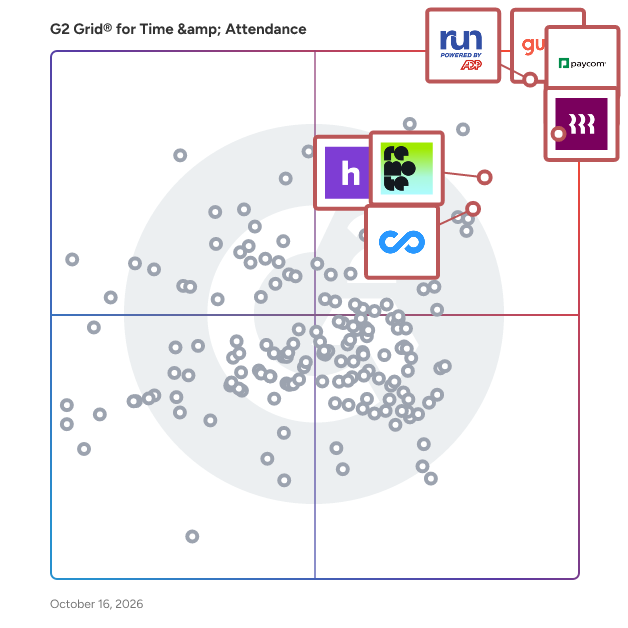
## G2 Grid® for Time & Attendance Software
 ![G2 Grid® for Time & Attendance Software plotting products by satisfaction and market presence](https://www.g2.com/categories/time-attendance/grids.png?focus%5B%5D=5449&focus%5B%5D=3637&focus%5B%5D=53090&focus%5B%5D=20433&focus%5B%5D=19474&focus%5B%5D=79064&focus%5B%5D=4132&focus%5B%5D=5349)

Highlighted products: RUN Powered by ADP, Gusto, Rippling, Connecteam, Homebase, Remote, UKG Ready, and Hubstaff.

Underlying data: [Grid® JSON](https://www.g2.com/categories/time-attendance/grids.json?focus%5B%5D=run-powered-by-adp&focus%5B%5D=gusto&focus%5B%5D=rippling&focus%5B%5D=connecteam&focus%5B%5D=homebase&focus%5B%5D=remote&focus%5B%5D=ukg-ready&focus%5B%5D=hubstaff&segment=small-business)

**Sponsored**

### Buddy Punch

Buddy Punch is a cloud-based platform that transforms how businesses track employee time and manage schedules, bringing clarity and control to workforce operations across industries. This software helps organizations accurately track employee work hours, manage time-off requests, monitor attendance, and prepare data for payroll. Buddy Punch is built to accommodate remote, mobile, and in-office teams with tools that support accountability, transparency, and flexibility. Designed for small to mid-sized businesses across industries like construction, healthcare, retail, professional services, and more, Buddy Punch provides customizable features to support both hourly and salaried workers. Employees can clock in and out using web browsers or mobile apps on iOS and Android devices, while employers can oversee operations in real time with GPS tracking, geofencing, and customizable permissions. Buddy Punch features: \*Real-Time Tracking & Visibility: Monitor who is on the clock, their current location, and their punch activity with GPS and geofencing tools. \*Payroll-Ready Reporting: Export timesheets directly to payroll systems or download them in Excel format, with integrations for QuickBooks, ADP, Paychex, and SurePayroll. \*Flexible Punch Options: Employees can punch in via Face ID, QR codes, PIN, or mobile device, which ensures security and convenience. \*Advanced Time Management Tools: Includes automatic break rules, punch rounding, PTO accrual tracking, and job code reporting. \*Secure Access & SSO: Offers role-based permissions and single sign-on (SSO) for a streamlined and secure login experience. Buddy Punch enables managers and business owners to reduce manual entry, enforce time tracking policies, and empower their teams with tools that are easy to use and built for accountability. Whether employees are on-site, remote, or mobile, Buddy Punch helps organizations ensure accurate time tracking and efficient payroll processing by making workforce management straightforward and reliable.

[Visit website](https://www.g2.com/external_clickthroughs/record?secure%5Bad_program%5D=paid_promo&secure%5Bad_slot%5D=category_product_list_llm&secure%5Bcategory_id%5D=1381&secure%5Bchosen_at%5D=2026-08-01T00%3A00%3A26Z&secure%5Bmedium%5D=sponsored&secure%5Bprioritized%5D=false&secure%5Bproduct_id%5D=4446&secure%5Bresource_id%5D=1381&secure%5Bresource_type%5D=Category&secure%5Bsource_type%5D=category_page&secure%5Bsource_url%5D=https%3A%2F%2Fwww.g2.com%2Fcategories%2Ftime-attendance%2Fsmall-business%3Fpage%3D7&secure%5Btoken%5D=54f3b5488a3164831d9bcf5eff0dfe41ffc894d697cf8215312e793173684975&secure%5Burl%5D=https%3A%2F%2Fbuddypunch.com%2F%3Futm_campaign%3Dtime%26utm_content%3Dproducts-buddy-punch-reviews%26utm_medium%3Dcpc%26utm_source%3Dg2&secure%5Burl_type%5D=paid_promos)

### [Sage HR](https://www.g2.com/products/sage-hr/reviews)

All-in-one HR software that transforms how small and medium-sized businesses manage and engage their people. Whether it’s simple leave&nbsp;management&nbsp;or end-to-end HR management, Sage HR helps small businesses work more effectively, by automating and streamlining their HR tasks across the employment journey. Unlike other solutions that involve multiple and disparate systems, Sage HR allows businesses to access and manage everything they need from a single digital platform, delivering amazing work-life experiences for everyone in the process.&nbsp; Key features of Sage HR include: • Core HR and leave management • Shift scheduling and timesheets • Performance management • Onboarding and offboarding • Employee records and database • Asset management • Expenses management • Reports and analytics • Recruitment

**Average Rating:** 4.3/5.0

**Total Reviews:** 91

#### How Do G2 Users Rate Sage HR?

- **Has the product been a good partner in doing business?:** 9.0/10 (Category avg: 8.8/10)
- **Dashboards & Reporting:** 7.8/10 (Category avg: 8.6/10)
- **Process Automation:** 8.8/10 (Category avg: 8.7/10)
- **Data Collection:** 8.3/10 (Category avg: 8.7/10)

#### Who Is the Company Behind Sage HR?

- **Seller:** [Sage Software](https://www.g2.com/sellers/sage-software-d61a780c-4fb3-4781-9519-baa772f5ea91)
- **Year Founded:** 1981
- **HQ Location:** Newcastle
- **LinkedIn® Page:** [www.linkedin.com](https://www.g2.com/external_clickthroughs/record?secure%5Bsource_type%5D=product_profile&secure%5Btoken%5D=86f239d02fadcee5a4a98d333eece19ed93d313e880a1b86e6451872bfa2360c&secure%5Burl%5D=https%3A%2F%2Fwww.linkedin.com%2Fcompany%2F2802%2F&secure%5Burl_type%5D=linkedin_company_website)  
15,579 employees on LinkedIn®
- **Ownership:** SGE.L
- **Phone:** +1 (866) 996-7243

#### Who Uses This Product?

- **Top Industries:** Information Technology and Services, Marketing and Advertising
- **Company Size:** 53% Small, 40% Medium

#### What Do G2 Reviewers Say About Sage HR?

_AI-generated summary from verified user reviews_

##### Pros

- Users value the **ease of use** of Sage HR, finding it smooth and efficient for managing reimbursements and approvals.
- Users value the **comprehensive features** of Sage HR, particularly for seamless employee management from onboarding to offboarding.
- Users appreciate the **smooth reimbursement process** in Sage HR, enjoying clear workflows and quick approvals.
- Users commend the **easy implementation** of Sage HR, appreciating its straightforward setup and user-friendly design.
- Users appreciate the **easy integrations** of Sage HR, seamlessly connecting various HR processes for enhanced efficiency.

##### Cons

- Users find Sage HR to be **not intuitive** , experiencing confusion with navigation and integration features that hinder usability.
- Users find the **interface and integration process not user-friendly** , complicating onboarding and self-help efforts.
- Users find **poor customer support** frustrating, especially when struggling with integration and needing ongoing assistance.
- Users find the **poor interface design** of Sage HR confusing and sluggish, hindering efficient document handling and navigation.
- Users experience **slow loading** and frustrating bugs in Sage HR, impacting the overall usability and efficiency.

#### What Are Recent G2 Reviews of Sage HR?

**["Streamlines HR Processes and Boosts the Employee Experience"](https://www.g2.com/survey_responses/sage-hr-review-12855057)**

**Rating:** 5.0/5.0 stars

_— bonani m._

[Read full review](https://www.g2.com/survey_responses/sage-hr-review-12855057)

**["Easy-to-Use, Highly Customizable Time-Off Management That Keeps Getting Better"](https://www.g2.com/survey_responses/sage-hr-review-12701985)**

**Rating:** 5.0/5.0 stars

_— Shoaib S._

[Read full review](https://www.g2.com/survey_responses/sage-hr-review-12701985)

#### What Are G2 Users Discussing About Sage HR?

- [What should be included in HR software?](https://www.g2.com/discussions/sage-hr-what-should-be-included-in-hr-software)
- [Does sage have an HR module?](https://www.g2.com/discussions/does-sage-have-an-hr-module) - 1 comment
- [What does Sage HR do?](https://www.g2.com/discussions/what-does-sage-hr-do) - 1 comment
- [What are the features of HR software?](https://www.g2.com/discussions/sage-hr-what-are-the-features-of-hr-software) - 1 comment

### [MakeShift](https://www.g2.com/products/makeshift/reviews)

MakeShift is the only people first cloud scheduling solution that improves the scheduling experience for managers and employees alike. It's easy to set up and even easier to use. You'll create schedules faster, track attendance more accurately, and communicate with staff in real time regardless of the size of your team. Our customers experience fewer unfilled shifts, better work-life balance, happier employees, and a healthier bottom line. It's People First scheduling and businesses love it! Sign up today to save time, reduce labor costs, and increase employee engagement --\> makeshift.ca MakeShift offers a free 14-day trial.

**Average Rating:** 4.3/5.0

**Total Reviews:** 290

#### How Do G2 Users Rate MakeShift?

- **Has the product been a good partner in doing business?:** 8.8/10 (Category avg: 8.8/10)
- **Dashboards & Reporting:** 8.0/10 (Category avg: 8.6/10)
- **Process Automation:** 8.0/10 (Category avg: 8.7/10)
- **Data Collection:** 7.8/10 (Category avg: 8.7/10)

#### Who Is the Company Behind MakeShift?

- **Seller:** [MakeShift](https://www.g2.com/sellers/makeshift)
- **Company Website:** www.makeshift.ca
- **Year Founded:** 2014
- **HQ Location:** Calgary, CA
- **Twitter:** @makeshiftapp  
505 Twitter followers
- **LinkedIn® Page:** [www.linkedin.com](https://www.g2.com/external_clickthroughs/record?secure%5Bsource_type%5D=product_profile&secure%5Btoken%5D=b0126ae376261fbfc0f20b95d0e689fc7ab31eece394b8acfb82f0f056584de4&secure%5Burl%5D=https%3A%2F%2Fwww.linkedin.com%2Fcompany%2Fmakeshiftscheduling&secure%5Burl_type%5D=linkedin_company_website)  
25 employees on LinkedIn®

#### Who Uses This Product?

- **Who Uses This:** Manager, Supervisor
- **Top Industries:** Hospital & Health Care, Health, Wellness and Fitness
- **Company Size:** 57% Medium, 33% Small

#### What Do G2 Reviewers Say About MakeShift?

_AI-generated summary from verified user reviews_

##### Pros

- Users appreciate the **easy scheduling** features of MakeShift, making it simple to manage and reference work schedules.
- Users find **Scheduling Ease** in MakeShift beneficial, as it simplifies management and visibility of work schedules.
- Users love the **ease of use** of MakeShift, finding it convenient and user-friendly for scheduling tasks.
- Users love the **easy-to-understand shift management** and valuable notifications provided by MakeShift's dashboard.
- Users value the **easy access** to schedules and employee information, enhancing overall management and workflow efficiency.

##### Cons

- Users find **scheduling issues** in MakeShift tedious due to manual time selection and small screen size.
- Users find the **missing features** of MakeShift hinder their scheduling efficiency and overall user experience.
- Users struggle with **shift management** , citing difficulties in scheduling, bulk adding, and exporting shifts efficiently.
- Users are frustrated by **display issues** , particularly the small scheduling view on the desktop affecting usability.
- Users are frustrated by MakeShift's **limited features** , lacking essential tools like notes, communication, and robust scheduling options.

#### What Are Recent G2 Reviews of MakeShift?

**["Effortless Shift Management and Real-Time Updates"](https://www.g2.com/survey_responses/makeshift-review-11973956)**

**Rating:** 4.5/5.0 stars

_— Xia Y._

[Read full review](https://www.g2.com/survey_responses/makeshift-review-11973956)

**["Efficiency and reliability"](https://www.g2.com/survey_responses/makeshift-review-9401922)**

**Rating:** 5.0/5.0 stars

_— Kenechukwu U._

[Read full review](https://www.g2.com/survey_responses/makeshift-review-9401922)

#### What Are G2 Users Discussing About MakeShift?

- [What is MakeShift used for?](https://www.g2.com/discussions/what-is-makeshift-used-for) - 1 comment

### [Legion WFM](https://www.g2.com/products/legion-wfm/reviews)

Legion Technologies is a workforce management platform designed to help businesses enhance labor efficiency while simultaneously boosting employee engagement. This innovative solution leverages advanced technology to streamline various aspects of workforce management, making it easier for organizations to optimize their operations and improve overall productivity. The Legion WFM platform stands out due to its intelligent automation and employee-centric approach, ensuring that both management and staff benefit from its features. The target audience for Legion Technologies includes businesses with 1000+ employees looking to improve their workforce management practices. Industries such as retail, hospitality, restaurants and convenience stores can particularly benefit from the platform's capabilities. By providing tools for strategic insights, labor budgeting, and demand forecasting, Legion enables organizations to make informed decisions that align workforce capabilities with business needs. Legion AI is crucial for optimizing labor costs and ensuring that the right number of employees are scheduled at the right times. Key features of the Legion WFM platform include labor optimization, automated scheduling, and time and attendance tracking. These functionalities work together to create a seamless execution process that maximizes operational efficiency. Automated scheduling reduces the time managers spend on creating shifts, while labor optimization ensures that businesses are not overstaffed or understaffed. The time and attendance feature simplifies tracking employee hours, allowing for accurate payroll processing and compliance with labor regulations. In addition to operational features, Legion Technologies places a strong emphasis on employee empowerment. The platform includes tools for frontline communications, enabling team members to stay informed and connected. Legion InstantPay is another notable feature that allows employees to access their earned wages before the traditional payday, enhancing financial flexibility. Furthermore, the platform includes performance and rewards tracking, which helps organizations recognize and incentivize employee contributions, fostering a positive workplace culture. Overall, Legion Technologies provides a comprehensive workforce management solution that not only enhances operational efficiency but also prioritizes employee satisfaction. By integrating advanced technology with user-friendly interfaces, the Legion WFM platform positions itself as a valuable asset for businesses aiming to thrive in a competitive landscape.

**Average Rating:** 4.3/5.0

**Total Reviews:** 72

#### How Do G2 Users Rate Legion WFM?

- **Has the product been a good partner in doing business?:** 9.2/10 (Category avg: 8.8/10)
- **Dashboards & Reporting:** 7.7/10 (Category avg: 8.6/10)
- **Process Automation:** 8.0/10 (Category avg: 8.7/10)
- **Data Collection:** 8.1/10 (Category avg: 8.7/10)

#### Who Is the Company Behind Legion WFM?

- **Seller:** [Legion Technologies](https://www.g2.com/sellers/legion-technologies)
- **Company Website:** legion.co
- **Year Founded:** 2016
- **HQ Location:** Palo Alto, US
- **Twitter:** @legiontech  
243 Twitter followers
- **LinkedIn® Page:** [www.linkedin.com](https://www.g2.com/external_clickthroughs/record?secure%5Bsource_type%5D=product_profile&secure%5Btoken%5D=c04fd3b59698f525ce1e95e4de4e5c66b43dda3cb8ecf7a8c2aaa136fdf34b65&secure%5Burl%5D=https%3A%2F%2Fwww.linkedin.com%2Fcompany%2F24584274%2F&secure%5Burl_type%5D=linkedin_company_website)  
257 employees on LinkedIn®

#### Who Uses This Product?

- **Top Industries:** Retail, Health, Wellness and Fitness
- **Company Size:** 49% Large, 28% Small

#### What Do G2 Reviewers Say About Legion WFM?

_AI-generated summary from verified user reviews_

##### Pros

- Users appreciate the **ease of use** of Legion WFM, enabling effortless scheduling and communication with team members.
- Users enjoy the **easy scheduling** features of Legion WFM, facilitating communication and shift management effortlessly.
- Users value the **ease of scheduling** with Legion WFM, enhancing communication and shift management seamlessly.
- Users enjoy the **access ease** of Legion WFM, allowing convenient login and onsite scheduling insights before arrival.
- Users value the **automation capabilities** of Legion WFM, streamlining location open hours for efficiency across platforms.

##### Cons

- Users face **difficulties with holiday management** , particularly regarding clocking in and out on designated holidays.
- Users struggle with **inadequate tracking** of paid time off, making it difficult to manage schedules and understand earnings.
- Users find the **limited features** of Legion WFM make tracking paid time off and hours challenging.
- Users find the **paid time off tracking challenging** , complicating the weekly scheduling and understanding of estimated pay.
- Users find the **PTO issues** frustrating, as tracking hours and estimated pay is complicated and unclear.

#### What Are Recent G2 Reviews of Legion WFM?

**["Optimizes Strategy with Intuitive Employee Engagement"](https://www.g2.com/survey_responses/legion-wfm-review-12642349)**

**Rating:** 4.0/5.0 stars

_— Tim C._

[Read full review](https://www.g2.com/survey_responses/legion-wfm-review-12642349)

**["Efficient Scheduling and Real-Time Insights"](https://www.g2.com/survey_responses/legion-wfm-review-12545507)**

**Rating:** 5.0/5.0 stars

_— Carl J._

[Read full review](https://www.g2.com/survey_responses/legion-wfm-review-12545507)

#### What Are G2 Users Discussing About Legion WFM?

- [What is Legion WFM used for?](https://www.g2.com/discussions/what-is-legion-wfm-used-for)

### [Flowace](https://www.g2.com/products/flowace/reviews)

Flowace is an AI-powered productivity and workforce analytics platform designed to help organizations transform their work processes. Tailored for CXOs and business leaders, Flowace provides comprehensive visibility into productivity, utilization, and performance across teams, enabling informed, data-driven decision-making. This platform is particularly beneficial for organizations seeking to enhance operational efficiency and optimize workforce management. The primary audience for Flowace includes executives and managers in various sectors, particularly those in BPOs, IT services, and healthcare revenue cycle management. These professionals require tools that allow them to monitor team performance and productivity effectively. Flowace addresses this need by combining automated time tracking, employee monitoring, and advanced AI analytics to provide insights into how teams work, where time is allocated, and how overall output can be improved without resorting to micromanagement. One of the standout features of Flowace is its ability to automate 90% of manual timesheet processes, which not only enhances accuracy but also liberates valuable time for strategic initiatives. The platform's AI productivity assistant translates activity data into actionable insights, enabling leaders to pinpoint inefficiencies, foster focus among team members, and mitigate the risk of burnout. This capability is essential in today’s fast-paced work environment, where maintaining employee well-being is as crucial as achieving productivity goals. Flowace is designed with privacy and flexibility in mind, allowing organizations to choose their preferred tracking methods. Whether opting for silent background monitoring or interactive, privacy-first modes, Flowace ensures compliance with privacy regulations while building trust among employees. Key features include Custom Alerts & Notifications to identify overwork or productivity dips in real time, Connectivity Reports to assess network performance impact, and Automated Attendance & Custom Approvals for streamlined workflows. Additionally, AI-generated ROI Dashboards provide a clear view of performance improvements and workforce efficiency. By leveraging Flowace, organizations can achieve significant productivity gains—up to 31% higher productivity, enhanced transparency, and a healthier, more focused workforce. The platform's comprehensive approach to measuring, analyzing, upskilling, optimizing, and growing makes it a valuable asset for any organization looking to enhance its operational effectiveness.

**Average Rating:** 4.6/5.0

**Total Reviews:** 137

#### How Do G2 Users Rate Flowace?

- **Has the product been a good partner in doing business?:** 9.2/10 (Category avg: 8.8/10)
- **Dashboards & Reporting:** 9.2/10 (Category avg: 8.6/10)
- **Data Collection:** 10.0/10 (Category avg: 8.7/10)

#### Who Is the Company Behind Flowace?

- **Seller:** [Flowace Technologies](https://www.g2.com/sellers/flowace-technologies)
- **Year Founded:** 2018
- **HQ Location:** San Francisco Bay Area, US
- **LinkedIn® Page:** [www.linkedin.com](https://www.g2.com/external_clickthroughs/record?secure%5Bsource_type%5D=product_profile&secure%5Btoken%5D=a9e684b6ac7204f5c1772e024ecc383b49e77b7c295cb7952b0accba00b3ae30&secure%5Burl%5D=https%3A%2F%2Fwww.linkedin.com%2Fcompany%2Fflowace%2F&secure%5Burl_type%5D=linkedin_company_website)  
35 employees on LinkedIn®

#### Who Uses This Product?

- **Who Uses This:** Associate
- **Top Industries:** Information Technology and Services, Accounting
- **Company Size:** 42% Medium, 37% Small

#### What Do G2 Reviewers Say About Flowace?

_AI-generated summary from verified user reviews_

##### Pros

- Users commend the **effective time tracking** of Flowace, enhancing transparency and accuracy in productivity and attendance monitoring.
- Users find Flowace to be **very easy to use** , enhancing team productivity and saving valuable time with its tools.
- Users find Flowace to significantly enhance **productivity and efficiency** , simplifying time management and team navigation.
- Users praise Flowace for its **time-saving features** , which streamline tracking and reporting while enhancing productivity and transparency.
- Users value the **efficiency** of Flowace's automated insights, enhancing productivity and streamlining workflow management effortlessly.

##### Cons

- Users experience **integration issues** with Flowace, seeking better connections to tools like Asana and Trello.
- Users find the **learning curve challenging** due to a confusing setup and the need for manual configurations.
- Users report experiencing **software bugs** that disrupt productivity and affect the tool's reliability on occasion.
- Users experience **slow loading** times for reports and syncing, which can hinder the overall efficiency of Flowace.
- Users report issues with **tracking accuracy** , noting miscalculations and delays in recording phone hours.

#### What Are Recent G2 Reviews of Flowace?

**["Best Tool to get the visibility of your team"](https://www.g2.com/survey_responses/flowace-review-11821449)**

**Rating:** 5.0/5.0 stars

_— Amelia S._

[Read full review](https://www.g2.com/survey_responses/flowace-review-11821449)

**["Revolutionized Our HR Management with Effortless Tracking"](https://www.g2.com/survey_responses/flowace-review-12107217)**

**Rating:** 5.0/5.0 stars

_— Avik B._

[Read full review](https://www.g2.com/survey_responses/flowace-review-12107217)

#### What Are G2 Users Discussing About Flowace?

- [What is Flowace used for?](https://www.g2.com/discussions/what-is-flowace-used-for) - 1 comment, 2 upvotes

### [Evolia](https://www.g2.com/products/evolia/reviews)

Evolia makes it easier to hire, schedule and track time worked by frontline in medium and large-sized businesses. Gone are the days of working in silos and having to play the telephone game finding last-minute replacements. With Evolia, employees get the opportunity to take part in the scheduling process in a few clicks. Evolia offers time & attendance tracking, clock in, leave management, and staffing budget control features. It integrates with major HRIS and payroll solutions. Its main features include: Smart schedule creation Save 80% of time dedicated to schedule management and increase the profitability of your business by quickly creating schedules by branch, team, assembly line or other organizational structures that meet your specific needs. Time and attendance Implement mobile or web punching solutions to control the presence of your employees in real-time or use Evolia's smart timesheets to automatically pre-approve payroll with customizable business rules. Receive absence alerts, easily identify any anomalies and export your time and expense accounts to payroll to avoid errors and time wasted processing payroll manually. Replacement management Customize your business rules and automate reminder lists according to your chosen order and timeframe. Let Evolia fulfill each replacement request for you. All you have to do is approve the proposed changes. Availability management Let your employees submit their availability directly to Evolia so that the creation of your schedules can take them into account automatically. Centralize your employees' work preferences to build schedules that meet their time constraints as well as yours. Smart timesheets Keep an overview of all shifts worked, absences and punches, including ones with irregularities. Evolia automatically approves times that meet your rules and schedules. All you have to do is make the necessary adjustments, approve your timesheets and send them to payroll in a few clicks. Monitoring of labor budgets Evolia allows the establishment of budgets specific to your places and work teams. This ensures the profitability of your business and lets the system alert your managers before cost overruns occur. Centralizes Communication Centralize your employee files and your communication with your teams on Evolia through various features including messaging, employee notes and announcements. Mobile and web application Evolia is accessible to everyone at all times via any web browser as well as on your iOS and Android mobile devices. Evolia lightens the busy workload of managers and workers by offering a variety of tools available on all of our platforms. Evolia for managers: • Hire for open shifts and replacements • Quick and intuitive schedule creation • Workforce planning • Automated replacements and recall lists • Employee availability management • Centralization of leave requests • Labor budget controls • Integrations to the most popular HR and payroll systems • Smart timesheets with pre-approval • Automated payroll preparation • Employee messaging and platform for announcements • And so much more! Voilà! for employees: • Free profile to post for an open shift in your area • Free and easy to use web & mobile application • Intuitive calendar • Support for expense accounts • Support for replacement and leave requests • Work availability and preference settings • Mobile punch • Messaging platform With Evolia, you can finally invest your time where it has a real impact on your business. You will save several hours per week in managing your schedules, while keeping control of your operating costs. Plan. Work. Together.

**Average Rating:** 4.3/5.0

**Total Reviews:** 44

#### How Do G2 Users Rate Evolia?

- **Has the product been a good partner in doing business?:** 8.4/10 (Category avg: 8.8/10)
- **Dashboards & Reporting:** 8.3/10 (Category avg: 8.6/10)
- **Process Automation:** 7.8/10 (Category avg: 8.7/10)
- **Data Collection:** 8.1/10 (Category avg: 8.7/10)

#### Who Is the Company Behind Evolia?

- **Seller:** [Evolia](https://www.g2.com/sellers/evolia)
- **Year Founded:** 2016
- **HQ Location:** Québec, CA
- **LinkedIn® Page:** [www.linkedin.com](https://www.g2.com/external_clickthroughs/record?secure%5Bsource_type%5D=product_profile&secure%5Btoken%5D=2c779807373fcbce927b4caadb45a2910ee4810c2571eedbc0c48b71ce2ffc24&secure%5Burl%5D=https%3A%2F%2Fwww.linkedin.com%2Fcompany%2Fevolia-hr%2F&secure%5Burl_type%5D=linkedin_company_website)  
39 employees on LinkedIn®

#### Who Uses This Product?

- **Company Size:** 52% Medium, 45% Small

#### What Are Recent G2 Reviews of Evolia?

**["Highly recommended for efficient and simplified HR management!"](https://www.g2.com/survey_responses/evolia-review-11361746)**

**Rating:** 5.0/5.0 stars

_— SOINS R._

[Read full review](https://www.g2.com/survey_responses/evolia-review-11361746)

**["Business creation and ultra-simple hours, instantly accessible"](https://www.g2.com/survey_responses/evolia-review-12224249)**

**Rating:** 5.0/5.0 stars

_— Jasmine B._

[Read full review](https://www.g2.com/survey_responses/evolia-review-12224249)

#### What Are G2 Users Discussing About Evolia?

- [What is Voilà! used for?](https://www.g2.com/discussions/what-is-voila-used-for)

### [uAttend](https://www.g2.com/products/uattend/reviews)

uAttend integrates its time clocks with easy-to-use technology and versatile cloud software to bring small businesses an affordable time and attendance tracking solution. Save time and money with a system that streamlines manual time card calculations and daily employee management tasks. - Eliminate buddy punching with biometric time clocks. - Track all punch types and view data in real-time from your online cloud account. - Set alerts for overtime, breaks, lunches, and lockouts to cut costs and ensure compliance. - Capture all punches even when the internet is down with offline mode. - Easy plug-and-play setup with Wi-Fi and LAN. - Payroll feature available, integrated with employee time and attendance.

**Average Rating:** 4.5/5.0

**Total Reviews:** 87

#### How Do G2 Users Rate uAttend?

- **Has the product been a good partner in doing business?:** 8.9/10 (Category avg: 8.8/10)
- **Dashboards & Reporting:** 9.0/10 (Category avg: 8.6/10)
- **Process Automation:** 9.2/10 (Category avg: 8.7/10)
- **Data Collection:** 9.0/10 (Category avg: 8.7/10)

#### Who Is the Company Behind uAttend?

- **Seller:** [Workwell](https://www.g2.com/sellers/workwell)
- **Year Founded:** 2005
- **HQ Location:** Carlsbad, CA
- **Twitter:** @ProcessingPoint  
89 Twitter followers
- **LinkedIn® Page:** [www.linkedin.com](https://www.g2.com/external_clickthroughs/record?secure%5Bsource_type%5D=product_profile&secure%5Btoken%5D=1d6fcdaf47587cc286d8128d8fb3a3f0d34d0c1432b2690cb028350c89cd1219&secure%5Burl%5D=https%3A%2F%2Fwww.linkedin.com%2Fcompany%2F1147292%2F&secure%5Burl_type%5D=linkedin_company_website)  
105 employees on LinkedIn®

#### Who Uses This Product?

- **Who Uses This:** Office Manager
- **Top Industries:** Hospitality, Staffing and Recruiting
- **Company Size:** 77% Small, 21% Medium

#### What Do G2 Reviewers Say About uAttend?

_AI-generated summary from verified user reviews_

##### Pros

- Users value the **ease of use** of uAttend, preferring it over other options like ADP for simplicity.
- Users find the **easy daily login** process of uAttend convenient for tracking their time effortlessly.
- Users value the **easy daily login** with uAttend, making time tracking straightforward and efficient.
- Users find uAttend's **easy access** beneficial for daily logins and effective time tracking.
- Users value the **ease of daily login and time tracking** with uAttend, simplifying their time management process.

##### Cons

- Users often face **attendance issues** with uAttend, especially when it fails to show time during punch in or out.
- Users often experience **clocking issues** where the time does not display when punching in or out.
- Users find **customization issues** frustrating, especially with access controls and scheduling details lacking clarity.
- Users face significant challenges with **delayed support** , leading to penalties and unresolved issues with tax reports.
- Users often experience **inaccurate tracking** with uAttend, particularly regarding time display when punching in or out.

#### What Are Recent G2 Reviews of uAttend?

**["Easy to Use and Preferred by Staff, But Needs Better Privacy and Shift Details"](https://www.g2.com/survey_responses/uattend-review-11860307)**

**Rating:** 5.0/5.0 stars

_— Dharti P._

[Read full review](https://www.g2.com/survey_responses/uattend-review-11860307)

**["Review U-attend"](https://www.g2.com/survey_responses/uattend-review-11496760)**

**Rating:** 5.0/5.0 stars

_— Verified User in Computer Software_

[Read full review](https://www.g2.com/survey_responses/uattend-review-11496760)

#### What Are G2 Users Discussing About uAttend?

- [What is your experience regarding the pricing and costs for uAttend?](https://www.g2.com/discussions/what-is-your-experience-regarding-the-pricing-and-costs-for-uattend)
- [How do I cancel uAttend?](https://www.g2.com/discussions/how-do-i-cancel-uattend)
- [How much does uAttend cost?](https://www.g2.com/discussions/how-much-does-uattend-cost) - 1 comment
- [Does uAttend track you?](https://www.g2.com/discussions/does-uattend-track-you)
- [Does uAttend work with QuickBooks?](https://www.g2.com/discussions/does-uattend-work-with-quickbooks)

### [UZIO Payroll & HR](https://www.g2.com/products/uzio-payroll-hr/reviews)

Our mission is to revolutionize workforce management—using intelligent automation to simplify HR and payroll and boost efficiency. UZIO's AI-driven platform streamlines operations, eliminates busywork, and scales effortlessly with your business. We're dedicated to providing you with the assistance you need, exactly when you need it. Whether you have a question, encounter a technical issue, or need guidance, our team is available to offer prompt and professional help. www.uzio.com www.uzio.ai

**Average Rating:** 4.4/5.0

**Total Reviews:** 86

#### How Do G2 Users Rate UZIO Payroll & HR?

- **Has the product been a good partner in doing business?:** 9.0/10 (Category avg: 8.8/10)
- **Dashboards & Reporting:** 10.0/10 (Category avg: 8.6/10)
- **Process Automation:** 7.5/10 (Category avg: 8.7/10)

#### Who Is the Company Behind UZIO Payroll & HR?

- **Seller:** [Uzio](https://www.g2.com/sellers/uzio)
- **Year Founded:** 2018
- **HQ Location:** Great Falls, Virginia
- **Twitter:** @UzioInc  
467 Twitter followers
- **LinkedIn® Page:** [www.linkedin.com](https://www.g2.com/external_clickthroughs/record?secure%5Bsource_type%5D=product_profile&secure%5Btoken%5D=15e1095dcb621c544859c1f05487320a0a56affb5db6445febc66b892c63abab&secure%5Burl%5D=https%3A%2F%2Fwww.linkedin.com%2Fcompany%2F13655579%2F&secure%5Burl_type%5D=linkedin_company_website)  
106 employees on LinkedIn®

#### Who Uses This Product?

- **Top Industries:** Information Technology and Services, Insurance
- **Company Size:** 61% Small, 36% Medium

#### What Do G2 Reviewers Say About UZIO Payroll & HR?

_AI-generated summary from verified user reviews_

##### Pros

- Users find the **ease of use** of UZIO Payroll & HR exceptional, thanks to its straightforward, user-friendly interface.
- Users enjoy the **easy management** of HR documents and digital PTO tracking with UZIO Payroll & HR.
- Users appreciate the **effective onboarding tools** in UZIO Payroll & HR, facilitating seamless HR document management and PTO tracking.
- Users appreciate the **simple tracking and approval** of time off with UZIO Payroll & HR, enhancing efficiency.
- Users value the **easy time-off tracking and approval** process with Uzio Payroll & HR, enhancing efficiency.

##### Cons

- Users find the **mobile platform difficult and frustrating** , hindering their ability to efficiently manage payroll and HR tasks.

#### What Are Recent G2 Reviews of UZIO Payroll & HR?

**["Easy platform for nonprofits"](https://www.g2.com/survey_responses/uzio-payroll-hr-review-9414653)**

**Rating:** 4.5/5.0 stars

_— Savannah U._

[Read full review](https://www.g2.com/survey_responses/uzio-payroll-hr-review-9414653)

**["great services!"](https://www.g2.com/survey_responses/uzio-payroll-hr-review-8757068)**

**Rating:** 5.0/5.0 stars

_— Celso G._

[Read full review](https://www.g2.com/survey_responses/uzio-payroll-hr-review-8757068)

#### What Are G2 Users Discussing About UZIO Payroll & HR?

- [What are the benefits and drawbacks of using UZIO Payroll & HR for managing employee compensation?](https://www.g2.com/discussions/what-are-the-benefits-and-drawbacks-of-using-uzio-payroll-hr-for-managing-employee-compensation)
- [What is UZIO Payroll & HR used for?](https://www.g2.com/discussions/what-is-uzio-payroll-hr-used-for)
- [Which free payroll software is best?](https://www.g2.com/discussions/which-free-payroll-software-is-best)
- [Is ADP a payroll?](https://www.g2.com/discussions/is-adp-a-payroll)
- [What is a payroll program?](https://www.g2.com/discussions/what-is-a-payroll-program)

### [Teambridge](https://www.g2.com/products/teambridge/reviews)

Teambridge is everything you want in a workforce management system with three key differentiators: One, it’s composable, so you can format your data, change the layout, and automate your processes exactly the way you want to. Two, it’s AI-native, built from the ground up so it understands your business and drives real outcomes. Three, it’s mobile-first—designed to look, feel, and perform like the mobile apps your staff use every day. For the first time ever, you can scale what makes your business unique while slashing operating costs and boosting revenue.

**Average Rating:** 4.7/5.0

**Total Reviews:** 42

#### How Do G2 Users Rate Teambridge?

- **Has the product been a good partner in doing business?:** 9.1/10 (Category avg: 8.8/10)
- **Dashboards & Reporting:** 7.0/10 (Category avg: 8.6/10)
- **Process Automation:** 7.7/10 (Category avg: 8.7/10)
- **Data Collection:** 6.7/10 (Category avg: 8.7/10)

#### Who Is the Company Behind Teambridge?

- **Seller:** [Teambridge](https://www.g2.com/sellers/teambridge)
- **Company Website:** teambridge.com
- **Year Founded:** 2017
- **HQ Location:** San Francisco, CA
- **LinkedIn® Page:** [www.linkedin.com](https://www.g2.com/external_clickthroughs/record?secure%5Bsource_type%5D=product_profile&secure%5Btoken%5D=c7f3c383a5fd3782e0d59e98c4911226fb7c930eeda86debd5d5f863ad69ad01&secure%5Burl%5D=https%3A%2F%2Fwww.linkedin.com%2Fcompany%2Fteam-bridge%2F&secure%5Burl_type%5D=linkedin_company_website)  
50 employees on LinkedIn®

#### Who Uses This Product?

- **Top Industries:** Staffing and Recruiting, Hospital & Health Care
- **Company Size:** 50% Medium, 43% Small

#### What Do G2 Reviewers Say About Teambridge?

_AI-generated summary from verified user reviews_

##### Pros

- Users praise Teambridge for its **intuitive design and excellent support** , making it easy to learn and implement.
- Users commend Teambridge's **powerful automation** capabilities, enhancing efficiency and customizability in staffing solutions.
- Users praise the **responsive customer support** of Teambridge, enhancing their overall experience and satisfaction.
- Users value the **powerful automations** in Teambridge, enhancing creativity and simplifying complex processes effectively.
- Users highlight the **endless customizability** of Teambridge, enabling tailored solutions for their specific staffing needs.

##### Cons

- Users find the **limited features** of Teambridge a downside, despite recognizing future improvements on the roadmap.
- Users point out the **missing features** in Teambridge, noting basic layouts and limitations in product capabilities.
- Users experience **software glitches** that result in unreliability, lagging, and freezing during heavy usage.
- Users find it challenging to manage shifts due to the **deletion difficulty** that complicates cancellation processes.
- Users find the **difficult setup** of Teambridge to be a significant hurdle in their user experience.

#### What Are Recent G2 Reviews of Teambridge?

**["Efficient and Reliable Time-Keeping Solution and More!"](https://www.g2.com/survey_responses/teambridge-review-11280796)**

**Rating:** 5.0/5.0 stars

_— April C._

[Read full review](https://www.g2.com/survey_responses/teambridge-review-11280796)

**["Well worth the investment!"](https://www.g2.com/survey_responses/teambridge-review-11280738)**

**Rating:** 5.0/5.0 stars

_— Regina G._

[Read full review](https://www.g2.com/survey_responses/teambridge-review-11280738)

### [Aplano](https://www.g2.com/products/aplano/reviews)

Aplano is a cloud-based employee scheduling and time tracking software that helps businesses manage their workforce more efficiently. It allows you to create and manage shift plans digitally, track working hours via app or punch clock, handle absences and vacation requests, and communicate with your team—all in one platform.

**Average Rating:** 4.8/5.0

**Total Reviews:** 42

#### How Do G2 Users Rate Aplano?

- **Has the product been a good partner in doing business?:** 9.4/10 (Category avg: 8.8/10)
- **Dashboards & Reporting:** 9.2/10 (Category avg: 8.6/10)
- **Process Automation:** 10.0/10 (Category avg: 8.7/10)

#### Who Is the Company Behind Aplano?

- **Seller:** [Aplano](https://www.g2.com/sellers/aplano)
- **Company Website:** www.aplano.de
- **Year Founded:** 2020
- **HQ Location:** Berlin, DE
- **Twitter:** @aplano\_app  
10 Twitter followers
- **LinkedIn® Page:** [www.linkedin.com](https://www.g2.com/external_clickthroughs/record?secure%5Bsource_type%5D=product_profile&secure%5Btoken%5D=f6b52266a089f1463824ef6ccf6e7ed5d70f3041d7c198ae853a9ab7bfd5e423&secure%5Burl%5D=https%3A%2F%2Fwww.linkedin.com%2Fcompany%2Faplano%2F&secure%5Burl_type%5D=linkedin_company_website)  
5 employees on LinkedIn®

#### Who Uses This Product?

- **Company Size:** 70% Small, 23% Medium

#### What Are Recent G2 Reviews of Aplano?

**["Efficient scheduling with Aplano, Highly Recommended!"](https://www.g2.com/survey_responses/aplano-review-12719252)**

**Rating:** 5.0/5.0 stars

_— Hasan H._

[Read full review](https://www.g2.com/survey_responses/aplano-review-12719252)

**["Aplano: Self-explanatory, clear, and vacation approvals directly in the app"](https://www.g2.com/survey_responses/aplano-review-12727954)**

**Rating:** 5.0/5.0 stars

_— Andreas D._

[Read full review](https://www.g2.com/survey_responses/aplano-review-12727954)

#### What Are G2 Users Discussing About Aplano?

- [What is Aplano used for?](https://www.g2.com/discussions/what-is-aplano-used-for)

- [&lsaquo; Prev‹ Prev](/categories/time-attendance/small-business?order=g2_score&page=6#product-list)
- [1](/categories/time-attendance/small-business?order=g2_score#product-list)
- [2](/categories/time-attendance/small-business?order=g2_score&page=2#product-list)
- [3](/categories/time-attendance/small-business?order=g2_score&page=3#product-list)
- [4](/categories/time-attendance/small-business?order=g2_score&page=4#product-list)
- [5](/categories/time-attendance/small-business?order=g2_score&page=5#product-list)
- [6](/categories/time-attendance/small-business?order=g2_score&page=6#product-list)
- 7
- Next &rsaquo;Next ›

Spotlight Categories

[Account-Based Orchestration Platforms](https://www.g2.com/categories/account-based-orchestration-platforms)

[Knowledge Base Software](https://www.g2.com/categories/knowledge-base-software)

[Identity Verification Software](https://www.g2.com/categories/identity-verification)

[Social Media Listening Tools](https://www.g2.com/categories/social-media-listening-tools)

[Employee Recognition Software](https://www.g2.com/categories/employee-recognition)

Similar Categories

- [HCM Software](/categories/hcm-software)
- [Recruiting](/categories/recruiting)
- [Talent Management](/categories/talent-management)
- [Core HR](/categories/core-hr)
- [Benefits Administration](/categories/benefits-administration)

- [Workforce Management](/categories/workforce-management)
- [Time Tracking](/categories/time-tracking-software)
- [Freelance Platforms](/categories/freelance-platforms)
- [Staffing](/categories/staffing)
- [Other HR](/categories/other-hr)

- [401(k)](/categories/401-k)
- [Absence Management](/categories/absence-management-software)
- [ACA Compliance](/categories/aca-compliance)
- [Benefits Support](/categories/benefits-support)
- [Compensation Planning](/categories/compensation-planning)

[Browse Time & Attendance Themes](/categories/time-attendance/themes)

 ![Jeffrey Lin](/assets/transparent-ad5be28fbcd25b7b08d2cebe1d957125437fb5407d75ee717965ad22c8808791.gif "Jeffrey Lin")
JL

Researched and written by [Jeffrey Lin](https://research.g2.com/insights/author/jeffrey-lin)

Updated 

Products classified in the overall Time & Attendance category are similar in many regards and help companies of all sizes solve their business problems. However, small business features, pricing, setup, and installation differ from businesses of other sizes, which is why we match buyers to the right Small Business Time & Attendance to fit their needs. Compare product ratings based on reviews from enterprise users or connect with one of G2's buying advisors to find the right solutions within the Small Business Time & Attendance category.

In addition to qualifying for inclusion in the Time & Attendance Software category, to qualify for inclusion in the Small Business Time & Attendance Software category, a product must have at least 10 reviews left by a reviewer from a small business.

Show More

* * *

## How Do You Choose the Right Time & Attendance Software?

### What You Should Know About Time & Attendance Software

### **Time & Attendance Software buying insights at a glance**

[Time & Attendance Software](https://www.g2.com/categories/time-attendance) helps businesses track employee hours, manage attendance, monitor schedules, and support accurate payroll processing from a central system. As workforce operations become more distributed and schedule complexity increases, time and attendance software has become a critical operational tool rather than a simple clock-in utility. It gives HR, operations, and people managers a clearer view of labor activity while helping employees log time, review hours, and access payroll-related information more easily. For many buyers evaluating the best time and attendance software, the category now plays a direct role in payroll accuracy, workforce visibility, and administrative efficiency.&nbsp;

When I dig into the G2 review data for this category, I see that buyers are mainly looking for platforms that simplify time tracking without creating new admin burdens. In practice, the strongest time and attendance systems help companies centralize attendance workflows, reduce manual corrections, and make it easier for both managers and employees to handle everyday workforce tasks. Based on G2 reviews, the category performs strongly overall, with an average star rating of 4.61/5, Ease of Use of 6.54/7, average Quality of Support of 6.43/7, and average Likelihood to Recommend of 9.22/10.&nbsp;&nbsp;&nbsp;

The biggest buying pattern I see is that teams evaluating the best time and attendance systems are trying to balance usability, payroll accuracy, and setup speed. The best time and attendance software tends to stand out when it makes daily time entry, approvals, and employee self-service feel simple from day one, while still supporting the broader operational needs that companies expect from modern time and attendance management software.&nbsp;&nbsp;&nbsp;&nbsp;

Businesses use time and attendance software to accurately track hours, streamline approvals, and reduce manual payroll errors. It also helps centralize employee self-service and routine workforce administration, so HR and operations teams can spend less time on repetitive tasks and more time on higher-value work.&nbsp;&nbsp;&nbsp;&nbsp;

Pricing typically depends on business size, implementation scope, and the level of payroll or HR functionality included.&nbsp; For buyers evaluating time and attendance systems, total cost is often shaped by employee count, number of locations, payroll integration needs, and the level of workflow automation the team expects from its time and attendance management software.&nbsp;

**Top 5 FAQs from software buyers**

- Which time and attendance tools are easiest for employees and managers to adopt?
- How do time and attendance platforms handle payroll, approvals, and overtime tracking?
- Which time and attendance software integrates best with [payroll softwares,](https://www.g2.com/categories/payroll) HR tools, and scheduling systems?
- What is the best time and attendance software for small or mid-sized businesses?
- Which time and attendance systems work best for shift-based, multi-location, or distributed teams?

G2’s top-rated Time & Attendance software, based on the uploaded review export of 14,456 verified reviews, includes [Rippling](https://www.g2.com/products/rippling/reviews), [UKG Ready](https://www.g2.com/products/ukg-ready/reviews), [HR One](https://www.g2.com/products/uneecops-hrone/reviews), [RUN Powered by ADP](https://www.g2.com/products/run-powered-by-adp/reviews), Remote, and [Connecteam](https://www.g2.com/products/connecteam/reviews)

### **What are the top-reviewed Time & Attendance Software on G2?**

[Rippling](https://www.g2.com/products/rippling/reviews)

- Number of Reviews: 3871
- Satisfaction: 100
- Market Presence: 91
- G2 score: 96

[Connecteam](https://www.g2.com/products/connecteam/reviews)

- Number of Reviews: 775
- Satisfaction: 84
- Market Presence: 99
- G2 score: 92

[RUN Powered by ADP](https://www.g2.com/products/run-powered-by-adp/reviews)

- Number of Reviews: 775
- Satisfaction: 84
- Market Presence: 99
- G2 score: 92&nbsp;

[UKG Ready](https://www.g2.com/products/ukg-ready/reviews)

- Number of Reviews: 1618
- Satisfaction: 93
- Market Presence: 83
- G2 score: 88

[Remote](https://www.g2.com/products/remote/reviews)

- Number of Reviews: 1074
- Satisfaction: 96
- Market Presence: 70
- G2 score: 83

[HR One](https://www.g2.com/products/uneecops-hrone/reviews)

- Number of Reviews: 1532
- Satisfaction: 96
- Market Presence: 70
- G2 score: 83

Satisfaction score reflects how positively users rate a product based on review-driven measures such as ease of use, support, implementation experience, and likelihood to recommend, as defined in G2’s scoring methodology. ([Source 2](https://www.g2.com/reports))

Market Presence score reflects a product’s overall market footprint using signals such as review volume and external company scale indicators, as described in G2’s methodology. ([Source 2](https://www.g2.com/reports))

G2 Score is the standardized overall score used to compare products within the same category, derived from the combined Satisfaction and Market Presence scoring components. ([Source 2](https://www.g2.com/reports))

Learn how G2 scores products. ([Source 1](https://documentation.g2.com/docs/research-scoring-methodologies?_gl=1*5vlk6s*_gcl_au*MTAwMzU5MzUxLjE3NjM0MTg0NzYuNjY0NTIxMTY0LjE3NjQ2MTc0NzcuMTc2NDYxNzQ3Nw..*_ga*NzY1MDU0NjE3LjE3NjM0NzQ3ODM.*_ga_MFZ5NDXZ5F*czE3NjYwODk1MTMkbzY3JGcxJHQxNzY2MDkyMjQyJGo1NyRsMCRoMA..))

### **What I Often See in Time & Attendance**

#### Feedback Pros: What Users Consistently Appreciate

- **Fast initial setup with intuitive navigation for daily tasks**

_"Rippling has been a game changer for our team. What I love most about it is how user-friendly it is the interface is clean, intuitive, and easy to navigate, even for non-tech-savvy users. On top of that, having HR, payroll, and IT all in one place is a huge time-saver. No more juggling multiple tools or platforms&nbsp; everything you need is right there in a single dashboard.The onboarding process is smooth, payroll runs like clockwork, and the automation features significantly reduce manual work. It's clear that Rippling was built with the end user in mind.Overall, I highly recommend Rippling to any business looking to streamline their HR operations. It's one of those tools that once you start using it, you wonder how you ever managed without it."_

- Sagar Chormale, [Rippling Review](https://www.g2.com/products/rippling/reviews/rippling-review-12427517)

- **Employee self-service access to hours, pay stubs, records**

_"What stands out about HROne is how it simplifies routine HR work without making it feel overly rigid. Attendance, leave, payroll and employee data are well connected, so updates in one area reflect smoothly across the system. I find the employee self-service features especially useful because they reduce the back-and-forth with HR for simple requests. The interface feels structured and practical for daily operations."_

- Priyanka Tomar, [HROne Review](https://www.g2.com/products/uneecops-hrone/reviews/hrone-review-12356840)

- **Streamlined hour tracking that simplifies payroll and approvals**

_"The platform showed it was a great hub to manage not only payments but also time tracking in a really efficient way. At work, we usually had time that did not require being on the computer, but rather doing physical tasks. With Rippling, it was really easy to keep it all tracked and even to add manual time."_

- Rodrigo Moreno, [Rippling Review](https://www.g2.com/products/rippling/reviews/rippling-review-10960858)

#### Cons: Where Many Platforms Fall Short

- **Mobile app gaps create friction for quick clock-ins**

_"The mobile app for expense requests seems to be a little messed up sometimes. I often have trouble getting a request in when I'm trying to take a picture. And, also, when I started managing, it took us a while to figure out how to get reports sent to me instead of their prior manager."_

-Samuel Henry, [Rippling Review](https://www.g2.com/products/rippling/reviews/rippling-review-12277498)

- **Reporting and customization feel limited for complex workflows**

_"While Connecteam is strong overall, there are areas that could be improved. Integrations with third-party systems are relatively limited compared to more mature HR or payroll ecosystems, which can create extra manual work for organizations with complex tool stacks. Advanced HR functionality, such as deep performance management, analytics, and benefits administration—is basic and may not meet the needs of larger enterprises. Some users also experience occasional mobile app performance issues, and reporting customization can feel restrictive when more granular or cross-module insights are required."_

- Harish T, [Connecteam Review](https://www.g2.com/products/connecteam/reviews/connecteam-review-12218180)

### **My Expert Takeaway on Time & Attendance**

G2 review data suggests that time and attendance software performs especially well in the areas that most directly affect long-term adoption: usability, day-to-day efficiency, and confidence in payroll-related workflows. The category averages 4.61 out of 5 stars, alongside a 9.22 out of 10 likelihood-to-recommend score, indicating that most teams see clear operational value once the software is embedded in their regular workforce processes.

Where I see the biggest difference between average and high-performing teams is in how they operationalize the software beyond simple time capture. Teams that get the most value do not treat time and attendance systems as passive recordkeeping tools. They use them to create a steady operating rhythm: track attendance accurately, reduce exceptions before payroll runs, give employees more self-service access, and shorten the turnaround time for manager approvals. In other words, the best time and attendance software becomes a coordination layer between employees, managers, HR, and payroll rather than just a place to log hours.

I also notice stronger adoption patterns in industries that depend on shift coverage, compliance, or high-volume workforce coordination. In the uploaded review data, some of the strongest average ratings appear in Insurance (4.78), Medical Practice (4.74), Health, Wellness and Fitness (4.69), and Hospital & Health Care (4.68) among segments with meaningful review volume. These environments typically require accurate hour tracking, repeatable approval workflows, and clear visibility across teams. That is where time and attendance management software tends to perform best, especially when it supports structured workflows without becoming administratively heavy.

Another consistent trend in the data is that usability and support are major adoption drivers, but product flexibility still matters as teams become more sophisticated. Quantitatively, category averages remain high for Ease of Use (6.54/7), Ease of Setup (6.41/7), Ease of Admin (6.34/7), and Quality of Support (6.43/7). That combination tells me most teams are satisfied once they are live, but written feedback suggests that reporting limitations, mobile app friction, and slower support response times can affect momentum during rollout or expansion.

If I were advising a team evaluating the best time and attendance systems, I would focus early on three things: how easily employees can use the product without training fatigue, how reliably the platform supports payroll-adjacent workflows, and how much administrative overhead it introduces as the business grows. The best time and attendance software usually wins when it can simplify routine workforce tasks, keep time data clean, and support manager oversight without creating unnecessary complexity. That is what separates ordinary time and attendance software from platforms that become core operational infrastructure.&nbsp;

### **Time & Attendance Software FAQs**

#### What is the best platform for tracking remote employee hours?

Remote and distributed teams usually need simple clock-ins, employee self-service, and reliable visibility into hours worked. Top options on G2 include:

- [Rippling:](https://www.g2.com/products/rippling/reviews) Strong choice for businesses that want time tracking tied closely to broader workforce operations.
- [Connecteam](https://www.g2.com/products/connecteam/reviews): Useful for teams that need mobile-friendly workflows for employees working across locations.
- [UKG Ready:](https://www.g2.com/products/ukg-ready/reviews) Good fit for organizations that want structured time tracking with manager oversight.

#### **What is the most affordable time and attendance tool for SMBs?**

SMBs usually prioritize fast setup, lower admin overhead, and practical payroll support without unnecessary complexity. Common choices for G2 users include:

- [Gusto](https://www.g2.com/products/gusto/reviews): Often a strong fit for smaller businesses looking for approachable payroll-connected time tracking.
- [Connecteam:](https://www.g2.com/products/connecteam/reviews) Helpful for SMBs that want straightforward scheduling and attendance workflows.
- [RUN Powered by ADP:](https://www.g2.com/products/run-powered-by-adp/reviews) Useful for growing small businesses that need payroll support alongside attendance tracking.
- [Jibble:](https://www.g2.com/products/jibble/reviews) Useful for SMBs looking for a lightweight and accessible time tracking solution.

#### **What is the top-rated time and attendance software for enterprises?**

Enterprise teams usually need stronger controls, manager approvals, workforce visibility, and more structured administration. Common choices for G2 users include:

- [UKG Ready:](https://www.g2.com/products/ukg-ready/reviews) Strong option for larger teams that need more structured workforce administration.
- [Rippling:](https://www.g2.com/products/rippling/reviews) Useful for organizations that want time tracking connected to broader employee operations.
- [RUN Powered by ADP:](https://www.g2.com/products/run-powered-by-adp/reviews) Often considered by teams that want dependable payroll-adjacent workflows at scale.&nbsp;&nbsp;&nbsp;&nbsp;&nbsp;&nbsp;

#### What platform integrates time tracking with payroll systems?&nbsp; 

Buyers in this category often look for software that reduces manual corrections and helps move cleaner hours into payroll workflows. Top options on G2 include:

- [Gusto](https://www.g2.com/products/gusto/reviews): Known as a strong option for businesses that want payroll-connected time tracking.
- [RUN Powered by ADP:](https://www.g2.com/products/run-powered-by-adp/reviews) Useful for teams that prioritize payroll readiness and fewer manual adjustments.
- [Rippling:](https://www.g2.com/products/rippling/reviews) Helpful for organizations that want time, attendance, and workforce workflows in one system.

#### **What platform provides detailed analytics on employee attendance patterns?**

Teams looking at attendance analytics usually want better visibility into hours, exceptions, approvals, and workforce trends over time. Common choices for G2 users include:

- [UKG Ready:](https://www.g2.com/products/ukg-ready/reviews)Good fit for teams that need more structured visibility into workforce activity.
- [Rippling:](https://www.g2.com/products/rippling/reviews) Useful for organizations that want attendance data tied into broader operational reporting.
- [Connecteam:](https://www.g2.com/products/connecteam/reviews) Helpful for managers monitoring daily activity across distributed employees.
- [Hubstaff](https://www.g2.com/products/hubstaff/reviews): Best for teams that want stronger visibility into time usage and workforce activity patterns.

#### **Which solution supports multi-location workforce management?**

Multi-location teams typically need consistent clock-ins, manager oversight, and easier coordination across sites. Top options on G2 include:

- [Connecteam](https://www.g2.com/products/connecteam/reviews): Strong option for businesses managing employees across multiple locations or field settings.
- [UKG Ready:](https://www.g2.com/products/ukg-ready/reviews) Useful for organizations that need structured approvals and workforce visibility across teams.
- [Rippling:](https://www.g2.com/products/rippling/reviews) Helpful for businesses coordinating time tracking across different offices or employee groups.

#### **Which time and attendance software offers the best employee scheduling features?**

Scheduling-focused buyers usually want attendance tracking to work smoothly alongside daily shift coordination and manager approvals. Common choices for G2 users include:

- [Connecteam:](https://www.g2.com/products/connecteam/reviews) Often a strong fit for teams that need scheduling and attendance in the same workflow.
- [UKG Ready:](https://www.g2.com/products/ukg-ready/reviews) Useful for businesses with more structured scheduling and manager review needs.
- [Rippling:](https://www.g2.com/products/rippling/reviews) Helpful for companies that want scheduling tied into broader workforce administration.
- [Deel](https://www.g2.com/products/deel-hr/reviews): Best for teams that prioritize scheduling and shift coordination alongside attendance tracking.

#### **Which tool supports compliance with labor regulations?**

Compliance-minded teams usually need accurate records, cleaner approval workflows, and dependable workforce oversight. Top options on G2 include:

- [UKG Ready](https://www.g2.com/products/ukg-ready/reviews): Strong option for organizations that need more control and structure in workforce processes.
- [RUN Powered by ADP](https://www.g2.com/products/run-powered-by-adp/reviews): Useful for businesses that want attendance data aligned closely with payroll operations.
- [Rippling:](https://www.g2.com/products/rippling/reviews) Helpful for teams that want cleaner records and more centralized employee operations.

#### **Which vendor offers mobile-friendly time tracking apps?**

Mobile-first teams usually care most about quick clock-ins, easy employee access, and less friction in day-to-day use. Common choices for G2 users include:

- [Connecteam:](https://www.g2.com/products/connecteam/reviews)Often highlighted as a practical option for mobile and distributed workforces.
- [Rippling:](https://www.g2.com/products/rippling/reviews) Useful for teams that want modern, accessible attendance workflows.
- [Gusto:](https://www.g2.com/products/gusto/reviews) Helpful for smaller businesses that want a simpler employee experience.

#### **Which vendor provides biometric time clock integration?**

**&nbsp;** Buyers researching biometric support usually want tighter attendance controls and more accurate clock-in records. Top options to evaluate on G2 include:

- [UKG Ready:](https://www.g2.com/products/ukg-ready/reviews) Best candidate for organizations with more advanced workforce administration requirements.
- [Paylocity:](https://www.g2.com/products/paylocity/reviews) Useful for teams comparing broader workforce systems with stronger attendance controls.
- [Isolved:](https://www.g2.com/products/isolved/reviews) Strong option to consider for businesses evaluating more structured time and labor workflows.&nbsp;

#### Sources

1. [G2 Research Hub](https://research.g2.com/insights/demo-automation)
2. [G2 Research Scoring Methodologies](https://documentation.g2.com/docs/research-scoring-methodologies)
3. [G2 Market Presence Score Overview](https://www.g2.com/reports)

**Researched By:** [Jeffrey Lin](https://research.g2.com/insights/author/jeffrey-lin)

**Last updated on:** March 17, 2026.&nbsp;&nbsp;&nbsp;&nbsp;