# Best Single Sign-On (SSO) Solutions for Small Business - Page 2

*By [Brandon Summers-Miller](https://research.g2.com/insights/author/brandon-summers-miller)*


Products classified in the overall Single Sign-On (SSO) category are similar in many regards and help companies of all sizes solve their business problems. However, small business features, pricing, setup, and installation differ from businesses of other sizes, which is why we match buyers to the right Small Business Single Sign-On (SSO) to fit their needs. Compare product ratings based on reviews from enterprise users or connect with one of G2&#39;s buying advisors to find the right solutions within the Small Business Single Sign-On (SSO) category.

In addition to qualifying for inclusion in the Single Sign-On (SSO) Solutions category, to qualify for inclusion in the Small Business Single Sign-On (SSO) Solutions category, a product must have at least 10 reviews left by a reviewer from a small business.


## Top Single Sign-On (SSO) Solutions at a Glance
| # | Product | Rating | Best For | What Users Say |
|---|---------|--------|----------|----------------|
| 1 | [Okta](https://www.g2.com/products/okta/reviews) | 4.5/5.0 (1,298 reviews) | SSO with automated provisioning across SaaS | "[Seamless, Secure Access: Everything Centralized in the Okta Dashboard](https://www.g2.com/survey_responses/okta-review-13101882)" |
| 2 | [JumpCloud](https://www.g2.com/products/jumpcloud/reviews) | 4.5/5.0 (3,893 reviews) | Cloud directory SSO with cross-platform MDM | "[All-in-One Access and Device Management That Saves Time](https://www.g2.com/survey_responses/jumpcloud-review-12977315)" |
| 3 | [Rippling IT](https://www.g2.com/products/rippling-it/reviews) | 4.7/5.0 (1,050 reviews) | HR-integrated SSO with automated provisioning | "[IT provisioning and app access made completely painless for everyday employees.](https://www.g2.com/survey_responses/rippling-it-review-13035351)" |
| 4 | [Microsoft Entra ID](https://www.g2.com/products/microsoft-entra-id/reviews) | 4.5/5.0 (873 reviews) | Microsoft ecosystem SSO with conditional access | "[Entra ID P2 Makes Conditional Access and Security Policies Easy to Configure](https://www.g2.com/survey_responses/microsoft-entra-id-review-12889489)" |
| 5 | [Cisco Duo](https://www.g2.com/products/cisco-duo/reviews) | 4.5/5.0 (499 reviews) | MFA-enabled SSO with SAML flexibility | "[Effortless Security Compliance with Cisco Duo](https://www.g2.com/survey_responses/cisco-duo-review-12676028)" |
| 6 | [1Password](https://www.g2.com/products/1password/reviews) | 4.6/5.0 (1,788 reviews) | Team password vaults with granular access control | "[Seamless, Simple Password Management Across Desktop and Mobile](https://www.g2.com/survey_responses/1password-review-12976873)" |
| 7 | [LastPass](https://www.g2.com/products/lastpass/reviews) | 4.5/5.0 (2,040 reviews) | Password vault with secure credential sharing | "[Stress-Free Password Management with Seamless Autofill and Sync](https://www.g2.com/survey_responses/lastpass-review-12845237)" |
| 8 | [Auth0](https://www.g2.com/products/auth0/reviews) | 4.3/5.0 (267 reviews) | Developer-first SSO with extensible authentication workflows | "[Auth0 Makes Secure Authentication Easy for a Beginner Developer](https://www.g2.com/survey_responses/auth0-review-12955437)" |
| 9 | [Zscaler Private Access](https://www.g2.com/products/zscaler-private-access/reviews) | 4.4/5.0 (134 reviews) | Zero Trust application access replacing VPNs | "[Easy, Fast, and Secure Access to Internal Apps with Zscaler Private Access](https://www.g2.com/survey_responses/zscaler-private-access-review-13105641)" |
| 10 | [Citrix Secure Private Access](https://www.g2.com/products/citrix-citrix-secure-private-access/reviews) | 4.5/5.0 (70 reviews) | VPN-less SSO with zero-trust remote access | "[Strong Security, Minor Connection Hiccups](https://www.g2.com/survey_responses/citrix-secure-private-access-review-12952066)" |


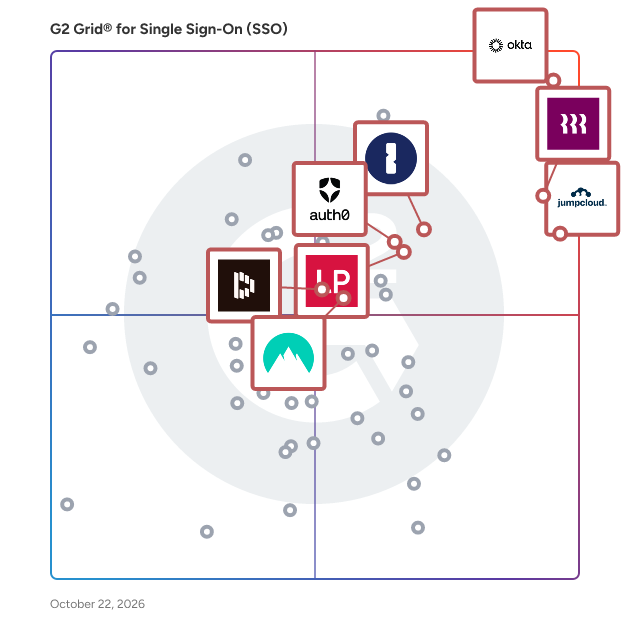
## G2 Grid® for Single Sign-On (SSO) Solutions
![G2 Grid® for Single Sign-On (SSO) Solutions plotting products by satisfaction and market presence](https://www.g2.com/categories/single-sign-on-sso/grids.png?focus%5B%5D=36316&focus%5B%5D=633&focus%5B%5D=1640029&focus%5B%5D=4533&focus%5B%5D=1718&focus%5B%5D=22264&focus%5B%5D=3899&focus%5B%5D=107342)
Highlighted products: JumpCloud, Okta, Rippling IT, 1Password, LastPass, Auth0, Microsoft Entra ID, and NordPass Business.
Underlying data: [Grid® JSON](https://www.g2.com/categories/single-sign-on-sso/grids.json?focus%5B%5D=jumpcloud&amp;focus%5B%5D=okta&amp;focus%5B%5D=rippling-it&amp;focus%5B%5D=1password&amp;focus%5B%5D=lastpass&amp;focus%5B%5D=auth0&amp;focus%5B%5D=microsoft-entra-id&amp;focus%5B%5D=nordpass-business&amp;segment=small-business)


## How Many Single Sign-On (SSO) Solutions Products Does G2 Track?
**Total Products under this Category:** 172

### Category Stats (Jul 2026)
- **Average Rating**: 4.4/5 The average rating of products in this category, based on all submitted ratings
- **Top Trending Product**: ID.me (+1.62%) - Among all products in this category, ID.me recorded the largest rating increase compared to last month
*Last updated: July 16, 2026*


## How Does G2 Rank Single Sign-On (SSO) Solutions Products?

**Why You Can Trust G2's Software Rankings:**

- 30 Analysts and Data Experts
- 18,000+ Authentic Reviews
- 172+ Products
- Unbiased Rankings

G2's software rankings are built on verified user reviews, rigorous moderation, and a consistent research methodology maintained by a team of analysts and data experts. Each product is measured using the same transparent criteria, with no paid placement or vendor influence. While reviews reflect real user experiences, which can be subjective, they offer valuable insight into how software performs in the hands of professionals. Together, these inputs power the G2 Score, a standardized way to compare tools within every category.


---

**Sponsored**

### NextGen Healthcare EHR

NextGen Healthcare provides ambulatory practices of all sizes award-winning solutions along with dedicated support and professional services. We align with your goals to achieve the success that results in healthier patients and happier providers. NextGen® Enterprise EHR offers your practice configurable clinical content, intuitive workflows, and an integrated patient experience platform that incorporates telehealth. With NextGen® Mobile, your providers’ smartphones become an extension of your EHR, which saves valuable time. NextGen has its own fully integrated solutions that provide dictation, speech-to-text, direct to desktop and Ambient Listening AI technology. NextGen Mobile Pro provides these capabilities to our clients, replacing their need for additional integrated solutions. Managed cloud hosting keeps your practice secure and makes upgrades easy, though on-premise options are also available. NextGen® Enterprise PM supports patient registration and scheduling, eligibility verification, and pre-service financial clearance. It also provides rules-based charge creation, claims scrubbing and processing, and supports A/R management and collections and reporting. Your healthcare organization can benefit from robust technology and professional services that integrate with your EHR and PM system. You can enhance patient engagement, better manage your revenue cycle, optimize the management of your patient population, and expand communication with other healthcare organizations. NextGen® Office is a cloud-based EHR designed to support your practice growth, save staff time, and increase patient volume. This fully integrated clinical and billing platform features specialty-specific EHR content, mobile accessibility, a revenue cycle management system, and a convenient patient portal. Your care team can benefit from easy-to-use, cost-efficient technology that adapts to their workflow and is accessible from anywhere. They can touch, talk, or type encounter notes directly into the clinical documentation. Patients can also be empowered to manage their care as you enable them to go online to schedule appointments, request refills, schedule virtual visits, and connect with their providers.


[Visit website](https://www.g2.com/external_clickthroughs/record?secure%5Bad_program%5D=ppc&amp;secure%5Bad_slot%5D=category_product_list&amp;secure%5Bcategory_id%5D=254&amp;secure%5Bchosen_at%5D=2026-07-19T13%3A31%3A27Z&amp;secure%5Bdisplayable_resource_id%5D=444&amp;secure%5Bdisplayable_resource_type%5D=Category&amp;secure%5Bmedium%5D=sponsored&amp;secure%5Bplacement_reason%5D=retargeted_product&amp;secure%5Bplacement_resource_ids%5D%5B%5D=1821&amp;secure%5Bprioritized%5D=false&amp;secure%5Bproduct_id%5D=1821&amp;secure%5Bresource_id%5D=254&amp;secure%5Bresource_type%5D=Category&amp;secure%5Bsource_type%5D=category_page&amp;secure%5Bsource_url%5D=https%3A%2F%2Fwww.g2.com%2Fcategories%2Fsingle-sign-on-sso%2Fsmall-business&amp;secure%5Btoken%5D=7782c62c4210156895168291905423e92e3c3d3d55b97125a86fed2618490627&amp;secure%5Burl%5D=https%3A%2F%2Fwww.nextgen.com%2Fehr-demo%3Futm_source%3Dintent%26utm_medium%3Dg2%26utm_campaign%3D701Vz00000jcuH0IAI%26utm_content%3Dg2-clicks-ad&amp;secure%5Burl_type%5D=custom_url)

---


## What Is Single Sign-On (SSO) Solutions?

[Identity Management Software](https://www.g2.com/categories/identity-management)

## What Software Categories Are Similar to Single Sign-On (SSO) Solutions?

- [User Provisioning and Governance Tools](https://www.g2.com/categories/user-provisioning-and-governance-tools)
- [Identity and Access Management (IAM) Software](https://www.g2.com/categories/identity-and-access-management-iam)
- [Multi-Factor Authentication (MFA) Software](https://www.g2.com/categories/multi-factor-authentication-mfa)
- [Risk-Based Authentication Software](https://www.g2.com/categories/risk-based-authentication-rba)
- [Customer Identity and Access Management (CIAM) Software](https://www.g2.com/categories/customer-identity-and-access-management-ciam)
- [Biometric Authentication Software](https://www.g2.com/categories/biometric-authentication)
- [Passwordless Authentication Software](https://www.g2.com/categories/passwordless-authentication)


---

## How Do You Choose the Right Single Sign-On (SSO) Solutions?

### What You Should Know About Single Sign-On Solutions

### What are Single Sign-On (SSO) Solutions?

Single sign-on (SSO) solutions are user authentication solution that helps companies secure access to business applications and assets. It does so while also providing end users with a convenient, easy-to-use portal that requires them only to sign in and authenticate once to access multiple corporate applications and resources.&amp;nbsp;

SSO solutions share authentication sessions between a trusted identity provider, which manages digital identities and applications. In practice, commonly, an identity provider requires the user to log in and authenticate; the identity provider then shares this authentication session with other applications by passing digitally signed tokens for the receiving application to verify that it is coming from a trusted provider before granting the user with access to the application. If the user identity token is accepted, the user is automatically granted access to the application.

Companies use SSO software mainly to improve security and enhance the end-user sign-on experience, whether that be internal employees, end customers, or corporate business partners. SSO solutions also centralizes user access management, thus reducing the security management burden on administrators. Using an SSO solution, IT administrators can reduce or eliminate common time-consuming tasks like password resets. SSO products contain features that benefit both end users and administrators. For end users, this includes an easy-to-use user portal, intuitive authentication, and often a mobile application. For administrators, these solutions often include an identity directory or directory integrations, multiple multi-factor authentication (MFA) methods, audit features, and prebuilt application integrations.&amp;nbsp;

**What Does SSO Stand For?**

SSO most commonly stands for single sign-on. The acronym SSO is less frequently used to describe same sign-on, which is different from single sign-on; same sign-on does not rely on trusted tokens, but rather credential sharing. Rarely, the acronym SSO is used to describe single sign-out.

Other common acronyms people may encounter regarding SSO products include:

FIM: federated identity management, of which SSO is a part

IAM: identity and access management

IdP: identity provider

JWT: JSON Web Token, a protocol commonly used in business-to-consumer (B2C) SSO applications

LDAP: lightweight directory access protocol, an open protocol used for directory services authentication

MFA: multi-factor authentication

OIDC: OpenID Connect, an authentication protocol

OAuth: an open standard authentication protocol

SAML: Security Assertion Markup Language, an open standard used for SSO solutions

#### What Types of Single Sign-On (SSO) Solutions Exist?

**Business to employee (B2E)**

Companies use B2E SSO solutions to securely manage their employees’ access to corporate accounts, provide an easy-to-use user experience, and reduce user need for IT administrators services.

**Business to business (B2B)**

Companies use B2B SSO solutions to enable their business partners and corporate customers to best utilize the company’s services, using the partner or corporate customer’s preferred identity providers.

**Business to consumer (B2C) or customer identity and access management (CIAM)**

In B2C or CIAM use cases, customers are able to sign into other accounts and connect them to the business’ app to provide an SSO experience. Most commonly, customers authenticate using social media identity providers like Facebook or Google enabling them access to connected accounts. **&amp;nbsp;**

### What are the Common Features of Single Sign-On (SSO) Solutions?

The following are some core features within SSO solutions that can help users and administrators.

**User portal:** User portals provide an intuitive, easy-to-use end-user interface.

**Mobile app:** Many SSO solutions offer a mobile app for end users to both authenticate and access the SSO solution from their mobile devices.

**MFA methods:** Most SSO providers offer multiple authentication methods to end users, from software or hardware token-based authentication, to mobile push, passwordless authentication, biometric authentication, or one-time passcodes (OTPs).&amp;nbsp;

**Adaptive or contextual access:** Some SSO software offers advanced authentication tools, such as adaptive or contextual access. Using machine learning to understand a user’s contextual use of the SSO product, such as location, IP address, time, and other real-time factors to create a user baseline profile. This profile is then used to determine anomalous access activity to prevent access when risk is deemed too high.

**Directory or integration:** To assist with user provisioning and management, SSO solutions either integrate with standard directories, such as Microsoft Active Directory, LDAP-based directories, or Google Cloud Directory or offer their own cloud directories built into the SSO software.

**Prebuilt integration application catalog:** SSO solutions commonly provide prebuilt integrations to widely used SaaS applications, which are available on an application catalog.

**Role management:** SSO solutions assist administrators with user provisioning and assigning permissions based on user role for access control.

**Audit features** : Audit features provide administrators audit logs to monitor user access.

### What are the Benefits of Single Sign-On (SSO) Solutions?

**Increases security:** The main benefit of using an SSO solution is for securing user access to company applications and other resources through user authentication.

**Reduces password authentication risk:** Since users must only sign in and authenticate once to access multiple applications, SSO solutions reduce the risks associated with poor password management and using only a single factor for authentication.

**Saves users time and frustration:** SSO solutions reduce the number of logins end users such as employees or customers must remember and SSO solutions reduce user frustration when switching between multiple applications once authenticated.

**Saves administrators time and money:** Users can access their accounts in one centralized location, reducing the number of calls to administrators for password resets, saving time and, therefore money on labor costs.

**Seamless experience across assets:** SSO solutions reduce login friction for end users once authenticated and give them access to multiple accounts.&amp;nbsp;

**Centralizes consumer profiles:** SSO software consolidates end-user experiences in one tool to provide a centralized view of end-user or customer data.

### Who Uses Single Sign-On (SSO) Solutions?

**Systems administrators:** Systems administrators are responsible for deploying and managing a company’s SSO solutions.

**Employees:** Employees are end users of SSO solutions in a B2E use case to sign on and authenticate with the user portal to access their corporate accounts.

**Customers:** Customers are end users of SSO solutions in a B2C use case and sign in and authenticate using an identity provider, often a social media account, to access a business’ applications.

**Business contacts:** Companies may use SSO software to enable their business partners and corporate customers to securely authenticate and access the company’s assets, often with multiple identity providers.

#### Software Related to Single Sign-On (SSO) Solutions

Related solutions that can be used together with SSO software include:

[Identity and access management (IAM) software](https://www.g2.com/categories/identity-and-access-management-iam) **:** For employee use cases, IAM software offers broader identity solutions, of which SSO is often a part. IAM software authenticates users, provides access to systems and data based on company policies, tracks user activity, and provides reporting tools to ensure employees comply with company policies and regulations.

[Customer identity and access management (CIAM) software](https://www.g2.com/categories/customer-identity-and-access-management-ciam) **:** For customer use cases, CIAM software provides robust identity functionality. CIAM software enables businesses to centralize and manage customer identities, preferences, and profile information at scale while offering customers self-registration options.

[Password manager software](https://www.g2.com/categories/password-manager) **:** Password managers are secure repositories that store individual user passwords, much like a vault. SSO solutions differs from password managers because SSO software provides authentication before granting a trusted token, not an actual password, for access to an application.&amp;nbsp;

[SaaS operations management software](https://www.g2.com/categories/saas-operations-management) **:** SaaS operations management software tools enable businesses to manage, govern, and secure their SaaS product portfolios; many of these tools integrate with SSO solutions to manage user permissions. **&amp;nbsp;&amp;nbsp;&amp;nbsp;**

[SaaS spend management software](https://www.g2.com/categories/saas-spend-management) **:** This software enables companies to manage SaaS utilization to identify cost savings. Many of these tools integrate with SSO software to manage end-user utilization of SaaS subscriptions.

### Challenges with Single Sign-On (SSO) Solutions

Software solutions can come with their own set of challenges. Issues to consider include:&amp;nbsp;

**Legacy applications** : SSO tools may not integrate with legacy applications; a solution to overcome this may include password vaulting tools within the SSO software to provide the end user with ease of use, despite not technically functioning as SSO regarding authentication.&amp;nbsp;

**High availability:** It is important that the SSO provider has high availability to avoid users being locked out of their systems; with applications managed centrally with an SSO solution, any downtime can prevent end users from accessing their applications and resources. If a company has mission-critical applications that must be available 24/7, many companies will not integrate these tools with SSO providers and instead log in and authenticate separately.

### Which Companies Should Buy Single Sign-On (SSO) Solutions?

All companies can benefit from securing their login process to corporate assets.

**Companies securing employees:** Companies of all sizes that want to secure their employees’ access to corporate applications use SSO solutions.

**Companies securing customers:** Companies that want to enable their customers to provide self service to securely authenticate and login to applications use SSO solutions.

**Companies securing partners:** Companies that want to secure their partners and contractors access to corporate applications use SSO solutions.

### How to Buy Single Sign-On (SSO) Solutions

#### Requirements Gathering (RFI/RFP) for Single Sign-On (SSO) Software

Prior to selecting an SSO software service provider or solution, buyers must consider what factors are important to the company, which may include:

**End-user use case:** Buyers must determine their end users—whether employees, customers, or business partners—to determine what kind of SSO solution works best for these constituencies.

**Cloud vs. on-premises application support:** The buyer should determine what applications and company resources will be connected to the SSO software. For applications that need high availability (24/7), they may not wish to connect those in case of downtime with the SSO provider. Many SSO providers offer prebuilt integrations with the most popular business software. If the business has applications that are custom-built, legacy, or on-premises, those may need integrations built to connect with the SSO. Another workaround would be to use a password vault within an SSO solution for legacy applications that are difficult to connect.

**Federation protocols** : If the organization needs to integrate with multiple identity providers outside of the organization, especially for authenticating business partners, FIM can achieve this. Federation protocols include SAML 1.1, SAML2, WS-Federation, OAuth2, OpenID Connect, WS-Trust, and other protocols.

**Authentication type** : The company should ensure that the authentication types its employees, customers, or partners will use are supported by the SSO solution of choice. This may include software or hardware-token-based authentication for employees and OTPs via email, SMS, or phone for customers, among many other authentication methods. Many SSO solutions now offer contextual or risk-based authentication measures to learn user behaviors, identify patterns, and thus provide risk-based assessments when the authentication process does not meet typical patterns.&amp;nbsp;

**Mobile app** : If end users will access corporate applications from mobile devices, ensure the SSO software provider’s mobile app meets particular business needs.&amp;nbsp;

**Developer support** : Buyers must ensure the SSO provider has the developer support the team requires, including software development kits (SDKs) and application programming interface (API) lifecycle management functions, particularly for B2C SSO use cases.&amp;nbsp;

**Meets security standards** : SSO is a security tool providing users with authenticated access to their company resources. It is important that the SSO service provider meet security standards that are important to the company, which may include ISO 27017, ISO 27018, ISO 27001, SOC 2 Type 2, and others.&amp;nbsp;

#### Compare Single Sign-On Software (SSO) Products

**Create a long list**

Buyers should create a long list of software solutions by researching on g2.com, by reading real-user reviews, seeing how vendors compare on G2 Grid® reports, and saving the software selections to “My List” to reference them in the future. Using g2.com, users can learn about which solutions are most often used in the geographic market and which ones are best for every business segment size—whether that is for small, medium, and enterprise businesses.

**Create a short list**

After creating a long list of vendors, buyers must do further research to narrow down the selections. Using g2.com’s compare feature, they can stack specific software up side by side to learn about how real users of the software rate their functionality. G2 also has quarterly reports showcasing users’ perception of return on investment (in months),&amp;nbsp;the software provider’s average implementation time in months, usability scores, and many other factors.

**Conduct demos**

Up next is time to demo the products. Many vendors enable buyers to contact them directly from g2’s website by clicking the “Get a quote” button on their product profile. Buyers must prepare for each demo by having a standard list of questions and clarifications to ask each vendor.&amp;nbsp;

#### Selection of Single Sign-On (SSO) Solutions&amp;nbsp;

**Choose a selection team**

Single sign-on solutions impact users across the business—from employees, customers, business partners, IT teams, infosec teams, and more. The company’s software selection team should include people representative of these groups. They must start with three to five people to join the selection committee and clearly define project roles.&amp;nbsp;

**Negotiation**

It is important to know how many licenses are needed, as pricing often depends on the number of licenses the buyer purchases and the length of time they purchase it for. Often buyers can get discounts if they purchase large blocks of licenses for a longer duration. They must be sure to negotiate not just on price, but also implementation. Companies may be able to get free or reduced implementation services or ongoing support, as well.

**Final decision**

Before making a final choice, buyers should check if they can get a trial run of the product to test adoption with a small sample size of users. If the tool is well used and well received, the buyer can be confident that the selection was correct.


