Best Remote Desktop Software - Page 3

How Many Remote Desktop Software Products Does G2 Track?

Total Products under this Category: 162

Category Stats (Sep 2026)

  • Average Rating: 4.45/5 (↓0.02 vs Aug 2026) The average rating of products in this category, based on all submitted ratings
  • Top Trending Product: HelpWire (+0.17%) - Among all products in this category, HelpWire recorded the largest rating increase compared to last month

Last updated: September 26, 2026

How Does G2 Rank Remote Desktop Software Products?

Why You Can Trust G2's Software Rankings:

  • 30 Analysts and Data Experts
  • 16,400+ Authentic Reviews
  • 162+ Products
  • Unbiased Rankings

G2's software rankings are built on verified user reviews, rigorous moderation, and a consistent research methodology maintained by a team of analysts and data experts. Each product is measured using the same transparent criteria, with no paid placement or vendor influence. While reviews reflect real user experiences, which can be subjective, they offer valuable insight into how software performs in the hands of professionals. Together, these inputs power the G2 Score, a standardized way to compare tools within every category.

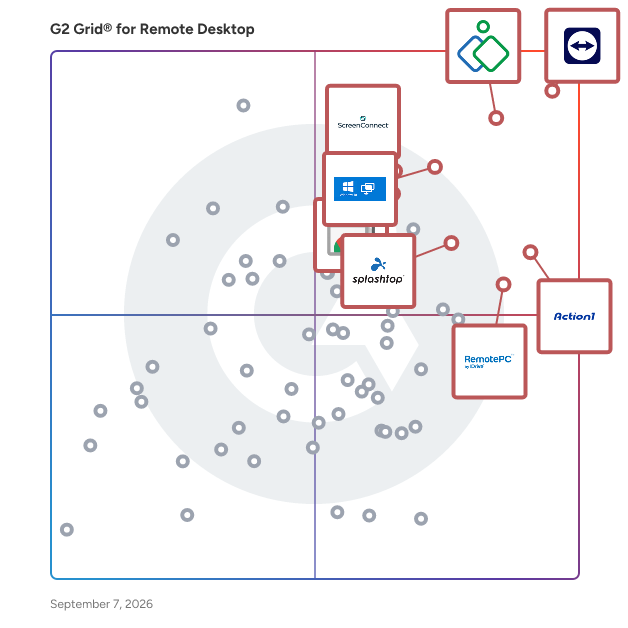
G2 Grid® for Remote Desktop Software

G2 Grid® for Remote Desktop Software plotting products by satisfaction and market presence

Highlighted products: TeamViewer, Zoho Assist, Action1, Microsoft Quick Assist, Chrome Remote Desktop, RemotePC, Splashtop Remote Access, and ScreenConnect.

Underlying data: [Grid® JSON](https://www.g2.com/categories/remote-desktop/grids.json?focus%5B%5D=teamviewer&focus%5B%5D=zoho-assist&focus%5B%5D=action1&focus%5B%5D=microsoft-quick-assist&focus%5B%5D=chrome-remote-desktop&focus%5B%5D=remotepc&focus%5B%5D=splashtop-remote-access&focus%5B%5D=screenconnect&segment=all)

Parallels Desktop for Mac

A fast, easy and powerful application for running Windows on your Intel or Apple M1 Mac—all without rebooting. Includes 30+ one-touch tools to simplify everyday tasks on Mac and Windows.

Average Rating: 4.3/5.0

Total Reviews: 59

How Do G2 Users Rate Parallels Desktop for Mac?

  • Has the product been a good partner in doing business?: 8.3/10 (Category avg: 9.0/10)
  • Usage Information: 8.7/10 (Category avg: 8.7/10)
  • Remote Access/Control: 8.5/10 (Category avg: 9.1/10)
  • Device Management: 8.8/10 (Category avg: 8.7/10)

Who Is the Company Behind Parallels Desktop for Mac?

  • Seller: Corel Corporation
  • Year Founded: 2006
  • HQ Location: Bellevue, WA
  • Twitter: @corelsoftware
    83 Twitter followers
  • LinkedIn® Page: www.linkedin.com
    1 employees on LinkedIn®

Who Uses This Product?

  • Who Uses This: Owner
  • Top Industries: Information Technology and Services, Computer Software
  • Company Size: 68% Small, 17% Large

What Do G2 Reviewers Say About Parallels Desktop for Mac?

AI-generated summary from verified user reviews

Pros
  • Users appreciate the fast connection speed of Parallels Desktop for seamless switching between Mac and Windows.
  • Users highlight the seamless cross-platform integration of Parallels Desktop, enhancing productivity while using Windows tools on Mac.
  • Users find Parallels Desktop easy to use with seamless switching between Mac and Windows, enhancing productivity.
  • Users value the easy deployment of Parallels Desktop, enjoying quick transitions between Mac and Windows environments.
  • Users appreciate the mobile compatibility of Parallels Desktop, enabling smooth operation of Windows tools on their Macs.
Cons
  • Users find Parallels Desktop expensive and misleading due to unexpected auto-renewals and lack of refunds.
  • Users face feature limitations like requiring a separate Windows license and issues with USB detection and graphic performance.
  • Users are frustrated by subscription issues, facing auto-renewals without consent and difficulty in securing refunds.
  • Users face update issues with Parallels Desktop, affecting device detection and the performance of demanding applications.

What Are Recent G2 Reviews of Parallels Desktop for Mac?

What Are G2 Users Discussing About Parallels Desktop for Mac?

MobaXTerm

MobaXterm is an all-in-one remote computing toolbox designed for Windows, integrating a comprehensive suite of network tools and Unix commands into a single, portable application. It caters to IT professionals, developers, and system administrators who require efficient management of remote systems. By consolidating various functionalities, MobaXterm simplifies complex networking tasks and enhances productivity. Key Features and Functionality: - Tabbed Terminal with Unix Commands: Provides a terminal emulator supporting essential Unix commands like `ls`, `cd`, `grep`, and `awk`, offering a familiar environment for users accustomed to Unix/Linux systems. - Session Management: Supports multiple remote sessions, including SSH, Telnet, Rlogin, RDP, VNC, XDMCP, FTP, SFTP, and Serial connections, all managed within a unified interface. - Graphical SFTP Browser: Facilitates secure file transfers through an integrated SFTP browser, enabling drag-and-drop functionality between local and remote systems. - Embedded X11 Server: Allows the execution of remote graphical applications on the local Windows desktop without additional configuration, utilizing X11 forwarding. - Multi-Execution: Enables simultaneous execution of commands across multiple servers, streamlining repetitive tasks. - Embedded Tools: Includes a variety of network tools and utilities tailored for system administrators and developers, such as a text editor, packet capture, and network daemons. - Macros Support: Offers the ability to record and replay macros, automating complex command sequences to save time and reduce errors. - Customization Options: Provides extensive customization, including custom startup commands, scripts, and configuration settings, allowing users to tailor the application to their specific needs. Primary Value and Solutions Provided: MobaXterm addresses the challenges of remote system management by offering a unified platform that combines multiple network protocols and tools. Its integration of an X11 server, SSH client, and various network utilities into a single application reduces the need for multiple disparate tools, thereby enhancing workflow efficiency. The portable nature of MobaXterm allows users to operate it from a USB drive without installation, providing flexibility for professionals who work across different machines. By simplifying remote access, file transfers, and the execution of graphical applications, MobaXterm significantly improves productivity and streamlines the management of remote systems.

Average Rating: 4.6/5.0

Total Reviews: 102

How Do G2 Users Rate MobaXTerm?

  • Has the product been a good partner in doing business?: 9.3/10 (Category avg: 9.0/10)
  • Usage Information: 8.6/10 (Category avg: 8.7/10)
  • Remote Access/Control: 8.9/10 (Category avg: 9.1/10)
  • Device Management: 8.5/10 (Category avg: 8.7/10)

Who Is the Company Behind MobaXTerm?

  • Seller: Mobatek
  • HQ Location: Toulouse, France
  • Twitter: @mobatek
    3,178 Twitter followers
  • LinkedIn® Page: www.linkedin.com
    1 employees on LinkedIn®

Who Uses This Product?

  • Who Uses This: Software Engineer
  • Top Industries: Information Technology and Services, Computer Software
  • Company Size: 52% Medium, 29% Small

What Do G2 Reviewers Say About MobaXTerm?

AI-generated summary from verified user reviews

Pros
  • Users value the ease of use in MobaXterm, praising its organized layout and efficient session management.
  • Users value the efficient file transfer capabilities of MobaXterm, enhancing workflow during remote connections.
  • Users value the simplicity of MobaXterm, finding its neat organization and tab-based interface highly efficient for managing connections.
  • Users love the easy setup of MobaXterm, enabling effortless management of multiple RDP connections in one place.
  • Users appreciate the easy to access RDP connections in MobaXterm, enhancing efficiency and streamlining their workflow.
Cons
  • Users find log viewing difficult at times, but it doesn't significantly impact their overall experience.
  • Users feel the limited customization options hinder their experience and make the interface feel outdated.
  • Users find the user interface outdated and experience frustration with limited customization options and credential disruptions.
  • Users express concerns about pricing issues with MobaXTerm, finding it a significant drawback of the product.
  • Users report update issues that disrupt saved credentials, along with outdated interface and limited customization options.

What Are Recent G2 Reviews of MobaXTerm?

What Are G2 Users Discussing About MobaXTerm?

Getscreen.me

Getscreen.me is a cloud-based web service for remote desktop connection in web. Cloud-based software for administration, technical support and remote work. You can get access to any Windows, macOS, Linux and Android devices. Remote access for a two clicks! All service plans offer two-factor authorization in the personal account via e-mail, Telegram and Google Authenticator. Availibable session recordings and connection history. Our solution is primarily focused on professional use: - Enterprise and home network administration - Set up of technical support - Remote office - No need to install a client - Easy integrations It is also a great solution for personal purposes: - Share access to your desktop - Connect to your friend’s desktop - Create teams - View session recordings and connection history

Average Rating: 4.8/5.0

Total Reviews: 260

How Do G2 Users Rate Getscreen.me?

  • Has the product been a good partner in doing business?: 9.2/10 (Category avg: 9.0/10)
  • Usage Information: 8.8/10 (Category avg: 8.7/10)
  • Remote Access/Control: 9.2/10 (Category avg: 9.1/10)
  • Device Management: 8.8/10 (Category avg: 8.7/10)

Who Is the Company Behind Getscreen.me?

  • Seller: Getscreen.me
  • Year Founded: 2018
  • HQ Location: Limassol, CY
  • Twitter: @getscreenme
    112 Twitter followers
  • LinkedIn® Page: www.linkedin.com
    9 employees on LinkedIn®

Who Uses This Product?

  • Who Uses This: CEO, Owner
  • Top Industries: Information Technology and Services, Computer & Network Security
  • Company Size: 91% Small, 8% Medium

What Do G2 Reviewers Say About Getscreen.me?

AI-generated summary from verified user reviews

Pros
  • Users commend the ease of use of Getscreen.me, highlighting its simple navigation and effective customer support.
  • Users appreciate the reliable remote access provided by Getscreen.me, enhancing team monitoring and support seamlessly.
  • Users love the easy setup of Getscreen.me, finding it quick and hassle-free for remote access needs.
  • Users love the easy browser-based access of Getscreen.me, allowing instant connections without any software hassle.
  • Users love the intuitive interface of Getscreen.me, making daily tasks seamless and straightforward.
Cons
  • Users report occasional connection issues that can impact experience, though such occurrences are usually rare.
  • Users report slow performance, with low frame rates and laggy response affecting their overall experience.
  • Users find feature limitations in the free plan frustrating, especially with essential features locked behind a paywall.
  • Users express concern over limited compatibility, particularly with Edge and Linux, affecting their overall experience.
  • Users report compatibility issues on Linux, especially with Wayland, affecting their overall experience with Getscreen.me.

What Are Recent G2 Reviews of Getscreen.me?

What Are G2 Users Discussing About Getscreen.me?

HelpWire

HelpWire is remote access software for Windows, macOS, and Linux. IT teams and technicians can start sessions by sending a link, so the remote user clicks it and joins without creating an account or entering credentials. When follow-up is required, unattended access allows technicians to return to devices later without involving the remote user again. Sessions reconnect automatically after reboots. To keep remote access responsive, HelpWire uses direct peer-to-peer connections by default, with relay fallback when network conditions require it. All sessions are encrypted with TLS and AES-256. Core features: - No sign-up for the remote user – reduce friction and speed up session initiation. - Reboot & reconnect – continue support after system restarts without losing access. - UAC elevation support – perform administrative tasks on Windows devices during the session. - File transfer – move files between devices during support work. - Wayland support on Linux – connect to Ubuntu 22.04+, Fedora, and other distributions where Wayland is the default. - Concurrent sessions – let one operator connect to several clients at once, or multiple operators join the same session. - Multi-screen view – work across all client monitors without switching context. - Two-factor authentication (2FA) – protect account access. - Firewall-friendly connections – run support within restricted network environments.

Average Rating: 4.8/5.0

Total Reviews: 30

How Do G2 Users Rate HelpWire?

  • Has the product been a good partner in doing business?: 9.5/10 (Category avg: 9.0/10)
  • Usage Information: 9.5/10 (Category avg: 8.7/10)
  • Remote Access/Control: 9.4/10 (Category avg: 9.1/10)
  • Device Management: 9.4/10 (Category avg: 8.7/10)

Who Is the Company Behind HelpWire?

  • Seller: Electronic Team
  • Year Founded: 2018
  • HQ Location: 11890 Sunrise Valley Dr, Ste 111, Reston, VA 20191, USA
  • Twitter: @inc_electronic
    268 Twitter followers
  • LinkedIn® Page: www.linkedin.com
    36 employees on LinkedIn®

Who Uses This Product?

  • Company Size: 81% Small, 23% Medium

What Do G2 Reviewers Say About HelpWire?

AI-generated summary from verified user reviews

Pros
  • Users praise HelpWire for its reliable connection, providing seamless access without frustrating disconnections or interruptions.
  • Users highlight the simplicity of HelpWire, enjoying straightforward setup and a reliable, uninterrupted experience.
  • Users are impressed by the stable and reliable connection speed of HelpWire, enhancing their overall experience significantly.
  • Users value the cross-platform compatibility of HelpWire, enabling seamless support across both Mac and Windows systems.
  • Users value the cross-platform support of HelpWire, ensuring seamless assistance on both Mac and Windows systems.
Cons
  • Users face occasional connection issues, but appreciate the product's free status despite this drawback.
  • Users find the setup difficulties challenging, suggesting a need for improved UI for managing connections.
  • Users find the steep learning curve of HelpWire challenging, complicating the setup process for maintaining connections.

What Are Recent G2 Reviews of HelpWire?

What Are G2 Users Discussing About HelpWire?

LogMeIn Central

LogMeIn Central is a remote monitoring and management (RMM) platform for IT teams and managed service providers. It enables remote access, endpoint monitoring, patch management, task automation, and reporting from a centralized dashboard. The platform supports Windows and Mac environments and includes antivirus management powered by Bitdefender.

Average Rating: 4.2/5.0

Total Reviews: 203

How Do G2 Users Rate LogMeIn Central?

  • Has the product been a good partner in doing business?: 8.4/10 (Category avg: 9.0/10)
  • Usage Information: 8.3/10 (Category avg: 8.7/10)
  • Remote Access/Control: 9.8/10 (Category avg: 9.1/10)
  • Device Management: 7.5/10 (Category avg: 8.7/10)

Who Is the Company Behind LogMeIn Central?

  • Seller: GoTo
  • Year Founded: 2003
  • HQ Location: Boston, MA
  • Twitter: @goto
    41,211 Twitter followers
  • LinkedIn® Page: www.linkedin.com
    993 employees on LinkedIn®

Who Uses This Product?

  • Who Uses This: Network Administrator, IT Manager
  • Top Industries: Information Technology and Services, Computer Software
  • Company Size: 51% Small, 38% Medium

What Are Recent G2 Reviews of LogMeIn Central?

ManageEngine Remote Access Plus

ManageEngine Remote Access Plus is an enterprise remote support and troubleshooting solution that enables IT teams and help desk technicians to securely access, diagnose, and resolve issues on remote endpoints from a centralized console. It supports Windows, macOS, Linux, and Android devices, with both attended and unattended remote access. Technicians can use built-in tools such as remote command prompt, task manager, registry, device manager, file manager, event viewer, Wake on LAN, and network performance monitoring to troubleshoot issues without being physically present. Remote Access Plus also provides voice, video, and text chat, secure file transfer, session recording, audit-ready reporting, role-based access, and multi-technician collaboration. It is available in both cloud and on-premises deployment models, making it suitable for organizations with diverse infrastructure, security, and data residency requirements.

Average Rating: 4.4/5.0

Total Reviews: 33

How Do G2 Users Rate ManageEngine Remote Access Plus?

  • Has the product been a good partner in doing business?: 9.0/10 (Category avg: 9.0/10)
  • Usage Information: 8.9/10 (Category avg: 8.7/10)
  • Remote Access/Control: 9.3/10 (Category avg: 9.1/10)
  • Device Management: 8.9/10 (Category avg: 8.7/10)

Who Is the Company Behind ManageEngine Remote Access Plus?

  • Seller: Zoho
  • Year Founded: 1996
  • HQ Location: Austin, TX
  • Twitter: @Zoho
    137,880 Twitter followers
  • LinkedIn® Page: www.linkedin.com
    30,913 employees on LinkedIn®
  • Phone: +1 (888) 900-9646

Who Uses This Product?

  • Top Industries: Information Technology and Services, Computer & Network Security
  • Company Size: 53% Small, 35% Medium

What Do G2 Reviewers Say About ManageEngine Remote Access Plus?

AI-generated summary from verified user reviews

Pros
  • Users appreciate the automation features of ManageEngine Remote Access Plus, enhancing efficiency and reducing disruptions during tasks.
  • Users value the affordability of ManageEngine Remote Access Plus, finding it cost-effective with easy setup and installation.
  • Users value the deployment ease of ManageEngine Remote Access Plus, appreciating its straightforward setup and on-premise options.
  • Users value the ease of use of ManageEngine Remote Access Plus, appreciating its straightforward setup and seamless functionality.
  • Users praise the easy integrations with Active Directory for seamless deployment and management efficiency.
Cons
  • Users often experience slow performance, which complicates basic tasks and hampers the overall efficiency of the product.
  • Users report automation issues due to slow performance and delays in agent installation and host identification.
  • Users find the complexity of basic tasks in ManageEngine Remote Access Plus frustrating and resource-intensive.
  • Users find the feature limitations problematic, as the app is often complicated and consumes excessive resources.
  • Users experience significant functionality issues with the mobile app, which complicates basic tasks and consumes excessive resources.

What Are Recent G2 Reviews of ManageEngine Remote Access Plus?

What Are G2 Users Discussing About ManageEngine Remote Access Plus?

TightVNC

TightVNC is a free and open-source remote desktop software that enables users to access and control computers over a network. It allows interaction with a remote screen as if the user were physically present, facilitating tasks such as opening files, launching applications, and performing other desktop activities. Compatible with Windows and Linux operating systems, TightVNC is designed to be lightweight and efficient, making it suitable for various hardware configurations. Key Features and Functionality: - Cross-Platform Compatibility: Supports both Windows and Linux systems, ensuring broad usability. - Tight Encoding: Utilizes a combination of JPEG and zlib compression to optimize performance over low-bandwidth connections. - File Transfer Capability: Allows users to transfer files between local and remote machines seamlessly. - Multi-Monitor Support: Enables viewing and controlling multiple monitors connected to the remote system. - Auto-Scaling: Adjusts the viewer window to match the remote desktop size, regardless of the host computer's resolution. - Lightweight Resource Usage: Designed to consume minimal system resources, making it suitable for older hardware and resource-constrained environments. Primary Value and User Solutions: TightVNC provides a cost-effective solution for remote desktop access, eliminating licensing expenses associated with commercial alternatives. Its optimized bandwidth usage and straightforward configuration make it particularly valuable for businesses seeking practical remote connectivity without licensing overhead. By enabling remote control of computers, TightVNC enhances productivity, facilitates remote support, and allows for efficient management of systems across different locations.

Average Rating: 4.2/5.0

Total Reviews: 35

How Do G2 Users Rate TightVNC?

  • Has the product been a good partner in doing business?: 8.3/10 (Category avg: 9.0/10)
  • Usage Information: 7.3/10 (Category avg: 8.7/10)
  • Remote Access/Control: 8.7/10 (Category avg: 9.1/10)
  • Device Management: 7.1/10 (Category avg: 8.7/10)

Who Is the Company Behind TightVNC?

  • Seller: TightVNC
  • Year Founded: 2006
  • HQ Location: Tomsk, Tomsk oblast
  • Twitter: @tightvnc
    630 Twitter followers
  • LinkedIn® Page: www.linkedin.com
    4 employees on LinkedIn®

Who Uses This Product?

  • Top Industries: Information Technology and Services
  • Company Size: 47% Medium, 39% Large

What Do G2 Reviewers Say About TightVNC?

AI-generated summary from verified user reviews

Pros
  • Users appreciate the fast connection speed of TightVNC, making remote support efficient within internal networks.
  • Users value the free remote support TightVNC offers, especially for internal network connectivity.
  • Users value the free remote support capability of TightVNC for efficient assistance within their internal network.
  • Users appreciate the free remote support tool TightVNC offers for effective internal network access and assistance.
Cons
  • Users experience lack of chat functionality during remote connections, hindering effective communication while troubleshooting.

What Are Recent G2 Reviews of TightVNC?

What Are G2 Users Discussing About TightVNC?

Heimdal

Accommodate all your cybersecurity needs under one convenient roof with the Heimdal® Unified Cybersecurity Platform. Our cybersecurity solutions can be used as standalone products or integrated into one another as part of a cohesive and unified XDR platform. Whether you’re a reseller, distributor, MSSP, or an organization committed to bolstering your online security, we provide an array of cutting-edge products to make your mission smoother. Heimdal® is a fast-growing cybersecurity company focused on continuous technological innovation. Since its establishment in 2014 in Copenhagen, based on the winning idea of CTF World Champions, Heimdal has experienced spectacular growth by proactively building products that anticipate threatscape trends. The company offers a multi-layeredand unified security suite that combines threat prevention, patch and asset management, endpoint rights management, antivirus and mail security which together secure customers against cyberattacks and keep critical information and intellectual property safe. Heimdal has been recognized as a thought leader in the industry and has won multiple international awards both for its solutions and for its educational content creation. The Heimdal line of products currently consists of 10 products and 2 services. The former category encompasses DNS Security for Endpoints & Network, Patch & Asset Management, Privileged Access Management, Application Control, Next-Gen Endpoint Antivirus, Ransomware Encryption Protection, Email Security, Email Fraud Prevention, and Remote Desktop. The latter is represented by Endpoint Detection & Response, as well as eXtended Detection & Response, or EDR and XDR for short. Currently, Heimdal’s cybersecurity solutions are deployed in more than 45 countries and supported regionally from offices in 15+ countries, by 175+ highly qualified specialists. Heimdal is ISAE 3000 certified and secures more than 2 million endpoints for over 10,000 companies. The company supports its partners without concessions on the basis of predictability and scalability. The common goal is to create a sustainable ecosystem and a strategic partnership.

Average Rating: 4.4/5.0

Total Reviews: 80

How Do G2 Users Rate Heimdal?

  • Has the product been a good partner in doing business?: 9.4/10 (Category avg: 9.0/10)
  • Usage Information: 9.2/10 (Category avg: 8.7/10)
  • Remote Access/Control: 9.2/10 (Category avg: 9.1/10)
  • Device Management: 10.0/10 (Category avg: 8.7/10)

Who Is the Company Behind Heimdal?

  • Seller: Heimdal®
  • Company Website:
  • Year Founded: 2014
  • HQ Location: Copenhagen, Denmark
  • Twitter: @HeimdalSecurity
    5,086 Twitter followers
  • LinkedIn® Page: www.linkedin.com
    284 employees on LinkedIn®

Who Uses This Product?

  • Top Industries: Computer & Network Security, Construction
  • Company Size: 56% Medium, 30% Small

What Do G2 Reviewers Say About Heimdal?

AI-generated summary from verified user reviews

Pros
  • Users praise the easy setup of Heimdal, appreciating its straightforward installation and quick integration with their systems.
  • Users find that file transfer with Heimdal is seamless and reliable, enhancing overall productivity and ease of use.
  • Users commend Heimdal for its exceptional issue resolution support, providing quick and professional solutions exceeding expectations.
  • Users value the reliable patch management of Heimdal, delivering consistent performance without issues during monthly updates.
  • Users value the reliable security and user-friendly interface of Heimdal, enhancing overall satisfaction and support.
Cons
  • Users find the complex interface of Heimdal difficult to navigate, complicating their overall experience and functionality.
  • Users find the admin portal complex and illogical, making navigation frustrating and cumbersome for essential tasks.
  • Users find the customer support lacking during initial setup, which causes issues with product deployment and upgrades.
  • Users find the poor interface design of Heimdal difficult to navigate, complicating essential tasks and access.
  • Users experience restart issues with Heimdal, feeling unprotected after scans until the software is rebooted.

What Are Recent G2 Reviews of Heimdal?

Kasm Workspaces

The Next-Generation Workspace: Web-Native. Zero-Trust. Hyperconverged. Kasm provides capabilities not possible with your legacy workspace provider: a modern foundation for integrations, devops-enabled automation for deployment speed, data-loss-prevention controls for cybersecurity, and freedom of choice across cloud/hypervisor/infrastructure to escape vendor-lock. Kasm is changing the way that businesses deliver digital workspaces using our open-source web-native container streaming technology to establish a modern devops delivery of Desktop as a Service (DaaS), application streaming, and browser isolation. Provide your workforce on-demand, high-performance, and automatically updated desktop workspaces, with secure DLP-controlled access to their data, regardless of location or device. Kasm is the future of digital workplaces, offering secure, efficient and scalable Windows, Linux and MacOS desktops...along with secure remote access, application streaming and open-source intelligence (OSINT) research environments. Trusted to run the most critical enterprise workloads, aligned with your business/mission needs, at a price you can afford. There is a better way...and Kasm is your partner for getting there.

Average Rating: 4.7/5.0

Total Reviews: 49

How Do G2 Users Rate Kasm Workspaces?

  • Has the product been a good partner in doing business?: 9.6/10 (Category avg: 9.0/10)
  • Usage Information: 8.3/10 (Category avg: 8.7/10)
  • Remote Access/Control: 7.8/10 (Category avg: 9.1/10)
  • Device Management: 7.8/10 (Category avg: 8.7/10)

Who Is the Company Behind Kasm Workspaces?

  • Seller: Kasm Technologies Inc
  • Company Website:
  • Year Founded: 2017
  • HQ Location: McLean, Virginia
  • Twitter: @kasmweb
    619 Twitter followers
  • LinkedIn® Page: www.linkedin.com
    49 employees on LinkedIn®

Who Uses This Product?

  • Top Industries: Information Technology and Services, Computer & Network Security
  • Company Size: 112% Small, 14% Medium

What Do G2 Reviewers Say About Kasm Workspaces?

AI-generated summary from verified user reviews

Pros
  • Users value the affordability of Kasm Workspaces, enjoying efficient remote access without the burden of traditional VMs.
  • Users praise the swift and helpful customer support of Kasm Workspaces, enhancing the overall user experience.
  • Users find Kasm Workspaces to be incredibly easy to set up and use, enhancing their overall experience significantly.
  • Users find Kasm Workspaces to be exceptionally user-friendly, simplifying setup and minimizing helpdesk support needs.
  • Users highlight the easy deployment of Kasm Workspaces, streamlining setup and minimizing rollout time for updates.
Cons
  • Users experience system instability issues due to browser dependency and performance limitations for demanding tasks.
  • Users often face connection issues due to browser dependency, affecting responsiveness and compatibility during use.
  • Users experience feature limitations with Kasm Workspaces, especially in performance and browser compatibility issues.
  • Users experience slow performance with Kasm Workspaces during resource-intensive tasks, impacting productivity and efficiency.
  • Users experience technical issues with responsiveness and performance, especially for resource-intensive tasks in Kasm Workspaces.

What Are Recent G2 Reviews of Kasm Workspaces?

What Are G2 Users Discussing About Kasm Workspaces?

Cisco Webex Support

Cisco Webex Support is a comprehensive remote support solution designed to deliver real-time technical assistance and customer service globally. By enabling support teams to address issues promptly, it helps decrease call durations, achieve faster resolutions, and reduce overall support costs. This platform empowers organizations to meet and exceed customer expectations by providing efficient and effective support services. Key Features and Functionality: - Instant Remote Support Sessions: Initiate support sessions swiftly, allowing representatives to view and control customers' desktops for immediate issue resolution. - Live Chat and Video Conferencing: Engage with customers through high-quality video and chat, facilitating personalized and interactive support experiences. - Remote Desktop Control: Take control of remote desktops to perform tasks such as software installations, updates, and troubleshooting directly on the customer's device. - Unattended Access: Access and manage unattended computers, servers, and point-of-service systems remotely to resolve issues, run patches, and install updates without user intervention. - File Transfer Capability: Transfer files directly to the customer's computer during a session, streamlining the process of providing necessary resources or updates. - System Information Collection: Gather system information with a single click to diagnose issues more effectively and expedite the support process. - Session Recording and Reporting: Record support sessions for quality assurance and training purposes, and utilize detailed reporting functions to analyze and improve support processes. Primary Value and Solutions Provided: Cisco Webex Support enhances customer satisfaction by enabling rapid and effective remote assistance, reducing the need for on-site visits. It boosts support representative productivity through tools like live chat, video conferencing, and remote desktop control, allowing them to handle multiple customers simultaneously. The platform's ability to access unattended systems ensures that support can be provided at any time, addressing issues proactively. By decreasing call times and increasing first-call resolution rates, organizations can reduce overall support costs while delivering high-quality service. Additionally, the secure, scalable nature of the service ensures that support sessions are protected and can grow with the organization's needs.

Average Rating: 4.2/5.0

Total Reviews: 42

How Do G2 Users Rate Cisco Webex Support?

  • Has the product been a good partner in doing business?: 9.2/10 (Category avg: 9.0/10)
  • Usage Information: 7.8/10 (Category avg: 8.7/10)
  • Remote Access/Control: 9.3/10 (Category avg: 9.1/10)
  • Device Management: 8.3/10 (Category avg: 8.7/10)

Who Is the Company Behind Cisco Webex Support?

  • Seller: Cisco
  • Year Founded: 1984
  • HQ Location: San Jose, CA
  • Twitter: @Cisco
    720,366 Twitter followers
  • LinkedIn® Page: www.linkedin.com
    95,294 employees on LinkedIn®
  • Ownership: NASDAQ:CSCO

Who Uses This Product?

  • Company Size: 45% Large, 32% Small

What Do G2 Reviewers Say About Cisco Webex Support?

AI-generated summary from verified user reviews

Pros
  • Users appreciate the ease of use of Cisco Webex Support, making remote assistance simple and efficient.
  • Users value the intuitive design of Cisco Webex Support, enhancing functionality and ease of use across platforms.
  • Users appreciate the mobile compatibility of Cisco Webex Support, finding it functional and easy to use on-the-go.
  • Users appreciate the ease of remote control access in Cisco Webex Support, valuing its long-standing reliability.
  • Users appreciate the ease of use and top-notch features of Cisco Webex Support as a time-tested remote support tool.
Cons
  • Users experience difficulties with slow performance and sharing control, impacting their overall satisfaction with Cisco Webex Support.
  • Users experience remote access issues, facing slow performance and difficulties in sharing control with others.
  • Users experience remote control issues with Cisco Webex Support, facing slow performance and difficulties in sharing control.
  • Users experience slow performance at times, which complicates sharing control with other users during sessions.

What Are Recent G2 Reviews of Cisco Webex Support?

What Are G2 Users Discussing About Cisco Webex Support?

FixMe.IT

FixMe.IT is a fast and easy-to-use remote support application built for delivering on-demand and unattended technical assistance to clients located anywhere in the world — including reliable compatibility with legacy environments such as Windows XP. Starting at just $32.50 per month per seat, FixMe.IT allows you to provide unlimited on-demand support and manage up to 200 unattended machines. Other key features include branding, multi-session handling, multi-window control, drag-n-drop file transfer, multi-monitor navigation, whiteboard tools, session recording and reporting, reboot & auto-reconnect, and much more.

Average Rating: 4.7/5.0

Total Reviews: 220

How Do G2 Users Rate FixMe.IT?

  • Has the product been a good partner in doing business?: 9.5/10 (Category avg: 9.0/10)
  • Usage Information: 9.0/10 (Category avg: 8.7/10)
  • Remote Access/Control: 9.4/10 (Category avg: 9.1/10)
  • Device Management: 8.7/10 (Category avg: 8.7/10)

Who Is the Company Behind FixMe.IT?

  • Seller: Techinline
  • Year Founded: 2007
  • HQ Location: Toronto
  • Twitter: @techinline
    730 Twitter followers
  • LinkedIn® Page: www.linkedin.com
    6 employees on LinkedIn®

Who Uses This Product?

  • Who Uses This: Owner, IT Manager
  • Top Industries: Information Technology and Services, Computer Software
  • Company Size: 66% Small, 32% Medium

What Are Recent G2 Reviews of FixMe.IT?

What Are G2 Users Discussing About FixMe.IT?

Pandora FMS

Pandora FMS is a unified monitoring and observability platform designed to consolidate visibility, alerting, reporting, and automation across heterogeneous IT environments. Instead of combining multiple point tools for networks, servers, applications, and cloud services, Pandora FMS centralizes data collection and operational workflows in a single console, reducing integration effort and operational complexity in on-premise, hybrid, and multi-cloud architectures. The platform collects telemetry using multiple methods, including agents, remote checks, standard protocols (e.g., SNMP/WMI), APIs, and log/event ingestion. This enables teams to monitor infrastructure and services end-to-end, correlate signals, and maintain consistent alerting policies and dashboards across distributed estates. Pandora FMS also supports capacity and trend analysis to anticipate resource constraints and identify recurring patterns, and includes AI-assisted capabilities for anomaly detection and automated thresholds to surface hard-to-spot operational signals. Pandora FMS is extensible through a large plugin ecosystem (500+ plugins and integrations), covering a wide range of enterprise and infrastructure technologies such as SAP, Oracle, Citrix, JBoss, VMware, AWS, SQL Server, Red Hat, and WebSphere. This extensibility helps organizations standardize monitoring across legacy and modern stacks without redesigning their monitoring approach per technology. Core capabilities: -Unified monitoring for networks, servers, applications, cloud services, endpoints, and logs -Centralized alerting, event correlation, dashboards, and scheduled reporting -Flexible data collection via agents, remote checks, APIs, and plugins -Scalability for distributed environments and large numbers of monitored elements -Analytics for trend/capacity planning plus AI-assisted anomaly detection and dynamic thresholds -A key differentiator is direct vendor support, which simplifies escalation and ensures continuity of expertise for deployment, tuning, and ongoing operations.

Average Rating: 4.6/5.0

Total Reviews: 212

How Do G2 Users Rate Pandora FMS?

  • Has the product been a good partner in doing business?: 9.0/10 (Category avg: 9.0/10)
  • Usage Information: 9.2/10 (Category avg: 8.7/10)
  • Remote Access/Control: 8.8/10 (Category avg: 9.1/10)
  • Device Management: 9.6/10 (Category avg: 8.7/10)

Who Is the Company Behind Pandora FMS?

  • Seller: Pandora FMS
  • Company Website:
  • Year Founded: 2004
  • HQ Location: Madrid, Spain
  • Twitter: @pandorafms
    5,458 Twitter followers
  • LinkedIn® Page: www.linkedin.com
    56 employees on LinkedIn®

Who Uses This Product?

  • Who Uses This: Data Analyst
  • Top Industries: Information Technology and Services, Telecommunications
  • Company Size: 50% Medium, 37% Small

What Do G2 Reviewers Say About Pandora FMS?

AI-generated summary from verified user reviews

Pros
  • Users value the reliable remote monitoring capabilities of Pandora FMS, ensuring seamless oversight of their systems.
  • Users enjoy the ease of use of Pandora FMS, appreciating its intuitive interface and reliable support.
  • Users value the real-time monitoring capabilities of Pandora FMS, enhancing visibility of all network devices effortlessly.
  • Users value the flexibility and adaptability of Pandora FMS, making it suitable for diverse IT monitoring needs.
  • Users value the versatility of network monitoring in Pandora FMS, effectively managing diverse devices and environments.
Cons
  • Users find the learning curve steep, particularly with initial setup and complex functionalities of Pandora FMS.
  • Users find the complex setup of Pandora FMS challenging, particularly due to compatibility issues and steep learning curves.
  • Users note the learning difficulty with Pandora FMS, especially for those lacking technical expertise for setup and configuration.
  • Users find the complex configuration of Pandora FMS challenging, especially without extensive technical expertise.
  • Users face a difficult learning curve with Pandora FMS, which can hinder effective usage for beginners.

What Are Recent G2 Reviews of Pandora FMS?

What Are G2 Users Discussing About Pandora FMS?

Oracle Secure Global Desktop

Oracle Secure Global Desktop is a remote access tool for cloud-hosted enterprise applications and hosted desktops.

Average Rating: 4.2/5.0

Total Reviews: 16

How Do G2 Users Rate Oracle Secure Global Desktop?

  • Has the product been a good partner in doing business?: 7.9/10 (Category avg: 9.0/10)
  • Usage Information: 8.7/10 (Category avg: 8.7/10)
  • Remote Access/Control: 8.5/10 (Category avg: 9.1/10)
  • Device Management: 9.0/10 (Category avg: 8.7/10)

Who Is the Company Behind Oracle Secure Global Desktop?

  • Seller: Oracle
  • Year Founded: 1977
  • HQ Location: Austin, TX
  • Twitter: @Oracle
    827,997 Twitter followers
  • LinkedIn® Page: www.linkedin.com
    207,576 employees on LinkedIn®
  • Ownership: NYSE:ORCL

Who Uses This Product?

  • Company Size: 44% Medium, 31% Large

What Are Recent G2 Reviews of Oracle Secure Global Desktop?

What Are G2 Users Discussing About Oracle Secure Global Desktop?

Inuvika OVD Enterprise

Migrating from Citrix or VMware Horizon (Omnissa) could not be easier. Inuvika OVD Enterprise is a secure and cost-effective alternative that reduces your TCO by over 60%. More users on a server, fewer Windows server licenses, no SQL server license, built in secure gateway, concurrent user subscriptions and 2FA will all lower your costs substantially. Inuvika OVD Enterprise is an efficient, desktop virtualization solution that delivers Windows and Linux virtual apps and virtual desktops to any device. It deploys on any hypervisor (KVM, vSphere, ProxmoxVE, Nutanix AHV, Verge.OS, etc) and can be installed on-premise, on public or private clouds, and can also be purchased as a Desktop as a Service (DaaS) from our hosting partners around the world. The on-premises version of the product is available starting with 20 concurrent users. DaaS is available starting at 10 concurrent users. Inuvika OVD Enterprise offers an easy-to-use admin console, a fast user experience, and requires less infrastructure overhead compared to traditional virtual desktop solutions. OVD Enterprise serves enterprise, financial, healthcare, education and government organizations and we are happy to work with SMEs who are struggling with price increases at Citrix and vendor lock-in at VMware/Omnissa. Inuvika also has its own thin client software called ResoluteOS that allows you to repurpose existing hardware to extend the life of it and securely access Inuvika OVD Enterprise. Available in over 60 countries.

Average Rating: 4.7/5.0

Total Reviews: 19

How Do G2 Users Rate Inuvika OVD Enterprise?

  • Has the product been a good partner in doing business?: 9.8/10 (Category avg: 9.0/10)
  • Usage Information: 9.3/10 (Category avg: 8.7/10)
  • Remote Access/Control: 8.9/10 (Category avg: 9.1/10)
  • Device Management: 9.2/10 (Category avg: 8.7/10)

Who Is the Company Behind Inuvika OVD Enterprise?

  • Seller: Inuvika
  • Year Founded: 2014
  • HQ Location: Toronto, Canada
  • Twitter: @InuvikaInc
    311 Twitter followers
  • LinkedIn® Page: www.linkedin.com
    17 employees on LinkedIn®

Who Uses This Product?

  • Top Industries: Information Technology and Services
  • Company Size: 53% Small, 47% Medium

What Are Recent G2 Reviews of Inuvika OVD Enterprise?

Vysor

Vysor is a application that enables users to mirror and control their iOS or Android devices directly from their desktop computers. Compatible with Windows, macOS, Linux, and web browsers, Vysor offers a seamless integration between mobile devices and desktops, allowing users to interact with their mobile apps, play games, and manage their devices using a keyboard and mouse. This functionality is particularly beneficial for developers, IT professionals, and general users seeking enhanced productivity and convenience. Key Features and Functionality: - Device Mirroring and Control: View and operate your iOS or Android device on your desktop, facilitating easy access to mobile applications and content. - Keyboard and Mouse Integration: Utilize your desktop's keyboard for efficient typing and your mouse for navigation, enhancing the user experience. - High-Quality Mirroring: Experience clear and responsive screen mirroring, ensuring a smooth interaction with your mobile device. - Fullscreen Mode: Expand the mirrored display to fullscreen for an immersive experience. - Wireless Connectivity: Connect to your device wirelessly, eliminating the need for USB cables and providing greater flexibility. - Vysor Share: Share your device screen and ADB (Android Debug Bridge) access with others, enabling remote collaboration and support. - Drag and Drop Files: Easily transfer files between your desktop and mobile device using a simple drag-and-drop interface. Primary Value and User Solutions: Vysor addresses the need for efficient and integrated control of mobile devices from desktop environments. For developers, it offers a practical alternative to emulators by providing real-time interaction with physical devices, streamlining the development and testing process. IT professionals can leverage Vysor for remote device management and troubleshooting, enhancing support capabilities. General users benefit from the convenience of managing their mobile devices through a larger screen and more precise input devices, improving productivity and ease of use. By bridging the gap between mobile and desktop platforms, Vysor enhances user experience, facilitates efficient workflows, and supports a wide range of applications across various industries.

Average Rating: 4.6/5.0

Total Reviews: 18

How Do G2 Users Rate Vysor?

  • Usage Information: 9.0/10 (Category avg: 8.7/10)
  • Remote Access/Control: 9.3/10 (Category avg: 9.1/10)
  • Device Management: 9.1/10 (Category avg: 8.7/10)

Who Is the Company Behind Vysor?

  • Seller: ClockworkMod
  • HQ Location: N/A
  • Twitter: @clockworkmod
    23,911 Twitter followers
  • LinkedIn® Page: www.linkedin.com
    1 employees on LinkedIn®

Who Uses This Product?

  • Top Industries: Information Technology and Services
  • Company Size: 60% Medium, 25% Small

What Do G2 Reviewers Say About Vysor?

AI-generated summary from verified user reviews

Pros
  • Users find Vysor to be extremely easy to use, appreciating its quick setup and smooth functionality for device management.
  • Users love the easy setup of Vysor, making it seamless to mirror and control Android devices from a computer.
  • Users appreciate the cross-platform functionality of Vysor, making mirroring and controlling devices seamless and efficient.
  • Users find Vysor's intuitive interface makes mirroring and controlling their Android devices effortless and efficient.
  • Users appreciate the mobile compatibility of Vysor, making device management seamless and efficient on their computers.
Cons
  • Users experience slow performance during screen sharing, particularly on slower connections, while still finding it reliable.
  • Users find Vysor's Pro plan to be quite expensive, which may deter some from upgrading for additional features.
  • Users experience a slight lag during screen sharing on slower connections, impacting the overall experience.
  • Users report slow customer support, which can hinder assistance during critical issues with Vysor.

What Are Recent G2 Reviews of Vysor?

What Are G2 Users Discussing About Vysor?

Tian Lin
TL
Researched and written by Tian Lin
Updated April 9, 2026