Top Free Mind Mapping Software - Page 2

How Many Mind Mapping Software Products Does G2 Track?

Total Products under this Category: 91

Category Stats (Oct 2026)

  • Average Rating: 4.48/5 The average rating of products in this category, based on all submitted ratings
  • Top Trending Product: Lucid Visual Collaboration Suite (+0.13%) - Among all products in this category, Lucid Visual Collaboration Suite recorded the largest rating increase compared to last month

Last updated: October 17, 2026

How Does G2 Rank Mind Mapping Software Products?

Why You Can Trust G2's Software Rankings:

  • 30 Analysts and Data Experts
  • 45,200+ Authentic Reviews
  • 91+ Products
  • Unbiased Rankings

G2's software rankings are built on verified user reviews, rigorous moderation, and a consistent research methodology maintained by a team of analysts and data experts. Each product is measured using the same transparent criteria, with no paid placement or vendor influence. While reviews reflect real user experiences, which can be subjective, they offer valuable insight into how software performs in the hands of professionals. Together, these inputs power the G2 Score, a standardized way to compare tools within every category.

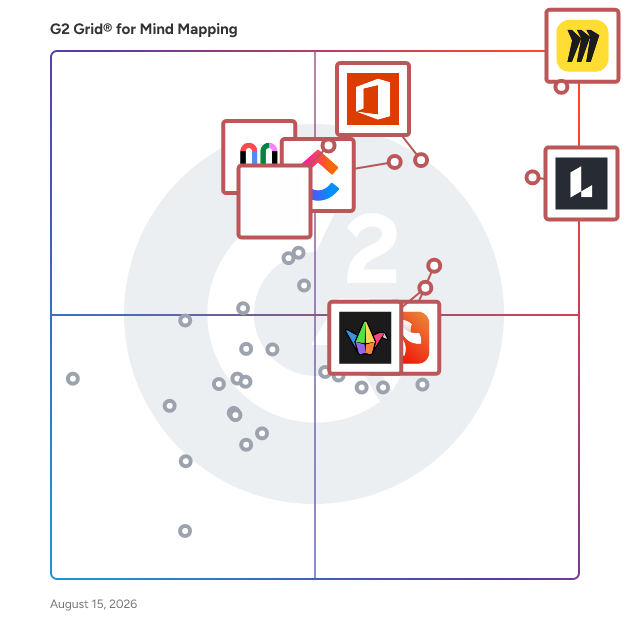
G2 Grid® for Mind Mapping Software

G2 Grid® for Mind Mapping Software plotting products by satisfaction and market presence

Highlighted products: Miro, Lucid Visual Collaboration Suite, Visio, ClickUp, FigJam, Xmind, Padlet, and Mural.

Underlying data: [Grid® JSON](https://www.g2.com/categories/mind-mapping-software/grids.json?focus%5B%5D=miro&focus%5B%5D=lucid-software-inc-lucid-visual-collaboration-suite&focus%5B%5D=visio&focus%5B%5D=clickup&focus%5B%5D=fig-jam&focus%5B%5D=xmind&focus%5B%5D=padlet&focus%5B%5D=mural)

Creately

Creately is an AI-powered diagramming and visual collaboration platform used by teams and professionals worldwide. From genograms and flowcharts to org charts, UML, and network diagrams, Creately makes complex visuals simple with its intuitive editor. It is also the first tool to introduce template-based AI diagram generation for advanced diagram types, saving hours of manual work. With real-time collaboration, smart templates, and integrations, Creately helps teams turn ideas into clear, actionable plans.

Average Rating: 4.4/5.0

Total Reviews: 1,381

G2 Deal: 50% Off Exclusive 3-Year Creately Subscription!

Creately is a visual collaboration platform. It enables teams to go from ideation to planning and execution in the same visual space. Grab your exclusive Creately 3-year subscription just for $89 instead of $180! - that's unbeatable 50% off, only for G2 Users.

Price: ~~$180~~ → $89 for 3 Years

View this exclusive G2 deal

How Do G2 Users Rate Creately?

  • Has the product been a good partner in doing business?: 9.2/10 (Category avg: 9.0/10)
  • Quality of Support: 8.5/10 (Category avg: 8.7/10)

Who Is the Company Behind Creately?

  • Seller: Creately
  • Year Founded: 2008
  • HQ Location: Melbourne, Australia
  • Twitter: @creately
    5,018 Twitter followers
  • LinkedIn® Page: www.linkedin.com
    29 employees on LinkedIn®

Who Uses This Product?

  • Who Uses This: Student, Software Engineer
  • Top Industries: Computer Software, Information Technology and Services
  • Company Size: 77% Small, 14% Medium

What Do G2 Reviewers Say About Creately?

AI-generated summary from verified user reviews

Pros
  • Users find Creately to be intuitive and user-friendly, enabling easy collaboration and diagram creation without prior experience.
  • Users appreciate the versatile diagramming options of Creately, enhancing brainstorming and collaboration effectively across teams.
  • Users appreciate the real-time collaboration in Creately, enabling seamless editing and commenting in shared diagrams.
  • Users value the real-time collaboration in Creately, enhancing teamwork and productivity during brainstorming and diagramming tasks.
  • Users love the user-friendly templates in Creately, making it easy to create professional diagrams effortlessly.
Cons
  • Users experience performance lags and inefficiencies with complex diagrams, impacting usability and offline functionality.
  • Users experience slow loading with Creately, especially involving large diagrams, impacting collaboration and workflow efficiency.
  • Users find the limited features of Creately restrictive, hindering their ability to effectively manage complex diagrams.
  • Users report performance issues with Creately, particularly with large diagrams causing slow loading and inefficiencies.
  • Users experience lagging performance with Creately, especially with large diagrams and during collaborative sessions, hindering efficiency.

What Are Recent G2 Reviews of Creately?

What Are G2 Users Discussing About Creately?

Minitab Workspace

Minitab Workspace is a visual toolset designed to assist teams in mapping, analyzing, and enhancing processes, thereby providing a clear understanding of how work is executed and identifying areas for improvement. This software solution is particularly valuable for organizations aiming to streamline operations and foster a culture of continuous improvement. By offering a comprehensive suite of diagramming and problem-solving tools, Minitab Workspace empowers users to visualize complex processes and collaborate effectively on improvement initiatives. The target audience for Minitab Workspace includes professionals involved in process improvement, quality management, and operational excellence. This includes teams working within frameworks such as Lean and Six Sigma, who require structured methodologies to identify root causes and implement effective solutions. The software's capabilities are particularly beneficial for project managers, quality assurance teams, and operational leaders who need to communicate workflows and insights clearly across various departments. By providing a centralized platform for collaboration, Minitab Workspace enhances team alignment and drives standardized approaches to problem-solving. Key features of Minitab Workspace include a variety of diagramming tools such as process maps, value stream maps, and fishbone diagrams, which facilitate structured problem-solving. These tools enable users to break down complex processes into manageable components, making it easier to identify inefficiencies and areas for improvement. Additionally, brainstorming tools are integrated into the platform, allowing teams to generate and organize ideas collaboratively. This structured approach not only aids in identifying root causes but also fosters a culture of innovation and continuous improvement. Another significant advantage of Minitab Workspace is its cloud availability through the Minitab Solution Center. This feature allows teams to access, create, and collaborate on visual tools from any location, enhancing visibility and supporting distributed workforces. The cloud capability ensures that process knowledge and improvement efforts are centralized, making it easier for teams to share insights and updates in real time. This flexibility is particularly important in today’s increasingly remote work environments, where collaboration across geographies is essential for successful project execution. Overall, Minitab Workspace stands out in the realm of process improvement tools by combining powerful visualization capabilities with collaborative features, making it an essential resource for teams dedicated to enhancing operational efficiency and driving continuous improvement initiatives.

Average Rating: 4.3/5.0

Total Reviews: 87

How Do G2 Users Rate Minitab Workspace?

  • Has the product been a good partner in doing business?: 8.3/10 (Category avg: 9.0/10)
  • Quality of Support: 8.3/10 (Category avg: 8.7/10)

Who Is the Company Behind Minitab Workspace?

  • Seller: Minitab
  • Company Website:
  • Year Founded: 1972
  • HQ Location: State College, Pennsylvania, United States
  • Twitter: @Minitab
    5,017 Twitter followers
  • LinkedIn® Page: www.linkedin.com
    732 employees on LinkedIn®

Who Uses This Product?

  • Who Uses This: Student
  • Top Industries: Automotive, Medical Devices
  • Company Size: 40% Medium, 36% Small

What Do G2 Reviewers Say About Minitab Workspace?

AI-generated summary from verified user reviews

Pros
  • Users find Minitab Workspace easy to use, enabling efficient project organization and quick data processing without expertise.
  • Users find Minitab Workspace's ease of learning invaluable, especially with its supportive training and intuitive features.
  • Users praise Minitab Workspace for its efficiency, delivering quick results and enhancing project organization seamlessly.
  • Users find Minitab Workspace's organization features exceptional, streamlining project workflows and enhancing efficiency with reliable tools.
  • Users appreciate the innovative features of Minitab Workspace, enhancing organization, speed, and efficiency in project management.
Cons
  • Users often face difficult navigation within Minitab Workspace, making it hard to utilize its features effectively.
  • Users find Minitab Workspace to be expensive, particularly affecting students and researchers seeking cost-effective solutions.
  • Users find integration issues with Minitab Workspace, particularly with accessing Minitab directly and limited software compatibility.
  • Users are frustrated by the access limitations of Minitab Workspace, as it cannot directly access Minitab software.
  • Users face connection issues preventing direct access to Minitab Workspace, hindering their experience and workflow.

What Are Recent G2 Reviews of Minitab Workspace?

What Are G2 Users Discussing About Minitab Workspace?

MindMeister

MindMeister is an intuitive mind mapping tool that provides an infinite canvas for collaboration and project planning. Whether used alone or with a team, MindMeister is an easy-to-use, beautifully-designed platform that boosts creativity and productivity. Launched in 2007 as Meister’s first product, MindMeister is now the market-leading online mind mapping solution with 20+ million users generating over one million maps per month. A dedicated mind mapping tool built by and for mind mappers, MindMeister has everything users need to keep their teams creative and engaged. From group brainstorming and project planning to information sharing and knowledge management, MindMeister helps you get the most out of your projects. MindMeister is part of the Meister Suite, a group of products for flawless workflow management. From intuitive, secure task management in MeisterTask, to online documentation in MeisterNote, your team unlocks a powerful toolkit that drives projects every step of the way.

Average Rating: 4.2/5.0

Total Reviews: 34

How Do G2 Users Rate MindMeister?

  • Has the product been a good partner in doing business?: 7.5/10 (Category avg: 9.0/10)
  • Quality of Support: 7.7/10 (Category avg: 8.7/10)

Who Is the Company Behind MindMeister?

  • Seller: MeisterLabs
  • Year Founded: 2006
  • HQ Location: Vienna, Austria
  • Twitter: @mindmeister
    20,018 Twitter followers
  • LinkedIn® Page: www.linkedin.com
    124 employees on LinkedIn®

Who Uses This Product?

  • Top Industries: Information Technology and Services
  • Company Size: 59% Small, 29% Medium

What Are Recent G2 Reviews of MindMeister?

What Are G2 Users Discussing About MindMeister?

AI can help you find the answers. G2 helps you trust them.

Connect G2 to Claude or ChatGPT for answers grounded in G2's trusted reviews, comparisons, and pricing from real user insights.

How it works

Milanote

Milanote is an easy-to-use tool to organize your ideas and projects into visual boards.

Average Rating: 4.5/5.0

Total Reviews: 42

How Do G2 Users Rate Milanote?

  • Has the product been a good partner in doing business?: 8.3/10 (Category avg: 9.0/10)
  • Quality of Support: 8.9/10 (Category avg: 8.7/10)

Who Is the Company Behind Milanote?

  • Seller: Milanote
  • Year Founded: 2016
  • HQ Location: Melbourne, Australia
  • LinkedIn® Page: www.linkedin.com
    23 employees on LinkedIn®

Who Uses This Product?

  • Top Industries: Marketing and Advertising
  • Company Size: 71% Small, 26% Medium

What Do G2 Reviewers Say About Milanote?

AI-generated summary from verified user reviews

Pros
  • Users love the beautiful and intuitive interface of Milanote, which enhances their creative workflow effortlessly.
  • Users love the beautiful, visual interface of Milanote, making it perfect for organizing creative ideas and projects.
  • Users appreciate the beautiful, visual interface of Milanote, making organization of creative projects effortless and enjoyable.
  • Users admire the beautiful, visual interface of Milanote, which enhances creativity and organization in projects.
Cons
  • Users find integration issues with Milanote limiting, especially desiring more connections to third-party tools and automations.
  • Users experience limited features on the free plan, wishing for more integrations and automation options.
  • Users find Milanote's free plan limitations restrictive, especially when heavily utilizing the tool without third-party integrations.

What Are Recent G2 Reviews of Milanote?

What Are G2 Users Discussing About Milanote?

Boardmix

Boardmix is an innovative online whiteboard that enables seamless brainstorming, discussion, and collaborative creation. Harness the power of AI and redefine your remote work experience.

Average Rating: 4.5/5.0

Total Reviews: 22

How Do G2 Users Rate Boardmix?

  • Has the product been a good partner in doing business?: 8.9/10 (Category avg: 9.0/10)
  • Quality of Support: 9.1/10 (Category avg: 8.7/10)

Who Is the Company Behind Boardmix?

Who Uses This Product?

  • Company Size: 68% Small, 41% Medium

What Do G2 Reviewers Say About Boardmix?

AI-generated summary from verified user reviews

Pros
  • Users find Boardmix easy to use with flexible templates and helpful AI, enhancing their collaborative efforts.
  • Users value the real-time collaboration features of Boardmix, enhancing teamwork and communication effectively.
  • Users value Boardmix for its all-in-one collaborative whiteboard with built-in AI that enhances brainstorming and teamwork.
  • Users love the variety of templates in Boardmix, enhancing their brainstorming and project planning experiences effortlessly.
  • Users commend the fast customer support of Boardmix, enhancing their experience and resolving issues promptly.
Cons
  • Users find Boardmix expensive due to extra subscription costs and locked features affecting overall value.
  • Users find the limited features of Boardmix restrictive, often feeling overwhelmed by the templates provided.
  • Users feel overwhelmed by the limited templates, encountering repetitive content and insufficient pricing information in Boardmix.
  • Users find the software overwhelming due to its numerous tools and complex offline editing options.
  • Users find the overwhelming features of Boardmix daunting, complicating learning and requiring internet dependence for basic functions.

What Are Recent G2 Reviews of Boardmix?

MindNode

MindNode is a mind mapping and outlining application designed exclusively for Apple devices, including Mac, iPhone, iPad, and Apple Vision Pro. It empowers users to capture, organize, and visualize their thoughts, transforming complex ideas into clear, structured diagrams. With an intuitive interface and seamless integration across the Apple ecosystem, MindNode facilitates brainstorming, project planning, and idea development for individuals and teams alike. Key Features and Functionality: - Mind Mapping: Create dynamic mind maps on an infinite canvas, allowing ideas to branch and evolve freely. - Outlining: Switch to Outline View to edit your mind map as a structured, hierarchical list, catering to different organizational preferences. - Visual Enhancements: Incorporate images, over 250 custom-designed stickers, and emojis to add context and visual appeal to your ideas. - Live Collaboration: Work with others in real time, making collaborative brainstorming and project planning seamless. - Cross-Device Compatibility: Access and edit your mind maps across all your Apple devices, with secure iCloud synchronization ensuring your data is always up to date. - AI Integration: Utilize on-device AI features for brainstorming, text generation, summarization, and image background removal, enhancing productivity and creativity. - Task Management: Transform ideas into actionable tasks, integrating with Apple Reminders, Things, or OmniFocus to keep track of your projects. - Customization: Personalize your mind maps with dynamic themes, various node shapes, and layout options to suit your style and project requirements. Primary Value and User Solutions: MindNode addresses the need for an efficient and user-friendly tool to capture and organize thoughts, making complex information more digestible and actionable. By combining mind mapping and outlining capabilities, it caters to diverse thinking styles, enhancing creativity and productivity. The application's seamless integration across Apple devices ensures that users can brainstorm and plan anytime, anywhere, without disruption. Its collaborative features foster teamwork, while AI-powered tools streamline content creation and refinement. Ultimately, MindNode simplifies the process of turning abstract ideas into concrete plans, benefiting professionals, students, and anyone seeking to organize their thoughts effectively.

Average Rating: 4.3/5.0

Total Reviews: 32

How Do G2 Users Rate MindNode?

  • Has the product been a good partner in doing business?: 8.8/10 (Category avg: 9.0/10)
  • Quality of Support: 8.6/10 (Category avg: 8.7/10)

Who Is the Company Behind MindNode?

  • Seller: Mindnode
  • HQ Location: N/A
  • Twitter: @mindnode
    8,580 Twitter followers
  • LinkedIn® Page: www.linkedin.com
    1 employees on LinkedIn®

Who Uses This Product?

  • Top Industries: Information Technology and Services
  • Company Size: 55% Small, 27% Medium

What Do G2 Reviewers Say About MindNode?

AI-generated summary from verified user reviews

Pros
  • Users love the ease of use in MindNode, appreciating its seamless iCloud integration and minimalistic design for outlining thoughts.
  • Users praise the easy presentations in MindNode, enjoying seamless access to organized outlines across all their devices.
  • Users appreciate the visual templates of MindNode, making idea structuring effortless and visually appealing.

What Are Recent G2 Reviews of MindNode?

What Are G2 Users Discussing About MindNode?

ProcessOn

ProcessOn is One tool for diverse diagramming needs.Product capabilities are mainly divided into five aspects: Mind Map: It supports drawing mind maps, tree diagrams, timelines, fishbone diagrams, organizational charts, bracket diagrams, matrix diagrams, and more to unleash your inspiration. Flowchart: Supports drawing Flowcharts, Swimlane Diagrams, UML Diagrams, Gantt Charts, Network Topology Diagrams, and many other graphics. Whiteboard: A smart canvas enables innovation everywhere.A visual diagram makes work more efficient.A free space fosters closer teamwork. Mermaid: It supports generating flowcharts directly in the browser using Mermaid syntax code, with real-time preview of the results. Furthermore, it seamlessly integrates with ProcessOn, and the graphs generated by Mermaid support secondary editing. Formula Editor: This free online LaTeX formula editor includes a comprehensive collection of LaTeX symbols, covering mathematical, physical, and chemical formulas. It can download SVG, PNG, and JPG image formats and export various code formats. Most importantly, ProcessOn supports AI-powered graphing, empowering tools through intelligent AI.

Average Rating: 4.4/5.0

Total Reviews: 14

How Do G2 Users Rate ProcessOn?

  • Has the product been a good partner in doing business?: 8.3/10 (Category avg: 9.0/10)
  • Quality of Support: 9.5/10 (Category avg: 8.7/10)

Who Is the Company Behind ProcessOn?

  • Seller: ProcessOn
  • Year Founded: 2012
  • HQ Location: New York, US
  • Twitter: @ProcessOn
    536 Twitter followers
  • LinkedIn® Page: www.linkedin.com
    7 employees on LinkedIn®

Who Uses This Product?

  • Company Size: 71% Small, 29% Medium

What Are Recent G2 Reviews of ProcessOn?

What Are G2 Users Discussing About ProcessOn?

Bubbl.us

Bubbl.us is an easy-to-use, online brainstorming software. With Bubbl.us you can create colorful mind maps and share them with others. To view examples of mind maps that were created using Bubbl.us, see https://bubbl.us/help/examples

Average Rating: 4.0/5.0

Total Reviews: 25

How Do G2 Users Rate Bubbl.us?

  • Has the product been a good partner in doing business?: 6.7/10 (Category avg: 9.0/10)
  • Quality of Support: 8.4/10 (Category avg: 8.7/10)

Who Is the Company Behind Bubbl.us?

  • Seller: LkCollab
  • Year Founded: 2005
  • HQ Location: Houston, TX
  • Twitter: @bubbl_us
    485 Twitter followers
  • LinkedIn® Page: www.linkedin.com
    1 employees on LinkedIn®

Who Uses This Product?

  • Company Size: 65% Small, 23% Medium

What Do G2 Reviewers Say About Bubbl.us?

AI-generated summary from verified user reviews

Pros
  • Users value the easy integrations of Bubbl.us, effortlessly sharing diagrams and enhancing collaborative efforts with just a link.
  • Users value the easy-to-use presentation tools of Bubbl.us, simplifying the creation and sharing of visual ideas.
  • Users appreciate the clean interface of Bubbl.us, making it easy to visualize and share ideas efficiently.
Cons
  • Users find access limitations frustrating, as upgrading is often necessary for full functionality after initial map creation.
  • Users find the limited features restrict their ability to create and reuse maps effectively without upgrading.

What Are Recent G2 Reviews of Bubbl.us?

What Are G2 Users Discussing About Bubbl.us?

ConceptDraw MINDMAP

ConceptDraw MINDMAP is a next generation mind mapping tool that has the power and flexibility to increase productivity for individuals and teams. It is designed to assist in organization, learning, planning, writing, and presentations for individuals and teams. This app imports and exports to a wide variety of file formats that extend its capabilities as a productivity tool. ConceptDraw MINDMAP supports two operating systems Windows and macOS providing a no-charge technical support. The product can be used alone or in conjunction with its ConceptDraw OFFICE suite mates (a bundle of products that also includes ConceptDraw DIAGRAM – business graphics and diagramming; ConceptDraw PROJECT – project management). Uses of ConceptDraw MINDMAP Note taking Boundary grouping Topic Pin Building presentations (has its own presentation capability) Writing Map Minder Tool Project planning (topics can be configured as project elements) Meeting management Requirements gathering Brainstorming (has built-in brainstorming tool) Task management (topics identified as tasks can be sent to Microsoft Outlook for following assignment assignment) Electronic white board Instruction tool Use and share map contents directly to Microsoft OneNote and Evernote Tweet directly from mind map Organization tasks (work and personal) File types that can be imported to ConceptDraw MINDMAP as a mind map Microsoft Word Microsoft Project Microsoft PowerPoint ConceptDraw PROJECT OPML (Outline Processor Markup Language) Text Indented Outline Text Numerated Outline Mindjet MindManager FreeMind XMind File types that ConceptDraw MINDMAP can be exported to: Adobe PDF (hyperlinks are preserved in export) Microsoft PowerPoint (1. all map text is organized and exported as a presentation, or 2. map images are assembled into a presentation) Microsoft Project (mind map is exported as a project) ConceptDraw PROJECT (mind map can be opened as a project) ConceptDraw PRO (mind map can be exported as various diagrams) Web page map image (exports map image with live hyperlinks) Web page outline view (exports map in outline format in web view) Export map as graphic image in any of the following formats (PNG - supports Transparency, BMP, JPG, GIF, TIFF) OPML (Outline Processor Markup Language) RTF (Rich Text Format) Text Outline (configurable) ConceptDraw MINDMAP is designed to save your time as well as assist in organizing work and personal tasks. ConceptDraw products have a history of innovation, and have been serving our customers' needs since 1993.

Average Rating: 3.4/5.0

Total Reviews: 15

How Do G2 Users Rate ConceptDraw MINDMAP?

  • Has the product been a good partner in doing business?: 5.8/10 (Category avg: 9.0/10)
  • Quality of Support: 7.8/10 (Category avg: 8.7/10)

Who Is the Company Behind ConceptDraw MINDMAP?

  • Seller: CS Odessa
  • Year Founded: 1993
  • HQ Location: Odessa, Ukraine
  • Twitter: @CSO_ConceptDraw
    955 Twitter followers
  • LinkedIn® Page: www.linkedin.com
    25 employees on LinkedIn®

Who Uses This Product?

  • Company Size: 67% Small, 20% Medium

What Are Recent G2 Reviews of ConceptDraw MINDMAP?

IOctopus

Online mind map service for deep immersion in a state of flow. There are handy tools for mindmapping and efficient teamwork. For example, sharing with different access, work in real time, convenient tariffs.

Average Rating: 4.9/5.0

Total Reviews: 10

How Do G2 Users Rate IOctopus?

  • Quality of Support: 10.0/10 (Category avg: 8.7/10)

Who Is the Company Behind IOctopus?

  • Seller: LLC IOctopus
  • Year Founded: 2021
  • HQ Location: N/A
  • Twitter: @IOctopus_online
    244 Twitter followers
  • LinkedIn® Page: www.linkedin.com
    2 employees on LinkedIn®

Who Uses This Product?

  • Company Size: 36% Medium, 18% Large

What Are Recent G2 Reviews of IOctopus?

What Are G2 Users Discussing About IOctopus?

Goodnotes

Goodnotes was founded back in 2013 and currently has offices in Hong Kong and London with 200+ employees from 30+ nationalities. Our app offers industry-first digital paper, powered by AI, and with over 26 million monthly active users and average rating of 4.75/5 from 1.8 million user reviews, Goodnotes is the No. 1 App for Productivity on the App Store. We won Apple’s iPad App of the Year for 2022. Goodnotes 6 is a powerful note-taking app designed to provide a seamless and natural handwriting experience on digital paper. The comprehensive solution combines the simplicity of handwriting, the power of digital tools, and advanced AI features to enhance productivity, planning, organization and live collaboration. Whether you're in a meeting, on a call, or brainstorming, Goodnotes keeps your ideas organized and accessible. Key Features: - Seamless Handwriting Experience - PDF Document Annotation - Sharing & Collaboration - Advanced Spell-check & Word Prediction - Shape Recognition - Voice Recording - Sync Across Devices Enjoy seamless digital handwriting with real-time spell-check and intelligent word prediction, helping you maintain both accuracy and speed. Import and annotate any document, including PDFs and images, highlight, underline, create, save and reuse your custom designs, graphics and elements, take notes directly within the documents and share with your team to collaborate on in real time. Sync your notes across all your devices effortlessly, ensuring you have access to your important information anytime, anywhere. Effortlessly draw and create perfect shapes with our intelligent shape recognition technology, ensuring your diagrams and illustrations are precise and presentation-ready.

Average Rating: 4.7/5.0

Total Reviews: 119

How Do G2 Users Rate Goodnotes?

  • Has the product been a good partner in doing business?: 9.0/10 (Category avg: 9.0/10)
  • Quality of Support: 8.6/10 (Category avg: 8.7/10)

Who Is the Company Behind Goodnotes?

  • Seller: Goodnotes
  • Company Website:
  • Year Founded: 2011
  • HQ Location: London, United Kingdom
  • Twitter: @GoodnotesApp
    47,490 Twitter followers
  • LinkedIn® Page: www.linkedin.com
    314 employees on LinkedIn®

Who Uses This Product?

  • Top Industries: Computer Software, Higher Education
  • Company Size: 67% Small, 13% Medium

What Do G2 Reviewers Say About Goodnotes?

AI-generated summary from verified user reviews

Pros
  • Users find GoodNotes to be extremely user-friendly, facilitating easy note-taking and seamless organization of materials.
  • Users value the easy organization features of Goodnotes, allowing seamless management of notes and documents across devices.
  • Users find the easy setup of Goodnotes straightforward, enhancing their notetaking experience without complications.
  • Users love GoodNotes for its user-friendly design, seamless integration of handwritten and typed notes, and flexible features.
  • Users praise Goodnotes for its helpful and interactive note-taking features, enhancing organization and efficiency in their tasks.
Cons
  • Users experience slow performance with large notebooks and image-heavy files, causing noticeable lag during use.
  • Users face connectivity issues with Goodnotes, experiencing unreliable sync and a lack of real-time updates.
  • Users experience significant performance issues with Goodnotes, including lag, sync delays, and memory consumption in heavier tasks.
  • Users report technical issues with Goodnotes, including performance lag, sync problems, and unreliable cloud features.
  • Users find the expensive pricing of Goodnotes a barrier, especially for those needing cross-platform access.

What Are Recent G2 Reviews of Goodnotes?

What Are G2 Users Discussing About Goodnotes?

GroupMap

Real-time online collaborative brainstorming and decision making. Start from over 60 brainstorming templates, or design your own. Templates include SWOT, 6 Thinking Hats, Perceptual Maps, Stakeholder Maps, Risk Maps, Mind Maps, the Lean Business Canvas and many more…

Average Rating: 4.0/5.0

Total Reviews: 8

How Do G2 Users Rate GroupMap?

  • Has the product been a good partner in doing business?: 10.0/10 (Category avg: 9.0/10)
  • Quality of Support: 8.3/10 (Category avg: 8.7/10)

Who Is the Company Behind GroupMap?

Who Uses This Product?

  • Company Size: 60% Small, 30% Large

What Are Recent G2 Reviews of GroupMap?

What Are G2 Users Discussing About GroupMap?

Big Hairy Goal

Big Hairy Goal is a mind-mapping, brainstorming, and progress tracking app for creatives and creators. The app is simple, clean, and easy to use so you can just let your inspiration flow. As a thinking tool, Big Hairy Goal is straightforward, which allows you to delve into ideas, bring everything together, and work on the big picture. Since it is also a structuring tool, you can easily straighten everything out to plan workflows, concepts, and events. Big Hairy Goal supports your creative thinking process on what to do, what natural approaches may exist, and finally getting things done.

Average Rating: 4.8/5.0

Total Reviews: 5

How Do G2 Users Rate Big Hairy Goal?

  • Has the product been a good partner in doing business?: 8.9/10 (Category avg: 9.0/10)
  • Quality of Support: 9.6/10 (Category avg: 8.7/10)

Who Is the Company Behind Big Hairy Goal?

Who Uses This Product?

  • Company Size: 100% Small

What Do G2 Reviewers Say About Big Hairy Goal?

AI-generated summary from verified user reviews

Pros
  • Users appreciate the ease of use of Big Hairy Goal, allowing seamless idea capturing and structuring on a single platform.
  • Users love the versatile whiteboard-style canvas of Big Hairy Goal, enabling seamless idea capture and organization.
  • Users love the flexibility of Big Hairy Goal, allowing seamless idea capture and layout adjustments in one space.
Cons
  • Users note quality issues with automatic restructuring that can disrupt elements during live sessions, although not critical.

What Are Recent G2 Reviews of Big Hairy Goal?

What Are G2 Users Discussing About Big Hairy Goal?

Brightidea Innovation Management

With over 2 million users world wide and $15+ billion in recorded business impact, Brightidea is ranked as the #1 Idea Management Platform globally and is the market leader in innovation management and Hackathon software and services. Here at Brightidea, we believe that innovation is too important to be left to chance, and that every individual deserves an opportunity to have their voice heard. Our focus is not only giving organizations the ability to readily crowdsource ideas and build on strategic plans, but also back every idea with complex data points to help you track, manage, and prioritize ideas to ensure the best ideas always win. We are designed to fit any size, scale, or level of maturity when it comes to idea or innovation management. Brightidea helps you harness the power of ideas to help you foster a culture of innovation within the company. Most recently, we've added the Whiteboard. Brightidea Whiteboard gives your team a place to brainstorm in your own infinite space via a browser. Create stickies for new ideas, upload images, draw with dynamic pen and marker tools, emote with rich reactions, leverage smart tools like timers to keep your meetings on track, and utilize all of your favorite idea and innovation management templates. Wherever you're at in your innovation journey, our platform & people will help you get to the next level.

Average Rating: 4.3/5.0

Total Reviews: 211

How Do G2 Users Rate Brightidea Innovation Management?

  • Has the product been a good partner in doing business?: 9.2/10 (Category avg: 9.0/10)
  • Quality of Support: 9.1/10 (Category avg: 8.7/10)

Who Is the Company Behind Brightidea Innovation Management?

  • Seller: Brightidea
  • Year Founded: 1999
  • HQ Location: San Francisco, CA
  • Twitter: @Brightidea
    7,657 Twitter followers
  • LinkedIn® Page: www.linkedin.com
    62 employees on LinkedIn®

Who Uses This Product?

  • Top Industries: Non-Profit Organization Management, Financial Services
  • Company Size: 72% Large, 24% Medium

What Do G2 Reviewers Say About Brightidea Innovation Management?

AI-generated summary from verified user reviews

Pros
  • Users commend the ease of use of Brightidea, enjoying its intuitive interface and seamless integrations with existing tools.
  • Users praise the incredible customer support at Brightidea for its knowledge and willingness to assist effectively.
  • Users value the customization options in Brightidea, enhancing workflow flexibility and support for various initiatives.
  • Users value the user-friendly and customizable features of Brightidea, enhancing idea management and initiative execution.
  • Users value the helpful support staff of Brightidea, enhancing their experience and aiding problem-solving effectively.
Cons
  • Users find the limited features of Brightidea restrictive, complicating navigation and customization for diverse needs.
  • Users find the difficult setup process intensive, though they appreciate the exceptional customer support offered.
  • Users find the system unintuitive, making it difficult for casual users to navigate and utilize effectively.
  • Users find the learning curve steep, making it tough for casual users to navigate Brightidea efficiently.
  • Users find limited customization options in Brightidea, making it challenging for non-experienced users to navigate effectively.

What Are Recent G2 Reviews of Brightidea Innovation Management?

What Are G2 Users Discussing About Brightidea Innovation Management?

Elements.cloud

Elements.cloud gives Salesforce teams clarity and confidence in how their Org works. See how it’s built, track what’s changing, understand the impact of every update, and design better solutions. Elements makes your metadata visible, connected, and easy to trust. From documentation generated directly from your Org, to impact analysis and governance insights, Elements helps Salesforce customers and partners design, document, and deliver change safely. Trusted by global enterprises, used by Salesforce Professional Services, and recognised by Gartner as a 2025 Cool Vendor in CRM, Elements.cloud turns complexity into clarity so teams can make intelligent change at speed.

Average Rating: 4.6/5.0

Total Reviews: 36

How Do G2 Users Rate Elements.cloud?

  • Has the product been a good partner in doing business?: 9.4/10 (Category avg: 9.0/10)
  • Quality of Support: 9.2/10 (Category avg: 8.7/10)

Who Is the Company Behind Elements.cloud?

  • Seller: Elements.cloud
  • Year Founded: 2014
  • HQ Location: San Francisco, California
  • Twitter: @elements_cloud
    1,014 Twitter followers
  • LinkedIn® Page: www.linkedin.com
    22 employees on LinkedIn®

Who Uses This Product?

  • Top Industries: Consulting
  • Company Size: 38% Small, 38% Medium

What Do G2 Reviewers Say About Elements.cloud?

AI-generated summary from verified user reviews

Pros
  • Users value the complete visibility and automation of Salesforce documentation, enhancing collaboration and understanding of changes.
  • Users praise Elements.cloud for its exceptional customer support, highlighting the team's readiness to assist and provide guidance.
  • Users value the efficiency of Elements.cloud for enhancing project execution and fostering collaborative workflows.
  • Users find Elements.cloud to have an intuitive interface that enhances process management and documentation efficiency.
  • Users value the centralized documentation in Elements.cloud, enhancing collaboration and maintaining an organized workflow in Salesforce.
Cons
  • Users find the learning curve steep with Elements.cloud, particularly for new users and complex projects.
  • Users find the procedures confusing, making onboarding new team members challenging and less intuitive for effective use.
  • Users often experience a lack of guidance, leading to confusion during onboarding and challenges with sophisticated features.
  • Users find Elements.cloud not intuitive, feeling overwhelmed by complex features and seeking better onboarding support.
  • Users often find the powerful insights overwhelming, especially when navigating initial features and large projects.

What Are Recent G2 Reviews of Elements.cloud?

Neeraja Prakash
NP
Researched and written by Neeraja Prakash
Updated March 10, 2025