Best Document Creation Software - Page 4

How Many Document Creation Software Products Does G2 Track?

Total Products under this Category: 337

Category Stats (Oct 2026)

  • Average Rating: 4.38/5 The average rating of products in this category, based on all submitted ratings
  • Top Trending Product: VisibleThread (+2.08%) - Among all products in this category, VisibleThread recorded the largest rating increase compared to last month

Last updated: October 26, 2026

How Does G2 Rank Document Creation Software Products?

Why You Can Trust G2's Software Rankings:

  • 30 Analysts and Data Experts
  • 157,700+ Authentic Reviews
  • 337+ Products
  • Unbiased Rankings

G2's software rankings are built on verified user reviews, rigorous moderation, and a consistent research methodology maintained by a team of analysts and data experts. Each product is measured using the same transparent criteria, with no paid placement or vendor influence. While reviews reflect real user experiences, which can be subjective, they offer valuable insight into how software performs in the hands of professionals. Together, these inputs power the G2 Score, a standardized way to compare tools within every category.

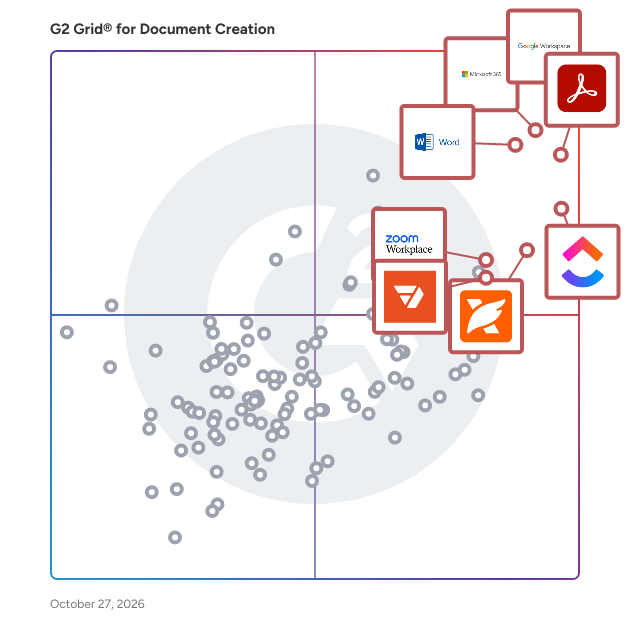
G2 Grid® for Document Creation Software

G2 Grid® for Document Creation Software plotting products by satisfaction and market presence

Highlighted products: Google Workspace, Microsoft 365, Adobe Acrobat, Microsoft Word, ClickUp, Foxit PDF Editor, Zoom Workplace, and pdfFiller.

Underlying data: [Grid® JSON](https://www.g2.com/categories/document-creation/grids.json?focus%5B%5D=google-workspace&focus%5B%5D=microsoft365&focus%5B%5D=adobe-acrobat&focus%5B%5D=microsoft-word&focus%5B%5D=clickup&focus%5B%5D=foxit-pdf-editor&focus%5B%5D=zoom-workplace&focus%5B%5D=pdffiller)

Formstack Documents

Formstack Documents is the only document generation solution you need to save time, put a stop to manual entry, and streamline your paperwork process. With Formstack Documents, you can upload, merge, and deliver smart documents in a snap. Start from scratch or upload your own fillable PDF or Word document. Our app allows you to easily customize your document and merge it with data. Once you've created your document, it's time to figure out where you'll be sending it. From emails to Google Drive to a third-party integration via Webhooks, Formstack Documents gives you the control to send your merged files wherever you want. Formstack Documents integrates with over 150 different products, ensuring you'll easily be able to upload, merge, and deliver your documents, no matter what products you're using.

Average Rating: 4.5/5.0

Total Reviews: 148

How Do G2 Users Rate Formstack Documents?

  • Has the product been a good partner in doing business?: 9.0/10 (Category avg: 9.0/10)
  • Quality of Support: 8.7/10 (Category avg: 8.6/10)
  • Ease of Use: 8.2/10 (Category avg: 8.9/10)
  • Ease of Admin: 8.6/10 (Category avg: 8.9/10)

Who Is the Company Behind Formstack Documents?

  • Seller: Intellistack
  • Year Founded: 2006
  • HQ Location: Fishers, IN
  • Twitter: @Formstack
    6,392 Twitter followers
  • LinkedIn® Page: www.linkedin.com
    219 employees on LinkedIn®

Who Uses This Product?

  • Who Uses This: Owner
  • Top Industries: Computer Software, Non-Profit Organization Management
  • Company Size: 59% Small, 33% Medium

What Do G2 Reviewers Say About Formstack Documents?

AI-generated summary from verified user reviews

Pros
  • Users value the seamless integration of Formstack Documents, enhancing workflows and saving time across various platforms.
  • Users find automation features in Formstack Documents incredibly time-saving, enhancing overall workflow efficiency and ease of use.
  • Users find Formstack Documents to be very user-friendly, significantly streamlining their document generation process with ease.
  • Users value the easy integrations of Formstack Documents, which streamline workflows and enhance productivity across various platforms.
  • Users love how Formstack Documents provides time-saving automation for document generation, enhancing efficiency and reducing errors.
Cons
  • Users find the learning curve steep for complex document merges, though the new builder simplifies the process.
  • Users find bug issues with Formstack Documents occasionally disrupt their experience, though most are easily resolved.
  • Users find the user interface clunky, leading to a less intuitive experience despite its robust capabilities.
  • Users find the poor documentation inadequate for advanced scenarios, hindering their overall experience with Formstack Documents.
  • Users find the setup difficulty of Formstack Documents challenging initially, but it becomes user-friendly after configuration.

What Are Recent G2 Reviews of Formstack Documents?

What Are G2 Users Discussing About Formstack Documents?

CocoDoc

CocoDoc is a cutting-edge online PDF editor. Our interactive interface makes it easier for users to utilize the different tools and features available, therefore increasing efficiency and chopping off time. With our secure gateways, users can enjoy the peace of mind that their documents are safe and private.

Average Rating: 4.8/5.0

Total Reviews: 14

How Do G2 Users Rate CocoDoc?

  • Has the product been a good partner in doing business?: 10.0/10 (Category avg: 9.0/10)
  • Quality of Support: 10.0/10 (Category avg: 8.6/10)
  • Ease of Use: 10.0/10 (Category avg: 8.9/10)
  • Ease of Admin: 6.7/10 (Category avg: 8.9/10)

Who Is the Company Behind CocoDoc?

  • Seller: CocoFax
  • HQ Location: Singapore
  • Twitter: @coco_fax
    1,501 Twitter followers
  • LinkedIn® Page: www.linkedin.com
    5 employees on LinkedIn®

Who Uses This Product?

  • Top Industries: Information Technology and Services
  • Company Size: 57% Medium, 43% Small

What Do G2 Reviewers Say About CocoDoc?

AI-generated summary from verified user reviews

Pros
  • Users value the quick conversion feature of CocoDoc, enabling seamless format changes and intuitive document management.
  • Users appreciate the quick conversion feature in CocoDoc, enabling seamless document format switching without quality loss.
  • Users love the easy access provided by CocoDoc, enabling quick conversions and seamless document management.
  • Users appreciate the easy conversion feature of CocoDoc, allowing seamless format changes without quality loss.
  • Users appreciate the e-signing features of CocoDoc, enabling easy online signing and document management.

What Are Recent G2 Reviews of CocoDoc?

What Are G2 Users Discussing About CocoDoc?

DocRaptor

DocRaptor is a powerful API service that enables developers to convert HTML, CSS, and JavaScript into high-quality PDF and Excel documents. Utilizing the advanced PrinceXML PDF generator, DocRaptor ensures precise rendering of complex layouts, making it ideal for applications requiring professional document generation. Its seamless integration with various programming languages allows for efficient automation of document workflows across diverse industries. Key Features and Functionality: - Comprehensive HTML & CSS Support: DocRaptor fully supports HTML5, CSS3, and JavaScript, enabling the creation of sophisticated document layouts with features like headers, footers, watermarks, footnotes, columns, and cross-references. - Advanced PDF Output Options: The API offers capabilities such as accessible PDFs, printer's marks, bookmarks, links, forms, font embedding, password protection, and encryption, ensuring documents meet various professional and security standards. - Flexible Document Generation: DocRaptor supports asynchronous and parallel document generation, with no size limits, facilitating efficient processing of large volumes of documents. - Multi-Language Integration: The API is compatible with numerous programming languages, including Ruby, JavaScript, PHP, and C#, allowing developers to integrate it seamlessly into their existing systems. - Security and Compliance: DocRaptor is certified under SOC 2 and HIPAA compliance standards, ensuring the protection of sensitive data during document processing. Primary Value and User Solutions: DocRaptor addresses the need for reliable and efficient document generation by automating the conversion of web content into professional-grade PDFs and Excel files. This automation reduces development time, ensures consistent document quality, and allows businesses to focus on core operations without the complexities of manual document creation. Industries such as finance, healthcare, e-commerce, education, and legal services benefit from DocRaptor's ability to produce accurate, accessible, and secure documents at scale.

Average Rating: 4.5/5.0

Total Reviews: 16

How Do G2 Users Rate DocRaptor?

  • Has the product been a good partner in doing business?: 8.8/10 (Category avg: 9.0/10)
  • Quality of Support: 9.1/10 (Category avg: 8.6/10)
  • Ease of Use: 8.9/10 (Category avg: 8.9/10)
  • Ease of Admin: 8.8/10 (Category avg: 8.9/10)

Who Is the Company Behind DocRaptor?

  • Seller: Expected Behavior
  • Year Founded: 2006
  • HQ Location: Indianapolis, IN
  • Twitter: @EB
    402 Twitter followers
  • LinkedIn® Page: www.linkedin.com
    3 employees on LinkedIn®

Who Uses This Product?

  • Company Size: 69% Small, 13% Medium

What Do G2 Reviewers Say About DocRaptor?

AI-generated summary from verified user reviews

Pros
  • Users value the ease of PDF generation with DocRaptor, highlighting its ability to replicate complex templates accurately.
  • Users value the easy PDF generation with customizable templates that DocRaptor provides, ensuring precise replication of designs.
  • Users value the easy integration and customization of PDF reports in DocRaptor, enhancing their workflow efficiency.
  • Users value the customization options in DocRaptor for tailored PDF report generation via easy API integration.
  • Users appreciate the ease of use of DocRaptor, finding PDF generation simple and fast with great template replication.
Cons
  • Users find the pricing expensive and feel it could be more affordable despite the quality being excellent.

What Are Recent G2 Reviews of DocRaptor?

What Are G2 Users Discussing About DocRaptor?

AI can help you find the answers. G2 helps you trust them.

Connect G2 to Claude or ChatGPT for answers grounded in G2's trusted reviews, comparisons, and pricing from real user insights.

How it works

Able2Extract Professional

Able2Extract Professional is an all-in-one PDF converter designed for both business and individual users. Trusted by professionals in finance, accounting, legal, insurance, real estate, and banking industries, it is renowned for its PDF to Excel conversion accuracy and advanced data extraction capabilities. Available on Windows, macOS, and Linux, Able2Extract Professional offers enterprise-level PDF conversion and editing features including: • Selective conversions: convert a single paragraph, specific pages, or entire documents. • Batch upload and convert hundreds of PDF files at once. • Preview table output before converting PDF into XLSX. • Deploy advanced OCR on scanned PDF files and images. • Create custom conversion templates to save valuable time. • Advanced detection for merging Excel rows accurately. • Precise conversion capabilities with European continental settings. • Auto-rotate vertical text in Excel (column headers included). Additional features include PDF creation, electronic and digital signatures, PDF form handling, content editing, side-by-side document comparison, merging and splitting PDFs, secure data redaction, and much more.

Average Rating: 4.7/5.0

Total Reviews: 23

How Do G2 Users Rate Able2Extract Professional?

  • Has the product been a good partner in doing business?: 9.4/10 (Category avg: 9.0/10)
  • Quality of Support: 9.1/10 (Category avg: 8.6/10)
  • Ease of Use: 9.7/10 (Category avg: 8.9/10)
  • Ease of Admin: 9.4/10 (Category avg: 8.9/10)

Who Is the Company Behind Able2Extract Professional?

Who Uses This Product?

  • Company Size: 58% Small, 33% Medium

What Do G2 Reviewers Say About Able2Extract Professional?

AI-generated summary from verified user reviews

Pros
  • Users value the affordability of Able2Extract Professional, appreciating the one-time license without any monthly fees.
  • Users value the automation capabilities of Able2Extract Professional, significantly streamlining their conversion tasks and saving time.
  • Users commend Able2Extract Professional for its exceptional conversion efficiency, automating tasks and delivering precise Excel exports.
  • Users value the ease of use of Able2Extract Professional, appreciating its intuitive setup and seamless automation.
  • Users highly value the easy conversion capabilities of Able2Extract Professional, significantly saving time and effort in data tasks.

What Are Recent G2 Reviews of Able2Extract Professional?

What Are G2 Users Discussing About Able2Extract Professional?

Docupilot

Docupilot is document automation software that helps businesses generate, process, sign, and deliver documents using reusable templates, structured data, and automated workflows. The platform enables organizations to automate repetitive document-related tasks, including generating contracts, agreements, invoices, certificates, reports, and other business documents. It supports both non-technical users who want to configure document workflows without coding and developers who need to integrate document operations into their applications. Users can create templates using a no-code editor or upload existing documents in Word, PowerPoint, Excel, or fillable PDF formats. Templates can incorporate conditional logic, dynamic fields, and repeating sections to accommodate different data inputs and document variations. Documents can be generated individually or in bulk and exported in formats including PDF, DOCX, and HTML. Docupilot provides a visual Workflow Builder that connects data collection, document generation, processing, eSignatures, and delivery into automated workflows. Users can configure conditions and branching logic to handle different scenarios without writing code. Data can be collected through hosted forms or supplied through a REST API and integrations with third-party applications. The platform supports 70+ integrations, including Zapier, Make, Airtable, Google Drive, Dropbox, and Amazon S3. Generated documents can be sent for signature using built-in eSignature capabilities and delivered through email, webhooks, cloud storage, or SFTP. Docupilot also provides APIs for individual document operations, including document generation, file conversion, PDF merging, and electronic signatures. API access and webhooks are available across plans. Docupilot is used across industries, including legal, healthcare, real estate, finance, human resources, and insurance. Common use cases include contract generation, employee onboarding, customer documentation, certificate issuance, and automated document distribution. The platform offers a 14-day free trial, allowing users to configure templates, build workflows, and test document automation through the application or APIs.

Average Rating: 4.6/5.0

Total Reviews: 73

How Do G2 Users Rate Docupilot?

  • Has the product been a good partner in doing business?: 9.7/10 (Category avg: 9.0/10)
  • Quality of Support: 9.5/10 (Category avg: 8.6/10)
  • Ease of Use: 8.7/10 (Category avg: 8.9/10)
  • Ease of Admin: 9.2/10 (Category avg: 8.9/10)

Who Is the Company Behind Docupilot?

  • Seller: Docupilot, Inc.
  • Company Website:
  • Year Founded: 2018
  • HQ Location: Dover, US
  • Twitter: @docupilot
    34 Twitter followers
  • LinkedIn® Page: www.linkedin.com
    13 employees on LinkedIn®

Who Uses This Product?

  • Top Industries: Marketing and Advertising
  • Company Size: 55% Small, 24% Medium

What Do G2 Reviewers Say About Docupilot?

AI-generated summary from verified user reviews

Pros
  • Users find Docupilot easy to use, enabling quick navigation and seamless document creation integration with other systems.
  • Users appreciate the automations in Docupilot, enhancing document creation speed and collaboration while minimizing errors.
  • Users commend the efficient customer support of Docupilot, swiftly resolving issues and enhancing user experience.
  • Users value the intuitive features of Docupilot, enhancing document automation and streamlining workflows effectively.
  • Users appreciate the time-saving automations of Docupilot, making document creation faster and more efficient.
Cons
  • Users find the pricing to be high relative to the limited features and poor user experience offered by Docupilot.
  • Users experience formatting issues with templates in Docupilot, requiring careful adjustments for optimal results.
  • Users find the learning curve challenging, though automation speed compensates for initial difficulties.
  • Users find the steep learning curve challenging initially, but appreciate the speed and efficiency once mastered.
  • Users find some features of Docupilot to be complicated to use, impacting the overall user experience.

What Are Recent G2 Reviews of Docupilot?

Soda PDF Anywhere

Soda PDF Anywhere is the first fully functional PDF solution available both as a desktop and a web-based app. Users have the freedom to access features on any device with a web browser, including desktops, laptops, smartphones, and tablets. Switching between both applications is done seamlessly, which is a breakthrough in the software industry. Soda PDF Anywhere also comes equipped with innovative features specifically designed to increase productivity, including PDF conversion, editing, reviewing & security tools, sending documents for e-signature, Bates numbering, cloud storage integration (Dropbox, Box, Onedrive, Google Drive, Sharepoint), and much more.

Average Rating: 4.4/5.0

Total Reviews: 70

How Do G2 Users Rate Soda PDF Anywhere?

  • Has the product been a good partner in doing business?: 6.5/10 (Category avg: 9.0/10)
  • Quality of Support: 8.0/10 (Category avg: 8.6/10)
  • Ease of Use: 8.7/10 (Category avg: 8.9/10)
  • Ease of Admin: 7.7/10 (Category avg: 8.9/10)

Who Is the Company Behind Soda PDF Anywhere?

Who Uses This Product?

  • Who Uses This: Software Engineer
  • Top Industries: Information Technology and Services, Computer Software
  • Company Size: 49% Medium, 41% Small

What Do G2 Reviewers Say About Soda PDF Anywhere?

AI-generated summary from verified user reviews

Pros
  • Users appreciate the ease of use of Soda PDF Anywhere, enjoying its seamless navigation and reliable functionalities.
  • Users love the seamless functionality of Soda PDF Anywhere for effective collaboration and document management.
  • Users value the seamless team collaboration features of Soda PDF Anywhere, enhancing efficiency and communication during projects.
  • Users appreciate the easy editing capabilities of Soda PDF Anywhere, enhancing their document management experience effortlessly.
  • Users emphasize the reliability of Soda PDF Anywhere for quick document generation and secure collaboration.
Cons
  • Users report issues with crashes during large PDF editing, which disrupts their otherwise seamless workflows.
  • Users find the performance issues on the mobile app version less satisfactory compared to the desktop version.

What Are Recent G2 Reviews of Soda PDF Anywhere?

What Are G2 Users Discussing About Soda PDF Anywhere?

WordPerfect Word Processor

WordPerfect is a comprehensive word processing application developed by Corel, designed to facilitate the creation of professional documents, presentations, and spreadsheets. Renowned for its robust features and user-friendly interface, WordPerfect has been a trusted tool for individuals and businesses seeking efficient document management solutions. Key Features and Functionality: - Reveal Codes: Provides a clear view of all formatting within a document, allowing users to easily identify and adjust formatting elements. - Redaction: Enables the blacking out of sensitive or confidential information, ensuring that text cannot be retrieved or revealed. - Metadata Removal: Strips confidential or sensitive metadata from files, keeping documents clean and secure. - Bates Numbering: Facilitates the insertion of unique, incremental numbers on every page of a document or a folder of documents, commonly used in legal and medical fields. - eBook Publisher: Supports the EPUB format, allowing users to create eBooks compatible with devices such as Kobo, Nook, and Sony Reader. - Extensive File Compatibility: Offers compatibility with over 60 file types, including Microsoft Word, Excel, and PowerPoint files, ensuring seamless sharing and collaboration. Primary Value and Solutions Provided: WordPerfect addresses the need for a versatile and reliable word processing tool that caters to a wide range of document creation and management requirements. Its extensive file compatibility ensures that users can work with various file formats without compatibility issues. Features like Reveal Codes and Metadata Removal provide users with greater control over document formatting and security, while the eBook Publisher expands the scope of document distribution. Overall, WordPerfect enhances productivity by offering a suite of tools that streamline the document creation process, making it an invaluable asset for professionals across various industries.

Average Rating: 4.4/5.0

Total Reviews: 30

How Do G2 Users Rate WordPerfect Word Processor?

  • Has the product been a good partner in doing business?: 7.7/10 (Category avg: 9.0/10)
  • Quality of Support: 7.9/10 (Category avg: 8.6/10)
  • Ease of Use: 8.8/10 (Category avg: 8.9/10)
  • Ease of Admin: 8.0/10 (Category avg: 8.9/10)

Who Is the Company Behind WordPerfect Word Processor?

Who Uses This Product?

  • Top Industries: Legal Services
  • Company Size: 67% Small, 15% Medium

What Do G2 Reviewers Say About WordPerfect Word Processor?

AI-generated summary from verified user reviews

Pros
  • Users appreciate the ease of use in WordPerfect, especially with its formatting and error-checking features.
  • Users value the reliability of WordPerfect, appreciating its effectiveness in handling long documents and formatting tasks.
Cons
  • Users find the lack of collaborative features in WordPerfect limiting, hindering real-time editing and document sharing.
  • Users find WordPerfect not intuitive, struggling with collaboration features and issues opening modern file formats.
  • Users experience PDF issues with WordPerfect, as newer file types often fail to open correctly and hinder collaboration.

What Are Recent G2 Reviews of WordPerfect Word Processor?

What Are G2 Users Discussing About WordPerfect Word Processor?

PDFescape

PDFescape is a totally free and open source online PDF reader and editor, as well as a PDF form filler with features for PDF form design. PDFescape offers users a new way to open and edit PDF files online. It allows for a much better PDF software experience by using the original document file format, allowing users to be not be constrained by typical software requirements. Due to the fact that this PDF editor can be accessed online, PDFescape only requires a modern internet browser and an active internet connection. Below are some of the features offered by this PDF editor.

Online PDF Reader

  • Natively open PDF documents in your preferred web browser
  • Manipulate PDF pages with zooming and rotation features for an optimal viewing experience
  • Copy PDF text to your clipboard by selecting your desired content
  • Easily search PDF text for specific keywords and terms with ease
  • Gives you the ability to save, download, and print all PDF documents
  • Provides users with thumbnail, bookmark, and link support features and functionality

Online PDF Editor

  • Gives you the option to add text, shapes, whiteout, and other annotations to PDF files
  • Crop, rotate, shift, move, delete and insert PDF files to create more custom files
  • Easily create links to multiple PDF files or other types of web content
  • Edit PDF information tags to help with identification
  • Encrypt PDF content with password protection features
  • Add additional images to PDF forms and documents
  • Sign PDF documents using scanned and imported signatures

PDF Form Filler

  • Fill out PDF forms using pre-existing form fields or by using a text tool
  • PDF field calculation and formatting features are supported
  • PDF text, checkbox, radio, list, and drop down fields are available and supported
  • Basic PDF field design and styling properties supported
  • Allows users to quickly jump from field to field using tabs

PDF Form Designer

  • Create and add new PDF form fields to any existing PDF file
  • Style PDF form fields with text, color, size features
  • Modify existing PDF form fields to suit custom documents
  • Fully supports checkbox, radio, dropdown, listbox, text, submit button and reset button fields in all PDF files
  • Submit buttons are able to be created to be compatible with PDFescape Ultimate's publishing feature
PDFescape also offers many more features as a PDF editor, including RAD options, PDF merging, and some of the functionality listed below.

PDFescape Additional Features:

  • PDF Annotator
  • Premium Desktop Features
  • Ultimate Desktop Features
  • Webmaster Tools
  • Additional Publishing Features
  • Volume Licensing
  • And many more!

Average Rating: 4.2/5.0

Total Reviews: 67

How Do G2 Users Rate PDFescape?

  • Has the product been a good partner in doing business?: 8.3/10 (Category avg: 9.0/10)
  • Quality of Support: 8.1/10 (Category avg: 8.6/10)
  • Ease of Use: 8.7/10 (Category avg: 8.9/10)
  • Ease of Admin: 8.3/10 (Category avg: 8.9/10)

Who Is the Company Behind PDFescape?

  • Seller: Red Software
  • Year Founded: 2015
  • HQ Location: Monza, MB
  • Twitter: @pdfescape
    396 Twitter followers
  • LinkedIn® Page: www.linkedin.com
    26 employees on LinkedIn®

Who Uses This Product?

  • Top Industries: Information Technology and Services, Computer Software
  • Company Size: 39% Medium, 36% Large

What Do G2 Reviewers Say About PDFescape?

AI-generated summary from verified user reviews

Pros
  • Users love the easy editing capabilities of PDFescape, making document management and updates seamless and efficient.
  • Users find PDFescape's PDF editing capabilities invaluable for maintaining and customizing their professional documents effortlessly.
  • Users value the versatile document editing capabilities of PDFescape, enhancing project management and maintaining up-to-date visuals.
  • Users find PDFescape very easy to use, appreciating its straightforward interface and efficient document editing capabilities.
  • Users value the easy form filling features of PDFescape, enhancing document customization and overall usability.
Cons
  • Users experience conversion issues with PDFescape, particularly in importing files and scaling PDFs to Excel.
  • Users often face data deletion issues that complicate the importing and exporting of PDFs and other files.
  • Users report import issues with PDFescape, noting slow file imports and occasional scaling problems with PDFs to Excel.
  • Users experience PDF importing delays and occasional scaling issues when converting PDFs to Excel.
  • Users find the slow loading times frustrating, especially with larger documents, impacting their workflow efficiency.

What Are Recent G2 Reviews of PDFescape?

What Are G2 Users Discussing About PDFescape?

MadCap Flare

Empowering teams to create, manage, and deliver exceptional content at scale MadCap Flare is the go-to solution for technical content teams that need to streamline workflows and deliver consistent, high-quality content across every channel. Trusted by documentation, training, and knowledge management professionals worldwide, Flare combines the precision of XML-based authoring with the flexibility of multi-channel publishing—all from a single, centralized platform. Why leading teams rely on Flare: Scalable, topic-based authoring: XML-based structure ensures precision and scalability for complex documentation projects. Single-source publishing: Manage all outputs from one project to eliminate redundancy and simplify updates. Multi-channel delivery: Publish effortlessly to self-service portals, online Help, documentation hubs, and training guides. Advanced content reuse: Reuse variables, snippets, and conditions to save time and maintain accuracy. Real-time collaboration with Flare Online: Co-author, review, and manage content simultaneously in the cloud—no check-in delays or version conflicts. Integrated translation management: Accelerate localization and expand your global reach. Flexible publishing formats: Deliver content in HTML5, PDF, Word, SCORM, and more to meet diverse audience needs. Proven ROI: Cut production costs, speed release cycles, and boost customer satisfaction. What sets Flare apart: Unlike traditional content management tools, Flare is purpose-built for technical content teams—offering unmatched flexibility, control, and scalability. With Flare Online, teams gain cloud-based collaboration and instant publishing capabilities for faster, more connected workflows. Together, they form a unified platform for creating, managing, and delivering knowledge at scale—ensuring efficiency, brand consistency, and an exceptional user experience. That’s why thousands of organizations trust Flare to power their global content strategy.gy."

Average Rating: 4.4/5.0

Total Reviews: 484

How Do G2 Users Rate MadCap Flare?

  • Has the product been a good partner in doing business?: 8.9/10 (Category avg: 9.0/10)
  • Quality of Support: 8.6/10 (Category avg: 8.6/10)
  • Ease of Use: 7.4/10 (Category avg: 8.9/10)
  • Ease of Admin: 8.0/10 (Category avg: 8.9/10)

Who Is the Company Behind MadCap Flare?

  • Seller: MadCap Software
  • Company Website:
  • Year Founded: 2005
  • HQ Location: Denver, CO
  • Twitter: @MadCapSoftware
    1,678 Twitter followers
  • LinkedIn® Page: www.linkedin.com
    124 employees on LinkedIn®

Who Uses This Product?

  • Who Uses This: Technical Writer, Senior Technical Writer
  • Top Industries: Computer Software, Information Technology and Services
  • Company Size: 52% Medium, 29% Large

What Do G2 Reviewers Say About MadCap Flare?

AI-generated summary from verified user reviews

Pros
  • Users appreciate the user-friendly content management of MadCap Flare, enhancing efficiency in documentation and review processes.
  • Users praise MadCap Flare for its exceptional efficiency, allowing for streamlined authoring and documentation tasks with ease.
  • Users value the user-friendly interface of MadCap Flare, enhancing efficiency in both authoring and technical documentation tasks.
  • Users commend the excellent customer support from MadCap Flare, particularly praising their responsive and knowledgeable tech team.
  • Users value the customization options in MadCap Flare, allowing for diverse project applications and ongoing discovery.
Cons
  • Users find the steep learning curve of MadCap Flare challenging, requiring consistent use to retain knowledge and skills.
  • Users find the complexity of MadCap Flare challenging, especially when not using it regularly between jobs.
  • Users find the cost of entry and travel for conferences too high, limiting access for many documentation professionals.
  • Users find learning difficulty with MadCap Flare due to its complexity, making it challenging to remember processes over time.
  • Users report experiencing performance issues with MadCap Flare, particularly slowdowns during large project builds.

What Are Recent G2 Reviews of MadCap Flare?

What Are G2 Users Discussing About MadCap Flare?

Templafy

Templafy is the leading agentic document generation platform, enabling enterprise organizations to create accurate, compliant, and on-brand documents with maximum efficiency and control. Accessible directly within M365, Google Workspace, Salesforce, Claude or any AI agent Templafy simplifies document workflows through AI and automation, to reduce risk and boost productivity. Founded in 2014, Templafy is a global organization with offices across Europe and the US. Trusted by industry leaders like KPMG and BDO, Templafy saves teams over 30% of the time they typically spend on repetitive work like proposals, engagement letters, and audit reports, so they can focus on revenue-driving tasks instead. Join more than 4 million users worldwide who rely on Templafy to accelerate business content creation with AI.

Average Rating: 4.4/5.0

Total Reviews: 60

How Do G2 Users Rate Templafy?

  • Has the product been a good partner in doing business?: 9.3/10 (Category avg: 9.0/10)
  • Quality of Support: 8.4/10 (Category avg: 8.6/10)
  • Ease of Use: 8.8/10 (Category avg: 8.9/10)
  • Ease of Admin: 8.7/10 (Category avg: 8.9/10)

Who Is the Company Behind Templafy?

  • Seller: Templafy
  • Company Website:
  • HQ Location: New York, USA
  • Twitter: @Templafy
    1,082 Twitter followers
  • LinkedIn® Page: www.linkedin.com
    186 employees on LinkedIn®

Who Uses This Product?

  • Top Industries: Accounting, Consulting
  • Company Size: 46% Large, 41% Medium

What Do G2 Reviewers Say About Templafy?

AI-generated summary from verified user reviews

Pros
  • Users find Templafy to be easy to use, streamlining document creation and ensuring brand consistency effortlessly.
  • Users appreciate the seamless integration and automated features of Templafy, enhancing efficiency and brand consistency.
  • Users appreciate the ease of use and integration of Templafy's templates, enhancing efficiency and brand consistency.
  • Users value the time-saving features of Templafy, enabling faster document creation and enhanced productivity.
  • Users value Templafy for its efficient document management, ensuring consistent branding and easy access to templates across the organization.
Cons
  • Users find the complex usability of Templafy frustrating due to integration issues and challenges with template creation.
  • Users find Templafy quite expensive, especially since many features can be replicated in Word.
  • Users experience integration issues with Templafy, facing clunkiness and compatibility challenges that hinder optimal functionality.
  • Users find missing features in Templafy, including limited templates and frustrating file size constraints.
  • Users face technical issues with Templafy, dealing with bugs and integration challenges that hinder their experience.

What Are Recent G2 Reviews of Templafy?

What Are G2 Users Discussing About Templafy?

Craft Docs

Craft is collaborative workspace where your whole team can come together to take notes, create docs, manage work and ideate together. Craft's Daily Notes offers a paradigm shift in team collaboration. Power your team’s progress with structured daily updates, align on priorities, and remove blockers — all in one place. With a built-in AI assistant, you can quickly generate ideas, summarize longer content or get help with editing your documents.

Average Rating: 4.6/5.0

Total Reviews: 22

How Do G2 Users Rate Craft Docs?

  • Has the product been a good partner in doing business?: 10.0/10 (Category avg: 9.0/10)
  • Quality of Support: 9.3/10 (Category avg: 8.6/10)
  • Ease of Use: 9.3/10 (Category avg: 8.9/10)
  • Ease of Admin: 10.0/10 (Category avg: 8.9/10)

Who Is the Company Behind Craft Docs?

  • Seller: Craft Docs
  • Year Founded: 2019
  • HQ Location: Budapest, Hungary
  • LinkedIn® Page: www.linkedin.com
    26 employees on LinkedIn®

Who Uses This Product?

  • Company Size: 82% Small, 14% Medium

What Do G2 Reviewers Say About Craft Docs?

AI-generated summary from verified user reviews

Pros
  • Users find Craft Docs to be beautifully simple, enhancing their daily note-taking experience with elegance and usability.
  • Users love Craft Docs for its beautiful simplicity, making note-taking an enjoyable and accessible experience for everyone.
  • Users love the efficiency of Craft Docs, making note-taking a fun and effortless experience for everyone.
  • Users admire the beautiful simplicity of Craft Docs, making note-taking easy and enjoyable for everyone.
  • Users love the beautiful simplicity of Craft Docs, making note-taking enjoyable and accessible for everyone.
Cons
  • Users note the lack of features in Craft Docs compared to competitors, but appreciate ongoing updates and improvements.
  • Users note the limited reporting capabilities of Craft Docs, but appreciate the team's commitment to ongoing improvements.
  • Users note the missing features in Craft Docs, yet appreciate the team's efforts to improve and update the software.

What Are Recent G2 Reviews of Craft Docs?

CleverPDF

CleverPDF offers more than 30 PDF tools online for free. Users can convert PDF to Office, iWork, images, Ebooks or create PDF from those formats. Besides PDF conversion, there are dozens of PDF utility tools such as compress, combine, split, encrypt, add watermark or page numbers to PDF and more. It can help you with your daily PDF tasks. The web-based app is completely free, perpetual license for Offline versions (Mac and Windows) are also available.

Average Rating: 4.4/5.0

Total Reviews: 27

How Do G2 Users Rate CleverPDF?

  • Has the product been a good partner in doing business?: 10.0/10 (Category avg: 9.0/10)
  • Quality of Support: 8.2/10 (Category avg: 8.6/10)
  • Ease of Use: 9.4/10 (Category avg: 8.9/10)
  • Ease of Admin: 8.3/10 (Category avg: 8.9/10)

Who Is the Company Behind CleverPDF?

  • Seller: CleverPDF
  • Year Founded: 2017
  • HQ Location: Hong Kong, Hong Kong
  • Twitter: @cleverpdf
    282 Twitter followers
  • LinkedIn® Page: www.linkedin.com
    1 employees on LinkedIn®

Who Uses This Product?

  • Company Size: 44% Small, 41% Medium

What Do G2 Reviewers Say About CleverPDF?

AI-generated summary from verified user reviews

Pros
  • Users find CleverPDF to be easy to use, especially for extracting images and managing reports effortlessly.
  • Users value the easy extraction of high-quality images and consistent auto-page numbering in CleverPDF for reports.

What Are Recent G2 Reviews of CleverPDF?

What Are G2 Users Discussing About CleverPDF?

Apache OpenOffice Writer

Writer has everything you would expect from a modern, fully equipped word processor. It is simple enough for a quick memo, yet powerful enough to create complete books with contents, diagrams, indexes, etc. You're free to concentrate on your ideas while Writer makes them look great.

Average Rating: 4.3/5.0

Total Reviews: 36

How Do G2 Users Rate Apache OpenOffice Writer?

  • Has the product been a good partner in doing business?: 9.2/10 (Category avg: 9.0/10)
  • Quality of Support: 7.2/10 (Category avg: 8.6/10)
  • Ease of Use: 8.3/10 (Category avg: 8.9/10)
  • Ease of Admin: 10.0/10 (Category avg: 8.9/10)

Who Is the Company Behind Apache OpenOffice Writer?

Who Uses This Product?

  • Company Size: 68% Small, 22% Medium

What Do G2 Reviewers Say About Apache OpenOffice Writer?

AI-generated summary from verified user reviews

Pros
  • Users appreciate the abundance of features in Apache OpenOffice Writer, making it ideal for authors and writers.
Cons
  • Users find the lack of built-in FB2 file generation a significant limitation in Apache OpenOffice Writer.

What Are Recent G2 Reviews of Apache OpenOffice Writer?

What Are G2 Users Discussing About Apache OpenOffice Writer?

PDF Converter Elite

Turn PDF documents to editable MS Office or OpenOffice file formats. Convert PDF files to JPG, PNG and other image formats. Use PDF Converter to convert PDF to AutoCAD and HTML as well.

Average Rating: 4.4/5.0

Total Reviews: 20

How Do G2 Users Rate PDF Converter Elite?

  • Has the product been a good partner in doing business?: 9.4/10 (Category avg: 9.0/10)
  • Quality of Support: 9.4/10 (Category avg: 8.6/10)
  • Ease of Use: 9.6/10 (Category avg: 8.9/10)
  • Ease of Admin: 10.0/10 (Category avg: 8.9/10)

Who Is the Company Behind PDF Converter Elite?

Who Uses This Product?

  • Company Size: 55% Small, 32% Medium

What Are Recent G2 Reviews of PDF Converter Elite?

What Are G2 Users Discussing About PDF Converter Elite?

Sejda PDF Editor for G Suite

Sejda PDF Editor for G Suite is a comprehensive, cloud-based tool designed to streamline PDF management within the Google Workspace environment. It enables users to edit, sign, compress, convert, split, and merge PDF documents directly from Google Drive, eliminating the need for additional software installations. This integration facilitates seamless workflows, allowing teams to collaborate efficiently on PDF files without leaving the G Suite ecosystem. Key Features and Functionality: - PDF Editing: Add or modify text and images, edit existing content, utilize the whiteout tool, annotate with highlights and strike-throughs, and draw shapes. - Digital Signatures: Sign PDF documents electronically, enhancing document authenticity and security. - Compression: Reduce PDF file sizes to optimize storage and facilitate faster sharing. - Format Conversion: Convert PDFs to and from Office formats (Word, Excel, PowerPoint) and images (JPG, PNG). - Document Organization: Visually combine, reorder, merge multiple PDFs with table of contents and bookmarks, and split documents as needed. - Page Management: Crop, rotate, delete, resize pages, add watermarks, and insert page numbers or header/footer labels. - Bates Numbering: Apply Bates stamps to PDF documents for indexing and legal purposes. Primary Value and User Solutions: Sejda PDF Editor for G Suite addresses the need for efficient and accessible PDF management within the Google Workspace. By integrating directly with Google Drive, it allows users to perform a wide range of PDF tasks without switching between applications, thereby enhancing productivity and collaboration. Its user-friendly interface ensures that both technical and non-technical users can effectively edit and manage PDFs, making it an ideal solution for businesses, educators, and professionals seeking a reliable and integrated PDF tool.

Average Rating: 4.5/5.0

Total Reviews: 40

How Do G2 Users Rate Sejda PDF Editor for G Suite?

  • Quality of Support: 7.6/10 (Category avg: 8.6/10)
  • Ease of Use: 9.4/10 (Category avg: 8.9/10)
  • Ease of Admin: 5.0/10 (Category avg: 8.9/10)

Who Is the Company Behind Sejda PDF Editor for G Suite?

  • Seller: Sejda PDF
  • HQ Location: Amsterdam
  • Twitter: @sejdapdf
    297 Twitter followers
  • LinkedIn® Page: www.linkedin.com
    1 employees on LinkedIn®

Who Uses This Product?

  • Top Industries: Staffing and Recruiting, Information Technology and Services
  • Company Size: 51% Small, 27% Large

What Do G2 Reviewers Say About Sejda PDF Editor for G Suite?

AI-generated summary from verified user reviews

Pros
  • Users value the ease of use of Sejda PDF Editor, quickly editing and managing PDFs directly within Google Workspace.
  • Users love the easy editing capabilities of Sejda PDF Editor, facilitating quick modifications and seamless integration with Google Workspace.
  • Users value the editing ease of Sejda PDF Editor, allowing quick and seamless modifications directly from Google Drive.
  • Users appreciate the easy editing and functionality of Sejda PDF Editor, making document management quick and efficient.
  • Users find the electronic signing feature of Sejda PDF Editor invaluable for efficient document management and accessibility.
Cons
  • Users experience editing difficulties with advanced text manipulation in Sejda PDF Editor, especially with complex layouts.
  • Users find internet dependency limiting, especially when faced with heavy usage or advanced editing needs.
  • Users find limited customization options frustrating, especially for advanced editing and complex layouts in Sejda PDF Editor.
  • Users report frustrations with OCR accuracy, particularly with advanced editing on scanned documents and complex layouts.
  • Users experience frustrations with advanced text manipulation and restrictive free usage limits affecting their editing experience.

What Are Recent G2 Reviews of Sejda PDF Editor for G Suite?

What Are G2 Users Discussing About Sejda PDF Editor for G Suite?

Neeraja Prakash
NP
Researched and written by Neeraja Prakash
Updated April 10, 2026