# Best Diagramming Software - Page 5

*By [Neeraja Prakash](https://research.g2.com/insights/author/neeraja-prakash)*


Diagramming software allows users to create detailed diagrams—such as flow charts and floor plans—out of data and images. Diagramming tools often include templates for building diagrams in addition to enabling users to create diagrams from scratch. Certain diagramming programs can integrate with other design tools, and may offer collaborative platforms so multiple users can view and edit diagram files at the same time.

To qualify for inclusion in the Diagramming category, a product must:

- Offer specialized tools for designing one or more types of diagrams, such as organizational charts and floorplans
- Provide industry-related shapes and elements for use in diagrams and allow users to create or import custom diagram components
- Allow specified users to view and interact with diagrams online during and after presentations


## Top Diagramming Software at a Glance
| # | Product | Rating | Best For | What Users Say |
|---|---------|--------|----------|----------------|
| 1 | [Miro](https://www.g2.com/products/miro/reviews) | 4.6/5.0 (13,123 reviews) | Collaborative visual diagramming with infinite canvas | "[A Creative, Fast Digital Storyboarding Platform with Convenient Drag-and-Drop](https://www.g2.com/survey_responses/miro-review-13095817)" |
| 2 | [Lucid Visual Collaboration Suite](https://www.g2.com/products/lucid-software-inc-lucid-visual-collaboration-suite/reviews) | 4.5/5.0 (8,674 reviews) | Real-time visual diagramming with collaborative workflows | "[As a Business Analyst, I believe that Lucidcharts is a game changer.](https://www.g2.com/survey_responses/lucid-visual-collaboration-suite-review-13060586)" |
| 3 | [Visio](https://www.g2.com/products/visio/reviews) | 4.2/5.0 (676 reviews) | Microsoft-native process and network diagramming | "[A Crucial Tool for Regulatory Affairs](https://www.g2.com/survey_responses/visio-review-12734647)" |
| 4 | [FigJam](https://www.g2.com/products/fig-jam/reviews) | 4.6/5.0 (457 reviews) | Collaborative flow diagramming inside Figma | "[Fast, intuitive, and team-friendly](https://www.g2.com/survey_responses/figjam-review-13039267)" |
| 5 | [Wondershare EdrawMax](https://www.g2.com/products/wondershare-edrawmax/reviews) | 4.5/5.0 (139 reviews) | Cross-domain diagramming with zero-learning-curve templates | "[Outstanding Application makes works easy](https://www.g2.com/survey_responses/wondershare-edrawmax-review-10942452)" |
| 6 | [SmartDraw](https://www.g2.com/products/smartdraw/reviews) | 4.5/5.0 (386 reviews) | Multi-format diagramming with Visio-compatible workflows | "[Clean, Easy-to-Use Interface That Streamlines Team Collaboration](https://www.g2.com/survey_responses/smartdraw-review-12917764)" |
| 7 | [Cvent Event Marketing &amp; Management](https://www.g2.com/products/cvent-event-marketing-management/reviews) | 4.3/5.0 (2,082 reviews) | — | "[Cvent Streamlines Event Management and Saves Us Time Across Departments](https://www.g2.com/survey_responses/cvent-event-marketing-management-review-13097176)" |
| 8 | [Mural](https://www.g2.com/products/mural/reviews) | 4.6/5.0 (1,401 reviews) | Visual diagramming for real-time remote collaboration | "[Feature-Rich and Reliable: Great Navigation, Templates, and Integration](https://www.g2.com/survey_responses/mural-review-12212889)" |
| 9 | [Creately](https://www.g2.com/products/creately/reviews) | 4.4/5.0 (1,379 reviews) | Collaborative visual diagramming with AI-assisted workflows | "[Great tool for quick and intuitive database modeling](https://www.g2.com/survey_responses/creately-review-12565759)" |
| 10 | [Draw.io](https://www.g2.com/products/draw-io/reviews) | 4.4/5.0 (442 reviews) | Browser-native flowchart and architecture diagramming | "[Powerful Diagramming Tool with Great Flexibility](https://www.g2.com/survey_responses/draw-io-review-12958091)" |


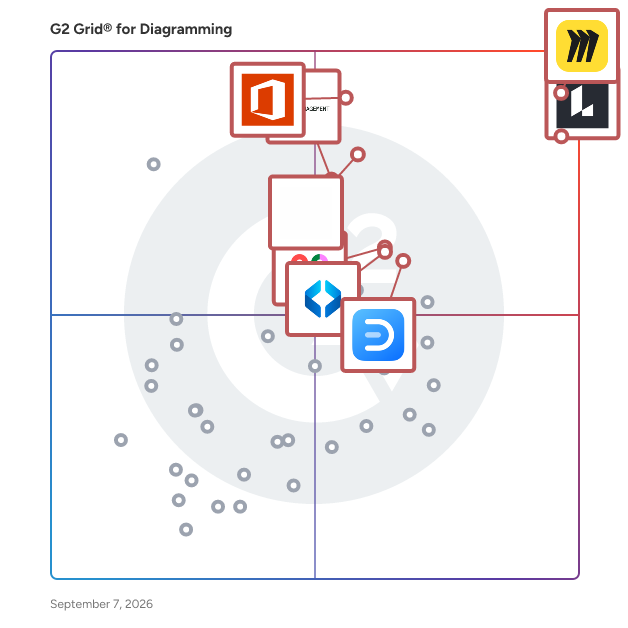
## G2 Grid® for Diagramming Software
![G2 Grid® for Diagramming Software plotting products by satisfaction and market presence](https://www.g2.com/categories/diagramming/grids.png?focus%5B%5D=42445&focus%5B%5D=2887&focus%5B%5D=17137&focus%5B%5D=1215793&focus%5B%5D=89809&focus%5B%5D=17725&focus%5B%5D=737&focus%5B%5D=6782)
Highlighted products: Miro, Lucid Visual Collaboration Suite, Visio, FigJam, Wondershare EdrawMax, SmartDraw, Cvent Event Marketing &amp; Management, and Mural.
Underlying data: [Grid® JSON](https://www.g2.com/categories/diagramming/grids.json?focus%5B%5D=miro&amp;focus%5B%5D=lucid-software-inc-lucid-visual-collaboration-suite&amp;focus%5B%5D=visio&amp;focus%5B%5D=fig-jam&amp;focus%5B%5D=wondershare-edrawmax&amp;focus%5B%5D=smartdraw&amp;focus%5B%5D=cvent-event-marketing-management&amp;focus%5B%5D=mural)


## How Many Diagramming Software Products Does G2 Track?
**Total Products under this Category:** 135

### Category Stats (Jul 2026)
- **Average Rating**: 4.39/5 The average rating of products in this category, based on all submitted ratings
- **Top Trending Product**: LibreOffice Draw (+1.0%) - Among all products in this category, LibreOffice Draw recorded the largest rating increase compared to last month
*Last updated: July 14, 2026*


## How Does G2 Rank Diagramming Software Products?

**Why You Can Trust G2's Software Rankings:**

- 30 Analysts and Data Experts
- 33,600+ Authentic Reviews
- 135+ Products
- Unbiased Rankings

G2's software rankings are built on verified user reviews, rigorous moderation, and a consistent research methodology maintained by a team of analysts and data experts. Each product is measured using the same transparent criteria, with no paid placement or vendor influence. While reviews reflect real user experiences, which can be subjective, they offer valuable insight into how software performs in the hands of professionals. Together, these inputs power the G2 Score, a standardized way to compare tools within every category.


## Which Diagramming Software Is Best for Your Use Case?

- **Leader:** [Miro](https://www.g2.com/products/miro/reviews)
- **Highest Performer:** [Whimsical](https://www.g2.com/products/whimsical/reviews)
- **Easiest to Use:** [Creately](https://www.g2.com/products/creately/reviews)
- **Top Trending:** [Excalidraw](https://www.g2.com/products/excalidraw/reviews)
- **Best Free Software:** [Miro](https://www.g2.com/products/miro/reviews)


---

**Sponsored**

### Weflow

Weflow is a Revenue AI Platform that captures every customer interaction and unlocks AI insights to help you convert and forecast your pipeline. Weflow offers a suite of products: - Activity Capture ($19/user/month (billed annually) - Conversation Intelligence ($39/user/month (billed annually) - Deal Intelligence &amp; Forecasting ($39/user/month (billed annually) Pick single modules from above or bundles to save: - Revenue AI Foundation : Unify your GTM data with automated Salesforce data capture. Use AI to handle rep workflows and coach your team. - Revenue AI Business: Everything in Foundation, plus full deal and account intelligence. AI-powered scoring, summaries, and pipeline visibility, built in. - Revenue AI Enterprise: Everything in Business, plus AI-powered forecasting. Predict revenue, analyze pipeline, and run forecasts across your org. Transparent pricing, no platform fees. Premium support included. Learn more at: weflow.ai


[Visit website](https://www.g2.com/external_clickthroughs/record?secure%5Bad_program%5D=ppc&amp;secure%5Bad_slot%5D=category_product_list&amp;secure%5Bcategory_id%5D=588&amp;secure%5Bchosen_at%5D=2026-07-14T11%3A02%3A27Z&amp;secure%5Bdisplayable_resource_id%5D=2641&amp;secure%5Bdisplayable_resource_type%5D=Category&amp;secure%5Bmedium%5D=sponsored&amp;secure%5Bplacement_reason%5D=retargeted_product&amp;secure%5Bplacement_resource_ids%5D%5B%5D=164950&amp;secure%5Bprioritized%5D=false&amp;secure%5Bproduct_id%5D=164950&amp;secure%5Bresource_id%5D=588&amp;secure%5Bresource_type%5D=Category&amp;secure%5Bsource_type%5D=category_page&amp;secure%5Bsource_url%5D=https%3A%2F%2Fwww.g2.com%2Fcategories%2Fdiagramming%3Fpage%3D5&amp;secure%5Btoken%5D=d1fe18ca2d8ba9ce9f93abeab84bc863b6b05c0b82b8a28516d379daa1dc1784&amp;secure%5Burl%5D=https%3A%2F%2Fwww.weflow.ai%2F%3Futm_source%3Dg2%26utm_medium%3Dcpc%26utm_content%3DRevOps-category-page&amp;secure%5Burl_type%5D=custom_url)

---

## What Are the Top-Rated Diagramming Software Products in 2026?
### 1. [Digs](https://www.g2.com/products/digs/reviews)
Digs is an AI-powered collaboration software built for homebuilders. From pre-con to aftercare, it keeps your team, trades, and clients aligned with one centralized workspace&amp;nbsp;for decisions, documentation, digital handoff, and ongoing warranty support.


**Average Rating:** 5.0/5.0
**Total Reviews:** 5
**How Do G2 Users Rate Digs?**

- **Quality of Support:** 10.0/10 (Category avg: 8.7/10)
- **Ease of Use:** 9.3/10 (Category avg: 8.7/10)
- **Has the product been a good partner in doing business?:** 10.0/10 (Category avg: 9.0/10)

**Who Is the Company Behind Digs?**

- **Seller:** [Digs](https://www.g2.com/sellers/digs)
- **Year Founded:** 2022
- **HQ Location:** Vancouver, US
- **LinkedIn® Page:** http://www.linkedin.com/company/digs-com (1 employees on LinkedIn®)

**Who Uses This Product?**
- **Company Size:** 100% Small-Business


#### What Are Digs's Pros and Cons?

**Pros:**

- Collaboration (1 reviews)


### What Do G2 Reviewers Say About Digs?
*AI-generated summary from verified user reviews*

**Pros:**

- Users value the **enhanced collaboration** Digs provides, streamlining communication and improving teamwork in home building projects.


#### What Are Recent G2 Reviews of Digs?

**"[We can&#39;t imagine building a house without Digs](https://www.g2.com/survey_responses/digs-review-11347421)"**

**Rating:** 5.0/5.0 stars
*— Paula A.*

[Read full review](https://www.g2.com/survey_responses/digs-review-11347421)

---

**"[Finally, a tech tool that actually makes my life easier](https://www.g2.com/survey_responses/digs-review-11358661)"**

**Rating:** 5.0/5.0 stars
*— Vincent L.*

[Read full review](https://www.g2.com/survey_responses/digs-review-11358661)

---


### 2. [Dot Chart](https://www.g2.com/products/dot-chart/reviews)
Quick and easy business process drawing chart with dot chart format. Automatic conversion to BPMN standard and export to Cavemo, Bizagi, Draw.io, Lucidchart.


**Who Is the Company Behind Dot Chart?**

- **Seller:** [MARCIN ŻMIGRODZKI](https://www.g2.com/sellers/marcin-zmigrodzki)
- **HQ Location:** N/A
- **LinkedIn® Page:** https://www.linkedin.com/company/No-Linkedin-Presence-Added-Intentionally-By-DataOps (1 employees on LinkedIn®)


### 3. [DoView](https://www.g2.com/products/doview/reviews)
DoView Visual Strategic Planning communicates faster than text-based strategic planning because it is based on using a visual DoView Results Roadmap. This is an example of the principle that &#39;a picture is worth a thousand words&#39;. What’s more, if you need to change your strategy overnight, you can do this by just tweaking your priorities directly onto your Results Roadmap. You don&#39;t need to rewrite your whole strategic plan.


**Who Is the Company Behind DoView?**

- **Seller:** [DoView](https://www.g2.com/sellers/doview)
- **HQ Location:** N/A
- **Twitter:** @DoViewSoftware (2 Twitter followers)
- **LinkedIn® Page:** https://www.linkedin.com/company/No-Linkedin-Presence-Added-Intentionally-By-DataOps (1 employees on LinkedIn®)


### 4. [DrakonHub](https://www.g2.com/products/drakonhub/reviews)
DrakonHub helps project managers, software developers, and architects to make visual program documentation.


**Who Is the Company Behind DrakonHub?**

- **Seller:** [DRAKON Labs](https://www.g2.com/sellers/drakon-labs)
- **HQ Location:** Kolsås, NO
- **Twitter:** @drakon_editor (25 Twitter followers)
- **LinkedIn® Page:** http://www.linkedin.com/company/drakon-editor-web (1 employees on LinkedIn®)


### 5. [Eraser](https://www.g2.com/products/eraser-eraser/reviews)
Eraser (eraser.io) is an AI-powered tool to create diagrams and agents. Generate professional diagrams from natural language, code, or images in seconds. Build agents that automatically create and update diagrams based on your rules, policies, and references.


**Who Is the Company Behind Eraser?**

- **Seller:** [Eraser](https://www.g2.com/sellers/eraser-6c4906b6-54b8-4cbc-ae05-bba55dcf9ce0)
- **Year Founded:** 2020
- **HQ Location:** San Francisco, US
- **LinkedIn® Page:** https://www.linkedin.com/company/eraser/ (31 employees on LinkedIn®)


### 6. [Excalidraw plus Whiteboards for Confluence](https://www.g2.com/products/excalidraw-plus-whiteboards-for-confluence/reviews)
Excalidraw plus brings native Excalidraw whiteboards and Mermaid diagrams directly into Confluence—so your team can create, edit, and reuse diagrams without leaving the documentation workflow. Key benefits: Excalidraw editing inside Confluence: draw, zoom, search, and export/save diagrams in context Mermaid.js import with instant diagram creation: generate flowcharts and UML, then refine them in Excalidraw 220+ reusable libraries: filter, preview, and reuse shapes and templates to document faster Built for teams: consistent diagramming for dev docs, architecture diagrams, and process flows Secure by design: built on Atlassian Forge with no need for external data storage We also has a Excalidraw Diagrams plus Whiteboards for Jira


**Who Is the Company Behind Excalidraw plus Whiteboards for Confluence?**

- **Seller:** [NGPILOT](https://www.g2.com/sellers/ngpilot)
- **HQ Location:** N/A
- **LinkedIn® Page:** https://www.linkedin.com/company/No-Linkedin-Presence-Added-Intentionally-By-DataOps (1 employees on LinkedIn®)


### 7. [Flowchart Maker for Excel](https://www.g2.com/products/flowchart-maker-for-excel/reviews)
Stop drawing shapes manually. Automate your process documentation. Flowchart Maker is a lightweight, high-performance Excel-based app designed for business analysts, operations managers, compliance officers, and project leaders who need to visualize complex workflows without wasting hours dragging, resizing, and connecting shapes. Instead of building diagrams element by element, users simply list their process steps, decision paths within a standard Excel table. With a single click from the Excel ribbon, the add-in&#39;s layout algorithm mathematically calculates and renders a perfectly structured, beautifully aligned flowchart instantly. Because the software generates diagrams using 100% native Microsoft Office shapes, your outputs remain completely dynamic. There is no proprietary file formatting or vendor lock-in—anyone with Excel can open, modify, format, or update the generated charts, even if they do not have the add-in installed. Key Features &amp; Benefits for B2B Buyers Automatic Process Mapping: Eliminate manual drawing entirely. Transform plain-text process lists and dependency rows into presentation-ready visuals instantly. Native Cross-App Compatibility: The dedicated &quot;Copy&quot; ribbon command exports charts as fully grouped Office shape objects. Paste diagrams into Word or PowerPoint as native vector shapes rather than static images, allowing you to ungroup, recolor, and edit text blocks directly inside your slide decks or documentation. Professional Export Controls: Leverage advanced, built-in layout configurations to export custom ranges or complete chart sheets directly to high-resolution PDF and PNG formats. Print-Ready Configurations: Take the guesswork out of layout scaling. Programmatically control canvas boundaries, cell ranges, and margins to ensure large-scale workflows fit onto physical pages without awkward text clipping or broken page boundaries. Enterprise Security &amp; Compliance: Operates natively within your existing Microsoft desktop environment. No data is sent to external clouds or third-party web servers, protecting sensitive corporate intellectual property. Whether you are mapping out Standard Operating Procedures (SOPs), structuring complex decision trees, engineering corporate compliance flows, or auditing financial system logic, Excel Flowchart Maker delivers a frictionless, data-driven diagramming experience right where your data already lives.


**Who Is the Company Behind Flowchart Maker for Excel?**

- **Seller:** [Uniform Software](https://www.g2.com/sellers/uniform-software-2026-06-17)
- **HQ Location:** N/A
- **LinkedIn® Page:** https://www.linkedin.com/company/uniformsoftware/ (1 employees on LinkedIn®)


### 8. [Flowsage](https://www.g2.com/products/flowsage/reviews)
Flowsage is a web-based application designed to simplify the process of creating flowcharts. It utilizes artificial intelligence (AI) technology to offer features such as AI auto-completions, which suggest the next steps in the flowchart creation process. This tool aims to streamline the flowcharting experience, making it easier and more intuitive for users to map out their ideas and workflows. The platform offers both free and paid subscription plans, catering to users with varying needs and preferences. Overall, Flowsage aims to enhance productivity and efficiency in flowchart creation without the need for complex software or extensive training.


**Who Is the Company Behind Flowsage?**

- **Seller:** [Flowsage](https://www.g2.com/sellers/flowsage)
- **LinkedIn® Page:** https://www.linkedin.com/company/flowsage/about/ (1 employees on LinkedIn®)


### 9. [Flows by UserBit](https://www.g2.com/products/flows-by-userbit/reviews)
Flows by UserBit is a powerful online flow diagram maker that enables teams to visually map out user interactions with clarity and speed. Designed for UX designers, product teams, researchers, and cross-functional stakeholders. UserFlow makes complex interactions easy to visualize, communicate, and iterate. With a flexible and intuitive canvas, versatile nodes, customizable edges, a rich text editor, and advanced styling options, teams can build structured user flows that reflect real user paths. Get started faster with AI-assisted flow templates that turn rough ideas into structured diagrams in seconds. And when things get messy, AI flow optimization cleans up, aligns, and organizes your flows in one click—so they’re instantly clear and presentation-ready. It goes beyond stand-alone diagrams by integrating with other UserBit tools: you can attach personas, research insights, and reference journey maps directly within your diagrams to give flows context rooted in real user research. For collaboration and stakeholder engagement, Flows by UserBit offers one-click sharing via public or protected links, a Client Portal for feedback and review, and export options in image and XML formats (like GraphML and DrawIO). These features help teams share, present, and document flows without friction.


**Who Is the Company Behind Flows by UserBit?**

- **Seller:** [UserBit](https://www.g2.com/sellers/userbit)
- **Year Founded:** 2019
- **HQ Location:** Brooklyn, US
- **Twitter:** @UserBitApp (196 Twitter followers)
- **LinkedIn® Page:** https://www.linkedin.com/company/userbit (4 employees on LinkedIn®)


### 10. [FlowZap](https://www.g2.com/products/flowzap/reviews)
FlowZap is an intuitive process-mapping platform designed to empower teams in documenting and visualizing workflows collaboratively.​ Targeted at business analysts, developers, and AI builders, it leverages AI to generate diagrams from natural language descriptions, turning ideas into living Workflows or Sequence Diagrams at the speed of conversation.​ The core feature is FlowZap Code, a simple domain-specific language (DSL) that requires no technical skills for creating clear workflow and sequence diagrams from the same source code.​ Users can toggle between dual views—workflow diagrams with swimlanes and sequence diagrams with lifelines—eliminating redundant documentation efforts. Stop wrestling with Mermaid or UML syntax. Describe your goal once in the FlowZap AI Code Generator, let your favorite AI browser and FlowZap generate the FlowZap Code, and instantly see a polished process diagram. It’s the fastest way for solopreneurs to learn, build, and iterate on AI agent workflows.


**Who Is the Company Behind FlowZap?**

- **Seller:** [FlowZap](https://www.g2.com/sellers/flowzap)
- **HQ Location:** N/A
- **LinkedIn® Page:** https://www.linkedin.com/company/No-Linkedin-Presence-Added-Intentionally-By-DataOps (1 employees on LinkedIn®)


### 11. [FunnelFlux](https://www.g2.com/products/funnelflux/reviews)
FunnelFlux lets you build tracking the way you think - with flowcharts and diagrams - and without limits


**Who Is the Company Behind FunnelFlux?**

- **Seller:** [Funnelflux](https://www.g2.com/sellers/funnelflux)
- **HQ Location:** Dubai Silicon Oasis, AE
- **Twitter:** @FunnelFlux (35 Twitter followers)
- **LinkedIn® Page:** http://www.linkedin.com/company/funnelflux (4 employees on LinkedIn®)


### 12. [GenMyModel RDS](https://www.g2.com/products/genmymodel-rds/reviews)
GenMyModel RDS provides online database modeling platform that will increase productivity.


**Who Is the Company Behind GenMyModel RDS?**

- **Seller:** [Genmymodel](https://www.g2.com/sellers/genmymodel)
- **HQ Location:** N/A
- **Twitter:** @GenMyModel (548 Twitter followers)
- **LinkedIn® Page:** https://www.linkedin.com/company/genmymodel/ (2 employees on LinkedIn®)


### 13. [GenogramAI](https://www.g2.com/products/genogramai/reviews)
GenogramAI is the modern standard for creating professional, clear, and comprehensive genograms. Trusted by therapists, students, researchers, and family historians, GenogramAI combines an intuitive vector-based design canvas with powerful Artificial Intelligence to make mapping family histories, medical patterns, and relationship dynamics effortless.


**Who Is the Company Behind GenogramAI?**

- **Seller:** [GenogramAI](https://www.g2.com/sellers/genogramai)
- **Year Founded:** 2025
- **HQ Location:** Pasadena, US
- **LinkedIn® Page:** https://www.linkedin.com/company/genogramai/ (1 employees on LinkedIn®)


### 14. [Genogram Pro](https://www.g2.com/products/genogram-pro/reviews)
Genogram Pro is a modern genogram editor with AI features and intuitive UI. It&#39;s built for professionals like therapists, nurses or social workers. Key features: - AI assistant that can make edits and generate genograms based on plain-language descriptions - End-to-end encryption meaning only you can see genogram data, and you can be sure that you clients&#39; data is fully protected - Custom templates and a library of examples to speed up your workflow - Fully responsive and mobile-friendly interface - PDF, image and GEDCOM exports with full genogram symbols key - Includes lifetime completely free plan so you can explore the product freely


**Who Is the Company Behind Genogram Pro?**

- **Seller:** [Viston MB](https://www.g2.com/sellers/viston-mb)
- **HQ Location:** N/A
- **LinkedIn® Page:** https://www.linkedin.com/company/No-Linkedin-Presence-Added-Intentionally-By-DataOps (1 employees on LinkedIn®)


### 15. [Gleek](https://www.g2.com/products/gleek/reviews)
Gleek is an innovative diagramming tool designed for developers and technical professionals who prefer a keyboard-centric approach to creating diagrams. By utilizing a unique text-based syntax, users can efficiently generate a variety of diagrams—including flowcharts, entity-relationship diagrams (ERDs, UML class diagrams, sequence diagrams, state machine diagrams, Gantt charts, and user journey maps—without the need for mouse interaction. This streamlined process enhances productivity by allowing rapid visualization of complex systems and processes. Key Features and Functionality: - Keyboard-Driven Interface: Enables the creation of diagrams solely through keyboard inputs, catering to users who favor typing over traditional drag-and-drop methods. - Diverse Diagram Types: Supports multiple diagram formats, including flowcharts, ERDs, UML class diagrams, sequence diagrams, state machine diagrams, Gantt charts, and user journey maps, accommodating a wide range of project needs. - AI-Powered Chat: Facilitates the generation of custom diagrams through natural language interactions, simplifying the diagram creation process. - Live Collaboration: Allows real-time teamwork on diagrams, enhancing collaboration and accuracy in project development. - Version Control: Provides meaningful version control for diagram files, enabling efficient tracking of changes and updates. - Multiple Export Options: Offers the ability to save diagrams in various formats, including PNG, SVG, and PDF, for versatile sharing and presentation. - Git Integration: Allows diagrams to be stored in repositories alongside code, ensuring seamless version management and collaboration. - Custom Themes: Enables personalization of diagram appearance and styling to meet specific project or branding requirements. Primary Value and User Solutions: Gleek addresses the need for a rapid, efficient, and code-friendly diagramming solution by eliminating the reliance on mouse-based interfaces. Its keyboard-only input and text-to-diagram conversion streamline the creation of complex diagrams, significantly reducing the time and effort required. The integration of AI-powered chat and live collaboration features further enhances productivity, making it an invaluable tool for developers, project managers, and UX designers who need to visualize and communicate complex systems and processes effectively. By supporting a wide array of diagram types and offering robust version control and export options, Gleek simplifies the documentation and sharing of technical information, ultimately improving workflow efficiency and team collaboration.


**Who Is the Company Behind Gleek?**

- **Seller:** [Gleek](https://www.g2.com/sellers/gleek)
- **HQ Location:** N/A
- **LinkedIn® Page:** https://www.linkedin.com/company/No-Linkedin-Presence-Added-Intentionally-By-DataOps (1 employees on LinkedIn®)


### 16. [Graphesent Anim](https://www.g2.com/products/graphesent-anim/reviews)
A software for both creating diagrams like flowcharts, mind maps, etc and also easy creation of animations from diagrams. The software is designed with fast creation of diagrams and elegance of diagrams in mind. Also the software is designed with easy creation of animations from diagrams especially for mobile audience in mind.


**Who Is the Company Behind Graphesent Anim?**

- **Seller:** [Gradelms Software](https://www.g2.com/sellers/gradelms-software)
- **HQ Location:** N/A
- **LinkedIn® Page:** https://www.linkedin.com/company/No-Linkedin-Presence-Added-Intentionally-By-DataOps (1 employees on LinkedIn®)


### 17. [ICOGRAMS](https://www.g2.com/products/icograms/reviews)
Icograms is a 3D Map Online Designer platfrom.


**Who Is the Company Behind ICOGRAMS?**

- **Seller:** [ICOGRAMS](https://www.g2.com/sellers/icograms)
- **HQ Location:** N/A
- **LinkedIn® Page:** https://www.linkedin.com/company/No-Linkedin-Presence-Added-Intentionally-By-DataOps (1 employees on LinkedIn®)


### 18. [IQ Process Modeler](https://www.g2.com/products/iq-process-modeler/reviews)
IQ Process Modeler helps enterprises identify ways to improve business outcomes, drive efficiency, account for new circumstances and gain a competitive advantage that lasts. Our Process Modeler tool is an intuitive, highly visual way to map out your strategy step-by-step in order to achieve precise implementation, set expectations and allocate resources accordingly.


**Who Is the Company Behind IQ Process Modeler?**

- **Seller:** [InQuisient](https://www.g2.com/sellers/inquisient)
- **Year Founded:** 2004
- **HQ Location:** Reston, US
- **LinkedIn® Page:** https://www.linkedin.com/company/inquisient (8 employees on LinkedIn®)


### 19. [LexisNexis Crash Designer](https://www.g2.com/products/lexisnexis-crash-designer/reviews)
Design crash diagrams more easily, accurately and efficiently


**Who Is the Company Behind LexisNexis Crash Designer?**

- **Seller:** [LexisNexis](https://www.g2.com/sellers/lexisnexis)
- **Year Founded:** 1970
- **HQ Location:** New York
- **Twitter:** @NexisSolutions (1,258 Twitter followers)
- **LinkedIn® Page:** https://www.linkedin.com/company/lexisnexis/ (9,695 employees on LinkedIn®)


### 20. [Machinations](https://www.g2.com/products/machinations-machinations/reviews)
Machinations is the ultimate game design tool that empowers game designers with out-of-the-box predictions to anticipate and fix balancing issues. Taking a proactive approach to game design and using player progression predictions, Machinations allows studios to deliver better games faster, manage risks, and lift game KPIs. Trusted by world-class studios such as Ubisoft, Gameloft, Wargaming, and King, see what Machinations can do in action: -34% Production Time: Instrumental throughout game&#39;s lifecycle, Machinations brings clarity to teams while allowing for game design innovation through rapid, no-code iterations. -88% Guesswork: Using Machinations, studios get actionable insights to manage risks and avoid damage to their player base. +27% Player Retention: With Machinations, studios can easily identify &amp; eliminate causes of player churn without introducing short- &amp; long-term side effects. +3,25% Revenue/month: By introducing compounding incremental improvements with each update. Machinations fosters a community of 50k+ game developers across 300+ studios worldwide and is taught in 700+ academic institutions around the world.


**Average Rating:** 4.5/5.0
**Total Reviews:** 1
**How Do G2 Users Rate Machinations?**

- **Quality of Support:** 10.0/10 (Category avg: 8.7/10)
- **Ease of Use:** 8.3/10 (Category avg: 8.7/10)

**Who Is the Company Behind Machinations?**

- **Seller:** [Machinations](https://www.g2.com/sellers/machinations)
- **Year Founded:** 2018
- **HQ Location:** Mamer, LU
- **Twitter:** @machinationsio (2,969 Twitter followers)
- **LinkedIn® Page:** https://www.linkedin.com/company/machinations-io/ (20 employees on LinkedIn®)

**Who Uses This Product?**
- **Company Size:** 100% Small-Business


#### What Are Machinations's Pros and Cons?

**Pros:**

- Customer Support (1 reviews)
- Ease of Use (1 reviews)

**Cons:**

- Diagram Issues (1 reviews)


### What Do G2 Reviewers Say About Machinations?
*AI-generated summary from verified user reviews*

**Pros:**

- Users praise the **amazing customer support** of Machinations for their helpful assistance in creating models.
- Users appreciate the **ease of use** of Machinations, finding it a helpful visual builder for game development.

**Cons:**

- Users face **diagram issues** due to limitations on the free tier, hindering basic game loop implementations with only 50 nodes.

#### What Are Recent G2 Reviews of Machinations?

**"[A Good Tool to Try Out Gameplay Loops!](https://www.g2.com/survey_responses/machinations-review-10776001)"**

**Rating:** 4.5/5.0 stars
*— Srivishnu  S.*

[Read full review](https://www.g2.com/survey_responses/machinations-review-10776001)

---


### 21. [Matilda Workspace](https://www.g2.com/products/matilda-workspace/reviews)
The All-New All-In-One Workspace for Modern Teams Embracing the concept of a unified workspace, Matilda brings a powerful suite of best-in-class apps together in one place, allowing teams across the globe to connect, create, coordinate, and delight their customers effortlessly. With its mission to simplify technology, Matilda empowers organisations to do more with less, making it an essential tool for startups to Fortune 500 companies alike. Key Features: -Powerful Apps Included: Matilda comes packed with a suite of powerful applications including Docs, Projects, Tables, Chat, Customers, and Copilot, ensuring that teams have all the tools they need to succeed. - Create with Ease: With Docs, teams can co-edit in real time, making document creation and coordination seamless. This feature aims to replace Google Docs, Notion, and Coda, by providing a more integrated and efficient experience. - Streamlined Project Management: Matilda&#39;s Projects feature allows for effortless management and tracking of every aspect of your projects. With capabilities like auto-scheduling, it&#39;s designed to replace tools like Jira, Trello, and Asana. - Advanced Data Management: Although Tables are coming soon, they promise to redefine data handling by syncing data from hundreds of sources or creating new collections, aiming to replace tools like Airtable, Notion, and Segment. - Seamless Communication: Chat brings all team communication into one place, integrated across projects, tasks, and docs, providing an alternative to Slack and MS Teams. - Customer Relationship Management: The soon-to-be-released Customers feature will allow teams to effortlessly track leads and manage customer interactions in one streamlined interface, aiming to replace Salesforce and Hubspot. - AI-Powered Assistance: Copilot offers custom AI assistants to help automate and streamline workflows, aiming to replace AI tools like ChatGPT and Google Bard. Conclusion: Matilda Workspace stands out as an all-encompassing solution that not only promises to streamline and simplify the way teams work but also embraces the future with its AI-powered capabilities and commitment to sustainability. Whether you’re managing projects, coordinating with your team, handling customer relationships, or leveraging AI for automation, Matilda Workspace provides an intuitive, powerful, and adaptable platform for every kind of team to thrive. Try Matilda today and experience the future of work, designed to help you deliver projects on time, every time.


**Average Rating:** 4.7/5.0
**Total Reviews:** 14
**How Do G2 Users Rate Matilda Workspace?**

- **Quality of Support:** 8.9/10 (Category avg: 8.7/10)
- **Ease of Use:** 9.1/10 (Category avg: 8.7/10)
- **Has the product been a good partner in doing business?:** 9.7/10 (Category avg: 9.0/10)

**Who Is the Company Behind Matilda Workspace?**

- **Seller:** [Matilda Workspace](https://www.g2.com/sellers/matilda-workspace)
- **Year Founded:** 2024
- **HQ Location:** San Francisco, California
- **Twitter:** @matildaworkspce (127 Twitter followers)
- **LinkedIn® Page:** https://www.linkedin.com/company/matildaworkspace/about/ (2 employees on LinkedIn®)

**Who Uses This Product?**
- **Company Size:** 80% Small-Business, 20% Mid-Market


#### What Are Matilda Workspace's Pros and Cons?

**Pros:**

- Features (10 reviews)
- Team Collaboration (10 reviews)
- Ease of Use (9 reviews)
- Project Management (8 reviews)
- Task Management (8 reviews)

**Cons:**

- Missing Features (6 reviews)
- Lack of Features (4 reviews)
- Bug Issues (1 reviews)
- Learning Curve (1 reviews)
- Limited Customization (1 reviews)


### What Do G2 Reviewers Say About Matilda Workspace?
*AI-generated summary from verified user reviews*

**Pros:**

- Users love the **all-in-one functionalities** of Matilda Workspace, enhancing collaboration and project management seamlessly.
- Users value the **seamless team collaboration** offered by Matilda Workspace, integrating project management and communication effortlessly.
- Users find Matilda Workspace to be **extremely easy to use** , consolidating multiple functions and enhancing team collaboration effortlessly.
- Users value the **integrated project management features** of Matilda Workspace, enhancing collaboration and efficiency for their teams.
- Users enjoy the **seamless task management** features of Matilda Workspace, consolidating communication and project organization in one platform.

**Cons:**

- Users note the **missing features** in Matilda Workspace, but are hopeful for improvements in future updates.
- Users note a **lack of features** in Matilda Workspace, limiting its appeal compared to more established competitors.
- Users encounter **tiny bugs** in Matilda Workspace, but the responsive team effectively addresses feedback and fixes issues promptly.
- Users find a **steep learning curve** for some team members, making the initial transition to Matilda Workspace challenging.
- Users feel that the **limited customization** options in Matilda Workspace could be improved, but it&#39;s a minor drawback.

#### What Are Recent G2 Reviews of Matilda Workspace?

**"[Invaluable support for my projects](https://www.g2.com/survey_responses/matilda-workspace-review-9407993)"**

**Rating:** 5.0/5.0 stars
*— Anna K.*

[Read full review](https://www.g2.com/survey_responses/matilda-workspace-review-9407993)

---

**"[Intuitive Workspace](https://www.g2.com/survey_responses/matilda-workspace-review-10803846)"**

**Rating:** 5.0/5.0 stars
*— Annabel K.*

[Read full review](https://www.g2.com/survey_responses/matilda-workspace-review-10803846)

---


### 22. [Modeldraw](https://www.g2.com/products/modeldraw/reviews)
Modeldraw is a comprehensive diagramming solution that&#39;s completely free for teams, offering a full suite of tools for professional communication. Create specialized diagrams for software development, business planning, and Agile workflows, including UML diagrams, system architecture maps, flowcharts, mind maps, and user story maps. With powerful real-time collaboration and an intuitive interface, Modeldraw allows unlimited team members to work together with no credit card required.


**Who Is the Company Behind Modeldraw?**

- **Seller:** [Atlantean IT](https://www.g2.com/sellers/atlantean-it)
- **HQ Location:** N/A
- **LinkedIn® Page:** https://www.linkedin.com/company/106171276/ (1 employees on LinkedIn®)


### 23. [Monodraw](https://www.g2.com/products/monodraw/reviews)
Powerful ASCII art editor designed for the Mac


**Who Is the Company Behind Monodraw?**

- **Seller:** [Monodraw](https://www.g2.com/sellers/monodraw)
- **HQ Location:** N/A
- **LinkedIn® Page:** https://www.linkedin.com/company/No-Linkedin-Presence-Added-Intentionally-By-DataOps (1 employees on LinkedIn®)


### 24. [Nevron Open Vision for .NET (NOV)](https://www.g2.com/products/nevron-open-vision-for-net-nov/reviews)
Nevron Open Vision for .NET is a suite of advanced UI components that helps you develop feature-rich Web (Blazor WebAssembly) and Desktop (WinForms, WPF, Xamarin.Mac) applications from a single code base. The suite includes advanced components for all major User Interface categories - Chart, Diagram, Grid, Rich Text Editor, Scheduler, and a complete set of 70+ Widgets (Ribbon, Dockable Toolbars, Layout Panels, Buttons, CheckBox, TextBox etc). The main features of Nevron Open Vision for .NET are: The only suite of components that works in Blazor WebAssembly, WinForms, WPF, and Xamarin.Mac projects from a single code base. Provides your users with identical experience in Web and Desktop (Windows and macOS) environments. Includes a complete set of User Interface components: 70+ Widgets, Chart, Diagram, Grid, Rich Text Editor, Scheduler, Gauge, Barcode etc. All components are based on an extensible Document Object Model (DOM), with support for styling, events, serialization, history, and others. All components in the suite can be integrated into each other - for example, you can embed a Chart inside a Diagram or a Rich Text Document. All components are vector-based, printable, hi-res (4K monitor) ready, and best of all - hardware accelerated where possible.


**Average Rating:** 3.5/5.0
**Total Reviews:** 1
**How Do G2 Users Rate Nevron Open Vision for .NET (NOV)?**

- **Quality of Support:** 8.3/10 (Category avg: 8.7/10)
- **Ease of Use:** 6.7/10 (Category avg: 8.7/10)

**Who Is the Company Behind Nevron Open Vision for .NET (NOV)?**

- **Seller:** [Nevron Software](https://www.g2.com/sellers/nevron-software)
- **Year Founded:** 1998
- **HQ Location:** Wilmington, DE
- **Twitter:** @NevronSoftware (228 Twitter followers)
- **LinkedIn® Page:** https://www.linkedin.com/company/130361/ (14 employees on LinkedIn®)

**Who Uses This Product?**
- **Company Size:** 100% Small-Business


### 25. [PRD Chart](https://www.g2.com/products/prd-chart/reviews)
PRD Chart is an AI-powered web app that converts Product Requirements Documents into clear visual diagrams. Paste a PRD or upload a .docx file, and the tool instantly generates editable Mermaid sequence diagrams, flowcharts, and user journey maps. Users can refine the output in a built-in Monaco code editor, switch between six color themes, and export to PNG. It runs on a credit-based system with a generous free tier, making it ideal for PMs, designers, and developers who need to communicate product behavior fast.


**Who Is the Company Behind PRD Chart?**

- **Seller:** [PRD Chart](https://www.g2.com/sellers/prd-chart)
- **HQ Location:** N/A
- **LinkedIn® Page:** https://www.linkedin.com/company/No-Linkedin-Presence-Added-Intentionally-By-DataOps (1 employees on LinkedIn®)


## What Is Diagramming Software?

[Design Software](https://www.g2.com/categories/design)

## What Software Categories Are Similar to Diagramming Software?

- [Collaborative Whiteboard Software](https://www.g2.com/categories/collaborative-whiteboard)
- [Mind Mapping Software](https://www.g2.com/categories/mind-mapping-software)
- [Visual Collaboration Platforms](https://www.g2.com/categories/visual-collaboration-platforms)


---

## How Do You Choose the Right Diagramming Software?

### What You Should Know About Diagramming Software

### What is Diagramming Software?

Diagramming software, also known as flowchart software, provides users with a variety of tools to create organized and comprehensible flowcharts. These tools include shapes and arrows, varying colors, themes, fonts, and tools that help users arrange steps in a logical manner. Users can connect shapes and utilize drag and drop features to create an intuitive workflow. For users looking for less customizability, there are also a wide variety of premade templates users can choose from.

Key Benefits of Diagramming Software

- Create a repository of flowcharts that communicate best processes across the company
- Provide clarity to complex processes that are better explained with visual aids
- Identify roadblocks within certain processes
- Provide a reference point for new hires on how to identify best practices

### Why Use Diagramming Software?

Diagramming software helps make complex concepts more comprehensible for teams. Whether it’s a workflow that requires countless steps, or an IT network infrastructure, diagramming software can make these concepts more digestible for users. Not only do flowcharts make processes more efficient for those that view them, it can also be a tool used by teams to solve their own challenges. When users find it difficult to solve a particular issue they can use diagramming software to break down the problem using visual components and mind maps—greatly enhancing team efficiency.

**Improve processes —** Perhaps the most valuable use case for diagramming software is to better communicate processes between teams, project managers, and stakeholders. Providing a visual aid for workflows and processes allows teams to catch inefficiencies and identify blockers to particular tasks.

**Simplify organizational structure —** Organizations can greatly enhance the efficiency of their employees by placing them in positions where their talents are best utilized. Creating organizational charts that highlight team structures as well as job descriptions of each employee on that team is one of the easiest ways to do this.

### Who Uses Diagramming Software?

Diagramming software is a dynamic tool that can be applied across almost any department within a company. In general, diagramming software is used to document and analyze processes, standardize a process for efficiency, communicate processes for training, and identify bottlenecks and redundancies. As a result, it can be applied across a wide array of fields.

Aside from general purpose diagramming software, there are also use cases for specific fields. For example, sales and marketing teams may use diagramming software to plot out the flow of a survey, chart a sales process, plan research strategies, or show registration flows. Manufacturing teams may diagram the physical makeup of a product and illustrate the manufacturing process from start to finish. Below are some teams that use diagramming software for specific use cases.

**HR teams —** Creating a diagram is one of the best ways to keep track of organizational hierarchies. As teams scale and grow, HR teams must be able to make sense of organizational structure and hierarchical relationships to understand who reports to who. Diagramming software can provide a central location to organize employees by department, scrum team, job role, salaries, and other related fields.

**IT teams —** IT teams can use diagramming software to help them design and optimize network diagrams.This allows IT teams to display which networks connect where, which ultimately enhances the accuracy and visibility for the team.

**Project managers —** Project managers use diagramming software to accurately keep track of tasks, projects and ultimately create a more comprehensive view of a team’s workflow. This aids employees by simplifying their workflow management and aids project managers by simplifying workflow planning and scoping.

**Operations teams—** Similar to project managers communicating task workflows, it’s equally as important for operations teams to visually outline the workflows for processes. This creates a central repository for an operations team to reference, while enabling new hires to get up to speed.

### Kinds of Diagramming Software

Most diagramming software provides a variety of templates that users can tailor to fit most use cases. However some software offers templates that fit the use case for a particular business function. Some diagramming software allows users to create a diagram for networks, while others are more geared towards creating a diagram for project management. Ultimately it’s up to the user to decide from the countless uses cases for flowcharts and diagrams and apply it to the business processes they desire.

As mentioned previously, the use cases for this software are endless, however some of the most common diagrams created are website wireframes, sequence diagrams, mind maps, organization charts, network structures, and venn diagrams. Additionally there is a distinct difference between on-premise and open source diagramming software.

**Open source —** Open source diagramming software allows users to deploy their diagramming solution online. This provides users with accessibility from any computer, and often runs on a recurring subscription model. So although users pay a monthly or yearly fee, they would get benefits such as mobile accessibility, improved collaboration, and access to more updates.

**On-premise —** On-premise diagramming software requires users to install the software onto a desktop. On-premise solutions generally require users to pay a one time fee in which they then retain the total cost of ownership of the software. Some benefits include total ownership and not relying on internet connectivity.

### Diagramming Software Features

**Drag and drop —** One of the main functions of diagramming software is the drag and drop feature. This allows users to simply edit the organizational chart by dragging boxes to the correct position on the diagram.

**Templates —** Users can create new diagrams more efficiently when they’re using pre existing templates. Most Diagramming software provides users with a variety of flow chart templates that they can quickly pull to start creating their own diagrams.

**Collaboration —** Most diagramming software provides users with the ability to make comments and edits to diagrams in the process of being created. Some products even allow multiple users to edit the diagram together in real time, which is very useful for teams that have remote components.

**Dashboard —** Another key feature within diagramming software is the central dashboard that manages all documentation in one single place. This allows users to keep team assets organized with shared folders, and presents all diagrams in one easy to view location.

**Integrations —** Diagramming software provides users with a variety of integrations that can streamline the creation of most diagrams. For example, if a user wants to create an organizational diagram that displays employee hierarchy, they can integrate the diagramming software with HR systems to extract all employee names. Similarly, users can integrate the diagramming software with IT systems to create a more accurate network infrastructure.

**Themes and styles —** Diagramming software allows users to choose a variety of shapes, colors, and fonts to create a diagram that fits their desired vision. Whether it’s comprehensibility, or branding, users can truly customize the diagram to whatever they see fit.

**Import files —** Most diagramming software allows users to import files from other diagramming software vendors. So even if another user is working with a different software, they can still import diagrams. Additionally, most diagramming software allows users to export PDF files, image files, or SVG vectors.

**Track changes —** The track changes features allow users to access previous versions in revision history. This way, the software saves various iterations in case a previous workflow worked better than a current one.

### Trends Related to Diagramming Software

**Automation —** One of the major trends in diagramming software is automation. Automation in diagramming allows users to run queries on information from databases when the query will automatically create a diagram. So if a user ran a query to create an employee relationship diagram based on employees on a particular team, then the automation function could automatically perform that task. This helps users turn messy unorganized flow charts into legible ones that are easy to follow.

### Software and Services Related to Diagramming Software

**Wireframing software —** [Wireframing software](https://www.g2.com/categories/wireframing) is a type of diagramming software used to diagram and create the blueprints of a website, web page, or application during the early stages of development. It is a great tool for developers, or product designers.

**Business process management software —** [Business process management (BPM) software](https://www.g2.com/categories/business-process-management) helps define, automate, and report processes that help optimize businesses to deliver on company goals. Users can integrate diagramming software with BPM software to create logical business rules and capture business processes.

**Org chart software —** [Org chart software](https://www.g2.com/categories/org-chart) allows users to create organizational charts of all employees within a company. These tools are designed to facilitate improved internal communications within an organization by offering awareness about current employees. Org chart software can indicate specific roles, departments, and more, as well as enable the publication and updating of organizational charts as a business grows. Since org chart tools are designed specifically to create organizational charts, this might be a better option for users that are solely looking to create these types of diagrams.


