Best CRM Software for Medium-Sized Businesses - Page 6

How Many CRM Software Products Does G2 Track?

Total Products under this Category: 3,243

Category Stats (Nov 2026)

  • Average Rating: 4.42/5 (↑0.01 vs Oct 2026) The average rating of products in this category, based on all submitted ratings
  • Top Trending Product: HelloGrowthCRM (+29.64%) - Among all products in this category, HelloGrowthCRM recorded the largest rating increase compared to last month

Last updated: November 01, 2026

How Does G2 Rank CRM Software Products?

Why You Can Trust G2's Software Rankings:

  • 30 Analysts and Data Experts
  • 158,700+ Authentic Reviews
  • 3,243+ Products
  • Unbiased Rankings

G2's software rankings are built on verified user reviews, rigorous moderation, and a consistent research methodology maintained by a team of analysts and data experts. Each product is measured using the same transparent criteria, with no paid placement or vendor influence. While reviews reflect real user experiences, which can be subjective, they offer valuable insight into how software performs in the hands of professionals. Together, these inputs power the G2 Score, a standardized way to compare tools within every category.

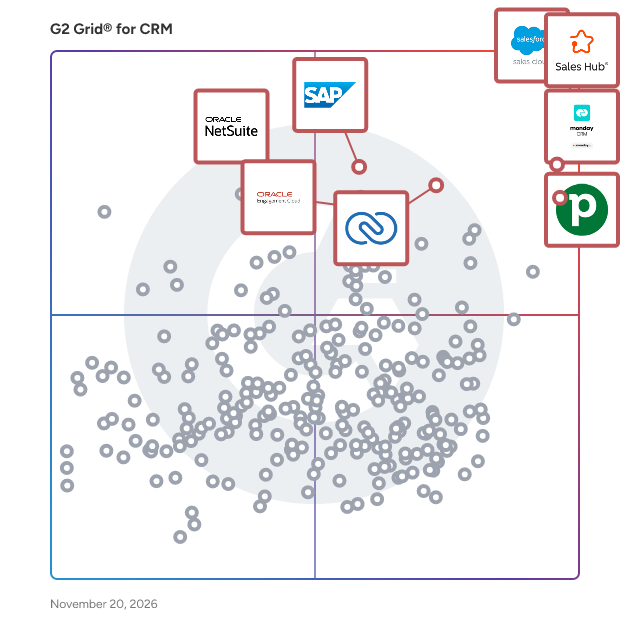
G2 Grid® for CRM Software

G2 Grid® for CRM Software plotting products by satisfaction and market presence

Highlighted products: Salesforce Sales Cloud, HubSpot Sales Hub, Pipedrive, monday CRM, Zoho CRM, Oracle Sales Cloud, SAP Sales Cloud, and NetSuite.

Underlying data: [Grid® JSON](https://www.g2.com/categories/crm/grids.json?focus%5B%5D=salesforce-sales-cloud&focus%5B%5D=hubspot-sales-hub&focus%5B%5D=pipedrive&focus%5B%5D=monday-crm&focus%5B%5D=zoho-crm&focus%5B%5D=oracle-sales-cloud&focus%5B%5D=sap-sap-sales-cloud&focus%5B%5D=oracle-netsuite&segment=mid-market)

Workbooks

Workbooks is a cloud-based Customer Relationship Management (CRM) solution designed specifically for midmarket firms seeking to streamline their business processes and enhance customer engagement. This comprehensive platform integrates various aspects of business operations, allowing organizations to manage their sales, marketing, and customer service functions from a single interface. By combining advanced software capabilities with exceptional consultancy, implementation, and support services, Workbooks aims to deliver a seamless experience for its users. Targeted at midmarket companies, Workbooks addresses the unique challenges these organizations face, such as resource constraints and the need for scalable solutions. The platform is particularly beneficial for businesses looking to improve their customer relationships and operational efficiency without the complexities often associated with larger CRM systems. Workbooks is designed to cater to a diverse range of industries, making it a versatile choice for firms that require a tailored approach to CRM. One of the standout features of Workbooks is its co-funded implementation model, which significantly reduces the cost and risk associated with CRM projects. This approach not only makes the software more accessible but also ensures that businesses receive the necessary support during the setup process. By working closely with clients, Workbooks delivers a customized CRM solution that aligns with specific business needs, all while maintaining an off-the-shelf price point. This unique offering allows organizations to benefit from a tailored system without the financial burden typically associated with bespoke software development. In addition to its cost-effective implementation, Workbooks provides a range of key features that enhance its functionality. Users can expect robust tools for sales automation, marketing campaign management, customer service tracking, project and task management, and sales order processing. The platform also includes advanced reporting and analytics capabilities, enabling businesses to gain valuable insights into their operations and customer interactions. This data-driven approach empowers organizations to make informed decisions and optimize their strategies for better outcomes. The Workbooks platform is powered by AI agents which can be automated via workflows to boost productivity and help drive greater revenue growth. Overall, Workbooks stands out in the CRM landscape by offering a comprehensive solution that combines powerful software with dedicated support services. Its focus on midmarket firms, cost-effective implementation, and customizable features makes it an attractive option for businesses looking to enhance their customer relationship management efforts. By integrating various business functions into a single platform, Workbooks helps organizations improve efficiency, reduce operational risks, and ultimately drive growth.

Average Rating: 4.2/5.0

Total Reviews: 535

How Do G2 Users Rate Workbooks?

  • Has the product been a good partner in doing business?: 8.7/10 (Category avg: 9.0/10)
  • Workflow Capability: 8.2/10 (Category avg: 8.5/10)
  • Contact & Account Management: 8.5/10 (Category avg: 8.8/10)
  • Opportunity & Pipeline Mgmt.: 8.2/10 (Category avg: 8.7/10)

Who Is the Company Behind Workbooks?

  • Seller: Workbooks
  • Company Website:
  • Year Founded: 2009
  • HQ Location: Reading, Berkshire
  • LinkedIn® Page: www.linkedin.com
    65 employees on LinkedIn®
  • Phone: +44 (0) 118 3030 100

Who Uses This Product?

  • Who Uses This: Managing Director, Director
  • Top Industries: Information Technology and Services, Computer Software
  • Company Size: 61% Small, 33% Medium

What Do G2 Reviewers Say About Workbooks?

AI-generated summary from verified user reviews

Pros
  • Users commend the ease of use of Workbooks, appreciating its intuitive interface and efficient organization of data.
  • Users appreciate the customizable reporting features of Workbooks, enhancing visibility and decision-making across teams.
  • Users value the friendly and reliable customer support of Workbooks, ensuring prompt and insightful assistance whenever needed.
  • Users value the customization options in Workbooks, allowing tailored dashboards and reports for efficient data management.
  • Users value the extensive features of Workbooks, enhancing data management and customization for various business needs.
Cons
  • Users face a learning curve with Workbooks, particularly when setting up advanced features without prior knowledge.
  • Users experience slow loading times and lack essential features like dual screens and native iOS app support.
  • Users find the limited features of Workbooks restrict their ability to manage larger operations effectively.
  • Users find the complex features of Workbooks can be clunky and require external assistance for adjustments.
  • Users find limited customization in Workbooks challenging, making simple changes difficult after initial setup.

What Are Recent G2 Reviews of Workbooks?

What Are G2 Users Discussing About Workbooks?

1Channel

1Channel is a comprehensive platform designed to empower businesses with next-gen automation across sales, distribution, and customer engagement. Trusted by companies in 40+ countries, we deliver measurable outcomes through our suite of solutions: Sales Force Automation (SFA), Field CRM, Channel and Influencer Loyalty, and Retail Merchandising Execution. Clients trust 1Channel not just for software, but for solving real business problems with data-driven insights, innovative technology, and reliable support. From organizing field force operations to strengthening channel partnerships and ensuring flawless retail execution, we help brands achieve growth with efficiency and clarity. What makes 1Channel stand apart is its nimbleness, adaptability, and responsiveness. Our solutions are configurable to diverse business models, offering configurations without unnecessary complexity. With AI-powered tools, intuitive dashboards, and timely support, we enable organizations to transform processes, drive loyalty, and maximize ROI. More than a technology provider, 1Channel is a partner committed to delivering on promises including high-quality execution, on-time delivery, and an eager-to-help culture. Businesses rely on us for growth, reliability, and a fair return on every investment they make.

Average Rating: 4.8/5.0

Total Reviews: 64

How Do G2 Users Rate 1Channel?

  • Has the product been a good partner in doing business?: 9.7/10 (Category avg: 9.0/10)
  • Workflow Capability: 10.0/10 (Category avg: 8.5/10)
  • Contact & Account Management: 9.8/10 (Category avg: 8.8/10)
  • Opportunity & Pipeline Mgmt.: 9.8/10 (Category avg: 8.7/10)

Who Is the Company Behind 1Channel?

  • Seller: 1Channel
  • Year Founded: 2006
  • HQ Location: Gurgaon/Gurugram, Haryana
  • LinkedIn® Page: www.linkedin.com
    62 employees on LinkedIn®

Who Uses This Product?

  • Top Industries: Marketing and Advertising, Retail
  • Company Size: 60% Medium, 22% Large

What Are Recent G2 Reviews of 1Channel?

Coevera

Coevera is an AI-powered CRM and sales process platform for B2B sales organizations of 15 to 2,500 quota-carrying sellers: companies with a defined sales process, sales managers accountable for pipeline, and deals complex enough that consultation rather than transaction wins them. Formerly Pipeliner CRM, the company has built sales software since 2011. Its promise today: a sales process that is visible, teachable and repeatable. The platform is industry-agnostic; historically, its strongest results have come from manufacturing, financial services, insurance, software, professional services, energy and mining. Sales leaders buy Coevera for a forecast they can defend. Sales operations teams buy it because it can be configured, changed and reported on without a dedicated administrator, outside consultants or a multi-year build. Frontline managers coach from a pipeline that reflects what is actually happening. Sellers use it because the pipeline is visual and the next step is obvious. A CRM your team actually adopts: visual pipeline management with drag-and-drop deals and Kanban, list, chart and bubble views gives sellers clarity at a glance, with a short learning curve; a map view is available as an add-on. Onboarding a new user takes about two hours. Implementation runs about four weeks. See the whole buying committee, not just the contact: buying centers and relationship maps show who influences the deal, who is blocking it and where the relationship is thin, the detail that decides complex, multi-stakeholder sales. Your sales process, enforced where the work happens: guided selling puts your stages, required activities and qualification criteria in front of the seller in the flow of work, so the process is followed rather than documented. That is what makes a forecast defensible. AI that collaborates, not just automates: Voyager AI shows its reasoning, asks before it acts and learns when corrected. Voyager 1 is included in every edition; Voyager 2 agents, including one that gives contextual guidance on next steps inside a deal, are a paid add-on that runs on credits, with a free monthly allowance. MCP Server support connects Coevera to compatible AI assistants. Coaching built into the deal: more than 1,600 Sales POP! episodes power the Voyager 2 Real Time Sales Assistant, which surfaces relevant expertise when a seller needs it. No-code automation your own team owns: Automatizer lets sales operations build and change multi-step workflows without a full-time administrator. It is included in the Enterprise edition (25 processes a month) and the Unlimited edition (100 processes a month) and is available as an add-on for Business. Reporting and forecasting included: dashboards, pipeline analytics and forecasting are built in, with no separate BI license. The BI Feeder add-on exports raw data to Tableau, Power BI and other tools. A total cost of ownership you can model: transparent per-user pricing, no six-figure implementation and no administrator headcount to fund year after year. Three editions at $85, $115 and $150 per user per month, billed annually.

Average Rating: 4.6/5.0

Total Reviews: 455

How Do G2 Users Rate Coevera?

  • Has the product been a good partner in doing business?: 9.2/10 (Category avg: 9.0/10)
  • Workflow Capability: 9.2/10 (Category avg: 8.5/10)
  • Contact & Account Management: 9.0/10 (Category avg: 8.8/10)
  • Opportunity & Pipeline Mgmt.: 9.2/10 (Category avg: 8.7/10)

Who Is the Company Behind Coevera?

Who Uses This Product?

  • Who Uses This: Business Development Manager, CEO
  • Top Industries: Information Technology and Services, Marketing and Advertising
  • Company Size: 71% Small, 23% Medium

What Do G2 Reviewers Say About Coevera?

AI-generated summary from verified user reviews

Pros
  • Users appreciate the ease of use of Coevera, benefiting from its intuitive interface and minimal training requirements.
  • Users appreciate the easy tracking of deals in Pipeliner CRM, finding the sales pipeline clear and intuitive.
  • Users appreciate the excellent service and intuitive interface of Pipeliner, enhancing daily productivity and workflow management.
  • Users appreciate the user-friendly interface of Coevera, making navigation and deal tracking straightforward and efficient.
  • Users appreciate the user-friendly interface of Coevera, finding it intuitive and easy to navigate for better organization.
Cons
  • Users find the limited customization options in Coevera inadequate for complex workflows and organization needs.
  • Users find the product expensive, which can be a burden for small businesses despite license flexibility.
  • Users find the complexity of Coevera challenging, especially with advanced customization and large organizational needs.
  • Users experience integration issues with Coevera, limiting compatibility with other tools and hindering overall flexibility.
  • Users face a steep learning curve initially due to the complexity and abundance of features in Coevera.

What Are Recent G2 Reviews of Coevera?

What Are G2 Users Discussing About Coevera?

AI can help you find the answers. G2 helps you trust them.

Connect G2 to Claude or ChatGPT for answers grounded in G2's trusted reviews, comparisons, and pricing from real user insights.

How it works

HubSpot Smart CRM

HubSpot Smart CRM is self-updating, AI-powered software that brings your customer data, teams, and tech stack together in one connected system Core Value Proposition HubSpot Smart CRM is the CRM that works for you, not the other way around. It keeps your CRM current through automatic updates and built-in enrichment, capturing customer conversations, creating and filling records, surfacing important changes, and turning the latest context into actionable next steps. Your team spends less time on data entry and more time building relationships. Updates stay visible, editable, and under your control, so you know what got updated and why. Built on HubSpot’s agentic customer platform, Smart CRM combines AI tools and agents, flexible customer views, automation, reporting, governance, and app connectivity so marketing, sales, and service teams can work from a single source of truth, move faster, and deliver better customer experiences at scale. Key capabilities See your customers clearly - Self-updating and self-cleaning CRM: Updates itself based on what actually happened — using, conversations, emails, notes, and the web — so your CRM data stays accurate and trusted. - Agentic onboarding: makes Smart CRM setup easy: contacts, companies, and deals automatically populate from email and calendar connections. - Breeze Assistant: conversational AI that pulls from self-updating CRM data to create content, reports, analysis, automation, and build and activate agents. - Custom data model: store any type of CRM data with custom objects, events, scoring, and calculations. - Data enrichment: automatically enrich contact and company records using emails, calls, the web, and HubSpot’s data sources. - Notetaker: transcribes notes (including voice notes) and captures follow-up items; deal progression drafts the recap email and next steps for reps. - Deal progression: analyzes conversations and recommends updates to deal stage and qualification fields, then drafts follow-up emails. - Data Agent: get updated answers on business-specific questions about customers and prospects by searching CRM data, emails, calls, documents, and the web. Intent signals: learn who’s in-market for your product and a good fit, what they’re searching for, and the right time to reach out. - AI insights: surface important changes, risks, and next-best actions from customer context stored within your CRM. - Reporting dashboards and analytics: make informed decisions fast with templated dashboards and built-in reports that include multiple visualization types and AI-assisted insights. - Sensitive data controls: protect sensitive customer information with encryption, access controls, SSO, and 2FA-ready governance. - Segmentation: easily segment customer or prospect data into lists that can be used for outreach. Get your team on the same page - Pipeline management: stay on top of deals with multiple pipelines, tags, and automated actions. Conditional logic ensures sales processes are never skipped. - Workflows and AI-assisted workflows: automate tasks and customer communications based on customer behavior and business logic. - Task management: keep reps organized and stay on track with automated task management and queues - Custom reporting and dashboards: turn CRM data into actionable insights across pipeline, attribution, and revenue performance with highly customizable reporting. - Team governance: manage precise permissions, team structures, SSO, 2FA, SOC2 compliance with administrative controls.. - Centralized audit log: track actions taken by users, automations, integrations, and agents. Undo and restore actions. - Automatic duplicate detection: use AI to identify and merge duplicate records, keeping the CRM accurate and usable. - Project management: coordinate customer-facing work, track progress, and automate handoffs without leaving the CRM. Connect all your tools in one place - HubSpot Marketplace: connect to more than 2,000 popular apps, including toolsGoogle Workspace, Microsoft 365, Slack, Zoom, and Shopify. - Data Sync: keep records updated automatically with two-way sync across HubSpot and third-party systems. - Custom CRM interface: visualize the same customer data in the format that makes sense for each team, including tables, charts, and custom views. - Sandbox test account: test changes and integrations safely before pushing them live. - UI extensibility: build custom interfaces and extend HubSpot with APIs to match your business processesIntegrated tool actions in workflows: combine HubSpot automation with external apps to streamline multi-system processes. Smart CRM vs. Alternatives HubSpot’s Smart CRM is different from traditional CRM solutions and AI-native CRMs. It unifies customer data, teams, and tech stacks securely, with self-cleaning capabilities that keep data continuously up-to-date. Leveraging your data and third-party insights, Smart CRM’s built-in AI helps deliver personalized customer experiences at scale. All AI-driven updates keep humans in the loop. Reps and admins can review, edit, or approve before anything is saved to the CRM, with the ability to restore data changes. Unlike standalone AI tools, notetakers, or workflow automation layers, self-updating CRM is built directly into HubSpot’s agentic customer platform and works with the data your team already uses. It’s easy to adopt without requiring a dedicated administrator, while still offering the flexibility to support more complex business needs. Outcome Smart CRM is a self-updating source of truth that helps businesses grow faster by unifying customer data, teams, and tools in one easy-to-use agentic customer platform. By having all business context in one place, Smart CRM becomes a source of truth you can rely on to drive outcomes for your business.

Average Rating: 4.6/5.0

Total Reviews: 107

How Do G2 Users Rate HubSpot Smart CRM?

  • Has the product been a good partner in doing business?: 10.0/10 (Category avg: 9.0/10)
  • Workflow Capability: 8.8/10 (Category avg: 8.5/10)
  • Contact & Account Management: 9.7/10 (Category avg: 8.8/10)
  • Opportunity & Pipeline Mgmt.: 8.6/10 (Category avg: 8.7/10)

Who Is the Company Behind HubSpot Smart CRM?

  • Seller: HubSpot
  • Company Website:
  • Year Founded: 2006
  • HQ Location: Cambridge, Massachusetts, United States
  • LinkedIn® Page: www.linkedin.com
    17,628 employees on LinkedIn®
  • Ownership: NYSE:HUBS

Who Uses This Product?

  • Top Industries: Computer Software, Consulting
  • Company Size: 54% Medium, 39% Small

What Are Recent G2 Reviews of HubSpot Smart CRM?

Pipeline CRM

Pipeline CRM is a sales-first CRM designed to help teams close deals faster, automate processes, and drive predictable revenue growth. Our platform eliminates time-consuming admin work with powerful automation, seamlessly moving leads from prospect to customer. With an intuitive interface and highly customizable workflows, sales teams can focus on selling—not data entry.

Average Rating: 4.3/5.0

Total Reviews: 914

How Do G2 Users Rate Pipeline CRM?

  • Has the product been a good partner in doing business?: 9.1/10 (Category avg: 9.0/10)
  • Workflow Capability: 8.1/10 (Category avg: 8.5/10)
  • Contact & Account Management: 8.7/10 (Category avg: 8.8/10)
  • Opportunity & Pipeline Mgmt.: 8.7/10 (Category avg: 8.7/10)

Who Is the Company Behind Pipeline CRM?

  • Seller: Pipeline CRM
  • Company Website:
  • Year Founded: 2006
  • HQ Location: Seattle, WA
  • LinkedIn® Page: www.linkedin.com
    28 employees on LinkedIn®
  • Phone: +1 (866) 702-7303

Who Uses This Product?

  • Who Uses This: Account Manager, Owner
  • Top Industries: Construction, Marketing and Advertising
  • Company Size: 65% Small, 27% Medium

What Do G2 Reviewers Say About Pipeline CRM?

AI-generated summary from verified user reviews

Pros
  • Users value the ease of use of Pipeline CRM, enjoying its intuitive interface and organized approach to deal management.
  • Users praise Pipeline CRM for its intuitive interface, enabling quick learning and efficient management of deals and contacts.
  • Users admire the simple and organized pipeline management of Pipeline CRM, enhancing deal tracking and team consistency.
  • Users appreciate the efficient customer management features of Pipeline CRM, enhancing organization and visibility in client relationships.
  • Users praise Pipeline CRM's fast and helpful customer support, enhancing their overall experience and satisfaction.
Cons
  • Users find the limited features of Pipeline CRM restrict their ability to customize and automate workflows effectively.
  • Users find limited customization in Pipeline CRM, hindering advanced workflows and third-party integration capabilities.
  • Users experience integration issues with Pipeline CRM, facing limitations with third-party apps and data syncing challenges.
  • Users note the missing features in Pipeline CRM, particularly in integrations, automation, and reporting capabilities.
  • Users experience slow performance with Pipeline CRM, encountering lags during updates that hinder overall efficiency.

What Are Recent G2 Reviews of Pipeline CRM?

What Are G2 Users Discussing About Pipeline CRM?

BIGContacts

BIGContacts is an easy-to-use, all-in-one CRM for contact management, email marketing & deal tracking. With AI built in, growing businesses can manage relationships and close more deals without having to stitch together separate tools. Teams use it to organize contacts, run email campaigns, track sales pipelines, and automate follow-ups, all from one dashboard, reducing the back-and-forth between a CRM, an email tool, and a spreadsheet along the way. Popular use cases: • Centralized contact and lead management • Email marketing campaigns and drip sequences • Sales pipeline and deal tracking • Task and follow-up automation • Lead capture through webforms AI CRM: the engine behind the platform The AI CRM learns from your contact data and activity history to keep your pipeline and outreach moving without manual upkeep. It powers: • AI Contact Import & Summary: pulls in contact details and summarizes activity history so reps get context without digging through past notes • AI Marketing Emails: drafts campaign copy and subject lines based on the audience and goal you specify • AI-Powered Dashboards: surfaces pipeline and activity insights at a glance instead of requiring manual report building • AI-driven follow-ups: flags contacts that need attention based on recent activity or inactivity Everything else you'd expect from a modern CRM: • Customizable sales pipeline with deal stages • Drag-and-drop email builder with templates and email analytics • Task management, reminders, and calendar sync • Webforms for direct lead capture • Unlimited users, teams, and storage on every plan • Meeting invitations and Outlook task sync • Reports and analytics on sales and email performance • Third-party integrations plus phone, chat, and email support Whether the goal is keeping contact data from scattering across spreadsheets, running email campaigns without a separate tool, or giving reps visibility into deals without extra admin work, BIGContacts brings contact management, email marketing, and deal tracking together in one platform.

Average Rating: 4.5/5.0

Total Reviews: 77

How Do G2 Users Rate BIGContacts?

  • Has the product been a good partner in doing business?: 8.7/10 (Category avg: 9.0/10)
  • Workflow Capability: 8.2/10 (Category avg: 8.5/10)
  • Contact & Account Management: 9.0/10 (Category avg: 8.8/10)
  • Opportunity & Pipeline Mgmt.: 8.3/10 (Category avg: 8.7/10)

Who Is the Company Behind BIGContacts?

Who Uses This Product?

  • Who Uses This: Owner
  • Top Industries: Marketing and Advertising, Accounting
  • Company Size: 75% Small, 25% Medium

What Are Recent G2 Reviews of BIGContacts?

What Are G2 Users Discussing About BIGContacts?

SalesDesk

Sales Desk is a cost effective and easy to use sales automation software that helps businesses manage their sales team, increase their productivity, generate more leads and build customer relationships. We at Sales Desk believe building relationships with customers is the foundation for any successful business. Most business these days ignore this factor and tend to treat customers and prospects like numbers. Business that use data to foster relationships outperform those who don’t.

Average Rating: 4.4/5.0

Total Reviews: 53

How Do G2 Users Rate SalesDesk?

  • Has the product been a good partner in doing business?: 8.8/10 (Category avg: 9.0/10)
  • Workflow Capability: 9.2/10 (Category avg: 8.5/10)
  • Contact & Account Management: 9.4/10 (Category avg: 8.8/10)
  • Opportunity & Pipeline Mgmt.: 9.5/10 (Category avg: 8.7/10)

Who Is the Company Behind SalesDesk?

Who Uses This Product?

  • Top Industries: Marketing and Advertising
  • Company Size: 45% Small, 42% Medium

What Do G2 Reviewers Say About SalesDesk?

AI-generated summary from verified user reviews

Pros
  • Users value the ease of use of SalesDesk, enjoying its simplicity and organization for efficient lead management.
  • Users praise SalesDesk's lead management for its simplicity, organization, and effective follow-up reminders, enhancing productivity.
  • Users appreciate the user-friendly interface of SalesDesk, which simplifies managing leads and customers effectively.
  • Users value the organizational efficiency of SalesDesk, enabling streamlined sales processes and consistent follow-ups.
  • Users value the easy tracking of SalesDesk, which simplifies lead management and enhances team performance analysis.
Cons
  • Users find SalesDesk has limited customization, hindering their ability to tailor the platform to diverse sales processes.
  • Users feel that the lack of advanced features limits SalesDesk's ability to address specific customer needs effectively.
  • Users feel that performance issues hinder smooth navigation and lead to delays in customer responses.
  • Users find the filter issues in SalesDesk detract from its overall user-friendliness and efficiency.
  • Users find the integration with video call software lacking, hindering effective virtual meetings with customers.

What Are Recent G2 Reviews of SalesDesk?

What Are G2 Users Discussing About SalesDesk?

NetHunt CRM

NetHunt is a sales automation tool that literally lives inside your Gmail and other Google Workspace apps. It helps sales teams manage leads, nurture customer relations, monitor sales progress, and close more deals. Businesses grow x5 with NetHunt CRM, check customer stories - https://nethunt.com/case-studies 🥇 Google Cloud Partner 🥇 Google Security Assessment Program Passed We’ve built the best CRM integration with Gmail allowing for 100% CRM functionality from within Gmail. ✅ No more switching tabs ✅ No more data entry ✅ Everything is in one place ✅ In a familiar interface, within an app that you use daily Watch our demo: https://youtu.be/wD-tjeX6x_s Browse Help Center: https://help.nethunt.com/en/ MORE ABOUT NETHUNT CRM 🙂 Organize your customer base Use core CRM features in NetHunt to organize your customer base in the most efficient way. ✓ Say goodbye to tedious data entry forever. ✓ Use NetHunt’s duplicate prevention feature to keep your data clean at all times. ✓ The required fields feature watches over your data to make sure you’ve got what you need. ✓ Your customer base is securely stored in one place, protected from leaks or prying eyes by proper access management. 📞 Capture new leads through multiple channels NetHunt CRM is integrated with multiple tools that allows you to get new leads from different sources and store communication within CRM records. ✓ Create new leads from inbound and outbound calls ✓ Turn website chats into new leads ✓ Get new leads from social media platforms ✓ Add new leads to CRM from messengers ✓ Capture leads from custom web forms 📋 Segment leads and customers base Break down your customer base into targeted segments to send personalized pitches by using various macros - job title, need, company size and more. ✓ Use custom filters and views to segment your contacts. ✓ Save an unlimited number of segments for yourself or share them with the team. ✓ Have these segments updated automatically when new users match certain parameters. 💲 Build sales pipeline Turn contacts into leads and push them down the beautiful, functional pipeline. ✓ Add new deals, their value, probability of closing and expected close date. ✓ Track deals progress through the pipeline stages. ✓ Know revenue stuck at every stage of the pipeline ✓ Spot blocked leads and how to push them towards purchase. ✓ Create one or several custom pipelines for your products and services. ✓ Build forecasts you can trust. ⭕ Manage Tasks Organize your workday and manage the workload of your team. All within Gmail. ✓ Manage Tasks and collaborate with your team inside Gmail. ✓ Assign Tasks automatically by certain criteria or round-robin algorithm. ✓ Link Tasks to emails and CRM records. ✓ Receive daily Tasks Digest to plan your day. 🤖 Automate sales processes in Gmail NetHunt CRM allows users to automate the entire sales process – from lead capture to deals’ pipeline stage to notifications. ✓ Capture leads from different sources and add them in your CRM. ✓ Assign managers to leads and set up personalised auto-replies. ✓ Prioritise leads automatically depending on their behaviour ✓ Set sequences to nurture leads. ✓ Automatically link email conversations, chats, calls to CRM profiles. ✓ Have an algorithm move a lead to the next pipeline stage based on the lead’s response. ✓ Create automatic tasks for the team. ✓ Set notifications to the team when important changes happen in the pipeline. ✓ Automate data entry. ✉️ Email automation ✓ Create personal and shared email templates in Gmail. ✓ Write repetitive emails easily and quickly. ✓ Personalize email templates with custom fields. ✓ Use email templates in daily email correspondence, email campaigns or automated email sequences. 📩 Email tracking Track your email opens and clicks in Gmail. ✓ Know if, when, and how often the receiver views your emails in real-time. ✓ Know when people open your emails to provide insights for your team. ✓ Prioritise leads based on how many times they open emails or click on the links. ✓ Use email tracking for regular emails, email campaigns and automated email sequences. 🔁 Email campaigns Send email campaigns and follow-up campaigns in Gmail. ✓ Send email campaigns to custom segments or all of your customer base. ✓ Set follow-up emails to previous email campaigns. ✓ Monitor campaigns stats: opens, clicks, unsubscribes, bounces, and replies. ✓ Send email campaigns via Gmail, NetHunt SMTP or your own SMTP server. 📊 Sales reporting Track key business metrics and team performance with reports in NetHunt CRM. ✓ Track the effectiveness of the entire team and every manager separately – the number of sent emails, presentations made, calls made, etc. ✓ Analyze business growth compared to previous periods – the number of closed deals as well as revenue generated. ✓ Analyze revenue by breaking it down by a manager, by a certain product, by country, etc. ✓ Track your quota attainment. ✓ Analyze the reasons for losing deals. ✓ Build a sales forecast you can trust.

Average Rating: 4.6/5.0

Total Reviews: 279

How Do G2 Users Rate NetHunt CRM?

  • Has the product been a good partner in doing business?: 9.3/10 (Category avg: 9.0/10)
  • Workflow Capability: 8.7/10 (Category avg: 8.5/10)
  • Contact & Account Management: 9.3/10 (Category avg: 8.8/10)
  • Opportunity & Pipeline Mgmt.: 9.1/10 (Category avg: 8.7/10)

Who Is the Company Behind NetHunt CRM?

Who Uses This Product?

  • Who Uses This: CEO, Director
  • Top Industries: Marketing and Advertising, Information Technology and Services
  • Company Size: 79% Small, 17% Medium

What Do G2 Reviewers Say About NetHunt CRM?

AI-generated summary from verified user reviews

Pros
  • Users appreciate the ease of use of NetHunt CRM, enabling straightforward navigation and quick setup.
  • Users love the Gmail integration for streamlining sales processes and organizing client communications directly within their inbox.
  • Users value the Gmail integration for enhancing CRM functionality directly within their email interface.
  • Users benefit from the Gmail integration, seamlessly managing leads and workflows directly within their email interface.
  • Users love the easy integration of NetHunt CRM with Gmail and GSuite, enhancing their workflow seamlessly.
Cons
  • Users face a steep learning curve with NetHunt CRM, making setup and mastery time-consuming and challenging.
  • Users note the missing features in NetHunt CRM, particularly for advanced project management and email campaigns.
  • Users note the limited features of NetHunt CRM, especially regarding reporting and advanced automations.
  • Users struggle with email issues including lag, no HTML templates, and limited campaign flexibility compared to Lemlist.
  • Users feel the pricing is premium and can be confusing, especially with per-user fees adding up quickly.

What Are Recent G2 Reviews of NetHunt CRM?

What Are G2 Users Discussing About NetHunt CRM?

1CRM

1CRM enables businesses to create long-lasting customer relationships and experiences with the most intuitive, customizable and cost-effective customer relationship management (CRM) solution on the market. By focusing on a comprehensive and easy to customize CRM solution, 1CRM is putting tailored-fit CRMs within reach of businesses everywhere. With so many CRMs available, what sort is right for you? You'll see CRMs that are limited sales & marketing CRM products, others that are good at Mass Emailing, and then some that include Order Management, Service Management, or Project Management. For businesses with up to about 250 users, the All-in-One type of CRM has proven popular - and that's where 1CRM fits in. 1CRM offers a Sales & Marketing CRM with strong Mass Email capabilities. But it also includes very comprehensive Order Management (Quotes, Invoices, Payments - as well as the Purchasing side), Service Management and Project Management. Throw in Timesheets, Expense Reports, Vacation & Sick Day tracking - and you can see why they call us an All-in-One CRM!

Average Rating: 4.3/5.0

Total Reviews: 39

How Do G2 Users Rate 1CRM?

  • Has the product been a good partner in doing business?: 8.8/10 (Category avg: 9.0/10)
  • Workflow Capability: 8.8/10 (Category avg: 8.5/10)
  • Contact & Account Management: 8.8/10 (Category avg: 8.8/10)
  • Opportunity & Pipeline Mgmt.: 9.1/10 (Category avg: 8.7/10)

Who Is the Company Behind 1CRM?

  • Seller: 1CRM
  • Year Founded: 1997
  • HQ Location: British Columbia, Canada
  • LinkedIn® Page: www.linkedin.com
    6 employees on LinkedIn®

Who Uses This Product?

  • Top Industries: Outsourcing/Offshoring, Marketing and Advertising
  • Company Size: 50% Medium, 45% Small

What Do G2 Reviewers Say About 1CRM?

AI-generated summary from verified user reviews

Pros
  • Users appreciate the ease of use of 1CRM, finding it intuitive and efficient for managing sales and leads.
  • Users praise the excellent customer support of 1CRM, highlighting its knowledgeable and responsive service team.
  • Users value the easy lead management process of 1CRM, which simplifies sales and enhances overall efficiency.
  • Users appreciate the affordability of 1CRM, enjoying a customizable platform that simplifies sales and customer support.
  • Users appreciate the convenient storage of client information in 1CRM, enhancing their sales interaction and organization.
Cons
  • Users find 1CRM's interface inefficient, requiring time and teamwork for setup and customization challenges.
  • Users struggle with the learning curve of 1CRM due to its outdated interface and complex setup requirements.
  • Users find 1CRM’s interface not intuitive, requiring extra time to navigate and adapt to its detailed features.
  • Users find 1CRM not user-friendly due to its outdated interface and slow performance with large databases.
  • Users find the slow performance of 1CRM problematic, especially with large databases and complex workflows.

What Are Recent G2 Reviews of 1CRM?

What Are G2 Users Discussing About 1CRM?

ArcCRM

ArcCRM is a customer relationship management (CRM) platform built for organizations that need a structured way to manage customer interactions, sales activities, and business relationships. It is designed for teams that work with leads, prospects, customers, and ongoing accounts, providing a centralized system for storing and organizing customer-related information. For many businesses, customer data is often spread across emails, spreadsheets, notes, and multiple software applications. As the volume of customer interactions increases, it can become difficult to keep track of conversations, follow-up activities, sales opportunities, and account histories. A CRM system addresses this challenge by bringing relevant information together in a single environment where teams can access and update records as needed. ArcCRM helps users maintain detailed customer profiles, track communication history, manage sales pipelines, and monitor the progress of opportunities from initial contact through ongoing engagement. By consolidating customer information in one location, the platform supports better visibility into customer relationships and helps reduce the risk of important details being overlooked. The software is suitable for sales teams, account managers, customer service departments, business development professionals, and organizations that rely on regular customer interactions. It can also be useful for businesses looking to improve collaboration between departments by ensuring that employees have access to consistent and up-to-date customer information. A CRM platform such as ArcCRM is often needed when businesses reach a point where manual methods of tracking customer information become difficult to manage. Centralized recordkeeping, activity tracking, and relationship management can help teams maintain organization and gain a clearer understanding of customer engagement across different stages of the business process. Overall, ArcCRM serves as a business management tool that helps organizations organize customer data, track interactions, manage sales-related activities, and maintain a comprehensive view of their customer relationships over time.

Average Rating: 4.6/5.0

Total Reviews: 25

How Do G2 Users Rate ArcCRM?

  • Has the product been a good partner in doing business?: 9.2/10 (Category avg: 9.0/10)
  • Workflow Capability: 9.3/10 (Category avg: 8.5/10)
  • Contact & Account Management: 9.6/10 (Category avg: 8.8/10)
  • Opportunity & Pipeline Mgmt.: 9.8/10 (Category avg: 8.7/10)

Who Is the Company Behind ArcCRM?

  • Seller: Archarina
  • HQ Location: New York, NY
  • LinkedIn® Page: www.linkedin.com
    8 employees on LinkedIn®
  • Phone: +1 (732) 705 - 7771

Who Uses This Product?

  • Top Industries: Consulting
  • Company Size: 84% Medium, 16% Small

What Do G2 Reviewers Say About ArcCRM?

AI-generated summary from verified user reviews

Pros
  • Users value the effective lead management features of ArcCRM, enhancing outreach and engagement through tailored strategies.
  • Users praise the ease of use of ArcCRM, allowing effortless setup of campaigns and quick note management.
  • Users value the easy tracking features of ArcCRM for managing applications, deadlines, and client follow-ups effortlessly.
  • Users appreciate the automation features of ArcCRM, enabling efficient campaign management and time-saving follow-ups.
  • Users value the automation features of ArcCRM, significantly enhancing efficiency in managing and tracking campaigns.
Cons
  • Users find the learning curve steep, requiring patience and time to fully understand ArcCRM's advanced features.
  • Users desire a more customizable dashboard in ArcCRM to enhance their user experience and meet specific needs.
  • Users experience integration issues with ERP and third-party tools, causing delays and complicating overall functionality.
  • Users desire missing features such as enhanced reporting and improved mobile app functionalities for better user experience.
  • Users report occasional glitches with the mobile version, though these issues are generally not serious.

What Are Recent G2 Reviews of ArcCRM?

Shape Software

Shape is purpose-built sales and marketing automation software that comes with pre-built features that can be configured for any business. The easy-to-use interface empowers your teams and consolidates all aspects of your business in one AI platform. Shape Software provides a collaborative space for your teams to stay aligned and efficient in everything they do, whether it's streamlining your sales pipeline, engaging more prospects with marketing sequences and digital ads, nurturing customer relationships, communicating seamlessly, or tracking projects. Start growing your revenue with Shape today.

Average Rating: 4.5/5.0

Total Reviews: 59

How Do G2 Users Rate Shape Software?

  • Has the product been a good partner in doing business?: 8.3/10 (Category avg: 9.0/10)
  • Workflow Capability: 8.6/10 (Category avg: 8.5/10)
  • Contact & Account Management: 9.1/10 (Category avg: 8.8/10)
  • Opportunity & Pipeline Mgmt.: 8.8/10 (Category avg: 8.7/10)

Who Is the Company Behind Shape Software?

Who Uses This Product?

  • Top Industries: Financial Services, Accounting
  • Company Size: 60% Small, 35% Medium

What Do G2 Reviewers Say About Shape Software?

AI-generated summary from verified user reviews

Pros
  • Users value the advanced email marketing features of Shape Software, enhancing their marketing automation efforts effectively.
  • Users appreciate the advanced lead management features of Shape Software, enhancing their marketing automation efforts.
  • Users find the marketing automation tools of Shape Software effective for managing campaigns and leads efficiently.
  • Users value the marketing automation tools in Shape Software, enhancing their email campaigns and lead management efficiency.
  • Users appreciate the marketing automation tools in Shape Software, enhancing their campaigns with efficiency and effectiveness.
Cons
  • Users express frustration over editing limitations in Shape Software, finding customization and API functionality severely restricted.
  • Users highlight the expensive pricing of Shape Software, noting better, more affordable alternatives available in the market.
  • Users face API issues with Shape Software, noting limitations in functionality and restrictive usage limits despite additional fees.
  • Users note the limited customization and additional costs of Shape Software, leading to frustration with its functionality.
  • Users report billing issues with Shape Software, including difficulties in cancellation and unexpected contract commitments.

What Are Recent G2 Reviews of Shape Software?

What Are G2 Users Discussing About Shape Software?

Salesmate

Salesmate is an AI-powered Customer Relationship Management (CRM) platform built for mid-market and enterprise teams that need a connected system to run revenue operations at scale. It centralizes customer data, deal pipelines, tasks, and conversations so sales, marketing, support, and revenue operations stay aligned on every account. By bringing execution and visibility into one place, Salesmate reduces operational friction and helps teams move faster from first touch to renewal. Salesmate is designed for organizations scaling across teams, regions, and customer segments - and looking for a CRM that supports structured processes without slowing people down. The platform supports key revenue workflows such as capturing and qualifying leads, managing complex sales cycles, coordinating cross-team handoffs, and tracking performance through reporting and forecasting. Automation through no-code workflows and sequences reduces repetitive work, standardizes best practices, and ensures timely follow-ups without adding unnecessary complexity. A core strength of Salesmate is communication visibility and execution discipline. With seamless email synchronization and tracking, teams can monitor engagement and keep every interaction tied to the right contact, company, and deal. Built-in meeting scheduling improves speed-to-lead and responsiveness, while dashboards and reports give leaders the clarity they need to forecast accurately, identify bottlenecks, and optimize conversion across the funnel. Skara extends Salesmate with CRM-native AI agents that don’t just answer questions - they take action across the customer lifecycle. Skara can engage prospects and customers through real-time conversations, qualify and route inbound leads, book meetings using calendar availability and time-zone logic, and automatically create or update CRM records to keep pipelines clean. Beyond pre-sales, Skara can handle repetitive support requests using knowledge bases, deflect tickets, capture structured data through conversational forms, trigger workflows, assign owners, and escalate complex cases with full context and summaries. For eCommerce and digital-first businesses, Skara also enables conversational commerce use cases such as guided product discovery, answering product and availability questions, handling order status and returns, and capturing high-intent signals that flow directly into the CRM. Together, Salesmate and Skara help mid-market and enterprise organizations operate with greater speed and precision - delivering more qualified conversations, cleaner data, stronger handoffs between teams, and a customer experience that feels responsive and personalized at every stage.

Average Rating: 4.7/5.0

Total Reviews: 118

How Do G2 Users Rate Salesmate?

  • Has the product been a good partner in doing business?: 9.3/10 (Category avg: 9.0/10)
  • Workflow Capability: 8.9/10 (Category avg: 8.5/10)
  • Contact & Account Management: 9.1/10 (Category avg: 8.8/10)
  • Opportunity & Pipeline Mgmt.: 9.1/10 (Category avg: 8.7/10)

Who Is the Company Behind Salesmate?

  • Seller: Salesmate
  • Company Website:
  • Year Founded: 2016
  • HQ Location: Charlotte, NC
  • LinkedIn® Page: www.linkedin.com
    29 employees on LinkedIn®

Who Uses This Product?

  • Who Uses This: Owner
  • Top Industries: Marketing and Advertising, Computer Software
  • Company Size: 75% Small, 14% Medium

What Do G2 Reviewers Say About Salesmate?

AI-generated summary from verified user reviews

Pros
  • Users praise the exceptional customer support from Salesmate's team, enhancing their overall experience and satisfaction.
  • Users appreciate the super easy user interface of Salesmate, finding the platform intuitive and efficient for their needs.
  • Users value the easy-to-use interface and all-in-one solution of Salesmate, enhancing productivity and client engagement.
  • Users appreciate the super easy user interface and comprehensive modules of Salesmate, enhancing workflow creation and management.
  • Users find automation in Salesmate invaluable, enhancing workflow ease and delivering seamless customer engagement across channels.
Cons
  • Users find integration issues frustrating, as they complicate the workflow automation experience with other CRMs.
  • Users find limited features in Salesmate's third-party integrations and advanced settings challenging for non-technical users.
  • Users feel that missing features like better support and multi-user login options hinder Salesmate's potential.
  • Users experience a learning curve for advanced configurations, often relying on support for setup and adjustments.
  • Users find Salesmate to be not intuitive, requiring significant technical assistance for advanced configurations.

What Are Recent G2 Reviews of Salesmate?

What Are G2 Users Discussing About Salesmate?

Infor CRM

Your customer relationships are the driving force of your business. By offering a complete view of every customer touch point across your sales, marketing, customer service, and support teams, Infor CRM enables you to maximize the impact of every interaction—across the entire customer lifecycle—whether in the office or out in the field. The best part about Infor CRM is that it’s built for your business. Industry-specific capabilities, deep integration, and unparalleled flexibility and control in how you deploy, use, and pay for your solution offers a best-of-breed CRM solution without compromise.

Average Rating: 3.3/5.0

Total Reviews: 77

How Do G2 Users Rate Infor CRM?

  • Has the product been a good partner in doing business?: 6.9/10 (Category avg: 9.0/10)
  • Workflow Capability: 5.8/10 (Category avg: 8.5/10)
  • Contact & Account Management: 7.4/10 (Category avg: 8.8/10)
  • Opportunity & Pipeline Mgmt.: 6.6/10 (Category avg: 8.7/10)

Who Is the Company Behind Infor CRM?

  • Seller: Infor
  • Year Founded: 2002
  • HQ Location: New York
  • LinkedIn® Page: www.linkedin.com
    22,165 employees on LinkedIn®
  • Phone: 800-260-2640

Who Uses This Product?

  • Top Industries: Computer Software, Information Technology and Services
  • Company Size: 58% Medium, 29% Small

What Do G2 Reviewers Say About Infor CRM?

AI-generated summary from verified user reviews

Pros
  • Users value the easy access to Infor CRM, enhancing customer satisfaction from anywhere.
  • Users appreciate the ease of use with Infor CRM, particularly for scheduling sales calls via the calendar feature.
  • Users appreciate the easy navigation of Infor CRM, facilitating convenient access and customer satisfaction.
  • Users appreciate the user-friendly login of Infor CRM, ensuring customer satisfaction from any location.
Cons
  • Users desire a mobile app for Infor CRM, as using a laptop on the road is impractical.
  • Users experience slow loading times due to the large volume of data, impacting their overall efficiency.

What Are Recent G2 Reviews of Infor CRM?

What Are G2 Users Discussing About Infor CRM?

Agile CRM

Agile CRM is a fully integrated CRM with sales tracking, contact management, marketing automation, web analytics, 2-way emails, telephony, helpdesk with a clean modern interface. With Agile CRM, SMB's can now: - Automate their marketing, sales and customer retention process with simple and powerful drag-drop editor - Convert website visitors directly to leads in the CRM - Nurture, track and score leads automatically based on web or email activity - Enable multi channel communication with the ability to call or email or tweet to a contact from the same page - Monitor customer behavior and get real time alerts for customer activity - Manage helpdesk tickets with all of the customers history in one place - Have a detailed record of all of the customer's details and communication history in one page, sorted chronologically - See customer data from various other business apps on one page using extensive integrations

Average Rating: 4.0/5.0

Total Reviews: 365

How Do G2 Users Rate Agile CRM?

  • Has the product been a good partner in doing business?: 8.0/10 (Category avg: 9.0/10)
  • Workflow Capability: 7.6/10 (Category avg: 8.5/10)
  • Contact & Account Management: 8.2/10 (Category avg: 8.8/10)
  • Opportunity & Pipeline Mgmt.: 7.7/10 (Category avg: 8.7/10)

Who Is the Company Behind Agile CRM?

Who Uses This Product?

  • Who Uses This: Founder, CEO
  • Top Industries: Marketing and Advertising, Information Technology and Services
  • Company Size: 76% Small, 16% Medium

What Do G2 Reviewers Say About Agile CRM?

AI-generated summary from verified user reviews

Pros
  • Users value the ease of use of Agile CRM, appreciating its intuitive interface and all-in-one capabilities.
  • Users value Agile CRM for its effective consolidation of essential tools, making it ideal for small to mid-sized businesses.
  • Users value the all-in-one toolset of Agile CRM, appreciating its efficiency and affordability for small to mid-sized businesses.
  • Users value Agile CRM for its affordability, appreciating the effective tools it offers for small businesses.
  • Users value the effective automation features of Agile CRM, enhancing organization and efficiency in managing their tasks.
Cons
  • Users find the interface not intuitive, making navigation and feature use more challenging than expected.
  • Users often face poor customer support, with slow response times and unresolved issues impacting their experience.
  • Users note a dated and clunky interface that can hinder navigation and overall ease of use.
  • Users frequently experience slow loading times, particularly with large datasets, hindering their workflow efficiency.
  • Users find the interface issues of Agile CRM hinder engaging and effective navigation compared to competitors.

What Are Recent G2 Reviews of Agile CRM?

What Are G2 Users Discussing About Agile CRM?

ConnectWise PSA

ConnectWise PSA is the most complete business management platform built specifically for companies that sell, service, and support technology. Designed for Managed Service Providers (MSPs) and IT service organizations, it centralizes operations, strengthens accountability, and improves service delivery by bringing every core workflow into one modern platform. ConnectWise PSA helps MSPs reduce manual effort and streamline operations through adaptive workflows, automated billing, and structured service processes. From ticket management and customer service to sales, project delivery, and business analytics, ConnectWise PSA gives teams the tools they need to work smarter, faster, and with greater consistency. As a unified command center for the business, ConnectWise PSA provides real-time visibility across service, finance, and operations. This holistic approach allows MSPs to eliminate swivel-chair work, reduce errors, and make data-driven decisions that support growth and customer satisfaction. Routine tasks become automated, freeing technicians and leaders to focus on strategic initiatives rather than administrative overhead. Built for small to mid-sized technology firms and MSPs, ConnectWise PSA supports the full lifecycle of managed services. Users rely on it to track and resolve service tickets, automate recurring and one-time invoicing, manage projects, oversee sales activity, and monitor key performance metrics—all from a single platform that scales with the business. Core capabilities include an advanced service desk for efficient ticket routing and resolution, reliable integrations with major accounting platforms, robust quoting and invoicing tools for accelerating cash flow, and comprehensive project management to keep teams aligned. Built-in dashboards and analytics surface trends and insights that help leaders improve performance and operate proactively. Backed by more than 40 years of experience in the technology services industry, ConnectWise stands apart through its global community, deep ecosystem, and continuous innovation. ConnectWise PSA gives MSPs the foundation they need to run and grow their business today while preparing for a future powered by automation and intelligent service delivery.

Average Rating: 3.9/5.0

Total Reviews: 562

How Do G2 Users Rate ConnectWise PSA?

  • Has the product been a good partner in doing business?: 7.6/10 (Category avg: 9.0/10)
  • Workflow Capability: 7.9/10 (Category avg: 8.5/10)
  • Contact & Account Management: 8.5/10 (Category avg: 8.8/10)
  • Opportunity & Pipeline Mgmt.: 7.8/10 (Category avg: 8.7/10)

Who Is the Company Behind ConnectWise PSA?

  • Seller: ConnectWise
  • Company Website:
  • Year Founded: 1982
  • HQ Location: Tampa, FL
  • LinkedIn® Page: www.linkedin.com
    3,401 employees on LinkedIn®
  • Phone: 800-671-6898

Who Uses This Product?

  • Who Uses This: President, Network Engineer
  • Top Industries: Information Technology and Services, Computer & Network Security
  • Company Size: 66% Small, 28% Medium

What Do G2 Reviewers Say About ConnectWise PSA?

AI-generated summary from verified user reviews

Pros
  • Users value the ease of use of ConnectWise PSA, appreciating its simple implementation and seamless integration features.
  • Users praise the seamless integration of ConnectWise PSA, enhancing their operational efficiency and management capabilities.
  • Users value the seamless integrations of ConnectWise PSA, enhancing efficiency and streamlining their operations.
  • Users value the feature richness of ConnectWise PSA, benefiting from its all-in-one functionality and strong automation.
  • Users value the excellent customer support from ConnectWise PSA, enhancing their overall experience and problem resolution.
Cons
  • Users find the steep learning curve of ConnectWise PSA challenging, noting complexity and slow interface performance.
  • Users express frustration with the poor customer support, citing slow response times and unhelpfulness in resolving issues.
  • Users find the complex usability of ConnectWise PSA challenging, citing a steep learning curve and cumbersome interface.
  • Users find the missing features, like a lite version and better mobile app, limit ConnectWise PSA's usability.
  • Users frequently experience performance issues with ConnectWise PSA, citing slow interface and complicated processes that hinder productivity.

What Are Recent G2 Reviews of ConnectWise PSA?

What Are G2 Users Discussing About ConnectWise PSA?

Julie Jung
JJ
Researched and written by Julie Jung
Updated
Reviews & FAQs

Reviews Summary: The Best CRM Software for Mid-Market Businesses

Thanks to 122469 CRM software reviews and associated data from users working for mid-size companies, at G2 we have some of the most definitive data on the best CRM software for the mid-market space. We have identified 122 individual CRM products offering the features, pricing and support that Mid-Market companies look for when comparing CRM software and solutions. These reviews are generated using the qualitative and quantitative feedback from G2 members working in mid-size companies and who have used these CRM software products.

When G2 reviewers submit their CRM software reviews, they often provide information on the type of company they work for and what market segment they belong to. We break these different market segments into three distinct groups:

  • Small Business CRM Software Reviews (< 50 employees)
  • mid-market CRM Software Reviews (51-1,000 employees)
  • Enterprise CRM Software Reviews (1,001+ employees)

mid-market businesses have their own unique requirements when it comes to CRM software compared to small or enterprise companies. That is why these individual mid-size company CRM software reviews are especially helpful when comparing product set up, ease of use and overall cost.

Below you will find FAQs and review snippets for CRM software products that work well in mid-market environments. These reviews are written by real G2 users working for these Mid-Market companies who have real-world experience with these CRM software products.

FAQs About CRM Software for Mid-Market Businesses

Q. What are the best CRM software products for mid-size businesses, according to G2 reviewers?
  • Salesforce Sales Cloud - 4.4-stars, 10785 reviews (45% from mid-market reviewers)
  • HubSpot Sales Hub - 4.4-stars, 4116 reviews (35% from mid-market reviewers)
  • Pipedrive - 4.2-stars, 995 reviews (21% from mid-market reviewers)
  • monday CRM - 4.5-stars, 360 reviews (22% from mid-market reviewers)
  • Zoho CRM - 4.2-stars, 862 reviews (32% from mid-market reviewers)
Q. What are the least-liked CRM software products for professionals at mid-size companies, based on the overall G2 rating?
  • Solid Performers CRM - 4.9-stars, 14 reviews (25% from mid-market reviewers)
  • InStream Group - 4.4-stars, 30 reviews (25% from mid-market reviewers)
  • TDF CRM - 3.8-stars, 29 reviews (59% from mid-market reviewers)
  • noCRM - 4.6-stars, 10 reviews (8% from mid-market reviewers)
  • OpenCRM - 4.0-stars, 15 reviews (31% from mid-market reviewers)
Q. What are the highest-rated CRM software tool features according to employees at Mid-Market companies?
  • Performance Metrics - 5.0-stars
  • Audience Targeting - 5.0-stars
  • Lead Capture - 5.0-stars
Q. What are the features that are rated lowest by employees at Mid-Market companies?
  • Customizable Reports - 3.3-stars
  • Mobile Access - 3.4-stars
  • Channel Management - 3.4-stars
Q. How many CRM software reviews are from users working in mid-market companies?

26045 out of all CRM software reviews on G2 are from users working in Mid-Market companies (21%).

Here's What Reviewers Working at mid-market Businesses Have to Say About CRM Software

What Mid-Market Professionals Liked What Mid-Market Professionals Disliked

Salesforce Sales Cloud: “Great product to onboard your sales team right away and only thing you need is salesforce admins to right away onboard.”

Read Review

Pipedrive: “Having to put in that a deal with an existing customer is with an existing customer even though it's against an existing customer. Multi-choice for things that should be radio-button style. Total lack of inbuilt intelligence. Constant pushing of crappy AI.”

Read Review

Sales Flow Technologies: “Easy to use and manage the database with smooth workflow”

Read Review

ActiveCampaign: “No support No cross object reporting OR filtering No duplicate accounts or contacts No Global Search No ownership by AC to their product changes.”

Read Review

HubSpot Sales Hub: “HubSpot allows for flexibility between business units while tracking sales for prospects to established customers.”

Read Review

HubSpot Sales Hub: “That many things want to be managed entirely through the platform without the support of a specialist, and it can be very confusing if you don't have experience, which was our case. They do not attend to you correctly or cordially in customer service. Difficult to use.”

Read Review

Recommendations To Others Problems Solved & Benefits

HubSpot Sales Hub: “The free version is great to evaluate if it fits your company needs. To unlock it's full potencial, it's better use with the complete platform, marketing and sales pro features.”

Read Review

Kylas Sales CRM: “I use Kylas Sales CRM to manage leads and track follow-ups, saving time and keeping everything organized in one place. Its simple interface and quick access to customer details streamline daily work.”

Read Review

Salesforce Sales Cloud: “I highly recommend Salesforce. It is the largest CRM company in the world for a reason. It offers continual updates and enhancements, and can be customized to any company.”

Read Review

monday CRM: “It keeps us accountable and reduces human error in tracking leasing enquiry. This ensures that we respond to all leasing enquiries that come through”

Read Review

HubSpot Sales Hub: “Give it a try; you won't be disappointed. Also, make sure not to get frustrated at the start if you don't know how to navigate it right off the bat. There are helpful tutorials and info on the site and once you play around with it for a bit, and get acclimated to how it works it will come second nature pretty quickly.”

Read Review

monday CRM: “monday CRM offers a faster way to handle and access data, making it easy to use on mobile devices. I store secure IT info like serial numbers and emails, which I can review from anywhere.”

Read Review