Top Free Construction Data Analytics Software

How Many Construction Data Analytics Software Products Does G2 Track?

Total Products under this Category: 94

Category Stats (Sep 2026)

  • Average Rating: 4.39/5 (↓0.01 vs Aug 2026) The average rating of products in this category, based on all submitted ratings
  • Top Trending Product: CMiC Platform (+2.2%) - Among all products in this category, CMiC Platform recorded the largest rating increase compared to last month

Last updated: September 11, 2026

How Does G2 Rank Construction Data Analytics Software Products?

Why You Can Trust G2's Software Rankings:

  • 30 Analysts and Data Experts
  • 11,600+ Authentic Reviews
  • 94+ Products
  • Unbiased Rankings

G2's software rankings are built on verified user reviews, rigorous moderation, and a consistent research methodology maintained by a team of analysts and data experts. Each product is measured using the same transparent criteria, with no paid placement or vendor influence. While reviews reflect real user experiences, which can be subjective, they offer valuable insight into how software performs in the hands of professionals. Together, these inputs power the G2 Score, a standardized way to compare tools within every category.

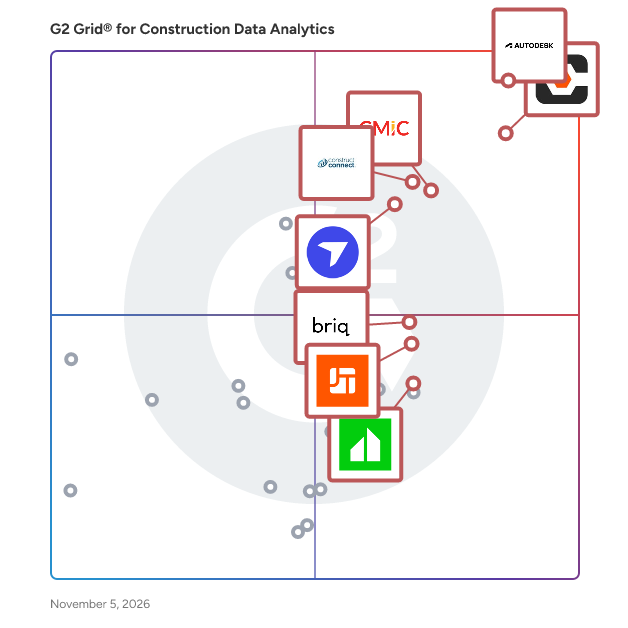
G2 Grid® for Construction Data Analytics Software

G2 Grid® for Construction Data Analytics Software plotting products by satisfaction and market presence

Highlighted products: Autodesk Forma (formerly Autodesk Construction Cloud), Procore, ConstructConnect Project Intelligence, DroneDeploy, CMiC Platform, briq, JobTread, and InEight.

Underlying data: [Grid® JSON](https://www.g2.com/categories/construction-data-analytics/grids.json?focus%5B%5D=autodesk-forma-formerly-autodesk-construction-cloud&focus%5B%5D=procore&focus%5B%5D=constructconnect-project-intelligence&focus%5B%5D=dronedeploy&focus%5B%5D=cmic-platform&focus%5B%5D=briq-briq&focus%5B%5D=jobtread&focus%5B%5D=ineight)

Autodesk Forma (formerly Autodesk Construction Cloud)

Autodesk Forma (formerly Autodesk Construction Cloud) connects workflows, teams and data at every stage of construction to reduce risk, maximize efficiency, and increase profits. Autodesk Build is part of Autodesk Forma (formerly Autodesk Construction Cloud)'s newest set of products that further connect data, workflows, and teams throughout the entire building lifecycle. Build delivers a broad, deep, and connected set of field execution and project management tools for builders in a single software platform that is easy to deploy, adopt and use. Autodesk Build delivers the unification of best-in-class technology from PlanGrid and BIM 360, along with new functionality, to connect construction data and workflows across the headquarters, office, and jobsite. It offers tools for project management, quality, safety, cost, document management and project closeout workflows in a single application that is purpose-built for what you do and where you are working. -Supports integrated & digitized processes for the build phase of a project in a platform that is easy to deploy, adopt and use, while ensuring information sharing and workflows are tightly controlled and highly-configurable. -Standardized and centralized data collection from design through operations enables data-driven decision making, and predictive analytics provide visibility into high-risk issues that can impact project cost, schedule, quality, and safety. -Cloud-based document management provides a single source of truth for all project documentation for the owner, GCs and subs. Autodesk Takeoff empowers estimators to create fast, accurate takeoffs in a cloud-based solution that combines 2D and 3D workflows. Autodesk Takeoff is part of Autodesk Forma (formerly Autodesk Construction Cloud)'s newest set of products that further connect data, workflows, and teams throughout the entire building lifecycle. Autodesk Takeoff allows estimators to perform more accurate 2D takeoffs and generate automated quantities from 3D models in a single online solution. Preconstruction teams are empowered to win more work with integrated takeoffs and quantities that help produce quality estimates for faster, more accurate bidding. -Manage sheets and models in one data environment with Autodesk Docs -Easily capture project scope with linear, count and area takeoff -Generate multiple quantities and use custom formulas -Get instant access to quantities from models for automated 3D takeoffs -Access aggregated quantities from drawings and models Autodesk BIM Collaborate is part of Autodesk Forma (formerly Autodesk Construction Cloud)'s newest set of products that further connect data, workflows, and teams throughout the entire building lifecycle. BIM Collaborate empowers project teams to align and execute on design intent and constructability by managing the entire design collaboration and coordination workflow. Autodesk BIM Collaborate empowers design and construction teams to align and execute on design intent and constructability in a single online solution. By allowing teams to manage the entire design collaboration and coordination process in a single common data environment, BIM Collaborate reduces rework and improves overall design quality. -No limits on projects or file storage -Subscribe once and use on any project you are working on -Flexible subscription offerings for users, projects and businesses -Easily add subscribers and models as your business grows -Keep the same central administration and user login when adding new products

Average Rating: 4.4/5.0

Total Reviews: 5,288

How Do G2 Users Rate Autodesk Forma (formerly Autodesk Construction Cloud)?

  • Has the product been a good partner in doing business?: 8.3/10 (Category avg: 9.0/10)
  • Ease of Use: 8.1/10 (Category avg: 8.6/10)
  • Post-Construction Data Analytics: 7.6/10 (Category avg: 8.3/10)
  • Resource Management: 7.3/10 (Category avg: 8.0/10)

Who Is the Company Behind Autodesk Forma (formerly Autodesk Construction Cloud)?

  • Seller: Autodesk
  • Company Website:
  • Year Founded: 1982
  • HQ Location: San Francisco
  • Twitter: @autodesk
    273,215 Twitter followers
  • LinkedIn® Page: www.linkedin.com
    15,757 employees on LinkedIn®

Who Uses This Product?

  • Who Uses This: BIM Manager, Project Manager
  • Top Industries: Construction, Architecture & Planning
  • Company Size: 45% Medium, 31% Large

What Do G2 Reviewers Say About Autodesk Forma (formerly Autodesk Construction Cloud)?

AI-generated summary from verified user reviews

Pros
  • Users appreciate the simple user interface of Autodesk Forma, making it easy to navigate and utilize effectively.
  • Users value the real-time collaboration features of Autodesk Forma, enhancing project insight and coordination efficiency.
  • Users value the real-time collaboration features of Autodesk Forma, enhancing insights and teamwork throughout the design process.
  • Users value the seamless collaboration in Autodesk Forma, enhancing trust and efficiency across project phases.
  • Users value the accessible large CAD file capabilities of Autodesk Forma, ensuring seamless project management from anywhere.
Cons
  • Users express frustration over missing features and complex access hurdles that limit functionality for architects in Autodesk Forma.
  • Users face limitations in tracking and functionality, making project management challenging and costing concerns prevalent.
  • Users face access limitations with Autodesk Forma, struggling with login prompts and multi-level assemblies access.
  • Users highlight the need for better configuration and accessibility in Autodesk Forma for improved usability.
  • Users find the steep learning curve of Autodesk Forma challenging, especially for smaller teams and simpler projects.

What Are Recent G2 Reviews of Autodesk Forma (formerly Autodesk Construction Cloud)?

What Are G2 Users Discussing About Autodesk Forma (formerly Autodesk Construction Cloud)?

Procore

Procore construction software manages your construction projects, resources and financials from planning to closeout. The platform connects every project contributor to solutions built specifically for the industry for the owner, the general contractor and the specialty contractor. The ability to communicate across teams makes it easier to work together by establishing a single source of truth. This is how Procore gives your team easy access to everything they need to know to get the job done.

Average Rating: 4.6/5.0

Total Reviews: 4,262

How Do G2 Users Rate Procore?

  • Has the product been a good partner in doing business?: 8.9/10 (Category avg: 9.0/10)
  • Ease of Use: 8.6/10 (Category avg: 8.6/10)
  • Post-Construction Data Analytics: 8.4/10 (Category avg: 8.3/10)
  • Resource Management: 8.3/10 (Category avg: 8.0/10)

Who Is the Company Behind Procore?

  • Seller: Procore Technologies
  • Company Website:
  • Year Founded: 2003
  • HQ Location: Carpinteria, CA
  • Twitter: @procoretech
    16,491 Twitter followers
  • LinkedIn® Page: www.linkedin.com
    4,788 employees on LinkedIn®

Who Uses This Product?

  • Who Uses This: Project Manager, Project Engineer
  • Top Industries: Construction, Architecture & Planning
  • Company Size: 48% Medium, 40% Small

What Do G2 Reviewers Say About Procore?

AI-generated summary from verified user reviews

Pros
  • Users highlight Procore's intuitive interface, making training and onboarding for new users effortless.
  • Users value the efficient document management in Procore, streamlining processes and reducing the need for physical storage.
  • Users value the logical organization of Procore, enhancing task management and collaboration on job sites.
  • Users value the centralization of information in Procore, streamlining processes and enhancing efficiency in construction projects.
Cons
  • Users find the learning curve steep, particularly with importing budgets from Excel, impacting overall user-friendliness.
  • Users note the missing features in Procore, particularly concerning material procurement and meeting management improvements.
  • Users find limitations in integration and reporting features that hinder Procore's overall effectiveness for their needs.
  • Users find Procore's difficult learning curve challenging, often feeling overwhelmed by its complex features and notifications.
  • Users find that significant improvement is needed in Procore's setup, integration, and overall module functionality.

What Are Recent G2 Reviews of Procore?

What Are G2 Users Discussing About Procore?

DroneDeploy

DroneDeploy powers field teams with robotics and AI. As the only platform that combines robotic automation, AI agents and truly unified reality capture, DroneDeploy allows critical industries to operate with speed and confidence. From construction and energy to agriculture, the world’s largest companies use DroneDeploy to simplify field operations, improve safety and make smarter decisions, faster. By combining aerial drones, 360 and fixed cameras, ground robots and proprietary AI, we’re bringing the power of automation and visual intelligence to all stakeholders, from the field to the boardroom.

Average Rating: 4.6/5.0

Total Reviews: 110

How Do G2 Users Rate DroneDeploy?

  • Has the product been a good partner in doing business?: 9.2/10 (Category avg: 9.0/10)
  • Ease of Use: 8.8/10 (Category avg: 8.6/10)

Who Is the Company Behind DroneDeploy?

  • Seller: DroneDeploy
  • Year Founded: 2013
  • HQ Location: San Francisco, US
  • Twitter: @DroneDeploy
    34,433 Twitter followers
  • LinkedIn® Page: www.linkedin.com
    386 employees on LinkedIn®

Who Uses This Product?

  • Who Uses This: Project Engineer, VDC Manager
  • Top Industries: Construction, Architecture & Planning
  • Company Size: 43% Small, 40% Medium

What Do G2 Reviewers Say About DroneDeploy?

AI-generated summary from verified user reviews

Pros
  • Users appreciate the ease of use of DroneDeploy, enjoying intuitive features for planning and collaboration.
  • Users praise the user-friendly interface and exceptional customer service of DroneDeploy, enhancing their overall experience.
  • Users value the responsive and knowledgeable customer support from DroneDeploy, enhancing their overall experience and productivity.
  • Users value the intuitive flight planning and rapid map processing of DroneDeploy, significantly enhancing their workflow efficiency.
  • Users value the user-friendly flight management and mapping tools of DroneDeploy for efficient collaboration and accurate measurements.
Cons
  • Users find the service expensive, leading to difficulties in retention and understanding pricing plans.
  • Users report missing features like bulk GCP processing and account restrictions, making tasks tedious and less efficient.
  • Users experience slow processing times with DroneDeploy, impacting efficiency and usability in critical situations.
  • Users report upload issues with DroneDeploy, finding it sometimes slow and complicating their project workflows.
  • Users find 3D integration issues frustrating, with limitations on mobile and manual adjustments needed for PDFs.

What Are Recent G2 Reviews of DroneDeploy?

What Are G2 Users Discussing About DroneDeploy?

Knowify

**NEW** - Knowify now connects directly to AI platforms like Claude and ChatGPT. No generic AI advice. No reports to build. No analyst to hire. Just the insights you need to grow with confidence. ✅ “What jobs need my attention this week?” ✅ “What’s my WIP this month?” ✅ “Who’s making me the most money on commercial work?” Every job. Every number. Everything that drives profitability. Any question you’ve every had about your business. Now all you have to do is ask. ------------------------------------------------- Knowify is job management software built for trade contractors. Founded in New York City, with team members across the U.S. and Canada, Knowify supports growing subcontractors with teams ranging from 2 to 200. The platform is trusted by contractors across trades like electrical, plumbing, HVAC, drywall, and remodeling. Knowify brings estimating, job costing, scheduling, time tracking, and invoicing together in one platform. It supports construction-specific workflows including AIA billing, change orders, certified payroll, and prevailing wage tracking. Mobile tools keep field teams connected to the office, and everything stays in sync with QuickBooks Online, QuickBooks Payroll, QuickBooks time, QuickBooks Payments, and Intuit Enterprise Suite through a best-in-class two-way integration. Knowify helps contractors stay organized, on schedule, and profitable. With real-time visibility into costs and progress, contractors can manage every job more efficiently and make confident financial decisions. Knowify replaces spreadsheets and disconnected tools with one system built to support growing construction businesses. Most importantly - our fully U.S.-based support team is full of real people ready to talk and help you solve the challenges in your business. We're proud partners of the trades - and proud of our commitment to top quality software and service.

Average Rating: 4.5/5.0

Total Reviews: 102

How Do G2 Users Rate Knowify?

  • Has the product been a good partner in doing business?: 9.1/10 (Category avg: 9.0/10)
  • Ease of Use: 8.8/10 (Category avg: 8.6/10)
  • Post-Construction Data Analytics: 7.5/10 (Category avg: 8.3/10)
  • Resource Management: 7.3/10 (Category avg: 8.0/10)

Who Is the Company Behind Knowify?

  • Seller: Knowify
  • Company Website:
  • Year Founded: 2012
  • HQ Location: New York, NY
  • Twitter: @knowify
    970 Twitter followers
  • LinkedIn® Page: www.linkedin.com
    53 employees on LinkedIn®

Who Uses This Product?

  • Who Uses This: Owner
  • Top Industries: Construction
  • Company Size: 85% Small, 12% Medium

What Do G2 Reviewers Say About Knowify?

AI-generated summary from verified user reviews

Pros
  • Users enjoy the user-friendly interface of Knowify, making navigation intuitive and enhancing overall experience.
  • Users appreciate the exceptional customer support of Knowify, highlighting responsive service and personalized training sessions.
  • Users value the effective data management in Knowify, streamlining processes and enhancing project organization effortlessly.
  • Users value the enhanced efficiency of Knowify, benefiting from streamlined processes and excellent customer support.
  • Users love the user-friendly interface and exceptional customer service of Knowify, enhancing their overall experience significantly.
Cons
  • Users feel there is a desperate need for improved reporting and better commission calculations to enhance functionality.
  • Users find the missing features in Knowify limiting, impacting management of large projects and client interactions.
  • Users experience access limitations with Knowify, leading to increased workload and functionality issues for employees.
  • Users report invoicing issues with mismatched tax rates and cumbersome proposal revision processes, impacting efficiency.
  • Users find limited customization in Knowify, struggling with features like reporting and invoicing templates.

What Are Recent G2 Reviews of Knowify?

What Are G2 Users Discussing About Knowify?

Clearstory

Clearstory is the only purpose-built technology for managing Change Orders between construction stakeholders in real time, delivering unmatched transparency and speed. With all projects, trades, and Change Orders in one place, our cloud-based Change Order Request Log provides the visibility needed to reduce risk and foster trust. Designed for contractors of all types, Clearstory is easy to adopt, streamlines communication, and modernizes the T&M Tag and Change Order approach to simplify processes and save time and money.

Average Rating: 4.8/5.0

Total Reviews: 89

How Do G2 Users Rate Clearstory?

  • Has the product been a good partner in doing business?: 9.8/10 (Category avg: 9.0/10)
  • Ease of Use: 9.1/10 (Category avg: 8.6/10)
  • Post-Construction Data Analytics: 8.9/10 (Category avg: 8.3/10)
  • Resource Management: 8.2/10 (Category avg: 8.0/10)

Who Is the Company Behind Clearstory?

  • Seller: Clearstory
  • Year Founded: 2018
  • HQ Location: San Francisco, CA
  • LinkedIn® Page: www.linkedin.com
    99 employees on LinkedIn®

Who Uses This Product?

  • Who Uses This: Project Manager, Project Engineer
  • Top Industries: Construction
  • Company Size: 46% Medium, 30% Small

What Do G2 Reviewers Say About Clearstory?

AI-generated summary from verified user reviews

Pros
  • Users commend the ease of use of Clearstory, making subcontractor cost management intuitive and efficient.
  • Users appreciate the easy tracking of change orders with Clearstory, benefiting from its transparency and simplicity.
  • Users value the tracking efficiency of Clearstory, appreciating the ease of managing change orders and project transparency.
  • Users enjoy the efficiency improvement of Clearstory, streamlining pricing and change order management effectively.
  • Users value Clearstory for its excellent organization that centralizes all project-related documents and communications.
Cons
  • Users find Clearstory has missing features that hinder usability and limit efficiency in project management.
  • Users find difficult navigation in Clearstory, particularly with T&M slips and change events, complicating their experience.
  • Users find the difficult customization of Clearstory frustrating, hindering report updates and simple adjustments.
  • The difficult learning curve of Clearstory makes it challenging for contractors to fully utilize its features.
  • Users find the difficult setup of Clearstory's features, particularly the T&M module, to be a substantial inconvenience.

What Are Recent G2 Reviews of Clearstory?

BusyBusy

AlignOps BusyBusy is the leading construction time tracking and job costing software. Leverage GPS to efficiently track field time, equipment, materials, and progress. Simplify payroll, manage employee schedules, and generate daily reports in one easy-to-use app. BusyBusy's job site data is instantly available to your team, allowing you to see what’s happening anytime, anywhere. Voted #1 by employees for ease of use and reliability, join 75,000+ happy customers who’ve ditched outdated paper timesheets. The #1 Mobile Time Tracking and Job Costing App for Construction, and all industries with employees out in the field. Make GPS Time Tracking & scheduling a breeze with an easy-to-use, reliable app. Favorite features include GPS Time Tracking, Supervisor Time Tracking, Scheduling, Photos & Notes, Budgets, PTO, Safety Reports, Daily Project Reports, Work Accomplished, and more. We offer a 90-day money-back guarantee, no contract, & bill based on usage, ensuring great customer service!

Average Rating: 4.8/5.0

Total Reviews: 158

How Do G2 Users Rate BusyBusy?

  • Has the product been a good partner in doing business?: 9.6/10 (Category avg: 9.0/10)
  • Ease of Use: 9.4/10 (Category avg: 8.6/10)
  • Post-Construction Data Analytics: 8.7/10 (Category avg: 8.3/10)
  • Resource Management: 8.2/10 (Category avg: 8.0/10)

Who Is the Company Behind BusyBusy?

  • Seller: AlignOps
  • Company Website:
  • Year Founded: 1991
  • HQ Location: Englewood, Colorado
  • Twitter: @ToolWatch
    127 Twitter followers
  • LinkedIn® Page: www.linkedin.com
    141 employees on LinkedIn®

Who Uses This Product?

  • Who Uses This: Office Manager, Operations Manager
  • Top Industries: Construction, Accounting
  • Company Size: 77% Small, 19% Medium

What Do G2 Reviewers Say About BusyBusy?

AI-generated summary from verified user reviews

Pros
  • Users praise the ease of use of BusyBusy, highlighting its intuitive design and user-friendly features.
  • Users praise BusyBusy for its easy time tracking, making clocking in and out seamless for employees.
  • Users love how BusyBusy provides efficient time management, simplifying the clocking in and out process seamlessly.
  • Users appreciate how time-saving BusyBusy is, simplifying clocking in and out while automating hour tracking.
  • Users appreciate the efficiency improvement offered by BusyBusy, making time tracking seamless and organized.
Cons
  • Users find the missing features in BusyBusy frustrating, especially the lack of QuickBooks sync for equipment clocking.
  • Users find the clocking issues frustrating, complicating their ability to efficiently manage time and data synchronization.
  • Users report location inaccuracies that lead to confusion and detract from the overall usability of BusyBusy.
  • Users find the complex usability of BusyBusy challenging, particularly with equipment entry and mapping difficulties.
  • Users report concerns with data inaccuracy, including location errors and inconsistent equipment numbering, complicating their experience.

What Are Recent G2 Reviews of BusyBusy?

What Are G2 Users Discussing About BusyBusy?

GoCanvas

GoCanvas is a mobile-first field operations platform that helps businesses eliminate errors, reduce admin time, and complete jobs faster. Built for teams in the field, GoCanvas replaces paperwork and manual handoffs with easy-to-use mobile forms and flexible digital workflows that connect the field and office in real time. Turn your existing PDFs into smart, mobile-friendly forms using an AI-powered form converter or an intuitive drag-and-drop builder. Streamline inspections, work orders, safety checks, and daily reports by capturing photos and videos, scanning barcodes, logging GPS, and collecting e-signatures - even while offline, with automatic sync when connectivity returns. With thousands of integrations, GoCanvas fits seamlessly into your existing systems so teams always have access to accurate, real-time data. And powerful analytics let you track performance, uncover trends, and make data-informed decisions that drive efficiency. GoCanvas is trusted by thousands of businesses across industries like construction, energy and utilities, transportation, and field services to streamline operations, ensure compliance, and deliver better results—faster.

Average Rating: 4.3/5.0

Total Reviews: 76

How Do G2 Users Rate GoCanvas?

  • Has the product been a good partner in doing business?: 8.8/10 (Category avg: 9.0/10)
  • Ease of Use: 8.9/10 (Category avg: 8.6/10)

Who Is the Company Behind GoCanvas?

  • Seller: Canvas Solutions
  • Year Founded: 2008
  • HQ Location: Reston, VA
  • Twitter: @GoCanvas
    2,657 Twitter followers
  • LinkedIn® Page: www.linkedin.com
    228 employees on LinkedIn®

Who Uses This Product?

  • Top Industries: Construction, Computer Software
  • Company Size: 44% Medium, 39% Small

What Do G2 Reviewers Say About GoCanvas?

AI-generated summary from verified user reviews

Pros
  • Users appreciate the ease of use of GoCanvas, highlighting its organization and user-friendly design.
  • Users find GoCanvas to be user-friendly, appreciating its organization and ease of use for effective tasks.
  • Users love the customizability of forms in GoCanvas, enhancing their experience and meeting specific needs.
  • Users love the customization of forms in GoCanvas, allowing for tailored solutions that meet their needs.
  • Users enjoy the customization options for forms in GoCanvas, enhancing their data collection flexibility.
Cons
  • Users find the interface outdated, making the scheduling process seem unnecessarily complicated and in need of refinement.
  • Users experience clarity issues with GoCanvas, noting slow responses and images lacking realism.
  • Users find the complexity of scheduling in GoCanvas outdated and not fitting for their needs.
  • Users find the complex setup of GoCanvas to be outdated and unnecessarily complicated for their needs.
  • Users find the complex usability of GoCanvas frustrating, with outdated scheduling complicating their experience unnecessarily.

What Are Recent G2 Reviews of GoCanvas?

Touchplan

Touchplan® is a production planning, scheduling, and analytics platform that helps project teams plan work together, make reliable commitments, and track progress in real time. Used by owners, general contractors, and trade partners across complex projects, Touchplan brings planning into a shared digital environment. Teams can align on sequencing, identify constraints early, and adjust plans as conditions change in the field. For project leaders, Touchplan provides visibility into performance through live data and production metrics, enabling more informed decision making. For field teams, it offers an intuitive interface to coordinate work, manage tasks, and keep projects on schedule. In one year, customers generate 430% ROI, reduce time spent in construction planning meetings by 50%, and experience a 50% reduction in planning related project delays. Touchplan® is the premier software offering of MOCA Systems, Inc. (MSI)

Average Rating: 4.3/5.0

Total Reviews: 190

How Do G2 Users Rate Touchplan?

  • Has the product been a good partner in doing business?: 8.9/10 (Category avg: 9.0/10)
  • Ease of Use: 8.6/10 (Category avg: 8.6/10)
  • Post-Construction Data Analytics: 7.9/10 (Category avg: 8.3/10)
  • Resource Management: 8.3/10 (Category avg: 8.0/10)

Who Is the Company Behind Touchplan?

  • Seller: Touchplan
  • Year Founded: 2013
  • HQ Location: Boston, MA
  • Twitter: @TouchplanApp
    495 Twitter followers
  • LinkedIn® Page: www.linkedin.com
    36 employees on LinkedIn®

Who Uses This Product?

  • Who Uses This: Project Manager, Project Engineer
  • Top Industries: Construction, Architecture & Planning
  • Company Size: 53% Medium, 30% Large

What Are Recent G2 Reviews of Touchplan?

What Are G2 Users Discussing About Touchplan?

SmartPM Technologies

SmartPM is the first of its kind, full-cycle, Construction Analytics Software and Project Controls Platform designed expressly for the Construction Industry. Expert Construction Schedule Analysts built SmartPM specifically to perform and automate the very time consuming aspects of their analyses. The data is unbiased and almost impossible to argue against. Companies that have always relied on third-party specialists are now able to perform their own in-depth analyses in a fraction of the time. SmartPM translates schedule file data into information everyone can understand at all levels. In minutes, construction project stakeholders can now assess and correct schedule quality thru the project lifecycle, analyze delays, schedule compression and end-date feasibility in real time, and conduct a complete forensic delay analysis. SmartPM™ unlocks all of the hidden data stored in schedule files and converts it into reports, graphs and analytics that highlight problem areas & risk issues while guiding users in making the best decisions.

Average Rating: 4.8/5.0

Total Reviews: 13

How Do G2 Users Rate SmartPM Technologies?

  • Has the product been a good partner in doing business?: 9.7/10 (Category avg: 9.0/10)
  • Ease of Use: 9.0/10 (Category avg: 8.6/10)
  • Post-Construction Data Analytics: 6.3/10 (Category avg: 8.3/10)
  • Resource Management: 8.3/10 (Category avg: 8.0/10)

Who Is the Company Behind SmartPM Technologies?

Who Uses This Product?

  • Top Industries: Construction
  • Company Size: 64% Medium, 21% Large

What Are Recent G2 Reviews of SmartPM Technologies?

MightyFields

Simplify your field data collection. By digitalising your data collection processes, we can help you boost fieldwork productivity in no time at all. MightyFields enables you to create digital smart forms with a simple drag and drop form designer, to share your data with your field teams with no tech support needed, and to make reports available instantly. You can also use the data in your current applications with our simple Mightyfields API integration tool. Reducing stacks of paper forms, optimizing your field team workflows, and keeping your data collection up-to-date is actually simple to achieve – with MightyFields.

Average Rating: 4.3/5.0

Total Reviews: 23

How Do G2 Users Rate MightyFields?

  • Has the product been a good partner in doing business?: 8.3/10 (Category avg: 9.0/10)
  • Ease of Use: 9.2/10 (Category avg: 8.6/10)
  • Post-Construction Data Analytics: 8.1/10 (Category avg: 8.3/10)
  • Resource Management: 8.9/10 (Category avg: 8.0/10)

Who Is the Company Behind MightyFields?

Who Uses This Product?

  • Company Size: 57% Small, 26% Medium

What Are Recent G2 Reviews of MightyFields?

Assemble

Assemble Systems provides a SaaS solution that enables construction professionals to condition, query and connect BIM data to key workflows including design reviews, takeoffs, estimating, change management, value engineering and schedule management. Instant Access to BIM: Provide the entire project team with access to the model and drawings in the cloud to quickly group, sort, and filter quantities and associated meta-data Instant Access to Quantities: Instant access to complete project inventory to easily organize project data by user defined parameters such as bid-package, locations, phase, WBS or Work Activity codes Improved Workflows: Leverage aggregated quantities by trade in Assemble for construction workflows including Work in Place (WIP), lookaheads, status tracking and inventory management

Average Rating: 4.3/5.0

Total Reviews: 85

How Do G2 Users Rate Assemble?

  • Has the product been a good partner in doing business?: 8.6/10 (Category avg: 9.0/10)
  • Ease of Use: 8.3/10 (Category avg: 8.6/10)
  • Post-Construction Data Analytics: 6.7/10 (Category avg: 8.3/10)
  • Resource Management: 8.3/10 (Category avg: 8.0/10)

Who Is the Company Behind Assemble?

  • Seller: Autodesk
  • Year Founded: 1982
  • HQ Location: San Francisco
  • Twitter: @autodesk
    273,215 Twitter followers
  • LinkedIn® Page: www.linkedin.com
    15,757 employees on LinkedIn®
  • Ownership: NASDAQ:ADSK

Who Uses This Product?

  • Who Uses This: VDC Manager, Estimator
  • Top Industries: Construction
  • Company Size: 55% Large, 41% Medium

What Do G2 Reviewers Say About Assemble?

AI-generated summary from verified user reviews

Pros
  • Users value the data extraction and metadata addition features, enhancing model customization and usability.
  • Users value the data extraction and metadata addition capabilities of Assemble, enhancing model coordination significantly.
Cons
  • Users feel the interface needs updates for larger models, impacting usability and overall experience with Assemble.

What Are Recent G2 Reviews of Assemble?

SYNCHRO Construction

SYNCHRO is the leading heavy civil construction management platform to manage heavy civil design data through to construction handover. Teams can seamlessly capture, access, and analyze their data in full project context while better managing tasks, people, materials, and equipment. With SYNCHRO’s full project management cloud collaboration, teams can connect all project teams and stakeholders, from field to office. SYNCHRO's platform of digital solutions allow teams to drive greater efficiencies and successful project outcomes, including: - Field Management - Project Management - Cost Management - Performance Management - Virtual Construction Management

Average Rating: 4.6/5.0

Total Reviews: 4

How Do G2 Users Rate SYNCHRO Construction?

  • Ease of Use: 7.1/10 (Category avg: 8.6/10)

Who Is the Company Behind SYNCHRO Construction?

  • Seller: Bentley Systems
  • Year Founded: 1984
  • HQ Location: Exton, PA
  • Twitter: @BentleySystems
    17,564 Twitter followers
  • LinkedIn® Page: www.linkedin.com
    5,656 employees on LinkedIn®
  • Ownership: NASDAQ: BSY

Who Uses This Product?

  • Company Size: 75% Large, 25% Medium

What Are Recent G2 Reviews of SYNCHRO Construction?

INGENIOUS.BUILD

INGENIOUS.BUILD is a cloud-based construction management software solution that connects pre-construction to closeout, centralizing workflows, financial management, and team communication in one unified platform. It is designed for Owners, Developers, Owner’s Reps, and General Contractors, while enabling Specialty Trades and Architects & Engineers to collaborate seamlessly within the workspace. The software supports users in planning, executing, and overseeing capital construction projects across portfolios of varying size and complexity. The platform provides a centralized system for managing capital projects and real estate developments, giving stakeholders shared visibility into budgets, contracts, schedules, and documentation across the project lifecycle. It replaces fragmented systems and manual tracking processes by consolidating operational and financial data into a single cloud-based environment. This allows project teams to coordinate activities, standardize reporting, and maintain consistent documentation from early planning through project closeout. Core capabilities include: - Capital planning, budgeting, bidding, and procurement - Contract administration, change order management, and invoicing - RFIs, submittals, document control, and vendor coordination - Mobile field tools for daily reports, punch lists, and progress tracking - Real-time dashboards for cost tracking, schedule monitoring, and portfolio oversight INGENIOUS.BUILD enables stakeholders to maintain accountability, monitor performance, and use real-time and historical data to improve forecasting and decision-making. #BuildingTheFuture #BeINGENIOUS

Average Rating: 4.4/5.0

Total Reviews: 15

How Do G2 Users Rate INGENIOUS.BUILD?

  • Has the product been a good partner in doing business?: 9.2/10 (Category avg: 9.0/10)
  • Ease of Use: 8.9/10 (Category avg: 8.6/10)

Who Is the Company Behind INGENIOUS.BUILD?

Who Uses This Product?

  • Top Industries: Construction
  • Company Size: 27% Small, 20% Large

What Do G2 Reviewers Say About INGENIOUS.BUILD?

AI-generated summary from verified user reviews

Pros
  • Users find Ingenious.Build to have a highly intuitive interface and a smooth onboarding experience that enhances usability.
  • Users appreciate the budget management capabilities of Ingenious.Build for effective financial oversight and accurate reporting.
  • Users value the intuitive interface and responsive customer support of INGENIOUS.BUILD, enhancing project management efficiency.
  • Users value the setup ease of INGENIOUS.BUILD, enjoying a smooth onboarding process and intuitive navigation.
  • Users praise the responsive customer support at Ingenious.Build, highlighting effective communication and assistance throughout the process.
Cons
  • Users find missing features in Ingenious.Build, particularly in the custom reporting module and forms section.
  • Users find the learning curve steep, as the rigid structure and evolving software can overwhelm new users.
  • Users find limited features in INGENIOUS.BUILD, particularly in reporting and procurement, affecting usability and effectiveness.
  • Users find the limited functionality restricts personalized analysis and reporting, affecting overall user satisfaction with Ingenious.Build.
  • Users face budgeting issues with INGENIOUS.BUILD, citing complex exports and difficulties in user management.

What Are Recent G2 Reviews of INGENIOUS.BUILD?

Shape Construction

Shape fixes the gaps in construction change management and production control—with field-first tools that actually get used. In the field, simple interfaces replace complicated forms so critical data gets captured correctly. In the office, the Control Room structures and flags what matters—tracking production against schedule, flagging change events, and providing the evidence needed for commercial decisions. What is this product about: - Channels: Secure project-wide communication - Project Gallery: File and image organization - Shift Manager: Daily progress and resource allocation - Issue Tracker: Issue and blocker management - Weekly Work Planner: Schedule-aligned planning and reporting - Control Room: Production tracking and change management Start with what you need most and scale up as you see results. No complex setup, no training needed—your field teams get it immediately and you get visibility into who's following the process. Get started at www.shape.construction. Key benefits of Shape Construction: PROTECT PROFIT FROM CHANGE Stop losing margin to unrecovered change events. Shape automatically captures every change, issue, and event as it happens on site, building bulletproof audit trails with timestamped records, photos, and decisions. When disputes arise, you have complete evidence ready to defend and recover costs. REAL-TIME CHANGE DETECTION Never miss critical change again. Shape monitors site activities continuously, flagging change events instantly so you can manage them as they unfold rather than discovering them weeks later. Get immediate alerts about plan variances, issues, and downtime with full context on impact. FIELD TEAMS ACTUALLY USE IT Built field-first for rapid adoption. Shape connects to daily routines your teams are already doing—no special procedures or duplicate data entry required. Site teams get tools that feel familiar and work on any device, while you get consistent documentation without the admin burden. COMPLETE DOCUMENTATION WITHOUT EFFORT Generate professional reports and evidence packages instantly. Every change includes all supporting records—shift reports, photos, communications, and timeline data—automatically organized and ready for commercial use. No more hunting through scattered files or reconstructing events from incomplete records. FASTER DISPUTE RESOLUTION Resolve disputes quickly with comprehensive evidence. Shape's detailed audit trails provide the proof needed to substantiate your position, reducing lengthy negotiations. Complete documentation means fewer disputes reach formal resolution processes. SEAMLESS INTEGRATION Works alongside your existing systems without disruption. Shape integrates with major construction software platforms while providing dedicated tools for field teams. PROVEN COMMERCIAL IMPACT Trusted by leading construction contractors on major projects worldwide. A single substantial claim backed by Shape evidence typically recovers enough margin to cover the entire subscription cost, making it a self-funding investment in profit protection. SIMPLE DEPLOYMENT, POWERFUL RESULTS Up and running quickly with an interface that feels familiar from day one. Shape scales from single projects to enterprise-wide deployment, with modular tools that can be implemented based on your specific needs and priorities.

Average Rating: 4.9/5.0

Total Reviews: 7

How Do G2 Users Rate Shape Construction?

  • Ease of Use: 10.0/10 (Category avg: 8.6/10)
  • Resource Management: 10.0/10 (Category avg: 8.0/10)

Who Is the Company Behind Shape Construction?

Who Uses This Product?

  • Company Size: 57% Medium, 29% Small

What Do G2 Reviewers Say About Shape Construction?

AI-generated summary from verified user reviews

Pros
  • Users praise the effective communication tools of Shape Construction, enhancing collaboration and streamlining project management seamlessly.
  • Users value the continuous improvement of Shape Construction, as it enhances daily project management efficiency and integration.
  • Users appreciate the easy access to all project management tools, streamlining teamwork and enhancing productivity seamlessly.
  • Users love the intuitive all-in-one management tools of Shape, simplifying project delivery and enhancing team collaboration.
  • Users find Shape Construction to be incredibly intuitive, allowing for quick adoption and seamless integration into daily workflows.
Cons
  • Users find limited customization with Shape, requiring additional integration for tailored dashboards and long-term planning tools.
  • Users feel the missing features limit Shape's capability for long-term planning and custom dashboard needs.

What Are Recent G2 Reviews of Shape Construction?

ConstructionBids.ai

ConstructionBids.ai is an AI-powered government construction bid aggregation platform built to help contractors, subcontractors, and construction firms stop wasting time manually searching procurement portals and start winning more projects. Finding government construction opportunities today means logging into dozens of fragmented portals — City procurement sites, county bid boards, state contracting systems — every single day. Most contractors spend 2+ hours daily on this process alone, with no guarantee they've caught every opportunity relevant to their trade or region. ConstructionBids.ai solves this by continuously monitoring hundreds of government procurement portals across the United States and consolidating active bid opportunities into a single, searchable dashboard. What We Do ConstructionBids.ai automatically scrapes and aggregates public construction bids from federal, state, county, and municipal sources nationwide. Contractors can filter opportunities by trade category, location, project size, and bid deadline — surfacing only the projects that match their business. Real-time alerts ensure users never miss a bid closing or a newly posted opportunity in their area. The platform covers a wide range of construction bid types including public works contracts, infrastructure projects, school district construction, government facility renovations, road and utility projects, and more. Whether you're a general contractor pursuing public works contracts or a specialty subcontractor looking for niche government work, ConstructionBids.ai delivers a curated feed of relevant opportunities. Who It's For ConstructionBids.ai is built for: General contractors pursuing municipal, county, and state public works contracts Subcontractors looking for active projects to join as a specialty trade Construction estimators and bid managers who need an efficient pipeline of qualified opportunities Small and mid-sized construction firms that lack the resources to monitor dozens of portals manually Why ConstructionBids.ai Traditional bid discovery is broken. Portals are inconsistent, slow, and siloed. ConstructionBids.ai brings AI-driven automation to a process that most construction businesses still handle manually — giving teams back hours every week and reducing missed opportunities to near zero. Unlike generic procurement tools, ConstructionBids.ai is purpose-built for the construction industry. Our data coverage spans PlanetBids-connected agencies, city procurement portals, county purchasing departments, and government bid portals across all 50 states, with ongoing expansion. Key Features Nationwide government bid aggregation updated daily Smart filters by trade, location, project type, and deadline Bid tracking and deadline management Coverage of 100+ public procurement portals City and county-level search for hyper-local opportunities Clean, contractor-friendly dashboard ConstructionBids.ai is the fastest way for construction professionals to build a consistent pipeline of government contract opportunities — without the manual grind.

Average Rating: 3.3/5.0

Total Reviews: 3

How Do G2 Users Rate ConstructionBids.ai?

  • Ease of Use: 10.0/10 (Category avg: 8.6/10)

Who Is the Company Behind ConstructionBids.ai?

Who Uses This Product?

  • Company Size: 100% Small

What Do G2 Reviewers Say About ConstructionBids.ai?

AI-generated summary from verified user reviews

Pros
  • Users appreciate the affordable pricing and user-friendly dashboard of ConstructionBids.ai, enhancing their bidding experience significantly.

What Are Recent G2 Reviews of ConstructionBids.ai?