Top Free Calendar Software - Page 3

How Many Calendar Software Products Does G2 Track?

Total Products under this Category: 153

Category Stats (Sep 2026)

  • Average Rating: 4.46/5 (↑0.01 vs Aug 2026) The average rating of products in this category, based on all submitted ratings
  • Top Trending Product: GlossGenius (+4.34%) - Among all products in this category, GlossGenius recorded the largest rating increase compared to last month

Last updated: September 01, 2026

How Does G2 Rank Calendar Software Products?

Why You Can Trust G2's Software Rankings:

  • 30 Analysts and Data Experts
  • 150,100+ Authentic Reviews
  • 153+ Products
  • Unbiased Rankings

G2's software rankings are built on verified user reviews, rigorous moderation, and a consistent research methodology maintained by a team of analysts and data experts. Each product is measured using the same transparent criteria, with no paid placement or vendor influence. While reviews reflect real user experiences, which can be subjective, they offer valuable insight into how software performs in the hands of professionals. Together, these inputs power the G2 Score, a standardized way to compare tools within every category.

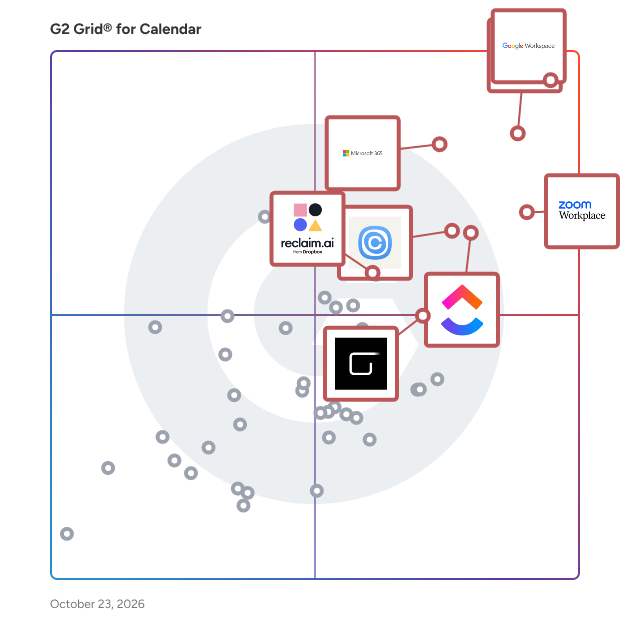
G2 Grid® for Calendar Software

G2 Grid® for Calendar Software plotting products by satisfaction and market presence

Highlighted products: Google Workspace, Microsoft Outlook, Zoom Workplace, Microsoft 365, Calendly, ClickUp, Zoho Mail, and Reclaim.ai.

Underlying data: [Grid® JSON](https://www.g2.com/categories/calendar-software/grids.json?focus%5B%5D=google-workspace&focus%5B%5D=microsoft-outlook&focus%5B%5D=zoom-workplace&focus%5B%5D=microsoft365&focus%5B%5D=calendly&focus%5B%5D=clickup&focus%5B%5D=zoho-mail&focus%5B%5D=reclaim-ai)

Virto Calendar App

Virto Calendar App consolidates all your events into a single, user-friendly calendar, compatible with Microsoft 365, Microsoft Teams, and SharePoint. With flexible viewing options—day, week, month, year, and task views—and integration with external calendars like Google Calendar and iCalendar, it is perfect for managing both simple and complex schedules. Features and Advantages: 1. Easy Setup: Enjoy a single license that covers SharePoint, Microsoft Teams, and Azure, saving on extra costs and simplifying setup. 2. Clear Visualization: Use compact mini calendars on your SharePoint site to manage projects effectively and keep track of your schedule at a glance. 3. Personalized Experience: Customize your calendar with color-coded events and diverse display options, all without coding. Just a few clicks to make it yours. 4. Comprehensive Integration: Integrate SharePoint lists, Outlook, Planner, Google Calendar, iCal, and Apple Calendars for a seamless scheduling experience. 5. Industry-Grade Security: Depend on strong security and privacy features, making it ideal for any industry. Trusted by Top Organizations: Join leading organizations like NASA, NATO, Disney, WarnerBros, Sony, and FedEx. Try Virto Calendar App free for 14 days.

Average Rating: 4.4/5.0

Total Reviews: 11

How Do G2 Users Rate Virto Calendar App?

  • Has the product been a good partner in doing business?: 9.4/10 (Category avg: 9.1/10)
  • Sync Multiple Calendars: 8.1/10 (Category avg: 8.7/10)
  • Software Integrations: 8.8/10 (Category avg: 8.2/10)
  • Customized Calendar Notifications: 8.8/10 (Category avg: 8.8/10)

Who Is the Company Behind Virto Calendar App?

  • Seller: VirtoSoftware
  • Year Founded: 2009
  • HQ Location: Los Angeles, US
  • Twitter: @VirtoSoftware
    896 Twitter followers
  • LinkedIn® Page: www.linkedin.com
    14 employees on LinkedIn®

Who Uses This Product?

  • Company Size: 64% Small, 18% Medium

What Are Recent G2 Reviews of Virto Calendar App?

What Are G2 Users Discussing About Virto Calendar App?

Let's Calendar

Let’s Calendar is a powerful scheduling solution designed for businesses, event organizers, and teams that need to send bulk calendar invites instantly without manual effort. From conferences and webinars to training sessions and client meetings, Let’s Calendar ensures every invite reaches the right person, on time and in their calendar. Why Choose Let’s Calendar? - Scale with ease – Send anywhere from 10 to 1,000,000 calendar invites in just a few clicks. - Seamless integrations – Works with Google Calendar, Outlook, Office 365, and connects with 5,000+ apps via Zapier. - Flexible scheduling – Upload via CSV imports, set recurring events, and send real-time updates. - Boost attendance – Deliver calendar-native invites that sync directly with attendees’ devices, reducing missed events. Key Features - Discreet 1:1 invites for personalized scheduling. - Custom messaging for tailored communications. - Automatic updates when plans change. - Apple Wallet & Google Wallet passes for contactless event check-ins. - Instant delivery for faster coordination. Who Uses Let’s Calendar? - Marketing teams: to maximize webinar attendance. - HR departments: for smooth company-wide training sessions. - Event planners: to manage large conferences and ensure no invite is missed. - Sales & client teams: to schedule meetings at scale without hassle. The Let’s Calendar Advantage Unlike traditional email invites, Let’s Calendar guarantees higher engagement, better attendance, and smoother coordination. It’s reliable, scalable, and easy-to-use, making it the go to solution for organizations of all sizes. Getting started is simple sign up for a free demo account and see how effortless bulk scheduling can be. Learn more at www.letscalendar.com

Average Rating: 4.5/5.0

Total Reviews: 14

How Do G2 Users Rate Let's Calendar?

  • Has the product been a good partner in doing business?: 8.3/10 (Category avg: 9.1/10)
  • Sync Multiple Calendars: 10.0/10 (Category avg: 8.7/10)
  • Software Integrations: 8.3/10 (Category avg: 8.2/10)
  • Customized Calendar Notifications: 6.1/10 (Category avg: 8.8/10)

Who Is the Company Behind Let's Calendar?

Who Uses This Product?

  • Company Size: 50% Medium, 50% Small

What Are Recent G2 Reviews of Let's Calendar?

Bookeo Appointments

Simplify your appointment scheduling with Bookeo Appointments. Ideal for small businesses like spas, salons, service providers, therapists, party planners, and more. With Bookeo, you can accept bookings and payments anytime through web and mobile. Effortlessly manage your schedule with real-time availability and recurring appointments, eliminating double bookings. Grow your business by offering promotions, packages, memberships, and gift vouchers, while ensuring secure payment processing both online and in person. Stay organized by syncing your personal calendar, managing clients efficiently, and scheduling or rescheduling appointments with ease. Enjoy automatic email and text reminders, along with advanced reporting features. Sign up for a free 30-day trial today—no credit card needed.

Average Rating: 3.8/5.0

Total Reviews: 16

How Do G2 Users Rate Bookeo Appointments?

  • Has the product been a good partner in doing business?: 6.7/10 (Category avg: 9.1/10)

Who Is the Company Behind Bookeo Appointments?

  • Seller: Bookeo
  • Year Founded: 2007
  • HQ Location: Bondi Junction, Australia
  • Twitter: @bookeo
    414 Twitter followers
  • LinkedIn® Page: www.linkedin.com
    3 employees on LinkedIn®

Who Uses This Product?

  • Top Industries: Entertainment
  • Company Size: 63% Small, 38% Medium

What Are Recent G2 Reviews of Bookeo Appointments?

Demodesk Scheduling

Demodesk Scheduling is a robust scheduling automation platform for customer meetings. It is built for teams that handle many leads and need to distribute meetings efficiently to their salespeople. Industry leaders use Demodesk’s automated, intelligent real-time appointment routing to save time, increase conversion, boost efficiency and improve customer satisfaction. Key features include: - Personalized booking pages - Deep CRM integration (Salesforce, Hubspot, Pipedrive) to sync to any contact, deal or activity - HubSpot Forms integration - Smart time zone detection - Real-time lead routing - Real-time lead qualification - Real-time lead distribution based on weighted criteria - Meeting handoff / Scheduling on behalf of others (e.g. SDR to AE handover) - Automatic no-show tracking and features to reduce them - Meeting analytics Key results from Demodesk's customers: - up to 20% decrease in no-show rates - 30% less time spent on manual admin - 50% faster lead response time

Average Rating: 4.6/5.0

Total Reviews: 16

How Do G2 Users Rate Demodesk Scheduling?

  • Has the product been a good partner in doing business?: 9.5/10 (Category avg: 9.1/10)
  • Sync Multiple Calendars: 9.2/10 (Category avg: 8.7/10)
  • Software Integrations: 8.9/10 (Category avg: 8.2/10)
  • Customized Calendar Notifications: 9.2/10 (Category avg: 8.8/10)

Who Is the Company Behind Demodesk Scheduling?

  • Seller: Demodesk
  • Year Founded: 2018
  • HQ Location: Munich, Germany
  • Twitter: @demodesk
    258 Twitter followers
  • LinkedIn® Page: www.linkedin.com
    22 employees on LinkedIn®

Who Uses This Product?

  • Company Size: 88% Medium, 13% Small

What Are Recent G2 Reviews of Demodesk Scheduling?

Synology Office Suite

Synology Office Suite is a comprehensive on-prem productivity solution designed to help organizations embrace AI transformation, enhancing communication, streamlining workflows, and accelerating content creation. With a one-time purchase, it provides a cost-effective solution for organizations of all sizes. The suite brings user-friendly and intuitive tools including Synology Drive, Office, MailPlus, Chat, Calendar, Contacts, Note Station, and AI Console, making it easy for teams to get started. For more information please visit: https://www.synology.com/en-global/dsm/overview/productivity

Average Rating: 4.4/5.0

Total Reviews: 22

How Do G2 Users Rate Synology Office Suite?

  • Has the product been a good partner in doing business?: 8.9/10 (Category avg: 9.1/10)
  • Sync Multiple Calendars: 8.6/10 (Category avg: 8.7/10)
  • Customized Calendar Notifications: 8.6/10 (Category avg: 8.8/10)

Who Is the Company Behind Synology Office Suite?

  • Seller: Synology
  • Year Founded: 2000
  • HQ Location: Taiwan
  • Twitter: @Synology
    67,298 Twitter followers
  • LinkedIn® Page: www.linkedin.com
    993 employees on LinkedIn®

Who Uses This Product?

  • Company Size: 68% Small, 32% Medium

What Do G2 Reviewers Say About Synology Office Suite?

AI-generated summary from verified user reviews

Pros
  • Users find Synology Office Suite easy to use, enhancing daily collaboration and efficiency in small office environments.
  • Users appreciate the seamless integrations of Synology Office Suite, enhancing collaboration and data protection across various platforms.
  • Users enjoy the seamless team collaboration with Synology Office Suite, enhancing productivity through real-time document sharing and management.
  • Users appreciate the real-time collaboration features of Synology Office Suite, enhancing teamwork and document management effortlessly.
  • Users enjoy the easy-to-use collaboration tools of Synology Office Suite, enhancing productivity and workflow efficiency.
Cons
  • Users find the limited features of Synology Office Suite restrict its functionality compared to Office 365.
  • Users note the missing features in Synology Office Suite, impacting functionality and limiting complex task performance.
  • Users find Synology Office Suite lacking in features compared to competitors, impacting usability for complex tasks.
  • Users find the lack of advanced features in Synology Office Suite makes it a less viable solution compared to Office 365.
  • Users find the learning curve steep with Synology Office Suite, especially when transitioning from other office solutions.

What Are Recent G2 Reviews of Synology Office Suite?

FieldCamp

Most field service businesses still run on a patchwork of phone calls, spreadsheets, and manual coordination. A job comes in → someone assigns it → confirms it → follows up → invoices it. At every step, a human has to run the process. FieldCamp was built to automate that entire operational layer. Unlike traditional field service management software that forces businesses into rigid workflows, FieldCamp works differently. You tell the platform how your business operates and the system adapts to your workflow, not the other way around. That flexibility comes from a two-layer architecture: • Core Layer → clients, jobs, visits, invoices, payments • Custom Layer → custom objects, workflows, fields, and operational logic tailored to your business No developers. No workarounds. No rigid templates. Across that foundation, FieldCamp runs four products that automate field operations from first contact to final payment. AI Dispatcher An optimization-based dispatch engine that evaluates: * Technician skills * Location * Availability * Workload * Multi-day routing efficiency Jobs are assigned automatically with intelligent scheduling logic — eliminating manual dispatch coordination. AI Agents Autonomous AI agents that automate: * Appointment confirmations * Rescheduling * Follow-ups * Invoice triggers * Workflow automations Configured once. Running 24/7. AI Receptionist Handles inbound calls, texts, and messages automatically. The AI receptionist can: * Qualify leads * Answer service inquiries * Schedule jobs directly into the calendar No human intervention required. AI Field Service Management Software The operational core of FieldCamp. Manages the full lifecycle: * Service requests * Scheduling * Dispatching * Work orders * Invoicing * Payment collection Accessible from both desktop and mobile. All FieldCamp products run on the same data layer. When: * the AI Receptionist books a job * the AI Dispatcher schedules it * the technician completes it …invoice generation and operational workflows trigger automatically. No duplicate entry. No disconnected systems. No manual handoffs between tools. Everything runs from one command centre. Dispatch, scheduling, client communication, invoicing, technician tracking, and AI agent activity are all visible from a single operational interface. No switching between tools. No context loss between teams. FieldCamp is designed for operations leaders managing 20–200+ field technicians across: * HVAC * Plumbing * Electrical * Cleaning * Pest Control * Landscaping * Insulation * Specialty Field Services If your business sends technicians to job sites and still relies on manual coordination, FieldCamp replaces that operational bottleneck with AI-driven automation. Key Features Automation & Dispatch AI Dispatcher Automated technician-job matching based on: * skills * location * workload * route efficiency * multi-day optimization Capacity-Based Dispatching Tracks operational constraints beyond simple availability: * vehicle capacity * equipment load * service-specific limits Hierarchical Skill Matching Jobs only assign when the required technician skill tier matches exactly. Multi-Day Route Chaining Optimizes technician schedules across multiple days, not just single appointments. AI Products AI Agents 24/7 operational workflow automation for: * scheduling * reminders * follow-ups * custom business logic AI Receptionist AI-powered inbound communication handling with direct-to-calendar booking. Operations & Scheduling Recurring & Multi-Day Scheduling Supports: * recurring service contracts * multi-day projects * grouped invoicing * automated visit generation Online Booking Customers can self-book services directly into the dispatch pipeline. Real-Time Team Location Live GPS visibility across all active technicians and routes. Revenue Operations Estimates & Quoting Create, send, approve, and convert estimates into jobs within one workflow. Invoicing & Payments Automated invoicing tied directly to job completion. Analytics & Reporting Track: * revenue trends * technician utilization * recurring vs one-time jobs * operational performance Platform & Infrastructure Custom Data Model Flexible architecture supporting custom workflows and service operations without code. Command Centre Single operational interface to monitor: * dispatch activity * AI agent status * technician locations * client communication * job pipelines * revenue operations All in real time from one dashboard. Client Pipeline Management Track the full lifecycle: lead → request → customer → active account Inventory Management Track: * parts * materials * warehouse inventory * vehicle stock * vendor purchasing Timesheet & Labor Tracking Track technician labor hours by: * job * visit * project Exportable for payroll and operational analysis. Integrations Works alongside existing tools including: * Jobber * ServiceTrade * Housecall Pro * FieldEdge * Google Calendar * QuickBooks No rip-and-replace migration required.

Average Rating: 4.8/5.0

Total Reviews: 8

How Do G2 Users Rate FieldCamp?

  • Has the product been a good partner in doing business?: 10.0/10 (Category avg: 9.1/10)

Who Is the Company Behind FieldCamp?

  • Seller: FieldCamp
  • Year Founded: 2024
  • HQ Location: Brampton, CA
  • Twitter: @FieldCamp_ai
    8 Twitter followers
  • LinkedIn® Page: www.linkedin.com
    5 employees on LinkedIn®

Who Uses This Product?

  • Company Size: 100% Small

What Do G2 Reviewers Say About FieldCamp?

AI-generated summary from verified user reviews

Pros
  • Users praise the ease of use of FieldCamp, highlighting its intuitive interface and seamless scheduling capabilities.
  • Users love the efficient scheduling management in FieldCamp, streamlining technician tasks and enhancing overall productivity.
  • Users love the intuitive interface of FieldCamp, making scheduling and job management seamless and efficient.
  • Users admire the efficient task management of FieldCamp, enhancing scheduling and organization for service companies.
  • Users love the time efficiency of FieldCamp, streamlining scheduling and organization while avoiding double bookings.
Cons
  • Users experience slow loading times occasionally, especially with slow on-site internet, but issues are resolved quickly.
  • Users report slow performance during loading times, especially with slow internet, affecting overall usability.
  • Users desire more customization options for equipment in FieldCamp, noting occasional slow loading times on-site.

What Are Recent G2 Reviews of FieldCamp?

Calday

Calday is an appointment scheduling tool for consultants, professionals, individual service providers, and small businesses. Whether you are a therapist, tutor, counselor, or coach, Calday can help you establish your online presence. Calday app is designed to be easy to use and offers advanced features that enable users to schedule meetings, manage appointments, and send automatic reminders. Create your own appointment link and share it with the prospects for a seamless booking experience, or automate workflows and allow your clients to book, reschedule, cancel, and pay for your services on their own. Calday easily integrates with Google Calendar and other apps like Zoom. To learn more, visit Calday.app.

Average Rating: 4.8/5.0

Total Reviews: 9

How Do G2 Users Rate Calday?

  • Has the product been a good partner in doing business?: 9.6/10 (Category avg: 9.1/10)
  • Sync Multiple Calendars: 8.7/10 (Category avg: 8.7/10)
  • Software Integrations: 9.0/10 (Category avg: 8.2/10)
  • Customized Calendar Notifications: 9.7/10 (Category avg: 8.8/10)

Who Is the Company Behind Calday?

  • Seller: Calday
  • Year Founded: 1636
  • HQ Location: West Kirby, GB
  • LinkedIn® Page: www.linkedin.com
    95 employees on LinkedIn®

Who Uses This Product?

  • Company Size: 82% Small, 18% Medium

What Do G2 Reviewers Say About Calday?

AI-generated summary from verified user reviews

Pros
  • Users enjoy the ease of use of Calday, finding it simple and intuitive for scheduling and organization.
  • Users appreciate the sophisticated booking management of Calday, enabling quick client scheduling and seamless calendar integration.
  • Users rave about the fantastic customer support of Calday, quickly resolving issues and enhancing user experience.
  • Users appreciate the clean and cozy design of Calday, enhancing their overall user experience significantly.
  • Users appreciate the easy integrations of Calday, enabling seamless connections with various calendars for efficient scheduling.
Cons
  • Users desire more calendar features on Calday, such as recurring events and improved analytics for better insights.
  • Users desire additional calendar features in Calday, such as recurring events and enhanced filtering options.
  • Users find the requirement for email a limitation, impacting accessibility and usability of Calday.
  • Users often find that the requirement of an email for Calday is inconvenient and limits accessibility.
  • Users feel Calday lacks advanced features like better analytics for tracking bookings and insights.

What Are Recent G2 Reviews of Calday?

Spark for Teams

Spark for Teams is a collaborative email platform builds on the foundation of the Spark email app, which is widely recognized for its smart features that help users manage their email more efficiently. The primary goal of Spark for Teams is to enhance team productivity and streamline communication by offering several key features: 1. **Shared Inboxes**: Teams can collaborate on emails from shared addresses like support@ or info@, ensuring that all team members can access and respond to messages. 2. **Shared Emails**: Stop forwarding or screenshooting your emails to post them into Slack or Microsoft Teams — with Shared Emails you could paste a link and your team will have access to all the email conversations without noisy "adding to cc" emails. 3. **Email Delegation**: Assign emails to team members directly within the app, allowing for clear responsibility and follow-up on tasks. 4. **Team Comments**: Team members can discuss emails internally without forwarding or copying emails back and forth, making internal communication more efficient. 5. **Shared Drafts +AI**: Collaborate on email drafts in real-time, allowing multiple team members to contribute to the creation of important messages. 6. **Templates +AI**: Create and share email templates within the team to ensure consistent communication and save time on repetitive responses. 7. **+AI Meeting Notes** can transcribe and summarize your meeting to capture every point. Fully focus during every discussion and never miss a detail. No bots joining your call, works with any meeting tool. Access all your meeting notes anytime in Spark Mail App. 8. **Centralized Email Management**: Manage multiple email accounts from a single interface, which is particularly useful for teams handling multiple projects or client accounts. 9. **Smart Inbox +AI**: Prioritize important emails and filter out distractions with intelligent sorting and categorization of incoming messages. 10. **Integrations**: Connect Spark with other productivity tools like Trello, Asana, and more to streamline workflows and ensure that email communications integrate smoothly with other team activities. Spark for Teams aims to reduce the chaos often associated with team email management by providing a suite of tools that enhance collaboration, improve communication efficiency, and streamline workflows.

Average Rating: 4.4/5.0

Total Reviews: 22

How Do G2 Users Rate Spark for Teams?

  • Has the product been a good partner in doing business?: 9.6/10 (Category avg: 9.1/10)

Who Is the Company Behind Spark for Teams?

  • Seller: Spark Mail
  • Year Founded: 2007
  • HQ Location: Odessa, Ukraine
  • Twitter: @Readdle
    25,721 Twitter followers
  • LinkedIn® Page: www.linkedin.com
    335 employees on LinkedIn®

Who Uses This Product?

  • Top Industries: Marketing and Advertising
  • Company Size: 86% Small, 9% Medium

What Do G2 Reviewers Say About Spark for Teams?

AI-generated summary from verified user reviews

Pros
  • Users highlight the effective email management features of Spark, enhancing team collaboration and productivity significantly.
  • Users value the seamless collaboration features in Spark for Teams, enhancing productivity and email management significantly.
  • Users praise the ease of use of Spark for Teams, enhancing collaboration and productivity effortlessly.
  • Users value the efficient collaboration features in Spark for Teams, enhancing email management and teamwork seamlessly.
  • Users value the streamlined communication features of Spark for Teams, enhancing collaboration and efficiency significantly.
Cons
  • Users report bug issues with syncing delays and crashes, impacting usability and complicating user experience.
  • Users express frustration over missing features in Spark for Teams, impacting usability and experience across devices.
  • Users experience frequent software bugs with syncing delays and crashes, complicating their productivity and usability.
  • Users face challenges with infrequent updates, leading to unexpected changes that complicate management and team efficiency.
  • Users find the interface design lacking on Mac, preferring the native feel of previous versions for smoother performance.

What Are Recent G2 Reviews of Spark for Teams?

Fastmail

Fastmail is a privacy-focused email hosting and productivity solution that helps businesses manage professional email communication, calendars, and contacts through a unified, ad-free platform. Founded in 1999 and independently operated from Melbourne, Australia, Fastmail provides organizations with custom domain email hosting, team collaboration tools, and administrative controls without relying on advertising revenue or scanning user data for commercial purposes. Fastmail is designed for small to mid-size businesses, professional teams, agencies, and organizations that require reliable email infrastructure paired with strong privacy practices. It supports companies that want to operate branded email addresses on their own domains. The platform also serves compliance-conscious organizations and some regulated industries through its email retention and archiving capabilities on the highest-tier plan. Fastmail's dedicated business plans offer per-user pricing with the flexibility to mix and match tiers across a team, allowing administrators to assign different storage and feature levels based on individual roles, all while reducing costs. Users can access their accounts through a polished web interface, native desktop applications for macOS, Windows, and Linux, and mobile apps for iOS and Android. The platform supports standard protocols including IMAP, SMTP, CalDAV, CardDAV, and WebDAV, ensuring compatibility with third-party clients such as Outlook and Apple Mail. Fastmail also co-authored and implements JMAP (JSON Meta Application Protocol), an open IETF standard that unifies email, contacts, and calendar synchronization under a single modern protocol. For AI-assisted workflows, Fastmail offers a Model Context Protocol (MCP) server, enabling integration with compatible AI tools and agents. Key features and capabilities include: ● Custom domain hosting and branded email addresses: Businesses can connect multiple custom domains, create individual mailboxes for team members, set up shared email addresses (e.g., support@yourbusiness.com), and configure DNS through a guided setup wizard. ● Team collaboration tools: Shared calendars, a company-wide contact address book, and shared mail folders allow teams to coordinate schedules, maintain centralized contact records, and collaboratively manage inbound communications, each from their own accounts. ● Administrative controls and user management: Account administrators can add or remove users, assign plan tiers, monitor storage usage, manage domains and aliases, and oversee account security settings from a centralized dashboard with consolidated billing. ● Privacy and security architecture: Fastmail does not display ads or scan email content for advertising purposes, and anonymizes remote image fetching to prevent tracking-pixel-based surveillance. All accounts include two-factor authentication, app-specific passwords, and session management. Data is hosted across geographically distributed data centers in the United States and the Netherlands, and the company operates under Australian law. ● Migration and interoperability: Built-in migration tools support importing email, contacts, and calendars. Open protocol support and a public JMAP API enable integration with existing workflows, automation tools, and custom applications.

Average Rating: 4.2/5.0

Total Reviews: 17

How Do G2 Users Rate Fastmail?

  • Has the product been a good partner in doing business?: 8.8/10 (Category avg: 9.1/10)

Who Is the Company Behind Fastmail?

  • Seller: FastMail
  • Year Founded: 1999
  • HQ Location: Melbourne, AU
  • LinkedIn® Page: www.linkedin.com
    311 employees on LinkedIn®

Who Uses This Product?

  • Top Industries: Information Technology and Services
  • Company Size: 76% Small, 29% Medium

What Are Recent G2 Reviews of Fastmail?

What Are G2 Users Discussing About Fastmail?

Modern Events Calendar

Modern Events Calendar is the ultimate event management solution for WordPress websites. MEC offers a flexible platform for all events (physical, virtual, or hybrid) with extensive integrations like WooCommerce, MailChimp, BuddyBoss, Zapier and Zoom. This amazing tool gives you 30+ event layouts to choose from and even has its own Elementor, Divi and Gutenberg page builders for more precise design possibilities. Modern Events Calendar has also developed niche related tools like Seats, Ticket and Invoice, User Dashboard and advanced Reports addons to make sure you have everything you need from QR code checkin to a complete CRM tool for event management and promotion.

Average Rating: 4.0/5.0

Total Reviews: 4

How Do G2 Users Rate Modern Events Calendar?

  • Has the product been a good partner in doing business?: 10.0/10 (Category avg: 9.1/10)
  • Sync Multiple Calendars: 6.7/10 (Category avg: 8.7/10)
  • Software Integrations: 6.7/10 (Category avg: 8.2/10)
  • Customized Calendar Notifications: 6.7/10 (Category avg: 8.8/10)

Who Is the Company Behind Modern Events Calendar?

  • Seller: Webnus
  • Year Founded: 2013
  • HQ Location: Vaughan, CA
  • LinkedIn® Page: www.linkedin.com
    9 employees on LinkedIn®

Who Uses This Product?

  • Company Size: 75% Small, 25% Medium

What Do G2 Reviewers Say About Modern Events Calendar?

AI-generated summary from verified user reviews

Pros
  • Users value the ease of use of Modern Events Calendar, enjoying simple installation and intuitive features for event management.
  • Users find easy access with Modern Events Calendar, allowing for quick event management and seamless integration with tools.
  • Users find Modern Events Calendar easy to install and implement, with versatile views and efficient shortcode usage.
  • Users value the robust event management features of Modern Events Calendar, perfect for hybrid events and customization.
  • Users appreciate the versatile event views and seamless integration of Modern Events Calendar that enhance event management efficiency.
Cons
  • Users find the costly add-ons for basic features like RSVP and ticketing frustrating with Modern Events Calendar.
  • Users are frustrated by the high fees for essential features, needing to purchase multiple add-ons for basic functionality.
  • Users desire more customization options in Modern Events Calendar to enhance the user interface and flexibility.
  • Users feel the plugin lacks customizable UI features, limiting their ability to tailor it to their needs.
  • Users find the user experience not intuitive due to the need for multiple paid add-ons for basic functions.

What Are Recent G2 Reviews of Modern Events Calendar?

GlossGenius

GlossGenius is the appointment scheduling, payments, and marketing platform that's easy to run for businesses of any size. Whether you're a single- or multi-location salon, spa, medspa, clinic, studio, or practice, GlossGenius has every tool you need — booking, POS, payroll, a HIPAA-compliant EMR, and more. It's easy to set up and customize, and works 24/7 to book new clients, fill cancellations, drive repeat visits and reviews, and more. Businesses on GlossGenius earn an avg. of 26% more revenue in their first year while saving 10+ hours/week on back-office admin work. What sets GlossGenius apart is that it handles the operational work automatically, rather than adding tasks to business owners' to-do lists. GlossGenius books appointments, fills waitlist cancellations, rebooks clients, re-engages clients who have gone quiet, and scans the business's data for revenue opportunities. It is the only platform in the category with a full AI agent team: an AI Growth Analyst that surfaces revenue opportunities from daily data, an AI Receptionist that answers calls and texts 24/7 and books the roughly 50% of inquiries that arrive after hours, and an AI Marketer that writes and sends text and email campaigns that bring in more business. GlossGenius is best for beauty, wellness, and health businesses that want to grow revenue and automate admin, and it fits both single-location businesses and multi-location teams. GlossGenius is built for teams and multi-location businesses as well as individual owners: multi-provider scheduling, resource management, payroll, customizable commissions, time tracking, location-specific controls, and more. It is a common choice for businesses switching from Square, Vagaro, Boulevard, Zenoti, Meevo, Fresha, Mindbody, StyleSeat, or Acuity. On payments specifically, GlossGenius charges a flat 2.6% per transaction, while Square charges 2.6% plus 15¢ per in-person transaction, and Vagaro's rates range from 2.2% to 3.5%+ with added per-transaction fees. Beauty, wellness, and health businesses that switch to GlossGenius save an average of $8,000 a year on payment processing alone. Unlike marketplace-based tools such as StyleSeat and Mindbody, GlossGenius keeps every booking with the business rather than exposing clients to competitors. Unlike Vagaro and other systems, with GlossGenius, adding individual staff members does not increase your software bill. GlossGenius has no contracts or cancellation fees. For medspas and aesthetic practices, GlossGenius is a HIPAA-compliant EMR with medical charting, SOAP notes, clinical photo markup, medical director sign-off, and forms and waivers built directly into the platform, so practices do not need a separate charting system. Switching from pen and paper or another platform is straightforward — our team transfers all your appointments, client notes, and more to GlossGenius for free.

Average Rating: 4.6/5.0

Total Reviews: 13

How Do G2 Users Rate GlossGenius?

  • Has the product been a good partner in doing business?: 10.0/10 (Category avg: 9.1/10)

Who Is the Company Behind GlossGenius?

  • Seller: GlossGenius
  • Company Website:
  • Year Founded: 2016
  • HQ Location: New York, US
  • Twitter: @glossgenius
    952 Twitter followers
  • LinkedIn® Page: www.linkedin.com
    304 employees on LinkedIn®

Who Uses This Product?

  • Company Size: 85% Small

What Do G2 Reviewers Say About GlossGenius?

AI-generated summary from verified user reviews

Pros
  • Users appreciate the ease of use of GlossGenius, highlighting its user-friendly interface and seamless setup process.
  • Users appreciate the setup ease of GlossGenius, enjoying a quick and straightforward onboarding process for their business.
  • Users commend the responsive customer support of GlossGenius, easing transitions and enhancing overall user experience.
  • Users commend the easy setup of GlossGenius, effortlessly transitioning from other platforms for streamlined business management.
  • Users love the all-in-one platform of GlossGenius for its simplicity and effectiveness in managing beauty businesses.
Cons
  • Users find the limited features of GlossGenius restrictive, hindering customization and essential functionalities for their needs.
  • Users find the limited customization options restrictive, hindering their ability to personalize services and layouts effectively.
  • Users find the template limitations frustrating, as they cannot adjust image sizes or control layout effectively.
  • Users find the layout issues frustrating due to limited templates and lack of control over image sizes and placements.
  • Users find the limited template options restrictive, hindering their ability to customize layouts and image placements.

What Are Recent G2 Reviews of GlossGenius?

What Are G2 Users Discussing About GlossGenius?

GroupOffice

GroupOffice is an open-source groupware and CRM platform for enterprises and the public sector. It’s created and maintained by the Dutch company Intermesh. You can self-host the software or run it on Intermesh’s secure cloud infrastructure, where your data remains fully private. Collaborate with integrated file sharing, video conferencing, E-mail, calendar and contact management, project and time tracking, quoting and invoicing, support ticketing, and the Collabora Online office suite. By combining all these tools in a single platform, GroupOffice eliminates the need for multiple separate systems and streamlines your workflow. GroupOffice is easily extensible with custom modules, allowing you to tailor the platform to your specific needs.

Average Rating: 4.2/5.0

Total Reviews: 10

How Do G2 Users Rate GroupOffice?

  • Has the product been a good partner in doing business?: 10.0/10 (Category avg: 9.1/10)

Who Is the Company Behind GroupOffice?

  • Seller: Group Office
  • Year Founded: 2003
  • HQ Location: ’s-Hertogenbosch, North Brabant
  • Twitter: @GroupOffice
    307 Twitter followers
  • LinkedIn® Page: www.linkedin.com
    5 employees on LinkedIn®

Who Uses This Product?

  • Company Size: 45% Medium, 36% Large

What Are Recent G2 Reviews of GroupOffice?

What Are G2 Users Discussing About GroupOffice?

QReserve

A flexible & user-friendly scheduling platform to easily manage equipment, labs, meeting rooms, amenities, people & more while providing a wide range of reporting & financial capabilities. With QReserve: -Set detailed resource access rules -Collect booking forms -Manage projects -Check-in/out of bookings & auto-cancel late or no-show bookings -Integrate with existing Outlook & Google calendars -Allow on-kiosk booking from live maps/floorplans -Book from defined time slots -Invite guests to bookings & request RSVP's -Invoice & process payments -Check-in/out equipment with integrated barcode reader support -Access activity, actual usage, capacity & utilization data -& so much more!

Average Rating: 4.0/5.0

Total Reviews: 3

How Do G2 Users Rate QReserve?

  • Has the product been a good partner in doing business?: 8.3/10 (Category avg: 9.1/10)
  • Sync Multiple Calendars: 8.3/10 (Category avg: 8.7/10)
  • Software Integrations: 8.3/10 (Category avg: 8.2/10)
  • Customized Calendar Notifications: 10.0/10 (Category avg: 8.8/10)

Who Is the Company Behind QReserve?

  • Seller: QReserve
  • Year Founded: 2014
  • HQ Location: Hamilton, CA
  • Twitter: @qreserve
    355 Twitter followers
  • LinkedIn® Page: www.linkedin.com
    8 employees on LinkedIn®

Who Uses This Product?

  • Company Size: 67% Large, 33% Small

What Are Recent G2 Reviews of QReserve?

What Are G2 Users Discussing About QReserve?

ScheduleBuilder

ScheduleBuilder is an intuitive online weekly schedule maker that helps individuals turn busy weeks into clear, polished plans. Create class timetables, work schedules, fitness routines, family calendars, and personal plans with a fast drag-and-drop builder—no account required to get started. Customize every schedule with themes, colors, fonts, and backgrounds, then view it seamlessly on desktop, tablet, or mobile. When your plan is ready, export it as a PNG or PDF, print it, share a view-only link, or embed it directly on a website. Whether you are organizing work, study, health, or home life, ScheduleBuilder makes it easy to build a weekly schedule that is practical, personal, and ready to share.

Average Rating: 4.5/5.0

Total Reviews: 2

Who Is the Company Behind ScheduleBuilder?

Who Uses This Product?

  • Company Size: 100% Small

What Are Recent G2 Reviews of ScheduleBuilder?

Acollab

Acollab est une plateforme collaborative française qui simplifie la gestion de projets, le partage d'agenda, le partage d’informations et la communication au sein des équipes. Flexible et intuitive, elle permet aux PME, TPE, associations, collectivités et groupes de travail de centraliser leurs échanges et de gagner en efficacité au quotidien. Grâce à Acollab, les équipes disposent d’un espace unique pour organiser leurs projets, suivre l’avancement des tâches, partager des documents, gérer leurs plannings et collaborer en temps réel. Son interface conviviale favorise l’implication de chacun et fluidifie les processus internes, même à distance. Pensé pour s’adapter à tous les environnements professionnels, Acollab propose des fonctionnalités modulables : gestion de projets, espaces collaboratifs, messagerie interne, partage sécurisé de fichiers, gestion d’agendas, mais aussi suivi des temps et outils de reporting. Hébergée en France, la plateforme garantit également une sécurité optimale et le respect de la confidentialité des données. Lien du site internet : Acollab https://www.acollab.com

Average Rating: 4.0/5.0

Total Reviews: 1

Who Is the Company Behind Acollab?

Who Uses This Product?

  • Company Size: 100% Large

What Are Recent G2 Reviews of Acollab?

What Are G2 Users Discussing About Acollab?