Best AI App Builder Software

Last updated: November 14, 2026

How Many AI App Builder Software Products Does G2 Track?

Total Products under this Category: 638

Category Stats (Nov 2026)

  • Average Rating: 4.67/5 The average rating of products in this category, based on all submitted ratings
  • Top Trending Product: C3 Agentic AI Platform (+0.86%) - Among all products in this category, C3 Agentic AI Platform recorded the largest rating increase compared to last month

Last updated: November 01, 2026

How Does G2 Rank AI App Builder Software Products?

Why You Can Trust G2's Software Rankings:

  • 30 Analysts and Data Experts
  • 41,500+ Authentic Reviews
  • 638+ Products
  • Unbiased Rankings

G2's software rankings are built on verified user reviews, rigorous moderation, and a consistent research methodology maintained by a team of analysts and data experts. Each product is measured using the same transparent criteria, with no paid placement or vendor influence. While reviews reflect real user experiences, which can be subjective, they offer valuable insight into how software performs in the hands of professionals. Together, these inputs power the G2 Score, a standardized way to compare tools within every category.

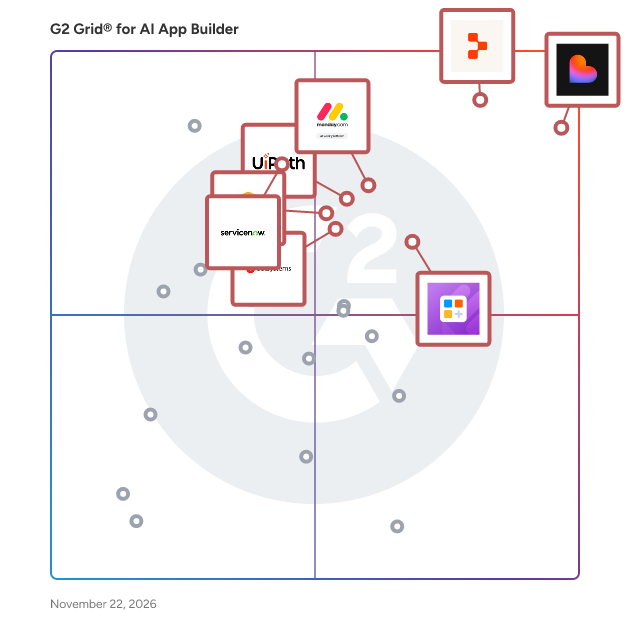
G2 Grid® for AI App Builder Software

G2 Grid® for AI App Builder Software plotting products by satisfaction and market presence

Highlighted products: Lovable, Replit, monday AI Workspace, Jotform Apps, UiPath Agentic Automation, ServiceNow App Engine, OutSystems, and Airtable.

Underlying data: [Grid® JSON](https://www.g2.com/categories/ai-app-builder/grids.json?focus%5B%5D=lovable&focus%5B%5D=replit&focus%5B%5D=monday-com&focus%5B%5D=jotform-apps&focus%5B%5D=uipath-agentic-automation&focus%5B%5D=servicenow-app-engine&focus%5B%5D=outsystems&focus%5B%5D=airtable)

Lovable

An AI software engineer that works. Chat with AI to build for the web, and ship faster. Go from prompt to prototypes in seconds. Iterate on a real app in real-time. Own your code, with no lock-in. Integrate with workflows developers love. One-click deploy to production.

Average Rating: 4.6/5.0

Total Reviews: 500

Who Is the Company Behind Lovable?

  • Seller: Lovable
  • Year Founded: 2023
  • HQ Location: N/A
  • LinkedIn® Page: www.linkedin.com
    1,063 employees on LinkedIn®

Who Uses This Product?

  • Who Uses This: CEO, Founder
  • Top Industries: Computer Software, Information Technology and Services
  • Company Size: 76% Small, 9% Medium

What Do G2 Reviewers Say About Lovable?

AI-generated summary from verified user reviews

Pros
  • Users appreciate the ease of use of Lovable, enabling quick and effortless website creation without coding skills.
  • Users love Lovable for its effortless website creation, enabling anyone to build professional sites quickly without coding skills.
  • Users rave about the time-saving capabilities of Lovable, enabling rapid software development and effortless tool creation.
  • Users love Lovable's coding assistance, enabling effortless website and app creation without prior coding skills.
  • Users love the ease of implementation with Lovable, appreciating the quick setup and user-friendly design.
Cons
  • Users find the credit system limiting, as daily allocations hinder efficient website building and overall usage.
  • Users experience prompt issues with Lovable, leading to frustration as tasks are not always executed properly.
  • Users find the pricing of Lovable to be quite expensive, limiting access for those wanting full usage.
  • Users face poor coding challenges in Lovable, leading to frustrating cycles with unresolved bugs and edit issues.
  • Users experience inaccuracy with Lovable, often encountering misleading claims and errors that waste credits and time.

What Are Recent G2 Reviews of Lovable?

Replit

Replit turns your ideas into apps, fast. With Replit, anyone—technical or non-technical—can build and deploy fully-functional, full-stack apps directly from their browser, without any installation, setup, or configuration. Replit's Agent and Assistant enables you to create entire applications from natural language, turning bullet points into working apps in minutes. Its built-in tools, including databases and deployment features, allow you to launch with a single click. Replit bridges the gap between non-technical and technical users, driving collaboration for everything from product roadmaps and prototypes to custom APIs and internal tools. Replit empowers everyone to not just consume software but to create it, transforming app development into an accessible, instant, and impactful process. Go from 'why doesn't this app exist?' to building it for yourself.

Average Rating: 4.4/5.0

Total Reviews: 420

Who Is the Company Behind Replit?

  • Seller: Replit
  • Year Founded: 2016
  • HQ Location: Foster City, California, United States
  • LinkedIn® Page: www.linkedin.com
    693 employees on LinkedIn®

Who Uses This Product?

  • Who Uses This: Founder, CEO
  • Top Industries: Computer Software, Information Technology and Services
  • Company Size: 67% Small, 11% Medium

What Do G2 Reviewers Say About Replit?

AI-generated summary from verified user reviews

Pros
  • Users appreciate the ease of use of Replit, facilitating smooth project development and collaboration across various stages.
  • Users admire the ease of use of Replit, enabling quick iterations and seamless project development even for beginners.
  • Users highlight the implementation ease of Replit, enabling rapid development from concept to deployment effortlessly.
  • Users value Replit for its time-saving capabilities, enabling quick idea validation and streamlined development processes.
  • Users love the coding assistance of Replit, enabling quick project iterations and effortless app creation.
Cons
  • Users find the pricing structure confusing, leading to unexpected charges and dissatisfaction with the overall cost.
  • Users find the billing system confusing, leading to unexpected charges and frustrating experiences with credits management.
  • Users report poor coding issues with Replit, leading to bugs and uncertainty in project scalability and maintenance.
  • Users report system unreliability, experiencing outages and slow support responses that hinder app functionality and progress.
  • Users experience slow performance with Replit, leading to delays and frustrations during coding tasks and workflows.

What Are Recent G2 Reviews of Replit?

What Are G2 Users Discussing About Replit?

Jotform Apps

Jotform Apps is an AI-powered, no-code mobile app builder that lets you create fully customized apps for your business, all without writing a single line of code. Simply describe the app you want conversationally, and Jotform AI App Builder can generate a complete app in minutes. Prefer a hands-on approach? Use Jotform’s intuitive drag-and-drop builder or start with one of 800+ free, fully customizable app templates designed for a wide range of industries and use cases. Your app works seamlessly on smartphones, tablets, and computers, making it easy to connect with users anywhere. Customize your app by embedding online forms, adding documents, images, links, widgets, payment tools, and your own branding to create a polished, professional experience. You can also refine your app through AI-powered prompts to update layouts, generate content, add pages, or expand functionality while maintaining full control over every detail. Whether you're building an app for data collection, client onboarding, digital payments, event management, internal workflows, or customer engagement, Jotform Apps adapts to your unique workflows. Sharing your app is simple. Send email invitations, generate QR codes, or embed your app on your website. Users can securely sign in, complete forms, and submit information from any device. Every submission flows directly into your Jotform account, where you can manage responses with Jotform Tables, generate PDFs, create automated reports, and trigger approval workflows (without relying on developers or IT support). Jotform Apps integrates seamlessly with Jotform’s suite of productivity tools to automate workflows and centralize data. Connect forms, tables, AI Agents, and hundreds of third-party integrations to build intelligent, interactive experiences. Whether you're collecting field data offline, processing payments through Stripe or PayPal, coordinating appointments, or streamlining internal operations, everything works together from a single platform. Built for businesses, nonprofits, schools, healthcare organizations, and teams of every size, Jotform Apps makes professional app development accessible to everyone. By combining AI-powered app generation with intuitive no-code customization and powerful automation, Jotform Apps helps you build and launch custom mobile apps without the cost or complexity of traditional app development.

Average Rating: 4.7/5.0

Total Reviews: 614

Who Is the Company Behind Jotform Apps?

  • Seller: Jotform
  • Company Website:
  • Year Founded: 2006
  • HQ Location: San Francisco, California
  • LinkedIn® Page: www.linkedin.com
    925 employees on LinkedIn®

Who Uses This Product?

  • Who Uses This: Owner, CEO
  • Top Industries: Education Management, Hospital & Health Care
  • Company Size: 67% Small, 22% Medium

What Do G2 Reviewers Say About Jotform Apps?

AI-generated summary from verified user reviews

Pros
  • Users love the ease of use of Jotform Apps, enabling quick creation and customization without any coding expertise.
  • Users value the easy setup of Jotform Apps, enabling quick creation and customization of their own applications.
  • Users love the easy creation of Jotform Apps, enabling professional app development without any coding skills needed.
  • Users love the intuitive interface of Jotform Apps, making it easy for everyone, including non-tech-savvy members.
  • Users commend Jotform Apps for its easy app creation and integration, enhancing feedback collection and user experience.
Cons
  • Users find missing features like account separation for businesses limiting Jotform Apps' usability for collaborative projects.
  • Users often find the limited customization options frustrating, wishing for more freedom in app design and layout.
  • Users express frustration over a lack of features in Jotform Apps, including insufficient forms and limited mobile support.
  • Users find the form issues frustrating, with loading problems and unclear RSVP options affecting usability.
  • Users find Jotform Apps too expensive, especially for non-profit use, wishing for more affordable or customized pricing options.

What Are Recent G2 Reviews of Jotform Apps?

What Are G2 Users Discussing About Jotform Apps?

AI can help you find the answers. G2 helps you trust them.

Connect G2 to Claude or ChatGPT for answers grounded in G2's trusted reviews, comparisons, and pricing from real user insights.

How it works

monday AI Workspace

monday.com is the AI Workspace where people and agents operate as one team - with shared cross-department context, enterprise-grade trust, and an easy-to-use interface built for adoption at scale. With monday.com, agents work alongside teams in the same boards, workflows, and goals they already use every day, creating a new kind of teamwork where people and agents move work forward together. Beyond agents, monday.com gives every team more ways to turn AI into real business impact. With monday vibe, teams can build custom work apps for their specific needs, and with monday sidekick, every user gets a personal AI assistant to help solve business challenges, move faster, and get more done. monday.com gives organizations the visibility, permissions, human oversight, and compliance standards they need to deploy AI with confidence. AI doesn’t operate in a black box - it operates within the same trusted guardrails teams already rely on. Because monday.com is already used across departments, agents can access the broader context of how work connects across marketing, sales, product, IT, HR, operations, and more. That means smarter decisions, faster execution, and fewer silos - all in one place. Today, over 250,000 customers and more than 60% of Fortune 500 companies trust monday.com with how they run their business.

Average Rating: 4.7/5.0

Total Reviews: 17,428

Who Is the Company Behind monday AI Workspace?

  • Seller: monday.com
  • Company Website:
  • Year Founded: 2012
  • HQ Location: Tel Aviv
  • LinkedIn® Page: www.linkedin.com
    10,589 employees on LinkedIn®
  • Ownership: NASDAQ: MNDY

Who Uses This Product?

  • Who Uses This: Project Manager, CEO
  • Top Industries: Marketing and Advertising, Information Technology and Services
  • Company Size: 60% Small, 30% Medium

What Do G2 Reviewers Say About monday AI Workspace?

AI-generated summary from verified user reviews

Pros
  • Users find the platform intuitive and easy to use, helping them get started with everyday work quickly.
  • Users like the platform’s flexible, customizable boards and workflows, adapting them to different teams, projects, and individual work styles.
  • Users appreciate the straightforward setup and onboarding, helping teams get started and bring new members in quickly.
  • Users value easy-to-set-up automations that handle repetitive tasks and updates, save time, and reduce manual follow-ups.
  • Users like how easily they can organize tasks, projects, and everyday work, helping them stay on top of their responsibilities.
Cons
  • Users find the platform unintuitive at first, with a steep learning curve for its features and complex workflows.
  • Users say pricing feels high, especially for smaller teams and as organizations scale.
  • Users say the platform can be slow and laggy, especially when loading large boards or handling heavy workloads.
  • Users find integrations limited and difficult to set up or manage, with gaps in support for the tools they need.
  • Users find the abundance of features and options overwhelming, especially when learning the platform or setting up complex workflows.

What Are Recent G2 Reviews of monday AI Workspace?

What Are G2 Users Discussing About monday AI Workspace?

UiPath Agentic Automation

UiPath (NYSE: PATH) is a global leader in agentic automation, empowering enterprises to harness the full potential of AI agents to autonomously execute and optimize complex business processes. The UiPath Platform™ uniquely combines controlled agency, developer flexibility, and seamless integration to help organizations scale agentic automation safely and confidently. Committed to security, governance, and interoperability, UiPath supports enterprises as they transition into a future where automation delivers on the full potential of AI to transform industries. For more information, visit www.uipath.com. Agentic testing is an AI-powered approach to software quality assurance that leverages autonomous agents to generate, execute, and evolve tests across the entire testing lifecycle. By partnering intelligent agents with human testers, agentic testing dramatically increases test coverage, accelerates release cycles, improves system resilience, and enables continuous testing at enterprise scale. It empowers teams to shift from manual, reactive testing to proactive, scalable quality engineering—driving faster innovation with higher confidence.

Average Rating: 4.6/5.0

Total Reviews: 6,282

Who Is the Company Behind UiPath Agentic Automation?

  • Seller: UiPath
  • Company Website:
  • Year Founded: 2005
  • HQ Location: New York
  • LinkedIn® Page: www.linkedin.com
    5,142 employees on LinkedIn®
  • Ownership: NYSE: PATH

Who Uses This Product?

  • Who Uses This: RPA Developer, Software Engineer
  • Top Industries: Information Technology and Services, Computer Software
  • Company Size: 51% Large, 28% Medium

What Do G2 Reviewers Say About UiPath Agentic Automation?

AI-generated summary from verified user reviews

Pros
  • Users appreciate the versatile automation capabilities of UiPath, making it useful across various industries.
  • Users value the ease of use of UiPath Agentic Automation, facilitating seamless automation across various applications.
  • Users value the straightforward automation capabilities of UiPath Agentic Automation, noting its ease of use and security features.
  • Users benefit from the automation ease of UiPath Agentic Automation, enhancing productivity and simplifying test cycles significantly.
  • Users highlight the efficiency of UiPath Agentic Automation, streamlining automation processes and enhancing workflow management.
Cons
  • Users find the licensing costs expensive and difficult to anticipate, complicating budget management for UiPath Agentic Automation.
  • Users find the learning curve steep, especially with challenging content like the Orchestra videos and licensing issues.
  • Users find the complexity of the RPA platform overwhelming, highlighting the need for more intuitive features and upgrades.
  • Users find the missing features in UiPath, such as modern folder access, hinder their overall experience.
  • Users express concerns about the high cost of UiPath licenses, particularly in comparison to Power Automate.

What Are Recent G2 Reviews of UiPath Agentic Automation?

What Are G2 Users Discussing About UiPath Agentic Automation?

ServiceNow App Engine

ServiceNow App Engine is a development platform for building, extending, and governing custom work on the ServiceNow AI Platform. Developers use it to create new tables, extend out-of-the-box workflows, and build full applications. Business teams use it to replace the spreadsheets, email chains, and standalone tools that often run core processes. Most custom development on ServiceNow doesn’t start from a blank slate. Teams add fields and tables to existing processes, change how a request routes through an approval, or add logic to a workflow the platform already runs. App Engine keeps that work on the same data model, workflows, and security rules the enterprise already uses, so changes plug into existing processes instead of sitting beside them. Key capabilities include: ServiceNow Studio: The primary build environment on the platform. Teams use it to build with AI assistance, low-code, and pro-code tools in one place. Build Agent: Turns natural language descriptions into starting components, including tables, forms, business logic, and user interfaces, for new applications or extensions to existing out-of-the-box workflows. It is accessed from ServiceNow Studio. Test Agent: Generates automated tests and checks changes before release. App Engine Management Center: Sets and enforces data models, security rules, and templates across custom work. Applications run on the ServiceNow AI Platform, so workflows, data, integrations, and user experiences share one foundation. Governance, security policies, and performance management are handled at runtime. Common use cases include: Creating tables and forms for internal intake, tracking, and case management Extending out-of-the-box workflows with custom logic, approvals, and routing Building fully scoped applications that replace spreadsheet and email processes Consolidating legacy internal tools onto one governed platform Teams use App Engine to shorten release cycles and reduce the number of tools they maintain. Results depend on scope and starting point, so measure development time and tool count before and after to see what changed. Frequently asked questions What can you build with App Engine? Custom tables, forms, and workflow extensions on top of existing ServiceNow processes, as well as full applications that run on the same platform. Who is App Engine for? Developers and builders across skill levels. Pro-code developers get full control in ServiceNow Studio, and teams with AI, low-code, or no prior development experience can build and extend internal applications on the platform their enterprise already runs on. Where does App Engine run? App Engine runs on the ServiceNow AI Platform.

Average Rating: 4.5/5.0

Total Reviews: 1,074

Who Is the Company Behind ServiceNow App Engine?

  • Seller: ServiceNow
  • Company Website:
  • Year Founded: 2004
  • HQ Location: Santa Clara, CA
  • LinkedIn® Page: www.linkedin.com
    35,078 employees on LinkedIn®
  • Ownership: NYSE:NOW

Who Uses This Product?

  • Who Uses This: ServiceNow Developer, Consultant
  • Top Industries: Information Technology and Services, Computer Software
  • Company Size: 44% Large, 26% Medium

What Do G2 Reviewers Say About ServiceNow App Engine?

AI-generated summary from verified user reviews

Pros
  • Users find the ease of use in ServiceNow App Engine accelerates development and enhances collaboration effectively.
  • Users value the rapid application development with ServiceNow App Engine, simplifying the process and enhancing productivity.
  • Users love the easy creation of applications with ServiceNow App Engine, thanks to its low-code and integration features.
  • Users love the fast development process of ServiceNow App Engine, enabling quick transition from ideas to applications.
  • Users value the fast development capabilities of ServiceNow App Engine, enhancing productivity and collaboration in app creation.
Cons
  • Users find the steep learning curve of ServiceNow App Engine challenging, especially for creating complex applications.
  • Users face learning difficulties with ServiceNow App Engine due to complex architecture and limited tutorials for advanced features.
  • Users find the cost and complexity of ServiceNow App Engine a challenge for effective implementation and ownership.
  • Users experience slow performance with ServiceNow App Engine, especially when managing larger applications and complex workflows.
  • Users find limited customization options frustrating, requiring deeper knowledge and navigation to native UI for modifications.

What Are Recent G2 Reviews of ServiceNow App Engine?

What Are G2 Users Discussing About ServiceNow App Engine?

Airtable

Airtable’s AI app platform is the easiest way to build custom apps to accelerate your business operations. Turn your data into custom apps, automations, and AI agents - no technical expertise required. Your teams can move from idea to impact in minutes. More than 500,000 organizations, including 80% of the Fortune 100, use Airtable to manage, build their businesses and enable citizen development. The result? Faster innovation, better customer experiences, enterprise-grade governance, and a modern way to work across teams. Get the free edition today at airtable.com

Average Rating: 4.6/5.0

Total Reviews: 3,221

Who Is the Company Behind Airtable?

  • Seller: Airtable
  • Company Website:
  • Year Founded: 2012
  • HQ Location: San Francisco, California
  • LinkedIn® Page: www.linkedin.com
    1,268 employees on LinkedIn®

Who Uses This Product?

  • Who Uses This: Owner, Project Manager
  • Top Industries: Non-Profit Organization Management, Marketing and Advertising
  • Company Size: 60% Small, 26% Medium

What Do G2 Reviewers Say About Airtable?

AI-generated summary from verified user reviews

Pros
  • Users highlight the ease of use of Airtable, appreciating its intuitive design and powerful, seamless functionalities.
  • Users value the powerful and intuitive automations in Airtable, enhancing productivity and streamlining repetitive tasks effortlessly.
  • Users love Airtable for its versatility, enabling easy customization and integration for diverse and evolving business needs.
  • Users value Airtable's flexibility, allowing for custom solutions and seamless integration with other platforms, enhancing their workflows.
  • Users praise Airtable's intuitive design, allowing easy integration and efficient use across various professional applications.
Cons
  • Users find the learning curve challenging, especially for non-tech-savvy individuals needing time to adapt.
  • Users find Airtable lacking in essential features like file editing, flexible permissions, and customizable exports.
  • Users find Airtable's limited features can complicate processes and hinder usability, especially in custom setups.
  • Users find the learning difficulty in Airtable challenging, especially for those unfamiliar with the interface and setup.
  • Users find Airtable's pricing to be expensive, making it challenging to manage expenses over time.

What Are Recent G2 Reviews of Airtable?

What Are G2 Users Discussing About Airtable?

OutSystems

What if you could build custom, AI-powered solutions that fit your business perfectly, without the risk or costly lock-in? The OutSystems AI-powered low-code development platform eliminates the compromises of building and buying, enabling your teams to turn ideas into mission-critical applications and agents that drive revenue, efficiency, and customer impact. By combining a trusted low-code foundation with powerful AI capabilities, you can build custom solutions up to 10x faster, with the speed of innovation and control you need to compete in the AI-centric future.

Average Rating: 4.5/5.0

Total Reviews: 1,633

Who Is the Company Behind OutSystems?

  • Seller: OutSystems
  • Company Website:
  • Year Founded: 2001
  • HQ Location: Boston, MA
  • LinkedIn® Page: www.linkedin.com
    2,239 employees on LinkedIn®

Who Uses This Product?

  • Who Uses This: Software Engineer, Developer
  • Top Industries: Information Technology and Services, Computer Software
  • Company Size: 40% Medium, 36% Large

What Do G2 Reviewers Say About OutSystems?

AI-generated summary from verified user reviews

Pros
  • Users find OutSystems exceptionally easy to use, enabling rapid application development with intuitive features and workflows.
  • Users commend the speed of development in OutSystems, enhanced by AI-driven features and efficient tools.
  • Users appreciate the fast development capabilities of OutSystems, leveraging AI to enhance application building and efficiency.
  • Users appreciate the speed of development with OutSystems, enabled by AI features that enhance efficiency and ease.
  • Users love the efficiency offered by AI features in OutSystems, significantly speeding up application development.
Cons
  • Users find the licensing costs confusing and prohibitively expensive, especially for small businesses trying to implement OutSystems.
  • Users find the licensing costs prohibitive, particularly for small businesses, hindering their ability to use OutSystems effectively.
  • Users highlight licensing issues with OutSystems, especially concerning pricing for small companies and scaling applications.
  • Users express concern over missing essential features in OutSystems, impacting control and troubleshooting capabilities.
  • Users report limited customization options in OutSystems, making it difficult to meet specific requirements or brand guidelines.

What Are Recent G2 Reviews of OutSystems?

What Are G2 Users Discussing About OutSystems?

Microsoft Power Apps

Microsoft Power Apps is a low-code app development platform designed to help organizations build and run modern applications and complex solutions efficiently. It combines AI Copilot, drag-and-drop functions, pre-built components, and other low-code approaches to facilitate fast and easy app creation. For developers, Power Apps also integrates seamlessly with professional tools, offering extensive customization options. Power Apps supports applications for personal, team, and enterprise use, and can handle apps for tens of thousands of users. It includes a suite of apps, services, and a data platform that allows users to build custom apps tailored to their specific business needs, ensuring easy interoperability with other parts of the Microsoft Power Platform. Both traditional developers and low-code makers benefit from a dedicated studio environment in Power Apps, where they can collaboratively build pixel-perfect applications and connect to over 1400 data sources with pre-built connectors. Users can leverage a vast library of existing components or create custom ones, all while using a powerful Copilot and an intuitive drag-and-drop interface. Additionally, users have the option to import and export underlying code for further customization. For administrators and IT professionals, Power Apps offers robust governance, security, and operational tools within the Power Platform admin center. It's straightforward to set up and manage developer environments, enforce rules and sharing limits, initiate proactive monitoring, and respond to issues when necessary. Microsoft Power Apps and Power Platform are a comprehensive development platform to build, deploy, scale and manage intelligent applications of the modern AI era.

Average Rating: 4.3/5.0

Total Reviews: 557

Who Is the Company Behind Microsoft Power Apps?

  • Seller: Microsoft
  • Year Founded: 1975
  • HQ Location: Redmond, Washington
  • LinkedIn® Page: www.linkedin.com
    232,750 employees on LinkedIn®
  • Ownership: MSFT
  • Phone: +1 (877) 276-2464

Who Uses This Product?

  • Who Uses This: Software Engineer, Project Manager
  • Top Industries: Information Technology and Services, Computer Software
  • Company Size: 42% Large, 34% Medium

What Do G2 Reviewers Say About Microsoft Power Apps?

AI-generated summary from verified user reviews

Pros
  • Users value the ease of use of Microsoft Power Apps, enabling quick application development without extensive coding knowledge.
  • Users value the seamless integration of Microsoft Power Apps with Microsoft 365, enhancing productivity and efficiency in workflows.
  • Users appreciate the easy integration of Microsoft Power Apps with Microsoft 365, enhancing productivity and workflow automation.
  • Users appreciate the seamless integrations of Microsoft Power Apps with Microsoft 365, enhancing workflow and productivity.
  • Users appreciate the No Coding feature of Microsoft Power Apps, enabling fast app development and increased independence.
Cons
  • Users find the steep learning curve with complex formulas and logic can hinder their experience when using Power Apps.
  • Users often face slow performance in Microsoft Power Apps, especially when handling complex applications and large datasets.
  • Users find the costly premium subscription necessary for advanced features burdensome, limiting their development options.
  • Users experience performance issues with Microsoft Power Apps, particularly when dealing with complex applications and large datasets.
  • Users often experience slow loading times in Microsoft Power Apps, particularly with large data sources and complex integrations.

What Are Recent G2 Reviews of Microsoft Power Apps?

What Are G2 Users Discussing About Microsoft Power Apps?

Bolt.new

Bolt.new turns your idea into a real website, app, or tool, just by describing what you need. No coding, no developer, no waiting months for someone else to build it. Bolt.new writes the code and fixes its own errors along the way, so you're not stuck debugging something you don't understand. It picks the right AI model for each step automatically, so you get quality output without having to know the difference. Bolt Cloud handles hosting, your database, user accounts, and your custom domain, all in the same place. You're not juggling five different logins and bills just to get your site live. Already have a designer's mockup or some existing code? Bolt.new imports from Figma and GitHub, so you're not starting from scratch.

Average Rating: 4.3/5.0

Total Reviews: 144

Who Is the Company Behind Bolt.new?

Who Uses This Product?

  • Who Uses This: Software Engineer
  • Top Industries: Computer Software, Information Technology and Services
  • Company Size: 65% Small, 25% Medium

What Do G2 Reviewers Say About Bolt.new?

AI-generated summary from verified user reviews

Pros
  • Users find Bolt.new to be approachable and easy to use, allowing quick idea exploration and validation.
Cons
  • Users report issues with the credit system, causing unintentional credit loss during project builds.
  • Users experience dependency issues with Bolt.new, leading to credit wastage and complications in project management.

What Are Recent G2 Reviews of Bolt.new?

Sigma

Sigma is the AI runtime layer for analytics, agents, and apps built on live warehouse data. It is a cloud analytics and business intelligence platform that helps business and technical teams explore live data, build reports and applications, and deploy AI agents directly on a cloud data warehouse, using a familiar spreadsheet interface alongside SQL, Python, and AI. - Analytics: Use Sigma for classic business intelligence workloads like pixel-perfect reporting, embedded analytics, and self-service access to data in an Excel-like interface. Build with AI, spreadsheet functions, SQL, or Python. - Agents: Deploy AI agents that act on live data and run multi-step workflows. Build them with natural language and your choice of enterprise LLM or warehouse AI. - Apps: Build AI Apps for operational work like planning and forecasting, scenario modeling, and approval routing, with writeback and governance automatically configured. Every artifact in Sigma inherits the security, permissions, and row-level access already set in the cloud data warehouse. Because governance is enforced at the source, anything a team builds is IT-approved from the start. Sigma solves a persistent tradeoff in enterprise data work. Business teams typically wait on a central data team to build reports and tools, while ad hoc AI and app-building tools produce work that sits outside IT's control. Sigma removes that tradeoff by keeping analysis, reporting, applications, and agents on live warehouse data under one set of permissions, so non-technical users build what they need while IT keeps a single, auditable system of control. Founded in 2014, Sigma is a privately held company headquartered in San Francisco, with offices in New York, London, and Sydney. More than 2,000 companies trust Sigma, including DoorDash, Blackstone, JPMorgan Chase, and Figma. Sigma is the business intelligence partner of the year for both Snowflake (2023-2026) and Databricks (2025-2026).

Average Rating: 4.5/5.0

Total Reviews: 620

Who Is the Company Behind Sigma?

  • Seller: Sigma Computing
  • Company Website:
  • Year Founded: 2014
  • HQ Location: San Francisco, California
  • LinkedIn® Page: www.linkedin.com
    1,417 employees on LinkedIn®

Who Uses This Product?

  • Who Uses This: Data Analyst, Data Scientist
  • Top Industries: Information Technology and Services, Computer Software
  • Company Size: 55% Medium, 25% Large

What Do G2 Reviewers Say About Sigma?

AI-generated summary from verified user reviews

Pros
  • Users appreciate the ease of use of Sigma, finding its simplicity and quick setup highly beneficial.
  • Users love the intuitive spreadsheet-style interface of Sigma, making data exploration and integration effortless and fast.
  • Users commend Sigma's excellent customer support, noting quick responses and knowledgeable assistance whenever needed.
  • Users appreciate the powerful and accessible data visualization capabilities of Sigma, driving informed decision-making across organizations.
  • Users appreciate the ease of handling large datasets with Sigma, enhancing efficiency and allowing focus on insights.
Cons
  • Users often face slow loading times when working with complex datasets, impacting their productivity and experience.
  • Users express frustration over the slow performance of Sigma, especially during moderately complex tasks and formulas.
  • Users note the limited customization in Sigma, making it challenging to achieve specific design preferences.
  • Users find the learning curve steep, especially with large datasets and wish for more guided tutorials.
  • Users note that Sigma lacks several essential features, like exporting data and standard visualizations, impacting usability.

What Are Recent G2 Reviews of Sigma?

What Are G2 Users Discussing About Sigma?

Softr

Softr is the AI app builder for business operations. Build secure internal tools and portals with databases, workflow automation, and integrations included. Access control and granular permissions are built in. Non-technical teams can launch, maintain, and change their own tools without relying on developers. Most teams are held back by fragmented systems: work is scattered across spreadsheets, docs, messages, and tools that don't connect. Softr replaces that fragmentation with a single platform for building software tailored to your exact workflows and business logic. Build with AI, edit visually, or switch between the two at any time. Over 1 million teams, including Netflix, Google, Stripe, UPS, and Clay, use Softr to build and run business operations apps. Key features: - All-in-one platform: Build and connect apps, databases, workflow automation, and forms in a single platform, without having to switch between tools. - Native databases and 17+ data source integrations: Store and manage data in Softr Databases, or sync in real time with external sources, including Airtable, HubSpot, Notion, monday.com, Coda, ClickUp, Google Sheets, SQL data sources, and more. - Production-ready infrastructure: User management, hosting, and security are built in from day one, making your apps ready to deploy securely. - AI-powered building: Describe what you need in plain language and get a working app, then customize visually without writing code. - Custom user groups and granular permissions: Control exactly who can see, access, and edit what across your apps. - Built to scale: Add features, make changes, and grow your software as your business evolves, all without technical debt or developer dependencies. With Softr, you can build client portals, internal tools, CRMs, project trackers, dashboards, employee intranets, inventory management systems, partner portals, ERP systems, lead capture forms, and more.

Average Rating: 4.7/5.0

Total Reviews: 733

Who Is the Company Behind Softr?

  • Seller: Softr
  • Company Website:
  • Year Founded: 2020
  • HQ Location: Berlin, DE
  • LinkedIn® Page: www.linkedin.com
    89 employees on LinkedIn®

Who Uses This Product?

  • Who Uses This: Founder, CEO
  • Top Industries: Computer Software, Consulting
  • Company Size: 87% Small, 7% Medium

What Do G2 Reviewers Say About Softr?

AI-generated summary from verified user reviews

Pros
  • Users find Softr's ease of use enhances productivity, allowing quick setups and complex interactions effortlessly.
  • Users value the exceptional customer support of Softr, receiving quick assistance whenever needed to enhance their experience.
  • Users highlight the easy setup of Softr, making it accessible for building complex integrations quickly.
  • Users value the easy integrations with various data sources and automations, enhancing their experience with Softr.
  • Users value the easy integration of Softr with various automations and data sources, enhancing their overall experience.
Cons
  • Users find the limited customization frustrating, wishing for more flexibility in layouts and data display options.
  • Users face missing features like segmented email notifications and improved data display options, impacting usability.
  • Users express concern over limited features, particularly in email notifications and data visualization options.
  • Users find customization limitations in Softr, facing challenges with predefined layouts and a lack of inline editing options.
  • Users find that Softr is expensive, especially as pricing increases with scaling needs and feature limitations.

What Are Recent G2 Reviews of Softr?

What Are G2 Users Discussing About Softr?

Quickbase

Quickbase is an AI-driven platform designed to help businesses streamline their operations by adapting to their unique workflows and processes. Unlike traditional off-the-shelf software, which often requires users to conform to predefined structures, Quickbase empowers organizations to create customized solutions that align with their specific needs. This flexibility is crucial for companies seeking to eliminate inefficiencies and reduce the burden of 'Gray Work' - what we call the time-consuming tasks and manual processes that arise from using rigid software systems. The target audience for Quickbase includes businesses of all sizes across various industries that are looking to enhance their operational efficiency. Whether it's a 50 person small business or a large enterprise, organizations can benefit from a platform that allows them to connect disparate data sources, automate repetitive tasks, and scale their competitive advantages. Quickbase is particularly valuable for teams that rely on collaboration and data-driven decision-making, as it fosters an environment where information flows seamlessly and processes are optimized. Key features of Quickbase include its intuitive interface, which allows users to build custom applications without extensive coding knowledge. This user-friendly design enables teams to quickly adapt the platform to their specific workflows, ensuring that they can address unique challenges without the need for extensive IT support. Additionally, Quickbase offers powerful automation capabilities, allowing users to set up triggers and workflows that reduce manual effort and streamline operations. The platform also supports integration with various data sources, enabling businesses to consolidate their information and gain valuable insights. One of the standout benefits of Quickbase is its ability to scale with your business. As organizations grow and evolve, their processes often become more complex. Quickbase's adaptable nature ensures that users can modify their applications and workflows as needed, without the constraints typically associated with traditional software. This flexibility not only saves time but also fosters innovation, as teams can experiment with new processes and tools that enhance their productivity. By prioritizing user-centric design and adaptability, Quickbase stands out in the crowded landscape of business software solutions. It provides organizations with the tools they need to optimize their operations, reduce inefficiencies, and ultimately drive growth. With Quickbase, businesses can focus on what truly matters—leveraging their unique processes to gain a competitive edge in their respective markets.

Average Rating: 4.4/5.0

Total Reviews: 1,653

Who Is the Company Behind Quickbase?

  • Seller: Quickbase
  • Company Website:
  • Year Founded: 2012
  • HQ Location: Boston, MA
  • LinkedIn® Page: www.linkedin.com
    806 employees on LinkedIn®

Who Uses This Product?

  • Who Uses This: Project Manager, Software Engineer
  • Top Industries: Information Technology and Services, Construction
  • Company Size: 45% Medium, 30% Small

What Do G2 Reviewers Say About Quickbase?

AI-generated summary from verified user reviews

Pros
  • Users admire the ease of use of Quickbase, finding it beginner-friendly with intuitive drag-and-drop features.
  • Users value the full customization of Quickbase, enabling seamless integration and efficient business processes across various functions.
  • Users value the customizability of Quick Base, making it adaptable to various business needs and processes.
  • Users value the flexibility of Quickbase, enabling seamless customization and integration for diverse business needs.
  • Users appreciate the fully customizable nature of Quickbase, enabling smooth integration and tailored solutions for their businesses.
Cons
  • Users find the learning curve steep, especially for those without technical experience, making onboarding challenging.
  • Users express frustration over missing features in Quickbase, hindering usability and smooth workflow management.
  • Users find Quickbase not intuitive, with a clunky mobile experience that impacts overall usability and flow.
  • Users find the limited features of Quickbase can complicate use and require additional financial commitment.
  • Users find limited customization options in Quickbase hinder their ability to tailor the experience to their needs.

What Are Recent G2 Reviews of Quickbase?

What Are G2 Users Discussing About Quickbase?

GlideOS

GlideOS is an agentic software development platform for building internal business software. A collaborative AI project workspace where your team can use a chat interface to build and use custom software and agents. Use GlideOS to consolidate all the organizational spreadsheets, data and AI, and unify critical operations under one centralized platform.

Average Rating: 4.9/5.0

Total Reviews: 57

Who Is the Company Behind GlideOS?

  • Seller: Glide
  • Company Website:
  • Year Founded: 2018
  • HQ Location: San Francisco, CA
  • LinkedIn® Page: www.linkedin.com
    98 employees on LinkedIn®

Who Uses This Product?

  • Company Size: 89% Small, 5% Medium

What Are Recent G2 Reviews of GlideOS?

Aha! Builder

Aha! Builder is the AI app coding tool where product managers can create prototypes, validate proofs of concept, and build trusted business applications. Unlike general-purpose AI app coding tools, Aha! Builder takes a strategy-first approach. Teams can define goals, personas, requirements, and design standards before generating an application. This helps ensure what gets built aligns with real business needs rather than simply producing code. Key features include: - Create prototypes, proofs of concept, and business applications with AI - Use natural language to describe what you want to create - Define the vision, goals, and personas to keep strategy at the forefront - Establish branding and design standards for a consistent experience - Collect feedback directly within prototypes and applications - Apply governance policies from a central dashboard - Run built-in privacy and security reviews to support IT approval processes - Configure authentication with built-in options - Automatically generate application databases - Integrated with Aha! Roadmaps to connect to your roadmap plans Aha! Builder is part of the Aha! software suite which connects strategy, customer feedback, planning, and application development in one place. Teams can move from defining what to build to delivering software without losing context along the way.

Average Rating: 4.8/5.0

Total Reviews: 12

Who Is the Company Behind Aha! Builder?

  • Seller: Aha! Labs
  • Year Founded: 2013
  • HQ Location: Menlo Park, CA
  • LinkedIn® Page: www.linkedin.com
    149 employees on LinkedIn®

Who Uses This Product?

  • Company Size: 42% Small, 33% Large

What Are Recent G2 Reviews of Aha! Builder?

Reviews of AI App Builder products
Adam Crivello
AC
Researched and written by Adam Crivello

Learn More About AI App Builder Software

AI App Builder Software buying insights at a glance

AI app builder software helps businesses create web applications, internal tools, workflows, and prototypes using artificial intelligence (AI), natural-language prompts, and low-code or no-code development environments. Unlike traditional application development tools that require users to write and configure much of the code themselves, AI app builders can generate interfaces, backend logic, and application components from written instructions. Some platforms also support databases, API integrations, deployment, and ongoing application maintenance.

Turning a written idea into a working prototype is a major attraction of AI app development platforms. G2 reviewers appreciate conversational development, intuitive interfaces, and the ability to build and revise applications in one environment. Their feedback also highlights the work that can follow initial generation: correcting code, debugging complex workflows, managing usage costs, and preparing applications for production.

Businesses comparing the best AI app builder software should consider how much control they need over generated applications. Some AI app development platforms prioritize fast, prompt-based creation, while others offer more extensive customization, integration, security, and governance capabilities for enterprise applications.

Common use cases and how businesses benefit:

  • Rapid application prototyping: Turn product ideas and written requirements into working prototypes that teams can evaluate before committing to full development.
  • Internal business application development: Build dashboards, approval systems, databases, and operational tools without requiring extensive custom coding.
  • Web app and customer portal creation: Generate user interfaces, forms, authentication workflows, and backend functionality for customer-facing applications.
  • Workflow automation: Create applications that connect business data, automate repetitive processes, and coordinate tasks across existing systems.
  • Application testing and iteration: Refine interfaces, modify application logic, and add features through natural-language instructions and visual editing tools.

Pricing for AI app builder software typically depends on AI usage, generation credits, application hosting, number of users, and available development features. Some platforms offer free access or entry-level subscriptions for prototypes, while others use usage-based or enterprise pricing. When comparing the best AI app builder software, buyers should account for repeated AI iterations, integrations, deployment, and ongoing maintenance, in addition to the initial application-generation cost.

Top 5 FAQs from software buyers

  • What features should businesses prioritize when choosing the best AI app builder software?
  • How do AI app builders generate frontend interfaces and backend logic from natural-language prompts?
  • What is the difference between AI app builder software and traditional low-code development platforms?
  • Can AI app development platforms connect to external APIs, databases, and existing business systems?
  • What should businesses consider when evaluating the quality, security, scalability, and customization of generated code?

G2's top-rated AI App Builder software, based on user reviews, includes Lovable, Replit, Jotform Apps, UiPath Agentic Automation, and ServiceNow App Engine.

What are the top-reviewed AI App Builder Software on G2?

These AI app development platforms are ranked by G2 Score within the AI App Builder category.

Lovable

  • Number of Reviews: 326
  • Satisfaction: 99
  • Market Presence: 87
  • G2 Score: 93

Replit

  • Number of Reviews: 223
  • Satisfaction: 93
  • Market Presence: 86
  • G2 Score: 89

Jotform Apps

  • Number of Reviews: 136
  • Satisfaction: 70
  • Market Presence: 65
  • G2 Score: 67

UiPath Agentic Automation

  • Number of Reviews: 71
  • Satisfaction: 56
  • Market Presence: 72
  • G2 Score: 64

ServiceNow App Engine

  • Number of Reviews: 67
  • Satisfaction: 47
  • Market Presence: 80
  • G2 Score: 64

Satisfaction reflects how users rate their experience with the product based on review signals such as usability, support quality, and likelihood to recommend. (Source 2)

Market Presence represents a product's market footprint using G2's market indicators, including company size, adoption, and product growth indicators. (Source 2)

G2 Score combines Satisfaction and Market Presence to provide a category-level comparison between products. (Source 2)

Learn more about how G2 calculates these scores. (Source 1)

What I Often See in AI App Builder Software

Feedback Pros: What Users Consistently Appreciate

  • Natural-language prompts make app development accessible without coding skills.

"I really like Replit because it's very easy and simple for non-professional programmers or even non-programmers like me. I'm not a programmer, but it's easy to come up with my ideas and then turn them into a functional application. I value the AI agent a lot because it implements everything that I request and helps me to develop the application. The initial setup of Replit was also very easy."

- Replit review, Shadi G.

  • Rapid application generation turns ideas into functional prototypes quickly.

"What I like most about Bolt.new is how quickly it can turn an idea into a working application. I can describe what I want in natural language, and it generates a full-stack app (frontend, backend, and database) right in the browser."

- Bolt.new review, Himanshu J.

  • Built-in integrations simplify connecting applications with existing business workflows.

"Best thing about ServiceNow App engine is how quickly and easily it helps to develop business requirements into actual apps. Additionally, using tools like Flow Designer, App Engine Studio, along with the built-in integration help me to develop much quicker and easier."

- ServiceNow App Engine review, Aditya M.

Cons: Where Many Platforms Fall Short

  • Limited AI credits restrict experimentation and repeated application refinements.

"The only thing that I did not like was how quickly I went through my AI credits in the system. But I found a way around that by connecting CODEX to it."

- Softr review, Diane I.

  • Complex application debugging requires additional effort and technical knowledge.

"Making the UI feel custom is really difficult. It feels outdated compared to other modern web frameworks, and our marketers always complain that it doesn't exactly match the brand image. The licensing cost is pretty high for what it does, and also, I find that debugging can be frustrating when the error message is vague."

- OutSystems review, Olga G.

  • Larger applications introduce performance issues and maintenance complexity.

"Airtable can become slower and harder to manage as bases grow. Pricing also increases quickly with more users and advanced features, while permissions, automation limits, and AI outputs can require extra setup and manual checking."

- Airtable review, Muhammad S.

My Expert Takeaway on AI App Builder Software in 2026

My evaluation suggests that choosing the best AI app builder software requires looking at both the initial build and the work needed afterward. Reviewers value being able to create applications without extensive programming experience, giving the tools an average star rating of 4.59/5, an ease-of-use score of 6.46/7, and a likelihood-to-recommend score of 9.19/10. These results reflect positive experiences getting started, while reviewer feedback also shows that generated applications can require further development before production use.

Recent reviews span software, IT, marketing, finance, and healthcare, with diverse needs. Software and IT teams use the platform to prototype apps, connect APIs, and build internal tools. Marketers and business users create landing pages, forms, and operational apps without depending on developers for every change. Enterprise reviews highlight governance, integrations, and workflow automation across existing systems.

What stands out in my analysis is the difference between generating an application and keeping it reliable. Reviewers often value how quickly natural-language instructions can produce functional prototypes, but their experiences become more mixed when applications involve complex business logic, authentication, multiple integrations, or repeated changes. Some report using extra credits to correct generated code or fix issues introduced during development. G2 feature satisfaction scores provide more specific comparison points: Lovable scores 91% for prompt understanding and UI generation, compared with Replit’s 87% and 84%, respectively. For integration-focused development, Airtable earns 98% for Data & API Integration, while ServiceNow App Engine scores 95%.

When evaluating AI app development platforms, prioritize how well they handle changes after the initial build. Test whether they preserve features, support debugging, connect to required data sources, and offer sufficient deployment and security controls. Users give the tools an encouraging average Meets Requirements score of 6.33/7, but teams should test realistic application complexity before buying. Don’t just assess whether a builder produces a working first version; consider whether the app stays manageable as requirements change.

AI App Builder Software FAQs

Which AI app builder integrates with the most APIs?

AI app development platforms vary in how they connect applications to databases, CRM platforms, cloud services, and third-party APIs. Airtable, ServiceNow App Engine, and ToolJet offer relevant options for teams evaluating connected workflows and access to external data.

  • Airtable: Relevant to teams building applications around structured business data and connected workflows. It receives 98% satisfaction for Data & API Integration, and recent reviewers highlight its flexibility for organizing and connecting business information.
  • ServiceNow App Engine: Suited to enterprises creating applications within established service management and operational environments. Reviewers appreciate its built-in integrations and Flow Designer for connecting business processes. The Grid reports 95% for Data & API Integration.
  • ToolJet: Useful for development teams building internal applications that connect to external data sources and services. Reviewers appreciate its integration capabilities and the flexibility to work directly with application logic when necessary.

Buyers should compare the availability of native connectors, support for REST APIs, authentication methods, database connections, and custom integrations.

Which AI app builder offers the most customizable templates?

AI app builders with customizable templates let businesses create applications without designing every screen or workflow from scratch. The most suitable platform depends on whether teams need visual interface customization, reusable components, or complete control over the generated application's structure.

  • Softr: Relevant to teams building client portals, internal applications, and database-driven interfaces using configurable components. Recent G2 reviewers appreciate its intuitive design environment and integration capabilities, making it useful for businesses adapting standard application structures to their requirements.
  • Airtable: Allows teams to organize business data and create configurable interfaces around existing workflows. Its 96% Design Customization satisfaction score in the Grid makes it worth evaluating for teams prioritizing flexible application interfaces.
  • Bolt.new: Supports creating application interfaces through prompts and modifying generated designs. Reviewers appreciate the ability to build from scratch and use templates, although some report that advanced customization requires additional manual refinement.

Businesses should distinguish between the number of available templates and how extensively those templates can be modified. Buyers should test whether a platform supports reusable components, responsive layouts, branding controls, and modifications to application logic without rebuilding existing functionality.

Which AI app development platform is the easiest to use?

The easiest AI app development platforms help users create functioning applications without configuring development environments or learning extensive programming concepts. The following tools stand out for the use case:

  • Lovable: Particularly relevant to beginners who want to create web applications using conversational prompts. Recent reviewers describe its intuitive interface, straightforward setup, and ability to generate frontend and backend components from written instructions.
  • Jotform Apps: Suited to users creating form-based applications and lightweight business tools. Reviewers appreciate quick setup and AI-assisted building, although some find detailed interface customization less straightforward.
  • GlideOS: Worth considering for users who prioritize accessible application creation and straightforward interfaces. Reviewers highlight ease of use, simple setup, and the ability to develop applications without extensive technical knowledge.

Organizations should evaluate ease of use across the full development process, including creating an initial application, editing existing features, resolving errors, and publishing updates.

Which is the top AI app builder for non-technical teams?

For non-technical teams, the best AI app builder software should translate everyday business requirements into usable applications without requiring dedicated developers for every step. Lovable, Jotform Apps, and Softr are relevant options for different needs, including prompt-generated web tools, form-based workflows, and internal portals.

  • Lovable: Helps non-developers describe applications in natural language and generate working interfaces and functionality. Reviewers frequently appreciate being able to experiment with ideas and build prototypes without writing code.
  • Jotform Apps: Useful for teams creating simple apps, forms, and business workflows. Reviewers emphasize its accessible building process and the time saved through AI-assisted application setup.
  • Softr: Fits operations and customer-facing teams building portals or internal tools around existing data sources. Reviewers appreciate its visual development experience, ease of configuration, and connections to business systems.

Non-technical teams should also consider what happens after an application is launched. Recent reviews show that debugging, security, and scaling can become difficult without development experience. Teams should prioritize builders with understandable error messages, manageable permissions, and reliable support for updating existing applications.

What is the best AI app builder for agencies?

The best AI app builder for agencies depends on whether they create customer-facing websites, build client applications, or develop internal tools for managing projects and operations. Agencies often need a combination of rapid prototyping, design customization, integration capabilities, and the ability to maintain multiple projects.

  • Lovable: Suitable for agencies prototyping client-facing web applications, landing pages, and interactive tools. Reviewers appreciate generating functional designs from prompts and iterating on application features without building every component manually.
  • Replit: Relevant to agencies developing more customized applications that require access to generated code, hosting, and backend functionality. Reviewers value its integrated development environment, although some highlight the cost and debugging effort involved in complex projects.
  • Softr: Useful for agencies developing client portals, internal dashboards, and database-connected applications. Reviewers appreciate its visual builder and integrations, which support creating business tools without extensive custom development.

Agencies should evaluate application ownership, client handoff, branding flexibility, collaboration permissions, and long-term maintenance. It is also important to establish whether clients can update their own applications and how hosting, AI credits, and integration costs are managed after delivery.
Sources

  1. G2 Research Scoring Methodologies
  2. G2 Market Presence Score Overview

Researched By: Adam Crivello

Last updated on: October 16, 2026