Introducing G2.ai, the future of software buying.Try now

Best 3D Rendering Software

Gauri Pawsey
GP
Researched and written by Gauri Pawsey

3D rendering software is a computer application that takes user-created 3D models and places them into fully realized 3D environments or images. These tools help professionals across various industries, including film, architecture, VFX, video gaming, fashion design, automotive design, and more. With 3D rendering programs, graphic designers and media developers can insert diverse objects and characters imported from 3D modeling programs into a graphically appropriate setting.

Some popular features of 3D rendering include unidirectional path tracing, real-time viewpoint previews, physically based rendering (PBR) shaders, high dynamic range (HDR) lighting support, virtual reality (VR) support, GPU rendering, and more. These 3D-rendered images are often scalable, high-quality, navigable, and interactive. 3D rendering software may include animation tools or integrate with animation software to bring scenes to life for later use in video games, movies, television shows, or other media. These programs also have features such as lighting and texturing, adding depth and realism to scenes.

To qualify for inclusion in the 3D Rendering category, a product must:

-Provide tools for rendering and manipulating 3D environments
-Offers features such as lighting, texturing, and wind effects to bring environments to life
-Allow users to insert 3D models, objects, and characters into renderings
-Generate rendered images to be explored by external users or used in multimedia or websites
Show More
Show Less

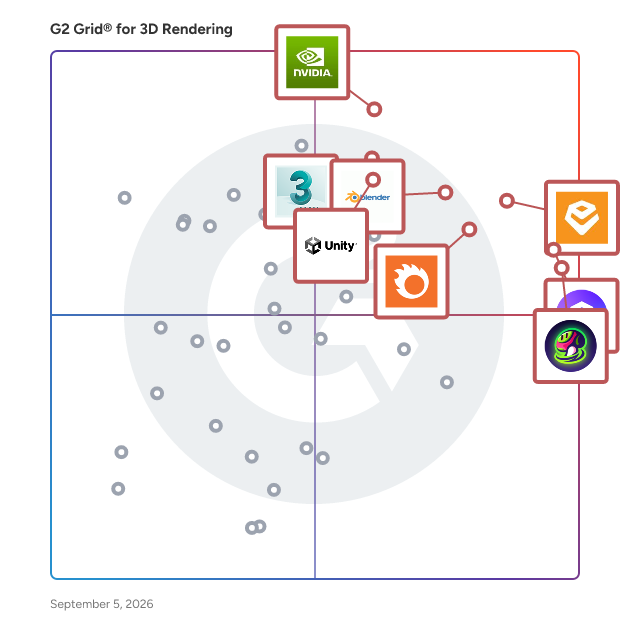
Best 3D Rendering Software At A Glance

Leader:
Highest Performer:
Easiest to Use:
Top Trending:
Best Free Software:
Show LessShow More
Easiest to Use:
Top Trending:
Best Free Software:

G2 takes pride in showing unbiased reviews on user satisfaction in our ratings and reports. We do not allow paid placements in any of our ratings, rankings, or reports. Learn about our scoring methodologies.

Coming Soon
Get Trending 3D Rendering Products in Your Inbox

A weekly snapshot of rising stars, new launches, and what everyone's buzzing about.

Sample Trending Products Newsletter
No filters applied
161 Listings in 3D Rendering Available
(335)4.6 out of 5
Optimized for quick response
2nd Easiest To Use in 3D Rendering software
Save to My Lists
  • Overview
    Expand/Collapse Overview
  • Product Description
    How are these determined?Information
    This description is provided by the seller.

    Enscape is the #1 real-time rendering software used by architects and designers worldwide. It provides AI-powered ideation and fast visual feedback directly inside your BIM/CAD software, making it the

    Users
    • Architect
    • Student
    Industries
    • Architecture & Planning
    • Design
    Market Segment
    • 80% Small-Business
    • 15% Mid-Market
  • Pros and Cons
    Expand/Collapse Pros and Cons
  • Enscape 3D Pros and Cons
    How are these determined?Information
    Pros and Cons are compiled from review feedback and grouped into themes to provide an easy-to-understand summary of user reviews.
    Pros
    Ease of Use
    82
    Speed
    48
    Real-time Rendering
    36
    Rendering Quality
    30
    Rendering Speed
    29
    Cons
    Poor Rendering Quality
    22
    Lighting Issues
    21
    Limited Materials
    18
    Limited Assets
    16
    Performance Issues
    13
  • User Satisfaction
    Expand/Collapse User Satisfaction
  • Enscape 3D features and usability ratings that predict user satisfaction
    8.4
    Quality of Support
    Average: 8.3
  • Seller Details
    Expand/Collapse Seller Details
  • Seller Details
    Company Website
    Year Founded
    1997
    HQ Location
    Karlsruhe, Germany
    Twitter
    @ChaosGroup
    30,810 Twitter followers
    LinkedIn® Page
    www.linkedin.com
    889 employees on LinkedIn®
Product Description
How are these determined?Information
This description is provided by the seller.

Enscape is the #1 real-time rendering software used by architects and designers worldwide. It provides AI-powered ideation and fast visual feedback directly inside your BIM/CAD software, making it the

Users
  • Architect
  • Student
Industries
  • Architecture & Planning
  • Design
Market Segment
  • 80% Small-Business
  • 15% Mid-Market
Enscape 3D Pros and Cons
How are these determined?Information
Pros and Cons are compiled from review feedback and grouped into themes to provide an easy-to-understand summary of user reviews.
Pros
Ease of Use
82
Speed
48
Real-time Rendering
36
Rendering Quality
30
Rendering Speed
29
Cons
Poor Rendering Quality
22
Lighting Issues
21
Limited Materials
18
Limited Assets
16
Performance Issues
13
Enscape 3D features and usability ratings that predict user satisfaction
8.4
Quality of Support
Average: 8.3
Seller Details
Company Website
Year Founded
1997
HQ Location
Karlsruhe, Germany
Twitter
@ChaosGroup
30,810 Twitter followers
LinkedIn® Page
www.linkedin.com
889 employees on LinkedIn®
(972)4.9 out of 5
1st Easiest To Use in 3D Rendering software
Save to My Lists
Entry Level Price:Free
  • Overview
    Expand/Collapse Overview
  • Product Description
    How are these determined?Information
    This description is provided by the seller.

    D5 Render is a real-time ray tracing renderer for architecture, landscape, interior design, engineering and other 3D professionals. This software is fully compatible with SketchUp, 3ds Max, Revit, Arc

    Users
    • Architect
    • architect
    Industries
    • Architecture & Planning
    • Design
    Market Segment
    • 92% Small-Business
    • 2% Mid-Market
  • Pros and Cons
    Expand/Collapse Pros and Cons
  • D5 Render Pros and Cons
    How are these determined?Information
    Pros and Cons are compiled from review feedback and grouped into themes to provide an easy-to-understand summary of user reviews.
    Pros
    Ease of Use
    198
    Rendering Quality
    113
    Speed
    112
    Quality
    100
    Realistic Rendering
    97
    Cons
    Limited Assets
    49
    Limited Materials
    32
    High System Requirements
    28
    Limited Library
    24
    Performance Issues
    22
  • User Satisfaction
    Expand/Collapse User Satisfaction
  • D5 Render features and usability ratings that predict user satisfaction
    9.1
    Quality of Support
    Average: 8.3
  • Seller Details
    Expand/Collapse Seller Details
  • Seller Details
    Company Website
    Year Founded
    2020
    HQ Location
    New York, US
    Twitter
    @D5Render
    3,171 Twitter followers
    LinkedIn® Page
    www.linkedin.com
    95 employees on LinkedIn®
Product Description
How are these determined?Information
This description is provided by the seller.

D5 Render is a real-time ray tracing renderer for architecture, landscape, interior design, engineering and other 3D professionals. This software is fully compatible with SketchUp, 3ds Max, Revit, Arc

Users
  • Architect
  • architect
Industries
  • Architecture & Planning
  • Design
Market Segment
  • 92% Small-Business
  • 2% Mid-Market
D5 Render Pros and Cons
How are these determined?Information
Pros and Cons are compiled from review feedback and grouped into themes to provide an easy-to-understand summary of user reviews.
Pros
Ease of Use
198
Rendering Quality
113
Speed
112
Quality
100
Realistic Rendering
97
Cons
Limited Assets
49
Limited Materials
32
High System Requirements
28
Limited Library
24
Performance Issues
22
D5 Render features and usability ratings that predict user satisfaction
9.1
Quality of Support
Average: 8.3
Seller Details
Company Website
Year Founded
2020
HQ Location
New York, US
Twitter
@D5Render
3,171 Twitter followers
LinkedIn® Page
www.linkedin.com
95 employees on LinkedIn®

This is how G2 Deals can help you:

  • Easily shop for curated – and trusted – software
  • Own your own software buying journey
  • Discover exclusive deals on software
  • Overview
    Expand/Collapse Overview
  • Product Description
    How are these determined?Information
    This description is provided by the seller.

    Corona is a photorealistic rendering tool known for its exceptional realism and ease of use. It helps architects, interior designers, visualization artists, and 3D artists create high-quality imagery

    Users
    • Architect
    • Student
    Industries
    • Architecture & Planning
    • Design
    Market Segment
    • 95% Small-Business
    • 2% Mid-Market
  • Pros and Cons
    Expand/Collapse Pros and Cons
  • Chaos Corona Pros and Cons
    How are these determined?Information
    Pros and Cons are compiled from review feedback and grouped into themes to provide an easy-to-understand summary of user reviews.
    Pros
    Ease of Use
    51
    Quality
    31
    Rendering Quality
    26
    Realistic Rendering
    22
    Intuitive
    18
    Cons
    Poor Rendering Quality
    13
    Slow Rendering
    7
    Licensing Issues
    6
    Slow Performance
    6
    Expensive
    5
  • User Satisfaction
    Expand/Collapse User Satisfaction
  • Chaos Corona features and usability ratings that predict user satisfaction
    8.6
    Quality of Support
    Average: 8.3
  • Seller Details
    Expand/Collapse Seller Details
  • Seller Details
    Company Website
    Year Founded
    1997
    HQ Location
    Karlsruhe, Germany
    Twitter
    @ChaosGroup
    30,810 Twitter followers
    LinkedIn® Page
    www.linkedin.com
    889 employees on LinkedIn®
Product Description
How are these determined?Information
This description is provided by the seller.

Corona is a photorealistic rendering tool known for its exceptional realism and ease of use. It helps architects, interior designers, visualization artists, and 3D artists create high-quality imagery

Users
  • Architect
  • Student
Industries
  • Architecture & Planning
  • Design
Market Segment
  • 95% Small-Business
  • 2% Mid-Market
Chaos Corona Pros and Cons
How are these determined?Information
Pros and Cons are compiled from review feedback and grouped into themes to provide an easy-to-understand summary of user reviews.
Pros
Ease of Use
51
Quality
31
Rendering Quality
26
Realistic Rendering
22
Intuitive
18
Cons
Poor Rendering Quality
13
Slow Rendering
7
Licensing Issues
6
Slow Performance
6
Expensive
5
Chaos Corona features and usability ratings that predict user satisfaction
8.6
Quality of Support
Average: 8.3
Seller Details
Company Website
Year Founded
1997
HQ Location
Karlsruhe, Germany
Twitter
@ChaosGroup
30,810 Twitter followers
LinkedIn® Page
www.linkedin.com
889 employees on LinkedIn®
(363)4.5 out of 5
7th Easiest To Use in 3D Rendering software
View top Consulting Services for Unity
Save to My Lists
  • Overview
    Expand/Collapse Overview
  • Product Description
    How are these determined?Information
    This description is provided by the seller.

    Unity is the world’s leading platform for creating and operating interactive, RT3D content. Creators, ranging from game developers to artists, architects,and automotive designers to filmmakers and mor

    Users
    • Unity Developer
    • Game Developer
    Industries
    • Computer Games
    • Computer Software
    Market Segment
    • 75% Small-Business
    • 18% Mid-Market
  • Pros and Cons
    Expand/Collapse Pros and Cons
  • Unity Pros and Cons
    How are these determined?Information
    Pros and Cons are compiled from review feedback and grouped into themes to provide an easy-to-understand summary of user reviews.
    Pros
    Ease of Use
    5
    Community Support
    3
    Intuitive
    3
    Creativity
    2
    Integrations
    2
    Cons
    Expensive
    3
    Performance Issues
    3
    Expensive Subscriptions
    2
    High Hardware Requirements
    2
    High Subscription Cost
    2
  • User Satisfaction
    Expand/Collapse User Satisfaction
  • Unity features and usability ratings that predict user satisfaction
    8.4
    Quality of Support
    Average: 8.3
  • Seller Details
    Expand/Collapse Seller Details
  • Seller Details
    Seller
    Unity
    Year Founded
    2010
    HQ Location
    San Fransisco
    Twitter
    @unity
    110,724 Twitter followers
    LinkedIn® Page
    www.linkedin.com
    6,739 employees on LinkedIn®
Product Description
How are these determined?Information
This description is provided by the seller.

Unity is the world’s leading platform for creating and operating interactive, RT3D content. Creators, ranging from game developers to artists, architects,and automotive designers to filmmakers and mor

Users
  • Unity Developer
  • Game Developer
Industries
  • Computer Games
  • Computer Software
Market Segment
  • 75% Small-Business
  • 18% Mid-Market
Unity Pros and Cons
How are these determined?Information
Pros and Cons are compiled from review feedback and grouped into themes to provide an easy-to-understand summary of user reviews.
Pros
Ease of Use
5
Community Support
3
Intuitive
3
Creativity
2
Integrations
2
Cons
Expensive
3
Performance Issues
3
Expensive Subscriptions
2
High Hardware Requirements
2
High Subscription Cost
2
Unity features and usability ratings that predict user satisfaction
8.4
Quality of Support
Average: 8.3
Seller Details
Seller
Unity
Year Founded
2010
HQ Location
San Fransisco
Twitter
@unity
110,724 Twitter followers
LinkedIn® Page
www.linkedin.com
6,739 employees on LinkedIn®
  • Overview
    Expand/Collapse Overview
  • Product Description
    How are these determined?Information
    This description is provided by the seller.

    NVIDIA IRAY is physically based rendering technology that generates photorealistic imagery by simulating the physical behavior of light and materials.

    Users
    No information available
    Industries
    No information available
    Market Segment
    • 100% Small-Business
  • User Satisfaction
    Expand/Collapse User Satisfaction
  • Iray features and usability ratings that predict user satisfaction
    8.2
    Quality of Support
    Average: 8.3
  • Seller Details
    Expand/Collapse Seller Details
  • Seller Details
    Seller
    NVIDIA
    Year Founded
    1993
    HQ Location
    Santa Clara, CA
    Twitter
    @nvidia
    2,418,630 Twitter followers
    LinkedIn® Page
    www.linkedin.com
    43,633 employees on LinkedIn®
    Ownership
    NVDA
Product Description
How are these determined?Information
This description is provided by the seller.

NVIDIA IRAY is physically based rendering technology that generates photorealistic imagery by simulating the physical behavior of light and materials.

Users
No information available
Industries
No information available
Market Segment
  • 100% Small-Business
Iray features and usability ratings that predict user satisfaction
8.2
Quality of Support
Average: 8.3
Seller Details
Seller
NVIDIA
Year Founded
1993
HQ Location
Santa Clara, CA
Twitter
@nvidia
2,418,630 Twitter followers
LinkedIn® Page
www.linkedin.com
43,633 employees on LinkedIn®
Ownership
NVDA
(305)4.6 out of 5
6th Easiest To Use in 3D Rendering software
View top Consulting Services for Blender
Save to My Lists
  • Overview
    Expand/Collapse Overview
  • Product Description
    How are these determined?Information
    This description is provided by the seller.

    Blender is an open source 3D creation suite that supports the 3D pipeline, modeling, rigging, animation, simulation, rendering, compositing, and motion tracking, video editing, and game creation.

    Users
    • Software Engineer
    • Graphic Designer
    Industries
    • Animation
    • Computer Games
    Market Segment
    • 75% Small-Business
    • 12% Mid-Market
  • Pros and Cons
    Expand/Collapse Pros and Cons
  • Blender Pros and Cons
    How are these determined?Information
    Pros and Cons are compiled from review feedback and grouped into themes to provide an easy-to-understand summary of user reviews.
    Pros
    3D Modeling
    11
    Modeling
    10
    Animation
    9
    Ease of Use
    9
    Features
    8
    Cons
    Learning Curve
    10
    Difficult Learning
    9
    Steep Learning Curve
    8
    Learning Difficulty
    6
    Difficulty for Beginners
    5
  • User Satisfaction
    Expand/Collapse User Satisfaction
  • Blender features and usability ratings that predict user satisfaction
    8.6
    Quality of Support
    Average: 8.3
  • Seller Details
    Expand/Collapse Seller Details
  • Seller Details
    Seller
    Blender
    Year Founded
    2002
    HQ Location
    Amsterdam
    Twitter
    @BlenderDev
    86,799 Twitter followers
    LinkedIn® Page
    www.linkedin.com
    1,267 employees on LinkedIn®
Product Description
How are these determined?Information
This description is provided by the seller.

Blender is an open source 3D creation suite that supports the 3D pipeline, modeling, rigging, animation, simulation, rendering, compositing, and motion tracking, video editing, and game creation.

Users
  • Software Engineer
  • Graphic Designer
Industries
  • Animation
  • Computer Games
Market Segment
  • 75% Small-Business
  • 12% Mid-Market
Blender Pros and Cons
How are these determined?Information
Pros and Cons are compiled from review feedback and grouped into themes to provide an easy-to-understand summary of user reviews.
Pros
3D Modeling
11
Modeling
10
Animation
9
Ease of Use
9
Features
8
Cons
Learning Curve
10
Difficult Learning
9
Steep Learning Curve
8
Learning Difficulty
6
Difficulty for Beginners
5
Blender features and usability ratings that predict user satisfaction
8.6
Quality of Support
Average: 8.3
Seller Details
Seller
Blender
Year Founded
2002
HQ Location
Amsterdam
Twitter
@BlenderDev
86,799 Twitter followers
LinkedIn® Page
www.linkedin.com
1,267 employees on LinkedIn®
  • Overview
    Expand/Collapse Overview
  • Product Description
    How are these determined?Information
    This description is provided by the seller.

    V-Ray is the industry-standard photorealistic rendering tool for architectural visualization and the media & entertainment industry. It helps architects, designers, 3D artists, and visualization s

    Users
    • Architect
    • Designer
    Industries
    • Architecture & Planning
    • Design
    Market Segment
    • 82% Small-Business
    • 11% Mid-Market
  • Pros and Cons
    Expand/Collapse Pros and Cons
  • V-Ray Pros and Cons
    How are these determined?Information
    Pros and Cons are compiled from review feedback and grouped into themes to provide an easy-to-understand summary of user reviews.
    Pros
    Ease of Use
    39
    Rendering Quality
    38
    Quality
    31
    Realistic Rendering
    30
    Lighting Quality
    28
    Cons
    Difficult Learning
    21
    Poor Rendering Quality
    19
    Complex Interface
    17
    Complexity
    14
    Slow Performance
    14
  • User Satisfaction
    Expand/Collapse User Satisfaction
  • V-Ray features and usability ratings that predict user satisfaction
    8.0
    Quality of Support
    Average: 8.3
  • Seller Details
    Expand/Collapse Seller Details
  • Seller Details
    Company Website
    Year Founded
    1997
    HQ Location
    Karlsruhe, Germany
    Twitter
    @ChaosGroup
    30,810 Twitter followers
    LinkedIn® Page
    www.linkedin.com
    889 employees on LinkedIn®
Product Description
How are these determined?Information
This description is provided by the seller.

V-Ray is the industry-standard photorealistic rendering tool for architectural visualization and the media & entertainment industry. It helps architects, designers, 3D artists, and visualization s

Users
  • Architect
  • Designer
Industries
  • Architecture & Planning
  • Design
Market Segment
  • 82% Small-Business
  • 11% Mid-Market
V-Ray Pros and Cons
How are these determined?Information
Pros and Cons are compiled from review feedback and grouped into themes to provide an easy-to-understand summary of user reviews.
Pros
Ease of Use
39
Rendering Quality
38
Quality
31
Realistic Rendering
30
Lighting Quality
28
Cons
Difficult Learning
21
Poor Rendering Quality
19
Complex Interface
17
Complexity
14
Slow Performance
14
V-Ray features and usability ratings that predict user satisfaction
8.0
Quality of Support
Average: 8.3
Seller Details
Company Website
Year Founded
1997
HQ Location
Karlsruhe, Germany
Twitter
@ChaosGroup
30,810 Twitter followers
LinkedIn® Page
www.linkedin.com
889 employees on LinkedIn®
Entry Level Price:Free
  • Overview
    Expand/Collapse Overview
  • Product Description
    How are these determined?Information
    This description is provided by the seller.

    Twinmotion is a real-time visualization tool designed to assist users, including architects, designers, filmmakers, and storytellers, in producing high-quality images, panoramas, standard or 360° VR v

    Users
    • Architect
    Industries
    • Architecture & Planning
    Market Segment
    • 75% Small-Business
    • 18% Mid-Market
  • Pros and Cons
    Expand/Collapse Pros and Cons
  • Twinmotion Pros and Cons
    How are these determined?Information
    Pros and Cons are compiled from review feedback and grouped into themes to provide an easy-to-understand summary of user reviews.
    Pros
    Ease of Use
    16
    Features
    9
    Speed
    9
    Ease of Learning
    8
    Quality
    8
    Cons
    Poor Rendering Quality
    7
    Limited Library
    5
    Limited Features
    4
    Lighting Issues
    3
    Limited Modeling Capabilities
    3
  • User Satisfaction
    Expand/Collapse User Satisfaction
  • Twinmotion features and usability ratings that predict user satisfaction
    8.4
    Quality of Support
    Average: 8.3
  • Seller Details
    Expand/Collapse Seller Details
  • Seller Details
    Company Website
    Year Founded
    1991
    HQ Location
    Cary, NC
    Twitter
    @EpicGames
    5,411,348 Twitter followers
    LinkedIn® Page
    www.linkedin.com
    10,589 employees on LinkedIn®
Product Description
How are these determined?Information
This description is provided by the seller.

Twinmotion is a real-time visualization tool designed to assist users, including architects, designers, filmmakers, and storytellers, in producing high-quality images, panoramas, standard or 360° VR v

Users
  • Architect
Industries
  • Architecture & Planning
Market Segment
  • 75% Small-Business
  • 18% Mid-Market
Twinmotion Pros and Cons
How are these determined?Information
Pros and Cons are compiled from review feedback and grouped into themes to provide an easy-to-understand summary of user reviews.
Pros
Ease of Use
16
Features
9
Speed
9
Ease of Learning
8
Quality
8
Cons
Poor Rendering Quality
7
Limited Library
5
Limited Features
4
Lighting Issues
3
Limited Modeling Capabilities
3
Twinmotion features and usability ratings that predict user satisfaction
8.4
Quality of Support
Average: 8.3
Seller Details
Company Website
Year Founded
1991
HQ Location
Cary, NC
Twitter
@EpicGames
5,411,348 Twitter followers
LinkedIn® Page
www.linkedin.com
10,589 employees on LinkedIn®
(277)4.3 out of 5
8th Easiest To Use in 3D Rendering software
View top Consulting Services for 3ds Max Design
Save to My Lists
Entry Level Price:$460 per quarter
  • Overview
    Expand/Collapse Overview
  • Product Description
    How are these determined?Information
    This description is provided by the seller.

    3ds Max Design software is a comprehensive 3D design, modeling, animation, and rendering solution for architects, designers, civil engineers, and visualization specialists.

    Users
    • Interior Designer
    • Architect
    Industries
    • Architecture & Planning
    • Design
    Market Segment
    • 64% Small-Business
    • 24% Mid-Market
  • Pros and Cons
    Expand/Collapse Pros and Cons
  • 3ds Max Design Pros and Cons
    How are these determined?Information
    Pros and Cons are compiled from review feedback and grouped into themes to provide an easy-to-understand summary of user reviews.
    Pros
    3D Modeling
    2
    3D Visualization
    2
    Visualization
    2
    Animation
    1
    Animation Quality
    1
    Cons
    Difficult Learning
    3
    Crashes
    2
    High Hardware Requirements
    2
    High System Requirements
    2
    Lagging Issues
    2
  • User Satisfaction
    Expand/Collapse User Satisfaction
  • 3ds Max Design features and usability ratings that predict user satisfaction
    7.6
    Quality of Support
    Average: 8.3
  • Seller Details
    Expand/Collapse Seller Details
  • Seller Details
    Seller
    Autodesk
    Year Founded
    1982
    HQ Location
    San Francisco
    Twitter
    @autodesk
    277,726 Twitter followers
    LinkedIn® Page
    www.linkedin.com
    15,635 employees on LinkedIn®
    Ownership
    NASDAQ:ADSK
Product Description
How are these determined?Information
This description is provided by the seller.

3ds Max Design software is a comprehensive 3D design, modeling, animation, and rendering solution for architects, designers, civil engineers, and visualization specialists.

Users
  • Interior Designer
  • Architect
Industries
  • Architecture & Planning
  • Design
Market Segment
  • 64% Small-Business
  • 24% Mid-Market
3ds Max Design Pros and Cons
How are these determined?Information
Pros and Cons are compiled from review feedback and grouped into themes to provide an easy-to-understand summary of user reviews.
Pros
3D Modeling
2
3D Visualization
2
Visualization
2
Animation
1
Animation Quality
1
Cons
Difficult Learning
3
Crashes
2
High Hardware Requirements
2
High System Requirements
2
Lagging Issues
2
3ds Max Design features and usability ratings that predict user satisfaction
7.6
Quality of Support
Average: 8.3
Seller Details
Seller
Autodesk
Year Founded
1982
HQ Location
San Francisco
Twitter
@autodesk
277,726 Twitter followers
LinkedIn® Page
www.linkedin.com
15,635 employees on LinkedIn®
Ownership
NASDAQ:ADSK
(126)4.5 out of 5
4th Easiest To Use in 3D Rendering software
Save to My Lists
Entry Level Price:$25.00
  • Overview
    Expand/Collapse Overview
  • Product Description
    How are these determined?Information
    This description is provided by the seller.

    Coohom, a leading global cloud-based, all-in-one 3D design platform, that provides software and services to empowers designers and businesses to effortlesssly bring ideas to life, streamline processes

    Users
    • Architect
    Industries
    • Architecture & Planning
    • Design
    Market Segment
    • 84% Small-Business
    • 8% Mid-Market
  • Pros and Cons
    Expand/Collapse Pros and Cons
  • Coohom Pros and Cons
    How are these determined?Information
    Pros and Cons are compiled from review feedback and grouped into themes to provide an easy-to-understand summary of user reviews.
    Pros
    Ease of Use
    65
    Rendering Capabilities
    46
    Realistic Rendering
    37
    Speed
    32
    3D Modeling
    31
    Cons
    Lack of Features
    15
    Expensive
    11
    Limited Features
    10
    Slow Performance
    10
    3D Modeling Issues
    9
  • User Satisfaction
    Expand/Collapse User Satisfaction
  • Coohom features and usability ratings that predict user satisfaction
    8.0
    Quality of Support
    Average: 8.3
  • Seller Details
    Expand/Collapse Seller Details
  • Seller Details
    Seller
    Coohom
    Company Website
    Year Founded
    2018
    HQ Location
    New York
    Twitter
    @coohom
    863 Twitter followers
    LinkedIn® Page
    www.linkedin.com
    144 employees on LinkedIn®
Product Description
How are these determined?Information
This description is provided by the seller.

Coohom, a leading global cloud-based, all-in-one 3D design platform, that provides software and services to empowers designers and businesses to effortlesssly bring ideas to life, streamline processes

Users
  • Architect
Industries
  • Architecture & Planning
  • Design
Market Segment
  • 84% Small-Business
  • 8% Mid-Market
Coohom Pros and Cons
How are these determined?Information
Pros and Cons are compiled from review feedback and grouped into themes to provide an easy-to-understand summary of user reviews.
Pros
Ease of Use
65
Rendering Capabilities
46
Realistic Rendering
37
Speed
32
3D Modeling
31
Cons
Lack of Features
15
Expensive
11
Limited Features
10
Slow Performance
10
3D Modeling Issues
9
Coohom features and usability ratings that predict user satisfaction
8.0
Quality of Support
Average: 8.3
Seller Details
Seller
Coohom
Company Website
Year Founded
2018
HQ Location
New York
Twitter
@coohom
863 Twitter followers
LinkedIn® Page
www.linkedin.com
144 employees on LinkedIn®
  • Overview
    Expand/Collapse Overview
  • Product Description
    How are these determined?Information
    This description is provided by the seller.

    Direct3D is a low-level graphics API that enables you to manipulate visual models of 3D objects and take advantage of hardware acceleration such as video graphics cards.

    Users
    No information available
    Industries
    No information available
    Market Segment
    • 38% Enterprise
    • 38% Small-Business
  • User Satisfaction
    Expand/Collapse User Satisfaction
  • Direct3D features and usability ratings that predict user satisfaction
    8.1
    Quality of Support
    Average: 8.3
  • Seller Details
    Expand/Collapse Seller Details
  • Seller Details
    Seller
    Microsoft
    Year Founded
    1975
    HQ Location
    Redmond, Washington
    Twitter
    @microsoft
    13,570,889 Twitter followers
    LinkedIn® Page
    www.linkedin.com
    220,934 employees on LinkedIn®
    Ownership
    MSFT
Product Description
How are these determined?Information
This description is provided by the seller.

Direct3D is a low-level graphics API that enables you to manipulate visual models of 3D objects and take advantage of hardware acceleration such as video graphics cards.

Users
No information available
Industries
No information available
Market Segment
  • 38% Enterprise
  • 38% Small-Business
Direct3D features and usability ratings that predict user satisfaction
8.1
Quality of Support
Average: 8.3
Seller Details
Seller
Microsoft
Year Founded
1975
HQ Location
Redmond, Washington
Twitter
@microsoft
13,570,889 Twitter followers
LinkedIn® Page
www.linkedin.com
220,934 employees on LinkedIn®
Ownership
MSFT
(265)4.3 out of 5
9th Easiest To Use in 3D Rendering software
View top Consulting Services for Maya
Save to My Lists
  • Overview
    Expand/Collapse Overview
  • Product Description
    How are these determined?Information
    This description is provided by the seller.

    Bring your imagination to life with Maya® 3D animation, modeling, simulation, and rendering software. Maya helps artists tell their story with one fast, creative toolset.

    Users
    • 3D Artist
    • Director
    Industries
    • Animation
    • Computer Games
    Market Segment
    • 61% Small-Business
    • 24% Mid-Market
  • Pros and Cons
    Expand/Collapse Pros and Cons
  • Maya Pros and Cons
    How are these determined?Information
    Pros and Cons are compiled from review feedback and grouped into themes to provide an easy-to-understand summary of user reviews.
    Pros
    Ease of Use
    3
    3D Modeling
    1
    Animation
    1
    Characters
    1
    Ease of Learning
    1
    Cons
    Crashes
    2
    Software Instability
    2
    Poor Customer Support
    1
    Poor Rendering Quality
    1
    Slow Rendering
    1
  • User Satisfaction
    Expand/Collapse User Satisfaction
  • Maya features and usability ratings that predict user satisfaction
    7.8
    Quality of Support
    Average: 8.3
  • Seller Details
    Expand/Collapse Seller Details
  • Seller Details
    Seller
    Autodesk
    Year Founded
    1982
    HQ Location
    San Francisco
    Twitter
    @autodesk
    277,726 Twitter followers
    LinkedIn® Page
    www.linkedin.com
    15,635 employees on LinkedIn®
    Ownership
    NASDAQ:ADSK
Product Description
How are these determined?Information
This description is provided by the seller.

Bring your imagination to life with Maya® 3D animation, modeling, simulation, and rendering software. Maya helps artists tell their story with one fast, creative toolset.

Users
  • 3D Artist
  • Director
Industries
  • Animation
  • Computer Games
Market Segment
  • 61% Small-Business
  • 24% Mid-Market
Maya Pros and Cons
How are these determined?Information
Pros and Cons are compiled from review feedback and grouped into themes to provide an easy-to-understand summary of user reviews.
Pros
Ease of Use
3
3D Modeling
1
Animation
1
Characters
1
Ease of Learning
1
Cons
Crashes
2
Software Instability
2
Poor Customer Support
1
Poor Rendering Quality
1
Slow Rendering
1
Maya features and usability ratings that predict user satisfaction
7.8
Quality of Support
Average: 8.3
Seller Details
Seller
Autodesk
Year Founded
1982
HQ Location
San Francisco
Twitter
@autodesk
277,726 Twitter followers
LinkedIn® Page
www.linkedin.com
15,635 employees on LinkedIn®
Ownership
NASDAQ:ADSK
(39)4.5 out of 5
View top Consulting Services for Autodesk 3ds Max
Save to My Lists
  • Overview
    Expand/Collapse Overview
  • Product Description
    How are these determined?Information
    This description is provided by the seller.

    Autodesk 3ds Max Design software is a comprehensive 3D design, modeling, animation, and rendering solution for architects, designers, civil engineers, and visualization specialists.

    Users
    No information available
    Industries
    • Architecture & Planning
    Market Segment
    • 77% Small-Business
    • 15% Mid-Market
  • Pros and Cons
    Expand/Collapse Pros and Cons
  • Autodesk 3ds Max Pros and Cons
    How are these determined?Information
    Pros and Cons are compiled from review feedback and grouped into themes to provide an easy-to-understand summary of user reviews.
    Pros
    Features
    2
    Flexibility
    2
    3D Modeling
    1
    Animation
    1
    Ease of Use
    1
    Cons
    Complex Interface
    2
    Difficult Learning
    2
    Difficulty for Beginners
    1
    Expensive
    1
    High Resource Usage
    1
  • User Satisfaction
    Expand/Collapse User Satisfaction
  • Autodesk 3ds Max features and usability ratings that predict user satisfaction
    8.1
    Quality of Support
    Average: 8.3
  • Seller Details
    Expand/Collapse Seller Details
  • Seller Details
    Seller
    Autodesk
    Year Founded
    1982
    HQ Location
    San Francisco
    Twitter
    @autodesk
    277,726 Twitter followers
    LinkedIn® Page
    www.linkedin.com
    15,635 employees on LinkedIn®
    Ownership
    NASDAQ:ADSK
Product Description
How are these determined?Information
This description is provided by the seller.

Autodesk 3ds Max Design software is a comprehensive 3D design, modeling, animation, and rendering solution for architects, designers, civil engineers, and visualization specialists.

Users
No information available
Industries
  • Architecture & Planning
Market Segment
  • 77% Small-Business
  • 15% Mid-Market
Autodesk 3ds Max Pros and Cons
How are these determined?Information
Pros and Cons are compiled from review feedback and grouped into themes to provide an easy-to-understand summary of user reviews.
Pros
Features
2
Flexibility
2
3D Modeling
1
Animation
1
Ease of Use
1
Cons
Complex Interface
2
Difficult Learning
2
Difficulty for Beginners
1
Expensive
1
High Resource Usage
1
Autodesk 3ds Max features and usability ratings that predict user satisfaction
8.1
Quality of Support
Average: 8.3
Seller Details
Seller
Autodesk
Year Founded
1982
HQ Location
San Francisco
Twitter
@autodesk
277,726 Twitter followers
LinkedIn® Page
www.linkedin.com
15,635 employees on LinkedIn®
Ownership
NASDAQ:ADSK
Entry Level Price:$1,188.00
  • Overview
    Expand/Collapse Overview
  • Product Description
    How are these determined?Information
    This description is provided by the seller.

    KeyShot is the leading Product Design-to-Market Suite, empowering companies worldwide to seamlessly turn product visions into market-ready realities. By integrating every phase of the product journey

    Users
    • Designer
    • Industrial Designer
    Industries
    • Design
    • Higher Education
    Market Segment
    • 69% Small-Business
    • 17% Mid-Market
  • Pros and Cons
    Expand/Collapse Pros and Cons
  • KeyShot Pros and Cons
    How are these determined?Information
    Pros and Cons are compiled from review feedback and grouped into themes to provide an easy-to-understand summary of user reviews.
    Pros
    Asset Management
    1
    Assets
    1
    Useful
    1
    Cons
    Error Issues
    1
    Limited Materials
    1
    Software Instability
    1
  • User Satisfaction
    Expand/Collapse User Satisfaction
  • KeyShot features and usability ratings that predict user satisfaction
    8.2
    Quality of Support
    Average: 8.3
  • Seller Details
    Expand/Collapse Seller Details
  • Seller Details
    Seller
    KeyShot
    Year Founded
    2010
    HQ Location
    Costa Mesa, US
    Twitter
    @KeyShot3D
    9,569 Twitter followers
    LinkedIn® Page
    www.linkedin.com
    174 employees on LinkedIn®
Product Description
How are these determined?Information
This description is provided by the seller.

KeyShot is the leading Product Design-to-Market Suite, empowering companies worldwide to seamlessly turn product visions into market-ready realities. By integrating every phase of the product journey

Users
  • Designer
  • Industrial Designer
Industries
  • Design
  • Higher Education
Market Segment
  • 69% Small-Business
  • 17% Mid-Market
KeyShot Pros and Cons
How are these determined?Information
Pros and Cons are compiled from review feedback and grouped into themes to provide an easy-to-understand summary of user reviews.
Pros
Asset Management
1
Assets
1
Useful
1
Cons
Error Issues
1
Limited Materials
1
Software Instability
1
KeyShot features and usability ratings that predict user satisfaction
8.2
Quality of Support
Average: 8.3
Seller Details
Seller
KeyShot
Year Founded
2010
HQ Location
Costa Mesa, US
Twitter
@KeyShot3D
9,569 Twitter followers
LinkedIn® Page
www.linkedin.com
174 employees on LinkedIn®
Entry Level Price:Free
  • Overview
    Expand/Collapse Overview
  • Product Description
    How are these determined?Information
    This description is provided by the seller.

    Arcadium is a free online 3D house design tool. Its key differentiation is its speed and ease-of-use when creating 3D architectural modeling and virtual walkthroughs. Being online, is also a huge adva

    Users
    No information available
    Industries
    • Architecture & Planning
    • Design
    Market Segment
    • 90% Small-Business
    • 10% Mid-Market
  • Pros and Cons
    Expand/Collapse Pros and Cons
  • Arcadium Pros and Cons
    How are these determined?Information
    Pros and Cons are compiled from review feedback and grouped into themes to provide an easy-to-understand summary of user reviews.
    Pros
    Ease of Use
    17
    Intuitive
    13
    Ease of Learning
    8
    Customization
    7
    Features
    7
    Cons
    Design Difficulties
    1
    Interface Usability
    1
    Lighting Issues
    1
    Steep Learning Curve
    1
  • User Satisfaction
    Expand/Collapse User Satisfaction
  • Arcadium features and usability ratings that predict user satisfaction
    9.7
    Quality of Support
    Average: 8.3
  • Seller Details
    Expand/Collapse Seller Details
  • Seller Details
    Seller
    Arcadium
    HQ Location
    New York, US
    LinkedIn® Page
    www.linkedin.com
    1 employees on LinkedIn®
Product Description
How are these determined?Information
This description is provided by the seller.

Arcadium is a free online 3D house design tool. Its key differentiation is its speed and ease-of-use when creating 3D architectural modeling and virtual walkthroughs. Being online, is also a huge adva

Users
No information available
Industries
  • Architecture & Planning
  • Design
Market Segment
  • 90% Small-Business
  • 10% Mid-Market
Arcadium Pros and Cons
How are these determined?Information
Pros and Cons are compiled from review feedback and grouped into themes to provide an easy-to-understand summary of user reviews.
Pros
Ease of Use
17
Intuitive
13
Ease of Learning
8
Customization
7
Features
7
Cons
Design Difficulties
1
Interface Usability
1
Lighting Issues
1
Steep Learning Curve
1
Arcadium features and usability ratings that predict user satisfaction
9.7
Quality of Support
Average: 8.3
Seller Details
Seller
Arcadium
HQ Location
New York, US
LinkedIn® Page
www.linkedin.com
1 employees on LinkedIn®

Learn More About 3D Rendering Software

What is 3D rendering?

3D rendering software is a process that takes previously created 3D models and seamlessly places them into a fully actualized 3D environment or image. 3D rendering involves adding textures and lighting to models of objects to create lifelike, photorealistic images depending on the style and purpose. 

Graphic designers and media developers use 3D rendering to take contrasting characters and objects, typically imported from 3D modeling software, and place them into a graphically appropriate environment.. Some 3D rendering solutions may include or integrate with animation software so animators can bring their scenes to life. Features like lighting and texturing allow users to add depth to their scenes and make them as realistic as possible. Visual artists in industries such as entertainment, automotive, architecture, advertising, interior design, and web design can use 3D rendering software to create lifelike scenes for client engagement purposes or to create new types of media.

Common features of 3D rendering software

3D rendering solutions come equipped with several features for users’ design needs. The following features are commonly found in 3D rendering solutions:

  • Render setup: A 3D rendering solution should allow users to generate reusable templates to quickly render a complex scene. 
  • Surface modeling: These tools enable users to continue their work on 3D models once they have been imported into the 3D rendering solution. You can modify, align, and digitally transform the geometry of your objects.
  • Animation tools: 3D rendering solutions typically include character animation functionality. This functionality lets the user detail the model's surface, along with perfecting its movements.
  • Motion paths: This feature lets users preview the path animated objects will follow. Users can adjust the direction of the paths and convert them to and from splines. They can also add a curve to the object’s path.
  • Physical camera: 3D rendering software may also offer a physical camera that will integrate with the user’s scene. This feature is ideal for users hoping to create a photorealistic, physically based rendering. Additionally, a physical camera integration can help with exposure control.

Benefits of using 3D rendering software

3D rendering offers a wide range of benefits across industries. Some of the key benefits of this software type include: 

  • Visualization: 3D rendering allows users to create a compelling, highly realistic visualization, helping them present their concepts appealingly. This can speed up the design and visualization process, leading to quicker decision-making. Various industries can use it for architectural visualization, photorealistic rendering, and more.
  • Design iteration: Designers can easily iterate and make changes to their prototypes or models in a virtual space, allowing quick adjustments without creating a physical prototype. 
  • Marketing and advertising: 3D rendering can be used extensively in marketing and advertising to create visually appealing and impactful promotional material.
  • Cost saving: The need for physical prototypes and mockups are reduced, leading to cost savings. 
  • Training and simulation: It can be used by healthcare, aviation, architecture, and other industries to create training material. 
  • Collaboration: 3D rendering software helps users easily share and review work done by multiple stakeholders, thus fostering collaboration among both internal teams and clients. 
  • Precision and accuracy: 3D rendering software offer users complete control over their designs. These tools typically integrate with CAD solutions and can store necessary images from the project. Data from these solutions can provide information, like the distance between two points on your model. So, thanks to those integrations, users can have access to precise measurements as they design.

Who uses 3D rendering software?

3D rendering software is typically used by those working in entertainment and design fields. This includes, but is not limited to, the following industries:

  • Animation: The vast majority of animation nowadays is 3D instead of 2D. Animators start by creating a 3D model and then uploading it to a 3D rendering platform. Modeling tools will let animators put these static 3D models into motion. Some animation software comes equipped with 3D rendering capabilities, but many will integrate with 3D rendering solutions.
  • Architecture: 3D rendering tools and architectural rendering software can also be used in the design process for objects that aren’t intended to move. Users begin by creating a model of their building in computer-aided design (CAD) or 3D modeling platforms. They subsequently upload these models into 3D rendering tools. The tools, then, capture building data from CAD software or 3D modeling platforms. Therefore, architects have that information at hand and are enabled to design and manipulate their building model from any angle. 
  • Advertising: Advertising professionals can use 3D rendering software for purposes similar to animators. 3D rendering tools enable users to create more interactive media. This allows advertisers to create more engaging advertisements for their audience.

3D rendering software pricing

Different pricing models are available for different 3D rendering software. Each software may offer unique features and subscription models. This pricing is sourced from existing pricing information found on G2. 

  • Min annual price per license: $269.85
  • Min annual price per license (without free): $269.85
  • Max annual price per license: $1795.00
  • Average annual price per license: $682.72

How to choose the best 3D rendering software 

Choosing the best 3D rendering software depends on several factors—industry, personal preferences, specific needs, budget, and more. 

  • Identify requirements: Every industry has different requirements. The user must list the essential features required from the 3D rendering software and go through the list before finalizing the software.
  • Budget considerations: One must determine the budget allocated to software usage. Multiple options and price variations, free trials, and subscriptions are available in the market today. A user must, try out trial versions, demos, or free versions whenever possible to gauge the software's compatibility with their workflow.
  • Integration: It is essential to check if the software integrates well with other tools commonly used. Compatibility with file formats is crucial for smooth collaboration. There are certain open-source software that are readily available and integrate well with other tools.
  • Availability: A large and active user community can be beneficial for getting help, tutorials, and third-party plugins. The availability of customer support and documentation is also beneficial to 3D artists.
  • Learning curve: The user interface and workflow should be evaluated. Choosing software that aligns with skill level, has a user-friendly interface, can be used by beginners without extensive training, and offers a comfortable learning curve is ideal.
  • Updates and development: Regular software updates indicate active maintenance and improvement. Depending on the requirements, the history of updates and the development roadmap for different operating systems, such as Windows, Mac, Linux, and Android, should be considered..
  • Scalability: Some software may be better suited for smaller projects, while others excel in handling large, complex scenes.

Potential issues with 3D rendering software

3D rendering software, like floor plan software, is massively useful to those in building and design industries. However, as with every software solution, 3D rendering tools have potential disadvantages.

  • Unrealistic expectations: Some experts in the industry argue that 3D rendering can give users unrealistic expectations for what their final product may look like. As the product often ends up looking different in real life, these tools can sometimes provide deceiving designs and confusing concepts for the client.
  • Cost: 3D rendering can allow users to create an incredibly realistic design of a building or an object. But because that design is so realistic, it can often be incredibly expensive. These solutions may be out of budget for smaller businesses or individual users.