Best Email Archiving Software

How Many Email Archiving Software Products Does G2 Track?

Total Products under this Category: 65

Category Stats (Sep 2026)

  • Average Rating: 4.34/5 The average rating of products in this category, based on all submitted ratings

Last updated: September 08, 2026

How Does G2 Rank Email Archiving Software Products?

Why You Can Trust G2's Software Rankings:

  • 30 Analysts and Data Experts
  • 6,600+ Authentic Reviews
  • 65+ Products
  • Unbiased Rankings

G2's software rankings are built on verified user reviews, rigorous moderation, and a consistent research methodology maintained by a team of analysts and data experts. Each product is measured using the same transparent criteria, with no paid placement or vendor influence. While reviews reflect real user experiences, which can be subjective, they offer valuable insight into how software performs in the hands of professionals. Together, these inputs power the G2 Score, a standardized way to compare tools within every category.

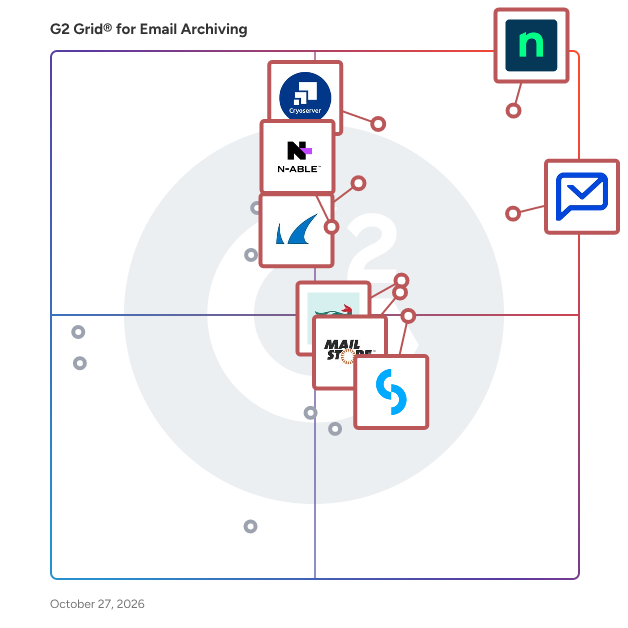
G2 Grid® for Email Archiving Software

G2 Grid® for Email Archiving Software plotting products by satisfaction and market presence

Highlighted products: NinjaOne, Paubox, Cryoserver, Smarsh, Barracuda Message Archiver, Jatheon Enterprise Data Archiving Solution, MailStore Server, and N-able Mail Assure.

Underlying data: [Grid® JSON](https://www.g2.com/categories/email-archiving/grids.json?focus%5B%5D=ninjaone&focus%5B%5D=paubox&focus%5B%5D=cryoserver&focus%5B%5D=smarsh-smarsh&focus%5B%5D=barracuda-barracuda-message-archiver&focus%5B%5D=jatheon-enterprise-data-archiving-solution&focus%5B%5D=mailstore-server&focus%5B%5D=n-able-mail-assure)

NinjaOne

NinjaOne is the unified IT operations platform that helps IT teams and managed service providers manage, secure, and support every endpoint from a single cloud-native console. Nearly 40,000 customers across 140+ countries use NinjaOne to replace fragmented point tools with one platform built to scale. The platform brings together the core work of modern IT operations: endpoint management, autonomous patch management, vulnerability management, endpoint and SaaS backup, remote access, and IT service desk. Teams monitor and control Windows, macOS, Linux, mobile, and virtual devices in one place, automate routine work with policy-based automation and human-centered AI, and cut the cost and risk that come from running many disconnected tools. NinjaOne serves internal IT teams and MSPs alike, from lean IT departments to mid-market and large enterprise organizations managing distributed, multi-site environments. Common uses include consolidating IT tooling, automating patching for security and compliance, managing distributed and hybrid workforces, improving endpoint visibility, and strengthening backup and ransomware readiness. NinjaOne has maintained a 98 percent customer satisfaction score for more than five years, backed by free unlimited onboarding and 24/7 support in seven languages. Organizations that move to NinjaOne report replacing four or more separate tools with the single platform. NinjaOne is FedRAMP Moderate Authorized and SOC 2 Type II and Type III compliant, and supports audit-ready compliance evidence across frameworks including CMMC, ISO 27001, and HIPAA. The mission behind the platform is simple: unify IT to simplify work, giving IT teams better tools and employees a great technology experience at work.

Average Rating: 4.7/5.0

Total Reviews: 4,989

How Do G2 Users Rate NinjaOne?

  • Quality of Support: 9.1/10 (Category avg: 8.5/10)
  • Archive Backup: 9.4/10 (Category avg: 9.2/10)
  • Email Storage: 9.5/10 (Category avg: 9.1/10)
  • Email Analysis: 8.2/10 (Category avg: 8.7/10)

Who Is the Company Behind NinjaOne?

  • Seller: NinjaOne
  • Company Website:
  • Year Founded: 2013
  • HQ Location: Austin, Texas
  • Twitter: @NinjaOne
    3,607 Twitter followers
  • LinkedIn® Page: www.linkedin.com
    2,376 employees on LinkedIn®

Who Uses This Product?

  • Who Uses This: IT Manager, Owner
  • Top Industries: Information Technology and Services, Computer & Network Security
  • Company Size: 47% Medium, 45% Small

What Do G2 Reviewers Say About NinjaOne?

AI-generated summary from verified user reviews

Pros
  • Users value the ease of use of NinjaOne, highlighting its seamless implementation and effective support for MSPs.
  • Users praise NinjaOne for its easy-to-navigate remote access and full visibility, enhancing IT support efficiency.
  • Users appreciate the ongoing feature enhancements of NinjaOne, ensuring the platform continuously evolves to meet our needs.
  • Users praise the powerful automation features of NinjaOne, enhancing efficiency and simplifying management tasks.
  • Users appreciate the exceptional customer support of NinjaOne, which simplifies learning and enhances overall usability.
Cons
  • Users notice the missing features in NinjaOne, specifically regarding client and customer portal capabilities.
  • Users find the limited features of NinjaOne frustrating, especially regarding user management and third-party software automation.
  • Users find the search function lacking and struggle with visibility and usability issues in NinjaOne.
  • Users feel the search function needs improvement and find the visibility of the NinjaOne icon inconsistent.
  • Users express concerns about feature issues, including confusion over roles, auto-installations, and OS compatibility challenges.

What Are Recent G2 Reviews of NinjaOne?

What Are G2 Users Discussing About NinjaOne?

Paubox

Paubox is a HIPAA compliant email security platform designed for healthcare organizations. It provides outbound email encryption and AI-powered inbound email protection, helping organizations safeguard protected health information (PHI) without changing how staff or patients use email. Email remains a critical communication tool in healthcare, but standard platforms like Google Workspace and Microsoft 365 are not HIPAA compliant on their own. Paubox makes compliance automatic and enhances security to defend against evolving phishing and malware attacks, all while maintaining a seamless user experience. Paubox serves small to mid-sized healthcare organizations, clinics, and IT teams seeking reliable compliance, reduced risk, and simple management. Key capabilities: - Automatic outbound encryption: Every message is encrypted by default; recipients read emails directly in their inbox, without portals or passwords - AI-powered inbound email security: Detects and blocks phishing, spoofing, and malware using generative AI analysis - Seamless integration: Works with Google Workspace, Microsoft 365, and Microsoft Exchange without new workflows or domain changes - Compliance and control: Supports HIPAA compliance and minimizes human error in handling PHI - Additional tools: Archiving, Data Loss Prevention, Paubox Email API, and Paubox Marketing Benefits: - Simplifies compliance management and reduces IT workload - Improves patient and staff experience with frictionless secure email - Strengthens protection against modern email threats Paubox enables healthcare organizations to confidently use email as a secure, compliant, and user-friendly communication channel, eliminating guesswork for staff and helping IT teams protect against data breaches and compliance risk.

Average Rating: 4.9/5.0

Total Reviews: 637

How Do G2 Users Rate Paubox?

  • Quality of Support: 9.8/10 (Category avg: 8.5/10)
  • Archive Backup: 9.6/10 (Category avg: 9.2/10)
  • Email Storage: 9.5/10 (Category avg: 9.1/10)
  • Email Analysis: 9.4/10 (Category avg: 8.7/10)

Who Is the Company Behind Paubox?

  • Seller: Paubox
  • Year Founded: 2015
  • HQ Location: San Francisco, CA
  • Twitter: @PauboxHQ
    16,577 Twitter followers
  • LinkedIn® Page: www.linkedin.com
    47 employees on LinkedIn®

Who Uses This Product?

  • Who Uses This: Owner, CEO
  • Top Industries: Mental Health Care, Hospital & Health Care
  • Company Size: 85% Small, 13% Medium

What Do G2 Reviewers Say About Paubox?

AI-generated summary from verified user reviews

Pros
  • Users appreciate the ease of use of Paubox, finding it simple to set up and integrate seamlessly.
  • Users value the seamless security of Paubox, enhancing peace of mind while handling sensitive information effectively.
  • Users commend the fantastic customer support from Paubox, highlighting their responsiveness and dedication to user satisfaction.
  • Users value the peace of mind from Paubox's email security, ensuring HIPAA compliance and protecting sensitive information.
  • Users find the setup ease of Paubox refreshing, enjoying quick integration and excellent customer support.
Cons
  • Users find Paubox to be expensive, noting pricing concerns despite the perceived value and available incentives.
  • Users experience occasional email delivery issues with Paubox, causing frustrations with missed messages and bounces.
  • Users find Paubox setup to be difficult, though the support team provides helpful guidance during the process.
  • Users find the email encryption visibility inadequate, as clients hesitate due to how different the emails appear.
  • Users feel there are encryption visibility issues that could lead to confusion for recipients about email security.

What Are Recent G2 Reviews of Paubox?

What Are G2 Users Discussing About Paubox?

Cryoserver

Launched in the UK in 2003, Cryoserver has customers in 28 countries around the globe. It serves a large client base across all sectors, including financial, industrial and government. Cryoserver email archiving technologies are one of the pioneers of email archiving; with many years’ of experience, investment and development, the Cryoserver technologies deliver highly complex and ultra-secure systems with simplistic and easy-to-use interfaces allowing for expert archiving solutions that everyone can benefit from. Delivered either as an onpremise or as a cloud solution. Cryoserver helps organisations and individuals to find emails in a secure tamper evident archive in split seconds.

Average Rating: 4.6/5.0

Total Reviews: 53

How Do G2 Users Rate Cryoserver?

  • Quality of Support: 9.3/10 (Category avg: 8.5/10)
  • Archive Backup: 9.4/10 (Category avg: 9.2/10)
  • Email Storage: 9.5/10 (Category avg: 9.1/10)
  • Email Analysis: 8.6/10 (Category avg: 8.7/10)

Who Is the Company Behind Cryoserver?

  • Seller: Ziff Davis
  • Year Founded: 1995
  • HQ Location: New York
  • Twitter: @ziffdavis
    1,426 Twitter followers
  • LinkedIn® Page: www.linkedin.com
    6,722 employees on LinkedIn®
  • Ownership: NASDAQ: ZD

Who Uses This Product?

  • Top Industries: Information Technology and Services
  • Company Size: 52% Medium, 28% Large

What Are Recent G2 Reviews of Cryoserver?

What Are G2 Users Discussing About Cryoserver?

Smarsh

Smarsh’s Connected Archive is inclusive of capture, Archive, supervision and e-discovery capabilities across 80+ communication channels. It delivers unparalleled efficiency for small to mid-sized organizations, global enterprises, and US Federal Agencies. Connected Archive empowers you to efficiently review and search all of your electronic communications with full conversational context in one place, by leveraging Smarsh’s Supervision and e-Discovery Apps. This product suite is built to weather any regulatory change and evolves seamlessly alongside your organization.

Average Rating: 4.1/5.0

Total Reviews: 28

How Do G2 Users Rate Smarsh?

  • Quality of Support: 8.0/10 (Category avg: 8.5/10)
  • Archive Backup: 8.5/10 (Category avg: 9.2/10)
  • Email Storage: 9.0/10 (Category avg: 9.1/10)
  • Email Analysis: 7.7/10 (Category avg: 8.7/10)

Who Is the Company Behind Smarsh?

  • Seller: Smarsh
  • Company Website:
  • Year Founded: 2001
  • HQ Location: Portland, OR
  • Twitter: @SmarshInc
    5,683 Twitter followers
  • LinkedIn® Page: www.linkedin.com
    1,623 employees on LinkedIn®

Who Uses This Product?

  • Top Industries: Financial Services
  • Company Size: 57% Small, 25% Medium

What Do G2 Reviewers Say About Smarsh?

AI-generated summary from verified user reviews

Pros
  • Users find Smarsh to be easy to use, thanks to its smooth onboarding and excellent support throughout.
  • Users highlight the responsive and helpful customer support of Smarsh, enhancing their overall experience with the platform.
  • Users value the easy search function of Smarsh, ensuring accurate results for audits and internal reviews.
  • Users value the easy search function and seamless onboarding of Smarsh, making their experience smooth and efficient.
  • Users commend review efficiency in Smarsh, simplifying compliance monitoring and enhancing communication management for safety.
Cons
  • Users find a steep learning curve with Smarsh, requiring extensive training to utilize its features effectively.
  • Users report poor customer support, citing slow response times and inadequate assistance affecting their overall experience.
  • Users experience slow performance with Smarsh, affecting daily operations and the efficiency of alerts and searches.
  • Users experience insufficient training with Smarsh, leading to confusion and challenges during onboarding and feature utilization.
  • Users find the interface not user-friendly, struggling with navigation and accessing essential features effectively.

What Are Recent G2 Reviews of Smarsh?

What Are G2 Users Discussing About Smarsh?

Barracuda Message Archiver

Capture all email data accurately, easily meet regulatory requirements, and take complex discovery requests in stride. The Barracuda Message Archiver ensures secure, long-term storage, while users get instant, anytime access to archived messages on any device.

Average Rating: 4.4/5.0

Total Reviews: 19

How Do G2 Users Rate Barracuda Message Archiver?

  • Quality of Support: 9.0/10 (Category avg: 8.5/10)
  • Archive Backup: 7.9/10 (Category avg: 9.2/10)
  • Email Storage: 8.8/10 (Category avg: 9.1/10)
  • Email Analysis: 6.4/10 (Category avg: 8.7/10)

Who Is the Company Behind Barracuda Message Archiver?

  • Seller: Barracuda
  • Year Founded: 2002
  • HQ Location: Campbell, CA
  • Twitter: @Barracuda
    15,239 Twitter followers
  • LinkedIn® Page: www.linkedin.com
    2,327 employees on LinkedIn®
  • Ownership: Private

Who Uses This Product?

  • Company Size: 47% Large, 26% Medium

What Are Recent G2 Reviews of Barracuda Message Archiver?

What Are G2 Users Discussing About Barracuda Message Archiver?

Jatheon Enterprise Data Archiving Solution

Jatheon's archiving solution assists organizations to store, access, search and produce structured and unstructured historical communications data for audits, compliance and ediscovery. With Jatheon, organizations can capture data from various sources (email, social media, chat apps, telephony), automate its retention, monitor conversations for policy violations and simplify and accelerate FOIA and ediscovery processes.

Average Rating: 4.7/5.0

Total Reviews: 20

How Do G2 Users Rate Jatheon Enterprise Data Archiving Solution?

  • Quality of Support: 9.6/10 (Category avg: 8.5/10)
  • Archive Backup: 10.0/10 (Category avg: 9.2/10)
  • Email Storage: 9.8/10 (Category avg: 9.1/10)
  • Email Analysis: 10.0/10 (Category avg: 8.7/10)

Who Is the Company Behind Jatheon Enterprise Data Archiving Solution?

  • Seller: Jatheon
  • Year Founded: 2004
  • HQ Location: Toronto, Ontario
  • Twitter: @Jatheon
    1,661 Twitter followers
  • LinkedIn® Page: www.linkedin.com
    39 employees on LinkedIn®

Who Uses This Product?

  • Company Size: 57% Medium, 29% Small

What Are Recent G2 Reviews of Jatheon Enterprise Data Archiving Solution?

What Are G2 Users Discussing About Jatheon Enterprise Data Archiving Solution?

MailStore Server

MailStore Server is a leading email archiving solution designed for small and medium-sized businesses . It creates 1:1 copies of all emails in a central archive, ensuring data security and availability over many years. Users can access their archived emails through Microsoft Outlook, MailStore Web Access, or mobile devices, enabling rapid searches and retrievals. Key Features and Functionality: - Comprehensive Archiving: Supports various email systems, including Microsoft Exchange Server, Microsoft 365, Google Workspace, and any IMAP- or POP3-compatible servers. - Integrated Storage Technology: Manages large volumes of emails without external database software, utilizing de-duplication and compression to save up to 70% storage space. - Fast Search Access: Offers full-text searching for emails and attachments, with seamless integration into Microsoft Outlook and other platforms. - Compliance and Security: Assists with regulatory compliance, including GDPR, by providing tamper-proof archiving and retention policies. - Flexible Archiving Methods: Archives existing mailboxes, public folders, shared mailboxes, and PST files, with options for journal archiving to capture all incoming and outgoing emails. Primary Value and Solutions Provided: MailStore Server addresses critical business needs by ensuring email data is securely archived and easily retrievable, aiding in regulatory compliance and data loss prevention. It reduces the workload on email servers, optimizes storage through efficient data management, and simplifies backup and restore processes. By eliminating mailbox quotas and dependence on PST files, it enhances operational efficiency and ensures long-term email availability.

Average Rating: 4.2/5.0

Total Reviews: 12

How Do G2 Users Rate MailStore Server?

  • Quality of Support: 8.6/10 (Category avg: 8.5/10)
  • Archive Backup: 8.7/10 (Category avg: 9.2/10)
  • Email Storage: 9.3/10 (Category avg: 9.1/10)
  • Email Analysis: 7.7/10 (Category avg: 8.7/10)

Who Is the Company Behind MailStore Server?

Who Uses This Product?

  • Company Size: 54% Medium, 38% Small

What Are Recent G2 Reviews of MailStore Server?

N-able Mail Assure

N-able™ Mail Assure is cloud-based email security helps you and your customers stay in control and protect inbound and outbound email using collective threat intelligence, 24/7 email continuity, and long-term email archiving. Proprietary filtering technology, combined with real-time pattern threat recognition and machine learning technology, helps protect users against advanced phishing attacks, ransomware, malware, spam, and other email-borne threats. N-able™ Mail Assure offers: • Advanced threat protection for inbound and outbound email • Built-in 24/7 email continuity to maintain business productivity • Encrypted, long-term email archiving • A Private Portal for specifically business-critical emails • 99.99% malware catch rate, as certified by Virus Bulletin: https://www.virusbulletin.com/virusbulletin/2022/06/vbspam-comparative-review/ • A multitenant web interface designed for your technicians and end-users • Seamless integration with Microsoft 365™ • Quarantine reports to give users visibility over email flow

Average Rating: 4.0/5.0

Total Reviews: 67

How Do G2 Users Rate N-able Mail Assure?

  • Quality of Support: 8.0/10 (Category avg: 8.5/10)
  • Archive Backup: 7.7/10 (Category avg: 9.2/10)
  • Email Storage: 8.1/10 (Category avg: 9.1/10)
  • Email Analysis: 7.9/10 (Category avg: 8.7/10)

Who Is the Company Behind N-able Mail Assure?

  • Seller: N-able
  • HQ Location: Morrisville, North Carolina
  • Twitter: @Nable
    15,859 Twitter followers
  • LinkedIn® Page: www.linkedin.com
    2,307 employees on LinkedIn®
  • Ownership: NYSE: NABL

Who Uses This Product?

  • Top Industries: Information Technology and Services, Computer & Network Security
  • Company Size: 69% Small, 24% Medium

What Do G2 Reviewers Say About N-able Mail Assure?

AI-generated summary from verified user reviews

Pros
  • Users value the user-friendly and strong email security provided by N-able Mail Assure, enhancing their experience.
  • Users value the strong email security and advanced filtering features of N-able Mail Assure for reliability.
  • Users value the easy customization of N-able Mail Assure, enabling quick integration with Microsoft 365 and Google Workspace.
  • Users find the dashboard easy to understand, enabling quick data analysis with intuitive bar and pie charts.
  • Users appreciate the intuitive dashboard updates of N-able Mail Assure, enabling quick data analysis through clear visuals.
Cons
  • Users experience slow customer support, which can hinder timely resolutions and overall satisfaction with the service.
  • Users note the slow performance of N-able Mail Assure, which affects their overall productivity and experience.
  • Users express concern over email security vulnerabilities in N-able Mail Assure, especially regarding MX records and potential attack strategies.
  • Users express frustration with the limited customization options available and the slow support response times.
  • Users express dissatisfaction with the limited customization options and slow support of N-able Mail Assure.

What Are Recent G2 Reviews of N-able Mail Assure?

What Are G2 Users Discussing About N-able Mail Assure?

CyberSentriq

CyberSentriq is an integrated cybersecurity and data protection platform, leveraging solutions from two best-of breed vendors in the MSP space. Partnering with over 3,000 MSPs and protecting over 150,000 SMBs globally, CyberSentriq provides an unmatched combination of proactive AI-driven email and web security, advanced data protection, and operational resilience. The CyberSentriq platform offers: - Data backup & recovery for Microsoft M365 & Entra ID, Azure, Google workspace and more - AI-driven threat intelligence and detection - Advanced email security at both the Mail Exchange (MX) and Integrated Cloud Email Security (ICES) layers. - Security awareness services - Phishing simulation - Email archiving and encryption

Average Rating: 4.6/5.0

Total Reviews: 385

How Do G2 Users Rate CyberSentriq?

  • Quality of Support: 9.1/10 (Category avg: 8.5/10)
  • Email Storage: 10.0/10 (Category avg: 9.1/10)

Who Is the Company Behind CyberSentriq?

  • Seller: CyberSentriq
  • Company Website:
  • Year Founded: 2025
  • HQ Location: Galway ,Galway
  • Twitter: @Redstor
    1,949 Twitter followers
  • LinkedIn® Page: www.linkedin.com
    206 employees on LinkedIn®

Who Uses This Product?

  • Who Uses This: IT Manager, Director
  • Top Industries: Information Technology and Services, Computer & Network Security
  • Company Size: 47% Medium, 41% Small

What Do G2 Reviewers Say About CyberSentriq?

AI-generated summary from verified user reviews

Pros
  • Users appreciate the ease of use of CyberSentriq, benefiting from its user-friendly interface and efficient cloud solutions.
  • Users commend the exceptional restore capability of CyberSentriq, allowing versatile recovery across multiple platforms effortlessly.
  • Users love the ease of tracking and reviewing backups with Redstore, enhancing data management efficiency and reliability.
  • Users value the exceptional backup and restore features of CyberSentriq, ensuring efficient data recovery across platforms.
  • Users appreciate the reliable daily backups of CyberSentriq, ensuring quick access and minimal downtime during recovery.
Cons
  • Users face backup issues due to vague reporting and no scheduled backups on user endpoints, complicating restoration efforts.
  • Users express the need for improved reporting features in CyberSentriq for better troubleshooting and transparency.
  • Users find the reporting inadequate for troubleshooting, lacking detail needed for effective error resolution and analysis.
  • Users struggle with backup failures, finding error resolution tedious and reporting on Office 365 insufficient for troubleshooting.
  • Users find the reporting issues in CyberSentriq unsatisfactory, lacking detail and options for effective auditing.

What Are Recent G2 Reviews of CyberSentriq?

What Are G2 Users Discussing About CyberSentriq?

Mimecast Mailbox Continuity

Get world-class, AI-powered email security with Mimecast Email Security CG. Easily manage complex environments, customize policies to meet your needs, and get essential added protection for M365 or Google Workspace.

Average Rating: 4.1/5.0

Total Reviews: 33

How Do G2 Users Rate Mimecast Mailbox Continuity?

  • Quality of Support: 8.0/10 (Category avg: 8.5/10)

Who Is the Company Behind Mimecast Mailbox Continuity?

  • Seller: Mimecast
  • Year Founded: 2003
  • HQ Location: London
  • Twitter: @Mimecast
    18,007 Twitter followers
  • LinkedIn® Page: www.linkedin.com
    2,388 employees on LinkedIn®
  • Ownership: NASDAQ: MIME

Who Uses This Product?

  • Company Size: 60% Medium, 29% Large

What Are Recent G2 Reviews of Mimecast Mailbox Continuity?

What Are G2 Users Discussing About Mimecast Mailbox Continuity?

Barracuda Cloud Archiving Service

The Barracuda Cloud Archiving Service provides a complete on demand Software-as-a-Service (SaaS) cloud solution. With our guided setup wizard, most customers are typically up and running in less than an hour. All your emails are archived without the need to install any email client or server software. Operational costs stay low and predictable, with support overhead practically vanishing. Barracuda's extensive and robust global cloud infrastructure ensures security, and centralized management through the Cloud Control portal makes it simple.

Average Rating: 4.4/5.0

Total Reviews: 15

How Do G2 Users Rate Barracuda Cloud Archiving Service?

  • Quality of Support: 9.2/10 (Category avg: 8.5/10)
  • Archive Backup: 9.3/10 (Category avg: 9.2/10)
  • Email Storage: 9.0/10 (Category avg: 9.1/10)
  • Email Analysis: 9.3/10 (Category avg: 8.7/10)

Who Is the Company Behind Barracuda Cloud Archiving Service?

  • Seller: Barracuda
  • Year Founded: 2002
  • HQ Location: Campbell, CA
  • Twitter: @Barracuda
    15,239 Twitter followers
  • LinkedIn® Page: www.linkedin.com
    2,327 employees on LinkedIn®
  • Ownership: Private

Who Uses This Product?

  • Company Size: 40% Medium, 33% Small

What Are Recent G2 Reviews of Barracuda Cloud Archiving Service?

What Are G2 Users Discussing About Barracuda Cloud Archiving Service?

OpenText Enterprise Messaging

Micro Focus Enterprise Messaging is a complete collaboration solution that provides your organization with email, scheduling, instant messaging, chat-based teamwork, security, archiving, backup, and disaster recovery.

Average Rating: 4.4/5.0

Total Reviews: 11

How Do G2 Users Rate OpenText Enterprise Messaging?

  • Quality of Support: 7.8/10 (Category avg: 8.5/10)
  • Archive Backup: 8.3/10 (Category avg: 9.2/10)
  • Email Storage: 8.0/10 (Category avg: 9.1/10)
  • Email Analysis: 7.7/10 (Category avg: 8.7/10)

Who Is the Company Behind OpenText Enterprise Messaging?

  • Seller: OpenText
  • Year Founded: 1991
  • HQ Location: Waterloo, ON
  • Twitter: @OpenText
    21,565 Twitter followers
  • LinkedIn® Page: www.linkedin.com
    22,835 employees on LinkedIn®
  • Ownership: NASDAQ:OTEX

Who Uses This Product?

  • Company Size: 45% Large, 45% Medium

What Are Recent G2 Reviews of OpenText Enterprise Messaging?

What Are G2 Users Discussing About OpenText Enterprise Messaging?

Trustifi Email Security

Trustifi is a cybersecurity firm featuring solutions delivered on a software-as-a-service platform. Trustifi leads the market with the easiest-to-use and deploy email security products providing both inbound and outbound email security from a single vendor. The most valuable asset to any organization, other than its employees, is the data contained in its email, and Trustifi's key objective is keeping clients' data, reputations, and brands safe from all threats related to email. With Trustifi's Inbound Shield, Data Loss Prevention, Account Takeover Protection, Email Archiving, Security Awareness Training, and Email Encryption, clients are always one step ahead of attackers. www.trustifi.com

Average Rating: 4.8/5.0

Total Reviews: 23

How Do G2 Users Rate Trustifi Email Security?

  • Quality of Support: 9.8/10 (Category avg: 8.5/10)

Who Is the Company Behind Trustifi Email Security?

  • Seller: Trustifi
  • Company Website:
  • Year Founded: 2005
  • HQ Location: Las Vegas, US
  • Twitter: @TRUSTIFI
    341 Twitter followers
  • LinkedIn® Page: www.linkedin.com
    33 employees on LinkedIn®

Who Uses This Product?

  • Top Industries: Information Technology and Services
  • Company Size: 48% Medium, 39% Small

What Do G2 Reviewers Say About Trustifi Email Security?

AI-generated summary from verified user reviews

Pros
  • Users appreciate the comprehensive protection offered by Trustifi, ensuring secure email communication and safeguarding their accounts.
  • Users appreciate the great email security of Trustifi, effectively protecting against SPAM and phishing attacks.
  • Users value the robust security features of Trustifi Email Security, ensuring safe and efficient email communication.
  • Users value the responsive customer support of Trustifi, which genuinely prioritizes client needs and satisfaction.
  • Users praise the ease of use of Trustifi, highlighting its seamless integration and intuitive features.
Cons
  • Users find the complex configuration of Trustifi Email Security to be slow and sometimes confusing during setup.
  • Users feel the product needs improved threat simulation and clearer trust management for individual contacts.
  • Users find the complex implementation of Trustifi Email Security to be slow and involved, complicating the initial setup process.
  • Users find the setup process slow and complex, making it an involved task that requires patience.
  • Users find the setup process slow and complex, leading to a frustrating initial experience with Trustifi Email Security.

What Are Recent G2 Reviews of Trustifi Email Security?

What Are G2 Users Discussing About Trustifi Email Security?

Proofpoint Essentials for Small Business

Proofpoint Essentials for Small Business is a cloud-based enterprise-class security for small and medium enterprises with email security, continuity, archiving, and social-media protection.

Average Rating: 4.0/5.0

Total Reviews: 23

How Do G2 Users Rate Proofpoint Essentials for Small Business?

  • Quality of Support: 8.2/10 (Category avg: 8.5/10)

Who Is the Company Behind Proofpoint Essentials for Small Business?

  • Seller: Proofpoint
  • Year Founded: 2002
  • HQ Location: Sunnyvale, CA
  • Twitter: @proofpoint
    31,157 Twitter followers
  • LinkedIn® Page: www.linkedin.com
    5,261 employees on LinkedIn®
  • Ownership: NASDAQ: PFPT

Who Uses This Product?

  • Top Industries: Information Technology and Services
  • Company Size: 54% Medium, 38% Small

What Are Recent G2 Reviews of Proofpoint Essentials for Small Business?

What Are G2 Users Discussing About Proofpoint Essentials for Small Business?

Gmail Backup Tool

A Gmail Backup Tool is a specialized software solution designed to securely download and save emails from your Gmail account to a local system or external storage. It helps users create a complete backup of their mailbox, including emails, attachments, contacts, calendars, and other data. This tool is especially useful for data protection, migration, and offline access. Users can export Gmail data into multiple file formats such as PST, MBOX, EML, PDF, and more, making it easier to access emails across different email clients like Microsoft Outlook, Thunderbird, and Apple Mail. Key Features: - Backup Gmail emails with attachments - Export data into multiple file formats - Maintain folder hierarchy and email properties - Selective backup using date filters - Remove duplicate emails during backup - Support for bulk Gmail account backup

Average Rating: 4.4/5.0

Total Reviews: 38

How Do G2 Users Rate Gmail Backup Tool?

  • Quality of Support: 8.3/10 (Category avg: 8.5/10)
  • Archive Backup: 8.8/10 (Category avg: 9.2/10)
  • Email Storage: 8.6/10 (Category avg: 9.1/10)
  • Email Analysis: 8.7/10 (Category avg: 8.7/10)

Who Is the Company Behind Gmail Backup Tool?

  • Seller: Cigati Solutions
  • Year Founded: 2018
  • HQ Location: Noida, Uttar Pradesh
  • Twitter: @Cigatisolution
    11 Twitter followers
  • LinkedIn® Page: www.linkedin.com
    4 employees on LinkedIn®

Who Uses This Product?

  • Company Size: 50% Medium, 37% Small

What Are Recent G2 Reviews of Gmail Backup Tool?

Tian Lin
TL
Researched and written by Tian Lin
Updated October 3, 2024

Learn More About Email Archiving Software

What is Email Archiving Software?

Email archiving software compresses, stores, and indexes emails for future referencing or legal auditing. As emails transfer, the archive solution copies each email and stores them in an on-premise server, cloud server, or both (hybrid). Email users can delete their old emails to save space since they can retrieve old emails anytime in the email archive. Email archiving is an ongoing process, so users don’t have to worry about data loss at any point.

From an organization's perspective, they can keep full records of any email transactions without consuming significant storage. Even though emails are compressed, companies and legal entities can still search, index, and audit employee email conversations, sales email interaction histories, and conversational histories. Stored emails are usually read-only, and their access is monitored and logged by administrators. This prevents unauthorized access and protects the integrity of the email history. Email archiving is not only beneficial to individual users, but also to companies that need to be compliant with regulations. Financial services companies, healthcare organizations, legal firms, and other regulated organizations are legally required to keep copies of their email. Regardless of which industries the user works with, email archiving is important and beneficial to everyone.

What Types of Email Archiving Software Exist?

On-premise email archiving

On-premise email archiving software stores all the emails in physical servers on the premises of the organization. Started in the 2000s, this type of solution has been very reliable and can be fully customized to different needs. However, it requires a high initial investment to build up the servers and the IT team to manage it. 

Cloud email archiving

Cloud email archiving software stores all the emails in a remote physical server managed by a third-party vendor. It is charged based on a subscription so it doesn’t require initial investments and maintenance. Reputable vendors offer reliable, inexpensive, and easy management archiving services that are compliant with legal requirements. However, migration to the cloud is still a big hurdle. 

Hybrid email archiving

The hybrid solution enables email archiving on-premises and on the cloud. It is a solution for businesses that are in the migration process or don’t want to commit to a full cloud solution. 

What are the Features of Email Archiving Software?

The following are some core features within email archiving software that can help users manage their email retention and e-discovery policy:

Email journaling: Every email, calendar, and event transaction must be copied and stored in the archive server in real time. Archived emails should never be replaced or modified for their integrity. This is necessary to keep in compliance with any legal requirements because the information stored must be 100% true to its original source.

Email compression: All copied emails are compressed to save space on the archives. This saves server space and money.

Email retrieval: Email account owners and administrators should be able to retrieve all of their emails within the retention period. This also means the email archive server should have a high availability so that the retrieval process is not constantly interrupted.

Administrative dashboard: Administrators should be able to control user access to email archives and custom policies through a dashboard. The dashboard needs to generate accurate data tables and visualization so decision-makers can be informed about space used and access control. Advanced reporting tools in email archiving solutions can also identify inappropriate or sensitive email exchanges. This alerts administrators about usage patterns and user behaviors that violate corporate policy.

Electronic discovery (eDiscovery): eDiscovery is a legal requirement to search and recover electronic data for litigation or legal compliance. Companies should be able to set up tags and attributes to search emails based on sender/receiver information, dates, keywords, and so on. Multiple search query management is also recommended to speed up the search. Users can save or modify the searches without going through every individual search.

What are the Benefits of Email Archiving Software?

Storage cost savings: Depending on the size of a company, the amount of storage space they need for email can grow quickly. Archiving old emails can free space and increase email server performance. 

Policy compliance: Email archiving ensures that an organization follows the proper email retention policy automatically. A complete solution allows users to retrieve their email from a secure server with ease. This saves money from paying auditors and lawyers when they spend time digging into all the emails. Those emails will be tamper-free because no employee can edit them on the storage server. It’s important to check with the local laws on the retention and security policy of email before buying the software.

Disaster recovery: While email archiving is not email backup, it can be used as a disaster recovery option. When companies experience email systems data loss such as hardware malfunctions or cyberattacks, they can recover their email quickly. If only part of the emails got lost, they can recover that specific part instead of restoring the whole system. 

Email security: The best email archive solution protects email messages through a mail server. Data archiving doesn't always have to do a fast search, but it does have to encrypt email communications to prevent cyberattacks.

Business continuity: When the email exchange server is down, some solutions allow the user to send and receive emails from their server. This acts as a business continuity email service so users don’t miss important email exchanges online.

Who Uses Email Archiving Software?

Employees: Anyone in the organization should be able to use this tool to retrieve their emails.

Email managers: Email managers should be able to set archiving permissions and policies through this software. They can also prevent inappropriate email exchange by analyzing risky user patterns and irregular content reports. This could save the company from potential competitive intelligence or espionage. 

Legal entities: Court, lawyers, and auditors need to use e-Discovery tools for litigation and legal purposes. It saves them time to find the necessary documents because email archiving solutions can filter and search based on names, email addresses, keywords, and so on.

Challenges with Email Archiving Software

Email archiving solutions can come with their own set of challenges. 

Slow email retrieval: Since the email is saved on archive servers, it can be slow to download and upload from that server. Archive storage is inexpensive because it is compensated by a slow transfer speed. Multiple users retrieving at once also slows the server. Buyers need to make sure that the email archive solution server ensures a specific data transfer speed according to the requirement.

Email retrieval access: Unauthorized email access to the archive server can leak important company trade secrets and sensitive information. Email managers need to set the right access for each account on day one. 

Redundancy with other backup software: Companies today have other disaster recovery and backup solutions that do similar things as email archive software. While the email archive has its own unique functionality and use case, the cost to store multiple copies of emails with different software can rise significantly with time. Buyers need to make sure that the future storage cost doesn’t exceed the budget. 

Which Companies Should Buy Email Archiving Software?

While all companies that use email should consider email archiving solutions, below are the two industries that especially need the software:

Finance industry: The financial industry is heavily regulated so it requires email archiving to meet local laws. There are incentives for companies and employees to alter email copies for financial gains. Email archiving solutions prevent that by guaranteeing tamper-free email copies. Also, financial documents have industry words and numbers that are hard to discover. Many email archiving solutions provide search options that can include keywords and similar terms to find the right content quickly. Generic email searches often lack this functionality, making them inferior solutions that fail to meet the industry needs.

Healthcare industry: Sensitive email exchanges between healthcare providers and patients are regulated by governments and targeted by cyberattacks/ransoms. Having an archive solution prevents unauthorized temperament of emails, ensures compliance, and provides business continuity. Since patient care can be very time sensitive, sending and receiving emails on time may save lives. 

How to Buy Email Archiving Software

Requirements Gathering (RFI/RFP) for Email Archiving Software

Buyers may be tempted to create long lists of detailed requirements or ones that are too vague. Ideally, an RFI should be detailed enough to cover the essential requirements but not too long to discourage employees and vendors from using it. Since not all requirements have the same importance, buyers should assign them priorities and focus on the most important ones. 

Must-have features are critical features that the company needs to run its daily operations based on their industry. For example, financial companies need software that can process financial search terms and secure email temperament policy. 

Important requirements should have a high priority but aren’t necessarily deal breakers if there is a replacement. For example, advanced analytics and dashboards to predict user patterns are important but not critical when the buyer already uses employee monitoring software that can analyze email content. 

Nice-to-have features may vary by department and team. For example, mobile apps that can retrieve email on a phone instead of a PC are useful but oftentimes unnecessary.

Compare Email Archiving Software Products

Create a long list

When making a long list, it should have no more than 10 products selected by eliminating all options that are not a good fit for the buyer. An easy start is to check what email software the company is using. The email archive software needs to be compatible with the company’s email software. If a company is using Gmail, they shouldn’t buy an archiver that focuses on on-premises since Gmail is a SaaS product. Also, users need to look into the legal requirements (such as GDPR data protection) for their company and industry. Some software solutions ensure regulatory compliance with specific laws, but that doesn’t guarantee that they always do. Email archiving software is changed by the number of users and/or space used for storage. Users can calculate an ideal budget based on that and filter out companies that don't meet it. 

Create a short list

The products in the long list can be very similar at first sight, so buyers need more details about the products and the vendors to create a short list. This is where the requirements list comes in handy. Decision makers use this list to generate RFIs, which ask vendors to provide detailed information on how they deliver the features needed by the buyer. Some vendors may decline to respond to RFIs, which automatically disqualifies them from the selection process. Others are eliminated because they provided unsatisfactory responses.

Vendors also provide testimonials, customer references, and technical documentation to prove that they have the qualifications and expertise to deliver the product on time and within budget.

Conduct demos

Demos should be conducted live, not with slide decks or screenshots. Vendors should follow a script with scenarios created by the buyer. An example of a scenario would be to show how the system can save copies of emails, search specific emails based on industry terms, and retrieve the email on time. Buyers should take notes of the speed of data transfer and space used to store emails, as not all compression, data transfer, and storage options are created the same.

All email archive vendors should use the same demo script, and buyers need to rate each criterion and scenario using a rating system such as scores from one to five (where one is the lowest rating and five the highest).

All members of the selection team who attend demos should rate the functionality being demonstrated. The results can then be combined and analyzed to identify the main strengths and weaknesses of each product. 

Selection of Email Archiving Software

Choose a selection team

IT managers, auditors, lawyers, and some end users should be included in the selection team. External consultants and outsourced IT teams may also provide a neutral perspective or help with negotiation. 

Negotiation

Understandably, companies want to reduce costs during pricing negotiations, but this should not happen to the users' detriment. Instead, it is preferable to focus on getting the most value for the money. An example is customer support, which is included in the software's price but is usually limited to working hours and weekdays. Global companies may require 24/7 follow-the-sun support, which means that issues can be passed between teams in different time zones, so the users do not have to wait too long for a resolution. 

Negotiation also includes legal and contractual terms, as well as service level agreements (SLAs). One example is cloud uptime, which guarantees that SaaS archiving products are operational. Most vendors provide an uptime of 95% and higher, but even a few hours a month can be very disruptive for regulated companies in finance and healthcare.

Final decision

The final decision should be made by a team, not a single person. It is also essential to use a structured approach and the data gathered during the previous phases. Decision support systems can prioritize requirements, identify the strengths and weaknesses of each product, and create various buying scenarios.