Learn More About Voice Recognition Software
What is Voice Recognition Software?
Voice recognition software, also known as automatic speech recognition (ASR) software or speech recognition, is a computer program or system designed to convert spoken language or audio input into written text.
However, ASR software offers a range of features beyond speech recognition, including transcription services, voice command processing, etc. It utilizes advanced algorithms and machine learning techniques to analyze and interpret audio signals, identifying words and phrases and accurately transcribing them into text.
This technology facilitates natural and efficient human-computer interaction by enabling voice commands, transcription services, voice assistants, and various applications across industries, including accessibility, customer service, and automation.
What are the Common Features of Voice Recognition Software?
The following are some essential aspects of voice recognition software that can assist users in several ways:
Speech-to-text conversion: The tool can accurately translate spoken words, phrases, and commands into written text, promoting effective communication and automating numerous processes using natural language input.
Natural language processing (NLP): This feature considers the context, recognizes various accents, and deciphers speech subtleties, allowing the software to comprehend and respond to human communication with more accuracy and contextual relevance.
Voice commands: This feature allows users to interact with various devices and apps using spoken commands. This simple engagement style allows for hands-free control, particularly useful when physical input is unfeasible or cumbersome, such as when operating smart home appliances, navigating GPS systems, or managing chores on a computer or mobile device.
What are the Benefits of Voice Recognition Software?
The following are some of the benefits of voice recognition software.
Automation: Voice recognition software significantly reduces the need for manual data entry, transcription, and repetitive tasks that involve converting spoken words into written text.
For example, it can automate medical transcription in healthcare, allowing healthcare professionals to focus more on patient care than documentation. In business, it can expedite the creation of written documents from spoken notes, improving overall productivity.
Improved accessibility: This software is vital for individuals with disabilities. For those with mobility impairments or conditions that limit their ability to type, this technology enables them to interact with computers, smartphones, and other devices using their voice. It empowers them to access information, communicate, and perform tasks independently, enhancing their overall quality of life and participation in personal and professional activities.
Enhanced user experience: It allows for natural language interactions with devices and applications. Instead of navigating complex menus or interfaces, users can simply speak commands or questions in a conversational manner. This makes the technology more user-friendly and approachable, particularly for those who may not be tech-savvy. It also enhances customer experiences in applications like voice assistants, making interactions more human and intuitive.
Time saving: For professionals who rely on transcription services, it can significantly reduce the time required to convert audio recordings into written documents. This time-saving aspect can increase efficiency and enable faster turnaround times in various industries, such as journalism, legal, and research.
Additionally, for everyday users, it expedites tasks like composing emails, creating documents, and taking notes, allowing them to be more productive in less time.
Who Uses Voice Recognition Software?
The following personas use voice recognition software.
Customer support representatives: Customer support representatives often use voice recognition software in call centers to assist customers efficiently. It enables them to transcribe and analyze customer interactions, ensuring accurate records and providing insights for improving service quality. This technology streamlines the workflow, allowing representatives to focus on resolving customer issues promptly.
Sales teams: Sales teams benefit from voice recognition software, allowing them to dictate and transcribe sales notes, emails, and follow-up tasks. By automating documentation processes, sales professionals can maintain more comprehensive records of customer interactions, leading to improved customer relationships and sales performance.
Content creators: Content creators, including writers, journalists, and bloggers, leverage voice recognition software to transform spoken ideas into written content quickly. This streamlines the content creation process, increases productivity, and allows creators to capture ideas on the go, whether in the field or traveling.
Automotive and IoT developers: Developers working on automotive infotainment systems and internet of things (IoT) devices integrate voice recognition software to create voice-activated features. This enhances user experience by allowing drivers and users to interact with technology hands-free, ensuring safety and convenience.
Software and Services Related to Voice Recognition Software
In addition to speech recognition software, the following related software can be utilized:
Natural language processing (NLP) software: Although these two software categories are sometimes confused, they are different. While voice recognition simply gathers and transcribes speech information, NLP software is more concerned with interpreting the information.
Voice recognition and NLP software combine to create the voice-operated systems we use daily. Voice recognition software handles the process of gathering auditory commands. Natural language processing, on the other hand, understands what was said and what has to be done with the information provided.
Natural language generation (NLG) software: Like NLP software, voice recognition software is frequently used with NLG products. NLG tools process data and create responses, auditory or otherwise.
Many applications will use voice recognition and natural language processing to intake and process commands that are then handed to an NLG application that outputs a response for the user.
Transcription services: An audio recording may be sent to a transcription service, turning it into a written document. Professional transcribers are used by most, if not all, of the services; this means that an actual human will be listening to the audio, preventing mistakes and improving accuracy. These services may be pricey, so companies that would want to transcribe internally and cut expenses should give voice recognition software some thought.
Challenges with Voice Recognition Software
Software solutions can come with their own set of challenges.
Accents and dialects: One of the most challenging problems for voice recognition software is effectively recognizing and interpreting speech with various accents and dialects.
People from various backgrounds or linguistic origins may pronounce words differently, utilize different vocabularies, or speak differently. To attain great accuracy, ASR systems must often be trained on a wide range of accents and dialects. Failure to accommodate this variability can result in misinterpretations, mistakes, and annoyance for users who do not have a standard dialect. It's a continuing struggle since language is dynamic and ever-changing.
Background noise: In noisy environments, voice recognition software may face difficulties comprehending spoken language. The software's ability to precisely record and transcribe spoken words may be hampered by background noise, including discussions, traffic, machinery, or ambient sounds.
This problem is especially noticeable in settings like manufacturing facilities, crowded public areas, and call centers where it could be challenging to get clear audio input. While there are efforts to mitigate this issue through advanced techniques like audio filtering and noise cancellation, it still poses a significant challenge in some situations.
Continuous learning: To increase accuracy, voice recognition software uses data training and machine learning. For these systems to function as intended or improve upon it, ongoing learning and modification are necessary.
As new words, phrases, and dialects appear, the software's language models must be updated regularly. Individual users could also gain from specialized training to consider their particular speaking patterns. Because of the constant need for updates and training, users and developers may find it difficult to allocate the time and resources necessary to maintain maximum performance.
How to Buy Voice Recognition Software
Requirements gathering (RFI/RFP) for voice recognition software
First, pinpoint your organization's needs and prioritize them for voice recognition, considering factors like transcription, voice commands, or customer service automation.
Next, create a request for information (RFI ) or request for proposal (RFP) tailored to voice recognition software, including project goals and evaluation criteria. Finally, distribute the RFI/RFP to potential software vendors, seeking detailed responses that address how their solutions meet your voice recognition needs and objectives.
Compare Voice Recognition Software Products
Create a long list
Start by conducting comprehensive market research specifically focused on voice recognition software providers. Explore industry reports, user reviews, and trusted recommendations to identify a diverse array of potential vendors.
Next, contact these vendors, requesting essential information about their voice recognition solutions, such as product brochures, case studies, and references. Once you've gathered this data, perform an initial evaluation to compile a list of potential solutions that closely match your organization's unique requirements and objectives, considering factors like pricing, features, and scalability.
Create a short list
Narrow your choices by assessing the voice recognition software solutions on your long list. Dive deeper with product demonstrations, conversations with vendor representatives, and further research into their performance track record and customer feedback.
Additionally, consider running a proof of concept (PoC) or pilot project with select vendors to evaluate how well their solutions perform in your real-world environment.
Lastly, prioritize scalability by ensuring the chosen solutions meet your organization's future needs and assess their compatibility for seamless integration with your existing systems.
Conduct demos
To evaluate voice recognition software effectively, start by crafting a targeted demo script tailored to your organization's needs. Include use cases like voice command testing, transcription accuracy assessment, and integration testing to assess the software's suitability.
Ask vendors about key features, customization options, training needs, and ongoing support during the demos. Focus on aspects such as ease of use, response time, and the overall user experience.
Additionally, engage end-users or relevant stakeholders in the demo process to gather their feedback and impressions, which are vital in assessing usability and overall user satisfaction.
Selection of Voice Recognition Software
Choose a selection team
Assemble a cross-functional team that includes representatives from IT, operations, user experience, and any other relevant departments. Ensuring that end-users have a voice in the selection process is important.
Negotiation
Negotiate with the selected vendor(s) regarding licensing terms, pricing, and any additional services or support required. Seek competitive pricing based on your organization's budget.
Final decision
For the final selection of voice recognition software, identify the key decision-maker or decision-making team accountable for the final choice. Thoroughly evaluate all collected information, including vendor responses, demo outcomes, and end-user feedback.
Ensure the selected solution aligns with your organization's strategic objectives and budgetary considerations. Lastly, formulate a precise implementation plan specifying timelines, assigning responsibilities, and addressing training prerequisites. Effectively communicate the decision and implementation strategy to all pertinent stakeholders to seamlessly integrate the chosen voice recognition software.
Voice Recognition Software Trends
Advanced NLP
Advanced NLP techniques are rapidly being used in voice recognition software. These advances enable the program to recognize spoken words and their context and purpose. Interactions with voice assistants and applications will become more conversational and contextually relevant as a result.
Users, for example, can ask follow-up inquiries or give complicated orders with more confidence that the program will correctly grasp their objectives. Improved natural language processing also makes speech recognition systems more flexible to varied accents and dialects, resulting in a more inclusive user experience.
Integration with IoT
Voice recognition software is rapidly integrating with IoT devices as the IoT ecosystem evolves. This trend allows users to manage and interact with numerous smart gadgets in their homes or workplaces using voice commands.
Users can, for example, use voice commands to alter the thermostat, control lighting, lock doors, or check equipment status. Integrating speech recognition with IoT improves convenience and adds to task automation, making households and businesses more efficient and responsive.
Cross-platform compatibility
Voice recognition software is becoming more adaptable and compatible with various operating systems and devices. This is an important development since customers want a consistent experience across several devices, such as smartphones, tablets, desktop computers, and smart speakers.
Users may access speech recognition functions on the devices and platforms of their choosing, thanks to improved cross-platform compatibility. This adaptability is critical for companies and developers seeking to deliver consistent voice-driven experiences across a wide range of hardware and software settings, therefore increasing customer satisfaction and adoption.
Voice Recognition Software FAQs
Most Popular FAQs
Which Voice Recognition Software has the best reviews?
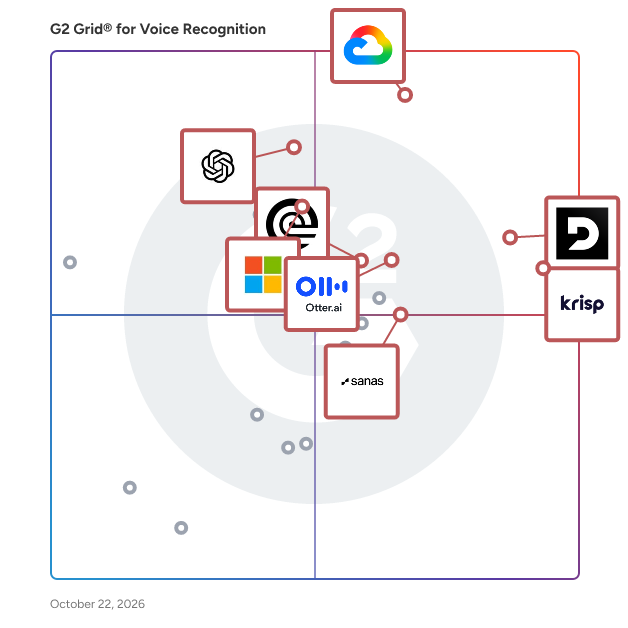
Several voice recognition platforms consistently earn top marks from verified users, with standout ratings across accuracy, ease of use, and support quality.
-
Speechmatics: An AI-powered speech recognition engine known for its exceptional multilingual accuracy and high average star rating, making it a top-reviewed choice among professional and enterprise users.
-
Krisp: A noise-cancellation and transcription platform that earns consistently high ratings for its call clarity features and strong likelihood-to-recommend scores across teams of all sizes.
-
Mihup: A conversational AI and voice recognition solution with a perfect 5.0 average rating among its reviewers, praised for meeting requirements and quality of support.
-
Deepgram: A developer-focused speech-to-text API with the largest volume of verified reviews in this category and a strong 4.56 average rating, valued for its real-time transcription performance.
What are the best voice recognition softwares?
The best voice recognition software in the market combines high transcription accuracy, ease of integration, and reliable support—here are the leading options based on user reviews.
-
Deepgram: A powerful speech-to-text and text-to-speech API built for developers building voice agents and real-time transcription pipelines with high accuracy at scale.
-
Krisp: A voice AI solution that removes background noise and clarifies accents in real time, widely used by remote workers and call center teams to improve call quality.
-
Otter.ai: A meeting transcription and collaboration tool that automatically generates real-time notes, summaries, and action items from voice conversations and meetings.
-
AssemblyAI - Speech to Text API: A robust AI transcription API offering features like speaker diarization, sentiment analysis, and auto-chapters, popular among developers and content teams.
What are the leading voice recognition apps for remote teams in tech?
For remote teams in the technology sector, voice recognition tools that excel at meeting transcription, noise suppression, and API integration tend to perform best based on reviewer feedback.
-
Krisp: Widely adopted by remote tech teams to eliminate distracting background noise and automatically produce meeting summaries during live calls.
-
Otter.ai: A go-to meeting assistant for distributed technology teams that captures real-time transcripts, enables collaboration on notes, and integrates with video conferencing tools.
-
Deepgram: Preferred by engineering and product teams in software companies for its streaming API, allowing real-time voice processing directly within applications.
-
Speechmatics: Favored by tech organizations that require enterprise-grade accuracy across multiple languages and accents, with flexible on-premises or cloud deployment options.
What's the most reliable voice recognition platform for software developers?
Software developers consistently favor voice recognition platforms that offer well-documented APIs, fast response times, and flexible integration options within their applications.
-
Deepgram: A developer-first speech API with comprehensive documentation, support for streaming and batch transcription, and strong performance in building AI voice agents—highly recommended by developers in G2's review data.
-
AssemblyAI - Speech to Text API: A developer-friendly transcription API with pre-built AI models for entity detection, summarization, and speaker identification, designed for quick integration into apps and workflows.
-
OpenAI Whisper: An open-source speech recognition model from OpenAI that developers use for offline and custom transcription tasks, praised for its high accuracy and language breadth.
-
Gladia: A speech intelligence API focused on real-time transcription and audio enrichment, gaining traction among developers who need low-latency voice processing in their products.
What software is used for voice recognition?
Voice recognition software spans a wide range of use cases, from API-based transcription tools for developers to meeting assistants and noise cancellation platforms for business teams.
-
Deepgram: A cloud-based speech-to-text and TTS API used by developers to add real-time voice transcription and voice agent capabilities to applications.
-
Rev: A human- and AI-powered transcription service used by professionals in media, legal, and enterprise settings who require high-accuracy transcripts for recorded audio and video.
-
Azure AI Speech: Microsoft's enterprise speech recognition service integrated into the Azure ecosystem, used by IT teams for voice-enabled applications, command recognition, and transcription workflows.
-
Google Cloud Speech-to-Text: Google's speech recognition API leveraging deep learning to convert audio to text, widely used in enterprise applications requiring multi-language support and integration with Google Cloud services.
Small Business FAQs
What is the most affordable Voice Recognition Software for SMBs?
Affordability is a key consideration for small and medium-sized businesses evaluating voice recognition tools, explore the top-rated SMB options on G2 to compare pricing and value across vendors.
-
Otter.ai: Offers a freemium plan and low-cost paid tiers that make it accessible for small teams seeking automated meeting transcription without a large budget.
-
Krisp: Provides a free individual tier and competitively priced plans that are popular with freelancers and small businesses needing noise cancellation on calls.
-
AssemblyAI - Speech to Text API: Features a pay-as-you-go pricing model that scales with usage, making it a cost-effective choice for SMBs with variable transcription needs.
-
Gladia: A speech API with developer-friendly pricing tiers suited for startups and small teams that need real-time transcription capabilities without committing to enterprise contracts.
What is the best Voice Recognition Software for startups?
Startups need voice recognition tools that are fast to set up, developer-friendly, and scalable, see G2's small business voice recognition rankings for verified startup reviews and ratings.
-
Deepgram: A startup-favored API with flexible pricing and extensive documentation that lets early-stage teams embed voice transcription and voice AI directly into their products.
-
AssemblyAI - Speech to Text API: Designed for fast integration with clear developer documentation and modular AI features that allow startups to add transcription, summarization, and analysis with minimal overhead.
-
Otter.ai: Helps startup teams keep aligned across remote and hybrid environments by automatically recording and transcribing meetings, syncing notes, and generating summaries.
-
Gladia: Offers a lightweight, API-first approach to speech recognition that suits lean startup engineering teams looking for flexible, scalable audio processing.
Which Voice Recognition Software is the most user-friendly for startups?
Ease of use is consistently cited as a top priority by startup reviewers in this category, visit G2's small business voice recognition page to filter by ease-of-use ratings.
-
Otter.ai: Consistently earns top ease-of-use scores among SMB reviewers with its intuitive interface, one-click meeting recording, and automatic note-sharing features that require no technical setup.
-
Krisp: Praised by startup users for its plug-and-play setup that integrates with any conferencing tool, delivering immediate noise cancellation without configuration complexity.
-
Rev: Offers a simple upload-and-receive workflow for transcription that requires no technical knowledge, making it ideal for non-developer startup employees who need reliable transcripts quickly.
How does voice recognition software help small businesses improve productivity?
Voice recognition software helps small businesses reduce manual documentation, speed up communication, and free teams to focus on higher-value work, see how SMBs are using these tools on G2's small business voice recognition page.
Small business reviewers frequently cite time savings from automated meeting transcription as the primary productivity benefit, converting hour-long calls into structured notes and action items without manual effort.
Tools like Otter.ai and Krisp help remote-first teams stay aligned and minimize the administrative overhead of recapping conversations. For product and engineering teams at startups, API-based tools like Deepgram and AssemblyAI eliminate the need to build custom speech recognition infrastructure, accelerating development timelines significantly.
What are the most recommended voice recognition tools for solopreneurs and micro-teams?
Solopreneurs and micro-teams benefit most from voice recognition tools that are low-cost, easy to set up, and work out of the box.
-
Otter.ai: An ideal solo-use transcription assistant that records, transcribes, and organizes meeting notes automatically, helping individual practitioners manage client calls without a support team.
-
Krisp: Popular among solopreneurs who work from home or shared spaces, providing instant noise removal on client and partner calls to maintain a professional audio presence.
-
Rev: A reliable on-demand transcription option for micro-teams that need accurate transcripts for client deliverables, podcasts, or legal documentation without ongoing software subscriptions.
Enterprise FAQs
What are the best-rated Voice Recognition Software for tech enterprises?
Technology enterprises require voice recognition platforms with high accuracy, scalable APIs, and enterprise-grade security—explore G2's enterprise voice recognition rankings for detailed ratings from enterprise reviewers in tech.
-
Speechmatics: A high-accuracy, enterprise-ready ASR platform with a 4.85 average star rating that supports complex deployment environments and is trusted by global technology organizations.
-
Deepgram: An enterprise-scalable voice AI platform used by tech companies for real-time transcription, voice agent development, and high-volume audio processing at competitive latency.
-
Mihup: An enterprise conversational AI platform with a perfect 5.0 average rating from its enterprise reviewers, recognized for call center automation and customer engagement capabilities.
-
AssemblyAI - Speech to Text API: A widely adopted enterprise transcription API in the technology sector, praised for its developer ecosystem, compliance-ready infrastructure, and rich AI feature set.
What are the most reliable Voice Recognition Software tools for enterprises?
Reliability in enterprise voice recognition means consistent uptime, strong support SLAs, and accurate performance under production load—review verified enterprise ratings on G2's enterprise voice recognition page.
-
Speechmatics: Delivers industry-leading accuracy across 50+ languages with flexible on-premises and cloud deployment options, earning high reliability ratings from enterprise customers in production environments.
-
Google Cloud Speech-to-Text: Backed by Google's global infrastructure, this enterprise speech API offers high availability and seamless integration with GCP services, trusted by large organizations for mission-critical transcription workloads.
-
Azure AI Speech: Microsoft's enterprise speech recognition service with robust SLA guarantees, deep integration with Microsoft 365 and Azure ecosystems, and support for custom speech model training.
-
Deepgram: Provides enterprise-grade SLAs, dedicated support, and consistently fast transcription latency, making it a reliable backbone for enterprise voice AI infrastructure.
What are the best-reviewed Voice Recognition Software for enterprise app integration?
Enterprises evaluating voice recognition software for app integration prioritize robust APIs, webhook support, and compatibility with existing tech stacks—visit G2's enterprise voice recognition category to compare integration-focused reviews.
-
Deepgram: Offers a versatile set of REST and WebSocket APIs for real-time and batch speech processing, widely integrated into enterprise customer service platforms, voice agents, and telephony systems.
-
AssemblyAI - Speech to Text API: Provides a full suite of integration-ready endpoints with pre-built connectors and a well-documented SDK, enabling enterprise developers to embed transcription and audio intelligence into existing applications quickly.
-
IBM Watson Speech to Text: A veteran enterprise speech solution designed for deep IBM Cloud and hybrid cloud integration, preferred by organizations with existing IBM infrastructure and compliance requirements.
-
Azure AI Speech: Tightly integrated with Microsoft's enterprise application suite—including Teams, Dynamics, and Power Platform—making it the natural choice for organizations standardizing on the Microsoft stack.
What should enterprise teams look for when evaluating voice recognition vendors?
Enterprise procurement teams evaluating voice recognition solutions should assess accuracy benchmarks, language support, deployment flexibility, compliance certifications, and support quality before committing—use G2's enterprise voice recognition category to compare vendors side by side using verified review data.
Enterprise reviewers in this category consistently flag transcription accuracy across accents and languages, low-latency real-time processing, and responsive technical support as the most critical evaluation criteria.
Security and data residency requirements are especially prominent for organizations in regulated industries such as financial services, healthcare, and insurance, all well-represented segments in the reviewer base. Teams should also evaluate whether vendors support custom model training, as enterprises with domain-specific vocabulary in legal, medical, or technical fields frequently require model customization to achieve acceptable accuracy levels.
Which voice recognition platforms offer the best multilingual support for global enterprises?
Global enterprises operating across regions require voice recognition platforms with broad language coverage and consistent cross-language accuracy—see enterprise reviewer ratings for multilingual support on G2's enterprise voice recognition page.
-
Speechmatics: Recognized by enterprise reviewers as one of the strongest performers for multilingual transcription, supporting over 50 languages with high accuracy, including less-resourced languages often underserved by competing platforms.
-
Google Cloud Speech-to-Text: Supports 125+ languages and language variants, leveraging Google's deep learning infrastructure to deliver broad coverage for multinational enterprise deployments.
-
Azure AI Speech: Provides extensive language support with neural voice models across dozens of locales, and allows custom speech model training to improve accuracy for specific regional accents or domain vocabularies.
-
Deepgram: Offers multilingual transcription capabilities with expanding language support, particularly valued by global enterprises building AI-powered customer interaction systems.
Last updated on April 24, 2026