Best Legal Practice Management Software

How Many Legal Practice Management Software Products Does G2 Track?

Total Products under this Category: 341

Category Stats (Sep 2026)

  • Average Rating: 4.26/5 (↑0.01 vs Aug 2026) The average rating of products in this category, based on all submitted ratings
  • Top Trending Product: Jusnote Software (+1.75%) - Among all products in this category, Jusnote Software recorded the largest rating increase compared to last month

Last updated: September 01, 2026

How Does G2 Rank Legal Practice Management Software Products?

Why You Can Trust G2's Software Rankings:

  • 30 Analysts and Data Experts
  • 5,200+ Authentic Reviews
  • 341+ Products
  • Unbiased Rankings

G2's software rankings are built on verified user reviews, rigorous moderation, and a consistent research methodology maintained by a team of analysts and data experts. Each product is measured using the same transparent criteria, with no paid placement or vendor influence. While reviews reflect real user experiences, which can be subjective, they offer valuable insight into how software performs in the hands of professionals. Together, these inputs power the G2 Score, a standardized way to compare tools within every category.

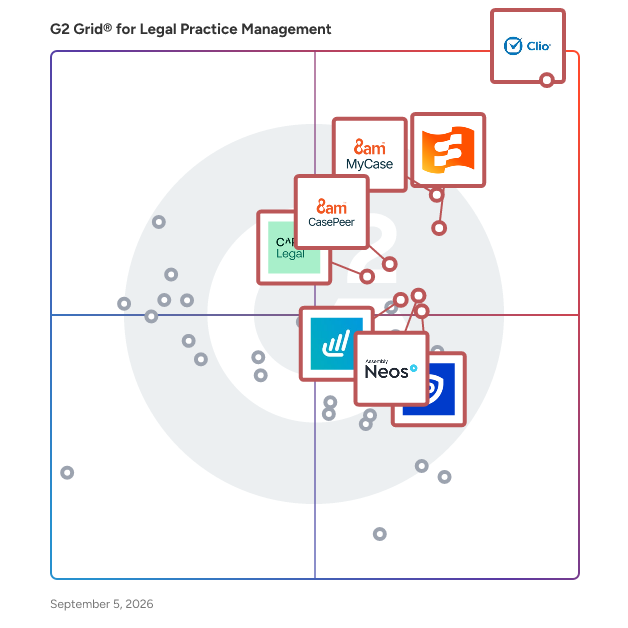
G2 Grid® for Legal Practice Management Software

G2 Grid® for Legal Practice Management Software plotting products by satisfaction and market presence

Highlighted products: Clio Manage, 8am MyCase, Smokeball, Assembly Neos, 8am CasePeer, PracticePanther, Lawmatics, and CARET Legal.

Underlying data: [Grid® JSON](https://www.g2.com/categories/legal-practice-management/grids.json?focus%5B%5D=clio-clio-manage&focus%5B%5D=8am-mycase&focus%5B%5D=smokeball&focus%5B%5D=assembly-software-assembly-neos&focus%5B%5D=8am-casepeer&focus%5B%5D=paradigm-practicepanther&focus%5B%5D=lawmatics&focus%5B%5D=caret-legal)

Clio Manage

Ranked #1, Clio is the leading legal practice management software with built-in AI capabilities and the most 5-star reviews. Proudly used by 150,000+ lawyers from mid-sized, small & solo firms. Work the way you want with flexible solutions for multi-practice firms and manage your law firm securely from anywhere. Personal Injury, Real Estate, Family Law, Civil Litigation, Criminal Law, Immigration + more. Access and manage your work in one central system - with matters, contacts, billing, and everything you need in one place. Learn more at www.clio.com

Average Rating: 4.6/5.0

Total Reviews: 991

How Do G2 Users Rate Clio Manage?

  • Ease of Use: 9.0/10 (Category avg: 8.4/10)
  • Workflow: 8.6/10 (Category avg: 8.2/10)
  • Contact Management: 9.0/10 (Category avg: 8.5/10)
  • Activity Dashboard: 8.8/10 (Category avg: 8.3/10)

Who Is the Company Behind Clio Manage?

  • Seller: Clio
  • Company Website:
  • Year Founded: 2008
  • HQ Location: Burnaby, BC
  • Twitter: @goclio
    16,501 Twitter followers
  • LinkedIn® Page: www.linkedin.com
    2,722 employees on LinkedIn®

Who Uses This Product?

  • Who Uses This: Attorney, Paralegal
  • Top Industries: Law Practice, Legal Services
  • Company Size: 93% Small, 4% Medium

What Do G2 Reviewers Say About Clio Manage?

AI-generated summary from verified user reviews

Pros
  • Users appreciate the ease of use of Clio Manage, with all case information organized and accessible in one hub.
  • Users value the efficiency of Clio Manage, enjoying streamlined operations and centralized access to essential case information.
  • Users commend Clio Manage for its intuitive interface, enhancing usability and supporting efficient workflow management.
  • Users value the efficient billing features of Clio Manage, streamlining their invoicing process and saving time.
  • Users appreciate the excellent organization features of Clio Manage, making task and matter management highly efficient.
Cons
  • Users find the missing features in Clio Manage limit transparency and complicate billing processes significantly.
  • Users note the limitations in customization for specific needs, requiring third-party solutions for niche functionalities.
  • Users experience billing issues with Clio Manage, facing challenges in handling payments and customer support responses.
  • Users find the lack of customization in Clio Manage limits its applicability for diverse legal organizations beyond law firms.
  • Users find document management lacking in Clio Manage, needing improvements for better usability and functionality.

What Are Recent G2 Reviews of Clio Manage?

What Are G2 Users Discussing About Clio Manage?

8am MyCase

8am MyCase is a legal practice management solution built for attorneys and legal professionals at small to mid-sized law firms in the US and Canada. MyCase helps you run your firm as a business, not just manage cases. Cases, documents, deadlines, and client communication are all stored in one place, so you and your team stay aligned without chasing updates. You can automate workflows, assign tasks, and stay on top of court deadlines with built-in calendaring. Clients get a simple, professional experience from intake to payment. Online intake forms and built-in eSignature get matters started quickly, while a secure client portal allows you to collect documents, share updates, and send reminders to keep the matter moving. Secure, IOLTA-compliant, online payments are powered by LawPay. Flexible payment options and automated invoice reminders make it easier for clients to pay, so you get paid faster and spend less time on follow-up. Firm-wide reporting gives you real-time visibility into revenue, expenses, and performance so you always know exactly where your business stands. And with 8am IQ embedded directly into MyCase, AI becomes a natural part of how you work helping you automate repetitive tasks and reduce administrative tasks, freeing up more time for meaningful legal work.

Average Rating: 4.4/5.0

Total Reviews: 391

How Do G2 Users Rate 8am MyCase?

  • Ease of Use: 8.9/10 (Category avg: 8.4/10)
  • Workflow: 8.0/10 (Category avg: 8.2/10)
  • Contact Management: 8.5/10 (Category avg: 8.5/10)
  • Activity Dashboard: 8.5/10 (Category avg: 8.3/10)

Who Is the Company Behind 8am MyCase?

  • Seller: 8am
  • Company Website:
  • Year Founded: 2005
  • HQ Location: N/A
  • LinkedIn® Page: www.linkedin.com
    741 employees on LinkedIn®

Who Uses This Product?

  • Who Uses This: Attorney, Paralegal
  • Top Industries: Law Practice, Legal Services
  • Company Size: 98% Small, 2% Medium

What Do G2 Reviewers Say About 8am MyCase?

AI-generated summary from verified user reviews

Pros
  • Users value the ease of use of 8am MyCase, which simplifies communication and document management efficiently.
  • Users appreciate the easy-to-use billing and accounting features of MyCase, streamlining their invoicing and client communication.
  • Users love the case management functionality of 8am MyCase, making their daily work significantly more productive and efficient.
  • Users appreciate the cloud-based document management of 8am MyCase, enhancing productivity and simplifying client communication.
  • Users value the straightforward billing process of 8am MyCase, appreciating its ease and efficiency in managing finances.
Cons
  • Users are disappointed with the missing features in MyCase, which impact usability and overall user experience.
  • Users express frustration with disorganized document management and substantial feature reductions that hinder functionality in MyCase.
  • Users face challenges with billing issues, requiring excessive clicks and manual calculations due to system limitations.
  • Users report significant customer service delays, lack of customization, and cumbersome appointment processes with MyCase.
  • Users report significant user interface issues with MyCase, including navigation challenges and cumbersome document sharing processes.

What Are Recent G2 Reviews of 8am MyCase?

Smokeball

Smokeball is powering people-law. Our legal practice management software lightens the administrative burden, so legal professionals have more time to serve the people who need them most. With automatic time tracking, tailored workflows, and rapid innovation through AI, Smokeball is the industry standard in people-law. Key features include: • 200+ pre-built matter types for different areas of law • Integrated Archie AI with full matter context • Easy-to-review automatic time tracking • Robust Document automation • Email and document management through Microsoft Office • Firm insights and reporting capabilities • Access to 20,000+ federal and local court forms • Comprehensive onboarding and ongoing training Smokeball’s practice management software and award-winning client support help legal professionals capture more billable hours without working more and regain peace of mind.

Average Rating: 4.7/5.0

Total Reviews: 381

How Do G2 Users Rate Smokeball?

  • Ease of Use: 9.2/10 (Category avg: 8.4/10)
  • Workflow: 8.8/10 (Category avg: 8.2/10)
  • Contact Management: 9.0/10 (Category avg: 8.5/10)
  • Activity Dashboard: 9.0/10 (Category avg: 8.3/10)

Who Is the Company Behind Smokeball?

  • Seller: Smokeball
  • Company Website:
  • Year Founded: 2011
  • HQ Location: Chicago, IL
  • Twitter: @SmokeballNews
    1,823 Twitter followers
  • LinkedIn® Page: www.linkedin.com
    167 employees on LinkedIn®

Who Uses This Product?

  • Who Uses This: Paralegal, Attorney
  • Top Industries: Law Practice, Legal Services
  • Company Size: 97% Small, 1% Medium

What Do G2 Reviewers Say About Smokeball?

AI-generated summary from verified user reviews

Pros
  • Users appreciate the ease of use of Smokeball, benefiting from its organized and user-friendly interface.
  • Users appreciate the effective organization features of Smokeball, benefiting from streamlined document management and scheduling.
  • Users appreciate the user-friendly document management of Smokeball, enjoying organized files and easy access to important documents.
  • Users love the efficiency of Smokeball, praising its intuitive design and excellent document management capabilities.
  • Users value the effective tracking options in Smokeball, enhancing organization and communication with cases and staff.
Cons
  • Users find the missing features in Smokeball frustrating, especially limitations with billing and document management.
  • Users face significant billing issues with Smokeball, finding the feature lacking and requiring numerous workarounds.
  • Users experience slow performance with Smokeball, facing delays in loading documents and lag when writing memos.
  • Users report frequent software bugs that disrupt communication and hinder file accessibility in Smokeball.
  • Users struggle with integration issues, finding connections with platforms like Logmatics and LawPay less than seamless.

What Are Recent G2 Reviews of Smokeball?

What Are G2 Users Discussing About Smokeball?

8am CasePeer

8am CasePeer is the #1 rated case management platform built for personal injury law firms. Supercharge your law firm with a cloud-based plaintiffs' practice management solution. With cases and reporting accessible anywhere, anytime, you can execute on outcomes like never before. CasePeer provides you with the case and practice management tools that allow you to focus on what matters most -- your clients.

Average Rating: 4.7/5.0

Total Reviews: 193

How Do G2 Users Rate 8am CasePeer?

  • Ease of Use: 9.4/10 (Category avg: 8.4/10)
  • Workflow: 8.5/10 (Category avg: 8.2/10)
  • Contact Management: 8.4/10 (Category avg: 8.5/10)
  • Activity Dashboard: 8.9/10 (Category avg: 8.3/10)

Who Is the Company Behind 8am CasePeer?

  • Seller: 8am
  • Company Website:
  • Year Founded: 2005
  • HQ Location: N/A
  • LinkedIn® Page: www.linkedin.com
    741 employees on LinkedIn®

Who Uses This Product?

  • Who Uses This: Paralegal, Attorney
  • Top Industries: Legal Services, Law Practice
  • Company Size: 93% Small, 7% Medium

What Do G2 Reviewers Say About 8am CasePeer?

AI-generated summary from verified user reviews

Pros
  • Users appreciate the ease of use of 8am CasePeer, enjoying its straightforward setup and user-friendly interface.
  • Users appreciate the ease of case organization and management with 8am CasePeer's features and support.
  • Users appreciate the effective communication options with clients, enhancing their overall experience with CasePeer.
  • Users value the efficiency of 8am CasePeer, finding it user-friendly and effective for productivity tracking and insights.
  • Users value the efficient task management in CasePeer, making tracking and reporting easy and seamless.
Cons
  • Users find the missing features frustrating, particularly the lack of bulk actions and inefficient e-signature processes.
  • Users face frequent functionality issues with CasePeer, including downtime and difficulties with calendar and contact management.
  • Users find the document management functionality lacking, struggling with organization and integration with other platforms.
  • Users experience messaging issues such as cluttered notifications and lack of features like emoji support and mass texting.
  • Users find it frustrating to manage texting issues due to cluttered notifications and limitations on case communication.

What Are Recent G2 Reviews of 8am CasePeer?

What Are G2 Users Discussing About 8am CasePeer?

Assembly Neos

Assembly Software is changing how plaintiff firms run their practice, combining embedded intelligence, workflow automation, and 40+ years of expertise to help firms handle more cases and drive better results for their clients. Its flagship platform, Neos, has been consistently recognized as a G2 Leader in Legal Case Management, and its built-in AI, NeosAI, won the 2025 LegalTech Breakthrough Award for LegalTech Generative AI Solution of the Year. Built on the legacy of pioneering personal injury case management brands Needles and Trialworks, Assembly is trusted by thousands of firms every day. Key Features & Benefits Embedded Intelligence: Unlimited AI can generate documents, create summaries, extract and auto-populate data into Neos fields, and seamlessly analyze and compare documents, plus capture immediate answers to case questions, saving your firm up to 75 hours per week. Collaboration & Communication: In-app calling, texting, emailing, and calendar management with full communication tracking. Streamlined Intake: Customizable intake forms, 24/7 intake, and AI-powered data extraction directly into case fields for a seamless transitions into a case. Secure Anywhere Access: Role-based permissions, encryption, and Microsoft Azure-backed AI with no third-party retention. Document Management: AI-enabled generation, templates, bulk sending, and full-text and OCR-enabled search across case files. Real-Time Insights: Custom dashboards, automated reporting, and performance audits to reduce per-case cost. Rich Integrations: Works with RingCentral/Zoom Phone, QuickBooks®, Office 365®, DocuSign®, LawToolBox, and more. Training & Support: 95%+ customer satisfaction, fast ticket resolution, and on-demand training resources. Neos has evolved and will continue to disrupt and transform the legal sector to meet the changing needs of modern law firms. Learn more at https://www.assemblysoftware.com/neos

Average Rating: 4.5/5.0

Total Reviews: 296

How Do G2 Users Rate Assembly Neos?

  • Ease of Use: 8.9/10 (Category avg: 8.4/10)
  • Workflow: 9.0/10 (Category avg: 8.2/10)
  • Contact Management: 9.1/10 (Category avg: 8.5/10)
  • Activity Dashboard: 9.2/10 (Category avg: 8.3/10)

Who Is the Company Behind Assembly Neos?

  • Seller: Assembly Software
  • Company Website:
  • Year Founded: 1985
  • HQ Location: Coral Gables, FL
  • Twitter: @AssemblyCMS
    267 Twitter followers
  • LinkedIn® Page: www.linkedin.com
    130 employees on LinkedIn®

Who Uses This Product?

  • Who Uses This: Paralegal, Legal Assistant
  • Top Industries: Legal Services, Law Practice
  • Company Size: 82% Small, 16% Medium

What Do G2 Reviewers Say About Assembly Neos?

AI-generated summary from verified user reviews

Pros
  • Users love the ease of use in Assembly Neos, effortlessly navigating between client documents.
  • Users value the organization and efficiency of Assembly Neos, enhancing productivity and simplifying document management.
  • Users value the exceptional case management capabilities of Neos, enhancing organization and efficiency in their workflow.
  • Users appreciate the exceptional organization features of Neos, simplifying their workflow and enhancing teamwork and efficiency.
  • Users love how Assembly Neos provides time-saving efficiency, streamlining document management and boosting productivity in the workplace.
Cons
  • Users report functionality issues with Assembly Neos, including plug-in failures and unexpected app restarts.
  • Users desire improvements in missing features like medical record tracking, mobile functionality, and integrated texting options.
  • Users find the usability issues in Assembly Neos, like overwhelming checklists and frustrating navigation, quite challenging.
  • Users find lagging performance in Assembly Neos, with slow response times and frequent system downtimes disrupting productivity.
  • Users often experience slow performance with Assembly Neos, hindering efficiency and leading to frequent crashes.

What Are Recent G2 Reviews of Assembly Neos?

PracticePanther

PracticePanther is the #1 easiest-to-use, all-in-one law practice management software on the market, trusted by tens of thousands of legal professionals across 170+ countries. Designed specifically for solo, small, and mid-sized law firms that value speed, simplicity, and control. Firms choose PracticePanther to manage their cases from start to finish in a single, all-in-one platform. Everything is organized around the contact and matter, bringing together case and client data, automated task workflows, legal calendaring, document management, communication, time tracking and billing, payment processing, reporting, and native trust & operating accounting built into one intuitive, cloud-based platform. PracticePanther stands out for how quickly teams can adopt it. From day one, firms have clear visibility into their case progress, workloads, and firm finances, whether they’re at the office, in court, or at home. Law firms using PracticePanther report measurable results: • Saving 15+ hours per week by automating routine tasks, intake workflows, and case organization • Capturing more billables with real-time time and expense tracking from any device • Resolving cases 25% faster with centralized case management and streamlined client communication • Staying on top of meetings, deadlines, and court dates with firm-wide calendaring and docketing • Getting paid up to 70% faster through streamlined legal billing and built-in online payment processing • Making better data-driven decisions using customizable productivity and financial reporting • Completing three-way trust reconciliations in minutes with built-in safeguards that help them stay 100% bar compliant, while also simplifying matter & firm-level financial management with real-time expense classification and a suite of tax-ready reports Secure client portals and a best-in-class iOS and Android mobile app make it easy to collaborate with clients and manage work from anywhere. Backed by industry-leading security standards, including 256-bit military-grade encryption, our platform protects your sensitive client and firm data at all times. PracticePanther is ideal for law firms that need an easy-to-use system they can grow with. The platform is well-suited for all practice areas, including family law, criminal defense, divorce, civil litigation, personal injury, estate planning, bankruptcy, and more. Try it for free today and experience the difference, no credit card required. Learn more: https://www.practicepanther.com

Average Rating: 4.3/5.0

Total Reviews: 113

How Do G2 Users Rate PracticePanther?

  • Ease of Use: 8.7/10 (Category avg: 8.4/10)
  • Workflow: 8.3/10 (Category avg: 8.2/10)
  • Contact Management: 9.0/10 (Category avg: 8.5/10)
  • Activity Dashboard: 9.2/10 (Category avg: 8.3/10)

Who Is the Company Behind PracticePanther?

  • Seller: Paradigm
  • Company Website:
  • HQ Location: New York, New York, United States
  • LinkedIn® Page: www.linkedin.com
    90 employees on LinkedIn®

Who Uses This Product?

  • Who Uses This: Paralegal, Attorney
  • Top Industries: Law Practice, Legal Services
  • Company Size: 92% Small, 7% Medium

What Do G2 Reviewers Say About PracticePanther?

AI-generated summary from verified user reviews

Pros
  • Users find PracticePanther to be extremely user-friendly, streamlining tasks like billing and document creation effortlessly.
  • Users appreciate the helpful customer support of PracticePanther, ensuring quick resolutions and smooth operation.
  • Users love the billing ease of PracticePanther, effectively managing invoices and payments effortlessly in one platform.
  • Users love the intuitive design and comprehensive features of PracticePanther, enhancing organization and efficiency for legal practices.
  • Users value the organization provided by PracticePanther, effectively managing billing, case data, and client communication easily.
Cons
  • Users occasionally experience app crashes that disrupt workflow, such as the timer resetting to zero.
  • Users are frustrated by overpayment issues in PracticePanther, leading to complications in managing their operating accounts.
  • Users find the app difficult to learn, leading to infrequent usage and a cumbersome experience.
  • Users find PracticePanther to be expensive for smaller firms, which can be a barrier to entry.
  • Users report occasional functionality issues with PracticePanther, such as timers unexpectedly resetting to zero.

What Are Recent G2 Reviews of PracticePanther?

What Are G2 Users Discussing About PracticePanther?

Lawmatics

Lawmatics is the AI-powered legal CRM built by attorneys for law firms of all sizes, from solo practices to large multi-attorney firms, to automate client intake, respond to leads instantly, and win clients before competitors do. In legal, the first firm to respond wins. Most practices lose potential clients simply due to delayed follow-ups, unanswered inquiries, and intake processes that depend on someone remembering to act. Meanwhile, client data scattered across disconnected tools makes it nearly impossible to track where leads are falling off or why conversion rates stay frustratingly low. Lawmatics automates the entire journey from first contact to signed retainer, capturing leads, triggering instant follow-up sequences, and getting prospects onto the calendar faster than any manual process can. Once retained, client data flows directly into your case management software, with integrations across virtually every major platform, so nothing gets lost in the handoff. Lawmatics also runs targeted marketing campaigns and delivers dashboards that show which channels are driving consultations, so firms spend their budget on what works. Firms switching from Clio Grow, Law Ruler, Lead Docket, Keap, and Lawcus cite faster lead conversion, higher close rates, and marketing spend that finally produces measurable results. Rated 4.6 out of 5 stars across 228 verified G2 reviews in the Legal CRM and Legal Practice Management categories.

Average Rating: 4.6/5.0

Total Reviews: 239

How Do G2 Users Rate Lawmatics?

  • Ease of Use: 8.2/10 (Category avg: 8.4/10)
  • Workflow: 8.7/10 (Category avg: 8.2/10)
  • Contact Management: 8.6/10 (Category avg: 8.5/10)
  • Activity Dashboard: 8.2/10 (Category avg: 8.3/10)

Who Is the Company Behind Lawmatics?

  • Seller: Lawmatics
  • Company Website:
  • Year Founded: 2017
  • HQ Location: San Diego, California
  • Twitter: @lawmatics
    408 Twitter followers
  • LinkedIn® Page: www.linkedin.com
    86 employees on LinkedIn®

Who Uses This Product?

  • Who Uses This: Attorney, Paralegal
  • Top Industries: Legal Services, Law Practice
  • Company Size: 93% Small, 6% Medium

What Do G2 Reviewers Say About Lawmatics?

AI-generated summary from verified user reviews

Pros
  • Users appreciate the automation features of Lawmatics, which save time and streamline client management processes.
  • Users find Lawmatics to be extremely easy to use, with intuitive navigation and effective automation for client communication.
  • Users praise the responsive and helpful customer support team at Lawmatics, enhancing their experience with quick assistance.
  • Users commend Lawmatics for its intuitive client management features that enhance client relationships and streamline processes.
  • Users appreciate the rapid and knowledgeable customer service from Lawmatics, enhancing their overall experience significantly.
Cons
  • Users experience usability issues with Lawmatics, finding navigation clunky and the interface unintuitive at times.
  • Users face a lack of customization options with Lawmatics, finding it difficult to tailor workflows and intake forms.
  • Users find the learning curve challenging, noting that navigation can be confusing and unintuitive at first.
  • Users find the time-consuming setup and audience management in Lawmatics challenging, affecting overall efficiency.
  • Users face messaging issues with Lawmatics, hindering effective communication and client management due to limited SMS functionality.

What Are Recent G2 Reviews of Lawmatics?

What Are G2 Users Discussing About Lawmatics?

CARET Legal

CARET Legal is the leading solution for legal professionals to manage their practice and create space for what matters, including delighting clients and maximizing billable time. From client intake, to matter management, to back-office reporting, CARET Legal helps you save time, increase team collaboration, increase accuracy, scale your business, and collect revenue faster than ever before. With almost a decade in business, 95% of CARET Legal customers would recommend the platform to others. Law firms using CARET Legal report that they recoup their investment 31% faster than G2's legal practice management software category average.

Average Rating: 4.4/5.0

Total Reviews: 207

How Do G2 Users Rate CARET Legal?

  • Ease of Use: 8.9/10 (Category avg: 8.4/10)
  • Workflow: 7.6/10 (Category avg: 8.2/10)
  • Contact Management: 8.1/10 (Category avg: 8.5/10)
  • Activity Dashboard: 8.1/10 (Category avg: 8.3/10)

Who Is the Company Behind CARET Legal?

  • Seller: CARET
  • Company Website:
  • Year Founded: 1983
  • HQ Location: San Diego, CA
  • LinkedIn® Page: www.linkedin.com
    353 employees on LinkedIn®

Who Uses This Product?

  • Who Uses This: Attorney, Paralegal
  • Top Industries: Law Practice, Legal Services
  • Company Size: 95% Small, 1% Medium

What Do G2 Reviewers Say About CARET Legal?

AI-generated summary from verified user reviews

Pros
  • Users commend CARET Legal for its ease of use, appreciating its intuitive design and seamless integration for office tasks.
  • Users value the streamlined efficiency of CARET Legal, drastically reducing administrative workload and enhancing workflow productivity.
  • Users find CARET Legal's document management efficient, secure, and user-friendly, enhancing overall productivity and organization.
  • Users value the centralized management of CARET Legal, enjoying streamlined processes and improved team collaboration.
  • Users commend the exceptional customer support from CARET Legal, facilitating a smooth and effective implementation experience.
Cons
  • Users face frequent software bugs in CARET Legal, leading to frustrating slowdowns and client data issues.
  • Users express dissatisfaction with missing features, including limited matter access and inadequate task management in CARET Legal.
  • Users report poor customer support with CARET Legal, citing communication issues and long response times for assistance.
  • Users experience slow performance with CARET Legal due to server issues and unexpected glitches, impacting productivity.
  • Users often face functionality issues with CARET Legal, including freezing, glitches, and limitations in email management.

What Are Recent G2 Reviews of CARET Legal?

Supio

Supio is an agentic artificial intelligence platform built specifically for plaintiff personal injury law firms. It connects to the systems a firm already runs on—case management, medical records, intake, communications, and legal research—and performs work across those systems, from the first client call through final case resolution. Rather than responding to prompts one at a time, the platform plans a task, executes it, and produces a reviewable work product, operating at the case, caseload, and firm level simultaneously. Supio Agent handles case and firm work: building medical chronologies, drafting demand letters in a firm's own style, tracking liens and expenses, surfacing case law, and generating firm-level analytics. Supio Intake conducts full intake conversations around the clock, scores leads against firm-defined criteria, and delivers structured case data into the case management system. The platform retains a firm's prior cases, settlements, and templates, applying that history to new matters over time. Key features and capabilities: - Connects to your systems. Connects directly to case management systems (Litify, SmartAdvocate, Casepeer, and more), document stores, and email systems, without manual uploads. - Case-level work product. Produces medical chronologies, demand drafts, and itemized ledgers, with every output traceable to its source page. - Firm- and portfolio-level intelligence. Answers questions across an entire caseload that are difficult to assess file by file. - Compounding intelligence. Learns from a firm's best work and applies that to every case going forward. - Westlaw-grounded research. Natively connected to Thomson Reuters Westlaw Advantage. - Security and oversight. A closed, HIPAA-compliant, SOC 2 Type II–audited system with attorney review on all outputs.

Average Rating: 4.8/5.0

Total Reviews: 67

How Do G2 Users Rate Supio?

  • Ease of Use: 9.2/10 (Category avg: 8.4/10)

Who Is the Company Behind Supio?

  • Seller: Supio
  • Company Website:
  • Year Founded: 2021
  • HQ Location: Seattle, Washington, United States
  • LinkedIn® Page: www.linkedin.com
    164 employees on LinkedIn®

Who Uses This Product?

  • Who Uses This: Paralegal, Litigation Paralegal
  • Top Industries: Legal Services, Law Practice
  • Company Size: 57% Small, 43% Medium

What Are Recent G2 Reviews of Supio?

Lead Docket

Lead Docket is built specifically for the front end of the legal lifecycle. While generic CRM tools treat potential clients as entries in a database, Lead Docket focuses on the critical window between a person’s moment of need and their decision to hire a firm. By embedding intelligence into the intake process, it ensures that no inquiry is ignored and every high-value lead is identified and captured with precision. The platform functions as a firm’s first impression, providing the clarity and speed required to convert prospects in a competitive market. From automated follow-ups to comprehensive marketing attribution, Lead Docket unifies the intake department into a single source of truth. This allows firms to stop guessing which marketing channels drive revenue and start making data-driven decisions that grow the business. Ambitious firms use Lead Docket to transform their intake from a source of chaos into a high-performance engine: Intelligent Intake Management: Every call, web form, and chat is centralized, allowing teams to qualify leads through customized, logic-based scripts that ensure consistency. Strategic Follow-Up Automation: The system executes persistent, personalized communication across text and email, keeping the firm top-of-mind without requiring manual intervention from staff. Real-Time Marketing Attribution: Integrated tracking surfaces exactly which campaigns and referral sources are producing signed cases, providing a clear view of marketing ROI. Operational Transparency: Detailed dashboards and reporting offer a real-time pulse on intake speed, conversion rates, and staff productivity, highlighting bottlenecks before they impact the bottom line. Seamless Matter Transition: Once a lead is signed, all gathered context and documentation move directly into the next phase of the legal lifecycle, eliminating data reentry and protecting the client experience. By automating the administrative heavy lifting of lead management, Lead Docket allows intake professionals to focus on the human element of legal work. It provides the edge necessary to scale a firm's caseload while maintaining the responsiveness and dependability that modern clients demand.

Average Rating: 4.2/5.0

Total Reviews: 19

How Do G2 Users Rate Lead Docket?

  • Ease of Use: 8.3/10 (Category avg: 8.4/10)
  • Workflow: 9.2/10 (Category avg: 8.2/10)
  • Contact Management: 9.1/10 (Category avg: 8.5/10)
  • Activity Dashboard: 9.2/10 (Category avg: 8.3/10)

Who Is the Company Behind Lead Docket?

  • Seller: Filevine
  • Year Founded: 2015
  • HQ Location: Salt Lake City, Utah
  • Twitter: @filevine
    1,385 Twitter followers
  • LinkedIn® Page: www.linkedin.com
    941 employees on LinkedIn®

Who Uses This Product?

  • Top Industries: Legal Services, Law Practice
  • Company Size: 65% Small, 35% Medium

What Do G2 Reviewers Say About Lead Docket?

AI-generated summary from verified user reviews

Pros
  • Users value the ease of use of Lead Docket, facilitating seamless navigation and efficient lead management.
  • Users appreciate the seamless integrations of Lead Docket, enhancing lead management and streamlining processes effortlessly.
  • Users find the automation features of Lead Docket invaluable, making lead management efficient and user-friendly.
  • Users value the effective communication tools in Lead Docket, enhancing collaboration with clients and within teams.
  • Users appreciate the responsive customer support of Lead Docket, facilitating seamless integration and daily usage.
Cons
  • Users face messaging issues due to all incoming messages going to everyone, hindering prompt responses and efficiency.
  • Users find the poor reporting in Lead Docket frustrating due to inconsistent and inaccurate numbers from saved reports.
  • Users express frustration over billing issues, particularly when saved reports do not transition to new formats.
  • Users express a desire for better integration with Smokeball to enhance the functionality of Lead Docket.
  • Users find the lack of a message filtering feature frustrating, as it hampers timely responses and efficiency.

What Are Recent G2 Reviews of Lead Docket?

What Are G2 Users Discussing About Lead Docket?

Eve Legal

Eve Legal is an AI-native legal software platform designed to help plaintiff law firms automate and manage case workflows from intake through resolution. Built specifically for plaintiff practices, Eve integrates AI throughout the entire case lifecycle rather than addressing isolated tasks, enabling firms to handle higher caseloads without proportional increases in headcount. Eve serves attorneys, paralegals, legal operations managers, and firm administrators at plaintiff law firms of varying sizes and practice areas. The platform is positioned as an end-to-end operational system rather than a standalone legal AI tool, meaning it is designed to connect intake evaluation, document analysis, case drafting, and firm-wide workflows within a single environment. Key capabilities and features of Eve Legal include: - AI-powered intake screening: Eve Intake can conduct intake calls, assess case qualification against firm-defined criteria, gather supporting information, and warm-transfer qualified leads to a human intake specialist for signing. - Document analysis and extraction: Eve can review medical records, correspondence, and case files to extract relevant facts, summarize findings, and surface information that informs litigation strategy and case valuation. - Legal document drafting: The platform generates demand letters, pleadings, and other case documents with built-in citation validation and legal guardrails, reducing drafting time while maintaining accuracy standards. - Customizable playbooks and workflows: Firms can codify their best attorneys' methodologies into reusable playbooks that guide case handling across the team, allowing institutional knowledge to scale consistently. - Integrations and API access: Eve integrates with case management systems such as Clio, and offers API access that allows firms to connect the platform with their CRM, communication tools, and other existing software through services like Zapier. Eve differentiates from generalist AI tools by being trained specifically for legal work, with outputs designed to meet the standards required in legal practice. Unlike case management systems that have added AI features, Eve is built from the ground up around AI-native workflows, meaning AI is central to how the platform operates rather than supplemental. The platform also includes onboarding support and adoption coaching to help firms move beyond isolated AI experiments toward firm-wide implementation.

Average Rating: 4.9/5.0

Total Reviews: 46

How Do G2 Users Rate Eve Legal?

  • Ease of Use: 9.6/10 (Category avg: 8.4/10)
  • Workflow: 9.3/10 (Category avg: 8.2/10)
  • Contact Management: 7.2/10 (Category avg: 8.5/10)
  • Activity Dashboard: 8.9/10 (Category avg: 8.3/10)

Who Is the Company Behind Eve Legal?

Who Uses This Product?

  • Who Uses This: Attorney
  • Top Industries: Law Practice, Legal Services
  • Company Size: 89% Small, 9% Medium

What Do G2 Reviewers Say About Eve Legal?

AI-generated summary from verified user reviews

Pros
  • Users value the speed and efficiency of Eve Legal in drafting diverse legal documents, enhancing their workflow significantly.
  • Users value the ease of use and speed of Eve Legal in drafting legal documents and conducting research.
  • Users appreciate the easy navigation and quick drafting of legal documents on Eve Legal, enhancing their productivity.
  • Users enjoy the automation features of Eve Legal, appreciating her quick summaries and helpful suggestions.
  • Users value the ease of use in case management, praising its efficiency in legal research and evaluations.

What Are Recent G2 Reviews of Eve Legal?

Filevine

Filevine is the pioneer of the Legal Operating Intelligence System, LOIS. While traditional platforms often bolt AI onto legacy frameworks, Filevine embeds intelligence into the core of legal work, providing a unified system of truth where data, documents, and workflows operate with total clarity. From elite litigation firms to complex corporate counsel departments, legal professionals use Filevine to move faster, think strategically, and command better outcomes without the friction of toggling between disconnected tools. By centralizing every matter, contract, and communication, Filevine replaces fragmented chaos with a single source of intelligence. This shift allows teams to move beyond mere task management and into a state of high-performance legal work. Whether drafting complex motions, analyzing discovery, or managing intricate billing cycles, the platform ensures that every action is grounded in the full context of the case. Modern legal teams rely on Filevine to drive consistency and scale: Unified Matter Management: Every document, note, deadline, and communication is housed in one location, ensuring the entire team operates from the same set of facts. Embedded Legal Intelligence: LOIS works behind the scenes to automate drafting, analyze dense discovery files, and surface insights that might otherwise remain buried in data. Operational Clarity: Integrated timekeeping, billing, and payments eliminate the need for third-party plug-ins, creating a seamless financial workflow tied directly to case progress. Strategic Automation: Beyond simple task reminders, the system executes complex workflows that accelerate the journey from intake to resolution. Data Integrity: A single system of truth reduces the risk of human error and ensures that sensitive client information is protected within a secure, professional-grade infrastructure. The platform is built to handle the heavy lifting of legal operations, allowing lawyers to reclaim hours previously lost to administrative overhead. This focus on utility ensures that as a firm grows, its processes remain lean and its outcomes remain predictable. By turning silent data into active intelligence, Filevine provides the edge necessary to navigate the complexities of the modern legal landscape.

Average Rating: 4.6/5.0

Total Reviews: 290

How Do G2 Users Rate Filevine?

  • Ease of Use: 9.2/10 (Category avg: 8.4/10)
  • Workflow: 8.6/10 (Category avg: 8.2/10)
  • Contact Management: 8.9/10 (Category avg: 8.5/10)
  • Activity Dashboard: 8.3/10 (Category avg: 8.3/10)

Who Is the Company Behind Filevine?

  • Seller: Filevine
  • Company Website:
  • Year Founded: 2015
  • HQ Location: Salt Lake City, Utah
  • Twitter: @filevine
    1,385 Twitter followers
  • LinkedIn® Page: www.linkedin.com
    941 employees on LinkedIn®

Who Uses This Product?

  • Who Uses This: Paralegal, Legal Assistant
  • Top Industries: Legal Services, Law Practice
  • Company Size: 73% Small, 25% Medium

What Do G2 Reviewers Say About Filevine?

AI-generated summary from verified user reviews

Pros
  • Users find Filevine's ease of use helpful for organizing tasks and accessing case information quickly.
  • Users value the organization capabilities of Filevine, making it easier to manage tasks and keep communications in one place.
  • Users value the task automation system in Filevine, which enhances efficiency and ensures deadlines are consistently met.
  • Users find the AI assistant helpful for reviewing cases and efficiently managing client documents.
  • Users value the comprehensive document management features of Filevine, enhancing organization and client communication.
Cons
  • Users experience functionality issues with Filevine, including unworkable features, slow support, and system freezes.
  • Users find that document management can be cumbersome, requiring excessive clicks and lacking effective organization for returning clients.
  • Users often experience slow performance with Filevine, including lag during peak times and when loading tabs.
  • Users report significant missing features in Filevine, highlighting issues with support and essential functionality improvements.
  • Users experience software bugs like task duplication and freezing, leading to frustrations with overall functionality.

What Are Recent G2 Reviews of Filevine?

What Are G2 Users Discussing About Filevine?

Actionstep

Actionstep is a comprehensive law firm management platform designed to streamline operations for midsize law firms. This solution integrates various aspects of legal practice, including matter management, workflows, billing, and team collaboration, into a connected system. By centralizing these functions, Actionstep aims to reduce the chaos often associated with managing multiple software tools, allowing firms to focus more on client service and less on administrative tasks. Targeted primarily at midsize law firms, Actionstep caters to a diverse audience that includes both boutique practices and larger multi-office operations. The platform is particularly beneficial for firms looking to enhance their operational efficiency and clarity. With its user-friendly interface and robust features, including AI, Actionstep supports law firm professionals in automating repetitive tasks, managing workflows effectively, and onboarding new team members seamlessly. This adaptability makes it an ideal choice for firms that are scaling or evolving their practice. Key features of Actionstep include configurable workflows that allow firms to tailor processes to their specific needs, integrated legal accounting tools that simplify financial management, and comprehensive matter management capabilities that keep all relevant information organized and accessible. The automation of routine tasks not only saves time but also minimizes the risk of errors, ensuring that legal professionals can focus on higher-value activities. Additionally, Actionstep's reporting and analytics tools provide insights into firm performance, helping managers make informed decisions. The platform stands out in the law firm management category due to its flexibility and scalability. Actionstep is designed to grow with a firm, accommodating changes in size, structure, and practice areas without requiring a complete overhaul of systems. This adaptability, combined with its focus on reducing administrative burdens, positions Actionstep as a valuable resource for law firms seeking to enhance their operational efficiency and client service capabilities. It's technology that a law firm never outgrows. By integrating all essential functions into one platform, Actionstep empowers legal professionals to work smarter, not harder, ultimately leading to a more productive and organized practice.

Average Rating: 3.9/5.0

Total Reviews: 14

How Do G2 Users Rate Actionstep?

  • Ease of Use: 7.2/10 (Category avg: 8.4/10)
  • Workflow: 8.8/10 (Category avg: 8.2/10)
  • Contact Management: 8.3/10 (Category avg: 8.5/10)
  • Activity Dashboard: 6.3/10 (Category avg: 8.3/10)

Who Is the Company Behind Actionstep?

  • Seller: Actionstep Software
  • Company Website:
  • Year Founded: 2004
  • HQ Location: Denver, CO
  • Twitter: @Actionstep
    761 Twitter followers
  • LinkedIn® Page: www.linkedin.com
    268 employees on LinkedIn®

Who Uses This Product?

  • Top Industries: Law Practice, Legal Services
  • Company Size: 100% Small

What Do G2 Reviewers Say About Actionstep?

AI-generated summary from verified user reviews

Pros
  • Users value how Actionstep’s case management simplifies job delegation and documentation, enhancing team efficiency.
  • Users find that Actionstep enhances document management, simplifying job delegation and tracking important work-related communications.
  • Users find that document sharing greatly simplifies job delegation, enhancing team efficiency and organization over time.
  • Users find navigation easy with Actionstep, enhancing job delegation and document management for their teams.
  • Users find that Actionstep greatly enhances work delegation, simplifying task management and documentation for their teams.

What Are Recent G2 Reviews of Actionstep?

What Are G2 Users Discussing About Actionstep?

CloudLex

CloudLex is the end-to-end personal injury management software built exclusively for plaintiff personal injury law firms. From intake through settlement, CloudLex unifies the work of running a PI practice across intake, case management, client communication, expense management, litigation, negotiations, and settlement so your team can operate with greater clarity, stronger coordination, and better control. Modern PI practices need more than standalone software. CloudLex is one connected ecosystem where platform, AI, and paralegal services work together—eliminating the need to manage multiple tools, vendors, and disconnected workflows. What sets CloudLex apart: • Platform: Intake, matters, documents, deadlines, reporting, and settlement—all in one PI-focused system of record. • Lexee AI: Built-in AI for demand drafting, medical summaries, intake capture, 24/7 client assistance, voice-assisted tasks, and chat with your case—grounded in your case data. • Paralegal Services: Human-powered support, including medical records retrieval, chronologies, and document indexing—delivered directly to your case files. • Voices of PI: A community initiative celebrating plaintiff attorneys who champion justice—through stories, interviews, and industry recognition. Instead of piecing together software, AI tools, and service vendors, CloudLex gives PI firms one ecosystem, one partner, and one login. Trusted by personal injury law firms nationwide, CloudLex helps modern PI practices scale with confidence.

Average Rating: 4.8/5.0

Total Reviews: 51

How Do G2 Users Rate CloudLex?

  • Ease of Use: 9.4/10 (Category avg: 8.4/10)
  • Workflow: 8.8/10 (Category avg: 8.2/10)
  • Contact Management: 9.4/10 (Category avg: 8.5/10)
  • Activity Dashboard: 9.7/10 (Category avg: 8.3/10)

Who Is the Company Behind CloudLex?

  • Seller: CloudLex
  • Year Founded: 2015
  • HQ Location: New York, New York
  • Twitter: @TheLegalCloud
    249 Twitter followers
  • LinkedIn® Page: www.linkedin.com
    96 employees on LinkedIn®

Who Uses This Product?

  • Who Uses This: Paralegal
  • Top Industries: Law Practice, Legal Services
  • Company Size: 98% Small

What Do G2 Reviewers Say About CloudLex?

AI-generated summary from verified user reviews

Pros
  • Users love the ease of use of CloudLex, highlighting its organization and streamlined design for efficient task management.
  • Users appreciate the user-friendly organization of CloudLex, making information easily accessible and management more efficient.
  • Users value the seamless document sharing in CloudLex, enhancing organization and efficiency for client management.
  • Users appreciate the user-friendly case management of CloudLex, streamlining tasks and improving organization effortlessly.
  • Users value the effective communication features of CloudLex, facilitating quick client interactions and document exchanges.
Cons
  • Users criticize the missing features like autosave and efficient insurance sharing, leading to frustration during case management.
  • Users face the lack of auto-save for notes, risking loss of important information during their work sessions.
  • Users struggle with saving issues due to lack of auto-save, risking loss of important notes and updates.
  • Users experience frequent app crashes, leading to frustration and interruptions during use of CloudLex.
  • Users often struggle with data duplication when entering the same insurance info for multiple clients, leading to inefficiencies.

What Are Recent G2 Reviews of CloudLex?

What Are G2 Users Discussing About CloudLex?

Tabs3 Software

Tabs3 Software provides an intuitive, fully integrated legal billing and practice management solution that combines privacy, security, and advanced performance with fast, flexible, work-anywhere functionality. Growing firms choose Tabs3 Cloud for its deep billing, accounting, and reporting features, all backed by outstanding US-based support. Request a demo and learn more at Tabs3.com. Our products include: Tabs3 Cloud: Experience Complete Billing, Accounting, and Practice Management in the cloud. Get access to the flexible and reliable tools and features that tens of thousands of legal professionals use every day. Includes Tabs3 Billing, Financials, and PracticeMaster (optional), Tabs3 Pay, and Tabs3 Connect, and is available from anywhere with an internet connection. Tabs3 Billing: Get your bills out quickly and easily. Tabs3 Billing helps law firms simplify billing, get paid faster, and stay organized — with accurate time and fee tracking, flexible billing options, and secure payment processing built in. Tabs3 Financials: Trust Accounting, Accounts Payable, and General Ledger, all specifically designed for law firms. Together they help firms track and reconcile client trust funds, manage vendor bills and payments, and maintain accurate financial records, all flowing seamlessly into Tabs3 Billing to eliminate manual double entry. PracticeMaster: Practice Management that gives your firm more than Outlook. Features include matter management, a calendar designed for attorneys, better conflict of interest searches, customizable workflows, and document assembly and management with leading industry integrations. Tabs3 Pay: Helps law firms get paid faster and easier — offering clients secure, flexible ways to pay, anywhere and anytime, while every payment flows straight into billing and trust accounting to keep firms compliant. Features include quick setup, reduced paperwork, honest pricing, optional surcharging, and the ability to schedule future and recurring payments. Tabs3 Connect: Gives attorneys and staff secure mobile access to their practice — capturing time, reviewing matters, and staying on top of firm activity from anywhere, anytime, on any device. Features include the ability to access client and contact information, enter fees and costs, and check your firm-wide calendar, all from a secure, SSL encrypted interface which never stores data on your phone or tablet. Tabs3 CRM: Get more clients with less work. Engage new leads through campaigns, nurture leads with text automation and custom forms, and convert leads to PracticeMaster clients. Features include customizable intake forms for each area of practice, automated texts and emails to prospects, and automated personalized marketing campaigns to communicate with different segments of your prospect and client audiences. Ready to learn more? Sign up for a one-on-one demo with a product expert at Tabs3.com/SeeTabs3.

Average Rating: 4.4/5.0

Total Reviews: 105

How Do G2 Users Rate Tabs3 Software?

  • Ease of Use: 8.6/10 (Category avg: 8.4/10)
  • Workflow: 8.8/10 (Category avg: 8.2/10)
  • Contact Management: 8.8/10 (Category avg: 8.5/10)
  • Activity Dashboard: 9.4/10 (Category avg: 8.3/10)

Who Is the Company Behind Tabs3 Software?

  • Seller: ProfitSolv
  • Company Website:
  • Year Founded: 2020
  • HQ Location: Knoxville, US
  • Twitter: @ProfitSolv
    18 Twitter followers
  • LinkedIn® Page: www.linkedin.com
    196 employees on LinkedIn®

Who Uses This Product?

  • Who Uses This: Attorney, Office Manager
  • Top Industries: Legal Services, Law Practice
  • Company Size: 87% Small, 11% Medium

What Do G2 Reviewers Say About Tabs3 Software?

AI-generated summary from verified user reviews

Pros
  • Users appreciate the ease of use of Tabs3 Software, highlighting its user-friendly design and helpful support.
  • Users praise the outstanding customer support of Tabs3 Software, highlighting its helpfulness and responsiveness during issues.
  • Users appreciate the easy billing process of Tabs3 Software, highlighting its user-friendly features and helpful support.
  • Users enjoy the efficiency of Tabs3 Software, finding it user-friendly and great for organizing data seamlessly.
  • Users appreciate the user-friendly features of Tabs3 Software, especially the helpful support and extensive customization options.
Cons
  • Users find billing issues frustrating, especially with additional training needs and concerns about license upcharges.
  • Users find the cost of the Platinum Edition to be quite high, impacting overall satisfaction with Tabs3 Software.
  • Users find the functionality issues with renumbering for timekeepers to be quite frustrating and cumbersome.
  • Users note the lack of a comprehensive audit trail in Tabs3 Software, complicating task management for solo practices.
  • Users find the complexity of features in Tabs3 Software can make tasks more challenging to manage effectively.

What Are Recent G2 Reviews of Tabs3 Software?

What Are G2 Users Discussing About Tabs3 Software?

Neya Kumaresan
NK
Researched and written by Neya Kumaresan
Updated March 7, 2025

Learn More About Legal Practice Management Software