
2026 Best Software Awards are here!See the list
ServiceNow Field Service Management

By ServiceNow

4.4 out of 5 stars

How would you rate your experience with ServiceNow Field Service Management?

ServiceNow Field Service Management Reviews & Product Details

Value at a Glance

Averages based on real user reviews.

Time to Implement

3 months

ServiceNow Field Service Management Media

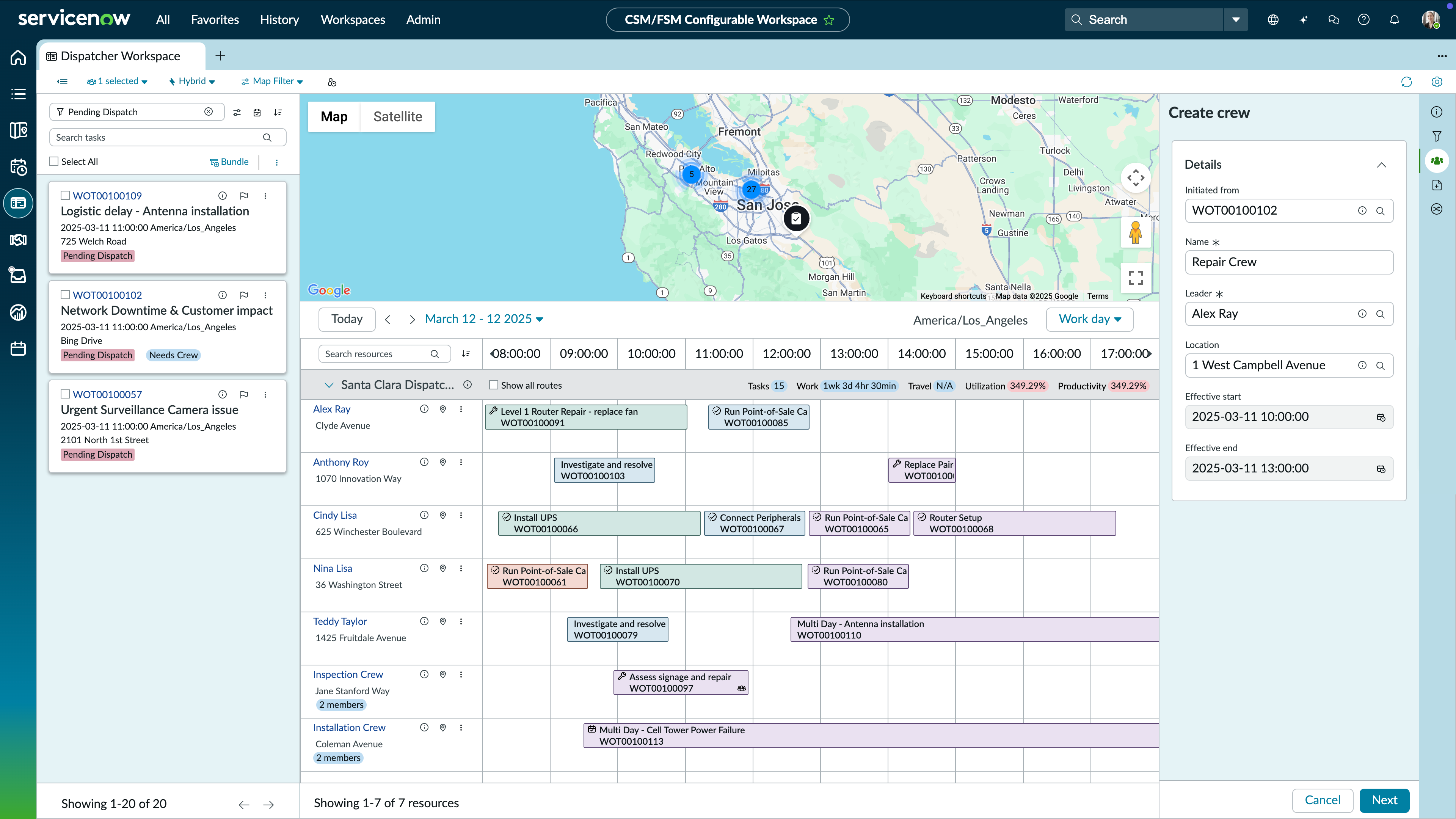
ServiceNow Field Service Management Demo - Dispatcher workspace
Give dispatchers one screen to see everything—schedules, tasks, equipment, maps, crews. Assign work with AI automatically, optimize routes instantly, and fix schedule gaps without the back-and-forth.
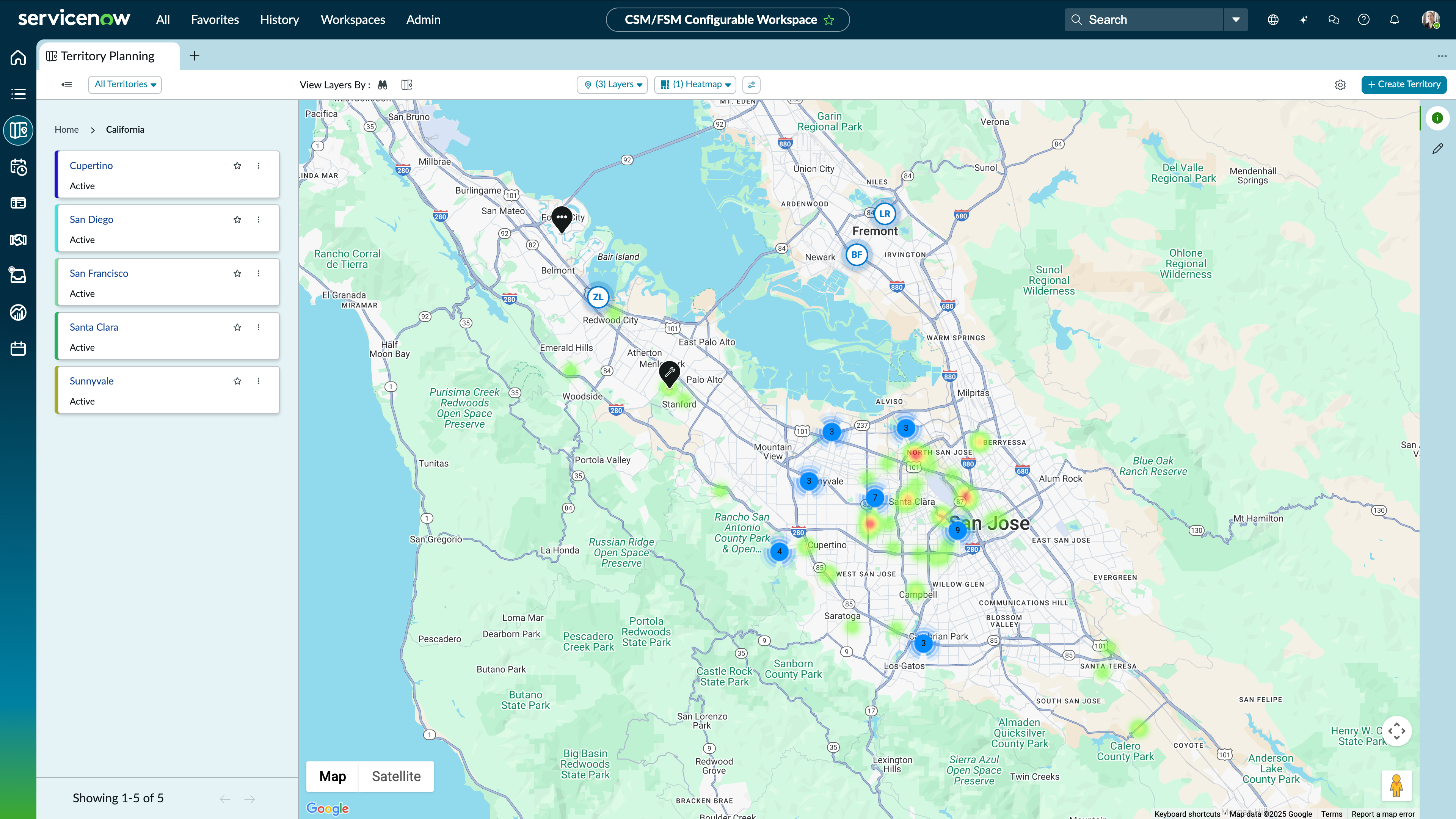
ServiceNow Field Service Management Demo - Territory Planning
Define territories that match how your teams actually work so jobs go to the right technicians without manual guesswork.
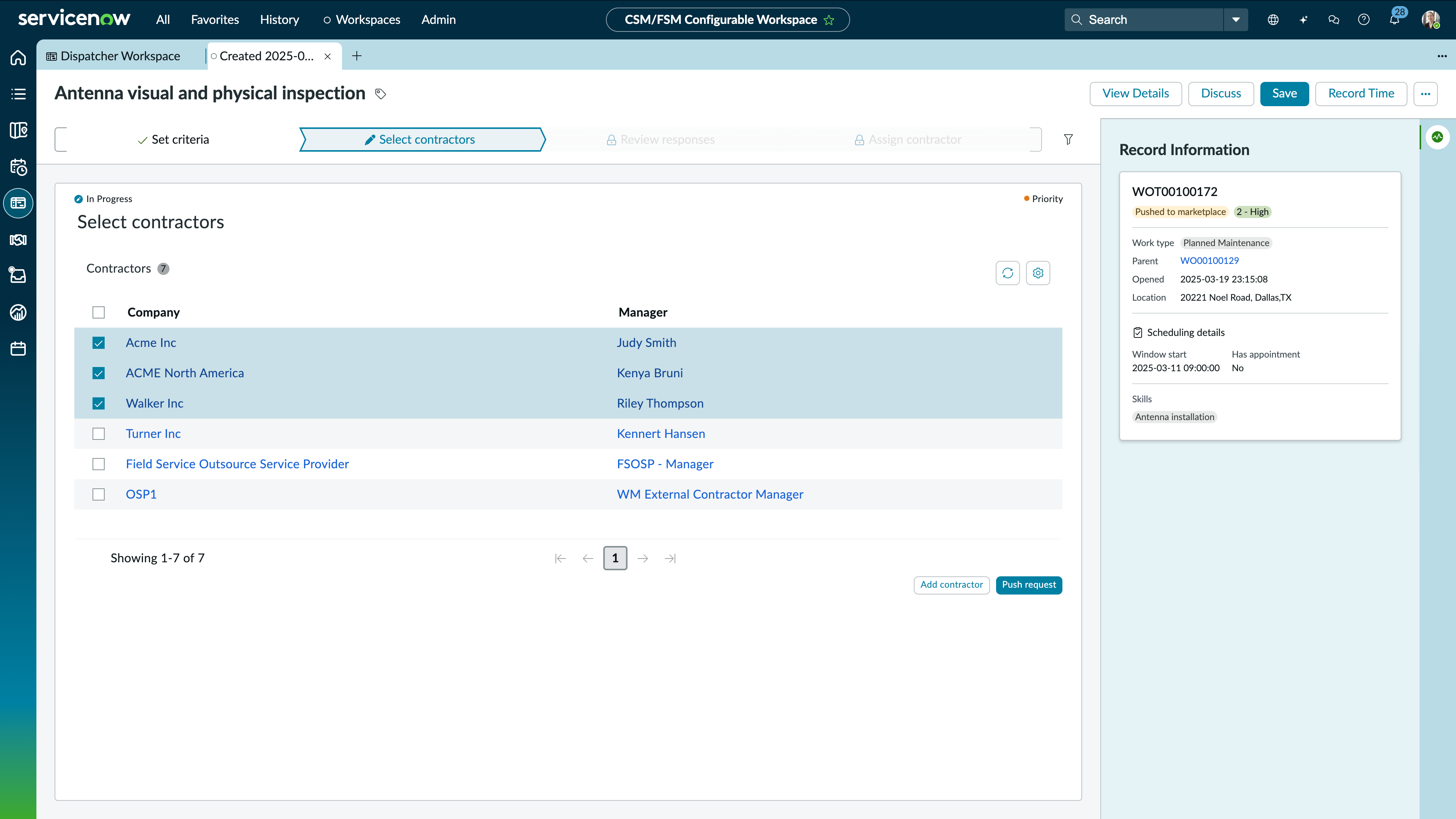
ServiceNow Field Service Management Demo - Field Service Marketplace
Route overflow work to qualified contractors and track it like it's your own—full visibility from assignment to completion.
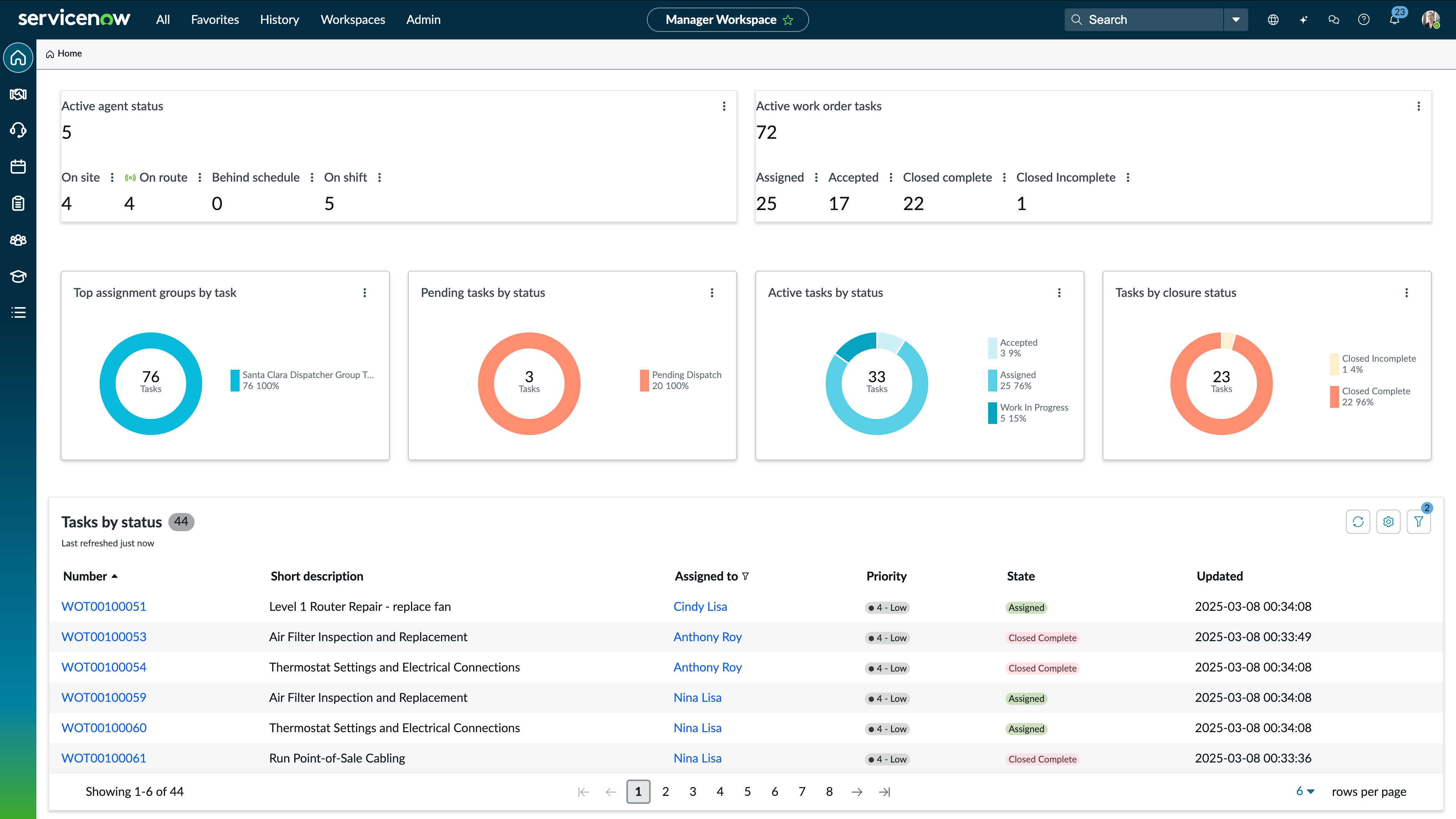
ServiceNow Field Service Management Demo - Workforce Optimization
See where capacity falls short and where skills need development before it shows up in missed SLAs.
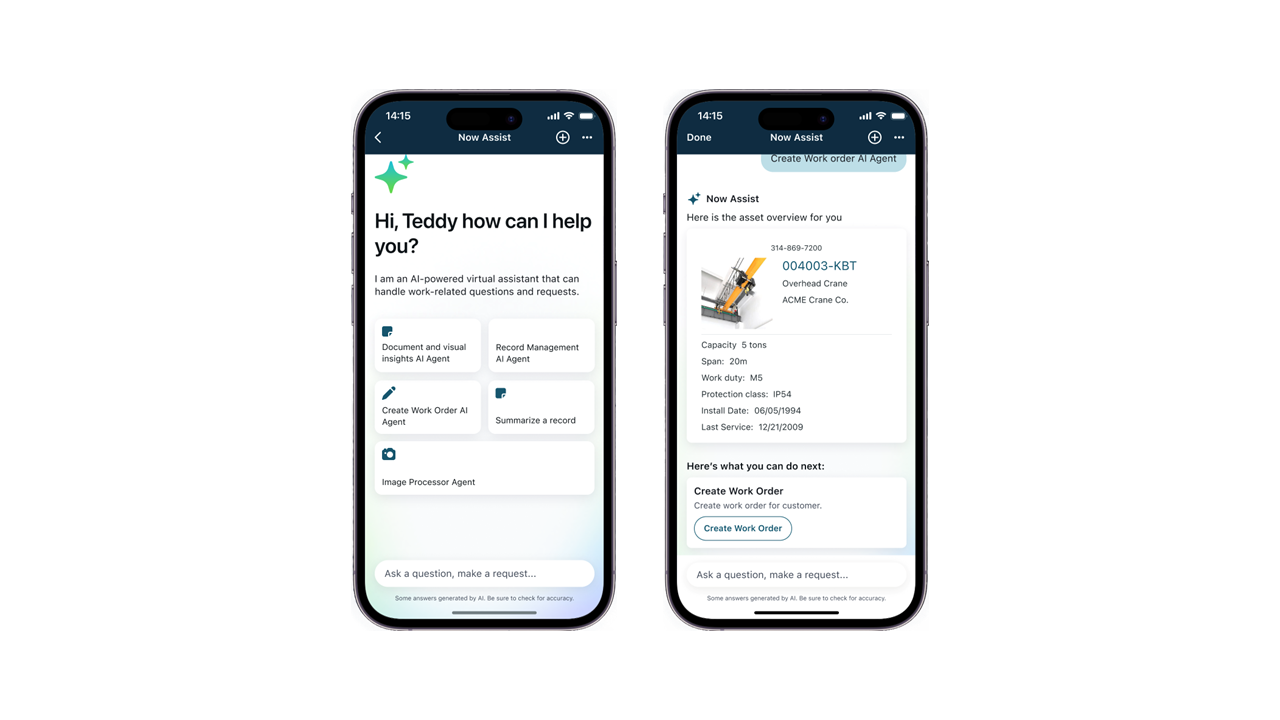
ServiceNow Field Service Management Demo - AI-powered Virtual Agent
Give your technicians AI that works as fast as they do. Capture job details by voice, get tailored task guidance in seconds, and generate summaries on the spot.
ServiceNow Field Service Management Demo - Field Service Management AI agents
Use AI agents to automate planning, optimize staffing, and guide technicians on site. Validate jobs against business standards to reduce service disruptions.
The Smart Assessment for Field Service Questionnaire simplifies data collection for technicians with conditional dependencies, detailed instructions, and enhanced number input ranges for timely customer follow-up.
Play ServiceNow Field Service Management Video
The Smart Assessment for Field Service Questionnaire simplifies data collection for technicians with conditional dependencies, detailed instructions, and enhanced number input ranges for timely customer follow-up.
New enhancements to the Dispatcher Workspace include an improved territory filter for efficient navigation, refreshed map interface for organizing technician routes, and customizable resource filters via the task panel.
Play ServiceNow Field Service Management Video
New enhancements to the Dispatcher Workspace include an improved territory filter for efficient navigation, refreshed map interface for organizing technician routes, and customizable resource filters via the task panel.
Now Assist for FSM generates work order task summaries, among other assistive AI skills, that help agents understand and complete jobs faster.
Play ServiceNow Field Service Management Video
Now Assist for FSM generates work order task summaries, among other assistive AI skills, that help agents understand and complete jobs faster.
Mobile playbooks provide technicians step-by-step guidance to complete work consistently while executing workflows, accessing knowledge articles, and documenting work.
Play ServiceNow Field Service Management Video
Mobile playbooks provide technicians step-by-step guidance to complete work consistently while executing workflows, accessing knowledge articles, and documenting work.
Dynamic Scheduling automates schedules and routes, minimizing travel time for technicians by assigning tasks based on customizable rules to optimize resource allocation
Play ServiceNow Field Service Management Video
Dynamic Scheduling automates schedules and routes, minimizing travel time for technicians by assigning tasks based on customizable rules to optimize resource allocation
Product Avatar Image

Have you used ServiceNow Field Service Management before?

Answer a few questions to help the ServiceNow Field Service Management community

ServiceNow Field Service Management Reviews (68)

Reviews

ServiceNow Field Service Management Reviews (68)

4.4
68 reviews

Review Summary

Generated using AI from real user reviews
Users consistently praise the real-time visibility and automation capabilities of ServiceNow Field Service Management, which streamline field operations and enhance coordination among teams. The platform's ability to centralize tasks and provide mobile access significantly improves efficiency and service delivery. However, many note a common limitation in the steep learning curve required for new users to fully utilize its features.

Pros & Cons

Generated from real user reviews
View All Pros and Cons
Search reviews
Filter Reviews
Clear Results
G2 reviews are authentic and verified.
James Joshua P.
JP
Project development officer I
Small-Business (50 or fewer emp.)
"Seamless ServiceNow FSM Integration with Smart Dispatching and a Strong Mobile App"
What do you like best about ServiceNow Field Service Management?

I most appreciate how ServiceNow FSM seamlessly integrates with the broader ServiceNow ecosystem, particularly the CSM and ITSM modules. The automated dispatching and scheduling engine significantly reduce manual coordination, ensuring the right technician with the right skills is sent to the job. The mobile application is also a standout feature, providing field agents with offline access to critical data and parts inventory in real time. Review collected by and hosted on G2.com.

What do you dislike about ServiceNow Field Service Management?

While the platform is extremely powerful, the initial setup and implementation can be complex and time-consuming. Getting the workflows exactly right often requires a dedicated team of specialists. In addition, the licensing costs may be steep for smaller organizations. The mobile UI is functional, but it can occasionally feel a bit cluttered, especially when navigating more complex work orders on smaller device screens. Review collected by and hosted on G2.com.

William B.
WB
Maintenance Technician
Hospital & Health Care
Mid-Market (51-1000 emp.)
"Revolutionized Our Hospital's Maintenance Response, Though There's a Learning Curve"
What do you like best about ServiceNow Field Service Management?

The most significant benefit is the clarity and efficiency it brings to our daily operations. Knowing exactly what job is next, having all the historical data for a piece of equipment at my fingertips, and being able to document my work with photos and notes directly in the work order has improved our department's accountability and productivity. The scheduling and routing logic is intelligent; it has drastically reduced the time we spend driving between our various campus buildings. For the hospital, this means faster resolution times for critical issues, which directly contributes to patient safety and care. The ability to link work orders to specific assets also helps us build a preventative maintenance history, allowing us to spot trends and fix problems before they cause a critical failure. Review collected by and hosted on G2.com.

What do you dislike about ServiceNow Field Service Management?

The initial setup and training period was substantial. The platform is powerful, which also means it can feel complex at first. For some of my colleagues who were less comfortable with new technology, there was a steep learning curve to becoming proficient with all the features in the mobile app. Occasionally, the interface can feel a bit clunky compared to simpler, consumer-grade apps, but I understand that's the trade-off for the deep functionality it provides. We also had to work closely with our IT department to get the asset data integrated correctly, which was a project in itself. Review collected by and hosted on G2.com.

Kishan R.
KR
Owner
Wholesale
Small-Business (50 or fewer emp.)
"Efficient Service Management with Some Complexity"
What do you like best about ServiceNow Field Service Management?

I like that ServiceNow Field Service Management provides real-time visibility into technician schedules, work orders, and field activities. The automated dispatching and centralized data make field operations much more efficient and predictable. Real-time visibility lets us track work and adjust quickly, while automated dispatching reduces delays by assigning the right technician faster. Centralized data cuts errors and helps technicians resolve issues more efficiently on-site. Review collected by and hosted on G2.com.

What do you dislike about ServiceNow Field Service Management?

Some features feel overly complex to configure, especially workflows and dispatch rules. The mobile app can be slow at times, and customizations often require more development effort than expected. Reporting is strong but could be more flexible for field-level insights. Workflows and dispatch rules require more configuration than expected. Even small changes often need technical expertise, and overlapping conditions can be hard to manage, making updates slower and more complex than they should be. Review collected by and hosted on G2.com.

NM
Technical Team Lead
Mid-Market (51-1000 emp.)
"A versatile tool that handles all the field challenges of a organization"
What do you like best about ServiceNow Field Service Management?

I use serviceNow Field service for my company mainly for handling our staffs that work on different locations to provide service to our customers. This is a platform that help us in assigning all the everyday task and keep a track record of our data related to upcoming scheduled appointments. Review collected by and hosted on G2.com.

What do you dislike about ServiceNow Field Service Management?

For us the most difficult part of using servicenow Field Service Management tool was its configuration with our Google workspace because the user interface of this tool is also Complex and it took more than one month to understand its user interface and other technical features but now it has been one of the best resource that we have for our company. Review collected by and hosted on G2.com.

Bianka D.
BD
Analista de dados sênior
Enterprise (> 1000 emp.)
"Efficient and Integrated Field Management with ServiceNow Field Service Management"
What do you like best about ServiceNow Field Service Management?

The ServiceNow Field Service Management platform stands out as a robust and reliable solution for managing field operations. Its native integration with the ServiceNow ecosystem allows for a unified view of processes, connecting planning, execution, and real-time monitoring.

Usability is a strong point, with well-structured workflows that facilitate the routing of service orders, allocation of technicians, and monitoring of SLAs. The automation of operational tasks significantly reduces rework and manual errors, contributing to greater efficiency and predictability in operations.

Another relevant differentiator is the ability to generate actionable data and insights, supporting more strategic decision-making based on clear performance indicators. The platform's flexibility also allows for adaptations according to the team's maturity and the complexity of the operation, without compromising system stability.

Overall, ServiceNow Field Service Management adds value to the business by increasing productivity, improving the end customer experience, and bringing more control and transparency to field service management. Review collected by and hosted on G2.com.

What do you dislike about ServiceNow Field Service Management?

The learning curve can be somewhat steep for new users, requiring more structured training.

The customization process, although powerful, may require time and specialized technical knowledge.

Depending on the level of use, the cost of the platform can be a limiting factor for smaller operations.

Some initial configurations can be complex and require greater setup effort. Review collected by and hosted on G2.com.

"Streamlined Field Operations, Needs UI Tweaks"
What do you like best about ServiceNow Field Service Management?

I like how ServiceNow Field Service Management connects scheduling, work orders, and technician tracking in one flow. It makes it easy to assign the right person to the right task, monitor progress in real time, and keep a complete service history without juggling multiple tools. Scheduling helps ensure technicians are assigned based on availability, location, and skill set, reducing delays and unnecessary travel. Work orders keep all task details, customer information, and service history in one place, so technicians know exactly what needs to be done before they arrive. Technician tracking provides real-time visibility into task status, making it easier for the support team to coordinate, update customers, and handle any changes quickly. Together, these features create a smooth workflow from request to resolution and improve overall service efficiency. Review collected by and hosted on G2.com.

What do you dislike about ServiceNow Field Service Management?

The interface can feel a bit complex at first, especially for new users who are not familiar with the ServiceNow ecosystem. Some configurations and customizations require time and technical knowledge to set up properly. The mobile experience for field technicians could be more streamlined. Generating certain reports can take extra steps that could be made more intuitive. For the mobile experience, it would help if the app had a cleaner, more task-focused layout with quicker access to work orders, navigation, and status updates. Reducing the number of screens needed to update a task, add notes, or upload photos would save time for technicians in the field. Offline support could also be smoother so updates sync reliably once the device reconnects. For report generation, more ready-made report templates and simpler filters would make it easier to pull common insights quickly. A more visual report builder with drag-and-drop options and clearer previews would reduce the effort needed to create custom reports. Review collected by and hosted on G2.com.

VD
Sales Manager
Small-Business (50 or fewer emp.)
"ServiceNow FSM: Real-Time Control for Field Teams"
What do you like best about ServiceNow Field Service Management?

1. Strong implementation framework with structured workflows for field teams.

2. Mobile app makes it easy for field engineers to update tasks in real time.

3. Deep integration with ServiceNow ecosystem and enterprise systems. Review collected by and hosted on G2.com.

What do you dislike about ServiceNow Field Service Management?

1. Licensing and customization costs can scale up quickly.

2. Customer support depends heavily on partner or enterprise support tiers.

3. Interface can feel heavy for new or non-technical users. Review collected by and hosted on G2.com.

Rahul v.
RV
Founder & CEO
Small-Business (50 or fewer emp.)
"Seamless Integration and Real-Time Visibility Elevate Field Operations"
What do you like best about ServiceNow Field Service Management?

What I appreciate most about ServiceNow Field Service Management is its seamless integration of field operations with the wider ServiceNow platform. Having real-time visibility into work orders, technician schedules, and asset history keeps teams in sync and minimizes the need for manual coordination. The automation features, mobile support for technicians, and robust reporting capabilities all contribute to managing large-scale field operations more efficiently. Review collected by and hosted on G2.com.

What do you dislike about ServiceNow Field Service Management?

The main drawback is the complexity and steep learning curve, which can be particularly challenging for newcomers or smaller teams. Setting up and customizing the system often takes considerable time and typically demands the expertise of seasoned administrators or external partners. Additionally, both licensing and implementation expenses tend to be relatively high, making this solution less suitable for organizations with tighter budgets or more straightforward field service requirements. Review collected by and hosted on G2.com.

Kaushal D.
KD
Associate Consultant
Enterprise (> 1000 emp.)
"Effective Field Service Operations on a Robust Platform"
What do you like best about ServiceNow Field Service Management?

I like the centralized and automated approach of ServiceNow Field Service Management in handling field operations. The scheduling and dispatch features make it easy to assign the right technician based on availability and skills, saving a lot of manual effort. I appreciate the real-time visibility into work orders and technician status. Its seamless integration with other ServiceNow modules helps teams collaborate better, stay aligned, and deliver services more efficiently. The platform centralizes field operations, improves scheduling accuracy, and provides better control over work orders and technician activities. These aspects make it a strong and reliable platform for managing field operations. Review collected by and hosted on G2.com.

What do you dislike about ServiceNow Field Service Management?

One area that could be improved in ServiceNow Field Service Management is the initial setup and configuration, which can be complex and time-consuming, especially for teams new to the platform. The scheduling and dispatch rules sometimes require fine-tuning to match real-world scenarios. Additionally, performance can feel slow when handling large volumes of work orders, and some UI workflows could be more intuitive for field technicians to reduce training effort. Review collected by and hosted on G2.com.

"Streamlined Operations with a Learning Curve"
What do you like best about ServiceNow Field Service Management?

I like how ServiceNow Field Service Management centralizes and streamlines our entire field operations process. The automated work orders, intelligent technician scheduling, and real-time job tracking make managing tasks easy and efficient. The mobile app is especially helpful for keeping technicians updated on the go, noticeably improving coordination and service delivery. It has helped us automate work orders, improve technician scheduling, and provide real-time visibility into job progress. These features significantly improve our service response time and operational efficiency. Review collected by and hosted on G2.com.

What do you dislike about ServiceNow Field Service Management?

Some aspects of ServiceNow Field Service Management that could be improved include the learning curve and configuration complexity, especially for teams new to the platform. Certain features require technical expertise to set up or customize, which can slow down adoption. The interface can also feel a bit heavy at times, and performance may lag when handling large data sets or complex workflows. Additionally, licensing costs can be high for smaller teams, making it less accessible for organizations with limited budgets. Review collected by and hosted on G2.com.

Trending Discussions related to ServiceNow Field Service Management

Pricing Insights

Averages based on real user reviews.

Time to Implement

3 months

Return on Investment

14 months

Perceived Cost

$$$$$
ServiceNow Field Service Management Comparisons
Product Avatar Image
Salesforce Field Service
Compare Now
Product Avatar Image
NetSuite
Compare Now
Product Avatar Image
Microsoft Dynamics 365 Field Service
Compare Now
ServiceNow Field Service Management Features
Calendar
Dispatch
Roles
Location
Employee Communication
Behavior Monitoring
Reports
Analytics
Invoicing
AI Text Summarization
Product Avatar Image
ServiceNow Field Service Management