Introducing G2.ai, the future of software buying.Try now

IT Asset Management

by Sagar Joshi
IT asset management (ITAM) is the process of collecting, indexing, maintaining, and disposing of IT assets. Learn about the ITAM process and its benefits.

What is IT asset management?

IT asset management (ITAM) is an operational process of end-to-end management of IT assets that includes acquiring, tracking, indexing, maintaining, and disposing. ITAM integrates financial, inventory, and contractual tasks to reduce costs, assist IT environment lifecycle management, and facilitate strategic decision making in business.

Information technology (IT) assets are any data, software, or hardware a business uses for its operations. Hardware assets include tangible computing gear, including desktop computers, laptops, mobile devices, actual servers in data centers, keyboards, and printers. In short, companies must take care of these assets in ITAM.

For instance, keeping track of all the desktops and their warranties might assist organizations with budgeting, replacement planning, and support. They can also track their expiry dates by keeping their software licenses in a database. Many organizations prefer using IT asset management software to document their software and hardware inventory.

Types of IT asset management

Below are the types of ITAM techniques that support businesses to manage their IT assets.

  • Digital asset management. Organizations that handle digital content often employ asset management tools to track licensing, formats, metadata, and other factors. These tools additionally offer functions and features that are hard to find in other products.
  •  Fixed asset management. The tools keep track of all fixed IT assets on the premises, including workstations, printers, networking cabinets, server room AC units, and other items.
  • Hardware and software asset management. In this approach, IT has a platform that exclusively emphasizes managing IT hardware, including endpoint devices, mobile devices, servers, workstations, and any software in use.
  •  Cloud asset management. An instrument for managing cloud assets from Amazon, Microsoft, Google, or other cloud service providers is called a cloud asset management tool.
  •  Network asset management. This technique helps companies manage network infrastructure like routers, firewalls, wireless access points, and switches.

Benefits of IT asset management

Benefits of ITAM include improved management and operations, cost savings, increased security, and better planning. Here are some additional advantages of ITAM.

  • Single asset database. Monitoring assets in multiple locations is difficult as inaccuracy and mismanagement may occur. Hence, companies can easily track assets to prevent inefficiency and poor decision making. They can see everything in one place and decide what to do with the assets. 
  •  Better asset use. IT asset management minimizes waste, risk, and costs while promoting effective resource utilization. An organization can acquire real-time information on the condition of all assets. After that, they can utilize that information to make informed decisions about asset use by implementing an ITAM process.
  •  Improved asset classification. With the help of ITAM, organizations can categorize IT assets according to their characteristics. The factors include their roles, departments, physical locations, owners, and other attributes. By improving asset management, utilization, and tracking, businesses can better assess risk, allocate assets, and plan for retirement.
  •  Compliance with software licenses. Software providers seek proof that the organization complies with all the license rules. Companies use ITAM software to continuously track that all software installed on their systems complies with all applicable license agreements.
  •  Informed decision-making. IT asset management data helps assess the prior deployments and purchases and guides subsequent moves. ITAM can enhance business and purchasing procedures through efficient decision-making for IT assets.

IT asset management lifecycle

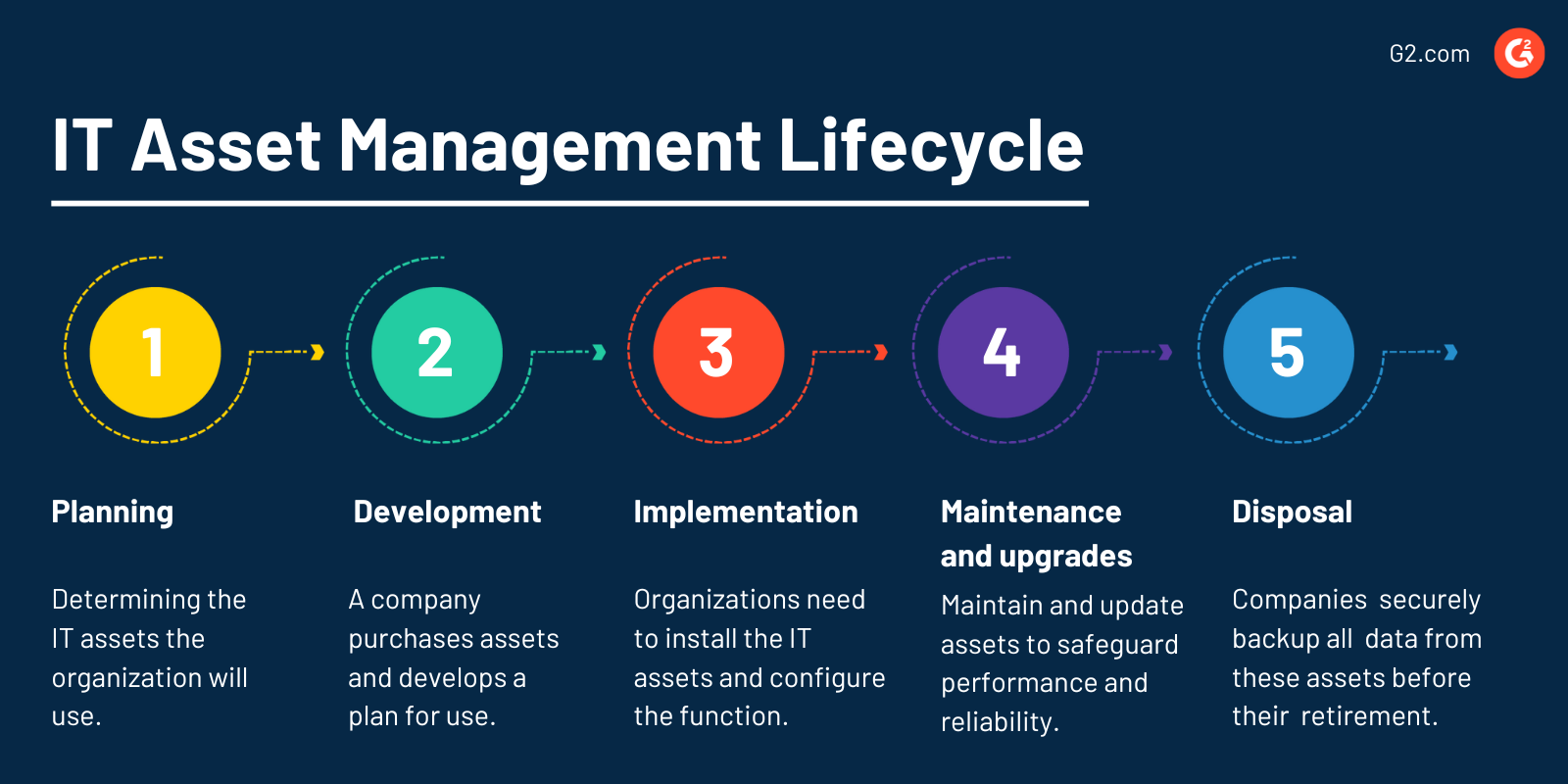
The ITAM lifecycle starts from choosing hardware and software assets to the end of use and disposal.
IT Asset Management Lifecycle

Here are the five stages:

  • Planning. It involves planning out or determining the IT assets the organization will use. It must fulfill the ITAM goals and objectives.
  • Development and acquisition. In the second stage, the company purchases assets and develops a plan for using different techniques. They establish the asset's ownership and accountability. Also, the organization can acquire assets by purchasing, licensing, or leasing. 
  • Implementation. At this point, organizations need to install the IT assets and configure the function. Then, the company can meet its goals securely. 
  • Maintenance and upgrades. This stage subsequently involves regularly maintaining and updating IT assets to safeguard optimal performance, reliability, and security.
  • End of use and disposal. Disposing of IT assets, no longer in use is the last stage of the ITAM lifecycle. Companies must securely backup all the data from these assets before the asset's retirement.

IT asset management process

The ITAM process involves the three following steps:

  • Asset identification. Making a complete inventory of all IT assets is the first step in ITAM. Companies quickly identify redundant assets and optimize them for maximum productivity.
  •  Asset tracking. An ITAM tool is used to track IT assets regularly. Financial (asset costs), contractual (warranties, licenses, and service-level agreements), and inventory (location and condition of physical assets) data are all collected for each asset.
  • Asset maintenance. Maintaining IT assets following the stage of their lifecycle is an essential part of the ITAM process. Maintenance involves the repair, improvement, and replacement of assets.

IT asset management best practices

ITEM significantly involves the best practices organizations can follow for successful implementation. The best practices are:

  • Identify the necessary asset. Identify the tool that would meet the present asset management needs.
  • Usability plan. Outline the system's use, documentation, and standard operating procedures for asset tracking.
  • Tracking strategy. Developing a uniform tracking strategy indeed ensures the accountancy of all relevant assets.
  •  Regular audits. Execute regular audits of asset management by inspecting and revamping current assets.
  •  Monitoring data. Track critical data such as expiry dates, purchase dates, vendor contact details, etc.

IT asset management vs. IT service management

IT asset management (ITAM) tracks, manages, and optimizes a company's IT assets efficiently. It maximizes asset utilization, minimizes costs, and improves decision-making with complete asset lifecycle management.

IT service management (ITSM) helps businesses streamline their IT service delivery and support processes effectively. They align IT services with business needs, automate service workflows, and prioritize and resolve incidents and service requests. In this process, they improve service quality, enhance customer satisfaction, and optimize IT operations with robust ITSM features.

ITAM and ITSM are complementary to each other. 

Learn more about ITSM and discover how it enables more efficient, standardized, and effective IT service delivery.

Sagar Joshi
SJ

Sagar Joshi

Sagar Joshi is a former content marketing specialist at G2 in India. He is an engineer with a keen interest in data analytics and cybersecurity. He writes about topics related to them. You can find him reading books, learning a new language, or playing pool in his free time.

IT Asset Management Software

This list shows the top software that mention it asset management most on G2.

ServiceNow IT Asset Management (ITAM) is a comprehensive solution designed to manage the entire lifecycle of an organization's IT assets, including hardware, software, and cloud resources. By centralizing asset data and automating workflows, ITAM enhances visibility, ensures compliance, and optimizes costs, enabling organizations to effectively track, manage, and utilize their IT investments. Key Features and Functionality: - Hardware Asset Management (HAM): Oversees the complete lifecycle of physical assets, from procurement to disposal, ensuring accurate tracking and maintenance scheduling. - Software Asset Management (SAM): Manages software licenses to ensure compliance with vendor agreements, optimizes software usage, and monitors renewals and maintenance updates. - Cloud Cost Management: Provides insights into cloud resource usage and costs, enabling organizations to allocate resources efficiently and avoid overspending. - Integration with IT Service Management (ITSM): Seamlessly connects with ITSM processes like incident, change, and problem management, facilitating efficient service delivery and decision-making. - Automated Workflows: Automates routine asset management tasks, such as provisioning, updates, and decommissioning, reducing manual errors and improving operational efficiency. Primary Value and Solutions Provided: ServiceNow ITAM delivers significant value by offering a unified platform that automates the end-to-end lifecycle of IT assets. This automation leads to optimized costs, reduced risks, and enhanced compliance. Organizations benefit from improved asset visibility, enabling proactive planning and decision-making. By integrating ITAM with other ITSM processes, businesses can streamline operations, reduce downtime, and ensure that IT assets are aligned with organizational goals, ultimately driving efficiency and innovation.

Oomnitza offers the industry’s most versatile Enterprise Technology Management platform that delivers key business process automation for IT. We empower teams to optimize resources, mitigate cyber risk, expedite audits and fortify the digital experience.

SolarWinds Service Desk is an IT and Employee Service Management solution that helps you redefine employee service experiences in seamless, smart, and meaningful ways.

Freshservice is an easy to use IT service desk and ITSM solution designed using ITIL best practices that enables organizations to focus on exceptional service delivery.

With Ivanti Neurons for ITAM’s platform, employees have a richer self-service experience as they navigate through an approved service catalog, alleviating pressure on IT staff while reducing the cost of service. In addition, Ivanti Neurons for ITAM enhances the change management processes by providing visibility into the impact and potential risk of each change. Configurable workflows enhanced by asset information helps to support successful, repeatable change processes while reducing the risk to the business. Ivanti Neurons for ITAM delivers a single asset repository that fully supports both the Asset Manager’s and Configuration Manager’s efforts to support organizations with accurate, up-to-date information.

Run your IT with a complete web-based, ITIL-driven Help Desk & Asset Management tool.

Cryotos is a mobile-first and easy to use computerized maintenance management system (CMMS), facility management (FM), enterprise asset management (EAM) which can be used across industries for achieving efficiency in the maintenance and operations process.

ALVAO Asset Management is a solution help in optimizing of methodologies and development of software tools to support service processes.

Endpoint Central is an integrated desktop and mobile device management software that helps in managing servers, laptops, desktops, smartphones, and tablets from a central location.

IT Asset Management Software: Infraon Assets is a powerful Software, Hardware, and Fixed asset management tool that helps you track, manage and control all of your enterprise's IT assets efficiently. Download a free version now!

Zoho Desk pulls in all your customer interactions from across multiple channels into a single, clean interface. You can then seamlessly continue these conversations and help customers easily.

A complete IT management platform that helps you identify and tackle the issues in your IT infrastructure that impacts your bottom line.

Incident IQ is a cloud-based technology support platform that allows school districts to effectively support all the hardware, software and systems that teaching and learning depends on.

SymphonyAI IT Service Management is an enterprise-class IT operations management platform designed to provide integrated, intelligent and innovative solutions across service, asset, availability and project management.

ClickUp is one app to replace them all. It's the future of work. More than just task management - ClickUp offers docs, reminders, goals, calendars, and even an inbox. Fully customizable, ClickUp works for every type of team, so all teams can use the same app to plan, organize, and collaborate.

GLPI is an incredible Free and Open-Source ITSM software tool that helps you plan and manage IT changes in an easy way, solve problems efficiently when they emerge and allow you to gain legit control over your company's IT budget, and expenses.

SysAid is an all-in-one IT service management tool that integrates all the essentials directly into ONE service desk and asset management platform.

It was clear that security and privacy had become mainstream issues, and that we all increasingly relied on cloud services to store everything from our personal photos to our communications at work. Vanta’s mission is to be the layer of trust on top of these services, and to secure the internet, increase trust in software companies, and keep consumer data safe. Today, we're a growing team in San Francisco passionate about making the internet more secure and elevating the standards for technology companies.

Absolute accelerates its customers’ shift to work-from-anywhere through the industry’s first self-healing Zero Trust platform, helping to ensure maximum security and uncompromised productivity. Absolute is the only solution embedded in more than half a billion devices, offering a permanent digital connection that intelligently and dynamically applies visibility, control and self-healing capabilities to endpoints, applications, and network access to help ensure their cyber resilience tailored for distributed workforces.

ManageEngine Patch Manager Plus is a comprehensive, automated patch management solution designed to keep enterprise systems secure and up-to-date. It supports multiple operating systems, including Windows, macOS, and Linux, as well as over 850 third-party applications. By automating the entire patch management process—from detection and assessment to deployment and reporting—Patch Manager Plus helps organizations enhance system stability, ensure compliance, and protect against vulnerabilities. Key Features and Functionality: - Automated Patch Management: Streamlines the entire patching process by automating the detection, download, testing, approval, and deployment of patches. - Cross-Platform Support: Provides seamless patching capabilities for Windows, macOS, and Linux systems, ensuring comprehensive coverage across diverse IT environments. - Third-Party Application Patching: Manages and deploys patches for over 850 third-party applications, including popular software like Adobe, Java, and WinRAR. - Flexible Deployment Policies: Allows customization of patch deployment schedules and policies to align with organizational needs and minimize disruption. - Patch Testing and Approval: Enables the creation of test groups to assess patches before widespread deployment, reducing the risk of system issues. - Windows 10 Feature Update Deployment: Facilitates the deployment of the latest Windows 10 feature updates, ensuring systems remain current without compromising productivity. - Patch Compliance and Reporting: Offers real-time audits and comprehensive reports to monitor patch compliance and system health across the network. Primary Value and User Benefits: Patch Manager Plus addresses the critical need for timely and efficient patch management in today's complex IT environments. By automating the patching process across multiple operating systems and applications, it significantly reduces the manual effort required from IT administrators. This automation not only enhances operational efficiency but also strengthens security by promptly addressing vulnerabilities. Additionally, the solution's comprehensive reporting and compliance features ensure organizations meet industry standards and maintain a robust security posture.