Best Workflow Management Software - Page 2

How Many Workflow Management Software Products Does G2 Track?

Total Products under this Category: 389

Category Stats (Aug 2026)

  • Average Rating: 4.54/5 The average rating of products in this category, based on all submitted ratings
  • Top Trending Product: R2 Docuo (+0.84%) - Among all products in this category, R2 Docuo recorded the largest rating increase compared to last month

Last updated: August 04, 2026

How Does G2 Rank Workflow Management Software Products?

Why You Can Trust G2's Software Rankings:

  • 30 Analysts and Data Experts
  • 145,100+ Authentic Reviews
  • 389+ Products
  • Unbiased Rankings

G2's software rankings are built on verified user reviews, rigorous moderation, and a consistent research methodology maintained by a team of analysts and data experts. Each product is measured using the same transparent criteria, with no paid placement or vendor influence. While reviews reflect real user experiences, which can be subjective, they offer valuable insight into how software performs in the hands of professionals. Together, these inputs power the G2 Score, a standardized way to compare tools within every category.

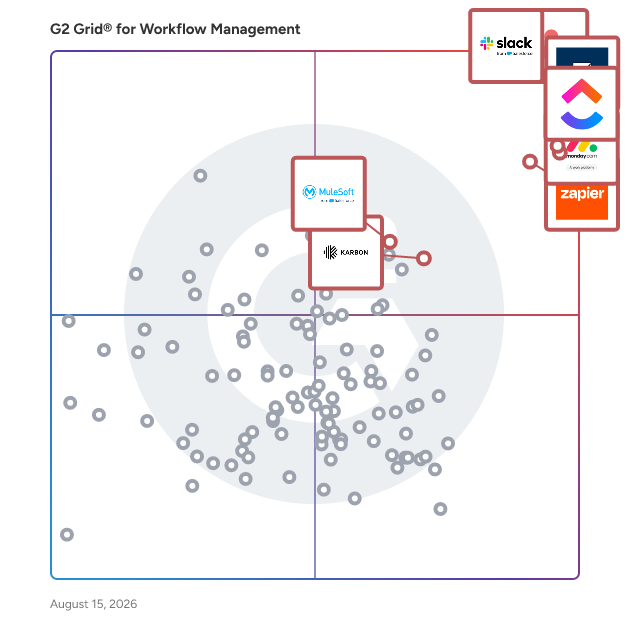
G2 Grid® for Workflow Management Software

G2 Grid® for Workflow Management Software plotting products by satisfaction and market presence

Highlighted products: Slack, Asana, Smartsheet, ClickUp, monday AI Work Platform, Zapier, Karbon, and MuleSoft Automation.

Underlying data: [Grid® JSON](https://www.g2.com/categories/workflow-management/grids.json?focus%5B%5D=slack&focus%5B%5D=asana&focus%5B%5D=smartsheet&focus%5B%5D=clickup&focus%5B%5D=monday-com&focus%5B%5D=zapier&focus%5B%5D=karbon-2025-03-03&focus%5B%5D=mulesoft-automation)

Sponsored

Hive

Hive is an all-in-one project management software platform that helps teams plan, collaborate, automate workflows, and deliver projects faster. Designed for organizations of every size, Hive combines powerful project planning, task management, team collaboration, and workflow automation tools in one customizable workspace. Whether you're managing marketing campaigns, product launches, creative projects, client work, or cross-functional initiatives, Hive adapts to your team's unique processes. Unlike rigid project management tools, Hive offers flexible workflows, customizable dashboards, and multiple project views so every team can work the way they work best. Hive empowers marketing, operations, product, IT, creative, and remote teams with the tools they need to stay organized and aligned. With customizable workflows and powerful collaboration features, teams can centralize work, reduce manual tasks, and improve visibility across every project. Key capabilities include: - Multiple project views, including Kanban boards, Gantt charts, calendars, tables, and lists - Task management with custom fields, dependencies, milestones, and priorities - Workflow automation to eliminate repetitive work - Real-time team collaboration with messaging, comments, and file sharing - Time tracking, reporting, and analytics - Integrations with hundreds of popular business applications Every organization works differently, which is why Hive is built to be one of the most customizable project management platforms available. Teams can create workflows tailored to their business processes using custom fields, project templates, automations, approvals, and integrations. Instead of forcing teams to change how they work, Hive adapts to existing workflows — helping organizations improve efficiency without disrupting productivity. Hive gives teams the flexibility to manage projects from the perspective that works best for them. Switch seamlessly between: - Kanban boards for agile workflows - Gantt charts for timeline planning - Calendar views for scheduling - Table and List views for detailed task management These flexible project views help teams track deadlines, manage resources, identify bottlenecks, and keep projects moving forward. Hive brings projects, communication, and documentation together in one centralized workspace. Team members can collaborate in real time, assign tasks, share files, provide feedback, and monitor project progress without switching between multiple tools. By combining project planning, collaboration, automation, and reporting in a single platform, Hive helps teams reduce busywork and focus on delivering results. Hive is more than just task management software—it's a scalable work management platform built to evolve alongside your business. As your needs change, Hive continues to expand through new features, integrations, and customer-driven enhancements. With flexible customization, powerful automation, and dedicated customer support, Hive enables organizations to streamline workflows, improve cross-functional collaboration, and execute projects with greater speed and confidence.

Visit website

Softr

Softr is the leading AI platform for building business software — including apps, databases, workflow automation, and forms — without code. Most teams are held back by fragmented systems: work is scattered across spreadsheets, docs, messages, and tools that don't connect. Softr replaces that fragmentation with a single platform for building software tailored to your exact workflows and business logic — without waiting on developers, IT, or outside help. Start with the AI app builder, then switch to visual editing anytime. Add features, adjust logic, and make changes yourself as your business evolves. No technical overhead, no tickets, no waiting. With Softr, you can build client portals, internal tools, CRMs, project trackers, dashboards, employee intranets, inventory management systems, partner portals, ERP systems, lead capture forms, and more. Key features: - All-in-one platform: Build and connect apps, databases, workflow automation, and forms in a single platform, without having to switch between tools. - Native databases and 17+ data source integrations: Store and manage data in Softr Databases, or sync in real time with external sources, including Airtable, HubSpot, Notion, monday.com, Coda, ClickUp, Google Sheets, SQL data sources, and more. - Production-ready infrastructure: User management, hosting, and security are built in from day one, making your apps ready to deploy securely. - AI-powered building: Describe what you need in plain language and get a working app, then customize visually without writing code. - Custom user groups and granular permissions: Control exactly who can see, access, and edit what across your apps. - Built to scale: Add features, make changes, and grow your software as your business evolves, all without technical debt or developer dependencies. Softr is used by operations, HR, finance, sales, customer success, and business teams at organizations of all sizes, as well as agencies and consultants who need professional, branded software without hiring a developer. Trusted by 1M+ organizations worldwide, from Fortune 500s to fast-growing startups.

Average Rating: 4.7/5.0

Total Reviews: 711

How Do G2 Users Rate Softr?

  • Has the product been a good partner in doing business?: 9.2/10 (Category avg: 9.1/10)
  • Activities: 10.0/10 (Category avg: 8.9/10)
  • Flows: 10.0/10 (Category avg: 8.9/10)
  • Integration: 10.0/10 (Category avg: 8.4/10)

Who Is the Company Behind Softr?

  • Seller: Softr
  • Company Website:
  • Year Founded: 2020
  • HQ Location: Berlin, DE
  • Twitter: @softr_io
    15,629 Twitter followers
  • LinkedIn® Page: www.linkedin.com
    77 employees on LinkedIn®

Who Uses This Product?

  • Who Uses This: Founder, CEO
  • Top Industries: Computer Software, Consulting
  • Company Size: 87% Small, 7% Medium

What Do G2 Reviewers Say About Softr?

AI-generated summary from verified user reviews

Pros
  • Users highlight the ease of use of Softr, praising its simplicity and helpful support for beginners.
  • Users highlight the fast and responsive customer support of Softr, enhancing their overall experience and satisfaction.
  • Users value the easy setup of Softr, enabling quick implementation and accessibility for everyone.
  • Users love the easy integrations with various apps like Airtable and Monday.com, enhancing their workflow effortlessly.
  • Users love the easy integration capabilities of Softr, making it seamless to connect with various apps and databases.
Cons
  • Users desire greater customization options in Softr, as current limitations hinder their design and branding flexibility.
  • Users find the missing features in Softr limit functionality, hindering practical applications like blogging and actions.
  • Users are frustrated by the limited features of Softr, especially the lack of mobile app availability.
  • Users find Softr has limitations in customization and functionality, impacting control and performance for complex projects.
  • Users find Softr to be expensive, especially when scaling and needing advanced features or longer trial periods.

What Are Recent G2 Reviews of Softr?

What Are G2 Users Discussing About Softr?

Pipefy

Pipefy is a global leader in business orchestration, currently serving more than 4,000 clients across 150+ countries. Pipefy ia a Business Orchestration and Automation Technology (BOAT), providing a unified control plane that coordinates humans, systems, and AI agents to eliminate process fragmentation. The platform is built on a modular architecture featuring four distinct layers: a Human Interface for fluid service delivery, a Workflow and Rules core for modeling complex logic, a Data and Analytics layer for real-time insights, and an Automation and Integration engine. A standout feature is the Pipefy Agent Studio, which allows non-developers to create specialized AI agents and also providing a Bring Your Own LLM (BYOLLM) strategy, allowing customers to choose which LLM is more appropriate for each need. The platform ensures technical oversight through its Adaptive Governance Framework, establishing safe zones for business areas to co-create agents with the IT department, and its Trust Layer, which provides end-to-end audit logs and causal lineage for every automated action. Pipefy’s primary value lies in its ability to deliver AI results in days, not months. The platform solves the existential pressure of an unsustainable development backlog and the security risks posed by uncontrolled Shadow IT and Shadow AI. It provides a sanctioned, secure environment using an Adaptive Governance Framework, for business technologists to build their own automations without creating technical debt. For Larger companies, Pipefy acts as an orchestration wrapper that modernizes rigid legacy infrastructure, without the cost and systemic risk of a replacing project. The platform specifically addresses the inefficiency of operational silos and the manual white space workflows, by creating a unified Process Fabric. This orchestration layer provides the global compliance, granular RBAC, and end-to-end auditability required to pass rigorous SOC2 and ISO 27001 audits while delivering a modern digital experience over the legacy core.

Average Rating: 4.6/5.0

Total Reviews: 213

How Do G2 Users Rate Pipefy?

  • Has the product been a good partner in doing business?: 8.9/10 (Category avg: 9.1/10)
  • Activities: 9.0/10 (Category avg: 8.9/10)
  • Flows: 9.2/10 (Category avg: 8.9/10)
  • Integration: 8.5/10 (Category avg: 8.4/10)

Who Is the Company Behind Pipefy?

  • Seller: Pipefy
  • Company Website:
  • Year Founded: 2015
  • HQ Location: San Francisco, CA
  • Twitter: @Pipefy
    2,252 Twitter followers
  • LinkedIn® Page: www.linkedin.com
    610 employees on LinkedIn®

Who Uses This Product?

  • Top Industries: Information Technology and Services, Computer Software
  • Company Size: 53% Small, 29% Medium

What Do G2 Reviewers Say About Pipefy?

AI-generated summary from verified user reviews

Pros
  • Users find Pipefy's ease of use beneficial for automating workflows with minimal technical skills required.
  • Users value the ease of automation with Pipefy, enhancing organization and collaboration without technical skills.
  • Users value the efficiency of Pipefy, enjoying streamlined processes and reduced workload through automation.
  • Users appreciate the clean and intuitive user interface of Pipefy, enhancing organization and collaboration effortlessly.
  • Users praise Pipefy's intuitive interface, making business process automation simple, efficient, and user-friendly.
Cons
  • Users find the high cost of Pipefy's premium version a barrier for many firms to fully leverage its capabilities.
  • Users find the learning curve steep, feeling overwhelmed by numerous options, especially new team members.
  • Users find the limited integrations with tools like Jira, Notion, and Slack insufficient for their needs.
  • Users experience glitches in workflow automation with Pipefy, impacting the reliability and efficiency of their processes.
  • Users find integration issues with tools like Jira, Notion, and Slack limit Pipefy's effectiveness for their workflows.

What Are Recent G2 Reviews of Pipefy?

What Are G2 Users Discussing About Pipefy?

Pega Platform

Pega is a powerful low-code platform that builds agility into the world’s leading organizations so they can adapt to change. Clients use our AI-powered decisioning and workflow automation to solve their most pressing business challenges – from personalizing engagement to automating service to streamlining operations. Since 1983, we’ve built our scalable and flexible architecture to help people focus on what matters most, so they can meet today’s customer demands while continuously transforming for tomorrow. Experience the simplicity and power of the Pega Platform today: https://www.pega.com/platform-guided-tour

Average Rating: 4.2/5.0

Total Reviews: 199

How Do G2 Users Rate Pega Platform?

  • Has the product been a good partner in doing business?: 8.3/10 (Category avg: 9.1/10)
  • Activities: 9.2/10 (Category avg: 8.9/10)
  • Flows: 8.9/10 (Category avg: 8.9/10)
  • Integration: 8.3/10 (Category avg: 8.4/10)

Who Is the Company Behind Pega Platform?

  • Seller: Pegasystems
  • Year Founded: 1983
  • HQ Location: Cambridge, MA
  • Twitter: @pega
    45,022 Twitter followers
  • LinkedIn® Page: www.linkedin.com
    5,558 employees on LinkedIn®
  • Ownership: NASDAQ:PEGA

Who Uses This Product?

  • Who Uses This: Senior Software Engineer, Consultant
  • Top Industries: Information Technology and Services, Banking
  • Company Size: 68% Large, 20% Medium

What Do G2 Reviewers Say About Pega Platform?

AI-generated summary from verified user reviews

Pros
  • Users value the excellent customer support provided by Pega, enhancing their onboarding and integration experience.
  • Users appreciate the strong case management and effective automation of complex processes in Pega Platform, enhancing operations.
  • Users appreciate the ease of use of Pega Platform, enabling automation and integration without complex coding.
  • Users appreciate the easy integration and user-friendly interface of Pega Platform, enhancing their overall experience and functionality.
  • Users value the easy integrations with various systems and the capability to enhance business processes effectively.
Cons
  • Users find the customization limitations of the Pega Platform frustrating, often sacrificing ideal designs for compatibility.
  • Users find the limited features of Pega Platform frustrating, hindering their ability to customize for their needs.
  • Users find the outdated interface of the Pega Platform frustrating, impacting customization and overall user experience.
  • Users find the poor interface design of Pega Platform frustrating, limiting customization and affecting overall usability.
  • Users are frustrated with the poor UI of the Pega Platform, facing limitations and outdated design elements.

What Are Recent G2 Reviews of Pega Platform?

What Are G2 Users Discussing About Pega Platform?

Cflow

Cflow is a leading AI-powered approval automation platform that empowers key decision makers with actionable data for making informed business decisions. Trusted by a 100,000+ user base spanning SMBs, mid-market, and Enterprise companies, Cflow is the highest-rated choice for unstoppable, no-code workflow automation. Complex workflows with multiple approval levels can be effectively automated within minutes using the visual workflow builder. Cflow takes paperless offices to the next level by providing intelligent document processing and document management features that include AI-powered OCR, Auto-classification, Fuzzy Search Mapping, Document Designer, Integrated electronic signatures, and role-based access control. SEYARC AI in Cflow turns data into decisions instantly by automating data entry, form filling, document reading, and insights. Cflow’s core value proposition lies in its ability to automate processes and deliver results in days, not months. Backed by SOC 2 Type 2, ISO 27001, GDPR, and HIPAA compliance, Cflow delivers enterprise-grade security that Global businesses require.

Average Rating: 4.7/5.0

Total Reviews: 185

How Do G2 Users Rate Cflow?

  • Has the product been a good partner in doing business?: 9.6/10 (Category avg: 9.1/10)
  • Activities: 9.3/10 (Category avg: 8.9/10)
  • Flows: 9.4/10 (Category avg: 8.9/10)
  • Integration: 8.9/10 (Category avg: 8.4/10)

Who Is the Company Behind Cflow?

  • Seller: Cavintek Inc
  • Company Website:
  • Year Founded: 2011
  • HQ Location: 4140 Via Candidiz UNIT 158, San Diego, CA 92130, United States
  • Twitter: @cflowapps
    828 Twitter followers
  • LinkedIn® Page: www.linkedin.com
    26 employees on LinkedIn®

Who Uses This Product?

  • Top Industries: Marketing and Advertising, Information Technology and Services
  • Company Size: 46% Medium, 40% Small

What Do G2 Reviewers Say About Cflow?

AI-generated summary from verified user reviews

Pros
  • Users appreciate the ease of use of Cflow, enabling simple setup and management of workflows without coding.
  • Users value Cflow's automation capabilities that streamline daily tasks, enhancing efficiency and organization in workflows.
  • Users appreciate the user-friendly workflow management of Cflow, enhancing efficiency and supporting smooth operational processes.
  • Users find Cflow's automation efficiency invaluable, streamlining tasks like onboarding and procurement with ease.
  • Users appreciate how Cflow's process automation streamlines tasks like onboarding and approvals, greatly enhancing workflow efficiency.
Cons
  • Users experience performance issues with Cflow, including slow loading and delayed notifications on mobile.
  • Users notice slow performance in Cflow, especially during data transfers and while editing workflows, impacting overall efficiency.
  • Users find the steep learning curve of Cflow daunting, especially with its many features for new automation users.
  • Users find the limited features of Cflow restrict their customization and efficiency, especially for new users.
  • Users experience slow loading times, particularly when multiple workflows are active, affecting overall app performance.

What Are Recent G2 Reviews of Cflow?

Zoho Flow

Zoho Flow is an integration platform that helps users integrate applications and automate business workflows. Flow provides integrations across various ecosystems and networks, letting you connect your favorite apps, collaborate with teammates, and adapt to dynamic business needs. Here are some important features of Zoho Flow: - Over 1,000 cloud and on-premises applications to integrate - 25,000+ ready-to-use integrations in Flow Gallery - A dynamic drag-and-drop builder for integrations - Workflow logic elements such as decisions, delays, and custom functions to automate complex processes - Workflow triggers from various sources, including apps, APIs, schedules, emails, and webhooks Use Zoho Flow to: - Automatically move form data from form builders like Zoho Forms and Contact Form 7 to CRM apps like Zoho CRM and HubSpot. - Automate invoice creation in invoice management apps when a deal is closed in your CRM or a sale is made through an ecommerce platform. - Get notified through messaging applications like Zoho Cliq or Slack when new updates are made in your project or desk management applications. - Centralize and synchronize data across apps, regardless of their ecosystem or network. Zoho Flow helps teams eliminate manual work, reduce errors, and build reliable automation tailored to their exact requirements. Users can sign up for free and start building workflows in minutes.

Average Rating: 4.1/5.0

Total Reviews: 19

How Do G2 Users Rate Zoho Flow?

  • Has the product been a good partner in doing business?: 8.8/10 (Category avg: 9.1/10)
  • Activities: 7.8/10 (Category avg: 8.9/10)
  • Flows: 8.9/10 (Category avg: 8.9/10)
  • Integration: 9.2/10 (Category avg: 8.4/10)

Who Is the Company Behind Zoho Flow?

  • Seller: Zoho
  • Year Founded: 1996
  • HQ Location: Austin, TX
  • Twitter: @Zoho
    137,880 Twitter followers
  • LinkedIn® Page: www.linkedin.com
    30,766 employees on LinkedIn®
  • Phone: +1 (888) 900-9646

Who Uses This Product?

  • Top Industries: Information Technology and Services
  • Company Size: 55% Small, 35% Medium

What Do G2 Reviewers Say About Zoho Flow?

AI-generated summary from verified user reviews

Pros
  • Users love the automation capabilities of Zoho Flow, simplifying workflows and connecting various applications effortlessly.
  • Users value the easy setup of Zoho Flow, facilitating effortless connections between various applications for enhanced productivity.
  • Users appreciate the seamless integrations in Zoho Flow, simplifying workflow connections across various applications.

What Are Recent G2 Reviews of Zoho Flow?

What Are G2 Users Discussing About Zoho Flow?

Blink

Automate Everything Security in the Blink of AI Blink is a security workflow automation platform designed to make building, collaborating, and scaling all things security & beyond effortless using generative AI. Whether you prefer code, low-code, or no-code, Blink has got you covered. Easily drag and drop the actions you want into a workflow, leveraging the over 30,000 integrations available in the automation library, or use Blink Copilot to generate a workflow with a natural language prompt. Use Blink as an automation hub, where security teams go to quickly develop, collaborate, and automate their security ideas. Leverage the platform’s 10,000+ workflows that come out of the box to quickly build workflows for real-time remediation. Generate automation workflows for standalone use cases or build an end-to-end proactive automation strategy, streamlining security responses across your entire organization.

Average Rating: 4.7/5.0

Total Reviews: 19

How Do G2 Users Rate Blink?

  • Has the product been a good partner in doing business?: 9.9/10 (Category avg: 9.1/10)
  • Activities: 9.0/10 (Category avg: 8.9/10)
  • Flows: 9.5/10 (Category avg: 8.9/10)
  • Integration: 9.8/10 (Category avg: 8.4/10)

Who Is the Company Behind Blink?

  • Seller: Blink Ops
  • Company Website:
  • Year Founded: 2021
  • HQ Location: Austin, US
  • Twitter: @getBlinkOps
    706 Twitter followers
  • LinkedIn® Page: www.linkedin.com
    126 employees on LinkedIn®

Who Uses This Product?

  • Top Industries: Computer Software
  • Company Size: 63% Medium, 21% Large

What Do G2 Reviewers Say About Blink?

AI-generated summary from verified user reviews

Pros
  • Users appreciate the ease of use of Blink, facilitating a quick and satisfying setup for effective project execution.
  • Users value the automation capabilities of Blink, noting significant outcomes and enhanced security orchestration.
  • Users commend the responsive customer support of Blink, enhancing the overall experience and effectiveness of the product.
  • Users value the easy setup of Blink, enabling a seamless start and enhancing their overall experience.
  • Users appreciate the smooth JavaScript execution of Blink, enhancing web project efficiency and compatibility.
Cons
  • Users identify limited extensibility in Blink, especially affecting large and complex project workflows.
  • Users find Blink's limited extensibility problematic, particularly for large and complex project needs.

What Are Recent G2 Reviews of Blink?

Workfront

Adobe Workfront is the leader in collaborative work management and marketing work management. Workfront connects strategy to delivery, integrating people and data across the enterprise, and manages work from start to finish to help teams deliver measurable outcomes. At every stage of planning, executing, and automating work, Workfront enables the business capabilities companies need to deliver exceptional customer experiences and to connect planning processes to execution workflows.

Average Rating: 4.1/5.0

Total Reviews: 1,154

How Do G2 Users Rate Workfront?

  • Has the product been a good partner in doing business?: 8.4/10 (Category avg: 9.1/10)
  • Activities: 8.5/10 (Category avg: 8.9/10)
  • Flows: 7.9/10 (Category avg: 8.9/10)
  • Integration: 7.8/10 (Category avg: 8.4/10)

Who Is the Company Behind Workfront?

  • Seller: Adobe
  • Company Website:
  • Year Founded: 1982
  • HQ Location: San Jose, CA
  • Twitter: @Adobe
    956,842 Twitter followers
  • LinkedIn® Page: www.linkedin.com
    42,087 employees on LinkedIn®

Who Uses This Product?

  • Who Uses This: Project Manager, Senior Project Manager
  • Top Industries: Marketing and Advertising, Information Technology and Services
  • Company Size: 47% Large, 35% Medium

What Do G2 Reviewers Say About Workfront?

AI-generated summary from verified user reviews

Pros
  • Users value the centralized project management of Workfront, enhancing team alignment and productivity through clear organization.
  • Users appreciate the ease of use of Workfront, complimenting its clean interface and efficient functionality.
  • Users value the smooth team collaboration in Workfront, enhancing communication and coordination effectively across projects.
  • Users appreciate the enhanced visibility and organization of Workfront, streamlining task management and reducing confusion in teams.
  • Users value the visibility and organization Workfront provides, enhancing project management and team efficiency.
Cons
  • Users find the steep learning curve of Workfront challenging, especially for those accustomed to simpler project management tools.
  • Users find Workfront to be not intuitive, often requiring training to navigate its complex features and outdated UI.
  • Users find Workfront's complexity and steep learning curve challenging, making navigation and setup time-consuming and frustrating.
  • Users often experience slow performance with Adobe Workfront, particularly when managing large datasets or extensive reports.
  • Users find Workfront's limited features frustrating, particularly in customization and managing project views effectively.

What Are Recent G2 Reviews of Workfront?

What Are G2 Users Discussing About Workfront?

Basecamp

Basecamp is the #1 collaboration tool for hundreds of thousands of teams worldwide. Teams use Basecamp to work on projects, communicate, and get work organized every day. Whether with teammates across the room, or clients across the world, Basecamp is the best tool to get things done. Basecamp makes it easy for teams to see what everyone is working on, collaborate on documents, schedule projects, and more without meetings or emails. Not convinced? Read our thousands of reviews and sign up for free.

Average Rating: 4.1/5.0

Total Reviews: 5,358

How Do G2 Users Rate Basecamp?

  • Has the product been a good partner in doing business?: 8.7/10 (Category avg: 9.1/10)
  • Activities: 8.5/10 (Category avg: 8.9/10)
  • Flows: 8.4/10 (Category avg: 8.9/10)
  • Integration: 8.0/10 (Category avg: 8.4/10)

Who Is the Company Behind Basecamp?

  • Seller: 37signals
  • Year Founded: 1999
  • HQ Location: Chicago, IL
  • Twitter: @basecamp
    7,061 Twitter followers
  • LinkedIn® Page: www.linkedin.com
    175 employees on LinkedIn®

Who Uses This Product?

  • Who Uses This: Project Manager, Marketing Manager
  • Top Industries: Marketing and Advertising, Information Technology and Services
  • Company Size: 50% Small, 34% Medium

What Do G2 Reviewers Say About Basecamp?

AI-generated summary from verified user reviews

Pros
  • Users love the ease of use in Basecamp, streamlining project management and enhancing team collaboration effortlessly.
  • Users appreciate how Basecamp enhances team collaboration, streamlining communication and organization on a single platform.
  • Users love the collaboration tools in Basecamp, enhancing teamwork and project visibility for seamless management.
  • Users value the organization of Basecamp, benefiting from streamlined project coordination and clear communication within a single platform.
  • Users appreciate how Basecamp offers intuitive task management, simplifying project oversight and enhancing team collaboration.
Cons
  • Users find Basecamp has limited features, missing advanced options and lacking in scheduling and notification control.
  • Users find Basecamp to lack advanced features, making it challenging for managing complex projects effectively.
  • Users find Basecamp has limited functionality, struggling with complex workflows and lacking advanced scheduling and reporting features.
  • Users find the project management system confusing, particularly with handling multiple complex projects effectively.
  • Users express frustration over the lack of features in Basecamp, particularly for scheduling and effective communication.

What Are Recent G2 Reviews of Basecamp?

What Are G2 Users Discussing About Basecamp?

Hive

Hive is an all-in-one project management software platform that helps teams plan, collaborate, automate workflows, and deliver projects faster. Designed for organizations of every size, Hive combines powerful project planning, task management, team collaboration, and workflow automation tools in one customizable workspace. Whether you're managing marketing campaigns, product launches, creative projects, client work, or cross-functional initiatives, Hive adapts to your team's unique processes. Unlike rigid project management tools, Hive offers flexible workflows, customizable dashboards, and multiple project views so every team can work the way they work best. Hive empowers marketing, operations, product, IT, creative, and remote teams with the tools they need to stay organized and aligned. With customizable workflows and powerful collaboration features, teams can centralize work, reduce manual tasks, and improve visibility across every project. Key capabilities include: - Multiple project views, including Kanban boards, Gantt charts, calendars, tables, and lists - Task management with custom fields, dependencies, milestones, and priorities - Workflow automation to eliminate repetitive work - Real-time team collaboration with messaging, comments, and file sharing - Time tracking, reporting, and analytics - Integrations with hundreds of popular business applications Every organization works differently, which is why Hive is built to be one of the most customizable project management platforms available. Teams can create workflows tailored to their business processes using custom fields, project templates, automations, approvals, and integrations. Instead of forcing teams to change how they work, Hive adapts to existing workflows — helping organizations improve efficiency without disrupting productivity. Hive gives teams the flexibility to manage projects from the perspective that works best for them. Switch seamlessly between: - Kanban boards for agile workflows - Gantt charts for timeline planning - Calendar views for scheduling - Table and List views for detailed task management These flexible project views help teams track deadlines, manage resources, identify bottlenecks, and keep projects moving forward. Hive brings projects, communication, and documentation together in one centralized workspace. Team members can collaborate in real time, assign tasks, share files, provide feedback, and monitor project progress without switching between multiple tools. By combining project planning, collaboration, automation, and reporting in a single platform, Hive helps teams reduce busywork and focus on delivering results. Hive is more than just task management software—it's a scalable work management platform built to evolve alongside your business. As your needs change, Hive continues to expand through new features, integrations, and customer-driven enhancements. With flexible customization, powerful automation, and dedicated customer support, Hive enables organizations to streamline workflows, improve cross-functional collaboration, and execute projects with greater speed and confidence.

Average Rating: 4.6/5.0

Total Reviews: 651

How Do G2 Users Rate Hive?

  • Has the product been a good partner in doing business?: 9.4/10 (Category avg: 9.1/10)
  • Activities: 8.8/10 (Category avg: 8.9/10)
  • Flows: 9.1/10 (Category avg: 8.9/10)
  • Integration: 8.0/10 (Category avg: 8.4/10)

Who Is the Company Behind Hive?

  • Seller: Hive
  • Company Website:
  • Year Founded: 2016
  • HQ Location: New York, New York
  • Twitter: @hive
    3,353 Twitter followers
  • LinkedIn® Page: www.linkedin.com
    63 employees on LinkedIn®

Who Uses This Product?

  • Who Uses This: Project Manager, Graphic Designer
  • Top Industries: Marketing and Advertising, Information Technology and Services
  • Company Size: 63% Small, 29% Medium

What Do G2 Reviewers Say About Hive?

AI-generated summary from verified user reviews

Pros
  • Users value the versatility and organization of Hive, effectively managing multiple projects with robust tracking and reporting features.
  • Users appreciate the ease of use of Hive, benefiting from its simple interface and efficient project management features.
  • Users value the effective team collaboration features of Hive, enhancing interaction through comments, file sharing, and chats.
  • Users appreciate the solid functionality of Hive, benefiting from easy project management, reporting, and collaborative features.
  • Users value the effective organization capabilities of Hive, streamlining projects and enhancing collaboration effortlessly.
Cons
  • Users find missing features in Hive, such as lack of calendar view and automatic note saving, disappointing.
  • Users face a steep learning curve with Hive, requiring adaptation to its unique logic for smoother navigation.
  • Users find Hive's limited features restrictive, wanting enhancements like improved search and automation for better usability.
  • Users find Hive's interface not intuitive, leading to confusion with features and project management tasks.
  • Users find Hive's complexity overwhelming, especially with large projects and cumbersome permission management, affecting overall usability.

What Are Recent G2 Reviews of Hive?

IBM Cloud Pak for Business Automation

IBM Cloud Pak for Business Automation is a modular set of integrated software components, built for any hybrid cloud, each designed to automate work and accelerate the growth of your business. It simplifies complex multi-step workflows, manual tasks, decision-making, data extraction, record management, document governance and compliance, and more. You can start your digital transformation journey by applying robotic process automation (RPA) to free up human employees, speed decisioning with operational intelligence, and expand to automate key types of work across core operations. Security-rich environments bring trust and transparency to multi-party workflows, all of which can be tailored and integrated with your existing investments. Using this complete intelligent automation solution, clients are transforming fragile and disparate workflows—achieving 97% straight-through processing—to stay competitive and deliver more efficient and satisfying customer and employee experiences while reducing operational costs.

Average Rating: 4.3/5.0

Total Reviews: 38

How Do G2 Users Rate IBM Cloud Pak for Business Automation?

  • Has the product been a good partner in doing business?: 8.5/10 (Category avg: 9.1/10)
  • Activities: 7.9/10 (Category avg: 8.9/10)
  • Flows: 7.6/10 (Category avg: 8.9/10)
  • Integration: 7.4/10 (Category avg: 8.4/10)

Who Is the Company Behind IBM Cloud Pak for Business Automation?

  • Seller: IBM
  • Year Founded: 1911
  • HQ Location: Armonk, New York, United States
  • Twitter: @IBMSecurity
    74,660 Twitter followers
  • LinkedIn® Page: www.linkedin.com
    328,202 employees on LinkedIn®
  • Ownership: SWX:IBM

Who Uses This Product?

  • Top Industries: Information Technology and Services, Computer Software
  • Company Size: 51% Large, 28% Medium

What Are Recent G2 Reviews of IBM Cloud Pak for Business Automation?

What Are G2 Users Discussing About IBM Cloud Pak for Business Automation?

Scoro

Scoro is a professional services automation (PSA) software purpose-built for consultancies, agencies, IT firms, architecture companies, and other professional services businesses. It unites projects, resources, and finances in one system, so you don’t need to juggle multiple tools for planning, tracking, and billing for your work. Core features include: - CRM & pipeline – Get a complete overview of your sales funnel and upcoming work - Quote-to-cash – Estimate scope, track progress and budget burn, and bill for work in one system - Capacity & resource planning – Plan ahead with live heatmaps and utilization forecasts - Time & expense tracking – Log time with built-in timers and auto-populated timesheets - Cost & profit forecasts – Understand margins with role or service-level insights - Billing & invoicing – Automate time & material, fixed-fee, and retainer billing - Revenue forecasting – Track project income based on pipeline and committed work - AI-powered insights & actions – Save time with automation and data-driven suggestions - Live dashboards – Monitor progress, profitability, and capacity in real time By uniting this data, Scoro gives you end-to-end visibility across your business. Helping you spot risks sooner, allocate resources smarter, and protect profitability as you scale.

Average Rating: 4.5/5.0

Total Reviews: 488

How Do G2 Users Rate Scoro?

  • Has the product been a good partner in doing business?: 9.0/10 (Category avg: 9.1/10)
  • Activities: 8.6/10 (Category avg: 8.9/10)
  • Flows: 8.3/10 (Category avg: 8.9/10)
  • Integration: 7.8/10 (Category avg: 8.4/10)

Who Is the Company Behind Scoro?

  • Seller: Scoro
  • Company Website:
  • Year Founded: 2013
  • HQ Location: London
  • Twitter: @ScoroSoftware
    8,204 Twitter followers
  • LinkedIn® Page: www.linkedin.com
    141 employees on LinkedIn®

Who Uses This Product?

  • Who Uses This: Project Manager, CEO
  • Top Industries: Marketing and Advertising, Information Technology and Services
  • Company Size: 66% Small, 25% Medium

What Do G2 Reviewers Say About Scoro?

AI-generated summary from verified user reviews

Pros
  • Users appreciate the ease of use of Scoro, benefiting from its streamlined all-in-one platform for various tasks.
  • Users value Scoro for its integrated project management capabilities, simplifying task tracking and business conversations significantly.
  • Users value the comprehensive project tracking in Scoro, enhancing management and profitability for their campaigns.
  • Users value the efficient time tracking feature of Scoro, enhancing productivity without adding complexity.
  • Users find the task management features of Scoro invaluable for integrating projects, budgets, and workflows in one platform.
Cons
  • Users find the learning curve challenging due to complexity and rigidity, impacting workflow efficiency during setup.
  • Users find Scoro's interface not intuitive, especially for tasks like creating PTO days and using the mobile app.
  • Users note the missing features in Scoro's mobile version and some integrations that limit functionality.
  • Users experience a steep learning curve with Scoro, challenging for new users due to its complexity and usability issues.
  • Users find Scoro's complexity necessitates extensive training, hindering the initial user experience despite its robust features.

What Are Recent G2 Reviews of Scoro?

What Are G2 Users Discussing About Scoro?

Teamwork.com

Combining powerful project management and easily streamlined operations - we’re the only platform built for managing client projects, profitably. Deliver work on time and on budget, eliminate client chaos, and understand profitability, all in one platform. Headquartered in Cork, Ireland and founded by a team who have run an agency before, Teamwork.com has more than 20,000 customers around the world with a global team of over 350 employees. Learn more at teamwork.com.

Average Rating: 4.4/5.0

Total Reviews: 1,177

How Do G2 Users Rate Teamwork.com?

  • Has the product been a good partner in doing business?: 9.0/10 (Category avg: 9.1/10)
  • Activities: 8.7/10 (Category avg: 8.9/10)
  • Flows: 8.4/10 (Category avg: 8.9/10)
  • Integration: 7.7/10 (Category avg: 8.4/10)

Who Is the Company Behind Teamwork.com?

  • Seller: Teamwork
  • Company Website:
  • Year Founded: 2007
  • HQ Location: Cork
  • Twitter: @teamwork
    1 Twitter followers
  • LinkedIn® Page: www.linkedin.com
    549 employees on LinkedIn®

Who Uses This Product?

  • Who Uses This: Project Manager, Owner
  • Top Industries: Marketing and Advertising, Information Technology and Services
  • Company Size: 57% Small, 31% Medium

What Do G2 Reviewers Say About Teamwork.com?

AI-generated summary from verified user reviews

Pros
  • Users value the comprehensive task tracking of Teamwork.com, enhancing project management and resource utilization effectively.
  • Users value the effective task management capabilities of Teamwork.com, enhancing focus and project visibility.
  • Users appreciate the effective team collaboration features of Teamwork.com, enhancing productivity and project visibility.
  • Users appreciate the comprehensive task tracking of Teamwork.com, enhancing project visibility and resource management.
  • Users commend the user-friendly interface of Teamwork.com, which simplifies task management and improves team productivity.
Cons
  • Users find the learning curve steep, as the new UX and complex features can be overwhelming for newcomers.
  • Users find Teamwork.com suffers from limited features that hinder navigation and overall project management efficiency.
  • Users find the setup process overly complex, leading to frustrations and delays in utilizing Teamwork.com effectively.
  • Users note a lack of critical features in Teamwork.com, hoping for future improvements to enhance usability.
  • Users find some parts of Teamwork.com to be not intuitive, resulting in a learning curve for advanced features.

What Are Recent G2 Reviews of Teamwork.com?

What Are G2 Users Discussing About Teamwork.com?

morningmate

Your team’s new flow starts with Morningmate — the single workspace where work moves seamlessly from morning to done. Not as many integrations as Slack. Not as automated as Asana. But just enough of the right features to manage tasks, communicate in real time, and collaborate with clients — all without per-seat pricing. Stop switching between disconnected tools for chat, tasks, and calendars. Morningmate brings it all together with feed-style collaboration, built-in chat, and customizable workflows that adapt to any team. More than 550,000 teams rely on Morningmate to stay organized and connected. From your first login, our onboarding experts provide tailored, friendly support — for as long as you need it. With a familiar, social-style interface and hands-on help every step of the way, your team will be up and running in minutes — not months.

Average Rating: 4.8/5.0

Total Reviews: 265

How Do G2 Users Rate morningmate?

  • Has the product been a good partner in doing business?: 9.5/10 (Category avg: 9.1/10)
  • Activities: 9.5/10 (Category avg: 8.9/10)
  • Flows: 9.4/10 (Category avg: 8.9/10)
  • Integration: 8.8/10 (Category avg: 8.4/10)

Who Is the Company Behind morningmate?

  • Seller: morningmate
  • Company Website:
  • HQ Location: N/A
  • Twitter: @morningmateGL
    18 Twitter followers
  • LinkedIn® Page: www.linkedin.com
    11 employees on LinkedIn®

Who Uses This Product?

  • Who Uses This: Assistant Manager, Developer
  • Top Industries: Computer Software, Information Technology and Services
  • Company Size: 52% Medium, 40% Small

What Do G2 Reviewers Say About morningmate?

AI-generated summary from verified user reviews

Pros
  • Users love the intuitive interface of Morningmate, enhancing seamless collaboration and efficient task management.
  • Users value the easy communication and collaboration offered by Morningmate, enhancing project management and team synergy.
  • Users appreciate the task management features of Morningmate, enabling effective communication and seamless project organization.
  • Users appreciate the easy communication and collaboration features of Morningmate, enhancing project management and teamwork.
  • Users value the effective organization of project materials and seamless collaboration offered by Morningmate.
Cons
  • Users find the missing features in Morningmate, such as limited emotions and imperfect UI, detracting from their experience.
  • Users experience notification issues with morningmate, finding the system overwhelming and sometimes inconsistent during busy periods.
  • Users find the learning curve challenging initially due to the interface and multitude of features, requiring time to adjust.
  • Users find the notification system overwhelming during busy times, making it difficult to manage multiple projects effectively.
  • Users face slow loading times when searching for older files or switching sections, impacting their overall experience.

What Are Recent G2 Reviews of morningmate?

ProHance

ProHance is the Productivity Control Room for enterprises, the single place where productivity across employees, vendors, AI copilots, and autonomous agents is observed, governed, and improved. Modern work is no longer done by employees alone, yet most organizations can measure and govern only employee productivity. ProHance unifies every worker type in one control room: one view, one governance layer, one source of truth. Modules span Work Time, Work Output, Workflow Management, Advanced Analytics, Asset Optimization, AI Adoption Index, and an AI-enabled Retention Risk Index. Trusted by 450,000+ users across 220+ enterprises in 55 countries, ProHance delivers measurable gains in operational efficiency for banking and financial services, BPO/KPO, global capability centers, healthcare RCM, and IT services organizations, with enterprise-grade, privacy-first architecture

Average Rating: 4.6/5.0

Total Reviews: 218

How Do G2 Users Rate ProHance?

  • Has the product been a good partner in doing business?: 9.1/10 (Category avg: 9.1/10)
  • Activities: 9.3/10 (Category avg: 8.9/10)
  • Flows: 8.6/10 (Category avg: 8.9/10)
  • Integration: 9.0/10 (Category avg: 8.4/10)

Who Is the Company Behind ProHance?

  • Seller: ProHance
  • Company Website:
  • Year Founded: 2010
  • HQ Location: Bangalore, Karnataka
  • Twitter: @prohance_net
    79 Twitter followers
  • LinkedIn® Page: www.linkedin.com
    236 employees on LinkedIn®

Who Uses This Product?

  • Who Uses This: Assistant Manager, Project Manager
  • Top Industries: Information Technology and Services, Hospital & Health Care
  • Company Size: 56% Medium, 38% Large

What Do G2 Reviewers Say About ProHance?

AI-generated summary from verified user reviews

Pros
  • Users value effective time tracking with ProHance, enhancing productivity and simplifying team management efficiently.
  • Users highlight the efficiency of ProHance in streamlining business processes and managing productivity effortlessly.
  • Users appreciate the user-friendly interface of ProHance, making performance monitoring and team management efficient and hassle-free.
  • Users value the time-saving aspects of ProHance, enhancing productivity and transparency across teams with real-time tracking.
  • Users value the easy tracking capabilities of ProHance, enabling efficient management of productivity and compliance.
Cons
  • Users find the difficult navigation of ProHance frustrating, especially when adapting to new or unfamiliar situations.
  • Users express that the limited features in ProHance hinder customization and overall user experience.
  • Users experience data inaccuracy due to reliance on manual updates, leading to compromised data quality and oversight challenges.
  • Users find missing customization options in ProHance, which limits functionality and overall user experience.
  • Users find ProHance's interface not intuitive, making navigation complex and challenging for new users to adapt quickly.

What Are Recent G2 Reviews of ProHance?

What Are G2 Users Discussing About ProHance?

Kuali Build

Kuali Build is accelerating digital transformation in higher education. In today's digital era, colleges and universities are in dire need of seamless, integrated, and user-friendly platforms. Kuali Build addresses these needs head-on. Here's how: Mobile-Friendly Forms: No more PDFs or paper forms. With Kuali Build, you can create branded online forms that not only look authentic to your institution but are also mobile-responsive. This ensures that students, staff, and faculty have a consistent experience regardless of the device they use. Advanced Workflow Automations: The tool supports sophisticated workflow automations, complete with branching logic. This ensures smooth operations, reduces administrative burdens, and enhances user experiences. Distributed Management & Citizen Developers: One of Kuali Build's standout features is its capability for distributed management. Departments across a campus can take the reins, creating their own forms and workflows. Empowering these "citizen developers" not only fosters innovation within departments but also unburdens Central IT, letting them focus on broader strategic initiatives. Integration & Data Governance: Say goodbye to data silos! The robust API ensures that Kuali Build melds effortlessly with existing systems. The direct consequence? A streamlined flow of data and reinforced data governance. Preventing "Rogue" Moves: We understand the impulse departments might have to implement their own solutions when faced with challenges. Kuali Build offers them the control they crave, ensuring they remain within the bounds of vetted, secure solutions rather than resorting to potentially insecure third-party systems. Superior Security: Since Kuali Build is the singular, vetted platform used across departments, it offers unmatched security compared to a motley of different third-party applications. Clean & User-Friendly UX: One of its greatest assets is its intuitive user experience. The platform is designed to be approachable, allowing even those without extensive tech backgrounds to craft advanced forms and workflow automations without needing perennial support from IT. For higher education IT leaders aiming for a unified, efficient, and forward-thinking digital strategy, Kuali Build is the ultimate choice.

Average Rating: 4.9/5.0

Total Reviews: 15

How Do G2 Users Rate Kuali Build?

  • Has the product been a good partner in doing business?: 9.8/10 (Category avg: 9.1/10)
  • Activities: 9.7/10 (Category avg: 8.9/10)
  • Flows: 9.3/10 (Category avg: 8.9/10)
  • Integration: 9.0/10 (Category avg: 8.4/10)

Who Is the Company Behind Kuali Build?

  • Seller: Kuali
  • Year Founded: 2014
  • HQ Location: Lehi, UT
  • Twitter: @Kuali
    1,303 Twitter followers
  • LinkedIn® Page: www.linkedin.com
    100 employees on LinkedIn®

Who Uses This Product?

  • Top Industries: Higher Education
  • Company Size: 40% Medium, 40% Large

What Do G2 Reviewers Say About Kuali Build?

AI-generated summary from verified user reviews

Pros
  • Users value the automation capabilities of Kuali Build, enabling rapid development of complex workflow solutions easily.
  • Users value the robust capabilities of Kuali Build, enabling efficient workflow solutions without needing programming skills.
  • Users praise the collaboration features of Kuali Build, significantly boosting workflow efficiency and teamwork.
  • Users appreciate the excellent customer support of Kuali Build, which enhances their overall experience and satisfaction.
  • Users appreciate the ease of use of Kuali Build, allowing swift creation of complex solutions without coding.
Cons
  • Users find integration issues with Kuali Build, requiring additional tools or programming for effective data connections.
  • Users find the limited reporting options in Kuali Build inadequate, often requiring third-party tools for data integration.
  • Users find Kuali Build lacking in missing features like out-of-the-box reporting and robust integration services.

What Are Recent G2 Reviews of Kuali Build?

Bijou Barry
BB
Researched and written by Bijou Barry
Updated April 9, 2026