Top Free Website Builder Software

How Many Website Builder Software Products Does G2 Track?

Total Products under this Category: 817

Category Stats (Sep 2026)

  • Average Rating: 4.33/5 (↑0.01 vs Aug 2026) The average rating of products in this category, based on all submitted ratings
  • Top Trending Product: Static.app (+10.24%) - Among all products in this category, Static.app recorded the largest rating increase compared to last month

Last updated: September 01, 2026

How Does G2 Rank Website Builder Software Products?

Why You Can Trust G2's Software Rankings:

  • 30 Analysts and Data Experts
  • 95,600+ Authentic Reviews
  • 817+ Products
  • Unbiased Rankings

G2's software rankings are built on verified user reviews, rigorous moderation, and a consistent research methodology maintained by a team of analysts and data experts. Each product is measured using the same transparent criteria, with no paid placement or vendor influence. While reviews reflect real user experiences, which can be subjective, they offer valuable insight into how software performs in the hands of professionals. Together, these inputs power the G2 Score, a standardized way to compare tools within every category.

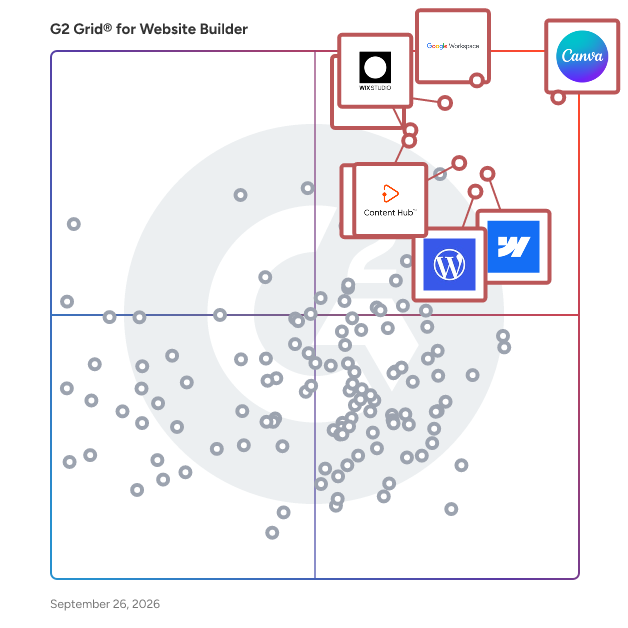
G2 Grid® for Website Builder Software

G2 Grid® for Website Builder Software plotting products by satisfaction and market presence

Highlighted products: Canva, Google Workspace, Wix, Webflow, WordPress.com, Squarespace, HighLevel, and Wix Studio.

Underlying data: [Grid® JSON](https://www.g2.com/categories/website-builder/grids.json?focus%5B%5D=canva&focus%5B%5D=google-workspace&focus%5B%5D=wix&focus%5B%5D=webflow&focus%5B%5D=wordpress-com&focus%5B%5D=squarespace&focus%5B%5D=highlevel&focus%5B%5D=wix-studio)

Canva

Canva is a visual communication platform that gives everyone a creative voice, no matter your design experience, team size, or budget. Whether you're a student making your first presentation, a marketer producing social graphics in minutes, or a global team creating on-brand content without touching a designer's inbox, Canva is where ideas become something you can actually show. Start with one of over a million professionally designed templates, or build from scratch with an AI-powered drag-and-drop editor. A library of stock images, videos, soundtracks, and fonts means you are easily equipped to create visual content at scale. Looking to work in Canva across your team? Real-time collaboration lets multiple people design simultaneously. Brand kits keep assets, colors, and fonts consistent across a one-person business or a Fortune 500 company. Canva AI helps you generate, resize, write, and edit visuals in a fraction of the time. Canva is used by more than 265 million people across 190 countries and trusted by 95% of Fortune 500 companies. Canva is available on the web, iOS and Android.

Average Rating: 4.7/5.0

Total Reviews: 6,499

How Do G2 Users Rate Canva?

  • Has the product been a good partner in doing business?: 9.4/10 (Category avg: 8.7/10)
  • Customer Support: 8.7/10 (Category avg: 8.6/10)
  • Content Management: 8.2/10 (Category avg: 8.5/10)
  • Marketing Tools: 8.6/10 (Category avg: 8.1/10)

Who Is the Company Behind Canva?

  • Seller: Canva
  • Company Website:
  • Year Founded: 2012
  • HQ Location: Sydney
  • Twitter: @canva
    339,250 Twitter followers
  • LinkedIn® Page: www.linkedin.com
    19,250 employees on LinkedIn®

Who Uses This Product?

  • Who Uses This: Owner, Marketing Manager
  • Top Industries: Marketing and Advertising, Information Technology and Services
  • Company Size: 66% Small, 23% Medium

What Do G2 Reviewers Say About Canva?

AI-generated summary from verified user reviews

Pros
  • Users appreciate the ease of use in Canva, enabling quick, intuitive designs on any device with minimal effort.
  • Users love the extensive templates in Canva, enabling quick and polished designs that suit varied needs effortlessly.
  • Users love Canva for its extensive design options, intuitive interface, and time-saving templates across devices.
  • Users love how Canva offers easy creation with intuitive templates and features, streamlining their design workflow effortlessly.
  • Users appreciate the wide variety of ready-made templates in Canva, enabling quick and easy design customization.
Cons
  • Users find Canva's limited features frustrating, especially with vector editing and costly premium options for essential tools.
  • Users find the limited options in Canva frustrating, especially for vector editing and bulk page creation.
  • Users express frustration over the missing features in Canva, impacting design capabilities and overall usability.
  • Users feel that the premium plan is expensive, especially for beginners who need essential features.
  • Users find the limited customization options in Canva restricts their creativity and flexibility in design projects.

What Are Recent G2 Reviews of Canva?

What Are G2 Users Discussing About Canva?

Google Workspace

Google Workspace is a comprehensive productivity and collaboration solution designed to help users streamline their work processes by integrating essential tools such as email, chat, file storage, and video conferencing into a unified platform. This suite of applications is tailored for businesses, educational institutions, and individuals looking to enhance their communication and collaboration efforts, all while leveraging the power of Google’s artificial intelligence. Targeted at a diverse audience, Google Workspace caters to teams of all sizes, from small startups to large enterprises. It is particularly beneficial for remote teams and organizations that prioritize collaboration across different locations. The platform supports various use cases, including project management, team communication, document sharing, and virtual meetings, making it an ideal choice for professionals who need to work together efficiently, regardless of their physical location. One of the key features of Google Workspace is its seamless integration of applications such as Gmail, Google Meet, Google Drive, and Google Docs. This interconnectedness allows users to switch effortlessly between tasks, whether they are sending emails, participating in video calls, or collaborating on documents in real-time. The AI capabilities embedded within the platform enhance user experience by providing smart suggestions, automating repetitive tasks, and improving search functionalities, ultimately saving time and increasing productivity. Additionally, Google Workspace prioritizes security and data protection, offering robust features such as two-factor authentication, advanced phishing protection, and customizable access controls. These measures ensure that sensitive information remains secure while allowing teams to collaborate freely. The platform also supports third-party integrations, enabling users to connect their favorite applications and tools, further enhancing their workflow. In summary, Google Workspace stands out in the productivity software category by providing a holistic approach to collaboration. Its user-friendly interface, combined with powerful AI-driven features and strong security protocols, makes it a valuable tool for anyone looking to improve their work processes and foster effective teamwork. Whether for managing projects, communicating with colleagues, or sharing files, Google Workspace is designed to meet the diverse needs of its users, making it an essential resource in today’s digital workplace.

Average Rating: 4.6/5.0

Total Reviews: 45,693

How Do G2 Users Rate Google Workspace?

  • Has the product been a good partner in doing business?: 9.0/10 (Category avg: 8.7/10)
  • Customer Support: 8.4/10 (Category avg: 8.6/10)
  • Content Management: 8.8/10 (Category avg: 8.5/10)
  • Marketing Tools: 8.5/10 (Category avg: 8.1/10)

Who Is the Company Behind Google Workspace?

  • Seller: Google
  • Year Founded: 1998
  • HQ Location: Mountain View, CA
  • Twitter: @google
    31,899,995 Twitter followers
  • LinkedIn® Page: www.linkedin.com
    301,144 employees on LinkedIn®
  • Ownership: NASDAQ:GOOG

Who Uses This Product?

  • Who Uses This: Student, Teacher
  • Top Industries: Information Technology and Services, Education Management
  • Company Size: 46% Small, 35% Medium

What Do G2 Reviewers Say About Google Workspace?

AI-generated summary from verified user reviews

Pros
  • Users appreciate the ease of use in Google Workspace, facilitating smooth and efficient workflow management.
  • Users love the seamless team collaboration in Google Workspace, enhancing communication and boosting productivity effortlessly.
  • Users love the seamless integrations in Google Workspace, enhancing efficiency with easy access to tools and scheduling.
  • Users praise the ease of use and integration in Google Workspace, enhancing productivity and collaboration seamlessly.
  • Users appreciate the seamless Google integration of Workspace, enhancing collaboration and efficiency across all tools.
Cons
  • Users face missing features in Google Workspace, such as limited offline capabilities and restrictions on accessing certain functionalities.
  • Users find the limited features of Google Workspace unnecessary for smaller teams, lacking essential tools for their needs.
  • Users find Google Workspace lacking features compared to other platforms, impacting effective campaign management and data handling.
  • Users find internet dependency challenging, as offline functionality is limited and issues with quality can arise.
  • Users find limited customization options in Google Workspace, particularly for calendars and forms, restricting flexibility and creativity.

What Are Recent G2 Reviews of Google Workspace?

What Are G2 Users Discussing About Google Workspace?

Wix

Wix is a website builder that lets any business or individual build their own professional website. By combining design tools and business solutions in one AI-powered platform, Wix makes it easy for anyone to create without limits and scale confidently online. Whether it’s a personal portfolio, blog, service business or eCommerce store, Wix has a solution for you. You can get started by vibe coding a website with Wix Harmony, or choosing a designer-made template for something more structured. Either way, your site can then be easily customized with a smart drag and drop editor. Every site includes multi-cloud hosting, lightning-fast web performance and enterprise grade security. Wix goes beyond basic website creation with built-in tools and AI features to support your full online journey. You can generate content using AI in the same brand voice across your entire site, as well as images, SEO tags, marketing materials and much more. You can also use Wix to search for and register a custom domain with access to 400+ TLD options, set up a professional business email and use advanced branding features. Wix also has website analytics and a mobile app, so you can monitor and manage your site from anywhere. No matter your website or business, Wix combines everything you need into one intuitive platform used by millions worldwide. What are the main features of Wix? • AI website builder that can create a site for any industry • Smart drag and drop editor to intuitively edit your site • Professionally designed website templates • Ability to search for and register a custom domain • Multi-cloud web hosting with fast performance and built-in security • Advanced marketing tools including SEO and LLM optimization • eCommerce solutions equipped with multi-channel sales • Online scheduling software for service-based businesses • Blogging and portfolio capabilities to grow and monetize your audience • Full-stack web dev tools for advanced customization

Average Rating: 4.2/5.0

Total Reviews: 1,824

How Do G2 Users Rate Wix?

  • Has the product been a good partner in doing business?: 8.4/10 (Category avg: 8.7/10)
  • Customer Support: 8.3/10 (Category avg: 8.6/10)
  • Content Management: 8.4/10 (Category avg: 8.5/10)
  • Marketing Tools: 7.8/10 (Category avg: 8.1/10)

Who Is the Company Behind Wix?

  • Seller: Wix
  • Company Website:
  • Year Founded: 2006
  • HQ Location: Tel Aviv
  • Twitter: @Wix
    391,474 Twitter followers
  • LinkedIn® Page: www.linkedin.com
    7,103 employees on LinkedIn®

Who Uses This Product?

  • Who Uses This: Owner, Marketing Manager
  • Top Industries: Marketing and Advertising, Computer Software
  • Company Size: 79% Small, 15% Medium

What Do G2 Reviewers Say About Wix?

AI-generated summary from verified user reviews

Pros
  • Users love the ease of use of Wix, enabling effortless website creation with a wealth of templates and features.
  • Users love the easy creation process with Wix, leveraging its intuitive drag-and-drop functionality and extensive templates.
  • Users love the wide variety of customizable templates offered by Wix, allowing for unique and personalized website designs.
  • Users enjoy the no coding flexibility of Wix, enabling easy website creation with diverse templates and integrations.
  • Users appreciate the simplicity and user-friendliness of Wix, making website creation easy for beginners with impressive features.
Cons
  • Users find limited customization options in Wix, suggesting better alternatives for advanced design and functionality.
  • Users find Wix to be expensive with hidden charges and costly premium features affecting overall value.
  • Users find pricing issues with Wix, citing high costs and limited currency support for diverse needs.
  • Users find limited features in Wix, especially with its fewer plugins and restricted customization options.
  • Users find the limited templates restricting as switching can result in lost content and rebuilding efforts.

What Are Recent G2 Reviews of Wix?

What Are G2 Users Discussing About Wix?

HubSpot Content Hub

Content Hub provides tools to create, manage, and personalize content across the entire customer journey, addressing the modern challenge of producing high-volume, multi-channel, personalized content at scale. Core Value Proposition: Content Hub addresses three critical content challenges: creating sufficient content volume to support multi-channel strategies, managing content assets and permissions across distributed teams, and personalizing content at scale. The role of content has evolved beyond just a lead generation tool– marketers need to create more content than ever before, distribute it across more channels at more points in the customer journey, and make it highly personal to the buyer. Key Capabilities: Content Creation Tools: Content Hub provides website page builders, blog editors, landing page creators, and asset management systems within a unified platform, enabling content production without switching between multiple tools. Multi-Channel Distribution: The platform enables content publishing across websites, blogs, landing pages, and email from a single content library with consistent brand management and asset reuse. Personalization at Scale: Content Hub includes dynamic content functionality that adapts page elements, messaging, and calls-to-action based on visitor attributes, behavior, and customer journey stage. This enables personalization without creating separate page versions for each audience segment. Content Management: The platform provides tools that help marketing teams coordinate content production, maintain quality standards, and measure effectiveness. Content Hub vs. Alternatives: Unlike standalone content management systems lacking marketing context, Content Hub operates on the HubSpot CRM platform, enabling content personalization based on customer data. This connection between content and customer data enables relevant experiences traditional CMS platforms cannot deliver. Content Hub eliminates the need to purchase and integrate separate tools for website management, landing pages, blog hosting, and asset storage by providing these capabilities within the HubSpot ecosystem. Who Should Use Content Hub: Content Hub serves marketing teams producing content across multiple channels and journey stages, content managers coordinating distributed content production, and organizations requiring content personalization based on customer behavior. The platform scales content operations from small marketing teams to enterprise content organizations. Outcome: With Content Hub, marketers get everything they need to create and manage personalized content experiences across the customer journey at scale, shifting from reactive content production to strategic content programs.

Average Rating: 4.5/5.0

Total Reviews: 1,989

How Do G2 Users Rate HubSpot Content Hub?

  • Has the product been a good partner in doing business?: 8.9/10 (Category avg: 8.7/10)
  • Customer Support: 8.7/10 (Category avg: 8.6/10)
  • Content Management: 8.9/10 (Category avg: 8.5/10)
  • Marketing Tools: 8.8/10 (Category avg: 8.1/10)

Who Is the Company Behind HubSpot Content Hub?

  • Seller: HubSpot
  • Company Website:
  • Year Founded: 2006
  • HQ Location: Cambridge, Massachusetts, United States
  • Twitter: @HubSpot
    784,270 Twitter followers
  • LinkedIn® Page: www.linkedin.com
    17,628 employees on LinkedIn®

Who Uses This Product?

  • Who Uses This: Marketing Manager, Digital Marketing Manager
  • Top Industries: Marketing and Advertising, Computer Software
  • Company Size: 53% Small, 40% Medium

What Do G2 Reviewers Say About HubSpot Content Hub?

AI-generated summary from verified user reviews

Pros
  • Users appreciate the ease of use in HubSpot Content Hub, allowing for seamless website creation and management.
  • Users appreciate the intuitive content management of HubSpot Content Hub, enabling easy creation, organization, and optimization within one ecosystem.
  • Users love the user-friendly interface and AI-assisted features that enhance efficiency and streamline workflows.
  • Users praise the easy creation features of HubSpot Content Hub, facilitating seamless collaboration and accelerating content production.
  • Users appreciate the intuitive design of HubSpot Content Hub, allowing for quick and easy learning and usage.
Cons
  • Users face limited customization options in HubSpot, often requiring developer assistance for advanced design needs.
  • Users find a challenging learning curve with HubSpot Content Hub due to overwhelming tools and limited customization options.
  • Users find HubSpot Content Hub to be expensive, especially for smaller businesses not using all its features.
  • Users experience limited customization options with HubSpot, often requiring developer assistance for advanced designs.
  • Users find the interface confusing, struggling with categorization and losing filters when navigating through different hubs.

What Are Recent G2 Reviews of HubSpot Content Hub?

What Are G2 Users Discussing About HubSpot Content Hub?

HighLevel

HighLevel is an all-in-one Sales & Marketing CRM currently powering hundreds of thousands of businesses worldwide. Functionality includes CRM, Email, 2-way SMS, Consolidated SMS/Messenger/Instagram DM/Whatsapp/GMB Chat, Outbound Calling, Call Tracking, Call Recording, Power Dialer, Form Builder, Survey Builder, Funnel Builder, Website Builder, Online Scheduling, Workflow Automation, Social Media Scheduling, Proposals, Estimates, Invoicing, Reporting, Webhooks, and more! Flat pricing, unlimited sub-accounts for agencies managing clients that can be cloned to speed up setups, and even white-label! Start with a 14 day free trial!

Average Rating: 4.6/5.0

Total Reviews: 636

How Do G2 Users Rate HighLevel?

  • Has the product been a good partner in doing business?: 8.5/10 (Category avg: 8.7/10)
  • Customer Support: 8.3/10 (Category avg: 8.6/10)
  • Content Management: 8.8/10 (Category avg: 8.5/10)
  • Marketing Tools: 9.5/10 (Category avg: 8.1/10)

Who Is the Company Behind HighLevel?

  • Seller: HighLevel
  • Company Website:
  • Year Founded: 2018
  • HQ Location: Dallas, Texas
  • Twitter: @gohighlevel
    8,862 Twitter followers
  • LinkedIn® Page: www.linkedin.com
    2,569 employees on LinkedIn®

Who Uses This Product?

  • Who Uses This: Owner, CEO
  • Top Industries: Marketing and Advertising, Consulting
  • Company Size: 64% Small, 3% Medium

What Do G2 Reviewers Say About HighLevel?

AI-generated summary from verified user reviews

Pros
  • Users enjoy the flexibility and comprehensive features of HighLevel, finding it easy to set up and integrate.
  • Users appreciate the all-in-one functionality of HighLevel, enhancing efficiency in marketing, sales, and client management.
  • Users praise the excellent customer support of HighLevel, appreciating their responsiveness and active feature requests.
  • Users value the extensive feature set of Go HighLevel, appreciating its depth and constant innovation in marketing tools.
  • Users value the intuitive automation setup in HighLevel, enhancing their workflow and client management effectively.
Cons
  • Users find the steep learning curve of HighLevel challenging, complicating their ability to leverage its extensive features.
  • Users desire more missing features in HighLevel, impacting functionality like email marketing and live streaming capabilities.
  • Users face a steep learning curve with HighLevel, requiring significant effort to master its numerous features and updates.
  • Users find HighLevel to be not intuitive, often feeling overwhelmed by its complexity and learning curve.
  • Users express concern over poor customer support, finding the team uninformed and responses often vague.

What Are Recent G2 Reviews of HighLevel?

What Are G2 Users Discussing About HighLevel?

Duda

Duda is the leading website development platform empowering digital marketing agencies and SaaS companies to build and manage their customers' digital presence. Duda’s award-winning low-code no-code platform enables agencies and SaaS companies to reach higher productivity and unprecedented growth with an extensive range of capabilities spanning ecommerce, client management, SEO, automation, and white labeling.

Average Rating: 4.6/5.0

Total Reviews: 748

How Do G2 Users Rate Duda?

  • Has the product been a good partner in doing business?: 9.3/10 (Category avg: 8.7/10)
  • Customer Support: 9.4/10 (Category avg: 8.6/10)
  • Content Management: 8.7/10 (Category avg: 8.5/10)
  • Marketing Tools: 7.7/10 (Category avg: 8.1/10)

Who Is the Company Behind Duda?

  • Seller: Duda
  • Company Website:
  • Year Founded: 2009
  • HQ Location: Palo Alto, CA
  • Twitter: @DudaPlatform
    13,995 Twitter followers
  • LinkedIn® Page: www.linkedin.com
    464 employees on LinkedIn®

Who Uses This Product?

  • Who Uses This: Owner, CEO
  • Top Industries: Marketing and Advertising, Design
  • Company Size: 87% Small, 10% Medium

What Do G2 Reviewers Say About Duda?

AI-generated summary from verified user reviews

Pros
  • Users love the ease of use of Duda, highlighting its intuitive design and excellent customer support.
  • Users commend Duda for its outstanding customer support, which enhances their agency experience and streamlines service delivery.
  • Users appreciate the easy creation process in Duda, enabling seamless website building and client management for agencies.
  • Users appreciate Duda's strong support for agencies, ease of use, and reliable customer service, enhancing overall efficiency.
  • Users love Duda's intuitive design, praising its ease of use and powerful connectivity tools for web development.
Cons
  • Users find the limited customization options of Duda restrictive, impacting design flexibility and user experience.
  • Users find Duda’s limited features restricts design flexibility and doesn’t meet modern expectations for individual use.
  • Users find the missing features on Duda limit design flexibility and advanced customization options compared to competitors.
  • Users feel a lack of customization in Duda, finding design flexibility limited and features outdated for individual use.
  • Users find the learning curve steep, particularly if transitioning from other website builders like WordPress.

What Are Recent G2 Reviews of Duda?

What Are G2 Users Discussing About Duda?

GoDaddy Website Builder

GoDaddy Website Builder is an online editing and publishing tool that helps you create a website, regardless of your technical skill level. Just create an account, pick a design and use the built-in editor to add your own images and text. You can make your website as simple or complex as you’d like. You can even add a full online store complete with product listings, coupons, shopping cart, shipping and multiple payment options. GoDaddy Website Builder can act as your hub, the place where your friends and contacts can see your posts, photos, videos and more. With the option to link to your Facebook, Twitter, Instagram, Pinterest, LinkedIn and YouTube on your website, your visitors can be everywhere you are on the web. Being able to cover multiple platforms gives you the opportunity to reach more people, while creating appropriate content for each of your socials (like posting all of your photos on Instagram, and tweeting about your most recent business venture on Twitter). By centrally locating all the links in one place – your new website – you are giving your website visitors a seamless experience. Linking to your social media in your website gives you an advantage in communicating with your visitors; the more they can connect with you and do so in the forum that’s most comfortable to them, the more they’ll engage with your site, and thus you or your business.

Average Rating: 4.1/5.0

Total Reviews: 182

How Do G2 Users Rate GoDaddy Website Builder?

  • Has the product been a good partner in doing business?: 8.3/10 (Category avg: 8.7/10)
  • Customer Support: 8.6/10 (Category avg: 8.6/10)
  • Content Management: 8.4/10 (Category avg: 8.5/10)
  • Marketing Tools: 8.0/10 (Category avg: 8.1/10)

Who Is the Company Behind GoDaddy Website Builder?

  • Seller: GoDaddy
  • Year Founded: 1997
  • HQ Location: Scottsdale, AZ
  • Twitter: @GoDaddy
    274,844 Twitter followers
  • LinkedIn® Page: www.linkedin.com
    9,052 employees on LinkedIn®
  • Ownership: NYSE:GDDY

Who Uses This Product?

  • Who Uses This: Owner
  • Top Industries: Information Technology and Services, Marketing and Advertising
  • Company Size: 83% Small, 14% Medium

What Do G2 Reviewers Say About GoDaddy Website Builder?

AI-generated summary from verified user reviews

Pros
  • Customers value the professionalism of GoDaddy's support team, enhancing their website building experience significantly.
  • Users enjoy the easy creation process of GoDaddy Website Builder, enabling anyone to build a professional website effortlessly.
  • Users commend the knowledgeable and helpful customer service, which greatly supports their business growth and needs.
  • Users love the drag and drop features of GoDaddy Website Builder, making website creation effortless for everyone.
  • Users praise the drag-and-drop functionality for simplifying website creation, making it accessible to everyone.
Cons
  • Users find the high costs and unclear subscriptions of GoDaddy Website Builder frustrating and overwhelming during management.
  • Users find the limited customization options of GoDaddy Website Builder restrictive for more advanced website needs.
  • Users find GoDaddy Website Builder not user-friendly, with confusing upgrades and persistent ads interrupting their workflow.
  • Users struggle with a steep learning curve, finding upgrades and subscriptions confusing and intrusive with constant prompts.

What Are Recent G2 Reviews of GoDaddy Website Builder?

What Are G2 Users Discussing About GoDaddy Website Builder?

FlexiFunnels

FlexiFunnels: Conversion Optimized *AI Funnel Builder* FlexiFunnels is an AI-powered business growth platform. From creating world-class landing pages in seconds to handling your marketing and lead generation, FlexiFunnels brings everything under one roof. --- ## Main Features of FlexiFunnels 1.) **AI Website & Funnel Builder** – Type just one line, and Flexi AI instantly creates professional landing pages with proven direct-response sales copy. You can then customize them with our easy drag-and-drop editor. 2.) **AI Marketing Agents** – Get your entire marketing and copywriting tasks done, from ad copy to webinar pages, sales pages, emails, hooks, video ad scripts, and more. 3.) **FlexiViral – Viral Referral Lead Generation System** – Launch viral campaigns where your customers bring in more leads for you. 4.) Drag & Drop Landing Page Builder 5.) Super Fast Hosting & Accelerated Page Delivery 6.) Integrated Payment Gateway Integrations 7.) Converting Checkout Pages 8.) Bump Offers 9.) Advanced Funnel Logics 10.) Host & Sell Courses Inside FlexiFunnels 11.) Piracy Protected Courses (Paid Courses) 12.) Autoresponder & Webinar Integrations 13.) Automated Split Testing 14.) Source Tracking of Buyers & Leads 15.) Proof Notifications for Leads & Sales 16.) Facebook Conversion API 17.) Cart Abandon Automated Email Sequence 18.) Cart Abandon Data Transfer 19.) Webhook for Leads & Sales Data Transfer 20.) Advanced Membership Features – Certificates, Quiz, Drip Feed, Notes, Discussions, etc. 21.) AI Based High Converting Sales Copy 22.) 700+ Done For You Funnels & Pages 23.) Fully Mobile Responsive Pages 24.) Digital Assets – Automated delivery of products like eBooks, PDFs, etc. 25.) Domain Mapping (Subdomain or Main Domain) 26.) Advanced Analytics of Page Conversions 27.) Detailed Reporting Dashboard – Project, Product, Funnel & Lead Report …and much more. --- ## Huge Benefits of FlexiFunnels: ✅ Launch Fast with AI – Start your online business in hours, not weeks. ✅ All-in-One Dashboard – Funnels, websites, courses, payments, email integrations, AI tools, and analytics in one place. ✅ Save Time & Money – No need for 10+ tools or expensive coders. FlexiFunnels covers it all. ✅ Affordable Pricing – Get full access for just $447/year. ✅ Outstanding Support – 3-Minute Live Chat Support, 6 One-on-One Onboarding Calls, weekly Q

A, and detailed tutorials, knowledgebase. ✅ Community & Training – Join 100,000+ members in our active community. Plus, access in-depth courses on ads, funnels, copywriting, freelancing, course creation, and more. ✅ Client Income Opportunity – Use FlexiFunnels to sell your products or offer funnel/website building services to clients. ✅ Risk-Free Guarantee – 30-Day money-back, no questions asked. ⚡ In short: FlexiFunnels is your **AI Funnel Builder + Complete Online Business System**, designed to save you time, increase conversions, and grow your income.

Average Rating: 4.7/5.0

Total Reviews: 239

How Do G2 Users Rate FlexiFunnels?

  • Has the product been a good partner in doing business?: 9.4/10 (Category avg: 8.7/10)
  • Customer Support: 9.7/10 (Category avg: 8.6/10)
  • Content Management: 8.9/10 (Category avg: 8.5/10)
  • Marketing Tools: 9.3/10 (Category avg: 8.1/10)

Who Is the Company Behind FlexiFunnels?

Who Uses This Product?

  • Who Uses This: Founder, Freelancer
  • Top Industries: Marketing and Advertising, Professional Training & Coaching
  • Company Size: 79% Small, 0% Large

What Do G2 Reviewers Say About FlexiFunnels?

AI-generated summary from verified user reviews

Pros
  • Users praise the ease of use of FlexiFunnels, highlighting its intuitive drag-and-drop features for quick setup.
  • Users appreciate the responsive customer support from FlexiFunnels, enabling quick problem resolution and ease of use.
  • Users appreciate the easy creation of websites with FlexiFunnels, enabling quick builds even for non-IT professionals.
  • Users love the easy setup of FlexiFunnels, appreciating its user-friendly interface and supportive resources for smooth implementation.
  • Users love the intuitive interface and powerful features of FlexiFunnels, simplifying sales page creation for everyone.
Cons
  • Users find the learning curve steep, wishing for better onboarding and support to navigate features effectively.
  • Users feel that FlexiFunnels has missing features, such as improved domain integration and modern design templates.
  • Users experience poor customer support, facing delays and difficulties getting guidance and resolving issues, including cancellations.
  • Users are frustrated by the lack of integration options and limitations on domain hosting with FlexiFunnels.
  • Users find the limited integrations in FlexiFunnels challenging, affecting their ability to streamline their processes effectively.

What Are Recent G2 Reviews of FlexiFunnels?

CRMOne

The lack of a centralised CRM system can result in data disorganisation, ineffective communication, missed sales opportunities and limited customer insights. Many small to mid sized companies struggle with managing customer relationships without paying the hefty price of different essential features, or multiple subscriptions. However, it doesn’t have to be that way. With CRMOne, businesses can empower themselves with one seamless solution that can manage their customer relationships all in one place without compromising any features that they may need for sales and marketing without breaking the bank. From lead management and sales pipeline tracking to customer support and analytics, CRMOne offers a versatile toolkit to meet the diverse needs of businesses across various industries. CRMOne has a rich history of empowering over 4000 startups, growing businesses, and enterprises worldwide, showcasing a commitment to excellence and innovation.

Average Rating: 4.8/5.0

Total Reviews: 1,044

How Do G2 Users Rate CRMOne?

  • Has the product been a good partner in doing business?: 9.6/10 (Category avg: 8.7/10)

Who Is the Company Behind CRMOne?

  • Seller: CrmOne
  • Year Founded: 2022
  • HQ Location: Menlo Park, US
  • Twitter: @crmone_global
    10 Twitter followers
  • LinkedIn® Page: www.linkedin.com
    21 employees on LinkedIn®

Who Uses This Product?

  • Top Industries: Marketing and Advertising, Financial Services
  • Company Size: 32% Small, 24% Medium

What Do G2 Reviewers Say About CRMOne?

AI-generated summary from verified user reviews

Pros
  • Users value the effective lead management in CRMOne, enhancing collaboration and ensuring streamlined communication across teams.
  • Users value the effective customer management of CrmOne, enhancing collaboration and response times for better support.
  • Users appreciate the ease of use of CRMOne, enjoying quick access and navigation across all devices.
  • Users commend the fast and effective customer support provided by CRMOne, enhancing overall service quality and engagement.
  • Users benefit from automated reminders and streamlined workflows, enhancing efficiency and improving response times significantly.
Cons
  • Users feel there is limited customization for advanced needs, hindering the system’s ability to meet specific requirements.
  • Users find the learning curve challenging, especially when trying to navigate the system as newcomers.
  • Users face a steep learning curve with CRMOne due to complex onboarding and insufficient beginner-friendly tutorials.
  • Users find the limited features of CRMOne make attaching files and using the mobile version challenging.
  • Users find CRMOne lacks advanced features for productivity tracking and complex task automation, limiting its effectiveness.

What Are Recent G2 Reviews of CRMOne?

Framer

Framer is the AI design agent and AI website builder for every step from idea to a live site. Designers, marketers, agencies, and site teams use it to design on a visual canvas, generate and refine pages with agents, manage content in a built-in CMS, and publish to a custom domain. Ask agents to restyle a page, rewrite copy, build new sections from a prompt or a reference, make layouts responsive, migrate a site from WordPress or Webflow, and run SEO and accessibility checks. Connect Claude, Cursor, or Codex so work can start from the tools you already use. Framer is for teams that want professional design control and AI-assisted publishing in one workspace.

Average Rating: 4.5/5.0

Total Reviews: 145

How Do G2 Users Rate Framer?

  • Has the product been a good partner in doing business?: 9.0/10 (Category avg: 8.7/10)
  • Customer Support: 7.7/10 (Category avg: 8.6/10)
  • Content Management: 7.9/10 (Category avg: 8.5/10)
  • Marketing Tools: 7.1/10 (Category avg: 8.1/10)

Who Is the Company Behind Framer?

  • Seller: Framer
  • Company Website:
  • HQ Location: Amsterdam, NL
  • Twitter: @framer
    199,152 Twitter followers
  • LinkedIn® Page: www.linkedin.com
    759 employees on LinkedIn®

Who Uses This Product?

  • Who Uses This: Product Designer, Founder
  • Top Industries: Design, Computer Software
  • Company Size: 69% Small, 21% Medium

What Do G2 Reviewers Say About Framer?

AI-generated summary from verified user reviews

Pros
  • Users appreciate the ease of use of Framer, finding it intuitive for both design and development tasks.
  • Users praise Framer for its fast and responsive customer support, enhancing their overall workflow experience significantly.
  • Users praise Framer for its speed and seamless design integration, greatly enhancing workflow and collaboration.
  • Users value the exceptional speed of Framer, enabling rapid launches and seamless collaboration for design and content updates.
  • Users love the intuitive design interface of Framer, making development and customization seamless and enjoyable.
Cons
  • Users find the lack of essential CMS features in Framer limits its functionality and usability for complex projects.
  • Users find Framer's pricing high, especially for personal and multilingual projects, which can hinder experimentation.
  • Users find that pricing issues can hinder experimentation and increase costs, especially for personal or multilingual projects.
  • Users note the limited options for flexibility and multilingual support in Framer, impacting their overall experience.
  • Users often experience slow loading times with Framer, leading to frustration during their design workflow.

What Are Recent G2 Reviews of Framer?

What Are G2 Users Discussing About Framer?

Square Online (formerly Weebly)

Weebly is now a part of the Square product suite. This means never missing a sale and letting your customers pay how they want to. Whether it's at a pop-up shop or your own online store, Square takes care of your payments for you, so you can focus on your business.

Average Rating: 4.2/5.0

Total Reviews: 475

How Do G2 Users Rate Square Online (formerly Weebly)?

  • Has the product been a good partner in doing business?: 8.3/10 (Category avg: 8.7/10)
  • Customer Support: 6.3/10 (Category avg: 8.6/10)
  • Content Management: 8.2/10 (Category avg: 8.5/10)
  • Marketing Tools: 7.1/10 (Category avg: 8.1/10)

Who Is the Company Behind Square Online (formerly Weebly)?

  • Seller: Block
  • Year Founded: 2009
  • HQ Location: Oakland, California
  • Twitter: @Square
    309,691 Twitter followers
  • LinkedIn® Page: www.linkedin.com
    11,860 employees on LinkedIn®
  • Ownership: NYSE:SQ

Who Uses This Product?

  • Who Uses This: Owner, President
  • Top Industries: Marketing and Advertising, Information Technology and Services
  • Company Size: 75% Small, 16% Medium

What Do G2 Reviewers Say About Square Online (formerly Weebly)?

AI-generated summary from verified user reviews

Pros
  • Users appreciate the ease of use when building websites with Square Online, enjoying its straightforward navigation and organization.
  • Users love the all-in-one platform of Square Online, appreciating its seamless integration and smooth functionality.
  • Users value the seamless payment integration with Square, enhancing their website design and overall functionality.
  • Users appreciate the responsive and helpful customer support of Square Online, enhancing their overall experience with the platform.
  • Users appreciate the easy customization of Square Online, enabling quick site creation through an intuitive interface.
Cons
  • Users find the limited customization options challenging, especially for optimizing search engine competition effectively.
  • Users find the missing features in Square Online limit customization and hinder effective SEO optimization.
  • Users face competition issues due to limited customization and basic SEO tools impacting search engine optimization efforts.
  • Users find the customer support complexity frustrating, as it's unclear who to contact for issues between Weebly and Square.
  • Users find the separate customer support for Weebly and Square Online confusing, complicating their assistance experience.

What Are Recent G2 Reviews of Square Online (formerly Weebly)?

Elementor

THE #1 NO CODE DRAG & DROP WORDPRESS WEBSITE BUILDER POWERING 22M+ WEBSITES WORLDWIDE, NOW WITH AI. Elementor, the leading WordPress website creation platform, empowers you to build professional, pixel-perfect websites seamlessly with its no-code, drag-and-drop Atomic Editor. Supporting the full website lifecycle, Elementor enables you to confidently build, optimize, and manage your website with extended capabilities such as AI-powered creation, image optimization, transactional email delivery, accessibility tools, performance boosters, and more. Now in version 4 – the Atomic Editor! Introducing a new generation of performance-first atomic building blocks that allow you to control every atomic part with no limits or locked layouts. Define your global design systems and reusable components once, and they apply everywhere instantly – turning hours or even days of work into single clicks. Unlock all features with Elementor One. Need fast and secure cloud hosting for your Elementor site? Try out Elementor Host Powered by Google Cloud & Cloudflare. 4.9/5 TrustPilot score. 🌟 Create Professional Stunning Websites Intuitive Drag & Drop Builder: Build any website with our no-code, drag-and-drop Editor. Achieve design precision with full control over layout and style. Pixel-Perfect Design Tools: Upload SVGs, apply masks, gradients, box shadows, headline effects, shape dividers, and use built-in CSS controls for advanced customization. Template Library: Apply complete website kits for instant setups, or choose from a vast library of single pages, blocks, and pop-up templates. Advanced Widgets: Access over 40 FREE widgets, including heading, image, text editor, video, button, gallery, carousels, and more. AI Capabilities: Revolutionize your design and content creation process with native AI integration. Instantly create sections, text, code, and images. 🗝️ Key features: Design System: Use Variables and Classes for consistent colors, typography, and design elements, ensuring a cohesive, professional look that updates everywhere globally. Responsive Design: Optimize your design for every device with custom breakpoints, ensuring a seamless desktop, tablet, and mobile experience. Mask Shapes: Turning any element, like an image or video, into whatever shape you desire to create standout designs. CSS Transform: Use CSS Transform to rotate, scale, and skew elements, adding dynamic styling to your site. Entrance Animations: Add entrance animations to elements to create engaging and interactive user experiences. Revision History: Elementor’s Revision History feature enables users to track and revert to previous versions of their designs, providing peace of mind and flexibility during the creative process. Developer-Friendly: Equipped with extensive documentation, API, developer tools, and custom code areas, Elementor offers a conducive environment for developers to extend its capabilities and create custom solutions. Floating Buttons: Enhance user interaction with customizable, floating action buttons that stay in view as users scroll. Components [Pro]: Reuse the same building blocks across pages and sites, and update them everywhere they appear. Including controlled content editing, allowing collaborators and clients to update only exposed content properties without breaking layout or styling. Theme Builder [Pro]: Design every part of your site—headers, footers, posts, and archives—for complete control over appearance. Popup Builder [Pro]: Create eye-catching popups with Elementor’s Popup Builder, equipped with advanced targeting and triggering options to optimize user engagement and conversions. Forms [Pro]: Design and integrate custom forms, utilizing advanced features and integrations to capture and manage submissions effectively. WooCommerce Builder [Pro]: Integrate Elementor with WooCommerce to design custom product pages, shop layouts, archives, carts, checkout pages, my account, and more, enhancing your store’s visual appeal and functionality. Dynamic Content [Pro]: Leverage dynamic content capabilities to create personalized and interactive web experiences by connecting your designs to various data sources. Notes [Pro]: Enhance team collaboration by using Elementor’s Notes feature to leave feedback and comments directly on the design interface. Custom Code [Pro]: Insert custom code to extend the functionality of your site, offering flexibility for advanced customizations. Custom CSS [Pro]: Apply Custom CSS to fine-tune the styling of elements, ensuring precise control over the design aspects. Motion Effects [Pro]: Add advanced motion effects to elements for a more dynamic and engaging user experience. Custom Fonts & Icons [Pro]: Upload and use custom fonts and icons to match your brand’s identity. 😍 Elementor FREE widgets Unlock the potential of Elementor with our comprehensive suite of free widgets and tools, designed to empower your website creation process and elevate your design capabilities: Heading. Add eye-catching headlines. Image. Control the size, opacity and more. Text Editor. Just like the WordPress text editor. Video. Add YouTube, Vimeo, VideoPress, Dailymotion or self-hosted videos. Button. Create interactive buttons. Link in Bio. Build link in bio components to promote your business / services. Image Box. A box with image, headline and text. Testimonials. Customer testimonials. Icon. Place one or more of 600+ icons available. Icon Box. An icon, headline, and text with one widget. Social Icons. Link to your social pages with the Facebook/X (formerly Twitter) icons. Image Gallery. Display your images in a grid. Image Carousel. Create rotating carousels or sliders for chosen images. Icon List. Use any icon to create a bullet list. Counter. Show numbers in an escalating manner. Progress Bar. Include an escalating progress bar. Nested Tabs. Display content in vertical or horizontal tabs. Nested Accordion. Display any type of content in collapsible sections. Rating. Display how many stars (or another icon) other visitors gave. Alert. Include a colored alert box to draw visitor’s attention. HTML. Insert code into the page. Shortcode. Insert shortcodes from any plugin into the page. Menu Anchor. Link any menu to this anchor. Read More. Set the Read More cut-off for the excerpt in archive pages. Sidebar. Add sidebars onto the page. Google Maps. Embed maps into the page. SoundCloud. Add SoundCloud audio bits. Divider. Separate content with a designed divider. Spacer. Add space between elements. Text Path. Attach your text to a path. And counting… 🚀 Enhance Your Website Website performance impacts your visitor’s experience and search result ranking. Elementor, in partnership with Google Chrome, continuously enhances performance without compromising design. Key features include: - Reduced DOM Output: Streamlined HTML structure for faster rendering. Improved Media File Loading: Optimized loading of images, videos, and other media assets. - Reduced CSS and JS Files: Minimized stylesheets and scripts individually loaded only on demand for quicker loading times. - Lazy Loading: Deferred loading of non-critical resources to improve initial page load speed. - Faster Font Loading: Efficient delivery of web fonts to enhance text rendering speed. - Optimized Front-End Asset Loading: Efficient loading of assets like JavaScript and CSS to minimize render-blocking. - Element Caching: Cache frequently accessed design elements to reduce server response time and enhance overall performance. 🔥 Elementor Editor Pro Features Create unparalleled websites while saving time, money and resources with Elementor Editor Pro’s full website builder. Get access to 100+ professional widgets, features, and tools. Editor Pro Design Widgets: - Posts: Display your blog posts with customizable layouts and styles. - Share Buttons: Allow visitors to easily share your content on various social media platforms. - Portfolio: Showcase your work or projects with stunning portfolio layouts. - Slides: Create dynamic slideshows with custom animations and transitions. - Form: Design and customize advanced forms for user interaction and data collection. - Login: Add a login form or user registration module to your website. - Nav Menu: Customize and style your website’s navigation menu for better user experience. - Animated Headline: Create attention-grabbing headlines with animated effects. - Price Table: Display pricing plans or packages in a structured and visually appealing format. - Price List: Showcase a list of prices or services with customizable styling options. - Gallery: Create beautiful image galleries with various layout options and lightbox support. - Flip Box: Add interactive flip animations to highlight content or features. - Call to Action: Encourage user interaction and conversions with compelling call-to-action sections. - Media Carousel: Showcase a carousel of media files such as images or videos. - Testimonial Carousel: Display client testimonials in a carousel format for social proof. - Nested Carousel: Create nested carousels for more complex content organization. - Loop Carousel: Display content in a looped carousel for continuous viewing. - Table Of Content: Generate a table of contents for longer articles or guides to improve navigation. - Countdown: Add countdown timers to create urgency for promotions or events. - Facebook Page: Embed your Facebook page feed or content onto your website. - Blockquote: Highlight quotes or testimonials with stylish formatting options. - Template: Save and reuse design templates for consistent branding and layout. - Reviews: Showcase customer reviews and ratings to build trust and credibility. - Facebook Button: Add buttons to promote interactions with your Facebook page or content. - Facebook Embed: Embed Facebook posts or content onto your website. - Facebook Comments: Enable Facebook comments on your website’s pages or posts. - PayPal Button: Integrate PayPal buttons for easy online payments. - Stripe Button: Integrate Stripe payment buttons to facilitate secure online transactions. - Lottie Widget: Add Lottie animations to enhance visual appeal and engagement. - Code Highlight: Display code snippets with syntax highlighting for better readability. - Video Playlist: Create and customize playlists for video content on your website. - Mega Menu: Customize advanced menus for better navigation and displaying complex content. - Off Canvas: Create off-canvas areas that slide in to show extra info or menus without cluttering the main layout. Editor Pro Theme Widgets: Build and customize all the key parts of your website including headers, footers, 404 page, global archives, and more… - Post Title: Customize the title of individual blog posts or pages. - Post Excerpt: Display a brief summary or teaser of your blog posts. - Post Content: Customize the main content area of your blog posts or pages. - Featured Image: Set and customize featured images for blog posts or pages. - Author Box: Display author information and bios on blog posts. - Post Comments: Customize the appearance and functionality of comments sections on your website. - Post Navigation: Add navigation links to adjacent posts for easy browsing. - Post Info: Display additional information about blog posts, such as author and date. - Site Logo: Upload and customize your website’s logo for branding purposes. - Site Title: Customize the title of your website. - Page Title: Customize the title of individual pages. - Search Bar: Add a search bar to allow users to search your website’s content. - Breadcrumbs: Display hierarchical navigation paths for better user navigation. - Sitemap: Generate a sitemap for better search engine indexing and user navigation. - Loop Grid: Design and customize grid layouts for blog post archives or product listings. Editor Pro WooCommerce Widgets: Design and customize a complete online shopping experience across your entire website. - Product: Display individual products with customizable layouts and styles. - Breadcrumbs: Display hierarchical navigation paths for better user navigation within your store. - Product Title: Customize the title of individual products. - Product Images: Set and customize images for product listings. - Product Price: Display the price of individual products. - Add To Cart: Add customizable add to cart buttons for easy purchasing. - Product Rating: Display ratings and reviews for products. - Product Stock: Display stock availability for products. - Product Meta: Display additional information about products, such as SKU and categories. - Product Content: Customize the main content area of product descriptions. - Short Description: Display brief summaries or teasers of products. - Product Data Tabs: Organize product information into tabbed sections for better organization. - Additional Information: Display additional details about products, such as dimensions and weight. - Product Related: Showcase related products to encourage additional purchases. - Upsells: Promote upsell products to increase average order value. - Products: Display a grid or list of products with customizable settings. - Custom Add To Cart: Customize the add to cart button for specific products. - WooCommerce Pages: Design and customize WooCommerce-specific pages, such as the cart and checkout pages. - Product Categories: Display product categories for easy navigation within your store. - Menu Cart: Display a cart icon in your navigation menu for easy access to the shopping cart. - Cart: Customize the appearance and functionality of the shopping cart page. - Checkout: Customize the appearance and functionality of the checkout page. - My Account: Customize the appearance and functionality of the customer account area. - Purchase Summary: Display a summary of purchases during the checkout process. - WooCommerce Notices: Customize the appearance and functionality of WooCommerce notices, such as order confirmation messages. Build professional websites with Elementor Editor Pro! 🔒 SECURITY AND COMPLIANCE Elementor places a paramount focus on security, evident through our acquisition of industry certifications such as ISO/IEC 27001, ISO/IEC 27017, ISO/IEC 27018, ISO/IEC 27701, and SOC 2 Type II. These certifications underscore our commitment to implementing robust security measures, and highlight our dedication to adhering to recognized industry standards. We encourage ethical security research through our Bug Bounty program. We collaborate with leading bug bounty services to provide opportunities for researchers to report vulnerabilities in our services. Our bounty programs include a triage team available 24/7/365. For more information: Trust Center. ♿ Accessibility Best Practices Elementor offers accessibility tools and enhancements to help you provide a better experience for all users. Including HTML 5 semantic, full keyboard navigation menu, ongoing improvement of features, widget, and more. 🌐 Translated to 63+ languages, includes RTL support Elementor supports multiple languages, typographies, and RTL, with editor translations in over 63 languages. It’s also compatible with WPML, Polylang, TranslatePress, Weglot, and more. To contribute, add a new language via translate.wordpress.org. See our guide on how to translate and localize the plugin.

Average Rating: 4.4/5.0

Total Reviews: 411

How Do G2 Users Rate Elementor?

  • Has the product been a good partner in doing business?: 8.3/10 (Category avg: 8.7/10)
  • Customer Support: 7.6/10 (Category avg: 8.6/10)
  • Content Management: 8.8/10 (Category avg: 8.5/10)
  • Marketing Tools: 8.1/10 (Category avg: 8.1/10)

Who Is the Company Behind Elementor?

  • Seller: Elementor
  • Company Website:
  • Year Founded: 2016
  • HQ Location: Ramat Gan, Tel Aviv District, Israel
  • Twitter: @elemntor
    29,101 Twitter followers
  • LinkedIn® Page: www.linkedin.com
    467 employees on LinkedIn®

Who Uses This Product?

  • Who Uses This: Owner, Web Developer
  • Top Industries: Marketing and Advertising, Information Technology and Services
  • Company Size: 86% Small, 13% Medium

What Do G2 Reviewers Say About Elementor?

AI-generated summary from verified user reviews

Pros
  • Users love the ease of use of Elementor, appreciating its intuitive drag-and-drop interface and straightforward setup.
  • Users love Elementor's intuitive drag-and-drop interface, making website design fast and effortless for all skill levels.
  • Users love the intuitive drag-and-drop functionality of Elementor, enabling fast and easy website creation without coding.
  • Users love the extensive customizability of Elementor, allowing for easy and professional website creation without hassle.
  • Users love the powerful customization options of Elementor, enabling easy, professional design without needing expert skills.
Cons
  • Users often face plugin issues that lead to compatibility troubles, affecting overall performance and user experience.
  • Users notice that Elementor has a slow loading speed, impacting their overall usage experience negatively.
  • Users find Elementor's pricing expensive, especially after recent tier updates, limiting functionality and customization options.
  • Users find Elementor has limited features, requiring additional purchases for customization and creating frustration with its basic functions.
  • Users express frustration with Elementor's poor customer support, finding the team unhelpful and slow to resolve issues.

What Are Recent G2 Reviews of Elementor?

What Are G2 Users Discussing About Elementor?
10Web

10Web is a no-code, AI-powered website builder that creates, hosts, and scales WordPress sites from a single workspace. It merges a text-to-website generator, managed hosting, AI editing tools, and a developer-ready API. • AI Website Builder converts a short text brief into mobile-friendly, SEO-optimized informational or eCommerce sites in minutes. • On-page AI Co-Pilot and an Elementor-based drag-and-drop editor let users add sections, rewrite copy, generate images, and launch new pages. • Managed hosting provides server-side caching, free SSL, daily backups, and malware scans, all with 99.99% uptime. • Google Cloud hosting with an integrated global CDN, for fast, reliable delivery. • Ecommerce features include automatic WooCommerce setup, product catalog generation, and secure 10Web payments. • Agency-ready features: separate client dashboards, user management, isolated resources for each site, Google Cloud VPS hosting, and unlimited automatic migrations. Website Builder API is a white-label solution that embeds the same generation and hosting pipeline into third-party products through a RESTful interface. • A single API request containing a business brief returns a live, hosted WordPress site. • Additional endpoints handle domain mapping, content regeneration, WooCommerce activation, and performance metrics. • Interactive API documentation and Slack-based support make integration straightforward for developer teams.

Average Rating: 4.6/5.0

Total Reviews: 163

How Do G2 Users Rate 10Web?

  • Has the product been a good partner in doing business?: 9.1/10 (Category avg: 8.7/10)
  • Customer Support: 9.2/10 (Category avg: 8.6/10)
  • Content Management: 8.8/10 (Category avg: 8.5/10)
  • Marketing Tools: 8.5/10 (Category avg: 8.1/10)

Who Is the Company Behind 10Web?

  • Seller: TenWeb
  • Year Founded: 2017
  • HQ Location: Newark, Delaware
  • Twitter: @10Web_io
    13,750 Twitter followers
  • LinkedIn® Page: www.linkedin.com
    70 employees on LinkedIn®

Who Uses This Product?

  • Who Uses This: CEO, Owner
  • Top Industries: Marketing and Advertising, Information Technology and Services
  • Company Size: 87% Small, 7% Medium

What Do G2 Reviewers Say About 10Web?

AI-generated summary from verified user reviews

Pros
  • Users find 10Web's ease of use exceptional, making website building accessible for all skill levels.
  • Users commend the outstanding customer support of 10Web, making website building seamless and stress-free.
  • Users find 10Web to be incredibly user-friendly, making website building easy and accessible for everyone.
  • Users find the easy setup of 10Web remarkably efficient, streamlining their experience from start to finish.
  • Users find 10Web to be exceptionally user-friendly, making website management accessible even for the non-tech-savvy.
Cons
  • Users find the pricing concerns with 10Web noteworthy, as it can be high for smaller projects.
  • Users experience a notable learning curve due to limited instructions and the need for familiarity with the platform.
  • Users experience poor customer support, with slow response times affecting their overall satisfaction with 10Web.
  • Users face technical issues including unreliable support and a learning curve for advanced features, complicating their experience.
  • Users note the high pricing of 10Web, which may deter budget-conscious users seeking more affordable alternatives.

What Are Recent G2 Reviews of 10Web?

What Are G2 Users Discussing About 10Web?

Constant Contact

Go from prompt to progress with the new Constant Contact Make your business impossible to miss with AI-powered email, social, SMS, and more that drive real growth. Whether you're building your brand from the ground up or managing your marketing across teams, locations, and accounts, we have everything you need to get your business seen. Build in one spot: Describe the marketing assets you want, have them made for you, then customize and review — all in one conversation. Create fast: Go from “I’ve got nothing” to “nothing’s stopping me” with templates and AI tools that turn your ideas into ready-to-send emails, texts, and posts. Connect everywhere: No more hopping around. Tell your story across email, SMS, and social, all from one place that integrates with the tools you're already using. Grow your reach: Find more fans and add new customers to your contact list with simple sign-up forms and ad tools.

Average Rating: 4.1/5.0

Total Reviews: 7,268

How Do G2 Users Rate Constant Contact?

  • Has the product been a good partner in doing business?: 8.6/10 (Category avg: 8.7/10)
  • Customer Support: 9.2/10 (Category avg: 8.6/10)
  • Content Management: 9.0/10 (Category avg: 8.5/10)
  • Marketing Tools: 9.2/10 (Category avg: 8.1/10)

Who Is the Company Behind Constant Contact?

  • Seller: Constant Contact
  • Company Website:
  • Year Founded: 1995
  • HQ Location: Waltham, US
  • Twitter: @ConstantContact
    67,137 Twitter followers
  • LinkedIn® Page: www.linkedin.com
    1,156 employees on LinkedIn®

Who Uses This Product?

  • Who Uses This: Marketing Manager, Owner
  • Top Industries: Non-Profit Organization Management, Marketing and Advertising
  • Company Size: 70% Small, 23% Medium

What Do G2 Reviewers Say About Constant Contact?

AI-generated summary from verified user reviews

Pros
  • Users find Constant Contact's ease of use invaluable for efficiently creating and managing email marketing campaigns.
  • Users love the easy creation of content with Constant Contact, benefiting from versatile templates and hassle-free scheduling.
  • Users find Constant Contact's simplicity in creating consistent newsletters and social posts invaluable for client engagement.
  • Users appreciate the ease of use and reliability of Constant Contact for managing email outreach effectively.
  • Users appreciate the user-friendly interface of Constant Contact, facilitating effective communication and engagement with their community.
Cons
  • Users express frustration with missing features like improved search, faster uploads, and lack of specific integrations.
  • Users find limited features in Constant Contact, affecting layout flexibility and access to standard services like A/B Testing.
  • Users find the limited customization options frustrating, making it difficult to achieve desired newsletter layouts.
  • Users find the limited templates in Constant Contact restrictive, wishing for more design options and flexibility.
  • Users find the layout issues in Constant Contact frustrating, leading to confusion in navigation and tool access.

What Are Recent G2 Reviews of Constant Contact?

What Are G2 Users Discussing About Constant Contact?

Grigora

Grigora is a powerful all-in-one platform designed to make website building, blogging, and content management effortless. With an intuitive drag-and-drop website builder, robust blogging tools, built-in hosting, free SSL, and integrated CDN, Grigora provides everything you need to establish a professional online presence without complexity. One of the most exciting features of Grigora is its AI Website Creation capability. With just a few prompts, users can instantly generate complete websites tailored to their needs—whether it’s for a personal portfolio, business, blog, or community. The AI intelligently structures layouts, writes SEO-friendly content, suggests internal links, and even generates images, giving users a ready-to-launch site in minutes. Beyond AI-driven website creation, Grigora offers a wide range of advanced tools including AI blog generation, AI-powered keyword research, internal link suggestions, FAQ generation, and keyword tracking. For teams and businesses, Grigora enables seamless collaboration, real-time traffic analytics, and integrations with Google Analytics, Search Console, Zapier, PayPal, Stripe, and more. Grigora is designed to empower creators, marketers, educators, researchers, and businesses of all sizes to build, grow, and manage their digital presence with ease. With responsive themes, built-in SEO optimization, migration support, and conversion tools like popups and lead forms, Grigora stands as a complete solution for the modern web.

Average Rating: 4.6/5.0

Total Reviews: 143

How Do G2 Users Rate Grigora?

  • Has the product been a good partner in doing business?: 9.2/10 (Category avg: 8.7/10)
  • Customer Support: 9.1/10 (Category avg: 8.6/10)
  • Content Management: 9.0/10 (Category avg: 8.5/10)
  • Marketing Tools: 8.2/10 (Category avg: 8.1/10)

Who Is the Company Behind Grigora?

Who Uses This Product?

  • Who Uses This: Owner, CEO
  • Top Industries: Marketing and Advertising, Consulting
  • Company Size: 90% Small, 1% Medium

What Do G2 Reviewers Say About Grigora?

AI-generated summary from verified user reviews

Pros
  • Users love the intuitive user interface of Grigora, making website design straightforward and enjoyable.
  • Users appreciate the clean, user-friendly interface and strong SEO features of Grigora, enhancing their website-building experience.
  • Users praise Grigora for its blazing fast performance, enhancing productivity and simplifying the content deployment process.
  • Users love the intuitive interface of Grigora, making website creation easy and straightforward for everyone.
  • Users appreciate the simple and fast interface of Grigora, making website creation efficient and professional.
Cons
  • Users desire more limited templates and industry-specific options in Grigora to enhance customization and creativity.
  • Users find the missing features of Grigora, such as email integration and automation, limiting for their business needs.
  • Users note a learning curve with Grigora, requiring time to master customization and intuitive tasks.
  • Users find the white-label option too expensive for smaller agencies, making it challenging for them to scale.
  • Users find the limited customization options restrictive, impacting their creative control over the design of their pages.

What Are Recent G2 Reviews of Grigora?

Neeraja Prakash
NP
Researched and written by Neeraja Prakash
Updated October 3, 2024