Best Virtual Event Platforms for Small Business - Page 2

How Many Virtual Event Platforms Products Does G2 Track?

Total Products under this Category: 411

Category Stats (Nov 2026)

  • Average Rating: 4.63/5 (↑0.02 vs Oct 2026) The average rating of products in this category, based on all submitted ratings
  • Top Trending Product: Sardius Media (+3.71%) - Among all products in this category, Sardius Media recorded the largest rating increase compared to last month

Last updated: November 01, 2026

How Does G2 Rank Virtual Event Platforms Products?

Why You Can Trust G2's Software Rankings:

  • 30 Analysts and Data Experts
  • 46,100+ Authentic Reviews
  • 411+ Products
  • Unbiased Rankings

G2's software rankings are built on verified user reviews, rigorous moderation, and a consistent research methodology maintained by a team of analysts and data experts. Each product is measured using the same transparent criteria, with no paid placement or vendor influence. While reviews reflect real user experiences, which can be subjective, they offer valuable insight into how software performs in the hands of professionals. Together, these inputs power the G2 Score, a standardized way to compare tools within every category.

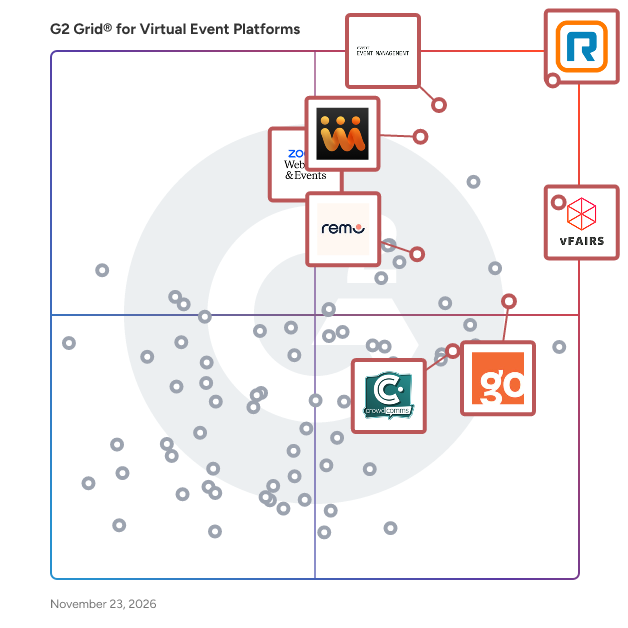
G2 Grid® for Virtual Event Platforms

G2 Grid® for Virtual Event Platforms plotting products by satisfaction and market presence

Highlighted products: RingCentral Events, vFairs, Webex Events & Webinars, Cvent Event Marketing & Management, Remo Conference, Zoom Events and Webinars, Swoogo, and CrowdComms.

Underlying data: [Grid® JSON](https://www.g2.com/categories/virtual-event-platforms/grids.json?focus%5B%5D=ringcentral-events&focus%5B%5D=vfairs&focus%5B%5D=webex-events-webinars&focus%5B%5D=cvent-event-marketing-management&focus%5B%5D=remo-conference&focus%5B%5D=zoom-events-and-webinars&focus%5B%5D=swoogo&focus%5B%5D=crowdcomms&segment=small-business)

Eventee

Eventee is an intuitive self-service event platform designed to bring every aspect of the event to life while taking the stress off your shoulders. No coding skills or tech support are required – with Eventee, you can have your event up and running in under an hour! As an end-to-end solution, Eventee was created for event managers who want to build a feature-rich yet practical event app, without endlessly haggling with customer support. Collect registrations, scan tickets with the check-in app, and share interactive programs. During the event, rely on engagement features that have powered Eventee since 2019, like push notifications, live Q&As, networking, and Live polls. The platform helps build a lasting community beyond the event via three attendee channels — mobile app, web app, and event website — all customizable with your branding or even as a full White Label app. Once the event is over, powerful Analytics provide you with valuable insights into attendee behavior and satisfaction. With so many event solutions out there, Eventee stands out as the easiest choice by bringing the perfect balance of a great range of features without overcomplicating things. On top of that, Eventee’s professional and minimal design triumphs every outdated and clunky event app on the market. For enterprises seeking top-level engagement across any event format, whether in-person or hybrid, Eventee leads the way. It's an ideal solution for universities, enterprise events, conferences, expos, governments, nonprofits, or event agencies. Trusted by industry-leading brands such as SAP, Colgate-Palmolive, Siemens, Atlas Copco, Kiwi, United Nations, Stanford University, Cambridge University, and the Czech Army. Industry experts rated Eventee as the easiest event app and the highest performer in the field. Join over 10,372 event managers who chose Eventee over other platforms and see attendee engagement grow by up to 300% compared to standard channels like social media or email.

Average Rating: 4.8/5.0

Total Reviews: 238

How Do G2 Users Rate Eventee?

  • Ease of Use: 9.6/10 (Category avg: 9.1/10)
  • Event Configuration: 9.3/10 (Category avg: 9.2/10)
  • Speaker Access and Control: 8.6/10 (Category avg: 8.9/10)
  • Interactive Content: 8.9/10 (Category avg: 8.7/10)

Who Is the Company Behind Eventee?

  • Seller: Eventee s.r.o.
  • Company Website:
  • Year Founded: 2019
  • HQ Location: Czech Republic, EU
  • LinkedIn® Page: www.linkedin.com
    11 employees on LinkedIn®

Who Uses This Product?

  • Who Uses This: CEO, Founder
  • Top Industries: Events Services, Education Management
  • Company Size: 74% Small, 19% Medium

What Do G2 Reviewers Say About Eventee?

AI-generated summary from verified user reviews

Pros
  • Users highlight the ease of use of Eventee, praising its intuitive setup and smooth navigation for events.
  • Users appreciate the seamless event management experience with Eventee, praising its intuitive design and powerful features.
  • Users commend the easy setup of Eventee, making event management a seamless and enjoyable experience.
  • Users praise Eventee for its intuitive design and seamless navigation, enhancing the overall event experience immensely.
  • Users love the intuitive design of Eventee, making event management effortless and enjoyable for everyone involved.
Cons
  • Users note the limited features of Eventee, expressing a need for more customization and flexibility in layouts.
  • Users desire more missing features like customization options and enhanced networking capabilities within Eventee.
  • Users note the lack of customization, wishing for more design flexibility and tailored features for specific events.
  • Users find the limited customization options of Eventee restrictive, impacting design flexibility and feature arrangement.
  • Users face integration issues with Eventee, making attendee management and branding more cumbersome than necessary.

What Are Recent G2 Reviews of Eventee?

What Are G2 Users Discussing About Eventee?

ON24

ON24 is on a mission to help businesses bring their go-to-market strategy into the AI era and drive the next generation of event marketing. Through its leading webinar and digital event platform, ON24 enables customers to combine its leading first-party experiences with personalization and content as well as capture and act on engagement insights, accelerating the buyer journey and propelling pipeline forward. ON24 provides industry-leading companies with a valuable source of first-party data to drive sales and marketing innovation, improve efficiency and increase business results.

Average Rating: 4.3/5.0

Total Reviews: 1,191

How Do G2 Users Rate ON24?

  • Ease of Use: 8.3/10 (Category avg: 9.1/10)
  • Event Configuration: 8.8/10 (Category avg: 9.2/10)
  • Speaker Access and Control: 8.8/10 (Category avg: 8.9/10)
  • Interactive Content: 8.4/10 (Category avg: 8.7/10)

Who Is the Company Behind ON24?

  • Seller: Cvent
  • Company Website:
  • Year Founded: 1999
  • HQ Location: Tysons Corner, VA
  • LinkedIn® Page: www.linkedin.com
    6,821 employees on LinkedIn®
  • Ownership: NASDAQ: CVT

Who Uses This Product?

  • Who Uses This: Marketing Manager, Marketing Coordinator
  • Top Industries: Computer Software, Information Technology and Services
  • Company Size: 42% Medium, 41% Large

What Do G2 Reviewers Say About ON24?

AI-generated summary from verified user reviews

Pros
  • Users appreciate the ease of use of ON24, enjoying its intuitive interface and straightforward video conferencing setup.
  • Users value the seamless integration of ON24 with Salesforce, enhancing engagement and streamlining lead management.
  • Users value the interactive tools of ON24, enhancing engagement and providing a stellar user experience during meetings.
  • Users commend ON24 for its excellent customer support, enhancing the overall experience for both presenters and audiences.
  • Users highly value the customization options of ON24, allowing for personalized and straightforward video conferencing experiences.
Cons
  • Users find the learning curve steep for ON24, as the complex interface requires significant initial training.
  • Users find ON24's limited customization options restrictive, making it challenging to tailor events effectively.
  • Users find that improvements are needed in user limits, video customization, and library content for a better experience.
  • Users report integration issues with ON24, experiencing connectivity problems and a steep learning curve for new users.
  • Users find ON24's pricing to be highly expensive, limiting accessibility for broader user onboarding and features trial.

What Are Recent G2 Reviews of ON24?

What Are G2 Users Discussing About ON24?

Riverside

Riverside (formerly Riverside.fm) is the all-in-one platform for recording, live streaming, editing, repurposing, and publishing studio-quality videos and podcasts. Creators and businesses use it to produce broadcast-quality content without the production maze of multiple tools, expensive studios, or technical expertise. Record up to 4K video and uncompressed audio locally on every participant’s device, so quality holds up even on bad internet. Edit by editing the transcript. Turn long recordings into clips, captions, show notes, and translations with AI. Webinars scale to 10,000 attendees. Trusted by independent podcasters like Tim Ferriss, Mel Robbins, and Guy Raz, and by brands including Spotify, Marvel, HubSpot, Microsoft, and Intuit. What are Riverside's core benefits? - All-in-one: Record, live stream, edit, repurpose, host, and publish from one platform. Studio-quality results, no studio needed: Up to 4K video and uncompressed audio, recorded locally so quality doesn’t depend on the internet connection. - AI that does the heavy lifting: Edit by chatting or by editing text, clip automatically, enhance audio, translate, and generate show notes in seconds. - Speed without compromising quality: Cut hours of post-production into minutes. - Maximum reach from every recording: Built-in repurposing into clips, captions, transcripts, translations, and social formats. - No learning curve: Easy enough for first-timers, deep enough for pros. Guests join from a browser link. What are Riverside's main features? - Record crystal-clear audio and video regardless of internet connection - Edit content with intuitive, time-saving tools leveraging AI - Repurpose content automatically for multiple channels - Live stream to any social platforms (YouTube, Facebook, Instagram, Twitch, and more) - Transcribe audio and video files in 100+ languages with 99% accuracy - Host and distribute your podcast to major directories like Spotify, Apple, and YouTube. What is Riverside best used for? For creators: - Podcast recording, editing, hosting, and publishing - Remote video interviews with guests anywhere in the world - YouTube videos and long-form content - Live shows and live podcasts - Solo recordings, screen capture, and tutorials For businesses and teams: - Marketing video: testimonials, case studies, social content, brand podcasts - Webinars and virtual events up to 10,000 attendees - Internal communications: town halls, executive updates, all-hands - Learning and development: training, onboarding, internal knowledge - Sales: demos, prospect calls, customer stories - Product: demos, recorded user calls, walkthroughs - Producers and agencies: multi-guest remote production with full producer control What does Riverside offer for businesses? Full production control: - Producer Mode: Run the session without appearing in the recording. Control guests’ mics, cameras, layouts, and teleprompters. - Studio branding: Lock fonts, colors, logos, and overlays so content stays on-brand at scale. Team collaboration: - Workspaces, roles, and permissions: Organize teams, assign access, share files inside/outside the company. - In-editor comments: Feedback without Slack threads or screen recordings. - Riverside API Scale and speed: - Unlimited recording, storage, and exports. - Simultaneous team editing. Enterprise-grade security and support: - End-to-end encryption. SSO available. - 24/7 live support - Dedicated Customer Success Manager. - Producer on demand

Average Rating: 4.8/5.0

Total Reviews: 1,746

How Do G2 Users Rate Riverside?

  • Ease of Use: 9.4/10 (Category avg: 9.1/10)

Who Is the Company Behind Riverside?

  • Seller: Riverside
  • Company Website:
  • Year Founded: 2020
  • HQ Location: Palo Alto, California
  • LinkedIn® Page: www.linkedin.com
    474 employees on LinkedIn®

Who Uses This Product?

  • Who Uses This: Founder, Owner
  • Top Industries: Entertainment, Media Production
  • Company Size: 90% Small, 10% Medium

What Do G2 Reviewers Say About Riverside?

AI-generated summary from verified user reviews

Pros
  • Users find Riverside's ease of use exceptional, streamlining remote recording with guests and enhancing podcast efficiency.
  • Users value the exceptional quality of Riverside's recordings, greatly enhancing their podcasting experience and efficiency.
  • Users love the high-quality content and ease of use Riverside offers for their recording needs.
  • Users appreciate the flexibility and quality of Riverside for podcast recording, enhancing their efficiency and experience.
  • Users praise Riverside for its exceptional video quality, enabling clearer and more professional recordings for their podcasts.
Cons
  • Users face recording issues such as complicated sharing and inconsistent audio quality, detracting from the overall experience.
  • Users desire missing features like multiple studio setups, advanced editing options, and facial filters for enhanced video quality.
  • Users are frustrated by Riverside's feature deficiencies, citing unreliability, poor organization, and inadequate customer support.
  • Users often face audio issues, experiencing syncing problems and inconsistent volume levels during recordings.
  • Users experience editing issues like syncing problems and occasional lag, which can be frustrating during production.

What Are Recent G2 Reviews of Riverside?

What Are G2 Users Discussing About Riverside?

AI can help you find the answers. G2 helps you trust them.

Connect G2 to Claude or ChatGPT for answers grounded in G2's trusted reviews, comparisons, and pricing from real user insights.

How it works

Gatherly

Gatherly.io is an immersive virtual events, coworking, and office platform that brings the energy of in-person connection online. Host an engaging event, create a shared workspace, or give your community a digital home, all in one place. Most platforms focus on either events or everyday collaboration. Gatherly brings both together, helping people connect during scheduled gatherings and stay connected between them. Use Gatherly for: - Virtual networking events and conferences - Career fairs and hiring events - Trade shows and exhibitor showcases - Workshops, community meetups, and team socials - Virtual coworking and office space From one-time events to everyday community, Gatherly gives people a place to belong.

Average Rating: 5.0/5.0

Total Reviews: 12

How Do G2 Users Rate Gatherly?

  • Ease of Use: 9.7/10 (Category avg: 9.1/10)
  • Event Configuration: 10.0/10 (Category avg: 9.2/10)
  • Speaker Access and Control: 10.0/10 (Category avg: 8.9/10)

Who Is the Company Behind Gatherly?

  • Seller: Gatherly
  • Year Founded: 2024
  • HQ Location: Toronto, CA
  • LinkedIn® Page: ca.linkedin.com
    16 employees on LinkedIn®

Who Uses This Product?

  • Company Size: 90% Small, 10% Medium

What Are Recent G2 Reviews of Gatherly?

EventMobi

From first invite to final report, EventMobi gives you the tools to plan, promote, and run your events with ease. Plan and manage your events from a single platform with The Experience Manager. Build a custom event website with RSVP or ticketed registration, and promote your event with personalized email campaigns through the Communications Hub. Onsite, speed up check-in with the Onsite App, design and print badges with the Badge Designer, and help sponsors capture and manage leads using the Lead Capture App and Company Portal. The fully branded Event App keeps attendees engaged with live polls, surveys, networking tools, and on-demand resources. Trusted by over 30,000 planners in 70+ countries since 2009, EventMobi is a top choice for conferences, trade shows, corporate meetings, and association events. It’s a go-to solution for associations and lean teams that need customizable tools and reliable support. With flexible packaging and award-winning service, it’s easy to create a solution that fits your event goals and budget, whether you're hosting one event or managing a full calendar.

Average Rating: 4.6/5.0

Total Reviews: 246

How Do G2 Users Rate EventMobi?

  • Ease of Use: 9.2/10 (Category avg: 9.1/10)
  • Event Configuration: 9.2/10 (Category avg: 9.2/10)
  • Speaker Access and Control: 9.4/10 (Category avg: 8.9/10)
  • Interactive Content: 9.3/10 (Category avg: 8.7/10)

Who Is the Company Behind EventMobi?

  • Seller: 5Touch Solutions
  • Company Website:
  • Year Founded: 2010
  • HQ Location: Toronto, Ontario
  • LinkedIn® Page: www.linkedin.com
    91 employees on LinkedIn®

Who Uses This Product?

  • Top Industries: Non-Profit Organization Management, Events Services
  • Company Size: 58% Small, 23% Medium

What Do G2 Reviewers Say About EventMobi?

AI-generated summary from verified user reviews

Pros
  • Users value the ease of use of EventMobi for effortlessly managing event details and communications.
  • Users value the centralized event management of EventMobi, simplifying setup and enhancing communication for seamless experiences.
  • Users value attendee management in EventMobi for its efficiency, real-time updates, and centralized information access.
  • Users find the easy setup of EventMobi highly beneficial for organizing and managing event details seamlessly.
  • Users commend the excellent customer support of EventMobi, appreciating their responsiveness and assistance during setup.
Cons
  • Users find the session management tedious, leading to reliance on third-party tools for better organization.
  • Users find limited customization options in EventMobi, hindering their ability to personalize the app effectively.
  • Users desire editing limitations addressed, particularly for announcements post-setup, to enhance event management flexibility.
  • Users find the inefficient processes in document management cumbersome, preferring better organization and separation for improved experience.
  • Users find integration issues with EventMobi challenging, especially for managing sessions and bilingual app support.

What Are Recent G2 Reviews of EventMobi?

What Are G2 Users Discussing About EventMobi?

Bevy

Bevy.com is a complete AI-driven community platform unifying events, discussions and data. Bevy incorporates a variety of tools to plan, promote, and execute virtual and in-person events and is a flexible software solution that can be used to manage and host thousands of different types of community events. Built with enterprise level analytics, integrations and data security, the Bevy platform is used by a range of enterprise, consumer and eduction teams who want to build, grow and scale a global Online Community and Customer-to-Customer (C2C) community. Featuring a deep permissions system and webcasting capabilities, community and field marketing teams can empower local brand advocates to build, grow and scale local communities all over the world.

Average Rating: 4.8/5.0

Total Reviews: 108

How Do G2 Users Rate Bevy?

  • Ease of Use: 9.5/10 (Category avg: 9.1/10)
  • Event Configuration: 9.8/10 (Category avg: 9.2/10)
  • Speaker Access and Control: 9.3/10 (Category avg: 8.9/10)
  • Interactive Content: 9.6/10 (Category avg: 8.7/10)

Who Is the Company Behind Bevy?

Who Uses This Product?

  • Who Uses This: Founder, Chapter Director
  • Top Industries: Events Services, Computer Software
  • Company Size: 66% Small, 21% Medium

What Do G2 Reviewers Say About Bevy?

AI-generated summary from verified user reviews

Pros
  • Users appreciate the ease of use of Bevy, finding it straightforward to launch and manage community events efficiently.
  • Users commend Bevy for its ease of event creation and management, enabling smooth launches and community building.
  • Users love Bevy for its seamless community engagement features, making managing and building communities effortless and intuitive.
  • Users appreciate the easy setup of Bevy, making community management and event launching a breeze.
  • Users praise Bevy for its ease of use and seamless community management features, enhancing member onboarding and event creation.
Cons
  • Users find the pricing barrier of Bevy challenging for smaller organizations or early-stage communities.
  • Users find Bevy's limited customization frustrating, particularly for event pages and complex workflows.
  • Users find complexity in customization frustrating, especially when managing event pages and analytics dashboards.
  • Users are frustrated by export limitations on email lists, hindering their ability to manage contacts effectively.
  • Users find Bevy's limited customization options and complex analytics configuration challenging for event management.

What Are Recent G2 Reviews of Bevy?

What Are G2 Users Discussing About Bevy?

Aonmeetings

AONMeetings is a comprehensive browser-based video conferencing solution that helps businesses conduct HD video meetings, webinars, and live streams without requiring software installations. The platform operates entirely through web browsers, primarily Google Chrome and MS Edge, enabling users to connect instantly for professional communications. Here's the revised second paragraph: Designed to serve healthcare, education, legal, and corporate environments, AONMeetings also fits small to medium-sized businesses across various industries, prioritizing security with HIPAA compliance, end-to-end encryption, and granular access controls. The platform addresses the communication needs of organizations ranging from small businesses to large enterprises through its scalable participant limits and feature sets. Core Features and Capabilities: Unlimited HD video meetings and webinars with registration capabilities AI-powered meeting summaries and smart search functionality Screen sharing with annotations, whiteboard collaboration, and live polling Audio and video recording with closed captioning and virtual backgrounds Custom branding, multi-camera broadcasts, and RTMP streaming for advanced users AONMeetings operates on a tiered pricing model starting at $3.99 per month for up to 25 participants in the Standard plan, progressing through Pro (100 participants) and Business Pro (250 participants) tiers. The platform includes enterprise add-ons for large-scale webinars supporting 500 to 5,000 participants with both monthly subscription and one-time event pricing options. The solution distinguishes itself through its browser-based accessibility, eliminating the need for downloads or installations while maintaining professional-grade security standards. Integration capabilities include calendar systems like Calendly, MS Outlook, Google Calendar and Slack, while advanced analytics and insights help organizations optimize their communication strategies . This positions AONMeetings as a cost-effective alternative to traditional video conferencing platforms, particularly suited for organizations requiring reliable, secure, and feature-rich communication tools without the complexity of software management.

Average Rating: 4.9/5.0

Total Reviews: 40

How Do G2 Users Rate Aonmeetings?

  • Ease of Use: 9.7/10 (Category avg: 9.1/10)
  • Event Configuration: 9.2/10 (Category avg: 9.2/10)
  • Speaker Access and Control: 10.0/10 (Category avg: 8.9/10)
  • Interactive Content: 8.3/10 (Category avg: 8.7/10)

Who Is the Company Behind Aonmeetings?

  • Seller: Aonmeetings
  • Company Website:
  • Year Founded: 2020
  • HQ Location: Des Moines, US
  • LinkedIn® Page: www.linkedin.com
    4 employees on LinkedIn®

Who Uses This Product?

  • Top Industries: Information Technology and Services, Marketing and Advertising
  • Company Size: 115% Small, 4% Large

What Do G2 Reviewers Say About Aonmeetings?

AI-generated summary from verified user reviews

Pros
  • Users value the ease of use of Aonmeetings, allowing seamless participation and effective collaboration across devices.
  • Users commend the reliability of Aonmeetings, noting consistent video and audio quality that enhances their virtual interactions.
  • Users value the strong video quality of Aonmeetings, enhancing live demos with minimal lag and clear visuals.
  • Users praise the easy setup of Aonmeetings, enabling hassle-free access across devices for seamless collaboration.
  • Users love the high video quality and smooth performance of Aonmeetings, enhancing live demos and training sessions.
Cons
  • Users note the limited features of Aonmeetings, particularly in virtual backgrounds and moderator controls.
  • Users find limited customization frustrating, wishing for more advanced options and flexibility in managing meetings and branding.
  • Users find the limited features of Aonmeetings, such as background options and moderator controls, somewhat lacking.
  • Users find the user interface outdated and challenging, especially for webinars and payment processing during peak times.
  • Users find Aonmeetings' limited options for virtual backgrounds and group management could use more variety and functionality.

What Are Recent G2 Reviews of Aonmeetings?

Virtual PRO

Virtual PRO is a premium virtual events platform designed for organizations producing large-scale, high-impact experiences where content, story, and craft matter. Built for one-time and milestone moments such as conferences, product launches, internal summits, and awards programs, Virtual PRO supports events that demand more than a simple broadcast. It enables teams to create immersive digital environments that feel intentional, designed, and professionally produced, whether audiences are fully virtual or participating in hybrid formats. Virtual PRO brings together advanced production capabilities, multi-session orchestration, and creative control in a single platform. Teams can manage complex agendas with multiple stages, speakers, and engagement rooms while maintaining a cohesive visual and narrative experience. The platform supports cinematic layouts, branded design systems, and structured programming that mirrors how audiences experience modern media. Built-in tools for presenter management, backstage communication, and content coordination make it easier to run sophisticated events without sacrificing reliability or control. At its core, Virtual PRO solves the challenge of producing ambitious events at scale without fragmentation or chaos. Event teams are often forced to juggle multiple vendors, tools, and workflows to deliver a polished experience. Virtual PRO replaces that complexity with a unified platform designed to support both creative ambition and operational discipline. From audience engagement and interactive experiences to real-time oversight and post-event insights, everything is built to support moments that matter. The result is an event experience that feels elevated and cohesive for attendees, while giving producers and stakeholders confidence that every detail has been thoughtfully considered and expertly executed.

Average Rating: 4.6/5.0

Total Reviews: 464

How Do G2 Users Rate Virtual PRO?

  • Ease of Use: 9.1/10 (Category avg: 9.1/10)
  • Event Configuration: 8.8/10 (Category avg: 9.2/10)
  • Speaker Access and Control: 8.6/10 (Category avg: 8.9/10)
  • Interactive Content: 9.0/10 (Category avg: 8.7/10)

Who Is the Company Behind Virtual PRO?

  • Seller: Brandlive
  • Year Founded: 2010
  • HQ Location: Portland, Oregon
  • LinkedIn® Page: www.linkedin.com
    127 employees on LinkedIn®

Who Uses This Product?

  • Company Size: 58% Small, 28% Medium

What Do G2 Reviewers Say About Virtual PRO?

AI-generated summary from verified user reviews

Pros
  • Users appreciate the incredible customer support of Virtual PRO, which enhances the overall event experience significantly.
  • Users appreciate the ease of use of Virtual PRO, finding it intuitive for setting up events effortlessly.
  • Users value the smooth event management capabilities of Hubilo, enhancing engagement with interactive features and reliable support.
  • Users value the exceptional experience Virtual PRO provides, enhancing events with attractive layouts and interactivity.
  • Users praise the attendee management of Virtual PRO for its user-friendly setup and impressive event features.
Cons
  • Users find the missing features in Virtual PRO hinder effective setup, customization, and overall usability.
  • Users face technical limitations with browser dependency and a confusing setup, hindering their overall experience.
  • Users find the interface and controls need improvement, with a learning curve and occasional clunkiness affecting usability.
  • Users find the limited customization options frustrating, making it difficult to create tailored landing pages effectively.
  • Users report platform limitations such as browser dependency and confusing setup, hindering effective use of Virtual PRO.

What Are Recent G2 Reviews of Virtual PRO?

What Are G2 Users Discussing About Virtual PRO?

Accelevents

Accelevents is a modern, enterprise-ready event management platform built for organizations that need flexibility, speed, and reliability across every phase of the event lifecycle. The platform supports in-person, virtual, and hybrid events, combining robust registration tools, real-time badge printing, mobile event apps, and abstract management in one, easy-to-use system. With Accelevents, organizers can: • Set up branded event registration pages in minutes • Build stunning event websites and emails • Offer on-site and self-serve event check-in with badge printing • Deploy a fully customizable mobile app for attendees • Track session attendance and issue CE credits or certificates • Equip exhibitors with built-in lead capture tools • Manage speaker content, agendas, and networking • Access live analytics, engagement data, and post-event reporting • Integrate with Salesforce, HubSpot, Marketo, and other CRM and marketing tools Accelevents is trusted by event teams at the fast-growing companies and global enterprises to run conferences, trade shows, field marketing events, employee summits, and more. From registration and access control to mobile engagemen

Average Rating: 4.7/5.0

Total Reviews: 172

How Do G2 Users Rate Accelevents?

  • Ease of Use: 9.0/10 (Category avg: 9.1/10)
  • Event Configuration: 8.9/10 (Category avg: 9.2/10)
  • Speaker Access and Control: 9.1/10 (Category avg: 8.9/10)
  • Interactive Content: 9.1/10 (Category avg: 8.7/10)

Who Is the Company Behind Accelevents?

  • Seller: Accelevents
  • Company Website:
  • Year Founded: 2015
  • HQ Location: Boston, MA
  • LinkedIn® Page: www.linkedin.com
    69 employees on LinkedIn®

Who Uses This Product?

  • Who Uses This: Executive Director
  • Top Industries: Non-Profit Organization Management, Events Services
  • Company Size: 56% Small, 35% Medium

What Do G2 Reviewers Say About Accelevents?

AI-generated summary from verified user reviews

Pros
  • Users find Accelevents to be simple and user-friendly, enhancing their event planning experience with ease.
  • Users praise the responsive customer support of Accelevents, enhancing their confidence and event management efficiency.
  • Users appreciate the ease of event preparation, streamlining email communication and offering reliable customer support.
  • Users appreciate the helpful customer service of Accelevents, ensuring smooth event management and user satisfaction.
  • Users highlight the easy setup of Accelevents, making event preparation and registration seamless and efficient.
Cons
  • Users desire increased customization options, highlighting the need for better functionality and easier event management.
  • Users find Accelevents not intuitive, as duplicating events and accessing features can be cumbersome and frustrating.
  • Users express concerns over missing features in Accelevents, particularly in survey functionalities and dashboard accuracy.
  • Users report encountering software bugs with Accelevents, including issues with badge printing and dashboard accuracy.
  • Users find the confusing processes of Accelevents to be a challenge, especially with event hub navigation and feature labels.

What Are Recent G2 Reviews of Accelevents?

What Are G2 Users Discussing About Accelevents?

Chati

Chati is a flexible, highly scalable virtual event platform designed to help users create immersive and engaging online experiences. This software solution caters to a diverse array of event organizers, including corporate professionals, educators, and anyone looking to host impactful virtual gatherings. With decades of experience in producing virtual events, Chati equips users with the necessary tools to ensure their events are both successful and memorable. The platform's target audience encompasses businesses hosting conferences, trade shows, webinars, and workshops, as well as educational institutions conducting online classes and seminars. Chati is particularly beneficial for organizations seeking a customizable solution to meet specific event objectives. With a variety of templates available, users can also create their own unique experiences, allowing for tailored events that resonate with their intended audience and purpose. Chati distinguishes itself in the virtual event software landscape through its user-friendly interface and extensive customization options. Users can easily navigate the platform to design events that align with their brand identity. The platform also features interactive tools that enhance attendee engagement, such as customizable event layouts, real-time analytics, and integrated communication features. These functionalities not only enrich the attendee experience but also enable organizers to monitor engagement levels and adapt their strategies to maintain participant involvement throughout the event. Accessibility is another cornerstone of Chati's design philosophy. The platform is built to ensure that attendees from various backgrounds and locations can participate without barriers. Chati's commitment to inclusivity is evident in its functionality across different devices and internet speeds, facilitating a seamless experience for all users. By prioritizing accessibility and immersion, Chati enhances the overall attendee experience and fosters a sense of community, encouraging participants to look forward to future events. Chati provides a comprehensive solution for hosting virtual events that are engaging and tailored to specific needs. Its combination of flexibility, scalability, and focus on user experience empowers event organizers to create memorable experiences that leave a lasting impression on attendees. With Chati, users can confidently navigate the complexities of virtual event planning, ensuring that every gathering is not only successful but also impactful.

Average Rating: 4.4/5.0

Total Reviews: 124

How Do G2 Users Rate Chati?

  • Ease of Use: 9.0/10 (Category avg: 9.1/10)
  • Event Configuration: 8.8/10 (Category avg: 9.2/10)
  • Speaker Access and Control: 8.8/10 (Category avg: 8.9/10)
  • Interactive Content: 8.9/10 (Category avg: 8.7/10)

Who Is the Company Behind Chati?

  • Seller: Chati
  • Year Founded: 2021
  • HQ Location: Yorba Linda, California
  • LinkedIn® Page: www.linkedin.com
    28 employees on LinkedIn®

Who Uses This Product?

  • Who Uses This: Medical Laboratory Scientist, Researcher
  • Top Industries: Hospital & Health Care, Biotechnology
  • Company Size: 48% Small, 27% Medium

What Do G2 Reviewers Say About Chati?

AI-generated summary from verified user reviews

Pros
  • Users enjoy Chati's ease of use, finding the interface intuitive and smooth for everyday tasks.
  • Users appreciate how Chati fosters real-time interactions, transforming virtual events into engaging, interactive experiences.
  • Users appreciate the navigation ease of Chati, enhancing their experience during virtual events and making participation effortless.
  • Users appreciate the intuitive interaction of Chati, enjoying its user-friendly design and seamless setup experience.
  • Users enjoy Chati's intuitive interface, facilitating easy navigation and seamless execution of tasks for virtual meetings.
Cons
  • Users experience information overload with excessively long answers that hinder quick access to essential details.
  • Users find the missing features, like enhanced transcription and closed captioning, hinder their overall experience with Chati.
  • Users face presentation problems with cramped sub-windows that complicate navigation and hinder an effective viewing experience.
  • Users find the transcription and communication quality lacking, impacting the effectiveness and usability for technical audiences.
  • Users find the chat functionality frustrating due to inconsistent responses and confusing directions from organizers.

What Are Recent G2 Reviews of Chati?

Swapcard

Swapcard is the revenue-first intelligent event management platform built for associations, trade show organizations, media companies, and conference organizers. Swapcard unifies the entire event lifecycle on a single intelligent platform, from registration to engagement and monetization, actively converting attendees into qualified exhibitor leads. With an intuitive interface, seamless integrations, and real-time analytics, Swapcard helps organizers streamline operations, prove exhibitor ROI, and unlock new revenue streams. Trusted by global leaders such as Informa, Clarion, NAVC, IAAPA, and Koelnmesse, Swapcard has powered more than 15,000 trade shows, exhibitions, and conferences worldwide, transforming event technology from a cost center into a strategic, data-driven revenue engine. For more information, visit www.swapcard.com.

Average Rating: 4.6/5.0

Total Reviews: 221

How Do G2 Users Rate Swapcard?

  • Ease of Use: 9.0/10 (Category avg: 9.1/10)
  • Event Configuration: 8.7/10 (Category avg: 9.2/10)
  • Speaker Access and Control: 8.3/10 (Category avg: 8.9/10)
  • Interactive Content: 8.2/10 (Category avg: 8.7/10)

Who Is the Company Behind Swapcard?

  • Seller: Swapcard
  • Company Website:
  • Year Founded: 2013
  • HQ Location: Paris
  • LinkedIn® Page: www.linkedin.com
    180 employees on LinkedIn®

Who Uses This Product?

  • Who Uses This: Event Manager, Director
  • Top Industries: Events Services, Non-Profit Organization Management
  • Company Size: 55% Small, 31% Medium

What Do G2 Reviewers Say About Swapcard?

AI-generated summary from verified user reviews

Pros
  • Users appreciate the ease of use of Swapcard, noting its intuitive design and straightforward setup process.
  • Users find Swapcard's intuitive design enhances user experience, allowing for easy navigation and efficient event management.
  • Users appreciate the intuitive interface of Swapcard, enhancing engagement and simplifying event networking and management.
  • Users value the responsive customer support of Swapcard, ensuring they get assistance whenever they need it.
  • Users appreciate the user-friendly interface of Swapcard, valuing its convenience and helpful networking features.
Cons
  • Users note the limited customization options in Swapcard, expressing a desire for more flexibility in features and layouts.
  • Users find Swapcard has limited features, expressing a desire for more customization and offline access options.
  • Users find missing features in Swapcard, like limited customization and outdated elements affecting usability.
  • Users find the lack of customization options in Swapcard limiting, affecting the overall user experience and functionality.
  • Users desire more customization options in Swapcard for improved networking and attendee management at events.

What Are Recent G2 Reviews of Swapcard?

What Are G2 Users Discussing About Swapcard?

PheedLoop

PheedLoop's all-in-one event management platform makes it easy for even the smallest teams to run big events. We proudly power thousands of association, corporate, academic & scientific events, tradeshows, expos and meetings around the world every year. Simplify event planning and power every stage of your event's lifecycle with one platform: From speaker, sponsor & exhibitor management, to registration, check-in & badge printing - to the industry's top rated mobile app that puts lead retrieval, session check-in and credit tracking, networking, attendee engagement, and more in the palm of your attendees' hands. Get advanced event analytics across your events' lifecycle that proves ROI to exhibitors, sponsors, and your team. Take advantage of in-house and on-site support, and integrated kiosk and printing hardware solutions that work seamlessly with your PheedLoop platform. Easily integrate with your CRMs, AMSs, and more.

Average Rating: 4.8/5.0

Total Reviews: 304

How Do G2 Users Rate PheedLoop?

  • Ease of Use: 9.2/10 (Category avg: 9.1/10)
  • Event Configuration: 9.3/10 (Category avg: 9.2/10)
  • Speaker Access and Control: 9.0/10 (Category avg: 8.9/10)
  • Interactive Content: 8.8/10 (Category avg: 8.7/10)

Who Is the Company Behind PheedLoop?

  • Seller: PheedLoop
  • Year Founded: 2015
  • HQ Location: North York, CA
  • LinkedIn® Page: www.linkedin.com
    47 employees on LinkedIn®

Who Uses This Product?

  • Who Uses This: Executive Director, Event Manager
  • Top Industries: Non-Profit Organization Management, Events Services
  • Company Size: 81% Small, 14% Medium

What Do G2 Reviewers Say About PheedLoop?

AI-generated summary from verified user reviews

Pros
  • Users enjoy the ease of use of PheedLoop, finding integration and customization straightforward and efficient.
  • Users value the easy setup of PheedLoop, allowing quick integration with Zoom and straightforward user management.
  • Users value the access ease of PheedLoop, enjoying seamless integration and hassle-free virtual participation.
  • Users value the easy access of PheedLoop, allowing seamless integration and virtual access for learners.
  • Users find PheedLoop's easy creation feature enhances webpage design with flexible sections and media placements.
Cons
  • Users find insufficient guidance challenging, as limited awareness hampers the onboarding experience with PheedLoop.
  • Users find integration with WordPress challenging, which complicates their experience with PheedLoop.
  • Users find registration issues challenging due to limited awareness of PheedLoop, complicating the onboarding process.

What Are Recent G2 Reviews of PheedLoop?

What Are G2 Users Discussing About PheedLoop?

Restream

Restream is the live video platform for professional broadcasts. Produce studio-quality live video in your browser, record in 4K, bring remote guests on screen, and stream on YouTube, LinkedIn, X, Twitch, Facebook, Instagram, TikTok, and 30+ platforms at the same time. No downloads, no extra hardware, no production crew required. Create in our web-based Studio or connect the tools you already use: OBS, Zoom, vMix, or Ecamm Live. What Restream helps you do: → Reach every audience with one stream. Multistream to 30+ social channels at once and manage live chats from a single view. More reach from the same broadcast, with no extra bandwidth. → Look professional without a production team. Custom layouts, branded overlays, high-resolution screen sharing, and calls to action turn a single virtual event into a polished live show. → Turn one broadcast into weeks of content. Restream Clips converts long videos into short, captioned vertical highlights and posts them automatically, including live clips that publish while you're still on air. → Guests bring their audience. Invite up to 10 remote guests on screen for interviews, panels, and co-hosted shows. Let them add their social channels or company profiles to 3X your reach. → Record TV-quality video. Capture 4K video with 48kHz audio for podcasts and interviews, solo or with guests, while you stream or on its own. → Fit every feed. Stream portrait and landscape at the same time, so your video looks right on YouTube and TikTok alike. → Stay live even when you're offline. Schedule pre-recorded videos to play as live and keep your channels active around the clock. → Know exactly what worked. Track views, engagement, and growth across every platform in one place. Ask AI to surface missed questions, chat sentiment, or peak viewer moments. → Run it as a team. Shared workspaces and assigned seats let hosts, producers, and marketers plan, run, and repurpose broadcasts together. What teams use Restream for: ✔︎ Launch and announce. Product launches, demos, press conferences, music releases, and company announcements that reach every channel at once, while attention is at its peak. ✔︎ Engage your audience. Webinars, Q&As, AMAs, interviews, podcasts, and executive fireside chats with remote guests and live audience interaction built in. ✔︎ Broadcast live moments. Sports, news, industry conferences, hackathons, meetups, and live coding and build-in-public sessions, produced professionally and streamed everywhere. ✔︎ Communicate at scale. Town halls, internal comms, earnings calls, and public briefings delivered live to employees, investors, and communities wherever they watch.

Average Rating: 4.5/5.0

Total Reviews: 83

How Do G2 Users Rate Restream?

  • Ease of Use: 9.0/10 (Category avg: 9.1/10)

Who Is the Company Behind Restream?

  • Seller: Restream
  • Company Website:
  • Year Founded: 2015
  • HQ Location: Austin, TX
  • LinkedIn® Page: www.linkedin.com
    116 employees on LinkedIn®

Who Uses This Product?

  • Top Industries: Religious Institutions, Marketing and Advertising
  • Company Size: 85% Small, 12% Medium

What Do G2 Reviewers Say About Restream?

AI-generated summary from verified user reviews

Pros
  • Users love the setup ease of Restream, enabling quick connections to social channels within seconds.
  • Users appreciate the user-friendly content management of Restream, enhancing their podcast and video production efficiency.
  • Users highly value the user-friendly interface of Restream, making content management and livestreaming effortless.
  • Users love the easy integrations of Restream, allowing seamless connection to platforms for efficient livestreaming and content management.
  • Users enjoy the easy management of Restream, appreciating its user-friendly interface and hassle-free integration with social platforms.
Cons
  • Users express frustration over access limitations with Restream, particularly the short video storage duration of 15 days.
  • Users find Restream expensive and frustrating due to costly upgrades for extended video storage beyond 15 days.
  • Users are frustrated by limited recording storage on Restream, making event planning overly time-consuming and complicated.
  • Users face streaming issues with Restream, including timezone problems and limitations on event scheduling.

What Are Recent G2 Reviews of Restream?

What Are G2 Users Discussing About Restream?

Glue Up

Glue Up is an all-in-one CRM platform designed to help associations, Chambers of Commerce and other member-based organizations build and grow their communities through events, memberships, and various digital tools, all from a single interface. This comprehensive solution integrates essential functionalities such as CRM, event management, membership management, email marketing, project management, training management, surveys, and financial tools, providing users with a cohesive experience that simplifies their operations. Targeted primarily at associations, Chambers of Commerce, event organizers, and other member-based organizations, Glue Up is perfect choice for those seeking to enhance their community engagement and operational efficiency. The platform is particularly beneficial for organizations that require robust tools to manage memberships, organize events, and communicate effectively with their members. By consolidating multiple functionalities into one platform, Glue Up allows organizations to focus on their core mission of serving their communities while reducing the complexity of managing disparate systems. Key features of Glue Up include its two mobile applications—one designed for organizations and the other for their communities—both available at no additional cost. These mobile apps enable users to manage their activities on the go, ensuring that they can stay connected and engaged with their members anytime, anywhere. Additionally, Glue Up's advanced engagement features, such as Speed Networking, Community Engagement Solutions, and Chapter Management, provide organizations with innovative ways to foster interaction and collaboration among their members. Since its introduction of AI capabilities in 2023, Glue Up has positioned itself as the first AI-powered association management software. This advancement allows organizations to leverage artificial intelligence to enhance member engagement and streamline operations further. The platform's unique offerings, including White Label and Webinar Engagement Solutions, cater to the specific needs of demanding member organizations, making it a versatile choice for those looking to elevate their community-building efforts. With over 3,000 organizations utilizing Glue Up across more than 70 countries, the platform has proven its effectiveness in helping member communities thrive. By integrating a wide array of tools and features into a single platform, Glue Up stands out as a comprehensive solution that addresses the diverse needs of organizations aiming to enhance their community engagement and operational success. #ams #communityfirst

Average Rating: 4.5/5.0

Total Reviews: 137

How Do G2 Users Rate Glue Up?

  • Ease of Use: 8.9/10 (Category avg: 9.1/10)
  • Event Configuration: 9.3/10 (Category avg: 9.2/10)
  • Speaker Access and Control: 9.3/10 (Category avg: 8.9/10)
  • Interactive Content: 8.7/10 (Category avg: 8.7/10)

Who Is the Company Behind Glue Up?

  • Seller: Glue Up
  • Year Founded: 2013
  • HQ Location: Tysons, VA
  • LinkedIn® Page: www.linkedin.com
    48 employees on LinkedIn®

Who Uses This Product?

  • Who Uses This: Executive Director
  • Top Industries: Non-Profit Organization Management, Events Services
  • Company Size: 86% Small, 11% Medium

What Do G2 Reviewers Say About Glue Up?

AI-generated summary from verified user reviews

Pros
  • Users value the ease of use of Glue Up, appreciating its intuitive interface and supportive customer service.
  • Users find Glue Up's event management capabilities invaluable, enhancing efficiency and centralizing data effectively.
  • Users commend the excellent customer support of Glue Up, highlighting friendly, quick responses and comprehensive guidance.
  • Users appreciate the user-friendly interface of Glue Up that streamlines operations and enhances community engagement.
  • Users appreciate the helpful support provided by Glue Up, highlighting quick responses and informative guidance throughout their experience.
Cons
  • Users note the missing features in Glue Up, wishing for basic event management functions and fewer format limitations.
  • Users face significant setup difficulties with Glue Up, requiring extended time for account configuration and issue resolution.
  • Users find the learning curve steep, requiring significant time for setup and proper training to avoid overwhelm.
  • Users note a significant learning difficulty, recommending proper onboarding to avoid feeling overwhelmed with the system.
  • Users find the interface confusing, causing frustration in navigating the platform and accessing contact information easily.

What Are Recent G2 Reviews of Glue Up?

What Are G2 Users Discussing About Glue Up?

Bizzabo

Plan, deliver, and measure impactful events with Bizzabo's Event Experience OS. From intimate summits to 10,000+ attendee conferences, event organizers can streamline workflows, elevate attendee experiences, and capture the insights that matter. Recognized as a Leader in the 2025 GartnerⓇ Magic Quadrant™ and the only Customer Favorite in the 2024 Forrester Wave™, Bizzabo is trusted by the world’s top brands to deliver immersive experiences that connect and convert. With advanced customization, innovative smart wearables, and powerful event intelligence, organizers can scale their entire event portfolio with ease. And with enterprise-grade infrastructure and 99.99% uptime, event professionals can focus on creating memorable events, while Bizzabo handles the complexity behind the scenes.

Average Rating: 4.3/5.0

Total Reviews: 441

How Do G2 Users Rate Bizzabo?

  • Ease of Use: 8.6/10 (Category avg: 9.1/10)
  • Event Configuration: 8.6/10 (Category avg: 9.2/10)
  • Speaker Access and Control: 8.1/10 (Category avg: 8.9/10)
  • Interactive Content: 7.8/10 (Category avg: 8.7/10)

Who Is the Company Behind Bizzabo?

  • Seller: Bizzabo
  • Company Website:
  • Year Founded: 2011
  • HQ Location: New York
  • LinkedIn® Page: www.linkedin.com
    192 employees on LinkedIn®

Who Uses This Product?

  • Who Uses This: Marketing Manager, Marketing Director
  • Top Industries: Events Services, Computer Software
  • Company Size: 37% Small, 37% Medium

What Do G2 Reviewers Say About Bizzabo?

AI-generated summary from verified user reviews

Pros
  • Users love the ease of use of Bizzabo, appreciating its intuitive design and seamless event setup.
  • Users appreciate the ease of use and intuitive design of Bizzabo, simplifying event management for smaller teams.
  • Users appreciate Bizzabo's intuitive design and ease of use, making event management efficient and straightforward.
  • Users praise Bizzabo for its excellent customer support, highlighting quick responses and effective issue resolution.
  • Users value the flexible event hosting and excellent support from Bizzabo, enhancing their overall experience and engagement.
Cons
  • Users feel the limited customization options in Bizzabo hinder their ability to personalize and streamline event management.
  • Users express a need for greater customization options in Bizzabo, citing limitations that hinder their workflow efficiency.
  • Users find the confusing processes in Bizzabo frustrating, especially with unnecessary steps for basic tasks.
  • Users are frustrated by the missing features in Bizzabo, such as limited survey options and reporting customization.
  • Users find Bizzabo's limited features frustrating, wishing for more customization and a more streamlined experience.

What Are Recent G2 Reviews of Bizzabo?

What Are G2 Users Discussing About Bizzabo?

Yukta Rustagi
YR
Researched and written by Yukta Rustagi
Updated