Introducing G2.ai, the future of software buying.Try now

Best Virtual Classroom Software with Markup Tools Capabilities

Benefits of Virtual Classroom Software with Markup Tools capabilities include: Ability to markup different media types within a session
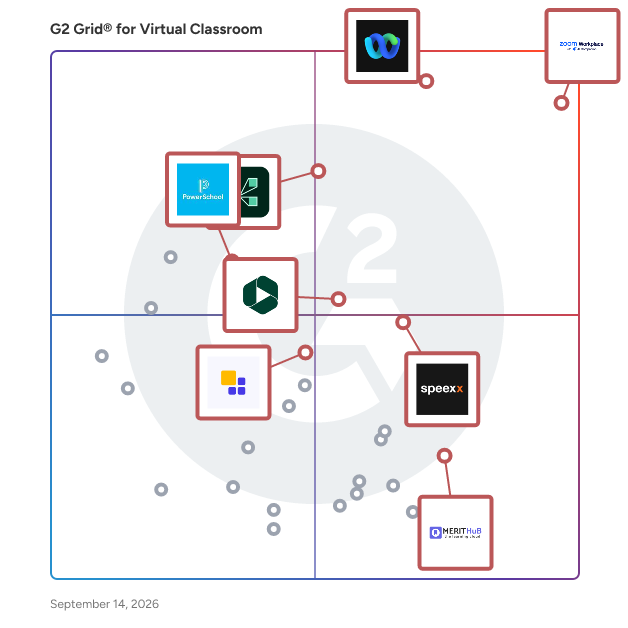
Below are the top-rated Virtual Classroom Software with Markup Tools capabilities, as verified by G2’s Research team. Real users have identified Markup Tools as an important function of Virtual Classroom Software. Compare different products that offer this feature so you can decide which is best for your business needs.
Show More
Show Less

G2 takes pride in showing unbiased reviews on user satisfaction in our ratings and reports. We do not allow paid placements in any of our ratings, rankings, or reports. Learn about our scoring methodologies.

Coming Soon
Get Trending Virtual Classroom Products in Your Inbox

A weekly snapshot of rising stars, new launches, and what everyone's buzzing about.

Sample Trending Products Newsletter
1 filter applied
Clear All
9 Listings in Virtual Classroom Available
(55,181)4.5 out of 5
Optimized for quick response
1st Easiest To Use in Virtual Classroom software
View top Consulting Services for Zoom Workplace
Save to My Lists
Entry Level Price:Free
  • Overview
    Expand/Collapse Overview
  • Product Description
    How are these determined?Information
    This description is provided by the seller.

    Goodbye app overload. Hello effortless work. Work can be complicated. Your tools shouldn't be. Zoom Workplace connects all the ways you collaborate — from meetings to docs to chat and more — with bui

    Users
    • Owner
    • Software Engineer
    Industries
    • Information Technology and Services
    • Computer Software
    Market Segment
    • 51% Small-Business
    • 31% Mid-Market
    User Sentiment
    How are these determined?Information
    These insights, currently in beta, are compiled from user reviews and grouped to display a high-level overview of the software.
    • Zoom Workplace is a platform that facilitates video meetings, online collaboration, and communication through features such as screen sharing, virtual whiteboards, and instant messaging.
    • Users frequently mention the ease of use, high-quality audio and video, and the ability to host large meetings with breakout room functionality as standout features of Zoom Workplace.
    • Users mentioned issues with occasional lag, audio quality, and the complexity of admin settings, as well as the high cost and limitations of the free version.
  • Pros and Cons
    Expand/Collapse Pros and Cons
  • Zoom Workplace Pros and Cons
    How are these determined?Information
    Pros and Cons are compiled from review feedback and grouped into themes to provide an easy-to-understand summary of user reviews.
    Pros
    Ease of Use
    4,576
    Video Conferencing
    2,710
    Video Quality
    1,993
    Reliability
    1,916
    Screen Sharing
    1,606
    Cons
    Zoom Issues
    1,214
    Limited Features
    1,198
    Meeting Issues
    1,181
    Connection Issues
    815
    Video Issues
    803
  • User Satisfaction
    Expand/Collapse User Satisfaction
  • Zoom Workplace features and usability ratings that predict user satisfaction
    9.1
    Has the product been a good partner in doing business?
    Average: 9.1
    9.0
    Video Streaming
    Average: 8.4
    9.1
    Session Recording
    Average: 8.6
    9.3
    Screen Sharing
    Average: 8.8
  • Seller Details
    Expand/Collapse Seller Details
  • Seller Details
    Seller
    Zoom
    Company Website
    Year Founded
    2011
    HQ Location
    San Jose, CA
    Twitter
    @zoom
    1,047,401 Twitter followers
    LinkedIn® Page
    www.linkedin.com
    12,432 employees on LinkedIn®
Product Description
How are these determined?Information
This description is provided by the seller.

Goodbye app overload. Hello effortless work. Work can be complicated. Your tools shouldn't be. Zoom Workplace connects all the ways you collaborate — from meetings to docs to chat and more — with bui

Users
  • Owner
  • Software Engineer
Industries
  • Information Technology and Services
  • Computer Software
Market Segment
  • 51% Small-Business
  • 31% Mid-Market
User Sentiment
How are these determined?Information
These insights, currently in beta, are compiled from user reviews and grouped to display a high-level overview of the software.
  • Zoom Workplace is a platform that facilitates video meetings, online collaboration, and communication through features such as screen sharing, virtual whiteboards, and instant messaging.
  • Users frequently mention the ease of use, high-quality audio and video, and the ability to host large meetings with breakout room functionality as standout features of Zoom Workplace.
  • Users mentioned issues with occasional lag, audio quality, and the complexity of admin settings, as well as the high cost and limitations of the free version.
Zoom Workplace Pros and Cons
How are these determined?Information
Pros and Cons are compiled from review feedback and grouped into themes to provide an easy-to-understand summary of user reviews.
Pros
Ease of Use
4,576
Video Conferencing
2,710
Video Quality
1,993
Reliability
1,916
Screen Sharing
1,606
Cons
Zoom Issues
1,214
Limited Features
1,198
Meeting Issues
1,181
Connection Issues
815
Video Issues
803
Zoom Workplace features and usability ratings that predict user satisfaction
9.1
Has the product been a good partner in doing business?
Average: 9.1
9.0
Video Streaming
Average: 8.4
9.1
Session Recording
Average: 8.6
9.3
Screen Sharing
Average: 8.8
Seller Details
Seller
Zoom
Company Website
Year Founded
2011
HQ Location
San Jose, CA
Twitter
@zoom
1,047,401 Twitter followers
LinkedIn® Page
www.linkedin.com
12,432 employees on LinkedIn®
(976)4.0 out of 5
8th Easiest To Use in Virtual Classroom software
Save to My Lists
  • Overview
    Expand/Collapse Overview
  • Product Description
    How are these determined?Information
    This description is provided by the seller.

    Adobe Connect empowers you with the true potential of virtual technology to craft unforgettable stories. Utilize its adaptable platform to create and present exceptional virtual experiences for diver

    Users
    • Teacher
    • Instructor
    Industries
    • Higher Education
    • Primary/Secondary Education
    Market Segment
    • 37% Mid-Market
    • 33% Enterprise
  • Pros and Cons
    Expand/Collapse Pros and Cons
  • Adobe Connect Pros and Cons
    How are these determined?Information
    Pros and Cons are compiled from review feedback and grouped into themes to provide an easy-to-understand summary of user reviews.
    Pros
    Ease of Use
    11
    Features
    11
    Security
    7
    Communication
    6
    Efficiency
    6
    Cons
    Mobile App Issues
    4
    Expensive
    3
    Limited Features
    2
    Admin Control
    1
    Admin Control Issues
    1
  • User Satisfaction
    Expand/Collapse User Satisfaction
  • Adobe Connect features and usability ratings that predict user satisfaction
    7.8
    Has the product been a good partner in doing business?
    Average: 9.1
    8.1
    Video Streaming
    Average: 8.4
    8.8
    Session Recording
    Average: 8.6
    8.5
    Screen Sharing
    Average: 8.8
  • Seller Details
    Expand/Collapse Seller Details
  • Seller Details
    Seller
    Adobe
    Year Founded
    1982
    HQ Location
    San Jose, CA
    Twitter
    @Adobe
    958,798 Twitter followers
    LinkedIn® Page
    www.linkedin.com
    41,406 employees on LinkedIn®
    Ownership
    NASDAQ:ADBE
Product Description
How are these determined?Information
This description is provided by the seller.

Adobe Connect empowers you with the true potential of virtual technology to craft unforgettable stories. Utilize its adaptable platform to create and present exceptional virtual experiences for diver

Users
  • Teacher
  • Instructor
Industries
  • Higher Education
  • Primary/Secondary Education
Market Segment
  • 37% Mid-Market
  • 33% Enterprise
Adobe Connect Pros and Cons
How are these determined?Information
Pros and Cons are compiled from review feedback and grouped into themes to provide an easy-to-understand summary of user reviews.
Pros
Ease of Use
11
Features
11
Security
7
Communication
6
Efficiency
6
Cons
Mobile App Issues
4
Expensive
3
Limited Features
2
Admin Control
1
Admin Control Issues
1
Adobe Connect features and usability ratings that predict user satisfaction
7.8
Has the product been a good partner in doing business?
Average: 9.1
8.1
Video Streaming
Average: 8.4
8.8
Session Recording
Average: 8.6
8.5
Screen Sharing
Average: 8.8
Seller Details
Seller
Adobe
Year Founded
1982
HQ Location
San Jose, CA
Twitter
@Adobe
958,798 Twitter followers
LinkedIn® Page
www.linkedin.com
41,406 employees on LinkedIn®
Ownership
NASDAQ:ADBE

This is how G2 Deals can help you:

  • Easily shop for curated – and trusted – software
  • Own your own software buying journey
  • Discover exclusive deals on software
(394)4.4 out of 5
12th Easiest To Use in Virtual Classroom software
Save to My Lists
  • Overview
    Expand/Collapse Overview
  • Product Description
    How are these determined?Information
    This description is provided by the seller.

    Schoology Learning, the leading K-12 learning management system (LMS), is part of the PowerSchool Unified Classroom solution. The system is designed to help schools and districts improve student perfo

    Users
    • Teacher
    • Educator
    Industries
    • Primary/Secondary Education
    • Education Management
    Market Segment
    • 48% Mid-Market
    • 34% Enterprise
  • Pros and Cons
    Expand/Collapse Pros and Cons
  • PowerSchool Schoology Learning Pros and Cons
    How are these determined?Information
    Pros and Cons are compiled from review feedback and grouped into themes to provide an easy-to-understand summary of user reviews.
    Pros
    Education Platform
    3
    Assessments
    2
    Assignment Management
    2
    Ease of Use
    2
    Features
    2
    Cons
    Lack of Intuitiveness
    2
    Not Intuitive
    2
    Not User-Friendly
    2
    Technical Glitches
    2
    Integration Issues
    1
  • User Satisfaction
    Expand/Collapse User Satisfaction
  • PowerSchool Schoology Learning features and usability ratings that predict user satisfaction
    8.9
    Has the product been a good partner in doing business?
    Average: 9.1
    7.5
    Video Streaming
    Average: 8.4
    7.0
    Session Recording
    Average: 8.6
    7.3
    Screen Sharing
    Average: 8.8
  • Seller Details
    Expand/Collapse Seller Details
  • Seller Details
    HQ Location
    Folsom, CA
    Twitter
    @MyPowerSchool
    12,268 Twitter followers
    LinkedIn® Page
    www.linkedin.com
    3,556 employees on LinkedIn®
    Ownership
    NYSE: PWSC
Product Description
How are these determined?Information
This description is provided by the seller.

Schoology Learning, the leading K-12 learning management system (LMS), is part of the PowerSchool Unified Classroom solution. The system is designed to help schools and districts improve student perfo

Users
  • Teacher
  • Educator
Industries
  • Primary/Secondary Education
  • Education Management
Market Segment
  • 48% Mid-Market
  • 34% Enterprise
PowerSchool Schoology Learning Pros and Cons
How are these determined?Information
Pros and Cons are compiled from review feedback and grouped into themes to provide an easy-to-understand summary of user reviews.
Pros
Education Platform
3
Assessments
2
Assignment Management
2
Ease of Use
2
Features
2
Cons
Lack of Intuitiveness
2
Not Intuitive
2
Not User-Friendly
2
Technical Glitches
2
Integration Issues
1
PowerSchool Schoology Learning features and usability ratings that predict user satisfaction
8.9
Has the product been a good partner in doing business?
Average: 9.1
7.5
Video Streaming
Average: 8.4
7.0
Session Recording
Average: 8.6
7.3
Screen Sharing
Average: 8.8
Seller Details
HQ Location
Folsom, CA
Twitter
@MyPowerSchool
12,268 Twitter followers
LinkedIn® Page
www.linkedin.com
3,556 employees on LinkedIn®
Ownership
NYSE: PWSC
(123)4.3 out of 5
Optimized for quick response
13th Easiest To Use in Virtual Classroom software
Save to My Lists
  • Overview
    Expand/Collapse Overview
  • Product Description
    How are these determined?Information
    This description is provided by the seller.

    Panopto is an all-in-one, AI-powered video platform designed to scale learning with seamless video creation and sharing. With Panopto, you can easily create, manage, and share accessible content acros

    Users
    No information available
    Industries
    • Higher Education
    • Education Management
    Market Segment
    • 51% Enterprise
    • 34% Mid-Market
  • Pros and Cons
    Expand/Collapse Pros and Cons
  • Panopto Pros and Cons
    How are these determined?Information
    Pros and Cons are compiled from review feedback and grouped into themes to provide an easy-to-understand summary of user reviews.
    Pros
    Ease of Use
    16
    Features
    14
    AI Integration
    8
    Helpfulness
    8
    Customer Support
    7
    Cons
    Feature Deficiency
    5
    Interface Issues
    4
    Difficulty
    3
    Navigation Difficulty
    3
    Recording Issues
    3
  • User Satisfaction
    Expand/Collapse User Satisfaction
  • Panopto features and usability ratings that predict user satisfaction
    9.0
    Has the product been a good partner in doing business?
    Average: 9.1
    9.4
    Video Streaming
    Average: 8.4
    9.9
    Session Recording
    Average: 8.6
    9.1
    Screen Sharing
    Average: 8.8
  • Seller Details
    Expand/Collapse Seller Details
  • Seller Details
    Seller
    Panopto
    Company Website
    Year Founded
    2007
    HQ Location
    600 River Avenue Suite 100 Pittsburgh, PA 15212
    Twitter
    @Panopto
    2,876 Twitter followers
    LinkedIn® Page
    www.linkedin.com
    186 employees on LinkedIn®
Product Description
How are these determined?Information
This description is provided by the seller.

Panopto is an all-in-one, AI-powered video platform designed to scale learning with seamless video creation and sharing. With Panopto, you can easily create, manage, and share accessible content acros

Users
No information available
Industries
  • Higher Education
  • Education Management
Market Segment
  • 51% Enterprise
  • 34% Mid-Market
Panopto Pros and Cons
How are these determined?Information
Pros and Cons are compiled from review feedback and grouped into themes to provide an easy-to-understand summary of user reviews.
Pros
Ease of Use
16
Features
14
AI Integration
8
Helpfulness
8
Customer Support
7
Cons
Feature Deficiency
5
Interface Issues
4
Difficulty
3
Navigation Difficulty
3
Recording Issues
3
Panopto features and usability ratings that predict user satisfaction
9.0
Has the product been a good partner in doing business?
Average: 9.1
9.4
Video Streaming
Average: 8.4
9.9
Session Recording
Average: 8.6
9.1
Screen Sharing
Average: 8.8
Seller Details
Seller
Panopto
Company Website
Year Founded
2007
HQ Location
600 River Avenue Suite 100 Pittsburgh, PA 15212
Twitter
@Panopto
2,876 Twitter followers
LinkedIn® Page
www.linkedin.com
186 employees on LinkedIn®
(26)4.2 out of 5
View top Consulting Services for BigBlueButton
Save to My Lists
  • Overview
    Expand/Collapse Overview
  • Product Description
    How are these determined?Information
    This description is provided by the seller.

    BigBlueButton is a web conferencing system, designed for online learning.

    Users
    No information available
    Industries
    • Higher Education
    Market Segment
    • 50% Mid-Market
    • 46% Small-Business
  • Pros and Cons
    Expand/Collapse Pros and Cons
  • BigBlueButton Pros and Cons
    How are these determined?Information
    Pros and Cons are compiled from review feedback and grouped into themes to provide an easy-to-understand summary of user reviews.
    Pros
    Ease of Use
    1
    Team Collaboration
    1
    User Interface
    1
    Cons
    This product has not yet received any negative sentiments.
  • User Satisfaction
    Expand/Collapse User Satisfaction
  • BigBlueButton features and usability ratings that predict user satisfaction
    9.2
    Has the product been a good partner in doing business?
    Average: 9.1
    8.6
    Video Streaming
    Average: 8.4
    8.9
    Session Recording
    Average: 8.6
    8.3
    Screen Sharing
    Average: 8.8
  • Seller Details
    Expand/Collapse Seller Details
  • Seller Details
    Year Founded
    2008
    HQ Location
    N/A
    Twitter
    @bigbluebutton
    7,113 Twitter followers
    LinkedIn® Page
    www.linkedin.com
    2 employees on LinkedIn®
Product Description
How are these determined?Information
This description is provided by the seller.

BigBlueButton is a web conferencing system, designed for online learning.

Users
No information available
Industries
  • Higher Education
Market Segment
  • 50% Mid-Market
  • 46% Small-Business
BigBlueButton Pros and Cons
How are these determined?Information
Pros and Cons are compiled from review feedback and grouped into themes to provide an easy-to-understand summary of user reviews.
Pros
Ease of Use
1
Team Collaboration
1
User Interface
1
Cons
This product has not yet received any negative sentiments.
BigBlueButton features and usability ratings that predict user satisfaction
9.2
Has the product been a good partner in doing business?
Average: 9.1
8.6
Video Streaming
Average: 8.4
8.9
Session Recording
Average: 8.6
8.3
Screen Sharing
Average: 8.8
Seller Details
Year Founded
2008
HQ Location
N/A
Twitter
@bigbluebutton
7,113 Twitter followers
LinkedIn® Page
www.linkedin.com
2 employees on LinkedIn®
  • Overview
    Expand/Collapse Overview
  • Product Description
    How are these determined?Information
    This description is provided by the seller.

    Tired of clunky systems and boring business conferencing software? LearnCube provides professional virtual classroom software made for tutoring & teaching. It's perfect for teachers and online s

    Users
    No information available
    Industries
    • Education Management
    • E-Learning
    Market Segment
    • 71% Small-Business
    • 29% Mid-Market
  • User Satisfaction
    Expand/Collapse User Satisfaction
  • LearnCube features and usability ratings that predict user satisfaction
    9.3
    Has the product been a good partner in doing business?
    Average: 9.1
    9.8
    Video Streaming
    Average: 8.4
    8.3
    Session Recording
    Average: 8.6
    9.4
    Screen Sharing
    Average: 8.8
  • Seller Details
    Expand/Collapse Seller Details
  • Seller Details
    Seller
    LearnCube
    Year Founded
    2014
    HQ Location
    London, England
    Twitter
    @LearnCubeLMS
    866 Twitter followers
    LinkedIn® Page
    www.linkedin.com
    13 employees on LinkedIn®
Product Description
How are these determined?Information
This description is provided by the seller.

Tired of clunky systems and boring business conferencing software? LearnCube provides professional virtual classroom software made for tutoring & teaching. It's perfect for teachers and online s

Users
No information available
Industries
  • Education Management
  • E-Learning
Market Segment
  • 71% Small-Business
  • 29% Mid-Market
LearnCube features and usability ratings that predict user satisfaction
9.3
Has the product been a good partner in doing business?
Average: 9.1
9.8
Video Streaming
Average: 8.4
8.3
Session Recording
Average: 8.6
9.4
Screen Sharing
Average: 8.8
Seller Details
Seller
LearnCube
Year Founded
2014
HQ Location
London, England
Twitter
@LearnCubeLMS
866 Twitter followers
LinkedIn® Page
www.linkedin.com
13 employees on LinkedIn®
Entry Level Price:$190 1
  • Overview
    Expand/Collapse Overview
  • Product Description
    How are these determined?Information
    This description is provided by the seller.

    WizIQ LMS provides a complete solution to tutors, institutes and organizations to deliver live online classes and launch self-paced courses. WizIQ is easy-to-use, affordable and gives the freedom to l

    Users
    No information available
    Industries
    • Education Management
    • E-Learning
    Market Segment
    • 50% Small-Business
    • 26% Mid-Market
  • User Satisfaction
    Expand/Collapse User Satisfaction
  • WizIQ features and usability ratings that predict user satisfaction
    6.9
    Has the product been a good partner in doing business?
    Average: 9.1
    9.0
    Video Streaming
    Average: 8.4
    8.8
    Session Recording
    Average: 8.6
    8.8
    Screen Sharing
    Average: 8.8
  • Seller Details
    Expand/Collapse Seller Details
  • Seller Details
    Seller
    WizIQ
    Year Founded
    2007
    HQ Location
    Gurugram, Haryana
    Twitter
    @WizIQ
    6,480 Twitter followers
    LinkedIn® Page
    www.linkedin.com
    150 employees on LinkedIn®
Product Description
How are these determined?Information
This description is provided by the seller.

WizIQ LMS provides a complete solution to tutors, institutes and organizations to deliver live online classes and launch self-paced courses. WizIQ is easy-to-use, affordable and gives the freedom to l

Users
No information available
Industries
  • Education Management
  • E-Learning
Market Segment
  • 50% Small-Business
  • 26% Mid-Market
WizIQ features and usability ratings that predict user satisfaction
6.9
Has the product been a good partner in doing business?
Average: 9.1
9.0
Video Streaming
Average: 8.4
8.8
Session Recording
Average: 8.6
8.8
Screen Sharing
Average: 8.8
Seller Details
Seller
WizIQ
Year Founded
2007
HQ Location
Gurugram, Haryana
Twitter
@WizIQ
6,480 Twitter followers
LinkedIn® Page
www.linkedin.com
150 employees on LinkedIn®
  • Overview
    Expand/Collapse Overview
  • Product Description
    How are these determined?Information
    This description is provided by the seller.

    Since its foundation in 2003, Digital Samba has been a trusted provider of secure video conferencing solutions in the European market. Entirely built and hosted within the European Union, it guarantee

    Users
    No information available
    Industries
    • E-Learning
    • Marketing and Advertising
    Market Segment
    • 68% Small-Business
    • 32% Mid-Market
  • Pros and Cons
    Expand/Collapse Pros and Cons
  • Digital Samba Pros and Cons
    How are these determined?Information
    Pros and Cons are compiled from review feedback and grouped into themes to provide an easy-to-understand summary of user reviews.
    Pros
    Ease of Use
    5
    Video Conferencing
    5
    Video Quality
    5
    Features
    4
    Convenience
    3
    Cons
    Audio Issues
    1
    Expensive
    1
    Lack of Customization
    1
    Limited Customization
    1
    Poor Quality
    1
  • User Satisfaction
    Expand/Collapse User Satisfaction
  • Digital Samba features and usability ratings that predict user satisfaction
    9.6
    Has the product been a good partner in doing business?
    Average: 9.1
    7.5
    Video Streaming
    Average: 8.4
    8.8
    Session Recording
    Average: 8.6
    7.7
    Screen Sharing
    Average: 8.8
  • Seller Details
    Expand/Collapse Seller Details
  • Seller Details
    Year Founded
    2003
    HQ Location
    Barcelona, ES
    LinkedIn® Page
    www.linkedin.com
    9 employees on LinkedIn®
Product Description
How are these determined?Information
This description is provided by the seller.

Since its foundation in 2003, Digital Samba has been a trusted provider of secure video conferencing solutions in the European market. Entirely built and hosted within the European Union, it guarantee

Users
No information available
Industries
  • E-Learning
  • Marketing and Advertising
Market Segment
  • 68% Small-Business
  • 32% Mid-Market
Digital Samba Pros and Cons
How are these determined?Information
Pros and Cons are compiled from review feedback and grouped into themes to provide an easy-to-understand summary of user reviews.
Pros
Ease of Use
5
Video Conferencing
5
Video Quality
5
Features
4
Convenience
3
Cons
Audio Issues
1
Expensive
1
Lack of Customization
1
Limited Customization
1
Poor Quality
1
Digital Samba features and usability ratings that predict user satisfaction
9.6
Has the product been a good partner in doing business?
Average: 9.1
7.5
Video Streaming
Average: 8.4
8.8
Session Recording
Average: 8.6
7.7
Screen Sharing
Average: 8.8
Seller Details
Year Founded
2003
HQ Location
Barcelona, ES
LinkedIn® Page
www.linkedin.com
9 employees on LinkedIn®
  • Overview
    Expand/Collapse Overview
  • Product Description
    How are these determined?Information
    This description is provided by the seller.

    The ConexED Student Services Management Platform is designed exclusively for streamlining and simplifying complex enrollment, eligibility, support, and completion processes. ConexED provides critical

    Users
    • Student
    • Instructor
    Industries
    • Higher Education
    • Education Management
    Market Segment
    • 58% Small-Business
    • 22% Mid-Market
  • Pros and Cons
    Expand/Collapse Pros and Cons
  • ConexED Pros and Cons
    How are these determined?Information
    Pros and Cons are compiled from review feedback and grouped into themes to provide an easy-to-understand summary of user reviews.
    Pros
    Scheduling Ease
    3
    Convenience
    2
    Ease of Use
    2
    Easy Access
    2
    Customer Support
    1
    Cons
    Glitches
    4
    Missing Features
    4
    Limited Features
    3
    Connectivity Issues
    2
    Limited Customization
    2
  • User Satisfaction
    Expand/Collapse User Satisfaction
  • ConexED features and usability ratings that predict user satisfaction
    8.5
    Has the product been a good partner in doing business?
    Average: 9.1
    9.0
    Video Streaming
    Average: 8.4
    9.9
    Session Recording
    Average: 8.6
    8.8
    Screen Sharing
    Average: 8.8
  • Seller Details
    Expand/Collapse Seller Details
  • Seller Details
    Seller
    ConexEd
    Year Founded
    2014
    HQ Location
    Salt Lake City, Utah
    Twitter
    @_Conexed
    1,485 Twitter followers
    LinkedIn® Page
    www.linkedin.com
    18 employees on LinkedIn®
Product Description
How are these determined?Information
This description is provided by the seller.

The ConexED Student Services Management Platform is designed exclusively for streamlining and simplifying complex enrollment, eligibility, support, and completion processes. ConexED provides critical

Users
  • Student
  • Instructor
Industries
  • Higher Education
  • Education Management
Market Segment
  • 58% Small-Business
  • 22% Mid-Market
ConexED Pros and Cons
How are these determined?Information
Pros and Cons are compiled from review feedback and grouped into themes to provide an easy-to-understand summary of user reviews.
Pros
Scheduling Ease
3
Convenience
2
Ease of Use
2
Easy Access
2
Customer Support
1
Cons
Glitches
4
Missing Features
4
Limited Features
3
Connectivity Issues
2
Limited Customization
2
ConexED features and usability ratings that predict user satisfaction
8.5
Has the product been a good partner in doing business?
Average: 9.1
9.0
Video Streaming
Average: 8.4
9.9
Session Recording
Average: 8.6
8.8
Screen Sharing
Average: 8.8
Seller Details
Seller
ConexEd
Year Founded
2014
HQ Location
Salt Lake City, Utah
Twitter
@_Conexed
1,485 Twitter followers
LinkedIn® Page
www.linkedin.com
18 employees on LinkedIn®